#HDMI no signal
13 messages · Page 1 of 1 (latest)
 hexed mesa
 twin roseBOT
Thread Created!
To provide the best level of support possible, please make sure you have provided as much information as possible.
This could include:
🔸 The problem you're facing
🔸 How frequently the issue occurs
🔸 Any pictures or videos of the issue
🔸 Related error codes or log files
🔸 Any further comments which to help us resolve your problem
Please bear in mind that this forum is for support from the community; the official customer support team can be contacted via phone and email.
☎️ 0333 323 7776
📧 [email protected]
 compact bluff
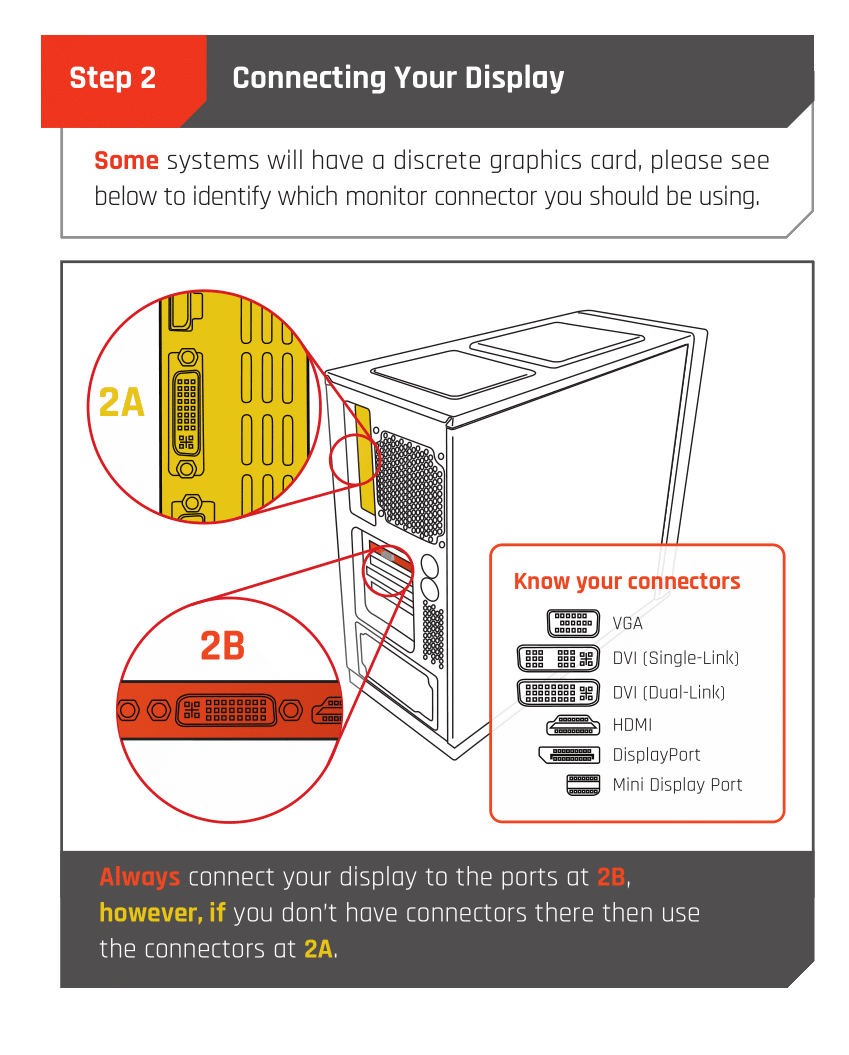
Are you plugging them into the graphics card or the motherboard?
twin roseBOT
 Monitor Cables
If you have a discrete GPU then you need to plug your monitor cable into the graphics card, not the motherboard. This can be found on the Quick Start Guide which was emailed to you, or you can download it with the /tag guide command.
 CyberPowerPC UK 🔸 0333 323 7776 🔸 https://www.cyberpowersystem.co.uk
 slender whale
Plug in to the orange part ^
twin roseBOT
@hexed mesa
This thread has been inactive for 72 hours
:green_square: If your query has been resolved, click the 'Close' button. Don't forget to thank the members that have helped you with the /thanks command!
:red_square: If you still need support, click the 'Keep Open' button in the next 24 hours to keep this thread active.
:question: Need more support on this issue later? Simply reply to this thread to re-open it.
hexed mesa
compact bluff
Are you plugging them into the graphics card or the motherboard?
Graphics
twin roseBOT
Reseating RAM
CyberPowerPC UK 🔸 0333 323 7776 🔸 https://www.cyberpowersystem.co.uk
Reseating GPU
CyberPowerPC UK 🔸 0333 323 7776 🔸 https://www.cyberpowersystem.co.uk
 half leaf
Try both of the above
half leaf
No problem!