#brand new pc won’t work?
32 messages · Page 1 of 1 (latest)
 lofty rivet
 golden widgetBOT
Thread Created!
To provide the best level of support possible, please make sure you have provided as much information as possible.
This could include:
🔸 The problem you're facing
🔸 How frequently the issue occurs
🔸 Any pictures or videos of the issue
🔸 Related error codes or log files
🔸 Any further comments which to help us resolve your problem
Please bear in mind that this forum is for support from the community; the official customer support team can be contacted via phone and email.
☎️ 0333 323 7776
📧 [email protected]
golden widgetBOT
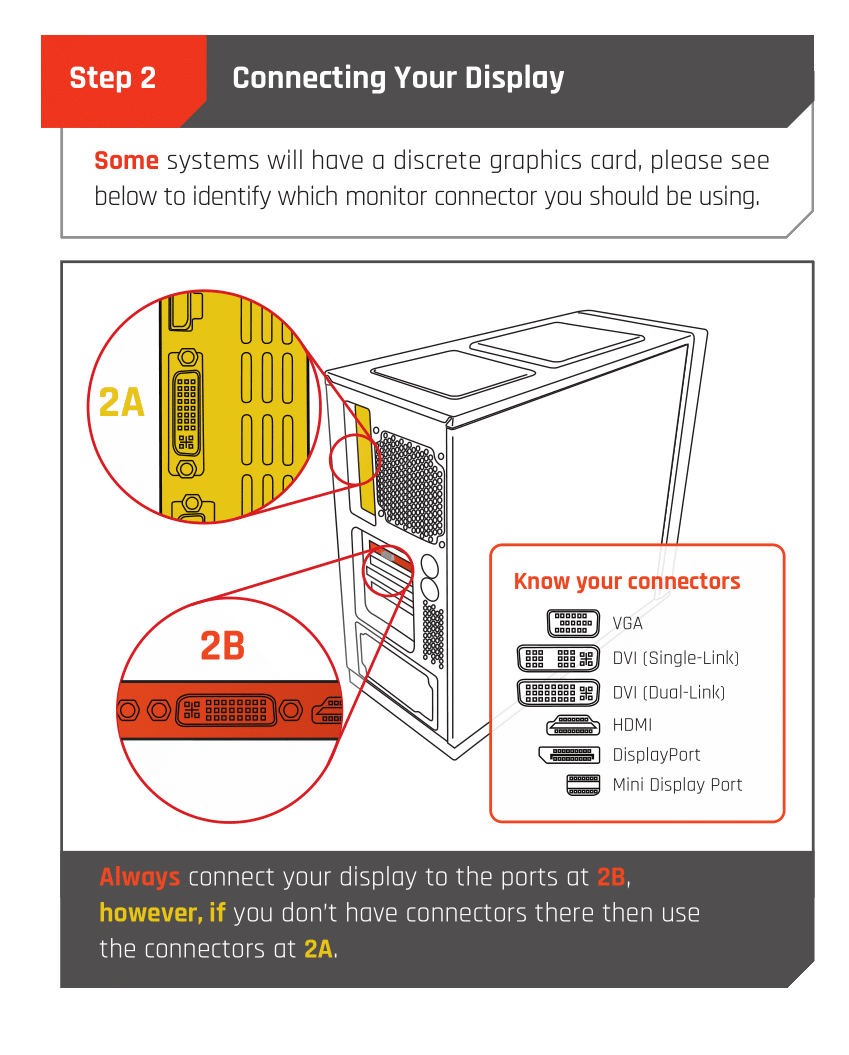
 Monitor Cables
If you have a discrete GPU then you need to plug your monitor cable into the graphics card, not the motherboard. This can be found on the Quick Start Guide which was emailed to you, or you can download it with the /tag guide command.
 CyberPowerPC UK 🔸 0333 323 7776 🔸 https://www.cyberpowersystem.co.uk
 buoyant island
Your display cable plugged in to the orange part ^ ?
 buoyant island
Um it shouldn't even boot to the BIOS unless you spammed the button to get there 😅
Click this
lofty rivet
I don’t even know the button to get there 😂😂
buoyant island
Actually your boot priority is already fine just check you have XMP on and then save and exit
F7 go advanced mode
lofty rivet
Yes xmp is enabled
buoyant island
Ok nice yeah just save and exit and hopefully it'll boot into Windows lmao
lofty rivet
Oh boy
golden widgetBOT
 :tada: Congrats @lofty rivet, you levelled up to 1! :tada:
lofty rivet
We’re in. Thanks a lot Lewis 👍
buoyant island
lofty rivet
We’re in. Thanks a lot Lewis 👍
No worries remember to update your GPU drivers and run a Windows update and you're all good to go 😄
Enjoy the PC
lofty rivet
How do I update GPU drivers?
buoyant island
lofty rivet
How do I update GPU drivers?
You got NVidia or AMD?
lofty rivet
Nvidia
buoyant island
NVIDIA
NVIDIA GeForce Experience Auto Update Drivers and Optimise Game Settings
lofty rivet
Thanks mate
buoyant island
Get the game ready drivers on the app 🙂
lofty rivet
So do I have to download that for it to work? 😂
buoyant island
Yeah download the Geforce Experience app then you can download the most recent driver from the app
lofty rivet
Wicked thanks a lot
buoyant island
All good 🙂