#Black screens on boot up

1 messages · Page 1 of 1 (latest)

modest basinBOT
#
Thread Created!

To provide the best level of support possible, please make sure you have provided as much information as possible.

This could include:
🔸 The problem you're facing
🔸 How frequently the issue occurs
🔸 Any pictures or videos of the issue
🔸 Related error codes or log files
🔸 Any further comments which to help us resolve your problem

Please bear in mind that this forum is for support from the community; the official customer support team can be contacted via phone and email.

☎️ 0333 323 7776
📧 [email protected]

modest basinBOT
#
Monitor Cables

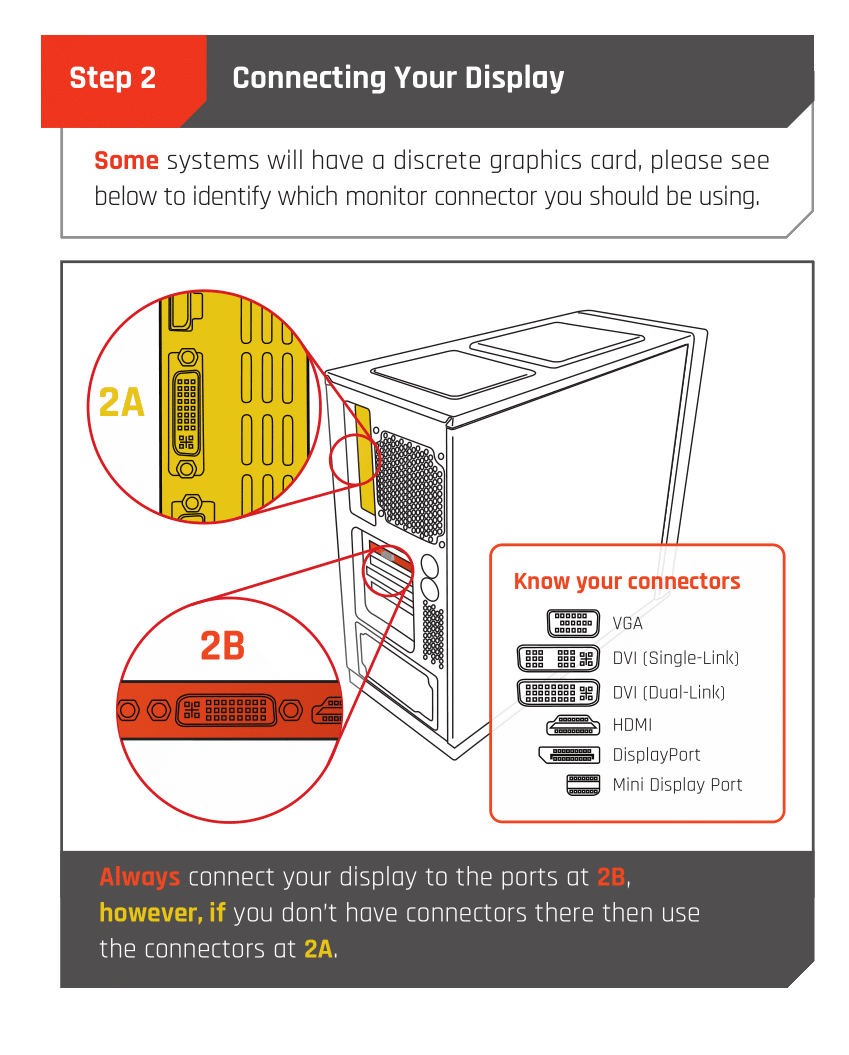
If you have a discrete GPU then you need to plug your monitor cable into the graphics card, not the motherboard. This can be found on the Quick Start Guide which was emailed to you, or you can download it with the /tag guide command.

fallen knot
golden vector
#

Are you using a grfx card or onboard grfx?

zenith ibex
#

Well I am assuming the computer was working before so it should still be working

#

Full system specs please

fallen knot
# zenith ibex Full system specs please

CPU:

Intel® Core™ i9-11900KF - 8-Core 3.50GHz, 5.10GHz Turbo - 16MB Cache, Ultimate OC Compatible.

GPU:
AMD Radeon™ RX 7800 XT - 16GB GDDR6 - HDMI, DP - RDNA™ 3 Architecture, Infinity Cache™.

RAM:
64GB (4x16GB) DDR4/3600mhz Corsair Vengeance Pro SL RGB Memory.

MOBO:
MSI MPG Z490 Gaming Plus: ATX w/ USB 3.2, 2x M.2.

Cooling:
Front fans - 3 Be Quiet Silent Wings 3 120mm PWM Fans Kit.

Top fans - 3 Be Quiet Silent Wings 3 120mm PWM Fans Kit.

CPU cooler - Be Quiet Dark Rock Pro 5 Air Cooler.

Storage:
2TB WD Blue SN580 M.2 NVMe PCIe SSD - 4150MB/s Read & 4150MB/s Write - for OS.

8TB Samsung 870 QVO 2.5" SSD - 560MB/s Read / 530MB/s Write - For games.

Western Digital Blue 1TB - For programs.

Western Digital Blue 2TB - For backups.

zenith ibex
#

Interesting.

#

oh

#

it works after you restarti t?

fallen knot
zenith ibex
#

I mean, you have 4 sticks at high ish speeds it literally could just be failing memory training every once in a while

fallen knot
#

and I reinstalled Windows 11 Home ed about a week ago

zenith ibex
#

Yeah

fallen knot
#

it did cause more issues as I reinstalled it from the cloud but after doing it on USB it's fine

zenith ibex
#

oh

#

so you load into windows with a cursor and a black screen?

fallen knot
#

no cursor, just both black screens

zenith ibex
#

I had an old computer that did just that

#

I wouldn't worry about it if you can get it to boot after a restart tbh

fallen knot
#

I have just made sure my cables are in correctly and it booted up with no issue. I've also had this PC since 11/12/2023.

zenith ibex
#

Yeah

fallen knot
#

I'll see what happens for the rest of the week.

fallen knot
#

And it happened again.... Both screens are on and are black and I just heard the fans increase in speed a bit. I'm not sure if it made a post beep sound, so next time I'll pay more attention.

fallen knot
#

PC post beep then splash screen for MOBO then black screens. Turning on and off my screens I'm then able to login. What could be the issue?

fallen knot
fallen knot
#

I have just reinstalled the most recent update and will see how things go.

fallen knot
#

nope...same issue...I really can't be bothered at the moment to re-install Windows 11 AGAIN! 😫

zenith ibex
#

Damn

#

I mean tbh its ok if it works

#

just a system qwerk

fallen knot
#

What I'll do tomorrow is make sure that I've not disrupted any cables from the last time I opened my PC to clean it.

rancid fable
fallen knot
#

First LED, then second LED then they go off and my monitors are on (for now) I updated my drivers via AMD adrenalin and are up-to-date.

#

I'm currently in safe mode using DDU, restarted my PC and now going to reinstall my GPU drive.

rancid fable
#

Yeah it's normal for some of them to come on as your PC boots, though if any of them start hanging then that normally indicates a problem
DDU was going to be my next suggestion so see how that goes!

fallen knot
#

I'll keep you updated

fallen knot
#

And it happened again.....

modest basinBOT
#

@fallen knot

This thread has been inactive for 72 hours

:green_square: If your query has been resolved, click the 'Close' button. Don't forget to thank the members that have helped you with the /thanks command!

:red_square: If you still need support, click the 'Keep Open' button in the next 24 hours to keep this thread active.

:question: Need more support on this issue later? Simply reply to this thread to re-open it.

fallen knot
#

After removing and re-inserting both DP cables, I'm still having the same issue. When I turned on and off my monitors, this time the resolution was wrong (very small icons etc). I logged out then back in and it was back to normal. What I plan to do in a few days, is only have my main monitor connected for a week and see what happens then repeat the same thing with my other monitor.

modest basinBOT
#

@fallen knot

This thread has been inactive for 72 hours

:green_square: If your query has been resolved, click the 'Close' button. Don't forget to thank the members that have helped you with the /thanks command!

:red_square: If you still need support, click the 'Keep Open' button in the next 24 hours to keep this thread active.

:question: Need more support on this issue later? Simply reply to this thread to re-open it.

fallen knot
#

So far from my testing, from just using my main monitor, I have no issues. Today, I plan to try with my second monitor for a few days.

fallen knot
#

Ok so I suspect that the DisplayPort to HDMI might be failing as it went black twice. Once on idle and didn't come back on (even with turning the monitor on and off) and again during a restart.

#

I've just ordered a new cable and will update on the situation when it arrives and install it.

golden vector
#

Check the specs of your monitor and gpu for DisplayPort version

fallen knot
#

Lenovo L22e-30 - HDMI 1.4

#

AMD Radeon RX 7800 XT has up to three DisplayPort 2.1 outputs and a single HDMI 2.1a port.

#

its the same one that I am currently using

#

and I've had it for about 3 years.

golden vector
#

When I switched to DP from HDMI many moons ago I had issues. It was mainly due to cable specs and monitor support. I still have issues today with the latest specs for compatible cables and new monitors. DP can be a pain in the ass.

fallen knot
#

the reason I've got a DP cable to HDMI is because my Oculus Rift CVI is occupying the HDMI port.

golden vector
#

ahh

#

that "could" be the issue... it may be prioritising the Oculus

fallen knot
#

yeah, that's the issue, I'm not going to remove and put back in the HDMI port for my headset over and over again when I want to use my second monitor as well as exhausting the HDMI port.

#

I've not had this issue before even when I had Windows 10.

#

and it just happend after many months having my current PC

golden vector
#

I agree, its shite to have to deal with that... but does it happen when the headset is not connected?

fallen knot
#

Good question....I've not tried that...

golden vector
#

at the end of the day the Oculus is a display so

fallen knot
#

I'll just disconnect my headset now and see what happens over a period of days.

golden vector
#

I leave my PC on 24/7 (work reasons) and I have to close all my windows on all my monitors (all DP) otherwise they all appear on the first monitor I switch on... DP is great for throughput and such but the WIndows suppoort is shite

#

Even now, I have a small sensor panel display (800x480) that is HDMI and apps will open on that screen

fallen knot
#

Monitors:
(Main) Lenovo Legion Y27qf-30 (2560x1440@240Hz).

(Secondary)
Lenovo L22e-30 (1920x1080@75Hz).

golden vector
#

try without the occulus and see 🙂

fallen knot
#

Yeah I just disconnected it for now

golden vector
#

hope you find a "fix"

fallen knot
#

Same here. If worse come to worse, I'll just get a new cable for my monitor