#help I’m new
16 messages · Page 1 of 1 (latest)
 karmic sand
 strange arrowBOT
Thread Created!
To provide the best level of support possible, please make sure you have provided as much information as possible.
This could include:
🔸 The problem you're facing
🔸 How frequently the issue occurs
🔸 Any pictures or videos of the issue
🔸 Related error codes or log files
🔸 Any further comments which to help us resolve your problem
Please bear in mind that this forum is for support from the community; the official customer support team can be contacted via phone and email.
☎️ 0333 323 7776
📧 [email protected]
 flint mesa
You have to plug both monitors into the GPU the top one is likely the motherboard
strange arrowBOT
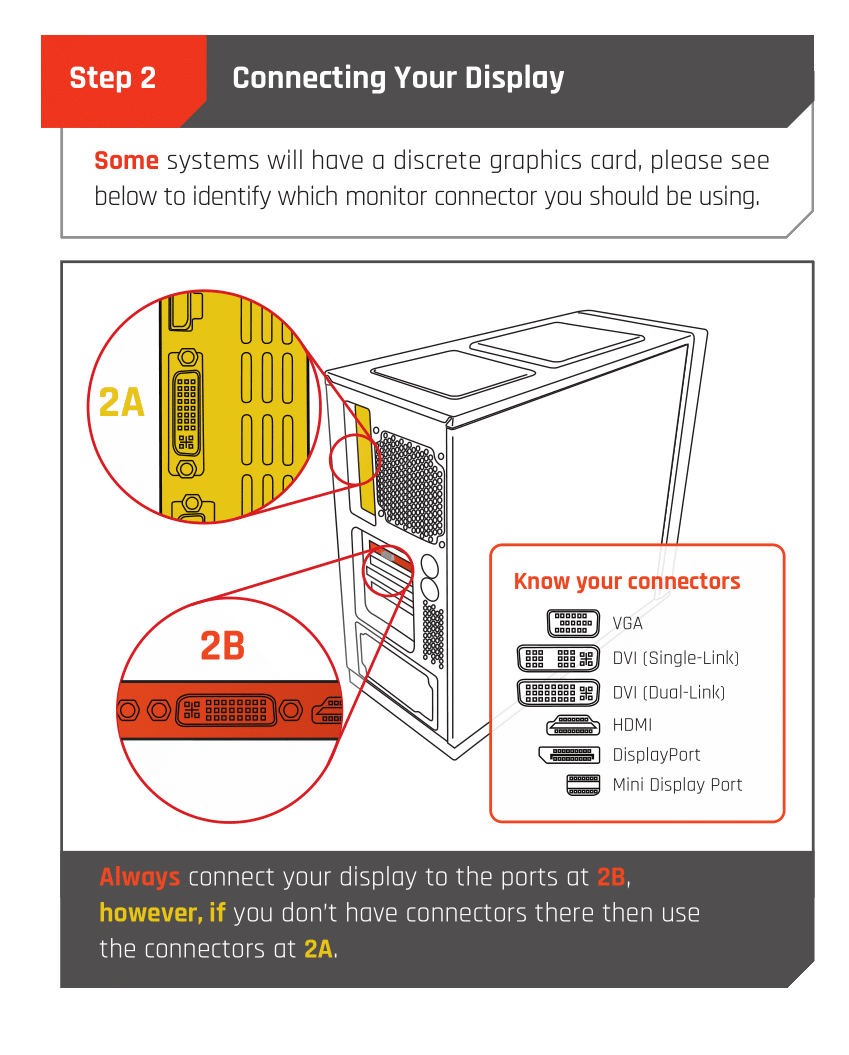
 Monitor Cables
If you have a discrete GPU then you need to plug your monitor cable into the graphics card, not the motherboard. This can be found on the Quick Start Guide which was emailed to you, or you can download it with the /tag guide command.
 CyberPowerPC UK 🔸 0333 323 7776 🔸 https://www.cyberpowersystem.co.uk
karmic sand
flint mesa
You have to plug both monitors into the GPU the top one is likely the motherboar...
CyberPowerPC UK 🔸 0333 323 7776 🔸 https://www.cyberpowersystem.co.uk
karmic sand
flint mesa
You have to plug both monitors into the GPU the top one is likely the motherboar...
ahhh okay that makes sense, do i need to get a converter then ?
flint mesa
What are your monitors? Just HDMI?
karmic sand
yes just HDMI
flint mesa
Yeah one of them will need a displayport to HDMI adaptor then since most GPUs are 1 HDMI 2 or 3 Displayport
karmic sand
okay amazing thank you fot your help 🙂 ill get one ordered now
strange arrowBOT
@karmic sand
This thread has been inactive for 72 hours
:green_square: If your query has been resolved, click the 'Close' button. Don't forget to thank the members that have helped you with the /thanks command!
:red_square: If you still need support, click the 'Keep Open' button in the next 24 hours to keep this thread active.
:question: Need more support on this issue later? Simply reply to this thread to re-open it.
 neat heron
Hey so I just had my new pc arrive and I set it up following the instructions but nothing is appearing on screen, I looked inside and I might just be wrong but I can’t see where the hard drive is, and nothing is plugged into data

Power supply is in that boxes area and the bar drive wouldn’t be in there(I don’t think
And no hard drive came in the box
 proven oriole