#No signal on monitor
28 messages · Page 1 of 1 (latest)
 versed mesa
 velvet sableBOT
Thread Created!
To provide the best level of support possible, please make sure you have provided as much information as possible.
This could include:
🔸 The problem you're facing
🔸 How frequently the issue occurs
🔸 Any pictures or videos of the issue
🔸 Related error codes or log files
🔸 Any further comments which to help us resolve your problem
Please bear in mind that this forum is for support from the community; the official customer support team can be contacted via phone and email.
☎️ 0333 323 7776
📧 [email protected]
velvet sableBOT
 Monitor Cables
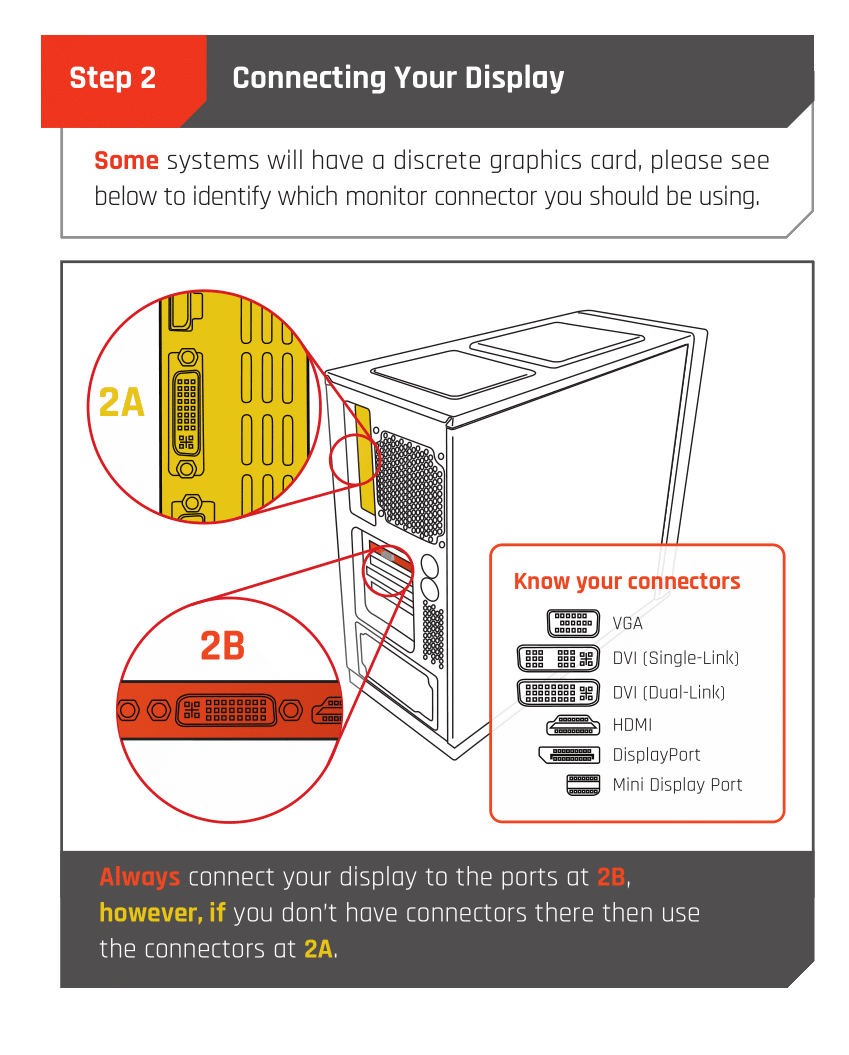
If you have a discrete GPU then you need to plug your monitor cable into the graphics card, not the motherboard. This can be found on the Quick Start Guide which was emailed to you, or you can download it with the /tag guide command.
 CyberPowerPC UK 🔸 0333 323 7776 🔸 https://www.cyberpowersystem.co.uk
versed mesa
CyberPowerPC UK 🔸 0333 323 7776 🔸 https://www.cyberpowersystem.co.uk
versed mesa
i’ve already done this, this isn’t the problem
 earnest wing
try differnet cables
 rotund ibex
Does the monitor work with anything else too
versed mesa
earnest wing
try differnet cables
tried it
velvet sableBOT
 :tada: Congrats @versed mesa, you levelled up to 1! :tada:
versed mesa
rotund ibex
Does the monitor work with anything else too
there’s nothing else i can try it with
rotund ibex
Got access to another monitor to hook your PC up to?
versed mesa
i’ve bought another monitor it’s coming tomorrow
i have a 45w power supply do you think that could be the problem ?
earnest wing
versed mesa
i have a 45w power supply do you think that could be the problem ?
45w
thats very low
whats specs do u have
versed mesa
rtx 3050 and ryzen 5 4500
earnest wing
yeh 45w is crazy
no wonder its not turning on
are u sure its 45w
i feel like it would explode
versed mesa
yeah it is
versed mesa
how come it’s only just started not working though
like i’ve been using the 45w for like 2 years now
earnest wing
idk bro
 sonic turret
Fix?