#pc beeping and it’s turning off and on
1 messages · Page 1 of 1 (latest)
 toxic mortar
 autumn fossilBOT
Thread Created!
To provide the best level of support possible, please make sure you have provided as much information as possible.
This could include:
🔸 The problem you're facing
🔸 How frequently the issue occurs
🔸 Any pictures or videos of the issue
🔸 Related error codes or log files
🔸 Any further comments which to help us resolve your problem
Please bear in mind that this forum is for support from the community; the official customer support team can be contacted via phone and email.
☎️ 0333 323 7776
📧 [email protected]
 wind citrus
@toxic mortar try this
autumn fossilBOT
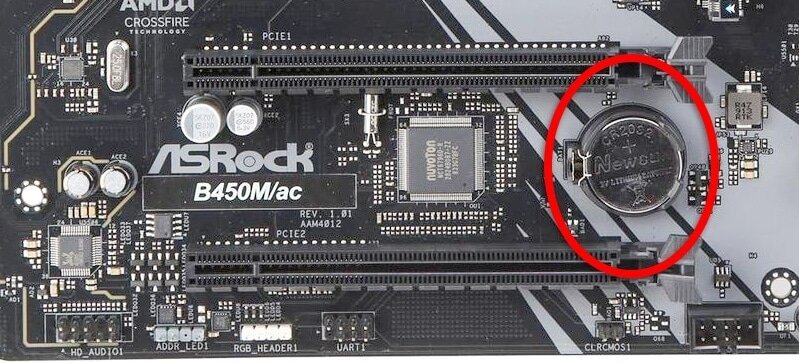
 Resetting CMOS
:one: Shut down your PC and unplug the power cord from the wall.
:two: Locate the CMOS battery (see the image below). On some motherboards, you may have to remove the graphics card in order to access it.
:three: Remove the CMOS battery from the motherboard by pressing down on the clip and pulling the battery out.
:four: Hold down the case power button for three seconds while your PC is unplugged.
:five: Install the CMOS battery back into the motherboard and plug the power cord back into the wall.
:six: Plug in and turn on your PC.
A video guide is also available below
 CyberPowerPC UK 🔸 0333 323 7776 🔸 https://www.cyberpowersystem.co.uk
toxic mortar
wind citrus
<@715430140234039329> try this
CyberPowerPC UK 🔸 0333 323 7776 🔸 https://www.cyberpowersystem.co.uk
toxic mortar
wind citrus
<@715430140234039329> try this
I may Aswell take it to the shop I don’t trust my self
wind citrus
Up to you mate no problem at all
toxic mortar
wind citrus
Up to you mate no problem at all
Is it risky taking the gpu out?
 modest venture
Not really
Just make sure to push down on the motherboard clip so it easily releases
In some cases you should take out the above PCIE slot cover to be sure it goes in smoothly
autumn fossilBOT
Reseating GPU
CyberPowerPC UK 🔸 0333 323 7776 🔸 https://www.cyberpowersystem.co.uk
wind citrus
This one shows you how to remove and reseat the GPU
modest venture

toxic mortar
wind citrus
This one shows you how to remove and reseat the GPU
I’ll do it once I’m home
Hopefully it doesn’t make anything worse
Do u think when I took it to the shop he messed up the ram
Cuz that was the only thing he touched
And ever since that it started beeping
But before that it was power cycling
toxic mortar
modest venture
<:upvote:818087721313763349>
U was talking about the ram being clipped on properly
But I don’t think it is
I could show a picture when I get to it
wind citrus
Could need reseating also
autumn fossilBOT
Reseating RAM
CyberPowerPC UK 🔸 0333 323 7776 🔸 https://www.cyberpowersystem.co.uk
toxic mortar
wind citrus
Could need reseating also
The rams are in the correvt place but the clip isn’t as solid as it use to be
So it just doesn’t look like it’s fully in the pc and that’s what might be causing the beeping
But I don’t know about the power cycle
toxic mortar
wind citrus
I personally think a CMOs will fix it
The only reason it started beeping was when the ram got messed with
So that’s most likely causing the beeping but idk about the power cycle
It was because I crashed on a game n I held down the power button cuz there was no other way of turning my pc off and then once I turned it on it started power cycling and then I took it to the shop n the ram got messed with and now it’s beeping while power cycling
wind citrus
Yes
That’ll reset memory settings to default in BIOS, then hopefully boots
Then we can work out your max ram speed and adjust it so you get the most from it
Also those ram clips don’t get weaker. They either clip or they don’t, if they’re not all the way in, you’ll want to reseat tjose
toxic mortar
wind citrus
Also those ram clips don’t get weaker. They either clip or they don’t, if they’r...
Ye then that means the ram isn’t in properly?
autumn fossilBOT
 :tada: Congrats @toxic mortar, you levelled up to 3! :tada:
toxic mortar
That’s what I’ll start with when I get the chance to
I’ll put the ram in and out n see if I can get the clip properly on
If it still doesn’t work
I’ll remove the gpu and take the little battery in and out
Should I put the gpu back on once I take the battery in and out or should I wait till I try turn it on?
wind citrus
toxic mortar
Should I put the gpu back on once I take the battery in and out or should I wait...
Have it fully assembled when you test
toxic mortar
Alright then
I’ll see that
I don’t even know if I have warranty on the pc
Nvm it comes with 2 years warranty doesn’t it
toxic mortar
wind citrus
Just don’t break it lol
I won’t
If I break it will the warranty fuck up?
 forest ice
toxic mortar
If I break it will the warranty fuck up?
forest ice
toxic mortar
If I break it will the warranty fuck up?
Yeah it'll void warranty of anything you break
toxic mortar
Fuck
That
So how come when I emailed customer support they told me to do the exact same thing @wind citrus told me to do
Should I ask if I can send it to them so they can fix it
Cuz I’d rather not touch it
wind citrus
You’re perfectly capable I am sure
toxic mortar
N risk it
wind citrus
You’d be surprised how resilient parts can be
If you follow the videos properly, it’s quite hard to bugger it up
I’d go with the RAM Reseat, that’s very easy
Is that doesn’t work then we do the fairly simple CMOS reset. Happy to walk you through any of the above if the video doesn’t help much. Just ping me
toxic mortar
wind citrus
You’d be surprised how resilient parts can be
So it would be hard to break?
wind citrus
It would require some effort
toxic mortar
wind citrus
It would require some effort
I’ll try be gentle
Ill be doing it around 2:20
wind citrus
Sure bud
wind citrus
Ram is a walk in the park dw
It’s just 2 small levers and that’s it, you’ll be sound lad
wind citrus
I’m sure it was a genuine mistake
As easy as they are to fix, they’re very easy to make small mistakes with
toxic mortar
I’ll show a video soon of what it looks like
Closeup of the clip
I’d like your thoughts on it @wind citrus to see if somethings been fucked with on the ram or it was just a small mistake
wind citrus
Sure thing
forest ice
You think they somehow damaged the RAM clip?
wind citrus
I think it’s just not seated properly mate
toxic mortar
wind citrus
I think it’s just not seated properly mate
That’s what I’m thinking
I’ve got a video of last night
It kinda shows the clip loose
Look at the ram clip it doesn’t look in properly
wind citrus
Yeah I think it’s just not seated properly
Easy mistake to make but wouldn’t expect it from a professional service lol
toxic mortar
It’s been a shop for 11 years
I’d expect different
@wind citrus @forest ice and that’s the sound it makes
toxic mortar
It fucking is
wind citrus
Do let me know how you get on
forest ice
Google is giving me mixed answers some say Memory error others are saying video card error
toxic mortar
It’s a infinite beep
And I’ve never heard of a infinite beep on YouTube
I’ve seen 3 beeps 4 beeps 2 beeps and 5
Just not infinite beeps none stop
forest ice
what make is ur motherboard do you know
wind citrus
Let’s not confuse this
Do the ram reseat, let us know how you get on
If we need to troubleshoot further we can and will
toxic mortar
 autumn fossilBOT
:tada: Congrats @toxic mortar, you levelled up to 4! :tada:
toxic mortar
^^ @forest ice
toxic mortar
wind citrus
Let’s not confuse this
Ye I’ll stick to the ram as that was what was messed with but that’s not what started the power cycle in the beginning so something else Aswell is involved
 toxic mortar
If the beeping stops that’s all I care about
The power cycling can continue happening
Just no more of that annoying beeping
wind citrus
You don’t want either of those lol
The beep is happening because of what’s causing the loop so it should resolve both with 1 move
toxic mortar
wind citrus
The beep is happening because of what’s causing the loop so it should resolve bo...
Do u think so
Fivem fucks my pc up hard tbh
wind citrus
That’s just fivem
toxic mortar
wind citrus
That’s just fivem
It’s a laggy game
That’s what started the whole situation
🤦♂️🤦♂️
toxic mortar
wind citrus
You don’t want either of those lol
If I send it back because of the warranty would I be liable of shipping costs do u recon
wind citrus
toxic mortar
If I send it back because of the warranty would I be liable of shipping costs do...
Yes you’d be paying for shipping
The parts and shipping back out to you would be free (if within warranty) I believe
toxic mortar
wind citrus
The parts and shipping back out to you would be free (if within warranty) I beli...
That’s alright then
wind citrus
But again, I’m fairly certain this is RAM issue and could be resolved at home
forest ice
wind citrus
But again, I’m fairly certain this is RAM issue and could be resolved at home
Me too
toxic mortar
Does keeping the pc on for long cause major issues?
wind citrus
No not really. Just not ideal
toxic mortar
wind citrus
No not really. Just not ideal
Oh
I keep my pc on for about 18 hours a day
I can’t lie
But I heard it’s not even bad but it is a little
wind citrus
Nothing has changed on ur pc except the ram. It’s more than likely just been installed poorly
toxic mortar
Would it because I restarted my pc while I crashed
Before something saved
Or something
wind citrus
Let’s just get that ticked off first then we’ll worry about other bits if it doesn’t fix it
wind citrus
Just let us know how you get on after 2pm when you’re ready to reseat
toxic mortar
Ye
toxic mortar
 rugged light
show us a close up of the ram
rugged light
show us a close up of the ram
Look at the video above
It goes quite close up
rugged light
did u get it back like that?
wind citrus
Yes
toxic mortar
Ye
wind citrus
That’s why we have determined it’s a bad ram install
toxic mortar
It was power cycle before I sent it out
rugged light
where did u send it too
rugged light
ah
toxic mortar
rugged light
where did u send it too
A pc shop and they do repairs to
rugged light
^
toxic mortar
I just wanna know what started it so I don’t do the same mistake
toxic mortar
If it was because I restarted my pc during a game crash
Then I’ll never do that again
Just to learn some things I should not do
rugged light
so it was working before?
toxic mortar
Yes
wind citrus
It happens sometimes. Could be because of a crash, or a change of settings in the BIOS, or the computer just decided to have a bad boot and got stuck in a loop
toxic mortar
It was 2 days ago I restarted my pc while my Fivem crashed cuz it wouldn’t turn off or anything
And then once I turned it back on
Turned on then off turned on then off none stop
If it was because of the crash it would because of how laggy Fivem is
wind citrus
Yes likely a boot loop. A CMOS reset would’ve fixed it probably
wind citrus
But now the RAM is seated wrong, you may need to do both ram + cmos. I imagine reseating RAM would make it obvious if we need to do a CMOS too
toxic mortar
wind citrus
But now the RAM is seated wrong, you may need to do both ram + cmos. I imagine r...
So if I reseat the ram and it still beeps would it still be a cmos issue to
wind citrus
toxic mortar
This will handle fiveM fine in 1080p
toxic mortar
That’s exactly what I play it on
wind citrus
toxic mortar
So if I reseat the ram and it still beeps would it still be a cmos issue to
Yes but CMOS is literally a battery to remove and reinsert. Very easy
toxic mortar
That’s what I got confused on how is the pc not handling Fivem
Tbh the fps on most games is not even so good
rugged light
how come u sent it into a shop anyway
toxic mortar
For the power cycle
None stop turning off n on when I powered it on
As if I was just restarting it every second but I weren’t
wind citrus
Always come here for help with cyberpower units
We even help with non cyberpower units
wind citrus
99% of problems can be resolved over desktop. The 1% being faulty parts
toxic mortar
If it’s a faulty part then atleast I get a brand new one if I send it back
toxic mortar
@wind citrus ok I’m home
As u can see I can pull it out even if it’s clipped on
@forest ice
wind citrus
So push that level down and reseat the RAM
It should automatically clip into place when you insert and give it a slight push down to lock it in
toxic mortar
It doesn’t do that
wind citrus
Have you tried
As in have you taken the RAM stick from its slot and reseated it into the same slot
Apply a bit of pressure to both sides of the RAM and it should click in
toxic mortar
autumn fossilBOT
:tada: Congrats @toxic mortar, you levelled up to 5! :tada:
forest ice
If you can pull it out then it's definitely not clipped in properly
the clips hold it in place
forest ice
Both slots or just 1?
toxic mortar
Both
forest ice
I don't know it's highly unlikely both slots are broken lol
forest ice
Try lay the PC flat if it helps and give them a little push on both sides of the stick
toxic mortar
When I put the tan it
forest ice
yeah
toxic mortar
The pc is layed flat
No wires in or anything
And it just won’t go in
Like tf?
wind citrus
You can’t take it OUT?
Plz make sure that lever at the top is pressed all the way down
wind citrus
Ok so put one hand on left side
toxic mortar
It won’t press all the way down
wind citrus
And one on the right
And press them left right left right til both sides click on
If that doesn’t do it, send a picture of the actual RAM slot on the Mobo please.
toxic mortar
 toxic mortar
 wind citrus
Can’t see a reason for it to not slot in
toxic mortar
I don’t get why it is
wind citrus
You’re facing the RAM the right way, right?
toxic mortar
It was slotted in perfectly before
Yes
The long side goes on the right
And the little hole goes on the little marks on the slot
I know exactly where to put it
But I don’t get why it’s not going in
It goes in but the clip doesn’t clip
wind citrus
The 2 sides of the ram should line up with these 2 little bits perfectly

It’s bizarre. No obvious visual issues
wind citrus
Who did you buy the RAM from?
wind citrus
I’d contact cyberpower directly and see what they recommend
toxic mortar
They emailed saying do the ram first
And then gpu
And battery
All the things you have said
But it’s the ram
wind citrus
And that you’re having trouble even getting the RAM in. They’ll probably get you to mail it back so they can check it and make any necessary replacements
toxic mortar
That’s clearly the issue
wind citrus
Yes, so email them and they’ll sort it
toxic mortar
I’ll try once more
wind citrus
They’ll be able to see this chat in full
toxic mortar
Should I push the ram in?
toxic mortar
I’ve fucking pushed it in
Full fucking force
And it’s clipped in
Fucking hell
Why did I have to push so hard
autumn fossilBOT
 tkndark2 was warned for Spamming
toxic mortar
I could see the motherboard moving
forest ice
🤣
toxic mortar
There you go
One ram in
Perfect
Fuck me why did I have to push so hard
Damn that was a piss take
Need a break before I do the second one
toxic mortar
forest ice
🤣
Na why was it so hard to push in
toxic mortar
Maybe
That was rough
I’m having a break till I do the other one
Was to scared of breaking the motherboard
toxic mortar
wind citrus
Told you they’re resilient
I didint know I had to push so hard tho
toxic mortar
Bro I was using my whole palm
wind citrus
Weird things these computers
toxic mortar
To push it in
Couldn’t do it with just my fingers
No wonder the shop didint do it
He could of atleast told me he started a repetitive beep in my pc with the ram being out
forest ice
toxic mortar
That video scwred me
Someone sent that into general
I was like no I’m not doing that
Are rams expensive?
forest ice
not really
toxic mortar
40 quid
forest ice
Well 1 16GB stick is like 40 ish yeah
toxic mortar
Eh I would rather not
Tbh
I would rather not break it
I’m ready to do the second one now tho
Hopefully it doesn’t fuck up
Got it in
Fuck yes
Time to plug it in
forest ice
Good stuff
toxic mortar
I hope it works now
forest ice
Should do 🙏
wind citrus
Inshallah
autumn fossilBOT
tkndark2 was warned for Spamming
wind citrus
Ok so now I’d reset the CMOS
toxic mortar
Risky shit
autumn fossilBOT
Reseating GPU
CyberPowerPC UK 🔸 0333 323 7776 🔸 https://www.cyberpowersystem.co.uk
wind citrus
Unplug everything from the wall
toxic mortar
Hard part
wind citrus
Hold the power button for a few seconds to drain the remaining power
Then follow that video until the GPU is out. Once the GPU is out ping me
wind citrus
Think about how much nicer it’ll be when ur pc running next to u
wind citrus
Push that down not up
forest ice
Push the top part down while pulling
wind citrus
Thumb on the top pushing the clip down and index underneath helping you slowly pull it out
Again, don’t be afraid to apply a bit of pressure to get it to let go
 forest ice
Able to take pic so its clearer?
toxic mortar
 forest ice
Yep top 2
toxic mortar
Ok both off
autumn fossilBOT
:tada: Congrats @toxic mortar, you levelled up to 6! :tada:
forest ice
I got the pic of google but the clip should be around there
 forest ice
^
wind citrus
Cos it might hurt ur finger it requires a fair bit of pressure to push down properly
toxic mortar
Would it be this
forest ice
Sometimes depending on the board instead of pushing down you have to sort of push it right
toxic mortar
forest ice
Yeah that looks like it
forest ice
Try use ur thumb lol if u can fit it in there
toxic mortar
Cant
forest ice
(That's what she said)
toxic mortar
The cpu is to big
forest ice
Damn
toxic mortar
The cpu bro
It’s been messing me up
The left ram was so hard to put in
Because of it
forest ice
Try what Ant said and use something flat may help
wind citrus
Lolol don’t touch the cpu for god sake we’ve barely got past the RAM yet!
But yes that’s the little lever you need to push
toxic mortar
wind citrus
Lolol don’t touch the cpu for god sake we’ve barely got past the RAM yet!
😂
wind citrus
If you have a screwdriver, use that to push it down
toxic mortar
wind citrus
But yes that’s the little lever you need to push
It’s went down a bit
But it’s hard

 forest ice
Okay try instead of pushing it down sort of push it to the right >>>>
wind citrus
On the right side of the clip
forest ice
It took me ages to take my GPU out too when I done it and I needed to push the clip to the right 
wind citrus
Try pushing from there
Also, use a screwdriver, not your finger. It’s weirdly easier
Just gotta put some good pressure on it
wind citrus
Is it straight
toxic mortar
I’ve been pushing it with the screwdriver hard
wind citrus
Or is it angled still
toxic mortar
I’ll check in a minute
wind citrus
Ok
toxic mortar
Went to look for another screwdriver
wind citrus
Flatheads r best
toxic mortar
wind citrus
Either way get it as close to the motherboard surface as you can, then you should be good to unscrew the rear bracket (if you haven’t already) and pull out
wind citrus
Stop using ur bloody thumb😂😂
Give it a good push with the screwdriver
It will just give way
toxic mortar
The top of the screwdriver?

Na I knew the beeping was from the ram since the start cuz it was never beeping until the ram got touched
But ofc the power cycle came back
wind citrus
Yes just push down on that lever until it goes all the way down
Towards the motherboard itself
toxic mortar
Oh shit
wind citrus
Again, a bit of force may be needed. If it doesn’t give way, you’ve not pushed the clip down enough
toxic mortar
It’s been done the whole time
wind citrus
Lmfao
toxic mortar
I’ve pulled it out
wind citrus
Ok so now do the CMOS battery
wind citrus
There’s a small lever somewhere on the inside of the circle it’s in, push that in / to the side and the battery should start to pop out
toxic mortar
Underneath the lever
wind citrus
toxic mortar
The motherboard
You probably would’ve been fine.
wind citrus
Should be a silver one
You’ll see a small lever somewhere on the side of that battery
Push that away from the battery n it’ll partially, or fully pop out
toxic mortar
toxic mortar
Where is the lever
wind citrus
I cannot see too well in the video
But it’s pretty obvious
It’ll be like a small little piece of metal
modest venture
toxic mortar
I could see the motherboard moving
That's normal
wind citrus
Then just take it out. It’s literally just a watch battery so don’t worry about it electrocuting you lol
toxic mortar
I’m not worrying about that
That’s the least I’m worrying about tbh
I want this fixed
Badky
wind citrus
We r so close
wind citrus
Basically try to make the little metal bit flat with the side
toxic mortar
toxic mortar
I’ve cut me nail
wind citrus
Am not surprised lad
toxic mortar
Ah
toxic mortar
Bro the screwdriver workedinstantly
Tf
Got the battery
It’s cold
Asf
Suprisingly
wind citrus
It’s just a battery
forest ice
Now hold power button for a few secs to drain the power
toxic mortar
When should I put it back in
toxic mortar
forest ice
Now hold power button for a few secs to drain the power
Before I put the battery in?
wind citrus
Yup drain everything again like u did at the start
 mellow stream
I’d be concerned if it was hot
wind citrus
Then put it back in
forest ice
toxic mortar
Before I put the battery in?
yh
toxic mortar
Ok
wind citrus
Then install the GPU again, the clip will automatically fix this time don’t worry. Screw in, add power, crack on
toxic mortar
So I put the battery in?
mellow stream
Yes
wind citrus
Yes
modest venture
Yes
wind citrus
Sweet
modest venture
Line up the golden fingers
I find the pcie cover above can sometimes block it a bit
wind citrus
Try lining up the bit that you screw in first
toxic mortar
Am I lining it right tho?
mellow stream
That’s the correct orientation
wind citrus
You may find the bracket on the GPU goes between the motherboard and back of case a little bit
wind citrus
Try lining up the bracket at the back first
Once that’s in place the PCIE bit should almost be a natural fit
forest ice
Did you give it a little push?
modest venture
It's a bit out
toxic mortar
If I screw it in
forest ice
Doesn't look in at the back properly
toxic mortar
Is it
modest venture
You don't want to see the golden
toxic mortar
I can’t pull it out anymore?
 forest ice
Yeah looks better
modest venture
Check the pcie slots
toxic mortar
Idk what that is tbh
modest venture
Ah not the pcie slots the rear
Where you screw it in
It is possibly misaligned cause that side should be flush
It's probably fine though
toxic mortar
A little bit
I mean I can’t pull it out anymore
The lever has to be pushed down again
modest venture
Okay good yeah screw it in
wind citrus
Then plug into wall and boot it up
modest venture
Should go in
wind citrus
Yeah I would line that up first
modest venture
Looks misaligned
wind citrus
That’s what the bracket part is
Line that up, then slotting it into the motherboard should be easier
toxic mortar
So should I pull the gpu back out
wind citrus
Yes because it’s misaligned it’ll be awkward
toxic mortar
So now I need to line up the hole
autumn fossilBOT
:tada: Congrats @toxic mortar, you levelled up to 7! :tada:
wind citrus
Ok once it’s out
- line up the screw holes on the rear bracket, then get them as close to how it’ll be. Part of that metal bracket may fit between the motherboard and case, Don’t worry if it does
Once that’s done, the PCIE slot on the motherboard should be nicely aligned for you to slot it into
modest venture
Yeah looks ok there
toxic mortar
Wait
modest venture
How about the golden fingers
 wind citrus
Line up the left, don’t screw it
Screw once it’s in the motherboard
Just use the left being lined up as a guide
toxic mortar
The screws don’t get lined up
modest venture
Take out the bottom pcie cover, it may make it easier
wind citrus
toxic mortar
This was perfect line up. Then you just push the PCIE in, you may need to pull out the lined up part momentarily to get it in
wind citrus
That’s exactly where it should be
You can move the GPU around til the screws slot in. You get a bit of lenience on that bracket to line it up properly
Again, stop using your hands. You’ll want the screw at the end of a screwdriver and your hand to align the GPU hole with the case hole so you can get it screwed in
toxic mortar
I’ve screwed it in
modest venture
Good
toxic mortar
Is that correct?
wind citrus
Looks fine
toxic mortar
wind citrus
Only one way to truly find out
wind citrus
Did you just cliff hanger me?
autumn fossilBOT
tkndark2 was warned for Spamming
toxic mortar
Wtf
autumn fossilBOT
tkndark2 was kicked for having too many infractions
wind citrus
What happened lol
forest ice
?
wind citrus
Sometimes it fizzles when loose just make sure it’s connected properly
toxic mortar
It’s on
Uh
It’s not turning off
But the light keeps flickering
Idk if that’s normal
Or it’s cuz I don’t have a display
modest venture
Hook it up the a display
toxic mortar
Tbh kinda forgot where I put the hdmi
modest venture
For future ref there's a two pin header on the board that clears the CMOS
wind citrus
The way you did was the proper way
forest ice
toxic mortar
Tbh kinda forgot where I put the hdmi
In to the GPU?
toxic mortar
wind citrus
toxic mortar
Tbh kinda forgot where I put the hdmi
😂 is ok. I forgot what the right way to have the PSu switch was once lol
toxic mortar
Ye so where I put
toxic mortar
Ye in the video
wind citrus
Yup the one u pointed at
toxic mortar
Ye
Alright
Now I put the pc plug back in it
Is there any point putting the keyboard and mouse in
Or should I wait till I see
If the screen works
forest ice
yeah just wait
toxic mortar
So why is it power cycling again?
modest venture
Any beeps?
toxic mortar
No
Beeps went ages ago
Now it’s just turning off and on again
It was literally just working then but I didint have my hdmi in
Tf
wind citrus
Do you have a spare HDMI?
toxic mortar
Lemme take the hdmi out
N I’ll try it again
Without a hdmi
Wait now it’s power cycling again
Why Tf
wind citrus
Might be because we booted without a display idk
I would say CMOs reset again but I think you may implode
modest venture
Use the two pin header
toxic mortar
Wym two pin header
wind citrus
There are 2 pins you put a screwdriver to which reset the CMOs also
Again, make sure power etc is off and drained
toxic mortar
Where
modest venture
Bottom of the board
wind citrus
Usually bottom right
modest venture
Not sure
If you locate the clrrtc two pins, bridge them with a screw driver for 5 seconds
toxic mortar
Where about are they
 toxic mortar
wind citrus
toxic mortar
wind citrus
I’d suggest doing the CMOS reset the recommended way if you’re unsure on which pins to make contact with
The highlighted area in that diagram does not help
modest venture
Official Support | ASUS UK
wind citrus
Am slightly confused as to why it looped again. You may of turned it off suddenly by the wall and caused that
Easy but annoying fix to it lol
wind citrus
U got this
toxic mortar
Battery in
wind citrus
Nearly there
wind citrus
Sure. Give it a go with monitor plugged in
forest ice
PSU dead then?
modest venture
I would lean more towards platform
toxic mortar
Nothing should be wrong with it
It only ever started power cycling
When Fivem crashed
And my pc wouldn’t turn off
So I held the power button
And ever since I held the power button in the middle of a Fivem crash
It’s been power cycling
wind citrus
It is a bit weird. I’d go back to official support and highlight what we’ve done
toxic mortar
So I’m literally at the beginning
wind citrus
Thankfully we’ve resolved the RAM issue
toxic mortar
It literally worked a minute ago tho
wind citrus
So I’d narrow it to PSU or motherboard. It’s looping somewhere
toxic mortar
That’s the thing
wind citrus
It did, it’s bizarre
modest venture
What CPU do you have
 autumn fossilBOT
Customer Support
autumn fossilBOT
Customer Support
:telephone: 03333-237776
:e_mail: [email protected]
:clock3: Monday - Friday, 9:00am - 5:30pm
Please ensure to include as much information about your query as possible, and ensure to include your order number if you require after-sales support.
CyberPowerPC UK 🔸 0333 323 7776 🔸 https://www.cyberpowersystem.co.uk
modest venture
Give em the deets, then they will send you the forum once they reckon it needs parts replacing
toxic mortar
Wait it’s not turning off now?
But no display?
I’ve been waiting with it turning off and on for like 3 minutes
It’s been just turning off and on now it’s randomly just staying on
But no display
Power button flashing on and off tho
wind citrus
Could you turn of at wall, plug in monitor to pc and start. Spam delete the whole time
See if BIOS loads
Sorry F2 not delete
toxic mortar
So should I turn it back on?
With the monitor in
And pc plugged in
And then obviously the keyboard and mouse
wind citrus
Yes everything
Im confused by the blinking led light honestly . Haven’t seen it before myself
toxic mortar
Do u think the rams are not working anymore
wind citrus
If it doesn’t let you into BIOS I’d leave it to official support to advise just in case replacement parts are neeeed
toxic mortar
That can cause power cycle
wind citrus
No I think the RAM is absolutely fine
toxic mortar
I have a feeling my motherboard is bricked
wind citrus
I think it’s your PSu or motherboard. Potentially cpu if a couple memory lanes r pooped but that’s fairly rare and a game crash shouldn’t cause that
toxic mortar
I just don’t get how a Fivem crash
Has caused all of this
My cpu is 100% getting fked of this
wind citrus
😂
toxic mortar
Tbh it does power cycle for ages
But then it turned on with the power button still flashing
And no display
modest venture
Remove one stick of ram
toxic mortar
I’ll turn it back on and let it power cycle a bit more
toxic mortar
modest venture
Remove one stick of ram
Alright
modest venture
If that doesn't work switch them out
toxic mortar
Tbh I may of put the wrong ram in
The wrong slot
Cuz I moved them around about 300 times
modest venture
Slots 2 and 4
toxic mortar
I only have 2 slors
modest venture
Then it's fine
 wind citrus
Take either one out
Leave 1 in
See if you can isolate a particular ram stick
Then try the other stick in the same lane, and see if it’s a lane issue, or stick issue
If it’s lane I imagine your technical help probably battered the lane when installing the ram lll
toxic mortar
Ok I took the right one out
Nothing changed
Should I take the left one out and put the right one back in?
wind citrus
Yes
modest venture
Make sure they are fully clicked in
toxic mortar
Still power cycling
autumn fossilBOT
:tada: Congrats @toxic mortar, you levelled up to 8! :tada:
toxic mortar
What should I do?
Swap them?
To different slot
Or just put both back in
To where it was
wind citrus
Different slot
toxic mortar
I’ll swap them then
wind citrus
Sure. Rules it out anyway
forest ice
Most likely PSU or Mobo issue then 😦
toxic mortar
Fuck
forest ice
Have you got the PC plugged in to the wall or a surge protector
toxic mortar
Wall
forest ice
Okay nvm that rules out faulty surge protector
Yeah just contact support at this point ;-;
modest venture
Brilliant
 toxic mortar
@modest venture @forest ice @wind citrus
I appreciate all the help
From you guys
Was a bit fun messing around with the pc parts ngl
Sad how it didint fix tho
Every fan in the pc moves as they should do it just turns off what is the bad thing
forest ice
No worries at least you have a lil PC knowledge now 😂
Support will sort you out don’t worry 👍
Likely a PSU or motherboard replacement
toxic mortar
Ye
Kinda needed the pc this week
But it’s what ever
Would I have to go the post office to return it ye
forest ice
They’ll send a prepaid label so DPD can come pick it up I believe
They’ll explain it all on the email
toxic mortar
forest ice
They’ll send a prepaid label so DPD can come pick it up I believe
Ah I see
wind citrus
toxic mortar
Was a bit fun messing around with the pc parts ngl
As long as you got a bit of experience out of it eh!
wind citrus
exactly, once its done 1 time, its a lot easier to do again
toxic mortar
wind citrus
exactly, once its done 1 time, its a lot easier to do again
I appreciate it tho
For trying to help
Atleast the beeping went
But ye the power cycling is probably worse
modest venture
toxic mortar
<@950090695564210226> <@262629912744165377> <@305755431538786305>
No prob, it will be a smooth process, you will have it back in no time !
wind citrus
always good to work backwards til you find the source, but im fairly certain this is either psu or mobo. cp will figure it all out. the benefit of this is, you won't see the pc unless its in full working order
modest venture
Trust me, I've been through the process and obviously I don't love it but, the process was very good
modest venture
toxic mortar
Don’t have the pc box 😂
Shit
toxic mortar
Is mental
modest venture
Search up instapak on Amazon
toxic mortar
For bit of cardboard
modest venture
It adds up
toxic mortar
modest venture
It adds up
Wym
I don’t have anything from when I got the pc
I don’t have the foam inside of the pc anymore
Don’t have the box
Don’t have anything at all
modest venture
No, it's included iirc
modest venture
Yes
modest venture
Not sure
modest venture
toxic mortar
Big enough?
For what?
toxic mortar
Case: Corsair 3000D RGB Airflow Gaming Case - Black (features 3x ARGB 120mm fans)
To fit the case
In the cardboard box?
modest venture
Get the packaging from them to make sure it's properly done
They will send the right stuff
modest venture
Yes
modest venture
It says to not throw it away
toxic mortar
Tbh I don’t remember
Btw my pc is not power cycling rn
It’s just power button flashing
No display
Should I try the f2
?
modest venture
I'm not sure what the button flashing means tbh
I usually see that when a PC goes to sleep
modest venture
toxic mortar
Should I try the f2
Nah it won't
modest venture
You have to do that when the PC starts
You can turn it off, turn it on (hold the power button) and mash F8
toxic mortar
Let’s see if the lights on the keyboard work
modest venture
It's F8
toxic mortar
Lights on keyboard don’t work
So my keyboard
Wouldn’t work anyways
Clearly the power cycling doesn’t let monitor work
Because if my keyboard won’t even connect and light up
The monitor obviously wouldn’t display anything
Time to break my fast anyways
@modest venture do u not think it’s dust
The cpu is pretty dusty
So was the ram but I’ve cleaned the ram
wind citrus
no
dust wont affect those components much. maybe temps on the cpu but not enough from what you've shown me
toxic mortar
I’ve looked on YouTube and it said that dust can mess up even a new pc
A game crashing wouldn’t ever ever fuck up my motherboard or psu
modest venture
Look at it another way
toxic mortar
There is just no way a game crashing has done this
modest venture
you played a game that exposed your PC fault
toxic mortar
Could be
modest venture
A game by itself can not damage hardware
toxic mortar
See thing is
I crashed on Fivem and nothing would work
Not even my windows button
Nothing
modest venture
Even if you think to the New world incident, that was an EVGA problem
modest venture
Something might of happened then
toxic mortar
And then turned it back on
It might of been cuz I restarted it
It’s in a restart loop now
modest venture
Still not your fault though, its bad hardware (presumably)
toxic mortar
Cuz it’s basically restarting
It turns on and then after a few seconds turns off
Like a restart
modest venture
If a PC breaks by restarting, thats not a good PC
toxic mortar
A restart takes a few seconds to happen
And that’s basically what’s happening
With the pc
toxic mortar
The power button could be fucked?
modest venture
I want to see what happens
toxic mortar
modest venture
Take out the NVME drive
What’s that