
#the pc does not start
14 messages · Page 1 of 1 (latest)
 eternal parcel
What happens when the issue occurs?
 modern echo
nothing, I start the computer and everything lights up and the fans work, but the image is not displayed on the monitor
the only thing that seemed suspicious to me was this button that glows red
 wanton forgeBOT
 Monitor Cables
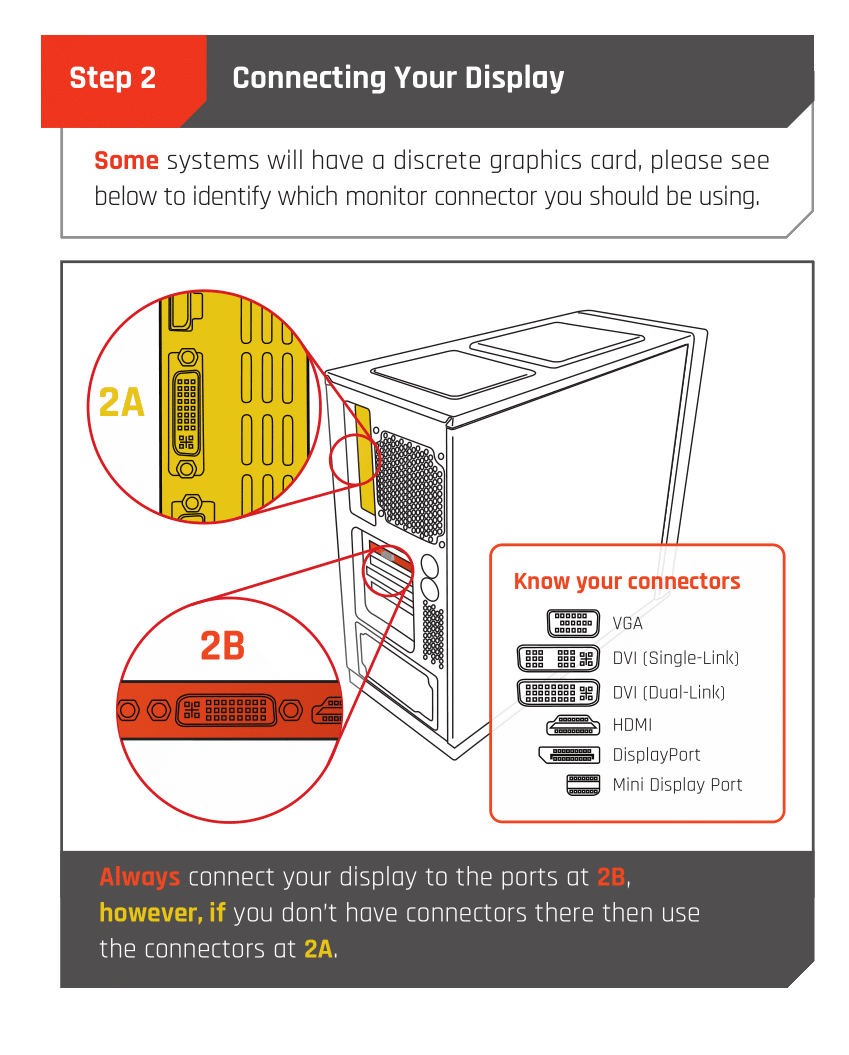
If you have a discrete GPU then you need to plug your monitor cable into the graphics card, not the motherboard. This can be found on the Quick Start Guide which was emailed to you, or you can download it with the /tag guide command.
 CyberPowerPC UK 🔸 0333 323 7776 🔸 https://www.cyberpowersystem.co.uk
eternal parcel
CyberPowerPC UK 🔸 0333 323 7776 🔸 https://www.cyberpowersystem.co.uk
eternal parcel
Double check your display cable is plugged into the gpu and not the motherboard

 stiff silo
It needs to go in the horizontal slot further down the case
modern echo
OK, thanks everything work, have a nice day good person 🙂
stiff silo
modern echo
OK, thanks everything work, have a nice day good person 🙂
No problem, you too, if you have any more issues give us a shout
 ivory pendant
The red light is usually a drive indicator
eternal parcel
modern echo
OK, thanks everything work, have a nice day good person 🙂
No problem, enjoy the pc 