
#Looking to get new pc this is what I got so far, please let me know what could/should be changed
50 messages · Page 1 of 1 (latest)
 rich ether
 slim templeBOT
rich ether
https://www.cyberpowersystem.co.uk/system/intel-14th-gen-pc-builder?utm_source=&...
slim templeBOT
rich ether
https://www.cyberpowersystem.co.uk/system/intel-14th-gen-pc-builder?utm_source=&...
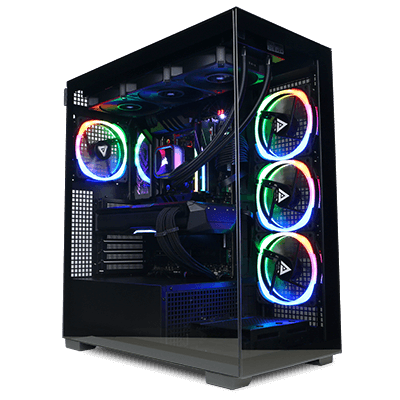 Intel 14th Gen PC Builder
Case: CyberPowerPC PRISM Panoramic Gaming case - Black
Case Fans: None Selected
CPU: Intel® Core™ i9-14900KF - 24-Core [8P @ 3.00GHz-5.60GHz / 16E @ 2.20GHz-4.40GHz] - 36MB Cache, Ultimate OC Compatible
CPU Cooler: MSI MAG Coreliquid M240 ARGB AIO Liquid Cooler, Ultimate OC Compatible
Motherboard: MSI PRO Z790-S WIFI: ATX w/ PCIe 5.0, Wi-Fi 6E, USB 3.2, 2 x M.2
M.2 SSD: 2TB Kingston Fury Renegade M.2 PCIe 4.0 NVMe SSD - 7300MB/s Read & 7000MB/s Write
RAM: 32GB (2x16GB) DDR5/5200mhz Corsair Vengeance Memory
Graphics Card: MSI GeForce RTX™ 4070 SUPER - 12GB GDDR6X - HDMI, DP - Real-Time Ray Tracing, NVIDIA DLSS 3
Power Supply: MSI MAG A850GL PCIE5 850W 80+ Gold ATX 3.0 Fully Modular Gaming Power Supply
PCIe WiFi Card: None Selected
Special Offer: Norton 360 VPN & Security for Gamers (Full 1 Year License)
£2199.60 inc. VAT (£1833.00 ex. VAT)
 CyberPowerPC UK 🔸 0333 323 7776 🔸 https://www.cyberpowersystem.co.uk
 tall gazelle
PErsonally I would drop to a i7 13700kf but other than that it pretty much matches the build I'm waiting to get delivered (different case and bits)
rich ether
tall gazelle
PErsonally I would drop to a i7 13700kf but other than that it pretty much match...
I need the cpu due to my work
Very demanding on my current 12700kf
tall gazelle
probably move up to a 360mm AIO then
rich ether
hold on
rich ether
slim temple
This isnt even the shit im looking at lmao
slim templeBOT
 How to share a configured system
 CyberPowerPC UK 🔸 0333 323 7776 🔸 https://www.cyberpowersystem.co.uk
slim templeBOT
rich ether
https://www.cyberpowersystem.co.uk/saved/5527790
CyberPowerPC UK 🔸 0333 323 7776 🔸 https://www.cyberpowersystem.co.uk
slim templeBOT
rich ether
https://www.cyberpowersystem.co.uk/saved/5527790
 CFGI914THD5
Case: Lian Li PC-O11 Dynamic Evo Gaming Case - Black [+44]
Case Fans: 6x Lian Li Uni Fan 120mm SL-Infinity ARGB Black Fan Kit [+109]
CPU: Intel® Core™ i9-14900K - 24-Core [8P @ 3.00GHz-5.60GHz / 16E @ 2.20GHz-4.40GHz] - 36MB Cache + UHD Graphics, Ultimate OC Compatible [+29]
CPU Cooler: Corsair Hydro Series iCUE Link H150i RGB Performance 360mm Liquid CPU Cooler, Ultimate OC Compatible [+118]
Motherboard: MSI PRO Z790-S WIFI: ATX w/ PCIe 5.0, Wi-Fi 6E, USB 3.2, 2 x M.2
M.2 SSD: 2TB Kingston Fury Renegade M.2 PCIe 4.0 NVMe SSD - 7300MB/s Read & 7000MB/s Write (Single Drive)
2nd M.2 SSD: 2TB Kingston Fury Renegade M.2 PCIe 4.0 NVMe SSD - 7300MB/s Read & 7000MB/s Write [+117] (Single Drive)
RAM: 64GB (2x32GB) DDR5/5600mhz Corsair Vengeance RGB Memory [+98]
Graphics Card: ASUS ProArt GeForce RTX™ 4070 OC Edition - 12GB GDDR6X - Real-Time Ray Tracing, NVIDIA DLSS 3 [-8] (Single Card)
Power Supply: Corsair HX1000i 1000W 80+ Platinum Ultra-Low Noise ATX 3.0 Modular Gaming Power Supply [+71]
PCIe WiFi Card: None Selected
Special Offer: Norton 360 VPN & Security for Gamers (Full 1 Year License) [+0]
£2863.20 inc. VAT (£2386.00 ex. VAT)
CyberPowerPC UK 🔸 0333 323 7776 🔸 https://www.cyberpowersystem.co.uk
rich ether
slim temple
thanks
tall gazelle
only thing I would change because I'm anal would be the lian li uni fans for corsair icue link fans so you can control the RGB in iCue with the AIO too
 wet trout
Defo don't overclock the 14900k
rich ether
I heard that overclocking damages the pc
slim templeBOT
 :tada: Congrats @rich ether, you levelled up to 1! :tada:
wet trout
Those things get hot enough as it is 
tall gazelle
wet trout
Defo don't overclock the 14900k
10% is fine no? with the h150i
wet trout
tall gazelle
10% is fine no? with the h150i
With more modern CPUs, overclocking is pretty much dead, the chips will turbo higher than any stable OC
tall gazelle
Wonder if its too late to remove the OC I've selected on mine 
wet trout
unless you're pushing for benchmark leaderboard, the 14900k is more than enough at stock
wet trout
tall gazelle
Wonder if its too late to remove the OC I've selected on mine <:KEKW:69917609037...
trust me even with a custom loop mine runs at 90c
and that's STOCK
tall gazelle
i opted for the 13700KF
slim templeBOT
:tada: Congrats @tall gazelle, you levelled up to 6! :tada:
tall gazelle
I should call someone tomorrow ahahaha
wet trout
rich ether
I heard that overclocking damages the pc
To answer your question, unstable overclocks can damage components and reduce longevity (lifespan of components) but stable overclocks are fine, saying that, I don't recommend an overclock on a modern chip
rich ether
wet trout
To answer your question, unstable overclocks can damage components and reduce lo...
ok so would you say with the change of the fans to the icue ones the pc will be good?
wet trout
I'll be honest, it'll more be a personal preference if you want it all to be under one software
otherwise you'd have two softwares
rich ether
wouldnt the AIO be under a different software anyway also
tall gazelle
but you'd be able to control fan curves etc as well as lighting in icue
wet trout
Nah the AIO is iCue (corsair) and tghe fans would be L-Connect (Lian Li) at the moment
if the fans were corsair, it all comes under iCue
rich ether
ok so keep the fans with the Lian li and we all good
wet trout
and to benefit, the AIO is iCue link, meaning if you did opt for Corsair fans, they all benefit from neater cable management as they all daisy chain
in the end, it'll be personal preference what you'd like
Lian li fans are beautiful, especially the infinitys
rich ether
what would you choose if it were your own computer, factoring everything you just mentioned
wet trout
If I was going for aesthetics, for ease I'd probably opt for the corsair fans just for the sake of RGB-coordination,
It just kinda makes it all a bit easier to control with the whole fan control and RGB,
But at the same time, I'm a huge fan of SignalRGB (RGB coordination application over seperate companies etc), so I'd opt for whatever looks the nicest (it's worth mentioning SignalRGB does not work on MSI motherboards if you were looking for that)
rich ether
Ok, do you know with the case if their would be any Lian li fans or if I picked corsair would all the fans be corsair. I dont want to open 3 different softwares just to change the fans like how it is at the moment 💀
wet trout
If you bought that PC as is, you would have two softwares, iCue for the AIO (and the corsair fans on that AIO) and then L-Connect for the Lian-li fans.
What you can opt to do, and I do believe it would be by default with the current setup, is they'd replace the corsair fans on the AIO with the Lian li ones that you're purchasing
and you'd simply get those corsair fans with the PC, as spares if you need them in the future
to answer your question though, the case itself does not come with any fans, it would simply be the fans you opt for
rich ether
Ok tysm