
#first day
66 messages · Page 1 of 1 (latest)
 hidden oar
 kind walrus
What do you mean its not on?
 delicate carbon
There's no RGB on that model if you are referring to that
hidden oar
okay but when i start it up it beeps is that normal
kind walrus
Yes
hidden oar
where is the storage located?
kind walrus
What storage do you have,
hidden oar
500gb
delicate carbon
Probably an NVMe SSD under the GPU as I don't see any sata cables
kind walrus
Not how much, What storage
delicate carbon
On the motherboard
 coral sphinxBOT
 Monitor Cables
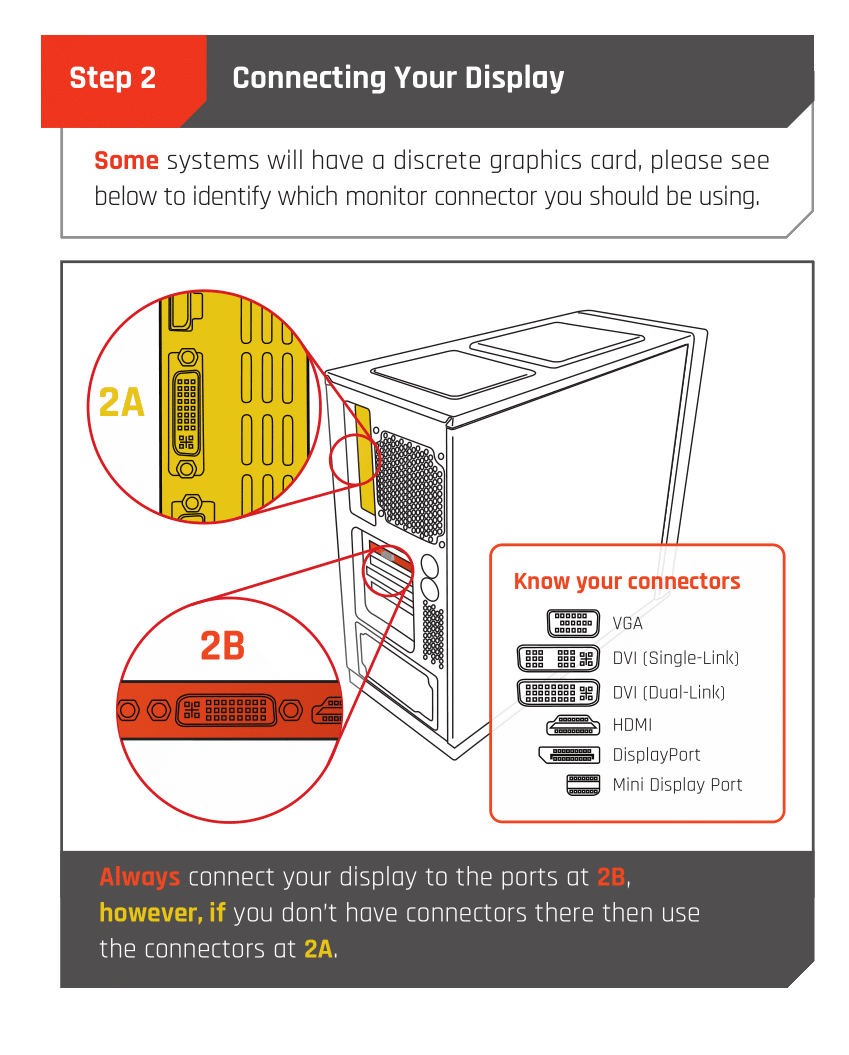
If you have a discrete GPU then you need to plug your monitor cable into the graphics card, not the motherboard. This can be found on the Quick Start Guide which was emailed to you, or you can download it with the /tag guide command.
 CyberPowerPC UK 🔸 0333 323 7776 🔸 https://www.cyberpowersystem.co.uk
Monitor Cables
CyberPowerPC UK 🔸 0333 323 7776 🔸 https://www.cyberpowersystem.co.uk
Monitor Cables
If you have a discrete GPU then you need to plug your monitor cable into the graphics card, not the motherboard. This can be found on the Quick Start Guide which was emailed to you, or you can download it with the /tag guide command.
CyberPowerPC UK 🔸 0333 323 7776 🔸 https://www.cyberpowersystem.co.uk
kind walrus
Read the quick start guide that came with the PC
hidden oar
do i use a display port or hdmi 2.1
 wintry beacon
display port if possible]
hidden oar
okay let me find one
wintry beacon
but its not completely needed
hidden oar
and do i plug it into the graphics card
wintry beacon
HDMI is just as fine
delicate carbon
Yes
wintry beacon
yes, plug it into the GPU, NOT THE MOTHERBOARD
wintry beacon
oh trust me you don't know how many issues on here are resolved by that simple step
 median wasp
hidden oar
but will hdmi cap at 60 fps?
median wasp
hidden oar
but will hdmi cap at 60 fps?
no
median wasp
hidden oar
dw i watch linius tech tips i know that is a no no
Linus is a goat
wintry beacon
depending on your monitor, it'll depend on the refresh rate of the monitor
delicate carbon
Not FPS *
hidden oar
it’s 165hz
wintry beacon
it may be able to achieve that on HDMI or for the full refresh rate it may need display port
median wasp
just make sure this is the highest it can go
 hidden oar
sure
coral sphinxBOT
 :tada: Congrats @hidden oar, you levelled up to 2! :tada:
delicate carbon
If you see no display give the PC a restart because sometimes it's picky assuming you plug the DP in while it's on
 median wasp
Do you know what motherboard you got?
May not come with wifi and you may have a small USB wifi dongle somewhere?
median wasp
Looks something like this yeah?
 hidden oar
yeah
median wasp
Just plug it in any USB slot on the PC (preferably the blue coloured ones)
And that should give the PC wifi
hidden oar
sure
i have ethernet connected but it doesn’t come up
this hs came up what do i press
 median wasp
May aswell install it
Most likely your motherboard is Asus branded? Armoury Crate is for Asus
Run your windows updates too
 delicate carbon
It's an A520m-k Asus one
median wasp
delicate carbon
It's an A520m-k Asus one
Oo nice asus is the goat
 median wasp

hidden oar
alr checking for updates
median wasp
hidden oar
alr checking for updates
beware most likely long list of updates 
hidden oar
command keeps coming up
hidden oar
there is
but the gpu fans are not spinning do they only spin when it’s using ing a lot of power
median wasp
The GPU fans only spin when reach a certain temp