#pc isn’t showing picture on my monitor.
164 messages · Page 1 of 1 (latest)
 coral comet
 flat river
And if I remember correctly, it's worked before yeah?
coral comet
Yup
 carmine briarBOT
 :tada: Congrats @coral comet, you levelled up to 10! :tada:
coral comet
All worked fine last night
flat river
Any EzDebug LEDs top right of the board?

 flat river
Alright do a restart
flat river
Turn the PC off
Back of the board you have a reset CMOS button
Hold that down
Without power
coral comet
For how long?
flat river
Tbh no clue - 20 seconds as a guess
Sorry about that - not experienced with all the fancy buttons, usually you have to resort to stuff like this:
carmine briarBOT
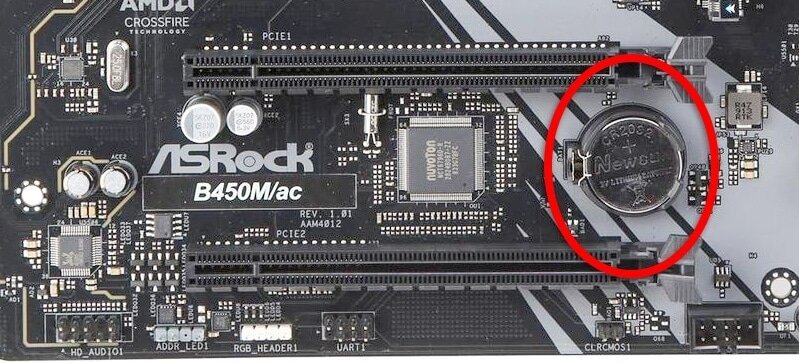
 Resetting CMOS
:one: Shut down your PC and unplug the power cord from the wall.
:two: Locate the CMOS battery (see the image below). On some motherboards, you may have to remove the graphics card in order to access it.
:three: Remove the CMOS battery from the motherboard by pressing down on the clip and pulling the battery out.
:four: Hold down the case power button for three seconds while your PC is unplugged.
:five: Install the CMOS battery back into the motherboard and plug the power cord back into the wall.
:six: Plug in and turn on your PC.
A video guide is also available below
 CyberPowerPC UK 🔸 0333 323 7776 🔸 https://www.cyberpowersystem.co.uk
flat river
CyberPowerPC UK 🔸 0333 323 7776 🔸 https://www.cyberpowersystem.co.uk
flat river
Which is a huge pain 
coral comet
Bro what
flat river
What's happening?
 ocean creek
Is your motherboard an MSI?
coral comet
Yes
flat river
I was just showing you what you have to do traditionally, sorry
The button works!
Sorry for the confusion
flat river
Did you hold down the CMOS button without power?
flat river
With the PSU off?
flat river
Turn it off from the wall and do it again
flat river
Yeah
flat river
Plug it in the IGPU
coral comet
Like I did the first time as a mistake?
flat river
Yes
flat river
That means your PC is a ok
flat river
Pictures?
coral comet
 flat river
What is with the 99
coral comet
This is what I’m saying
flat river
This ain't soft serve !
coral comet
I’m so confused
flat river
Yeah sure
coral comet
Still no output
flat river
Argh
coral comet
So is my pc fucked?
flat river
Nah I don't think it is your PC frankly
Can you plug it in somewhere else?
Can you use display port instead of hdmi or vice versa?
flat river
Display port is just another video cable
carmine briarBOT
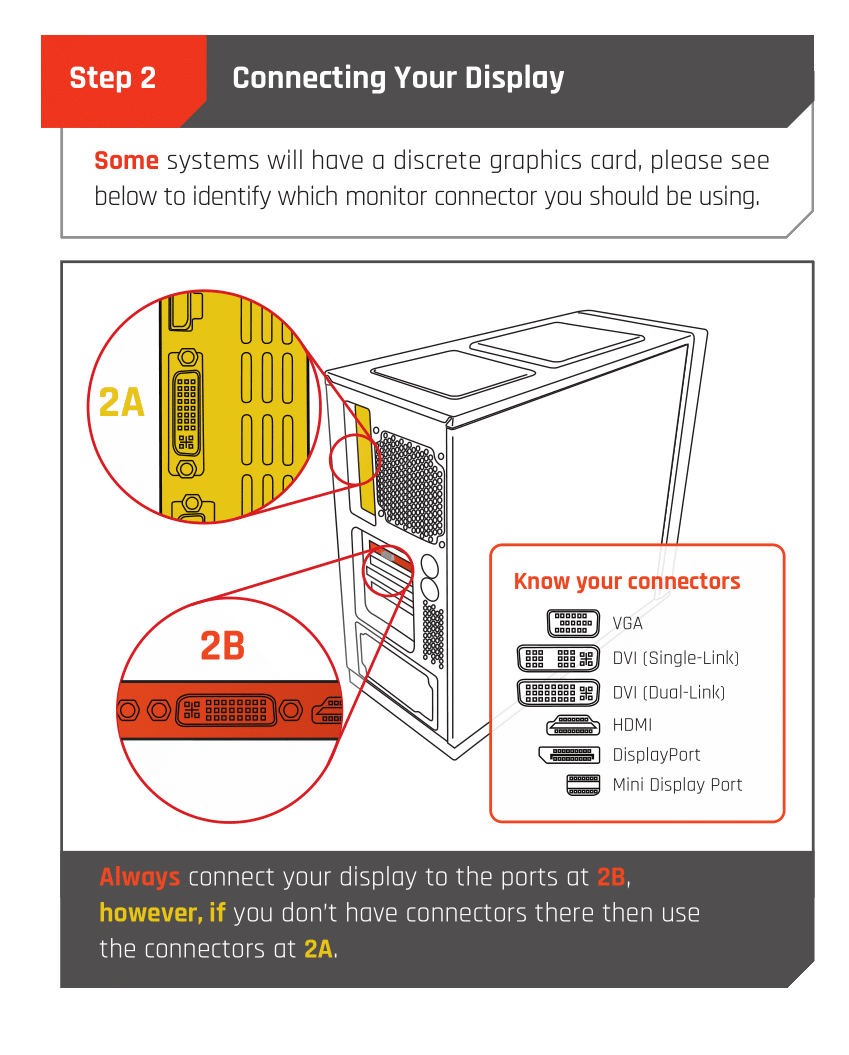
Monitor Cables
If you have a discrete GPU then you need to plug your monitor cable into the graphics card, not the motherboard. This can be found on the Quick Start Guide which was emailed to you, or you can download it with the /tag guide command.
 CyberPowerPC UK 🔸 0333 323 7776 🔸 https://www.cyberpowersystem.co.uk

 flat river
Atleast you for picture... But you can't go back into windows?
Turn your PC off and turn it on while spamming F10
coral comet
Now we have no power to the keyboard
flat river
Ah?
coral comet
 flat river
Restart the PC
flat river
Do the CMOS reset again
Turn the PC off from the wall and hold the button down
We will get there
Just the weirdest issues 
 flat river
99!
coral comet
It said E R 3 times
flat river
ER?
coral comet
Yes
It’s looking like my pc isn’t working
I’d rather send it back for them to look at it
Cuz like, I don’t know fuck all
coral comet
For the 7th time
flat river
Take a video while you are at it
flat river
coral comet
For the 7th time
Let's try...
coral comet
🙄😤
flat river
And spam F11

 flat river
Let's fucking GOO

 flat river
Ok, use your PC today
 rose abyss
we did it bois
flat river
Don't try fiddle round with it
If you have issues tomorrow I'll try be here
Don't turn it off and be like "I'll see I'll see" just use it today ❤️❤️

 flat river

coral comet
hopefully you dont have to
flat river
I hope I don't ever talk to you again bout tech issues but I'm here
rose abyss
so rude accent
flat river
I was just saying to you that you deserve no problems