#moved pc and now won't turn on
6 messages · Page 1 of 1 (latest)
 shut karma
 full socketBOT
 :tada: Congrats @shut karma, you levelled up to 5! :tada:
 wind basalt
have you tried a CMOS reset?
full socketBOT
 Resetting CMOS
:one: Shut down your PC and unplug the power cord from the wall.
:two: Locate the CMOS battery (see the image below). On some motherboards, you may have to remove the graphics card in order to access it.
:three: Remove the CMOS battery from the motherboard by pressing down on the clip and pulling the battery out.
:four: Hold down the case power button for three seconds while your PC is unplugged.
:five: Install the CMOS battery back into the motherboard and plug the power cord back into the wall.
:six: Plug in and turn on your PC.
A video guide is also available below
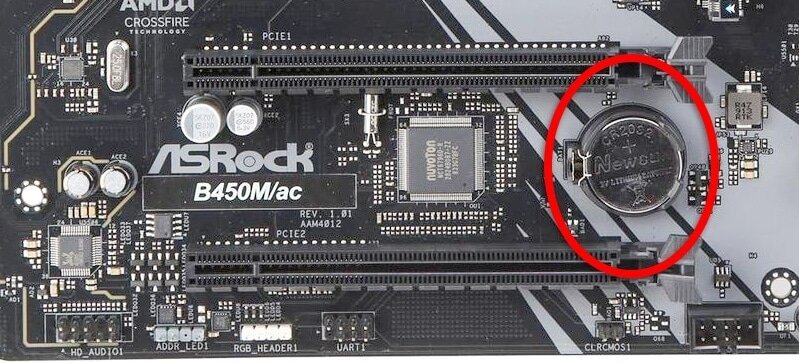
 CyberPowerPC UK 🔸 0333 323 7776 🔸 https://www.cyberpowersystem.co.uk
shut karma
wind basalt
have you tried a CMOS reset?
CyberPowerPC UK 🔸 0333 323 7776 🔸 https://www.cyberpowersystem.co.uk
shut karma
wind basalt
have you tried a CMOS reset?
I'm not there but will try thought I had to jump pins so didn't wanna try it
wind basalt
to reset the cmos you can take just the battery for a few seconds and then place it back, there is also the way to jump the cables, but the battery could do the trick