#Unknown disc when unpackaged.
105 messages · Page 1 of 1 (latest)
 spare atlas
 dawn dragon
You don't need it, the PC is plug and play
Just run Windows Updates once it's all set up
spare atlas
dawn dragon
Just run Windows Updates once it's all set up
Okay
Also
The monitor says no hdmi
But there was no hdmi cable in the box
dawn dragon
I don't think the PC comes with display cables?
Did you not get one with the monitor?
Also make sure to plug the PC in using the Graphics card
 noble gateBOT
 Display Driver Uninstaller
:one: Download the driver for your GPU from the manufacturer's website using the links below, but don't install them yet.
:two: Download the latest version of DDU by clicking the button below, clicking on the top post which is called "Display Driver Uninstaller (DDU) VXX.X.X.X Released", and clicking ***Official Download Here*** in that post.
:three: Disconnect from the Internet by unplugging your ethernet cable or turning off WiFi in the bottom-right corner.
:four: Open the program you just downloaded, choose a location for DDU to be saved, then click Extract
:five: Open the Start Menu, click the power icon then hold Shift on your keyboard and click Restart. Once your PC has restarted, select Troubleshoot > Advanced options > Startup Settings > Restart, and press 4 to load into safe mode.
:six: Find the folder you extracted DDU into and open Display Driver Uninstaller.
:seven: On the right side, select the type as GPU, and the brand as the manufacturer of your GPU. Then, click 'Clean and Restart'.
:eight: Once you have loaded back into Windows, install the GPU drivers you downloaded earlier. Once they have installed, connect back to the Internet.
 CyberPowerPC UK 🔸 0333 323 7776 🔸 https://www.cyberpowersystem.co.uk
noble gateBOT
CyberPowerPC UK 🔸 0333 323 7776 🔸 https://www.cyberpowersystem.co.uk
noble gateBOT
 Monitor Cables
If you have a discrete GPU then you need to plug your monitor cable into the graphics card, not the motherboard. This can be found on the Quick Start Guide which was emailed to you, or you can download it with the /tag guide command.
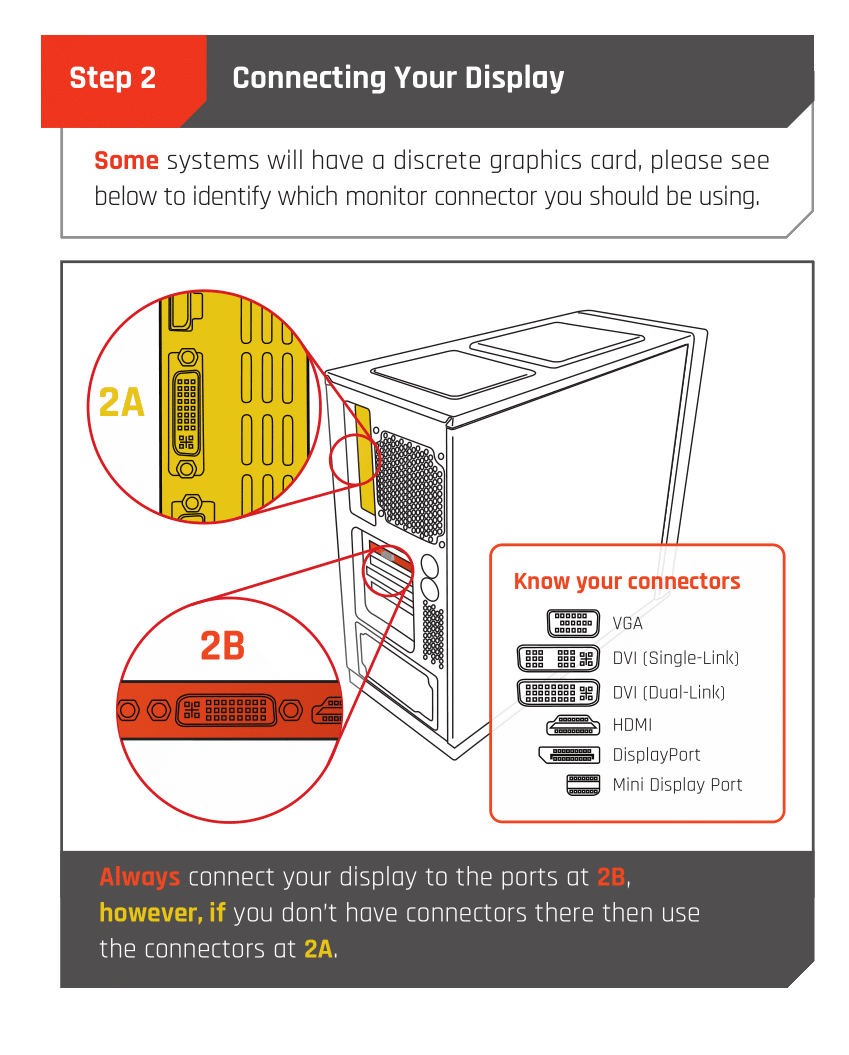 CyberPowerPC UK 🔸 0333 323 7776 🔸 https://www.cyberpowersystem.co.uk
 latent brook
@upper ivy
spare atlas
Thanks!
And lastly
It says dp no signal
Like it was working fine, and then turned back and said that
dawn dragon
What display cable are you using?
 spare atlas
Displayport
noble gateBOT
 :tada: Congrats @spare atlas, you levelled up to 1! :tada:
spare atlas
latent brook
and is it connected to the Graphics card?
Yh
But i restarted it
And its working again
Just hope it doesn't happen again
latent brook
It may just be a loose connection, make sure it's tightly in the monitor and the computer,
It's very easily done, just gotta make sure it's snug.
spare atlas
Its tight
Whats the difference between clicking restore from a pc and set up as a new PC
dawn dragon
You may have a cloud save from another PC/Laptop?
Personally, I'd set it up as a new device
dawn dragon
Nothing, it's not needed probably just a manual
latent brook
I believe the disc is just what every motherboard comes with,
dawn dragon
^
spare atlas
I was offered a free Xbox game pass
But i accidentally pressed back
And now it's gone
Anyway to get that back?
latent brook
Where was this? Discord?
dawn dragon
On the setup screen it offers free game pass for a month
latent brook
O
dawn dragon
Umm not sure how you'd get it back if it's not showing up in the setup screen anymore? Maybe once the PC is setup, download the Xbox app and see if the free 30 days appears there?

Yeah looks like it'll be in the Xbox App
spare atlas
latent brook
Where was this? Discord?
Nah, where u gotta set up the stuff when first turn on the pc
spare atlas
latent brook
O
Didn't you get the offer?
spare atlas
dawn dragon
Yeah looks like it'll be in the Xbox App
Epic
dawn dragon
No not the Epic Games launcher  jk lol
latent brook
... shivers Epic Games...
dawn dragon
Steam >>>
dawn dragon
What fans have you got?
spare atlas
Uhhh
noble gateBOT
:tada: Congrats @spare atlas, you levelled up to 2! :tada:
spare atlas
Dunno
dawn dragon
Picture?
 latent brook
Cyberpower hyperloops?
dawn dragon
Back one is a CyberPower fan the top may be MSI fans so mystic light?
 upper ivy
Mystic light for everything apart from if you have a remote
dawn dragon
The back fan you should have gotten a remote control with the PC?
upper ivy
Some cyberpower hyperloops are not remote controlled
spare atlas
It happened again. Turned off and said dp no singal
upper ivy
Was it while doing stuff?
spare atlas
Yh
spare atlas
dawn dragon
The back fan you should have gotten a remote control with the PC?
Nope, no remote control
dawn dragon
Ah, not really sure what software will change that back fan then
But the top two use Mystic Light
spare atlas
Anyone know why my pc keeps turning off
upper ivy
No, specs please
spare atlas
Do i need to install bios?
latent brook
spare atlas
Do i need to install bios?
The BIOS would already be installed, however it is a good idea to make sure it is up to date.
You can do this by going to the motherboard's website,using your model, ASUS, AMD, etc etc, and installing the most up to date revision of your bios.
dawn dragon
You able to check this?

And are you sure the cable is securely plugged in and not loose?
I would try buy another cable to make sure it's not a cable issue
spare atlas
dawn dragon
And are you sure the cable is securely plugged in and not loose?
Im sure
spare atlas
dawn dragon
I would try buy another cable to make sure it's not a cable issue
Kinda trying to save money
spare atlas
dawn dragon
Just set it to Never
But its the problem with the dp
I think
Cuz it just happens randomly
upper ivy
spare atlas
Kinda trying to save money
Its like £10
MAX
Also try a different port on the back