#PC turning off while trying to post
14 messages · Page 1 of 1 (latest)
 chrome kernel
 inland pewter
thanks for your question, what are the specs of your machine?
chrome kernel
7700x RTX 4070 B650 Edge and stop trolling 
inland pewter
how long does the system stay on for before shutting down?
have you tried to reseat your RAM modules? potentially a bad stick?
 keen rampartBOT
 :tada: Congrats @inland pewter, you levelled up to 7! :tada:
chrome kernel
inland pewter
how long does the system stay on for before shutting down?
30 seconds to 2 minutes, doesn't post
chrome kernel
inland pewter
have you tried to reseat your RAM modules? potentially a bad stick?
It's not a bad stick ram doesn't do that I don't think
keen rampartBOT
 Resetting CMOS
:one: Shut down your PC and unplug the power cord from the wall.
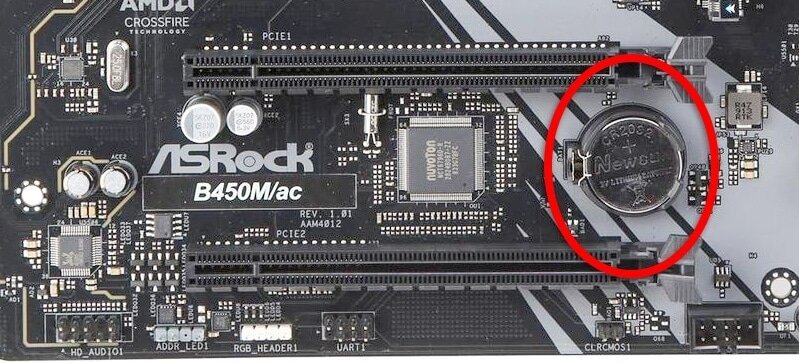
:two: Locate the CMOS battery (see the image below). On some motherboards, you may have to remove the graphics card in order to access it.
:three: Remove the CMOS battery from the motherboard by pressing down on the clip and pulling the battery out.
:four: Hold down the case power button for three seconds while your PC is unplugged.
:five: Install the CMOS battery back into the motherboard and plug the power cord back into the wall.
:six: Plug in and turn on your PC.
A video guide is also available below
 CyberPowerPC UK 🔸 0333 323 7776 🔸 https://www.cyberpowersystem.co.uk
 civic cloud
Try cmos
 zealous dove
You could try a different psu (assuming it’s got the right connectors for your gpu and it’s the right size psu)
chrome kernel
zealous dove
You could try a different psu (assuming it’s got the right connectors for your g...
Don't have a spare one for it