#disconnected power supply&GPU?
320 messages · Page 1 of 1 (latest)
 stiff basin
 warped adder
stiff basin
Hey all, noob desktop guy over here. I've just received my cyberpunk pc and im g...
warped adder
stiff basin
Hey all, noob desktop guy over here. I've just received my cyberpunk pc and im g...
its a bity hard for me to explain without being visual, i suggest you just search on youtube on tutorials on how to connect em, preferably Linus tech tips or other popular tech youtubers, and by god not the vice pc build tutorial
stiff basin
I understand its more of a visual task to explain, i mean i have no issue having a video chat and getting through this, ill also look up a tut on YouTube to see how to do it
For anyone else that sees this, where my finger is placed - i need to get this behemoth part OFF, so i may access the wiring underneath (its the bottom of the pc housing the power supply unit)

 celest cosmosBOT
 :tada: Congrats @stiff basin, you levelled up to 1! :tada:
 rugged mica
That is connected?
stiff basin
Everything underneath looks to not be connected
When i have a peak through the bunch of holes
rugged mica
Probably spare cables
Its plug and play - just enjoy your system
If something is unplugged it is quite easy to find the culprit
stiff basin
Odd... I did try to switch it on and, well, nothing?
rugged mica
Did you flick the power supply switch and press the power button?
stiff basin
Yeah done that
stiff basin
Yeah on I
rugged mica
Hold the power button with the power on
Some motherboards just take their sweet time (hold for like 2 seconds)
stiff basin
Let there be light....
Well i did press it a bunch of times
And nothing
holding it however....
rugged mica
Enjoy your rig! just do this:
celest cosmosBOT
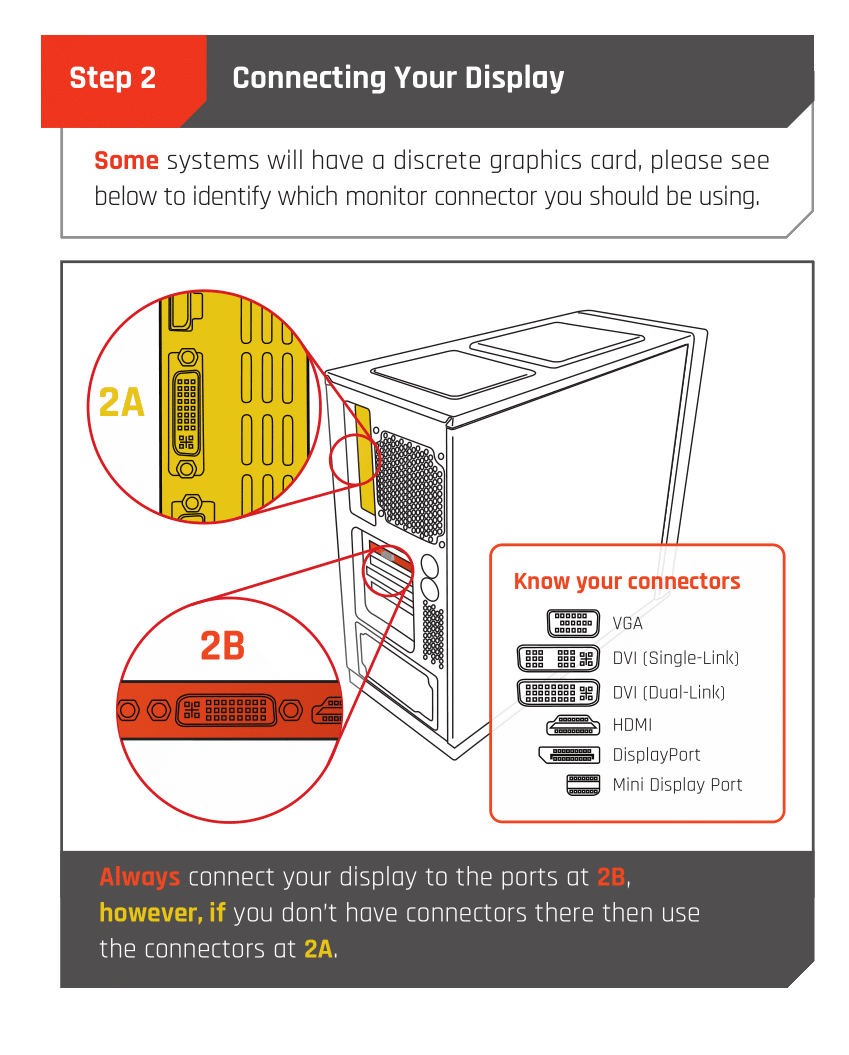
 Monitor Cables
If you have a discrete GPU then you need to plug your monitor cable into the graphics card, not the motherboard. This can be found on the Quick Start Guide which was emailed to you, or you can download it with the /tag guide command.
 CyberPowerPC UK 🔸 0333 323 7776 🔸 https://www.cyberpowersystem.co.uk
rugged mica
stiff basin
holding it however....
CyberPowerPC UK 🔸 0333 323 7776 🔸 https://www.cyberpowersystem.co.uk
rugged mica
stiff basin
holding it however....
Some cases/motherboards/psus do that. Weird stuff
stiff basin
Yeah plug it into the GPU part or something
rugged mica
Yeah
stiff basin
Yeah checking now if it boots
rugged mica
It should do!
Just if you plugged it in afterwards it might not like it
The monitor cables
stiff basin
Hmmm, no signal on my monitor
rugged mica
Give it a quick restart and should spin to life
check the motherboard EZ DEBUG LEDs aswell
they are located top right
stiff basin
Cant see any LEDs switched on
rugged mica
👍
Make sure those cables are in the right place!
And if using DP make sure its fully in - I have accidentally like half plugged it and just give that a quick push
stiff basin
Hmmmm still no signal but pc restarted on its own
rugged mica
Hmm.
Can you take a video if possible? or a photo of the motherboard when it is turned on?
stiff basin
Should i try to use the other ports to get a signal?
rugged mica
If you were to get signal that will probably be because it was not plugged in right
but yeah you can try
stiff basin
Lets try the other port...
celest cosmosBOT
:tada: Congrats @stiff basin, you levelled up to 2! :tada:
stiff basin
Yeah no signal
rugged mica
Take that photo/video and I will see if there are any obvious problems
stiff basin
Right just give me a second im gonna lay the pc on its side
rugged mica
All good
stiff basin
warped adder
looks like his gpu aint connected ngl
stiff basin
I was wondering that too
stiff basin
But then, the wire seems way too short to get through to the power supply
Rtx 4070
Ventus x2
warped adder
anychance you can just show them cables that look disconnected like turn your flash on with a picture
just so i can confirm
stiff basin
Yeah sure!
warped adder
thanks
stiff basin

Two wires, one feeding through, then THAT one
Which to me, well, looks important lol
stiff basin
Okay so its spare, that's good to know, and also one possibility checked off the list
rugged mica
It looks like it works
Might be something monitor related
You sure your connections are fully in?
stiff basin
Okay so possibly monitor, and yeah i double checked
warped adder
your DP or HDMI is plugged into GPU right?
stiff basin
Using DP, source on monitor set to DP
rugged mica
Full specs please?
warped adder
does your monitor have multiple DP ports? if so make sure your on whichever DP your plugged into, (DP1/DP2) some monitors don't automatically convert to the right one
it may sound stupid but i have done this millions of times myself


 warped adder
stiff basin
Theres only one with my monitor
warped adder
stiff basin
Theres only one with my monitor
ah ok
celest cosmosBOT
:tada: Congrats @warped adder, you levelled up to 3! :tada:
stiff basin
Should i try HDMI instead? See if anything changes?
rugged mica
Can you take a picture of the GPU connection on the motherboard?
See if the clip is engaged
stiff basin
Its definitely engaged since the GPU is switched on
rugged mica
 stiff basin
Fans are spinning
rugged mica
stiff basin
Is the pc turned on here?
 warped adder
stiff basin
Should i try HDMI instead? See if anything changes?
warped adder
stiff basin
Should i try HDMI instead? See if anything changes?
sure, but me or accent will still try to get your DP working
rugged mica
I am still thinking the computer works
stiff basin
warped adder
sure, but me or accent will still try to get your DP working
Well if HDMI works, ill have it set up and all, then work on getting DP to work
celest cosmosBOT
:tada: Congrats @stiff basin, you levelled up to 3! :tada:
warped adder
ye if thats what you wanna do
stiff basin
HDMI also doesnt work, oof
stiff basin
That plug down the middle of the picture, bottom middle of motherboard

Anything needing to be connected there?
rugged mica
The usb 3.0 is not plugged in but shouldn't matter
rugged mica
rugged mica
Take a picture at that angle here
stiff basin
@rugged mica
 rugged mica
Can not really see to be honest
stiff basin
Might be a monitor issue maybe
Then again, how? Switched on and DP is fully inserted
What uses these wires?

 stiff basin
Okay coool
rugged mica
This is a weird weird weird issue
celest cosmosBOT
Reseating RAM
CyberPowerPC UK 🔸 0333 323 7776 🔸 https://www.cyberpowersystem.co.uk
rugged mica
take all of them out but one
stiff basin
Okay let me try that
Jeez these things are shoved in there good
Im scared ill break it lol
Before ive even touched it, it looks like one is slightly upright than the rest
Would that disconnect it if it was, or has it got some leeway
rugged mica
There are CLIPS!
rugged mica
stiff basin
Before ive even touched it, it looks like one is slightly upright than the rest
Yes that would do it
Reseat that one
stiff basin
rugged mica
There are CLIPS!
Yess after i unclipped they're hard to pull out ahaha!
rugged mica
They shouldn't be too difficult
stiff basin
Well that one i mentioned, goes back in properly on one end, the other end is fighting
rugged mica
Fully unclipped?
stiff basin
Fully
And now THAT side is slightly upright
Rather than originally
Doesnt seem to want to slot in
stiff basin
Look at the bottom one, that side is slotted in


However this side, you can see its not just slightly
The clip doesnt attach
Ouch
With a bit of force
stiff basin
Hurt my hand but got it to stick in
rugged mica
It works?
stiff basin
No its okay! Ahaha
rugged mica
Glad its working!!!!!!
stiff basin
I got all weekend to fiddle with it
stiff basin
Ahaha thanks!!
stiff basin
rugged mica
I have a 4070 and let me tell you
Im upgrading from a laptop 2060 so...
Im excited....
I have to say though, Hp Omen laptops are pretty damn good
celest cosmosBOT
:tada: Congrats @stiff basin, you levelled up to 4! :tada:
rugged mica
I upgraded from the 3060 and damn it was an improvement
stiff basin
Ooof now im even more excited going from a 2060
rugged mica
Yessir!
stiff basin
Thanks for the help!!
rugged mica
No problem!
warped adder
tbh i was gonna reccomend ram, but i thought it was stupid, the first thing i do in that situation is my ram, but hell ye enjoy it dude
rugged mica
Weird that there was no indicator
stiff basin
Ahaha it was poking out just that litttleee bit
Caught my eye as i was staring at it hopelessly
rugged mica
Some dude at DPD probably accidentally dropped it lol
stiff basin
Probably
warped adder
rugged mica
Some dude at DPD probably accidentally dropped it lol
accidentally? shit you trippin if you think it was accidentally
they probs full on kicked that shit from tim buck two to his door
stiff basin
Lmaooo bro probably kicked it about
stiff basin
warped adder
they probs full on kicked that shit from tim buck two to his door
Exactly!! 😂😂
warped adder
LMAO yup
warped adder
i pray to god that dont happen with me, UPS deliveres cyberpower shit to me
and UPS is always great whenever i get delivered from them
warped adder
never ever a single mark on any package or product
rugged mica
Its dpd here
rugged mica
DPD delivers CPUK systems
warped adder
oh well i ordered a keyboard from cyberpower and ups delivered it, unless it was DPD then passed onto UPS for simplicity?
idk
i dont think theres any close DPD dispatchers near me
UPS or royal mail is pretty mutch the only companies that deliver here
and amazon
stiff basin
Yeah basically
warped adder
it was probabbly DPD then passed to UPS
rugged mica
oh no
warped adder
unless i ordered from ibuypower and not cyberpwoer
stiff basin
Bought this beast and a 0.5ms 240hz monitor and watch me still get shit on my Taq-56s in MWII
stiff basin
By*
warped adder
nah the company is ibuypower
rugged mica
Can't discuss competitors here 😔
rugged mica
they aren't competing 😈
stiff basin
So....
 warped adder
ishitpower is on the ground
warped adder
stiff basin
So....
THEY SOME BIG ASS BOXES
rugged mica
Is that a laxative?
warped adder
good, better packaginf
rugged mica
I shitpower...
warped adder
packaging*
stiff basin
warped adder
THEY SOME BIG ASS BOXES
LMAO
warped adder
rugged mica
I shitpower...
ye cause they're shit
stiff basin
Imagine carrying it up three flights of stairs
warped adder
cyberpower only good
warped adder
stiff basin
Imagine carrying it up three flights of stairs
eh it aint that bad, i used to deliver furnitre
never fun
 warped adder
once drove 5 hours to londong to deliver a 100kg marble table top the the top of a apartment building then 5 hours back its horrible
warped adder
stiff basin
Dust filter??
yur
stiff basin
Cooolll im slapping that shit back on asap
warped adder
be a good idea
stiff basin
Next investment - Loads of RGB
warped adder
ah yes you are a pc gamer in the making i see
stiff basin
Basically, i have a laptop ive been gaming on for about two years
warped adder
i say that i had LOAD of rgb and then i had zero
but i miss it
so imma buy shit ton of more rgb shit
stiff basin
Having a desktop is like
I just need that shit load of rgb
Everything that is possible to do
rugged mica
Talking about RGB?
rugged mica
Well
stiff basin
Got myself a surround sound in my room so ill make good use of that
stiff basin
Bless my eyes

 stiff basin
Ooohh yessss
stiff basin
More indeed
rugged mica
EVERYTHING IS FREAKING RGB
MY CASE IS RGB MY GPU IS RGB MY RAM IS RGB MY FANS ARE RGB MY
AIO IS RGB
WHAT MORE 😦
warped adder
MOREEEE
stiff basin
MORE
celest cosmosBOT
 inaweirdaccent was warned for Spamming
stiff basin
ah
warped adder
shit
warped adder
well even the protector agrees you need more RGB
warped adder
mousepad, keyboard, mouse, monitor, headphones,speakers
rugged mica
Noo
celest cosmosBOT
:tada: Congrats @warped adder, you levelled up to 4! :tada:
warped adder
lights
stiff basin
Your headset
warped adder
toilet rgb
stiff basin
RGB
warped adder
sink rgb, HOUSE RGB
warped adder
stiff basin
Okay i got a shit ton to throw out
we burn all our cardboard
take it up the farm yard
and burn it
stiff basin
I'm Asian that wont turn out well for me
warped adder
rugged mica
Alright well, if this is resolved may we seek different channels?
shit ye a good idea
stiff basin
Yesss how do i close this
rugged mica
Sounds like a plan!
stiff basin
Then spend the next few hours crying on mw2
rugged mica
That is the way to do it...
stiff basin
Thanks for all the help guys!
rugged mica
No problemo! Feel free to ask any more questions dare I say