#federal PC support.
1428 messages · Page 2 of 2 (latest)
 prisma swan
 obsidian pendant
just wanna make sure nothing is damaged components wise
like my power supply or sometjiing
 alpine mirage
if something was majorly damaged, it wouldn't be turning on
obsidian pendant
but then again, if that were the case i doubt it would have even turned on again right?
yeah
prisma swan
Your PSU is quality enough to not kill other parts probably
obsidian pendant
that was SO weird
prisma swan
We don't question computers
alpine mirage
welcome to PCs
 wise etherBOT
 OCCT
OCCT
 CyberPowerPC UK 🔸 0333 323 7776 🔸 https://www.cyberpowersystem.co.uk
 Furmark GPU Stress Testing
:one: Open the link below, choose latest version on the left, then click the Orange Download button.
:two: Open up the file you just downloaded, accept the license agreement and continue through the setup.
:three: Uncheck 'Launch FurMark release notes', leave 'Launch FurMark' checked, and click Finish.
:four: Leave everything on the defaults, select 'GPU Stress Test', and allow that to run for two hours.
:exclamation: If your PC freezes or crashes while running the test, or the two hours are up, let us know.
CyberPowerPC UK 🔸 0333 323 7776 🔸 https://www.cyberpowersystem.co.uk
Furmark GPU Stress Testing
:one: Open the link below, choose latest version on the left, then click the Orange Download button.
:two: Open up the file you just downloaded, accept the license agreement and continue through the setup.
:three: Uncheck 'Launch FurMark release notes', leave 'Launch FurMark' checked, and click Finish.
:four: Leave everything on the defaults, select 'GPU Stress Test', and allow that to run for two hours.
:exclamation: If your PC freezes or crashes while running the test, or the two hours are up, let us know.
CyberPowerPC UK 🔸 0333 323 7776 🔸 https://www.cyberpowersystem.co.uk
 MemTest86 Memory Testing
:one: Download MemTest86 using the link below.
:two: Open the zip file you downloaded and run ImageUSB
:three: Click 'Extract', choose a File Location then click 'Extract' again.
:four: Run ImageUSB from the File Explorer windows which just opened and select your USB stick from the list.
:five: Click the Write button, ensuring that any files on your USB stick that you would like to keep are backed up.
:six: Shut down the PC you are going to be testing, insert the USB stick and press the following key while your PC is turning on, depending on your motherboard:
 ASUS/ROG: F8
 Aorus/Gigabyte: F12


 MSI/ASRock/Cyberpower: F11
Then select your USB Drive from the list and press Enter.
:seven: Wait for the 10 second timer to finish and the test will begin.
:exclamation: If MemTest86 picks up an error, or the test has finished (It will stop automatically), let us know.
After making a MemTest86 USB, you will notice that your USB will have much less capacity. To fix this, reopen the ImageUSB tool, select Reformat USB drive under Step 2, then click Write again.
CyberPowerPC UK 🔸 0333 323 7776 🔸 https://www.cyberpowersystem.co.uk
 HWiNFO
Download either the Installer or Portable version
For temperatures, run in Sensor Only mode.
CyberPowerPC UK 🔸 0333 323 7776 🔸 https://www.cyberpowersystem.co.uk
prisma swan
Can you just full send everything and note the cpu temperatures please
alpine mirage
full send it all and just make sure you remember the support phone number 
prisma swan
:/
alpine mirage
nah it'll be fine
prisma swan
PCs are made to run 100% all da time
alpine mirage
do the tests and see if there is anything unusual
prisma swan
It's actually worse than gaming then stopping
 delicate plume
1000+ messages 

 delicate plume
alpine mirage
delicate plume
alpine mirage

 alpine mirage
dudes got a eco friendly chrome
prisma swan
Aging silicon
delicate plume
 prisma swan
Wow 😲
Lewis does your 10900k bottleneck your 4070ti?
Sometimes my 13600k is a weird bottleneck and I have a 4070
alpine mirage
Accent is just jealous because of my amount of cores
 delicate plume
Idk probably I don't really notice anything tho
delicate plume
8 cores 💀
prisma swan
💀💀
prisma swan
delicate plume
Idk probably I don't really notice anything tho
Oka
alpine mirage
... well... less chance of one breaking, the more cores, bigger chance of breaking
... right?
prisma swan
No, still one CCD
alpine mirage
Why am I defending this system when I'm getting a new one
obsidian pendant
delicate plume
1000+ messages <:HYPERS:899486488855711764>
lets go! downloading everything rn
obsidian pendant
furmark at 720p
 prisma swan
No, not the test
Like run everything at the same time
The Furmark will go on and on and on
alpine mirage
sup
wise etherBOT
 fe.deral was warned for Spamming
prisma swan
Yea you should be though.
obsidian pendant
ive heard even if task manager shows 32 GB
ur pc might not acc be running at that speed
alpine mirage
ram speed and the amount are two different things
obsidian pendant
okay so like what the slight problem is
sometimes when i have quite a few things running
prisma swan
It wont be due to your RAM most likely
obsidian pendant
lets say fortnite, discord, google and the ram is going up and up
sometimes
if im on google
prisma swan
Normal
obsidian pendant
it will go slow
alpine mirage
yeah normal if you have loads open tbh
obsidian pendant
but on task manager while i have that much open, there is not that much usage
but its fine
its not like a major issue, i just heard its common in pre builds that things such as RAM etc is not put to its acc potential
prisma swan
CPUK enables XMP.
obsidian pendant
thanks ❤️
 obsidian pendant
hey, did a driver update last night and get on my PC this morning and there seems to be this weird issue that when i am on my first monitor, in a game and i windows key to move over to my second monitor. my screen goes black for a second then i move my mouse over to my second monitor and everything is fine. when i am on my second monitor tho and operating on there and click the windows key everything is fine and there is no black screen. ive only tested this out with fortnite and this is the game i am getting a black screen on. any help?
wise etherBOT
 Display Driver Uninstaller
:one: Download the driver for your GPU from the manufacturer's website using the links below, but don't install them yet.
:two: Download the latest version of DDU by clicking the button below, clicking on the top post which is called "Display Driver Uninstaller (DDU) VXX.X.X.X Released", and clicking ***Official Download Here*** in that post.
:three: Disconnect from the Internet by unplugging your ethernet cable or turning off WiFi in the bottom-right corner.
:four: Open the program you just downloaded, choose a location for DDU to be saved, then click Extract
:five: Open the Start Menu, click the power icon then hold Shift on your keyboard and click Restart. Once your PC has restarted, select Troubleshoot > Advanced options > Startup Settings > Restart, and press 4 to load into safe mode.
:six: Find the folder you extracted DDU into and open Display Driver Uninstaller.
:seven: On the right side, select the type as GPU, and the brand as the manufacturer of your GPU. Then, click 'Clean and Restart'.
:eight: Once you have loaded back into Windows, install the GPU drivers you downloaded earlier. Once they have installed, connect back to the Internet.
CyberPowerPC UK 🔸 0333 323 7776 🔸 https://www.cyberpowersystem.co.uk
prisma swan
Update driver and getting weird issues next day is probably resolved with a DDU
obsidian pendant
do i uninstall the driver w ddu then reinstall it?
prisma swan
No worries, make sure to follow the steps carefully though.
delicate plume
Hold up if you're playing Fortnite in Fullscreen alt tabbing will most likely give a black screen
for a couple seconds
Depending on the game, this is normal..?
obsidian pendant
i mean it never happened before on my old drivers that i was on, the game would just keep rollin on my main monitor without audio, no sort of black screen
prisma swan
delicate plume
Depending on the game, this is normal..?
You might be right to be fair
Maybe the new driver put you off of borderless full screen?
I usually just default to DDU when update driver and then things change
delicate plume
Yeah just switch to Borderless Fullscreen in the game settings
obsidian pendant
guys i am very stupid 🙂
obsidian pendant
delicate plume
Yeah just switch to Borderless Fullscreen in the game settings
this is what i needed to do, didnt realise that the update changed it back to fullscreen and when i did windowed fullscreen it fixed the issue
delicate plume
obsidian pendant
this is what i needed to do, didnt realise that the update changed it back to fu...
Yeah some games when using Fullscreen will cause black screen when alt tabbing as it's making the game the focus
Borderless fullscreen will still render in your desktop in the background so alt tabbing is smoother but may cause slight input delay which shouldn't really be noticeable
 vapid crypt
There is a windows setting called full screen optimisation https://support.microsoft.com/en-us/windows/optimizations-for-windowed-games-in-windows-11-3f006843-2c7e-4ed0-9a5e-f9389e535952
How to improve gaming on your Windows 11 PC by making use of the optimization for windowed games settings.
From what I understand it basically runs full screen programs as borderless window ones
 brave scarab
obsidian pendant
brave scarab
obsidian pendant
yes 😅 been using this thread for the last 3 months for all my own personal PC issues, everything has been going amazing with my CPUK computer. couldn't have been more happy with my purchase.
obsidian pendant
vapid crypt
From what I understand it basically runs full screen programs as borderless wind...
thanks man
delicate plume
🥳
 obsidian pendant
weeeee meet again….😭
so erm new issue is the RGB on my case fans
booted up my PC today
and they are like really dim
and just slowly cycling throw colours
no response to my remote control
just got a mind of it’s own now
any suggestions?
my case fans are the stanard cyber power PC case fans
wise etherBOT
 Article suggestion from InAWeirdAccent
How to use your CyberPowerPC UK RGB Remote Control
The remote you have received is to control the lighting on your CyberPowerPC UK RGB fans. Take a look at the image below and then we'll go through each section.
Power Button:
This will turn your fan lighting on and off.
AUTO:
This button will reset the fans back to the original setting which is just a regular rainbow cycle.
M/B:
This button is used to swap the RGB control from the remote to your motherboard software. This is only to be used if your Cyberpower fan hub has been connected to your motherboard via the RGB cable.
S+/S- :
These buttons are to control the speed of the lighting effect currently being used on the fans, there are 3 levels to choose from.. For example if you have the fans cycling through every colour you can increase/decrease the speed at which it will change colours).
M+/M- :
These buttons will change the actual lighting effect/mode on the fans. You can decide whether you want it on full rainbow or fixed on one colour.
Brightness:
Use these buttons to change the brightness level of the lighting effect on your RGB fans. There are 3 levels to choose from.
Manual Colour Buttons:
If a lighting effect does not fit your setup and you just want a single colour to illuminate your room you can choose from 12 pre-set colours options using these buttons.
prisma swan
Try using motherboard software maybe?
obsidian pendant
how do i get the motherboard software tho?
prisma swan
Msi Center
obsidian pendant
ive opened msi center, struggling to find case fan control
prisma swan
Mystic light
obsidian pendant
you’re gonna have to listen to this on full volume but every time i turn on my pc there is this high pitch noise. i can’t tell if it’s a really long beep or something wrong with the fans?
prisma swan
My fans do the same sadly
obsidian pendant
and i’m having no luck with the RGB also
just seems to have died
idk
working fine last night
prisma swan
Oh turn the PC off go to the metal side panel and try see if the wires are in right (hub)
Unplug and replug all fans
 gleaming trench
Are they cyberpower fans?
I had a similar issue with my cyberpower fans, and changing the power connector which goes into the back of the hub helped
If they’re cyberpower fans, it’ll be a molex connector. They’re normally daisy chained. So find another one on the chain and plug it in and hope it fixes it. If not, you may need a new hub
obsidian pendant
prisma swan
Oh turn the PC off go to the metal side panel and try see if the wires are in ri...
looks like this fixed my issue, thanks 🙂

they were all in right, unplugged them all tho and plugged them back in
prisma swan
awesome!
obsidian pendant
this noise is going to piss me off
tho
i feel like it’s hitting something
i just dk what
maybe like the little mesh thing
infront of the fan
obsidian pendant
i can’t tell which fan it is😭
right
i am SO confused
turns out it’s the RGB making the noise?😭
prisma swan
Thats common 😭
prisma swan
Yeah its so frustrating
prisma swan
No idea
 prisma swan
This design is very human
obsidian pendant
that’s so weird so this must have been happening ever since i got the pc?
prisma swan
I believe so - yeah.
 royal parcel
Oh so that’s what the high pitch sound I always hear from my pc is
obsidian pendant
hey, fans seem to be doing the same thing again today
its like they are just being controlled on its own
do u think it might be an issue with the remote?
battery replacement needing?
gonna be really annoying to take the back panel off every time i boot to unplug the fans and put them back in again
prisma swan
obsidian pendant
gonna be really annoying to take the back panel off every time i boot to unplug ...
Maybe its a faulting hub, I would contact support.
wise etherBOT
 Customer Support
:telephone: 03333-237776
:e_mail: [email protected]
:clock3: Monday - Friday, 9:00am - 5:30pm
Please ensure to include as much information about your query as possible, and ensure to include your order number if you require after-sales support.
CyberPowerPC UK 🔸 0333 323 7776 🔸 https://www.cyberpowersystem.co.uk
prisma swan
Or remote, you can try the battery replacement
alpine mirage
happy bday
alpine mirage
happy early bday
prisma swan
atleast you can still use the PC I would guess?
obsidian pendant
yes the pc works fine but my PC was the brightest thing in my setup
now it looks like its half dim and dying
alpine mirage
it's just looking after your eyes
obsidian pendant
and mystic light is hella confusing
obsidian pendant
gleaming trench
If they’re cyberpower fans, it’ll be a molex connector. They’re normally daisy c...
update: this seemed to have worked, all i did was unplug the molex connector and plug it back in and it’s been fine for a few days
gleaming trench
Glad it worked :)
I haven’t had any issues with mine since swapping connectors. So hopefully the issue is fixed 👍
obsidian pendant
can somebody please do the tag for the DDU driver uninstall thing
for when you do it when installing new drivers
idk the tag 😭
wise etherBOT
Display Driver Uninstaller
:one: Download the driver for your GPU from the manufacturer's website using the links below, but don't install them yet.
:two: Download the latest version of DDU by clicking the button below, clicking on the top post which is called "Display Driver Uninstaller (DDU) VXX.X.X.X Released", and clicking ***Official Download Here*** in that post.
:three: Disconnect from the Internet by unplugging your ethernet cable or turning off WiFi in the bottom-right corner.
:four: Open the program you just downloaded, choose a location for DDU to be saved, then click Extract
:five: Open the Start Menu, click the power icon then hold Shift on your keyboard and click Restart. Once your PC has restarted, select Troubleshoot > Advanced options > Startup Settings > Restart, and press 4 to load into safe mode.
:six: Find the folder you extracted DDU into and open Display Driver Uninstaller.
:seven: On the right side, select the type as GPU, and the brand as the manufacturer of your GPU. Then, click 'Clean and Restart'.
:eight: Once you have loaded back into Windows, install the GPU drivers you downloaded earlier. Once they have installed, connect back to the Internet.
CyberPowerPC UK 🔸 0333 323 7776 🔸 https://www.cyberpowersystem.co.uk
obsidian pendant
never mind, im slow.
alpine mirage

alpine mirage
uhhhhh
obsidian pendant
because there seems to be a new one out, i just dont know how to get rid of the old one first
obsidian pendant
nvm sorry, im slow as shit
 alpine mirage
prisma swan
Confusion 
alpine mirage
if you go any slower you'd be going backwards
obsidian pendant
booting my shit into safe mode 🫡
obsidian pendant
looking to reset my pc, been recommended to do a fresh windows 11 install via a USB bootable drive. whats the best way to go about it?
reason for resetting is because one of the programs on my computer stopped working randomly and im hoping resetting my pc will help make it work again
wise etherBOT
 Windows 11 Installation
If you are upgrading from Windows 10, you may need to enable TPM and Secure Boot in order to proceed with the Windows 11 installation - please follow the TPM & Secure Boot guide below first.
:warning: When reinstalling Windows, you will lose any files which are not backed up to the cloud or an external drive - please ensure any files you would like to keep are backed up before continuing.
:one: Click the button below and download the 'Create Windows 11 Installation Media' tool.
:two: Follow through the installation tool, and choose 'USB flash drive' when prompted. Your USB flash drive must be 8GB or greater.
:three: Once the tool has finished, shut down the PC you're installing Windows on and insert the USB drive.
:four: Next, repeatedly press the following key while your PC is turning on, depending on your motherboard:
ASUS/ROG: F8
Aorus/Gigabyte: F12
MSI/ASRock/Cyberpower: F11
Then choose your USB drive from the list to boot from it.
:five: Follow through the installation tool. When it asks for your product key, click Skip - your PC will automatically reactivate. Make sure to select the same Windows version as you ordered with your PC, then choose a Custom installation.
:six: Select the drive in which you would like to install Windows on (you will want to install Windows on your SSD, this is typically a smaller drive), delete any partitions which already exist and then select Drive # Unallocated Space, and click Next.
:seven: Once your PC restarts, you will be taken to the first-time setup screen, where you can setup your user account and preferences.
CyberPowerPC UK 🔸 0333 323 7776 🔸 https://www.cyberpowersystem.co.uk
obsidian pendant
wow, been a minute 😅
but hey i’m back again, this time i’m looking for help regarding download and upload speeds on my pc
i’m trying to find an ISP with good downloads and upload speeds
but i also wanna make sure everything like wifi card on my motherboard etc, will be able to handle high download and upload speeds
i currently have those 2 antenna’s given to me by cyberpower on the back of my pc
and i have a B650 gaming plus wifi motherboard
any type of support or guidance would be greatly appreciated
prisma swan
The answer is Yes
obsidian pendant
prisma swan
The answer is Yes
wdym by yes?
prisma swan
obsidian pendant
wdym by yes?
your motherboard will do fine with good internet
its wifi 6
obsidian pendant
prisma swan
your motherboard will do fine with good internet
whats the sort of max speeds the motherboard can take?
prisma swan
Well you wont expect it but it can somehow do 9.6gbps
Its just about the range at that point
Wifi 6E
So just get a wifi 6 router and you are set
obsidian pendant
appreciate it, crazy to see you still here after all this time😅
prisma swan
heh..... yeah damn that seems kinda sad that im still here
obsidian pendant
had this thread for almost a year now lmao
obsidian pendant
not sure if you remember me or not 😹
prisma swan
Yeah I remember the fan troubles
obsidian pendant
prisma swan
PC still going strong!
honestly, amazing
prisma swan
the oh fuck cable management
obsidian pendant
LMAO
prisma swan
obsidian pendant
the setup rn 😅

@alpine mirage @prisma swan i will forever cherish this video my friends.
prisma swan
prisma swan
obsidian pendant
the setup rn 😅
YOOOOOO
my setup is so much worse than that
maybe because cable management
obsidian pendant
nah man your cable management must be good
i rmbr u showed me the back of ur pc without the back panel
everything in neat zip ties
prisma swan
That was someones I built for them
yee naw my desk is capble cable cable
the only nice cable on my desk is this coiled cable
 obsidian pendant
damn that keyboard is clean
prisma swan
I built it yesterday so I get flex rights
obsidian pendant
i was thinking about getting that popular keyboard that went viral recently
but didn’t know if it was worth the money
prisma swan
wooting?
obsidian pendant
prisma swan
I built it yesterday so I get flex rights
sound nice?
obsidian pendant
yeah im ngl i just was thinking ab it bc tenz said it was OP😂😂
wasn’t so determinded tho
prisma swan
And honestly hall effect is over hyped alot
Just some linears will do the trick
what keeb do you have now?
obsidian pendant
i went budget choice
got the red dragon k530 pro
i think
sounds great and feels great for the price
ngl
prisma swan
obsidian pendant
sound
OH DEAR GOD what tiis thatt
obsidian pendant
LMAO
prisma swan
those stabilizers are rattling SO HARD
obsidian pendant
my phone was hella close
prisma swan
nuh huhuhh
obsidian pendant
😭😭
prisma swan
uhhh but its very moddable
obsidian pendant
should i get into keyboard modifications?
prisma swan
Yes
obsidian pendant
where should i start
prisma swan

International products have separate terms, are sold from abroad and may differ from local products, including fit, age ratings, and language of product, labeling or instructions.
you bought this yeah?
obsidian pendant
tbh i’d rather go for sound more than sort of keyboard response times
prisma swan
obsidian pendant
tbh i’d rather go for sound more than sort of keyboard response times
yes this will end up sounding good
obsidian pendant
i’m scared something might break im ngl😅
i get scared to take off the key caps 😅😅
prisma swan
You can't really break a keyboard
obsidian pendant
the key caps be tough lmao
prisma swan
But when putting the switches in hold the hotswappable joints in so it doesn't break the joint
prisma swan
obsidian pendant
the key caps be tough lmao
If you like those keycaps keep em but there are some reallly nice ones
obsidian pendant
you type and i’ll brb
prisma swan
just forget about it its too much effort
obsidian pendant
prisma swan
just forget about it its too much effort <:kek:802149014198812703>
i’m actually so down tho 😅
so when you say foam, where does that sit?
prisma swan
alot but I think you need different types due to compatibility
prisma swan

Akko V3 Pro Cream Yellow Mechanical Keyboard Switch, Linear Switches, 5 Pin 50gf RGB LED Slot, Transparent Cover, MX Key Switches for DIY Kit/Gamer Barebones Keyboard (45 Pcs)
May need to buy two of these
dam
If you actually wanna get into modding just watch alot of youtube videos on your specific keyboard
that way you know what you wanna do

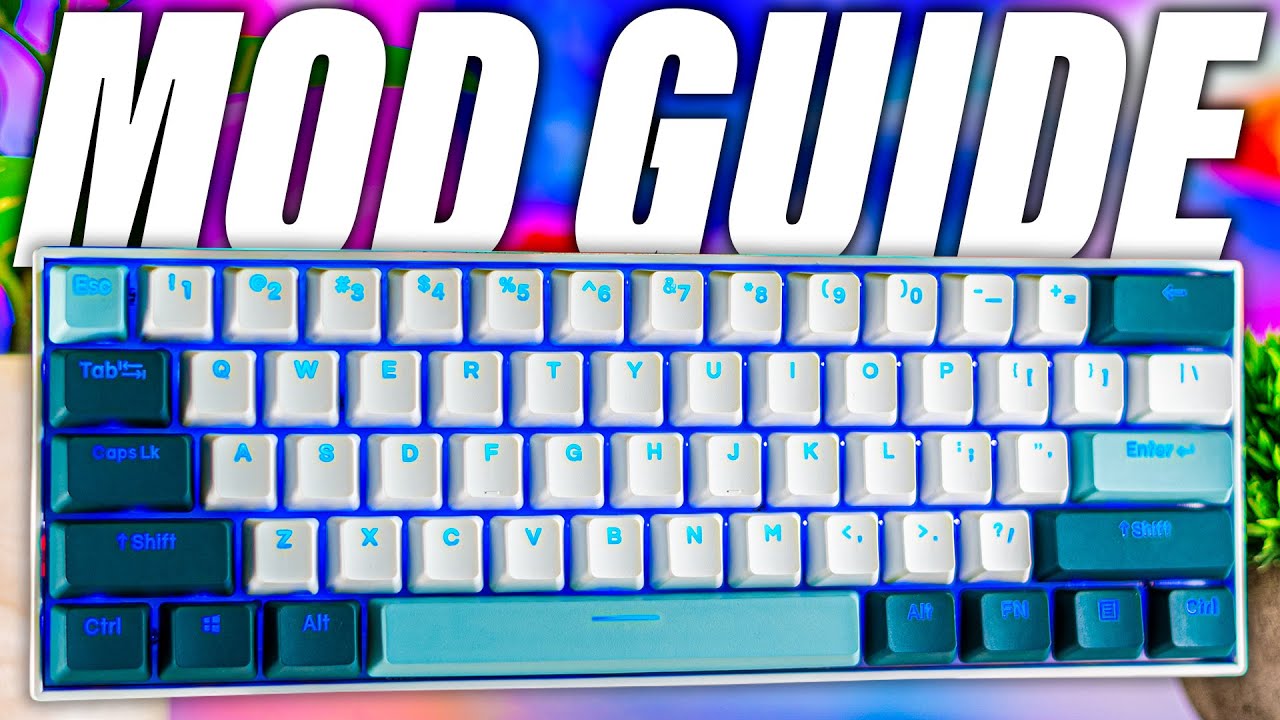
#keyboard #redragon
Amazon Links:
Redragon K530 Pro:
US: https://amzn.to/3TtV8Dn
CA: https://amzn.to/3R5FPz3
UK: https://amzn.to/3edcvYR
International: https://geni.us/lBCK3
Epomaker Flamingo Switches:
US: https://amzn.to/3cBZnfm
CA: https://amzn.to/3wPGxbq
UK: https://amzn.to/3RhTSSb
International: https://geni.us/LkaiJ1
Akko Switc...

I spent some money on a tiny toy that's actually supposed to be cheap. This is a review of a budget 60%, custom, mechanical keyboard by Redragon.
Expensive Keychron Q6 Review: https://youtu.be/ygAsLN6bnDs
Intro - 0:00 - 0:55
Unboxing & Features - 0:55 - 2:58
Building - 2:58 - 4:11
Sound (Cherry Black +Stock) - 4:11 - 4:49
Intermission - 4:49 -...
obsidian pendant
appreciate this a lot my man
wise etherBOT
@obsidian pendant
This thread has been inactive for 72 hours
:green_square: If your query has been resolved, click the 'Close' button. Don't forget to thank the members that have helped you with the /thanks command!
:red_square: If you still need support, click the 'Keep Open' button in the next 24 hours to keep this thread active.
:question: Need more support on this issue later? Simply reply to this thread to re-open it.
obsidian pendant
https://www.cyberpowersystem.co.uk/system/ultra-r75-gaming-pc does this PC build come with fans? lol i remember the last issue i had where i forgot to order fans in the first place

Ultra R75 Gaming PC - - - - -
wise etherBOT
obsidian pendant
https://www.cyberpowersystem.co.uk/system/ultra-r75-gaming-pc does this PC build...
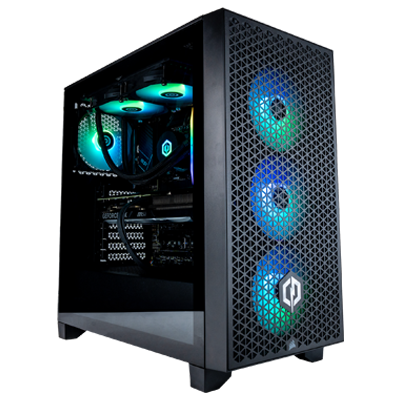 Ultra R75 Gaming PC
Case: Corsair 3000D RGB Airflow Gaming Case - Black (features 3x ARGB 120mm fans)
Case Fans: None Selected
CPU: AMD Ryzen 5 9600X - 6-Core 3.90GHz, 5.40GHz Turbo - 32MB L3 Cache Processor, Pro OC Compatible w/ Radeon Graphics
CPU Cooler: Be Quiet Dark Rock Slim Air Cooler
Motherboard: MSI PRO B650M-P: m-ATX w/ USB 3.2, 2x M.2
M.2 SSD: 1TB MSI M450 M.2 PCIe 4.0 NVMe SSD - 3600MB/s Read & 3000MB/s Write
RAM: 32GB (2x16GB) DDR5/5200mhz Corsair Vengeance Memory
Graphics Card: MSI GeForce RTX™ 4060 - 8GB GDDR6 - HDMI, DP - Real-Time Ray Tracing, NVIDIA DLSS 3
Power Supply: InWin B65E 650W 80+ Certified Gaming Power Supply
PCIe WiFi Card: None Selected
Special Offer: Norton 360 VPN & Security for Gamers (Full 1 Year License)
£1203.60 inc. VAT (£1003.00 ex. VAT)
CyberPowerPC UK 🔸 0333 323 7776 🔸 https://www.cyberpowersystem.co.uk
gleaming trench
Nope. You’d have to select some in the extra fans section
The cooler has a fan (as it’s a fan cooler) and by default, cyberpower will add a free black fan at the back of the case. But the 3000D is an OEM case (meaning it doesn’t come with any fans)
prisma swan
gleaming trench
Nope. You’d have to select some in the extra fans section
The cooler has a fan ...
3000D comes with 3x RGB fans
 prisma swan
prisma swan
obsidian pendant
https://www.cyberpowersystem.co.uk/system/ultra-r75-gaming-pc does this PC build...
You probably don't have that build
Things update
obsidian pendant
prisma swan
Things update
i noticed that lol, last september i bought the ultra r75 and the case was different and so was the GPU
so with the 3 fans that it comes with it, will that include the 1 rear exhaust fan or will there be FOUR in total, 3 that come with the build and 1 that cyberpower put in the back automatically?
prisma swan
Probably
wise etherBOT
@obsidian pendant
This thread has been inactive for 72 hours
:green_square: If your query has been resolved, click the 'Close' button. Don't forget to thank the members that have helped you with the /thanks command!
:red_square: If you still need support, click the 'Keep Open' button in the next 24 hours to keep this thread active.
:question: Need more support on this issue later? Simply reply to this thread to re-open it.
 thorny agate
RIP
wise etherBOT
@obsidian pendant
This thread has been inactive for 72 hours
:green_square: If your query has been resolved, click the 'Close' button. Don't forget to thank the members that have helped you with the /thanks command!
:red_square: If you still need support, click the 'Keep Open' button in the next 24 hours to keep this thread active.
:question: Need more support on this issue later? Simply reply to this thread to re-open it.
 hushed walrus
damn, been a whole year since i was last in this discord, im wanting to do some upgrades to my system (add an AIO into my PC) but i want to know which AIO size i need to buy to make sure it fits my case.
this is my PC case by the way 

 true thunder
hushed walrus
damn, been a whole year since i was last in this discord, im wanting to do some ...
true thunder
hushed walrus
damn, been a whole year since i was last in this discord, im wanting to do some ...
just make your own support thread bro 😭
hushed walrus
true thunder
just make your own support thread bro 😭
this is my support thread 😭 i am “federal”. just a new account
wise etherBOT
 :tada: Congrats @hushed walrus, you levelled up to 1! :tada:
hushed walrus
any ideas on AIO size?
wise etherBOT
@dark prawn
This thread has been inactive for 72 hours
:green_square: If your query has been resolved, click the 'Close' button. Don't forget to thank the members that have helped you with the /thanks command!
:red_square: If you still need support, click the 'Keep Open' button in the next 24 hours to keep this thread active.
:question: Need more support on this issue later? Please create a new thread - you can always reference this thread in your new one.
 leaden prairie
hushed walrus
this is my PC case by the way <:thumbsup:956584717837299772>
leaden prairie
hushed walrus
this is my PC case by the way <:thumbsup:956584717837299772>
just to clarify, you want to double check what AIO size can fit in the Onyxia case?
@hushed walrus should be fine now
hushed walrus
thank you
wise etherBOT
:tada: Congrats @hushed walrus, you levelled up to 2! :tada:
hushed walrus
leaden prairie
just to clarify, you want to double check what AIO size can fit in the Onyxia c...
yes, it's been a couple years since i bought my CPUK PC, im looking to upgrade my CPU and have better cooling
the wraith simply won't cut it anymore lol
leaden prairie
Looking at photos, it has space for 3x fans at the front so i'd assume a 360mm would be fine. I would purchase 1x extra for the top to to maximise the airflow
@ebon cedar hello good sir. the onyxia III, 360mm rad supp ?
 ebon cedar
I believe so yes
 ebon cedar
Been a while since we sold it but yeah should fit in the front fine
leaden prairie
the 120mm slot at the top confused me
@hushed walrus drop the team an e mail, say you need a 360mm AIO for your case and want some options -[ they'll send you some pricing through
wise etherBOT
Customer Support
:telephone: 0333 323 7776
:e_mail: [email protected]
:clock3: Monday - Friday, 9:00am - 5:30pm
Please ensure to include as much information about your query as possible, and ensure to include your order number if you require after-sales support.
CyberPowerPC UK 🔸 0333 323 7776 🔸 https://www.cyberpowersystem.co.uk
leaden prairie
just include your order number in the e mail so they can see you're an existing customer
hushed walrus
would the AIO be better at the front or on top?
leaden prairie
front
top only has 1x 120mm slot
front has 3x 120mm slots, should fit a radiator
When you ask for a quote, just double confirm it has 360mm RADIATOR support, not just 360mm fan support. i imagine its fine though
hushed walrus
leaden prairie
When you ask for a quote, just double confirm it has 360mm RADIATOR support, no...
thanks
legend
leaden prairie
hushed walrus
thanks
anytime
wise etherBOT
@dark prawn
This thread has been inactive for 72 hours
:green_square: If your query has been resolved, click the 'Close' button. Don't forget to thank the members that have helped you with the /thanks command!
:red_square: If you still need support, click the 'Keep Open' button in the next 24 hours to keep this thread active.
:question: Need more support on this issue later? Please create a new thread - you can always reference this thread in your new one.
hushed walrus
can someone transfer me ownership of this thread 😭 i am the OG creator but im on a new discord account
gleaming trench
hushed walrus
can someone transfer me ownership of this thread 😭 i am the OG creator but im o...
I don’t think that’s something we can do tbh
We can however close the thread if you want to make another 👍
hushed walrus
gleaming trench
We can however close the thread if you want to make another 👍
i wanted my OG messages, good memories in here 
wise etherBOT
:tada: Congrats @hushed walrus, you levelled up to 3! :tada:
hushed walrus
gleaming trench
I don’t think that’s something we can do tbh <:kek:802149014198812703>
all good, ig i’ll just keep typing and have to ignore the bot reminders 😭
looks like some members ended up leaving, had some good laughs with a couple, dude called accent and mudkip, hope they are doing well.
 analog narwhal
Mudkip and accent got banned
hushed walrus
analog narwhal
Mudkip and accent got banned
oh, well shit. 😭
learn new things every day i guess, mind if i ask why?
leaden prairie
Plebasaurus Maximus
analog narwhal
hushed walrus
learn new things every day i guess, mind if i ask why?
Accent moaned about not winning a giveaway, and mudkip didn't take too well to being muted, they were told they could appeal but they decided not to
hushed walrus
analog narwhal
Accent moaned about not winning a giveaway, and mudkip didn't take too well to b...
lmfao, over a giveaway is crazy, welp its been a couple years since the last talk i had with them. wish them the best
hushed walrus
@ebon cedar not sure if it’s you who handled my ticket, could be a different jacob. but you’re an absolute legend, cheers
ebon cedar
hushed walrus
<@755698397201301504> not sure if it’s you who handled my ticket, could be a dif...
I am indeed that same Jacob
Glad it's sorted! Enjoy!