#pc setup
105 messages · Page 1 of 1 (latest)
 frail nova
 stiff marten
Make sure you've created your bootable usb using this guide -> https://support.cyberpowersystem.co.uk/hc/en-gb/articles/360014733319-How-to-create-a-bootable-installation-media-for-Windows-with-the-Windows-Media-Creation-Tool

CyberPowerPC UK
If you want to install or reinstall Windows 7, Windows 8.1, Windows 10 or Windows 11, you can go to the software download website and create your own installation media using either a USB flash dri...
send a video of what you're doing and what happens
frail nova
if you don't have windows then your USB will be the default boot option so no need to change it
MSI bios be like that some times
had it on mine
stiff marten
turn the PC off, plug in your USB and then turn the PC on and don't press anything
frail nova
yeah it's checking the network for the windows server (how we install it on our end)
once that fails it should go to the USB if you have followed the steps above creating the Bootable USB
 placid aurora
Have you actually ran the media creation tool or did you just drag the files onto the USB?
So it's deffo a bootable image
stiff marten
Okay instead try pressing F11 on the keyboard as you're turning the PC on
This should bring you to the boot menu
Can you show me what comes up?
frail nova
Would be the 3rd one if that's you USB
Sound like something is wrong with your USB format it and start again
stiff marten
Create the usb drive again
But follow the guide I sent abov
I would create the usb again on your laptop
 remote musk
its saying to do windows update after installing windows on your new pc
remote musk
When it reaches 100 it has finished creating the usb
 dusky sundial
It will finish
remote musk
its crashing in the installer?
do u get to the screen where it asks for the language/keyboard settings?
oh
frail nova
Is it a BSOD or is it just a blank blue screen?
cause you might have to give it some time as USB read speeds are ass I know when I use hermin it takes 5 mins just to boot off the drive
remote musk
frail nova
cause you might have to give it some time as USB read speeds are ass I know when...
the issue here is it tries to load the installer but bsods and doesnt give any time to check the error code
frail nova
He doesn't have windows there will be no error code
placid aurora
- Unplug all the RAM modules and connect one module to slot 2
- Unplug the CMOS battery from the motherboard and reconnect after 10 - 15 minutes
- Plug the USB into the back of the motherboard, into the blue port
frail nova
Windows should install fine as we have installed it to test the system.
Then we will be unable to trouble shoot for you
remote musk
maybe try a different usb?
in case its not liking something about the current one
placid aurora
@thick mirage this is beyond discord support at this stage please email [email protected]
frail nova
It's pointing more to your USB being at fault than the PC
placid aurora
@thick mirage one last idea, try using Win10
SecureBoot might be messing with it
So format the USB again and use the Windows 10 Media creation tool, not the 11
You need a DVD Drive
try plugging that into the back and use a win 10 install disc but
Use the boot menu
remote musk
yes
you either get it through windows update or from https://www.microsoft.com/en-gb/software-download/windows11 (windows 11 installation assistant)
 tame sparrowBOT
 Customer Support
:telephone: 03333-237776, Option 1
:e_mail: [email protected]
:clock3: Monday - Friday, 9:00am - 5:30pm
Please ensure to include as much information about your query as possible, and ensure to include your order number if you require after-sales support.
 CyberPowerPC UK 🔸 0333 323 7776 🔸 https://www.cyberpowersystem.co.uk
dusky sundial
CyberPowerPC UK 🔸 0333 323 7776 🔸 https://www.cyberpowersystem.co.uk
dusky sundial
Does it freeze in bios?
Disable xmp
😭let me help
Send a screenshot over of your bios
tame sparrowBOT
 :tada: Congrats @thick mirage, you levelled up to 12! :tada:
dusky sundial
The memory icon with profile 1 under it
Disable profile 1
Yeah
Make it so it's 4800mhz
remote musk
click it again
remote musk
then it will turn grey
dusky sundial
Reset CMOS
tame sparrowBOT
Resetting CMOS
:one: Shut down your PC and unplug the power cord from the wall.
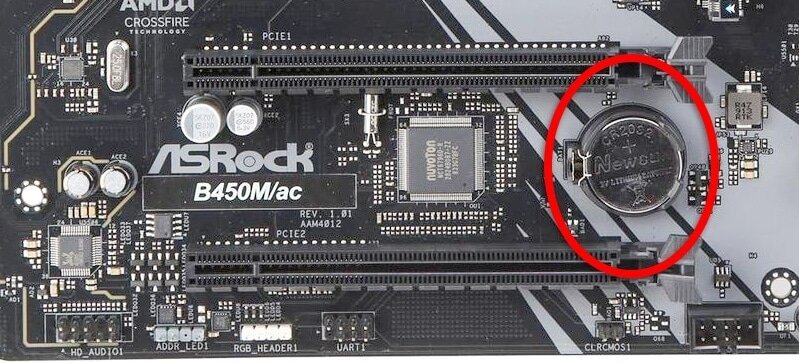
:two: Locate the CMOS battery (see the image below). On some motherboards, you may have to remove the graphics card in order to access it.
:three: Remove the CMOS battery from the motherboard by pressing down on the clip and pulling the battery out.
:four: Hold down the case power button for three seconds while your PC is unplugged.
:five: Install the CMOS battery back into the motherboard and plug the power cord back into the wall.
:six: Plug in and turn on your PC.
A video guide is also available below
 CyberPowerPC UK 🔸 0333 323 7776 🔸 https://www.cyberpowersystem.co.uk
dusky sundial
CyberPowerPC UK 🔸 0333 323 7776 🔸 https://www.cyberpowersystem.co.uk
dusky sundial
¯_(ツ)_/¯
remote musk
what motherboard is this
dusky sundial
Contact support then
frail nova
Please be respectful to members trying to help you
 vestal pike
At this point, its better off going through the support team. The quicker you email, the quicker it can get sent off and you can discuss where you go from there 👍
frail nova
Again windows has been installed previously on your system for testing. Are you getting to the drive select section? and did you format your drive once you got here?
 frail nova
People are trying to help and we will not tolerate it. Thank you for the apology just try and keep it chill ✌️
 vestal pike
Its understandable, as long as you know that it WILL get sorted 👍
placid aurora
Sorted?
frail nova
It's all good my dude! Just hope it's sorted and you get a weekend of Gaming in
vestal pike
If not, cyberpower will try their best to get it sorted sooner rather than later
dusky sundial
@thick mirage there's no worries, I am happy to help with any issues
Sounds like your system is getting sorted and used to itself
Lovely 
Please let us know if any issues occur
Did you just leave the xmp profile or did that seem to fix it?
vestal pike
Yeah. Pcs are a royal pain in the ass
dusky sundial
Oh brilliant
Well
Wanna run some tests to be sure?
Cinebench, OCCT Furmark
Yep
Chances are it's not even idle
Yeah
Yeah it just does that
Yeah it goes down, also
Your glass may be tinted
Bios
But why
No need 😔
Let it do it's thing cpuk has configured
So let it be ig
It's fine
😔
 rustic summit
How's it running? All g?
 flat thistle
Believe that's off work Curt