#Brand new CYBERPOWER PC beeping on start up.
72 messages · Page 1 of 1 (latest)
 static bloom
Where is your monitor cable plugged into?
Is it on the left hand side, or around the middle of the pc
static bloom
Deleted the video (just because it had your order number in)
Is there any debug leds on your motherboard.
Or if you aren’t sure, whats the name of your motherboard and i can check
 jade wren
Gigabyte B550M DS3H: m-ATX w/ USB 3.2, 2x M
Yeah I’m not sure what debug leds are sorry.
jade wren
Can anyone assist? 🥲
 limpid tigerBOT
 Resetting CMOS
:one: Shut down your PC and unplug the power cord from the wall.
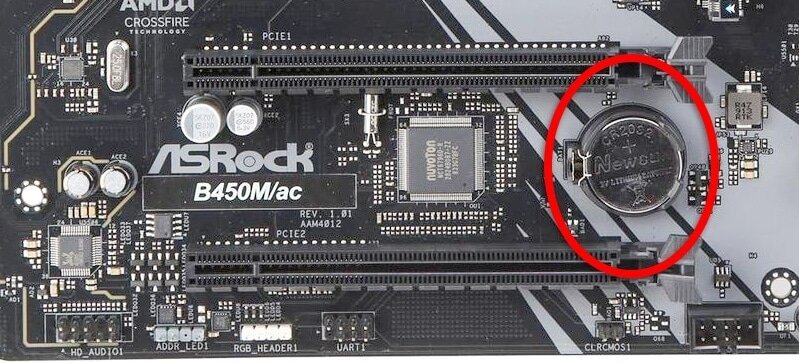
:two: Locate the CMOS battery (see the image below). On some motherboards, you may have to remove the graphics card in order to access it.
:three: Remove the CMOS battery from the motherboard by pressing down on the clip and pulling the battery out.
:four: Hold down the case power button for three seconds while your PC is unplugged.
:five: Install the CMOS battery back into the motherboard and plug the power cord back into the wall.
:six: Plug in and turn on your PC.
A video guide is also available below
 CyberPowerPC UK 🔸 0333 323 7776 🔸 https://www.cyberpowersystem.co.uk
 idle apex
Give this a try
jade wren
Okay I’ll get back to you in a hour
jade wren
No luck, double beep now no display
limpid tigerBOT
 :tada: Congrats @jade wren, you levelled up to 1! :tada:
jade wren
@idle apex
 gleaming patrol
@jade wren Hi there, can I just check that you have your video cables in the right place
send a photo of the back of your computer
Someone already asked but you never responded so idk
jade wren
He delete it bc it had number on the back here again
jade wren
Can delete when seen
static bloom
It can be a nightmare to diagnose without debug leds
static bloom
Never heard of just one beep
limpid tigerBOT
Reseating RAM
CyberPowerPC UK 🔸 0333 323 7776 🔸 https://www.cyberpowersystem.co.uk
gleaming patrol
Neither
gleaming patrol
Forget that
it says its normal
why am I not looking on the internet 🤣
Are you sure your display is connected
1 beep = post
idle apex
If it's 2 beeps now then I'd try reseating the ram
jade wren
Yes display is connected per the video, 1 beep at first, reset cmos now 2 beep
gleaming patrol
jade wren
Yes display is connected per the video, 1 beep at first, reset cmos now 2 beep
oh
dam
gleaming patrol
limpid tiger
This isn't too difficult
Depends on your motherboard but some just require one latch to pop out
jade wren
yeah ik how to do that ill get back to you soon
gleaming patrol
👍 don't let the ram slip out and drop
jade wren
Will I reseat them in different slots or same slots
jade wren
reseasted 1 beep no display.
😦
I might just have to return this PC, you pay for a prebuild for a reason, If I wanted issues I would of bought the parts seperately myself lmao
jade wren
yeah it literally works with my ps
and I have another pc that has never beeped I do not think a beep is good tbh
 jade wren
strange lemme switch hdmi, just got it today
gleaming patrol
Yeah
jade wren
just swapped slots in pc and monitor no luck, trying a different display now
yeah works on my tv, weird weird weird, sorry about that.
gleaming patrol
Oh it was your tv
jade wren
yeah just worrksd on the monitor now lmaooo cba
gleaming patrol
that makes sense
jade wren
just plugged it back into the monitor and it works thanks guys, sorry about the frustration 🙂
gleaming patrol
jade wren
just plugged it back into the monitor and it works thanks guys, sorry about the...
You have a good evening!