#help with motherboard
40 messages · Page 1 of 1 (latest)
 grizzled warren
 ripe coral
They would go into JFP1 like this:

 grizzled warren
Can’t see much on my phone screen sorry!
ripe coral
They look like fan cables, they'll go into one of the SYS_FAN headers
As they're 3-pin cables, you'll have one pin left sticking out which is fine
grizzled warren
That big blue one to me looks like a usb 3 connector which id assume is from your case? Which would go in the one that should mention usb3 and it will be a 20 pin one.
ripe coral
You'll probably need to open up the other side of your case and re-route them near the top
ripe coral
Double check your original accessories which came with your PC, you should have some mounting hardware for your cooler in there
ripe coral
Yeah that looks like it - though sometimes they have specific backplates for different CPU sockets as the holes are spaced apart differently. Which cooler do you have?
 verbal waveBOT
 :tada: Congrats @blazing dune, you levelled up to 5! :tada:
ripe coral
It would go around the back of PC here, then you would use the screws/other mounting hardware to hold it down around the other side
Although you might need the LGA 1700 bracket for your cooler - if yours doesn't fit then I believe you can request one free from NZXT
ripe coral
No power at all? I would double check your front panels headers and double check they're in the correct slots
ripe coral
ripe coral
They would go into JFP1 like this:
These connectors here^
ripe coral
If you remove the connectors and touch these 2 pins with a screwdriver, does your PC start?
Might also be worth double checking that the 24-pin power connector on the right side of your motherboard is plugged in properly, and your PSU switch is in the 1 position

Try moving your CPU power connector in the top left to the first connector
I would just double check that its all switched on at the wall, power switch is in the 1 position and the cables going into the power supply end are pushed in properly (if its a modular power supply)
It should be getting some form of power then - do any LEDs here light up at all when you try to start it up?

Which power supply do you have in your PC?
It should work with just 1, but you can plug in the other as your PSU has enough connectors for it
If your front panel connectors seem ok then it could possibly be a faulty power supply - it seems to be providing enough power to light up the ethernet LEDs but not enough to boot up the PC
Would you be able to send a picture of your front panel connectors just to confirm they look fine?
You could try removing some of the parts not required for your PC to turn on, like fan cables, USB connectors, 3 of your ram sticks, etc, just to see if you can get it to at least turn on
Yeah that seems to look fine- I would start removing things not needed for it to power on just to see if you can get it to at least do that
Did you end up trying that 2nd CPU power connector - I would leave that in just to see if that makes any difference at all
You can also try removing your GPU - you won't be able to see anything on your monitor without it as your CPU has no integrated graphics, but it will still turn on without a GPU
ripe coral
No you don't need to - though you could try removing it just to reset the BIOS settings;
verbal waveBOT
 Resetting CMOS
:one: Shut down your PC and unplug the power cord from the wall.
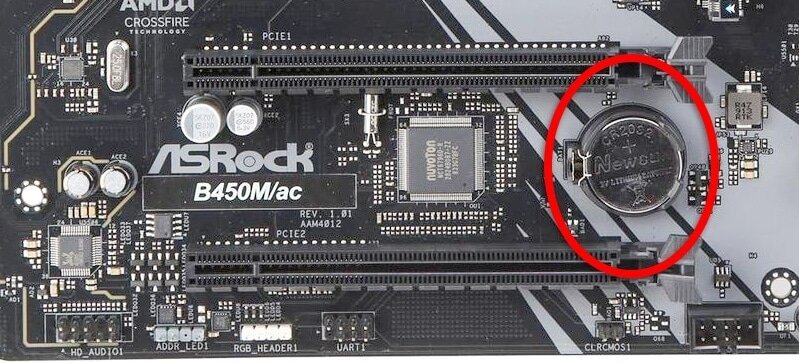
:two: Locate the CMOS battery (see the image below). On some motherboards, you may have to remove the graphics card in order to access it.
:three: Remove the CMOS battery from the motherboard by pressing down on the clip and pulling the battery out.
:four: Hold down the case power button for three seconds while your PC is unplugged.
:five: Install the CMOS battery back into the motherboard and plug the power cord back into the wall.
:six: Plug in and turn on your PC.
A video guide is also available below
 Cyberpower UK 🔸 0333 323 7776 🔸 https://www.cyberpowersystem.co.uk
verbal waveBOT
Cyberpower UK 🔸 0333 323 7776 🔸 https://www.cyberpowersystem.co.uk
verbal waveBOT
:tada: Congrats @blazing dune, you levelled up to 6! :tada:
ripe coral

You might just need to install the drivers from MSI's website, Windows doesn't come with a out of the box driver for one of the Intel LAN controllers
ripe coral
You pretty much only need to install your GPU drivers and you should be good to go - download GeForce Experience and check to see if there's any updates available
ripe coral
I would try running the 3DMark Demo just to see if it seems to be performing as expected for your hardware - run one of the benchmarks then click Compare Result Online and post the link in here
verbal waveBOT
 3DMark
Please Note: Purchasing the paid version of 3DMark is not necessary, you can download the free version by clicking 'Download Demo'.
Cyberpower UK 🔸 0333 323 7776 🔸 https://www.cyberpowersystem.co.uk
 high ember
2080mhz is really good for a 3070. Mine hits a high of around 1995mhz. So thats pretty good
high ember
What games are you playing and at what resolution?
What FPS are you getting, and are you using high settings etc?
What gpu usage are you seeing when gaming also?
120 FPS is about average for the components your using, but stuttering is obviously an issue
Do you notice stuttering in other games or is it mainly warzone?
Yeah, that’s definitely not right.
Could you try a few games and see if you can replicate the same thing in those games?
If it happens in multiple games then it might be a gpu issue. If not, it could be warzone itself
 slender vortex
Probably warzone being unoptimised