#new cyberpower pc no signal issue
34 messages · Page 1 of 1 (latest)
 warm cedar
 frank lintel
Have you tried re-seating your RAM, this can help sometimes, just remove them and put them back in.
 sudden cradle
maybe a CMOS reset too
warm cedar
All my ram sticks?
 late lichenBOT
 Reseating RAM
 Cyberpower UK 🔸 0333 323 7776 🔸 https://www.cyberpowersystem.co.uk
warm cedar
Cyberpower UK 🔸 0333 323 7776 🔸 https://www.cyberpowersystem.co.uk
warm cedar
Cos i have 4
frank lintel
yeah
late lichenBOT
 :tada: Congrats @warm cedar, you levelled up to 1! :tada:
Resetting CMOS
:one: Shut down your PC and unplug the power cord from the wall.
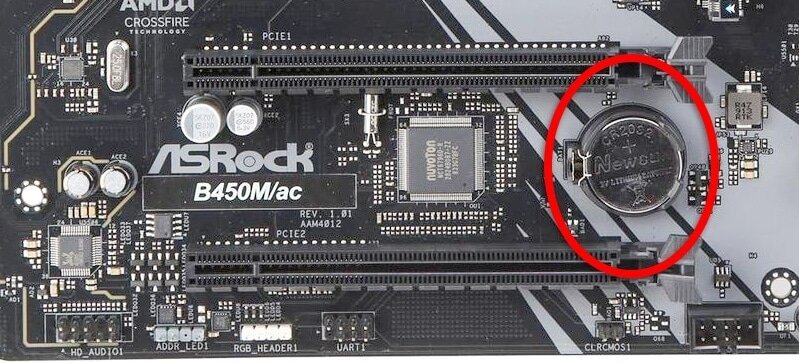
:two: Locate the CMOS battery (see the image below). On some motherboards, you may have to remove the graphics card in order to access it.
:three: Remove the CMOS battery from the motherboard by pressing down on the clip and pulling the battery out.
:four: Hold down the case power button for three seconds while your PC is unplugged.
:five: Install the CMOS battery back into the motherboard and plug the power cord back into the wall.
:six: Plug in and turn on your PC.
A video guide is also available below
 Cyberpower UK 🔸 0333 323 7776 🔸 https://www.cyberpowersystem.co.uk
sudden cradle
Cyberpower UK 🔸 0333 323 7776 🔸 https://www.cyberpowersystem.co.uk
sudden cradle
give this a go
warm cedar
Any other solutions?
 clever oyster
warm cedar
Any other solutions?
clever oyster
warm cedar
Any other solutions?
Which motherboard do you have inside your PC?
clever oyster
You could try reseating your GPU to see if that helps (if you didn't remove it to take out the CMOS)
late lichenBOT
Reseating GPU
Cyberpower UK 🔸 0333 323 7776 🔸 https://www.cyberpowersystem.co.uk
clever oyster
Also, which CPU do you have in your PC?
warm cedar
clever oyster
You could try reseating your GPU to see if that helps (if you didn't remove it t...
Considering the massive size of the gpu, im a bit scared to take out the gpu
And ive already tried re seating ram and the cmos
And the cpu is Ryzen 7 5700x
clever oyster
I see - the 1 long 2 short beeps does indicate a GPU issue so it would be worth trying to reseat it just incase its been knocked in transit
warm cedar
clever oyster
I see - the 1 long 2 short beeps does indicate a GPU issue so it would be worth ...
cyberpower have arranged for it to be collected tomorrow and sent in for fixing so i wont bother poking at things
clever oyster
Ah no worries, hopefully they'll get it back up and running soon 🙂
warm cedar
ye
warm cedar
clever oyster
I see - the 1 long 2 short beeps does indicate a GPU issue so it would be worth ...
its a bit late to say this but it was 1 long and THREE short beeps
i misheard the beeps at first
but im guessing that also means its a gpu issue
clever oyster
Some of the beep codes seem to overlap and each motherboard manufacturer has them slightly different, so they're not always super reliable on indicating where the problem might be - it's probably either GPU or RAM related but probably best to leave it with Cyberpower and they can get it sorted for you
warm cedar
Im just hoping i can get it back as soon as possible