#PC wont get display, 3 beeps.
180 messages · Page 1 of 1 (latest)
 long violet
 devout current
Do any of the DEBUG LEDS stay on once the pc is on?
Theres 4, CPU, DRAM, VGA and then BOOT
long violet
nope, they all go off
devout current
And theres still no signal?
long violet
yeah the fans come on at initial startup of the gpu, then briefly after the beeps all 4 red lights turn off
and fans go off
devout current
Its normal for the gpu fans to spin up and go off
They only come on when they reach a certain temperature
long violet
understood, but im getting no display right now, ive never heard these beeps before either
devout current
Also for one long and 2 short beep, that indicates ram
How many ram sticks do you have?
long violet
2 ram sticks
i tried removing one and starting it back up but didnt try the other
i can do that rn
devout current
You’ll want to try both on their own
long violet
ok one sec
devout current
I think the stick you try will need to go in the second ram slot
Yep, second slot
long violet
 devout current
Try one, if it doesn’t have a signal, turn the pc off and then try the second stick on its own
 thin finchBOT
 :tada: Congrats @devout current, you levelled up to 52! :tada:
 long violet
still no display and hearing beeps
devout current
Is it fully pressed in?
long violet
yeah i heard it click
devout current
Okay, try the other stick
long violet
ok
devout current
Make sure to turn it all off etc
long violet
same thing
devout current
Okay now, pick whichever stick, and put it in one of the other ram slots
Want to try and rule out the possibility of it being the actual slot on the motherboard
long violet
ok so only 1 stick plugged in and in any other the other 3 slots?
unplug everything from socket 2?
long violet
same thing tried it in slot 3
which i dont thinks ever been used
the boot light is red now
devout current
Is it still doing 1 long and 2 short beeps
long violet
yeah
devout current
Hmm
long violet
is the boot light being red a big worry?
long violet
btw ive noticed the GPU fans stay on when the boot light is on but when all 4 lights are off the fan goes off
ok it will be amazing if u could fix this because i have work tomorrow from home and im in big big big trouble lol ill pay extra if needed
devout current
Okay so for now, put both sticks of ram in (they’ll want to go into slot 2 and 4)
long violet
ok
devout current
Now we want to try resetting the CMOS
thin finchBOT
 Resetting CMOS
:one: Shut down your PC and unplug the power cord from the wall.
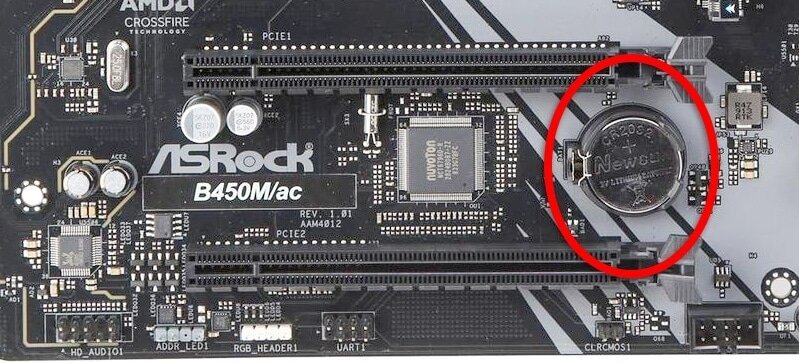
:two: Locate the CMOS battery (see the image below). On some motherboards, you may have to remove the graphics card in order to access it.
:three: Remove the CMOS battery from the motherboard by pressing down on the clip and pulling the battery out.
:four: Hold down the case power button for three seconds while your PC is unplugged.
:five: Install the CMOS battery back into the motherboard and plug the power cord back into the wall.
:six: Plug in and turn on your PC.
A video guide is also available below
 Cyberpower UK 🔸 0333 323 7776 🔸 https://www.cyberpowersystem.co.uk
long violet
Cyberpower UK 🔸 0333 323 7776 🔸 https://www.cyberpowersystem.co.uk
long violet
ok i tried finding the cmos switch or whatever but couldnt find it, do you want me to record my pc
devout current
The CMOS battery is normally under the graphics card
You might have to take the graphics card out in order to get it
long violet
Right ive never done that before
thin finchBOT
Reseating GPU
Cyberpower UK 🔸 0333 323 7776 🔸 https://www.cyberpowersystem.co.uk
devout current
This is how to remove your gpu
Make sure to turn the pc off
You may also want to drop tech support an email also (just incase we can’t fix the issue here).
 thin finchBOT
Technical Support
thin finchBOT
Technical Support
:telephone: 03333-237776, Option 2
:e_mail: [email protected]
:clock3: Monday - Friday, 9:00am - 5:30pm
Please ensure to include your order number, the issue you are facing and any steps you have already taken to try and fix the issue.
Cyberpower UK 🔸 0333 323 7776 🔸 https://www.cyberpowersystem.co.uk
devout current
Yep, those are called PCIE cables. At the top is a little clip which you’ll want to push down (towards the back of the clip)
And once your pushing it down, you’ll want to pull
They can be very hard to take out so don’t be scared to use some force
long violet
done now ill unscrew side
devout current
Yep unscrew the screws at the side
Then, theres a clip on the motherboard (near the gpu)
You’ll want to push that down towards the motherboard
long violet
this screw is different to every other screw or its a broken screw port idek
im so streessed
devout current
Send a picture
long violet
 devout current
Try a flat head
long violet
thats what ive been trying but it just wont go in its so loose
devout current
The screw wont unscrew?
devout current
Does it just keep spinning?
long violet
it doesnt spin the screw at all
devout current
Does the one above it unscrew
long violet
yep\
devout current
It might just be a bit tight
Have you tried putting the flat head in the thicker bit. It might grip it better
long violet
got it one sec
ok screws are undone should i use a lot of force to pull it off
cos it seems pretty tight still
 devout current
Have you pushed down the clip on the motherboard?
 devout current
Unscrew this one also
 long violet
oki
thin finchBOT
:tada: Congrats @long violet, you levelled up to 6! :tada:
devout current
And ill show you the clip aswell
long violet
done that screw
devout current

Its a bit hard to see
Bit theres a clip on the motherboard. You’ll want to push it down (towards the motherboard)
This will push the gpu out of the slot at that end, and then you can pull the gpu out
I find pushing the clip down whilst holding the gpu helps cos you can feel it push out, and then can pull it
thin finchBOT
Resetting CMOS
:one: Shut down your PC and unplug the power cord from the wall.
:two: Locate the CMOS battery (see the image below). On some motherboards, you may have to remove the graphics card in order to access it.
:three: Remove the CMOS battery from the motherboard by pressing down on the clip and pulling the battery out.
:four: Hold down the case power button for three seconds while your PC is unplugged.
:five: Install the CMOS battery back into the motherboard and plug the power cord back into the wall.
:six: Plug in and turn on your PC.
A video guide is also available below
Cyberpower UK 🔸 0333 323 7776 🔸 https://www.cyberpowersystem.co.uk
devout current
Follow this guide for the cmos 👍
Once youve reset the cmos, you’ll want to put the gpu back in
Which means lining it up with the slot, pushing it in till you hear a click (the click is the clip pushing out back to where it was)
Putting the pcie cables back in (make sure to pit the cables together before putting them in)
long violet
right ill try put the gpu back in now
the screws are sohard to get back in
it feelsl ike the screw wont even go back in the hole
devout current
They holes might be stripped down a bit
If they wont go in fully, then just get them in slightly for now
long violet
ok there in.. i think
devout current
Send a picture 👍
long violet
 devout current
From what i can tell it looks good
Send a picture from above
So i can see the cables going into the gpu from above
long violet
 devout current
The right one wants to go in a bit more
long violet
tried@pushing as hard as posisble
 devout current
Does the clip go over?
long violet
i believe so yea
long violet
ywp
devout current
Phew 😂
long violet
lol
devout current
Are the ram sticks back into slot 2 and 4?
long violet
yeA
devout current
Aww
long violet
boot light is still red
devout current
Still the same beeps and no signal?
long violet
yup
devout current
Its hard to say but best bet is to get in touch with tech support :/
Id drop them an email and let them know you’re tried reseating the gpu and ram, testing each ram stick individually as well as clearing the cmos
devout current
Sure
thin finchBOT
Technical Support
:telephone: 03333-237776, Option 2
:e_mail: [email protected]
:clock3: Monday - Friday, 9:00am - 5:30pm
Please ensure to include your order number, the issue you are facing and any steps you have already taken to try and fix the issue.
Cyberpower UK 🔸 0333 323 7776 🔸 https://www.cyberpowersystem.co.uk
long violet
ive just done another reboot and stuff, it started up with no beeps but boot light is on
the monitor 100% detects its receiving input as a light shows up but then after a while it gets no signal
devout current
its definitely a weird one
normally the 1 long and 2 short beeps indicates ram. but its rare for 2 ram sticks to both die
long violet
i read it could mean just display issue , because it wont even connect to my onboard grpahics
like i took out my gpu and tried using motherboards display port
and hdmi
and still nothing
devout current
ah, that doesnt have onboard graphics
so it won't display anything anyway
your best bet is to go through tech support, you've done a lot of tests anyway so hopefully they'll just request you to send it in for repairs/diagnostics
if you let them know everything we tried, then they won't ask you to do it all again
PC's can be a real pain sometimes and theres not a lot you can do when it happens :/ you can only hope it gets fixed sooner rather than later
 undone condor
long violet
is my pc atill under warranty yeah?
undone condor
long violet
is my pc atill under warranty yeah?
We can't check officially as we don't have access to Cyberpower's systems, but you have a 5 year warranty with 2 years on parts