#idle animation not working
77 messages · Page 1 of 1 (latest)
 sand portal
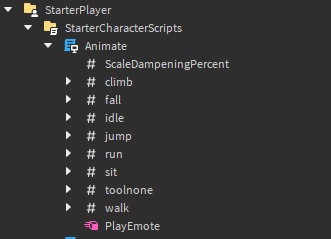
if you want you can just put them in here and they will replace the default
unless u only want it for some people or something
 light heronBOT
 ** You are now Level 1! **
sand portal

replace id of the thing inside here
with the id of your animation
and it will apply for all players
sand portal
sand portal
https://gyazo.com/d094994eac5829ddeec3952a2997a0fe
here
 wise cape
but what is the # thing
sand portal
string value
wise cape
do i put the animation id in the value property?
 wise cape
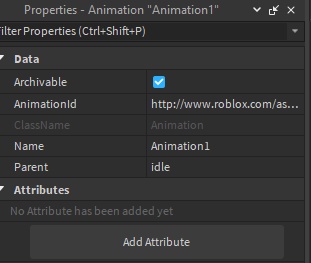
it's not working :/
sand portal
if you dont have the Animate local you have to copy it while your ingame
wise cape
sand portal
no put it instead of the animation1's id
ok
sand portal
then paste it into starter character script
wise cape
the script is already there
wise cape
sand portal
if you dont have the Animate local you have to copy it while your ingame
im dumb and i have dumber questions
so
wise cape
sand portal
if you dont have the Animate local you have to copy it while your ingame
copy what?
sand portal
wise cape
copy what?
go into a play test
look under ur player scripts for animate local script
copy it
then close play test
then copy it into starter character scripts
wise cape
oh
sand portal
then change what i said earlier
wise cape
i did it but it's not working
i did put the animation id in the animationid place
in my animate script
wise cape
wait nvm
it worked and stopped
it does the animation once and then stops
how do i loop it
sand portal
when u made the animation did u set the property to idle
wise cape
ihni wut does that mean
btw i realized that the thing that was working was the special thing that happens during idle animation
like if u stopped for a few secs it does move the player head right and left
so my animation was working but instead of working normally it replaced the head move thingy with my animation
light heronBOT
** You are now Level 2! **
sand portal
theres 2 animations inside the idle thing
wise cape
how do i loop it
wise cape
sand portal
theres 2 animations inside the idle thing
i managed to fix it (i think) but it doesn't loop the animation
wise cape
sand portal
what did u use to make the anim
u mean the plugin i used to animate it?
moon animator 2
sand portal
wise cape
u mean the plugin i used to animate it?
did you set the setting to idle
wise cape
ok
how do i edit the animate animation
that i spawn with
found it
after i did what you said it looks like that

@sand portal
sand portal
try putting id like this : http://www.roblox.com/asset/?id= ur id