#🔥︱curseforge-support
1 messages · Page 656 of 1
 remote badge
 red patioBOT
╰( ͡° ͜ʖ ͡° )つ──☆*:・゚ *˜”*°•.˜”*°• Many Help •°*”˜.•°*”˜* <:curselit:796985620550385705>
Please provide a description of your issue with as much detail as possible. If you have an issue with a mod or modpack, tell us the name. Explain what you can see happening. Be specific!
 Tell us what is happening, we already know it "doesn't work".
Avoid using words like "it", tell us exactly what "it" is.
Don't assume anyone knows what you are talking about, be specific.
Tell us what you expected to happen.
Provide screenshots or video if possible.
Provide a log if possible. ?mc-log
 broken zealot
Excuse me i need a bit of help
red patioBOT
╰( ͡° ͜ʖ ͡° )つ──☆*:・゚ *˜”*°•.˜”*°• Many Help •°*”˜.•°*”˜* <:curselit:796985620550385705>
Please provide a description of your issue with as much detail as possible. If you have an issue with a mod or modpack, tell us the name. Explain what you can see happening. Be specific!
Tell us what is happening, we already know it "doesn't work".
Avoid using words like "it", tell us exactly what "it" is.
Don't assume anyone knows what you are talking about, be specific.
Tell us what you expected to happen.
Provide screenshots or video if possible.
Provide a log if possible. ?mc-log
 real quail
hey guys, each time i run minecraft i have to manually assign a different java than the default, is there a way i can assign it permanently? clicking save never works...
 upper root
No, but there is no need to assign another version anyway
real quail
ive been having crashing issues with the latest java's so had to backdate to a previous version hence having to assign it
upper root
Wat.
How on earth does using an older java version work better than the one minecraft is made to use
real quail
not entirely sure but since switching the crashing has stopped
was exploring different way to solve the issue for like a week now and this is the only one that worked
 viral gorge
what happen to advance rocket try how do iget one of thoise manifest.json?
 upper root
!reject-cfhosted
red patioBOT
The following files belong to CurseForge-hosted projects, and should therefore not be added directly to zip files:
-
Remove any mods listed in the error message from the profile you exported. Then reinstall them with the CurseForge app. DO NOT drag and drop files from the site.
-
Export the profile again, open the new zip that was just made. Check for the
overrides/modsfolder. If you still see any mods in that folder do the step above again for each mod. -
Upload the zip once complete and no more mods show in the
overrides/modsfolder.
 hearty kestrel
how do i change the ram of a curseforge multiplayer server from a modpack layout?
viral gorge
upper root
!reject-cfhosted
How dose one get manifest.json though?
upper root
It is autogenerated by the curseforge app
upper root
hearty kestrel
how do i change the ram of a curseforge multiplayer server from a modpack layout...
Curseforge does not do servers
!notcf
red patioBOT
Your question is not related to CurseForge owned/maintained features or services.
Please use the appropriate game room by getting a game role from #786424115535544350.
Otherwise use #👽︱game-support for game related help.
CurseForge does not make or maintain any of the content or games used on the site or app. Just because it's on the site/app does not make it a problem with CurseForge. Move rooms as requested, arguing about it will result in you being muted.
viral gorge
the expor thing is flagging these 2?


 noble tundra
Hi does a moderator or anyone know what a good summary is ? mine got rejected and i just dont know what it is supposed to mean
when i say good summary is like an example of how i should write it for it to be accepted
viral gorge
noble tundra
Hi does a moderator or anyone know what a good summary is ? mine got rejected an...
look in your notification on the website

Eample heres mine
noble tundra
thanks!
viral gorge
so if i remove botanytrees 3.0.9 and botanypots 1.30 will it complain about botanypots 1.39 and botanytrees 3.0.7?
upper root
I dont know, try it and see
viral gorge
what dose display name do?
 upper root
Instead of showing up as the name of the zip file t will show up as whatever you put in there
 hearty cliff
how do i pass curseforge in 40.1.21 ?
 lyric crescent
That is not a version of curseforge
hearty cliff
wh- then why did tconstruct asked it ?!!?
lyric crescent
!!=
red patioBOT
Wording is important!
Forge = Minecraft Forge, This is a modloader often just called "Forge".
Fabric = Fabric MC, this is another modloader, just called "Fabric".
CurseForge = A Website/App that has content for games.
Mods = Individual mod files.
Modpacks = Multiple mods put into the mods folder or downloaded from CurseForge.
These are not Interchangeable! Please use the correct terms as it allows us to help you faster!
 tired light
I have this problem
 lyric crescent
No idea what this says
upper root
!win7
red patioBOT
Hey there,
You seem to be running Windows 7 which is not supported anymore by Overwolf or Curseforge. Please upgrade your machine if possible.
You can find the download link here
tired light
okey one moment
 raw jolt
How do i download mod packs in the browser version of curseforge because when i download it its a zip file and not java what should i do?
lyric crescent
Use the curseforge app
raw jolt
Yes but i want to stack mod packs
lyric crescent
No you dont
upper root
That is
- A bad idea and
- A really bad idea
lyric crescent
Make your own pack if you don't like the ones listed.
viral gorge
how do i get valid one?
 lyric crescent
Remove that project and reinstall it
raw jolt
Is there anyway to modify a mod pack that another person has made?
lyric crescent
Yes, but you should just make your own
upper root
viral gorge
how do i get valid one?
Rmeove vanilla additons, it was removed from curseforge for some reason
(https://cflookup.com/432421?fileId=3311565)
viral gorge
upper root
Rmeove vanilla additons, it was removed from curseforge for some reason
(<https:...
it didnt getit didnt flag vanilla additions though?
raw jolt
Yes but i want to add some other mods to better mc and i know that they work fine together
upper root
viral gorge
it didnt getit didnt flag vanilla additions though?
Wat, and #📛︱rules 5️⃣
 cerulean sparrow
Whenever I try to install Better Minecraft 1.18.2 in cursed forge it gets to downloading patches 2 out of 6 then deletes itself. It works and installs just fine if it is Better Minecraft 1.19. I've tried reinstalling and restarting my pc. Is there something that I'm doing wrong?
upper root
raw jolt
Yes but i want to add some other mods to better mc and i know that they work fin...
I doubt that, but anyway
!mc-editpack
red patioBOT
How to add/remove mods in a modpack.
- Click on the picture of the modpack.
- Click the

Add More Contentbutton, IF this button is not there, see below before continuing. - Find the Mods, Resource Packs or Maps you wish to Install and click
Installon them. - Wait for all the required mods to be downloaded.
- Start the modpack.
How to Enable/Disable content management for modpacks.
- Click on the picture of the modpack.
- Click on the
 button next to the
 Playbutton. - Click on

Profile Options. - Check the
Allow content management for this profileoption if you want to edit the content of the modpack, uncheck it to disable.
NOTE: The Allow content management for this profile option is what allows you to Delete, Disable, Update or Install any Mods, Resource Packs or Maps managed by CurseForge. It must be on to modify any of them! (Currently)
upper root
cerulean sparrow
Whenever I try to install Better Minecraft 1.18.2 in cursed forge it gets to dow...
!cflogs-app
red patioBOT
<:overwolf:857375414002384916> How to get CurseForge App logs! <:overwolf:857375414002384916>
- Click the

Create logs zipin the menu.
menu. - Drag and drop the file it just made to this chat room to upload it.
- Wait for someone to look at it so they can help you.
 viral gorge
upper root
Wat, and <#777323206884327484> 5️⃣
viral gorge
upper root
Wat, and <#777323206884327484> 5️⃣
its only flagging botany pots 1.30 and botany trees 3.0.9
upper root
The error you posted blames vanilla additions
The app isnt as smart as the site sometimes
viral gorge
the only vzanllia thing is vanilla tools plus
viral gorge
i dont see it


 upper root
It was removed from curseforge and so probably wont appear in that list
Check the actual files
Wait no
Its the first one
Literally has the id from the error message in its name
viral gorge
upper root
It was removed from curseforge and so probably wont appear in that list
why is scientific skys in the 1.16 pack section although it says 1.18?
upper root
The same file probably works on both versions
Tho why are you asking me that  , i have nothing to do with any of those resource packs
 humble saffron
i cant open my curseforge
 upper root
!outdated
red patioBOT
Your CurseForge App version is outdated!
To use CurseForge with the latest features & fixes you should update your CurseForge App.
You can do this by uninstalling the app from your computer programs and then install it again from https://download.curseforge.com/
NOTE: Uninstalling CurseForge will not remove any game/mod data, It's entirely safe to remove and install again!
 vast pivot
hii
upper root
No need to say hi in every channel you talk in either
vast pivot
how do i see if my curseforge is updated please? and could we be in full screen please?
vast pivot
upper root
No need to say hi in every channel you talk in either
😅 oh yes i'm sorry so
because Ive a little problem....
i could see only 1.5 mods... and so when going down.....
 upper root
vast pivot
how do i see if my curseforge is updated please? and could we be in full screen ...
upper root
vast pivot
how do i see if my curseforge is updated please? and could we be in full screen ...
If your version in the bottom right after you click  is within 1 or teo numbers of the most recent version announcement in #📢︱news then you are fine
Try change your windows app scale
It will be in windows settings somewhere
vast pivot
oh ok thankkk you soo
upper root
(Note: this will affect most apps)
upper root
So you reinstalled it?
humble saffron
yeah
upper root
!cflogs-oops
red patioBOT
Oops :(
- Make sure you tried these steps first!
- Click the
Create logs.zipbutton on the bottom of the oops error. - Drag and drop the file it makes into this room.
- Wait for someone to look the logs.
 humble saffron
that butten is not there for me
upper root
Well then you are very outdated
Try the steps in the article linked in the outdated message the bot sent above (not the logs one), and completely reinstall OW and CF
vast pivot
upper root
(Note: this will affect most apps)
ommmmggggg sooooo smaallllll, need somes good eyes lol
but now its better thank, seeing 4 mods
 upper root
You can use ctrl + to zoom in on discord specifically if you want it bigger
vast pivot
its smaller than reccomanded lol, so everyone have soo small for could use curseforge app....??
Ctrl + +???
upper root
Some people have bigger screens
vast pivot
where's the plus when its not under 1 .....??
upper root
=, after the 0 and -
vast pivot
upper root
Some people have bigger screens
oh yeah right😅 where do i post message for asking for have more options in curseforge? as CurseForge Proper scales? or settings for number of mods could seeing....? please
upper root
!ideas
red patioBOT
<:CFidea:798388634972717066> Have an idea on how to improve CurseForge? <:CFidea:798388634972717066>
CurseForge is looking for great ideas and user feedback! Get into the CurseForge Community by providing some feedback and voting on what's important to you!
Think some game should be supported? Post an idea and explain why!
Got a to die for feature idea? Let's hear it!
Location In-app
- Click the button on the bottom left of the app.
- Click on

Suggest a Featureoption!
vast pivot
woooooooooooowww i did Ctrl 0 and its good now, thx
humble saffron
upper root
Try the steps in the article linked in the outdated message the bot sent above (...
it says that they are iin use but i closed everything else than discord and my files and i closed it in the joblist
upper root
Restart your computer then try again. Also try disable "open on startup" in overwolf settings
humble saffron
okay
 pliant mauve
yo guys so vault hunters the modpack is the ONLY modpack i have that gives me bad performance ingame, usually i can get 144 fps no problem at all, but in this modpack im at like 50 or something, which makes no sense, ive run way more demanding modpacks no issue
so i do not understand
upper root
!mc-fps
red patioBOT
Low FPS? Check these things first!
- GPU (AMD specifically has issues)
- Is the correct GPU used
- Does the system have enough ram
- Is the correct amount of RAM allocated without going over excessively
- Are other things running in the background leading to lack of RAM
- Mods used
- Shaders
- View distance too high
- CPU core speed too low
*This list is intentionally ambiguous. There is no way to figure out what specifically causes your FPS issues, if there actually are any. Low FPS could simply be a result of the mods chosen in which you would need to trial & error out which are affecting it.
pliant mauve
GPU, i am using AMD yes, i dont know how to check which GPU minecraft is using but if this is the only modpack that has bad performance, i feel like it should be using my only gpu
im rudding amd radeon rx 6700
i have 16 gb ram so 6gb should be fine
view distance doesnt seem to matter
upper root
It will be in the f3 menu
pliant mauve
yeah i saw the GPU there
no matter if i have gpu on max or lowest
fps is still low
like the same amount of low
lol
i mean
view distance
not gpu
 strong mulch
 upper root
!notcf
red patioBOT
Your question is not related to CurseForge owned/maintained features or services.
Please use the appropriate game room by getting a game role from #786424115535544350.
Otherwise use #👽︱game-support for game related help.
CurseForge does not make or maintain any of the content or games used on the site or app. Just because it's on the site/app does not make it a problem with CurseForge. Move rooms as requested, arguing about it will result in you being muted.
upper root
anything
this could be fun
full credit card number, the pin and the expiry date on the back
It is probably just down to the modpack, vault hunters may have a discord you can ask in to see if anyone else had a similar probelm
 digital roost
question, I went in search for mods for minecraft for windows, found it and was pointed to curseforge, installed that, but seems to only have mincraft java listed. am i misunderstanding something ?
lyric crescent
Say what
 rich flint
!oops
red patioBOT
You had an "Oops, that was not supposed to happen!"
Follow the instructions in this link!
If the info in the link does not work please do ?cflogs-oops and follow the instructions there to get the log files.
rich flint
follow the steps in the link above
red patioBOT
Project Moderation Time
Project/File moderation is done on these days unless otherwise mentioned:
Sunday, Monday, Tuesday, Wednesday, Thursday: <t:1631170800:t> - <t:1631199600:t> (Your time)
Friday, Saturday: No Moderation!
Projects are moderated First in, First out. If you submit late in the work day, it will likely get left until the next day!
New Projects or anything flagged for manual review: 1-3 Working Days
Updates to approved projects not needing manual approval: 1 Hour
-If your file has been "Under Review" for more than an hour, then it is at manual review!
Changes will only show in the app if the project meets the requirements in the ?sync command and up to 24 hours has passed from when it was accepted.
upper root
Please use #🟢︱user-bot-spam for random bot commands
 molten sail
Can anyone help: #👽︱game-support message
 blissful void
what times to moderators check modpacks
 young bone
Look at the message 3 above yours
digital roost
so i seem to have a bug maybe. when updating minecraft forge modpacks, particularly 1.19, updating forge version 41.0.1 to 41.0.99, curseforge seems to revert back to 41.0.1 after trying to launch the game.
rich flint
digital roost
so i seem to have a bug maybe. when updating minecraft forge modpacks, particula...
to be honest that will get you more compatibility than updating to .99 lol. for real though 1.19 forge is still heavily in development and has made several forking/breaking changes the past week. unless a given mod was updated like 1-2 days ago it will be incompatible with the current build. it's almost pointless to chase around versions right now and would be way easier to let them settle out the changes and mods to update in a few weeks
 vapid imp
my forge deleted my mods and world but i see it in the curseforge files still
how do i put it back
lol
digital roost
rich flint
to be honest that will get you more compatibility than updating to .99 lol. for...
im on 0.1 and need at least 0.94, but it wont stick lol
rich flint
?owlogs
red patioBOT
<:overwolf:857375414002384916> How to get CurseForge App logs! <:overwolf:857375414002384916>
- Click the
Create logs zipin the menu. - Drag and drop the file it just made to this chat room to upload it.
- Wait for someone to look at it so they can help you.
 soft fiber
Hello I have a problem when I download modpacks then comes after applying patch 2 deleting files what can I do
rich flint
post those Aquamarine?
rich flint
soft fiber
Hello I have a problem when I download modpacks then comes after applying patch ...
same ^
soft fiber
rich flint
same ^
okey F
 patent otter
hey, so I installed a Minecraft modpack once and it worked but then i accidentally broke it so i deleted it. Now i am trying to reinstall it from curseforge and it will install the entire thing then go- "deleting files" and delete it
 restive bobcat
i downloaded overwolf version and it didnot change any help?
 patent otter
yeah everytime i install something it installs it then cancels the installation and deletes the files
 normal plank
hey
i need help
so i wanted to install mods and followd a video and everything is good forge is working in the luncher but when i open minecraft there is no mods in the game
 knotty apex
Hi im setting up my server but when i go 2 run it for the first time i get an error saying unable to acces jarfile forgeserver.jar
wondering if any1 knows a fix for this issue

 foggy ridge
Seems to be happening at least daily, might wanna get used to it unfortunately haha, I just rejoined the server to see if there were any updates about it
digital roost
rich flint
post those Aquamarine?
also looks like the same thing happens with forge 40.1.34 on 1.18.2
digital roost
foggy ridge
Seems to be happening at least daily, might wanna get used to it unfortunately h...
:/
 umbral trench
Hi, I can't install the All The Mods 7 modpack for MineCraft on the app, it start then a few seconds afterwards it stop, please help me
digital roost
DDOS?
foggy ridge
I'm not even getting an error page now, it's just blank on my end most of the times I refresh
rich flint
digital roost
ill do that in a sec
?mc-forgejava
red patioBOT
- Download and install this https://download.oracle.com/java/17/archive/jdk-17.0.3.1_windows-x64_bin.msi
- Open CurseForge and click the in the bottom left corner.
- Go to the
 Minecraft tab and scroll down to the bit about java versions.
 - Click the
 icon and then choose Java: 17.0.3.1 (64 Bit) from the list.
 - Follow the instructions from
!mc-installfix(if your internet is slow the instructions from!mc-updatemodloaderwork but need to be done on every profile made since the error began to happen)
rich flint
weekend traffic bringing down website = normal weekend
foggy ridge
Yeah but it's been happening the last couple of days too, I noticed
digital roost
is there any particular reason i have to switch java versions?
foggy ridge
Like it's becoming a daily occurance
 neon sundial
I just wanted to get the physics mod i saw in a YouTube video
 fallen egret
it might just be me, but I think it's sort of not great that CurseForge is down like 4 times every day lately...
foggy ridge
fallen egret
it might just be me, but I think it's sort of not great that CurseForge is down ...
Agreed tbh, it's really concerning to me
rich flint
digital roost
is there any particular reason i have to switch java versions?
issue that will be resolved with an upcoming app update. it's to do with forge versions and doing the actual forge file install process on the backend
digital roost
gotcha.
rich flint
weekend traffic. happens every weekend. get used to it.
foggy ridge
It isn't just the weekend tho
neon sundial
When will it work again
rich flint
it is tho
foggy ridge
That's what I'm saying, it's been happening the last couple days
neon sundial
I need the physics mod
foggy ridge
oh so it DIDN'T keep me from accessing the website the last three days? lmao
fallen egret
get used to it.
best answer to services being down
 rich flint
the last few days have been a weekend where CF staff resides 🙄
neon sundial
Yeah but is it solvable or long time down?
foggy ridge
Now I'm no expert but I don't think that's exactly how timezones work- /lh
umbral trench
umbral trench
Hi, I can't install the All The Mods 7 modpack for MineCraft on the app, it star...
If anyone have a solution please let me know
foggy ridge
Like I don't think Thursdays magically become Saturdays and Sundays lmao
neon sundial
Is it running on someone's pc?
fallen egret
it would probably run better if it was tbh
foggy ridge
Lmao honestly
The servers must be using the same internet company I'm stuck with 😂
Also even if it is just because it's the weekend, "get used to it" probably isn't the best solution to a problem that occurs every week and causes issues for all mod makers and mod users lmao, like if it's happening that often then it's probably time to start looking for a fix
rich flint
?feedback
red patioBOT
<:CFidea:798388634972717066> Have an idea on how to improve CurseForge? <:CFidea:798388634972717066>
CurseForge is looking for great ideas and user feedback! Get into the CurseForge Community by providing some feedback and voting on what's important to you!
Think some game should be supported? Post an idea and explain why!
Got a to die for feature idea? Let's hear it!
Location In-app
- Click the button on the bottom left of the app.
- Click on
Suggest a Featureoption!
foggy ridge
... i feel like i shouldnt need to submit a suggestion for the owners of curseforge to not want their website to go offline every single weekend-
like that feels a bit silly to have to make a suggestion of that-
rich flint
this isn't a very producting conversation. they've been notified and will get it up when possible
foggy ridge
I mean I disagree but I do think it's in the wrong channel; we should probably be in #💬︱general-chat instead as we're just chatting about it, but you trying to shut the conversation down entirely just makes you sound like one of those diehard stans who throw a fit if anyone acknowledges something isn't great, except instead of the hill you die on being some celebrity, it's a website. People are allowed to discuss/acknowledge when there's an issue or when something isn't how it should be. No one is flaming the admins, no one is talking shit, we're literally just having a conversation about how the situation isn't ideal.
rich flint
they've been notified. they'll work on it asap. there's basically nothing else to discuss as this is a private company not a crowdsourced venture
they take suggestions of course 😉
foggy ridge
So on the server for CurseForge, you are saying there is no point to people chatting about CurseForge and the things going on with it?
I'm not talking about admins or who runs the server, I'm talking about users just chatting about their opinions of current ongoings regarding CurseForge
normal plank
normal plank
so i wanted to install mods and followd a video and everything is good forge is ...
any help?
rich flint
I really have no more interest in continuing this - regardless of how it goes I will still go to sleep and wake up tomorrow.
foggy ridge
Okay but I don't get why you're trying to shut down conversations?
 fast sparrow
why are you trying to continue it here?
foggy ridge
Because it's an interesting topic to me? And I actually like discussing things with people?
fast sparrow
maybe it should move channels like you said
foggy ridge
I know, I know, most nerds of my caliber aren't fans of socializing, but I happen to like talking about the things going on that impact communities that I'm in. And it feels like the CurseForge discord makes the most sense for where to talk about CurseForge stuff
fast sparrow
seeing as this isn't support anymore
foggy ridge
Yeah that's fine by me, I just don't get trying to shut down the convo entirely lmao
If someone wants to hop into #💬︱general-chat with me then that's fine by me, I just didn't see a point to the comment that the conversation wasn't productive
fast sparrow
eitherway, looks like it's up again
foggy ridge
Oh good!
 vernal garden
My friend is installing a mod on the curseforge website but the curseforge app does not open so that he can play the mod
 violet willow
hi my game won't start i need help please
 tawny oriole
Hia... um idk what’s going on but my game is like... freaking out. I wanna play the blood and bones mod pack so badly and I’ve almost got it to work but then this started happening
 red patioBOT
Your question is not related to CurseForge owned/maintained features or services.
Please use the appropriate game room by getting a game role from #786424115535544350.
Otherwise use #👽︱game-support for game related help.
CurseForge does not make or maintain any of the content or games used on the site or app. Just because it's on the site/app does not make it a problem with CurseForge. Move rooms as requested, arguing about it will result in you being muted.
violet willow
hi my mc mods packs won't start i need help please
rich flint
will they install into the app, or do they crash after you press play?
violet willow
after i press play they crash
rich flint
post your log in #👽︱game-support
rich flint
curseforge as a company doesn't make modpacks, it hosts modpacks other people make and upload (and other modded gaming content)
 vernal plume
hey I'm having a problem with downloading the cave factory mod for Minecraft java, It downloads at first but once it gets to downloading's patches it delates all the files and i cant get it my friend seemed to fix it by hoping to a different WIFI connection but that is not an option for me. what do i do?
red patioBOT
<:overwolf:857375414002384916> How to get CurseForge App logs! <:overwolf:857375414002384916>
- Click the
Create logs zipin the menu. - Drag and drop the file it just made to this chat room to upload it.
- Wait for someone to look at it so they can help you.
vernal plume
rich flint
post these please
What do you mean
rich flint
3 steps ^ follow them and drop the ZIP log file in chat
vernal plume
this?
 rich flint
vernal plume
this?
rich flint
vernal plume
this?
?mc-installfix
red patioBOT
This is NOT instructions for Repair Profile! They are NOT the same! You need to do this!
- Click on the Minecraft Tab on the Left side of the CurseForge App.
- Click button next to the
Create Custom Profileoption. - Click

Repair Installationoption. - Play game.
NOTE: You will not lose any modpacks or worlds!
vernal plume
Got it thanks.
 elfin dragon
Ive been trying to download forge 1.8.9 for some hypizel skyblock mods but whenever i download the lastest installer for 1.8.9 i install n it dosent show up in the versions so i tried doing new installation scrolled and didnt see anything
wait
this is forge dc server right?
 vestal storm
How do I fix this? this happened after a shader pack crashed my game
 rich flint
elfin dragon
Ive been trying to download forge 1.8.9 for some hypizel skyblock mods but whene...
rich flint
elfin dragon
Ive been trying to download forge 1.8.9 for some hypizel skyblock mods but whene...
This is the CurseForge server - the company / app / website that hosts modded gaming content. Not the Forge mod loader discord
rich flint
vestal storm
How do I fix this? this happened after a shader pack crashed my game
!oops
red patioBOT
You had an "Oops, that was not supposed to happen!"
Follow the instructions in this link!
If the info in the link does not work please do ?cflogs-oops and follow the instructions there to get the log files.
 tribal flower
I click install on modpacks and they say install but when I check "My modpacks" they do not show up. I tohught there was a max so I uninstalled one but tthey still do not install any ideas?
red patioBOT
Oops :(
- Make sure you tried these steps first!
- Click the
Create logs.zipbutton on the bottom of the oops error. - Drag and drop the file it makes into this room.
- Wait for someone to look the logs.
rich flint
?owlogs
red patioBOT
<:overwolf:857375414002384916> How to get CurseForge App logs! <:overwolf:857375414002384916>
- Click the
Create logs zipin the menu. - Drag and drop the file it just made to this chat room to upload it.
- Wait for someone to look at it so they can help you.
rich flint
not the same instructions above - that uses the app ? menu
vestal storm
then how am i supposed to? the app wont load
rich flint
reinstall the app then
vestal storm
do you not think i've tried that? it's literally one of the suggestions on the website. not to mention that i said that i tried everything on the website
rich flint
?ticket
red patioBOT
Issue Reporting with Overwolf tickets!
Issues can be reported two ways!
Via the website, or in app. Instructions for both are below!
Make sure to include logs when reporting a problem!
Upload your Overwolf logs with the Upload File option on the ticket, information on how to get these logs can be found here https://support.overwolf.com/en/support/solutions/articles/9000176827-how-to-get-your-overwolf-logs
:bug: Reporting via Website :bug:
Can't open the app or would rather use the website? You can do so here: https://support.curseforge.com/en/support/tickets/new
Fill out the form with accurate detailed information, "It doesn't work" isn't helpful! What exactly doesn't work and why doesn't it work should be easy to answer!
:question: Ticket Status :question:
Tickets you have made can be looked at, replied to and closed if you make/login to an account. If you submit a ticket with a specific Email make sure to use that when you make your account so you can see your past tickets!
https://support.curseforge.com/en/support/tickets
Otherwise you will only get email replies at the email you used to open the ticket.
:bug: Reporting via the CurseForge App :bug:
- Click the icon in the bottom left.
- Select

Open a Ticket. - Fill out the form with accurate detailed information, "It doesn't work" isn't helpful! What exactly doesn't work and why doesn't it work should be easy to answer!!
- Upload your Overwolf logs with the
Upload Filesection. (see the top of this message for details) - Submit!
digital roost
!mc-installfix
red patioBOT
This is NOT instructions for Repair Profile! They are NOT the same! You need to do this!
- Click on the Minecraft Tab on the Left side of the CurseForge App.
- Click button next to the
Create Custom Profileoption. - Click
Repair Installationoption. - Play game.
NOTE: You will not lose any modpacks or worlds!
digital roost
rich flint
?ticket
so doing that fix seems to allow me to get forge updated in my 1.19 modpack. thanks for the help! 🙂
rich flint
uh sure but don't get too excited - 1.19 is an in-development minefield right now lol
 wet hearth
hello i have an issue opening the installer. i double click it, then it asks for admin permision and then nothing. it simply dosent start installing
 tall plover
im having a pretty big issue like i have minecraft and curseforge and everything installed but curseforge wont detect minecraft on my pc
pls @ me if you have a fix for the issue
 signal ridge
wet hearth
hello i have an issue opening the installer. i double click it, then it asks for...
signal ridge
wet hearth
hello i have an issue opening the installer. i double click it, then it asks for...
Windows?
signal ridge
tall plover
im having a pretty big issue like i have minecraft and curseforge and everything...
Top left corner does it say Alpha or Beta?
tall plover
alpha
red patioBOT
Looking to install the CurseForge app?
<:windows:798410728188936222> Windows
Minimum Requirements:
- OS Version: 10 or 11
- 64 bit Required.
- 350MB storage space.
- Microsoft .Net 4.8
- Intel/AMD quad-core CPU
- 8GB ram
[Windows Download]
[Windows Alternative Download]
If you are having issues with the Windows Download use the Windows Alternative Download to install Overwolf. Then download CurseForge from the App Store.
Windows Standalone: NOTE: ONLY SUPPORTS WORLD OF WARCRAFT CURRENTLY!
Requirements:
Uh, Windows? (No not the ones in your house)
WoW as that's all it's useful for..
Some sort of zoomy box that does teh verk.
[Windows Standalone] NOTE: ONLY SUPPORTS WORLD OF WARCRAFT CURRENTLY!
<:mac:798410654418862130> Mac
:penguin: Linux
NOTE: ONLY SUPPORTS WORLD OF WARCRAFT CURRENTLY!
Minimum Requirements:
Something not windows or mac would be a start.
Hopefully it turns on.
A screen would be beneficial too.
tall plover
thank you
 inner ginkgo
ok so i have forge and cursforge plus java on my computer how do i get the forge version on curseforge
signal ridge
Make a custom profile, set the mc version, modloader there
red patioBOT
How to install mods in CurseForge App.
- Click
+ Create Custom Profile - Name it, select the required Minecraft version, select the modloader & modloader version (usually the highest number), click
Create. - Click the profile icon.
- Click
Add More Content - Search and install the desired mods.
- Start the game!
How to install mods not on CurseForge.
- Right click the profile picture or Open the profile and click the Icon next to the play button.
- Click

Open Folder. - Drag the mod(s) into the
modsfolder. (Note: Some mods will require others, to run. Make sure to read the instructions for the mod!) - Start the game!
 signal ridge
The app will install forge for you. You dont need to manually add it.
inner ginkgo
right but i neeed a higher version to play some mods
so i need 40.1.57 while the thing only goes to 40.1.00'
or i am just blind
nvm
 rugged wedge
Hi. Trying to upload a datapack, but it says a field is required, yet it is filled out as datapack. What gives?
 signal ridge
Screen shot the whole screen
rugged wedge
 signal ridge
in the second categories field try removing Data Packs
rugged wedge
That works... but that's a weird conflict 🙂 Thank you.
digital roost
rich flint
uh sure but don't get too excited - 1.19 is an in-development minefield right no...
it also fixed my issue updating my 1.18.2 modpack too. had the same bug
rich flint
Yeah it should have - there's a known issue that is getting weeded out in new app version
 frozen mountain
hi. how do i put a modpack i downloaded from google into curseforge?
signal ridge
Where did you get it from?
frozen mountain
mediafire
signal ridge
Open the zip and screen shot
 signal ridge
!mc-installpack
red patioBOT
How to install modpacks with the search features in app.
- Open the
Minecraftsection of the app. - Click the top search bar where it says
Search for modpacksOR Click theBrowse ModpacksTab. - Find the Modpack you want to install and click install on it.
- Wait for CurseForge app to download and unpack all the required files.
- Once finished, click
Play!
======================================================
** **
======================================================
How to install modpacks from a Export. (Custom/Private/Site downloaded Modpack zip)
- Get CurseForge App if you don't have it, use
!downloadfor a link. - Get the exported modpack from CurseForge or someone else,
!mc-packshareexplains how to make them. - Open the
Minecraftsection of the app. - Click

Create Custom Profile - Click the
Importoption. - Find the file you just downloaded in step 2 and select it.
- CurseForge app will now attempt to download and unpack the modpack. If it fails, try steps 4-6 again.
- Once finished, click
Play!
 signal ridge
Second part
 ember merlin
hello im getting failed to download the mincraft launcher due to a network error when im trying to select modding folder
signal ridge
!mc-path
red patioBOT
Instructions for changing CurseForge Minecraft install path!
If Minecraft is not installed in CurseForge App:
- Click the
 in the top left.
 - Select Minecraft from the list of games.
- Select the
Advancedoption and select:
--- Windows:Local Disk (C:)at the left side of the window. If you do not see it, clickThis PCfirst.)
--- Mac:/Users/Shared/CurseForge, If it does not exist, make it. - Click
Continue.
If Minecraft is installed in CurseForge App:
- Click the in the bottom left.
- Select the Minecraft tab.
- Click
Change. - Select the location:
--- Windows:Local Disk (C:)at the left side of the window. If you do not see it, clickThis PCfirst.)
--- Mac:/Users/Shared/CurseForge, If it does not exist, make it.
signal ridge
If that doesnt work, restart your pc/router then try again
frozen mountain
signal ridge
Second part
ty it works now
 barren cobalt
I'm having trouble with Minecraft everytime I start it on Curseforge I keep getting that Exit Code 1. "Invalid Java Runtime"
red patioBOT
Error/Exit codes are useless. Follow these steps so someone can actually help you.
- Right-click the modpack profile icon OR click the button in the modpack profile.
- Click
Open Folder. - Open the
logsfolder. - Drag and drop the FILE named
latestORdebuginto discord.
ember merlin
signal ridge
If that doesnt work, restart your pc/router then try again
it didnt work 😦 is it because i have windows 7 ?
red patioBOT
Hey there,
You seem to be running Windows 7 which is not supported anymore by Overwolf or Curseforge. Please upgrade your machine if possible.
You can find the download link here
barren cobalt
Here are my Debug and Latest files
signal ridge
Looks like an issue with More_planets. Remove it and try again. If you have more issues post the new latest.log in #👽︱game-support as this isnt a cf issue
barren cobalt
Still doesn't work this mod pack worked before with More planets. Now it just doesn't want tostart.
signal ridge
#👽︱game-support for this
normal plank
hey i really need help
so i wanted to install mods and followd a video and everything is good forge is working in the luncher but when i open minecraft there is no mods in the game
signal ridge
Using the cf app?
 tacit trail
heyyo i have a non curseforge mod that i want to add to my pack, if I share the pack with my friends and have them import it will they have to download that mod separately or will it export without issue?
This is for fabric Minecraft btw
 tacit kernel
I need help fixing this for 1.12.2
 signal ridge
tacit kernel
I need help fixing this for 1.12.2
signal ridge
tacit kernel
I need help fixing this for 1.12.2
!notcf
red patioBOT
Your question is not related to CurseForge owned/maintained features or services.
Please use the appropriate game room by getting a game role from #786424115535544350.
Otherwise use #👽︱game-support for game related help.
CurseForge does not make or maintain any of the content or games used on the site or app. Just because it's on the site/app does not make it a problem with CurseForge. Move rooms as requested, arguing about it will result in you being muted.
upper root
tacit trail
heyyo i have a non curseforge mod that i want to add to my pack, if I share the ...
Itlwill be automatically included in the export. If you try upload it to the site it will be rejected, but otherwise it will work fine
tacit trail
awsome thanks for the help!
 pliant flower
how can i play curse forge with my friend, can anyone help please ?
upper root
What do you mean? Curseforge isnt a game
pliant flower
minecraft with mods
upper root
!mc-packshare to send them the modpack
red patioBOT
There are two ways to share a modpack you've made with others...
Export and Share - For Friends to Small Groups.
- Click the Icon for the modpack.
- Click the button next to play.
- Click

Export. - Select the files that should be included.
- Send the zip to the people that want it! They can follow the instructions in
!mc-installpackto install the pack!
Upload to Curseforge - For Public Release to Everyone.
This options will make your pack public to EVERYONE, it comes with extra requirements and will take some effort to set up.
- Go to here: https://www.curseforge.com/project/432/4471/create
- Fill out the information with a proper description of the pack. This should allow anyone to understand what the pack is.
- Click the Icon for the modpack in the CurseForge app.
- Click the button next to play.
- Click
Export. - Select the files that should be included.
- Open your Project you made on the CurseForge site and Upload the file you just made.
- Wait for Moderation & Sync so it can show up in the client! (See
!syncfor limitations)
upper root
Then for playing with them you need a server, you can pay for one online or install one on your own computer. If the latter ask in #👽︱game-support how to do it
pliant flower
okay thank you 🙂
 orchid quarry
Can anyone help?
 signal ridge
!notcf
red patioBOT
Your question is not related to CurseForge owned/maintained features or services.
Please use the appropriate game room by getting a game role from #786424115535544350.
Otherwise use #👽︱game-support for game related help.
CurseForge does not make or maintain any of the content or games used on the site or app. Just because it's on the site/app does not make it a problem with CurseForge. Move rooms as requested, arguing about it will result in you being muted.
 prisma hull
I am trying to download TNP 5 and it keeps cancelling
signal ridge
getting any errors?
prisma hull
no. it stopped at 55% and then deleted files and automatically canceled download
signal ridge
!cflogs-app
red patioBOT
<:overwolf:857375414002384916> How to get CurseForge App logs! <:overwolf:857375414002384916>
- Click the
Create logs zipin the menu. - Drag and drop the file it just made to this chat room to upload it.
- Wait for someone to look at it so they can help you.
upper root
!notcf
red patioBOT
Your question is not related to CurseForge owned/maintained features or services.
Please use the appropriate game room by getting a game role from #786424115535544350.
Otherwise use #👽︱game-support for game related help.
CurseForge does not make or maintain any of the content or games used on the site or app. Just because it's on the site/app does not make it a problem with CurseForge. Move rooms as requested, arguing about it will result in you being muted.
 sullen bane
I'm trying to add mods to a profile but when I do it says I/O ERROR. What can I do to fix this?
 glass marsh
anyone else keep getting a cloudfare error screen when uploading minecraft server packs?
it's quite annoying
signal ridge
sullen bane
I'm trying to add mods to a profile but when I do it says I/O ERROR. What can I ...
Do the below
!cflogs-app
red patioBOT
<:overwolf:857375414002384916> How to get CurseForge App logs! <:overwolf:857375414002384916>
- Click the
Create logs zipin the menu. - Drag and drop the file it just made to this chat room to upload it.
- Wait for someone to look at it so they can help you.
signal ridge
glass marsh
anyone else keep getting a cloudfare error screen when uploading minecraft serve...
Tried a different browser?
glass marsh
but now i gotta remember my login information....
and it's only happening for server packs, not regular updates
bruh
 eternal ermine
how can you send modpacks to friends
glass marsh
eternal ermine
how can you send modpacks to friends
use the website or any file hosting service?
just send them the page link if it's up there, if not then export it & toss it to them
exported packs are rarely above 4 MB, so you could upload it to discord
eternal ermine
i mean if i made a modpack and i wanted to send it to them?
glass marsh
yeah, export it and then send it to them
if you're not using the launcher, zip up the relevant items and send it
signal ridge
!mc-packshare
red patioBOT
There are two ways to share a modpack you've made with others...
Export and Share - For Friends to Small Groups.
- Click the Icon for the modpack.
- Click the button next to play.
- Click
Export. - Select the files that should be included.
- Send the zip to the people that want it! They can follow the instructions in
!mc-installpackto install the pack!
Upload to Curseforge - For Public Release to Everyone.
This options will make your pack public to EVERYONE, it comes with extra requirements and will take some effort to set up.
- Go to here: https://www.curseforge.com/project/432/4471/create
- Fill out the information with a proper description of the pack. This should allow anyone to understand what the pack is.
- Click the Icon for the modpack in the CurseForge app.
- Click the button next to play.
- Click
Export. - Select the files that should be included.
- Open your Project you made on the CurseForge site and Upload the file you just made.
- Wait for Moderation & Sync so it can show up in the client! (See
!syncfor limitations)
signal ridge
as in you get an error? Or
sullen bane
no now the mods simply wont be instaled to the profile
its not showing an error any more
signal ridge
How are you installing the mods? Using the app? OR from the site?
sullen bane
app
signal ridge
Click the > what are the numbers in the lower left corner of the app.
sullen bane
0.203.1.5255
signal ridge
ok, > minecraft tab > Screen shot the path the app is using
sullen bane
 signal ridge
!mc-path try this
red patioBOT
Instructions for changing CurseForge Minecraft install path!
If Minecraft is not installed in CurseForge App:
- Click the in the top left.
- Select Minecraft from the list of games.
- Select the
Advancedoption and select:
--- Windows:Local Disk (C:)at the left side of the window. If you do not see it, clickThis PCfirst.)
--- Mac:/Users/Shared/CurseForge, If it does not exist, make it. - Click
Continue.
If Minecraft is installed in CurseForge App:
- Click the in the bottom left.
- Select the Minecraft tab.
- Click
Change. - Select the location:
--- Windows:Local Disk (C:)at the left side of the window. If you do not see it, clickThis PCfirst.)
--- Mac:/Users/Shared/CurseForge, If it does not exist, make it.
signal ridge
Second part
 scenic roost
is anyone else not able to load the website
signal ridge
Will go investigate
eternal ermine
glass marsh
yeah, export it and then send it to them
so im the one the pack is being sent to is it supposed to open up to google drive?
 finite swift
scenic roost
is anyone else not able to load the website
finite swift
scenic roost
is anyone else not able to load the website
same bro, came here saw they said it was down, but then they said it was up, yet its down rn too
Only been about 5 minutes dont know if they know yet 🤷♂️
 lyric crescent
eternal ermine
so im the one the pack is being sent to is it supposed to open up to google driv...
lyric crescent
eternal ermine
so im the one the pack is being sent to is it supposed to open up to google driv...
is that where the person uploaded it to?
signal ridge
Failed for me on chrome but edge and firefox loaded..
scenic roost
it gave me a error 505
eternal ermine
lyric crescent
is that where the person uploaded it to?
no he sent it via email
lyric crescent
then ask them
sullen bane
Thanks bro
finite swift
Yeah website is down @scenic roost
wait
its back up
it just worked for me rn
@scenic roost it works
 craggy locust
i was just about to say the same thing
quick download your mods while you still can before it crashes again
annnd it's gone
finite swift
thats what im doing rn lmaoo
upper root
Its like reverse whack a mole
lyric crescent
the app likely still works, just use that
finite swift
lyric crescent
the app likely still works, just use that
yeah but im getting texture packs, which you cant get on the app if im correct
finite swift
this all I see
 lyric crescent
?mc-installmods
red patioBOT
How to install mods in CurseForge App.
- Click
+ Create Custom Profile - Name it, select the required Minecraft version, select the modloader & modloader version (usually the highest number), click
Create. - Click the profile icon.
- Click
Add More Content - Search and install the desired mods.
- Start the game!
How to install mods not on CurseForge.
- Right click the profile picture or Open the profile and click the Icon next to the play button.
- Click
Open Folder. - Drag the mod(s) into the
modsfolder. (Note: Some mods will require others, to run. Make sure to read the instructions for the mod!) - Start the game!
finite swift
lyric crescent
?mc-installmods
thankws
eternal ermine
!mc-installpack
red patioBOT
How to install modpacks with the search features in app.
- Open the
Minecraftsection of the app. - Click the top search bar where it says
Search for modpacksOR Click theBrowse ModpacksTab. - Find the Modpack you want to install and click install on it.
- Wait for CurseForge app to download and unpack all the required files.
- Once finished, click
Play!
======================================================
** **
======================================================
How to install modpacks from a Export. (Custom/Private/Site downloaded Modpack zip)
- Get CurseForge App if you don't have it, use
!downloadfor a link. - Get the exported modpack from CurseForge or someone else,
!mc-packshareexplains how to make them. - Open the
Minecraftsection of the app. - Click
Create Custom Profile - Click the
Importoption. - Find the file you just downloaded in step 2 and select it.
- CurseForge app will now attempt to download and unpack the modpack. If it fails, try steps 4-6 again.
- Once finished, click
Play!
finite swift
lyric crescent
?mc-installmods
Hey quick question
Im trying to find a resource pack thats on the curseforge website, but not on the curseforge app
this one
but it aint on the curseforge app that im trying to add it to
lyric crescent
yes it is
 lyric crescent
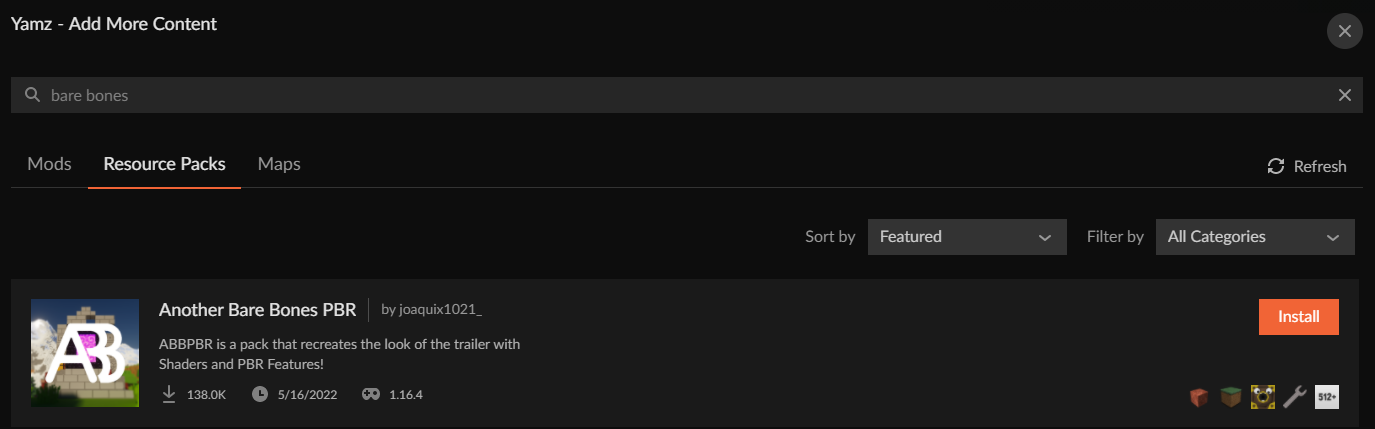 finite swift
it aint there for me what
signal ridge
Screen shot, same spelling as Yamza did

 signal ridge
your in 1.19, what you linked is 1.18 and under.
lyric crescent
its not marked for 1.19
glass marsh
eternal ermine
so im the one the pack is being sent to is it supposed to open up to google driv...
or whatever you use, yeah. Only if it exceeds the discord file limit.
 hollow mauve
was looking for help with an error whenever i try to launch my modpack

dont know how to fix it
signal ridge
!mc-logs send this to #👽︱game-support
red patioBOT
Sending logs for support.
- Right-click the modpack profile icon OR click the button in the modpack profile.
- Click
Open Folder. - Open the
logsfolder. - Drag and drop the FILE named
latestORdebuginto discord.
 tender brook
how do i fix this
 tender brook
New problem when i press install it gives another error
 upper root
!cflogs-app
red patioBOT
<:overwolf:857375414002384916> How to get CurseForge App logs! <:overwolf:857375414002384916>
- Click the
Create logs zipin the menu. - Drag and drop the file it just made to this chat room to upload it.
- Wait for someone to look at it so they can help you.
tender brook
upper root
!mc-path
red patioBOT
Instructions for changing CurseForge Minecraft install path!
If Minecraft is not installed in CurseForge App:
- Click the in the top left.
- Select Minecraft from the list of games.
- Select the
Advancedoption and select:
--- Windows:Local Disk (C:)at the left side of the window. If you do not see it, clickThis PCfirst.)
--- Mac:/Users/Shared/CurseForge, If it does not exist, make it. - Click
Continue.
If Minecraft is installed in CurseForge App:
- Click the in the bottom left.
- Select the Minecraft tab.
- Click
Change. - Select the location:
--- Windows:Local Disk (C:)at the left side of the window. If you do not see it, clickThis PCfirst.)
--- Mac:/Users/Shared/CurseForge, If it does not exist, make it.
tender brook
where is the advanced button?
 signal ridge
Second part, as you already have mc installed
 signal ridge
Did you change it to what the bot said to change it too?
 bronze shadow
i have a problem where whenever i try and make a modpack it says "an error occured while executing forge install command. Exit code: 1" it makes the modpack and then says the thing and deletes the modpack
red patioBOT
Error/Exit codes are useless. Follow these steps so someone can actually help you.
- Right-click the modpack profile icon OR click the button in the modpack profile.
- Click
Open Folder. - Open the
logsfolder. - Drag and drop the FILE named
latestORdebuginto discord.
signal ridge
Ignore that one. Do this
red patioBOT
- Download and install this https://download.oracle.com/java/17/archive/jdk-17.0.3.1_windows-x64_bin.msi
- Open CurseForge and click the in the bottom left corner.
- Go to the Minecraft tab and scroll down to the bit about java versions.
- Click the icon and then choose Java: 17.0.3.1 (64 Bit) from the list.
- Follow the instructions from
!mc-installfix(if your internet is slow the instructions from!mc-updatemodloaderwork but need to be done on every profile made since the error began to happen)
bronze shadow
thanks but i think i fixed it i just did the on the top right and did the repair installation and it worked so thanks for telling me though!
finite swift
signal ridge
your in 1.19, what you linked is 1.18 and under.
Ok, realised that, but this one is 1.19 but isnt showing up when I look it up
wait
nvm
I was looking in wrong area
 torn sigil
signal ridge
torn sigil
signal ridge
!notcf
red patioBOT
Your question is not related to CurseForge owned/maintained features or services.
Please use the appropriate game room by getting a game role from #786424115535544350.
Otherwise use #👽︱game-support for game related help.
CurseForge does not make or maintain any of the content or games used on the site or app. Just because it's on the site/app does not make it a problem with CurseForge. Move rooms as requested, arguing about it will result in you being muted.
 chrome halo
how do i get my minecraft modpack i made to be approved by a moderator
signal ridge
Have you uploaded it to the site?
chrome halo
yeah
signal ridge
!status
red patioBOT
Project Moderation Time
Project/File moderation is done on these days unless otherwise mentioned:
Sunday, Monday, Tuesday, Wednesday, Thursday: <t:1631170800:t> - <t:1631199600:t> (Your time)
Friday, Saturday: No Moderation!
Projects are moderated First in, First out. If you submit late in the work day, it will likely get left until the next day!
New Projects or anything flagged for manual review: 1-3 Working Days
Updates to approved projects not needing manual approval: 1 Hour
-If your file has been "Under Review" for more than an hour, then it is at manual review!
Changes will only show in the app if the project meets the requirements in the ?sync command and up to 24 hours has passed from when it was accepted.
chrome halo
ok
 dire mason
 short sparrow
has anyone tried to play mc ragnamod 6 and it be slow for them?
 queen storm
!notcf
red patioBOT
Your question is not related to CurseForge owned/maintained features or services.
Please use the appropriate game room by getting a game role from #786424115535544350.
Otherwise use #👽︱game-support for game related help.
CurseForge does not make or maintain any of the content or games used on the site or app. Just because it's on the site/app does not make it a problem with CurseForge. Move rooms as requested, arguing about it will result in you being muted.
short sparrow
my b
digital roost

 opal cipher
!notcf
red patioBOT
Your question is not related to CurseForge owned/maintained features or services.
Please use the appropriate game room by getting a game role from #786424115535544350.
Otherwise use #👽︱game-support for game related help.
CurseForge does not make or maintain any of the content or games used on the site or app. Just because it's on the site/app does not make it a problem with CurseForge. Move rooms as requested, arguing about it will result in you being muted.
 plucky sandal
My friend tried downloading a modpack on curseforge, but it automatically deletes it every time he finishes downloading. Why does this happen? And what do we do to fix it?
opal cipher
Get your friend in here, it's easier to help them directly.
Might be that it's not enough space on disk or something like that
plucky sandal
ight
 stable zealot
here
opal cipher
!owlogs
red patioBOT
<:overwolf:857375414002384916> How to get CurseForge App logs! <:overwolf:857375414002384916>
- Click the
Create logs zipin the menu. - Drag and drop the file it just made to this chat room to upload it.
- Wait for someone to look at it so they can help you.
red patioBOT
- Download and install this https://download.oracle.com/java/17/archive/jdk-17.0.3.1_windows-x64_bin.msi
- Open CurseForge and click the in the bottom left corner.
- Go to the Minecraft tab and scroll down to the bit about java versions.
- Click the icon and then choose Java: 17.0.3.1 (64 Bit) from the list.
- Follow the instructions from
!mc-installfix(if your internet is slow the instructions from!mc-updatemodloaderwork but need to be done on every profile made since the error began to happen)
stable zealot
alright
 mild sundial
question, in the rewards store ik it takes up to 60 days til curseforge pays out the reward but does the order number have to do with anything?
queen storm
Order number is to track the transactions
 warped field
yo i need help
red patioBOT
╰( ͡° ͜ʖ ͡° )つ──☆*:・゚ *˜”*°•.˜”*°• Many Help •°*”˜.•°*”˜* <:curselit:796985620550385705>
Please provide a description of your issue with as much detail as possible. If you have an issue with a mod or modpack, tell us the name. Explain what you can see happening. Be specific!
Tell us what is happening, we already know it "doesn't work".
Avoid using words like "it", tell us exactly what "it" is.
Don't assume anyone knows what you are talking about, be specific.
Tell us what you expected to happen.
Provide screenshots or video if possible.
Provide a log if possible. ?mc-log
warped field
Minecraft isnot showing up in my games on curse forge
queen storm
You have the alpha version, it is wow only
warped field
how i get the other version lmao
queen storm
!getcf
red patioBOT
Looking to install the CurseForge app?
<:windows:798410728188936222> Windows
Minimum Requirements:
- OS Version: 10 or 11
- 64 bit Required.
- 350MB storage space.
- Microsoft .Net 4.8
- Intel/AMD quad-core CPU
- 8GB ram
[Windows Download]
[Windows Alternative Download]
If you are having issues with the Windows Download use the Windows Alternative Download to install Overwolf. Then download CurseForge from the App Store.
Windows Standalone: NOTE: ONLY SUPPORTS WORLD OF WARCRAFT CURRENTLY!
Requirements:
Uh, Windows? (No not the ones in your house)
WoW as that's all it's useful for..
Some sort of zoomy box that does teh verk.
[Windows Standalone] NOTE: ONLY SUPPORTS WORLD OF WARCRAFT CURRENTLY!
<:mac:798410654418862130> Mac
:penguin: Linux
NOTE: ONLY SUPPORTS WORLD OF WARCRAFT CURRENTLY!
Minimum Requirements:
Something not windows or mac would be a start.
Hopefully it turns on.
A screen would be beneficial too.
queen storm
You download the correct version
warped field
thx g
 harsh gazelle
"An error occurred while executing Forge install command. Exit code: 1" I have both tried to repair and I updated Java, any ideas how to fix?
red patioBOT
Error/Exit codes are useless. Follow these steps so someone can actually help you.
- Right-click the modpack profile icon OR click the button in the modpack profile.
- Click
Open Folder. - Open the
logsfolder. - Drag and drop the FILE named
latestORdebuginto discord.
harsh gazelle
Also the discord link on support.curseforge does not work
queen storm
harsh gazelle
Also the discord link on support.curseforge does not work
Will poke people, thanks
harsh gazelle
Prob just need to make sure the link that's put in is set to never expire
queen storm
No, they used an old invite link, we have a custom one
queen storm
Any logs to shed light on those issues?
harsh gazelle
Where would I find logs for this, cause what I'm doing is trying to make a new custom modpack, but it doesnt work because of that error
queen storm
harsh gazelle
Where would I find logs for this, cause what I'm doing is trying to make a new c...
#🔥︱curseforge-support message
Did you see the bot?
queen storm
!mc-forgejava
red patioBOT
- Download and install this https://download.oracle.com/java/17/archive/jdk-17.0.3.1_windows-x64_bin.msi
- Open CurseForge and click the in the bottom left corner.
- Go to the Minecraft tab and scroll down to the bit about java versions.
- Click the icon and then choose Java: 17.0.3.1 (64 Bit) from the list.
- Follow the instructions from
!mc-installfix(if your internet is slow the instructions from!mc-updatemodloaderwork but need to be done on every profile made since the error began to happen)
 fast pond
Hello everyone I'm new here. I joined this discord server cause I have a problem with curseforge... the problem I'm having is I can't download modpacks for some reason. I actually installed manufactio but after that I can't download any other modpack
queen storm
What error do you get?
fast pond
no error no nothing "applying patch 2 out of 4" and it just dissapears after that
I didn't have a problem before
I installed fresh windows
and now I'm getting this problem for some reason
I might need something downloaded to work properly or?
fast pond
!mc-installfix
red patioBOT
This is NOT instructions for Repair Profile! They are NOT the same! You need to do this!
- Click on the Minecraft Tab on the Left side of the CurseForge App.
- Click button next to the
Create Custom Profileoption. - Click
Repair Installationoption. - Play game.
NOTE: You will not lose any modpacks or worlds!
fast pond
that worked! thank you so much! ❤️
digital roost
anyone know why my 1.19 custom profile wont launch the game? it doesnt even crash it just stops
opal cipher
Does the app say alpha or beta in the top left?
If Alpha, you installed the wrong version.
 harsh harness
dang it says alpha
opal cipher
!getcf
red patioBOT
Looking to install the CurseForge app?
<:windows:798410728188936222> Windows
Minimum Requirements:
- OS Version: 10 or 11
- 64 bit Required.
- 350MB storage space.
- Microsoft .Net 4.8
- Intel/AMD quad-core CPU
- 8GB ram
[Windows Download]
[Windows Alternative Download]
If you are having issues with the Windows Download use the Windows Alternative Download to install Overwolf. Then download CurseForge from the App Store.
Windows Standalone: NOTE: ONLY SUPPORTS WORLD OF WARCRAFT CURRENTLY!
Requirements:
Uh, Windows? (No not the ones in your house)
WoW as that's all it's useful for..
Some sort of zoomy box that does teh verk.
[Windows Standalone] NOTE: ONLY SUPPORTS WORLD OF WARCRAFT CURRENTLY!
<:mac:798410654418862130> Mac
:penguin: Linux
NOTE: ONLY SUPPORTS WORLD OF WARCRAFT CURRENTLY!
Minimum Requirements:
Something not windows or mac would be a start.
Hopefully it turns on.
A screen would be beneficial too.
harsh harness
Thanks a lot, I have sat here for 3 hours trying to figure it out
 rugged crag
when i launch minecraft it crashes
 scarlet dune
can anyone help me fix my modded minecraft server'
 calm crater
pls someone help i cant self host a server becasue the server works but my friends cannot join off of my public ip
queen storm
!notcf To both
red patioBOT
Your question is not related to CurseForge owned/maintained features or services.
Please use the appropriate game room by getting a game role from #786424115535544350.
Otherwise use #👽︱game-support for game related help.
CurseForge does not make or maintain any of the content or games used on the site or app. Just because it's on the site/app does not make it a problem with CurseForge. Move rooms as requested, arguing about it will result in you being muted.
calm crater
but it is cause i cant hos tthe curse forger server packs
upper root
Read the entire bots message
 upper root
Is there a create logs button?
 cloud arrow
No
upper root
!outdated
red patioBOT
Your CurseForge App version is outdated!
To use CurseForge with the latest features & fixes you should update your CurseForge App.
You can do this by uninstalling the app from your computer programs and then install it again from https://download.curseforge.com/
NOTE: Uninstalling CurseForge will not remove any game/mod data, It's entirely safe to remove and install again!
 flat shore
I can't download any modpack
red patioBOT
╰( ͡° ͜ʖ ͡° )つ──☆*:・゚ *˜”*°•.˜”*°• Many Help •°*”˜.•°*”˜* <:curselit:796985620550385705>
Please provide a description of your issue with as much detail as possible. If you have an issue with a mod or modpack, tell us the name. Explain what you can see happening. Be specific!
Tell us what is happening, we already know it "doesn't work".
Avoid using words like "it", tell us exactly what "it" is.
Don't assume anyone knows what you are talking about, be specific.
Tell us what you expected to happen.
Provide screenshots or video if possible.
Provide a log if possible. ?mc-log
flat shore
Ok so curseforge worked fine yesterday,and then curseforge started to not download modpacks.i uninstalled curseforge and installed it again and It still didn't fix it.
I expected it to launch like normal.
 final flicker
flat shore
Ok so curseforge worked fine yesterday,and then curseforge started to not downlo...
final flicker
flat shore
Ok so curseforge worked fine yesterday,and then curseforge started to not downlo...
does it cancel downloading the modpack mid-download?
flat shore
yes.
upper root
!cflogs-app
red patioBOT
<:overwolf:857375414002384916> How to get CurseForge App logs! <:overwolf:857375414002384916>
- Click the
Create logs zipin the menu. - Drag and drop the file it just made to this chat room to upload it.
- Wait for someone to look at it so they can help you.
final flicker
flat shore
yes.
same issue, also heres a log as suggested by chief:
upper root
!mc-installfix
red patioBOT
This is NOT instructions for Repair Profile! They are NOT the same! You need to do this!
- Click on the Minecraft Tab on the Left side of the CurseForge App.
- Click button next to the
Create Custom Profileoption. - Click
Repair Installationoption. - Play game.
NOTE: You will not lose any modpacks or worlds!
upper root
This should be all thats needed
flat shore
I did that
red patioBOT
- Download and install this https://download.oracle.com/java/17/archive/jdk-17.0.3.1_windows-x64_bin.msi
- Open CurseForge and click the in the bottom left corner.
- Go to the Minecraft tab and scroll down to the bit about java versions.
- Click the icon and then choose Java: 17.0.3.1 (64 Bit) from the list.
- Follow the instructions from
!mc-installfix(if your internet is slow the instructions from!mc-updatemodloaderwork but need to be done on every profile made since the error began to happen)
upper root
This will solve it
final flicker
problem solved for me, if it wasn't solved for goku that way technically we have different issues or somethin.
upper root
Probably
The issue that goku is having was meant to be solved in the newest version, which he has
 narrow minnow
@flat shore please send a screenshot of the folder: d:\Twitch\Minecraft\Instances\Install after hitting the Repair Installation item

 narrow minnow
try to move one of the mod files from the mods directory to another folder
then move it back inside
that might trigger a refresh
digital roost
did that
if i do it with the ones already showing up it wil remove them and they will show back up again but if I do it with the ones not shwoing up it dont do anything
They're all forge and all for 1.8.9
upper root
This is known to happen and other than copying them out and in again there isnt a solid fix
Minecraft will still recognise them though
digital roost
and my game crashes when I launch it
digital roost
upper root
Minecraft will still recognise them though
 upper root
!mc-logs send these into #👽︱game-support
red patioBOT
Sending logs for support.
- Right-click the modpack profile icon OR click the button in the modpack profile.
- Click
Open Folder. - Open the
logsfolder. - Drag and drop the FILE named
latestORdebuginto discord.
 marble shoal
One message removed from a suspended account.
One message removed from a suspended account.
queen storm
Login where?
marble shoal
One message removed from a suspended account.
One message removed from a suspended account.
One message removed from a suspended account.
One message removed from a suspended account.
queen storm
That is not login...
marble shoal
One message removed from a suspended account.
One message removed from a suspended account.
One message removed from a suspended account.
opal cipher
Try reinstalling the app through Overwolf.
queen storm
Did you do all the steps then?
queen storm
And you were supposed to do it. So please still do
stable zealot
aight
 thin river
alright I need some help with my minecraft.....It says something about error code 1 and java runtime everytime I try to start better minecraft 1.18.2....any clues?
red patioBOT
Error/Exit codes are useless. Follow these steps so someone can actually help you.
- Right-click the modpack profile icon OR click the button in the modpack profile.
- Click
Open Folder. - Open the
logsfolder. - Drag and drop the FILE named
latestORdebuginto discord.
 upper root
!mc-ram increase this a bit
red patioBOT
How to set Global Minecraft RAM value.
- Click the icon in the bottom left to open settings.
- Click the Minecraft tab.
- Scroll down.
- Slide slider to recommended ram range as seen below.
 upper root
Next time use #👽︱game-support for game issues
strong mulch
thanks
marble shoal
One message removed from a suspended account.
One message removed from a suspended account.
queen storm
They will
digital roost
hello guys, when i wanne play pixelmon my game freezes in like the first 1 min. How can i fix this
red patioBOT
Your question is not related to CurseForge owned/maintained features or services.
Please use the appropriate game room by getting a game role from #786424115535544350.
Otherwise use #👽︱game-support for game related help.
CurseForge does not make or maintain any of the content or games used on the site or app. Just because it's on the site/app does not make it a problem with CurseForge. Move rooms as requested, arguing about it will result in you being muted.
 copper fiber
hello so my curseforge app isnt letting me make my own custom profiles of forge for some reason
upper root
What happens when you try make one?
copper fiber
after patch 2 it says eror exit code 1
red patioBOT
Error/Exit codes are useless. Follow these steps so someone can actually help you.
- Right-click the modpack profile icon OR click the button in the modpack profile.
- Click
Open Folder. - Open the
logsfolder. - Drag and drop the FILE named
latestORdebuginto discord.
lyric crescent
i assume it says more than "exit code 1"?
copper fiber
v 0.203.1.5255
copper fiber
lyric crescent
i assume it says more than "exit code 1"?
it only says that
lyric crescent
screenshot it
copper fiber
 lyric crescent
the error
 lyric crescent
huh, looks like it's saying more than that eh
upper root
!mc-forgejava
red patioBOT
- Download and install this https://download.oracle.com/java/17/archive/jdk-17.0.3.1_windows-x64_bin.msi
- Open CurseForge and click the in the bottom left corner.
- Go to the Minecraft tab and scroll down to the bit about java versions.
- Click the icon and then choose Java: 17.0.3.1 (64 Bit) from the list.
- Follow the instructions from
!mc-installfix(if your internet is slow the instructions from!mc-updatemodloaderwork but need to be done on every profile made since the error began to happen)
copper fiber
the thing is the java works
but ok I will do that
thanks for helping me chiefarug and yamza
 shadow steeple
Does anyone know if there is a way to "Group" set of World of Warcraft addons for download? I would like to provide a link to my guild where it would take them to a Curseforge page that has all of the required addons to download.
 vague yoke
anyone else notice CF not loading today?
 kind sage
I believe it might be down again
vague yoke
probs, it usally is
vague yoke
shadow steeple
Does anyone know if there is a way to "Group" set of World of Warcraft addons fo...
make a modpack
 turbid jackal
vague yoke
anyone else notice CF not loading today?
turbid jackal
vague yoke
anyone else notice CF not loading today?
ya, it isnt working for me too
lyric crescent
website is down, app is working.
turbid jackal
ah
vague yoke
at least modrinth is up, so i can find the mod i needed anyway : D
turbid jackal
what's modrinth?
vague yoke
lyric crescent
website is down, app is working.
yeah hell will have to freeze over before i reinstall overwolf
lyric crescent
should have just started there then
vague yoke
turbid jackal
what's modrinth?
CF without ads, or having to use their app for modpacks, and dosnt randomly restrict 3rd party launchers from using modpacks and most of all, a proper filter. just less knowen so i usally check CF for mods first
shadow steeple
vague yoke
make a modpack
every search I do for a "ModPack" returns stuff for Minecraft.
 chrome solar
im trying to download minecolonies on curseforge but it wont let me it gets to 4 to 6 then stops
lyric crescent
!owlogs
red patioBOT
<:overwolf:857375414002384916> How to get CurseForge App logs! <:overwolf:857375414002384916>
- Click the
Create logs zipin the menu. - Drag and drop the file it just made to this chat room to upload it.
- Wait for someone to look at it so they can help you.
vague yoke
shadow steeple
every search I do for a "ModPack" returns stuff for Minecraft.
my b, seen your message before the edit
shadow steeple
vague yoke
my b, seen your message before the edit
yeah... thought I should make it more specific
 stable wigeon
The Page is not loading
 crimson idol
um hey
i have issue

so basically i can download mods only for wow
and i want mods for minecraft
so my question is how to fix it
young bone
You have the alpha client which only has WoW for now
young bone
?getcf
red patioBOT
Looking to install the CurseForge app?
<:windows:798410728188936222> Windows
Minimum Requirements:
- OS Version: 10 or 11
- 64 bit Required.
- 350MB storage space.
- Microsoft .Net 4.8
- Intel/AMD quad-core CPU
- 8GB ram
[Windows Download]
[Windows Alternative Download]
If you are having issues with the Windows Download use the Windows Alternative Download to install Overwolf. Then download CurseForge from the App Store.
Windows Standalone: NOTE: ONLY SUPPORTS WORLD OF WARCRAFT CURRENTLY!
Requirements:
Uh, Windows? (No not the ones in your house)
WoW as that's all it's useful for..
Some sort of zoomy box that does teh verk.
[Windows Standalone] NOTE: ONLY SUPPORTS WORLD OF WARCRAFT CURRENTLY!
<:mac:798410654418862130> Mac
:penguin: Linux
NOTE: ONLY SUPPORTS WORLD OF WARCRAFT CURRENTLY!
Minimum Requirements:
Something not windows or mac would be a start.
Hopefully it turns on.
A screen would be beneficial too.
 novel acorn
How do you increases your curesforge points?
lyric crescent
By getting downloads
novel acorn
ok thanks
 tepid sand
Im having problems with curseforge so i made a custom modpack and as soon as i launch the game from the launcher it gives me an error
with the exit code 1
red patioBOT
Error/Exit codes are useless. Follow these steps so someone can actually help you.
- Right-click the modpack profile icon OR click the button in the modpack profile.
- Click
Open Folder. - Open the
logsfolder. - Drag and drop the FILE named
latestORdebuginto discord.
tepid sand
And i get no logs

 fleet bear
shadow steeple
Does anyone know if there is a way to "Group" set of World of Warcraft addons fo...
fleet bear
shadow steeple
Does anyone know if there is a way to "Group" set of World of Warcraft addons fo...
Currently theres no way to pack and share wow addons within CF. Apparently it was something that existed in the past but was abandon quickly due to authors getting lots of issue reports. (This was like ages ago though)
It's packs of prepared content is something I've always said they should support across the board better though as its unique to minecraft.
shadow steeple
fleet bear
Currently theres no way to pack and share wow addons within CF. Apparently it wa...
Thank you for the response. I would love to see this. Figured it would just allow you to add AddOns to a "bundle" without having any impact on the AddOn itself.
fleet bear
Might be an uphill battle as many of the wow authors dont seem keen on it.
But who knows, perhaps someday.
 sudden ingot
Hey so im trying to play and make my own minecraft surver and it says I need FML/Forge to play and im not sure what to do because i cannot install forge and im not sure on what to do
fleet bear
sudden ingot
Hey so im trying to play and make my own minecraft surver and it says I need FML...
!notcf
red patioBOT
Your question is not related to CurseForge owned/maintained features or services.
Please use the appropriate game room by getting a game role from #786424115535544350.
Otherwise use #👽︱game-support for game related help.
CurseForge does not make or maintain any of the content or games used on the site or app. Just because it's on the site/app does not make it a problem with CurseForge. Move rooms as requested, arguing about it will result in you being muted.
sudden ingot
fleet bear
!notcf
Come again?
shadow steeple
fleet bear
But who knows, perhaps someday.
Yeah. No idea why, they would still get addons and the authors would get the downloads. It would be no different than searching for a "keyword" and seeing the results.... like you said, maybe one day.
fleet bear
sudden ingot
Come again?
Read the bot reply.
lyric crescent
Addon devs didnt want to deal with packs using outdated versions of addons.
fleet bear
shadow steeple
Yeah. No idea why, they would still get addons and the authors would get the do...
The issue in the past was that authors didn't like that they packed outdated versions or people would make packs with bad configs thus issues would end up in their lap instead of the pack maintainer.
tepid sand
tepid sand
Im having problems with curseforge so i made a custom modpack and as soon as i l...
Found the problem i am stupid
shadow steeple
lyric crescent
Addon devs didnt want to deal with packs using outdated versions of addons.
If I search for say unique ID "123456" withing the CF companion, it returns a specific search for these specific X number of addons.
lyric crescent
Similar to how MC modpack issues end up in our lap instead of the pack devs, or mod devs.
fleet bear
There just needs to be better tools for supporting this stuff imo.
shadow steeple
I still dont see how this would be any different than using the search bar... the only difference is that it returns a specific combination of addons
not configured, just available for download
fleet bear
Because a pack isnt just a list of addons, it's a list of a specific version of addons with configs so they work as intended.
lyric crescent
as you cant assume every version of a thing will work with everything else.
shadow steeple
maybe I shouldn't use the word "Pack" as it gets confused with how Minecraft works.
fleet bear
The issue isnt how mc works, that's how the pack system on CF works.
A whole new system would need to be created for what you are asking for.
So... project IDs?
shadow steeple
fleet bear
A whole new system would need to be created for what you are asking for.
Then not a pack.... I would like to see users be able to configure a Unique ID that returns a search. INstead of typing "Bag Help" in the search bar, I could type the Unique ID and it would return a search that contains multiple AddOns that are already created.
 fleet bear
Use the project ID that can be found in the overview box on the right side of the CF page. (Its not listed in the client)
Searching for that should automatically pull up the project page in the app.
Ah you edited it.
Search doesn't work like that and wouldn't be capable of doing so.
Again were back in the "pack" land.
lyric crescent
Guessing they want a pack like:
"Here's a list of addon ids"
When you install it it gives the latest version of all the addons.
But then you have the problem of...
The addons may have updated in a way in which they do not work together.
The user wont understand how to report issues, or who to report them too. (a current issue)
The user may not understand how to update their mods, or if/when they should.
fleet bear
I dont beleive conflicts are as much of an issue in wow space though. Would need to talk to tex on that one.
lyric crescent
Probably not since it's not as deep as minecraft modding.
 frozen rune
hi, curseforge is not opening for me, i reinstalled it and it still not opening

it remains like that for less than a minute then it quits
lyric crescent

Overwolf Support Help Center
We're here to get you informed on everything you need to know about Overwolf, including helpful guides and troubleshooting articles to back you up when you get in a pickle
send those logs
frozen rune
it doesnt appear in the tray icon unfortunately
 glacial violet
I've been trying to fine the Origins Adventure for minecraft but I cant find it in the app but its on the website and when i try to go from the website to the app no mod pack pops up
lyric crescent
LINK?
lyric crescent
frozen rune
it doesnt appear in the tray icon unfortunately
can you open overwolf?
glacial violet
lyric crescent
LINK?
lyric crescent
second result when i searched
glacial violet
lyric crescent
second result when i searched
thats the one for 1.16.5 not 1.18
young bone
It shows all versions in the app
glacial violet
young bone
It shows all versions in the app
thats odd for me the most recent one was from 1.16.5
lyric crescent
it literally says 1.18.1 in the info block
glacial violet
i can send a ss if you want
lyric crescent
do you have the 1.16.5 installed?
glacial violet
lyric crescent
do you have the 1.16.5 installed?
nope never installed it yet
lyric crescent
click versions, send a ss
glacial violet
ok
wait it poping up now
thats odd i went to go double check if i had it installed and now when I search it up the 1.18 is there
but thanks for your time
 plush orchid
yo how do i open config of the mods in cursedforge
lyric crescent
open the config folder, then open the config
plush orchid
thx
 snow mural
I reinstalled my OS today due to crash and I wanted to restore my addons but I cannot retrieve any of them. How can I fix it?
 lyric crescent
Please send this in #🧙🏼♂️︱warcraft-support as it will likely be buried before answered in here.
snow mural
okay, thanks
 signal ridge
!mc-path
red patioBOT
Instructions for changing CurseForge Minecraft install path!
If Minecraft is not installed in CurseForge App:
- Click the in the top left.
- Select Minecraft from the list of games.
- Select the
Advancedoption and select:
--- Windows:Local Disk (C:)at the left side of the window. If you do not see it, clickThis PCfirst.)
--- Mac:/Users/Shared/CurseForge, If it does not exist, make it. - Click
Continue.
If Minecraft is installed in CurseForge App:
- Click the in the bottom left.
- Select the Minecraft tab.
- Click
Change. - Select the location:
--- Windows:Local Disk (C:)at the left side of the window. If you do not see it, clickThis PCfirst.)
--- Mac:/Users/Shared/CurseForge, If it does not exist, make it.
 loud dune
Im crashing
It shows this
The game crashed whilst initializing game
Error: java.lang.NoClassDefFoundError: lucraft/mods/lucraftcore/infinity/render/ItemRendererFinestTinyIon
Exit Code: -1
Error/Exit codes are useless. Follow these steps so someone can actually help you.
- Right-click the modpack profile icon OR click the button in the modpack profile.
- Click
Open Folder. - Open the
logsfolder. - Drag and drop the FILE named
latestORdebuginto discord.
 summer pond
The game crashed whilst initializing game
Error: java.lang.NoClassDefFoundError: net/minecraftforge/client/model/data/IModelData
Exit Code: -1
red patioBOT
Error/Exit codes are useless. Follow these steps so someone can actually help you.
- Right-click the modpack profile icon OR click the button in the modpack profile.
- Click
Open Folder. - Open the
logsfolder. - Drag and drop the FILE named
latestORdebuginto discord.
signal ridge
Both of you: Send the log to #👽︱game-support
summer pond
i have an error like that too
loud dune
signal ridge
Both of you: Send the log to <#778097796410376242>
Done
signal ridge
loud dune
Done
#📛︱rules 5
 cobalt topaz
how can i get a modded server running on my own pc, i only have aa vanilla server
signal ridge
cobalt topaz
how can i get a modded server running on my own pc, i only have aa vanilla serve...
!notcf
red patioBOT
Your question is not related to CurseForge owned/maintained features or services.
Please use the appropriate game room by getting a game role from #786424115535544350.
Otherwise use #👽︱game-support for game related help.
CurseForge does not make or maintain any of the content or games used on the site or app. Just because it's on the site/app does not make it a problem with CurseForge. Move rooms as requested, arguing about it will result in you being muted.
signal ridge
 spiral python
Are you on Windows or Mac?
spiral python
Window
signal ridge
Click the Advanced option > click the folder icon > this will open a folder > click This PC on the left > click your Local(C) drive > Click continue
spiral python
signal ridge
Click the Advanced option > click the folder icon > this will open a folder > cl...
Okay, is that so?
signal ridge
thats what you do.
spiral python
 signal ridge
Screen shot the whole window
spiral python
 signal ridge
.... With cf open...
signal ridge
spiral python
I wanted to see the full screen from this picture
 signal ridge
Again no
spiral python
that?
spiral python

 pastel hearth
hey do anyone know how to fix this ?
 signal ridge
pastel hearth
hey do anyone know how to fix this ?
signal ridge
pastel hearth
hey do anyone know how to fix this ?
!mc-installfix
red patioBOT
This is NOT instructions for Repair Profile! They are NOT the same! You need to do this!
- Click on the Minecraft Tab on the Left side of the CurseForge App.
- Click button next to the
Create Custom Profileoption. - Click
Repair Installationoption. - Play game.
NOTE: You will not lose any modpacks or worlds!
signal ridge
spiral python
Click minecraft, do the advanced option again, then screen shot
spiral python
signal ridge
Click minecraft, do the advanced option again, then screen shot
To press continue?
signal ridge
yes
spiral python
 signal ridge
thats not the path you were told to use
Click the Advanced option > click the folder icon > this will open a folder > click This PC on the left > click your Local(C) drive > Click continue
 signal ridge
Click continue
spiral python
ok, get it
spiral python
signal ridge
Click continue
thank
digital roost
@signal ridge I click to open curse forge and an error messageappears
saying oops thats not suppose to happen
red patioBOT
You had an "Oops, that was not supposed to happen!"
Follow the instructions in this link!
If the info in the link does not work please do ?cflogs-oops and follow the instructions there to get the log files.
young bone
Follow the instructions in the link
 brazen osprey
is the moderators still online so they process modpacks?
young bone
?status
red patioBOT
Project Moderation Time
Project/File moderation is done on these days unless otherwise mentioned:
Sunday, Monday, Tuesday, Wednesday, Thursday: <t:1631170800:t> - <t:1631199600:t> (Your time)
Friday, Saturday: No Moderation!
Projects are moderated First in, First out. If you submit late in the work day, it will likely get left until the next day!
New Projects or anything flagged for manual review: 1-3 Working Days
Updates to approved projects not needing manual approval: 1 Hour
-If your file has been "Under Review" for more than an hour, then it is at manual review!
Changes will only show in the app if the project meets the requirements in the ?sync command and up to 24 hours has passed from when it was accepted.
brazen osprey
they are offline it seems like
brazen osprey
k

 thick kite
ok so ive been trying to install curseforge and when i click yes on the uac nothing happens how do i fix this
 grizzled sleet
<@&524645667818307596>
opal cipher
!mc-installfix
red patioBOT
This is NOT instructions for Repair Profile! They are NOT the same! You need to do this!
- Click on the Minecraft Tab on the Left side of the CurseForge App.
- Click button next to the
Create Custom Profileoption. - Click
Repair Installationoption. - Play game.
NOTE: You will not lose any modpacks or worlds!
opal cipher
And don't ping the mod role for support.
grizzled sleet
i tried that and it didnt work
 thorny tendon
when i open curseforge on overwolf it just will not work

it opens but doesn't do anything
young bone
?oops
red patioBOT
You had an "Oops, that was not supposed to happen!"
Follow the instructions in this link!
If the info in the link does not work please do ?cflogs-oops and follow the instructions there to get the log files.
 ember jay
Hey guys im pretty new at this, i made an mc modpack for curseforge but I'm not sure if i did it correctly, I exported the mods, config and resource packs. The file is a 44kb Zipped Winrar archive. this sounds correct right?
red patioBOT
Hey there,
You seem to be running Windows 7 which is not supported anymore by Overwolf or Curseforge. Please upgrade your machine if possible.
You can find the download link here
young bone
Is that actually Windows 7, or is it just set to look like it?
Then the bot message applies
thorny tendon
young bone
?oops
it works but there aren't any modpacks in the forge app anymore
did i loose all my progress or is it all okay?
young bone
Did you have any modpacks beforehand
thorny tendon
yes
 wicked geyser
it wont let me download this one mod called better mc 1.18.2 forge someone plz help
signal ridge
wicked geyser
it wont let me download this one mod called better mc 1.18.2 forge someone plz h...
Do you get any errors?
wicked geyser
no
lyric crescent
so what is happening
wicked geyser
after i press install and finishs downloading it says deleting file
lyric crescent
!owlogs
red patioBOT
<:overwolf:857375414002384916> How to get CurseForge App logs! <:overwolf:857375414002384916>
- Click the
Create logs zipin the menu. - Drag and drop the file it just made to this chat room to upload it.
- Wait for someone to look at it so they can help you.
young bone
Don’t try to ping everyone
 upper tundra
hello im trying to launch cave factory modpack bu i have this problem anyone can help me
thorny tendon
wicked geyser
look up
mmyes my ceiling sure looks nice
signal ridge
upper tundra
hello im trying to launch cave factory modpack bu i have this problem anyone can...
And that problem would be?
upper tundra
 signal ridge
!mc-logs send this to #👽︱game-support
red patioBOT
Sending logs for support.
- Right-click the modpack profile icon OR click the button in the modpack profile.
- Click
Open Folder. - Open the
logsfolder. - Drag and drop the FILE named
latestORdebuginto discord.
upper tundra
wait im gonna change lang
signal ridge
All that screen shot says is the game crashed. Send the logs the bot above says to #👽︱game-support
upper tundra
okay brother thanks
 burnt gale
am i able to search up somebodys profile on the curseforge desktop app?
signal ridge
Could try searching by author
pastel hearth
I tried launching Minecraft, it told me that the launcher could not be updated, how can I fix that ? (I'm the person that repaired installation after it didn't find the launcher file)
digital roost
can someone help me
red patioBOT
╰( ͡° ͜ʖ ͡° )つ──☆*:・゚ *˜”*°•.˜”*°• Many Help •°*”˜.•°*”˜* <:curselit:796985620550385705>
Please provide a description of your issue with as much detail as possible. If you have an issue with a mod or modpack, tell us the name. Explain what you can see happening. Be specific!
Tell us what is happening, we already know it "doesn't work".
Avoid using words like "it", tell us exactly what "it" is.
Don't assume anyone knows what you are talking about, be specific.
Tell us what you expected to happen.
Provide screenshots or video if possible.
Provide a log if possible. ?mc-log
digital roost
the mod wont let me download it by that I mean I press install and it finish's downloading it still says install
signal ridge
mod or modpack? screen shot what your talking about
 unreal gazelle
 signal ridge
!cflogs-app both of you do this
red patioBOT
<:overwolf:857375414002384916> How to get CurseForge App logs! <:overwolf:857375414002384916>
- Click the
Create logs zipin the menu. - Drag and drop the file it just made to this chat room to upload it.
- Wait for someone to look at it so they can help you.
digital roost
guys how do you screen shot
signal ridge
send the zip the bot says
lyric crescent
search by their name
signal ridge
burnt gale
?
What is it your trying to do exactly?
digital roost
whos talking to who
burnt gale
im trying to search up a user on the curseforge desktop app\
lyric crescent
for what reason exactly?
signal ridge
digital roost
whos talking to who
You do this #🔥︱curseforge-support message
burnt gale
it doesnt work when i download and their mods arent showing i search up their mods
on the app
lyric crescent
download what
signal ridge
Link from the site what your trying to download
lyric crescent
who's mods, what mods? i assume they have names
burnt gale
im trying to find doctor4ts mods on the curseforge app because it doesnt work when i download it on the website
 ebon dragon
Hello I'm looking for some help in getting modded minecraft running. Currently I'm trying to get an unmodded profile to run game version 18.1.1 forge version 39.1.0 but keep getting very unhelpful error code 1. The log file hasn't been very helpful either. I can run the game and forge just fine manualing from the launcher but get the error if i launch from curseforge.
red patioBOT
Error/Exit codes are useless. Follow these steps so someone can actually help you.
- Right-click the modpack profile icon OR click the button in the modpack profile.
- Click
Open Folder. - Open the
logsfolder. - Drag and drop the FILE named
latestORdebuginto discord.
signal ridge
ebon dragon
Hello I'm looking for some help in getting modded minecraft running. Currently I...
#👽︱game-support Send the log there
lyric crescent
burnt gale
im trying to find doctor4ts mods on the curseforge app because it doesnt work wh...
?mc-installmods
red patioBOT
How to install mods in CurseForge App.
- Click
+ Create Custom Profile - Name it, select the required Minecraft version, select the modloader & modloader version (usually the highest number), click
Create. - Click the profile icon.
- Click
Add More Content - Search and install the desired mods.
- Start the game!
How to install mods not on CurseForge.
- Right click the profile picture or Open the profile and click the Icon next to the play button.
- Click
Open Folder. - Drag the mod(s) into the
modsfolder. (Note: Some mods will require others, to run. Make sure to read the instructions for the mod!) - Start the game!
burnt gale
so am i able to search up someones user on the desktop app thats all im asking\
 dry shale
Tried to boot up curseforge for the first time in some months to play some old MC modpacks, greeted with this screen https://i.imgur.com/qU1COP9.png


 lyric crescent
!outdated
red patioBOT
Your CurseForge App version is outdated!
To use CurseForge with the latest features & fixes you should update your CurseForge App.
You can do this by uninstalling the app from your computer programs and then install it again from https://download.curseforge.com/
NOTE: Uninstalling CurseForge will not remove any game/mod data, It's entirely safe to remove and install again!
dry shale
alright, ty
wish the support page had said that tho, it just talks about firewall and DNS settings
lyric crescent
wish the autoupdate hadnt been broken but here we are 😄
 cyan idol
Hello, everyone! I'm struggling with uploading my first ever server pack for my MC modpack. I keep getting rejected but the error doesn't give me any guidance on what I might be doing wrong:
 lyric crescent
open the zip and screenshot the window
cyan idol
 lyric crescent
i think the problem is you zipped a folder, and not the files
cyan idol
Submitting now 🤞
It's "Under Review". That's progress!
Okay it got rejected but it did say it's because of something inside the libraries folder.
My install.bat script installs libraries anyways so I'll try again but without the libraries folder in it.
 hasty marsh
hey im new here so this might not be the right place to ask why is my curseforge giving me this error "Forge install command exit code 1" when i try to either create a custom profile/try to install a modpack, this is on the curseforge app on windows if its needed. Thanks
red patioBOT
Error/Exit codes are useless. Follow these steps so someone can actually help you.
- Right-click the modpack profile icon OR click the button in the modpack profile.
- Click
Open Folder. - Open the
logsfolder. - Drag and drop the FILE named
latestORdebuginto discord.
cyan idol
That's weird - I got the same error message but I uploaded a .zip file without a "libraries" folder...
No, wait. I didn't get that same error again, the file was simply removed after I submitted it.
No notifications on why...
upper root
hasty marsh
hey im new here so this might not be the right place to ask why is my curseforge...
What app version? bottom left
hasty marsh
its here
 upper root
!mc-forgejava do this
red patioBOT
- Download and install this https://download.oracle.com/java/17/archive/jdk-17.0.3.1_windows-x64_bin.msi
- Open CurseForge and click the in the bottom left corner.
- Go to the Minecraft tab and scroll down to the bit about java versions.
- Click the icon and then choose Java: 17.0.3.1 (64 Bit) from the list.
- Follow the instructions from
!mc-installfix(if your internet is slow the instructions from!mc-updatemodloaderwork but need to be done on every profile made since the error began to happen)
 verbal crest
I'm also experiencing issues with custom Forge packs. The turtle bot's instructions didn't help

v0.203.2.5493
signal ridge
!cflogs-app
red patioBOT
<:overwolf:857375414002384916> How to get CurseForge App logs! <:overwolf:857375414002384916>
- Click the
Create logs zipin the menu. - Drag and drop the file it just made to this chat room to upload it.
- Wait for someone to look at it so they can help you.
verbal crest
 weary linden
hey um, i'm having a ton of trouble with downloading multiple mods onto a profile. (mods are Speed Of Light FPS Booster (SOL) With Shaders, Terrablender 2.0.0.117, and Biomes O Plenty 1.19) i'm not able to import any mods into my profile on the app, through the launcher, or minecraft itself. i tried using "Open folder" to insert the files, yet extracting and/or double clicking does not add them. any idea what i'm supposed to do? (note that i want all 3 mods above ^ to be on the one profile together)
signal ridge
!mc-installmods
red patioBOT
How to install mods in CurseForge App.
- Click
+ Create Custom Profile - Name it, select the required Minecraft version, select the modloader & modloader version (usually the highest number), click
Create. - Click the profile icon.
- Click
Add More Content - Search and install the desired mods.
- Start the game!
How to install mods not on CurseForge.
- Right click the profile picture or Open the profile and click the Icon next to the play button.
- Click
Open Folder. - Drag the mod(s) into the
modsfolder. (Note: Some mods will require others, to run. Make sure to read the instructions for the mod!) - Start the game!
signal ridge
Make sure they are all for the same version of mc as well
hasty marsh
!mc-installfix
red patioBOT
This is NOT instructions for Repair Profile! They are NOT the same! You need to do this!
- Click on the Minecraft Tab on the Left side of the CurseForge App.
- Click button next to the
Create Custom Profileoption. - Click
Repair Installationoption. - Play game.
NOTE: You will not lose any modpacks or worlds!
signal ridge
verbal crest
What mc versions are you trying to use?
signal ridge
!mc-forgejava you have tried this?
red patioBOT
- Download and install this https://download.oracle.com/java/17/archive/jdk-17.0.3.1_windows-x64_bin.msi
- Open CurseForge and click the in the bottom left corner.
- Go to the Minecraft tab and scroll down to the bit about java versions.
- Click the icon and then choose Java: 17.0.3.1 (64 Bit) from the list.
- Follow the instructions from
!mc-installfix(if your internet is slow the instructions from!mc-updatemodloaderwork but need to be done on every profile made since the error began to happen)
weary linden
all of the mod files have been moved to the "mods" folder. i'm unsure of what to do next.
 signal ridge
why are they folders?
weary linden
according to the tutorial i was using you have to extract and turn them into files, however i believe i can turn them back into the .jar (files?)
signal ridge
what no....
upper root
Thats a stupid tutorial if so
verbal crest
1.2.5 flashbacks
weary linden
i see, i'll see what i can do about it
cyan idol
It is done!
 signal ridge
weary linden
i see, i'll see what i can do about it
signal ridge
weary linden
i see, i'll see what i can do about it
Just reinstall the mods using the cf app, dont try to re "jar" them.
weary linden
are they supposed to look like this? if so i should add them to the mods file, correct?
 signal ridge
Yes. Leave them as that
weary linden
signal ridge
Yes. Leave them as that
alright thank you
signal ridge
What are you talking about?
upper root
?notcf
red patioBOT
Your question is not related to CurseForge owned/maintained features or services.
Please use the appropriate game room by getting a game role from #786424115535544350.
Otherwise use #👽︱game-support for game related help.
CurseForge does not make or maintain any of the content or games used on the site or app. Just because it's on the site/app does not make it a problem with CurseForge. Move rooms as requested, arguing about it will result in you being muted.
verbal crest
signal ridge
!mc-forgejava you have tried this?
I downgraded my jdk from 18 to 17, still the same error. Am I supposed to type those commands in this chat?
 lone mulch
crap i thought this was general
signal ridge
verbal crest
I downgraded my jdk from 18 to 17, still the same error. Am I supposed to type t...
!mc-installfix now do this
red patioBOT
This is NOT instructions for Repair Profile! They are NOT the same! You need to do this!
- Click on the Minecraft Tab on the Left side of the CurseForge App.
- Click button next to the
Create Custom Profileoption. - Click
Repair Installationoption. - Play game.
NOTE: You will not lose any modpacks or worlds!
signal ridge
If you have done the steps up to that point
verbal crest
This time the profile creation took a bit longer, but still threw the same error.. :/
signal ridge
Screen shot error?
verbal crest
 signal ridge
make a new cf log and send it
upper root
!notcf
red patioBOT
Your question is not related to CurseForge owned/maintained features or services.
Please use the appropriate game room by getting a game role from #786424115535544350.
Otherwise use #👽︱game-support for game related help.
CurseForge does not make or maintain any of the content or games used on the site or app. Just because it's on the site/app does not make it a problem with CurseForge. Move rooms as requested, arguing about it will result in you being muted.
verbal crest
 lapis coral
I am having trouble... I am trying to update the forge version, but it won't let me update it
weary linden
all of the mod files have been added to the mods folder, what now? excuse the mass amount of files, there's nothing i can do about those as they are separate and for a modpack.
 lapis coral
And trying to make a new profile throws an error
upper root
verbal crest
That says its set to use the automatic version, but i think thats not the issue
signal ridge
lapis coral
I am having trouble... I am trying to update the forge version, but it won't let...
#👽︱game-support for his
upper root
!mc-path try this Sparky
red patioBOT
Instructions for changing CurseForge Minecraft install path!
If Minecraft is not installed in CurseForge App:
- Click the in the top left.
- Select Minecraft from the list of games.
- Select the
Advancedoption and select:
--- Windows:Local Disk (C:)at the left side of the window. If you do not see it, clickThis PCfirst.)
--- Mac:/Users/Shared/CurseForge, If it does not exist, make it. - Click
Continue.
If Minecraft is installed in CurseForge App:
- Click the in the bottom left.
- Select the Minecraft tab.
- Click
Change. - Select the location:
--- Windows:Local Disk (C:)at the left side of the window. If you do not see it, clickThis PCfirst.)
--- Mac:/Users/Shared/CurseForge, If it does not exist, make it.
upper root
(Move it out of a path with [ ] in it)
signal ridge
weary linden
all of the mod files have been added to the mods folder, what now? excuse the ma...
Please move this to #👽︱game-support as its not really a cf issue
lapis coral
This is what happens when I try to make a new profile
 weary linden
signal ridge
Please move this to <#778097796410376242> as its not really a cf issue
weary linden
signal ridge
Please move this to <#778097796410376242> as its not really a cf issue
alright
red patioBOT
- Download and install this https://download.oracle.com/java/17/archive/jdk-17.0.3.1_windows-x64_bin.msi
- Open CurseForge and click the in the bottom left corner.
- Go to the Minecraft tab and scroll down to the bit about java versions.
- Click the icon and then choose Java: 17.0.3.1 (64 Bit) from the list.
- Follow the instructions from
!mc-installfix(if your internet is slow the instructions from!mc-updatemodloaderwork but need to be done on every profile made since the error began to happen)
upper root
lapis coral
This is what happens when I try to make a new profile
What cf app version? bottom left
lapis coral
1.18.2... newest Forge is what I am attempting