#🔥︱curseforge-support
1 messages · Page 636 of 1
 upper root
By different people
 simple creek
Oh
The one I got is by cy4sh0t
But yeah, I just looked it up and there's also a resource pack...
upper root
Yeah, that id is for the mod one
simple creek
Maybe I'll try uploading with resource pack since it achieves the same effect
upper root
The rp wont fix other mods items
upper root
the issue has been brought up to the people higher up, but they are asleep rn and so may not respond for a bit
upper root
You could also release a version without that mod for now, then upload an update later when it gets fixed
simple creek
Maybe I'll do that
 fleet bear
tru uploading it again
fleet bear
well i need you to test with the mod.
so after that one finishes, upload the correct one
simple creek
Ok
This version just got approved
Gonna try with the item stitching fix
I just uploaded with the item stitching fix
It is now processing
This time it got approved 👀
I guess the site really just went "screw this file in particular" a few hours ago
 lyric crescent
stuff happens
fleet bear
I fixed it
simple creek
fleet bear
I fixed it
Oh!
Thank you so much 😄
I'm glad I came here, could've happened to other people
 nimble cliff
Curseforge installer not working issue that I am running into right now, is when I go to try and download the launcher, it brings up the "Do you wish this program to modify" pop-up, but when I click "Yes" nothing happens after that point.
 tired wadi
I am having an issue with the Better Minecraft PLUS 1.18.2 mods in curse forge. Base Minecraft is running fine but i cannot get the game to run my mods since it updates on its own yesterday I have done every single thing i can think of from deleting everything reinstalling everything and even moving the file paths several places ( i have multiple drives ) I keep getting this error, does anyone know how to fix it? google has not been helpful. [Exit Code: -1073740791]
 red patioBOT
Error/Exit codes are useless. Follow these steps so someone can actually help you.
- Right-click the modpack profile icon OR click the
 button in the modpack profile.
 - Click

Open Folder. - Open the
logsfolder. - Drag and drop the FILE named
latestORdebuginto discord.
tired wadi
tired wadi
I am having an issue with the Better Minecraft PLUS 1.18.2 mods in curse forge. ...
latest log for help
 left haven
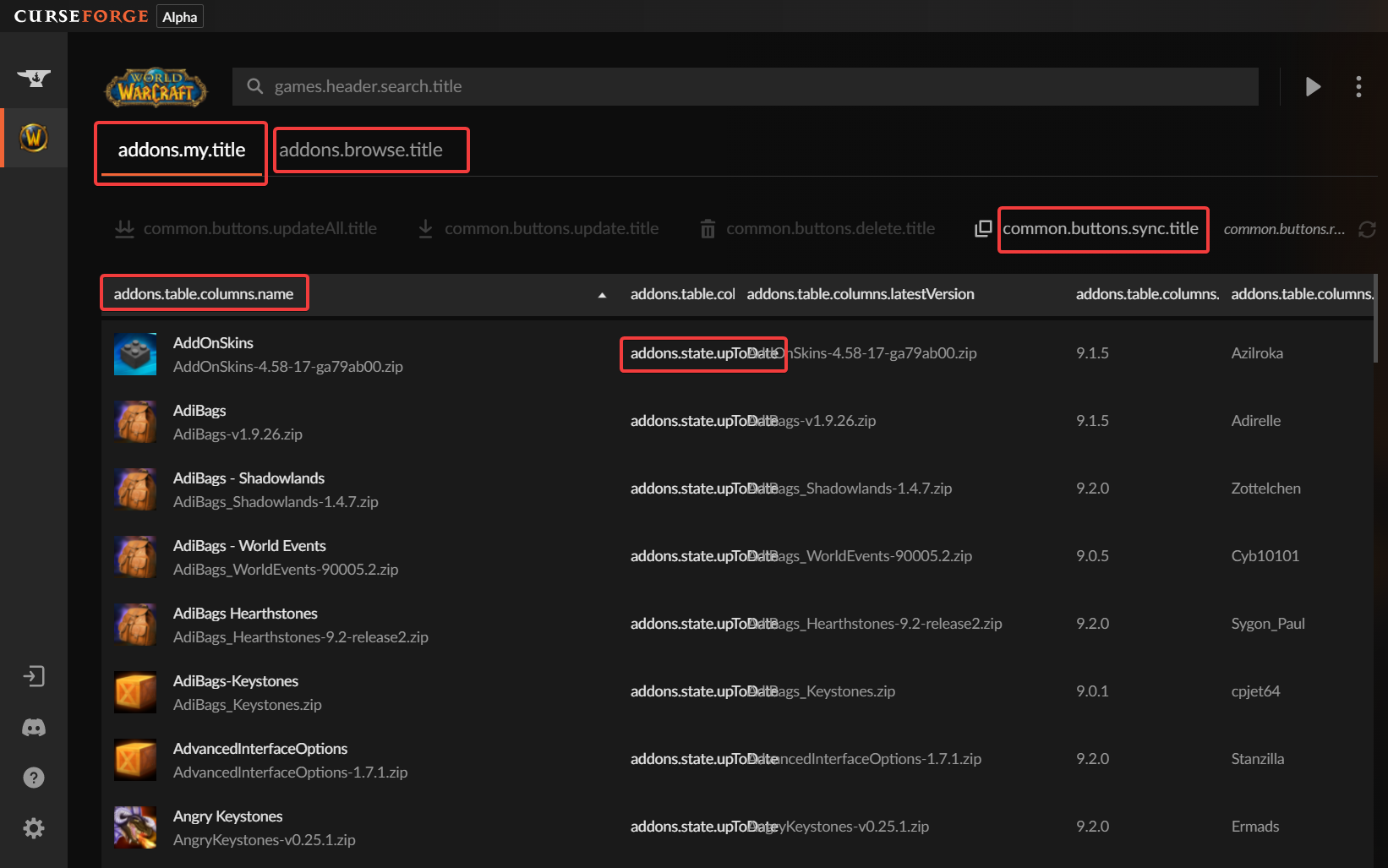
Why does the curseforge standalone client have these strange terms? https://i.imgur.com/sRshe5f.png
 opal cipher
Looks like translation didn't work out as expected.
left haven
What can I do?
opal cipher
I'll poke someone about it.
 unborn basin
left haven
Why does the curseforge standalone client have these strange terms? https://i.im...
unborn basin
left haven
Why does the curseforge standalone client have these strange terms? https://i.im...
Restarting the app doesn't fix it?
left haven
No
unborn basin
Send logs please
left haven
What exactly?
 fleet bear
!cflogs-app
red patioBOT
<:overwolf:857375414002384916> How to get CurseForge App logs! <:overwolf:857375414002384916>
- Click the

Create logs zipin the menu.
menu. - Drag and drop the file it just made to this chat room to upload it.
- Wait for someone to look at it so they can help you.
 left haven
unborn basin
left haven
left haven
unborn basin
left haven
What happens if you try to change language through the settings?
left haven
nothing happens
stays the way it is
 vapid tide
How do I fix this?
 unborn basin
vapid tide
How do I fix this?
unborn basin
vapid tide
How do I fix this?
Send logs please
 paper dock
unborn basin
paper dock
paper dock
unborn basin
paper dock
?
 digital roost
thanks for making me quit the modding community ill just play terraria goddam it, I aint installing the launcher
thanks for removing support from multimc
paper dock
someone is a bit salty
 queen storm
digital roost
thanks for removing support from multimc
queen storm
digital roost
thanks for removing support from multimc
They did it themselves
digital roost
 digital roost
paper dock
someone is a bit salty
digital roost
paper dock
someone is a bit salty
This is a national loss
 scenic lynx
MultiMC chose not to integrate. I suggest you speak with their devs
scenic lynx
We don't enable support for outside client, we literally can't. They choose if they want to use the API or not
MultiMC chose not to
 scenic lynx
I've had conversations with the developer but I won't get into specifics due to privacy.
In short, they didn't like the new API, so they chose not to use it.
scenic lynx
digital roost
That was when MMC went to use FTB's access to the API. Then FTB asked them not to ride their access
digital roost
okay time to go to FTB's discord
cya
is curseforge even for linux???
yeah. cool
digital roost
😫 '
scenic lynx
Again, 3rd party clients can work on Linux with the current API
vapid tide
unborn basin
Send logs please
oh ok how do I do that?

 dawn oasis
updated a modpack to a recent version and it loads up fine but doesnt start up it says java runtime configuration
vapid tide
unborn basin
You got VPN enabled?
all no
unborn basin
vapid tide
all no
Are you sure?
vapid tide
unborn basin
Are you sure?
yes?
unborn basin
vapid tide
yes?
Is that a question or a definite answer?
vapid tide
definite answer then
unborn basin
Creating a custom profile works?
vapid tide
unborn basin
Creating a custom profile works?
yes
unborn basin
Importing a modpack works?
vapid tide
unborn basin
Importing a modpack works?
you mean like importing it into my minecraft folder? and playing it?
unborn basin
No
vapid tide
unborn basin
No
then idk what you mean
unborn basin
Click on "Create custom profile" and import this zip file
Let me know if that works
vapid tide
ok
vapid tide
unborn basin
Let me know if that works
it does
 unborn basin
Try installing a modpack now, not the one you tried before
vapid tide
unborn basin
Try installing a modpack now, not the one you tried before
It works

 fluid creek
When I launch a modpack from curseforge, the forge installation does not show up in the launcher. Is there any way to fix this? Also I am on an M1 Mac and I know about the problem where modpacks don't work if they are between 1.13 and 1.16 but I am trying to play a mod that is 1.12.2.
lyric crescent
close whatever minecraft launcher you have open, then press play on curseforge
lyric crescent
?mc-installfix
red patioBOT
This is NOT instructions for Repair Profile! They are NOT the same! You need to do this!
- Click on the Minecraft Tab on the Left side of the CurseForge App.
- Click button next to the
Create Custom Profileoption. - Click

Repair Installationoption. - Play game.
NOTE: You will not lose any modpacks or worlds!
fluid creek
i tried repairing the installation but whenever i click play on a mod, it opens the minecraft launcher but doesnt show the forge installation
 lyric crescent
try restarting your computer
do not open the minecraft launcher yourself, just press play on curseforge
fluid creek
lyric crescent
try restarting your computer
is there anything else I can do?
lyric crescent
try another pack? im not sure what you are doing that's making this not work
fluid creek
ok
lyric crescent
Any change?
digital roost
i am haveing a problem with 'illegal characters in path'
lyric crescent
?mc-path
red patioBOT
Instructions for changing CurseForge Minecraft install path!
If Minecraft is not installed in CurseForge App:
- Click the
 in the top left.
 - Select Minecraft from the list of games.
- Select the
Advancedoption and select:
--- Windows:Local Disk (C:)at the left side of the window. If you do not see it, clickThis PCfirst.)
--- Mac:/Users/Shared/CurseForge, If it does not exist, make it. - Click
Continue.
If Minecraft is installed in CurseForge App:
- Click the
 in the bottom left.
 - Select the Minecraft tab.
- Click
Change. - Select the location:
--- Windows:Local Disk (C:)at the left side of the window. If you do not see it, clickThis PCfirst.)
--- Mac:/Users/Shared/CurseForge, If it does not exist, make it.
digital roost
still dont work
lyric crescent
show the screen
 lyric crescent
you need to make a profile that the mod works on
 lyric crescent
try restarting the app
 fathom vessel
how was it called the command to get the 3rd party mods of CF?
for exporting modpacks
or the link to the excel sheet is fine too
lyric crescent
?mc-3rdparty
red patioBOT
Minecraft Modpack 3rd party
Mods not on CurseForge must be on the 3rd-party list to be included in modpacks uploaded to CurseForge. If a mod is not on this list it can't be included in the export of a modpack and must be removed before uploading. If you upload with a mod that isn't on this list the file will be rejected.
List of approved 3rd party mods:
https://docs.google.com/spreadsheets/d/176Wv-PZUo9hFxy6oC6N8tWdquBLPRtSuLbNK-r0_byM
fathom vessel
ty
digital roost
why cant i export this modpack, it just keeps giving me this error

 red patioBOT
Sending logs for support.
- Right-click the modpack profile icon OR click the button in the modpack profile.
- Click
Open Folder. - Open the
logsfolder. - Drag and drop the FILE named
latestORdebuginto discord.
 vestal vortex
red patioBOT
vestal vortex
red patioBOT
This is NOT instructions for Repair Profile! They are NOT the same! You need to do this!
- Click on the Minecraft Tab on the Left side of the CurseForge App.
- Click button next to the
Create Custom Profileoption. - Click
Repair Installationoption. - Play game.
NOTE: You will not lose any modpacks or worlds!
 dense idol
Can you launch/instal/use (multiple) single mods with curseforges app thing? Or can you only play 1 modpack at a time?
queen storm
You can only have 1 instance running at the same time
Can install as many packs as you want though
dense idol
alright thanks
red patioBOT
Your question is not related to CurseForge owned/maintained features or services.
Please use the appropriate game room by getting a game role from #786424115535544350.
Otherwise use #👽︱game-support for game related help.
CurseForge does not make or maintain any of the content or games used on the site or app. Just because it's on the site/app does not make it a problem with CurseForge. Move rooms as requested, arguing about it will result in you being muted.
 elfin basalt
So my CurseForge is doing this thing where it says forging your library and then goes to this screen. Reboot didnt fix. Reinstall of curseforge didnt work. So now Im here. It worked fine last night.
 fathom vessel
when one uploads a modpack's version upgrade in CF, does it automatically download an update to whoever has already downloaded the pack?
i.e v1.0.0 for MC 1.18.1 already installed will get updated with the v1.1.0 for MC 1.18.2
 fallen loom
Users have to manually select to update the pack
And modpacks that update mc versions I believe would need to be downloaded to new profiles
 sullen glen
uhh i need some help.. i'm tryna play on the ftb modpack but when i get in the game, i get a brownish screen - i can still hear and move around (i can hear myself moving) but i can't see naything..
red patioBOT
Your question is not related to CurseForge owned/maintained features or services.
Please use the appropriate game room by getting a game role from #786424115535544350.
Otherwise use #👽︱game-support for game related help.
CurseForge does not make or maintain any of the content or games used on the site or app. Just because it's on the site/app does not make it a problem with CurseForge. Move rooms as requested, arguing about it will result in you being muted.
elfin basalt
Solved it... DNS issue.
 swift geyser
Hello, a webimage i have on my modpacksite updated 2 days ago, but hasnt updated on cf yet. Is it possible for a moderator/admin to flush the cache maybe?
digital roost
not support but instead a question, will there ever be a way to translate zip files for curseforge into folders full of jar filse as mods??
lyric crescent
no
 radiant creek
i tried making a 1.18.2 modpack but every time i try to launch it, it gives me an error
 signal ridge
radiant creek
i tried making a 1.18.2 modpack but every time i try to launch it, it gives me a...
signal ridge
radiant creek
i tried making a 1.18.2 modpack but every time i try to launch it, it gives me a...
#👽︱game-support for this. Send the log the bot there is asking for
radiant creek
signal ridge
<#778097796410376242> for this. Send the log the bot there is asking for
?
radiant creek
signal ridge
<#777323206884327484> 5, and Send your latest.log to <#778097796410376242> chann...
cant get it
radiant creek
cant find the log
upper root
... where cant you find it
signal ridge
Are you using the CurseForge app?
radiant creek
yes
signal ridge
!mc-logs
red patioBOT
Sending logs for support.
- Right-click the modpack profile icon OR click the button in the modpack profile.
- Click
Open Folder. - Open the
logsfolder. - Drag and drop the FILE named
latestORdebuginto discord.
signal ridge
you followed this in the channel I told you to go too?
radiant creek
signal ridge
you followed this in the channel I told you to go too?
i put it in game support
signal ridge
Ok take 10min to read the #📛︱rules as well. Specially 5 since you still dont seem to understand
 rich frigate
can anyone dm me on a video how to setup a server with a mod
signal ridge
go to #🟢︱user-bot-spam and type: !mc-installserver
red patioBOT
Your question is not related to CurseForge owned/maintained features or services.
Please use the appropriate game room by getting a game role from #786424115535544350.
Otherwise use #👽︱game-support for game related help.
CurseForge does not make or maintain any of the content or games used on the site or app. Just because it's on the site/app does not make it a problem with CurseForge. Move rooms as requested, arguing about it will result in you being muted.
fallen loom
?status
red patioBOT
Project Moderation Time
Project/File moderation is done on these days unless otherwise mentioned:
Sunday, Monday, Tuesday, Wednesday, Thursday: <t:1631170800:t> - <t:1631199600:t> (Your time)
Friday, Saturday: No Moderation!
Projects are moderated First in, First out. If you submit late in the work day, it will likely get left until the next day!
New Projects or anything flagged for manual review: 1-3 Working Days
Updates to approved projects not needing manual approval: 1 Hour
-If your file has been "Under Review" for more than an hour, then it is at manual review!
Changes will only show in the app if the project meets the requirements in the ?sync command and up to 24 hours has passed from when it was accepted.
 molten carbon
I'm guessing I have to wait till tomorrow?
lyric crescent
did you read it
molten carbon
i dont under stand it
lyric crescent
which part
molten carbon
the time
fallen loom
What about it?
molten carbon
idk if it means that it would be that it would be now or tomorrow
lyric crescent
if you read past the time you will find the answer
molten carbon
ok
 young palm
Is there a way to manually update a mod in a modpack?
fallen loom
As in update the modpack or just update your copy of it?
lyric crescent
unlock the pack, but you probably shouldnt unless there is a good reason to
young palm
One of the mods in the pack I'm using has some glitches that the mod developer said are fixed in a newer version
fallen loom
?mc-modifypack
red patioBOT
How to add/remove mods in a modpack.
- Click on the picture of the modpack.
- Click the

Add More Contentbutton, IF this button is not there, see below before continuing. - Find the Mods, Resource Packs or Maps you wish to Install and click
Installon them. - Wait for all the required mods to be downloaded.
- Start the modpack.
How to Enable/Disable content management for modpacks.
- Click on the picture of the modpack.
- Click on the button next to the
Playbutton. - Click on

Profile Options. - Check the
Allow content management for this profileoption if you want to edit the content of the modpack, uncheck it to disable.
NOTE: The Allow content management for this profile option is what allows you to Delete, Disable, Update or Install any Mods, Resource Packs or Maps managed by CurseForge. It must be on to modify any of them! (Currently)
fallen loom
But do note that the pack dev likely doesn't intend for you to make the changes yourself and will likely not provide support for any issues that develop afterward
 rich gate
I have a modpack for mc that runes mc fine but i cant play hypixle on vanala mc only on the modpack
idn how
lyric crescent
idk what you said
rich gate
on minecraft i cant play hypixle on vanala but only on a modpack
i used it and now i cant play hypixle on vanala idn how
lyric crescent
what does this have to do with curseforge?
rich gate
the modpack may be involved but it dosent let me play hypixle on vanala so it could work with other severs so it could be a bug with curseforage of mc idn
lyric crescent
i really have no clue what you're saying, it makes no sense
rich gate
nvm i give up
fallen loom
Curse has nothing to do with servers or even the game once it gets beyond launch
 gritty kayak
Hey all! I have been trying to export my new custom made modpack from the curseforge launcher but it always fails to extract the mods folder so when I import it into mmc or something else it says that it can't find mods
anyone know whats going on?
btw it does this with every modpack I try exporting not just my own
lyric crescent
does it import on curseforge?
 cinder field
my curseforge isn't working, it says network problems, how do I solve that
now it's working lol
gritty kayak
lyric crescent
does it import on curseforge?
What do you mean?
gritty kayak
oh sorry i'm stupid let me try
fleet bear
MultiMc doesn't support curseforge anymore.
the only launchers that I know of that support CF is ATL and FTB.
fleet bear
No, it does not. They removed support for it due to the API change and unless it's been replaced within the last ~5 days (I doubt) it won't work.
You can't switch modloaders.
gritty kayak
so ill have just have to copy and paste a bunch of the files to a new instance then right?
fleet bear
Forge mods are for Forge modloader, Fabric mods are for Fabric moddloader.
gritty kayak
In mmc
fleet bear
You would need to copy the files from the instance folder of one to the other or point MMC to use the folders from the CF app
gritty kayak
Oh okay thanks
 polar nexus
hi all
how can i scroll with a longer list
 lyric crescent
make the window bigger
polar nexus
wdym
lyric crescent
🤨
polar nexus
its already full size
 young bone
Maximize the window
lyric crescent
then you have some kind of zoom effect in your display settings
polar nexus
i use to be able to scroll down and the list would grow, hiding the profile
fleet bear
that was removed in an update because it was annoying to most.
polar nexus
fuck
would have been nice to put it in setting
fleet bear
Unless you are on a monitor that's 15 years old or you have the wrong resolution set on your PC, It should fit fine.
lyric crescent
or zoom
polar nexus
gotta admit, its a new tv
fleet bear
Is it set to 800x600 resolution or something on the PC..?
polar nexus
3840x2160
fleet bear
wtf
polar nexus
its the recommended
fleet bear
Are you using CF full screen or did you drag it to be a tiny box?
polar nexus
like that
 fleet bear
can you take a full screenshot of the device CF is on just as if you where using it?
polar nexus
 polar nexus
how do you see/know that
nope, just one
fleet bear
Open the full size image and inspect element it.
lyric crescent
now go to your display settings and screenshot that
polar nexus
 lyric crescent
🎙️
⬇️
young bone
I think it might be the scaling
lyric crescent
reduce the scaling, cf app doesnt like it
polar nexus
if i do, everything becomes really small
lyric crescent
ok, pick a problem then
fleet bear
Ahahaha yes 300% scaling would do that.
If you don't like how small it is make the resolution smaller.
young bone
Turn the scaling down by one option and see what happens
fleet bear
use 1920x1080
young bone
This makes me wonder what the resolution of my mini projector is
polar nexus
its on 1920x1080
 fleet bear
You need to set the scaling to 100%
polar nexus
kinda small
 fleet bear
Then make the resolution smaller.
1280x720 would be the next size down
This is one of those cases where you either need to pick larger programs with less info or smaller programs with more info.
There's no having both.
fallen loom
nvm, I was wrong
fleet bear
the other option is to move closer.
polar nexus
oh well, fuck me i guess.
thank you all for the help,i really appreciate you took the time to try 🙂
 short herald

 steady cliff
Hi, my friend is having an issue with opening up minecraft thru cursedforge. it was working initially with all the same mods me and my other friends have. He deleted then reinstalled EVERYTHING but now curseforge shows that its not responding when he tries launching it. any help with this?
fleet bear
your friend needs to come here for support.
 rough ferry
the new update just made my curseforge insanely slow and i have 2 small modpacks put together but thats it
 stuck wadi
are there any plans for the minecraft launcher for linux?
fleet bear
rough ferry
the new update just made my curseforge insanely slow and i have 2 small modpacks...
can you explain more?
fleet bear
stuck wadi
are there any plans for the minecraft launcher for linux?
It will come in the future. No current known info of when that will be
stuck wadi
fleet bear
I know, it's annoying
rough ferry
fleet bear
can you explain more?
my overwolf client is like insanely slow maybe 2 fps kinda slow
fleet bear
Overwolf or Curseforge as you have said two separate things now.
rough ferry
i meant overwolf in the begining sorry about that
fleet bear
so curseforge is fine?
rough ferry
i believe it takes forever to load it but that could just be overwolf
fleet bear
Have you tried a computer restart?
rough ferry
yep
fleet bear
I would go to the OW discord for support then.
rough ferry
ah okay i just joined the first place i saw to try and figure it out
rough ferry
okay thanks
fleet bear
you can't?
 pulsar cliff
it's like a video with fire appearing then curseforge logo
upper root
That should only show the first time you launch curseforge
pulsar cliff
ah, guess i'm fine then
 bleak terrace
When will gd launcher going to be working
fleet bear
Ask them not us
 old canyon
Hallo ich brauch hilfe ich kann meine mods nicht mehr spielen
 wooden sigil
uhhh what is this
 dawn oasis
Updated the better minecraft forge 1.18.2 modpack and its not letting me play it
 west folio
<@&524645667818307596>
 hidden fern
west folio
<@&524645667818307596>
hidden fern
west folio
<@&524645667818307596>
Thanks
 mental prism
whbat did somebody do
young bone
“Free premium MC accounts” and a discord invite link
 late patio
Hey curseforge team! I'm currently playing WoW classic SOM and my guild uses signa suicide kings loot system https://www.curseforge.com/wow/addons/signainferresuicidekings
version 3.1.4-bcc ....So heres my problem. I use the curseforge app because I run wow on Linux through an application called Wine. It makes it possible to run Windows programs through the Linux operating system. Your app works to attach addons to my WoW folder but I cannot physically move items into my addon folder because of the way Wine is layered. I can't install this addon to run inside of classic on the App because its technically TBC but can run on classic. How can I push this addon into the curseforge app into my classic folder? It seems I need to trick the software to think im playing TBC or something?
lyric crescent
- You can ask the addon dev to upload a file tagged as classic.
- You can figure out some way to get it into the addon folder.
There isn't going to be a way to trick the app into installing this.
Perhaps you could use sync from another computer where it's setup with the addons you want to use, but no idea if it would sync an addon not tagged for the version you use.
late patio
lyric crescent
1. You can ask the addon dev to upload a file tagged as classic.
2. You can figu...
Number 1 sounds like the most optimistic.
ah i got into the folder! nevermind all good!!
 thick nymph
Hey i loaded my own modpack on curse forge and when i download it and play single player it has extreme lag issues... but only when i play the version i dowload off of curse forge, if i play the exact same custom profile i created it doesnt lag one bit. any help?
lyric crescent
press f3 ingame and take a screenshot
 cunning torrent
what do i do if curse forge installer doesnt start when i open it?
signal ridge
what os?
cunning torrent
Windows
signal ridge
!getcf try the alternative link
red patioBOT
Looking to install the CurseForge app?
<:windows:798410728188936222> Windows
Minimum Requirements:
- OS Version: 7 (64 bit), 8.1, 10, 11
- 64 bit Required.
- 350MB storage space.
- Microsoft .Net 4.8
- Intel/AMD quad-core CPU
- 8GB ram
[Windows Download]
[Windows Alternative Download]
If you are having issues with the Windows Download use the Windows Alternative Download to install Overwolf. Then download CurseForge from the App Store.
Windows Standalone: NOTE: ONLY SUPPORTS WORLD OF WARCRAFT CURRENTLY!
Requirements:
Uh, Windows? (No not the ones in your house)
WoW as that's all it's useful for..
Some sort of zoomy box that does teh verk.
[Windows Standalone] NOTE: ONLY SUPPORTS WORLD OF WARCRAFT CURRENTLY!
<:mac:798410654418862130> Mac
:penguin: Linux
Minimum Requirements:
Something not windows or mac would be a start.
Hopefully it turns on.
A screen would be beneficial too.
 pearl minnow
Ok, weird situation. Today I tried to run minecraft and this well known error appeared. The weird part it, I played minecraft like normal some days ago, without any problems. I tried to reinstall, add enviromental variables, but with no help. I use curse forge. When I want to use java like normal, e.g. use -version, it doesn't throw any problems . The problem occur only when I try to run minecraft from curse launcher
 cunning torrent
can i download minecraft modpacks with this?
signal ridge
what is "this" ?
pearl minnow
cunning torrent
can i download minecraft modpacks with this?
With curse launcher? Yes, you can
cunning torrent
i mean Overwolf
signal ridge
Use the overwolf app to download the Curseforge app from its app store
signal ridge
pearl minnow
Ok, weird situation. Today I tried to run minecraft and this well known error ap...
in the app click > minecraft tab > screen shot the java args box
cunning torrent
wtf now overwolf doenst start
signal ridge
any errors?
cunning torrent
nvm im sorry
pearl minnow
signal ridge
in the app click <:CFsettings:798388925072408577> > minecraft tab > screen shot ...
 red patioBOT
This is NOT instructions for Repair Profile! They are NOT the same! You need to do this!
- Click on the Minecraft Tab on the Left side of the CurseForge App.
- Click button next to the
Create Custom Profileoption. - Click
Repair Installationoption. - Play game.
NOTE: You will not lose any modpacks or worlds!
signal ridge
then try running the pack
cunning torrent
@signal ridge Thanks a lot bro i tried fixing it for a long time now
 signal ridge
!mc-logs
red patioBOT
Sending logs for support.
- Right-click the modpack profile icon OR click the button in the modpack profile.
- Click
Open Folder. - Open the
logsfolder. - Drag and drop the FILE named
latestORdebuginto discord.
signal ridge
And did you re-add the args after at all? (shouldnt have)
pearl minnow
signal ridge
And did you re-add the args after at all? (shouldnt have)
No, I didn't
No logs
 signal ridge
Do other packs work?
pearl minnow
nope
signal ridge
what path is the app using? > mc tab > top of screen
pearl minnow
 signal ridge
!mc-path try a new path
red patioBOT
Instructions for changing CurseForge Minecraft install path!
If Minecraft is not installed in CurseForge App:
- Click the in the top left.
- Select Minecraft from the list of games.
- Select the
Advancedoption and select:
--- Windows:Local Disk (C:)at the left side of the window. If you do not see it, clickThis PCfirst.)
--- Mac:/Users/Shared/CurseForge, If it does not exist, make it. - Click
Continue.
If Minecraft is installed in CurseForge App:
- Click the in the bottom left.
- Select the Minecraft tab.
- Click
Change. - Select the location:
--- Windows:Local Disk (C:)at the left side of the window. If you do not see it, clickThis PCfirst.)
--- Mac:/Users/Shared/CurseForge, If it does not exist, make it.
pearl minnow
I've also tried to run it with vanilla minecraft, but it doesn't work either, so its not fabric nor forge
pearl minnow
signal ridge
!mc-path try a new path
Still the same
 bronze bison
guys whenever i keep joining my modpack minecraft pops up asking me to log into mojang or microsoft i press microsoft because i've mirged my mojang account to their's so this popped up to me
 signal ridge
bronze bison
guys whenever i keep joining my modpack minecraft pops up asking me to log into ...
signal ridge
bronze bison
guys whenever i keep joining my modpack minecraft pops up asking me to log into ...
!mc-installfix try this
red patioBOT
This is NOT instructions for Repair Profile! They are NOT the same! You need to do this!
- Click on the Minecraft Tab on the Left side of the CurseForge App.
- Click button next to the
Create Custom Profileoption. - Click
Repair Installationoption. - Play game.
NOTE: You will not lose any modpacks or worlds!
 signal ridge
if you click microsoft what happens?
 signal ridge
Would be an issue on Microsofts side as we use their launcher. Are you able to log into the vanilla app?
 signal ridge
oh, might be a network issue on your side or issue on microsofts side then. Shouldnt say play offline
 signal ridge
repair profile OR repair installation? they are not the same
bronze bison
profile
red patioBOT
This is NOT instructions for Repair Profile! They are NOT the same! You need to do this!
- Click on the Minecraft Tab on the Left side of the CurseForge App.
- Click button next to the
Create Custom Profileoption. - Click
Repair Installationoption. - Play game.
NOTE: You will not lose any modpacks or worlds!
bronze bison

 solar merlin
polar nexus
oh well, fuck me i guess.
thank you all for the help,i really appreciate you too...
solar merlin
polar nexus
oh well, fuck me i guess.
thank you all for the help,i really appreciate you too...
Well actually since Overwolf/CurseForge is an Electron app it natively supports all Chrome command line arguments, so you can just add --force-device-scale-factor=1.0 to your shortcut or whatever scale factor you want.
signal ridge
bronze bison
in the cf app click > minecraft tab > screen shot the path the app is using
bronze bison
 signal ridge
!mc-path try this
red patioBOT
Instructions for changing CurseForge Minecraft install path!
If Minecraft is not installed in CurseForge App:
- Click the in the top left.
- Select Minecraft from the list of games.
- Select the
Advancedoption and select:
--- Windows:Local Disk (C:)at the left side of the window. If you do not see it, clickThis PCfirst.)
--- Mac:/Users/Shared/CurseForge, If it does not exist, make it. - Click
Continue.
If Minecraft is installed in CurseForge App:
- Click the in the bottom left.
- Select the Minecraft tab.
- Click
Change. - Select the location:
--- Windows:Local Disk (C:)at the left side of the window. If you do not see it, clickThis PCfirst.)
--- Mac:/Users/Shared/CurseForge, If it does not exist, make it.
bronze bison
 signal ridge
ok? so then do what the bot says
signal ridge
make a folder called CurseForge and put it in the local C drive.
so in the app it will look like C:/CurseForge

 slow gazelle
How to make this buttons in your curseforge description :

 quasi cradle
I change my name of my modpack but is there anything else I need to change

I changed the name to The Atlantean
signal ridge
Then you wait for it to get looked at again.
quasi cradle
ok will do
 tardy fjord
can someone help me because every time I load up my mod it load up Minecraft launcher then shows the message and doesn't load up at all

 signal ridge
!mc-installfix try this
red patioBOT
This is NOT instructions for Repair Profile! They are NOT the same! You need to do this!
- Click on the Minecraft Tab on the Left side of the CurseForge App.
- Click button next to the
Create Custom Profileoption. - Click
Repair Installationoption. - Play game.
NOTE: You will not lose any modpacks or worlds!
signal ridge
you
signal ridge
Do other packs work?
tardy fjord
nope
signal ridge
!mc-path follow this
red patioBOT
Instructions for changing CurseForge Minecraft install path!
If Minecraft is not installed in CurseForge App:
- Click the in the top left.
- Select Minecraft from the list of games.
- Select the
Advancedoption and select:
--- Windows:Local Disk (C:)at the left side of the window. If you do not see it, clickThis PCfirst.)
--- Mac:/Users/Shared/CurseForge, If it does not exist, make it. - Click
Continue.
If Minecraft is installed in CurseForge App:
- Click the in the bottom left.
- Select the Minecraft tab.
- Click
Change. - Select the location:
--- Windows:Local Disk (C:)at the left side of the window. If you do not see it, clickThis PCfirst.)
--- Mac:/Users/Shared/CurseForge, If it does not exist, make it.
 signal ridge
Read the for windows. Shared is for mac
 signal ridge
!cflogs-app
red patioBOT
<:overwolf:857375414002384916> How to get CurseForge App logs! <:overwolf:857375414002384916>
- Click the
Create logs zipin the menu. - Drag and drop the file it just made to this chat room to upload it.
- Wait for someone to look at it so they can help you.
tardy fjord
file:///C:/Users/PPPL/Desktop/OverwolfLogs_2022-05-26_14-01-00%20(1)/OverwolfAgent_05-25-22_17-17-47.Game.html
signal ridge
ok?
tardy fjord
what?
signal ridge
the text you sent.
signal ridge
You using anything like a vpn ?
signal ridge
Ill forward this to support as im a little unsure. Otherwise best guess is something is blocking the connection. Either bad network, firewall , etc
signal ridge
tardy fjord
thanks for helping
One last thing. How full is your C drive? Do you have more then 10gb of space left?
tardy fjord
signal ridge
One last thing. How full is your C drive? Do you have more then 10gb of space le...
yep

yoyok9 if u find something out to help u can just @ me or dm ok
thanks for all ur help tho
signal ridge
Just for fun, try logging out then back in again.
tardy fjord
signal ridge
Just for fun, try logging out then back in again.
how u do that
signal ridge
in the mc launcher that opens > top left corner > click the pull down and log out of mc > then log back in
tardy fjord
signal ridge
in the mc launcher that opens > top left corner > click the pull down and log ou...
i never logged in before
wait
nvm
im thinking about soemthing else
nopE
didnt work
either
same respond
signal ridge
Try disabling your anti virus maybe? or running it to look for a virus.
signal ridge
does vanilla minecraft work?
tardy fjord
yeah
bleak terrace
Can you guys turn on your APL please
signal ridge
It is on? or the new one should be?
bleak terrace
I don't know what it is but gd launcher is down bc of curseforge ALi
I use it bc of the lag in single player
signal ridge
gd had lots of time to update their launcher to the new api, they chose to procrastinate. They will need to fix it. They are more then welcome to contact ow support as well.
tardy fjord
?
signal ridge
the CF app, FTB app, and ATLauncher all still work tho
 native iron
any way i can run modpacks on linux since i can't download them using other launchers?
signal ridge
ATLauncher works on linux
signal ridge
eventually the linux version of the cf app will have minecraft. Just no eta atm
native iron
okay
signal ridge
tardy fjord
yeah
!mc-launcherlog can you send this
red patioBOT
How to get the launcher log
- Right click a profile.
- Select
Open Folder - Go back two folders.
- Open the
Installfolder. - Drag the
launcher_log.txtinto discord.
native iron
I hope it will come out fast, the only reason i'm on linux is because of my amd gpu running like shit on modded windows sessions lol
tardy fjord
k
signal ridge
the pack your trying to run
signal ridge
Did you go back 2 folders?
 upper root
Click bwck two folders by using the up arrow to the left of the small bar at the top
tardy fjord
upper root
Click bwck two folders by using the up arrow to the left of the small bar at the...
yep
signal ridge
click the arrow twice till your in the CurseForge Folder. Then open the Installs folder
 broken sedge
Having an issue where Curseforge keeps asking me if I wanna update Geckolib, but I already have the latest version, and its trying to get me to "update" to an earlier version
How would I resolve this?
upper root
and change your release type to alpha or beta
broken sedge
Its not that, the latest version of Geckolib is a release
At least I don't think its that
Also this keeps happening?
 signal ridge
tardy fjord
uhm yoyok9?
signal ridge
tardy fjord
uhm yoyok9?
Want to make sure you down in fact own a legit version of JAVA version of minecraft right? Like got it from Mojang/Microsoft?
broken sedge
broken sedge
Also this keeps happening?
Where basically my entire modlist is replaced with random other mods, that sometimes aren't even in the same version
tardy fjord
signal ridge
Want to make sure you down in fact own a legit version of JAVA version of minecr...
wym
like do i own
mince
minecraft?
signal ridge
Yes.
tardy fjord
ye i do own one
broken sedge
broken sedge
Where basically my entire modlist is replaced with random other mods, that somet...
I need to reset curseforge in order for it to go back to what its supposed to look like, which is this
 upper root
Might have something to do with them messing around with adding another mod loader to the app, can you come back later if its still happening?
signal ridge
tardy fjord
ye i do own one
Can you screen shot the launcher the cf app opens when you press play?
tardy fjord
signal ridge
Can you screen shot the launcher the cf app opens when you press play?
what cf
app
o
curseforge


?
signal ridge
oh
tardy fjord
what happened
signal ridge
You on wifi? or a cable?
tardy fjord
signal ridge
You on wifi? or a cable?
cable
signal ridge
antivirus is off as well?
tardy fjord
signal ridge
antivirus is off as well?
yep
signal ridge
tried a pc and router reboot?
broken sedge
Oh, I see what the issue is, my launcher is trying to like, get me to install the latest version of Geckolib for quilt?
What the hell is Quilt?
signal ridge
another version of fabric. Fabric split at some point. So now we have Fabric and Quilt
scenic lynx
broken sedge
Also this keeps happening?
Could be an issue with recent quilt tagged mods. We're looking into this
broken sedge
Ah, okee
Good to hear its being looked into then 👍
Quick question, is there anything special one needs to do to make sure they get points for the rewards program?
Or is it all about just making sure you've agreed to the terms?
scenic lynx
You need to register for it once on your account and that's it
broken sedge
Dope
scenic lynx
Can you try checking your mods again? Restart the app might be needed
broken sedge
I imagine its not retroactive or anything like that, so downloads my projects already have won't count towards points prior to my accepting the terms?
scenic lynx
correct
broken sedge
Shame, but at least future downloads will count to that
I figure it can't hurt to add that, if I'm already uploading projects
broken sedge
scenic lynx
Can you try checking your mods again? Restart the app might be needed
Also doing this
Nope, its still trying to update Geckolib to a quilt version
scenic lynx
only geckolib?
broken sedge
Thats the only one its actually trying to update
It is also doing that thing where it changes all the mods in my packs modlist to random mods
scenic lynx
Thats....weird 😅
broken sedge
But that only seems to happen after I open and close a mod window
scenic lynx
Hang on, we're trying to refresh server cache
Did some changes that should fix this issue but it may be that we need to kick the cache awake
tardy fjord
yoyok9 i tried restarting pc and re booting internet still the same respond 😦
signal ridge
send new launcher log
red patioBOT
Ignore the new launcher update. CF does not use it or works with it, yet.
Everything will work fine otherwise.
signal ridge
shush 🐢
 signal ridge
tardy fjord
signal ridge
tardy fjord
I am honestly not sure at this point. I can try asking the other staff see if they have any ideas. Otherwise its leading me to believe you have a internet issue. Something is blocking you from getting to the mojang servers.
tardy fjord
signal ridge
I am honestly not sure at this point. I can try asking the other staff see if th...
O
ok
scenic lynx
broken sedge
Nope, its still trying to update Geckolib to a quilt version
can you check again?
broken sedge
Yup, its still doing that
fleet bear
bleak terrace
That's not a curseforge program. You are in the wrong discord.
scenic lynx
broken sedge
Yup, its still doing that
restarted the app again?
 idle sentinel
 digital roost
hey do you guys know how to fix the the decryption operation failed error when trying to download mods
?
 rain iron
fleet bear
That's not a curseforge program. You are in the wrong discord.
rain iron
fleet bear
That's not a curseforge program. You are in the wrong discord.
Yes it is, I've seen that when I open CurseForge
lyric crescent
proof?
fleet bear
rain iron
Yes it is, I've seen that when I open CurseForge
That's absolutely not CurseForge.
- There never was a changelog with that information.
- The layout is wrong.
- The colors are wrong.
- The links at the bottom are wrong. CF doesn't have a Github, Facebook, Instagram or whatever that last thing is.
rain iron
pfft oh nevermind im remembering wrong
I do have a problem: When I open the app, it says something like something closed the connection or something like that
fleet bear
Screenshot the error

 unkempt briar
do you know if quilt packs will be supported soon?
 fallen loom
Was that pack zip created with the Curse app or a third party?
I don't see the option in the app nor do I see quilt being reported as an available loader via the API
young bone
It was available as an option, it got disabled as it was being weird
unkempt briar
i used a 3rd party app
which exports to CF Format
i think CF just does not support quilt
does CF Support quilt
if so what should i change the loader feild to
 rocky bronze
its not letting me open the launcher it kicks me out instantly
fleet bear
unkempt briar
if so what should i change the loader feild to
CF packs do not support quilt.
You can't upload quilt modpacks to CF.
 smoky iris
Whenever I try to play modded minecraft I can only play the demo version. For vanilla I fixed this issue by deleting the launcher and reinstalling it through the microsoft store, but I obviously can't do the same with curseforge. I've tried reinstalling overwolf and curseforge and logging out and back into the launcher itself but it still didn't work. any recommendations on how I can fix this?
lyric crescent
unkempt briar
is this expected to change soon
no, there are no plans for quilt support in the app currently.
unkempt briar
ok
lyric crescent
smoky iris
Whenever I try to play modded minecraft I can only play the demo version. For va...
?mc-installfix does the same
red patioBOT
This is NOT instructions for Repair Profile! They are NOT the same! You need to do this!
- Click on the Minecraft Tab on the Left side of the CurseForge App.
- Click button next to the
Create Custom Profileoption. - Click
Repair Installationoption. - Play game.
NOTE: You will not lose any modpacks or worlds!
lyric crescent
then you are not using the correct account
smoky iris
Let me clarify. The launcher messed up after I migrated my Mojang account to a microsoft account. What I believe is happening is that the launcher thinks my copy of minecraft is linked to my old Mojang account and not my microsoft account. I can't play on my mojang account because that account no longer exists so I can't log into it, but I can't play on my microsoft account because the launcher still thinks my copy is linked to the non-existent mojang account. the solution to this problem in vanilla was to reinstall a new, not broken launcher through the microsoft store but I can't control what launcher curseforge uses.
And I have tried logging into my old mojang account but the launcher recognizes it as a microsoft account
lyric crescent
if you followed the instructions above then the launcher isnt thinking anything.
If it says Demo then the account you signed in with is not the correct microsoft account.
smoky iris
It IS the correct account. I use the same account with the same email and password on the minecraft launcher I got from the microsoft store and it works just fine. I log in with the same information on the minecraft website, and it opens a my profile with my name and skin that I've had for years. if you look on the minecraft forums you'll see this is a real problem with the minecraft launcher and the fix for it, at least to my knowledge, doesn't work through curseforge.
lyric crescent
Okay.
Open the vanilla launcher and screenshot it. Close it.
Open Curseforge and press play, then screenshot that launcher.
Send both.

 fleet bear
That's not even the same account
smoky iris
notice how the vanilla uses my randomly generated microsoft account name(top left) and my in game name(bottom right) while the curseforge one uses my in game name in the top left but just says "player" in the bottom right
lyric crescent
Yes, yes we did notice.
fleet bear
because they ain't the same account.....
smoky iris
I will screenshot myself entering my email into both launchers if I have to
lyric crescent
Don't bother. If you are at that point that you are swearing it's the same you need to talk to microsoft support.
smoky iris
The exact same info opens two different accounts depending on the launcher
lyric crescent
That is still the vanilla launcher, curseforge has nothing to do with your login.
fleet bear
it's the same launcher.
smoky iris
Okay, I figured it out. I tried logging in with a recovery email instead and that opened the correct account. Apparently all migrating your account does is make a new account with the same name and email and none of the stuff you actually owned
Thank you for your time
 cedar ether
HI! I seem to get Error Code :1 often.
red patioBOT
Error/Exit codes are useless. Follow these steps so someone can actually help you.
- Right-click the modpack profile icon OR click the button in the modpack profile.
- Click
Open Folder. - Open the
logsfolder. - Drag and drop the FILE named
latestORdebuginto discord.
 harsh bison
I recently downloaded Curseforge for Linux and it isn't detecting Minecraft.
lyric crescent
The linux version only has WoW currently.
harsh bison
lyric crescent
The linux version only has WoW currently.
rip :/
 woven star
i finally got curseforge to open after having to reinstall it but now whenever i click mc to try and look at my modpacks, it says it crashed and i can relaunch just to get the same thing over and over. any ideas?
fleet bear
woven star
i finally got curseforge to open after having to reinstall it but now whenever i...
!cflogs-zip
red patioBOT
 sick ferry
red patioBOT
sick ferry
red patioBOT
Your question is not related to CurseForge owned/maintained features or services.
Please use the appropriate game room by getting a game role from #786424115535544350.
Otherwise use #👽︱game-support for game related help.
CurseForge does not make or maintain any of the content or games used on the site or app. Just because it's on the site/app does not make it a problem with CurseForge. Move rooms as requested, arguing about it will result in you being muted.
 ocean anchor
how can i get an api key ? I made a request but I never got an answer
upper root
!devdiscord
red patioBOT
upper root
ask in there, you are less likely to get buried
ocean anchor
Tanks
Is anybody know a software to update a large amount of curseforge mods at the same time ?
upper root
Autoclicker and the update button 😆
mods that have updates always show at the top, and move down after they are updated
 gloomy timber
Hello everyone, My friend got a problem which is why im searching for help. 2 weeks ago we installed Curse forge, donwloaded a minecraft mod pack, and played for 5 hours. After that 2 weeks passed and we wanted to play again, Almost all of us managed to get back, except for 1 person, Who non stop gets a "Failed to retrieve information for addon" message with Curse forge. The things we tried:
Reinstalling Curse Forge - This caused curse forge to break complately, since then after she starts curseforge, she cant even get to her modpack or anything, Curse forge instantly tells her theres a problem with connection
Deleting all content related to Curse forge - So minecraft it self and modpacks downloaded
-Checking and disabling firewalls, even in the Router itself, Tried opening all Ports and placing her computer into DMZ
-Supposedly nothing changed from the location to the connection type from last time
ocean anchor
Yes but macro isn't good enough.
upper root
gloomy timber
Hello everyone, My friend got a problem which is why im searching for help. 2 we...
!cflogs-zip
red patioBOT
gloomy timber
I will check this, thank you
umm you think this can be considered "failed during installation" ?
or is it experience thats telling you this will be the problem ? 😄
upper root
The instructions you need to follow should be highlighted
gloomy timber
ooooh okay, thankyou
I will be back when she is available to troubleshoot, didnt think you guys were this active, Thank you very much
 signal vortex
I'm not able to edit the config for minecraft mods. Each time I make an edit the changes are reverted when I launch the game.
I tried setting the file to read only but that causes the game to crash
 rustic hearth
Odd question, but
What is analyticsnew.overwolf.com? What is it tracking or taking?
Sorry I’m not very experienced with this sort of thing, but I was a little concerned with what it could be
upper root
According to the text it shows briefly before redirecting you it has something to do with the overwolf ads
 rustic hearth
After looking at the link, my question still remains in answered https://brands.overwolf.com

Overwolf | Tech for developers who love gaming
Overwolf is an open platform for building gaming apps for top PC games. Use simple HTML and JavaScript to build native desktop apps - installer, desktop icon, auto updates - the works! What would you build?
Unless I missed something
upper root
If you want to know exactly what it does then you should probably ask in the OW discord
digital roost
When ever I try to use minecraft modpacks in curseforge it just continues to load and doesnt stop
I have tried repair the minecraft installment, and I have just un installed and reinstalled it as well
but it still shows that its just loading
I need help
upper root
wdym by loading?
upper root
Screenshot?
 upper root
!cflogs-app
red patioBOT
<:overwolf:857375414002384916> How to get CurseForge App logs! <:overwolf:857375414002384916>
- Click the
Create logs zipin the menu. - Drag and drop the file it just made to this chat room to upload it.
- Wait for someone to look at it so they can help you.
digital roost
upper root
!oops
red patioBOT
You had an "Oops, that was not supposed to happen!"
Follow the instructions in this link!
If the info in the link does not work please do ?cflogs-oops and follow the instructions there to get the log files.
digital roost
(nvm I fixed it)
upper root
How did you fix it? Incase someone else has the same problem
digital roost
upper root
How did you fix it? Incase someone else has the same problem
I had to reinsall like 4 different times
and now I have a different problem
great
actually maybe this can help
i dont know how to fix this thought
 upper root
sounds like you have something interferring with curseforges network stuff, try disable any vpns, webfilters or firewalls that could be blocking it
digital roost
o ok
upper root
Please keep random messages out of the support channels
cinder field
HI everybody, my forge says it cannot connect to network, how do u solve that
 clear spade
I have an issue running my custom pack, it worked previously but everything was outdated and was causing problems, so I opted to rebuild the pack completely, now it won't fully load the game, it will run all the way past initialization 7, but when the main screen is supposed to load, I get an error report instead. This is the log from the last failed initialization.
digital roost
ok so
I'm pretty sure its curseforge thats bugging right now
I've disable my firewall
Restarted my computer
uninstalled and reinstalled curseforge and yet
it still says

and yes I have no vpns either
so why is it doing this
and this is the log for it
 ancient plank
i really need option to more ram allocate
 digital roost
i got this error
The game crashed whilst rendering item
Error: java.lang.IllegalStateException: Not building!
Exit Code: -1
red patioBOT
Error/Exit codes are useless. Follow these steps so someone can actually help you.
- Right-click the modpack profile icon OR click the button in the modpack profile.
- Click
Open Folder. - Open the
logsfolder. - Drag and drop the FILE named
latestORdebuginto discord.
 spare linden
who can help me?

 fallen dagger
i need help really bad
i accidently deleted the files to my game and was wondering if curseforge had like a history were i could restore my mod folder stuff
i spent more than 5 months of work on this world and really wanna get it back
digital roost
When I try and load Curseforge I keep getting this. I have tried to uninstall and reinstall and it doesn't make a difference.
 young bone
!oops
red patioBOT
You had an "Oops, that was not supposed to happen!"
Follow the instructions in this link!
If the info in the link does not work please do ?cflogs-oops and follow the instructions there to get the log files.
digital roost
!oops
red patioBOT
You had an "Oops, that was not supposed to happen!"
Follow the instructions in this link!
If the info in the link does not work please do ?cflogs-oops and follow the instructions there to get the log files.
young bone
You didn’t need to do it again
digital roost
young bone
You didn’t need to do it again
i dont get it
og
oh
nope
im on internet
lunar client works
young bone
What the response says doesn’t change between users
digital roost
but i am on internet
young bone
Curseforge can just mess up sometimes, did you do what the linked instructions want you to do
digital roost
not yet
so control pannel network and internet
but im not on ethernet
i use wifi
 pallid scarab
my launcher don't want install, i always see this
 digital roost
?
pallid scarab
sorry
young bone
digital roost
?
Not for you, for Nikolev
 glass marsh
anyone know wtf is causing this? I've been adding new recipes & removing excess JAOPCA items, and this just randomly happened. I can't find anything about it in the log.

ping me if ya know
red patioBOT
Your question is not related to CurseForge owned/maintained features or services.
Please use the appropriate game room by getting a game role from #786424115535544350.
Otherwise use #👽︱game-support for game related help.
CurseForge does not make or maintain any of the content or games used on the site or app. Just because it's on the site/app does not make it a problem with CurseForge. Move rooms as requested, arguing about it will result in you being muted.
 chilly light
So I was trying to import a modpack into the CurseForge launcher but as soon as it tried to install the mods i got this error message:
Exception if type
Curse.Radium.InstallManagement.InstallTaskFailedException was thrown
anyone know how to fix it?
lyric crescent
where did the pack come from
chilly light
It was a pack my friend sent me, if you want i can send the file they sent me
lyric crescent
curseforge can only import packs made using export with the app, was that done?
chilly light
yes
lyric crescent
can the person who made it import it?
chilly light
yes they can
lyric crescent
are you on mac?
chilly light
Windows 10
lyric crescent
?owlogs
red patioBOT
<:overwolf:857375414002384916> How to get CurseForge App logs! <:overwolf:857375414002384916>
- Click the
Create logs zipin the menu. - Drag and drop the file it just made to this chat room to upload it.
- Wait for someone to look at it so they can help you.
lyric crescent
something on your computer/network is blocking your connection
No connection could be made because the target machine actively refused it
chilly light
it all comes back to that doesn't it
I'll have to take my computer in for inspection or something
 vague yoke
Q: how can i make a desktop shortcut to launch a mc modpack from CF? so i dont gotta deal with the overwolf bs
signal ridge
you cant
 full river
how can i upload a modpack to the site? it only has mods from the curseforge website
upper root
!mc-packshare
red patioBOT
There are two ways to share a modpack you've made with others...
Export and Share - For Friends to Small Groups.
- Click the Icon for the modpack.
- Click the button next to play.
- Click

Export. - Select the files that should be included.
- Send the zip to the people that want it! They can follow the instructions in
!mc-installpackto install the pack!
Upload to Curseforge - For Public Release to Everyone.
This options will make your pack public to EVERYONE, it comes with extra requirements and will take some effort to set up.
- Go to here: https://www.curseforge.com/project/432/4471/create
- Fill out the information with a proper description of the pack. This should allow anyone to understand what the pack is.
- Click the Icon for the modpack in the CurseForge app.
- Click the button next to play.
- Click
Export. - Select the files that should be included.
- Open your Project you made on the CurseForge site and Upload the file you just made.
- Wait for Moderation & Sync so it can show up in the client! (See
!syncfor limitations)
 sudden mason
I have been trying to install the Curseforge app but when i run th installer and click yes on the prompt there's an overwolf window that opens but it's empty
i've checked the files for the .net framework but there was nothing wrong
 last terrace
HOW DO I MAKE A MODPACK THAT I CAN PLAY WITH FRIENDS
last terrace
last terrace
HOW DO I MAKE A MODPACK THAT I CAN PLAY WITH FRIENDS
also how do i make a modpack
upper root
!mc-installmods
red patioBOT
How to install mods in CurseForge App.
- Click
+ Create Custom Profile - Name it, select the required Minecraft version, select the modloader & modloader version (usually the highest number), click
Create. - Click the profile icon.
- Click
Add More Content - Search and install the desired mods.
- Start the game!
How to install mods not on CurseForge.
- Right click the profile picture or Open the profile and click the Icon next to the play button.
- Click
Open Folder. - Drag the mod(s) into the
modsfolder. (Note: Some mods will require others, to run. Make sure to read the instructions for the mod!) - Start the game!
 red patioBOT
There are two ways to share a modpack you've made with others...
Export and Share - For Friends to Small Groups.
- Click the Icon for the modpack.
- Click the button next to play.
- Click
Export. - Select the files that should be included.
- Send the zip to the people that want it! They can follow the instructions in
!mc-installpackto install the pack!
Upload to Curseforge - For Public Release to Everyone.
This options will make your pack public to EVERYONE, it comes with extra requirements and will take some effort to set up.
- Go to here: https://www.curseforge.com/project/432/4471/create
- Fill out the information with a proper description of the pack. This should allow anyone to understand what the pack is.
- Click the Icon for the modpack in the CurseForge app.
- Click the button next to play.
- Click
Export. - Select the files that should be included.
- Open your Project you made on the CurseForge site and Upload the file you just made.
- Wait for Moderation & Sync so it can show up in the client! (See
!syncfor limitations)
broken sedge
I just experienced a really bizzare issue where Curseforge caused a crash of my game by hogging a ton of RAM
I'm not really sure how to report an issue like this, is there a curseforge log?
It was using like 3 gigabytes of RAM for no apparent reason
Now that I've restarted the launcher, its back to a more normal 300-900 megs
last terrace
!mc-installpack
red patioBOT
How to install modpacks with the search features in app.
- Open the

Minecraftsection of the app. - Click the top search bar where it says
Search for modpacksOR Click theBrowse ModpacksTab. - Find the Modpack you want to install and click install on it.
- Wait for CurseForge app to download and unpack all the required files.
- Once finished, click
Play!
======================================================
** **
======================================================
How to install modpacks from a Export. (Custom/Private/Site downloaded Modpack zip)
- Get CurseForge App if you don't have it, use
!downloadfor a link. - Get the exported modpack from CurseForge or someone else,
!mc-packshareexplains how to make them. - Open the
Minecraftsection of the app. - Click

Create Custom Profile - Click the
Importoption. - Find the file you just downloaded in step 2 and select it.
- CurseForge app will now attempt to download and unpack the modpack. If it fails, try steps 4-6 again.
- Once finished, click
Play!

 shrewd umbra
Hello again. I tried launching the CF launcher today but after the orange bar finishes loading and the box closes like normal, the app doesn't open. I noticed that the Overwolf .exe wasn't running because it wasn't in the little popup arrow thing on the task bar. And I just thought to check if maybe for some reason it didn't launch like it does when I start my pc because I have it set in the startup section of task manager. It was set to disable for some reason even though I never did myself. It worked perfectly the day before yesterday and I know that I didn't do anything to cause that. So I tried manually launching the Overwolf process and then the CF app and still nothing.
 frail condor
hi
i want to install curse forg but its show me error
error:a .net configuration file seems to be corrupted.
how can i do?
 errant skiff
can anyone help my minecraft is stuck on preparing
 rigid mist
i tried to play a custom mincraft pack but redstone flux crashed it, it worked before today
upper root
!notcf
red patioBOT
Your question is not related to CurseForge owned/maintained features or services.
Please use the appropriate game room by getting a game role from #786424115535544350.
Otherwise use #👽︱game-support for game related help.
CurseForge does not make or maintain any of the content or games used on the site or app. Just because it's on the site/app does not make it a problem with CurseForge. Move rooms as requested, arguing about it will result in you being muted.
rustic hearth
I've got an odd question - why does the standalone CF app use Electron?
My understanding is that Electron is a library/framework/whatever that lets you use html/css/js to make your desktop applications, and does so by bundling a web browser into every application. This would also be taxing to memory usage, right?
So CF must have a reason for doing this instead of using something like C++ (i'm not saying you need to switch, i'm just interested in how this all works)
upper root
its a bit like java, electron is available on all systems so its 1 platform to support rather than 3
rustic hearth
isnt C++ on all 3 (mac, windows and linux)? Or am I mistaken
upper root
🤷
rustic hearth
did a little digging, looks like it is 🤔
 rich cedar
Does curse forge work with the new launcher yet??
red patioBOT
Ignore the new launcher update. CF does not use it or works with it, yet.
Everything will work fine otherwise.
rich cedar
When might it work with the new launcher
red patioBOT
Ignore the new launcher update. CF does not use it or works with it, yet.
Everything will work fine otherwise.
rich cedar
When might it work with the new launcher
red patioBOT
Ignore the new launcher update. CF does not use it or works with it, yet.
Everything will work fine otherwise.
upper root
It wont, there is no need to
The 'new launcher' is just the old one put in a box and with the 'complain about being old' switch turned off
 tawdry silo
Hey, how do I update the forge version of a minecraft modpack profile?
Nvm I found out
chilly light
lyric crescent
`No connection could be made because the target machine actively refused it`
Do any of you guys know how to fix this?
How do you change the firewall port number
lyric crescent
#📛︱rules 5
This isnt network support, sorry. This is for CurseForge support specifically.
vague yoke
signal ridge
you cant
can i at least make it kill itself when i launch a modpack? OW is just very annoying
lyric crescent
no, you can close it yourself if you want
vague yoke
yeah thats what ive been doing, the gui it makes it juist annoying clutter
lyric crescent
good news for you then that the standalone client is coming soon
vague yoke
it was a standalone, then twitch bought it then ow bought it
lyric crescent
yes i know how history works
vague yoke
at least its not full adware yet
lyric crescent
what does that even mean
vague yoke
Adware, often called advertising-supported software by its developers, is software that generates revenue for its developer by automatically generating online advertisements in the user interface of the software or on a screen presented to the user during the installation process.
not asking for the definition of adware, asking what you are talking about.
vague yoke
i was saying at least CF isnt fully adware yet
lyric crescent
of course it isn't?
rustic hearth
It never will be lmao
 quick bear
help I already downloaded the files and when I want to enter the folder to add them I get an error saying that it is damaged
 quick bear
wtf I can't delete curseforger folder
signal ridge
!notcf
red patioBOT
Your question is not related to CurseForge owned/maintained features or services.
Please use the appropriate game room by getting a game role from #786424115535544350.
Otherwise use #👽︱game-support for game related help.
CurseForge does not make or maintain any of the content or games used on the site or app. Just because it's on the site/app does not make it a problem with CurseForge. Move rooms as requested, arguing about it will result in you being muted.
signal ridge
Read the bot again
 vapid harbor
Are you folks going to make it so Open Source launchers aren't all killed by the latest change to the curseforge API?
or was that an intentional choice to force people to only use your bloated launcher, and to stop Linux players from playing modded?
fleet bear
vapid harbor
Are you folks going to make it so Open Source launchers aren't all killed by the...
#978804775078465547 please
vapid harbor
feels like support to me
fleet bear
Don't care what it feels like to you.
vapid harbor
fair, y'all are very against open source, so makes sense it's low priority
glass marsh
So uh does anyone know the proper way to upload server packs?
Just had a guy join my discord and ask about it, but I thought I'd already set things up properly.
 lusty robin
Can someone help me with Minecraft Eternal?
when I open mc eternal it opens a screen that says that "an error during startup prevented Minecraft from starting the following mods(s) have been identified as potential causes: Just Enough Items"
glass marsh
lusty robin
Can someone help me with Minecraft Eternal?
when I open mc eternal it opens a sc...
Post latest.log
glass marsh
vapid harbor
fair, y'all are very against open source, so makes sense it's low priority
But the CF launcher isn't bloated....?
lusty robin
No
vapid harbor
more bloated than MultiMC, which is 1/6th the resource usage
 eternal sand
hello guys i keep getting the error code -805306369 while trying to play modded minecraft
red patioBOT
Error/Exit codes are useless. Follow these steps so someone can actually help you.
- Right-click the modpack profile icon OR click the button in the modpack profile.
- Click
Open Folder. - Open the
logsfolder. - Drag and drop the FILE named
latestORdebuginto discord.
lusty robin
glass marsh
Post latest.log
I dont know, where to find the log
signal ridge
Read the bot above
eternal sand
glass marsh
lusty robin
I dont know, where to find the log
Yeah the bot answered it, but it's in the logs folder inside the instance install
lusty robin
glass marsh
vapid harbor
more bloated than MultiMC, which is 1/6th the resource usage
The just use MultiMC tf?
vapid harbor
well that's not possible, the curseforge api was removed at the express request of curseforge
signal ridge
Then multimc would need to get on that. ATLauncher was able too. Not sure why other launchers have such an issue
vapid harbor
so it's "download a thing I don't want" or "do it manually" down from "choose between 5 different launchers that have strengths and weaknesses" great
signal ridge
Anyways this is more a talk for #💬︱general-chat please take it there
glass marsh
lusty robin
it looks like JEI is trying to load an invalid item, and that's what caused the crash.
and/or it ran out of RAM (or something) near the end
don't know for sure though since i don't play MC Eternal, but it's probably good to ask their discord about it if nobody else here can help
 tacit topaz
I am having an issue everytime I check updates, the app automatically downloads teelo's altoholic which I wont use as it breaks thaoky's altoholic. how do I block that one addon?
tacit topaz
ignore it? how? everytime I open the app and it checks for updates teelos is DL , I have to manually delete it
world of warcraft retail
signal ridge
Move this to #🧙🏼♂️︱warcraft-support just so it doesnt get barried. I asked the higher ups about it as well
tacit topaz
signal ridge
Move this to <#904222876234842154> just so it doesnt get barried. I asked the hi...
thank you, doing it now
 covert fjord
Hi i'm having a issue with minecraft freezeing to a point it being unplayable, i've been trying everything and nothing is seeming to work
I'm on a custom modpack with friends (Coppernetwork Official pack), and i have the ram on the modpack at 9k mb , i've tried lowering all my settings, and i've been going online and the only answer i've been getting is give it 5-8 Gigabytes of ram
 gritty ingot
Guys are there any reason why I'm not taking points from my mod anymore? I'm taking points from my other projects even from smaller ones like resource packs but not from the mod, that's driving me crazy cause the mod is the project where I've spent more time and effort and not taking any points from it really sad :/
signal ridge
!notcf
red patioBOT
Your question is not related to CurseForge owned/maintained features or services.
Please use the appropriate game room by getting a game role from #786424115535544350.
Otherwise use #👽︱game-support for game related help.
CurseForge does not make or maintain any of the content or games used on the site or app. Just because it's on the site/app does not make it a problem with CurseForge. Move rooms as requested, arguing about it will result in you being muted.
 pliant meteor
k
fleet bear
vapid harbor
fair, y'all are very against open source, so makes sense it's low priority
I have ~40 opensource projects of my own.....
 shrewd apex
tha game crashed everytime i start it ! can anyone help ?
 zenith nimbus
Howdy!
im a modpack author. curseforge website is great. love all the things. it's all tremendous, huge.
here's the thing though..... im on linux. so far we've been screwed over something fierce by this curseforge api shenanigans.
server hosts, server admins, modpack authors and modpack players on linux cant make things work, what is the current recommended course of action for us?
young bone
Use ATLauncher and wait for the Linux standalone Curse client to have Minecraft added
zenith nimbus
cool. so the ATlauncher is actually capable of downloading modpacks/mods ?
zenith nimbus
lovely coconuts ya have here. it's tremendous, huge, really. thanks for the advice. ❤️ (yes that was a parody)
young bone
GDLauncher works too
zenith nimbus
GD does not work
is why im here
PolyMC, GDLauncher, so far these do not download modpacks like Enigmatica 6 or a whole slew of mods like awesome dungeons (all), etc.
shrewd umbra
Can I ask what "standalone" in terms of the CF launcher means?
young bone
It doesn't need Overwolf
shrewd umbra
Is that going to be a seperate thing or the main thing?
young bone
It's separate and doesn't require Overwolf to install it
 shrewd umbra
Why is the main one still going to require it?
young bone
zenith nimbus
That's because of the mod developers choosing to have 3rd party distribution disabled, it's not Curseforge unilaterally saying mods can't be downloaded
zenith nimbus
yea i didnt choose that option for the mod i make. it was enabled by default.
young bone
Do what it says and it'll work
zenith nimbus
lets not blame the mod authors for this ****up, ey?
fleet bear
zenith nimbus
yea i didnt choose that option for the mod i make. it was enabled by default.
It wasn't disabled by default.
young bone
Curseforge gave the mod authors the ability to choose whether they want their mods downloaded outside of CF, that's not a screwup
zenith nimbus
the choice being there. actually not a bad thing. that's whatever. the choice being made for us in the first place. not a great look.
fleet bear
It was not
 cunning basin
how do i look at singular mods and not mod packs?
fleet bear
cunning basin
how do i look at singular mods and not mod packs?
!mc-installmods
red patioBOT
How to install mods in CurseForge App.
- Click
+ Create Custom Profile - Name it, select the required Minecraft version, select the modloader & modloader version (usually the highest number), click
Create. - Click the profile icon.
- Click
Add More Content - Search and install the desired mods.
- Start the game!
How to install mods not on CurseForge.
- Right click the profile picture or Open the profile and click the Icon next to the play button.
- Click
Open Folder. - Drag the mod(s) into the
modsfolder. (Note: Some mods will require others, to run. Make sure to read the instructions for the mod!) - Start the game!
 cyan oracle
Personally, this is a screwup in my opinion. Its to promote one launcher above all others and make life miserable for all users or modpack developers. And its promoting a launcher not even available fully featured yet on some operating systems. The option to allow opting out of third party launchers is just making a headache for everyone.
cunning basin
fleet bear
!mc-installmods
tysm
covert fjord
covert fjord
Hi i'm having a issue with minecraft freezeing to a point it being unplayable, i...
Forwarding this cause its been a hour
fleet bear
cyan oracle
Personally, this is a screwup in my opinion. Its to promote one launcher above a...
Tell that to the devs that requested the feature.
fleet bear
covert fjord
Forwarding this cause its been a hour
!notcf
red patioBOT
Your question is not related to CurseForge owned/maintained features or services.
Please use the appropriate game room by getting a game role from #786424115535544350.
Otherwise use #👽︱game-support for game related help.
CurseForge does not make or maintain any of the content or games used on the site or app. Just because it's on the site/app does not make it a problem with CurseForge. Move rooms as requested, arguing about it will result in you being muted.
shrewd umbra
shrewd umbra
Hello again. I tried launching the CF launcher today but after the orange bar fi...
Could I get someone to look at this possibly? I think when I sent this, it was pretty busy.
scenic lynx
zenith nimbus
yea i didnt choose that option for the mod i make. it was enabled by default.
Hi, if the API is blocking access to your mods while you have the distribution enabled that could be a bug.
In general any projects from the before the change are default to allow. Any new project asks you to choose.
Can I ask which project it is so we can check?
fleet bear
shrewd umbra
Could I get someone to look at this possibly? I think when I sent this, it was p...
!cflogs-zip
red patioBOT
shrewd umbra
Okay.
shrewd umbra
If there's going to be a standalone version that doesn't require Overwolf, then why does it need to require it on the main version after that?
 marsh flare
Any reason sorting is wanky?
fleet bear
shrewd umbra
If there's going to be a standalone version that doesn't require Overwolf, then ...
Because one is built with it and one is not...?
The whole point of Overwolf is to have a cohesive app experience. Why wouldn't they use their own platform to have CF on it? Plus the standalone apps will not have any of the OW events/overlays stuff reimplemented. (CF doesn't use any of them currently anyway.)
shrewd umbra
Can I ask why CF isn't free and open-source?
fleet bear
CF is free...?
shrewd umbra
Free as in freedom, not free beer.
fleet bear
marsh flare
Any reason sorting is wanky?
Looks like a possible bug with it trying to keep the stuff that needs to be updated pinned to the top?
shrewd umbra
red patio
Right-click your Overwolf tray icon and hit 'Support'
That feel when it's literally not in my tray. That's my whole problem as to why the CF app isn't loading I think. Like I had to turn OW in task manager's Startup to be enabled since it disabled itself for no reason which is weird since it was loading on startup perfectly fine like 3 days ago. It doesn't even launch if I do it manually.
fleet bear
shrewd umbra
Can I ask why CF isn't free and open-source?
Why isn't 90% of the stuff you interact with Free and open source?
It's because they decided no to.
shrewd umbra
What?
fleet bear
You currently talking to us via a program that isn't free, nor opensource.
shrewd umbra
...
marsh flare
And when you pay money to run stuff, you get to make it your way
You're not owed a "free as in speech" or "free as in beer" anything
shrewd umbra
Tell Richard Stallman that.
fleet bear
shrewd umbra
> Right-click your Overwolf tray icon and hit 'Support'
That feel when it's lit...
If you read directly below that it has instructions for zipping the files yourself.
shrewd umbra
Oh okay. Well, the video doesn't load anyways. Could just be me. I'll try that.
marsh flare
Yeah, and look how great it works out for popular projects that half the internet run on (see OpenSSL heartbleed from a few years ago)
I'm sure you're free to roll your own CurseForge alternative, apply for the API access, and open source it
So why aren't you?
fleet bear
shrewd umbra
Oh okay. Well, the video doesn't load anyways. Could just be me. I'll try that.
Try looking a bit farther down.
marsh flare
also, videos there load fine
shrewd umbra
Just because videos load for you doesn't mean that it's going to load for me.
But anyways, I'm going to get the logs rn.
marsh flare
You should probably check your browser, then.
shrewd umbra
If I can do it by reading it then the video doesn't matter. I don't need it. I was just mentioning it.
marsh flare
I'm sure you have javascript disabled, run some sort of aggressive filtering rules in your adblocker, or who knows...
You seem to be the type
marsh flare
Yeah, I'm not very nice.
shrewd umbra
Makes sense you aren't nice since you clearly don't understand why free and open source is important.
marsh flare
I absolutely understand why it's important.
I don't see the point of CurseForge to be open-source and/or "free as in freedom", as you put it

 shrewd umbra
...
marsh flare
WoW is not a "free" game either
shrewd umbra
Neither is MC.
shrewd umbra
Just because a game is paid, which it has the right to be, a program that supports free community made content doesn't need to be. That's all I'm saying.
 wind carbon
im a firm believer in super tux kart
marsh flare
But it also doesn't have to be "open source"
What exactly would YOU gain from CurseForge being open source?
wind carbon
freedom
shrewd umbra
People could fix and add things. It would be supported on Linux.
Like OBS for example?
wind carbon
having a lot of eyes on a problem is a good thing
seems like curseforge is chalk full of them
signal ridge
cf has a linux app, It currently supports wow. Its in the works for mc as well
wind carbon
im not a fan of linux
marsh flare
Ah, so you want the team to also put in the work to verify PRs. Got it.
wind carbon
more of a windows user myself
shrewd umbra
It's hard to get help here which is unfortunate.
marsh flare
Do you like Crocs?
upper root
If you want to discuss the details of open source apps please move out of the sulport channel into #🥑-off-topic-chat
wind carbon
i love crocs
shrewd umbra
Yeah.
wind carbon
big fan of bill gates
signal ridge
Move to #🥑-off-topic-chat please
wind carbon
i wanna be rich like him some day
shrewd umbra
signal ridge
Move to <#778026154677239824> please
Okay.
wind carbon
oh yes im sorry
is this just general support or just the client?
because i'm in dire need of mental support
signal ridge
Curseforge related support.
wind carbon
okay thank you for being nice! ❤️
signal ridge
Each channel as a channel description. If your not sure what a channel is for it is there.
wind carbon
❤️
digital roost
Where can I get help about cf api?