#🔥︱curseforge-support
1 messages · Page 634 of 1
 red patioBOT
Project Moderation Time
Project/File moderation is done on these days unless otherwise mentioned:
Sunday, Monday, Tuesday, Wednesday, Thursday: <t:1631170800:t> - <t:1631199600:t> (Your time)
Friday, Saturday: No Moderation!
Projects are moderated First in, First out. If you submit late in the work day, it will likely get left until the next day!
New Projects or anything flagged for manual review: 1-3 Working Days
Updates to approved projects not needing manual approval: 1 Hour
-If your file has been "Under Review" for more than an hour, then it is at manual review!
Changes will only show in the app if the project meets the requirements in the ?sync command and up to 24 hours has passed from when it was accepted.
 wheat pewter
😐
 small bluff
I forgot my password and the verification doesn't work, is there a way I could find my password in my curseforge files?
 fallen loom
Password for what?
small bluff
minecraft
because theoretically, if it's saved to the application, it should be somewhere in the files
fallen loom
I would recommend using Minecraft's "Forgot My Password" link
small bluff
I tried, the verification doesn't work
fallen loom
Then you'll have to contact Minecraft support
 digital roost
I found some bug in Curseforge
-
When I open it in opera, (pc), I have always the same notification: my pack status changed to approved. I read the message, and after I open it again, I see the same status notification!
-
When I open a notification I cant close it after. I clicked somewhere else, but that small window never closes
Only these
 weak mason
I'm having this problem where my modpack got approved 2 days ago, but it still hasn't shown up in the launcher. Can someone please help
 red patioBOT
Sync and your Project.
CurseForge App and site do not share the same requirements! You can find things on the site but this does not mean it will be in the app!
For a mod to show up in the app:
- Projects MUST have a file marked as RELEASE
 or BETA
- Projects MUST be APPROVED
- Projects MUST have a file marked for the GAME VERSION SELECTED/LOADED
- Projects CAN'T be EXPERIMENTAL
- Projects CAN'T be ABANDONED
Files can take a while to show up in the app. If your files still have not shown up either your project is new and you have yet to mark a file as Release/Beta or there is issues with the sync system making it slow.
Vote this issue up if you would like to know when the last sync was! https://curseforge-ideas.overwolf.com/ideas/CF-I-1617
 fleet bear
then link it
 upper root
It cant be only one file marked alpha, like you have
weak mason
I am really dumb apparently because I still don't understand and I'm scared that I still won't if explained again
upper root
You can edit the file to change its release status.
Go to the Files tab, then click on the files name.
Click the edit button
Select the new release type at the top
Then save at the bottom
 mint wigeon
Question: Is there any way to stop this from happening?
 upper root
Right click the open one and click Pin To Taskbar, and remove the old one
 molten hawk
Hi, I downloaded the curseforge app to download and install a minecraft mod pack from the website, but nothing happens on the client when clicking install on the website.
 red patioBOT
How to install modpacks with the search features in app.
- Open the

Minecraftsection of the app. - Click the top search bar where it says
Search for modpacksOR Click theBrowse ModpacksTab. - Find the Modpack you want to install and click install on it.
- Wait for CurseForge app to download and unpack all the required files.
- Once finished, click
Play!
======================================================
** **
======================================================
How to install modpacks from a Export. (Custom/Private/Site downloaded Modpack zip)
- Get CurseForge App if you don't have it, use
!downloadfor a link. - Get the exported modpack from CurseForge or someone else,
!mc-packshareexplains how to make them. - Open the
Minecraftsection of the app. - Click

Create Custom Profile - Click the
Importoption. - Find the file you just downloaded in step 2 and select it.
- CurseForge app will now attempt to download and unpack the modpack. If it fails, try steps 4-6 again.
- Once finished, click
Play!


 opal cipher
The standalone client doesn't have Minecraft support yet
You need to download the Overwolf version.
 unborn basin
PMed you
digital roost
Hey! my buddy had this when he tried to download Better Minecraft 1.16.5;
 opal cipher
Get your buddy in here instead, we might need their logs
unborn basin
Logs please
 dense tapir
why when i copy 260 mods to the mods folder it only installs 150 mods to my pack?
 queen storm
Because you are supposed to use the app to install mods
dense tapir
so theres no way around having the search 110 mods 1 by 1 then
upper root
You can try recopy them over, but the app isnt very good at detecting mods added manually
queen storm
And that the app does not see them does not mean the game doesn't see them
wheat pewter
Again, my modpack has been "under review" for over 16 hours
Is there a reason for that
 young bone
Is it brand new?
wheat pewter
It is yes
upper root
it will be at manual review, which only happens during the times mentioned below
red patioBOT
Project Moderation Time
Project/File moderation is done on these days unless otherwise mentioned:
Sunday, Monday, Tuesday, Wednesday, Thursday: <t:1631170800:t> - <t:1631199600:t> (Your time)
Friday, Saturday: No Moderation!
Projects are moderated First in, First out. If you submit late in the work day, it will likely get left until the next day!
New Projects or anything flagged for manual review: 1-3 Working Days
Updates to approved projects not needing manual approval: 1 Hour
-If your file has been "Under Review" for more than an hour, then it is at manual review!
Changes will only show in the app if the project meets the requirements in the ?sync command and up to 24 hours has passed from when it was accepted.
 lyric crescent
didnt read it the first time i guess
wheat pewter
So it'll take up to 3 days
queen storm
3 working days*
young bone
Just about
upper root
Up to 5 now, because its the weekend
wheat pewter
What are they reviewing about it
wheat pewter
Damn
 bronze loom
That worked for me - I had the same issue. Thanks!
queen storm
"it"
 rigid idol
forge
queen storm
!mc-updatemodloader
red patioBOT
You can update the mod loader within the same game version in the CurseForge app by following these steps!
- Click on the modpack profile you are working with.
- Click on the
 button next to the play button.
 - Click on the
 Profile Options button.
 - Select the mod loader version you want from the dropdown.
- Play!
If you need to update to a new game version, a new profile is required.
rigid idol
oh
queen storm
And try writing full sentences before hitting enter.
Makes it easier to help
queen storm
Probably, not 100% guaranteed though.
Minecraft version needs to be the same for sure though
 torpid tree
Hello, I've run into a launching issue with MC... I use normal mods and move them into the mods folder as needed but when I launch the game VIA curse forge I run into an error.
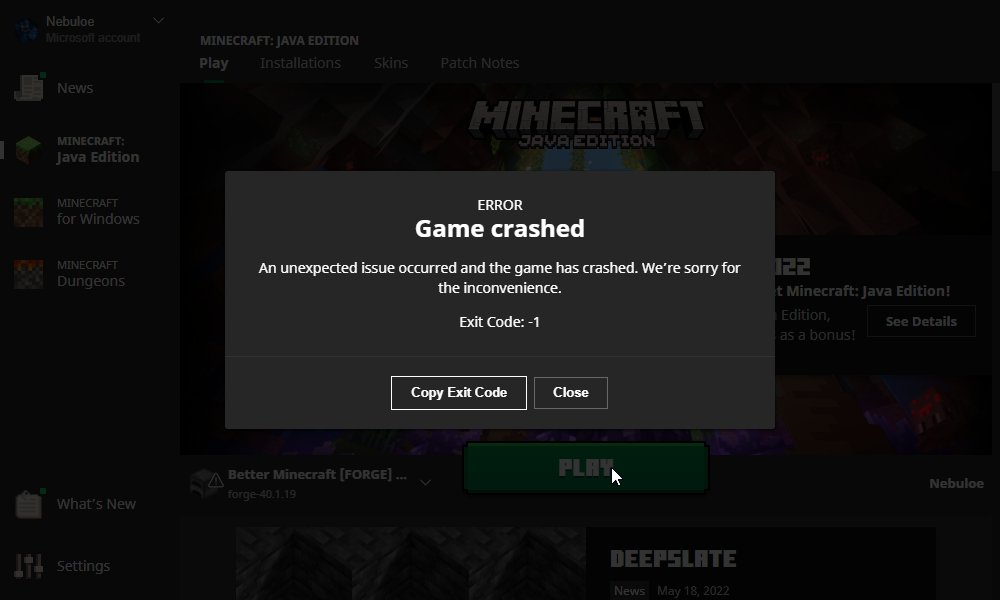
An unexpected issue occurred and the game has crashed. We’re sorry for the inconvenience.
This crash may be caused by an invalid Java Runtime configuration. Check any custom configuration settings.
Exit code 1
I've tried resetting the JVM area but still not working...
red patioBOT
"Invalid Java Runtime Configuration" does not help us, Follow these steps so someone can actually help you.
- Right-click the modpack profile icon OR click the button in the modpack profile.
- Click

Open Folder. - Open the
logsfolder. - Drag and drop the FILE named
latestORdebuginto discord.
torpid tree
red patioBOT
Your question is not related to CurseForge owned/maintained features or services.
Please use the appropriate game room by getting a game role from #786424115535544350.
Otherwise use #👽︱game-support for game related help.
CurseForge does not make or maintain any of the content or games used on the site or app. Just because it's on the site/app does not make it a problem with CurseForge. Move rooms as requested, arguing about it will result in you being muted.
 dense dirge
Hello. I have some questions related to the API terms and conditions. Basically, if I ware to go through the process of getting an API key for MultiMC and implemented it, the way the terms are written, I would be automatically breaking the rules.
red patioBOT
dense dirge
ok.
lyric crescent
would be a better place for this
digital roost
Hello, how can I remove Minecraft data pack from the APP?
 signal ridge
#📛︱rules 1
What do you mean by remove the datapack? As in you added one and what it gone? OR a mod added one and your having issues?
digital roost
I do not know how to pack data from here

Excuse me, because I use a translator, there are problems with sentence construction
signal ridge
ok so datapack is probably not what your looking for. Do you mean Modpack?
red patioBOT
Wording is important!
Forge = Minecraft Forge, This is a modloader often just called "Forge".
Fabric = Fabric MC, this is another modloader, just called "Fabric".
CurseForge = A Website/App that has content for games.
Mods = Individual mod files.
Modpacks = Multiple mods put into the mods folder or downloaded from CurseForge.
These are not Interchangeable! Please use the correct terms as it allows us to help you faster!
lyric crescent
You don't even have a profile installed, there are no datapacks to remove.
digital roost
lyric crescent
You don't even have a profile installed, there are no datapacks to remove.
I said I want to download
There was a problem with the translator
signal ridge
Send the Link for what it is your trying to download
digital roost
digital roost
I want to see the data packs to select: /
.
lyric crescent
signal ridge
Send the Link for what it is your trying to download
.
digital roost
lyric crescent
.
I do not want a specific data pack. I want to see all the data packages
lyric crescent
red patioBOT
Error/Exit codes are useless. Follow these steps so someone can actually help you.
- Right-click the modpack profile icon OR click the button in the modpack profile.
- Click
Open Folder. - Open the
logsfolder. - Drag and drop the FILE named
latestORdebuginto discord.
 alpine stream
Pastebin.pl is a website where you can store code/text online for a set period of time and share to anybody on earth
I have an error with loading the game after reaching the launcher, exit code 1
red patioBOT
Error/Exit codes are useless. Follow these steps so someone can actually help you.
- Right-click the modpack profile icon OR click the button in the modpack profile.
- Click
Open Folder. - Open the
logsfolder. - Drag and drop the FILE named
latestORdebuginto discord.
signal ridge
alpine stream
https://pastebin.pl/view/5146fb5e
!mc-installfix
red patioBOT
This is NOT instructions for Repair Profile! They are NOT the same! You need to do this!
- Click on the Minecraft Tab on the Left side of the CurseForge App.
- Click button next to the
Create Custom Profileoption. - Click

Repair Installationoption. - Play game.
NOTE: You will not lose any modpacks or worlds!
alpine stream
alpine stream
signal ridge
!mc-installfix
sorry what do you mean
signal ridge
Read the bot, do what it says
 signal ridge
Restart your pc then try the steps again
alpine stream
alpine stream
even though i dont have minecraft running?
ok thanks
thank you so much @signal ridge
wheat pewter
!mc-installpack
red patioBOT
How to install modpacks with the search features in app.
- Open the
Minecraftsection of the app. - Click the top search bar where it says
Search for modpacksOR Click theBrowse ModpacksTab. - Find the Modpack you want to install and click install on it.
- Wait for CurseForge app to download and unpack all the required files.
- Once finished, click
Play!
======================================================
** **
======================================================
How to install modpacks from a Export. (Custom/Private/Site downloaded Modpack zip)
- Get CurseForge App if you don't have it, use
!downloadfor a link. - Get the exported modpack from CurseForge or someone else,
!mc-packshareexplains how to make them. - Open the
Minecraftsection of the app. - Click
Create Custom Profile - Click the
Importoption. - Find the file you just downloaded in step 2 and select it.
- CurseForge app will now attempt to download and unpack the modpack. If it fails, try steps 4-6 again.
- Once finished, click
Play!
wheat pewter
is there a way to have texture packs added to a custom installation automatically apply? I've shared mine with a few of my players and they don't apply automatically and one of the packs works for me but not them
 atomic radish
I just downloaded the installer and then when I try to run the program, nothing runs. Any advice?
signal ridge
atomic radish
I just downloaded the installer and then when I try to run the program, nothing ...
win or mac?
atomic radish
win
signal ridge
!getcf try the alternate download
red patioBOT
Looking to install the CurseForge app?
<:windows:798410728188936222> Windows
Minimum Requirements:
- OS Version: 7 (64 bit), 8.1, 10, 11
- 64 bit Required.
- 350MB storage space.
- Microsoft .Net 4.8
- Intel/AMD quad-core CPU
- 8GB ram
[Windows Download]
[Windows Alternative Download]
If you are having issues with the Windows Download use the Windows Alternative Download to install Overwolf. Then download CurseForge from the App Store.
Windows Standalone: NOTE: ONLY SUPPORTS WORLD OF WARCRAFT CURRENTLY!
Requirements:
Uh, Windows? (No not the ones in your house)
WoW as that's all it's useful for..
Some sort of zoomy box that does teh verk.
[Windows Standalone] NOTE: ONLY SUPPORTS WORLD OF WARCRAFT CURRENTLY!
<:mac:798410654418862130> Mac
:penguin: Linux
Minimum Requirements:
Something not windows or mac would be a start.
Hopefully it turns on.
A screen would be beneficial too.
 upper root
Get your friend to join
upper root
!cflogs
young bone
Rule 5
digital roost
o sorry
upper root
!cflogs-app
red patioBOT
<:overwolf:857375414002384916> How to get CurseForge App logs! <:overwolf:857375414002384916>
- Click the

Create logs zipin the menu.
menu. - Drag and drop the file it just made to this chat room to upload it.
- Wait for someone to look at it so they can help you.
 digital roost
upper root
digital roost
upper root
Materials Expanded, id 393865, is causing the pack you are importing to fail because curseforge cannot find a mod file for it in its database.
You should talk to the modpack author about attempting to fix that
digital roost
upper root
`Materials Expanded`, id `393865`, is causing the pack you are importing to fail...
Where/How can I fix this
upper root
Try install a different version of it
digital roost
upper root
`Materials Expanded`, id `393865`, is causing the pack you are importing to fail...
What is Materials Expanded
upper root
We could not find the information for the requested mod, or it is not available through the 3rd party API yet.

digital roost
ah Matex
gimme sec
I dont see it in my modpack

wait
maybe im stupider than i thought
Resolved, thank you.
 sudden mulch
amm?
 upper root
It seems the mojang auth servers are down, try again later. Nothing we can do about it
sudden mulch
oh thanks
 meager olive
mint wigeon
upper root
Right click the open one and click Pin To Taskbar, and remove the old one
meager olive
mint wigeon
upper root
Right click the open one and click Pin To Taskbar, and remove the old one
I know how to temporarily fix it, I would like to permanently fix it
 bold bobcat
aye yo, how to i find the shader pack that i can see on the website on the app. i wont bring up anything but modpacks and i guess its not a modpack is my only guess. any help is greatly appreciated. the one im trying to install is the 'Nostalgia Shader' btw
upper root
You need to download it from the site and install it manually
bold bobcat
upper root
You need to download it from the site and install it manually
kk thank you
 lunar grotto
hey can you play multiplayer on better minecraft 16.5 modpack
or any mod packs on here
digital roost
Mojang auth. servers are down... no multiplayer until they are fixed...
 strong schooner
How do you upload modpacks
signal ridge
!mc-packshare
red patioBOT
There are two ways to share a modpack you've made with others...
Export and Share - For Friends to Small Groups.
- Click the Icon for the modpack.
- Click the button next to play.
- Click

Export. - Select the files that should be included.
- Send the zip to the people that want it! They can follow the instructions in
!mc-installpackto install the pack!
Upload to Curseforge - For Public Release to Everyone.
This options will make your pack public to EVERYONE, it comes with extra requirements and will take some effort to set up.
- Go to here: https://www.curseforge.com/project/432/4471/create
- Fill out the information with a proper description of the pack. This should allow anyone to understand what the pack is.
- Click the Icon for the modpack in the CurseForge app.
- Click the button next to play.
- Click
Export. - Select the files that should be included.
- Open your Project you made on the CurseForge site and Upload the file you just made.
- Wait for Moderation & Sync so it can show up in the client! (See
!syncfor limitations)
strong schooner
!mc-installpack
red patioBOT
How to install modpacks with the search features in app.
- Open the
Minecraftsection of the app. - Click the top search bar where it says
Search for modpacksOR Click theBrowse ModpacksTab. - Find the Modpack you want to install and click install on it.
- Wait for CurseForge app to download and unpack all the required files.
- Once finished, click
Play!
======================================================
** **
======================================================
How to install modpacks from a Export. (Custom/Private/Site downloaded Modpack zip)
- Get CurseForge App if you don't have it, use
!downloadfor a link. - Get the exported modpack from CurseForge or someone else,
!mc-packshareexplains how to make them. - Open the
Minecraftsection of the app. - Click
Create Custom Profile - Click the
Importoption. - Find the file you just downloaded in step 2 and select it.
- CurseForge app will now attempt to download and unpack the modpack. If it fails, try steps 4-6 again.
- Once finished, click
Play!
 graceful sparrow
I am trying to open a new profile that I created, there is no mods whatsoever. It applies a patch every time I load the client, when I try to run the game it brings up an unexpected crash menu "Exit Code - 1". I've deleted the profile and reinstalled it several times and each time it has the same issue, I am unsure what to do, I've been working on it with a few friends for awhile. How would I fix this, we think that the constant patches is what causes it but we are not sure?
red patioBOT
Error/Exit codes are useless. Follow these steps so someone can actually help you.
- Right-click the modpack profile icon OR click the button in the modpack profile.
- Click
Open Folder. - Open the
logsfolder. - Drag and drop the FILE named
latestORdebuginto discord.
graceful sparrow
upper root
!mc-installfix try this
red patioBOT
This is NOT instructions for Repair Profile! They are NOT the same! You need to do this!
- Click on the Minecraft Tab on the Left side of the CurseForge App.
- Click button next to the
Create Custom Profileoption. - Click
Repair Installationoption. - Play game.
NOTE: You will not lose any modpacks or worlds!
graceful sparrow
I did, like 10 times
Its does the same patch, but when I open the profile, the patches take a bit longer
graceful sparrow
Mb
upper root
!mc-launcherlog send this into #👽︱game-support
red patioBOT
How to get the launcher log
- Right click a profile.
- Select
Open Folder - Go back two folders.
- Open the
Installfolder. - Drag the
launcher_log.txtinto discord.
 raw sluice
What would the process be to pull my Minecraft mods from CurseForge and ensure that none of the modpacks that use them are allowed to receive them via CurseForge?
fleet bear
raw sluice
What would the process be to pull my Minecraft mods from CurseForge and ensure t...
Open a support ticket and ask for a deletion.
raw sluice
Okay. I feel sorry for the people who own the projects of the 44 pages of modpacks that include them, as well as those who would look to download some of the older well-known modpacks, like Agrarian Skies and Agrarian Skies 2, but the betrayal of the community is unforgivable.
upper root
You can archive the files to start, which will stop it being added to new projects but not break old ones, till its deleted.
fleet bear
but the betrayal of the community
What betrayal??
raw sluice
My oldest project is a modpack platform, older than both CurseForge and FTB.
upper root
Or who... "the community" is very vague
fleet bear
If you would like to say what you are unhappy about then I'd be glad to take it and pass it on but if you don't want to elaborate on anything, then... that's your problem?
raw sluice
It also doesn't help that when applying for an API key, clicking on the link to the T&C gives you this:
 fleet bear
It recently was broken then. Nobody else has reported it as not working.

CurseForge Support
We're here to get you informed on everything you need to know about CurseForge, including helpful guides and troubleshooting articles to back you up when you get in a pickle
here's the URL
raw sluice
That would do it. The link in the application is https://support.curseforge.com/en/support/solutions/articles/9000207405-curse-forge-3rd-party-api-terms-and-conditions/preview
fleet bear
Yes, I already reported it and there's another link at the bottom that works fine
will be fixed when someone is in the office again (or stops by here this weekend)
raw sluice
Where it asks for Discord username, is that the full name with the number as well (smbarbour#3108) or just the (smbarbour)?
fleet bear
first one
raw sluice
Thank you
fleet bear
I'll make a note for that to be clarified also.
raw sluice
Hrmm... the restrictions under Section 3 Paragraph 1 seem to prohibit the use of the API in any meaningful way.
Any 3rd party launcher's use would require the program to "[...]adapt [...] the Platform, Platform API and/or any SDK"
It also strangely prohibits any measures to reduce the stress on CurseForge's servers by caching any data at all.
lyric crescent
yea, they dont want you to reduce their stress
raw sluice
Or save any information... like the contents of a modpack.
lyric crescent
mhm
raw sluice
Which you can understand completely defeats any use by a 3rd party launcher.
lyric crescent
not really, im not a developer of any kind personally
fleet bear
raw sluice
Any 3rd party launcher's use would require the program to "[...]adapt [...] the ...
No it wouldn't. You make a call, then use the data.
You are in no way changing how the API works. There's no SDK to speak of for 3rd party use as of now.
raw sluice
So, not even referring to CurseForge platform modpacks, and just the mods on the platform. I cannot store ANY of the data retrieved from the API, such as the data of where to download the mod.
(e) save or cache any data obtained through the API or SDK. In addition, Developer shall not use the API or SDK, or any materials obtained through the API or SDK, in order build any product or service that competes, directly or indirectly, with CF, CFC or the Platform.
You can't store and reuse the data from the API.
you should make a new API call every time you need the data again.
 sly ruin
hi how fix blurry ?
 fleet bear
sly ruin
hi how fix blurry ?
fleet bear
sly ruin
hi how fix blurry ?
You have scaling or sharpening enabled in your GPU settings/Windows.
raw sluice
part e explicitly prohibits the use of the API for any direct or indirect competitor of CurseForge. That would apply to all 3rd party launchers.
fleet bear
raw sluice
part e explicitly prohibits the use of the API for any direct or indirect compet...
This part is being reworded. There's already dozens of launchers/managers approved.
 still minnow
hey, how do i link a minecraft pack to my friends?
file is too big to share over discord
fleet bear
How does this have anything to do with Curseforge? Use a file host like dropbox or google drive..
raw sluice
Then I will wait for the T&C to be updated where I am not in violation of the terms
still minnow
using curseforge, i'm trying to share it to them over discord lol
fleet bear
raw sluice
Then I will wait for the T&C to be updated where I am not in violation of the te...
You aren't and won't be.
fleet bear
still minnow
**using curseforge**, i'm trying to share it to them over discord lol
still not an issue with curseforge.
still minnow
wondering if its just as easy as creating a link
fleet bear
I already told you what you need to do...
still minnow
i was just asking if you could just, be in curseforge and right click and create a link lol but
thanks, bye, ill do that
fleet bear
🙄
raw sluice
Reassurances are nice, but what is in writing for the agreement is what would be used in a potential court case. It's much like how Forge resisted using Mojang's official mappings, simply because the terms did not match up with the stated intent.
sly ruin
fleet bear
You have scaling or sharpening enabled in your GPU settings/Windows.
dont work, maybe hardware acelelation?
raw sluice
A highly unlikely case... but certainly plausible.
fleet bear
raw sluice
Reassurances are nice, but what is in writing for the agreement is what would be...
It's literally being changed, and if they accept and give you a key by approving it for what you are doing they can't just sue you over it plus as i said there's already dozens of them.
lyric crescent
if they wanna wait thats on them
digital roost
How is everyone ?
I’m on a server host and every time I load new chunks I get kicked with timeout message
fleet bear
sly ruin
dont work, maybe hardware acelelation?
Perhaps? Worth a shot.
fleet bear
digital roost
I’m on a server host and every time I load new chunks I get kicked with timeout ...
!notcf
red patioBOT
Your question is not related to CurseForge owned/maintained features or services.
Please use the appropriate game room by getting a game role from #786424115535544350.
Otherwise use #👽︱game-support for game related help.
CurseForge does not make or maintain any of the content or games used on the site or app. Just because it's on the site/app does not make it a problem with CurseForge. Move rooms as requested, arguing about it will result in you being muted.
fleet bear
99% sure we had this conversation before about you coming here and posting stuff unrelated to CF in this room...
sly ruin
fleet bear
Perhaps? Worth a shot.
dont have option turn off u.u
sly ruin
ty
upper root
!notcf
red patioBOT
Your question is not related to CurseForge owned/maintained features or services.
Please use the appropriate game room by getting a game role from #786424115535544350.
Otherwise use #👽︱game-support for game related help.
CurseForge does not make or maintain any of the content or games used on the site or app. Just because it's on the site/app does not make it a problem with CurseForge. Move rooms as requested, arguing about it will result in you being muted.
digital roost
does anyone know how to turn on veinminer in stoenblock mod?
upper root
!notcf
red patioBOT
Your question is not related to CurseForge owned/maintained features or services.
Please use the appropriate game room by getting a game role from #786424115535544350.
Otherwise use #👽︱game-support for game related help.
CurseForge does not make or maintain any of the content or games used on the site or app. Just because it's on the site/app does not make it a problem with CurseForge. Move rooms as requested, arguing about it will result in you being muted.
 dusky heart
Hi, how can I open a second window of curseforge?
just like I can open file explorer
queen storm
Not
dusky heart
and my browser
dusky heart
queen storm
Not
so its not possible? 😕
queen storm
That is what I just said.
dusky heart
okay
 inland hamlet
my mod is not being accepted it just says This is a new project. Until approved by a moderator, the project will not be visible to others, and its files will not synchronize across CurseForge.
upper root
!status
red patioBOT
Project Moderation Time
Project/File moderation is done on these days unless otherwise mentioned:
Sunday, Monday, Tuesday, Wednesday, Thursday: <t:1631170800:t> - <t:1631199600:t> (Your time)
Friday, Saturday: No Moderation!
Projects are moderated First in, First out. If you submit late in the work day, it will likely get left until the next day!
New Projects or anything flagged for manual review: 1-3 Working Days
Updates to approved projects not needing manual approval: 1 Hour
-If your file has been "Under Review" for more than an hour, then it is at manual review!
Changes will only show in the app if the project meets the requirements in the ?sync command and up to 24 hours has passed from when it was accepted.
inland hamlet
thanks
 lyric crescent
Use a different slug then
 glossy crescent
u mean the Name?
fallen loom
Why is it called a slug anyway?
The slug is basically the short and simple name the site can use in urls
Spaces in it will be replaced with hyphens
inland hamlet
yeah
glossy crescent
nothing works
glossy crescent
i have even used the invisible character and it doesnt work
lyric crescent
try dkgdjfgksjfdgkjsk
glossy crescent
 queen storm
Now show a bigger screenshot
 opal cipher
Silly question, have you tried another browser? Really shouldn't have to, but do try another one
Stranger things have happened
glossy crescent
ok let me try
lyric crescent
that sure is something.
fallen loom
Going to guess it has something to do with the browser breaking CF's JS on that page
 crude gulch
Hi, does anyone know what happened with the https://addons-ecs.forgesvc.net/api/v2/ API?
I have already read about the new API, but I get 403 errors there when I want to retrieve the data from a Minecraft modpack, for example.
fallen loom
The old API was never meant to be publicly used, so there's no obligation for it to be maintained, especially with the new API that IS intended to be publicly used
crude gulch
Ok no problem - but what is with the 403 with the new API?
I already created a ticket - but i got no response for 4 days now :/
fallen loom
What endpoint are you trying to use?
crude gulch
For example https://docs.curseforge.com/#get-mod-files
fallen loom
You're trying to get info for what mod?
crude gulch
I want to access the files from this modpack for example: https://www.curseforge.com/minecraft/modpacks/better-minecraft-fabric
ID: 238222
Command i use to test it:
curl https://api.curseforge.com/v1/mods/238222/files -H 'Accept: application/json' -H "x-api-key: $2a$10$R..."
btw: I have also tested it with a "real" mod: https://www.curseforge.com/minecraft/mc-mods/jei
However, also there the same 403 error.
fallen loom
Worked fine for me

Be warned that you might have issues with the API key containing dollar signs if you use double quotes, as they allow substitution
I get around this by using single quotes instead
crude gulch
Ty, that was the issue
 vernal yoke
is there a way to make curseforge open another launcher instead of the original mc launcher when i click play on a profile?
queen storm
No
 hazy wasp
is CF having issues ? tried updating my server on my hosting company panel and each time it fails to update the modpack to the newest version
glossy crescent
i cant see the modpack i uploaded previously
queen storm
glossy crescent
i cant see the modpack i uploaded previously
Is it approved?
queen storm
hazy wasp
is CF having issues ? tried updating my server on my hosting company panel and e...
Asked the hosting site about it?
glossy crescent
queen storm
Is it approved?
under review
hazy wasp
queen storm
Asked the hosting site about it?
next think im going to do
queen storm
glossy crescent
under review
Well. That is why you can't find it
glossy crescent
queen storm
Well. That is why you can't find it
i cant find it in my profile
not in the launcher
queen storm
Point still stands
queen storm
The site is a mess
glossy crescent
if i open a new tab to the curseforge site i wont be able to see it
 scenic lynx
Hi Ink. Until the project passes initial moderation it will not be searchable. You can only find it with a direct link
 proven prawn

 sullen brook
all my minecraft instances keep crashing but it only does it for my curseforge modpacks curseforge is up to date i just dont know my issue here
 rare iris
Hey so I get an error massage that I can't upload my profile to curseforge because it is fabric and I have no idea why
 analog isle
java.lang.IllegalArgumentException: Failed to create model for byg:boat any idea why i get this crash error?
 molten carbon
hi i need some help
it says my new modpack needs to be approved and i need to know how long it will take?
opal cipher
!status
red patioBOT
Project Moderation Time
Project/File moderation is done on these days unless otherwise mentioned:
Sunday, Monday, Tuesday, Wednesday, Thursday: <t:1631170800:t> - <t:1631199600:t> (Your time)
Friday, Saturday: No Moderation!
Projects are moderated First in, First out. If you submit late in the work day, it will likely get left until the next day!
New Projects or anything flagged for manual review: 1-3 Working Days
Updates to approved projects not needing manual approval: 1 Hour
-If your file has been "Under Review" for more than an hour, then it is at manual review!
Changes will only show in the app if the project meets the requirements in the ?sync command and up to 24 hours has passed from when it was accepted.
molten carbon
ok thanks
 stuck reef
hey yall, i'm trying to install the forge server files (and not have it done through the curseforge app), but when i let the forge installer create the server files in a directory i specify, its creating a .bat and .sh file for starting the server and not the regular .jar files. anyone know how i can force the installer to install in the .jar files along with the server?
 thick bridge
Hi, Question! I have a modpack that im trying to add Tinker's Construct to, but it says it requries a more recent version of forge.. How do I update forge??
upper root
thick bridge
Hi, Question! I have a modpack that im trying to add Tinker's Construct to, but ...
!mc-updatemodloader
red patioBOT
You can update the mod loader within the same game version in the CurseForge app by following these steps!
- Click on the modpack profile you are working with.
- Click on the button next to the play button.
- Click on the Profile Options button.
- Select the mod loader version you want from the dropdown.
- Play!
If you need to update to a new game version, a new profile is required.
upper root
stuck reef
hey yall, i'm trying to install the forge server files (and not have it done thr...
!notcf
red patioBOT
Your question is not related to CurseForge owned/maintained features or services.
Please use the appropriate game room by getting a game role from #786424115535544350.
Otherwise use #👽︱game-support for game related help.
CurseForge does not make or maintain any of the content or games used on the site or app. Just because it's on the site/app does not make it a problem with CurseForge. Move rooms as requested, arguing about it will result in you being muted.
upper root
Knifed ☝️
thick bridge
upper root
!mc-updatemodloader
Thanks!!!
 fleet dust
upper root
Knifed ☝️
fleet dust
upper root
Knifed ☝️
its good i ik how
upper root
!notcf
red patioBOT
Your question is not related to CurseForge owned/maintained features or services.
Please use the appropriate game room by getting a game role from #786424115535544350.
Otherwise use #👽︱game-support for game related help.
CurseForge does not make or maintain any of the content or games used on the site or app. Just because it's on the site/app does not make it a problem with CurseForge. Move rooms as requested, arguing about it will result in you being muted.
 mellow chasm
oh ok sorry
 dim prairie
One message removed from a suspended account.
upper root
Make a team twitch account, or wait till there are other options
dim prairie
One message removed from a suspended account.
 subtle sonnet
red patioBOT
subtle sonnet
red patioBOT
╰( ͡° ͜ʖ ͡° )つ──☆*:・゚ *˜”*°•.˜”*°• Many Help •°*”˜.•°*”˜* <:curselit:796985620550385705>
Please provide a description of your issue with as much detail as possible. If you have an issue with a mod or modpack, tell us the name. Explain what you can see happening. Be specific!
 Tell us what is happening, we already know it "doesn't work".
Avoid using words like "it", tell us exactly what "it" is.
Don't assume anyone knows what you are talking about, be specific.
Tell us what you expected to happen.
Provide screenshots or video if possible.
Provide a log if possible. ?mc-log
 noble vortex
i was trying to fix my mc, it crashed my computer, now other stuff has stopped working. What do i do
wheat pewter
is there a tutorial video on how to create custom installations from exported things that I can show my players
lyric crescent
?mc-installpack
red patioBOT
How to install modpacks with the search features in app.
- Open the
Minecraftsection of the app. - Click the top search bar where it says
Search for modpacksOR Click theBrowse ModpacksTab. - Find the Modpack you want to install and click install on it.
- Wait for CurseForge app to download and unpack all the required files.
- Once finished, click
Play!
======================================================
** **
======================================================
How to install modpacks from a Export. (Custom/Private/Site downloaded Modpack zip)
- Get CurseForge App if you don't have it, use
!downloadfor a link. - Get the exported modpack from CurseForge or someone else,
!mc-packshareexplains how to make them. - Open the
Minecraftsection of the app. - Click
Create Custom Profile - Click the
Importoption. - Find the file you just downloaded in step 2 and select it.
- CurseForge app will now attempt to download and unpack the modpack. If it fails, try steps 4-6 again.
- Once finished, click
Play!
 prime lark
Would like to confirm some behavior in the new API! When using the "Get Mod File" endpoint, and downloadUrl is blank, this means the mod author has disabled third party downloads ?
I also see a 403 when using the "Get Mod File Download URL" endpoint, which I presume is the same thing ?
red patioBOT
 sour quartz
Hey, does anyone know to how fix invincible in survival mode? It's taking the fun away that mobs acknowledge my existence but cannot harm me. I only have mods and no plugins.
fallen loom
With the info you have provided there are literally infinite possibilities for what could be going wrong
(i.e. provide more info)
upper root
please do not spam the chat with a modlist
at the very least put it in a file and upload that file
sour quartz
ok
 alpine ivy
heyo, i just installed pixelmon and a few other mods in the 1.12 version through the curseforge app, and tried to load up the game. when i loaded it, i got this message. i exited the game, and checked to see if there was an update for either forge or pixelmon, but no avail. am i being dumb and doing something wrong? (also, not entirely sure if this belongs in this channel, or in a different channel/the pixelmon server so if im wrong, sorry)
 fallen loom
Exactly where did you check for a Forge update?
alpine ivy
fallen loom
Exactly where did you check for a Forge update?
turned the "check for updates" setting to 15 minutes and waited, poked around settings to see if there was anything, restarted the app
fallen loom
!!=
red patioBOT
Wording is important!
Forge = Minecraft Forge, This is a modloader often just called "Forge".
Fabric = Fabric MC, this is another modloader, just called "Fabric".
CurseForge = A Website/App that has content for games.
Mods = Individual mod files.
Modpacks = Multiple mods put into the mods folder or downloaded from CurseForge.
These are not Interchangeable! Please use the correct terms as it allows us to help you faster!
fallen loom
It sounds like you checked for a Curse update rather than a Forge update
 earnest hare
“The decryption operation failed, see inner exception”. I see this error every time I try to download a mod pack. Why is this?
young bone
!help
red patioBOT
╰( ͡° ͜ʖ ͡° )つ──☆*:・゚ *˜”*°•.˜”*°• Many Help •°*”˜.•°*”˜* <:curselit:796985620550385705>
Please provide a description of your issue with as much detail as possible. If you have an issue with a mod or modpack, tell us the name. Explain what you can see happening. Be specific!
Tell us what is happening, we already know it "doesn't work".
Avoid using words like "it", tell us exactly what "it" is.
Don't assume anyone knows what you are talking about, be specific.
Tell us what you expected to happen.
Provide screenshots or video if possible.
Provide a log if possible. ?mc-log
 stuck night
@fallen loom
young bone
Rule 5, read the bot above
stuck night
Ok
Y yall take the rules so serious
How do I get help if I can't help
Tf did I say
young bone
You need to explain what you need help with, not just say “I need help”
earnest hare
Why don’t you say what you need help with
stuck night
That made 0 sense
stuck night
young bone
You need to explain what you need help with, not just say “I need help”
Well j assumed some one was going to say yea or some shit
earnest hare
🤦♂️
stuck night
Well I need help finding servers
stuck night
Like you know what I mean Like a dis server for a mincraft server
That has mods
Get me?
fallen loom
stuck night
Well I need help finding servers
iirc server owners around here that are looking for users are told to post about them in #768717413918179368, which you will need to go to #786424115535544350 and pick up the Minecraft role to see
earnest hare
“The decryption operation failed, see inner exception”. I see this error every time I try to download a mod pack. Why is this?
fallen loom
!owlogs
red patioBOT
<:overwolf:857375414002384916> How to get CurseForge App logs! <:overwolf:857375414002384916>
- Click the
Create logs zipin the menu. - Drag and drop the file it just made to this chat room to upload it.
- Wait for someone to look at it so they can help you.
alpine ivy
fallen loom
It sounds like you checked for a Curse update rather than a Forge update
that makes sense lol. do you know of a way to check for a forge update?
young bone
?mc-uodatemodloader
fallen loom
?mc-updatemodloader
red patioBOT
You can update the mod loader within the same game version in the CurseForge app by following these steps!
- Click on the modpack profile you are working with.
- Click on the button next to the play button.
- Click on the Profile Options button.
- Select the mod loader version you want from the dropdown.
- Play!
If you need to update to a new game version, a new profile is required.
fallen loom
GG Squizzle 😛
young bone
Dang, I had a typo
young bone
Had a 🤨 look, “why didn’t that work?”
 tough obsidian
As for this map (https://www.curseforge.com/minecraft/worlds/luigis-mansion-adventure-map) it only shows versions 1.11.2 and 1.12 even but will it work on 1.12.2 or no?
fleet bear
You would need to test it.
 zinc swift
how long does it take to approve a modpack?
upper root
!status
red patioBOT
Project Moderation Time
Project/File moderation is done on these days unless otherwise mentioned:
Sunday, Monday, Tuesday, Wednesday, Thursday: <t:1631170800:t> - <t:1631199600:t> (Your time)
Friday, Saturday: No Moderation!
Projects are moderated First in, First out. If you submit late in the work day, it will likely get left until the next day!
New Projects or anything flagged for manual review: 1-3 Working Days
Updates to approved projects not needing manual approval: 1 Hour
-If your file has been "Under Review" for more than an hour, then it is at manual review!
Changes will only show in the app if the project meets the requirements in the ?sync command and up to 24 hours has passed from when it was accepted.
 celest sentinel
currently trying to install curseforge so i can play my mc mods, but its giving me an error for overwolf everytime i try to install it. im installing via lutris btw.
glossy crescent
i cant see my project
 hot monolith
Hello! When i try to load up cursedforge it says i have a network error but my wifi is working completely fine!
upper root
!cflogs
glossy crescent
yesterday i uploaded a project and i want to see if it is uproved but icant find it
upper root
Go to https://curseforge.com and then click on dashboard on the top left, then on projects
 steel oak
hi guys my curse forge isn't showing my addons

i have a bunch of addons, but non of the curseforge ones show up here, even after refresh and that's the only WoW client i have on my PC
nvrm standalone client works
 rough pond
hey um i have an question regarding steam and Curseforge
 austere briar
could it be that the curseforge api is offline again? cant manage to install any mod packs for minecraft atm
rough pond
im not able to use stardew valley mods or even use em even though i just got stardew valley on steam
queen storm
rough pond
im not able to use stardew valley mods or even use em even though i just got sta...
!stardew
red patioBOT
Overwolf maintains a known list of issues here, some with solutions, others without.
https://support.curseforge.com/en/support/solutions/articles/9000196615-curseforge-known-issues
Scroll down, look at "Other games"
queen storm
austere briar
could it be that the curseforge api is offline again? cant manage to install any...
Using which client?
austere briar
multimc. it worked 2 days ago
i can still get them from atlauncher, ftb, etc. just no connection to curseforge possible
queen storm
They dropped curseforge and ftb support I believe
austere briar
in the newest dev build it seems but the stable build worked 2 days ago just fine
austere briar
oh nvm, i was just lucky and it seemed to have been 3 days ago. the old api was shutdown just afterwards, so multimc doesnt work anymore
 forest burrow
celest sentinel
currently trying to install curseforge so i can play my mc mods, but its giving ...
forest burrow
celest sentinel
currently trying to install curseforge so i can play my mc mods, but its giving ...
I've spent days trying to get it working without success. I guess they just hate linux users. ATLauncher seems to be the only way to go right now
celest sentinel
forest burrow
I've spent days trying to get it working without success. I guess they just hate...
damn.
i mean it is on linux but only for wow
 burnt fable
Hello, I'm an MC mod/modpack developer, but I'm really dumb for curseforge. I was searching for a tutorial that how can you make better-looking pages for projects, but I couldn't find any. I was trying to teach myself but had no luck. Is there anybody here that could teach me, or send me a tutorial? I would appreciate that!
 lost dew
this crash may be caused by an invalid java runtime configuration exit code 1
red patioBOT
"Invalid Java Runtime Configuration" does not help us, Follow these steps so someone can actually help you.
- Right-click the modpack profile icon OR click the button in the modpack profile.
- Click
Open Folder. - Open the
logsfolder. - Drag and drop the FILE named
latestORdebuginto discord.
lost dew
trying to play better minecraft plus 1.18.2
upper root
!mc-installfix
red patioBOT
This is NOT instructions for Repair Profile! They are NOT the same! You need to do this!
- Click on the Minecraft Tab on the Left side of the CurseForge App.
- Click button next to the
Create Custom Profileoption. - Click
Repair Installationoption. - Play game.
NOTE: You will not lose any modpacks or worlds!
 pearl trellis
 terse field
why does a mod say its out of date when it says 1.18.2 the same as all the other mods
 frail jackal
Yo.. can anyone help wid addons for wow?
red patioBOT
Your question is not related to CurseForge owned/maintained features or services.
Please use the appropriate game room by getting a game role from #786424115535544350.
Otherwise use #👽︱game-support for game related help.
CurseForge does not make or maintain any of the content or games used on the site or app. Just because it's on the site/app does not make it a problem with CurseForge. Move rooms as requested, arguing about it will result in you being muted.
 tight garnet
Is it possible to have two curseforge clients opened at once?
 pearl canopy
My curseforge won't open, it says it's launching but then nothing opens. (I had to reinstall it for the fix)
 obsidian maple
When u read the manifest.json and start to download all the mods, How do you tell if the mod is a client side or a server side mod
because it dosnt tell u either way just says if its a requirement or not
lyric crescent
there is no way to tell from there. either look at the mods description and see if the developer said anything about it, or trial and error each mod.
obsidian maple
is there some sort of script or somthing because i download all my mods for my server from that manifest. the curseforge api doesnt tell u either
lyric crescent
script for what?
obsidian maple
So im wondering is there a way for forge to ignore client side mods or a way to detect them
lyric crescent
there should be no reason to do that
obsidian maple
If i put a client side mod in the server i get errors. Because the mods server pack zip sometimes dont include the mods folder.
So im downloading all the mods myself via the manifest json
lyric crescent
then you should tell the developer of the mod giving errors to fix their mod. the dev should be making mods self disable. this should not be a thing any user needs to mess with.
obsidian maple
For example if I put CustomMainMenu in the mod folder and run forge it just craches forge as its a client side mod. i can provide the error logs if needed
lyric crescent
anyway, there is nothing curseforge does or can do to help you with this. either you figure out which mods are client side only with the ways i told you already, or you report it to the dev to fix.
obsidian maple
hmm okay well ty for the help
 floral ravine
is there any way to access dev.bukkit api nowadays?
addons-ecs.forgesvc.net/api/v2/addon/{id} no longer works, what's the new eqivalent?
lyric crescent
!devdiscord
red patioBOT
lyric crescent
better to ask there
floral ravine
thanks
earnest hare
“The decryption operation failed, see inner exception”. I see this error every time I try to download a mod pack. Why is this?
lyric crescent
can you screenshot the error
earnest hare
Sure 👍
Damn it actually works now.. it didn’t work last night nor this morning. 🤷♂️ fixed ig
 wet holly
Hello, is there any way to play a modpack that you’ve downloaded through CurseForge, offline? Specifically for Minecraft. The pack itself shouldn’t require any connection just the launcher
lyric crescent
no. you can start the pack then go offline.
 green raptor
Hey I'm trying to upload my mod list to curseforge and it says I'm missing the file "manifest.json"
so can someone help me out with this situation
red patioBOT
There are two ways to share a modpack you've made with others...
Export and Share - For Friends to Small Groups.
- Click the Icon for the modpack.
- Click the button next to play.
- Click
Export. - Select the files that should be included.
- Send the zip to the people that want it! They can follow the instructions in
!mc-installpackto install the pack!
Upload to Curseforge - For Public Release to Everyone.
This options will make your pack public to EVERYONE, it comes with extra requirements and will take some effort to set up.
- Go to here: https://www.curseforge.com/project/432/4471/create
- Fill out the information with a proper description of the pack. This should allow anyone to understand what the pack is.
- Click the Icon for the modpack in the CurseForge app.
- Click the button next to play.
- Click
Export. - Select the files that should be included.
- Open your Project you made on the CurseForge site and Upload the file you just made.
- Wait for Moderation & Sync so it can show up in the client! (See
!syncfor limitations)
 marble jungle
hey uh, every time I launch the game, it says this

whats going on?
I cant seem to update the game it just insists its up to date
this might be a problem that has nothing to do with curseforge but idk?
green raptor
fleet bear
!mc-packshare
I did that
lyric crescent
marble jungle
this might be a problem that has nothing to do with curseforge but idk?
?mc-updatemodloader
red patioBOT
You can update the mod loader within the same game version in the CurseForge app by following these steps!
- Click on the modpack profile you are working with.
- Click on the button next to the play button.
- Click on the Profile Options button.
- Select the mod loader version you want from the dropdown.
- Play!
If you need to update to a new game version, a new profile is required.
lyric crescent
green raptor
I did that
show the contents of your zip
green raptor
 digital roost
i can't login to minecraft modpacks, is an error at the old minecraft launcher
queen storm
See #👽︱game-support
marble jungle
thx
 hollow forge
I’ve been trying to use a mod pack to join my friends custom server but this is the message it gives me. I’m using a Mac

Pls help
 earnest radish
hi does someone speak german
 indigo spade
How do you check if a Minecraft mod has third party distribution enabled or not?
lyric crescent
hollow forge
I’ve been trying to use a mod pack to join my friends custom server but this is ...
!notcf ⤵️
red patioBOT
Your question is not related to CurseForge owned/maintained features or services.
Please use the appropriate game room by getting a game role from #786424115535544350.
Otherwise use #👽︱game-support for game related help.
CurseForge does not make or maintain any of the content or games used on the site or app. Just because it's on the site/app does not make it a problem with CurseForge. Move rooms as requested, arguing about it will result in you being muted.
lyric crescent
earnest radish
hi does someone speak german
no
lyric crescent
indigo spade
How do you check if a Minecraft mod has third party distribution enabled or not?
You can use cflookup.com. There is no other way to tell currently.
 rich gulch
Hello again me can i play disunity skyblock with 3gb ram + gt 460
lyric crescent
!notcf ⤵️
red patioBOT
Your question is not related to CurseForge owned/maintained features or services.
Please use the appropriate game room by getting a game role from #786424115535544350.
Otherwise use #👽︱game-support for game related help.
CurseForge does not make or maintain any of the content or games used on the site or app. Just because it's on the site/app does not make it a problem with CurseForge. Move rooms as requested, arguing about it will result in you being muted.
lyric crescent
rich gulch
Hello again me can i play disunity skyblock with 3gb ram + gt 460
also ⤴️
 crude apex
This crash may be caused by an invalid java runtime configuration exit code: 1
red patioBOT
"Invalid Java Runtime Configuration" does not help us, Follow these steps so someone can actually help you.
- Right-click the modpack profile icon OR click the button in the modpack profile.
- Click
Open Folder. - Open the
logsfolder. - Drag and drop the FILE named
latestORdebuginto discord.
crude apex
terse field
why does one of my mods say its out of date but the same as the other ones (dm me or ping me if u know the answer)
lyric crescent
where does it say that
lyric crescent
crude apex
?mc-path
red patioBOT
Instructions for changing CurseForge Minecraft install path!
If Minecraft is not installed in CurseForge App:
- Click the
 in the top left.
 - Select Minecraft from the list of games.
- Select the
Advancedoption and select:
--- Windows:Local Disk (C:)at the left side of the window. If you do not see it, clickThis PCfirst.)
--- Mac:/Users/Shared/CurseForge, If it does not exist, make it. - Click
Continue.
If Minecraft is installed in CurseForge App:
- Click the
 in the bottom left.
 - Select the Minecraft tab.
- Click
Change. - Select the location:
--- Windows:Local Disk (C:)at the left side of the window. If you do not see it, clickThis PCfirst.)
--- Mac:/Users/Shared/CurseForge, If it does not exist, make it.
terse field
lyric crescent
where does it say that
did u say that to me?
queen storm
Yes, he did
terse field
queen storm
Yes, he did
oh ok
terse field
lyric crescent
where does it say that
it says when i go into minecraft
it says
Do u wanna use this mod its out dated
queen storm
Screenshot
queen storm
Where did you put it?
crude apex
local disk (c:)
lyric crescent
?mc-launcherlog
red patioBOT
How to get the launcher log
- Right click a profile.
- Select
Open Folder - Go back two folders.
- Open the
Installfolder. - Drag the
launcher_log.txtinto discord.
crude apex
lyric crescent
delete this Failed to load FML config from C:\CurseForge\Instances\Miwa\config\fml.toml
crude apex
huh
done
it works! thank you
the problem is now a mod has crashed
probably the file i deleted
 dim wedge
ayo
 queen storm
@inland hamletThere is no need to run those commands here, use #🟢︱user-bot-spam if you want to run commands
inland hamlet
oh
crude apex
how can i avoid the mod crashing without that file
digital roost
I got problem where my CurseForge launcher wont start at all...
It just says "Prepairing for first launch..." and than nothing happens
It just disapears after some time...

 narrow minnow
Try uninstalling Overwolf and then reinstalling CurseForge
Assuming it worked in the past
crude apex
i tried reinstalling the mod but it didnt fix it
digital roost
If anyone finds fix for me pls tag me
lyric crescent
did you do what wolfgang said?
 unique flame
Friend can’t launch any modpacks, after clicking play in the launcher he gets exit code: -1. He’s uninstalled and reinstalled curseforge but we’re not sure what to do as there’s no explanation as to why it’s crashing
red patioBOT
Error/Exit codes are useless. Follow these steps so someone can actually help you.
- Right-click the modpack profile icon OR click the button in the modpack profile.
- Click
Open Folder. - Open the
logsfolder. - Drag and drop the FILE named
latestORdebuginto discord.
unique flame
Only thing logs really say is skipping bad option: text background opacity
upper root
!mc-launcherlog
red patioBOT
How to get the launcher log
- Right click a profile.
- Select
Open Folder - Go back two folders.
- Open the
Installfolder. - Drag the
launcher_log.txtinto discord.
unique flame
upper root
!mc-launcherlog
That directed at me?
lyric crescent
their friend, who should be here to give logs
unique flame
I didn’t ping roles?
upper root
The general rule is 'Do not ping unless asked'. Do not ping roles is just an example of that
unique flame
I’m aware of how to get to the logs, but as I stated, the logs don’t provide any real insight, just a very long document stating a crash with no discernible cause of the crash, hence why I’m here
upper root
The launcher log isnt like a normal log.
lyric crescent
how do you expect anyone to help if we have only your interpretation of the logs?
unique flame
Where do I post the log for help then? It’s at least 1000 lines
lyric crescent
if it doesnt fit on discord upload it to a gist
lyric crescent
never heard of anything like that, but this issue is more suited for #👽︱game-support or #🧱︱mc-other-help
 upper wedge
Got it. I'll send it there instead
 wise stream
i have the gist of the logs Andy was on about that you asked for @lyric crescent https://gist.github.com/Aohdaki/a2a929ae5799d661133db22e1bc5844f

Gist
game crash error exit code: -1. GitHub Gist: instantly share code, notes, and snippets.
lyric crescent
ping isnt needed.
i assume you are the friend then, can you also provide the launcher log that cheifarug requested here #🔥︱curseforge-support message
wise stream
this is the same thing i think
 agile marten
whenever I try to copy and paste or drag and click an image into the description of a project, it doesn't appear. Is there any other way I could put an image into the description of a project? Because rn it looks pretty boring.
lyric crescent
you need to use a url with an img tag
lyric crescent
wise stream
this is the same thing i think
no, but i see no exit code in your launcher log.
agile marten
lyric crescent
you need to use a url with an img tag
so like, an imgur link?
lyric crescent
yea
lyric crescent
wise stream
this is the same thing i think
?mc-installfix see if this gets you anywhere
red patioBOT
This is NOT instructions for Repair Profile! They are NOT the same! You need to do this!
- Click on the Minecraft Tab on the Left side of the CurseForge App.
- Click button next to the
Create Custom Profileoption. - Click
Repair Installationoption. - Play game.
NOTE: You will not lose any modpacks or worlds!
agile marten
so just pasting the link in the desription should do it
lyric crescent
with the img code, yes
agile marten
how'd I do that?
lyric crescent
use the image button in the editor
agile marten
doesn't seem to work, maybe it's just broken at my side.

I'm gonna check on my other devices
fleet bear
You need to use the direct link
agile marten
I think I know what you mean
 steep narwhal
I need some help
agile marten
agile marten
I think I know what you mean
yeah works now, thanks for the help
fleet bear
👌
steep narwhal

when i open this modpack
it opens both of these
the minecraft one has none of the mods
fleet bear
!mc-installfix
red patioBOT
This is NOT instructions for Repair Profile! They are NOT the same! You need to do this!
- Click on the Minecraft Tab on the Left side of the CurseForge App.
- Click button next to the
Create Custom Profileoption. - Click
Repair Installationoption. - Play game.
NOTE: You will not lose any modpacks or worlds!
steep narwhal
and the other one wont stop loading
wise stream
Repair installation didn't work, this is the same error code
 lyric crescent
new launcher log
wise stream
lyric crescent
no error whatsoever..
and yet
try a computer restart, see if that helps. if not try changing the path
?mc-path
red patioBOT
Instructions for changing CurseForge Minecraft install path!
If Minecraft is not installed in CurseForge App:
- Click the in the top left.
- Select Minecraft from the list of games.
- Select the
Advancedoption and select:
--- Windows:Local Disk (C:)at the left side of the window. If you do not see it, clickThis PCfirst.)
--- Mac:/Users/Shared/CurseForge, If it does not exist, make it. - Click
Continue.
If Minecraft is installed in CurseForge App:
- Click the in the bottom left.
- Select the Minecraft tab.
- Click
Change. - Select the location:
--- Windows:Local Disk (C:)at the left side of the window. If you do not see it, clickThis PCfirst.)
--- Mac:/Users/Shared/CurseForge, If it does not exist, make it.
wise stream
changing the path has worked, thanks for your help 
lyric crescent
nice
 nocturne tiger
I am adding the Simple Voice Chat mod to the Better Minecraft modpack profile for 1.18.2. Every time I try to startup from curseforge I keep crashing and getting this error. I remove the mod I added and it launches fine, however my friend installed it the same way and can play perfectly fine and the voice chat mod works for them.

like I mentioned earlier it works without the Simple Voice Chat mod, but I need it for the server I am trying to play on.
sometimes i get this error code
red patioBOT
Error/Exit codes are useless. Follow these steps so someone can actually help you.
- Right-click the modpack profile icon OR click the button in the modpack profile.
- Click
Open Folder. - Open the
logsfolder. - Drag and drop the FILE named
latestORdebuginto discord.
 crude apex
anyone knows how to avoid the mod crashing after i removed that one file that seems to have triggered the crash?
lyric crescent
what
crude apex
so the file you told me to remove
crude apex
crude apex
https://gyazo.com/ae597ca30ff4775f7686014e3f8788ad
seems to have caused this to crash
it did fix the error code 1, but caused this
red patioBOT
Error/Exit codes are useless. Follow these steps so someone can actually help you.
- Right-click the modpack profile icon OR click the button in the modpack profile.
- Click
Open Folder. - Open the
logsfolder. - Drag and drop the FILE named
latestORdebuginto discord.
 rapid pike
Can you not bork 3rd party clients then do this crap thanks <3
 fleet bear
rapid pike
Can you not bork 3rd party clients then do this crap thanks <3
fleet bear
rapid pike
Can you not bork 3rd party clients then do this crap thanks <3
click the "learn more" to disable it.
fleet bear
Also, the standalone clients don't use overwolf so this won't matter shortly.
MC or WoW?
rapid pike
MC
fleet bear
For now, no. Soon, yes.
fleet bear
There was 6+ months leading up to this point, 3rd parties had plenty of time and warnings about this coming.
There's nothing we can do about devs removing the ability to use the API for their mods because users are treating them like crap.
rapid pike
The override doesn't work
fleet bear
I doubt that's the case as many others have used it but regardless you would need to take that up with OW support as this server only handles CurseForge issues.
 rapid pike
fleet bear
There was 6+ months leading up to this point, 3rd parties had plenty of time and...
rapid pike
fleet bear
There was 6+ months leading up to this point, 3rd parties had plenty of time and...
Off topic now but I'm guessing it's because of huge bandwidth costs?
In which case surely there was a better solution like making 3rd party client devs run cache servers or something
Just feels like hammering a nail with dynamite and people who just wanna play their mods get screwed
lyric crescent
fleet bear
Yes, I'll reply in the other room.
rapid pike
Mate I wasn't gonna ping him in a different channel just with a closing remark
Anyway I'll head over to the Overwolf server
 thick lava
why womt minecraft show up in my games for curse forge?
crude apex
crude apex
that is the crash report
i think this is the one from the actual curseforge instance?
crude apex
huh
thick lava
lol sorry im still figuring out discord
crude apex
oh
thick lava
do you think you might have an answer to my problem
crude apex
i have no idea about curseforge
i think you gotta scan your computer for games
like on the settings tab
but that's about all i know
thick lava
ohhhhhhh dang i feel so dumb now lol thanks
lyric crescent
I think you got the alpha client which only has WoW
crude apex
the problem is terrablender is needed for two other mods, so if it crashes, i cannot remove it without removing two other ones
lyric crescent
this isnt a curseforge issue. if removing the mod works, report to the dev
lyric crescent
send a log in #👽︱game-support
 viral atlas
The curseforge app does not allow me to install any mods
I go to this link curseforge://install?addonId=301845&fileId=3163143
But nothing happens
fleet bear
Do you have Curseforge installed?
fleet bear
Is it the standalone or OW+CF version
viral atlas
And overwolf is running
It came with overwolf
And when I start curseforge, it starts overwolf
When I click curseforge to start again, overwolf says "Launching" then it disappears
But nothing pops up
fleet bear
Do you have any Antivirus installed?
viral atlas
no
fleet bear
Try running the app as admin.
viral atlas
same result
fleet bear
Did CF ever open for you after installing it?
viral atlas
I don't even know what curse fiorge looks like
Overwolf is running
If thats what you mean?
It is in my dock
fleet bear
Open overwolf, open the app store, find CurseForge, uninstall and then reinstall it.
viral atlas
I downloaded from this link

Overwolf | Tech for developers who love gaming
Welcome to the CurseForge community! Build, manage and download mods and addons for your favorite games
Looks like overwolf fails to instal lcurse forge
But now curseforge is installed
And this link still does nothing
curseforge://install?addonId=301845&fileId=3163143
viral atlas
Apparently it all needs admin permissions to run, which is downright awful
This means everything on my system gets installed to a different user
fleet bear
Then you installed it with admin perms.
or with the wrong account.
Uninstall it and do it again.
viral atlas
it requires admin permissions to install
fleet bear
is your computer account by chance limited in what it can do?
viral atlas
my main account is a basic user
fleet bear
Like a school computer or family computer that's shared?
viral atlas
IO have to sudo
in order to use admin, which then curse is like, oh, I see you are root now I'll install in root
fleet bear
Something isn't adding up here.
viral atlas
How so?
fleet bear
What are you running for your computer as a normal user should be able to install it fine.
viral atlas
When I use your installer, it fails to install unless I am admin
So I sudo to admin, then it installs it only for admin
fleet bear
I don't know then as I haven't seen anyone else with this issue.
viral atlas
Everyone else probably just has admin permissions on their main account
fleet bear
I can pass on your issue to a support person that can help you when they are around next or you can try to figure it out on your own.
viral atlas
Your choice, I find the app rather unusable, so I'll probably just use it for downloading mods
Then import it to a different mod manager
 steel arch
viral atlas
steel arch
viral atlas
I agree with that statement
lyric crescent
the made a new one, that people are actually meant to use
fleet bear
viral atlas
Your choice, I find the app rather unusable, so I'll probably just use it for do...
then post what's unusable about it so it can be fixed. (besides the obvious install issue we are currently dealing with)
viral atlas
Um.. I did
It requires admin to install
Litterally makes the app unusable
You can always install to AppData
fleet bear
I believe that's the default, though I changed the location for mine to another drive.
sooo 🤷
I'm 99% sure you changed something or have something messing with your setup.
 sly ingot
I cannot load up CurseForge ):
 sudden mauve
Uninstall it and reinstall
sly ingot
ive tried that
sudden mauve
sly ingot
ive tried that
What are your specs
sly ingot
1050 ti with a core i5 4th gen
sly ingot
16GB
sudden mauve
Not that then.
sly ingot
All my other games run perfectly fine
sly ingot
No
it gives me the screen saying its loading up for the first time and the just doesnt load up at all
 static atlas
Hello, may I ask how I uploaded a file in the mod I created by forge myself, how do I review it?
viral atlas
fleet bear
I'm 99% sure you changed something or have something messing with your setup.
It doesn't even start the install without having admin permissions
static atlas
My mod's home page says: This is a new project. Until approved by a moderator, the project will not be visible to others, and its files will not synchronize across CurseForge.
I am the owner of this mod
lyric crescent
!status
red patioBOT
Project Moderation Time
Project/File moderation is done on these days unless otherwise mentioned:
Sunday, Monday, Tuesday, Wednesday, Thursday: <t:1631170800:t> - <t:1631199600:t> (Your time)
Friday, Saturday: No Moderation!
Projects are moderated First in, First out. If you submit late in the work day, it will likely get left until the next day!
New Projects or anything flagged for manual review: 1-3 Working Days
Updates to approved projects not needing manual approval: 1 Hour
-If your file has been "Under Review" for more than an hour, then it is at manual review!
Changes will only show in the app if the project meets the requirements in the ?sync command and up to 24 hours has passed from when it was accepted.
nocturne tiger
nocturne tiger
I am adding the Simple Voice Chat mod to the Better Minecraft modpack profile fo...
bringing this up again, seems to have been buried under other questions
upper root
!notcf
red patioBOT
Your question is not related to CurseForge owned/maintained features or services.
Please use the appropriate game room by getting a game role from #786424115535544350.
Otherwise use #👽︱game-support for game related help.
CurseForge does not make or maintain any of the content or games used on the site or app. Just because it's on the site/app does not make it a problem with CurseForge. Move rooms as requested, arguing about it will result in you being muted.
fleet bear
viral atlas
You can always install to AppData
Are you by chance running linux at all?
viral atlas
Windows 10
fleet bear
viral atlas
Windows 10
Can you contact @narrow minnow with info as to where it's installing please?
terse field
i wanna use a mod that is the same point as the other ones (1.18.2) but it says its out of date but i have checked and they are the same on the points (1.18.2)
fleet bear
!notcf
red patioBOT
Your question is not related to CurseForge owned/maintained features or services.
Please use the appropriate game room by getting a game role from #786424115535544350.
Otherwise use #👽︱game-support for game related help.
CurseForge does not make or maintain any of the content or games used on the site or app. Just because it's on the site/app does not make it a problem with CurseForge. Move rooms as requested, arguing about it will result in you being muted.
digital roost
help, where can I download the newest version of curseforge, i cant play mc v1.12.2 because it says this previous version of curseforge is not secure or something, so i went back to the websiteand redownloaded it but I dont htink i got the newest version, can anybody link me to the newest version please?
upper root
!!=
red patioBOT
Wording is important!
Forge = Minecraft Forge, This is a modloader often just called "Forge".
Fabric = Fabric MC, this is another modloader, just called "Fabric".
CurseForge = A Website/App that has content for games.
Mods = Individual mod files.
Modpacks = Multiple mods put into the mods folder or downloaded from CurseForge.
These are not Interchangeable! Please use the correct terms as it allows us to help you faster!
upper root
Are you sure you mean curseforge?
upper root
!mc-updatemodloader
red patioBOT
You can update the mod loader within the same game version in the CurseForge app by following these steps!
- Click on the modpack profile you are working with.
- Click on the button next to the play button.
- Click on the Profile Options button.
- Select the mod loader version you want from the dropdown.
- Play!
If you need to update to a new game version, a new profile is required.
digital roost
tysm!
 fickle quartz
can i get some help plz
when i add some mods for a pack it says that galacticraft core aint working or smthn
upper root
!notcf
red patioBOT
Your question is not related to CurseForge owned/maintained features or services.
Please use the appropriate game room by getting a game role from #786424115535544350.
Otherwise use #👽︱game-support for game related help.
CurseForge does not make or maintain any of the content or games used on the site or app. Just because it's on the site/app does not make it a problem with CurseForge. Move rooms as requested, arguing about it will result in you being muted.
hazy wasp
is cf down?
upper root
website works for me
 tawdry dust
Hello. What is the recommended Minecraft CurseForge Java Path? Automatic, or download the Java by yourself?
queen storm
tawdry dust
Hello. What is the recommended Minecraft CurseForge Java Path? Automatic, or dow...
Minecraft packs its own
celest sentinel
why is curseforge not installable on linux? why only for WoW?
queen storm
Minecraft is not done yet
digital roost
Why did i just lose all my installed modpacks on minecraft??? what happened
queen storm
digital roost
Why did i just lose all my installed modpacks on minecraft??? what happened
!mc-path
red patioBOT
Instructions for changing CurseForge Minecraft install path!
If Minecraft is not installed in CurseForge App:
- Click the in the top left.
- Select Minecraft from the list of games.
- Select the
Advancedoption and select:
--- Windows:Local Disk (C:)at the left side of the window. If you do not see it, clickThis PCfirst.)
--- Mac:/Users/Shared/CurseForge, If it does not exist, make it. - Click
Continue.
If Minecraft is installed in CurseForge App:
- Click the in the bottom left.
- Select the Minecraft tab.
- Click
Change. - Select the location:
--- Windows:Local Disk (C:)at the left side of the window. If you do not see it, clickThis PCfirst.)
--- Mac:/Users/Shared/CurseForge, If it does not exist, make it.
sly ingot
!help
red patioBOT
╰( ͡° ͜ʖ ͡° )つ──☆*:・゚ *˜”*°•.˜”*°• Many Help •°*”˜.•°*”˜* <:curselit:796985620550385705>
Please provide a description of your issue with as much detail as possible. If you have an issue with a mod or modpack, tell us the name. Explain what you can see happening. Be specific!
Tell us what is happening, we already know it "doesn't work".
Avoid using words like "it", tell us exactly what "it" is.
Don't assume anyone knows what you are talking about, be specific.
Tell us what you expected to happen.
Provide screenshots or video if possible.
Provide a log if possible. ?mc-log
 tawdry narwhal
For some reason my game keeps crashing whenever I try to launch it. This is 1.12.2 Minecraft.
It says something about a processer and then crashes.
I should put this is mc-help, sorry.
red patioBOT
Your question is not related to CurseForge owned/maintained features or services.
Please use the appropriate game room by getting a game role from #786424115535544350.
Otherwise use #👽︱game-support for game related help.
CurseForge does not make or maintain any of the content or games used on the site or app. Just because it's on the site/app does not make it a problem with CurseForge. Move rooms as requested, arguing about it will result in you being muted.
tawdry narwhal
Just about to say that.
 unreal nebula
My curse-maven isn't working.. I'm pretty sure its setup correctly?
Caused by: org.gradle.api.resources.ResourceException: Could not get resource 'https://cursemaven.com/curse/maven/trajanscore-626570/3800896/trajanscore-626570-3800896.jar'
this is the implementation line
implementation fg.deobf("curse.maven:trajanscore-626570:3800896")
https://www.curseforge.com/minecraft/mc-mods/trajans-core/files/3800896 this is what I'm trying to pull
lyric crescent
cursemaven is dead isnt it?
lyric crescent
like it used the old api that doesnt exist anymore
unreal nebula
oh.
lyric crescent
there is apparently a v2 cursemaven that uses the new api. this kind of issue might be better suited for the dev discord
!devdiscord
red patioBOT
 elder beacon
uhm can someone help me out because my friends game crashes when he starts up minecraft with any modpack
red patioBOT
Sending logs for support.
- Right-click the modpack profile icon OR click the button in the modpack profile.
- Click
Open Folder. - Open the
logsfolder. - Drag and drop the FILE named
latestORdebuginto discord.
queen storm
!mc-installfix
red patioBOT
This is NOT instructions for Repair Profile! They are NOT the same! You need to do this!
- Click on the Minecraft Tab on the Left side of the CurseForge App.
- Click button next to the
Create Custom Profileoption. - Click
Repair Installationoption. - Play game.
NOTE: You will not lose any modpacks or worlds!
 craggy grotto
looked through the discord and was able to fix my error
its probs happened before so searching for keywords helps
helped me fix in 5 mins
fickle quartz
im making my own pack where i add mods and it worked until i started adding from the curseforge app, then it says galacticraft isnt working anymore
er sum other ones
digital roost
Who do I get in contact with to discuss Quilt's behaviour in the modding scene?
queen storm
Quilt itself.
queen storm
We are not the police 🤷♂️
digital roost
I thought Curseforge was against DRM?
queen storm
Do you see quilt anywhere on the platform?
digital roost
I recall you guys talking about adding Quilt though?
queen storm
Curseforge hosts content, not polices the communities that make that content
digital roost
I feel like it's valuable information to know who the people behind Quilt are, no?
queen storm
Poked our person for this stuff.
Not gonna have this discussion myself
lyric crescent
I mean the real question is; are they using DRM or just talking about it? Can you prove it's being used?
scenic lynx
DRM in what sense?
queen storm
@digital roost
digital roost
lyric crescent
I mean the real question is; are they using DRM or just talking about it? Can yo...
GitHub
Adds a highly-configurable zoom key for Fabric. The zoom is yours! - OkZoomer/fabrique.mod.json at 1.18 · EnnuiL/OkZoomer
This user added DRM to their mod. There are screenshots of the discussion that was held too.
queen storm
Screenshots where?
digital roost
I can post them
scenic lynx
I'll DM you
 shut halo
so im not sure if my issue is a curseforge issue or not but when trying to launch RLcraft it either says offline or play demo
queen storm
!mc-login
red patioBOT
Minecraft Logins
As of march 10th 2022, you will need a Microsoft Account to play!
Step 1: Get to the Microsoft login screen.
Step 2: Log in with a Microsoft account that owns the Java version of Minecraft.
Done!
Issues: If it says PLAY DEMO then the account used DOES NOT own Java Minecraft. Log in with one that does.
 scenic lynx
Sound like an account issue?
shut halo
ive already converted from mojang and i own minecraft thats the weird part
seems like the main issue is the launcher isnt getting a network connection
scenic lynx
If when you login with your account directly in the launcher and it's still not letting you play normally, there's not much we can help with unfortunately. I suggest you try the game support at that point
queen storm
shut halo
seems like the main issue is the launcher isnt getting a network connection
Any errors on the launcher?
 minor sandal
Hi there 👋 have got a question about the new API application process.
I'm working on a private project that has to remain closed-source since a lot of it is under an NDA, but I currently use the legacy API to compare modpack updates and auto-update any modpacks we have.
The application seems to largely favour open-source software, which I'm all for personally, but I'm afraid this is an edge case that I can't give any exceptions for. Am I able to specify that in the application for the Git URL? In addition, it is a standalone application with no website, would I also specify it has no website?
scenic lynx
Yes, please provide all details you can and it will be taken into consideration.
If there are any specific questions we will contact you
minor sandal
Brilliant, thank you very much! 💚
 jaunty token
curseforge changed my default minecraft directory and so when i open minecraft launcher my instances previously created were gone (like forge and 1.8.9 installations)
all my other .minecraft folders are there but the minecraft launcher for some reason like got reset
lyric crescent
curseforge doesnt use the .minecraft folder. you can use windows search to look for a folder called instances and you should be able to find the old location. do not try to set curseforge back to that, just copy the stuff to the location curseforge uses now.
jaunty token
like do i put .minecraft in folder instances
there used to be a lot of versions like forge but theyre all gone now
 queen storm
Close Minecraft, open it the old way, tada
jaunty token
queen storm
Close Minecraft, open it the old way, tada
wdym the old way
i opened it normally and thats how it looks
i opened through curseforge and thats how it looks
queen storm
Open it without using curseforge
jaunty token
queen storm
Open it without using curseforge
i did and it opens that launcher
queen storm
Then restart your pc, try again
jaunty token
the default directory that the launcher would use was .minecraft and now it’s /curseforge/install or something g
jaunty token
queen storm
Then restart your pc, try again
ok
queen storm
And have a timeout for pinging me again
jaunty token
💀
 sick folio
hello! If I want to host a modded minecraft server though forge, was I supposed to install it a certain way?
digital roost
Hello, on curseforge I find more Minecraft
 young bone
The standalone client, which you have, doesn’t support Minecraft yet
 fossil talon
How are supported game versions managed? Because it hasn't been updated for almost a year now on Among us.
digital roost
young bone
The standalone client, which you have, doesn’t support Minecraft yet
i don't understand
 desert yoke
I re-installed the curseforge client earlier, can't see my installed minecraft mods. The folder path is to my knowledge correct, tried restarting without any luck
young bone
digital roost
i don't understand
You have the standalone Curseforge client, which is in alpha and doesn’t support Minecraft yet, you downloaded the client
 wooden umbra
So I tried making a personal modpack, but it crashes beyond my knowledge of incorrect versions and easy to fix problems... could someone explain to me what is causing it to do this?
fleet bear
fossil talon
How are supported game versions managed? Because it hasn't been updated for almo...
Manually I would assume. I'll poke them to add them.
 compact frost
what does it mean when your trying to play a profile you made and it says curse.radium.InstallManangement.InstallTaskFailedException
lyric crescent
usually that the zip you made wasnt made correctly, but also could be that a mod used is gone.
?owlogs
red patioBOT
<:overwolf:857375414002384916> How to get CurseForge App logs! <:overwolf:857375414002384916>
- Click the
Create logs zipin the menu. - Drag and drop the file it just made to this chat room to upload it.
- Wait for someone to look at it so they can help you.
compact frost
oh mkay thank you!
sly ingot
sudden mauve
Uninstall it and reinstall
i fixed it
 hardy pecan
Can i get in a call with anyone to help me understand why i cant figure out playing mod packs with my new minecraft account
lyric crescent
we dont do calls, however you can explain what the issue is here
sly ingot
@hardy pecan
hardy pecan
when i start up the curse forge mod pack im using just says incompitable with launcher
cant start the game
lyric crescent
can you show a screenshot of that
 lyric crescent
are you using curseforge?
hardy pecan
ye
lyric crescent
can you show the entire window
 lyric crescent
that's the bedrock version. curseforge doesnt work with bedrock
lyric crescent
you need to be on java
hardy pecan


then its demo
cant do multiplayer
im trying to play a mod server with my budds
im new to all this migrate bullshit should i have got a java account instead of a Microsoft one?
lyric crescent
correct, you need to buy java
hardy pecan
im fucking heated
lmao
is it same price as microsoft>
there is no way to migrate back to a java acc?
lyric crescent
if you just bought it, they should let you swap them if you contact their support
 summer lake
I had a weird error that said curseforge earlier on system restart with the standalone client, which is strange since it doesn't run on startup. After restarting again in an attempt to replicate the error my system would not boot, and I had to enter safe mode and remove CF, which allowed me to boot. After this, I installed CF gain and rebooted to once more try to track down what's going on, and Windows took longer than usual to start but did not show any errors.
lyric crescent
can check windows event viewer and see if you can find the relevent error logged in there
summer lake
Unfortunately I'm not finding anything in event viewer around the time the initial error popped, nor anything specific in the failed and slow restarts after. I'm honestly at a loss as to what could be going on. About all I do know is that it involves CF somehow and I've been unable to properly reproduce the initial error.
I wish I had something more useful to include.
lyric crescent
?owlogs
red patioBOT
<:overwolf:857375414002384916> How to get CurseForge App logs! <:overwolf:857375414002384916>
- Click the
Create logs zipin the menu. - Drag and drop the file it just made to this chat room to upload it.
- Wait for someone to look at it so they can help you.
lyric crescent
can pass that on to be looked at, though im not sure it'll say anything useful either.
summer lake
The inital error popped on a restart around 6:15, before I was even properly logged in, which is why I thought it was strange.
lyric crescent
passed it on
summer lake
thanks, hopefully whatever it was gets ironed out 🙂
 inland solstice
hi
I was trying to rename Supplementaries's and Snowy Spirit's Quark Azalea items cause they clash with Azalea items from a different mod
But I can't find their data in the lang file and I'm not sure where I'd put the lang file in a custom resource pack for these
Specifically I'm trying to rename the following
supplementaries:quark/hanging_sign_azalea
supplementaries:quark/sign_post_azalea
snowyspirit:quark/sled:azalea
Also idk how I'd handle this if I were to make a resource pack to rename these items
Where would I find the lang data for these?
red patioBOT
Your question is not related to CurseForge owned/maintained features or services.
Please use the appropriate game room by getting a game role from #786424115535544350.
Otherwise use #👽︱game-support for game related help.
CurseForge does not make or maintain any of the content or games used on the site or app. Just because it's on the site/app does not make it a problem with CurseForge. Move rooms as requested, arguing about it will result in you being muted.
 glacial spoke
Umm hey I’m a bit new here, but how would I get a mod like optifine because it does not come up when I put it in the instances folder also, there is a couple mods I would like to get so it would be nice to know how to do it please can someone help me with this?
lyric crescent
?mc-optifine
red patioBOT
We do not offer support for Optifine!
If you have issues with Optifine, remove it. If you want further support try the discord found on their website.
https://www.optifine.net/home
Installing Optifine with modpacks on Curseforge:
- Right click the modpack icon, select
Open Folder. - Put the
Optifine.jarinto themodsfolder. - Now start the modpack.
tawdry dust
A question regarding Curseforge on Mac: Is it normal that curseforge files are stored in the Document Folder?
lyric crescent
if that is the path it chose, yes
tawdry dust
It automatically chooses... Yeah.
 swift pond
does curseforge still use the old minecraft launcher?
lyric crescent
yes
fleet bear
they are exactly the same
swift pond
if i install curseforge now will it also download the old mc launcher?
fleet bear
Yes, they are exactly the same.
fleet bear
Windows store launcher and the one CF gets are the same
lyric crescent
you use the one it uses
swift pond
oh alright