#🔥︱curseforge-support
1 messages · Page 622 of 1
 lyric crescent
it wasnt though?? They mentioned the rework several times.
Also read the rules or im muting you.
 upper root
#📛︱rules 5️⃣, pinging
This is the channel for questions like that, or #💬︱general-chat
 ruby yarrow
help? Curseforge wont launch
upper root
What does this mean in english?
Процесс не может получить доступ к файлу "C:\Users\user\AppData\Local\Overwolf\Curse\GameInstances\MinecraftGameInstance.json.tmp", так как этот файл используется другим процессом.
 opal cipher
It cannot access the file, it's being used by another process
upper root
ruby yarrow
help? Curseforge wont launch
Try restart your computer, you might have a ghost curseforge running in the background
 sinful leaf
What should I do to make it public?

 red patioBOT
Project Moderation Time
Project/File moderation is done on these days unless otherwise mentioned:
Sunday, Monday, Tuesday, Wednesday, Thursday: <t:1631170800:t> - <t:1631199600:t> (Your time)
Friday, Saturday: No Moderation!
Projects are moderated First in, First out. If you submit late in the work day, it will likely get left until the next day!
New Projects or anything flagged for manual review: 1-3 Working Days
Updates to approved projects not needing manual approval: 1 Hour
-If your file has been "Under Review" for more than an hour, then it is at manual review!
Changes will only show in the app if the project meets the requirements in the ?sync command and up to 24 hours has passed from when it was accepted.
sinful leaf
ok
 wanton flame
I have a problem with inserting an image to the project description. I tried to convert image into http, but it didn’t worked. ( There was no image only it’s border ) What should I do?
 serene elk
I have problem with app. If it tries to download a mod pack, it shows a "webclient" error. Can anyone help me with this?
upper root
!cflogs
red patioBOT
<:overwolf:857375414002384916> How to get CurseForge App logs! <:overwolf:857375414002384916>
- Click the

Create logs zipin the menu.
menu. - Drag and drop the file it just made to this chat room to upload it.
- Wait for someone to look at it so they can help you.
 wanton flame
I have a problem with inserting an image to the project description. I tried to ...
wanton flame
wanton flame
I have a problem with inserting an image to the project description. I tried to ...
Can you please answer to my question too?
 lapis lily
Hey, I uploaded a mod to curseforge but it keeps saying the description contains links from stuff on my computer when it doesn’t? I deleted the remade the description and it still says so?
upper root
wanton flame
Can you please answer to my question too?
how did you do it?
wanton flame
I used online png to http converter, copied the result and inserted an image by code
upper root
wut...
it wants a link to the image
You can use the images tab to host it, then get the link from that by right clicking it
 upper root
lapis lily
Hey, I uploaded a mod to curseforge but it keeps saying the description contains...
upper root
lapis lily
Hey, I uploaded a mod to curseforge but it keeps saying the description contains...
What is your description?
 digital roost
how to play lan on a self made pack?
upper root
!notcf
red patioBOT
Your question is not related to CurseForge owned/maintained features or services.
Please use the appropriate game room by getting a game role from #786424115535544350.
Otherwise use #👽︱game-support for game related help.
CurseForge does not make or maintain any of the content or games used on the site or app. Just because it's on the site/app does not make it a problem with CurseForge. Move rooms as requested, arguing about it will result in you being removed from the discord.
upper root
!mc-packshare
red patioBOT
There are two ways to share a modpack you've made with others...
Export and Share - For Friends to Small Groups.
- Click the Icon for the modpack.
- Click the
 button next to play.
 - Click

Export. - Select the files that should be included.
- Send the zip to the people that want it! They can follow the instructions in
!mc-installpackto install the pack!
Upload to Curseforge - For Public Release to Everyone.
This options will make your pack public to EVERYONE, it comes with extra requirements and will take some effort to set up.
- Go to here: https://www.curseforge.com/project/432/4471/create
- Fill out the information with a proper description of the pack. This should allow anyone to understand what the pack is.
- Click the Icon for the modpack in the CurseForge app.
- Click the button next to play.
- Click
Export. - Select the files that should be included.
- Open your Project you made on the CurseForge site and Upload the file you just made.
- Wait for Moderation & Sync so it can show up in the client! (See
!syncfor limitations)
How to install modpacks with the search features in app.
- Open the

Minecraftsection of the app. - Click the top search bar where it says
Search for modpacksOR Click theBrowse ModpacksTab. - Find the Modpack you want to install and click install on it.
- Wait for CurseForge app to download and unpack all the required files.
- Once finished, click
Play!
======================================================
** **
======================================================
How to install modpacks from a Export. (Custom/Private/Site downloaded Modpack zip)
- Get CurseForge App if you don't have it, use
!downloadfor a link. - Get the exported modpack from CurseForge or someone else,
!mc-packshareexplains how to make them. - Open the
Minecraftsection of the app. - Click

Create Custom Profile - Click the
Importoption. - Find the file you just downloaded in step 2 and select it.
- CurseForge app will now attempt to download and unpack the modpack. If it fails, try steps 4-6 again.
- Once finished, click
Play!

 patent thistle
I currently cannot open Curse. When I launch, it brings me to this:

I've uninstalled and reinstalled twice and no change. I'm on a Mac running 12.3.1 (Monterey)
upper root
send the logs zip
upper root
Do you have anything that could be killing a background process or similar?
patent thistle
No. I've opened it with just Finder open and I get the same message. Is there a way to uninstall it more thoroughly than just deleting the app from the folder?
upper root
I dont know macs
Ill pass this on to someone higher up who may be able to understand whats happening better
patent thistle
okay thank you!
 unborn basin
patent thistle
unborn basin
patent thistle
PMed you
 honest crow
 upper root
!notcf
red patioBOT
Your question is not related to CurseForge owned/maintained features or services.
Please use the appropriate game room by getting a game role from #786424115535544350.
Otherwise use #👽︱game-support for game related help.
CurseForge does not make or maintain any of the content or games used on the site or app. Just because it's on the site/app does not make it a problem with CurseForge. Move rooms as requested, arguing about it will result in you being removed from the discord.
 wanton olive
Hi, please how to change the modpack version's ?
 upper root
Click on the picture, then go to the and choose "Change version"

 upper root
Can you send bigger screenshots? Those are just numbers that mean nothing
wanton olive

 upper root
And is there a change version option in the ?
 upper root
So click that, then click the change button which you cropped out
wanton olive
Doesn't work
I tested with an other modpack and the version changed idk why mine isn't working
upper root
!mc-modifypack
red patioBOT
How to add/remove mods in a modpack.
- Click on the picture of the modpack.
- Click the

Add More Contentbutton, IF this button is not there, see below before continuing. - Find the Mods, Resource Packs or Maps you wish to Install and click
Installon them. - Wait for all the required mods to be downloaded.
- Start the modpack.
How to Enable/Disable content management for modpacks.
- Click on the picture of the modpack.
- Click on the button next to the
Playbutton. - Click on

Profile Options. - Check the
Allow content management for this profileoption if you want to edit the content of the modpack, uncheck it to disable.
NOTE: The Allow content management for this profile option is what allows you to Delete, Disable, Update or Install any Mods, Resource Packs or Maps managed by CurseForge. It must be on to modify any of them! (Currently)

 upper root
!mc-path
red patioBOT
Instructions for changing CurseForge Minecraft install path!
If Minecraft is not installed in CurseForge App:
- Click the
 in the top left.
 - Select Minecraft from the list of games.
- Select the
Advancedoption and select:
--- Windows:Local Disk (C:)at the left side of the window. If you do not see it, clickThis PCfirst.)
--- Mac:/Users/Shared/CurseForge, If it does not exist, make it. - Click
Continue.
If Minecraft is installed in CurseForge App:
- Click the
 in the bottom left.
 - Select the Minecraft tab.
- Click
Change. - Select the location:
--- Windows:Local Disk (C:)at the left side of the window. If you do not see it, clickThis PCfirst.)
--- Mac:/Users/Shared/CurseForge, If it does not exist, make it.
 civic gale
upper root
!mc-path
civic gale
upper root
!mc-path
what about me
 night sorrel
upper root
!mc-path
night sorrel
upper root
!mc-path
what should i do
red patioBOT
Your question is not related to CurseForge owned/maintained features or services.
Please use the appropriate game room by getting a game role from #786424115535544350.
Otherwise use #👽︱game-support for game related help.
CurseForge does not make or maintain any of the content or games used on the site or app. Just because it's on the site/app does not make it a problem with CurseForge. Move rooms as requested, arguing about it will result in you being removed from the discord.
upper root
Rocknet: follow the instructions the bot posted
upper root
The bots instructions tell you how to fix it
 alpine abyss
I keep getting this error when I go on the website or when I try to go on a mod page.
 upper root
Read the entire thing...
upper root
alpine abyss
I keep getting this error when I go on the website or when I try to go on a mod ...
What page?
upper root
Link?
alpine abyss
 young bone
Maybe it was a freak occurrence
digital roost
any videos on how to host your own minecraft server with mod packs?
I'm having trouble while also receiving errors
red patioBOT
Your question is not related to CurseForge owned/maintained features or services.
Please use the appropriate game room by getting a game role from #786424115535544350.
Otherwise use #👽︱game-support for game related help.
CurseForge does not make or maintain any of the content or games used on the site or app. Just because it's on the site/app does not make it a problem with CurseForge. Move rooms as requested, arguing about it will result in you being removed from the discord.
digital roost
its a curseforge minecraft modpack
lyric crescent
Read the message.
 unkempt bloom
hey so if I'm not wrong the latest version of the direwolf20 1.12.2 modpack isn't the latest. Could someone verrify?
red patioBOT
Your question is not related to CurseForge owned/maintained features or services.
Please use the appropriate game room by getting a game role from #786424115535544350.
Otherwise use #👽︱game-support for game related help.
CurseForge does not make or maintain any of the content or games used on the site or app. Just because it's on the site/app does not make it a problem with CurseForge. Move rooms as requested, arguing about it will result in you being removed from the discord.
 steep glacier
um so i need help trying to put randomcraft on my minecraft or minecraft java plz help
 finite ivy
I keep getting this error when trying to load a modpack? https://gyazo.com/65fb329a41094af6996d731fd68ae26d
 hoary ginkgo
finite ivy
I keep getting this error when trying to load a modpack? https://gyazo.com/65fb3...
hoary ginkgo
finite ivy
I keep getting this error when trying to load a modpack? https://gyazo.com/65fb3...
Try to repair the pack?
red patioBOT
Hey there, it is Curseforge, not "Cursed forge"
finite ivy
 hoary ginkgo
finite ivy
this? https://gyazo.com/36f9825c37a26c708dcc0775307a002d
hoary ginkgo
finite ivy
this? https://gyazo.com/36f9825c37a26c708dcc0775307a002d
Yep
steep glacier
ok
finite ivy
kk 1 sec
hoary ginkgo
steep glacier
how tho????
Have you installed the pack?
lyric crescent
?mc-logs
red patioBOT
Sending logs for support.
- Right-click the modpack profile icon OR click the button in the modpack profile.
- Click

Open Folder. - Open the
logsfolder. - Drag and drop the FILE named
latestORdebuginto discord.
steep glacier
it goes into minecraft then downloads it then it crashes or it lets me in with nothing
finite ivy
hoary ginkgo
Yep
same error after repairing and attempted launch
finite ivy
I get that same error i posted above & this https://gyazo.com/957150f7495afc190bd588458e4f3890
 steep glacier
it just gives me alot of words ill give screen too
hoary ginkgo
Uhmm
lyric crescent
just send the logs
hoary ginkgo
Send the file
 steep glacier
welp
lyric crescent
reinstall curseforge then
steep glacier
this is so hard :/
finite ivy
will that remove my installed modpacks?
steep glacier
i think so
young bone
That looks like an exported profile
steep glacier
idk
hoary ginkgo
It shouldn't
finite ivy
young bone
That looks like an exported profile
it is.
hoary ginkgo
But you can back it up
young bone
Of course you won’t find a log file there
hoary ginkgo
You need to import the exported .zip
hoary ginkgo
steep glacier
ok ill try to reinstall curseforge
You don't need to
steep glacier
why?
hoary ginkgo
Copy the log and send it using discord
steep glacier
okay?
young bone
Triz’s situation is different from yours
steep glacier
hoary ginkgo
Good
finite ivy
young bone
Triz’s situation is different from yours
Yea sorry i misunderstood. I originally installed via curse, but just moved the /saves folder from my MultiMC instance, was all.
Im currently attempting an Update to new Profile to see if that will help?
young bone
That’ll make a brand new profile with the new version
hoary ginkgo
steep glacier
Is this server?
finite ivy
young bone
That’ll make a brand new profile with the new version
Yes i know, was gonna copy over the save from the problematic instance to this fresh one and hope for the best LUL
steep glacier
THATS SO CURSED
lyric crescent
Don't need the caps spam, thanks.
hoary ginkgo
Uhm what
steep glacier
srry
hoary ginkgo
lyric crescent
Don't need the caps spam, thanks.
Do you have any idea how to help him?
steep glacier
it says what my brand of headset im useing?!?!?!?!?
young bone
I mean, your computer installed drivers for your headset
steep glacier
oh
lyric crescent
Not sure what you did, but you appear to have mods installed to the resourcepacks folder
steep glacier
hmmmmmmmmmm idk what to do i've been trying this for 2 weeks now :/
finite ivy
finite ivy
Yes i know, was gonna copy over the save from the problematic instance to this f...
Yea this didnt work. 
lyric crescent
you are using the app, so just use the app to do it?
steep glacier
i've been using curseforge
for minecraft java and the mods but i cant get the mods
lyric crescent
curseforge doesnt install mods to the resourcepack folder
lyric crescent
C:\Users\Owner\curseforge\minecraft\Instances\RandomCraft\resourcepacks\mods\1.12.2\MathParser.org-mXparser-4.0.0.jar
steep glacier
so then where do i get the mods on curseforge?
lyric crescent
this is not where mods belong, so you must have done this somehow
steep glacier
thats what it says when i try a different way
finite ivy
Any ideas I can take on a next step to fixing my issue?
lyric crescent
can you be patient and wait until one issue gets solved
steep glacier
yamza u can work on him
ill try to fixed it by myself for now until he is done with he issue
lyric crescent
finite ivy
Any ideas I can take on a next step to fixing my issue?
What have you tried?
finite ivy
I was told to post my latest logs, yet /logs didnt exist in this instance. Ive tried updating the instance to a new profile (therefore making a fresh instance) and copying my /saves and my options.txt over. No positive result.
lyric crescent
Issue has nothing to do with your profile. Either you have custom java arguments in your curseforge minecraft settings that need to be removed, or you need to reinstall curseforge.
finite ivy
Only args i have https://gyazo.com/0fe9abdacc317ab490651a20fc3011d2

So im guessing reinstall launcher?
lyric crescent
that was part 2 of my 2 part explanation.
finite ivy
Aight, just Curseforge or overwolf too?
lyric crescent
just curseforge
finite ivy
okay, ill be back in a bit then 🙂 Thanks
first, is there a specific way to uninstall or will i just remove via the Control panel?
lyric crescent
that
finite ivy
okay thanks
finite ivy
lyric crescent
that
Worked like a charm. Thank you very much 
steep glacier
can u help me with the random craft now or not yet?
 queen storm
wanton olive
queen storm
wanton olive
hey, can u tell me what the server pack is ?
queen storm
The additional file on the modpack
wanton olive
what is it for ?
lyric crescent
setting up a server
queen storm
Why else would it be a "server" pack?
wanton olive
okk
digital roost
anyone know how to get controller to work with minecraft
red patioBOT
Your question is not related to CurseForge owned/maintained features or services.
Please use the appropriate game room by getting a game role from #786424115535544350.
Otherwise use #👽︱game-support for game related help.
CurseForge does not make or maintain any of the content or games used on the site or app. Just because it's on the site/app does not make it a problem with CurseForge. Move rooms as requested, arguing about it will result in you being removed from the discord.
 summer mulch
I’m having issues with my curseforge launcher not sure if it updated and it’s having issues or what but I used it yesterday and it was fine. Now today I try and use it and it got stuck loading on the “my modpacks” screen so I closed it out and restarted my computer. Same thing happened when I tried again so I turned it off completely for a bit & turned it back on & now I’m seeing “set up curseforge’s minecraft modding folder” with the Standard and Advanced options and when I try to choose either of them nothing happens. ???
digital roost
I am also having problems with my curseforge, i tried to log in and now it says i have no modpacks installed under "my Modpacks" also there is a cirkel around my profil. Its like i am logged in but not all the way. It was all finde a few hours ago.
queen storm
Curseforge does not need a login
digital roost
queen storm
Curseforge does not need a login
yah i know, i have been playing without the login but thought to see if that would help but it didnt
red patioBOT
Instructions for changing CurseForge Minecraft install path!
If Minecraft is not installed in CurseForge App:
- Click the in the top left.
- Select Minecraft from the list of games.
- Select the
Advancedoption and select:
--- Windows:Local Disk (C:)at the left side of the window. If you do not see it, clickThis PCfirst.)
--- Mac:/Users/Shared/CurseForge, If it does not exist, make it. - Click
Continue.
If Minecraft is installed in CurseForge App:
- Click the in the bottom left.
- Select the Minecraft tab.
- Click
Change. - Select the location:
--- Windows:Local Disk (C:)at the left side of the window. If you do not see it, clickThis PCfirst.)
--- Mac:/Users/Shared/CurseForge, If it does not exist, make it.
 fathom vessel
Can I ask about the approved Outside of CF Mods here, or do I have to submit a ticket with them?
CF Modlist has Limitless by auoeke, however when I was cheking the modrinth page, the owner is called "tjmnkrajyej".
However, when I go to the source link, it does directs me to get github of auoeke
queen storm
So they used a different username there
fathom vessel
Was wondering how would be the matter about it because my modpack got rejected(probly because the discrepancy on owners)
queen storm
Show the rejection message
fathom vessel
The status of the file ----------- has been changed to Rejected
Notes:
The following files do not appear to belong to any mods on the approved Non-CurseForge list:
overrides/mods/limitless-1.6.6.jar
Please see https://authors.curseforge.com/knowledge-base/game-specific-support/3279-non-curseforge-mods for full details.
If you have any questions please contact our support team https://support.curseforge.com.
8 hours ago
queen storm
So, where did you see that CF modlist?
Nevermind, is just not ordered as it should be
Link the github
fathom vessel

GitHub
Enchanting on steroids. Contribute to auoeke/limitless development by creating an account on GitHub.
fathom vessel
queen storm
Thanks, they will get back to you or just approve it
fathom vessel
ok thanks
 queen storm
!mc-logs
red patioBOT
Sending logs for support.
- Right-click the modpack profile icon OR click the button in the modpack profile.
- Click
Open Folder. - Open the
logsfolder. - Drag and drop the FILE named
latestORdebuginto discord.
 loud gale
can anyone help me with my issue?
loud gale
loud gale
can anyone help me with my issue?
i was trying to play vr sky factory 4
so i connected my vivecraft to the modpack
and it doesnt work
is there a fix?
loud gale
oh ok
digital roost
i installed optifine and now i get this when i try to launch a modpack
 queen storm
!mc-optifine
red patioBOT
We do not offer support for Optifine!
If you have issues with Optifine, remove it. If you want further support try the discord found on their website.
https://www.optifine.net/home
Installing Optifine with modpacks on Curseforge:
- Right click the modpack icon, select
Open Folder. - Put the
Optifine.jarinto themodsfolder. - Now start the modpack.
 spice cloud
 wanton olive
hi, i'm wondering if we can pay to put forward our modpack ?
lyric crescent
what
wanton olive
what what
lyric crescent
what does that mean
 pulsar cipher
how to rise my mod
wanton olive
Yes
lyric crescent
Yes what? I have no idea what you're trying to ask.
wanton olive
Pay to rise my modpack
lyric crescent
You dont.
pulsar cipher
how to upload my mod to the app
lyric crescent
?mc-packshare
red patioBOT
There are two ways to share a modpack you've made with others...
Export and Share - For Friends to Small Groups.
- Click the Icon for the modpack.
- Click the button next to play.
- Click
Export. - Select the files that should be included.
- Send the zip to the people that want it! They can follow the instructions in
!mc-installpackto install the pack!
Upload to Curseforge - For Public Release to Everyone.
This options will make your pack public to EVERYONE, it comes with extra requirements and will take some effort to set up.
- Go to here: https://www.curseforge.com/project/432/4471/create
- Fill out the information with a proper description of the pack. This should allow anyone to understand what the pack is.
- Click the Icon for the modpack in the CurseForge app.
- Click the button next to play.
- Click
Export. - Select the files that should be included.
- Open your Project you made on the CurseForge site and Upload the file you just made.
- Wait for Moderation & Sync so it can show up in the client! (See
!syncfor limitations)
wanton olive
Like advertising my modpack
lyric crescent
Curseforge does not have paid advertising.
wanton olive
Ok
 atomic hawk
I made a modpack and when i try to open it there is one error fml.modloading.dupemod and i have no idea how to fix it
 signal ridge
!mc-logs
red patioBOT
Sending logs for support.
- Right-click the modpack profile icon OR click the button in the modpack profile.
- Click
Open Folder. - Open the
logsfolder. - Drag and drop the FILE named
latestORdebuginto discord.
atomic hawk
signal ridge
Can you send this file C:\Users\marcu\curseforge\minecraft\Instances\Dragons Doggy's N Magic (2)\crash-reports\crash-2022-04-17_16.52.26-fml.txt
atomic hawk
signal ridge
ok I see you have the mod Hwyla, do you have any other mods named either: waila or jade?
atomic hawk
yea Waila Harvestability and jade
signal ridge
ah ok, so jade is a port of waila/hwyla. So either need to remove jade or hwyla.
signal ridge
How are you installing the mods? From the site then copy/paste into the mods folder? OR Are you using the app to install them?
atomic hawk
the app
 crimson lantern
Hey guys I keep getting crashs over and over, its very frustrating wheenever I launch the game it is just a small version of it with a black screen and if I click or do anything it stops responding. I have deleted everything related into minecraft and reinstalled it all yet it still dosent work, please help my friends are all on a server together and I would like to play with them, Thank You!
signal ridge
atomic hawk
the app
then something has gone very wrong. As the alexmobs mod you have installed is for the wrong version of minecraft all together.
wait nvm, just weird file naming...
signal ridge
There a reason your using 1.16.4 and not 1.16.5?
crimson lantern
Hey guys I keep getting crashs over and over, its very frustrating wheenever I launch the game it is just a small version of it with a black screen and if I click or do anything it stops responding. I have deleted everything related into minecraft and reinstalled it all yet it still dosent work, please help my friends are all on a server together and I would like to play with them, Thank You!
signal ridge
crimson lantern
Hey guys I keep getting crashs over and over, its very frustrating wheenever I l...
#📛︱rules 4
crimson lantern
kk
signal ridge
Just need to be patient
atomic hawk
i copied another modpack then added some other mods is that the reason?
signal ridge
Did you make the other modpack?
atomic hawk
i used the same mods then removed some and added some
signal ridge
As in redownloaded them OR copy pasted them?
atomic hawk
copy pasted
i think
i exported the other mod pack then imoported it n changed some stuff
signal ridge
So when I asked earlier if you used the app to download or copy pasted you lied then? You said you used the app....
Best to restart and download the mods you want to use, copy and pasting them from other packs can/will cause issues.
Specially if your altering a pre-made pack. this can lead to the issue you are having.
signal ridge
If you run into any other issues post them in #👽︱game-support
atomic hawk
okay will do thanks
signal ridge
crimson lantern
Hey guys I keep getting crashs over and over, its very frustrating wheenever I l...
!mc-logs
red patioBOT
Sending logs for support.
- Right-click the modpack profile icon OR click the button in the modpack profile.
- Click
Open Folder. - Open the
logsfolder. - Drag and drop the FILE named
latestORdebuginto discord.
crimson lantern
signal ridge
When it freezes how long have you waited till you closed it? Or do you close it right away?
crimson lantern
ive waited up to a hour
signal ridge
!mc-installfix try this. If it freezes again send new latest.log
red patioBOT
This is NOT instructions for Repair Profile! They are NOT the same! You need to do this!
- Click on the Minecraft Tab on the Left side of the CurseForge App.
- Click button next to the
Create Custom Profileoption. - Click

Repair Installationoption. - Play game.
NOTE: You will not lose any modpacks or worlds!
 grave thorn
whenever i try to start up my singleplayer world it goes fine but crashes after saying "saving world"
i will send you the log rn
signal ridge
Send it to #👽︱game-support
grave thorn
oh sorry
signal ridge
Do other packs work? If you mad a blank profile and hit play (no mods) does it work?
 tawdry parrot
im trying to do a mod for mc but when i do it it says detected missing/unkown registries then on the bottom it says missing minecraft dataseiriiazers
signal ridge
Screen shot error
tawdry parrot
 signal ridge
Send your logs to #👽︱game-support Will post the how to bot there if needed
crimson lantern
it isnt opening at all
signal ridge
Just a blank profile isnt opening?
crimson lantern
3ya not even the black screen from before
signal ridge
Out of curiosity how much ram does your pc have total?
crimson lantern
16gb
 nimble plaza
is it possible to allocate more than 17G of ram to your modpack before you launch it?
tawdry parrot
so if i hit yes then once i try to get guns from creative they dont appear
signal ridge
crimson lantern
16gb
?mc-launcherlog send this
red patioBOT
How to get the launcher log
- Right click a profile.
- Select
Open Folder - Go back two folders.
- Open the
Installfolder. - Drag the
launcher_log.txtinto discord.
 tardy abyss
can anyone help me? got this crash log and dont know whats wrong
Pastebin.pl is a website where you can store code/text online for a set period of time and share to anybody on earth
crimson lantern
signal ridge
nimble plaza
is it possible to allocate more than 17G of ram to your modpack before you launc...
Why would you even want too? If a pack needs more then 10Gb of ram you have other issues you should be worrying about. More ram does not == better for Minecraft. Can actually do more harm then good.
 open agate
I have been trying to download the forge file for 1.12.2 with winrar and the installer is not popping up. is there anyone that can help?
signal ridge
Forge OR Curseforge? They are not the same thing
open agate
curseforge
signal ridge
So trying to install the cf app? or something else. Explain what your trying to do / screen shot if needed
 fiery sonnet
My curseforge keeps doing this. I uninstalled it and reinstalled it already and all my other apps work on my computer

 fleet bear
crimson lantern
fleet bear
crimson lantern
Hey, you were passed off to me as yoyo is doing some other support.
Have you tried launching any other game versions other than 1.12?
crimson lantern
Yes same stuff keeps happening
fleet bear
Can you use the on the top right and click the "play vanilla" button and launch that?
crimson lantern
Hey man I have to leave for a little bit can I dm you later about the same case?
fleet bear
You can come here and get support again. We don't do DM's.
crimson lantern
Ok sounds good
fiery sonnet
Can I get help?
red patioBOT
╰( ͡° ͜ʖ ͡° )つ──☆*:・゚ *˜”*°•.˜”*°• Many Help •°*”˜.•°*”˜* <:curselit:796985620550385705>
Please provide a description of your issue with as much detail as possible. If you have an issue with a mod or modpack, tell us the name. Explain what you can see happening. Be specific!
 Tell us what is happening, we already know it "doesn't work".
Avoid using words like "it", tell us exactly what "it" is.
Don't assume anyone knows what you are talking about, be specific.
Tell us what you expected to happen.
Provide screenshots or video if possible.
Provide a log if possible. ?mc-log
fiery sonnet
fiery sonnet
My curseforge keeps doing this. I uninstalled it and reinstalled it already and ...
.
red patioBOT
You had an "Oops, that was not supposed to happen!"
https://support.curseforge.com/en/support/solutions/articles/9000194900-curseforge-troubleshooting#oops
Please follow these instructions
fiery sonnet
It worked a half an hour ago. i dont see why all of a sudden my computer would put a firewall up on it
not a firewall from what I can see, ive uninstalled and reinstalled, changed my dns and checked my antivirus which has overwolf allowed
signal ridge
!owlogs
red patioBOT
<:overwolf:857375414002384916> How to get CurseForge App logs! <:overwolf:857375414002384916>
- Click the
Create logs zipin the menu. - Drag and drop the file it just made to this chat room to upload it.
- Wait for someone to look at it so they can help you.
fiery sonnet
fleet bear
fiery sonnet
The app can't run because something is blocking the internet connections it's trying to make.
fiery sonnet
;/ My antivirus isnt blocking it and i dont think im having the same internet issues ive been having because my other apps are working. let me check
fleet bear
I couldn't tell you what's blocking it. Just that something is not letting it connect.
fiery sonnet
my laptop updated and now its working
fleet bear
That's good.
nimble plaza
signal ridge
Why would you even want too? If a pack needs more then 10Gb of ram you have othe...
oh shoot okay, i had no idea. i made a really really tech packed modpack in 1.12.2, but i have a ton of lag spikes here and there and didnt know why, i have the ram maxed out but im trying foamfix, phosphor, betterfps, and optifine
signal ridge
Try dropping the ram and removing optifine. See if that changes anything
6-8gb should be more then enough
 arctic sigil
I have a problem when I go into my modded server it says im using vinilla even though im using curseforge with the same modpack and version
red patioBOT
Your question is not related to CurseForge owned/maintained features or services.
Please use the appropriate game room by getting a game role from #786424115535544350.
Otherwise use #👽︱game-support for game related help.
CurseForge does not make or maintain any of the content or games used on the site or app. Just because it's on the site/app does not make it a problem with CurseForge. Move rooms as requested, arguing about it will result in you being removed from the discord.
signal ridge
Read bot above your post
 gray sedge
signal ridge
Read bot above your post
gray sedge
signal ridge
Read bot above your post
Wait so where do i put this
gray sedge
O ok sorry
red patioBOT
You had an "Oops, that was not supposed to happen!"
https://support.curseforge.com/en/support/solutions/articles/9000194900-curseforge-troubleshooting#oops
Please follow these instructions
╰( ͡° ͜ʖ ͡° )つ──☆*:・゚ *˜”*°•.˜”*°• Many Help •°*”˜.•°*”˜* <:curselit:796985620550385705>
Please provide a description of your issue with as much detail as possible. If you have an issue with a mod or modpack, tell us the name. Explain what you can see happening. Be specific!
Tell us what is happening, we already know it "doesn't work".
Avoid using words like "it", tell us exactly what "it" is.
Don't assume anyone knows what you are talking about, be specific.
Tell us what you expected to happen.
Provide screenshots or video if possible.
Provide a log if possible. ?mc-log
signal ridge
What are you trying to do?
fathom vessel
lyric crescent
Curseforge does not have paid advertising.
Would it be legal to like auction 3 slots each week/month to show at the top of the list? that way it won't just be like Only top 20 modpacks are there because someone paid
signal ridge
Use #🟢︱user-bot-spam to test commands then.
 wet frigate
How do I get CF Launcher to actually reset the JVM args?
I changed them once, but now whenever I launch a pack, it launches with those args, even though I cleared the default args bar in the settings menu of the launcher
So now, if I want to play 1.18.2, I have to swap the args to the ones that 1.18.2 uses, and then back again to use any other version of the game
Is there a way to force that to reset to the actual default args, as if I'd never actually set any args in the first place?
I suppose I could just reinstall CF, but I have... a fair few packs and thus reinstalling would just be a major pain
upper root
Reinstalling cf doesnt delete packs
 supple fable
can someone help me download curseforge and set it up?
upper root
!getcf
red patioBOT
Looking to install the CurseForge app?
<:windows:798410728188936222> Windows
Minimum Requirements:
- OS Version: 7 (64 bit), 8.1, 10, 11
- 64 bit Required.
- 350MB storage space.
- Microsoft .Net 4.8
- Intel/AMD quad-core CPU
- 8GB ram
[Windows Download]
[Windows Alternative Download]
If you are having issues with the Windows Download use the Windows Alternative Download to install Overwolf. Then download CurseForge from the App Store.
<:mac:798410654418862130> Mac
:penguin: Linux
Minimum Requirements:
Yes. SOON:tm: ( ͡~ ͜ʖ ͡°)
Download: :person_shrugging:
wet frigate
upper root
Reinstalling cf doesnt delete packs
Well okay but still, as far as I know, you need to reset all the settings with said packs if you do that though
upper root
What settings?
The only one i can think of that would need re-changing would be ram
And that can be done easily
wet frigate
I switched computers about a year ago, and moved all my packs over with a USB drive, and installed CF on the new PC, but it struggled to read the packs properly and it took a fair amount of fiddling to get each one going again. Not sure if that was CFs fault, or what exactly happened, but I'd rather not have to do that again
So is there a way to properly clear the args so it just uses the default every time?
Because apparently clearing the args bar in settings doesn't actually clear it
lyric crescent
clear it, then restart the app
wet frigate
lyric crescent
clear it, then restart the app
I've done that many times already, that doesn't do anything
upper root
!mc-installfix if anythings being cached by the mc launcher this will clear it
red patioBOT
This is NOT instructions for Repair Profile! They are NOT the same! You need to do this!
- Click on the Minecraft Tab on the Left side of the CurseForge App.
- Click button next to the
Create Custom Profileoption. - Click
Repair Installationoption. - Play game.
NOTE: You will not lose any modpacks or worlds!
lyric crescent
then reinstall, and dont ping people
wet frigate
I mean the args bar is clear, sure. But it doesn't actually clear the args. They're still in the MC launcher when it boots up
lyric crescent
there will always be args there, that is intended
wet frigate
Why though? I mean, if I clear the bar and want it to stay clear, then it should actually clear it. Or at least there should be a reset button. Otherwise you run into issues between 1.18.2 and older versions, where you need to swap args constantly or reinstall, and that seems like it's just poor design tbh
lyric crescent
What do you mean why? The args are how the app works.
wet frigate
I mean that as just go to the default args
 rich flint
you don't need to swap args - you can enter -XX:+IgnoreUnrecognizedVMOptions
wet frigate
Pasting the default MC args doesn't work, because 1.18.2 uses different args than the older versions. So if I just want CF to handle args on it's own, like it should in a default installation, then I should be able to do that
That's my point
 fallen loom
Wait what's going on with args?
wet frigate
fallen loom
Wait what's going on with args?
I set custom args for a pack awhile ago, but I don't need those args and cleared the args bar, thinking it would just use the default args that CF usually uses, but it doesn't, it uses what I had there before, despite there being nothing there. So I'm trying to figure out how to get CF to just go back to using it's normal args, because the ones I have don't work with some versions (like 1.18, as it uses different ones)
fallen loom
Did you restart the Minecraft Launcher after changing the JVM args?
wet frigate
Yeah I restarted CF many times, including my whole PC a few times to see if that even mattered
The bar in settings remains clear, but the args I had there still get applied to whatever pack I play
Some of which, like the 1.18 packs, don't work
lyric crescent
Are the args you see actually the ones you put in, or are you just seeing args there and having an issue with that?
wet frigate
Yes the are the ones I actually put in. Because the game should launch, regardless of version, if the args are what CF puts in by default. But it crashes, saying the args are invalid, because it's the ones I had there originally
fallen loom
?mc-launcherlog
red patioBOT
How to get the launcher log
- Right click a profile.
- Select
Open Folder - Go back two folders.
- Open the
Installfolder. - Drag the
launcher_log.txtinto discord.
wet frigate
Okay I tried installation repair and it didn't work
wet frigate
rich flint
you don't need to swap args - you can enter `-XX:+IgnoreUnrecognizedVMOptions`
I also tried this and for some reason this did not work either
fallen loom
Have you tried providing the file I requested
wet frigate
What would we even get from it though? It's obviously not clearing the args like it should
First I need to actually find it though hang on
I don't even see an error in there, but there you go
wet frigate
Well I don't know then, because it says it crashed due to an error with JVM args ¯_(ツ)_/¯
upper root
Are you sure?
wet frigate
upper root
Are you sure?
Yes, the launcher reappeared and said "This may have been caused by invalid JVM args" so I assume it's most likely, if that's what thinks it is
upper root
The launcher says "may be related to jvm config" on almost every crash
lyric crescent
 fallen loom
Please provide a screenshot of the error rather than paraphrasing it
wet frigate
lyric crescent
you mean this? https://i.gyazo.com/thumb/1200/65fb329a41094af6996d731fd68ae26d-p...
No because every time that I've had these crashes, it always just closes and the launcher says "Invalid JVM args" or "May be invalid JVM args"
upper root
Send a screenshot of it
wet frigate
One sec
 young dawn
Yo, I fucked up, i moved the minecraft modding folder to another place and now all my modpacks are gone, where do i put it again to make my modpacks come back 💀
wet frigate
 fallen loom
That does not say JVM args anywhere
and it's the launcher being dumb and misidentifying the cause
wet frigate
Well what do you call "Invalid Java Runtime configuration"?
red patioBOT
"Invalid Java Runtime Configuration" does not help us, Follow these steps so someone can actually help you.
- Right-click the modpack profile icon OR click the button in the modpack profile.
- Click
Open Folder. - Open the
logsfolder. - Drag and drop the FILE named
latestORdebuginto discord.
fleet bear
young dawn
Yo, I fucked up, i moved the minecraft modding folder to another place and now a...
They are in the old place still
wet frigate
Also I should note, I just reinstalled the launcher via the Installation Repair
fallen loom
I've told you how to fix it, give it a try
upper root
wet frigate
Well what do you call "Invalid Java Runtime configuration"?
Note the word may
Not is
wet frigate
upper root
Note the word ***may***
I know but earlier it wasn't a "May be a problem" it was "Caused by:"
There was no may earlier
fallen loom
fallen loom
remove Wolves with Armor
Just do this...
wet frigate
I'm trying it
young dawn
fleet bear
They are in the old place still
sorry, i don't understand what you mean by this. which folder should i make the minecraft modding folder's location so i can make it so that the modpacks show up on minecraft again?
wet frigate
young dawn
sorry, i don't understand what you mean by this. which folder should i make the ...
Did you move the "Instances" folder?
wet frigate
fallen loom
Just do this...
Its still dying, I really don't know what the issue is now
I removed that mod but it didn't change anything
fallen loom
?mc-launcherlog
red patioBOT
How to get the launcher log
- Right click a profile.
- Select
Open Folder - Go back two folders.
- Open the
Installfolder. - Drag the
launcher_log.txtinto discord.
wet frigate
It seems like it just doesn't want to be a modpack XD
signal ridge
wet frigate
Did you move the "Instances" folder?
Please focus on your own issue
fallen loom
Is this a pre-made pack or one you're making?
signal ridge
young dawn
sorry, i don't understand what you mean by this. which folder should i make the ...
Do you know where your packs were originally saved? If no would need to search your pc for those first
wet frigate
fallen loom
Is this a pre-made pack or one you're making?
One I'm attempting to make
young dawn
signal ridge
Do you know where your packs were originally saved? If no would need to search y...
no, i didn't look at it, thats the problem, so i don't know where the put them to make them come back
I'm sorry, didnt realize pinging was on, i thought it turned it on for all messages once clicked btw
signal ridge
Search your pc for the Instances folder, once you found it and it has your packs in it. Let me know
young dawn
alright
young dawn
signal ridge
Search your pc for the `Instances` folder, once you found it and it has your pac...
I found it, it's in the minecraft folder and it has the 3 modpacks that i had
signal ridge
Then in your app set it the the folder the instance folder is in.
young dawn
Alright, ty
fallen loom
wet frigate
I removed that mod but it didn't change anything
Please provide a fresh copy of the launcher log
wet frigate
fallen loom
Please provide a fresh copy of the launcher log
It's identical. Believe me I checked, and it's exactly the same
Sorry didn't mean to ping that one
 wet frigate
Okay fine I guess but it's literally identical
fallen loom
And last time you said it was adding your old JVM arguments... which was not the actual cause
wet frigate
Then how come when I go into the args section of the Minecraft launcher, it is
Because if I go into the section in the Minecraft launcher that CF loads, and I check the args there, it has my old args, which I 100% removed from the CF launcher itself
fallen loom
and those args were?
wet frigate
And also it crashes 1.18.2 because the args are for Java 8, not Java 17
Or whatever version 1.18 uses, I think it's 17
fallen loom
If you're done doing what is asked I'm done trying to help
young dawn
signal ridge
Then in your app set it the the folder the instance folder is in.
yeah, for some reason the folder shows up when i search it normally on my pc, but when i click on the button to change it and browse, the folder's just not there
wet frigate
Idk I guess I'll just reinstall CF because it'd be easier by this point anyways
fallen loom
Have fun
wet frigate
And if it's still broken then forget CF I guess, I'll use... idk GD or something
signal ridge
young dawn
yeah, for some reason the folder shows up when i search it normally on my pc, bu...
Screen shot the path in the file folder
lyric crescent
yes, lets do random things instead of what people have asked you to do
fallen loom
wet frigate
And if it's still broken then forget CF I guess, I'll use... idk GD or something
Your choice, not ours
We tried to help, you refused
young dawn
signal ridge
Screen shot the path in the file folder

then once i go into the curse forge, this is the only other that pops up
 fallen loom
your Windows username is 18134?
young dawn
fallen loom
your Windows username is 18134?
i guess?
young dawn
I don't know where it was before, so I havent been able to find the right place to put it, and right now it's in appdata roaming
fallen loom
Where is Curse looking?
young dawn
it was somewhere in C drive beforehand

this is the file path once i press "Change"
to change the location of the modding folder
fallen loom
Ok that changes where Curse looks but it doesn't move everything, you have to do that manually
young dawn
do what manually exactly?
fallen loom
Move the files and folders from the old place to the new place
otherwise you leave all your packs behind
young dawn
Hmm, alright, I have to go for right now so I'll be back in like 20 minutes, sorry about that
young dawn
fallen loom
Move the files and folders from the old place to the new place
Hey, I fixed it, so the issue why some folders werent popping up is because when I pressed "change" It led me to a file path that looked (almost) exactly like the one when i looked it up on my own files, but it was on D drive instead of C. I moved it back to C drive, and it works now, thanks for the help!
 empty jolt
The minecraft launcher launched from curseforge is always messed up
 upper root
!mc-art
red patioBOT
How do I get rid of the strange white artifacts in my launcher/applications?
If you have a NVIDIA-card, you have to turn off Image Sharpening in the NVIDIA control panel.

 mellow inlet
question: i exported my friend my private mod pack i have so he can play it, so i sent the file through discord. how does he open that file and actually use it to open the game
if that makes sense
fallen loom
?mc-packshare
red patioBOT
There are two ways to share a modpack you've made with others...
Export and Share - For Friends to Small Groups.
- Click the Icon for the modpack.
- Click the button next to play.
- Click
Export. - Select the files that should be included.
- Send the zip to the people that want it! They can follow the instructions in
!mc-installpackto install the pack!
Upload to Curseforge - For Public Release to Everyone.
This options will make your pack public to EVERYONE, it comes with extra requirements and will take some effort to set up.
- Go to here: https://www.curseforge.com/project/432/4471/create
- Fill out the information with a proper description of the pack. This should allow anyone to understand what the pack is.
- Click the Icon for the modpack in the CurseForge app.
- Click the button next to play.
- Click
Export. - Select the files that should be included.
- Open your Project you made on the CurseForge site and Upload the file you just made.
- Wait for Moderation & Sync so it can show up in the client! (See
!syncfor limitations)
red patioBOT
How to install modpacks with the search features in app.
- Open the
Minecraftsection of the app. - Click the top search bar where it says
Search for modpacksOR Click theBrowse ModpacksTab. - Find the Modpack you want to install and click install on it.
- Wait for CurseForge app to download and unpack all the required files.
- Once finished, click
Play!
======================================================
** **
======================================================
How to install modpacks from a Export. (Custom/Private/Site downloaded Modpack zip)
- Get CurseForge App if you don't have it, use
!downloadfor a link. - Get the exported modpack from CurseForge or someone else,
!mc-packshareexplains how to make them. - Open the
Minecraftsection of the app. - Click
Create Custom Profile - Click the
Importoption. - Find the file you just downloaded in step 2 and select it.
- CurseForge app will now attempt to download and unpack the modpack. If it fails, try steps 4-6 again.
- Once finished, click
Play!
 glad verge
Why when I turn on the mod to Launcher the game it stays for more than 10 minutes until it appears
young dawn
with every modpack i play, around each 6-8 minutes i get a lagspike that makes my game frozen for 1-2 minutes, and i click too much it turns the screen more white-ish and it pops up with the "wait or close the app" thing. this is probably because i don't have too much space left on my C drive, and i tried to pass it to my D drive, but I'm not sure I did it right, and the lagspikes are still happening, anyone know how to safely move the completely minecraft folder from C to D drive?
upper root
Did you change the modding path?
young dawn
sorry, are you speaking to me or the guy above?
young dawn
I tried, but i ran into some issues so i turned it back to normal, should i try again and move it to D drive?
upper root
Yes, that is how you move the files curseforge stores
young dawn
by issues, i also mean that when i went to my modpacks in the curseforge, they wouldn't show up, so i moved them back to where the original was
upper root
You should of explained that ypu wanted it on d drive earlier
young dawn
i thought this was enough, sorry
 upper root
You can copy the folder over from the current location to the c folder
young dawn
its currently in the C folder
so i should move the curseforge folder to the D drive?
is that basically it
fallen loom
Like I said earlier, you just have to move the files from the old location to the new one manually
young dawn
fallen loom
Like I said earlier, you just have to move the files from the old location to th...
this is about a different issue, where im trying to figure out how to move the curseforge files to D drive because I'm having lag spikes, i already fixed the old problem thanks to your help
fallen loom
No...
young dawn
?
My c drive is getting kind of full and I assume that's why, so i'm trying to move it to D
fallen loom
This is the same thing, you just forgot to move the files manually last time
young dawn
Ohh
So when i change the location by pressing change on curse forge, which other files should i move?
fallen loom
Take note of the old folder and copy all of its contents to the folder you select as the new one
young dawn
alright, thanks, will see if i run into any problems
glad verge
can you help me pls?
red patioBOT
╰( ͡° ͜ʖ ͡° )つ──☆*:・゚ *˜”*°•.˜”*°• Many Help •°*”˜.•°*”˜* <:curselit:796985620550385705>
Please provide a description of your issue with as much detail as possible. If you have an issue with a mod or modpack, tell us the name. Explain what you can see happening. Be specific!
Tell us what is happening, we already know it "doesn't work".
Avoid using words like "it", tell us exactly what "it" is.
Don't assume anyone knows what you are talking about, be specific.
Tell us what you expected to happen.
Provide screenshots or video if possible.
Provide a log if possible. ?mc-log
 vocal bronze
my modpacks for minecraft are not loading and when i press explore i get a blank screen. my internet is pretty good so i don’t know what the problem is i’ve reinstalled overwolf and curseforge
upper root
Screenshot?
glad verge
When I click on play, it does not appear for me to Launcher my Minecraft game until after more than 10 minutes
vocal bronze
 upper root
glad verge
When I click on play, it does not appear for me to Launcher my Minecraft game un...
upper root
glad verge
When I click on play, it does not appear for me to Launcher my Minecraft game un...
Avoid using words like "it", tell us exactly what "it" is
upper root
vocal bronze
?cflogs
red patioBOT
<:overwolf:857375414002384916> How to get CurseForge App logs! <:overwolf:857375414002384916>
- Click the
Create logs zipin the menu. - Drag and drop the file it just made to this chat room to upload it.
- Wait for someone to look at it so they can help you.
vocal bronze
upper root
Do you have a modpack called Age of fate?
vocal bronze
yes
upper root
Its failing to process that for some reason.
The tool i use to look up ids also failed on it, so its probably a backend issue. Ill poke someone about it but for now you can copy this folder somewhere else to remove it from the app: C:\Users\<username> Done\curseforge\minecraft\Instances\Age of Fate\
upper root
vocal bronze
okay it fixed it!! thank you <@812094192133996624>
Can you try to copy it back now and see if it works?
young dawn
I moved the whole minecraft curseforge folder to D drive, and I still get frequent lagspikes that freeze my game for 1-2 minutes and lag else i do on my computer while that lagspike is happening, its gotten to the point where i have task manager open all the time so I can close minecraft whenever it lasts for a long time. anyone know why it might be happening? (I moved curseforge to D drive since C drive was getting kind of full, and i suspected that that was the reason that i was getting lag spikes)
upper root
Look in the top right of minecraft, where it says number/number Ram, when it freezes is the first number very close to the second?
young dawn
I'll keep playing, and tell you when it happens again, ty
young dawn
upper root
Look in the top right of minecraft, where it says number/number Ram, when it fre...
it's frozen right now, and this is what it shows

the allocated memory that i gave minecraft on curseforge was 6.5k, not sure why its lower in that pic
upper root
some memory is put aside for the heap
young dawn
oh
upper root
it doesnt seem like its a memory issue then
Is there a crash report generated after you close it?
young dawn
on task manager it pops up red and somewhere around 95% memory when it happens
yeah
well
only if i close it with task manager
upper root
send that in #👽︱game-support
 mighty apex
I need some help with it loading in my mods for minecraft...
red patioBOT
╰( ͡° ͜ʖ ͡° )つ──☆*:・゚ *˜”*°•.˜”*°• Many Help •°*”˜.•°*”˜* <:curselit:796985620550385705>
Please provide a description of your issue with as much detail as possible. If you have an issue with a mod or modpack, tell us the name. Explain what you can see happening. Be specific!
Tell us what is happening, we already know it "doesn't work".
Avoid using words like "it", tell us exactly what "it" is.
Don't assume anyone knows what you are talking about, be specific.
Tell us what you expected to happen.
Provide screenshots or video if possible.
Provide a log if possible. ?mc-log
mighty apex
When i am just loading up Curseforge and i look at my 2 mods (stoneblock, and Wild Update Mod) it has the loading thing and when the loading thing is completed it just sits at 100% and just doesnt move at all.
And it doesnt work at all...
upper root
Screenshot?
mighty apex
sure
 worldly tide
someone know, how install optifine in my cursed forge?
red patioBOT
Hey there, it is Curseforge, not "Cursed forge"
mighty apex
here is the screenshot you asked for.

its been like that for 5 minutes
FOR 3 WHOLE DAYS!!!!
upper root
!cflogs
red patioBOT
<:overwolf:857375414002384916> How to get CurseForge App logs! <:overwolf:857375414002384916>
- Click the
Create logs zipin the menu. - Drag and drop the file it just made to this chat room to upload it.
- Wait for someone to look at it so they can help you.
mighty apex
Ok i did it now what?
signal ridge
send the zip here
signal ridge
Now you wait patiently till someone is able to read through the logs
signal ridge
Stoneblock is a modpack not a mod.
upper root
it could also be a modpack, it doesnt specify
mighty apex
I guess its The Wild Mod i got from Planet Minecraft...
upper root
To fix: move one of the folders from C:\\Users\\<username>\\curseforge\\minecraft\\Instances to somewhere else. if that works tell us which one. if it doesnt move the other one out and tell us that one
mighty apex
idk how to im quite young...
signal ridge
Dont really need this info
mighty apex
i just dont know how to
upper root
press  +
+ R
Paste this in: C:\Users\kille\curseforge\minecraft\Instances
Press enter.
Click once on the first folder in that window that opens
Press Ctrl + X
double Click on the desktop icon on the left of file explorer
Press Ctrl + V
launch curseforge
mighty apex
wait
i wants me to go to steam
for some reason
i tried to do it and i just dont know how... i am young so please show mw whats wrong
signal ridge
Chief gave you the instructions on how to do it. If your really unsure try asking a parent to try the instructions
signal ridge
Then you will either need to try the instructions again or wait till she can. We cant access your pc and do it for you
signal ridge
I dont do calls,
mighty apex
oh
signal ridge
You have been given your options .
mighty apex
does anyone do calls?\
alr i will try again
i did it and it still wont work
im giving up now.
 wraith compass
So, I attempt to open CF and once the bar gets to the end it crashes and I have tried to delete it and reinstall and it still does not work please help. my ign is kingjevin7 dm me if you have an answerer please help.
upper root
!cflogs
red patioBOT
<:overwolf:857375414002384916> How to get CurseForge App logs! <:overwolf:857375414002384916>
- Click the
Create logs zipin the menu. - Drag and drop the file it just made to this chat room to upload it.
- Wait for someone to look at it so they can help you.
upper root
Or use the logs button on the crash screen
wraith compass
me?
upper root
yeah
wraith compass
i cant even get to that screen so i cont do that it just closes before I can even do that
i just does this then closes and nothing ever opens

it*
upper root

 upper root
yes, zip all that and send it here
upper root
Try reinstall curseforge
wraith compass
again?
 fallen cedar
how would i add other mods to the fabulously optimized modpack, if at all possible?
upper root
!mc-modifypack
red patioBOT
How to add/remove mods in a modpack.
- Click on the picture of the modpack.
- Click the
Add More Contentbutton, IF this button is not there, see below before continuing. - Find the Mods, Resource Packs or Maps you wish to Install and click
Installon them. - Wait for all the required mods to be downloaded.
- Start the modpack.
How to Enable/Disable content management for modpacks.
- Click on the picture of the modpack.
- Click on the button next to the
Playbutton. - Click on
Profile Options. - Check the
Allow content management for this profileoption if you want to edit the content of the modpack, uncheck it to disable.
NOTE: The Allow content management for this profile option is what allows you to Delete, Disable, Update or Install any Mods, Resource Packs or Maps managed by CurseForge. It must be on to modify any of them! (Currently)
upper root
wraith compass
again?
ah, you dnot need to again
upper root
No, i cant see any mention of a crash anywhere.
It worked yesterday I assume?
wraith compass
well not yesterday a few days ago but yea
 reef cedar
hey, was wondering if anyone could help with a mod config if they have the time
upper root
!notcf
red patioBOT
Your question is not related to CurseForge owned/maintained features or services.
Please use the appropriate game room by getting a game role from #786424115535544350.
Otherwise use #👽︱game-support for game related help.
CurseForge does not make or maintain any of the content or games used on the site or app. Just because it's on the site/app does not make it a problem with CurseForge. Move rooms as requested, arguing about it will result in you being removed from the discord.
upper root
wraith compass
well not yesterday a few days ago but yea
Are you logged on as the user Gaming Machine?
wraith compass
yea
upper root
Did it show that "preparing for first launch" before you reinstalled it?
wraith compass
no it just said like launching or something but now it says the first launch every time because it wont like open.
upper root
I have passed it on to someone higher up, it may be a bit before they get to it tho cause its early early morning in israel, where Curseforge is based
wraith compass
ok well i am going to go to bed can you please tell them to dm me and i will get back to them?
 red patioBOT
Your question is not related to CurseForge owned/maintained features or services.
Please use the appropriate game room by getting a game role from #786424115535544350.
Otherwise use #👽︱game-support for game related help.
CurseForge does not make or maintain any of the content or games used on the site or app. Just because it's on the site/app does not make it a problem with CurseForge. Move rooms as requested, arguing about it will result in you being removed from the discord.
 edgy dew
rich flint
if you switch to <#778097796410376242> yes
edgy dew
rich flint
if you switch to <#778097796410376242> yes
oops mb
 limpid nimbus
when can you upload mincraft modpacks to curseforge
queen storm
!mc-packshare
red patioBOT
There are two ways to share a modpack you've made with others...
Export and Share - For Friends to Small Groups.
- Click the Icon for the modpack.
- Click the button next to play.
- Click
Export. - Select the files that should be included.
- Send the zip to the people that want it! They can follow the instructions in
!mc-installpackto install the pack!
Upload to Curseforge - For Public Release to Everyone.
This options will make your pack public to EVERYONE, it comes with extra requirements and will take some effort to set up.
- Go to here: https://www.curseforge.com/project/432/4471/create
- Fill out the information with a proper description of the pack. This should allow anyone to understand what the pack is.
- Click the Icon for the modpack in the CurseForge app.
- Click the button next to play.
- Click
Export. - Select the files that should be included.
- Open your Project you made on the CurseForge site and Upload the file you just made.
- Wait for Moderation & Sync so it can show up in the client! (See
!syncfor limitations)
limpid nimbus
at what time can you upload new projects
queen storm
They just don't get checked all the time
wanton olive
hi, I noticed that the curseforge website images are centered but on the cursforge app they are not, please can you help me


how can I fix it
fleet bear
They don't use the same base css.
Don't bother trying to fix it. They are going to be slowly replacing the site and that should fix the differences between them.
upper root
They edit the source html, which is messy
wanton olive
ah
and why my transparent background of an image I made in png format becomes white on curseforge app
there is a way to fix that ?
upper root
Probably not
wanton olive
upper root
They edit the source html, which is messy
how can i edit the source html to center the images
upper root
idk, i dont do html
if you dont know dont bother trying, just wait for the site rework
wanton olive
Ok
 marsh crag
help me
 queen storm
!mc-path
red patioBOT
Instructions for changing CurseForge Minecraft install path!
If Minecraft is not installed in CurseForge App:
- Click the in the top left.
- Select Minecraft from the list of games.
- Select the
Advancedoption and select:
--- Windows:Local Disk (C:)at the left side of the window. If you do not see it, clickThis PCfirst.)
--- Mac:/Users/Shared/CurseForge, If it does not exist, make it. - Click
Continue.
If Minecraft is installed in CurseForge App:
- Click the in the bottom left.
- Select the Minecraft tab.
- Click
Change. - Select the location:
--- Windows:Local Disk (C:)at the left side of the window. If you do not see it, clickThis PCfirst.)
--- Mac:/Users/Shared/CurseForge, If it does not exist, make it.
marsh crag
thanks
red patioBOT
Your question is not related to CurseForge owned/maintained features or services.
Please use the appropriate game room by getting a game role from #786424115535544350.
Otherwise use #👽︱game-support for game related help.
CurseForge does not make or maintain any of the content or games used on the site or app. Just because it's on the site/app does not make it a problem with CurseForge. Move rooms as requested, arguing about it will result in you being removed from the discord.
upper root
?cflogs send these
red patioBOT
<:overwolf:857375414002384916> How to get CurseForge App logs! <:overwolf:857375414002384916>
- Click the
Create logs zipin the menu. - Drag and drop the file it just made to this chat room to upload it.
- Wait for someone to look at it so they can help you.
 tight oracle
pls help!
i cant play flans mod and vic`s modern warfare
i can start it but it crash in a minute
upper root
!notcf
red patioBOT
Your question is not related to CurseForge owned/maintained features or services.
Please use the appropriate game room by getting a game role from #786424115535544350.
Otherwise use #👽︱game-support for game related help.
CurseForge does not make or maintain any of the content or games used on the site or app. Just because it's on the site/app does not make it a problem with CurseForge. Move rooms as requested, arguing about it will result in you being removed from the discord.
tight oracle
ok sorry
 sturdy flame
How to fix that?
red patioBOT
Your question is not related to CurseForge owned/maintained features or services.
Please use the appropriate game room by getting a game role from #786424115535544350.
Otherwise use #👽︱game-support for game related help.
CurseForge does not make or maintain any of the content or games used on the site or app. Just because it's on the site/app does not make it a problem with CurseForge. Move rooms as requested, arguing about it will result in you being removed from the discord.
young bone
Also that’s more for the Forge server if you’re having trouble with the the Forge installer, which isn’t this server
sturdy flame
Where i can report the trouble?
lyric crescent
Read the message.
 lyric crescent
Yes? We can't read that.
sinful leaf
what should i write
lyric crescent
What does it say to do?
sinful leaf
How can I view the summary of other mods
lyric crescent
Can you answer the question?
sinful leaf
I really don't understand what you mean
I don't understand how a mod pack that adds a lot of stuff should I fill in what's added
lyric crescent
what does this say? I can't help you if i don't know what the message is...
https://i.imgur.com/kOcq7Fn.png
 sinful leaf
Please expand in your description what your item does/add to the game
lyric crescent
Can you link your project?
lyric crescent
Summary and description are diffrent things. If it says your description isnt clear enough you need to go here and explain better what your pack is. https://i.imgur.com/4dqFdkH.png
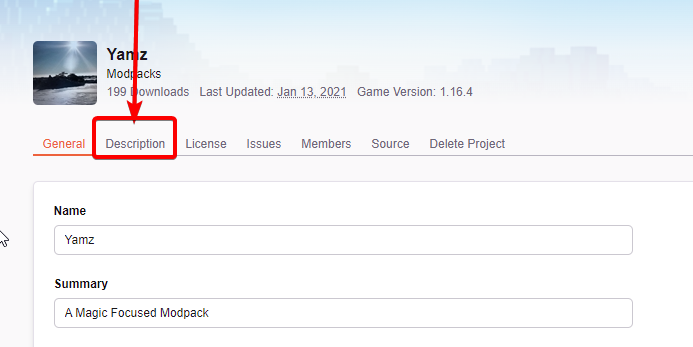
If it says summary then you change the thing at the bottom of that screenshot. You seem confused which one it's saying, so it's important that you fix the correct one.
 drowsy dawn
hello, i wanted to ask how do you add a mod into a curseforge modpack?
like if i wanted to add optifine to a modpack that i installed via the curseforge client
lyric crescent
?mc-optifine
red patioBOT
We do not offer support for Optifine!
If you have issues with Optifine, remove it. If you want further support try the discord found on their website.
https://www.optifine.net/home
Installing Optifine with modpacks on Curseforge:
- Right click the modpack icon, select
Open Folder. - Put the
Optifine.jarinto themodsfolder. - Now start the modpack.
drowsy dawn
thanks
sinful leaf
lyric crescent
Summary and description are diffrent things. If it says your description isnt cl...
ok thank you
 paper birch
trying to upload a mod, what is a slug?
lyric crescent
the text in the url
paper birch
right
I finally found one that isn't taken
but it tock like 20 iterations over like 2 hours to find something I liked
lyric crescent
ok
paper birch
Do you know why there are so few slugs?
lyric crescent
they got used
paper birch
but i searched them up on the website and most aren't being used
lyric crescent
you can make a ticket to try to claim one that isnt currently used, but you'll be waiting a while for it.
paper birch
Alr, thank you. It was just a large pain whilst most names aren't even there
 uneven valve
i need help when i download minecraft mod kimetsu no yaiba i got only jar and it wont open
signal ridge
Are you using the cf app?
signal ridge
Then you need to either use the cf app, or put the mod in what ever launcher your using with the correct modloader and mc version needed for it to work
uneven valve
im trying to put it in aternos
signal ridge
Then ask aternos support for help. CF has nothing to do with servers
signal ridge
Thats cuz its a mod, your not supposed to open it. You put it in the mods folder of the client
!mc-installmods
red patioBOT
How to install mods in CurseForge App.
- Click
+ Create Custom Profile - Name it, select the required Minecraft version, select the modloader & modloader version (usually the highest number), click
Create. - Click the profile icon.
- Click
Add More Content - Search and install the desired mods.
- Start the game!
How to install mods not on CurseForge.
- Right click the profile picture or Open the profile and click the Icon next to the play button.
- Click
Open Folder. - Drag the mod(s) into the
modsfolder. (Note: Some mods will require others, to run. Make sure to read the instructions for the mod!) - Start the game!
 signal ridge
for the server you put it in its mods folder. But if you want server support please use #👽︱game-support or #🧱︱mc-other-help ( #786424115535544350 > mc role)
 ashen palm
how would i add a game to curseforge
lyric crescent
what game
ashen palm
stardew valley
signal ridge
!stardew
red patioBOT
Overwolf maintains a known list of issues here, some with solutions, others without.
https://support.curseforge.com/en/support/solutions/articles/9000196615-curseforge-known-issues
Scroll down, look at "Other games"
ashen palm
ok
how do i import third party resource packs into a minecraft modpack
for me it does not show in the modpack when i put it in the folder
lyric crescent
open the profile folder, put them in the correct place
things that are not from CF will not show in the CF app
ashen palm
so this is about right?
 lyric crescent
seems so
ashen palm
is it also fine if it is a rar file?
lyric crescent
you dont unzip resource packs
ashen palm
yes
fleet bear
you don't need to but can
ashen palm
but does it need to be a zip file or can it also be a rar file
lyric crescent
doesnt matter
ashen palm
ok
 modest moth
The game crashed whilst initializing game
Error: org.spongepowered.asm.mixin.transformer.throwables.MixinTransformerError: An unexpected critical error was encountered
Exit Code: -1
red patioBOT
Error/Exit codes are useless. Follow these steps so someone can actually help you.
- Right-click the modpack profile icon OR click the button in the modpack profile.
- Click
Open Folder. - Open the
logsfolder. - Drag and drop the FILE named
latestORdebuginto discord.
 fair sage
I was sent here from outplayed is their a way to get this to start recording ragemp from gtav? Its a mod of it, it stopped recording gtav RP months ago
lyric crescent
Sorry.. what? How does CurseForge relate to either outplayed or gtav?
fair sage
Fuck if i know they sent me here tho
queen storm
Show screenshot of that message please
 lyric crescent
Seems like the result of a bad question to start with.
queen storm
To save mods? Yeah, I can understand the confusion
 warped wedge
I know cursegradle isnt actually made by cf but has anyone else been having trouble publishing recently?
fallen loom
?notcf
red patioBOT
Your question is not related to CurseForge owned/maintained features or services.
Please use the appropriate game room by getting a game role from #786424115535544350.
Otherwise use #👽︱game-support for game related help.
CurseForge does not make or maintain any of the content or games used on the site or app. Just because it's on the site/app does not make it a problem with CurseForge. Move rooms as requested, arguing about it will result in you being removed from the discord.
 rain turtle
I cant get curseforge to open
ive tried to follow the instructions on why not but im not a very techy person
its the oops, that was not supposed to happen page
signal ridge
!oops
red patioBOT
You had an "Oops, that was not supposed to happen!"
https://support.curseforge.com/en/support/solutions/articles/9000194900-curseforge-troubleshooting#oops
Please follow these instructions
rain turtle
I tried a lot of those
signal ridge
Just now you tried all those?
rain turtle
yea
it keeps trying to load but keeps going back to the same screen
(without me pressing retry)
signal ridge
Send this https://support.overwolf.com/en/support/solutions/articles/9000176827-how-to-get-your-overwolf-logs

Overwolf Support Help Center
We're here to get you informed on everything you need to know about Overwolf, including helpful guides and troubleshooting articles to back you up when you get in a pickle
 rocky pivot
Hye guys - How much time it can take before the moderators can review my modspack ? Thank you very much !

 opal cipher
!status
red patioBOT
Project Moderation Time
Project/File moderation is done on these days unless otherwise mentioned:
Sunday, Monday, Tuesday, Wednesday, Thursday: <t:1631170800:t> - <t:1631199600:t> (Your time)
Friday, Saturday: No Moderation!
Projects are moderated First in, First out. If you submit late in the work day, it will likely get left until the next day!
New Projects or anything flagged for manual review: 1-3 Working Days
Updates to approved projects not needing manual approval: 1 Hour
-If your file has been "Under Review" for more than an hour, then it is at manual review!
Changes will only show in the app if the project meets the requirements in the ?sync command and up to 24 hours has passed from when it was accepted.
rocky pivot
Thanks 🙂
crimson lantern
Hello I am back I still am having the same issues with my minecraft crashing before its even done laucnhing
any help would be amazing!
signal ridge
!mc-logs Send those to #👽︱game-support
red patioBOT
Sending logs for support.
- Right-click the modpack profile icon OR click the button in the modpack profile.
- Click
Open Folder. - Open the
logsfolder. - Drag and drop the FILE named
latestORdebuginto discord.
 honest quail
lyric crescent
honest quail
lyric crescent
You should just ask the question.
 clear robin
how do fix exit code 1
red patioBOT
Error/Exit codes are useless. Follow these steps so someone can actually help you.
- Right-click the modpack profile icon OR click the button in the modpack profile.
- Click
Open Folder. - Open the
logsfolder. - Drag and drop the FILE named
latestORdebuginto discord.
clear robin
upper root
!mc-installfix
red patioBOT
This is NOT instructions for Repair Profile! They are NOT the same! You need to do this!
- Click on the Minecraft Tab on the Left side of the CurseForge App.
- Click button next to the
Create Custom Profileoption. - Click
Repair Installationoption. - Play game.
NOTE: You will not lose any modpacks or worlds!
 proper mulch
i need help
red patioBOT
╰( ͡° ͜ʖ ͡° )つ──☆*:・゚ *˜”*°•.˜”*°• Many Help •°*”˜.•°*”˜* <:curselit:796985620550385705>
Please provide a description of your issue with as much detail as possible. If you have an issue with a mod or modpack, tell us the name. Explain what you can see happening. Be specific!
Tell us what is happening, we already know it "doesn't work".
Avoid using words like "it", tell us exactly what "it" is.
Don't assume anyone knows what you are talking about, be specific.
Tell us what you expected to happen.
Provide screenshots or video if possible.
Provide a log if possible. ?mc-log
lyric crescent
First you need to read the rules, then you can get help. Hopefully an hour is enough time to read them. #📛︱rules
 fair quail
Hello. I am having trouble launching the Rebirth of the night mod. It made me log in through the curse forge mc launcher, recognizes my account, and then makes me create a new Microsoft account under the same email, then proceeds to tell me I don't have MC bought through that account. I don't know what to do. Thank you!
upper root
Have you migrated your account yet?
fair quail
Ya that is the account I am trying to access. its microsoft
upper root
And so when you log in do you choose the Microsoft account option, and log in with the microsoft account you migrated to?
fair quail
yes
lyric crescent
Curseforge doesnt have a launcher, it uses the vanilla one. If you have login issues it is either you using the wrong account, or using an account that doesnt own java minecraft.
fair quail
I run java through that account all the time
lyric crescent
then log out and back in
fair quail
sorry ya i just meant the launcher that pops up when you run it through curseforge
I have done that already but I will do it again rn
I just did and it connects me to the one that it made me create - the one thats not working
lyric crescent
nothing makes you create an account..?
fleet bear
screenshot logging into another launcher. then screenshot the one launched by CF

 lyric crescent
so why are you not using the bottom one
lyric crescent
those are quite clearly not the same account
fair quail
i know but I logged in with the same info both times
lyric crescent
then you need to contact microsoft about your account
fair quail
ok cool. thank you for your help
 minor brook
Didn't you merge your account?
 old galleon
Hi everyone, I'm having problems with CurseForge app
I want to download "The Pixelmon Modpack" but it sends me error about a time out and I decided to download the mod that makes the errors manuly, but the CurseForge App doesn't recognizes that the mod is anlready in the mods folder of the instance called "The Pixelmon Modpack"
What should I do?
Mi internet connection is poor and I thinks that's the reason of the time out
And restart the download Is not an option because the error just continues
lyric crescent
use better internet
old galleon
lyric crescent
use better internet
._.
lyric crescent
ok, and we cant fix that for you.
upper root
You cannot, however any other pack has a lot higher chance of working.
Pixelmon is the biggest pack on curseforge (in single file size)
old galleon
upper root
You cannot, however any other pack has a lot higher chance of working.
Pixelmon ...
ok
thanks for your attention and time
Have a good night
 frail monolith
What's the max player limit you can get without paying for extra "player storage" or whatever you wanna call.
upper root
I dont think thats a question about curseforge, cause curseforge doesnt host servers
upper root
infinite, any cap imposed by server hosters is entirely artificial.
Except for the fact you need better hardware the more players you can have as many as you want
lyric crescent
Still not a question for curseforge.
frail monolith
Ight thanks
red patioBOT
Error/Exit codes are useless. Follow these steps so someone can actually help you.
- Right-click the modpack profile icon OR click the button in the modpack profile.
- Click
Open Folder. - Open the
logsfolder. - Drag and drop the FILE named
latestORdebuginto discord.
 snow lichen
can anyone help me with my issues modding ksp i have downloaded the mods from the app but cant figure out how to run them
digital roost
Has anyone reported problems with MacOS client today?
upper root
Not that i know of
upper root
snow lichen
can anyone help me with my issues modding ksp i have downloaded the mods fro...
Use ckan instead, cf is broken for ksp
 tame sun
Im trying to load and play SkyBlock 4 on my computer without having to connect it to wifi, how do i do that?
upper root
Install forge to the vanilla launcher then point it to the instances folder in moddingpath/Instances/
If you want more help get from #786424115535544350 and ask in #🧱︱mc-other-help
 humble coral
digital roost
Has anyone reported problems with MacOS client today?
humble coral
digital roost
Has anyone reported problems with MacOS client today?
I have a problem, my cursed forge wont update to the newest 0195.21 im stuck in v 0.194.1.1 im unable to connect to my online servers that my friend runs
red patioBOT
Hey there, it is Curseforge, not "Cursed forge"
humble coral
How would one update Curse forge to the lastest ver, with MacOS
digital roost
Didn’t know there was an update, but I can’t update it either. My 194.1.1 doesn’t see any of my Minecraft mods anymore.
humble coral
digital roost
Didn’t know there was an update, but I can’t update it either. My 194.1.1 doesn’...
I have the exact issue.
my friends recommend uninstalling and try installation again but i really dont want to go down that route.
How does one update the Forge on macOS
thats the question.
Ive looked all in the settings and closest thing i can find is a check for updates. Which is un-helpful.
digital roost
I’ve found that if I click the Minecraft game, the progress bar fills up and if you let it sit for five minutes or so, the mod list will populate. If you then click the Play button on the mod you want to play and wait another five minutes, the launcher will launch and the game will load. It’s being very weird. The launcher will require a new login, and will download a bunch of stuff while loading the modded installation.
I’ve copied my instances folder and did a complete reinstall earlier. Didn’t fix anything.
humble coral
Oh, wow comprehensive
I hope we can find a solution to this issue
I’m sorry the reinstallation process didn’t work
I was hoping that would do the trick
digital roost
It also resets your memory settings, so the mod will launch only using 3 GB of memory or something like that, unusable.
humble coral
Do you think we should submit a ticket?
Or wait here and see if another Mac user found a work around
digital roost
I’m waiting to see if it becomes more prevalent tomorrow. Only noticed it tonight. I can do without a couple days of Minecraft.
humble coral
Same, but Probably better for me anyway
Still a bummer
I had no problems yesterday
If you find a solution please ping me
digital roost
Neither did I, only this evening.
humble coral
I will be watching this thread closely
fleet bear
humble coral
I have a problem, my cursed forge wont update to the newest 0195.21 im stuck in ...
0.194.1.1 is the current version for mac. There's nothing new to update to. See #📢︱news for the latest versions released.
fleet bear
tardy abyss
non stop lagging out
!notcf Contact the server host.
red patioBOT
Your question is not related to CurseForge owned/maintained features or services.
Please use the appropriate game room by getting a game role from #786424115535544350.
Otherwise use #👽︱game-support for game related help.
CurseForge does not make or maintain any of the content or games used on the site or app. Just because it's on the site/app does not make it a problem with CurseForge. Move rooms as requested, arguing about it will result in you being removed from the discord.
 twilit zealot
Anyone know what this is Jmxremote.password.template? I found it in my directory and not sure if it's safe
fleet bear
what directory?
twilit zealot
Curzeforge
Sorry for the late reply
C:\Users\curseforge\minecraft\Install\runtime\java-runtime-beta\windows-x64\java-runtime-beta\conf\management
I took out my user but other then. That It is unchanged
upper root
That is part of the jre used to run minecraft.
There is a page on that files purpose here: https://docs.oracle.com/javadb/10.10.1.2/adminguide/radminjmxenablepwd.html
"Enabling remote JMX with password authentication only"
twilit zealot
upper root
That is part of the jre used to run minecraft.
There is a page on that files pur...
So it's safe? Sorry I think that's what your saying but want to be 100% sure
upper root
Yeah, seems to be a standard java thing
twilit zealot
Okay thanks a ton :D
Just never seem it before and I don't like to find a file that has remote and password in it lil
upper root
Yeah, the filename does seem sketchy at first
humble coral
fleet bear
0.194.1.1 is the current version for mac. There's nothing new to update to. See ...
I see, and i read through the new updated, but my problem of connecting to online servers still persists, Im unsure what exactly the connectivity issue is, and how to fix it.
I will wait patiently for more mac issuers with the same issue.
upper root
This is the third time youve mentioned wanting to update, but the only time you mentioned there being another issue, is there a reason why you are trying to update?
humble coral
upper root
This is the third time youve mentioned wanting to update, but the only time you ...
Im only trying to find the root to my issue.
im very unsure whats causing the problem
I think ive established it has nothing to do with the PC to mac updates.
upper root
What is your issue?
fleet bear
If you can't connect to a server that's an issue with your internet/the server not CF
humble coral
I solved the issue, Ok, my friend who hosts the server figured out my problem, not sure if you guys will find similar solutions though. The network he hosts the server from doesn't have a static IP, so some time ago he linked a domain to it and setup a script to handle ddns. Everyone else who wasn't having issues was using the url for the server but I never switched it over in my client, so once his IP address rolled over, the IP I was using was just outdate.
sorry for wasting ya'lls time
 tough obsidian
So I'm trying to download a mod but it's giving me an error saying "You don't have permission to download this mod" is it on curseforge's side or the mod creator's side?
queen storm
What app are you using?
tough obsidian
On the curseforge website in my browser
opal cipher
Cloudflare blocks that for some reason
tough obsidian
So is Cloudflare on my end or the mod creator's side?
tough obsidian
That's for 1.15 the version I'm getting is 1.12 since 1.12 is a popular mod version that lots of mods use
queen storm
Oww, missed the 45 at the end
https://www.curseforge.com/minecraft/mc-mods/voxelmap/files/3029445
Download button works fine
tough obsidian
Yea I can access the link but when I click the "Download" button and it shows the 5 secs thing, once the 5 secs are finished, instead of downloading it gets that error. The mod version before this one (the non latest one) works, only that one version doesn't work
queen storm
I have no 5 seconds thing...
opal cipher
Me neither. The download button straight up downloaded it for me.
Are you logged in to CF (website)?
That removes the timer I think.
tough obsidian
tough obsidian
Yea I can access the link but when I click the "Download" button and it shows th...
 tough obsidian
opal cipher
Are you logged in to CF (website)?
tough obsidian
opal cipher
Are you logged in to CF (website)?
Yea I am signed in
 queen storm
Login with an account that has the java version
 foggy storm
how can i do it?
queen storm
!mc-login
red patioBOT
Minecraft Logins
As of march 10th 2022, you will need a Microsoft Account to play!
Step 1: Get to the Microsoft login screen.
Step 2: Log in with a Microsoft account that owns the Java version of Minecraft.
Done!
Issues: If it says PLAY DEMO then the account used DOES NOT own Java Minecraft. Log in with one that does.
 queen storm
Does it still say "Play demo"
 spare canopy
hi
foggy storm
queen storm
Does it still say "Play demo"
yes
how can i make account own Java Minecraft?
i used 3 account bit still DOES NOT own Java Minecraft
queen storm
Show your vanilla launcher
foggy storm
here?
 queen storm
No, vanilla, non-modded.
foggy storm
sorry but idk wat is this :(((
queen storm
The minecraft you play without mods, without curseforge
foggy storm
 opal cipher
And that's the end of line for support, unless you have an actual real, paid account with access to Minecraft: Java Edition
foggy storm
ohh tks u guys

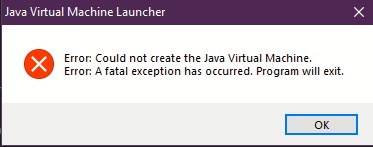

 red patioBOT
Sending logs for support.
- Right-click the modpack profile icon OR click the button in the modpack profile.
- Click
Open Folder. - Open the
logsfolder. - Drag and drop the FILE named
latestORdebuginto discord.
 peak pasture
is there a way to import my existing minecraft account into the curseforge client? with all the modded fabric versions i have and everything?
lyric crescent
no, since curseforge uses a separate install, and doesnt modify the files like you normally would.
you can create a custom profile inside curseforge and manually copy all the mods to the correct place
 round void
Curseforge dont wanna load for me
it says Opening Curse Forge Overwolf and then just goes poof
lyric crescent
Try opening overwolf first, then use that to open curseforge
 wind matrix
I was gonna check something in my mod, but when I Search the mod' s name on Google it only shows me the Download page link, not the principal one, idk why this happens
Is this normal?
Days ago everything was okay, now it bugged
lyric crescent
link?
wind matrix
https://www.curseforge.com/minecraft/mc-mods/iolite-ore/download , if u click this it automatically starts the download, it only shows this link on Google
 lyric crescent