#🔥︱curseforge-support
1 messages · Page 606 of 1
 upper root
You shouldnt be uploading the same file again
 slender edge
Should i send the log of my crash into there?
upper root
No. Post it into #🧱︱mc-other-help seeing you alreayd moved there, and please read the #📛︱rules, specifically 4 and 5
 sudden latch
upper root
You shouldnt be uploading the same file again
sudden latch
upper root
You shouldnt be uploading the same file again
I needed to switch accounts; had a typo in my name
upper root
Well then make the file slightly different, update a mod or add a space to a config file.
 digital roost
someone i need help
 red patioBOT
╰( ͡° ͜ʖ ͡° )つ──☆*:・゚ *˜”*°•.˜”*°• Many Help •°*”˜.•°*”˜* <:curselit:796985620550385705>
Please provide a description of your issue with as much detail as possible. If you have an issue with a mod or modpack, tell us the name. Explain what you can see happening. Be specific!
 Tell us what is happening, we already know it "doesn't work".
Avoid using words like "it", tell us exactly what "it" is.
Don't assume anyone knows what you are talking about, be specific.
Tell us what you expected to happen.
Provide screenshots or video if possible.
Provide a log if possible. ?mc-log
digital roost
!help
red patioBOT
╰( ͡° ͜ʖ ͡° )つ──☆*:・゚ *˜”*°•.˜”*°• Many Help •°*”˜.•°*”˜* <:curselit:796985620550385705>
Please provide a description of your issue with as much detail as possible. If you have an issue with a mod or modpack, tell us the name. Explain what you can see happening. Be specific!
Tell us what is happening, we already know it "doesn't work".
Avoid using words like "it", tell us exactly what "it" is.
Don't assume anyone knows what you are talking about, be specific.
Tell us what you expected to happen.
Provide screenshots or video if possible.
Provide a log if possible. ?mc-log
digital roost
!help im having a problem with playing the mods, i install them and then when i click play it says "launcher quiy enexpectedly"
red patioBOT
╰( ͡° ͜ʖ ͡° )つ──☆*:・゚ *˜”*°•.˜”*°• Many Help •°*”˜.•°*”˜* <:curselit:796985620550385705>
Please provide a description of your issue with as much detail as possible. If you have an issue with a mod or modpack, tell us the name. Explain what you can see happening. Be specific!
Tell us what is happening, we already know it "doesn't work".
Avoid using words like "it", tell us exactly what "it" is.
Don't assume anyone knows what you are talking about, be specific.
Tell us what you expected to happen.
Provide screenshots or video if possible.
Provide a log if possible. ?mc-log
digital roost
how tf do i use the help command lol
 signal ridge
Stop running the help command, its for you to read...
signal ridge
Show error
digital roost
like the details?
upper root
Or a screenshot of it
 upper root
What are you trying open that gives that error?
signal ridge
Are you using the Curseforge app?
digital roost
signal ridge
Are you using the Curseforge app?
yes
signal ridge
If you click reopen then play again does it quit out again?
signal ridge
Make sure all other mc related stuff is closed, then click play in the cf app
digital roost
ok one sec
digital roost
signal ridge
Make sure all other mc related stuff is closed, then click play in the cf app
didnt work 🤕
signal ridge
Screen shot launcher that opens after pressing play in cf.
 tepid viper
 storm escarp
Problem
So I got curse forge but some mods like crazy craft won’t work how do I lunch it I will say this
signal ridge
!mc-logs do that into #👽︱game-support
red patioBOT
Sending logs for support.
- Right-click the modpack profile icon OR click the
 button in the modpack profile.
 - Click

Open Folder. - Open the
logsfolder. - Drag and drop the FILE named
latestORdebuginto discord.
 signal ridge
Did you make this pack?
storm escarp
Nope
signal ridge
Did you add, remove, or change anything in the pack?
storm escarp
No hope I didn’t
signal ridge
Back up any worlds you want to keep then reinstall the pack
signal ridge
Easiest way is to reboot your pc
storm escarp
Ok
 arctic tundra
Hey! I realy need some help. I have downloaded some minecraft modpacks, when I hit play, it dosnt set up the moded instalation it just is the default minecraft login.
arctic tundra
me?
storm escarp
Yea
arctic tundra
Literaly any of them. Eaven custom ones.
upper root
Log into the launcher it opens, that will have the modded profile on it
arctic tundra
x_life. Spellbound.
storm escarp
Hmmm
arctic tundra
Better minecraft
 upper root
Are you sure you haven't modified the pack
storm escarp
How I do that?
signal ridge
Did you put any extra mods into the mods folder?
signal ridge
You would know if you did no?
storm escarp
I did not
signal ridge
And this is after reinstalling the pack? (and backing up any worlds you want to keep)
signal ridge
ah ok. Then try reinstalling the pack.
storm escarp
Ok
arctic tundra
My issue isnt with a modpack. I think it is an issue with the app. Maby?
upper root
Log into the launcher it opens, that will have the modded profile on it
arctic tundra
It dosn't
It just has the latest version and snapshot.
Dose it matter if I migrated my acc to a microsoft acc?
red patioBOT
This is NOT instructions for Repair Profile! They are NOT the same! You need to do this!
- Click on the Minecraft Tab on the Left side of the CurseForge App.
- Click button next to the
Create Custom Profileoption. - Click

Repair Installationoption. - Play game.
NOTE: You will not lose any modpacks or worlds!
arctic tundra
Done that also.
signal ridge
just now?
arctic tundra
Yes
upper root
And you did repair installation not repair profile?
arctic tundra
Yes. Multiple times.
Hear is what happends. I press play

Then minecraft opens to this
 signal ridge
There are also no other mc instances open anywhere?
arctic tundra
Not that I am awere of.
signal ridge
Open task manager and see if there are any hidding in the background. Or reboot your pc. Ghost launcher happen sometimes
arctic tundra
Um.......... Im a nerd. I have an I-Mac
signal ridge
Ah my bad, thought it was windows for some reason
arctic tundra
NP
Dose the app work with updated versions of MacOS?
I am on the newist version Monterey
 fallen loom
Remember that Mac Apps aren't stopped unless they disappear from the dock (or if they're pinned, the dot disappears)
arctic tundra
Is like the path finding prosses to the minecraft launcher messed up?
fallen loom
If Curse tries to launch the Minecraft Launcher and an instance is already running, either the OS or the Minecraft Launcher itself (I'm not sure which) says "Use this one that's already running"
arctic tundra
My normal minecraft launcher has some more instalations though.
This is when I just normaly open up minecraft

This is when I want to play a modpack
 fallen loom
Where did you tell Curse to put its Minecraft stuff?
arctic tundra

 fleet bear
CurseForge doesn't use the default installation. That's why you can't see them.
arctic tundra
How do I fix it?
fleet bear
you don't.
arctic tundra
I just realy want to use the app. It is soooo much easyer than manualy moding. 😥
arctic tundra
fleet bear
you don't.
So the app is usless to me?
fleet bear
I don't get what your issue is?
CF profiles are stored separate from the vanilla profiles. Just make a new instance in CF app
Copy over the world if you want to reuse it
upper root
As I understand the launcher cf opens doesnt have the profiles, and the normal installfix didnt solve it
arctic tundra
Yes
arctic tundra
How do I get it so that when I press PLAY on a CF app mod pack, it will open up a Minecraft launcher, with the made instalation.
fleet bear
you don't
There's no point
That's the whole purpose of CF app
You don't use the vanilla launcher profiles
arctic tundra
Then how do I use a CF profile.
fleet bear
You make a profile in the app and add stuff to it with the add more content button
arctic tundra
Then press play?
fleet bear
yes
 fleet bear
Then I don't know why you keep saying your missing the other profiles.
Restart the computer
upper root
That was explaining that it cant be teh regular launching that its opening, cause it would show the regular launchers profiles
digital roost
A fatal error has been detected by the Java Runtime Environment:
EXCEPTION_ACCESS_VIOLATION (0xc0000005) at pc=0x000000003ea01066, pid=40844, tid=10348
JRE version: Java(TM) SE Runtime Environment (8.0_51-b16) (build 1.8.0_51-b16)
Java VM: Java HotSpot(TM) 64-Bit Server VM (25.51-b03 mixed mode windows-amd64 compressed oops)
Problematic frame:
C [OpenAL64.dll+0x11066]
Failed to write core dump. Minidumps are not enabled by default on client versions of Windows
whats this
im just trying to play a modpack
arctic tundra
fleet bear
Restart the computer
-_- Bruh. I Have restarted the computer, deleted the app, reinstalled, updated the computer. IDK what to do!
upper root
digital roost
A fatal error has been detected by the Java Runtime Environment:
#
# EXCEPTION_...
Post the full error into #👽︱game-support
digital roost
okay
fleet bear
digital roost
im just trying to play a modpack
update your drivers.
digital roost
how do i do that
signal ridge
arctic tundra
-_- Bruh. I Have restarted the computer, deleted the app, reinstalled, updated t...
Try this. Force shutdown the mac so it closes all programs as well.
digital roost
I just set up my curseforge and a modpack but now i’d like to play that on a server with a friend… How do i make a modded server so he can join
If someone could help it would be much appreciated
upper root
Any further questions about this ⤵️ please ask in #👽︱game-support
red patioBOT
How to **manually** install a server - **On your own PC**
- Check if the modpack has a server pack, if it does: use that and skip below.
- Go to the Forge website http://files.minecraftforge.net/ and download the Installer for the forge version the pack is using.
- Run the installer and choose
Install server. Do not install to your desktop. Also do not install inside a OneDrive folder. - Run the server using the forge.jar. A file called
eula.txtwill be generated. Open it and changeeula=falsetoeula=true - From the Client; Copy the
modsfolder,configfolder, and any other folders needed for the pack to work into the server folder. If the modpack has a server pack, use this instead! - Run the server again.
- Port forward your machine if needed. (Google it)
Long version: https://pastebin.com/83DXfGTH
digital roost
will do, my apologies
arctic tundra
signal ridge
Try this. Force shutdown the mac so it closes all programs as well.
Sigh No luck
signal ridge
You started just cf and nothing else?
upper root
!mc-path try change this to the what it says at the top
red patioBOT
Change your install path to the following:
For Windows: C:\CurseForge
For Mac: /Users/Shared/CurseForge
If Minecraft is not installed in CurseForge App:
- Click the
 in the top left.
 - Select Minecraft from the list of games.
- Select the
Advancedoption and pick the location for your computer listed above. - Click
Continue.
If Minecraft is installed in CurseForge App:
- Click the
 in the bottom left.
 - Select the Minecraft tab.
- Click
Change. - Select the location for your computer listed above.
:no_entry_sign: Minecraft Files should NOT be installed inside the following locations :no_entry_sign:
:no_entry_sign: .minecraft folder.
:no_entry_sign: OneDrive folders.
:no_entry_sign: Desktop folder.
:no_entry_sign: iCloud enabled folders.
:no_entry_sign: or any other cloud saved folder.
:no_entry_sign: or folders with non-English characters in them.
If any of the above are in the path you need to change/move it!
arctic tundra
😭
storm escarp
Why he crying?
 unkempt briar
i was pinged here
upper root
Asbestosstar: see above
unkempt briar
so what do i do?
unkempt briar
upper root
Asbestosstar: see above
thank you
 unkempt echo
what do i do
 red patioBOT
Change your install path to the following:
For Windows: C:\CurseForge
For Mac: /Users/Shared/CurseForge
If Minecraft is not installed in CurseForge App:
- Click the in the top left.
- Select Minecraft from the list of games.
- Select the
Advancedoption and pick the location for your computer listed above. - Click
Continue.
If Minecraft is installed in CurseForge App:
- Click the in the bottom left.
- Select the Minecraft tab.
- Click
Change. - Select the location for your computer listed above.
:no_entry_sign: Minecraft Files should NOT be installed inside the following locations :no_entry_sign:
:no_entry_sign: .minecraft folder.
:no_entry_sign: OneDrive folders.
:no_entry_sign: Desktop folder.
:no_entry_sign: iCloud enabled folders.
:no_entry_sign: or any other cloud saved folder.
:no_entry_sign: or folders with non-English characters in them.
If any of the above are in the path you need to change/move it!
digital roost
What is longest time that Minecraft mod in curseforge can be approved if it is already under review
red patioBOT
Project Moderation Time
Project/File moderation is done on these days unless otherwise mentioned:
Sunday, Monday, Tuesday, Wednesday, Thursday: <t:1631170800:t> - <t:1631199600:t> (Your time)
Friday, Saturday: No Moderation!
Projects are moderated First in, First out. If you submit late in the work day, it will likely get left until the next day!
New Projects or anything flagged for manual review: 1-3 Working Days
Updates to approved projects not needing manual approval: 1 Hour
-If your file has been "Under Review" for more than an hour, then it is at manual review!
Changes will only show in the app if the project meets the requirements in the ?sync command and up to 24 hours has passed from when it was accepted.
digital roost
ok ty
 bronze nova
hey, im trying to download a mod into my server, how can i do so? ive been looking online and havent found a way to do so that has worked. I am trying to download the spiral lucky block onto my spigot server. Im aware that it has to be a forge server but how would i go about doing that because the tutorials i found just seem to show how to do it with apexhosting or other hosting companies like the one mentioned
upper root
!notcf
red patioBOT
Your question is not related to CurseForge owned/maintained features or services.
Please use the appropriate game room by getting a game role from #786424115535544350.
Otherwise use #👽︱game-support for game related help.
CurseForge does not make or maintain any of the content or games used on the site or app. Just because it's on the site/app does not make it a problem with CurseForge. Move rooms as requested, arguing about it will result in you being removed from the discord.
 misty dove
More ram = more availability for mods, right?
red patioBOT
Your question is not related to CurseForge owned/maintained features or services.
Please use the appropriate game room by getting a game role from #786424115535544350.
Otherwise use #👽︱game-support for game related help.
CurseForge does not make or maintain any of the content or games used on the site or app. Just because it's on the site/app does not make it a problem with CurseForge. Move rooms as requested, arguing about it will result in you being removed from the discord.
 final flower
My curseforge launcher keeps deleting all the profiles I have, including older profiles of mods I can't get anymore as well as my custom profiles. Is anyone able to assist?
 lyric crescent
Curseforge doesnt use profiles. You make a profile on the app and then use that to play.
final flower
lyric crescent
Curseforge doesnt use profiles. You make a profile on the app and then use that ...
But like, it keeps deleting them all. I had an older version of R.A.D and I had my own custom modpack too and now they're gone. This is the second time it's happened and I can't get them back anymore
final flower
So in the My Modpacks section, I had made a custom modpack, as well as I had an older version of the Roguelike adventures and dungeons modpack, and RLCraft. I loaded up curseforge and none of them exist anymore. They've all been deleted. It's happened twice now and idk what causes it.
lyric crescent
What is happening between you making them and you finding them gone.
final flower
Just firing up the app. The packs I make stay for a few days to a few weeks; and then they just vanish when I fire up the app again.
lyric crescent
What OS?
final flower
Windows 10
lyric crescent
Do you have onedrive active? Where is curseforge set to install to? (Gear icon, minecraft, "minecraft modding folder")
final flower
I don't have one drive, and it’s set to install in Users/Laptop/Twitch/Minecraft. Is that the issue?
lyric crescent
Do you have one of those file cleaning programs?
final flower
Nope
lyric crescent
Gotta be something going on there.
final flower
Yeah
The app also seems to log me out when this happens. It's only happened twice so I'm not sure what causes it
lyric crescent
You have something messing with your files.
final flower
That would make sense. Time to do some work ig
lyric crescent
?mc-path
red patioBOT
Change your install path to the following:
For Windows: C:\CurseForge
For Mac: /Users/Shared/CurseForge
If Minecraft is not installed in CurseForge App:
- Click the in the top left.
- Select Minecraft from the list of games.
- Select the
Advancedoption and pick the location for your computer listed above. - Click
Continue.
If Minecraft is installed in CurseForge App:
- Click the in the bottom left.
- Select the Minecraft tab.
- Click
Change. - Select the location for your computer listed above.
:no_entry_sign: Minecraft Files should NOT be installed inside the following locations :no_entry_sign:
:no_entry_sign: .minecraft folder.
:no_entry_sign: OneDrive folders.
:no_entry_sign: Desktop folder.
:no_entry_sign: iCloud enabled folders.
:no_entry_sign: or any other cloud saved folder.
:no_entry_sign: or folders with non-English characters in them.
If any of the above are in the path you need to change/move it!
lyric crescent
Try moving it to there. Should at least ensure it's not onedrive.
final flower
Okie, thank you!
digital roost
Aaaaaa I'm so confused I downloaded a mod but I don't own minecraft Java and I only have it because I'm using Xbox game pass
 meager swan
im trying to share my modpack profile thingy with someone and its not working! D:
pls halp
 rich flint
?mc-packshare
red patioBOT
There are two ways to share a modpack you've made with others...
Export and Share - For Friends to Small Groups.
- Click the Icon for the modpack.
- Click the button next to play.
- Click

Export. - Select the files that should be included.
- Send the zip to the people that want it! They can follow the instructions in
!mc-installpackto install the pack!
Upload to Curseforge - For Public Release to Everyone.
This options will make your pack public to EVERYONE, it comes with extra requirements and will take some effort to set up.
- Go to here: https://www.curseforge.com/project/432/4471/create
- Fill out the information with a proper description of the pack. This should allow anyone to understand what the pack is.
- Click the Icon for the modpack in the CurseForge app.
- Click the button next to play.
- Click
Export. - Select the files that should be included.
- Open your Project you made on the CurseForge site and Upload the file you just made.
- Wait for Moderation & Sync so it can show up in the client! (See
!syncfor limitations)
 cunning skiff
I installed a modpack server on my local pc, when its running i see this window.

But, I still cannot connect to it.
 visual surge
How can I get my project to get approved?
https://www.curseforge.com/minecraft/modpacks/joeminer
 queen storm
visual surge
How can I get my project to get approved?
https://www.curseforge.com/minecraft/m...
queen storm
visual surge
How can I get my project to get approved?
https://www.curseforge.com/minecraft/m...
Did you upload a file?
visual surge
yes
queen storm
cunning skiff
I installed a modpack server on my local pc, when its running i see this window.
!notcf
red patioBOT
Your question is not related to CurseForge owned/maintained features or services.
Please use the appropriate game room by getting a game role from #786424115535544350.
Otherwise use #👽︱game-support for game related help.
CurseForge does not make or maintain any of the content or games used on the site or app. Just because it's on the site/app does not make it a problem with CurseForge. Move rooms as requested, arguing about it will result in you being removed from the discord.
queen storm
visual surge
yes
Then you just wait
red patioBOT
Project Moderation Time
Project/File moderation is done on these days unless otherwise mentioned:
Sunday, Monday, Tuesday, Wednesday, Thursday: <t:1631170800:t> - <t:1631199600:t> (Your time)
Friday, Saturday: No Moderation!
Projects are moderated First in, First out. If you submit late in the work day, it will likely get left until the next day!
New Projects or anything flagged for manual review: 1-3 Working Days
Updates to approved projects not needing manual approval: 1 Hour
-If your file has been "Under Review" for more than an hour, then it is at manual review!
Changes will only show in the app if the project meets the requirements in the ?sync command and up to 24 hours has passed from when it was accepted.
queen storm
visual surge
how long does it usually take?
!status
visual surge
yikes I created it on thursday evening :(
queen storm
Yes, why would you rename it?
Yeah, that won't work the way you want it
The mods don't get put in the modpack as jars, they get put there as numbers pointing to the mods on the website
No
 grizzled osprey
please help trying to play the modpack one block but when trying to fire up the game shows me that you can not because something wrong with the settings please help
upper root
Im pretty sure that pack is broke, check its comments on the curseforge page
grizzled osprey
ok thx
but where is the coments
and first time i play that it worked but when i tried to open the world game crashed
 solar brook
Hi!
I just wanted to know if there are plans to add a "Datapacks" category to the site for Minecraft. This would allow datapacks not to be mixed up with shaders in "Customization" or in the middle of Minecraft Bedrock Addons in the category of that name; which by the way is also a catch-all between that and the real mod addons.
To come back to the datapack category, it would not only allow them to be better organized, but also give a better navigation on the site and finally allow a better visibility to them, because for the moment discovering datapacks made by small content creators is extremely complicated.
(or a sub category on Customization)
lyric crescent
solar brook
Hi!
I just wanted to know if there are plans to add a "Datapacks" category to th...
It's under resource packs
solar brook
lyric crescent
It's under resource packs
oh ok i see but it's a little bit a non-sens
lyric crescent
Why? Resource packs is the category for things that work without modloaders
solar brook
lyric crescent
Why? Resource packs is the category for things that work without modloaders
Resource pack is the name attributed in the game to the packs changing the textures; datapacks are modifying the game and are not placed in the same places (in the file structure); moreover, datapacks working on the server side (modifies game behavior for all players on a server without they need to download additional data) and ressource packs on the client side (render).
Honestly, I didn't know that the datapack category existed because (i think) resource packs is the wrong place. Finally, datapacks with many downloads are placed in the Customization category, which makes much more sense
Thanks for your answers btw 😅
red patioBOT
<:CFidea:798388634972717066> Have an idea on how to improve CurseForge? <:CFidea:798388634972717066>
CurseForge is looking for great ideas and user feedback! Get into the CurseForge Community by providing some feedback and voting on what's important to you!
Think some game should be supported? Post an idea and explain why!
Got a to die for feature idea? Let's hear it!
Location In-app
- Click the
 button on the bottom left of the app.
 - Click on

Suggest a Featureoption!
solar brook
I'll do that thanks for you patience 🙂
 young bone
I never messed with it when uploading a pack update, what is the display name for?
 summer hornet
Is there any way to prevent curseforge from overiding my java PATH variable on bootup?
I'm trying to control which java version I use for a server, but curseforge forces v14 when I boot it up, preventing me from starting it.
 errant hatch
 whole knot
yes

 full trellis
!status
red patioBOT
Project Moderation Time
Project/File moderation is done on these days unless otherwise mentioned:
Sunday, Monday, Tuesday, Wednesday, Thursday: <t:1631170800:t> - <t:1631199600:t> (Your time)
Friday, Saturday: No Moderation!
Projects are moderated First in, First out. If you submit late in the work day, it will likely get left until the next day!
New Projects or anything flagged for manual review: 1-3 Working Days
Updates to approved projects not needing manual approval: 1 Hour
-If your file has been "Under Review" for more than an hour, then it is at manual review!
Changes will only show in the app if the project meets the requirements in the ?sync command and up to 24 hours has passed from when it was accepted.
 subtle folio
Hey guys, I've tried everything to get a modpack running over curseforge on my pc... but nothing has worked. I tried on a second pc and there were zero issues (downloaded curseforge, downloaded modpack, pressed play, created a world, and no issues). On my main pc, I can download curseforge, download a modpack, and launch into minecraft... but then I create a world, and it crashes right when I load in...
Originally I was getting the exit code "-1073741819"... then after a day of googling and trying various fixes I'm getting the exit code 1 ("this crash may be caused by an invalid java Runtime configuration")
red patioBOT
Error/Exit codes are useless. Follow these steps so someone can actually help you.
- Right-click the modpack profile icon OR click the button in the modpack profile.
- Click
Open Folder. - Open the
logsfolder. - Drag and drop the FILE named
latestORdebuginto discord.
full trellis
bruh moment
subtle folio
and here is my log file
lyric crescent
there is no error here that i see. how much ram is allocated?
subtle folio
Default of 4GB (I've tried 2GB, 6GB and 8GB as well)
 tiny basin
hi can someone help trying to play a mc modpack but it wont load either they start loading and then stop and the play button comes back or i hit launch and nothing happend if anyone has some advice would be much apreacated 🙂
 pallid flame
im sry if im posting this in the wrong place but what was this mod called?
 queen storm
pallid flame
im sry if im posting this in the wrong place but what was this mod called?
queen storm
pallid flame
im sry if im posting this in the wrong place but what was this mod called?
#🔎︱mod-hunting
Draconic evolution
pallid flame
queen storm
<#847232261883035718>
Draconic evolution
what it's not draconic evoloution i meant the mod of the inventory tab i was in
queen storm
Jei, rei, nei
tiny basin
tiny basin
hi can someone help trying to play a mc modpack but it wont load either they sta...
does anyone know how to fix this ? i have tried everyhting
queen storm
!mc-installfix
red patioBOT
This is NOT instructions for Repair Profile! They are NOT the same! You need to do this!
- Click on the Minecraft Tab on the Left side of the CurseForge App.
- Click button next to the
Create Custom Profileoption. - Click
Repair Installationoption. - Play game.
NOTE: You will not lose any modpacks or worlds!
 velvet warren
Hi. So recently I bought a computer and installed minecraft and curseforge. I am in a page where I can only choose modpacks and not mods alone. If anyone knows how to solve it please massage me. Thanks in advance.
queen storm
!mc-installmods
red patioBOT
How to install mods in CurseForge App.
- Click
+ Create Custom Profile - Name it, select the required Minecraft version, select the modloader & modloader version (usually the highest number), click
Create. - Click the profile icon.
- Click
Add More Content - Search and install the desired mods.
- Start the game!
How to install mods not on CurseForge.
- Right click the profile picture or Open the profile and click the Icon next to the play button.
- Click
Open Folder. - Drag the mod(s) into the
modsfolder. (Note: Some mods will require others, to run. Make sure to read the instructions for the mod!) - Start the game!
 pallid flame
queen storm
Jei, rei, nei
pallid flame
queen storm
Jei, rei, nei
nah it's not jei
tiny basin
queen storm
!mc-installfix
i have done this it doesnt help
queen storm
pallid flame
nah it's not jei
Rule 5, then move to the right channel
 wild kiln
i dont know this and i wanted to ask but does cusreforge support steam games or does it not detect the games as a valid game?
queen storm
tiny basin
i have done this it doesnt help
!mc-path
red patioBOT
Change your install path to the following:
For Windows: C:\CurseForge
For Mac: /Users/Shared/CurseForge
If Minecraft is not installed in CurseForge App:
- Click the in the top left.
- Select Minecraft from the list of games.
- Select the
Advancedoption and pick the location for your computer listed above. - Click
Continue.
If Minecraft is installed in CurseForge App:
- Click the in the bottom left.
- Select the Minecraft tab.
- Click
Change. - Select the location for your computer listed above.
:no_entry_sign: Minecraft Files should NOT be installed inside the following locations :no_entry_sign:
:no_entry_sign: .minecraft folder.
:no_entry_sign: OneDrive folders.
:no_entry_sign: Desktop folder.
:no_entry_sign: iCloud enabled folders.
:no_entry_sign: or any other cloud saved folder.
:no_entry_sign: or folders with non-English characters in them.
If any of the above are in the path you need to change/move it!
queen storm
wild kiln
i dont know this and i wanted to ask but does cusreforge support steam games or ...
Which game?
velvet warren
can someone help me?
queen storm
Already posted a command for you
velvet warren
ok
wild kiln
like skyrim, minecraft many others?
queen storm
wild kiln
like skyrim, minecraft many others?
Minecraft is not a steam game, skyrim: not sure if it is on the app
subtle folio
lyric crescent
there is no error here that i see. how much ram is allocated?
This is the end of the minecraft debug log (after I turned it on in the launcher)
 grim gate
Minecraft crashes when I try to launch it, I'll send the crash log in a sec
grim gate
grim gate
Minecraft crashes when I try to launch it, I'll send the crash log in a sec
I still can't figure out how to fix this. I've tried everything, it still crashes with Exit Code 1
red patioBOT
Error/Exit codes are useless. Follow these steps so someone can actually help you.
- Right-click the modpack profile icon OR click the button in the modpack profile.
- Click
Open Folder. - Open the
logsfolder. - Drag and drop the FILE named
latestORdebuginto discord.
tiny basin
red patio
hi can someone help me understand this im awful with computers when i click change it brings up a bunch of files what do i do from there?
lyric crescent
subtle folio
This is the end of the minecraft debug log (after I turned it on in the launcher...
!notcf no idea
red patioBOT
Your question is not related to CurseForge owned/maintained features or services.
Please use the appropriate game room by getting a game role from #786424115535544350.
Otherwise use #👽︱game-support for game related help.
CurseForge does not make or maintain any of the content or games used on the site or app. Just because it's on the site/app does not make it a problem with CurseForge. Move rooms as requested, arguing about it will result in you being removed from the discord.
wild kiln
queen storm
Minecraft is not a steam game, skyrim: not sure if it is on the app
it says on the website that it has mods for skyrim, terraria and KSP
queen storm
wild kiln
it says on the website that it has mods for skyrim, terraria and KSP
Ksp works fine, skyrim: didn't test it myself, that is why I said this
lyric crescent
yes, the website does have those
tiny basin
my modding folder thing says /users/myname/Documents/Curseforge/minecraft is this ok if not how do i change it
queen storm
You already got instructions for that
velvet warren
i cant find the advance option...
queen storm
tiny basin
it brings up a bunch of files
Then you go to C, make a folder named Curseforge, select it
tiny basin
queen storm
Then you go to C, make a folder named Curseforge, select it
what is C and where do i find it?
sorry im awful with computers
wild kiln
queen storm
Ksp works fine, skyrim: didn't test it myself, that is why I said this
ah okay i wanted to know so i didnt waste money through steam and Curseforge end up not being able to register the games
queen storm
tiny basin
what is C and where do i find it?
It is your main computer drive, find somebody who can help with it then
tiny basin
queen storm
It is your main computer drive, find somebody who can help with it then
oh ok im sorry
lyric crescent
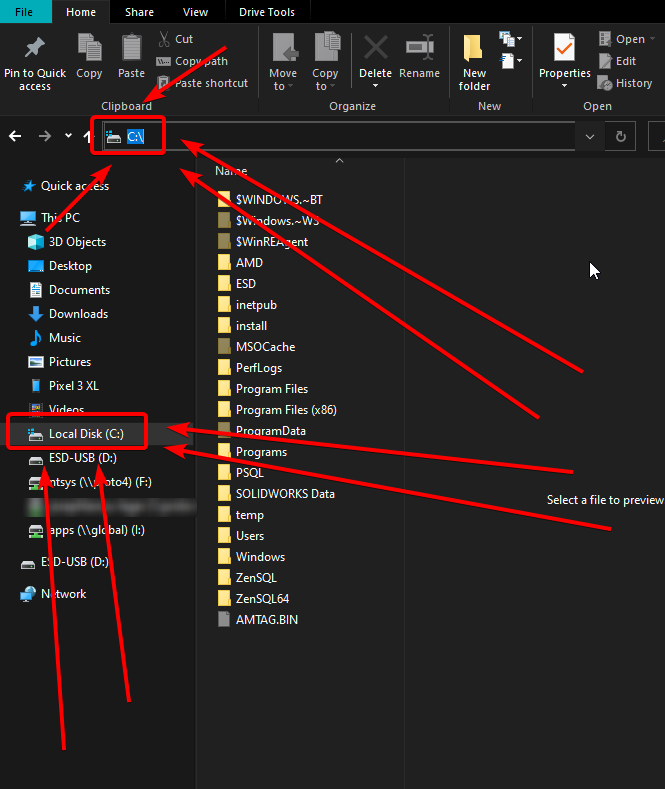 tiny basin
lyric crescent
https://i.imgur.com/CeOcOba.png
tiny basin
lyric crescent
https://i.imgur.com/CeOcOba.png
thank you ! 🙂 im on a mac tho so it looks difrent do u know where C would be on that?
lyric crescent
doesnt exist on mac
queen storm
Mac has no C
tiny basin
oh so what do i do then ?
queen storm
There is another folder for that in the same instructions
tiny basin
okie ill go look
/Users/Shared/CurseForge how do i make it look like this it pulls up files when i hit change what do i do from there?
lyric crescent
no clue how mac stuff works
tiny basin
aha nws neither do i
wild kiln
tiny basin
aha nws neither do i
from what i know on mac Machontosh HD is a rough equivalent to the windows c drive
lyric crescent
that isnt the issue
tiny basin
ima see if google has any advice
google is v confusing xd does it matter that i have played other forge modpacks and they have worked fine its only fabric ones im having an issue with or do i still need to figure out how to change the modding folder thing
 coarse gulch
I need help with sharing my modpack
digital roost
@fleet bear can u help me I have a problem were when I install a mod it requires me to login in with my mojang account or my Microsoft account but I'm playing through Xbox gamepass
coarse gulch
I have made a private modpack and previously I have just been able to send the file to my friends through discord and then it all works but now the file size is like 92MB when it used to be around 70KB
All I did was add three mods and update everything to the latest versions
 west folio
coarse gulch
I have made a private modpack and previously I have just been able to send the f...
west folio
coarse gulch
I have made a private modpack and previously I have just been able to send the f...
use filesharing website
tiny basin
is anyone around to help ? 🙂
queen storm
digital roost
<@117433042401886214> can u help me I have a problem were when I install a mod i...
Rule 5 much?
queen storm
digital roost
<@117433042401886214> can u help me I have a problem were when I install a mod i...
Current launcher does not work with gamepass, is a Mojang issue
queen storm
tiny basin
google is v confusing xd does it matter that i have played other forge modpacks ...
Change the folder, till that we can't help
tiny basin
how do i do that ? im stuck
arctic tundra
I need help. I was on all afternoon yesterday. Maby yoiu guys can help. Annybody willing?
red patioBOT
╰( ͡° ͜ʖ ͡° )つ──☆*:・゚ *˜”*°•.˜”*°• Many Help •°*”˜.•°*”˜* <:curselit:796985620550385705>
Please provide a description of your issue with as much detail as possible. If you have an issue with a mod or modpack, tell us the name. Explain what you can see happening. Be specific!
Tell us what is happening, we already know it "doesn't work".
Avoid using words like "it", tell us exactly what "it" is.
Don't assume anyone knows what you are talking about, be specific.
Tell us what you expected to happen.
Provide screenshots or video if possible.
Provide a log if possible. ?mc-log
arctic tundra
I download anny Minecraft(mc) Modpack. I press play. Then the mc launcher opens, it dose not have the mod insalation ready it just has these instalations.

Also, I am playing on a MacOS, most recent update.
queen storm
!mc-installfix
red patioBOT
This is NOT instructions for Repair Profile! They are NOT the same! You need to do this!
- Click on the Minecraft Tab on the Left side of the CurseForge App.
- Click button next to the
Create Custom Profileoption. - Click
Repair Installationoption. - Play game.
NOTE: You will not lose any modpacks or worlds!
young bone
Yes with Java, no with bedrock as that can't be modded
 covert jolt
ah ok got it thanks
covert jolt
i guess fabric is the same then, no bedrock?
 novel meteor
Hey I can't import a previously created profile, I'm on a macbook pro and I've been getting support from a lot of other people but no ones managed to figure out why I can't import files
lyric crescent
What is the issue
novel meteor
I'm not sure, everytime I try to import a zip file (I've been told how to do this I'm not actually sure if importing zip files are possible) it opens the file and won't let me import it, ts full of Minecraft mods I need and I'm not sure how to do it on a MacBook
lyric crescent
?mc-installpack
red patioBOT
How to install modpacks with the search features in app.
- Open the

Minecraftsection of the app. - Click the top search bar where it says
Search for modpacksOR Click theBrowse ModpacksTab. - Find the Modpack you want to install and click install on it.
- Wait for CurseForge app to download and unpack all the required files.
- Once finished, click
Play!
How to install modpacks from a Export. (Custom/Private/Site downloaded Modpack zip)
- Get CurseForge App if you don't have it, use
!downloadfor a link. - Get the exported modpack from CurseForge or someone else,
!mc-packshareexplains how to make them. - Open the
Minecraftsection of the app. - Click

Create Custom Profile - Click the
Importoption. - Find the file you just downloaded in step 2 and select it.
- CurseForge app will now attempt to download and unpack the modpack. If it fails, try steps 4-6 again.
- Once finished, click
Play!
 arctic tundra
Um.. Did I get dropped?
summer hornet
summer hornet
Is there any way to prevent curseforge from overiding my java PATH variable on b...
Anyone technical about curseforge and the JVM know anything about this?
novel meteor
red patio
It doesn't start to install though, It won't let me select a file, It also never asked me for access to my files if that's a problem
 honest relic
Hi, is there a way to change the launcher of mc curseforge uses? I don't have a premium account so I use Tlauncher instead
young bone
No, there is no way, buy the game
honest relic
Bruh okay thx
 lean agate
So i have a file full of mods... but i actually havent the slightest clue what im doing lowkey
arctic tundra
lean agate
So i have a file full of mods... but i actually havent the slightest clue what i...
Youtube would be easyer.
lean agate
Gotcha
signal ridge
arctic tundra
Um.. Did I get dropped?
Yesterday the last thing we tried was changing the path. Did you change it to what the bot said?
arctic tundra
Yes? At least im prety sure.
signal ridge
Screen shot the path your app is using now
arctic tundra
OM **** NVM! I got it! By myself! I think. Through trial and error! It Works!!!!!! Thankyou sooooooooooo much!
I love you!!!!!
signal ridge
What did you do to fix it?
arctic tundra
Earlyer, I was creating a file named /users/shared/curseforge. I was able to just find my already made users file along with the Shared file, and then All i needed to do was create a Curseforge File inside of that! 🙂
 sand kayak
is there a way to search by file id or project id?
lyric crescent
put it in the search bar, or google
sand kayak
asking bc i received this rather unhelpful message
unhelpful for me at least
Invalid file reference in manifest: File ID 571890 belongs to project ID 20805, which belongs to an invalid root category: Addons.
You can read more about this at https://support.curseforge.com/en/support/solutions/articles/9000197279-moderation-policies.
link doesn't mention anything about invalid file reference manifests
i gather a mod has been removed from cf?
 misty pivot
Can structure mods be safely removed from the server mods folder if they only use vanillia blocks
lyric crescent
someone made a thing to lookup those ids, trying to find it
lyric crescent
misty pivot
Can structure mods be safely removed from the server mods folder if they only us...
!notcf ⤵️
red patioBOT
Your question is not related to CurseForge owned/maintained features or services.
Please use the appropriate game room by getting a game role from #786424115535544350.
Otherwise use #👽︱game-support for game related help.
CurseForge does not make or maintain any of the content or games used on the site or app. Just because it's on the site/app does not make it a problem with CurseForge. Move rooms as requested, arguing about it will result in you being removed from the discord.
lyric crescent
sand kayak
also having a hard time understanding what is meant by the file belongs to a project which belongs to invalid root category... feels like something written in a more humane manner could be helpful. suggesting
lyric crescent
no idea what that part means, but the project seems to be rejected, which is why yours got rejected
 lyric crescent
press play?

 lyric crescent
restart your computer and try again
sand kayak
ok so that's telling me the project id is custom buttons, i can assume that's bc it's packed as a jij bc i didn't expressly add that.. do we have a way to find by file id?
 crude kindle
there are any mods in
crude kindle
lyric crescent
restart your computer and try again
okay
lyric crescent
sand kayak
ok so that's telling me the project id is custom buttons, i can assume that's bc...
No, why do you need that? The file is from this project.
sand kayak
would the "project" in this case be considered a mod?
sand kayak
ok, cool, i still can see it as being added by myself.
 narrow minnow
it might be some other file that is not identified correctly
sand kayak
narrow minnow
https://www.curseforge.com/wow/addons/project-20805
Not found
We were unable to find the page or file you were looking for.
crude kindle
its good ?
 sand kayak
i see it says wow ofc in the url 😛 thanks
lyric crescent
dont touch that drop menu, just press play
narrow minnow
yeah, the project was deleted
any ideas what was identified as a wrong file?
which mod?
sand kayak
could it be the project id was used for something else because it was rejected?
sand kayak
narrow minnow
any ideas what was identified as a wrong file?
well, that is the question
narrow minnow
no, it usually means a mod was identified wrongly
how many mods do you have?
in the mods folder
narrow minnow
so 3 weren't identified?
crude kindle
all the mods 7 don't work ?
narrow minnow
This vs what you have on the disk
 sand kayak
yea, 2 have not updated the tags so cf thinks they're not compatible, i'm not sure about the 3rd one
narrow minnow
the wow addon's name is: CustomButtons
do you see something like that on your list?
in the app
sand kayak
https://www.curseforge.com/minecraft/mc-mods/launchers/files
says +7 but i only see 3
sand kayak
maybe i'm looking in the wrong menu
 narrow minnow
yeah, here
sometimes, you'll see it starting from A again
if you continue to scroll down
because it first orders by the mods requiring update
sand kayak
yea, i noticed that, however there is no mention of custom buttons
narrow minnow
ok, and any idea which 3 files aren't appearing?
sand kayak
i maybe don't need to know about this anymore, i did spend 3 hours rebuilding the pack so need to wait for some devs to either update their tags or remove the mods before i tried to upload again...
narrow minnow
When you export the profile - which 3 files show as undetected?
sand kayak
heartbond, launchers and roll are no good i think
narrow minnow
please send me these three files (the ones you have physically on your disk) via DM
novel meteor
I am trying to download a mod (fabric) but it says that its not compatible with my profile, which it is, I've checked multiple times, does anyone know how to fix it?
narrow minnow
which?
novel meteor
Which mod? I don't know what you mean
narrow minnow
yes, which mod
 iron tapir
 signal ridge
!webclient
red patioBOT
Timeout/WebClient errors are from networking issues to your computer. You can try a few things to fix it:
- Restart the computer.
- Restart your router/modem.
- Try another internet source like a hotspot, wired connection or moving closer to the WiFi.
- Pause/Stop other things using the internet. (Streams, music, etc)
- If this still doesn't work, try again in an hour and hope your connection is stable.
narrow minnow
novel meteor
Pehkui (by Virtuoel)
For which MC version are you installing this?

this is for 1.16.5
I guess it supports more versions (including 1.18.1)
novel meteor
That's the version I'm installing it with
 flat mica
the site is slow for guys?
 elfin mesa
narrow minnow
elfin mesa
narrow minnow
Yeah, working on fixing the site right now
narrow minnow
novel meteor
That's the version I'm installing it with
send a screenshot of your profile - specifically the details
 novel meteor
 flat mica
when the site is down that means the launcher is to?
narrow minnow
no
 jagged beacon
i have a error 404 on immersive portal curseforge page , is it normal ?
narrow minnow
which url?
jagged beacon
Yup it work
 tame otter
it seems to be random. sometimes the connection just fails and you get a 404
narrow minnow
yeah, we are just after a reboot
jagged beacon
Kay
narrow minnow
try again
tame otter
if i didnt know any better i would say ddos cause thats what it looks like
novel meteor
narrow minnow
Try removing it and installing it again
How would I do that? Sorry I've never used curseforge before
 pine hedge
is it just me or is curseforge down rn?
 jagged beacon
it's back
 flat mica
when exporting my 450+ modpack it takes like 15 minutes and stop

is it disk space? becuase i moved curseforge over to my other disk that means stuff still exports on my first disk?
novel meteor
Oh it's worked! It said it wasn't compatible again but it's in my profile, Thanks for the help!
flat mica
flat mica
is it disk space? becuase i moved curseforge over to my other disk that means st...
because my modpacks alone takes 70 gigs curseforge is very slow
tame otter
seems the fabric fabulously optimized mod pack for 1.18.1 has a mod problem
one of the mods is for 1.17
signal ridge
tame otter
seems the fabric fabulously optimized mod pack for 1.18.1 has a mod problem
Report it to the packs devs.
tiny basin
hi can someone help i have changed my modding folder to the corect location but im still having isues launching modpacks
its only fabric modpacks that dont launch
forge ones work fine
 swift crane
When starting RLcraft on curseforge it just keeps giving me an error, i have my ram set to 12GB and such, i keep getting this error:
Does someone know how to fix it?

 white hinge
Hey Ive tried downloading multiple mods from forge but I keep getting an error saying "object reference not set to an instance of an object" anyone know how to fix it?
signal ridge
swift crane
When starting RLcraft on curseforge it just keeps giving me an error, i have my ...
!mc-logs into #👽︱game-support
red patioBOT
Sending logs for support.
- Right-click the modpack profile icon OR click the button in the modpack profile.
- Click
Open Folder. - Open the
logsfolder. - Drag and drop the FILE named
latestORdebuginto discord.
signal ridge
white hinge
Hey Ive tried downloading multiple mods from forge but I keep getting an error s...
reboot your pc and try again.
 digital mica
white hinge
Hey Ive tried downloading multiple mods from forge but I keep getting an error s...
digital mica
white hinge
Hey Ive tried downloading multiple mods from forge but I keep getting an error s...
Same thing for me
swift crane
signal ridge
!mc-logs into <#778097796410376242>
Got it!
digital mica
white hinge
Hey Ive tried downloading multiple mods from forge but I keep getting an error s...
Tell us if it worked
novel meteor
How long does it usually take for a game to load up while using a profile? Again its my first time using curse forge so I don't know.
signal ridge
Differs per pack and pc.
novel meteor
Oh alright, I've not got the best PC, so it'll probably take a while
pine hedge
Is the website back up?
digital mica
i reset my pc and it still says "Object reference not set to an instance of an object"
please help
lyric crescent
restart your pc
digital mica
did that
lyric crescent
do it again
 radiant perch
Well, Thursday I have created a project but i submit the wrong file mod and 20hr later they answered me and my mod got rejected. So i fixed that and upload the correct file and edit my project a lot and after more than 36. I got no answer. So i need to wait more? Not a problem.

 lyric crescent
!status
red patioBOT
Project Moderation Time
Project/File moderation is done on these days unless otherwise mentioned:
Sunday, Monday, Tuesday, Wednesday, Thursday: <t:1631170800:t> - <t:1631199600:t> (Your time)
Friday, Saturday: No Moderation!
Projects are moderated First in, First out. If you submit late in the work day, it will likely get left until the next day!
New Projects or anything flagged for manual review: 1-3 Working Days
Updates to approved projects not needing manual approval: 1 Hour
-If your file has been "Under Review" for more than an hour, then it is at manual review!
Changes will only show in the app if the project meets the requirements in the ?sync command and up to 24 hours has passed from when it was accepted.
digital mica
lyric crescent
do it again
it still didn't work
lyric crescent
!owlogs
red patioBOT
<:overwolf:857375414002384916> How to get CurseForge App logs! <:overwolf:857375414002384916>
- Click the

Create logs zipin the menu. - Drag and drop the file it just made to this chat room to upload it.
- Wait for someone to look at it so they can help you.
 digital mica
lyric crescent
digital mica
lyric crescent
what were you doing
digital mica
trying to download a modpack
narrow minnow
digital mica
trying to download a modpack
Do you know where your modding folder is on disk?
digital mica
where all the mod instances go?
lyric crescent
C:\\Users\\ABC\\Documents\\Twitch\\Minecraft\\Install
digital mica
yea
narrow minnow
please try to change it to c:\curseforge (or any other root)

and try to install a modpack
tiny basin
novel meteor
How long does it usually take for a game to load up while using a profile? Again...
i have a big modpack with 307 mods and a tini mac air so it takes like 30 mins xd but with smaller packs it only takes me a few mins so it varries quite a but
narrow minnow
now you can copy your olde instances to the new instance folder
 obtuse gull
Hi, when I try to load the modpack Better Minecraft it just gives me this screen and I have no idea why it does it.

It also then says this

 sly cloak
i keep getting that too
signal ridge
!mc-logs into #👽︱game-support
red patioBOT
Sending logs for support.
- Right-click the modpack profile icon OR click the button in the modpack profile.
- Click
Open Folder. - Open the
logsfolder. - Drag and drop the FILE named
latestORdebuginto discord.
signal ridge
Are you using curseforge?
 signal ridge
Then why is it saved in your .minecraft folder? Curseforge doesnt touch that folder (or isnt supposed too)
obtuse gull
idk
signal ridge
In the app click the > minecraft tab > screen shot the path the app is using
obtuse gull
 signal ridge
For the crash issue would remove optifine. However may also want to change your cf path as where it is now will break your vanilla minecraft (from mojang) and possibly cause other issues
!mc-path
red patioBOT
Change your install path to the following:
For Windows: C:\CurseForge
For Mac: /Users/Shared/CurseForge
If Minecraft is not installed in CurseForge App:
- Click the in the top left.
- Select Minecraft from the list of games.
- Select the
Advancedoption and pick the location for your computer listed above. - Click
Continue.
If Minecraft is installed in CurseForge App:
- Click the in the bottom left.
- Select the Minecraft tab.
- Click
Change. - Select the location for your computer listed above.
:no_entry_sign: Minecraft Files should NOT be installed inside the following locations :no_entry_sign:
:no_entry_sign: .minecraft folder.
:no_entry_sign: OneDrive folders.
:no_entry_sign: Desktop folder.
:no_entry_sign: iCloud enabled folders.
:no_entry_sign: or any other cloud saved folder.
:no_entry_sign: or folders with non-English characters in them.
If any of the above are in the path you need to change/move it!
digital roost
i got this error. How do i fix this?

 signal ridge
Install the mod justenoughids
digital roost
is there a limit to how much mods i have at all?
signal ridge
As many as your pc can handle / your willing to put the work into
digital roost
signal ridge
As many as your pc can handle / your willing to put the work into
im using a laptop and it works great with about 200 mods lol but without shaders
ty
novel meteor
tiny basin
i have a big modpack with 307 mods and a tini mac air so it takes like 30 mins x...
It's been two hours and its still not loaded
 limpid iron
im trying to load 24 mods and its not working :(
 upper root
!mc-logs drop these into #👽︱game-support
red patioBOT
Sending logs for support.
- Right-click the modpack profile icon OR click the button in the modpack profile.
- Click
Open Folder. - Open the
logsfolder. - Drag and drop the FILE named
latestORdebuginto discord.
jagged beacon
i have 60 mods in the mods folder but only 7 in the app

 upper root
You need to install them through the app, its very bad at picking up manually added mods.
Note that minecraft will still run them perfectly fine
jagged beacon
oh so even if it doesn't put the mods in the app it'll still work ?
upper root
Yes
jagged beacon
kay
 near lintel
so ive been recently trying to install mods but for some reason none of them are working after the issues you guys had today any clue what might be appening
upper root
whats going wrong?
near lintel
its saying multiple of the mods are for a older version even though it says they are for 1.16.5
upper root
Can you send a screenshot?
 young bone
Close out the game and relaunch, I’ve had that too
near lintel
just did
 versed wigeon
I Dont Know Why my ModPack For My Server Wont work and i need help
upper root
near lintel
!mc-logs send these into #👽︱game-support
red patioBOT
Sending logs for support.
- Right-click the modpack profile icon OR click the button in the modpack profile.
- Click
Open Folder. - Open the
logsfolder. - Drag and drop the FILE named
latestORdebuginto discord.
 vague nebula
 near lintel
upper root
!mc-logs send these into <#778097796410376242>
near lintel
upper root
!mc-logs send these into <#778097796410376242>
do i have to drop the logs with the command or do i do the command first and then drop the logs
young bone
Just the logs
upper root
Just drop the logs, you dont need to do the command
versed wigeon
Can I get some help
red patioBOT
╰( ͡° ͜ʖ ͡° )つ──☆*:・゚ *˜”*°•.˜”*°• Many Help •°*”˜.•°*”˜* <:curselit:796985620550385705>
Please provide a description of your issue with as much detail as possible. If you have an issue with a mod or modpack, tell us the name. Explain what you can see happening. Be specific!
Tell us what is happening, we already know it "doesn't work".
Avoid using words like "it", tell us exactly what "it" is.
Don't assume anyone knows what you are talking about, be specific.
Tell us what you expected to happen.
Provide screenshots or video if possible.
Provide a log if possible. ?mc-log
upper root
vague nebula
!mc-logs into #👽︱game-support
red patioBOT
Sending logs for support.
- Right-click the modpack profile icon OR click the button in the modpack profile.
- Click
Open Folder. - Open the
logsfolder. - Drag and drop the FILE named
latestORdebuginto discord.
vague nebula
vague nebula
upper root
Mod the_afterlight requires patchouli 0 or above
Currently, patchouli is not installed``` upper root
Your crash report doesnt say its installed, try reinstall it
red patioBOT
Sending logs for support.
- Right-click the modpack profile icon OR click the button in the modpack profile.
- Click
Open Folder. - Open the
logsfolder. - Drag and drop the FILE named
latestORdebuginto discord.
upper root
!mc-logs post this into #👽︱game-support, should have more information
 pine seal
I am trying to get schematica for minecraft 1.8.9 but this error keeps popping up every time i launch the game
 upper root
!mc-ram increase this a bit
red patioBOT
How to set Global Minecraft RAM value.
- Click the icon in the bottom left to open settings.
- Click the Minecraft tab.
- Scroll down.
- Slide slider to recommended ram range as seen below.
 upper root
not here Safe, #👽︱game-support
vague nebula
srry
pine seal
upper root
!mc-ram increase this a bit
im using the minecraft launcher not curseforge
should i use curseforge?
red patioBOT
Looking to install the CurseForge app?
<:windows:798410728188936222> Windows
Minimum Requirements:
- OS Version: 7 (64 bit), 8.1, 10, 11
- 64 bit Required.
- 350MB storage space.
- Microsoft .Net 4.8
- Intel/AMD quad-core CPU
- 8GB ram
Download: https://download.overwolf.com/install/Download?&PartnerId=4047
If you are having issues with the installer use the URL below to install Overwolf then go to the app store to download CurseForge.
https://content.overwolf.com/downloads/setup/latest/regular.html
<:mac:798410654418862130> Mac
Minimum Requirements:
- OS Version 10.14 or newer.
- 64 bit Required.
Download: https://curseforge.overwolf.com/downloads/curseforge-latest.dmg
:penguin: Linux
Minimum Requirements:
Yes. SOON:tm: ( ͡~ ͜ʖ ͡°)
Download: :person_shrugging:
pine seal
okay
 golden stratus
!sync
red patioBOT
Sync and your Project.
CurseForge App and site do not share the same requirements! You can find things on the site but this does not mean it will be in the app!
For a mod to show up in the app:
- Projects MUST have a file marked as RELEASE
 or BETA
- Projects MUST be APPROVED
- Projects MUST have a file marked for the GAME VERSION SELECTED/LOADED
- Projects CAN'T be EXPERIMENTAL
- Projects CAN'T be ABANDONED
Files can take a while to show up in the app. If your files still have not shown up either your project is new and you have yet to mark a file as Release/Beta or there is issues with the sync system making it slow.
Vote this issue up if you would like to know when the last sync was! https://curseforge-ideas.overwolf.com/ideas/CF-I-1617
pine seal
sorry
upper root
Where are you stuck?
pine seal
im at the overwolf page i think?

idk i installed curseforge
is that the same thing
wait nvermind
upper root
Go to the app store and search for curseforge
upper root
!mc-path
red patioBOT
Change your install path to the following:
For Windows: C:\CurseForge
For Mac: /Users/Shared/CurseForge
If Minecraft is not installed in CurseForge App:
- Click the in the top left.
- Select Minecraft from the list of games.
- Select the
Advancedoption and pick the location for your computer listed above. - Click
Continue.
If Minecraft is installed in CurseForge App:
- Click the in the bottom left.
- Select the Minecraft tab.
- Click
Change. - Select the location for your computer listed above.
:no_entry_sign: Minecraft Files should NOT be installed inside the following locations :no_entry_sign:
:no_entry_sign: .minecraft folder.
:no_entry_sign: OneDrive folders.
:no_entry_sign: Desktop folder.
:no_entry_sign: iCloud enabled folders.
:no_entry_sign: or any other cloud saved folder.
:no_entry_sign: or folders with non-English characters in them.
If any of the above are in the path you need to change/move it!
 upper root
!mc-installmods
red patioBOT
How to install mods in CurseForge App.
- Click
+ Create Custom Profile - Name it, select the required Minecraft version, select the modloader & modloader version (usually the highest number), click
Create. - Click the profile icon.
- Click
Add More Content - Search and install the desired mods.
- Start the game!
How to install mods not on CurseForge.
- Right click the profile picture or Open the profile and click the Icon next to the play button.
- Click
Open Folder. - Drag the mod(s) into the
modsfolder. (Note: Some mods will require others, to run. Make sure to read the instructions for the mod!) - Start the game!
 south pivot
stardew valley won't get added so I can install mods
upper root
!stardew
red patioBOT
Overwolf maintains a known list of issues here, some with solutions, others without.
https://support.curseforge.com/en/support/solutions/articles/9000196615-curseforge-known-issues
Scroll down, look at "Other games"
 ionic fable
hello im trying to install buff and it says it has an error installing
 fossil patrol
when I try to login using Twitch this keeps happening.
 ionic fable
fossil patrol
when I try to login using Twitch this keeps happening.
ionic fable
fossil patrol
when I try to login using Twitch this keeps happening.
get opera gx and you will not have that happen anymore
upper root
Please do not give useless advice
ionic fable
i wasnt
pine seal
i need helo
why arent .schem files loading on my schematica mod?
all the schematics i download are .schem
but when i loaded a .schematic file it worked
idk how to fix
upper root
!notcf
red patioBOT
Your question is not related to CurseForge owned/maintained features or services.
Please use the appropriate game room by getting a game role from #786424115535544350.
Otherwise use #👽︱game-support for game related help.
CurseForge does not make or maintain any of the content or games used on the site or app. Just because it's on the site/app does not make it a problem with CurseForge. Move rooms as requested, arguing about it will result in you being removed from the discord.
pine seal
oops
versed wigeon
My mod pack file is saying that it is missing a manifest.json file and I don’t know how to get it
upper root
!mc-packshare export it like this
red patioBOT
There are two ways to share a modpack you've made with others...
Export and Share - For Friends to Small Groups.
- Click the Icon for the modpack.
- Click the button next to play.
- Click
Export. - Select the files that should be included.
- Send the zip to the people that want it! They can follow the instructions in
!mc-installpackto install the pack!
Upload to Curseforge - For Public Release to Everyone.
This options will make your pack public to EVERYONE, it comes with extra requirements and will take some effort to set up.
- Go to here: https://www.curseforge.com/project/432/4471/create
- Fill out the information with a proper description of the pack. This should allow anyone to understand what the pack is.
- Click the Icon for the modpack in the CurseForge app.
- Click the button next to play.
- Click
Export. - Select the files that should be included.
- Open your Project you made on the CurseForge site and Upload the file you just made.
- Wait for Moderation & Sync so it can show up in the client! (See
!syncfor limitations)
versed wigeon
Ok
fossil patrol
how do I add a file extension? (trying to publish a modpack)
upper root
wdym?
fossil patrol
trying to add a thumbnail picture to said modpack (it is 400 by 400) but it said the file needs a file extension.
fossil patrol
ok
upper root
Where are you adding it?
fossil patrol
logo image
upper root
Screenshot?
fossil patrol
 upper root
and can you show a screenshot of the file?
fossil patrol
Didn't know what to have as the logo.
 outer bramble
 unique shell
🙀
fossil patrol
its a squirel
 upper root
Almost, it needs to be square
young bone
Before I changed the extension, it seemed like a very close up shot of some spider
upper root
wow
fossil patrol
I like how I googled 400 by 400 images and NONE of them worked
upper root
You can crop them using paint
young bone
Add "pixels" after each 400 and it can affect the search results as well
jagged beacon
is the app working on macos ?
upper root
Yes
jagged beacon
kay thanks
young bone
If the squirrel picture is still wanted, I have used an art app to fit the image to 400pix by 400pix
fossil patrol
young bone
If the squirrel picture is still wanted, I have used an art app to fit the image...
what art app?
fossil patrol
k
 quartz quest
How do I fix an invalid java runtime configuration error?
upper root
!mc-logs put these into #👽︱game-support
CARRRLLL
!mc-logs
Oh great, the bots dead
young bone
Was that a llamas with hats reference?
upper root
noo? Carl is the bots name
upper root
quartz quest
How do I fix an invalid java runtime configuration error?
Sending logs for support.
- Right-click the modpack profile icon OR click the
- Click
- Open the logs folder.
- Drag and drop the FILE named latest OR debug into discord.
young bone
Look up llamas with hats, chief and you'll see what I mean
 feral juniper
Can someone help me?
I am trying to upload my texture pack in to curseforge but for some reason it dosent upload and it tell me this:
The status of the file Star Wars Music (Star Wars Music) has been changed to Rejected
File is not a valid resource or texture pack.
If you have any questions please contact our support team https://support.curseforge.com.

CurseForge Support
We're here to get you informed on everything you need to know about CurseForge, including helpful guides and troubleshooting articles to back you up when you get in a pickle
but I know that it is a valid texturepack
upper root
When you zip it you need to zip the files inside the folder, not the folder itself
 upper root
Is that actual star wars music?
feral juniper
yes
upper root
Then unless you have permission from Lucasfilm you cannot upload the music to curseforge anyway
upper root
It depends on if you use some of the mods textures, and on the license of the mod
fossil patrol
This is a new project. Once a file is uploaded for this project, it will be reviewed by a moderator.Until approved by a moderator, the project will not be visible to others, and its files will not synchronize across CurseForge. Anyone know what file is needed?
upper root
If its a modpack then a modpack export
if its a mod, then a mod jar
That is fine, as long as you make it from scratch
fossil patrol
upper root
If its a modpack then a modpack export
how do I get a modpack export file?
upper root
!mc-packshare
red patioBOT
There are two ways to share a modpack you've made with others...
Export and Share - For Friends to Small Groups.
- Click the Icon for the modpack.
- Click the button next to play.
- Click
Export. - Select the files that should be included.
- Send the zip to the people that want it! They can follow the instructions in
!mc-installpackto install the pack!
Upload to Curseforge - For Public Release to Everyone.
This options will make your pack public to EVERYONE, it comes with extra requirements and will take some effort to set up.
- Go to here: https://www.curseforge.com/project/432/4471/create
- Fill out the information with a proper description of the pack. This should allow anyone to understand what the pack is.
- Click the Icon for the modpack in the CurseForge app.
- Click the button next to play.
- Click
Export. - Select the files that should be included.
- Open your Project you made on the CurseForge site and Upload the file you just made.
- Wait for Moderation & Sync so it can show up in the client! (See
!syncfor limitations)
 summer portal
i cant run minecraft
if i start vanilla or modded minecraft in just closes itself or crashes
it loads to the end but stops there
upper root
!mc-logs
red patioBOT
Sending logs for support.
- Right-click the modpack profile icon OR click the button in the modpack profile.
- Click
Open Folder. - Open the
logsfolder. - Drag and drop the FILE named
latestORdebuginto discord.
jagged beacon
got this
"The game crashed whilst initializing game
Error: java.lang.NullPointerException: Initializing game
Code de sortie : -1"here is the crash report
 ionic otter
!sync
red patioBOT
Sync and your Project.
CurseForge App and site do not share the same requirements! You can find things on the site but this does not mean it will be in the app!
For a mod to show up in the app:
- Projects MUST have a file marked as RELEASE or BETA
- Projects MUST be APPROVED
- Projects MUST have a file marked for the GAME VERSION SELECTED/LOADED
- Projects CAN'T be EXPERIMENTAL
- Projects CAN'T be ABANDONED
Files can take a while to show up in the app. If your files still have not shown up either your project is new and you have yet to mark a file as Release/Beta or there is issues with the sync system making it slow.
Vote this issue up if you would like to know when the last sync was! https://curseforge-ideas.overwolf.com/ideas/CF-I-1617
jagged beacon
jagged beacon
got this
"The game crashed whilst initializing game
Error: java.lang.NullPointer...
dont really know where is the error here
jagged beacon
starmaker ?
upper root
yeah, thats what the report says
jagged beacon
kay i found him
golden stratus
Quick question about Modpacks under review (since I don't know where else to put this), how long generally does it take for them to get reviewed?
red patioBOT
Project Moderation Time
Project/File moderation is done on these days unless otherwise mentioned:
Sunday, Monday, Tuesday, Wednesday, Thursday: <t:1631170800:t> - <t:1631199600:t> (Your time)
Friday, Saturday: No Moderation!
Projects are moderated First in, First out. If you submit late in the work day, it will likely get left until the next day!
New Projects or anything flagged for manual review: 1-3 Working Days
Updates to approved projects not needing manual approval: 1 Hour
-If your file has been "Under Review" for more than an hour, then it is at manual review!
Changes will only show in the app if the project meets the requirements in the ?sync command and up to 24 hours has passed from when it was accepted.
 tulip tiger
why does this happen to me
 signal ridge
?mc-art
red patioBOT
How do I get rid of the strange white artifacts in my launcher/applications?
If you have a NVIDIA-card, you have to turn off Image Sharpening in the NVIDIA control panel.
 upper root
Try restart your computer
tulip tiger
i just went into windows settings and made curseforge use my integrated gpu instead
 lament wedge
trying to add a mod to a small pack a friend and i are experimenting with. However its very delicate and things break when we update them. Curse wont let us add this if we dont do the force update to the files citing the whole your export may not work properly because there are non curse hosted mods in this (for mc...)
is there a work around for this?/A way to tell curse client that the mods are hosted by curse
upper root
How are you sending it to your friend?
 humble swallow
Hey im trying to set up a 1.16.5 minecraftr server for me and my friends and im following the steps of a yt video but im not getting the right files when i run the server. I tend to miss the "mods", "configs", "defaultconfigs: and ".mixin.out" files. ive tried multiple times to redo, uninstall, update java, update my drivers and make my own version of those files but whatver i do , it just gets ignored when i run the server and its just a vanilla world even if i try to take the world from single player then take it to the server.
Using forge
young bone
!notcf
red patioBOT
Your question is not related to CurseForge owned/maintained features or services.
Please use the appropriate game room by getting a game role from #786424115535544350.
Otherwise use #👽︱game-support for game related help.
CurseForge does not make or maintain any of the content or games used on the site or app. Just because it's on the site/app does not make it a problem with CurseForge. Move rooms as requested, arguing about it will result in you being removed from the discord.
lament wedge
upper root
How are you sending it to your friend?
sorry!
didnt see you responded
;-;
me and friend are hosting it on curse
to
make it easier for our other friends to easily install and then play on the server we host
so its just "build" in the client
then export into the modpack page
yada yada
red patioBOT
The following files belong to CurseForge-hosted projects, and should therefore not be added directly to zip files:
-
Remove any mods listed in the error message from the profile you exported. Then reinstall them with the CurseForge app. DO NOT drag and drop files from the site.
-
Export the profile again, open the new zip that was just made. Check for the
overrides/modsfolder. If you still see any mods in that folder do the step above again for each mod. -
Upload the zip once complete and no more mods show in the
overrides/modsfolder.
lament wedge
upper root
?reject-cfhosted this should solve it
ty!!!!!!
oh just manually reinstall the versions we want then export?
yuck
but doable
upper root
Yeah, it sucks but its the only way (unless you fancy manually editing files with random numbers)
lament wedge
upper root
Yeah, it sucks but its the only way (unless you fancy manually editing files wit...
LMAOOOOO
ok ill try ty!
 raw isle
help pls
 digital roost
Ok so I keep trying to upload my pack update and I keep getting this

 idle sentinel
The icons wont load in, and it wont let me sign in using curseforge on the minecraft launcher
upper root
Wdym? Do you have a screenshot?
idle sentinel
so basically. when i click it, it dont work
red patioBOT
╰( ͡° ͜ʖ ͡° )つ──☆*:・゚ *˜”*°•.˜”*°• Many Help •°*”˜.•°*”˜* <:curselit:796985620550385705>
Please provide a description of your issue with as much detail as possible. If you have an issue with a mod or modpack, tell us the name. Explain what you can see happening. Be specific!
Tell us what is happening, we already know it "doesn't work".
Avoid using words like "it", tell us exactly what "it" is.
Don't assume anyone knows what you are talking about, be specific.
Tell us what you expected to happen.
Provide screenshots or video if possible.
Provide a log if possible. ?mc-log
idle sentinel
When i click my ign, it reloads the page with nothing
It opens the minecraft launcher before that*
upper root
"The page" which page? Cf has thousands
idle sentinel
The minecraft launcher, like i said?
this but when i click "microsoft login" it reloads the page, with nothing changed
 lyric crescent
Probably something related to that red message
red patioBOT
This is NOT instructions for Repair Profile! They are NOT the same! You need to do this!
- Click on the Minecraft Tab on the Left side of the CurseForge App.
- Click button next to the
Create Custom Profileoption. - Click
Repair Installationoption. - Play game.
NOTE: You will not lose any modpacks or worlds!
lyric crescent
? mc-installfix
 near summit
how long does it usually take for my new pack to get approved?
red patioBOT
Project Moderation Time
Project/File moderation is done on these days unless otherwise mentioned:
Sunday, Monday, Tuesday, Wednesday, Thursday: <t:1631170800:t> - <t:1631199600:t> (Your time)
Friday, Saturday: No Moderation!
Projects are moderated First in, First out. If you submit late in the work day, it will likely get left until the next day!
New Projects or anything flagged for manual review: 1-3 Working Days
Updates to approved projects not needing manual approval: 1 Hour
-If your file has been "Under Review" for more than an hour, then it is at manual review!
Changes will only show in the app if the project meets the requirements in the ?sync command and up to 24 hours has passed from when it was accepted.
near summit
i just want to upload a pack for ease of use, what should my description consist of?
for me and my friends
upper root
If it is just for your friends you can send them the zip directly
near summit
the server host thing needs it
upper root
Ah.
In that case, do a short description on the sort of mods the pack is, like you are trying to convince a reluctant friend to play. It should be 3~6 sentences minimum.
An image of some scenery in your pack can also help
digital roost
Hello. How do I determine the amount of ram I will give for Minecraft? I couldn't find it either.
fleet bear
!mc-ram
red patioBOT
How to set Global Minecraft RAM value.
- Click the icon in the bottom left to open settings.
- Click the Minecraft tab.
- Scroll down.
- Slide slider to recommended ram range as seen below.
digital roost
fleet bear
!mc-ram
thank you very much sir
 sterile flicker
Hey im trying tonplay forever stranded through curseforge but when i load it up and click play it opens normal minecraft even though it said it was forever stranded i have the new microsoft account
upper root
!mc-installfix try this
red patioBOT
This is NOT instructions for Repair Profile! They are NOT the same! You need to do this!
- Click on the Minecraft Tab on the Left side of the CurseForge App.
- Click button next to the
Create Custom Profileoption. - Click
Repair Installationoption. - Play game.
NOTE: You will not lose any modpacks or worlds!
 upper root
Did you do repair installation, not repair profile?
sterile flicker
Yea
upper root
Can you send a screenshot of the button you clicked?
sterile flicker
 upper root
Ok, restart your computer and try again
sterile flicker
Ok
 waxen ridge
is there a way to know which mods crash the game that is not re adding them 1 by 1?
looked through logs but cant seem to find the cause
it could just be that i havent looked hard enough but it could also not be there
sterile flicker
Its worked thanks
radiant perch
Please can someone help me? How to make changelog
i'm author of a mod and i need to create the changelog but idk how
queen storm
radiant perch
i'm author of a mod and i need to create the changelog but idk how
It is a couple lines of text for what you changed...
radiant perch
queen storm
It is a couple lines of text for what you changed...
ik
but i cannot create one?
This message is shown... But i cannot create one

 inner cedar
Hi, i have a promblem with creating a public modpack on the curseforge, it wants me to give them manifest json, but i cant see it in the modpack folder (modpack was created with CurseForge App)
queen storm
radiant perch
This message is shown... But i cannot create one
You do that when you upload the file
queen storm
inner cedar
Hi, i have a promblem with creating a public modpack on the curseforge, it wants...
!mc-packshare
red patioBOT
There are two ways to share a modpack you've made with others...
Export and Share - For Friends to Small Groups.
- Click the Icon for the modpack.
- Click the button next to play.
- Click
Export. - Select the files that should be included.
- Send the zip to the people that want it! They can follow the instructions in
!mc-installpackto install the pack!
Upload to Curseforge - For Public Release to Everyone.
This options will make your pack public to EVERYONE, it comes with extra requirements and will take some effort to set up.
- Go to here: https://www.curseforge.com/project/432/4471/create
- Fill out the information with a proper description of the pack. This should allow anyone to understand what the pack is.
- Click the Icon for the modpack in the CurseForge app.
- Click the button next to play.
- Click
Export. - Select the files that should be included.
- Open your Project you made on the CurseForge site and Upload the file you just made.
- Wait for Moderation & Sync so it can show up in the client! (See
!syncfor limitations)
radiant perch
queen storm
You do that when you upload the file
i upload the file...
queen storm
And then you hit send without adding a changelog
radiant perch
 radiant perch
queen storm
And then you hit send without adding a changelog
radiant perch
queen storm
And then you hit send without adding a changelog
i uploaded the file and then i want to add a changelog.. But idk how
inner cedar
when you try to upload files there will be this box
 queen storm
radiant perch
i uploaded the file and then i want to add a changelog.. But idk how
queen storm
radiant perch
i uploaded the file and then i want to add a changelog.. But idk how
Stop the pings
inner cedar
answer is counting as a ping
queen storm
Can disable it on the right side
inner cedar
ye
red patioBOT
Sync and your Project.
CurseForge App and site do not share the same requirements! You can find things on the site but this does not mean it will be in the app!
For a mod to show up in the app:
- Projects MUST have a file marked as RELEASE or BETA
- Projects MUST be APPROVED
- Projects MUST have a file marked for the GAME VERSION SELECTED/LOADED
- Projects CAN'T be EXPERIMENTAL
- Projects CAN'T be ABANDONED
Files can take a while to show up in the app. If your files still have not shown up either your project is new and you have yet to mark a file as Release/Beta or there is issues with the sync system making it slow.
Vote this issue up if you would like to know when the last sync was! https://curseforge-ideas.overwolf.com/ideas/CF-I-1617
 short glen
How to remove a file from a project?
queen storm
You select it, archive
short glen
Oh, thanks. I thought this button was for something else
 lament cloak
I only have the curseforge installer and every time I start curseforge I must enter a passwort
 limpid nimbus

 weak glacier
hey guys, i want to download server pack on oracle virtual machine via $ wget command, but curseforge page wont allow me, err 403 fobidden pops out. What should i do?
queen storm
Download with pc, upload via ftp?
 potent crest
hi everyone! I want to play 1.16.5 modded minecraft, but when i click on "play" the game instantly crashed (An unexpected issue occurred and the game has crashed. We're sorry for the inconvenience. This crash may be caused by an invalid java runtime configuration. Check any custom configuration settings. Exit Code: 1)
Here is my output log: https://paste.gg/p/anonymous/138266d7f8c14868ac6a711aa9109943
red patioBOT
Error/Exit codes are useless. Follow these steps so someone can actually help you.
- Right-click the modpack profile icon OR click the button in the modpack profile.
- Click
Open Folder. - Open the
logsfolder. - Drag and drop the FILE named
latestORdebuginto discord.
weak glacier
queen storm
Download with pc, upload via ftp?
should i unpack zip file before that?
queen storm
That is up to you
queen storm
potent crest
hi everyone! I want to play 1.16.5 modded minecraft, but when i click on "play" ...
!mc-installfix
red patioBOT
This is NOT instructions for Repair Profile! They are NOT the same! You need to do this!
- Click on the Minecraft Tab on the Left side of the CurseForge App.
- Click button next to the
Create Custom Profileoption. - Click
Repair Installationoption. - Play game.
NOTE: You will not lose any modpacks or worlds!
 fast anchor
Hey can someone tell me how to set up my modpack so that it automatically activates an texturepack when you open it (minecraft)
fallen loom
iirc you can do that by adding the options.txt to the pack zip when you export, assuming you have the resourcepack active
(Note that it will also drag along your other settings)
fast anchor
ok thank you
potent crest
queen storm
!mc-installfix
it doesn't work
queen storm
Show the button you pressed
potent crest
 young bone
Was the login issue fixed, I feel I may need to re-log on the CF site fix my profile picture there
potent crest
i relogged after i pressed that button
queen storm
That is normal
potent crest
but the problem is still not fixed
 gaunt glen
how to make for delete a project?
queen storm
gaunt glen
how to make for delete a project?
Manage project, delete project
 haughty spoke
why my duplicate profile don't have my world on it?
queen storm
Because it duplicates the pack, not the save
digital roost
are moderators currently active that approve mods?
queen storm
!status
red patioBOT
Project Moderation Time
Project/File moderation is done on these days unless otherwise mentioned:
Sunday, Monday, Tuesday, Wednesday, Thursday: <t:1631170800:t> - <t:1631199600:t> (Your time)
Friday, Saturday: No Moderation!
Projects are moderated First in, First out. If you submit late in the work day, it will likely get left until the next day!
New Projects or anything flagged for manual review: 1-3 Working Days
Updates to approved projects not needing manual approval: 1 Hour
-If your file has been "Under Review" for more than an hour, then it is at manual review!
Changes will only show in the app if the project meets the requirements in the ?sync command and up to 24 hours has passed from when it was accepted.
haughty spoke
is there a way to get back deleted modpack with my world
digital roost
because a moderator is checking my mod
queen storm
digital roost
because a moderator is checking my mod
See above message
queen storm
haughty spoke
is there a way to get back deleted modpack with my world
Nope, not unless you made a backup yourself
haughty spoke
i mean i have backups but it's from 12.2021
digital roost
queen storm
See above message
 queen storm
digital roost
queen storm
digital roost
What is your question?
haughty spoke
or 12.2020
queen storm
Well, you can start by putting more text in a single message.
How long did you wait?
Considered it might be your internet?
fast anchor
fallen loom
iirc you can do that by adding the options.txt to the pack zip when you export, ...
how can I set up the options.txt and import it into the pack?
fallen loom
Have it set correctly in your own game and then select options.txt when Curse asks you which files you want in the exported pack
fast anchor
ok thanks
 sleek wraith
Hi everyone,
I hope someone can help me with this issue.
I just did the migration from Mojang to Microsoft and now the MC Launcher which gets started from Curseforge tells me that I dont own MC - only Demo is available.
But I definitly own it obviously. I am logged in with the correct account too.
The launcher tells me that there is a newer version of the minecraft launcher available. Usually I ignore this but I just tried if it would work with the new launcher.
Same account as before and it works...but now I dont have my mods installed.
Does anyone have an idea what causes this and how I can fix it?
I have already deleted and reinstalled both minecraft and curseforge + modpack.
red patioBOT
Ignore the new launcher update. CF does not use it or works with it, yet.
Everything will work fine otherwise.
 rich cedar
ive got the new minecraft luancher but whenever i load a mod through forge it sends me to the old one ive tried to set it to the new one but it doesnt appear
young bone
Curseforge doesn’t use the new launcher
red patioBOT
Ignore the new launcher update. CF does not use it or works with it, yet.
Everything will work fine otherwise.
young bone
There’s no changing that
rich cedar
oh when might it work with it
young bone
That’s TBD
fallen loom
Do you know where you told Curse to put its Minecraft-related stuff?
sleek wraith
Okay so the new launcher is not working - that is fine be me.
But now I need to figure out why, when using the old launcher it does not recognizes my minecraft. I will not buy it again obviously
Is that a known issue?
red patioBOT
Ignore the new launcher update. CF does not use it or works with it, yet.
Everything will work fine otherwise.
fallen loom
?mc-launcherlog
red patioBOT
How to get the launcher log
- Right click a profile.
- Select
Open Folder - Go back two folders.
- Open the
Installfolder. - Drag the
launcher_log.txtinto discord.
tiny basin
hi can someone help i have sorted my mod folder location but fabric modpacks still wont load forge ones work fine tho
 chilly hull
So umm is it allowed to put some blood in my mod? Or is it not allowed just wondering cus idk how to add a option so can I just put a warning in the description?
queen storm
Why are you asking again? We had this conversation already
chilly hull
queen storm
Why are you asking again? We had this conversation already
Mccreator doesn't say how to do anything like that
queen storm
Then ask them!
chilly hull
How?
chilly hull
queen storm
Or start making the mod with actual code
Yea is how to code very well so and I can't find there disc
 boreal holly
when ever i try to download a minecraft mod pack i always get an error message
doesnt matter what pack
errors.unknownError
boreal holly

queen storm
chilly hull
Yea is how to code very well so and I can't find there disc
Then don't add blood?
 void flume
What can I do with this error?
Disconnecting VANILLA connection attempt: This server has mods that require Forge to be installed on the client. Contact your server admin for more details.
chilly hull
queen storm
Then don't add blood?
But one of the updates I was trying to add was there was gonna be like if a mob or something gets hit and blocks badicly if you know what happytreefriends is you might know what I'm trying to say
queen storm
void flume
What can I do with this error?
Disconnecting VANILLA connection attempt: This se...
You install the same modpack as the server
void flume
queen storm
You install the same modpack as the server
I did it.
queen storm
chilly hull
But one of the updates I was trying to add was there was gonna be like if a mob ...
Trying being key, and if you can't keep it good for everyone then you should not do it
chilly hull
queen storm
Trying being key, and if you can't keep it good for everyone then you should not...
Ok
 proud trench
when i go to download curseforge why does it say installation error?
pine hedge
for the spartnary weapon mod how do i get platinum ore and stuff
signal ridge
!notcf
red patioBOT
Your question is not related to CurseForge owned/maintained features or services.
Please use the appropriate game room by getting a game role from #786424115535544350.
Otherwise use #👽︱game-support for game related help.
CurseForge does not make or maintain any of the content or games used on the site or app. Just because it's on the site/app does not make it a problem with CurseForge. Move rooms as requested, arguing about it will result in you being removed from the discord.
 cosmic drum
I'm trying to import a mod pack
but when i try to import it
it gives me this message
 cosmic drum
queen storm
Restart pc, try again
cosmic drum
queen storm
Restart pc, try again
same thing happened
 queen storm
What is the curseforge version, can see it when clicking settings
cosmic drum
V.0192.1.5
queen storm
!owlogs
red patioBOT
<:overwolf:857375414002384916> How to get CurseForge App logs! <:overwolf:857375414002384916>
- Click the
Create logs zipin the menu. - Drag and drop the file it just made to this chat room to upload it.
- Wait for someone to look at it so they can help you.
queen storm
Will forward to staff, they will get back to you
cosmic drum
thanks
 little comet
I cant open a modpack
when i press platy
it opens minecraft
and then when i press play on that nothing happens
queen storm
How long did you wait?
little comet
like 5 min
queen storm
Wait 10 more
summer portal
i cant run minecraft
if i start vanilla or modded minecraft in just closes itself or crashes
it loads to the end but stops there
queen storm
little comet
i added a mod
Could be
 lethal epoch
my app keeps opening the old launcher, does any one know how to switch it
queen storm
Screenshot please
lethal epoch
It didn't do it this time, but usually it will say my game crashed because it was loaded in the old minecraft launcher and it needed to be loaded in the newer one.
digital roost
mods wont load
queen storm
lethal epoch
It didn't do it this time, but usually it will say my game crashed because it wa...
Mods don't care what launcher is used
queen storm
digital roost
mods wont load
!mc-logs
red patioBOT
Sending logs for support.
- Right-click the modpack profile icon OR click the button in the modpack profile.
- Click
Open Folder. - Open the
logsfolder. - Drag and drop the FILE named
latestORdebuginto discord.
 hidden fern
cosmic drum
hidden fern
cosmic drum
Can you send me a DM?
 crude path
website down for anyone?
hidden fern
crude path
website down for anyone?
Not for me
crude path
hm, that's strange
 queen storm
Bit slow, but loads fine here
queen storm
Magic
summer portal
i cant run minecraft? it crashes or closes itself or stops loading completely
with only 1 mod
i cant run minecraft? it crashes or closes itself or stops loading completely
with only 1 mod
i cant run minecraft? it crashes or closes itself or stops loading completely
with only 1 mod
i cant run minecraft? it crashes or closes itself or stops loading completely
with only 1 mod
i cant run minecraft? it crashes or closes itself or stops loading completely
with only 1 mod
queen storm
How about not spamming?
summer portal
sorry
queen storm
!mc-logs No idea what made you think that it was a good idea to spam
red patioBOT
Sending logs for support.
- Right-click the modpack profile icon OR click the button in the modpack profile.
- Click
Open Folder. - Open the
logsfolder. - Drag and drop the FILE named
latestORdebuginto discord.
summer portal
i never thought it was a good idea?
queen storm
Then why did you do it?
summer portal
like, i spammed because i ask for help no respnse then another person asks for help and there is help?
 zealous jasper
everytime I press play on a minecraft modpack off curse forge after a while my game just stops loading and my pc says the game is not responding how do I fix?
 frail scarab
zealous jasper
everytime I press play on a minecraft modpack off curse forge after a while my g...
frail scarab
zealous jasper
everytime I press play on a minecraft modpack off curse forge after a while my g...
allocate more ram
zealous jasper
how I do that?

 zealous jasper
mien is at 6624 is that enough?
frail scarab
if ur running alot of mods with low ram it can be the cause
zealous jasper
 frail scarab
zealous jasper
mien is at 6624 is that enough?
frail scarab
zealous jasper
mien is at 6624 is that enough?
that should be good for 250 mods
frail scarab
zealous jasper
is that enough?
it needs mininum 8 gb allocated
zealous jasper
ok