#🔥︱curseforge-support
1 messages · Page 605 of 1
 lyric crescent
so the stable build you were waiting for was months ago 🤔
 opal cipher
There's a way to get around that block, but it isn't recommended.
https://support.overwolf.com/en/support/solutions/articles/9000197893-running-overwolf-on-windows-insider
 limpid lion
My 2fa was reset thank you very much 🙂 Have a nice day!
 nova meadow
Hello, i am having issues launching modpacks with curseforge.
My game keeps crashing right on launch and i get this message

 queen storm
!mc-installfix
 red patioBOT
This is NOT instructions for Repair Profile! They are NOT the same! You need to do this!
- Click on the Minecraft Tab on the Left side of the CurseForge App.
- Click
 button next to the
 Create Custom Profileoption. - Click

Repair Installationoption. - Play game.
NOTE: You will not lose any modpacks or worlds!
 fervent nebula
how do you changed curse forge to use the new launcher
 west folio
you dont, you avoid the new launcher if you use curseforge
red patioBOT
Ignore the new launcher update. CF does not use it or works with it, yet.
Everything will work fine otherwise.
lyric crescent
?mc-optifine
red patioBOT
We do not offer support for Optifine!
If you have issues with Optifine, remove it. If you want further support try the discord found on their website.
https://www.optifine.net/home
Installing Optifine with modpacks on Curseforge:
- Right click the modpack icon, select
Open Folder. - Put the
Optifine.jarinto themodsfolder. - Now start the modpack.
lyric crescent
We do not offer support for Optifine!
 odd comet
i cant select the minecraft version in the app

nvm now its there
just took 2 minutes
 distant plaza
its bbeen 4 DAYS and still no mod has review my modpack
is it just being ignore by mods
have a file thats still being proccesed
lyric crescent
when you get to 7 days then let us know
distant plaza
k
lyric crescent
if its being processed then it failed to upload
@distant plazaIf it's said processing for 4 days, delete it and reupload. it should not be at processing for longer than a minute or two.
distant plaza
lyric crescent
<@!355456201665937418>If it's said processing for 4 days, delete it and reupload...
ben 5 MINS still stuck on processing
waiit
its under review
still wondering when linking it its not making custom modpack
lyric crescent
what
distant plaza
lyric crescent
what
testing my modpack to see if it install to curseforge but not workin
lyric crescent
explain what you are doing
distant plaza
lyric crescent
explain what you are doing
im adding modpack through cursforge through site
it launches but nothing happens
i exported it from curse app
then uploaded it
then i tried to download from site yet nothing happens
lyric crescent
did you try importing the zip you made before uploading it?
distant plaza
yes
distant plaza
lyric crescent
did you try importing the zip you made before uploading it?
okay you know how to upload modpacks right?
can you give me steps so I can see if I did it right
lyric crescent
you can quit with the replies, it is completely unneeded
distant plaza
?
red patioBOT
There are two ways to share a modpack you've made with others...
Export and Share - For Friends to Small Groups.
- Click the Icon for the modpack.
- Click the button next to play.
- Click

Export. - Select the files that should be included.
- Send the zip to the people that want it! They can follow the instructions in
!mc-installpackto install the pack!
Upload to Curseforge - For Public Release to Everyone.
This options will make your pack public to EVERYONE, it comes with extra requirements and will take some effort to set up.
- Go to here: https://www.curseforge.com/project/432/4471/create
- Fill out the information with a proper description of the pack. This should allow anyone to understand what the pack is.
- Click the Icon for the modpack in the CurseForge app.
- Click the button next to play.
- Click
Export. - Select the files that should be included.
- Open your Project you made on the CurseForge site and Upload the file you just made.
- Wait for Moderation & Sync so it can show up in the client! (See
!syncfor limitations)
red patioBOT
Sync and your Project.
CurseForge App and site do not share the same requirements! You can find things on the site but this does not mean it will be in the app!
For a mod to show up in the app:
- Projects MUST have a file marked as RELEASE
 or BETA
- Projects MUST be APPROVED
- Projects MUST have a file marked for the GAME VERSION SELECTED/LOADED
- Projects CAN'T be EXPERIMENTAL
- Projects CAN'T be ABANDONED
Files can take a while to show up in the app. If your files still have not shown up either your project is new and you have yet to mark a file as Release/Beta or there is issues with the sync system making it slow.
Vote this issue up if you would like to know when the last sync was! https://curseforge-ideas.overwolf.com/ideas/CF-I-1617
 timber compass
!help
red patioBOT
╰( ͡° ͜ʖ ͡° )つ──☆*:・゚ *˜”*°•.˜”*°• Many Help •°*”˜.•°*”˜* <:curselit:796985620550385705>
Please provide a description of your issue with as much detail as possible. If you have an issue with a mod or modpack, tell us the name. Explain what you can see happening. Be specific!
 Tell us what is happening, we already know it "doesn't work".
Avoid using words like "it", tell us exactly what "it" is.
Don't assume anyone knows what you are talking about, be specific.
Tell us what you expected to happen.
Provide screenshots or video if possible.
Provide a log if possible. ?mc-log
 green flower
could someone help me upload my texture pack to curseforge? for some reason it gets rejected each time i try, i have checked and it has the same exacpt type of files as any other texture pack, Planet minecraft has accepted it but for some reason the bot at curseforge is rejecting it, thanks
queen storm
Show the rejection message
green flower
queen storm
Show the rejection message
"The status of the file Recipe Book+ (Recipe Book+) has been changed to Rejected
File is not a valid resource or texture pack.
If you have any questions please contact our support team https://support.curseforge.com."
lyric crescent
can you send the file here
green flower
lyric crescent
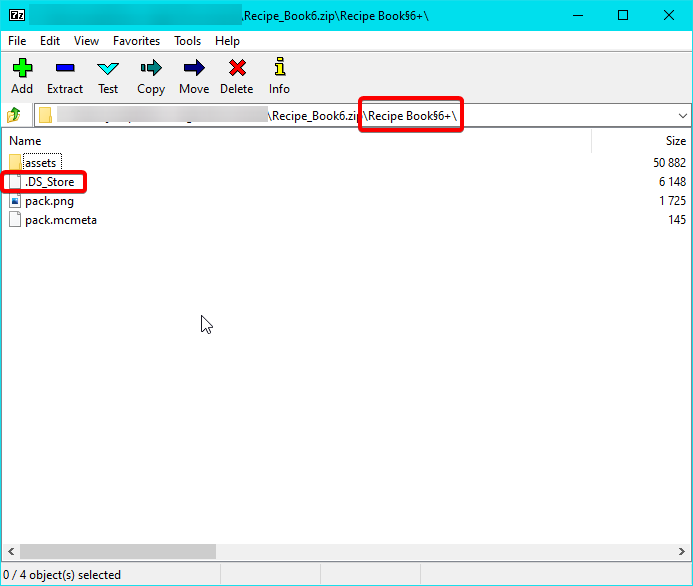
This is not zipped correctly, presumably because you are using a mac and mac interferes with zip files.
green flower
so how can i upload it?
lyric crescent
fix whatever mac is doing so that the zip is formatted properly.
green flower
i have no idea what it is doing
lyric crescent
me either, since i dont use one.
green flower
the thing is i have tried my friend to zip it and when i download it it still rejects that file
he uses a windows
lyric crescent
send the things inside the zip to your friend and have them rezip it
and then have them upload it too, since even having the zip on your mac computer will break it
green flower
ok ill just ask my friend to upload it
lyric crescent
so that you can see why it's wrong https://i.imgur.com/CL6BNYq.png
 green flower
thats not a file for me
lyric crescent
what you see in this screen should be the root of the zip, but it is not, it's inside a folder inside the zip. Also mac adds extra crap into the zips, the highlighted file
green flower
is there any website that can remove it?
green flower
idk mac is hella weird with its settings
 craggy zenith
could i get some help with this please? its been almost a week and i haven't heard a peep from support
 lyric crescent
?reject-cfhosted
red patioBOT
The following files belong to CurseForge-hosted projects, and should therefore not be added directly to zip files:
-
Remove any mods listed in the error message from the profile you exported. Then reinstall them with the CurseForge app. DO NOT drag and drop files from the site.
-
Export the profile again, open the new zip that was just made. Check for the
overrides/modsfolder. If you still see any mods in that folder do the step above again for each mod. -
Upload the zip once complete and no more mods show in the
overrides/modsfolder.
craggy zenith
thank you. I apprecitae it
 mild girder
anyone know a free server hoster for better minecraft?
queen storm
!notcf
red patioBOT
Your question is not related to CurseForge owned/maintained features or services.
Please use the appropriate game room by getting a game role from #786424115535544350.
Otherwise use #👽︱game-support for game related help.
CurseForge does not make or maintain any of the content or games used on the site or app. Just because it's on the site/app does not make it a problem with CurseForge. Move rooms as requested, arguing about it will result in you being removed from the discord.
 brave dirge
how to make a server for curseforge minecraft mods?
can i make it on nitrado or mojang?
red patioBOT
Your question is not related to CurseForge owned/maintained features or services.
Please use the appropriate game room by getting a game role from #786424115535544350.
Otherwise use #👽︱game-support for game related help.
CurseForge does not make or maintain any of the content or games used on the site or app. Just because it's on the site/app does not make it a problem with CurseForge. Move rooms as requested, arguing about it will result in you being removed from the discord.
 regal lion
whops
 unkempt briar
Hi, where can i know my queue number in the support ticket system?
queen storm
You can't
 prisma current
How long does my new project take to start earning me reward points?
queen storm
When you have enough downloads
prisma current
How much is that?
queen storm
A lot
prisma current
500?
queen storm
10000 more
lyric crescent
there is no set number
prisma current
I have been earning them on all my other projects
Wich are around 1000 - 10000
But they mostly started around 100
queen storm
There is no set number, or you earn them or not 🤷♂️
prisma current
Ok
 worn matrix
Hey so I hope this is the correct place to ask but I made my first project on forge last night (A resource pack) and I got a message back saying I needed to make some changes to the project before moderators could approve of it. Mainly it said "You can't have the game version in the Title of your project" so I removed it. Then I went to bed shortly after since it was late at that point. I woke up today and there was a new thing saying that I needed to add at least one picture and have a more detailed description. I did both of those and it's been roughly 3 - 5 hours since then.
Is this a normal length for waiting for moderator approval? Should I expect to be waiting longer? I just wanna know since I'm completely new to making projects on curseforge
red patioBOT
Project Moderation Time
Project/File moderation is done on these days unless otherwise mentioned:
Sunday, Monday, Tuesday, Wednesday, Thursday: <t:1631170800:t> - <t:1631199600:t> (Your time)
Friday, Saturday: No Moderation!
Projects are moderated First in, First out. If you submit late in the work day, it will likely get left until the next day!
New Projects or anything flagged for manual review: 1-3 Working Days
Updates to approved projects not needing manual approval: 1 Hour
-If your file has been "Under Review" for more than an hour, then it is at manual review!
Changes will only show in the app if the project meets the requirements in the ?sync command and up to 24 hours has passed from when it was accepted.
queen storm
You are at the back of the queue anyways 🤷♂️
worn matrix
yeah
worn matrix
I just recently learned how to make resource packs and have been going absolutely ham the past week and a half and one of my friends told me I should upload my stuff to curseforge
so I should expect for my project to get reviewed manually either tonight or next week?
queen storm
With 3 working days, no idea how big the queue is
worn matrix
I see
 fast mantle
Hello, can I ask how to get URL from my own Minecraft modpack in app?? I need it to my server, thanks : )
lyric crescent
Something you made on the app doesnt have any URL. Only things uploaded and approved to the website have a URL. You do not need a pack uploaded to the website to make a server for it. For questions on setting up servers try #👽︱game-support or #🧱︱mc-other-help.
fast mantle
Ok, thanks
 brittle dragon
This keeps happening when I try to log into the curseforge website. how to fix?
 lyric crescent
only when you log in or for the entire site?
lyric crescent
show the full page with the error
 lyric crescent
can you copy that url also
 normal oriole
I can’t get curseforge to work
 opal cipher
!notcf That's your internet being slow.
red patioBOT
Your question is not related to CurseForge owned/maintained features or services.
Please use the appropriate game room by getting a game role from #786424115535544350.
Otherwise use #👽︱game-support for game related help.
CurseForge does not make or maintain any of the content or games used on the site or app. Just because it's on the site/app does not make it a problem with CurseForge. Move rooms as requested, arguing about it will result in you being removed from the discord.
brittle dragon
lyric crescent
can you copy that url also
lyric crescent
Passed this on to support.
brittle dragon
Thank you. Expected response time?
lyric crescent
a few minutes to 3 days 🤷♂️
brittle dragon
Via this chat or?
lyric crescent
Depends what the answer is. I'll ping you if needed.
brittle dragon
Yes okay!
unkempt briar
i keep getting these emails since the morning and i put a link to my profile and some screenshots of the projects and i keep getting these and my ticket status keeps getting changed to "
Awaiting your Reply
"
 queen storm
Seems fishy
unkempt briar
so what should I do?
queen storm
They even spelled Curseforge wrong
unkempt briar
oh shoot , though overwolf is spelt correct in the url
queen storm
Does the link go to the same place it is looking where it would go?
lyric crescent

CurseForge Support
We're here to get you informed on everything you need to know about CurseForge, including helpful guides and troubleshooting articles to back you up when you get in a pickle
unkempt briar
queen storm
Does the link go to the same place it is looking where it would go?
yes it takes me to the overwolf website and after i login it takes me to the ticket where it says Awaiting your reply
lyric crescent
Did you make a ticket?
unkempt briar
 unkempt briar
lyric crescent
Did you make a ticket?
unkempt briar
lyric crescent
Did you make a ticket?
yes this is for my ticket i made a while ago
lyric crescent
can you show all the emails you've got?
unkempt briar
the email when i originally made the ticket

and the others i got today were just like the 1st i sent you
lyric crescent
so.. what is the issue? I don't get it.
unkempt briar
i keep getting these emails from the morning even though i have already put screenshots and my profile url

and the ticket status keeps changing to Awaiting my reply
 digital roost
Hello, is there support in Turkish?
lyric crescent
no
digital roost
I'm having a problem with CurseForge
lyric crescent
unkempt briar
i keep getting these emails from the morning even though i have already put scre...
What do you mean you keep getting these? I only see one. It will always be "awaiting your reply". Check that you actually have a reply to the ticket on the website.
digital roost
lyric crescent
no
Here it asks me to select the modding folder, I choose the default folder but it gives an error
 lyric crescent
?mc-path
red patioBOT
Change your install path to the following:
For Windows: C:\CurseForge
For Mac: /Users/Shared/CurseForge
If Minecraft is not installed in CurseForge App:
- Click the
 in the top left.
 - Select Minecraft from the list of games.
- Select the
Advancedoption and pick the location for your computer listed above. - Click
Continue.
If Minecraft is installed in CurseForge App:
- Click the
 in the bottom left.
 - Select the Minecraft tab.
- Click
Change. - Select the location for your computer listed above.
:no_entry_sign: Minecraft Files should NOT be installed inside the following locations :no_entry_sign:
:no_entry_sign: .minecraft folder.
:no_entry_sign: OneDrive folders.
:no_entry_sign: Desktop folder.
:no_entry_sign: iCloud enabled folders.
:no_entry_sign: or any other cloud saved folder.
:no_entry_sign: or folders with non-English characters in them.
If any of the above are in the path you need to change/move it!
unkempt briar
lyric crescent
What do you mean you keep getting these? I only see one. It will always be "awai...
oh, well i did not get a reply from CF or overwolf staff, but it still says awaiting my reply rather than processing. Since the morning,i got an email like the one i sent you, added some more info, the ticket was set to processing, and then a few minutes later i would get the email again and the ticket will be awaiting my reply
is that expected?
digital roost
lyric crescent
?mc-path
I am using my computer in Turkish. Is there any other solution for this?
lyric crescent
Why would you need another solution?
digital roost
lyric crescent
Why would you need another solution?
Because I use my computer in Turkish. So no matter what folder path I choose, it doesn't accept it.
lyric crescent
unkempt briar
oh, well i did not get a reply from CF or overwolf staff, but it still says awai...
It automatically changes to awaiting your reply after some time. idk what is expected I haven't dealt with a ticket since November 2020. doesn't sound like anything unusual is happening here to me.
unkempt briar
ok thanks
lyric crescent
digital roost
Because I use my computer in Turkish. So no matter what folder path I choose, it...
Use the path the bot said to use.
digital roost
lyric crescent
Use the path the bot said to use.
I already choose the use default folder location option, but it still gives an error
lyric crescent
Didn't say to do that.
digital roost
lyric crescent
Use the path the bot said to use.
 lyric crescent
C:\CurseForge
digital roost
lyric crescent
`C:\CurseForge`
I do not understand?
queen storm
Make a folder named curseforge
lyric crescent
Make that folder, then use it.
digital roost
So how can I install mods for my previously created world?
lyric crescent
make a profile on the same version as your world, install mods to it, then copy your world to the instance folder.
?mc-installmods
red patioBOT
How to install mods in CurseForge App.
- Click
+ Create Custom Profile - Name it, select the required Minecraft version, select the modloader & modloader version (usually the highest number), click
Create. - Click the profile icon.
- Click
Add More Content - Search and install the desired mods.
- Start the game!
How to install mods not on CurseForge.
- Right click the profile picture or Open the profile and click the Icon next to the play button.
- Click

Open Folder. - Drag the mod(s) into the
modsfolder. (Note: Some mods will require others, to run. Make sure to read the instructions for the mod!) - Start the game!
 digital roost
lyric crescent
make a profile on the same version as your world, install mods to it, then copy ...
digital roost
lyric crescent
make a profile on the same version as your world, install mods to it, then copy ...
But then my houses in my world go away
lyric crescent
copy your world
digital roost
lyric crescent
copy your world
Can't I just choose the path of my world's mod folder directly?
lyric crescent
no
digital roost
lyric crescent
copy your world
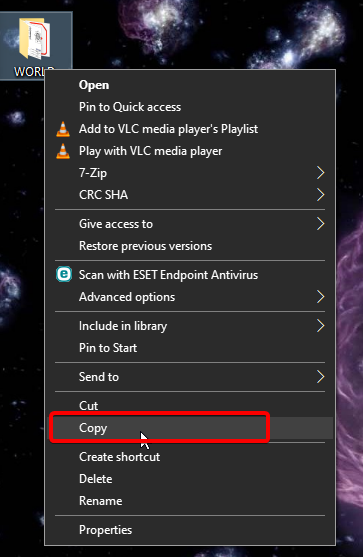
How will I copy my world?
lyric crescent
 digital roost
lyric crescent
https://i.imgur.com/6WBu58X.png
digital roost
lyric crescent
https://i.imgur.com/6WBu58X.png
Where do I paste it after I copy it?
lyric crescent
in the instance of the new profile
you right click it and open folder
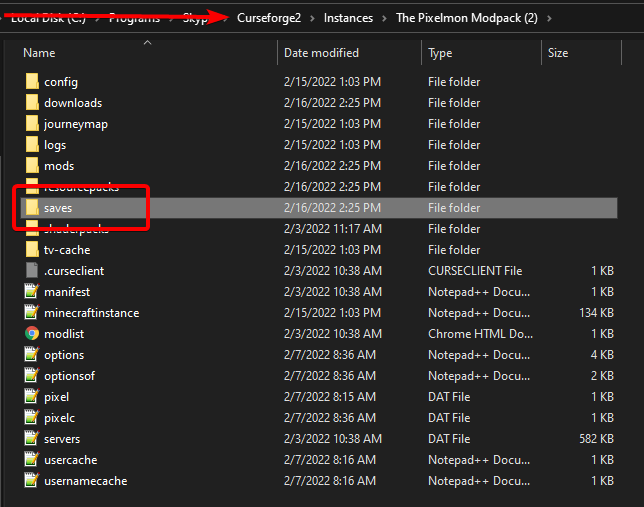
that is the folder you want
 worldly bobcat
My friend is trying to download curseforge but the installer wont launch after he downloades it
lyric crescent
open overwolf first, then use it to open curseforge
digital roost
lyric crescent
https://i.imgur.com/InJ2Zjf.png
So I can't import my world?
lyric crescent
i just told you how..
digital roost
lyric crescent
i just told you how..
What does the option in the place I show do?
 worldly bobcat
my friend tried opening the overwolf settup and got this message
 lyric crescent
digital roost
What does the option in the place I show do?
lyric crescent
digital roost
What does the option in the place I show do?
That is for importing modpacks
lyric crescent
worldly bobcat
my friend tried opening the overwolf settup and got this message
Message seems to say "reinstall me"
lyric crescent
!getcf
red patioBOT
Looking to install the CurseForge app?
<:windows:798410728188936222> Windows
Minimum Requirements:
- OS Version: 7 (64 bit), 8.1, 10, 11
- 64 bit Required.
- 350MB storage space.
- Microsoft .Net 4.8
- Intel/AMD quad-core CPU
- 8GB ram
Download: https://download.overwolf.com/install/Download?&PartnerId=4047
If you are having issues with the installer use the URL below to install Overwolf then go to the app store to download CurseForge.
https://content.overwolf.com/downloads/setup/latest/regular.html
<:mac:798410654418862130> Mac
Minimum Requirements:
- OS Version 10.14 or newer.
- 64 bit Required.
Download: https://curseforge.overwolf.com/downloads/curseforge-latest.dmg
:penguin: Linux
Minimum Requirements:
Yes. SOON:tm: ( ͡~ ͜ʖ ͡°)
Download: :person_shrugging:
lyric crescent
try the 2nd link here
worldly bobcat
it worked finally worked
 empty violet
Nice
digital roost
lyric crescent
That is for importing modpacks
Thank You
digital roost
lyric crescent
That is for importing modpacks
I pasted my world into the "Instances" folder here. Did I do it right?
 lyric crescent
no, it needs to go into the instance that you created
digital roost
lyric crescent
no, it needs to go into the instance that you created
I don't understand, could you please show me how to do it?
digital roost
lyric crescent
Did you make a profile on curseforge?
No, I did not. Because I want to use my own world.
 fallen loom
Is it a world made with the same mod set as the instance you're attempting to put it in?
lyric crescent
I realize that there may be some language issues here, but that was the first thing i told you to do.
lyric crescent
lyric crescent
make a profile on the same version as your world, install mods to it, then copy ...
☝️
I assume it's a vanilla world they want to use.
 dawn oasis
anyone else having invalid java runtime configuration?
digital roost
lyric crescent
☝️
But inside my world folder there is a folder called mods
fallen loom
dawn oasis
anyone else having invalid java runtime configuration?
Screenshot of the error?
lyric crescent
there should not be
fallen loom
digital roost
But inside my world folder there is a folder called mods
Did you make that folder?
Did you set the launcher to use "Instances" as a game directory?
You shouldn't have done either of these things
digital roost
lyric crescent
there should not be
But you say to copy and paste your world into "Instances" folder. How will it be?
fallen loom
Can you please reply to the message saying to put the world into Instances?
I don't see it
dawn oasis
 fallen loom
?mc-installfix
red patioBOT
This is NOT instructions for Repair Profile! They are NOT the same! You need to do this!
- Click on the Minecraft Tab on the Left side of the CurseForge App.
- Click button next to the
Create Custom Profileoption. - Click
Repair Installationoption. - Play game.
NOTE: You will not lose any modpacks or worlds!
dawn oasis
will this help?
fallen loom
It should
digital roost
fallen loom
Can you please reply to the message saying to put the world into Instances?
How so? I do not understand?
fallen loom
lyric crescent
in the instance of the new profile
I assume you're talking about this message
If so, you jumped to step 2 without following step one, and as a result you confused yourself
digital roost
Yes I'm confused
dawn oasis
fallen loom
It should
it didnt work
digital roost
fallen loom
If so, you jumped to step 2 without following step one, and as a result you conf...
I do not create a new profile so that my current world and home are not lost.
 shy totem
is there a way i can share a personal modpack to my friends?
fallen loom
dawn oasis
it didnt work
#📛︱rules 5
fallen loom
shy totem
is there a way i can share a personal modpack to my friends?
?mc-packshare
red patioBOT
There are two ways to share a modpack you've made with others...
Export and Share - For Friends to Small Groups.
- Click the Icon for the modpack.
- Click the button next to play.
- Click
Export. - Select the files that should be included.
- Send the zip to the people that want it! They can follow the instructions in
!mc-installpackto install the pack!
Upload to Curseforge - For Public Release to Everyone.
This options will make your pack public to EVERYONE, it comes with extra requirements and will take some effort to set up.
- Go to here: https://www.curseforge.com/project/432/4471/create
- Fill out the information with a proper description of the pack. This should allow anyone to understand what the pack is.
- Click the Icon for the modpack in the CurseForge app.
- Click the button next to play.
- Click
Export. - Select the files that should be included.
- Open your Project you made on the CurseForge site and Upload the file you just made.
- Wait for Moderation & Sync so it can show up in the client! (See
!syncfor limitations)
fallen loom
dawn oasis
it didnt work
Go into your Curse settings, Minecraft section, and scroll to the bottom
Do you have any custom JVM settings there? If so, what are they?
fallen loom
digital roost
I do not create a new profile so that my current world and home are not lost.
So what are you trying to do again? Add another world to your list of saves?
digital roost
fallen loom
So what are you trying to do again? Add another world to your list of saves?
I want mods to be installed inside an existing world
fallen loom
Ok, is this world inside a Curse instance or in the regular Minecraft launcher?
 young bone
You need to make a profile, add the mods you want, launch the game, open the profile’s folder location, find the saves folder, put your preexisting world in that folder, go back to the game, and play that world
digital roost
fallen loom
Ok, is this world inside a Curse instance or in the regular Minecraft launcher?
Inside Minecraft Launcher
young bone
What I said wouldn’t work then
fallen loom
digital roost
Inside Minecraft Launcher
When you say homes, do you have mods installed already?
digital roost
fallen loom
When you say homes, do you have mods installed already?
Yes mods installed
digital roost
fallen loom
When you say homes, do you have mods installed already?
Mods are installed in the folder I showed you.
 fallen loom
Ok, so what you want to do is make a new profile in Curse and set it to use the same modloader and version of that modloader that you're currently using
Once you've done that you can copy all of that into the profile, overwriting any defaults
dawn oasis

 digital roost
fallen loom
Ok, so what you want to do is make a new profile in Curse and set it to use the ...
digital roost
fallen loom
Ok, so what you want to do is make a new profile in Curse and set it to use the ...
So how do I do this? Could you show me please?
fallen loom
#📛︱rules 5
I don't understand what's so hard about creating a new profile and saying "use this modloader and this version of it", then opening the profile's folder and copying your mods, logs, saves, and configs over from .minecraft
...
digital roost
fallen loom
<#777323206884327484> 5
sorry forgot to turn off ping
 rugged forge
curse forge site dont not work
lyric crescent
yes it does
rugged forge
sign up is broken
fallen loom
rugged forge
curse forge site dont not work
If you want help you'll need to be more specific, if you're just here to talk crap, don't let the door hit you on the way out
lyric crescent
rugged forge
sign up is broken
fallen loom
Oh, that's probably the Twitch issue
fallen loom
Well we're not Twitch, nothing we can do on our end
fallen loom
iirc other methods of signup and signin are coming soon ™️
rugged forge
k
digital roost
fallen loom
I don't understand what's so hard about creating a new profile and saying "use t...
I have never used the CurseForge program before, so I am using it for the first time. That's why I want you to show me.
rugged forge
thank you for your help everybody
lyric crescent
?mc-installmods
red patioBOT
How to install mods in CurseForge App.
- Click
+ Create Custom Profile - Name it, select the required Minecraft version, select the modloader & modloader version (usually the highest number), click
Create. - Click the profile icon.
- Click
Add More Content - Search and install the desired mods.
- Start the game!
How to install mods not on CurseForge.
- Right click the profile picture or Open the profile and click the Icon next to the play button.
- Click
Open Folder. - Drag the mod(s) into the
modsfolder. (Note: Some mods will require others, to run. Make sure to read the instructions for the mod!) - Start the game!
opal cipher
digital roost
I have never used the CurseForge program before, so I am using it for the first ...
It's like this, but not with installing any other mods: https://www.youtube.com/watch?v=h5UDfye2KaQ

A simple video guide on how to install a single mod, and not an entire modpack in CurseForge.
Please note that you need to select the correct Minecraft version and modloader for the mods you want to add.
digital roost
opal cipher
It's like this, but not with installing any other mods: https://www.youtube.com/...
I'm not saying that 😔
opal cipher
I mean, that's how you can create a profile in CurseForge.
Just skip the "Install a mod"-part of it, and then open the instance, by right clicking the profile you created, and select "Open folder"
lyric crescent
If you want to use curseforge for mods then you need to move your stuff into it.
We've told you how to do this 3 times at this point.
digital roost
lyric crescent
If you want to use curseforge for mods then you need to move your stuff into it....
I'm sorry, but I have no clue as I have never used curseforge before, so I'm asking for your help.
 digital roost
fallen loom
https://tenor.com/view/tried-nothing-flanders-out-of-gif-9662944
digital roost
fallen loom
https://tenor.com/view/tried-nothing-flanders-out-of-gif-9662944
I couldn't try it now because it's night time. I'll try tomorrow, I'll try to get back to you
dawn oasis
i checked java its enabled
dont know why i keep getting invalid java runtime configuration....it was working fine a week ago
fallen loom
dawn oasis
dont know why i keep getting invalid java runtime configuration....it was workin...
Go into the Curse/MC root (wherever you told Curse to stick things) -> Install -> Runtime and delete the java-runtime-alpha folder, then try again
digital roost
fallen loom
https://tenor.com/view/tried-nothing-flanders-out-of-gif-9662944
are you mad at me
dawn oasis
there's no alpha its beta
fallen loom
digital roost
are you mad at me
No
fallen loom
dawn oasis
there's no alpha its beta
Oh, guess it's been a while since I used Curse to actually launch my packs
dawn oasis
so i delete java-runtime-beta?
fallen loom
Yes
fallen loom
?mc-launcherlog
red patioBOT
How to get the launcher log
- Right click a profile.
- Select
Open Folder - Go back two folders.
- Open the
Installfolder. - Drag the
launcher_log.txtinto discord.
dawn oasis
fallen loom
Reinstall xp tome
dawn oasis
ok
fallen loom
One of your jar files is corrupted, the question is which one
xp tome is my first guess
 abstract jewel
So after downloading curse forge and opening minecraft using their launcher, it seems to use a separate minecraft launcher.
There are times I want to switch back to my original launcher however it launches the curseforge one.
When i don't launch minecraft from the curseforge app for a long time, then it'll launch with the original minecraft launcher again.
lyric crescent
Curseforge uses a separate launcher install, yes.
fallen loom
abstract jewel
When i don't launch minecraft from the curseforge app for a long time, then it'l...
If you have even a console window open from one of the installations, that is the one your pc will use
abstract jewel
lyric crescent
Curseforge uses a separate launcher install, yes.
im aware, this was not helpful at all.
lyric crescent
Neither is most of what you said. 🤷♂️
abstract jewel
fallen loom
If you have even a console window open from one of the installations, that is th...
how do i close out of them completely so it launches the vanilla launcher?
young bone
Ummm, are you using the old launcher or the new
fallen loom
Are you on Windows, Linux, or Mac?
abstract jewel
lyric crescent
Neither is most of what you said. 🤷♂️
just say u cant read
lyric crescent
and 2
fallen loom
and 6, have a nice day
 foggy ridge
Is there a way to export a profile's mod list without exporting the whole profile? Like I just want a list in text form of the mods on the profile so I can send that to my friend to get their input on what mods to keep/remove without them having to go to the trouble of importing a profile and all that until we're actually ready to get started playing. I'm hoping there's a way to do this automatically instead of just sitting here and typing the names of all 75 mods.
lyric crescent
Exporting makes a modlist
foggy ridge
Oh cool! Where would I find said modlist? I'm assuming in the compressed folder?
lyric crescent
Yep
abstract jewel
i want to launch curseforge launcher and vanilla minecraft launcher separately
what is the solution
lyric crescent
It's already like that
abstract jewel
no
when i try launching the regular launcher it launches with the curseforge versions sometimes
and if i wait long enough then itll launch the original minecraft verisons
foggy ridge
Btw thank you for the help Yamza, appreciate it!
lyric crescent
Then you didn't close the launcher
abstract jewel
both curseforge and minecraft are closed
so im thinking maybe i have to kill it using command prompt? because they don't show on task manager.
lyric crescent
Nothing like that should be needed unless something is wrong with your pc
 wraith canyon
When I click to download to pallypower to curseforge it will not start to download there is a message that says if it doesn't start to click here and I have tried that as well and it just opens the curseforge app. no download happens at all. Any suggestions?
lyric crescent
Use the app to download it
wraith canyon
I cannot find it in the app, I have tried that as well.
lyric crescent
Link it
 fallow estuary
Anybody know any issues with resolving the hostname of a hosted server between a few friends of mine?
Currently having issues joining the hosted server. Tried flushing DNS, restarted pc, deleted files linked to the modpack that we're playing (Mysttech) etc.
fallen loom
You're sure it's a DNS issue?
fallow estuary
Not sure at all
But I've tried VPN as well
Didn't have any problems until the server lagged for me and 1 other friend. The other 2 on the server were completely fine
fallow estuary
fallen loom
You're sure it's a DNS issue?
Issues came out of the blue
fallen loom
#📛︱rules 5, reminder that Discord is dumb and keeps trying to insist that you ping with replies
That's... not very specific and doesn't necessarily imply DNS issues
fallow estuary
Sorry about the ping
The problem is that there's no specific reason as to why this should've happened to begin with
fallen loom
Can you provide debug.log files from the client and server?
fallow estuary
You know the specific location of said logs you want?
fallen loom
?mc-debuglog
red patioBOT
Missing the debug.log file? Enable it by following these steps.
- Click the icon in the bottom left.
- Click the

Minecrafttab. - Turn on the
Enable Forge debug.logoption.
red patioBOT
Sending logs for support.
- Right-click the modpack profile icon OR click the button in the modpack profile.
- Click
Open Folder. - Open the
logsfolder. - Drag and drop the FILE named
latestORdebuginto discord.
fallow estuary
Client logs
This is wayy too recent though
Stuff started about an hour and a half ago
Can't ping the server through cmd either...
fallen loom
I don't see the connection attempt in this log
fallow estuary
I'll get you one
1s
Modpack takes a long time to load
Here's with the connection attempt
fallen loom
Yeah I do not miss the FML1 era
fallow estuary
xd
Got any clue as to what this could be?
Cause I really can't figure this one out
fallen loom
I'm getting pings back from that address on my end
fallen loom
Dunno what to tell you
 fallow estuary
Thing is I have no issues running normal mc
It's only loading this modpack now
Although I've played it smoothly for the past 30 hours
fallen loom
Only thing I can think of is if your firewall is suddenly blocking the Java exe you're using
fallow estuary
I don't see why though
 vital latch
How do I play mods on curse forge with friends?
 signal ridge
Replied the first place you asked.
 visual jolt
Hi there I keep getting an error code "an exception occurred during a WebClient request" when trying to download a modpack for minecraft. Any ideas why this is happening?
lyric crescent
Try restarting your computer
lyric crescent
?owlogs
red patioBOT
<:overwolf:857375414002384916> How to get CurseForge App logs! <:overwolf:857375414002384916>
- Click the

Create logs zipin the menu.
menu. - Drag and drop the file it just made to this chat room to upload it.
- Wait for someone to look at it so they can help you.
 visual jolt
 spring drum
when i try to load a minecraft mod pack the minecraft window will load but then it will close on its own. can somone help please?
lyric crescent
visual jolt
Passed this on to the curseforge devs to look at when they are back in the office.
 rich flint
spring drum
when i try to load a minecraft mod pack the minecraft window will load but then ...
rich flint
spring drum
when i try to load a minecraft mod pack the minecraft window will load but then ...
?mc-launcherlog
red patioBOT
How to get the launcher log
- Right click a profile.
- Select
Open Folder - Go back two folders.
- Open the
Installfolder. - Drag the
launcher_log.txtinto discord.
spring drum
ok
rich flint
the latest.log file in 'logs' may or may not be there but it would be good to post also
spring drum
this it?
rich flint
well that's good also actually - but read the above auto reply and follow exactly
rich flint
right mouse button on the picture
spring drum
there is no "open foler" option
rich flint
 rich flint
yes thx
rich flint
the app works - this is an issue with your own system/account
try opening up the vanilla launcher by pressing play, log out of your account, reboot your computer, try launching again
spring drum
ok
 vivid canyon
unkempt briar
i keep getting these emails from the morning even though i have already put scre...
vivid canyon
unkempt briar
i keep getting these emails from the morning even though i have already put scre...
Hey there ot seems that some automated message go out of hand on it
 hazy terrace
how do i install curseforge as a version of minecrat? i feel like thats a stupid question but i havent used this in a long time and im unfamiliar with the new layout or whatever? i just want to install single mods
wait this is the wrong channel for that isnt it
red patioBOT
How to install mods in CurseForge App.
- Click
+ Create Custom Profile - Name it, select the required Minecraft version, select the modloader & modloader version (usually the highest number), click
Create. - Click the profile icon.
- Click
Add More Content - Search and install the desired mods.
- Start the game!
How to install mods not on CurseForge.
- Right click the profile picture or Open the profile and click the Icon next to the play button.
- Click
Open Folder. - Drag the mod(s) into the
modsfolder. (Note: Some mods will require others, to run. Make sure to read the instructions for the mod!) - Start the game!
 queen storm
You gonna follow rule 4?
 fervent garnet
me?
queen storm
Yes, you
fervent garnet
ye i will, its just i need help;(
queen storm
Then post that crash report here
And needing help is not a reason to break the rules
The FILE
 queen storm
Now drag and drop that file into discord
queen storm
Does it keep happening after a system restart?
fervent garnet
ye
queen storm
Only this modpack?
queen storm
Try and find out
fervent garnet
i tried it with all the magic spell bound and val hesiamod pack and still it shows
queen storm
Those all 1.16.5?
fervent garnet
ye those 3 mod pack
i really want to play the life in the village 2
lemme restart my pc and try it again
queen storm
You did not do that yet?
fervent garnet
no
im done restarting my pc
ill try it now
It worked
Omg thank u!@queen storm
queen storm
#🔥︱curseforge-support message
So what kind of restart did you think this was?
fervent garnet
I shutdowned the computer and start it again
I didnt know that shutdowned isnt the same as restarting jt
 open trench
Fix this

 split shuttle
how can i know what mods work and what not
i have 93 rn and some are doing hefty errors
i have no idea which
 upper root
You can read the log, or post it in #👽︱game-support and hope a helpful community member tells you whats wrong
split shuttle
i cant even open a world because the forge datapack cannot be checked or something
where is the log
it doesnt crash
it just refuses to open or do anything because forge datapack cannot be verified
upper root
!mc-logs and lets move to #👽︱game-support
red patioBOT
Sending logs for support.
- Right-click the modpack profile icon OR click the button in the modpack profile.
- Click
Open Folder. - Open the
logsfolder. - Drag and drop the FILE named
latestORdebuginto discord.
split shuttle
ah ok
fervent garnet
queen storm
<#777323206884327484> 5
Oh im sorry
queen storm
!mc-logs
red patioBOT
Sending logs for support.
- Right-click the modpack profile icon OR click the button in the modpack profile.
- Click
Open Folder. - Open the
logsfolder. - Drag and drop the FILE named
latestORdebuginto discord.
queen storm
Show a screenshot of your launcher, after you hit play on curseforge
 queen storm
Then you get an account that actually has the java edition
fervent garnet
wdym by that
queen storm
Right side of that screenshot, you don't have the game
fervent garnet
i bought the game tho..
queen storm
Java or bedrock? On the account that is logged in there?
fervent garnet
 queen storm
Yeah, that is the bedrock version
queen storm
No idea, bug maybe
 gray tapir
fervent garnet
gray tapir
fervent garnet
ill try
but is there anyway i could borrow account? or it isnt allowed
i really wanna play minecraft with mod
queen storm
Not allowed
fervent garnet
i see..
queen storm
fervent garnet
how do i contact microsoft for refund
opal cipher
Did you read the article Tim posted?
opal cipher
!mc-packshare
red patioBOT
There are two ways to share a modpack you've made with others...
Export and Share - For Friends to Small Groups.
- Click the Icon for the modpack.
- Click the button next to play.
- Click
Export. - Select the files that should be included.
- Send the zip to the people that want it! They can follow the instructions in
!mc-installpackto install the pack!
Upload to Curseforge - For Public Release to Everyone.
This options will make your pack public to EVERYONE, it comes with extra requirements and will take some effort to set up.
- Go to here: https://www.curseforge.com/project/432/4471/create
- Fill out the information with a proper description of the pack. This should allow anyone to understand what the pack is.
- Click the Icon for the modpack in the CurseForge app.
- Click the button next to play.
- Click
Export. - Select the files that should be included.
- Open your Project you made on the CurseForge site and Upload the file you just made.
- Wait for Moderation & Sync so it can show up in the client! (See
!syncfor limitations)
opal cipher
First section
red patioBOT
How to install modpacks with the search features in app.
- Open the
Minecraftsection of the app. - Click the top search bar where it says
Search for modpacksOR Click theBrowse ModpacksTab. - Find the Modpack you want to install and click install on it.
- Wait for CurseForge app to download and unpack all the required files.
- Once finished, click
Play!
How to install modpacks from a Export. (Custom/Private/Site downloaded Modpack zip)
- Get CurseForge App if you don't have it, use
!downloadfor a link. - Get the exported modpack from CurseForge or someone else,
!mc-packshareexplains how to make them. - Open the
Minecraftsection of the app. - Click

Create Custom Profile - Click the
Importoption. - Find the file you just downloaded in step 2 and select it.
- CurseForge app will now attempt to download and unpack the modpack. If it fails, try steps 4-6 again.
- Once finished, click
Play!

Error/Exit codes are useless. Follow these steps so someone can actually help you.
- Right-click the modpack profile icon OR click the button in the modpack profile.
- Click
Open Folder. - Open the
logsfolder. - Drag and drop the FILE named
latestORdebuginto discord.
upper root
It has to download each mod, yes it is normal
Especially on slower internet connections
 magic axle
So anyone have any tricks to get the CurseForge app to load? Mine is just spinning at the message "Forging your Library" Been there at least 5 minutes now
queen storm
If you have slow internet: yes
magic axle
So anyone have any tricks to get the CurseForge app to load? Mine is just spinning at the message "Forging your Library" Been there at least 5 minutes now
upper root
 hushed bluff
here or somewhere else?
hushed bluff
here or somewhere else?
Here is fine
magic axle
done that
upper root
!mc-path
red patioBOT
Change your install path to the following:
For Windows: C:\CurseForge
For Mac: /Users/Shared/CurseForge
If Minecraft is not installed in CurseForge App:
- Click the in the top left.
- Select Minecraft from the list of games.
- Select the
Advancedoption and pick the location for your computer listed above. - Click
Continue.
If Minecraft is installed in CurseForge App:
- Click the in the bottom left.
- Select the Minecraft tab.
- Click
Change. - Select the location for your computer listed above.
:no_entry_sign: Minecraft Files should NOT be installed inside the following locations :no_entry_sign:
:no_entry_sign: .minecraft folder.
:no_entry_sign: OneDrive folders.
:no_entry_sign: Desktop folder.
:no_entry_sign: iCloud enabled folders.
:no_entry_sign: or any other cloud saved folder.
:no_entry_sign: or folders with non-English characters in them.
If any of the above are in the path you need to change/move it!
upper root
Change this to what it says at the top
hushed bluff
when i try to delete a comment, i get an error:

HTTP Code: 403
Status Text: error
Address: https://www.curseforge.com/minecraft/mc-mods/crafting-on-a-stick
Date: Thu Feb 17 2022 13:16:41 GMT+0200 (Israel Standard Time)
Request: GET /comments/5222268/delete
and when i close the error window:
 queen storm
Known issue
upper root
Wdym 'right'? Did you follow the instructions?
hushed bluff
queen storm
Known issue
so its impossible to delete a comment?
queen storm
hushed bluff
so its impossible to delete a comment?
Report them
hushed bluff
i am trying to delete my own comment...
upper root
If Minecraft is installed in CurseForge App:
- Click the in the bottom left.
- Select the Minecraft tab.
- Click Change.
- Select the location for your computer listed above. (
C:\Curseforge)
Which is wrong. Change it to the one I posted
digital roost
Hello 👋
digital roost
fallen loom
No
Hi
digital roost
fallen loom
No
I will try to do the steps you said yesterday
upper root
Show the error again
digital roost
fallen loom
Ok, so what you want to do is make a new profile in Curse and set it to use the ...
The first step is to create a new profile from here. Is it correct?
 upper root
You did not change the path properly,jand it appears your internet is being slow anyway.
Try restart your computer and change the path again
The bot message said where, then I repeated it. C:\Curseforge
If the Curseforge folder does not exist, create it.
Click on the drive in the bottom left that says C. That is the C: part of the path
queen storm
If your name is in it then you are in the wrong folder
digital roost
fallen loom
Ok, so what you want to do is make a new profile in Curse and set it to use the ...
As you said, I created a new profile and installed the mods. Now I guess it's left to transfer my world
upper root
Yes. Make the Curseforge folder there
digital roost
fallen loom
Ok, so what you want to do is make a new profile in Curse and set it to use the ...
 upper root
Or just reinstall everything
digital roost
digital roost
As you said, I created a new profile and installed the mods. Now I guess it's le...
What should I do now?
queen storm
You copy the old world, paste it in the new saves folder
digital roost
queen storm
You copy the old world, paste it in the new saves folder
Inside my world's folder there is a folder called "mods". What will I do with it?
 upper root
That is not the worlds folder, that is the instance folder.
Your world is saved in the saves folder
digital roost
upper root
That is not the worlds folder, that is the instance folder.
Your world is saved ...
This is the world folder inside the folder I showed
will i copy? 👇
 queen storm
Yes, and disable your ping, last warning you get for that
digital roost
queen storm
Yes, and disable your ping, last warning you get for that
Once I turn it off, I can forget to turn it off because it does not stay closed all the time. I am very, very sorry for that. Please forgive me.
queen storm
Have 10 minutes to find that button as you just pinged me
 dull meteor
i need help
red patioBOT
╰( ͡° ͜ʖ ͡° )つ──☆*:・゚ *˜”*°•.˜”*°• Many Help •°*”˜.•°*”˜* <:curselit:796985620550385705>
Please provide a description of your issue with as much detail as possible. If you have an issue with a mod or modpack, tell us the name. Explain what you can see happening. Be specific!
Tell us what is happening, we already know it "doesn't work".
Avoid using words like "it", tell us exactly what "it" is.
Don't assume anyone knows what you are talking about, be specific.
Tell us what you expected to happen.
Provide screenshots or video if possible.
Provide a log if possible. ?mc-log
digital roost
queen storm
Have 10 minutes to find that button as you just pinged me
I turn off ping from this button, but every time I reply to a message, I have to turn it off again. Unfortunately it is not always closed. As a human condition, I can forget. Please forgive me. Again, I am very, very sorry.

 queen storm
!mc-installfix
red patioBOT
This is NOT instructions for Repair Profile! They are NOT the same! You need to do this!
- Click on the Minecraft Tab on the Left side of the CurseForge App.
- Click button next to the
Create Custom Profileoption. - Click
Repair Installationoption. - Play game.
NOTE: You will not lose any modpacks or worlds!
digital roost
queen storm
!mc-installfix
Are you angry with me
lyric crescent
Let's keep the discussion relevant to support issues.
digital roost
I paste my world inside this folder. Is it true?
 lyric crescent
idk you crossed it out.. 🙃
digital roost
lyric crescent
idk you crossed it out.. 🙃
I do not understand?
lyric crescent
lol
digital roost
🤔🤔
I didn't understand what you said sir
I think I followed all the steps you mentioned. Now all I have to do is press the button here, right?
 digital roost
lyric crescent
idk you crossed it out.. 🙃
digital roost
lyric crescent
idk you crossed it out.. 🙃
I pasted my world into the folder you said and then clicked the "play" button. Is there anything else I should do?
 sick anvil
i want do download some mods but it keeps saying manifest file does not exist
nvm figured it out
digital roost
lyric crescent
idk you crossed it out.. 🙃
Now I understand what you mean. You told me to copy the profile into the "saves" folder after creating it, but I couldn't quite understand it. I understand very well now. It took me a long time to understand the CurseForge program as I have just started using it. But I pasted my world into the "saves" folder and that's what you said. I can't thank you enough for your help. Thank you very, very much for your help. I'm very, very sorry if I offended you. Thank you very much again.
lyric crescent
Glad you finally got it.
 north crater
my left click got unbound in a minecraft modpack so now i have no way of getting out of the start menu and it wont let me access settings, how would i go about restarting that specific modpack?
lyric crescent
just delete options.txt
north crater
thank you
 tawdry knot
Hi! How to give my pack to the curseforge? I want to upload my modpack to the Curseforge for players to download. How to do that
lyric crescent
?mc-packshare
red patioBOT
There are two ways to share a modpack you've made with others...
Export and Share - For Friends to Small Groups.
- Click the Icon for the modpack.
- Click the button next to play.
- Click
Export. - Select the files that should be included.
- Send the zip to the people that want it! They can follow the instructions in
!mc-installpackto install the pack!
Upload to Curseforge - For Public Release to Everyone.
This options will make your pack public to EVERYONE, it comes with extra requirements and will take some effort to set up.
- Go to here: https://www.curseforge.com/project/432/4471/create
- Fill out the information with a proper description of the pack. This should allow anyone to understand what the pack is.
- Click the Icon for the modpack in the CurseForge app.
- Click the button next to play.
- Click
Export. - Select the files that should be included.
- Open your Project you made on the CurseForge site and Upload the file you just made.
- Wait for Moderation & Sync so it can show up in the client! (See
!syncfor limitations)
digital roost
plis help
 lyric crescent
?mc-path
red patioBOT
Change your install path to the following:
For Windows: C:\CurseForge
For Mac: /Users/Shared/CurseForge
If Minecraft is not installed in CurseForge App:
- Click the in the top left.
- Select Minecraft from the list of games.
- Select the
Advancedoption and pick the location for your computer listed above. - Click
Continue.
If Minecraft is installed in CurseForge App:
- Click the in the bottom left.
- Select the Minecraft tab.
- Click
Change. - Select the location for your computer listed above.
:no_entry_sign: Minecraft Files should NOT be installed inside the following locations :no_entry_sign:
:no_entry_sign: .minecraft folder.
:no_entry_sign: OneDrive folders.
:no_entry_sign: Desktop folder.
:no_entry_sign: iCloud enabled folders.
:no_entry_sign: or any other cloud saved folder.
:no_entry_sign: or folders with non-English characters in them.
If any of the above are in the path you need to change/move it!
lyric crescent
probably because its not an issue with curseforge
the mods used
send a log in #👽︱game-support
opal cipher
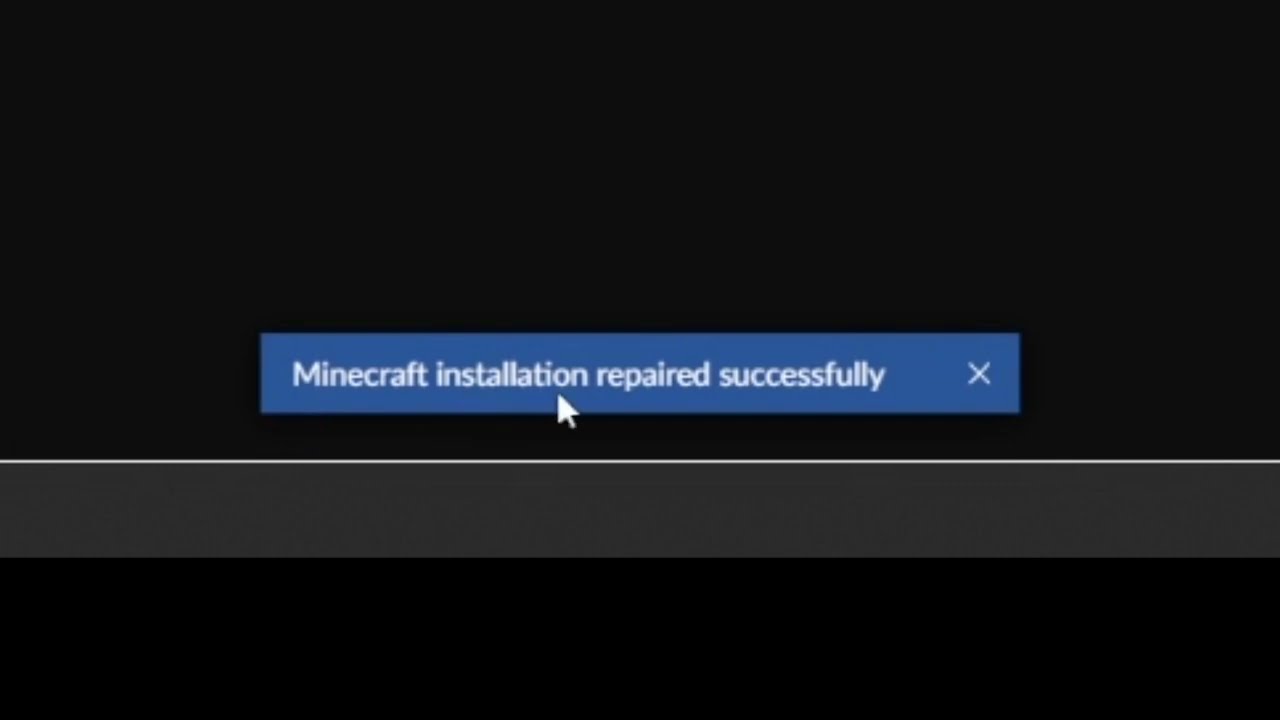
This short video will show you how to find the "Repair installation" for Minecraft in CurseForge.
What it does, is basically check if the local installation of Minecraft that CurseForge uses, is valid/working, and will repair itself, if needed.
Basically this.
Works for some issues, not for all.
Won't fix mods being incompatible with eachother.
red patioBOT
Error/Exit codes are useless. Follow these steps so someone can actually help you.
- Right-click the modpack profile icon OR click the button in the modpack profile.
- Click
Open Folder. - Open the
logsfolder. - Drag and drop the FILE named
latestORdebuginto discord.
 opal cipher
Nope, incompatible mods/broken stuff is a whole another thing.
opal cipher
Which is more for #👽︱game-support
lyric crescent
exit code 1 is a meaningless description of an error. it means an infinite amount of things.
all it says is "game crashed"
 hardy sluice
im tring to make a mod pack and some of the mods arnt on curse forge but i dawnlodid them on the websit
lyric crescent
Are they made for the version you picked for the profile
hardy sluice
yes
lyric crescent
Show your profile and link mods you can't find
hardy sluice
how
lyric crescent
How what
hardy sluice
how do i show my profile
lyric crescent
Screenshot
hardy sluice
 lyric crescent
Don't send files. Link the page
signal ridge
copy the url of the mod from the site
hardy sluice
?
signal ridge
Yamza wants the mods that you are saying you cant find in the app. The ones you had to download from the site. Send the links for those mods
lyric crescent
What modloader did you select for that peofile
hardy sluice
forge
lyric crescent
? mc-installmods
red patioBOT
How to install mods in CurseForge App.
- Click
+ Create Custom Profile - Name it, select the required Minecraft version, select the modloader & modloader version (usually the highest number), click
Create. - Click the profile icon.
- Click
Add More Content - Search and install the desired mods.
- Start the game!
How to install mods not on CurseForge.
- Right click the profile picture or Open the profile and click the Icon next to the play button.
- Click
Open Folder. - Drag the mod(s) into the
modsfolder. (Note: Some mods will require others, to run. Make sure to read the instructions for the mod!) - Start the game!
lyric crescent
Step 4 :)
hardy sluice
i did
lyric crescent
Where are the links to mods you claim to not find?
hardy sluice
do you want me to sint the name of the mods
 unborn basin
Yes please
hardy sluice
[1.18.1] SecurityCraft v1.9.0.2-beta1.jar
betteranimalsplus-1.18.1-11.0.4-forge.jar
buildinggadgets-3.12.0-build.4+mc1.18.1.jar
unborn basin
These mods aren't on curseforge?
unborn basin
I can find them on the app and on the website
Can you enter your profile and take a screenshot of this:
 hardy sluice
FarmersDelight-1.18.1-1.0.3.jar
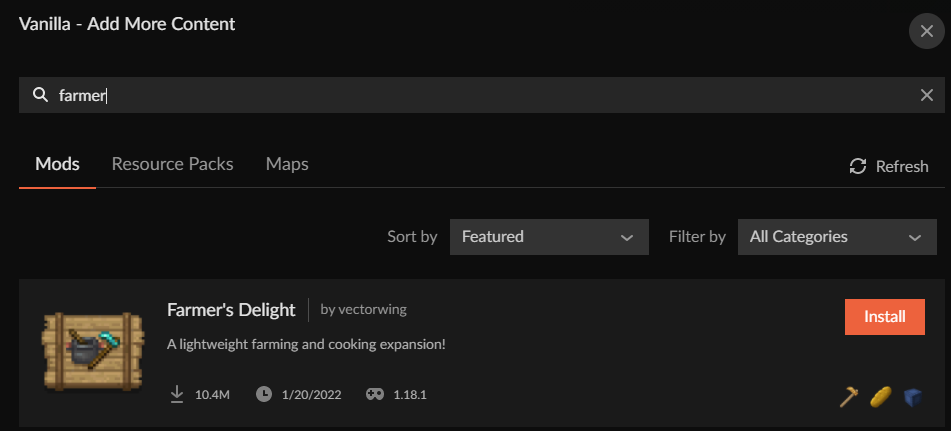 lyric crescent
k we dont need anymore, we already know it's an issue with what you are doing
paying attention yet? @hardy sluice
hardy sluice
yes
lyric crescent
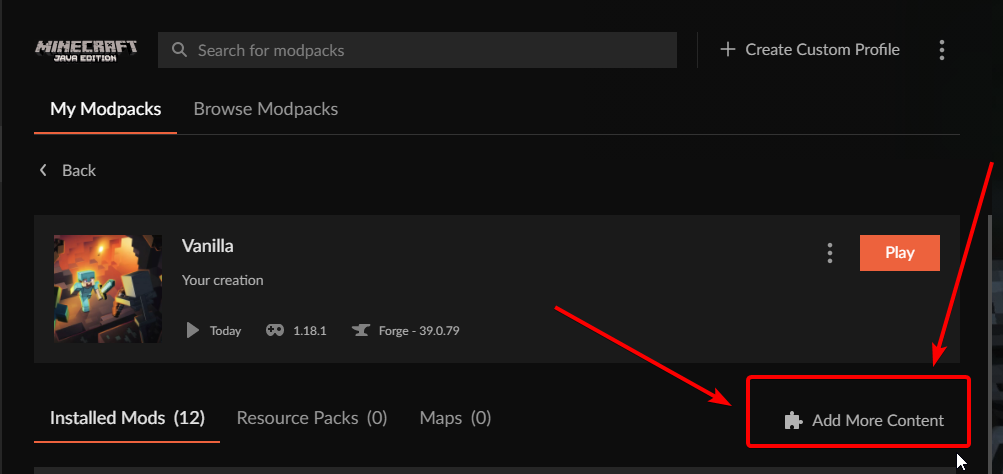 hardy sluice
im not domb
lyric crescent
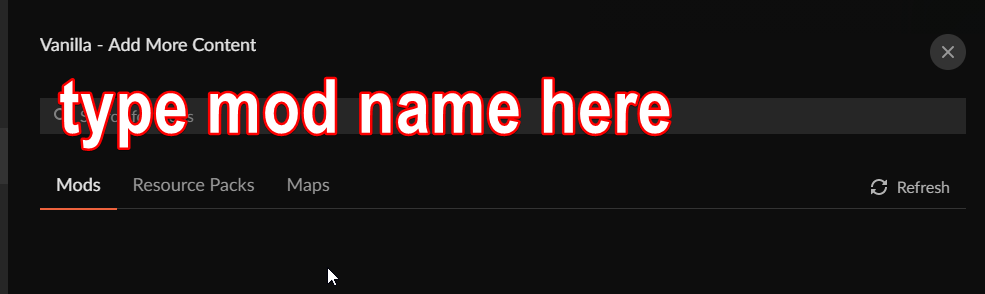 hardy sluice
i did that
lyric crescent
and yet they all show correctly for us so
hardy sluice
and most of the mods worked
lyric crescent
so which dont work?
hardy sluice
all of the ons i sint
lyric crescent
they all worked
lyric crescent
lyric crescent
https://i.imgur.com/0oPhH0h.png
⬆️
show this screen https://i.imgur.com/vs2CKfW.png
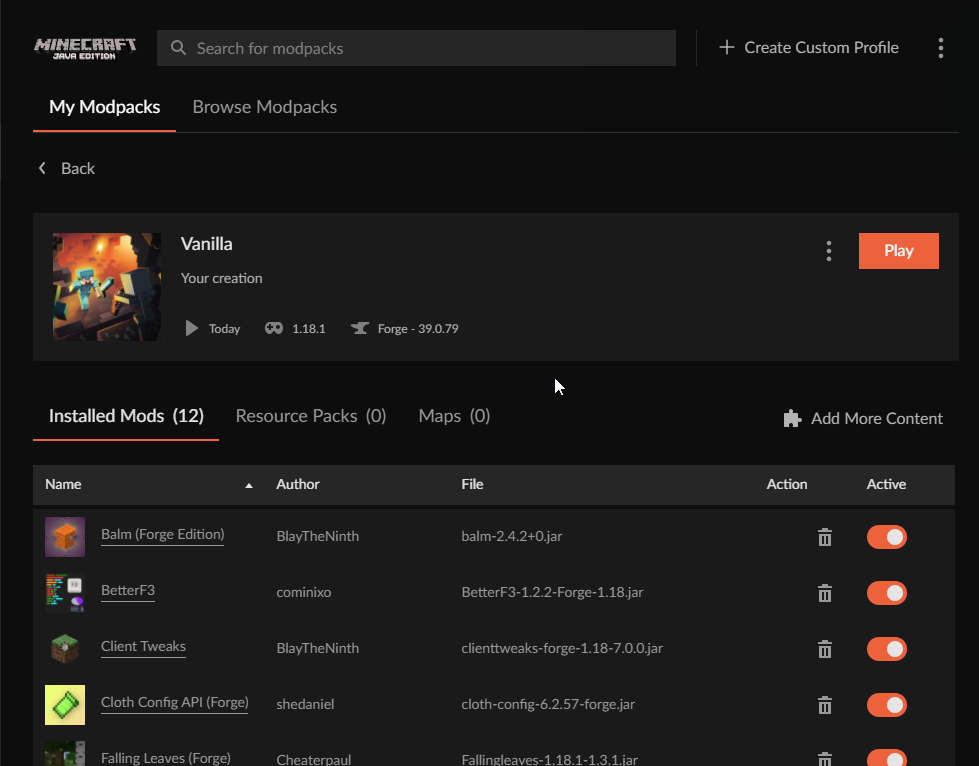 hardy sluice
 lyric crescent
cool, now show what you are typing that isnt working
 hardy sluice
 lyric crescent
restart your computer and try again
hardy sluice
 unborn basin
!owlogs
red patioBOT
<:overwolf:857375414002384916> How to get CurseForge App logs! <:overwolf:857375414002384916>
- Click the
Create logs zipin the menu. - Drag and drop the file it just made to this chat room to upload it.
- Wait for someone to look at it so they can help you.
unborn basin
Send logs please
hardy sluice
ok one sec
lyric crescent
endertech isnt a 1.18.1 mod either
oh nvm
there's more than one
it's one "word" no space btw forgeendertech
hardy sluice
architectury-3.6.17.jar
catalogue-1.6.0-1.18.1.jar
furniture-7.0.0-pre28-1.18.1.jar
thes are the mods i cant find
hello??
lyric crescent
lyric crescent
restart your computer and try again
done this yet?
hardy sluice
yes
hardy sluice
v. 0.192.1.5
lyric crescent
and search still isnt working after a restart?
hardy sluice
it works it just shos no resots for thos ones
lyric crescent
gunna have to wait for zappah to check the logs then. best guess is something is blocking your connection
could try making a new profile and search for those mods again to make sure its not an issue with the profile
hardy sluice
can you srtch the 3 mods and give me the names you srched with
lyric crescent
catalog
archi
furni
west folio
adding in, searching the keyword for all 3 (architectury, catalogue, furniture) shows up for me aswell
hardy sluice
o and ironchest-1.18-13.0.7.jar
lyric crescent
lyric crescent
i mean, iron chest doesnt exist for that but it still shows some results
☝️
hardy sluice
it dosint??
 knotty temple
hello, I uploaded a modpack but I made a mistake I deleted it and put it back, is it possible to validate it?
lyric crescent
yes, you just wait for approval.
knotty temple
I know but usually when I upload 2 the 2nd must be validated manually :/
lyric crescent
huh?
if you're asking for someone to manually approve your file, no one here does that. you wait through the approval process like everyone else.
!status
red patioBOT
Project Moderation Time
Project/File moderation is done on these days unless otherwise mentioned:
Sunday, Monday, Tuesday, Wednesday, Thursday: <t:1631170800:t> - <t:1631199600:t> (Your time)
Friday, Saturday: No Moderation!
Projects are moderated First in, First out. If you submit late in the work day, it will likely get left until the next day!
New Projects or anything flagged for manual review: 1-3 Working Days
Updates to approved projects not needing manual approval: 1 Hour
-If your file has been "Under Review" for more than an hour, then it is at manual review!
Changes will only show in the app if the project meets the requirements in the ?sync command and up to 24 hours has passed from when it was accepted.
knotty temple
ok sorry ^^
 lyric crescent
right click, save as?
digital roost
makes sence
lyric crescent
or just copy the link
 carmine pine
heya wanted to ask if a serverpack of 1.1GB is able to be uploaded on curseforge (i believe i get until submitting but then it like doesn't upload (forgot the error)
but wanted to ask here if someone knows about that
lyric crescent
i dont recall the file size limit exactly, but i do believe that is beyond it
the error would be helpful
 polar valley
carmine pine
heya wanted to ask if a serverpack of 1.1GB is able to be uploaded on curseforge...
polar valley
carmine pine
heya wanted to ask if a serverpack of 1.1GB is able to be uploaded on curseforge...
CurseForge Support
We're here to get you informed on everything you need to know about CurseForge, including helpful guides and troubleshooting articles to back you up when you get in a pickle
cant be bigger than 2gb, although that is specfically talking about modpacks
doesnt give a specific limit on server packs
mine is 0.9 GB, we'll see if mine gets accepted
carmine pine
ay ay 🙂
 fast reef
My cursforge aint working
red patioBOT
╰( ͡° ͜ʖ ͡° )つ──☆*:・゚ *˜”*°•.˜”*°• Many Help •°*”˜.•°*”˜* <:curselit:796985620550385705>
Please provide a description of your issue with as much detail as possible. If you have an issue with a mod or modpack, tell us the name. Explain what you can see happening. Be specific!
Tell us what is happening, we already know it "doesn't work".
Avoid using words like "it", tell us exactly what "it" is.
Don't assume anyone knows what you are talking about, be specific.
Tell us what you expected to happen.
Provide screenshots or video if possible.
Provide a log if possible. ?mc-log
 storm escarp
someone help
young bone
Read the bot message above yours
storm escarp
so i have ibuypower and curseforge wont work do i need a new pc
i mean wont download
lyric crescent
ibuypower, what?
lyric crescent
explain what "wont work" means
storm escarp
i mean download it wont download the luncher
lyric crescent
do you have overwolf installed?
lyric crescent
so what happens
storm escarp
it shows a pop up saying allow this to change to your pc and i click yes and nothing happens
lyric crescent
!getcf
red patioBOT
Looking to install the CurseForge app?
<:windows:798410728188936222> Windows
Minimum Requirements:
- OS Version: 7 (64 bit), 8.1, 10, 11
- 64 bit Required.
- 350MB storage space.
- Microsoft .Net 4.8
- Intel/AMD quad-core CPU
- 8GB ram
Download: https://download.overwolf.com/install/Download?&PartnerId=4047
If you are having issues with the installer use the URL below to install Overwolf then go to the app store to download CurseForge.
https://content.overwolf.com/downloads/setup/latest/regular.html
<:mac:798410654418862130> Mac
Minimum Requirements:
- OS Version 10.14 or newer.
- 64 bit Required.
Download: https://curseforge.overwolf.com/downloads/curseforge-latest.dmg
:penguin: Linux
Minimum Requirements:
Yes. SOON:tm: ( ͡~ ͜ʖ ͡°)
Download: :person_shrugging:
lyric crescent
use the 2nd link
lyric crescent
something on your pc must be blocking it then
lyric crescent
could be
storm escarp
well i delted it and you sayed 2nd link and i not on mac
lyric crescent
I feel like you should probably ask an adult to help you install this.
storm escarp
but now when i did that how i instal curse forge now i have over wolf
nvm
thank you guys
 vocal jacinth
why is my modpack not visible in the curseforge app?
signal ridge
Has it been approved?
 sly raven

Does anyone know how to download a modpacks file to put into a serverfile cause I only see the play option
suppose to be something like this but cant find it
upper root
Not all modpacks have server files
 grim glen
use ftp to your server to get pack onto a server
 fringe hare
My friend is playing on a mac, they try to download the latest version of Forge and it says that some libraries failed to load or wont download. Is there any way you can help with this?
 fleet bear
We dont play telephone.
Your freind can come get help.

 sullen meadow
Hi guys, how do I install minecraft mod on a server?
upper root
 sudden plaza
hi! every time I click the button to restart curseforge, nothing happens
sudden plaza
hi! every time I click the button to restart curseforge, nothing happens
And if you restart it manually?
upper root
sullen meadow
Hi guys, how do I install minecraft mod on a server?
!notcf
red patioBOT
Your question is not related to CurseForge owned/maintained features or services.
Please use the appropriate game room by getting a game role from #786424115535544350.
Otherwise use #👽︱game-support for game related help.
CurseForge does not make or maintain any of the content or games used on the site or app. Just because it's on the site/app does not make it a problem with CurseForge. Move rooms as requested, arguing about it will result in you being removed from the discord.
sudden plaza
How would I go about restarting it? I've ended the program via task manager and opened it again, but nothing changed.
grim glen
@sullen meadownormally ftp what i use
upper root
sudden plaza
How would I go about restarting it? I've ended the program via task manager and ...
Try renstall it then, you will not lose any profiles
grim glen
so mod starting to do server packs
sudden plaza
will do, tysm!
sullen meadow
grim glen
<@!181227529225502721>normally ftp what i use
Can I install it on any server? new to the whole server mod thing. It says to use minecraft forge. Is that a minecraft server already or do I need a server file like purpur
upper root
Please use #👽︱game-support or one of the dedicated mc channels (get from #786424115535544350) for discussing servers
 sudden latch
Hi! Can someone help me... I am trying to upload a modpack, but it was declined because of The following files belong to CurseForge-hosted projects, and should therefore not be added directly to zip files:
overrides/mods/collective-1.18.1-4.0.jar
red patioBOT
The following files belong to CurseForge-hosted projects, and should therefore not be added directly to zip files:
-
Remove any mods listed in the error message from the profile you exported. Then reinstall them with the CurseForge app. DO NOT drag and drop files from the site.
-
Export the profile again, open the new zip that was just made. Check for the
overrides/modsfolder. If you still see any mods in that folder do the step above again for each mod. -
Upload the zip once complete and no more mods show in the
overrides/modsfolder.
 fallen monolith
Dumb question but i've never posted on this site yet lol.
If i get a message after posting a pack saying file is not a valid resource pack (probably because I accidently put it in an extra folder?)
If i reupload a fixed version will it be reviewed or do I have to remake the post?
upper root
It will be re-reviewed
fallen monolith
Gotcha, thanks!
 terse talon
Is there an easier way to grab a link of a custom made modpack? The server I run requires a link to the modpack to use them and I have not found a way to find one. Is my only available method trying to publish a modpack?
rich flint
"requires a link to the modpack" what? as in a URL to the project page?
terse talon
Yeah. That
rich flint
making a modpack project page, getting it approved, and uploading a client export file then.
rich flint
sounds like a weird webhost. most let you upload your own custom whatever
terse talon
It's Dedicatedmc.io, A popular and widely trusted one
Atleast, thats what I got from reviews and such
 hard bear
working with the distant horizons mod says its supposed to work with forge and fabric but crashes on start up
red patioBOT
Your question is not related to CurseForge owned/maintained features or services.
Please use the appropriate game room by getting a game role from #786424115535544350.
Otherwise use #👽︱game-support for game related help.
CurseForge does not make or maintain any of the content or games used on the site or app. Just because it's on the site/app does not make it a problem with CurseForge. Move rooms as requested, arguing about it will result in you being removed from the discord.
 covert temple
anyone available to help me out with getting my modpack approved? Having some issues with the pack description not being good enough or something along those lines
"Your project requires a better description. You can change this by clicking Settings above the description on the project page.
- Features offered by the project.
- How those features affect a user's experience."
fleet bear
Add more to the description?
covert temple
First time they denied it for being too long and said it needed to be one sentence, now the one sentence isnt detailed enough
kinda running out of ideas
fleet bear
terse talon
It's Dedicatedmc.io, A popular and widely trusted one
Never heard of this one and you should likely avoid any hosts that don't allow you to use FTP/Manual uploads.
terse talon
They do. I hit up their support team (fastest team I've ever seen) and they do have an option for manual uploads. I am just dense
fleet bear
covert temple
First time they denied it for being too long and said it needed to be one senten...
I call bullshit on that.
They will never deny a project for "too long of a description"
covert temple
"A fun new Minecraft experience with all the most exciting mods providing new building blocks, mobs, weapons, foods, dimensions, and so much more." This is my current description and while I agree its not super detailed im not sure what exactly they're looking for
fleet bear
Are you sure you aren't confusing Summary with Description
They are not the same thing.
covert temple
Oh you know what youre right, the message about it being too long was about the summary my bad
had to go back and check
But any pointers on what I should say for the description to get it approved? I can go more into the specific mods I added but theres also a bullet point saying a mod list isnt sufficient
fleet bear
terse talon
They do. I hit up their support team (fastest team I've ever seen) and they do h...
Gotta laugh at their "Raw Power Panel" It's just a modified Pterodactyl panel. They don't make any of it other than how it looks.
terse talon
It works for me.
terse talon
It's not like reddit or the internet is very good at recommending hosting sites. Everyone tried to sell me on shockbyte which is a piece
lyric crescent
You get what you pay for, etc. They all suck somehow.
 wooden zealot
im trying to log into my minecraft account after downlaoding a modpack and im unable to do so. I have all the correct information as im able ot log in on the default launcher adn website
queen storm
!mc-installfix
red patioBOT
This is NOT instructions for Repair Profile! They are NOT the same! You need to do this!
- Click on the Minecraft Tab on the Left side of the CurseForge App.
- Click button next to the
Create Custom Profileoption. - Click
Repair Installationoption. - Play game.
NOTE: You will not lose any modpacks or worlds!
wooden zealot
queen storm
!mc-installfix
did this and still doesnt let me sign in. im thinking maybe it has to do with my account haing been migrated to a microsoft account not sure if that might be it
queen storm
Then are you logging in with the microsoft account button?
wooden zealot
theres no button for me to click when i load the modpack it takes me straight to the login option not option on what accoutn to sign in with
idk if its because it makes me use a legacy launcher
queen storm
Show a screenshot
 queen storm
Yeah, that is not good.
What is your curseforge version? Can see it by clicking the gear in the bottom left
wooden zealot
 red patioBOT
<:overwolf:857375414002384916> How to get CurseForge App logs! <:overwolf:857375414002384916>
- Click the
Create logs zipin the menu. - Drag and drop the file it just made to this chat room to upload it.
- Wait for someone to look at it so they can help you.
queen storm
Can you drop those here? Then I will get somebody to take a look at it.
queen storm
Yes, thank you, don't know when somebody will reply though as it is their weekend.
wooden zealot
ok my issues has been solved i decided to try deleting and reinstaling the curseforger app. after doing so it started using the new minecraft launcher and let me sign in using microsoft
queen storm
That is silly
 quaint comet
exit code 1?
red patioBOT
Error/Exit codes are useless. Follow these steps so someone can actually help you.
- Right-click the modpack profile icon OR click the button in the modpack profile.
- Click
Open Folder. - Open the
logsfolder. - Drag and drop the FILE named
latestORdebuginto discord.
 unreal trellis
hey can someone help me with cursforge?
red patioBOT
╰( ͡° ͜ʖ ͡° )つ──☆*:・゚ *˜”*°•.˜”*°• Many Help •°*”˜.•°*”˜* <:curselit:796985620550385705>
Please provide a description of your issue with as much detail as possible. If you have an issue with a mod or modpack, tell us the name. Explain what you can see happening. Be specific!
Tell us what is happening, we already know it "doesn't work".
Avoid using words like "it", tell us exactly what "it" is.
Don't assume anyone knows what you are talking about, be specific.
Tell us what you expected to happen.
Provide screenshots or video if possible.
Provide a log if possible. ?mc-log
unreal trellis
I cant start the Minecraft modpacks
lyric crescent
Tell us what is happening, we already know it "doesn't work".
unreal trellis
i dont know whats happening. One day i went to curseforge and minecraft didn't want to start over it
opal cipher
Are you getting any error messages, anything that could help us, instead of "doesn't work"?
Like, a screenshot, anything?
unreal trellis
wait
 digital swan
I can't select a folder for modding in curseforge for mac, what can I do?
lyric crescent
?mc-path
red patioBOT
Change your install path to the following:
For Windows: C:\CurseForge
For Mac: /Users/Shared/CurseForge
If Minecraft is not installed in CurseForge App:
- Click the in the top left.
- Select Minecraft from the list of games.
- Select the
Advancedoption and pick the location for your computer listed above. - Click
Continue.
If Minecraft is installed in CurseForge App:
- Click the in the bottom left.
- Select the Minecraft tab.
- Click
Change. - Select the location for your computer listed above.
:no_entry_sign: Minecraft Files should NOT be installed inside the following locations :no_entry_sign:
:no_entry_sign: .minecraft folder.
:no_entry_sign: OneDrive folders.
:no_entry_sign: Desktop folder.
:no_entry_sign: iCloud enabled folders.
:no_entry_sign: or any other cloud saved folder.
:no_entry_sign: or folders with non-English characters in them.
If any of the above are in the path you need to change/move it!
digital swan
thx
unreal trellis
opal cipher
Are you getting any error messages, anything that could help us, instead of "doe...
i cant send the video
opal cipher
I said screenshot though.
digital swan
I cant look
unreal trellis
?
 lyric crescent
read the instructions i gave
digital swan
I already rode those
lyric crescent
ok, then do it
digital swan
how can I put the /Users/shared/Curseforge
lyric crescent
you make that folder. i dont know how to do that on a mac, you will need to look that up
unreal trellis
and whats with my problem?
lyric crescent
unreal trellis
and whats with my problem?
?mc-installfix
red patioBOT
This is NOT instructions for Repair Profile! They are NOT the same! You need to do this!
- Click on the Minecraft Tab on the Left side of the CurseForge App.
- Click button next to the
Create Custom Profileoption. - Click
Repair Installationoption. - Play game.
NOTE: You will not lose any modpacks or worlds!
unreal trellis
didnt work
red patioBOT
<:overwolf:857375414002384916> How to get CurseForge App logs! <:overwolf:857375414002384916>
- Click the
Create logs zipin the menu. - Drag and drop the file it just made to this chat room to upload it.
- Wait for someone to look at it so they can help you.
lyric crescent
?owlogs
lyric crescent
google: how to make a folder on mac, then follow some instructions that work
unreal trellis
ok i have the logs and what now?
digital swan
It is that, if I choose a folder for example /Users/(Myname)/curseforge. It doesn't let me to download it
unreal trellis
?
opal cipher
unreal trellis
ok i have the logs and what now?
Read the instructions, follow step 2 now.
opal cipher
Poked some tech people, but it's their weekend now, so it might be until sunday
lyric crescent
can you launch vanilla minecraft?
unreal trellis
normal yeah but not over cursforge launcher
lyric crescent
try reinstalling curseforge
 nocturne salmon
Hello i'm using this modpack but i'm trying to had shaders someone have any idea for it, i was thinging about iris shaders but it's for fabric

 plush zealot
nocturne salmon
Hello i'm using this modpack but i'm trying to had shaders someone have any idea...
plush zealot
nocturne salmon
Hello i'm using this modpack but i'm trying to had shaders someone have any idea...
I think the only option for forge right now is optifine
lyric crescent
?mc-optifine
red patioBOT
We do not offer support for Optifine!
If you have issues with Optifine, remove it. If you want further support try the discord found on their website.
https://www.optifine.net/home
Installing Optifine with modpacks on Curseforge:
- Right click the modpack icon, select
Open Folder. - Put the
Optifine.jarinto themodsfolder. - Now start the modpack.
nocturne salmon
When i'm adding it, its crashing
plush zealot
maybe the modpack uses a forge port of sodium, which is incompatible with optifine


 plush zealot
yeah thats a sodium port
also the modpack uses blue skies which is incompatible with shaders
opal cipher
Redirecting this into #👽︱game-support, as this has nothing to do with CurseForge itself.
nocturne salmon
oh ok thanks a lot for the help 🙂
fleet bear
You cant.
digital roost
a
queen storm
!notcf
red patioBOT
Your question is not related to CurseForge owned/maintained features or services.
Please use the appropriate game room by getting a game role from #786424115535544350.
Otherwise use #👽︱game-support for game related help.
CurseForge does not make or maintain any of the content or games used on the site or app. Just because it's on the site/app does not make it a problem with CurseForge. Move rooms as requested, arguing about it will result in you being removed from the discord.
 spice tide
hello i have a problem with curseforge, it will not load any modpacks and if i try to load one it will only load vanila minecraft, does anyone know why
queen storm
!mc-installfix
red patioBOT
This is NOT instructions for Repair Profile! They are NOT the same! You need to do this!
- Click on the Minecraft Tab on the Left side of the CurseForge App.
- Click button next to the
Create Custom Profileoption. - Click
Repair Installationoption. - Play game.
NOTE: You will not lose any modpacks or worlds!
opal cipher
Yes.
 regal elk
hi i want to start a server on the mod pack all the mods 6 and when i try to run the serverstart.bat it give me a error
red patioBOT
Your question is not related to CurseForge owned/maintained features or services.
Please use the appropriate game room by getting a game role from #786424115535544350.
Otherwise use #👽︱game-support for game related help.
CurseForge does not make or maintain any of the content or games used on the site or app. Just because it's on the site/app does not make it a problem with CurseForge. Move rooms as requested, arguing about it will result in you being removed from the discord.
digital roost
hi i have been trying to download curseforge but everytime i open it it doesnt open and then deletes itself does anyone have a fix for it
queen storm
!getcf Use the second link
red patioBOT
Looking to install the CurseForge app?
<:windows:798410728188936222> Windows
Minimum Requirements:
- OS Version: 7 (64 bit), 8.1, 10, 11
- 64 bit Required.
- 350MB storage space.
- Microsoft .Net 4.8
- Intel/AMD quad-core CPU
- 8GB ram
Download: https://download.overwolf.com/install/Download?&PartnerId=4047
If you are having issues with the installer use the URL below to install Overwolf then go to the app store to download CurseForge.
https://content.overwolf.com/downloads/setup/latest/regular.html
<:mac:798410654418862130> Mac
Minimum Requirements:
- OS Version 10.14 or newer.
- 64 bit Required.
Download: https://curseforge.overwolf.com/downloads/curseforge-latest.dmg
:penguin: Linux
Minimum Requirements:
Yes. SOON:tm: ( ͡~ ͜ʖ ͡°)
Download: :person_shrugging:
 jagged beacon
hi just asking if i can publish a modpack even tho the mods in it is not my own mods and if i have to credit the guys who made the mods
queen storm
Did you install it using the curseforge app?
jagged beacon
Nop
but using the curseforge website
and if i can i would publish one of them on it
queen storm
Why not use the app?
hardy sluice
is thar a way i can speed up the Review proses on my mod pack
young bone
Nope
hardy sluice
how do i dilet srtin fiels frum my page
young bone
Why do you want to do that
jagged beacon
queen storm
Why not use the app?
don't need it , i'm fine with this
queen storm
Then you can't make modpacks though, they will get rejected
jagged beacon
why not ?
queen storm
Because a normal zip will be missing information that the website needs
queen storm
Nope
jagged beacon
not even credit creators ?
queen storm
Curseforge does that for you
 frail cradle
whenever I try to open minecraft launcher, its just blank

 narrow minnow
Do you have a windows update?
hardy sluice
how do i link my discord server to my modpack page??
lyric crescent
Put an invite link there
 fluid dragon
Whenever I try to open curseforge it just keeps on saying that it couldn't load even when I completely restart it. is there a way to fix this?
lyric crescent
Show what it says
hardy sluice
can you help me
lyric crescent
Don't know what your issue is
hardy sluice
how do i link my discord server to my modpack page??
lyric crescent
lyric crescent
Put an invite link there
☝️
young bone
Not here the pack page
hardy sluice
you said to
lyric crescent
No I did not
hardy sluice
 young bone
You put the link in the pack page, you were never told to put it in this server
lyric crescent
Do you know the difference between "here" and "there"...
hardy sluice
ok then where do I poat it?????
narrow minnow
What is the url to your modpack?
hardy sluice
young bone
You put the server link in the pack description
 alpine abyss
Is there a way to only download cureforge and not overwolf?
narrow minnow
 narrow minnow
alpine abyss
Is there a way to only download cureforge and not overwolf?
narrow minnow
alpine abyss
Is there a way to only download cureforge and not overwolf?
yes, on mac - you can buy a mac, then you can use CF without Overwolf
alpine abyss
narrow minnow
yes, on mac - you can buy a mac, then you can use CF without Overwolf
Damn
narrow minnow
What's the problem with Overwolf?
alpine abyss
Nothing, sometimes it takes up all my cpu usage when I launch minecraft or curseforge.
narrow minnow
Then close it when you no longer need CF
alpine abyss
I do but sometimes I can't be bothered to do that lol
narrow minnow
Also, if you want, we can review it with you and see what's going on
lyric crescent
That's a 24 hour time out. We can try this again tomorrow or I can just ban you if you continue to act like this.
narrow minnow
It shouldn't take up all your cpu - might be a bit cpu intensive upon launching it (as it needs to scan your files)
alpine abyss
narrow minnow
It shouldn't take up all your cpu - might be a bit cpu intensive upon launching ...
When I go on task manager, it says it has 8 overwolfs open when I click the arrow.
narrow minnow
alpine abyss
When I go on task manager, it says it has 8 overwolfs open when I click the arro...
That's fine, doesn't mean it takes up CPU.
Do you use a Chromium based browser? (edge, chrome, opera etc...)
that's the engine behind Overwolf - and why you need multiple processes
alpine abyss
narrow minnow
That's fine, doesn't mean it takes up CPU.
Do you use a Chromium based browser? ...
firefox but I don't have it open
narrow minnow
Again, processes running do not mean CPU is being used
They might be idle most of the time
alpine abyss
Ok
alpine abyss
narrow minnow
Again, processes running do not mean CPU is being used
I know
narrow minnow
Check the actual CPU usage - if you see it high, please DM me and you can help us fix these issues
alpine abyss
narrow minnow
Check the actual CPU usage - if you see it high, please DM me and you can help u...
Alright 👍
digital roost
i'm having trouble my curseforge is saying something about a webclient issue
idk how to fix it
narrow minnow
digital roost
i'm having trouble my curseforge is saying something about a webclient issue
Usually means a slow/bad connection - try to use mobile hotspot or cable lan
could also mean other stuff - like low disk space
!owlogs
red patioBOT
<:overwolf:857375414002384916> How to get CurseForge App logs! <:overwolf:857375414002384916>
- Click the
Create logs zipin the menu. - Drag and drop the file it just made to this chat room to upload it.
- Wait for someone to look at it so they can help you.
narrow minnow
you can send your logs
upper root
!mc-logs post these into #👽︱game-support, not this channel
red patioBOT
Sending logs for support.
- Right-click the modpack profile icon OR click the button in the modpack profile.
- Click
Open Folder. - Open the
logsfolder. - Drag and drop the FILE named
latestORdebuginto discord.
upper root
Nvm. I see you alreedy mlved