#🔥︱curseforge-support
1 messages · Page 603 of 1
 brave ledge
 white sorrel
Glad to hear it!
brave ledge
Thank you for the help i lost this world with a lot of hours and I didn't want it to go to waste
 fleet bear
👌
 upper brook
Does anyone know how to update a modpack on the curseforge launcher? I tried to follow the instructions in the support tab with no luck. I see no arrow next to "play"
Just in case it matters, I am trying to update All The Mods 8 on 1.18.1 though I see no arrow on any modpack I have downloaded
 whole summit
How can I report a discord mod? Yamza miss treated me, I've already filed a complaint with CurseForge themselves.
 young bone
upper brook
Does anyone know how to update a modpack on the curseforge launcher? I tried to ...
young bone
upper brook
Does anyone know how to update a modpack on the curseforge launcher? I tried to ...
There’d be two arrows next to each other, pointing away from each other, they’d appear when you hover the mouse over a modpack next to the play button that also appears, that usually only happens when a modpack has an update available
 lyric crescent
whole summit
How can I report a discord mod? Yamza miss treated me, I've already filed a comp...
lyric crescent
whole summit
How can I report a discord mod? Yamza miss treated me, I've already filed a comp...
What are you talking about
upper brook
I'm not seeing anything but the play button. my current version is 0.2.37 and 0.2.38 is available through browse modpacks. Ive updated it a few times that way but but its getting to be annoying re-downloading everything
 lyric crescent
Did you enable the option to allow content management?
upper brook
Yes
lyric crescent
If so, you need to disable it
whole summit
lyric crescent
What are you talking about
I asked a simple question, and you timed me out for an hour. Support chat says that's not expectable.
upper brook
Oh! okay. Ill give that a try
 lament sedge
Have you tried right clicking the profile?
upper brook
Brilliant! Disabling content management did the trick. Thanks so much!
lyric crescent
whole summit
I asked a simple question, and you timed me out for an hour. Support chat says t...
Perhaps you should read rules before you start messaging in a discord.
whole summit
lyric crescent
Perhaps you should read rules before you start messaging in a discord.
The support I talked to said it was an actual valid question to post in the support chat. I'll take it up with someone else. Good day.
whole summit
lyric crescent
Question was fine. Pinging was not.
I'm replying, not pinging. And again, support found no wrong in it.
lyric crescent
You are pinging me when you reply 🤡
 echo canopy
im running into a problem starting mc eternal where it says that my forge is not up to date. can anyone tell me how to fix?
lyric crescent
Show the error
whole summit
lyric crescent
You are pinging me when you reply 🤡
Get over it, I'm sure they'll be reaching out. I'd just like to take it up with someone in this discord as well. Bye
upper brook
Well I appreciate you Yamza. Id have never figured that out without your help.
echo canopy
 upper brook
Click the 3 dots in the profile, click profile options, change the forge version to the one its asking you for
echo canopy
got it working, Thank you!
upper brook
No problem. Glad I could help
lyric crescent
Weird that it was asking to begin with. Pack should work without changing things.
upper brook
My guess is that they updated mods beyond what the pack creator did
 celest lichen
sry,guys. But one interesting thing I found is that in today's language update, simplified Chinese and traditional Chinese are reversed. When I choose simplified Chinese, I will use traditional Chinese, and vice versa.😆
Can you fix it?
fleet bear
celest lichen
sry,guys. But one interesting thing I found is that in today's language update, ...
I will send a note for this to be fixed.
 jovial radish
Is there a way to see all mods by an author in the app?
celest lichen
fleet bear
I will send a note for this to be fixed.
Thank you.😘
fleet bear
jovial radish
Is there a way to see all mods by an author in the app?
Search the author name?
jovial radish
O H
 sullen aspen
Not sure if it's a curseforge error, but my minecraft has started to crash whenever I try to connect to my friend's server
I combat logged as a joke when we were playing and have been having issues ever since
white sorrel
are you able to post a crash log?
sullen aspen
sure, how would I find that
white sorrel
?mc-logs
 red patioBOT
Sending logs for support.
- Right-click the modpack profile icon OR click the
 button in the modpack profile.
 - Click

Open Folder. - Open the
logsfolder. - Drag and drop the FILE named
latestORdebuginto discord.
white sorrel
(feels so fancy to have that command available 😂)
sullen aspen
latest log and the exit code

I think it might be something with mod conflicts, but we've been playing on the same version for a month
I can't find the debug log in the logs folder
white sorrel
that's always frustrating when it stops working and you didn't do anything, yeah
CurseForge has a setting that by default suppresses the debug log, for reasons I do not understand 😅 lemme see if I can find the instructions on how to change that
 rich flint
that log doesn't seem to include the crash. if you've re-loaded the app since - it will have over-written latest.log
post the crash-report.txt from "crash-reports" folder in #👽︱game-support
white sorrel
here's a screenshot of where the debug log toggle is also 😄
 sullen aspen
thanks, I'll move to the other channel too
 upper root
white sorrel
here's a screenshot of where the debug log toggle is also 😄
upper root
white sorrel
here's a screenshot of where the debug log toggle is also 😄
😉 !mc-debuglog
 calm berry
is there a way to fix this? curseforge doesnt seem to want to work. overwolf does, but i keep getting this. (sorry if this is the wrong channel for this, im new!)
 rich flint
!oops
red patioBOT
You had an "Oops, that was not supposed to happen!"
https://support.curseforge.com/en/support/solutions/articles/9000194900-curseforge-troubleshooting#oops
Please follow these instructions
rich flint
also check that you have a version of the launcher close to 0.191.3.2+ (windows)
calm berry
how do i check that? also, i just installed it from the page, so it should be the most updated version
calm berry
 rich flint
that's the newest - go to the oops link above and try the suggestions
calm berry
im trying to do the firewall thing, would i enable overwolf in firewall? or would it be curseforge itself?
(curseforge and java dont show up in firewall though, so i assume overwolf maybe?)
rich flint
add them both 🙂
 hidden fern
celest lichen
sry,guys. But one interesting thing I found is that in today's language update, ...
hidden fern
celest lichen
sry,guys. But one interesting thing I found is that in today's language update, ...
Woops
 pale summit
hey, ive recently made a mc modpack by putting a bunch of mods on curseforge app and then transfering the stuff from there to the curseforge website, but anytime anybody tries to download the modpack it sends them to the curseforge app but it doesnt download it
does anybody know what might be the problem?
calm berry
rich flint
add them both 🙂
where do i find the curseforge file to add? i have no clue where its installed to
or should i just enable these
 pale summit
so when people click this button it redirects them to the curseforge app but it doesnt start the dowload
 rich flint
just try the OW one for now then
are you certain that the mod is compatible with the profile it's trying to put it in?
or is it a modpack - that should have been first question hah
pale summit
rich flint
are you certain that the mod is compatible with the profile it's trying to put i...
yeah all mods are 1.18.1
pale summit
rich flint
or is it a modpack - that should have been first question hah
its a modpack yeah
rich flint
link mod?
rich flint
it may be because the file is alpha and the project has never had a beta or release
pale summit
and thats what i made my account with so i cant lol
rich flint
mods that have never had an alpha or beta dont sync to the app
pale summit
ah wait lemme try it
rich flint
you can download the mod and manually place it in the mods folder
rich flint
is this your modpack? your mod? confused
pale summit
its my modpack just not my mods
rich flint
ah your mod though ok
click the file for it's page - edit - change it to beta
wait for it to eventually sync with the app
rich flint
?sync
red patioBOT
Sync and your Project.
CurseForge App and site do not share the same requirements! You can find things on the site but this does not mean it will be in the app!
For a mod to show up in the app:
- Projects MUST have a file marked as RELEASE
 or BETA
- Projects MUST be APPROVED
- Projects MUST have a file marked for the GAME VERSION SELECTED/LOADED
- Projects CAN'T be EXPERIMENTAL
- Projects CAN'T be ABANDONED
Files can take a while to show up in the app. If your files still have not shown up either your project is new and you have yet to mark a file as Release/Beta or there is issues with the sync system making it slow.
Vote this issue up if you would like to know when the last sync was! https://curseforge-ideas.overwolf.com/ideas/CF-I-1617
rich flint
is fairly random. it could be now. it could be in like 6-12 hours heh
calm berry
rich flint
just try the OW one for now then
is enabling public things in firewall okay? like, is it safe?
pale summit
what does the Projects MUST have a file marked for the GAME VERSION SELECTED/LOADED
pale summit
the manifest json folder has the version
do i need to make a new file and put the version in it?
 rich flint
mod files get tagged in the curseforge database ecosystem for correlation with things
no this is not about that
it's about the website buttons when you submit your file to the websitee
pale summit
so this?
 rich flint
yep
rich flint
the alpha/beta/release thing is a bit unnecessary. release versions get bugs all the time so what's the point xD
pale summit
xD
calm berry
i have a dumb question... would curseforge do the error im getting if i dont have minecraft installed first?
cause that might be the reason, though i dont see why not having that would cause the client to do what its doing, just a thought i had
rich flint
It should have no impact. The issue is almost always your internet connection
Resetting your router is a good start
pale summit
hey @rich flint
calm berry
rich flint
Resetting your router is a good start
didnt help ;-;
 rich flint
Can you search > install via the app?
pale summit
rich flint
Can you search > install via the app?
yes
but it doesnt install if you do it via the website
pale summit
 opal cipher
Use the app to install it.
opal cipher
Use the app to install it.
ik but i want the actual website to download on the app
since im planning to advertising it and with the link its way easier
calm berry
is there any login i have to do on the client or is my computer just going to refuse me using curseforge
rich flint
Uh just advertising the project page is sufficient. There are several ways mods can be obtained from the database
pale summit
rich flint
Uh just advertising the project page is sufficient. There are several ways mods ...
thats what im trying to do
but the install button doesnt actually install it on the app
calm berry
i can show the crash logs maybe? i might be missing something?
rich flint
No I mean the project page slug. People will figure it out. Nobody advertises their mod using a link to the website install button
rich flint
calm berry
i can show the crash logs maybe? i might be missing something?
Crash report? Thought this was an app oops connection issue
 rich flint
Yes
pale summit
yeah thats the page that wont install it

clicking that install button doesnt install the modpack on the app
it opens the app
but doesnt install it
calm berry
 rich flint
Huh weird
pale summit
yeah
also another thing
to send out a ticket
i need to use my email and pass
but i created my account with my twitch
and theres no log in with twitch option lol
rich flint
No the oops thing is weird.
The install button is not really that big a deal
pale summit
rich flint
No the oops thing is weird.
The install button is not really that big a deal
how would pll go from the website to the app then
rich flint
Tbh I don't understand why they even keep that install button
calm berry
sorry for all this lol, thanks for being a homie Briar
rich flint
They use. the. app. to search. and. install.
opal cipher
rich flint
Tbh I don't understand why they even keep that install button
Because it's a simple way for people browsing the website to install modpacks. Just that.. it doesn't always work.
The Curse(Forge) of custom protocol links ^^
pale summit
opal cipher
Because it's a simple way for people browsing the website to install modpacks. J...
yeah ig its not working for me lol
rich flint
calm berry
sorry for all this lol, thanks for being a homie Briar
Have you tried all of the items on the oops help?
calm berry
yeah i did
rich flint
Ok will check if someone can look
 digital roost
my mod has not been approved for 3 days i'm bored now please can you confirm my mod.
red patioBOT
Project Moderation Time
Project/File moderation is done on these days unless otherwise mentioned:
Sunday, Monday, Tuesday, Wednesday, Thursday: <t:1631170800:t> - <t:1631199600:t> (Your time)
Friday, Saturday: No Moderation!
Projects are moderated First in, First out. If you submit late in the work day, it will likely get left until the next day!
New Projects or anything flagged for manual review: 1-3 Working Days
Updates to approved projects not needing manual approval: 1 Hour
-If your file has been "Under Review" for more than an hour, then it is at manual review!
Changes will only show in the app if the project meets the requirements in the ?sync command and up to 24 hours has passed from when it was accepted.
opal cipher
Maybe today will be your lucky day. If you uploaded a file, or kept track of notifications in case it got rejected or is in need of changes.
If today is not your lucky day, reviews/moderations will resume on sunday :D
digital roost
thanks for the help
 unborn basin
celest lichen
sry,guys. But one interesting thing I found is that in today's language update, ...
unborn basin
celest lichen
sry,guys. But one interesting thing I found is that in today's language update, ...
Thank you, will be fixed next version
unborn basin
calm berry
Still happens to you?
calm berry
Yep
unborn basin
!owlogs
red patioBOT
<:overwolf:857375414002384916> How to get CurseForge App logs! <:overwolf:857375414002384916>
- Click the

Create logs zipin the menu.
menu. - Drag and drop the file it just made to this chat room to upload it.
- Wait for someone to look at it so they can help you.
 unborn basin
send them please
calm berry
unborn basin
send them please
send in dms or right here?
unborn basin
Here is fine
calm berry
 lavish cradle
I can't delete three of my comments from CurseForge, they keep giving me an error when I try to delete them:

 queen storm
@lavish cradleGot a link to the posts?
lyric crescent
That comment has been removed, bug is being looked at.
lavish cradle
Thank you.
 rugged wolf
is there a why to make the mods cover more of the screen
 opal cipher
Yes, lower the zoom ratio in windows display settings.
Or increase the resolution of the screen
 tame jasper
Hi everyone! I recently did a fresh reinstall of my OS. I have downloaded the modpack on curseforge for Minecraft, and when I try to run it, I get this message (picture 1). I have the latest Java 8, I have the Java SDK installed. I have tried reinstalling Java several times. The MC Launcher then starts, I can hit the play button. The game crashes with this error message (picture 2). How can I fix this?

 lyric crescent
?mc-installfix
red patioBOT
This is NOT instructions for Repair Profile! They are NOT the same! You need to do this!
- Click on the Minecraft Tab on the Left side of the CurseForge App.
- Click button next to the
Create Custom Profileoption. - Click

Repair Installationoption. - Play game.
NOTE: You will not lose any modpacks or worlds!
lyric crescent
do you have additional arguments in the settings?
digital roost
my problem is something else i think
whenever i run a modpack it opens the old version of the minecraft launcher
and i cant login with my microsoft account in that launcher
lyric crescent
pic?
queen storm
There is no support for the new launcher
red patioBOT
Ignore the new launcher update. CF does not use it or works with it, yet.
Everything will work fine otherwise.
lyric crescent
lyric crescent
pic?
☝️
digital roost
one sec

it opens this one instead of the one where my cursor is
and i cant login in this one
lyric crescent
launcher is fine to use, and does work correctly
lyric crescent
sounds like you are using the wrong account info then
digital roost
tried resetting it, "new password cannot be the same as old password"
im sure the account info is correct
lyric crescent
log in on the vanilla launcher, then do the same
digital roost
ok
 chilly hull
so i posted my mod folder 2 days ago and today its gone this has happend 2 times so far it wont let me post a mod if i can ask why is this happening and how do i fix it?

 lyric crescent
Check your notices. 🔔
chilly hull
it ses this
The status of the file tripletrouble-1.0.0-1.17 (triple trouble) has been changed to Rejected
Notes:
The following files do not appear to belong to any mods on the approved Non-CurseForge list:
overrides/mods/TripleTroubleBETA.jar
overrides/mods/TripleTroubleCore.jar what does this mean?
lyric crescent
those mods arnt on curseforge, and cannot be included.
chilly hull
wait so my mod is a modpack and both of those mods arent in curseforge yet is that why?
lyric crescent
!!=
red patioBOT
Wording is important!
Forge = Minecraft Forge, This is a modloader often just called "Forge".
Fabric = Fabric MC, this is another modloader, just called "Fabric".
CurseForge = A Website/App that has content for games.
Mods = Individual mod files.
Modpacks = Multiple mods put into the mods folder or downloaded from CurseForge.
These are not Interchangeable! Please use the correct terms as it allows us to help you faster!
lyric crescent
 opal cipher
So TL;DR, you need to upload those two mods separately, as mods, not modpacks.
lyric crescent
You need to make a mod project, currently you have a modpack project.
chilly hull
ahh ok i understand thanks!
 tame ridge
why i cant do that path
 red patioBOT
Change your install path to the following:
For Windows: C:\CurseForge
For Mac: /Users/Shared/CurseForge
If Minecraft is not installed in CurseForge App:
- Click the
 in the top left.
 - Select Minecraft from the list of games.
- Select the
Advancedoption and pick the location for your computer listed above. - Click
Continue.
If Minecraft is installed in CurseForge App:
- Click the
 in the bottom left.
 - Select the Minecraft tab.
- Click
Change. - Select the location for your computer listed above.
:no_entry_sign: Minecraft Files should NOT be installed inside the following locations :no_entry_sign:
:no_entry_sign: .minecraft folder.
:no_entry_sign: OneDrive folders.
:no_entry_sign: Desktop folder.
:no_entry_sign: iCloud enabled folders.
:no_entry_sign: or any other cloud saved folder.
:no_entry_sign: or folders with non-English characters in them.
If any of the above are in the path you need to change/move it!
tame ridge
see
opal cipher
No, I see perfectly why it's not working.
Your username contains a character that is not a "normal" L, which is why it fails.
Follow the instructions and create a folder like the bot says.
tame ridge
its my name
 narrow minnow
What's in a name?
lyric crescent
do what the bot said
opal cipher
Yes, and ł cannot be used in the path that CurseForge uses.
That's why I'm telling you to create the path C:\CurseForge instead.
tame ridge
i dont know how to change it
opal cipher
*looks at spreadsheet to see if he's making a video about that*
tame ridge
lyric crescent
then select it
i cant becose if i do it my neme is in the system
 chilly hull
so um i posted my mod and this pops up in my notifications and my mod is deleted intantly and i did create a new project i posted the .jar in my folder and it is mods instead of modspack
The status of the file TripleTroubleBETA.jar (tripletrouble) has been changed to Processing
File is a duplicate of an existing file. AutoBanPlus on AutoBanPlus
and i didint copy them im confused
lyric crescent
either the upload failed or you didnt upload anything. try using another browser, something could be blocking it.
chilly hull
i know i was using chrome but i switched to microsoft edge the same thing
it happend again
 proper ocean
hello can you pls help me on me stand minecraft ist not installed evil i installed this?
tame ridge
I CANT CHANGE IT
lyric crescent
proper ocean
hello can you pls help me on me stand minecraft ist not installed evil i install...
Seems like you are not native english. It might be best to just use a translator to talk because what you said doesn't really make sense.
proper ocean
sry
lyric crescent
tame ridge
I CANT CHANGE IT
Need to explain what the issue is.
proper ocean
I have minecraft installed but curseforge says I haven't installed it
please help me
lyric crescent
Just use curseforge to install it again. Curseforge uses it's own install of minecraft to manage mods.
proper ocean
lyric crescent
Just use curseforge to install it again. Curseforge uses it's own install of min...
can you please translate this in german on a transelter
lyric crescent
You can.
proper ocean
ou right thanks
 stable briar
lyric crescent
Just use curseforge to install it again. Curseforge uses it's own install of min...
stable briar
lyric crescent
Just use curseforge to install it again. Curseforge uses it's own install of min...
Hey im his friend , at the list where all the games which can have mods are shown at his pc stands not installed even though he has mc and can do everything in vanilla version and such
lyric crescent
lyric crescent
Just use curseforge to install it again. Curseforge uses it's own install of min...
☝️
 wild matrix
When I'm trying to create a modpack project, it states "A Project with that slug already exists." next to the title. But I looked all over curseforge, Bukkit Plugins, Modpacks, Customization, Addons, Mods, Resource Packs, Worlds, and there's nothing that has the name I'm trying to use, so why does it do this?
lyric crescent
Probably used by an archived or hidden project.
wild matrix
but I would be able to see that if I put it in the actual url instead of searching for it right
lyric crescent
no
wild matrix
then why the heck can't I use it if the project is deleted
I can only hope its doing it for some other reason
lyric crescent
You're assuming the project is deleted, but it may not be.
Even deleted projects retain their slugs as nothing is ever truly deleted.
Names/Slugs are unique per game sub-category and can not be shared within them. They usually are the same as the project name but are not tied together as they can be edited after the project is made independently from the project name.
If you start a project and it says the name/slug is taken, a project using that slug already exists. This project could be in any of the following states:
- Not approved, No files. | Requestable.
- Approved, No files | Requestable, under specific conditions.
- Not Approved, With files | Requestable, under specific conditions.
- Approved, With files | Not Requestable, under no circumstances.
In any case, any requestable name/slug will require the project that is currently holding it have been inactive for a considerable amount of time and the owner (if possible) has been contacted to transfer it. Only then you can open an author support ticket to request the slug/name be released for reuse.
wild matrix
So you think I could get someone at Curseforge support to help me get the slug if it's taken by some dead project
opal cipher
Best way to check is to create a ticket. :)
wild matrix
Well I'll try making a ticket soon
tame ridge
i need change my detoskop user name in control panel morrons
opal cipher
Did some googling. Metacraft appears to be a skyblock map, if I understand it correctly.. or the author at least.
wild matrix
on Curseforge?
opal cipher
tame ridge
i need change my detoskop user name in control panel morrons
No, you don't. You just change the folder.
opal cipher
wild matrix
on Curseforge?
Can't check that, because it doesn't return any results. But it's possible yeah
tame ridge
opal cipher
No, you don't. You just **change the folder**.
no i need to change name on detoskop that was that
wild matrix
thats weird
lyric crescent
imagine calling people morons when you cant make a simple folder
opal cipher
tame ridge
no i need to change name on detoskop that was that
For the last time. You don't put the Minecraft modding folder inside your user folder, since it contains a non-english character. You can select another path where you store the modpack instances.
wild matrix
I'm seeing what your're seeing on youtube, Metacraft skyblock by enbentz games
narrow minnow
@tame ridge send a screenshot of what you see in the app and we'll circle and explain what to do
tame ridge
lyric crescent
*imagine calling people morons when you cant make a simple folder*
it wasnt folder
opal cipher
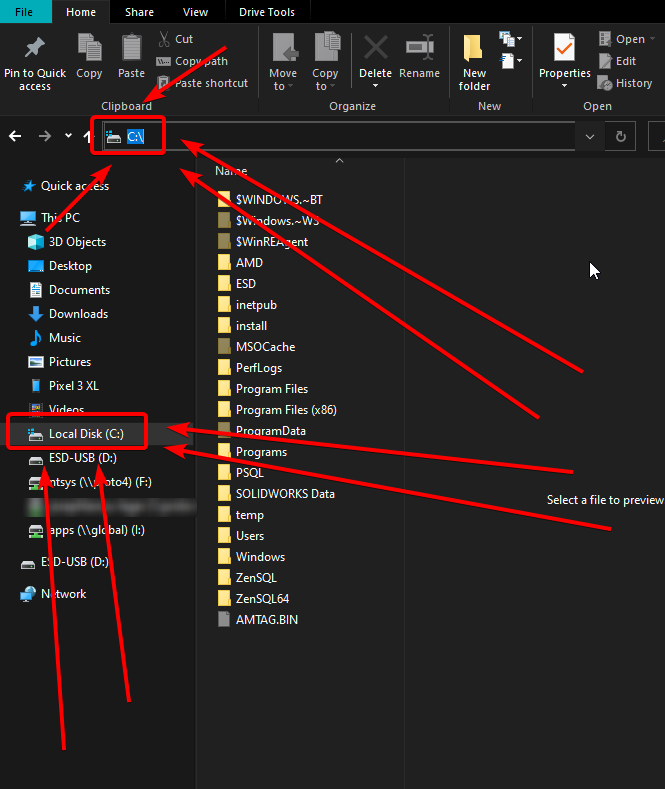
Press Windows + E, this will open Windows Explorer, then in the left section, click "My computer", then go into C:\, you can even click the address bar in the explorer window, and write this in.
Then you right click in the big window, and select Create new folder
tame ridge
narrow minnow
<@!626863704125866004> send a screenshot of what you see in the app and we'll ci...
i fix it
 frosty spruce
I have created a nonresponsive monstrosity by clicking to reply to a comment multiple times (this view is of my browser. zoomed out so you can see the length). When trying to open the reply box, why does the UI not ignore subsequent clicks? I only clicked multiple times because it wasn't responding as quickly as I expected to the first click, though even after 10 seconds I'm not sure what possessed me to spam the button...
 rich flint
the website is vintage 1896 code
frosty spruce
(I don't need support for this. I'm just going to reload the page. This is meant as a bug report)
rich flint
if it's any consolation the website will be undergoing a major overhaul
queen storm
Entire site is trash
opal cipher
queen storm
Entire site is trash
Not the new parts! They look decent
fleet bear
What new parts..?
lyric crescent
site seems to be slow in general, for me anyway.
opal cipher
Yeah, it's a tad slow.
frosty spruce
rich flint
if it's any consolation the website will be undergoing a major overhaul
Will that overhaul also include fixing it so you only get one "in reply to X" text when you reply? Or perhaps even trade the static text for something more dynamic?
If so, I'll be thrilled. That static text is so annoying sometimes
opal cipher
fleet bear
What new parts..?
Didn't you see the new parts that I posted about? With a full css overhaul to fix image scaling. :D
queen storm
frosty spruce
Will that overhaul also include fixing it so you only get one "in reply to X" te...
Full rewrite afaik
lyric crescent
also probably still months years out
seems like reply breaks if you click it more than twice
rich flint
It's Y2K finally here
 graceful shuttle
 lyric crescent
?mc-path
red patioBOT
Change your install path to the following:
For Windows: C:\CurseForge
For Mac: /Users/Shared/CurseForge
If Minecraft is not installed in CurseForge App:
- Click the in the top left.
- Select Minecraft from the list of games.
- Select the
Advancedoption and pick the location for your computer listed above. - Click
Continue.
If Minecraft is installed in CurseForge App:
- Click the in the bottom left.
- Select the Minecraft tab.
- Click
Change. - Select the location for your computer listed above.
:no_entry_sign: Minecraft Files should NOT be installed inside the following locations :no_entry_sign:
:no_entry_sign: .minecraft folder.
:no_entry_sign: OneDrive folders.
:no_entry_sign: Desktop folder.
:no_entry_sign: iCloud enabled folders.
:no_entry_sign: or any other cloud saved folder.
:no_entry_sign: or folders with non-English characters in them.
If any of the above are in the path you need to change/move it!
 lost geode
My Minecraft installation 1.18.1 / Fabric 0.13.1 crashed on startup. It say's java runtime error. do you have a tip for me what i can do?i already try to repair the intsallation and the profile without success. for this time changend back to 0.12.12, that worked already. Thanks in advance DonZockel.
lyric crescent
Show the error.
lost geode
where can i find the log
red patioBOT
Sending logs for support.
- Right-click the modpack profile icon OR click the button in the modpack profile.
- Click
Open Folder. - Open the
logsfolder. - Drag and drop the FILE named
latestORdebuginto discord.
 outer flicker
How do I fix this? It started today?
 lost geode
tha same like mine
outer flicker
Did it start today?
 west folio
outer flicker
How do I fix this? It started today?
west folio
outer flicker
How do I fix this? It started today?
follow the above
outer flicker
Which bit?
lost geode
west folio
outer flicker
These logs?
yup
outer flicker
Do these tell you the issue or?
west folio
are you using sodium and optifine
lost geode
Optifine
west folio
1.12? the minecraft version?
west folio
and you dont have sodium?
outer flicker
Uh is that a mod?
 west folio
both of your logs seem to mention optifabric, how about you try disabling optifine and optifabric, both of you
optifine commonly causes issues anyway
outer flicker
I will try that.
Disabling Optifabric seemed to work
That's a bit annoying, it disables my shaders.
west folio
fabric has sodium and iris shaders though, use those
(make sure to get rid of optifine before you do, they conflict)
lyric crescent
or report to the dev so they can fix it
west folio
sodium and iris combined are an alternative to optifine, they provide shaders and performance improvement (arguably more than optifine) up to you if you wish to use them, but yeah do what yamza said aswell
outer flicker
It was working last night which is annoying
lost geode
ok thanks for that
west folio
lost geode
ok thanks for that
did it work for you aswell?
lost geode
yes without optifine it worked. 😉
west folio
another day, another optifine problem
lost geode
😄
red patioBOT
Your question is not related to CurseForge owned/maintained features or services.
Please use the appropriate game room by getting a game role from #786424115535544350.
Otherwise use #👽︱game-support for game related help.
CurseForge does not make or maintain any of the content or games used on the site or app. Just because it's on the site/app does not make it a problem with CurseForge. Move rooms as requested, arguing about it will result in you being removed from the discord.
 prisma bobcat
Thanks for the heads up 🙂
 median saddle
I'm not super sure if this is the place to ask but I'm having an issue getting addons for WoW to update to the correct folder. Right now CurseForge seems to only be detecting PTR and a dead account to update addons to.
lyric crescent
Might want to copy this to #🧙🏼♂️︱warcraft-support so it doesnt get buried.
median saddle
Yea, just saw that. Was copying and deleting the post
 dusky idol
Hello, please tell me what is this "manifest.json" file and what can I do to be able to upload the modpack to your site?
 rich flint
You create an export file via the app
red patioBOT
There are two ways to share a modpack you've made with others...
Export and Share - For Friends to Small Groups.
- Click the Icon for the modpack.
- Click the button next to play.
- Click

Export. - Select the files that should be included.
- Send the zip to the people that want it! They can follow the instructions in
!mc-installpackto install the pack!
Upload to Curseforge - For Public Release to Everyone.
This options will make your pack public to EVERYONE, it comes with extra requirements and will take some effort to set up.
- Go to here: https://www.curseforge.com/project/432/4471/create
- Fill out the information with a proper description of the pack. This should allow anyone to understand what the pack is.
- Click the Icon for the modpack in the CurseForge app.
- Click the button next to play.
- Click
Export. - Select the files that should be included.
- Open your Project you made on the CurseForge site and Upload the file you just made.
- Wait for Moderation & Sync so it can show up in the client! (See
!syncfor limitations)
 neon breach
i'm trying to create a profile for a mod that's in minecraft 1.3.1 but it's not an option
lyric crescent
Curseforge doesn't support that far back
fleet bear
What in the world is on 1.3 that you would want to play?
dusky idol
Thanks 👍
 jaunty silo
Hi, can someone tell me which mod is causing forge not to load?
red patioBOT
Your question is not related to CurseForge owned/maintained features or services.
Please use the appropriate game room by getting a game role from #786424115535544350.
Otherwise use #👽︱game-support for game related help.
CurseForge does not make or maintain any of the content or games used on the site or app. Just because it's on the site/app does not make it a problem with CurseForge. Move rooms as requested, arguing about it will result in you being removed from the discord.
 arctic obsidian
Hello, I have a problem with downloading pixelmon on curseforge, it always stops at 14%. Can I do something about it?
lyric crescent
Your internet is too slow or unstable.
arctic obsidian
aa
If I leave the download overnight when the internet is better, should they download?
 cold bramble
I got a very old Forge_User account. Is it still possible to get it back?
fleet bear
cold bramble
I got a very old Forge_User account. Is it still possible to get it back?
Did you try the yellow text saying something about lost accounts in the top right to claim the account back
 olive drift
After today's update my minecraft mods wont let me do more than launch, the game wont open. Any suggestions?
 alpine abyss
olive drift
After today's update my minecraft mods wont let me do more than launch, the game...
alpine abyss
olive drift
After today's update my minecraft mods wont let me do more than launch, the game...
Talk in #👽︱game-support about game launxhing problems not here.
cold bramble
fleet bear
Did you try the yellow text saying something about lost accounts in the top righ...
Hm I did that - it redirected me to the homepage without any message after logging into twitch
fleet bear
then log into the site
cold bramble
Hm that didn't seem to work as well. I'm not quite sure if I connected it to twitch in the first place, it might still be a curseforge account
might have missed the twitch step when it went from bukkit => curseforge => fandom? => twitch => overwolf
 timid estuary
how do i share a modpack?
 stark frigate
Hey guys, when updating your pack, and uploading it from the curse app, when uploading the file, do I also have to go through these and "remove" them here, if the new pack im uploading, would not have it, or would it just know, based on what mods im uploading in the most recent update.
 timid estuary
there is no image in the world that matches 400 by 400 can someone please send an image that works
fleet bear
cold bramble
might have missed the twitch step when it went from bukkit => curseforge => fand...
Open a support ticket then is all I can say.
fleet bear
stark frigate
Hey guys, when updating your pack, and uploading it from the curse app, when upl...
no the export handles everything.
fleet bear
timid estuary
there is no image in the world that matches 400 by 400 can someone please send a...
It needs to be at least 400x400... Just make any image square and it works.
 marsh kestrel
Is there a way to solve this error?
 digital roost
how to add optifine to a mod
young bone
!mc-optifine
red patioBOT
We do not offer support for Optifine!
If you have issues with Optifine, remove it. If you want further support try the discord found on their website.
https://www.optifine.net/home
Installing Optifine with modpacks on Curseforge:
- Right click the modpack icon, select
Open Folder. - Put the
Optifine.jarinto themodsfolder. - Now start the modpack.
young bone
There we go
lyric crescent
marsh kestrel
Is there a way to solve this error?
? mc-path
red patioBOT
Change your install path to the following:
For Windows: C:\CurseForge
For Mac: /Users/Shared/CurseForge
If Minecraft is not installed in CurseForge App:
- Click the in the top left.
- Select Minecraft from the list of games.
- Select the
Advancedoption and pick the location for your computer listed above. - Click
Continue.
If Minecraft is installed in CurseForge App:
- Click the in the bottom left.
- Select the Minecraft tab.
- Click
Change. - Select the location for your computer listed above.
:no_entry_sign: Minecraft Files should NOT be installed inside the following locations :no_entry_sign:
:no_entry_sign: .minecraft folder.
:no_entry_sign: OneDrive folders.
:no_entry_sign: Desktop folder.
:no_entry_sign: iCloud enabled folders.
:no_entry_sign: or any other cloud saved folder.
:no_entry_sign: or folders with non-English characters in them.
If any of the above are in the path you need to change/move it!
 dense cloak
Get rid of the I'm not a robot thing. We don't need to verify ourselves every second.
rich flint
it's ddos protection
upper root
!cloudflare #blameThem
red patioBOT
Captcha issues
If you are receiving captcha confirmations on CurseForge then the host company Cloudflare has flagged your IP. This seems to happen at random for no known reason, though people uploading files are more likely to trigger it. There is nothing OverWolf/CurseForge can do to resolve this, you must simply wait until it stops happening.
 hushed bluff
How are points calculated? by downloads?
rich flint
A non disclosed formula to prevent exploit
hushed bluff
ok
are there a delay? because i uploaded a mod that got 3.5k downloads from yesterday, but i got points only on a mod i uploaded a long time ago that have in total 250 downloads
 hoary rivet
Why cant i use the mod launcher with minecraft it says couldnt lauch core
red patioBOT
This is NOT instructions for Repair Profile! They are NOT the same! You need to do this!
- Click on the Minecraft Tab on the Left side of the CurseForge App.
- Click button next to the
Create Custom Profileoption. - Click
Repair Installationoption. - Play game.
NOTE: You will not lose any modpacks or worlds!
rich flint
Let us know if that fixes?
hoary rivet
ok
upper root
hushed bluff
are there a delay? because i uploaded a mod that got 3.5k downloads from yesterd...
It is based on the projects popularity, if its a brand new one that will probably be lower as not much time has passed for it to be calculated in
hoary rivet
Everytime i try load
 lyric crescent
?mc-path
red patioBOT
Change your install path to the following:
For Windows: C:\CurseForge
For Mac: /Users/Shared/CurseForge
If Minecraft is not installed in CurseForge App:
- Click the in the top left.
- Select Minecraft from the list of games.
- Select the
Advancedoption and pick the location for your computer listed above. - Click
Continue.
If Minecraft is installed in CurseForge App:
- Click the in the bottom left.
- Select the Minecraft tab.
- Click
Change. - Select the location for your computer listed above.
:no_entry_sign: Minecraft Files should NOT be installed inside the following locations :no_entry_sign:
:no_entry_sign: .minecraft folder.
:no_entry_sign: OneDrive folders.
:no_entry_sign: Desktop folder.
:no_entry_sign: iCloud enabled folders.
:no_entry_sign: or any other cloud saved folder.
:no_entry_sign: or folders with non-English characters in them.
If any of the above are in the path you need to change/move it!
hoary rivet
I use the gamepass version does that interfere
lyric crescent
no
hushed bluff
upper root
It is based on the projects popularity, if its a brand new one that will probabl...
ok, thanks
hoary rivet
That where its meant to be
 upper root
You need to change that
hoary rivet
To what
upper root
C:\Curseforge, like the bot message above says
digital roost
Yo yo! I'm having some technical difficulties.
I can't connect to my Singleplayer game. When I use my customized modding pack. Would it be an incompatibility thing? Or something else?
It's saying 'can't connect to client/server' sorta thing.. :S
upper root
Can you send a screenshot of the error into #👽︱game-support?
digital roost
Sure thing! 🙂
hoary rivet
Can someone call me and step by step I'm very confused
lyric crescent
read the bot message..
digital roost
It'll take a few minutes. Just gotta reload the game up. Then I'll send over the screenshot. Should I take a photo of the mods I'm using as well? There are 109 of them installed.
 lyric crescent
read
opal cipher
 opal cipher
Create it
hoary rivet
How
opal cipher
Right click in C: and select new folder
hoary rivet
Done
hoary rivet
 opal cipher
Now go ahead and install modpacks
hoary rivet
Still wont work
opal cipher
Looks like you have an old version of CurseForge as well.
hoary rivet
?
opal cipher
Try reinstalling it.
opal cipher
Also, #📛︱rules 5.
Because of your screenshot. It says 192.1.5
Oh, never mind
That's the current one
I'm thinking of 191.x.x
hoary rivet
so why wont it work
opal cipher
¯_(ツ)_/¯
opal cipher
Should work, doesn't. And that's as far as my skills go.
hoary rivet
All good
opal cipher
!mc-installfix
red patioBOT
This is NOT instructions for Repair Profile! They are NOT the same! You need to do this!
- Click on the Minecraft Tab on the Left side of the CurseForge App.
- Click button next to the
Create Custom Profileoption. - Click
Repair Installationoption. - Play game.
NOTE: You will not lose any modpacks or worlds!
opal cipher
Try that again. Basically all I can think of right now. (at work, so I'm a bit busy as well)
hoary rivet
Still not working
 livid moat
wenn is the full version finished of cursen forge
queen storm
When it is done
 bold prairie
i need some help transfering a mod in my server
queen storm
!notcf
red patioBOT
Your question is not related to CurseForge owned/maintained features or services.
Please use the appropriate game room by getting a game role from #786424115535544350.
Otherwise use #👽︱game-support for game related help.
CurseForge does not make or maintain any of the content or games used on the site or app. Just because it's on the site/app does not make it a problem with CurseForge. Move rooms as requested, arguing about it will result in you being removed from the discord.
queen storm
@hoary rivet Rule 4, please don't break it
hoary rivet
sorry, i saw someone who was helping me in another channel so i went to ask
queen storm
Should not have been in 2 channels to start with
hoary rivet
okay
queen storm
How is it not working? What does happen?
hoary rivet
so it starts to load then pops up with like an error message
saying cant load due to something
bold prairie
hey um can i....get some help or...
queen storm
bold prairie
hey um can i....get some help or...
#🔥︱curseforge-support message
Read it please
queen storm
hoary rivet
so it starts to load then pops up with like an error message
Then show that error
 hoary rivet
queen storm
You moved it to C:\Curseforge before
hoary rivet
queen storm
You moved it to C:\Curseforge before
that was a photo i had earlier so you can see the message that it pops up withbut i is in that C:\Curseforge folder
queen storm
hoary rivet
that was a photo i had earlier so you can see the message that it pops up withbu...
I want a new image, not old information

 queen storm
!mc-installfix
red patioBOT
This is NOT instructions for Repair Profile! They are NOT the same! You need to do this!
- Click on the Minecraft Tab on the Left side of the CurseForge App.
- Click button next to the
Create Custom Profileoption. - Click
Repair Installationoption. - Play game.
NOTE: You will not lose any modpacks or worlds!
hoary rivet
i have done this several times
queen storm
!owlogs
red patioBOT
<:overwolf:857375414002384916> How to get CurseForge App logs! <:overwolf:857375414002384916>
- Click the
Create logs zipin the menu. - Drag and drop the file it just made to this chat room to upload it.
- Wait for someone to look at it so they can help you.
hoary rivet
what file do you want
queen storm
The logs zip that you make with that button
queen storm
Did you do a pc restart already?
hoary rivet
yep
queen storm
Will forward this to staff, then they can see what is wrong. Will be sunday though before a response
hoary rivet
this is stupid ngl
queen storm
Yes, so many things that could be the reason though
hoary rivet
like what
queen storm
I don't know, that is why I asked the staff for help with it.
 mighty plover
what is the moderator schedule?
queen storm
!status
red patioBOT
Project Moderation Time
Project/File moderation is done on these days unless otherwise mentioned:
Sunday, Monday, Tuesday, Wednesday, Thursday: <t:1631170800:t> - <t:1631199600:t> (Your time)
Friday, Saturday: No Moderation!
Projects are moderated First in, First out. If you submit late in the work day, it will likely get left until the next day!
New Projects or anything flagged for manual review: 1-3 Working Days
Updates to approved projects not needing manual approval: 1 Hour
-If your file has been "Under Review" for more than an hour, then it is at manual review!
Changes will only show in the app if the project meets the requirements in the ?sync command and up to 24 hours has passed from when it was accepted.
mighty plover
for review?
queen storm
First is sunday, their weekend is already started
mighty plover
ah aight
i still ned to make a logo and get screenshots
good for me
usually i'd want it earlier
but im fine with it being later now
hoary rivet
for the meantime do you know of any other software i can use to use mods just until the mods have a look
queen storm
I don't
hoary rivet
Okay
mighty plover
hoary rivet
for the meantime do you know of any other software i can use to use mods just un...
minecraft forge
hoary rivet
okay ill have a look
queen storm
mighty plover
minecraft forge
That won't be able to install curseforge modpacks though
mighty plover
queen storm
That won't be able to install curseforge modpacks though
wouldnt downloading a server pack work temporarily?
he just wants it temp
queen storm
Not all client side mods sit in a server pack as they often break the server
queen storm
So, this conversation went to offtopic so I cleared it, if you want to discuss games then go to #778026316589957140
hoary rivet
alright sorry
 vocal jacinth
how to publish a modpack
queen storm
!mc-packshare
red patioBOT
There are two ways to share a modpack you've made with others...
Export and Share - For Friends to Small Groups.
- Click the Icon for the modpack.
- Click the button next to play.
- Click
Export. - Select the files that should be included.
- Send the zip to the people that want it! They can follow the instructions in
!mc-installpackto install the pack!
Upload to Curseforge - For Public Release to Everyone.
This options will make your pack public to EVERYONE, it comes with extra requirements and will take some effort to set up.
- Go to here: https://www.curseforge.com/project/432/4471/create
- Fill out the information with a proper description of the pack. This should allow anyone to understand what the pack is.
- Click the Icon for the modpack in the CurseForge app.
- Click the button next to play.
- Click
Export. - Select the files that should be included.
- Open your Project you made on the CurseForge site and Upload the file you just made.
- Wait for Moderation & Sync so it can show up in the client! (See
!syncfor limitations)
upper root
Nope, just wait
narrow minnow
hoary rivet
okay ill have a look
Please check if you have one of these: https://minecrafthopper.net/help/known-incompatible-software/
MinecraftHopper
The software listed below is known to be incompatible with Minecraft, and should be uninstalled from your system.
 long cloak
my problem is as follows how to fix?
 queen storm
!webclient
red patioBOT
Timeout/WebClient errors are from networking issues to your computer. You can try a few things to fix it:
- Restart the computer.
- Restart your router/modem.
- Try another internet source like a hotspot, wired connection or moving closer to the WiFi.
- Pause/Stop other things using the internet. (Streams, music, etc)
- If this still doesn't work, try again in an hour and hope your connection is stable.
long cloak
my comupter is restartet router is restart and me wifi is ok
relog resttarted instalator forge?
queen storm
What?
narrow minnow
long cloak
relog resttarted instalator forge?
If you have another network (mobile hotspot) try it out
 narrow topaz
somebody know how to repair a not working quest book on Betterminecraft 5.5v 1.16.5 i dont have any quests in the book?
narrow topaz
sorry i wasnt asking cuz i dont think this a big problem
just not showing me any quest
s
 signal ridge
The authors of the pack would know more about their pack then us
narrow topaz
and wasnt sure in what channel to ask this questions
signal ridge
Then pick one and wait. If its in the wrong channel you will be notified. Dont need to spam it in multiples
 hasty bronze
Hey, I ran into a bit of an issue. I play on an SMP with mods, and usually I just load CurseForge, pick the modpack and start playing. I played a bit a few hours ago, but now when I load Minecraft it keeps telling me to reset my launcher, and although I keep resetting it and turning on and off my pc it's still giving me that message. Anyone know how I can fix it?
 summer portal
(Minecraft) can someone help me? i cant play some modpacks, some modpacks like Better Minecraft but i cant play like modpacks with 1 or 3 mods or any other modpacks
lyric crescent
hasty bronze
Hey, I ran into a bit of an issue. I play on an SMP with mods, and usually I jus...
show the message
lyric crescent
summer portal
(Minecraft) can someone help me? i cant play some modpacks, some modpacks like B...
Need you to explain why you can't do this.
 languid flume
Whenever I try to download Valhesia Enhanced Vanilla 1.18, it starts the download, downloads a few of the mods, but then stops, and shows an error code; 496007. Please advice
red patioBOT
Error/Exit codes are useless. Follow these steps so someone can actually help you.
- Right-click the modpack profile icon OR click the button in the modpack profile.
- Click
Open Folder. - Open the
logsfolder. - Drag and drop the FILE named
latestORdebuginto discord.
languid flume
k
There is no option for opening a folder
I just have issues downlaoding it, other modpacks like AOF5, and Medieval work fine
 tranquil parrot
danica#8504
He is trying to scam me
 red patioBOT
Don't want scam DM?
 hasty bronze
lyric crescent
show the message
hasty bronze
lyric crescent
show the message
 summer portal
@lyric crescent it starts but it only loads some mods and stops or crash
 verbal hill
all of my modpacks are gone can i bring them back
 crude kindle
rich flint
crude kindle
rich flint
Use Minecraft channels for things like this. Get role in #786424115535544350
 crimson cypress
Hello Guys! I'm trying to upload a mod pack made by me on the CurseForge page. But I don't know what to put in "Allow the distribution of this project outside the CurseForge-Overwolf ecosystem." and in "Project License" when it is a personal modpack and made by 1 person
Sorry if my English is rough, I'm using a translator
lyric crescent
You should look up licenses if you are not sure what to use. That stuff is way to complicated for a simple explanation. If you don't want to look it up you can just use ARR for full control.
"Allow the distribution of this project outside the CurseForge-Overwolf ecosystem."
This prevents 3rd party launchers from having access to what you uploaded. Completely up to you how you want to handle it. Downloads from 3rd party launchers don't give you reward points if that matters to you.
 mild seal
Does Mojang's updated launcher still mess up with Overwolf ?
crimson cypress
Uhm, and how do I get rewards? Do I have to open a paypal account or something and then set it to CurseForge?
lyric crescent
?rewards
red patioBOT
Question about the rearwards program?
Rewards TOS:
Enabling 2FA for rewards:
mild seal
I know it had issues shortly after it came out, wondering if that's still a thing
lyric crescent
still doesnt work, there are no plans for it to work currently
mild seal
noted
crimson cypress
Wait, you already confused me hahaha
lyric crescent
use the links to answer your questions
crimson cypress
So let's say Project License is to say that "This project belongs to:"
lyric crescent
the license is used to tell other people what they are allowed to do with any custom things you do with your project
crimson cypress
lyric crescent
the license is used to tell other people what they are allowed to do with any cu...
So, what license do you recommend so that people can download it and do what they want with the project?
But at the same time, in the future it can be uploaded to the curseforge platform
lyric crescent
I don't recommend because legal stuff is way outside of my knowledge base.
crimson cypress
Legal stuff? Can you do something illegal with a Modpack?
lyric crescent
Depends on the license used with it, yes.
crimson cypress
What is this license for?
 lyric crescent
You should look that up. Google. 🙂
crimson cypress
What a thing, haha. I never thought publishing a modpack would be difficult. I just wanted to show this to my friends
lyric crescent
You are uploading it to the public. This is a form of protection. If you do not care then use ARR which prevents anyone from doing anything with the pack.
vocal jacinth
how to make corail tombstone not give items randomly
lyric crescent
You can always change it later.
lyric crescent
vocal jacinth
how to make corail tombstone not give items randomly
!notcf ⤵️
red patioBOT
Your question is not related to CurseForge owned/maintained features or services.
Please use the appropriate game room by getting a game role from #786424115535544350.
Otherwise use #👽︱game-support for game related help.
CurseForge does not make or maintain any of the content or games used on the site or app. Just because it's on the site/app does not make it a problem with CurseForge. Move rooms as requested, arguing about it will result in you being removed from the discord.
crimson cypress
lyric crescent
You are uploading it to the public. This is a form of protection. If you do not ...
ARR? OH! rightfully confused me. You were saying to use All Rights Reserved and I did not understand because it is an abbreviation. And because I also don't speak English I didn't understand it at first hahaha! Now I understand!
I will opt for "All rights reserved" because it is recommended and because I remembered that the books also have that
crimson cypress
Uhm I need help
When I published my modpack to the public, this happened

I received this message
queen storm
Link please
crimson cypress
And it was removed where I posted it
queen storm
Show a screenshot of what you uploaded
 crimson cypress
https://www.curseforge.com/minecraft/modpacks/traveler-s-pack
crimson cypress
crimson cypress
https://www.curseforge.com/minecraft/modpacks/traveler-s-pack
I enter to this link
 crimson cypress
queen storm
Show a screenshot of what you uploaded
crimson cypress
queen storm
Show a screenshot of what you uploaded
This is the file

Im going to re-upload
queen storm
Why is that a rar?
crimson cypress
queen storm
Why is that a rar?
Shouldn't it be .rar?
queen storm
crimson cypress
Shouldn't it be .rar?
!mc-packshare
red patioBOT
There are two ways to share a modpack you've made with others...
Export and Share - For Friends to Small Groups.
- Click the Icon for the modpack.
- Click the button next to play.
- Click
Export. - Select the files that should be included.
- Send the zip to the people that want it! They can follow the instructions in
!mc-installpackto install the pack!
Upload to Curseforge - For Public Release to Everyone.
This options will make your pack public to EVERYONE, it comes with extra requirements and will take some effort to set up.
- Go to here: https://www.curseforge.com/project/432/4471/create
- Fill out the information with a proper description of the pack. This should allow anyone to understand what the pack is.
- Click the Icon for the modpack in the CurseForge app.
- Click the button next to play.
- Click
Export. - Select the files that should be included.
- Open your Project you made on the CurseForge site and Upload the file you just made.
- Wait for Moderation & Sync so it can show up in the client! (See
!syncfor limitations)
 queen storm
How did you make it? Using that export?
crimson cypress
queen storm
How did you make it? Using that export?
No, I used "Send to" And then I put "compressed ZIP folder"
 warped breach
In meantime I can't find a proper mod-pack name
queen storm
crimson cypress
No, I used "Send to" And then I put "compressed ZIP folder"
Well, don't
queen storm
warped breach
In meantime I can't find a proper mod-pack name
Not a support question
warped breach
my bad
crimson cypress
Sorry if I write slowly, I'm using a translator for the words, but I do understand them
queen storm
crimson cypress
Sorry if I write slowly, I'm using a translator for the words, but I do understa...
Use the export for exporting, don't do it by hand
crimson cypress
uhmm
queen storm
#🔥︱curseforge-support message
That, use that, don't send to zip
crimson cypress
But if you already completed that part
But if I already completed that part*
I'm going to have lunch, I'll be back
queen storm
Where do you even see that?
crimson cypress
queen storm
Where do you even see that?
When you enter the option "Create a Project"
I have to go out, can we continue this tomorrow?
queen storm
Then you skip it, it was just about making the file
crimson cypress
I have the file in 3 forms. Winrar, ZIP and normal archive
queen storm
Yes, and that is bad as you never zip it manually
crimson cypress
So how is it compressed? I just drag the normal file (that yellow one) to where the projects are uploaded?
I used this video as a guide, use subtitles
queen storm
Export and Share - For Friends to Small Groups.
- Click the Icon for the modpack.
- Click the button next to play.
- Click Export.
- Select the files that should be included.
- Send the zip to the people that want it! They can follow the instructions in !mc-installpack to install the pack!
The app does that!
Like I pointed to you twice
crimson cypress
AHHH
Damn, I didn't get it, I thought those were the steps to just upload the file
queen storm
Would have seen that if you read the entire message
crimson cypress
queen storm
Would have seen that if you read the entire message
I uploaded it again! I hope this time it works. I had to use the link I sent first to be able to access here. I don't know why my project doesn't appear on the cover
 queen storm
And now you wait
crimson cypress
Ok 👌
narrow minnow
crimson cypress
Ok 👌
Didn't you get a notification about the rejection reason?
narrow minnow
well.. now the zip doesn't have a manifest.json in it
obviously the user isn't exporting their modpack via the app
- A root directory inside the zip - bad
- No manifest.json - bad
 queen storm
Yeah, not surprised there
 simple hound
Can you help me? I have an endless download. What can be done about it?
 red patioBOT
Looking to install the CurseForge app?
<:windows:798410728188936222> Windows
Minimum Requirements:
- OS Version: 7 (64 bit), 8.1, 10, 11
- 64 bit Required.
- 350MB storage space.
- Microsoft .Net 4.8
- Intel/AMD quad-core CPU
- 8GB ram
Download: https://download.overwolf.com/install/Download?&PartnerId=4047
If you are having issues with the installer use the URL below to install Overwolf then go to the app store to download CurseForge.
https://content.overwolf.com/downloads/setup/latest/regular.html
<:mac:798410654418862130> Mac
Minimum Requirements:
- OS Version 10.14 or newer.
- 64 bit Required.
Download: https://curseforge.overwolf.com/downloads/curseforge-latest.dmg
:penguin: Linux
Minimum Requirements:
Yes. SOON:tm: ( ͡~ ͜ʖ ͡°)
Download: :person_shrugging:
crimson cypress
I'm trying to follow the instructions on this. And when I'm in the 3 points, this appears, I don't see explore or something like that. only this appears to me

Second, my modpack doesn't show up in the curseforge app, it's a modpack I made myself.
queen storm
Click a modpack first that you want to export.
Then click the 3 dots
crimson cypress
Yes I know about that part of the 3 points, but it only works with the mods that curseforge recognizes, mine does not recognize it
queen storm
Define "mine"
crimson cypress
Wait, it's not mine, the translator is mistranslating it, what I mean is that it's one of the mods that I find, and I put them together
An example of this could be joining the Optifine and quark mods in the game
Something like this could be said
queen storm
Optifine can't be uploaded with modpacks
queen storm
How did you install the mod?
crimson cypress
First I install the forge of the version I want. Then I go to the mods folder and drag the mod I want. So I install them
 hushed remnant
Hey, I need help. I have tried running all of the versions of Block Front and each time I get "Invalid java runtime configuration" crash
queen storm
crimson cypress
First I install the forge of the version I want. Then I go to the mods folder an...
!mc-installmods
red patioBOT
How to install mods in CurseForge App.
- Click
+ Create Custom Profile - Name it, select the required Minecraft version, select the modloader & modloader version (usually the highest number), click
Create. - Click the profile icon.
- Click
Add More Content - Search and install the desired mods.
- Start the game!
How to install mods not on CurseForge.
- Right click the profile picture or Open the profile and click the Icon next to the play button.
- Click
Open Folder. - Drag the mod(s) into the
modsfolder. (Note: Some mods will require others, to run. Make sure to read the instructions for the mod!) - Start the game!
 hushed remnant
Hey, I need help. I have tried running all of the versions of Block Front and each time I get "Invalid java runtime configuration" crash
queen storm
hushed remnant
Hey, I need help. I have tried running all of the versions of Block Front and ea...
Rule 4, don't spam
crimson cypress
I didn't know, I thought that by installing CurseForge, it would be like a launcher. It seems that I don't know many things about the application...
hushed remnant
I just need help
queen storm
crimson cypress
I didn't know, I thought that by installing CurseForge, it would be like a launc...
It is a mod manager, does not detect things in .minecraft
hoary rivet
narrow minnow
Please check if you have one of these: https://minecrafthopper.net/help/known-in...
I have none of them and discord overlay is off
hushed remnant
 queen storm
hushed remnant
queen storm
hushed remnant
!mc-installfix
red patioBOT
This is NOT instructions for Repair Profile! They are NOT the same! You need to do this!
- Click on the Minecraft Tab on the Left side of the CurseForge App.
- Click button next to the
Create Custom Profileoption. - Click
Repair Installationoption. - Play game.
NOTE: You will not lose any modpacks or worlds!
 limber lotus
i'm new to this server and need help with installing and using multiple versions of forge/modded mc
idk where to go tbh
queen storm
crimson cypress
queen storm
It is a mod manager, does not detect things in .minecraft
I knew it doesn't detect it. But I did not know that you had to give the option "Create a profile"
hoary rivet
Tim with rl craft does it need to be in a profile
queen storm
Rlcraft is the profile
hoary rivet
I thought
crimson cypress
Seriously, sorry for the inconvenience. I didn't know about this, sorry to waste your time. As usual I'm used to playing in CurseForge without giving "Create Profile" because I didn't know what it was for. This caused a lot of inconvenience, seriously. Excuse me
hoary rivet
Tim still having the problem
queen storm
Yes, and I still can't help you with it
crimson cypress
Uhm, this is strange, it only detects 3 mods of the 43 that I put, is there something wrong here?


I'm going to start the game to see if the 43 mods appear
upper root
Curseforge does not do a good job at reading mods from the mod folder, add them with the instructions Timtower gave above to make curseforge recognise them
hushed remnant
queen storm
!mc-installfix
WTF that shit worked, thx man
crimson cypress
If it appears! Now I'm going to go through the steps to create the modpack. Could you re-send that command you did with the "!"
upper root
!mc-installmods
red patioBOT
How to install mods in CurseForge App.
- Click
+ Create Custom Profile - Name it, select the required Minecraft version, select the modloader & modloader version (usually the highest number), click
Create. - Click the profile icon.
- Click
Add More Content - Search and install the desired mods.
- Start the game!
How to install mods not on CurseForge.
- Right click the profile picture or Open the profile and click the Icon next to the play button.
- Click
Open Folder. - Drag the mod(s) into the
modsfolder. (Note: Some mods will require others, to run. Make sure to read the instructions for the mod!) - Start the game!
hoary rivet
Chief
hoary rivet
!mc-info
crimson cypress
jajaja
hoary rivet
!mc-installmods
red patioBOT
How to install mods in CurseForge App.
- Click
+ Create Custom Profile - Name it, select the required Minecraft version, select the modloader & modloader version (usually the highest number), click
Create. - Click the profile icon.
- Click
Add More Content - Search and install the desired mods.
- Start the game!
How to install mods not on CurseForge.
- Right click the profile picture or Open the profile and click the Icon next to the play button.
- Click
Open Folder. - Drag the mod(s) into the
modsfolder. (Note: Some mods will require others, to run. Make sure to read the instructions for the mod!) - Start the game!
 gleaming ginkgo
Can someone help me with forge! I put a plugin in my mods folder
a mod*
and it doesn't show up in game
crimson cypress
What should I put in Package Version and in Choose files?
 crimson cypress
Sorry
What do you mean by making it official? I want to publish it on the curseforge page
 vague nebula
thats what I mean
vague nebula
just be sure to not have Optifine on it, its lincesed so the website will reject if its in it
crimson cypress
vague nebula
just be sure to not have Optifine on it, its lincesed so the website will reject...
Don't worry, my relationship with the Optifine is very bad. In fact, I'm already unfaithful to him with Magnesium😈
vague nebula
Im also using magnesium, just waiting for the shader support
crimson cypress
vague nebula
Im also using magnesium, just waiting for the shader support
Me too
Where should I put this folder?
 vague nebula
its a zip file, u can put it anywhere
crimson cypress
Uhm, ok
crimson cypress
Ah, I have a question, how do I make the mods appear and not the list of mods?
I only have the list of mods, config and overrides
signal ridge
huh?
crimson cypress
This thing
signal ridge
Did you use the export feature in the app?
crimson cypress
signal ridge
Did you use the export feature in the app?
Yes
crimson cypress
vague nebula
when people download the pack, theyll get the mods
I know that, but its that thing called "server pack"
vague nebula
according to the modlist
signal ridge
Server packs are made by the packs authors, cf has nothing to do with those
crimson cypress
But if my friends are NonPremium?
crimson cypress
signal ridge
Server packs are made by the packs authors, cf has nothing to do with those
Oh
Uhm
signal ridge
crimson cypress
But if my friends are NonPremium?
And no support will be given for that.
crimson cypress
It's okay. No problem for that one. So, in a server pack what things should there be?
signal ridge
Look at other server packs to see what people do.
Are you trying to create a server pack OR upload your modpack to cf?
crimson cypress
I have friends who are premium, but want to make a server. I understand that you need the Server pack, what files are commonly needed for this server pack
crimson cypress
signal ridge
Are you trying to create a server pack OR upload your modpack to cf?
What do you mean with that?
signal ridge
I can post the server creation support in #👽︱game-support Servers have nothing to do with CF
crimson cypress
signal ridge
I can post the server creation support in <#778097796410376242> Servers have not...
My modpack will be posted on the curseforge page if that's what you mean
signal ridge
ok, just trying to figure out what your trying to do. Your bouncing back and forth
crimson cypress
Wait, let me sort my ideas
vague nebula
I think he wants to know what necessarely is a "server pack"
I would like to know that too
crimson cypress
Yes that's what I mean
signal ridge
?mc-serverpack
red patioBOT
Serverpacks are special files uploaded alongside an existing project file. If the main file is rejected the server pack is also rejected.
You require an already uploaded export file to upload a server pack!
- Make the server pack by zipping up the required files by selecting the required folders & files. It should include the config and mod folders at a minimum, plus anything else you specifically required to run the server. Start/Run/Setup scripts are optional. Don't include modloader files or the minecraft server jar.
- Go to the
Filestab on the project. - Click the name of the file you wish to upload the server pack to. The pack and server should match pack versions.
- Click
Upload Additional File. - Fill out the form.
signal ridge
Basically a server pack is the necessary files needed to host a server for that pack. It is created by the author of the pack. If your wanting to play with friends for a pack you have made you dont need to create a server pack / upload a server pack. You can just make the server (or rent one) Can help with server stuff in #👽︱game-support
crimson cypress
Uhm
Thank
Now
I going to upload my modpack in CurseForge
By the way, about the Server Pack, I am seeing that the initial file can be uploaded first (the one that is exported from CF) and that there is an option to put the server pack below, but do you know how to put that?
I just post the modpack
😄
Can someone check if it works correctly?
 red patioBOT
Project Moderation Time
Project/File moderation is done on these days unless otherwise mentioned:
Sunday, Monday, Tuesday, Wednesday, Thursday: <t:1631170800:t> - <t:1631199600:t> (Your time)
Friday, Saturday: No Moderation!
Projects are moderated First in, First out. If you submit late in the work day, it will likely get left until the next day!
New Projects or anything flagged for manual review: 1-3 Working Days
Updates to approved projects not needing manual approval: 1 Hour
-If your file has been "Under Review" for more than an hour, then it is at manual review!
Changes will only show in the app if the project meets the requirements in the ?sync command and up to 24 hours has passed from when it was accepted.
crimson cypress
damn, it just had to be friday XD
I thought it was Thursday, not Friday.
Sunday
Im going to ask sunday
verbal hill
crimson cypress
Im going to ask sunday
we both know you wont
 obsidian fog
how do i get among us proximity chat
 restive pine
when im trying to launch my minecraft modpack it says that its "unable to update the minecraft native launcher" and i have no idea why
lyric crescent
? mc-installfix
red patioBOT
This is NOT instructions for Repair Profile! They are NOT the same! You need to do this!
- Click on the Minecraft Tab on the Left side of the CurseForge App.
- Click button next to the
Create Custom Profileoption. - Click
Repair Installationoption. - Play game.
NOTE: You will not lose any modpacks or worlds!
 swift harbor
Hey there, I'm exporting a Minecraft profile, and I've got several mods which are causing the "This profile includes mods versions that are not available on CurseForge", however I added every mod via the app, I even removed the offending mods and re-added them (via the app) and it's still giving me the error. Any suggestions?
rich flint
swift harbor
Hey there, I'm exporting a Minecraft profile, and I've got several mods which ar...
Look inside the export zip file at which ones they are? Are they the same every time?
Also - check your CF app version? Settings > bottom/left
swift harbor
Yeah, I just figured it out and fixed it actually, when I was deleting them via the app, it wasn't actually deleting them. I had to go into the folder and manually delete them, and then re-add them on the app.
rich flint
Kk. Do check your app version though. If it's older than 0.191.2.3 then you should uninstall/reinstall
swift harbor
It's 0.192.1.5
red patioBOT
<:overwolf:857375414002384916> How to get CurseForge App logs! <:overwolf:857375414002384916>
- Click the
Create logs zipin the menu. - Drag and drop the file it just made to this chat room to upload it.
- Wait for someone to look at it so they can help you.
swift harbor
Since I got it to work, would my previous logs be included in that?
Not sure I can re-create the error
rich flint
Maybe
swift harbor
restive pine
lyric crescent
? mc-installfix
thank you
now its saying it can verify the minecraft version, whats up with that
lyric crescent
?mc-path
red patioBOT
Change your install path to the following:
For Windows: C:\CurseForge
For Mac: /Users/Shared/CurseForge
If Minecraft is not installed in CurseForge App:
- Click the in the top left.
- Select Minecraft from the list of games.
- Select the
Advancedoption and pick the location for your computer listed above. - Click
Continue.
If Minecraft is installed in CurseForge App:
- Click the in the bottom left.
- Select the Minecraft tab.
- Click
Change. - Select the location for your computer listed above.
:no_entry_sign: Minecraft Files should NOT be installed inside the following locations :no_entry_sign:
:no_entry_sign: .minecraft folder.
:no_entry_sign: OneDrive folders.
:no_entry_sign: Desktop folder.
:no_entry_sign: iCloud enabled folders.
:no_entry_sign: or any other cloud saved folder.
:no_entry_sign: or folders with non-English characters in them.
If any of the above are in the path you need to change/move it!
red patioBOT
╰( ͡° ͜ʖ ͡° )つ──☆*:・゚ *˜”*°•.˜”*°• Many Help •°*”˜.•°*”˜* <:curselit:796985620550385705>
Please provide a description of your issue with as much detail as possible. If you have an issue with a mod or modpack, tell us the name. Explain what you can see happening. Be specific!
 Tell us what is happening, we already know it "doesn't work".
Avoid using words like "it", tell us exactly what "it" is.
Don't assume anyone knows what you are talking about, be specific.
Tell us what you expected to happen.
Provide screenshots or video if possible.
Provide a log if possible. ?mc-log
 lean geode
I keep crashing
mighty plover
help me here?

i exported my pack and its giving me this error when i try to import it
 delicate sierra
CF launcher bug report* When I uninstall a mod (when I Click on a trashcan next to mod) It may uninstall another mod thats not associated with mod..
lyric crescent
it uninstalls dependent mods. it is working as intended, though is being reconsidered.
delicate sierra
How is assembly line machines mod dependent on The one probe?
I guess but I thought Id point that out.
 magic atlas
if i want to add mods to a server and i just click add content will the people who imported my folder be forced to download the mods upon loading or would i have to send them another imported folder and have to make a copy of the world again?
upper root
You will have to send them another export
 zinc lava
Hey
Can someone help me out
I’m having trouble finding the mod folder for all of my mods on Mac
queen storm
Using curseforge ?
upper root
Right click the profile icon then click Open Folder
upper root
What do you mean by 'the folder for all my mods'?
upper root
Do you have the curseforge app?
zinc lava
Yes
upper root
!mc-installmods
red patioBOT
How to install mods in CurseForge App.
- Click
+ Create Custom Profile - Name it, select the required Minecraft version, select the modloader & modloader version (usually the highest number), click
Create. - Click the profile icon.
- Click
Add More Content - Search and install the desired mods.
- Start the game!
How to install mods not on CurseForge.
- Right click the profile picture or Open the profile and click the Icon next to the play button.
- Click
Open Folder. - Drag the mod(s) into the
modsfolder. (Note: Some mods will require others, to run. Make sure to read the instructions for the mod!) - Start the game!
zinc lava
Ohhhh
 keen hawk
hey my friend has been having issues with curseforge needs to uninstall and get a FRESH install of curseforge how would i go bout doin it
queen storm
Show a screenshot of your screen
queen storm
keen hawk
hey my friend has been having issues with curseforge needs to uninstall and get ...
Tell your friend to come here
zinc lava
I can’t
keen hawk
invited him
 teal igloo
it is i
zinc lava
I can’t send a screenshot file too big
teal igloo
the friend he has talked about once
queen storm
zinc lava
I can’t send a screenshot file too big
Screenshots are never too big
upper root
zinc lava
I can’t send a screenshot file too big
Use  +
+ Shift + S and drag over only the portion of your screen you want to show us.
Then Ctrl + V to paste the image into discord (it is copied to clipboard automatically)
queen storm
teal igloo
the friend he has talked about once
What is the issue that you have
zinc lava
Thank you I got it
teal igloo
queen storm
What is the issue that you have
i actually have not a single clue however when i load any mods/modpacks that i made or installed they just dont function at all. the game refuses to load and comes with an error message saying something about configurable files
queen storm
So reinstalling curseforge won't fix that at all.
Show the error
teal igloo
uuh yeah sure give me a min
sorry if it takes a bit i just have to deal with loading screens and stuff like that
queen storm
I know how it works, not waiting for it either
zinc lava
Ahh
I can’t join servers
With the mods
I got not enough updates and I can’t join hypixel!!!!!!
keen hawk
just join hypixel without mods and 1.18
 proper hull
where would I put the map file for a map i downloaded in the file folder for a modpack im making on curseforge
queen storm
zinc lava
I got not enough updates and I can’t join hypixel!!!!!!
!notcf
red patioBOT
Your question is not related to CurseForge owned/maintained features or services.
Please use the appropriate game room by getting a game role from #786424115535544350.
Otherwise use #👽︱game-support for game related help.
CurseForge does not make or maintain any of the content or games used on the site or app. Just because it's on the site/app does not make it a problem with CurseForge. Move rooms as requested, arguing about it will result in you being removed from the discord.
queen storm
proper hull
where would I put the map file for a map i downloaded in the file folder for a ...
Right click the profile, open folder
proper hull
i know hoe to open it but under what would I put the map's file in
would I need to make a new map folder inside it?
queen storm
Make a save first, then put it next to it
proper hull
i put the file folder with the map info in the "Open Folder" and no map is showing up
upper root
You need to unzip the map and put it into the saves folder.
Or you can use the 
Add more content button in the profiles menu and swap to the map tab to add it directly from the app.
proper hull
its a map that isn't on curseforge
upper root
Okay, then unzip it and put it in the saves folder
 uncut narwhal
hi im new
digital roost
what times do things usally get approved?
upper root
!status
red patioBOT
Project Moderation Time
Project/File moderation is done on these days unless otherwise mentioned:
Sunday, Monday, Tuesday, Wednesday, Thursday: <t:1631170800:t> - <t:1631199600:t> (Your time)
Friday, Saturday: No Moderation!
Projects are moderated First in, First out. If you submit late in the work day, it will likely get left until the next day!
New Projects or anything flagged for manual review: 1-3 Working Days
Updates to approved projects not needing manual approval: 1 Hour
-If your file has been "Under Review" for more than an hour, then it is at manual review!
Changes will only show in the app if the project meets the requirements in the ?sync command and up to 24 hours has passed from when it was accepted.
digital roost
thanks
 tiny parcel
hello i dont know if this problem is know but one of my friend who play minecraft on mac cant load mods he download them and paste them in the mods folder on the cursforge custom profile but the game launch and just load the 4 basics mods of forge but dont load the mods he download
he already try others versions of forge but its the same problem
queen storm
Get your friend here instead
tiny parcel
he dont speak english but i can try
 cloud bane
is there no "cave mode" option for the minimap from FTB Chunks?
queen storm
!notcf
red patioBOT
Your question is not related to CurseForge owned/maintained features or services.
Please use the appropriate game room by getting a game role from #786424115535544350.
Otherwise use #👽︱game-support for game related help.
CurseForge does not make or maintain any of the content or games used on the site or app. Just because it's on the site/app does not make it a problem with CurseForge. Move rooms as requested, arguing about it will result in you being removed from the discord.
cloud bane
my bad
 glacial lily
hello
 tired ether
I am getting the follow error when I try to install Vault Hunters anyone know how I can fix?

and if not how do I install the mods for it all I got when i manual installed it is this

do I just dump it into forge and it will do everything for me?
upper root
You import it like you where trying.
Thats a strange error tho, can you send a screenshot of –> 
Minecraft?


 upper root
Yeah. Try change the Java version used for installing modloaders
glacial lily
hello i dont know if this problem is know but on mac i cant load mods i download and paste them in the mods folder on the cursforge custom profile. but the game just load the 4 basics mods of forge but dont load the others
upper root
!mc-installmods
red patioBOT
How to install mods in CurseForge App.
- Click
+ Create Custom Profile - Name it, select the required Minecraft version, select the modloader & modloader version (usually the highest number), click
Create. - Click the profile icon.
- Click
Add More Content - Search and install the desired mods.
- Start the game!
How to install mods not on CurseForge.
- Right click the profile picture or Open the profile and click the Icon next to the play button.
- Click
Open Folder. - Drag the mod(s) into the
modsfolder. (Note: Some mods will require others, to run. Make sure to read the instructions for the mod!) - Start the game!
tired ether
upper root
Yeah. Try change the `Java version used for installing modloaders`
Doesn't let me
upper root
!mc-path change this
red patioBOT
Change your install path to the following:
For Windows: C:\CurseForge
For Mac: /Users/Shared/CurseForge
If Minecraft is not installed in CurseForge App:
- Click the in the top left.
- Select Minecraft from the list of games.
- Select the
Advancedoption and pick the location for your computer listed above. - Click
Continue.
If Minecraft is installed in CurseForge App:
- Click the in the bottom left.
- Select the Minecraft tab.
- Click
Change. - Select the location for your computer listed above.
:no_entry_sign: Minecraft Files should NOT be installed inside the following locations :no_entry_sign:
:no_entry_sign: .minecraft folder.
:no_entry_sign: OneDrive folders.
:no_entry_sign: Desktop folder.
:no_entry_sign: iCloud enabled folders.
:no_entry_sign: or any other cloud saved folder.
:no_entry_sign: or folders with non-English characters in them.
If any of the above are in the path you need to change/move it!
upper root
Wdym by 'didnt work'?
tiny parcel
The mods didnt load He just have the 4 basics mods loaded and not the one He install
upper root
Did he do it all through the curseforge app without the website?
tired ether
@upper root It doesn't give me an option to switch java version
upper root
tiny parcel
Hé put the mods in the right folder but they just dont load
That is not what I said
!mc-installmods follow the first lot of these instructions, not the second
red patioBOT
How to install mods in CurseForge App.
- Click
+ Create Custom Profile - Name it, select the required Minecraft version, select the modloader & modloader version (usually the highest number), click
Create. - Click the profile icon.
- Click
Add More Content - Search and install the desired mods.
- Start the game!
How to install mods not on CurseForge.
- Right click the profile picture or Open the profile and click the Icon next to the play button.
- Click
Open Folder. - Drag the mod(s) into the
modsfolder. (Note: Some mods will require others, to run. Make sure to read the instructions for the mod!) - Start the game!
tiny parcel
Ok
 timid bay
guys sorry after i install a modpack do i have to login?
opal cipher
Yes, to play Minecraft with mods, you need to log in to your account.
timid bay
ok i think its working
tired ether
@upper root So hwo do I fix it?
timid bay
opal cipher
Yes, to play Minecraft with mods, you need to log in to your account.
after i log and press play it should put me in right?
tired ether
It doesn't let me change java versin
opal cipher
timid bay
after i log and press play it should put me in right?
Yup.
upper root
tired ether
<@!812094192133996624> So hwo do I fix it?
Please stop the pings. #📛︱rules 5️⃣
Read the OTHER instructions i posted
upper root
Yes, curseforge installs a seperate version of the launcher to use
upper root
Yes
tired ether
Is there any way that I can just install the mods with this
 queen storm
That is a curseforge modpack
tired ether
how do I install it?
queen storm
!mc-installpack
red patioBOT
How to install modpacks with the search features in app.
- Open the
Minecraftsection of the app. - Click the top search bar where it says
Search for modpacksOR Click theBrowse ModpacksTab. - Find the Modpack you want to install and click install on it.
- Wait for CurseForge app to download and unpack all the required files.
- Once finished, click
Play!
How to install modpacks from a Export. (Custom/Private/Site downloaded Modpack zip)
- Get CurseForge App if you don't have it, use
!downloadfor a link. - Get the exported modpack from CurseForge or someone else,
!mc-packshareexplains how to make them. - Open the
Minecraftsection of the app. - Click

Create Custom Profile - Click the
Importoption. - Find the file you just downloaded in step 2 and select it.
- CurseForge app will now attempt to download and unpack the modpack. If it fails, try steps 4-6 again.
- Once finished, click
Play!
 tired ether
is there some way for me to like just get the mods? or the instance? cuz curseforge is buggin out for me
 upper root
!oops you can try some of these things
red patioBOT
You had an "Oops, that was not supposed to happen!"
https://support.curseforge.com/en/support/solutions/articles/9000194900-curseforge-troubleshooting#oops
Please follow these instructions
 rugged mica
Morning! Just wanted to check if there were any known issues currently with Curseforge API. I was told there was an issue a few days ago, but I'm still having problems installing modpacks into MultiMC.
Getting this error trying to install Valhelsia Enhanced Vanilla via ZIP or HTTP:

My MultiMC log shows these errors:
 opal cipher
That's not the correct API URL in those logs.
rugged mica
All I'm doing is providing the pack URL: https://media.forgecdn.net/files/3634/445/Valhelsia+Enhanced+Vanilla-1.0.7.zip
opal cipher
And the ones being called are getting Unauthenticated, so it sounds like that proxy API is not working as it should
Should probably ask MultiMC about this
rugged mica
Hmm.. so it's not a CurseForge issue then? It's something with MultiMC?
opal cipher
Hard to say, since the URL in those logs, is nothing that CurseForge has.
rugged mica
OK I'll check with MultiMC. Thanks!
digital roost
will the curseforge app ever come to linux?
queen storm
!roadmap According to this it is
red patioBOT
Organize anything, together. Trello is a collaboration tool that organizes your projects into boards. In one glance, know what's being worked on, who's working on what, and where something is in a process.
digital roost
pog
 tough schooner
can i access downloaded modpacks for mc with no internet
queen storm
No
 undone aurora
whenever i launch modded miencraft it says after nearly done loading "application not responding" how do I fix this?
rugged mica
@opal cipher I asked on the MultiMC Discord, and they're saying this is a Forge issue with that URL https://cursemeta.dries007.net/
So what's the deal here?
red patioBOT
How to set Global Minecraft RAM value.
- Click the icon in the bottom left to open settings.
- Click the Minecraft tab.
- Scroll down.
- Slide slider to recommended ram range as seen below.
 opal cipher
rugged mica
<@!139126154492641282> I asked on the MultiMC Discord, and they're saying this i...
opal cipher
rugged mica
<@!139126154492641282> I asked on the MultiMC Discord, and they're saying this i...
That's not a URL that I recognize to be anything from CurseForge. But if that API calls the CurseForge API, they might need to fix it so that it works.
rugged mica
What URL should they be using instead?
This is the full log: https://pastebin.com/6wKTSZbQ
Pastebin
Pastebin.com is the number one paste tool since 2002. Pastebin is a website where you can store text online for a set period of time.
opal cipher
Information about the API can be found on https://docs.curseforge.com
rugged mica
OK thanks
 shadow ember
rugged mica
<@!139126154492641282> I asked on the MultiMC Discord, and they're saying this i...
shadow ember
rugged mica
<@!139126154492641282> I asked on the MultiMC Discord, and they're saying this i...
Did you mean valhesia discord members said that?
(develoepers and active helpers on MMC knows that current CF support uses third party proxy)
undone aurora
-_-
tiny parcel
upper root
!mc-installmods follow the first lot of these instructions, not the second
Hey ty for your help now He can load mod on the curseforge app . But how he can add mods they are not on the app like cocricot pls