#🔥︱curseforge-support
1 messages · Page 601 of 1
 bronze bison
 red patioBOT
Your question is not related to CurseForge owned/maintained features or services.
Please use the appropriate game room by getting a game role from #786424115535544350.
Otherwise use #👽︱game-support for game related help.
CurseForge does not make or maintain any of the content or games used on the site or app. Just because it's on the site/app does not make it a problem with CurseForge. Move rooms as requested, arguing about it will result in you being removed from the discord.
 thin bluff
uh oh am i too late for update time?
 digital roost
So I installed stoneblock and It showed me this error "Object Reference not set to an Instance of an object"
 brittle heart
Hello, can I have the zipfile for downloading the overwolf launcher
 lyric crescent
!getcf link 2
red patioBOT
Looking to install the CurseForge app?
<:windows:798410728188936222> Windows
Minimum Requirements:
- OS Version: 7 (64 bit), 8.1, 10, 11
- 64 bit Required.
- 350MB storage space.
- Microsoft .Net 4.8
- Intel/AMD quad-core CPU
- 8GB ram
Download: https://download.overwolf.com/install/Download?&PartnerId=4047
If you are having issues with the installer use the URL below to install Overwolf then go to the app store to download CurseForge.
https://content.overwolf.com/downloads/setup/latest/regular.html
<:mac:798410654418862130> Mac
Minimum Requirements:
- OS Version 10.14 or newer.
- 64 bit Required.
Download: https://curseforge.overwolf.com/downloads/curseforge-latest.dmg
:penguin: Linux
Minimum Requirements:
Yes. SOON:tm: ( ͡~ ͜ʖ ͡°)
Download: :person_shrugging:
brittle heart
Thank you @lyric crescent
brittle heart
I am sorry
 chilly hull
Hello! im trying to upload a minecraft mod to curse forge it is not uploading when i click start my project it will say error and i cant post any mods, if anyone can help me.
lyric crescent
show the error
 lyric crescent
try another browser
chilly hull
like close it and reopen it?
 west folio
lyric crescent
chrome, IE, firefox
west folio
lyric crescent
chrome, IE, firefox
did you just say IE 
 noble marsh
west folio
did you just say IE <:concern:915887720289673236>
noble marsh
west folio
did you just say IE <:concern:915887720289673236>
best browser mate idk whatcha chattin 🤣
lyric crescent
This amazing discussion belongs in #🥑-off-topic-chat
chilly hull
Thanks Yamza i used FireFox it works!
lyric crescent
You likely have some addon/plugin on the original browser that is blocking it then.
chilly hull
ahh that would be resonable alot of websites i use dosent really work well
 small sparrow
I tried playing 2 mod packs but they just loaded into normal minecraft
lyric crescent
close the minecraft launcher before pressing play on curseforge
wish discord had an auto caps conversion 🙄
small sparrow
The game keeps crashing now
lyric crescent
?mc-log
red patioBOT
Sending logs for support.
- Right-click the modpack profile icon OR click the
 button in the modpack profile.
 - Click

Open Folder. - Open the
logsfolder. - Drag and drop the FILE named
latestORdebuginto discord.
small sparrow
Where do i debug it
lyric crescent
didnt ask you to debug anything..
lyric crescent
small sparrow
there is no crash here
 opal cipher
Log basically says that you entered the game, and then exited it.
lyric crescent
then you havent installed any mods?
small sparrow
But im plying better minecraft[forge]
lyric crescent
show the launcher that opens when you press play on curseforge
small sparrow
 lyric crescent
press play and show the main menu
small sparrow
 lyric crescent
restart your computer and try again
lyric crescent
?mc-installfix
red patioBOT
This is NOT instructions for Repair Profile! They are NOT the same! You need to do this!
- Click on the Minecraft Tab on the Left side of the CurseForge App.
- Click button next to the
Create Custom Profileoption. - Click

Repair Installationoption. - Play game.
NOTE: You will not lose any modpacks or worlds!
lyric crescent
also delete and reinstall the pack
 lyric crescent
that is what i assumed, which is why i said reinstall it
 gilded parrot
what do i do if it does this bcus idk

 narrow minnow
gilded parrot
what do i do if it does this bcus idk
narrow minnow
gilded parrot
what do i do if it does this bcus idk
 wintry gazelle
So my modpacks were previously in C:\Users\user\AppData\Roaming.minecraft\mods\Instances but I messed with some settings in curse forge and I had to reinstall the program, now it won't let me set the modding folder inside \mods
I tried the default option and minecraft just crashes
lyric crescent
Never should have been there to begin with
 idle sentinel
Nothing works in curseforge for me
lyric crescent
Meaning?
idle sentinel
Updates, creating profiles, downloading modpacks most things
lyric crescent
So what happens
idle sentinel
After like 3 seconds of me pressing a button i get a error
lyric crescent
And what is that error
 idle sentinel
I try to make better minecraft 54.5 when i press on it then press update it backsup then trys to start then uses the backup
lyric crescent
?owlogs
red patioBOT
<:overwolf:857375414002384916> How to get CurseForge App logs! <:overwolf:857375414002384916>
- Click the

Create logs zipin the menu.
menu. - Drag and drop the file it just made to this chat room to upload it.
- Wait for someone to look at it so they can help you.
 idle sentinel
lyric crescent
idle sentinel
lyric crescent
what better minecraft version is this
nvm
what version do you have currently
54.5 is the newest version so i know its not that
idle sentinel
50 but its the same with everything else
lyric crescent
click settings, tell me what version of curseforge you have
idle sentinel
Where do i find?
lyric crescent
bottom left corner
idle sentinel
 lyric crescent
what other modpack is this happening with?
idle sentinel
Every single one
lyric crescent
name
idle sentinel

 visual talon
hello i am trying to install the curseforge launcher but evertime i do nothing happens and there is no app on my comptuer
lyric crescent
!getcf use the 2nd link
red patioBOT
Looking to install the CurseForge app?
<:windows:798410728188936222> Windows
Minimum Requirements:
- OS Version: 7 (64 bit), 8.1, 10, 11
- 64 bit Required.
- 350MB storage space.
- Microsoft .Net 4.8
- Intel/AMD quad-core CPU
- 8GB ram
Download: https://download.overwolf.com/install/Download?&PartnerId=4047
If you are having issues with the installer use the URL below to install Overwolf then go to the app store to download CurseForge.
https://content.overwolf.com/downloads/setup/latest/regular.html
<:mac:798410654418862130> Mac
Minimum Requirements:
- OS Version 10.14 or newer.
- 64 bit Required.
Download: https://curseforge.overwolf.com/downloads/curseforge-latest.dmg
:penguin: Linux
Minimum Requirements:
Yes. SOON:tm: ( ͡~ ͜ʖ ͡°)
Download: :person_shrugging:
lyric crescent
idle sentinel
Every modpack i have like 50
Once again, I am asking for the name of a modpack that you have tried to update besides better minecraft. I don't want to know how many packs you have, I don't need to see all the packs you have, I simply want one other example of a pack you have tried to update.
lyric crescent
Forget it then. I'll just pass this on to support since you can't bother to give me an answer.
 rocky dagger
Does curseforge require admin perms to be installed?
 undone tinsel
How do you change the version of forge?
lyric crescent
rocky dagger
Does curseforge require admin perms to be installed?
if it installed to a folder that requires admin permissions
lyric crescent
undone tinsel
How do you change the version of forge?
?mc-updatemodloader
red patioBOT
You can update the mod loader within the same game version in the CurseForge app by following these steps!
- Click on the modpack profile you are working with.
- Click on the button next to the play button.
- Click on the
 Profile Options button.
 - Select the mod loader version you want from the dropdown.
- Play!
If you need to update to a new game version, a new profile is required.
undone tinsel
thanks mate
chilly hull
im not sure if its this is really support or not but if i can ask. do i need to post a file into curse forge wait untell it gets approved or do i not need to upload a file?
lyric crescent
..huh?
 lyric crescent
ok, so what is the problem?
chilly hull
do i need to wait untell its approved by a mod to post a mod cus its not letting me post a file
undone tinsel
lyric crescent
?mc-updatemodloader
this didnt work...
lyric crescent
chilly hull
do i need to wait untell its approved by a mod to post a mod cus its not letting...
if you dont have a file it wont get approved. can you explain what the issue is?
lyric crescent
undone tinsel
this didnt work...
Instead of saying "it didnt work" say what about it didnt work..
chilly hull
lyric crescent
if you dont have a file it wont get approved. can you explain what the issue is?
so basicly i post a file into it it posts then it gets deleted right away
it pops up and dissapers instantly
lyric crescent
did you look at the rejection message
undone tinsel
lyric crescent
Instead of saying "it didnt work" say what about it didnt work..
the mod is still saying it is loaded but it doesnt show up when I open my inventory in creative
lyric crescent
you need to be uploading a modpack export made by the app
lyric crescent
undone tinsel
the mod is still saying it is loaded but it doesnt show up when I open my invent...
im confused why you would be changing the forge version to fix this..
show the main menu
undone tinsel
lyric crescent
im confused why you would be changing the forge version to fix this..
 lyric crescent
?mc-packshare
red patioBOT
There are two ways to share a modpack you've made with others...
Export and Share - For Friends to Small Groups.
- Click the Icon for the modpack.
- Click the button next to play.
- Click

Export. - Select the files that should be included.
- Send the zip to the people that want it! They can follow the instructions in
!mc-installpackto install the pack!
Upload to Curseforge - For Public Release to Everyone.
This options will make your pack public to EVERYONE, it comes with extra requirements and will take some effort to set up.
- Go to here: https://www.curseforge.com/project/432/4471/create
- Fill out the information with a proper description of the pack. This should allow anyone to understand what the pack is.
- Click the Icon for the modpack in the CurseForge app.
- Click the button next to play.
- Click
Export. - Select the files that should be included.
- Open your Project you made on the CurseForge site and Upload the file you just made.
- Wait for Moderation & Sync so it can show up in the client! (See
!syncfor limitations)
lyric crescent
undone tinsel
maybe you could be more specific about what you are doing.. exactly
undone tinsel
 undone tinsel
lyric crescent
maybe you could be more specific about what you are doing.. exactly
undone tinsel
lyric crescent
maybe you could be more specific about what you are doing.. exactly
trying to get the mod working so i can play it
lyric crescent
stop pinging me
undone tinsel
k
lyric crescent
show what the issue is
undone tinsel
k loading again now
here it says that the mod is loading

it comes up with the extra armour thing in survival but when i go into creative there is nothing

also it crashes
 lyric crescent
?mc-log
red patioBOT
Sending logs for support.
- Right-click the modpack profile icon OR click the button in the modpack profile.
- Click
Open Folder. - Open the
logsfolder. - Drag and drop the FILE named
latestORdebuginto discord.
undone tinsel
is it possible it is because i still have a mojang account and not a microsoft one???
lyric crescent
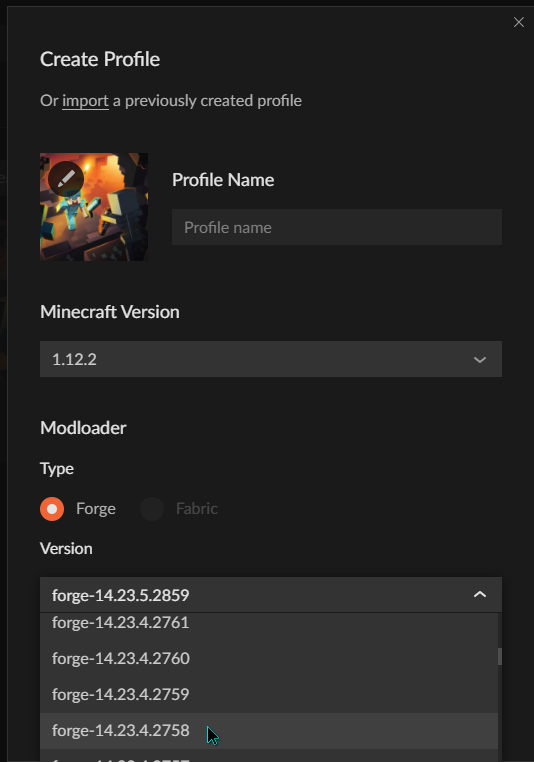
14.23.5.0 is higher than 14.23.4.2759
undone tinsel
which one do i choose then?
 lyric crescent
pick a version it said to pick
undone tinsel

lower than 12.23.4.2759
but i dont have anything even remotely close to that number
lyric crescent
 chilly hull
Ok wait so let me try to word this abit better so basicly it's not letting me post a mod into my project do I gotta wait untell it's approved by a mod? So the I can post it if not if you know why this issue is happening please tell me if you can help with this
lyric crescent
You don't put mods in it, you upload an export made using the instructions I sent you
chilly hull
Ok
chilly hull
lyric crescent
you need to be uploading a modpack export made by the app
Hey I relised that is this the curse forge app?
 tiny socket
Someone copied our mod and we have proof
 serene sorrel
images tho
tiny socket
But how can we report it?
serene sorrel
we know how just images is a problem
chilly hull
serene sorrel
we know how just images is a problem
Dang who steals a mod that's dumb
lyric crescent
Make a ticket, submit all your proof in it then send me the ticket number
serene sorrel
but stuff in it
serene sorrel
lyric crescent
Make a ticket, submit all your proof in it then send me the ticket number
ok
tiny socket
lyric crescent
Make a ticket, submit all your proof in it then send me the ticket number
Where we make one?
chilly hull
tiny socket
Where we make one?
Curseforge app
tiny socket
Okay thank you
 tiny socket
The app
chilly hull
Well how I did it was the app
serene sorrel
yes
chilly hull
I did a tickit
serene sorrel
ok
lyric crescent
? ticket-site
red patioBOT
:bug: Reporting via Website :bug:
Can't open the app or would rather use the website? You can do so here: https://support.curseforge.com/en/support/tickets/new
Fill out the form with accurate detailed information, "It doesn't work" isn't helpful! What exactly doesn't work and why doesn't it work should be easy to answer!
Make sure to upload your Overwolf logs with the Upload File option on the ticket, information on how to get these logs can be found here https://support.overwolf.com/en/support/solutions/articles/9000176827-how-to-get-your-overwolf-logs
serene sorrel
whats subject
tiny socket
lyric crescent
? ticket-site
Thank you
serene sorrel
is it nodnarb?
the guy we report
wait
or is it that someone is copying
ohh
its what we are making ticket about
i think
probably
chilly hull
chilly hull
Hey I relised that is this the curse forge app?
Also is this suppose to be the app? Yamza?
tiny socket
So they can do something if they can trust our proofs
lyric crescent
chilly hull
Also is this suppose to be the app? Yamza?
Yes
chilly hull
lyric crescent
Yes
Alr thanks!
lyric crescent
tiny socket
So they can do something if they can trust our proofs
Provide links to both projects. Don't need to link the person
tiny socket
lyric crescent
Provide links to both projects. Don't need to link the person
@serene sorrel
tiny socket
lyric crescent
Provide links to both projects. Don't need to link the person
Thank you
serene sorrel
So alborto and NiS made a mod around 2 months ago and like 1 week ago i started working on it too and i wanted it uploaded to curseforge and then someone joined jim`s server and found our discord joined and asked us for a download so he could steal the textures in the files of the mod and i asked why take the mod textures when you can just add it to your world and he said it was not working and i said it is so i was confused and then the mod was accepted and he also added his mod to curseforge and then i saw the big fish from the ultimate cursed mod and he copied way more than just that he even said alborto copied him by adding money and legos to the mod and then he added jim to the mod and cars and so we banned him, his name was nodnarb.
is that good?
for subject?
ohh
i just need the links for the mods
uhh
red patioBOT
Your question is not related to CurseForge owned/maintained features or services.
Please use the appropriate game room by getting a game role from #786424115535544350.
Otherwise use #👽︱game-support for game related help.
CurseForge does not make or maintain any of the content or games used on the site or app. Just because it's on the site/app does not make it a problem with CurseForge. Move rooms as requested, arguing about it will result in you being removed from the discord.
lyric crescent
Read
serene sorrel
lyric crescent
Read
ohh
i just made a ticket
and was not logged in
cant see it now
well its probably the most recent ticket
so just find it or something
or nvm
lyric crescent
Passed it on
 misty basin
why cant i find curse forge on the file exlpore
 drowsy sphinx
any chance you are going to update to accepted mod packs anytime soon. i've been waiting over an hour to play because the app isn't refreshing the current available versions. really need to fix that, i shouldn't have to wait for an accepted mod pack to be available.
@grand umbra any chance you can push the updates, i am sick of waiting to play, it shouldn't be taking hours for accepted mod packs to be available.
Whats the point of this, it would take less time to download the mods individually and just use the reg launcher, no need for CF if CF isn't going to work.
 misty trellis
can anybody help me with forge? I just downloaded it along with mods and it froze on the "freezing data"
I've tried almost every solution
such as
reinstalling minecraft
restarting the pc, waiting for 50 minutes on "freezing data"
 upper root
!notcf
red patioBOT
Your question is not related to CurseForge owned/maintained features or services.
Please use the appropriate game room by getting a game role from #786424115535544350.
Otherwise use #👽︱game-support for game related help.
CurseForge does not make or maintain any of the content or games used on the site or app. Just because it's on the site/app does not make it a problem with CurseForge. Move rooms as requested, arguing about it will result in you being removed from the discord.
misty trellis
ah
upper root
drowsy sphinx
Whats the point of this, it would take less time to download the mods individual...
You should read the #📛︱rules,specifically number 5 (I am pinging because it has been 15 mins since you asked and you are likely not watching this channel)
As for pack approval see below
!status
red patioBOT
Project Moderation Time
Project/File moderation is done on these days unless otherwise mentioned:
Sunday, Monday, Tuesday, Wednesday, Thursday: <t:1631170800:t> - <t:1631199600:t> (Your time)
Friday, Saturday: No Moderation!
Projects are moderated First in, First out. If you submit late in the work day, it will likely get left until the next day!
New Projects or anything flagged for manual review: 1-3 Working Days
Updates to approved projects not needing manual approval: 1 Hour
-If your file has been "Under Review" for more than an hour, then it is at manual review!
Changes will only show in the app if the project meets the requirements in the ?sync command and up to 24 hours has passed from when it was accepted.
red patioBOT
Sync and your Project.
CurseForge App and site do not share the same requirements! You can find things on the site but this does not mean it will be in the app!
For a mod to show up in the app:
- Projects MUST have a file marked as RELEASE
 or BETA
- Projects MUST be APPROVED
- Projects MUST have a file marked for the GAME VERSION SELECTED/LOADED
- Projects CAN'T be EXPERIMENTAL
- Projects CAN'T be ABANDONED
Files can take a while to show up in the app. If your files still have not shown up either your project is new and you have yet to mark a file as Release/Beta or there is issues with the sync system making it slow.
Vote this issue up if you would like to know when the last sync was! https://curseforge-ideas.overwolf.com/ideas/CF-I-1617
upper root
It can take up to 24hrs.
drowsy sphinx
upper root
It can take up to 24hrs.
first blurb say 1 hr if approved and not needing manual review, it's been accepted, and almost 2 hours later.
 signal ridge
Link the project
drowsy sphinx
signal ridge
Link the project
signal ridge
its only been 2 hours. Like Chief said it can take up to 24h to sync.
If you dont want to wait for the sync you can manually download it from the site and import it into the cf app
drowsy sphinx
wow, this is dumb. so i have to wait a day for an app to run a checksum... so i'll spend the day removing CF and installing the mods manually. sorry but thats just stupid, why "accept" a mod pack if you aren't going to make it accessible to the players in a timely fashion.
signal ridge
Sync isnt always instant. Things can fall behind or be slow sometimes. Welcome to the world of servers. Sometimes sync is slow, it happens. Just need to be patient and wait.
Ive had this pain with my own public packs. If you have a server and are wanting people to play asap then manually install the pack.
drowsy sphinx
yeah, i'm not that patient. in the world of instant, you guys are falling behind
add a manual check button, allow people who KNOW their pack is available to get the pack without waiting a day, tha's just poor customer service right there
signal ridge
"Instant" and computers / the internet will never happen. File sync will never be an instant unless everyone can run the highest grade in networking and have a 0 fault system in place
drowsy sphinx
i sync with a computer on the other side of the world every day, takes a few minutes, not sure what poor quality systems you guys run, but again. you are falling behind. it's not rocket science, it's a sync, millions of peoples phones do it with google everyday and they don't even know it's happening. the app sending out a " this is available" shouldn't be a day long process.
sorry, but i deal with this crap all day, banks have a reason to be 3 days behind, lots of checksum's with cash, but a mod pack that's made through an app taking a day for the app to send the all clear... get out of the 90's
signal ridge
Sync may also just be behind. You got to remember you are likely not the only one posting something atm. Thats a lot of files to sync all at once. Anyways. If your pack has not synced after 24h come back and let us know
drowsy sphinx
if it takes 24 hours i'm going to start working on your competitor, give you a reason to up your game, cause this is sloppy, sorry.
 young bone
They really left, or something different happened, all because their mod pack wasn’t synced to the app already
As for telling others that the pack is available, take the link and make an announcement about it
lyric crescent
That was quite uncalled for.
 hidden fern
idle sentinel
50 but its the same with everything else
hidden fern
idle sentinel
50 but its the same with everything else
Did you resolve the issue?
hidden fern
Send me a DM I'll try
 fervent crown
im attempting to open the minecolonies 1.18.1 modpack, but it keeps crashing. After half an hour of asking people on their discord, they told me that the issue had to do either with forge itself or java. For some strange reason, after it crashes, it does not make a crash log anywhere.
here's the only error I got

I think the reason why it doesnt make a log
is because it crashes because java isnt working before minecraft even opens
 exotic edge
hello. I have a question and im not quite sure where to take it. I've just put together a custom mod pack using the curse forge and I would like to send the pack to a friend of mine so that we can play it together on a LAN server........how do I do this?
 rich flint
fervent crown
here's the only error I got
rich flint
fervent crown
here's the only error I got
?mc-installfix
red patioBOT
This is NOT instructions for Repair Profile! They are NOT the same! You need to do this!
- Click on the Minecraft Tab on the Left side of the CurseForge App.
- Click button next to the
Create Custom Profileoption. - Click
Repair Installationoption. - Play game.
NOTE: You will not lose any modpacks or worlds!
fervent crown
ok
rich flint
try that first and playing, if still crashes provide latest.log
rich flint
exotic edge
hello. I have a question and im not quite sure where to take it. I've just put t...
LAN may or may not work as it has major problems with modded content. but this is how you create an export of your client -
?mc-packshare
red patioBOT
There are two ways to share a modpack you've made with others...
Export and Share - For Friends to Small Groups.
- Click the Icon for the modpack.
- Click the button next to play.
- Click
Export. - Select the files that should be included.
- Send the zip to the people that want it! They can follow the instructions in
!mc-installpackto install the pack!
Upload to Curseforge - For Public Release to Everyone.
This options will make your pack public to EVERYONE, it comes with extra requirements and will take some effort to set up.
- Go to here: https://www.curseforge.com/project/432/4471/create
- Fill out the information with a proper description of the pack. This should allow anyone to understand what the pack is.
- Click the Icon for the modpack in the CurseForge app.
- Click the button next to play.
- Click
Export. - Select the files that should be included.
- Open your Project you made on the CurseForge site and Upload the file you just made.
- Wait for Moderation & Sync so it can show up in the client! (See
!syncfor limitations)
rich flint
the reliable way to play modded together is to create a server pack, or find a modpack that publishes a server pack for their versions
exotic edge
thank you
I think I can also upload the modpack ive made into somewhere like minehut if LAN does not work.
rich flint
if you're reasonably computer savvy (know how to manage files) making a server on your computer isn't very difficult. watching a youtube vid or two is proabably the fastest way to take it in
exotic edge
I used to know how to do that.......im riding a bit of a high right now just from being able to make my own modpack! ive always loved tinkers construct but never could get my freinds to play project ozone 2 [my favorite modpack]
the new tools on the curse forge made it very simple to put together a simple pack but once its working ill have to look at getting some more mods like botania and ExNihilo
rich flint
sure. there are more mc channels locked behind the MC role in #786424115535544350 fyi
exotic edge
thanks ill check that out
chilly hull
!sync
red patioBOT
Sync and your Project.
CurseForge App and site do not share the same requirements! You can find things on the site but this does not mean it will be in the app!
For a mod to show up in the app:
- Projects MUST have a file marked as RELEASE or BETA
- Projects MUST be APPROVED
- Projects MUST have a file marked for the GAME VERSION SELECTED/LOADED
- Projects CAN'T be EXPERIMENTAL
- Projects CAN'T be ABANDONED
Files can take a while to show up in the app. If your files still have not shown up either your project is new and you have yet to mark a file as Release/Beta or there is issues with the sync system making it slow.
Vote this issue up if you would like to know when the last sync was! https://curseforge-ideas.overwolf.com/ideas/CF-I-1617
rich flint
fervent crown
still crashes
so you have no latest.log file at all?
what version is your CF app? (settings > bottom/left)
fervent crown
rich flint
so you have no latest.log file at all?
nope
rich flint
(^ issue was old CF app version - updated > works)
 signal vigil
I got question, can I put optifine into modpack folder?
signal vigil
tiny socket
I will send you in dms, if you agree
Me?
tiny socket
Yes
signal vigil
Yeah
tiny socket
You need to download a specific optifine version
 queen storm
!mc-optifine
red patioBOT
We do not offer support for Optifine!
If you have issues with Optifine, remove it. If you want further support try the discord found on their website.
https://www.optifine.net/home
Installing Optifine with modpacks on Curseforge:
- Right click the modpack icon, select
Open Folder. - Put the
Optifine.jarinto themodsfolder. - Now start the modpack.
 worthy vine
Hey, I am making a modpack for myself and one of the mods says I have old version of Forge, how can I update it?
rich flint
?mc-updatemodloader
red patioBOT
You can update the mod loader within the same game version in the CurseForge app by following these steps!
- Click on the modpack profile you are working with.
- Click on the button next to the play button.
- Click on the Profile Options button.
- Select the mod loader version you want from the dropdown.
- Play!
If you need to update to a new game version, a new profile is required.
 slate gorge
!status
red patioBOT
Project Moderation Time
Project/File moderation is done on these days unless otherwise mentioned:
Sunday, Monday, Tuesday, Wednesday, Thursday: <t:1631170800:t> - <t:1631199600:t> (Your time)
Friday, Saturday: No Moderation!
Projects are moderated First in, First out. If you submit late in the work day, it will likely get left until the next day!
New Projects or anything flagged for manual review: 1-3 Working Days
Updates to approved projects not needing manual approval: 1 Hour
-If your file has been "Under Review" for more than an hour, then it is at manual review!
Changes will only show in the app if the project meets the requirements in the ?sync command and up to 24 hours has passed from when it was accepted.
 compact prawn
whenever i load into a modpack and turn on fullscreen it just zoomsin way too muc
lemme send a pic

 upper root
In the zoomed out one click options then video settings. Change your gui scale to something other than auto
Also, for next time:
!notcf
red patioBOT
Your question is not related to CurseForge owned/maintained features or services.
Please use the appropriate game room by getting a game role from #786424115535544350.
Otherwise use #👽︱game-support for game related help.
CurseForge does not make or maintain any of the content or games used on the site or app. Just because it's on the site/app does not make it a problem with CurseForge. Move rooms as requested, arguing about it will result in you being removed from the discord.
upper root
CurseForge does not make or maintain any of the content or games used on the site or app. Just because it's on the site/app does not make it a problem with CurseForge.
west folio
p sure they just left
opal cipher
Yup
 velvet moon
Does anyone know how to install curseforge on linux?
lyric crescent
wait until it has a linux version
 meager helm
this is a scamm or not I don"t want get scamed again
queen storm
What is?
 tired bear
Can you play with a friend on curseforge?
queen storm
Need to make a server for that, goes outside of curseforge, can ask for instructions in #👽︱game-support
 pure meadow
Hey, I was wondering, the modpack I am trying to download is available on the website, but not when I open the app and search it up. Is there any way I can use the app instead of the website?
queen storm
Link it please
digital roost
can someone help me?
red patioBOT
╰( ͡° ͜ʖ ͡° )つ──☆*:・゚ *˜”*°•.˜”*°• Many Help •°*”˜.•°*”˜* <:curselit:796985620550385705>
Please provide a description of your issue with as much detail as possible. If you have an issue with a mod or modpack, tell us the name. Explain what you can see happening. Be specific!
 Tell us what is happening, we already know it "doesn't work".
Avoid using words like "it", tell us exactly what "it" is.
Don't assume anyone knows what you are talking about, be specific.
Tell us what you expected to happen.
Provide screenshots or video if possible.
Provide a log if possible. ?mc-log
digital roost
i can't play "Decimation" from BoheMod.When i try to start the launcher,it doesn't start.i can't speak english very well,so i f you need something,i can sendo you my anydesk's code
queen storm
!mc-installfix
red patioBOT
This is NOT instructions for Repair Profile! They are NOT the same! You need to do this!
- Click on the Minecraft Tab on the Left side of the CurseForge App.
- Click button next to the
Create Custom Profileoption. - Click
Repair Installationoption. - Play game.
NOTE: You will not lose any modpacks or worlds!
 chrome moss
i need some help with mods on my and my friends minecraft server
the mods used to work but we tramsferd server hosts and evrything was alright except for the mods
they don't work for some reasen but the server does without them
digital roost
queen storm
!mc-installfix
it works.Thank you so much <3
queen storm
chrome moss
they don't work for some reasen but the server does without them
!notcf
red patioBOT
Your question is not related to CurseForge owned/maintained features or services.
Please use the appropriate game room by getting a game role from #786424115535544350.
Otherwise use #👽︱game-support for game related help.
CurseForge does not make or maintain any of the content or games used on the site or app. Just because it's on the site/app does not make it a problem with CurseForge. Move rooms as requested, arguing about it will result in you being removed from the discord.
digital roost
uhh my experimental modpack's new update has not been approved yet but is still in review and a week has got over, whereas no message has been sent to me as a rejection too. The last update that i had posted didn't even took a day. May i know the reason why it is slow now?
queen storm
Show a screenshot of the files tab
 queen storm
Uploaded a day ago?
digital roost
that was a few days ago actually
but when i go on the link now, it says not found, cause I'm not logged in to the account as of now, and it usually shows that when a project is still being reviewed
but i asked the maintainer too, and he didn't recieve an email regarding the rejection of the file
queen storm
Need a current screenshot of the files list, not selected a specific file
 zenith ocean
Does anyone have a problem where if you open it without administrator it does not work. Only happens once in a blue moon
Open curseforge
lyric crescent
sounds like you have it installed somewhere that requires admin access. no it's not* normal
zenith ocean
Well most of the time it works without admin access
Idk maybe my PC was not all the way booted
Because when it happens I would have logged in to my account like 5 minutes vefore
 sinful surge
sorry im kinda dumb please may someone help me my minecraft keeps crashing here is the crashlog
 west compass
So I got Minecraft through Gamepass on PC, and your beta launcher isn't detecting it in whatever limbo folder microsoft game pass puts it in.
Do I just not mod minecraft?
rich flint
CF app uses it's own auto download copies of Minecraft files - unrelated to anything else you have
Install modpack profiles > press play > login to old vanilla launcher widget
upper root
Cf isnt detecting the launcher tho, its looking but cant find one where it normally is, in program files
I think
 supple summit
i cant download the curseforge installer
upper root
What goes wrong?
supple summit
the installer won't install
i install it but it is not in the Download
i have it now
 modest crow
my modpack has been under review for hours can someone help me please
red patioBOT
Project Moderation Time
Project/File moderation is done on these days unless otherwise mentioned:
Sunday, Monday, Tuesday, Wednesday, Thursday: <t:1631170800:t> - <t:1631199600:t> (Your time)
Friday, Saturday: No Moderation!
Projects are moderated First in, First out. If you submit late in the work day, it will likely get left until the next day!
New Projects or anything flagged for manual review: 1-3 Working Days
Updates to approved projects not needing manual approval: 1 Hour
-If your file has been "Under Review" for more than an hour, then it is at manual review!
Changes will only show in the app if the project meets the requirements in the ?sync command and up to 24 hours has passed from when it was accepted.
modest crow
lyric crescent
you dont need help for that, you need patience
no need for the rudeness, if i knew that i wouldnt have asked you could have just let me know with !status
lyric crescent
you could also just use the discord search instead of even asking to begin with 🙂
modest crow
great moderator 🤯
 safe breach
Alright, so I have an issue pertaining to a modpack I created to play on with my friends.
MC Version 1.16.5
Forge Version 36.2.23
I didn't know the proper way to package the mod files for import, so I sent a zip/copy of my profile, and had them copy the files over into a new profile on their machines, making sure they used the correct MC/Forge versions.
Now, 1/5 of us is having an issue where the profile will crash at the end of loading, every time. He can load the game from a blank profile just fine.
The other 4 of us have no issues.
Any thoughts?
I had him reinstall CurseForge, but haven't for Minecraft just yet.
lyric crescent
? mc-packshare
red patioBOT
There are two ways to share a modpack you've made with others...
Export and Share - For Friends to Small Groups.
- Click the Icon for the modpack.
- Click the button next to play.
- Click
Export. - Select the files that should be included.
- Send the zip to the people that want it! They can follow the instructions in
!mc-installpackto install the pack!
Upload to Curseforge - For Public Release to Everyone.
This options will make your pack public to EVERYONE, it comes with extra requirements and will take some effort to set up.
- Go to here: https://www.curseforge.com/project/432/4471/create
- Fill out the information with a proper description of the pack. This should allow anyone to understand what the pack is.
- Click the Icon for the modpack in the CurseForge app.
- Click the button next to play.
- Click
Export. - Select the files that should be included.
- Open your Project you made on the CurseForge site and Upload the file you just made.
- Wait for Moderation & Sync so it can show up in the client! (See
!syncfor limitations)
safe breach
Alright, that's good to know, but I just had him create another profile and put in JEI and Apple Skin to just see if it will load a lighter "pack". Still crashing.
upper root
Get him to join and post a log
safe breach
Will do
safe breach
So, he managed to fix it himself. Just repairing his main Minecraft install. Thanks for your help!
 fervent talon
Any way for Curseforge to launch Minecraft as admin? I'm trying to get Minecraft talking to Discord, but I use Discord as admin so that hotkeys work while I'm in games.
upper root
What...
That makes no sense. Why do you need to launch mc as admin??
fervent talon
upper root
What...
That makes no sense. Why do you need to launch mc as admin??
Craftpresence can't use rpc with Discord if you launch Discord in admin mode. Same thing happens with valorant-rpc, but that's fixable by launching it as admin.
 cunning stone
?mc-log
red patioBOT
Sending logs for support.
- Right-click the modpack profile icon OR click the button in the modpack profile.
- Click
Open Folder. - Open the
logsfolder. - Drag and drop the FILE named
latestORdebuginto discord.
cunning stone
Ok, so my custom modpack I made is not working at all. The custom pack crashes on initialization. I will provide the log
 somber star
Hi! I have downloaded CurseForge once and it worked. Suddenly it stopped working and I tried to uninstall it and all the mods. I redownloaded it, but the library is trying to load but I'm stuck on the loading bar. I've tried to uninstall and download a couple of times but it's still stuck on the loading screen. Any tips to resolve this issue? I'm using a mac and my macOS is Big Sur.
 main dirge
Heya, I just reset my PC as I fucked it up, and everytime I try to launch ANY 1.7.10+ I get this error https://mclo.gs/JADHygD I am not sure if this is CF related or not, so sorry if it isn't
508 lines | 2 errors
lyric crescent
main dirge
Heya, I just reset my PC as I fucked it up, and everytime I try to launch ANY 1....
?mc-installfix maybe
red patioBOT
This is NOT instructions for Repair Profile! They are NOT the same! You need to do this!
- Click on the Minecraft Tab on the Left side of the CurseForge App.
- Click button next to the
Create Custom Profileoption. - Click
Repair Installationoption. - Play game.
NOTE: You will not lose any modpacks or worlds!
main dirge
You're a legend! Thank you so much, you just saved me hours of work!
cunning stone
Alright, after some tinkering and googling, I was able to reduce the errors the log shows me, but now I am completely stuck on my custom pack. The main errors the latest log shows me is an error with "libcs", an error with a target dummy, which is part of decorative blocks, and finally an error about "mixin" and sponge something. I'll include the updated log
This is what the launcher shows me whenever I try to launch the mod pack
 digital roost
how can i turn to item or mob with which mod?
upper root
!notcf
red patioBOT
Your question is not related to CurseForge owned/maintained features or services.
Please use the appropriate game room by getting a game role from #786424115535544350.
Otherwise use #👽︱game-support for game related help.
CurseForge does not make or maintain any of the content or games used on the site or app. Just because it's on the site/app does not make it a problem with CurseForge. Move rooms as requested, arguing about it will result in you being removed from the discord.
 true eagle
is there a reason that a mod would be on the website but not the app
lyric crescent
Could be
true eagle
is there anyway to add a mod to a modpack if its nnot on the app
lyric crescent
Put it in the mods folder
true eagle
thanks
red patioBOT
Error/Exit codes are useless. Follow these steps so someone can actually help you.
- Right-click the modpack profile icon OR click the button in the modpack profile.
- Click
Open Folder. - Open the
logsfolder. - Drag and drop the FILE named
latestORdebuginto discord.
cunning stone
Good news: I fixed the error by removing the 'Simple' GUI Modifications
Bad news is there is now another problem. When I create a world, the world creation never loads. The progress bar sits at 0% until the launcher crashes, and the launcher tells me "Exit code 0"
Ok sorry one sec
Like I said, the game launches fine, but the game will not create a world, and crashes upon clicking the "play" icon on the world
red patioBOT
Your question is not related to CurseForge owned/maintained features or services.
Please use the appropriate game room by getting a game role from #786424115535544350.
Otherwise use #👽︱game-support for game related help.
CurseForge does not make or maintain any of the content or games used on the site or app. Just because it's on the site/app does not make it a problem with CurseForge. Move rooms as requested, arguing about it will result in you being removed from the discord.
cunning stone
upper root
Void dimension and interfaces from bclib conflict
So, what do I need to remove to fix it? Or rather, what are the exact two mods that are conflicting? I assume one is VoidZ? But I don't see an interface one. Apologies if I'm overlooking it
upper root
bclib is the other one, as i said
cunning stone
Oh, sorry. You said interfaces from bclib so I wasn't sure if that was the name. Thank you, I will remove one and lyk
 sweet mantle
how do i sign in with a microsoft account
cunning stone
upper root
bclib is the other one, as i said
I removed VoidZ, created a new world, and the world creation just sits there for a minute at 0%, and then crashes. Did I remove the wrong mod?
I assumed you meant they were conflicting with each other, and I needed to remove one or the other, but did you actually mean they both need to be removed?
upper root
sweet mantle
how do i sign in with a microsoft account
!mc-login
red patioBOT
Minecraft Logins
Step 1: Get to the Microsoft login screen.
Step 2: Log in with a Microsoft account that owns the Java version of Minecraft.
Done!
Issues: If it says PLAY DEMO then the account used DOES NOT own Java Minecraft. Log in with one that does.
 cunning stone
Sure thing
 mighty plover
i need help now
its happening again

someone help
my network is perfectly fine
idk whats happening
anyone?
sweet mantle
!mc-login
red patioBOT
Minecraft Logins
Step 1: Get to the Microsoft login screen.
Step 2: Log in with a Microsoft account that owns the Java version of Minecraft.
Done!
Issues: If it says PLAY DEMO then the account used DOES NOT own Java Minecraft. Log in with one that does.
sweet mantle
oh i relize why
 woeful trellis
I just wanna play my modpacks again 😢
and I don't know what to do
:<
is anyone able to help me :(
rich flint
?getcf
red patioBOT
Looking to install the CurseForge app?
<:windows:798410728188936222> Windows
Minimum Requirements:
- OS Version: 7 (64 bit), 8.1, 10, 11
- 64 bit Required.
- 350MB storage space.
- Microsoft .Net 4.8
- Intel/AMD quad-core CPU
- 8GB ram
Download: https://download.overwolf.com/install/Download?&PartnerId=4047
If you are having issues with the installer use the URL below to install Overwolf then go to the app store to download CurseForge.
https://content.overwolf.com/downloads/setup/latest/regular.html
<:mac:798410654418862130> Mac
Minimum Requirements:
- OS Version 10.14 or newer.
- 64 bit Required.
Download: https://curseforge.overwolf.com/downloads/curseforge-latest.dmg
:penguin: Linux
Minimum Requirements:
Yes. SOON:tm: ( ͡~ ͜ʖ ͡°)
Download: :person_shrugging:
woeful trellis
is this for me?
rich flint
yes? do you have a problem?
woeful trellis
ah I see
no I was just wondering :)
I'll let you know if I still have issues
It still isn't working :(
rich flint
you'll need to take screenshot or provide details
woeful trellis
of what exactly?
I'm sorry if I'm slow with this stuff, I'm not all that great with files
sweet mantle
i cant use mods without finding my microsoft password i have such a bad memory
rich flint
it doesn't work isn't helpful. what are you doing, what is your error message, what is not happening
rich flint
sweet mantle
i cant use mods without finding my microsoft password i have such a bad memory
contact microsoft support. CF can't help with that
sweet mantle
i know it cant
woeful trellis
oh okay, well I recently put together a modpack on curseforge, and I've been trying to run it on 1.16.5 like you're supposed to do. When i try and play the launcher it says the game crashed and gives me exit code 0, so to summarise everything works perfectly, up until the point where the actual game has to load.
red patioBOT
Error/Exit codes are useless. Follow these steps so someone can actually help you.
- Right-click the modpack profile icon OR click the button in the modpack profile.
- Click
Open Folder. - Open the
logsfolder. - Drag and drop the FILE named
latestORdebuginto discord.
red patioBOT
This is NOT instructions for Repair Profile! They are NOT the same! You need to do this!
- Click on the Minecraft Tab on the Left side of the CurseForge App.
- Click button next to the
Create Custom Profileoption. - Click
Repair Installationoption. - Play game.
NOTE: You will not lose any modpacks or worlds!
woeful trellis
I really hope this works
thanks in advance for being so patient ^^
IT WORKED!!! THANK YOU SO MUCH :D
rich flint
👍
 mighty plover
any help for this?

its annoying as fuck and i cant play my modpacks
i asked like an hour ago and got no response
ive tried installing through OW but it still gives this
upper root
!cflogs send these
red patioBOT
<:overwolf:857375414002384916> How to get CurseForge App logs! <:overwolf:857375414002384916>
- Click the
Create logs zipin the menu. - Drag and drop the file it just made to this chat room to upload it.
- Wait for someone to look at it so they can help you.
mighty plover
oki mb
i was just annoyed since im supposed to log onto a server rn
and i had reinstalled windows so had to reinstall everything
upper root
I am not sure of how to fix that, so I have passed it onto someone smarter than me. They may take a bit to see tho
 ivory mirage
I have downloaded better minecraft for forge and it doesn't work does anyone know how to fix
mighty plover
ivory mirage
I have downloaded better minecraft for forge and it doesn't work does anyone kno...
ask the modpack dev
ivory mirage
how would I do that
 cosmic horizon
I seem to be having an issue with updating one of the modpacks I have downloaded, there's no option to update it or change version when I right click it, anyone have an idea as to why that is?
upper root
!mc-modifypack make sure the toggle mentioned in here is on 
SORRY. I meant off 😔
red patioBOT
How to add/remove mods in a modpack.
- Click on the picture of the modpack.
- Click the

Add More Contentbutton, IF this button is not there, see below before continuing. - Find the Mods, Resource Packs or Maps you wish to Install and click
Installon them. - Wait for all the required mods to be downloaded.
- Start the modpack.
How to Enable/Disable content management for modpacks.
- Click on the picture of the modpack.
- Click on the button next to the
Playbutton. - Click on
Profile Options. - Check the
Allow content management for this profileoption if you want to edit the content of the modpack, uncheck it to disable.
NOTE: The Allow content management for this profile option is what allows you to Delete, Disable, Update or Install any Mods, Resource Packs or Maps managed by CurseForge. It must be on to modify any of them! (Currently)
cosmic horizon
Hmm, I just checked that toggle and it's enabled, the "Allow content management" thing, but there's still no option to update or change versions
Though a downloaded latest version of the pack as a separate profile does have the option to change version oddly enough
 nimble holly
Hi there, this may just be me being impatient, but I'm wondering if there is a possible reason my modpack is taking longer than usual to be accepted by moderators. Im used to maximum 1 1/2 days wait to be accepted but this pack is taking almost 3 days. Is there anyone that could tell me how come this is? (I have checked and all requirements have been met)
 quasi rain
Hey all. Just wanted to check in and see if anyone has encountered any issues with the curseforge installer not launching on Windows 11? We've tried running in compatibility mode and using Windows Insider after running into issues with the default install. We tried to run the installer in admin mode as well though no additonal logs or prompts pop up after trying to run.
Checked for similar issues earlier in the channelbut doesn't look like there was a solution related to the installer. Thank you.
upper root
!mc-updatemodloader ⤵️
red patioBOT
You can update the mod loader within the same game version in the CurseForge app by following these steps!
- Click on the modpack profile you are working with.
- Click on the button next to the play button.
- Click on the Profile Options button.
- Select the mod loader version you want from the dropdown.
- Play!
If you need to update to a new game version, a new profile is required.
upper root
nimble holly
Hi there, this may just be me being impatient, but I'm wondering if there is a p...
!status ⤵️
red patioBOT
Project Moderation Time
Project/File moderation is done on these days unless otherwise mentioned:
Sunday, Monday, Tuesday, Wednesday, Thursday: <t:1631170800:t> - <t:1631199600:t> (Your time)
Friday, Saturday: No Moderation!
Projects are moderated First in, First out. If you submit late in the work day, it will likely get left until the next day!
New Projects or anything flagged for manual review: 1-3 Working Days
Updates to approved projects not needing manual approval: 1 Hour
-If your file has been "Under Review" for more than an hour, then it is at manual review!
Changes will only show in the app if the project meets the requirements in the ?sync command and up to 24 hours has passed from when it was accepted.
upper root
quasi rain
Checked for similar issues earlier in the channelbut doesn't look like there was...
!getcf maybe try the second link, doing it throught the OW app?
red patioBOT
Looking to install the CurseForge app?
<:windows:798410728188936222> Windows
Minimum Requirements:
- OS Version: 7 (64 bit), 8.1, 10, 11
- 64 bit Required.
- 350MB storage space.
- Microsoft .Net 4.8
- Intel/AMD quad-core CPU
- 8GB ram
Download: https://download.overwolf.com/install/Download?&PartnerId=4047
If you are having issues with the installer use the URL below to install Overwolf then go to the app store to download CurseForge.
https://content.overwolf.com/downloads/setup/latest/regular.html
<:mac:798410654418862130> Mac
Minimum Requirements:
- OS Version 10.14 or newer.
- 64 bit Required.
Download: https://curseforge.overwolf.com/downloads/curseforge-latest.dmg
:penguin: Linux
Minimum Requirements:
Yes. SOON:tm: ( ͡~ ͜ʖ ͡°)
Download: :person_shrugging:
nimble holly
Awesome
quasi rain
upper root
!getcf maybe try the second link, doing it throught the OW app?
Appreciate it. Giving it a look now.
 vivid gorge
how do i change Biomes O' Plenty to 2445 instead of 2444 for pixelmon
upper root
Send the full log into #👽︱game-support
 true marten
ok
true marten
upper root
Send the full log into <#778097796410376242>
ok i sent it
true marten
log
red patioBOT
Your question is not related to CurseForge owned/maintained features or services.
Please use the appropriate game room by getting a game role from #786424115535544350.
Otherwise use #👽︱game-support for game related help.
CurseForge does not make or maintain any of the content or games used on the site or app. Just because it's on the site/app does not make it a problem with CurseForge. Move rooms as requested, arguing about it will result in you being removed from the discord.
 grizzled sierra
Every time I start the modpack i made it crashes can someone help?
upper root
!mc-logs post these into #👽︱game-support
red patioBOT
Sending logs for support.
- Right-click the modpack profile icon OR click the button in the modpack profile.
- Click
Open Folder. - Open the
logsfolder. - Drag and drop the FILE named
latestORdebuginto discord.
upper root
mighty plover
last time it happend, it fixed in a bit
Is it still happening? If so, try swap networks, like moving onto a mobile hotspot.
mighty plover
na its fine now
 spark siren
not sure if this has happened to anybody before, seen here before or even if its a common issue. But when selecting a version, nothing shows up.
 opal cipher
Restart CurseForge, should be resolved now
 shy beacon
when i want to create a new profile and want to select version none of the versions shows up. just a blank small window
queen storm
Restart curseforge
shy beacon
queen storm
Restart curseforge
oh thanks
grizzled sierra
Can someone help how can i fix this? : [11:46:37] [main/ERROR]: Missing mandatory dependencies: ae2
upper root
You need to install ae2, otherwise known as applied energistics
digital roost
when will my mod be approved?
shy beacon
digital roost
when will my mod be approved?
it takes time. when i uploaded a mod it took few hours
digital roost
shy beacon
it takes time. when i uploaded a mod it took few hours
it's been 1 day since I added my mod
red patioBOT
Project Moderation Time
Project/File moderation is done on these days unless otherwise mentioned:
Sunday, Monday, Tuesday, Wednesday, Thursday: <t:1631170800:t> - <t:1631199600:t> (Your time)
Friday, Saturday: No Moderation!
Projects are moderated First in, First out. If you submit late in the work day, it will likely get left until the next day!
New Projects or anything flagged for manual review: 1-3 Working Days
Updates to approved projects not needing manual approval: 1 Hour
-If your file has been "Under Review" for more than an hour, then it is at manual review!
Changes will only show in the app if the project meets the requirements in the ?sync command and up to 24 hours has passed from when it was accepted.
opal cipher
No moderation will be done until sunday, at the above given times.
grizzled sierra
upper root
You need to install ae2, otherwise known as applied energistics
But it is installed
queen storm
Show it please
grizzled sierra

 hot garnet
well i tried to launch a modpack it said 2 mods could not be loaded idk what to do shall i show crash report or somethin
queen storm
grizzled sierra
That is odd...
opal cipher
Try uninstalling and reinstalling it. In case it was installed during a hiccup in the API.
hot garnet
please help
red patioBOT
╰( ͡° ͜ʖ ͡° )つ──☆*:・゚ *˜”*°•.˜”*°• Many Help •°*”˜.•°*”˜* <:curselit:796985620550385705>
Please provide a description of your issue with as much detail as possible. If you have an issue with a mod or modpack, tell us the name. Explain what you can see happening. Be specific!
Tell us what is happening, we already know it "doesn't work".
Avoid using words like "it", tell us exactly what "it" is.
Don't assume anyone knows what you are talking about, be specific.
Tell us what you expected to happen.
Provide screenshots or video if possible.
Provide a log if possible. ?mc-log
red patioBOT
Sending logs for support.
- Right-click the modpack profile icon OR click the button in the modpack profile.
- Click
Open Folder. - Open the
logsfolder. - Drag and drop the FILE named
latestORdebuginto discord.
 livid sparrow
why is my modpack not appearing in the curseforge app
queen storm
Link it please
livid sparrow
how do i link a modpack from the app
queen storm
Did you upload the modpack on the site?
queen storm
That is why it does not appear
livid sparrow
i dont know
queen storm
The app doesn't list all modpacks that are made using it from everybody, it only lists the one on the site
livid sparrow
oh ok
digital roost
why does curseforge crash when i go to a mods profile options
queen storm
What version are you on?
livid sparrow
How do i upload the modpack on curseforge
queen storm
!mc-packshare
red patioBOT
There are two ways to share a modpack you've made with others...
Export and Share - For Friends to Small Groups.
- Click the Icon for the modpack.
- Click the button next to play.
- Click
Export. - Select the files that should be included.
- Send the zip to the people that want it! They can follow the instructions in
!mc-installpackto install the pack!
Upload to Curseforge - For Public Release to Everyone.
This options will make your pack public to EVERYONE, it comes with extra requirements and will take some effort to set up.
- Go to here: https://www.curseforge.com/project/432/4471/create
- Fill out the information with a proper description of the pack. This should allow anyone to understand what the pack is.
- Click the Icon for the modpack in the CurseForge app.
- Click the button next to play.
- Click
Export. - Select the files that should be included.
- Open your Project you made on the CurseForge site and Upload the file you just made.
- Wait for Moderation & Sync so it can show up in the client! (See
!syncfor limitations)
 sweet oyster
How to downland CurseForge app on Windows 11?
queen storm
!getcf
red patioBOT
Looking to install the CurseForge app?
<:windows:798410728188936222> Windows
Minimum Requirements:
- OS Version: 7 (64 bit), 8.1, 10, 11
- 64 bit Required.
- 350MB storage space.
- Microsoft .Net 4.8
- Intel/AMD quad-core CPU
- 8GB ram
Download: https://download.overwolf.com/install/Download?&PartnerId=4047
If you are having issues with the installer use the URL below to install Overwolf then go to the app store to download CurseForge.
https://content.overwolf.com/downloads/setup/latest/regular.html
<:mac:798410654418862130> Mac
Minimum Requirements:
- OS Version 10.14 or newer.
- 64 bit Required.
Download: https://curseforge.overwolf.com/downloads/curseforge-latest.dmg
:penguin: Linux
Minimum Requirements:
Yes. SOON:tm: ( ͡~ ͜ʖ ͡°)
Download: :person_shrugging:
 queen storm
sweet oyster
queen storm
sweet oyster
oh thanks
 carmine pine
When exporting a large modpack (252 mods) i sometimes have one or more mods that are on CF not being included in the manifest. Or they appear in the overrides folder which makes my profile invalid to upload.
Idk why, but it also takes a while to export the profile, b/c of this i spent hours trying to make the profile work (removing/readding the mods back) but to no avail.
is this a known issue?
carmine pine
CF? on the latest one stable
...
i actually tried it again after a few weeks and now it seems to work -.-;;
queen storm
Yeah, you just updated probably.
carmine pine
i assume this was recently fixed?
aah ye ye
also, is there any progress on the custom java issue?
is there any other workaround that remembers the specified java other then to keep changing it in vanilla launcher?
queen storm
No, as using a different java version is normally not needed
carmine pine
queen storm
No, as using a different java version is normally not needed
true, but there's the IBM J9 one that is incredible compared to openjdk
https://developer.ibm.com/languages/java/semeru-runtimes/downloads
you'll be suprised forreals 🙂
i found it thx to this post
https://www.reddit.com/r/feedthebeast/comments/as6p87/java_vms_and_you_how_to_reduce_your_ram_and_cpu/


reddit
332 votes and 131 comments so far on Reddit
 dim prairie
One message removed from a suspended account.
One message removed from a suspended account.
queen storm
Where are your instances? Is that in that folder?
dim prairie
One message removed from a suspended account.
One message removed from a suspended account.
One message removed from a suspended account.
queen storm
!owlogs
red patioBOT
<:overwolf:857375414002384916> How to get CurseForge App logs! <:overwolf:857375414002384916>
- Click the
Create logs zipin the menu. - Drag and drop the file it just made to this chat room to upload it.
- Wait for someone to look at it so they can help you.
dim prairie
One message removed from a suspended account.
queen storm
Logs say that you don't have the correct permissions
dim prairie
One message removed from a suspended account.
queen storm
(D:\Minecraft\Curse\Instances\Fowl Waters)
dim prairie
One message removed from a suspended account.
One message removed from a suspended account.
queen storm
Neither do I, that is why I forwarded this to staff
dim prairie
One message removed from a suspended account.
carmine pine
queen storm
Neither do I, that is why I forwarded this to staff
heya, could you maybe ask staff if they could consider adding proper support for a custom java?
it's a bit of a known issue i've heard/seen
queen storm
!feedback
red patioBOT
<:CFidea:798388634972717066> Have an idea on how to improve CurseForge? <:CFidea:798388634972717066>
CurseForge is looking for great ideas and user feedback! Get into the CurseForge Community by providing some feedback and voting on what's important to you!
Think some game should be supported? Post an idea and explain why!
Got a to die for feature idea? Let's hear it!
Location In-app
- Click the button on the bottom left of the app.
- Click on

Suggest a Featureoption!
queen storm
And last time they did it everything broke
People are gonna mess with it and break stuff
carmine pine
carmine pine
queen storm
And last time they did it everything broke
wut? what ya mean?
carmine pine
oh sorry, the reply function as it on by default pardon
died? like it tottaly hang or didn't boot mc launcher?
queen storm
It crashed curseforge
carmine pine
aah i see, you think they'll likely look at the issue again sometime or is it a none-fixable thing?
queen storm
I have no idea, there are bigger things to fix first
carmine pine
mmm gotcha thx ^^
queen storm
!notcf
red patioBOT
Your question is not related to CurseForge owned/maintained features or services.
Please use the appropriate game room by getting a game role from #786424115535544350.
Otherwise use #👽︱game-support for game related help.
CurseForge does not make or maintain any of the content or games used on the site or app. Just because it's on the site/app does not make it a problem with CurseForge. Move rooms as requested, arguing about it will result in you being removed from the discord.
 sage pumice
quick question, a friend of mine is trying to install the launcher but it doesnt let her what can she do?
queen storm
She can join here and ask help herself
 tiny island
hello
i was trying to download Vault hunters modpack today, yet i always got the same error of:

does anyone know how to fix this issue?
@here
opal cipher
Restart CurseForge. And don't ever ping here/everyone, or anyone randomly. Read the rules.
tiny island
tried that, didn't work
opal cipher
!owlogs
red patioBOT
<:overwolf:857375414002384916> How to get CurseForge App logs! <:overwolf:857375414002384916>
- Click the
Create logs zipin the menu. - Drag and drop the file it just made to this chat room to upload it.
- Wait for someone to look at it so they can help you.
tiny island
?
opal cipher
Read the instructions, follow them. Create the logs and drag them in here, so that I can forward them to someone that can take a look at them later.
opal cipher
Thanks.
Told someone about it, and they will check when they are able to. Meanwhile, you could try to restart your computer to see if that helps.
opal cipher
Got a tip. Try repairing the minecraft installation
https://www.youtube.com/watch?v=EeAf_PKXl8c
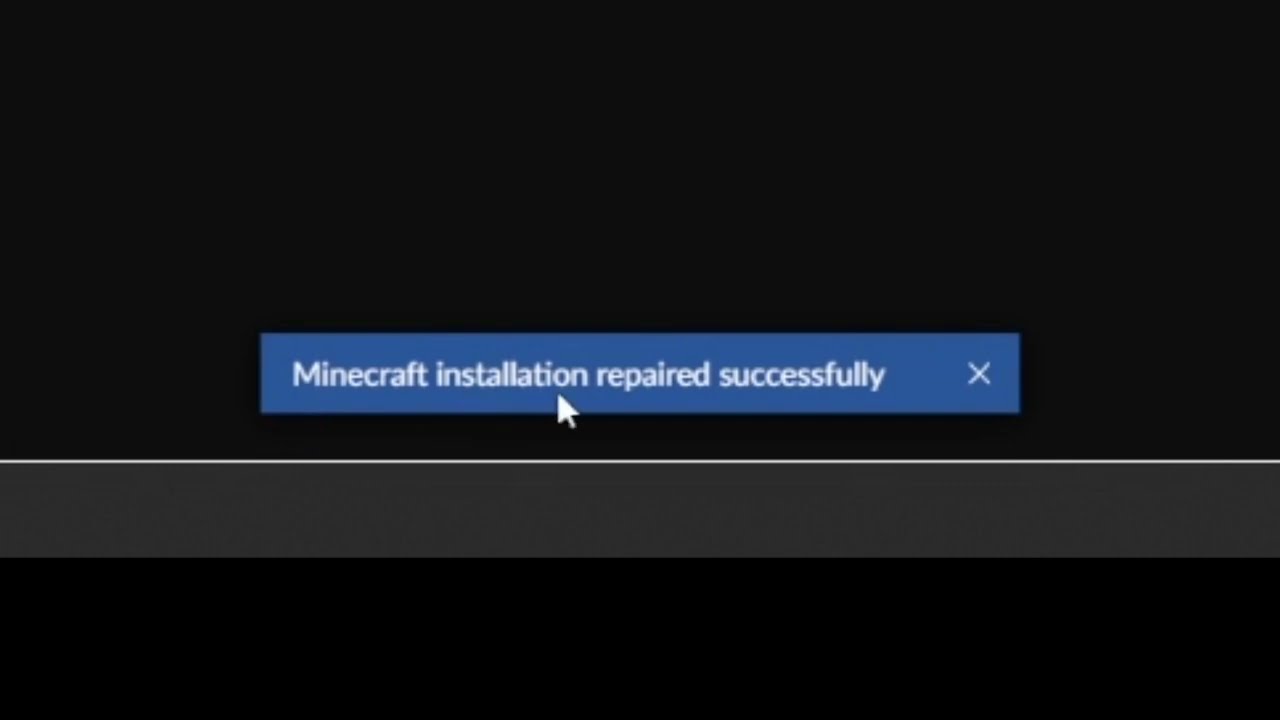
This short video will show you how to find the "Repair installation" for Minecraft in CurseForge.
What it does, is basically check if the local installation of Minecraft that CurseForge uses, is valid/working, and will repair itself, if needed.
tiny island
ty worked
 faint fog
hii
can someone help
\jinput-2.0.5.jar has a security seal for path net.java.games.input, but that path is defined and not secure
i get this error
in my logs
and you know
it happens when i press w or escp or something like that
and then my game just stops loading
and dies
xd
red patioBOT
Your question is not related to CurseForge owned/maintained features or services.
Please use the appropriate game room by getting a game role from #786424115535544350.
Otherwise use #👽︱game-support for game related help.
CurseForge does not make or maintain any of the content or games used on the site or app. Just because it's on the site/app does not make it a problem with CurseForge. Move rooms as requested, arguing about it will result in you being removed from the discord.
opal cipher
Just because it's on the site/app does not make it a problem with CurseForge
So move to #👽︱game-support and post the latest.log in there
 gentle belfry
Is the Curseforge API having issues?
queen storm
It is a bit wonky today
gentle belfry
F
 frail scarab
runs k for me
gentle belfry
GDlauncher devs saying it's an issue with Curseforge
queen storm
They say that every time.
gentle belfry
It usually is an issue with Curseforge every time tho
 trail comet
Are all the mods downloaded from curse forge safe?
queen storm
They are using a reverse engineered api not made for public use 🤷♂️
queen storm
trail comet
Are all the mods downloaded from curse forge safe?
Yes
trail comet
Like 100%
queen storm
If you are so worried then you should not be playing modded in all fairness
frail scarab
queen storm
If you are so worried then you should not be playing modded in all fairness
yep they have a moderation system, also i agree
trail comet
Ik how to mod and ive done it before but I wanted to know
K thanks
Also can you run 1.17 mods with 1.17.1 Mods?
I imagine because its like the same version but I wasn't sure
frail scarab
trail comet
Also can you run 1.17 mods with 1.17.1 Mods?
most mods show 1.17 but theyre 1.17.1, use 1.17.1 or 1.18.1 becuse its alot safer than 1.17 or 1.18
trail comet
Wdym safer
frail scarab
espicially after the log4j exploit
but i shouldnt be talking it here
not curseforge related
queen storm
Best to just try it out and find out, depends per mod
queen storm
!mc-installmods
red patioBOT
How to install mods in CurseForge App.
- Click
+ Create Custom Profile - Name it, select the required Minecraft version, select the modloader & modloader version (usually the highest number), click
Create. - Click the profile icon.
- Click
Add More Content - Search and install the desired mods.
- Start the game!
How to install mods not on CurseForge.
- Right click the profile picture or Open the profile and click the Icon next to the play button.
- Click
Open Folder. - Drag the mod(s) into the
modsfolder. (Note: Some mods will require others, to run. Make sure to read the instructions for the mod!) - Start the game!
 trail comet
Not on curse forge I meant on Fabric
queen storm
!!=
red patioBOT
Wording is important!
Forge = Minecraft Forge, This is a modloader often just called "Forge".
Fabric = Fabric MC, this is another modloader, just called "Fabric".
CurseForge = A Website/App that has content for games.
Mods = Individual mod files.
Modpacks = Multiple mods put into the mods folder or downloaded from CurseForge.
These are not Interchangeable! Please use the correct terms as it allows us to help you faster!
 alpine abyss
Why does cureforge use so much of your CPU? Or is it just me?
queen storm
Then close it after the game launches
alpine abyss
queen storm
Then close it after the game launches
What?
queen storm
alpine abyss
What?
Start the game, close curseforge
alpine abyss
Ok
 night mirage
Hello guys! I want to pass my Minecraft server (1.16.5 PaperMC) to a Forge Minecraft server (1.18.1 or even just 1.16.5 PaperMC (with Magma)) but in any i have an error
queen storm
!notcf
red patioBOT
Your question is not related to CurseForge owned/maintained features or services.
Please use the appropriate game room by getting a game role from #786424115535544350.
Otherwise use #👽︱game-support for game related help.
CurseForge does not make or maintain any of the content or games used on the site or app. Just because it's on the site/app does not make it a problem with CurseForge. Move rooms as requested, arguing about it will result in you being removed from the discord.
 snow pine
is there a forge for java 1.16, not 1.16.1 just 1.16?
queen storm
Of what?
snow pine
queen storm
Of what?
edited sry
queen storm
!mc-optifine
red patioBOT
We do not offer support for Optifine!
If you have issues with Optifine, remove it. If you want further support try the discord found on their website.
https://www.optifine.net/home
Installing Optifine with modpacks on Curseforge:
- Right click the modpack icon, select
Open Folder. - Put the
Optifine.jarinto themodsfolder. - Now start the modpack.
snow pine
sry, edited again
queen storm
Stop with the edits. You know pretty well what you want
snow pine
? i want forge 1.16
snow pine
ok thanks
 pine shell
Okey, so today I logged in in curseforge and all of my downloaded modpacks were gone, my saves disappeared out of existence, any idea of why this happened and what can I do so it doesn't happen again?
queen storm
Find the place where they were saved, they still there?
pine shell
queen storm
Find the place where they were saved, they still there?
I installed the modpack again
and checked the saves
and nope
or do you mean something else?
upper root
They will probably be loacted in the old twitch install folder
pine shell
upper root
They will probably be loacted in the old twitch install folder
where can i find that?
upper root
Not sure, i think its in your user folder (C:/users/username)
Also no need for the ping, #📛︱rules 5️⃣
 olive drift
So I play a mod pack called Origins Adventure by nurmdawurm and it wont play, it goes through the launcher and everything but the actual game just downt want to play I've tried everything from restarting to a full reset and still nothing, but if I launch something like RL craft it will let me play.
I've tried the repair instillation as well
I really need help with this :(
It really dosnt make sense seeing as rl craft is chunkier than the mod I want to use but I can still use RL craft
 desert bobcat
cool
upper root
What is your curseforge version?  -> bottom left
olive drift
0.191.3.2
desert bobcat
mk
upper root
Does a message come up after you launch it?
And pengi, please stop
desert bobcat
stop what
upper root
The posting of unrelated messages
 cyan idol
Hello everyone! I joined to ask a quick question. For Minecraft modpacks - Is there a problem with including the word "Minecraft" in the project title? I submitted my project for publishing yesterday and today I got a request to remove the term "Minecraft" from the project title.
I am just confused about this 😅 - Sorry if this isn't the right channel for this btw!
 upper root
cyan idol
Hello everyone! I joined to ask a quick question. For Minecraft modpacks - Is th...
upper root
cyan idol
Hello everyone! I joined to ask a quick question. For Minecraft modpacks - Is th...
You need to remove minecraft from the name
olive drift
No. But if I try to launch again after it acts as if it has minecraft open, like it asks if I want to close an already running one
cyan idol
Gotcha but like... Aren't there dozens of Minecraft modpacks with the word "Minecraft" in their title already published to Forge? Am I missing something?
cyan idol
Ohh okay, I sorta figured that was the case. No problem then, name can be changed. I was just super confused when I got that message. Thanks for the confirmation! 👌
upper root
olive drift
No. But if I try to launch again after it acts as if it has minecraft open, like...
Ahhh great. Let me see if i can find what fixed this for others.
For now, any java arguments set in => 
Minecraft? If so, clear them
olive drift
What?
upper root
This is an issue others have had, and its a pain to solve, and I can't remember exactly what the fix is.
olive drift
Ah
You're looking?
Yea it's a pain I've like done a full computer reset
I've been at it since yesterday
cyan idol
Would naming the modpack something with "MC" in it be allowed? Is there a link to the guidelines?
upper root
Mc shouldnt be allowed either
cyan idol
Dang. That complicates things.
upper root
The guidelines are basically no game name and no author name
 prisma thistle
help i keep trying to open the profile, i get exit code 0?
red patioBOT
Error/Exit codes are useless. Follow these steps so someone can actually help you.
- Right-click the modpack profile icon OR click the button in the modpack profile.
- Click
Open Folder. - Open the
logsfolder. - Drag and drop the FILE named
latestORdebuginto discord.
prisma thistle
nvm just restarted forge
red patioBOT
Change your install path to the following:
For Windows: C:\CurseForge
For Mac: /Users/Shared/CurseForge
If Minecraft is not installed in CurseForge App:
- Click the
 in the top left.
 - Select Minecraft from the list of games.
- Select the
Advancedoption and pick the location for your computer listed above. - Click
Continue.
If Minecraft is installed in CurseForge App:
- Click the in the bottom left.
- Select the Minecraft tab.
- Click
Change. - Select the location for your computer listed above.
:no_entry_sign: Minecraft Files should NOT be installed inside the following locations :no_entry_sign:
:no_entry_sign: .minecraft folder.
:no_entry_sign: OneDrive folders.
:no_entry_sign: Desktop folder.
:no_entry_sign: iCloud enabled folders.
:no_entry_sign: or any other cloud saved folder.
:no_entry_sign: or folders with non-English characters in them.
If any of the above are in the path you need to change/move it!
upper root
(For bwbb)
olive drift
I'm not sure what you're asking I'm not exactly very tech savy
Most of my attempted fixes are from searching the issue and videos that offer help
upper root
Send a screenshot of => Minecraft
olive drift
You want me to send a screenshot to a channel?
upper root
Yes. Send it here.
You can use  +
+ Shift + S then paste it into discord (Ctrl + V)
olive drift
I dont have discord on the computer I'm using mobile
upper root
Ahh. What is the Minecraft Modding Path set to on it?
 abstract perch
Hi im asking for a friend bc they cant join the server. This is what they said
I made a profile on CurseForge, the profile is 1.18.1 Forge, I installed mods with the "add more content" feature;option, I finished installing my desired mods, pressed play, it sent me to my mc launcher, I pressed play, and I can't get passed the Mojang loading screen or it crashes at the Mojang loading screen, the exit code is 0.
red patioBOT
Error/Exit codes are useless. Follow these steps so someone can actually help you.
- Right-click the modpack profile icon OR click the button in the modpack profile.
- Click
Open Folder. - Open the
logsfolder. - Drag and drop the FILE named
latestORdebuginto discord.
red patioBOT
This is NOT instructions for Repair Profile! They are NOT the same! You need to do this!
- Click on the Minecraft Tab on the Left side of the CurseForge App.
- Click button next to the
Create Custom Profileoption. - Click
Repair Installationoption. - Play game.
NOTE: You will not lose any modpacks or worlds!
olive drift
upper root
Ahh. What is the Minecraft Modding Path set to on it?
I dont see anything that says mod path specifically
queen storm
Curseforge, settings, Minecraft, top part
olive drift
Theres nodding folder prefered release game resolution launcher advanced java settings a and java version
olive drift
queen storm
Curseforge, settings, Minecraft, top part
My nodding folder?
queen storm
Modding folder is the thing we are looking for
upper root
Send it here
olive drift
The name?
 sudden relic
im trying to allocate more ram to a local forge server but it isnt working. im using a .bat file with the code "java -Xmx4096M -Xms4096M -jar forgeserver.jar nogui
PAUSE" and all that happens when i double click it is cmd prompt opens, spits out a few lines, and says press any key to continue. I have accepted the eula. I have renamed the forge1.61.5 jar file to forgeserver.jar
opal cipher
sudden relic
im trying to allocate more ram to a local forge server but it isnt working. im u...
!notcf
red patioBOT
Your question is not related to CurseForge owned/maintained features or services.
Please use the appropriate game room by getting a game role from #786424115535544350.
Otherwise use #👽︱game-support for game related help.
CurseForge does not make or maintain any of the content or games used on the site or app. Just because it's on the site/app does not make it a problem with CurseForge. Move rooms as requested, arguing about it will result in you being removed from the discord.
upper root
Do you have any profiles/worlds you care about? If so, export them through right click then try change the path following the below instructions
!mc-path
red patioBOT
Change your install path to the following:
For Windows: C:\CurseForge
For Mac: /Users/Shared/CurseForge
If Minecraft is not installed in CurseForge App:
- Click the in the top left.
- Select Minecraft from the list of games.
- Select the
Advancedoption and pick the location for your computer listed above. - Click
Continue.
If Minecraft is installed in CurseForge App:
- Click the in the bottom left.
- Select the Minecraft tab.
- Click
Change. - Select the location for your computer listed above.
:no_entry_sign: Minecraft Files should NOT be installed inside the following locations :no_entry_sign:
:no_entry_sign: .minecraft folder.
:no_entry_sign: OneDrive folders.
:no_entry_sign: Desktop folder.
:no_entry_sign: iCloud enabled folders.
:no_entry_sign: or any other cloud saved folder.
:no_entry_sign: or folders with non-English characters in them.
If any of the above are in the path you need to change/move it!
olive drift
Where do I find the advances option
queen storm
Use the second block, not the first one
opal cipher
If Minecraft is installed in CurseForge App:
- Click the
- Select the Minecraft tab.
- Click Change.
- Select the location for your computer listed above.
That block
upper root
No. Follow the instructions NLK just posted
olive drift
I did
upper root
The ones nlk posted do not say anything about advanced tho
 upper root
The one i sent has both lots, one for if minecraft is not installed in cf, and one for it if it (like you have). Nlk just copied it out
olive drift
What does it mean select the location of your computer above
I'm sorry that I dont know much on this
I have folders in front of me labeled as backups downloads installed and instances
upper root
Because you are on windows use the path listed for windows in the one i sent, so C:/Curseforge
 queen storm
That is the C drive...
olive drift
Sorry I dont really touch this stuff usually but I have it open
I just want to make sure I dont mess with anything I shouldn't
What next?
upper root
Then click the New Folder button and name it Curseforge. Select that and ten press Select Folder in the bottom right
upper root
So the cf app now shows C:/Curseforge in the Modding Path box?
olive drift
Yes
upper root
Try install a pack and see if it works
olive drift
Should I do it with the mod that wasnt working?
upper root
Yes
digital roost
whenever I click install for a modpack, it gives me this error message, I just installed it today, has anyone else had this issue?

oh and this isnt the first time ive installed it, I've done it before, just took a break from modded mc
rich flint
first time installed what - mmodpack or the CF app
digital roost
cf app
rich flint
so version is 0.191.3.2? settings > bottom/left
digital roost
yep
rich flint
!owlogs
red patioBOT
<:overwolf:857375414002384916> How to get CurseForge App logs! <:overwolf:857375414002384916>
- Click the
Create logs zipin the menu. - Drag and drop the file it just made to this chat room to upload it.
- Wait for someone to look at it so they can help you.
digital roost
will I just copy send the logs file here?
upper root
Yep, or you can drag and drop the zip into discord
digital roost
red patioBOT
Change your install path to the following:
For Windows: C:\CurseForge
For Mac: /Users/Shared/CurseForge
If Minecraft is not installed in CurseForge App:
- Click the in the top left.
- Select Minecraft from the list of games.
- Select the
Advancedoption and pick the location for your computer listed above. - Click
Continue.
If Minecraft is installed in CurseForge App:
- Click the in the bottom left.
- Select the Minecraft tab.
- Click
Change. - Select the location for your computer listed above.
:no_entry_sign: Minecraft Files should NOT be installed inside the following locations :no_entry_sign:
:no_entry_sign: .minecraft folder.
:no_entry_sign: OneDrive folders.
:no_entry_sign: Desktop folder.
:no_entry_sign: iCloud enabled folders.
:no_entry_sign: or any other cloud saved folder.
:no_entry_sign: or folders with non-English characters in them.
If any of the above are in the path you need to change/move it!
digital roost
Can curseforge have viruses?
my friend refuses to download anything anymore because apparently he "got a virus from installing a minecraft mod"
from curseforge
rich flint
digital roost
Can curseforge have viruses?
CF is pretty much the "safest" modding repository on the web
digital roost
im trying to tell him that 😔
apparently he got a virus from "alex's mobs" ||WHICH HAS OVER 11 MILLION DOWNLAODS||
rich flint
general discussion in #💬︱general-chat or game channels
 bright timber
help
rich flint
?notcf
red patioBOT
Your question is not related to CurseForge owned/maintained features or services.
Please use the appropriate game room by getting a game role from #786424115535544350.
Otherwise use #👽︱game-support for game related help.
CurseForge does not make or maintain any of the content or games used on the site or app. Just because it's on the site/app does not make it a problem with CurseForge. Move rooms as requested, arguing about it will result in you being removed from the discord.
digital roost
upper root
The second one, below that
ok still confused, when I copy and paste in C:\CurseForge it give me an error message that this path either doesnt exist or is spelt wrong
 tall sage
Hello! I am currently having issues connecting to LAN servers when I open minecraft through the cursforge launcher. I have tried running the exact same modpack, version, and everything through the original minecraft launcher and it works fine.
rich flint
modded minecraft LAN hardly works. discuss game problems in #👽︱game-support or MC channels through #786424115535544350
olive drift
IT WORKED
upper root
digital roost
ok still confused, when I copy and paste in C:\CurseForge it give me an error me...
You need to navigate to the c drive and make the folder called Curseforge
 stark frigate
Hi everyone! quick question, to remove a mod from my published pack, would I just remove it from the curse app, export, and reupload to the website and itll remove it, or is there another method?
rich flint
you're effectively publishing a new version (file)
upper root
Yes, you just upload a new identical export with the changes applied to it
olive drift
Or not idk yet it opened once so I closed it and now I'm testing it again
What all should I have installed to be sure it runs properly?
olive drift
upper root
Yes, you just upload a new identical export with the changes applied to it
If you dont mind me ask8ng
olive drift
Sorry
upper root
olive drift
What all should I have installed to be sure it runs properly?
Just whatever you want to play, it doesn't matter if version x works if you are never going to play version x anyway
olive drift
 red patioBOT
Sending logs for support.
- Right-click the modpack profile icon OR click the button in the modpack profile.
- Click
Open Folder. - Open the
logsfolder. - Drag and drop the FILE named
latestORdebuginto discord.
olive drift
I'll have to download discord then
stark frigate
rich flint
you're effectively publishing a new version (file)
Would I have to wait for that approval time to finish? I think it took almost a week for me last time.
upper root
Ahhhh great. its fabric
Can you send the crash report, but not here, into #👽︱game-support
upper root
stark frigate
Would I have to wait for that approval time to finish? I think it took almost a ...
Yes, althogh updates often take a lot shorter (1 hour)
olive drift
sent
rich flint
stark frigate
Would I have to wait for that approval time to finish? I think it took almost a ...
As long as nothing requiring manual review is flagged the auto approval system should be faster
 manic frost
How do I copy file links on the website? context: I'm trying to upload a resourcepack to Aternos and it only accepts file links
 whole summit
Hello, I was wondering if someone could review/approve my modpack. @lyric crescent
 lyric crescent
whole summit
Hello, I was wondering if someone could review/approve my modpack. <@!1255881185...
lyric crescent
whole summit
Hello, I was wondering if someone could review/approve my modpack. <@!1255881185...
No one here reviews modpacks. Read the rules.
lyric crescent
 golden zinc
why
golden zinc
why
? mc-path
red patioBOT
Change your install path to the following:
For Windows: C:\CurseForge
For Mac: /Users/Shared/CurseForge
If Minecraft is not installed in CurseForge App:
- Click the in the top left.
- Select Minecraft from the list of games.
- Select the
Advancedoption and pick the location for your computer listed above. - Click
Continue.
If Minecraft is installed in CurseForge App:
- Click the in the bottom left.
- Select the Minecraft tab.
- Click
Change. - Select the location for your computer listed above.
:no_entry_sign: Minecraft Files should NOT be installed inside the following locations :no_entry_sign:
:no_entry_sign: .minecraft folder.
:no_entry_sign: OneDrive folders.
:no_entry_sign: Desktop folder.
:no_entry_sign: iCloud enabled folders.
:no_entry_sign: or any other cloud saved folder.
:no_entry_sign: or folders with non-English characters in them.
If any of the above are in the path you need to change/move it!
lyric crescent
beacuse?
lyric crescent
well i cant, since you arnt giving any info to do so
golden zinc
upper root
change the second one following the instructions
golden zinc
maybe i'm stupid and i don't know, but what should i change for
the second one
okay i have it
 tardy shoal
Hey, can someone help me, i am assuming its a mod but i kinda need it to help me: The game crashed whilst rendering overlay
Error: net.minecraftforge.fml.config.ConfigFileTypeHandler$ConfigLoadingException: Failed loading config file adaptive_performance_tweaks-client.toml of type CLIENT for modid adaptive_performance_tweaks
Exit Code: -1
red patioBOT
Error/Exit codes are useless. Follow these steps so someone can actually help you.
- Right-click the modpack profile icon OR click the button in the modpack profile.
- Click
Open Folder. - Open the
logsfolder. - Drag and drop the FILE named
latestORdebuginto discord.
tardy shoal
idk where else to go, im just using forge on the java launcher
upper root
Not much we can do about that, they just spam throwaway accounts. Report them to discord and disable dms for the server
!dm
red patioBOT
Don't want scam DM?

 crimson cypress
upper root
Not much we can do about that, they just spam throwaway accounts. Report them to...
crimson cypress
upper root
Not much we can do about that, they just spam throwaway accounts. Report them to...
Ok, thanks
red patioBOT
╰( ͡° ͜ʖ ͡° )つ──☆*:・゚ *˜”*°•.˜”*°• Many Help •°*”˜.•°*”˜* <:curselit:796985620550385705>
Please provide a description of your issue with as much detail as possible. If you have an issue with a mod or modpack, tell us the name. Explain what you can see happening. Be specific!
Tell us what is happening, we already know it "doesn't work".
Avoid using words like "it", tell us exactly what "it" is.
Don't assume anyone knows what you are talking about, be specific.
Tell us what you expected to happen.
Provide screenshots or video if possible.
Provide a log if possible. ?mc-log
 tepid citrus
so everytime i try to load my modpack i get this crash report saying it crashed because of an unknown item
red patioBOT
Your question is not related to CurseForge owned/maintained features or services.
Please use the appropriate game room by getting a game role from #786424115535544350.
Otherwise use #👽︱game-support for game related help.
CurseForge does not make or maintain any of the content or games used on the site or app. Just because it's on the site/app does not make it a problem with CurseForge. Move rooms as requested, arguing about it will result in you being removed from the discord.
 cyan shale
Sorry!
whole summit
How do I report a mod?
upper root
Using the report button on the site
digital roost
Is there any way that I could use a controller well playing the better minecraft mod?
 left gulch
Hey when I try to install the curseforge app nothing pops up but it appears in task manager. Does anybody have a solution?
digital roost
So I'm trying to run vault hunters (minecraft mod) and it cant make a world any tips
rich flint
?getcf
red patioBOT
Looking to install the CurseForge app?
<:windows:798410728188936222> Windows
Minimum Requirements:
- OS Version: 7 (64 bit), 8.1, 10, 11
- 64 bit Required.
- 350MB storage space.
- Microsoft .Net 4.8
- Intel/AMD quad-core CPU
- 8GB ram
Download: https://download.overwolf.com/install/Download?&PartnerId=4047
If you are having issues with the installer use the URL below to install Overwolf then go to the app store to download CurseForge.
https://content.overwolf.com/downloads/setup/latest/regular.html
<:mac:798410654418862130> Mac
Minimum Requirements:
- OS Version 10.14 or newer.
- 64 bit Required.
Download: https://curseforge.overwolf.com/downloads/curseforge-latest.dmg
:penguin: Linux
Minimum Requirements:
Yes. SOON:tm: ( ͡~ ͜ʖ ͡°)
Download: :person_shrugging:
rich flint
left gulch
Hey when I try to install the curseforge app nothing pops up but it appears in t...
restart your computer and then try the 'if you are having issues' part
cunning stone
Um, I think my mods might be broken somehow? On the world I've been playing on, I was searching for ages trying to find any structure to make a base at, and thought "That's strange, I haven't found a single structure of any kind". So to test, I made a creative world to do /locate, But /locate says no structures exist of any kind. Doing /locate for any modded structure brings up nothing. No clue what could be wrong, as all the mods are up to date and haven't given an error
rich flint
?notcf
red patioBOT
Your question is not related to CurseForge owned/maintained features or services.
Please use the appropriate game room by getting a game role from #786424115535544350.
Otherwise use #👽︱game-support for game related help.
CurseForge does not make or maintain any of the content or games used on the site or app. Just because it's on the site/app does not make it a problem with CurseForge. Move rooms as requested, arguing about it will result in you being removed from the discord.
cunning stone
Oh, sorry. I thought it was curseforge since I'm on curseforge and it's a mod problem but I'll move to the other channel
rich flint
Yeah issue is with game not cf website or app
cunning stone
My bad
 cyan plover
excuse me but why is curseforge saying i have 12 gb of rem when i only have 8gb of ram
 unborn basin
cyan plover
excuse me but why is curseforge saying i have 12 gb of rem when i only have 8gb ...
unborn basin
cyan plover
excuse me but why is curseforge saying i have 12 gb of rem when i only have 8gb ...
Can you send a screen shot?
cyan plover
Yeah
queen storm
And follow rule 4 next time please
 opal cipher
12 288 is 12GB, since a GB is 1024 MB
opal cipher
Right click the windows logo/start meny, open Task Manager, go to the Performance tab and look what it says there as well. (just so Zappah gets more proof of the pudding)
red patioBOT
Your question is not related to CurseForge owned/maintained features or services.
Please use the appropriate game room by getting a game role from #786424115535544350.
Otherwise use #👽︱game-support for game related help.
CurseForge does not make or maintain any of the content or games used on the site or app. Just because it's on the site/app does not make it a problem with CurseForge. Move rooms as requested, arguing about it will result in you being removed from the discord.
cyan plover
 opal cipher
Yup, looks like CF done wrong :D
cyan plover
Yep
opal cipher
Oh, another tip for taking screenshots. If you press Windows + Shift + S, you can take screenshots directly with the computer.
hot garnet
is there a way to delete all of my modpacks on minecraft
hot garnet
cant i just go into the instance folder and delete em all
opal cipher
Technically, you could yeah.
hot garnet
alright I did that and installed a new one
but eversince
i got curseforge
Everything takes 2 hours to load packs on minecraft
IDK why
im loading one no
w
its taking ages
and now it just crashed
and it was loading for 20 mins
upper root
!mc-ram try increase this, probably the cause of slowness and crash
red patioBOT
How to set Global Minecraft RAM value.
- Click the icon in the bottom left to open settings.
- Click the Minecraft tab.
- Scroll down.
- Slide slider to recommended ram range as seen below.
 hot garnet
yea I already did that
upper root
Also 10+ minutes of loading time is quite normal
red patioBOT
Sending logs for support.
- Right-click the modpack profile icon OR click the button in the modpack profile.
- Click
Open Folder. - Open the
logsfolder. - Drag and drop the FILE named
latestORdebuginto discord.
 unborn basin
Looks like a driver problem to me
red patioBOT
How do I get rid of the strange white artifacts in my launcher/applications?
If you have a NVIDIA-card, you have to turn off Image Sharpening in the NVIDIA control panel.

 indigo anchor
Ok thank you
 forest oxide
Do anybody know why my screen turns completely blue when I try to load a modpack? It will only load a little and then the blue screen just starts, with no text whatsoever. I then have to manually restart it since I can't control anything while the blue screen is there
I am also not able to get a screenshot
The modpack has also never crashed, and never any problems with it until now
forest oxide
Sorry
modest crow
my pack got approved but it isnt showing on curse?
red patioBOT
Sync and your Project.
CurseForge App and site do not share the same requirements! You can find things on the site but this does not mean it will be in the app!
For a mod to show up in the app:
- Projects MUST have a file marked as RELEASE or BETA
- Projects MUST be APPROVED
- Projects MUST have a file marked for the GAME VERSION SELECTED/LOADED
- Projects CAN'T be EXPERIMENTAL
- Projects CAN'T be ABANDONED
Files can take a while to show up in the app. If your files still have not shown up either your project is new and you have yet to mark a file as Release/Beta or there is issues with the sync system making it slow.
Vote this issue up if you would like to know when the last sync was! https://curseforge-ideas.overwolf.com/ideas/CF-I-1617


 white sorrel
any other modpack makers having trouble with this error?
The status of [my pack] has been changed to Rejected
Notes:
Plugins must be uploaded in JAR format. For more information, see https://authors.curseforge.com/knowledge-base/minecraft/839-bukkit-plugins
If you have any questions please contact our support team https://support.curseforge.com
several problems with this:
- I'm not using Bukkit or Bukkit plugins at all??
- The for more information link doesn't go to any specific page
- The contact page also just goes to support home, no idea where to contact folks about this
(is this the right channel to ask?)
queen storm
 unkempt briar
Might be copyright here
queen storm
white sorrel
any other modpack makers having trouble with this error?
> The status of [my pac...
You have a zip in your export
white sorrel
is that not allowed? it's a datapack I made :/
(thanks for the help either way!)
(just awkward that the rejection message has literally nothing to do with the actual issue)
queen storm
It is pretty broken right now