#šŸ”„ļø±curseforge-support

1 messages Ā· Page 599 of 1

red patioBOT
#
There are two ways to share a modpack you've made with others...
Export and Share - For Friends to Small Groups.
  1. Click the Icon for the modpack.
  2. Click the CFmenu button next to play.
  3. Click CFexportExport.
  4. Select the files that should be included.
  5. Send the zip to the people that want it! They can follow the instructions in !mc-installpack to install the pack!
Upload to Curseforge - For Public Release to Everyone.

This options will make your pack public to EVERYONE, it comes with extra requirements and will take some effort to set up.

  1. Go to here: https://www.curseforge.com/project/432/4471/create
  2. Fill out the information with a proper description of the pack. This should allow anyone to understand what the pack is.
  3. Click the Icon for the modpack in the CurseForge app.
  4. Click the CFmenu button next to play.
  5. Click CFexportExport.
  6. Select the files that should be included.
  7. Open your Project you made on the CurseForge site and Upload the file you just made.
  8. Wait for Moderation & Sync so it can show up in the client! (See !sync for limitations)
opaque cargo
#

thank you so much

covert yew
#

is there a way to mass update mods

#

using forge 1.12.2

lyric crescent
#

no

covert yew
#

darn

#

ty anyway

#

wait oh yeah is there at least a way to check which mods aren't up to date

lyric crescent
#

use curseforge to manage your mods

covert yew
#

im using multimc rn

lyric crescent
#

then why you asking in curseforge support šŸ™‚

covert yew
#

cuz I figured checking for updates would relate to curseforge, mb

lyric crescent
#

it is, if you are using it

covert yew
#

can I somehow transfer my mods over without manually installing them again

lyric crescent
#

you can try but it doesnt always work 100%

covert yew
#

I'll try in a bit, ty

opaque cargo
#

!mc-installpack

red patioBOT
#
How to install modpacks with the search features in app.
  1. Open the grassMinecraft section of the app.
  2. Click the top search bar where it says Search for modpacks OR Click the Browse Modpacks Tab.
  3. Find the Modpack you want to install and click install on it.
  4. Wait for CurseForge app to download and unpack all the required files.
  5. Once finished, click Play!
How to install modpacks from a Export. (Custom/Private/Site downloaded Modpack zip)
  1. Get CurseForge App if you don't have it, use !download for a link.
  2. Get the exported modpack from CurseForge or someone else, !mc-packshare explains how to make them.
  3. Open the grassMinecraft section of the app.
  4. Click CFadd Create Custom Profile
  5. Click the Import option.
  6. Find the file you just downloaded in step 2 and select it.
  7. CurseForge app will now attempt to download and unpack the modpack. If it fails, try steps 4-6 again.
  8. Once finished, click Play!
patent wing
#

Hello I’m having an issue with using a mod file

#

I have an error message saying Install Management task failed

lyric crescent
#

did you try again?

patent wing
#

Many times

#

I was tryna fix last night too

lyric crescent
#

what kind of file

patent wing
#

It was a jar but that didn’t work so I made it a zip

#

Then when I import it I get the message

lyric crescent
#

so uh, kinda need you to be less vague about what's going on

patent wing
#

That’s really just it

#

I downloaded a mod from the website

#

It downloads as a jar file

#

I make it a zip file

#

I import it on curse forge app

#

And then get an error message

lyric crescent
#

you dont import a mod

#

?mc-installmods

red patioBOT
#
How to install mods in CurseForge App.
  1. Click + Create Custom Profile
  2. Name it, select the required Minecraft version, select the modloader & modloader version (usually the highest number), click Create.
  3. Click the profile icon.
  4. Click Add More Content
  5. Search and install the desired mods.
  6. Start the game!
How to install mods not on CurseForge.
  1. Right click the profile picture or Open the profile and click the CFmenu Icon next to the play button.
  2. Click CFfolderOpen Folder.
  3. Drag the mod(s) into the mods folder. (Note: Some mods will require others, to run. Make sure to read the instructions for the mod!)
  4. Start the game!
patent wing
lyric crescent
#

i feel like you're ignoring both what i said and the instructions i just gave you

digital roost
lyric crescent
#

#šŸ“›ļø±rules 5
You definitely are not having the same problem as that person wasn't trying to install a modpack.

#

Can you explain what is actually happening

digital roost
#

Sorry. I have figured it out, all is good! Looks like there was a version mismatch between mod versions and game version, buddy never specified it was on a later version and not latest

#

@lyric crescent Thanks for trying to help though!

turbid viper
#

I Exported a Modpack and one of the Mods I Downloaded on Curseforge is in the Overrides Folder.
I first recognized this Problem when I Tried to Update a Modpack and this Notification came up.

The status of the file Lappen Craft 2 | 2.0 (Lappen Craft 2) has been changed to Rejected
Notes:
The following files belong to CurseForge-hosted projects, and should therefore not be added directly to zip files:
overrides/mods/JustEnoughResources-1.16.5-0.12.1.133.jar

After I Deleted and Reinstalled Jei and Jer I Exported the pack Again and I saw another mod in the Overrides Folder, this Time it was Enchanted Descriptions and I Reinstalled this mod again. This Time it's Curio of Undying.

Is there a Way I can fix this Issue?

red patioBOT
#
The following files belong to CurseForge-hosted projects, and should therefore not be added directly to zip files:
  • Remove any mods listed in the error message from the profile you exported. Then reinstall them with the CurseForge app. DO NOT drag and drop files from the site.

  • Export the profile again, open the new zip that was just made. Check for the overrides/mods folder. If you still see any mods in that folder do the step above again for each mod.

  • Upload the zip once complete and no more mods show in the overrides/mods folder.

lyric crescent
#

What version of curseforge are you on?

turbid viper
#

v. 0.191.2.1

lyric crescent
#

?owlogs

red patioBOT
#
<:overwolf:857375414002384916> How to get CurseForge App logs! <:overwolf:857375414002384916>
  1. Click the CFlog Create logs zip in the CFsupport menu.
  2. Drag and drop the file it just made to this chat room to upload it.
  3. Wait for someone to look at it so they can help you.
turbid viper
lyric crescent
#

I will pass this on to the CurseForge devs, but since it's outside of their hours it may be some time before you hear anything. I would continue trying the steps above and see if it eventually resolves in the meantime.

turbid viper
#

Yeah, I will try that, if None of this works I'll just try a new Clean Install of Curseforge/Overwolf.

lyric crescent
#

I do see some system errors in your log which may be caused by folder permission issues. you could try changing to the path below

#

?mc-path

red patioBOT
#
Change your install path to the following:

For Windows: C:\CurseForge

For Mac: /Users/Shared/CurseForge

If Minecraft is not installed in CurseForge App:
  1. Click the cf in the top left.
  2. Select Minecraft from the list of games.
  3. Select the Advanced option and pick the location for your computer listed above.
  4. Click Continue.
If Minecraft is installed in CurseForge App:
  1. Click the CFsettings in the bottom left.
  2. Select the Minecraft tab.
  3. Click Change.
  4. Select the location for your computer listed above.
:no_entry_sign: Minecraft Files should NOT be installed inside the following locations :no_entry_sign:

:no_entry_sign: .minecraft folder.
:no_entry_sign: OneDrive folders.
:no_entry_sign: Desktop folder.
:no_entry_sign: iCloud enabled folders.
:no_entry_sign: or any other cloud saved folder.
:no_entry_sign: or folders with non-English characters in them.

If any of the above are in the path you need to change/move it!

lyric crescent
#

(I'm not an expert on this and it could be unrelated)

turbid viper
#

No Problem, I will look into this.
Still Thanks for your Help

undone belfry
#

I'm trying to install the RelicEx mod for Minecraft 1.16.5, and the Curseforge app says the latest version is 1.0.0, while the website says it's 2.0.1 which came out like half a year ago already. So like, why doesn't it show up in the app?

lyric crescent
#

link?

undone belfry
#

wait, I might be dumb and that newer version might be for Fabric while I'm using Forge

lyric crescent
#

it is

undone belfry
#

I see

gaunt sapphire
#

When I update a downloaded mod pack to a new version, how do I keep my worlds from previous versions?

young bone
#

Updating doesn’t affect the worlds

upper root
#

Right click and select change version

idle mango
#

Are the curse servers running slow today? I updated one of my packs and haven't seen the "latest updated" list change in almost an hour. In the app that is.

signal vale
#

Also I have a separate issue all the time where the app takes like 10 minutes to load my mods, if it even does load them at all.

#

I don't know what file in my log will tell me what caused the crash

upper root
#

It looks to me a like a corrupt json file somewhere, although i'm not sure where it is

digital roost
#

it is not showing on curse forge that i have stardew valley... i currently have it downloaded through steam and when i go to manually find it through the files its not showing up

upper root
#

!stardew

red patioBOT
idle thicket
#

hello, I recently installed the one block minecraft mod and whenever i load into the world the game crashes

upper root
#

!notcf

red patioBOT
#
Your question is not related to CurseForge owned/maintained features or services.

Please use the appropriate game room by getting a game role from #786424115535544350.
Otherwise use #šŸ‘½ļø±game-support for game related help.

CurseForge does not make or maintain any of the content or games used on the site or app. Just because it's on the site/app does not make it a problem with CurseForge. Move rooms as requested, arguing about it will result in you being removed from the discord.

idle thicket
#

oh mb

frosty spruce
#

I'm trying to export a modified Valhelsia instance to share with friends, but I'm getting a perpetual loading bar

#

Nevermind, it eventually resolved after like 3 minutes (I was letting it sit while I typed that)

#

sorry for jumping the projectile weapon (Bow?)

digital roost
#

wat does bio generator do

upper root
#

!notcf

red patioBOT
#
Your question is not related to CurseForge owned/maintained features or services.

Please use the appropriate game room by getting a game role from #786424115535544350.
Otherwise use #šŸ‘½ļø±game-support for game related help.

CurseForge does not make or maintain any of the content or games used on the site or app. Just because it's on the site/app does not make it a problem with CurseForge. Move rooms as requested, arguing about it will result in you being removed from the discord.

digital roost
#

how bruh its legit in the game

upper root
#

Read the entire bot message.

sick turtle
#

hello I have made a mod pack that I would like to play with my friends but am unsure of how to give them the mod pack.

upper root
#

?mc-packshare

red patioBOT
#
There are two ways to share a modpack you've made with others...
Export and Share - For Friends to Small Groups.
  1. Click the Icon for the modpack.
  2. Click the CFmenu button next to play.
  3. Click CFexportExport.
  4. Select the files that should be included.
  5. Send the zip to the people that want it! They can follow the instructions in !mc-installpack to install the pack!
Upload to Curseforge - For Public Release to Everyone.

This options will make your pack public to EVERYONE, it comes with extra requirements and will take some effort to set up.

  1. Go to here: https://www.curseforge.com/project/432/4471/create
  2. Fill out the information with a proper description of the pack. This should allow anyone to understand what the pack is.
  3. Click the Icon for the modpack in the CurseForge app.
  4. Click the CFmenu button next to play.
  5. Click CFexportExport.
  6. Select the files that should be included.
  7. Open your Project you made on the CurseForge site and Upload the file you just made.
  8. Wait for Moderation & Sync so it can show up in the client! (See !sync for limitations)
candid vector
#

It always does this. I don't have any mods downloaded, I've tried making multiple different profiles and using different versions, nothing works, it's always there.

upper root
#

Make sure overwolf is up to date, or just quit it. Its a known bug with its overlay

deft tapir
upper root
deft tapir
#

alright

lavish herald
#

why does it say files are lock cant delete?

digital roost
#

yo can someone help rq

lavish herald
#

F

split rampart
opal cipher
#

I don't think the Discord part is part of the troubleshooting guide I told you about. ^^;

#

!getcf Get the second link instead.

red patioBOT
#
Looking to install the CurseForge app?
<:windows:798410728188936222> Windows

Minimum Requirements:

  • OS Version: 7 (64 bit), 8.1, 10, 11
  • 64 bit Required.
  • 350MB storage space.
  • Microsoft .Net 4.8
  • Intel/AMD quad-core CPU
  • 8GB ram

Download: https://download.overwolf.com/install/Download?&PartnerId=4047

If you are having issues with the installer use the URL below to install Overwolf then go to the app store to download CurseForge.
https://content.overwolf.com/downloads/setup/latest/regular.html


<:mac:798410654418862130> Mac

Minimum Requirements:

  • OS Version 10.14 or newer.
  • 64 bit Required.

Download: https://curseforge.overwolf.com/downloads/curseforge-latest.dmg


:penguin: Linux

Minimum Requirements:
Yes. SOON:tm: ( Ķ”~ ĶœŹ– ͔°)

Download: :person_shrugging:

digital roost
#

What is manifest.json file?

opal cipher
#

It gets generated when you export the modpack from CurseForge, placed in the zipfile that you should upload.

queen storm
#

Is that an additional file or the main file?

digital roost
digital roost
opal cipher
#

Export the modpack from CurseForge, and upload that zip.

#

You cannot have a server pack only, it needs to be a modpack as well. And then you can add the serverpack as a additional file

queen storm
digital roost
opal cipher
#

No need to ping me for each reply..

digital roost
rich flint
#

you need to read closely how the curseforge system works. it's the only way it's going to work out for you making a project

#

?mc-packshare

red patioBOT
#
There are two ways to share a modpack you've made with others...
Export and Share - For Friends to Small Groups.
  1. Click the Icon for the modpack.
  2. Click the CFmenu button next to play.
  3. Click CFexportExport.
  4. Select the files that should be included.
  5. Send the zip to the people that want it! They can follow the instructions in !mc-installpack to install the pack!
Upload to Curseforge - For Public Release to Everyone.

This options will make your pack public to EVERYONE, it comes with extra requirements and will take some effort to set up.

  1. Go to here: https://www.curseforge.com/project/432/4471/create
  2. Fill out the information with a proper description of the pack. This should allow anyone to understand what the pack is.
  3. Click the Icon for the modpack in the CurseForge app.
  4. Click the CFmenu button next to play.
  5. Click CFexportExport.
  6. Select the files that should be included.
  7. Open your Project you made on the CurseForge site and Upload the file you just made.
  8. Wait for Moderation & Sync so it can show up in the client! (See !sync for limitations)
rich flint
#

the above is how you must create your client export file to upload to your project.

digital roost
rich flint
#

it's in the curseforge app - not OW app

digital roost
slim mist
#

Hello, I have a problem with my Twitch account, it got hack, so I recreated another one with the same email but it didn’t recover my curseforge account, any ideas on how to recover it?

queen storm
#

!ticket-site Need a ticket for that

red patioBOT
#
:bug: Reporting via Website :bug:

Can't open the app or would rather use the website? You can do so here: https://support.curseforge.com/en/support/tickets/new

Fill out the form with accurate detailed information, "It doesn't work" isn't helpful! What exactly doesn't work and why doesn't it work should be easy to answer!

Make sure to upload your Overwolf logs with the Upload File option on the ticket, information on how to get these logs can be found here https://support.overwolf.com/en/support/solutions/articles/9000176827-how-to-get-your-overwolf-logs

dapper pine
#

hello, I added my mod to the site, but I can't see it in my profile and I can't see if my mod is approved or not, can you help?

queen storm
#

When did you add it?

dapper pine
#

1 day ago

#

I can't reach my mod's page either.

queen storm
#

Then it is not approved

dapper pine
#

but I uploaded my mod to the site for the second time, this time it detected my first mod and rejected it.

queen storm
#

Don't upload it again.

#

That won't help anybody

#

Did you save the project link?

dapper pine
#

no

#

because nothing like that happened in my other mod

queen storm
#

Then you need to wait for the approval / rejection message

dapper pine
#

Text did not come

queen storm
#

Then it is not rejected or approved yet

#

!status

red patioBOT
#
Project Moderation Time

Project/File moderation is done on these days unless otherwise mentioned:
Sunday, Monday, Tuesday, Wednesday, Thursday: <t:1631170800:t> - <t:1631199600:t> (Your time)
Friday, Saturday: No Moderation!

Projects are moderated First in, First out. If you submit late in the work day, it will likely get left until the next day!

New Projects or anything flagged for manual review: 1-3 Working Days
Updates to approved projects not needing manual approval: 1 Hour
-If your file has been "Under Review" for more than an hour, then it is at manual review!

Changes will only show in the app if the project meets the requirements in the ?sync command and up to 24 hours has passed from when it was accepted.

dapper pine
#

In my first mode, normally it was not confirmed first, then it was approved, all messages came, but this one did not

queen storm
#

If it is not looked at yet then there are no messages

dapper pine
#

my first mod on the left normally shouldn't my other unconfirmed mod be on the right or down on the page

#

but not.

queen storm
#

There are plenty of issues with the site, this is one of them

dapper pine
#

ok thanks i will wait for confirmation

fast jungle
#

This keeps popping up

queen storm
#

When?

fast jungle
#

When I try to install it

queen storm
#

"it', that curseforge?

fast jungle
#

Yep

queen storm
#

!getcf Use the second link

red patioBOT
#
Looking to install the CurseForge app?
<:windows:798410728188936222> Windows

Minimum Requirements:

  • OS Version: 7 (64 bit), 8.1, 10, 11
  • 64 bit Required.
  • 350MB storage space.
  • Microsoft .Net 4.8
  • Intel/AMD quad-core CPU
  • 8GB ram

Download: https://download.overwolf.com/install/Download?&PartnerId=4047

If you are having issues with the installer use the URL below to install Overwolf then go to the app store to download CurseForge.
https://content.overwolf.com/downloads/setup/latest/regular.html


<:mac:798410654418862130> Mac

Minimum Requirements:

  • OS Version 10.14 or newer.
  • 64 bit Required.

Download: https://curseforge.overwolf.com/downloads/curseforge-latest.dmg


:penguin: Linux

Minimum Requirements:
Yes. SOON:tm: ( Ķ”~ ĶœŹ– ͔°)

Download: :person_shrugging:

gilded sparrow
#

how do i share my crash report?

queen storm
#

Why did you remove your first message in the first place?

gilded sparrow
#

cuz it said it was useless

queen storm
atomic rapids
#

guys can i ask you something?

#

i got a problem with the exportation of a profile, i own a minecraft modpack, but for some reason i can't upload the new version because it gets rejected since in the folder overrides/mods there are all the mods in the modpack ad .jar files, instead being in the manifest file. the problem is that when i export my profile it doesn't compile the manifest file anymore, and it just adds a few mods (like 30/160). i tried update the mods but it still didn't work...

young bone
#

There’s a bug currently that places mods in overrides even when they were added correctly

atomic rapids
#

how can i fix it?

red patioBOT
#
The following files belong to CurseForge-hosted projects, and should therefore not be added directly to zip files:
  • Remove any mods listed in the error message from the profile you exported. Then reinstall them with the CurseForge app. DO NOT drag and drop files from the site.

  • Export the profile again, open the new zip that was just made. Check for the overrides/mods folder. If you still see any mods in that folder do the step above again for each mod.

  • Upload the zip once complete and no more mods show in the overrides/mods folder.

atomic rapids
#

man, the folder is full...

#

do i seriously need to reinstall all the 160 mods?

lavish cradle
#

I hope this is the right place to ask, but I have a problem with my CurseForge account...My phone went down recently and I lost my 2FA code and I went to check out something from the Rewards Program and it's asking me for my 2FA code, so I went to settings and tried to manage my 2FA settings and it's asking for a code that I don't have anymore, is there any way around this issue?

#

I don't want to lose all my points...

opal cipher
narrow minnow
atomic rapids
opal cipher
#

The normal one

lavish cradle
#

So the only backup codes that I have are for Google Authenticator

atomic rapids
lavish cradle
narrow minnow
lavish cradle
#

I tried them

#

Realistically, I'd like to reset them if it's possible.

narrow minnow
#

ok, so i suggest you open a ticket and we'll get back to you during work days (Sunday-Thursday)

#

!ticket

red patioBOT
#
Issue Reporting with Overwolf tickets!

Issues can be reported two ways!
Via the website, or in app. Instructions for both are below!

Make sure to include logs when reporting a problem!
Upload your Overwolf logs with the Upload File option on the ticket, information on how to get these logs can be found here https://support.overwolf.com/en/support/solutions/articles/9000176827-how-to-get-your-overwolf-logs

:bug: Reporting via Website :bug:

Can't open the app or would rather use the website? You can do so here: https://support.curseforge.com/en/support/tickets/new

Fill out the form with accurate detailed information, "It doesn't work" isn't helpful! What exactly doesn't work and why doesn't it work should be easy to answer!

:question: Ticket Status :question:

Tickets you have made can be looked at, replied to and closed if you make/login to an account. If you submit a ticket with a specific Email make sure to use that when you make your account so you can see your past tickets!
https://support.curseforge.com/en/support/tickets
Otherwise you will only get email replies at the email you used to open the ticket.

:bug: Reporting via the CurseForge App :bug:
  1. Click the CFsupport icon in the bottom left.
  2. Select CFsupport_ticketOpen a Ticket.
  3. Fill out the form with accurate detailed information, "It doesn't work" isn't helpful! What exactly doesn't work and why doesn't it work should be easy to answer!!
  4. Upload your Overwolf logs with the Upload File section. (see the top of this message for details)
  5. Submit!
lavish cradle
#

Thank you so much wolfgang.

narrow minnow
lavish cradle
#

Really? Glad to know word is getting around. Haha

atomic rapids
#

i also have a weird question, i was looking for help with the online support service. i logged in with twitch in the app, so i uploaded my modpack with that profile, but on the tickets opened page it asks for the log in using an email or google, twitter or facebook... the email and pwd i used on twitch and when i asked support aren't working, so how am i supposed to log in? lol

narrow minnow
atomic rapids
#

oh ok, so should i create a new account for support?

narrow minnow
#

Yeah, what type of support are you looking for, btw?

narrow minnow
#

I'll DM

queen storm
vernal copper
#

can you not run curseforge mods offline? im tryna do that just to skip all the lag

#

minecraft ā¤“ļø

queen storm
#

No, curseforge needs internet to start

paper lodge
#

so

#

I was wondering

#

how do I make a modpack public?

queen storm
#

!mc-packshare

red patioBOT
#
There are two ways to share a modpack you've made with others...
Export and Share - For Friends to Small Groups.
  1. Click the Icon for the modpack.
  2. Click the CFmenu button next to play.
  3. Click CFexportExport.
  4. Select the files that should be included.
  5. Send the zip to the people that want it! They can follow the instructions in !mc-installpack to install the pack!
Upload to Curseforge - For Public Release to Everyone.

This options will make your pack public to EVERYONE, it comes with extra requirements and will take some effort to set up.

  1. Go to here: https://www.curseforge.com/project/432/4471/create
  2. Fill out the information with a proper description of the pack. This should allow anyone to understand what the pack is.
  3. Click the Icon for the modpack in the CurseForge app.
  4. Click the CFmenu button next to play.
  5. Click CFexportExport.
  6. Select the files that should be included.
  7. Open your Project you made on the CurseForge site and Upload the file you just made.
  8. Wait for Moderation & Sync so it can show up in the client! (See !sync for limitations)
paper lodge
#

thank :)

idle isle
#

hey guys

#

how can i active 2 FA

fierce zinc
#

Im getting a loadlibrary 126 error

#

Anybody know the fix?

idle isle
#

i need help

#

i can not ativate my 2 FA

#

it just say refresh

#

but if i click on it

#

it just do refresh the side

narrow minnow
fading obsidian
#

Uh, yo! I've been wanting to play some Curseforge mods, but I don't have access to the internet (working off of data now). Is there any way for me to access my already downloaded modpacks without messing up any files?

queen storm
#

No

fading obsidian
#

Aw...

narrow minnow
#

Once you have CurseForge started - you can probably play an already downloaded modpack.

fading obsidian
#

The issue is I can't start it. My internet went out, so I'm basically a sitting duck with no way to do things. I had some modpacks I downloaded from it though, so I figured I'd pass the time.

narrow minnow
#

no mobile hotspot?

fading obsidian
#

Nope.

queen storm
#

You are using internet right now...

narrow minnow
#

lol

#

true

fading obsidian
#

Data. Only available on my phone.

narrow minnow
#

so use it as a mobile hotspot (?)

queen storm
#

Usb tethering is an option

fading obsidian
#

My cell provider doesn't offer a Hotspot as an option. I've tried it before.

#

Apologies to sound dumb.

narrow minnow
#

Strange, it should be a phone thing, not a cell provider

fading obsidian
#

Unfortunately with the company I have it's only a cell provider. I haven't tried USB tethering though, so I'll try that.

sleek pawn
#

Hey i have a question, i wanna make a server for my friends, how can i do that? (Minecraft) (Horror Island - Modpack.)

fading obsidian
#

Dammit, USB tethering doesn't work either...

cloud arrow
#

Hello why are mods that have a curseforge page being overriden?

queen storm
#

!reject-cfhosted

red patioBOT
#
The following files belong to CurseForge-hosted projects, and should therefore not be added directly to zip files:
  • Remove any mods listed in the error message from the profile you exported. Then reinstall them with the CurseForge app. DO NOT drag and drop files from the site.

  • Export the profile again, open the new zip that was just made. Check for the overrides/mods folder. If you still see any mods in that folder do the step above again for each mod.

  • Upload the zip once complete and no more mods show in the overrides/mods folder.

junior juniper
#

is there some easy way to circumvent this without having to terminate my current MC instance and opening it again after the modpack loads?

queen storm
#

Why do you want 2 minecrafts open?

junior juniper
#

multiple reasons, with the top one being "I just want to"

#

I often do stuff in MP and SP at once, for example

#

I mean vanilla launcher allows for multiple instances

#

then for another example I wanna do some AFK in the background while I play another instance

queen storm
#

While, then you will spend a lot of time restarting the instance

junior juniper
#

hmmmm

#

that's disappointing, but OK

queen storm
#

Because we can't guarantee that the launcher handles everything as you want without killing the running one

junior juniper
#

Yeah, that's understandable

sturdy tree
#

can anyone direct me to a webpage on how to stop MC forge from installing/Running an old "unlicensed" verison of minecraft

queen storm
#

What?

sturdy tree
#

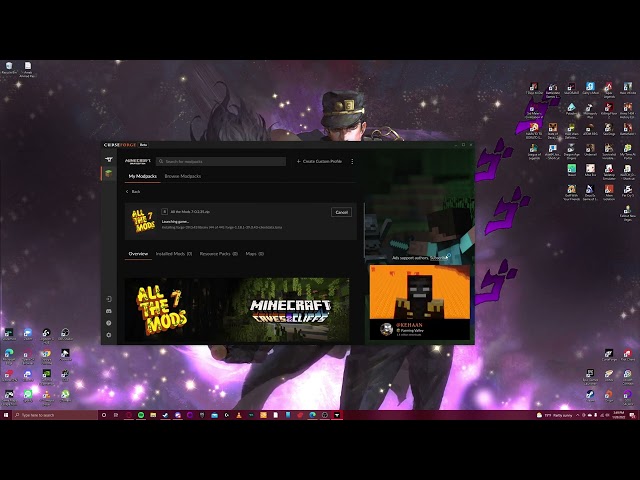
alright lemme explain, im tryna play the modpack "all the mods7" right. but when I launch Minecraft off of the curseforge application it boots up a version of minecraft that instead of saying play says "play demo"

queen storm
#

What Minecraft do you have?

sturdy tree
#

Java and Mincrosoft

#

microsoft

queen storm
#

With game pass or bought separate?

sturdy tree
#

seperate

queen storm
#

Logged in on correct account?

sturdy tree
#

yeah

#

I have the updated version of Minecraft launcher, and Ive uninstalled the old one. But when I try to boot a modpack it will reinstall the old launcher and play off that

queen storm
#

Can you show the vanilla launcher logged in and the curseforge one?

red patioBOT
#

Ignore the new launcher update. CF does not use it or works with it, yet.
Everything will work fine otherwise.

sturdy tree
#

here is a video

queen storm
#

Not what I asked for, know perfectly fine what you are looking at

sturdy tree
#

you want me to boot the vanilla one?

queen storm
#

And show a screenshot of the full window, on both launchers

sturdy tree
#

when i try to boot both of them the forge says "minecraft is already running"

queen storm
#

Don't need them in the same image

sturdy tree
#

ok

#

wait a minute i think I may have figured out my issue

#

I have 2 minecraft accounts

#

give me a few

queen storm
#

So not logged in on correct account after all

sturdy tree
#

yeah seems that was the case

#

thanks

zenith mountain
#

Hi!
So, I'm trying to make a 1.16.5 modpack in minecraft
I'm running into the following error, and I'm not sure what it means

lyric crescent
#

!notcf

red patioBOT
#
Your question is not related to CurseForge owned/maintained features or services.

Please use the appropriate game room by getting a game role from #786424115535544350.
Otherwise use #šŸ‘½ļø±game-support for game related help.

CurseForge does not make or maintain any of the content or games used on the site or app. Just because it's on the site/app does not make it a problem with CurseForge. Move rooms as requested, arguing about it will result in you being removed from the discord.

zenith mountain
#

Very sorry!

daring dune
#

Hey, is there a way to download Minecraft Modpack Server files through the command line?
I've read through all the docs and didnƄt find a thing

pure steppe
#

what is a good mod

digital roost
#

i need help

#

curseforge isnt working

lyric crescent
#

!oops

red patioBOT
digital roost
lyric crescent
digital roost
#

ok then i wont ping but it doesnt work

#

why is there an "X" on ethernet

#

why am i not getting any help didnt the website say i could get help with anything

lyric crescent
#

tried being patient?

#

ethernet has an X cuz it's not connected, which has nothing to do with curseforge.

digital roost
#

i use an ethernet usb for my pc and its plugged in and working properly

lyric crescent
#

then why is there a red x

digital roost
#

idk

lyric crescent
#

?owlogs

red patioBOT
#
<:overwolf:857375414002384916> How to get CurseForge App logs! <:overwolf:857375414002384916>
  1. Click the CFlog Create logs zip in the CFsupport menu.
  2. Drag and drop the file it just made to this chat room to upload it.
  3. Wait for someone to look at it so they can help you.
digital roost
lyric crescent
#

I'll pass that on to curseforge support.

digital roost
#

ok thanks

formal ridge
#

I can’t choose this file

upper root
#

!mc-path

red patioBOT
#
Change your install path to the following:

For Windows: C:\CurseForge

For Mac: /Users/Shared/CurseForge

If Minecraft is not installed in CurseForge App:
  1. Click the cf in the top left.
  2. Select Minecraft from the list of games.
  3. Select the Advanced option and pick the location for your computer listed above.
  4. Click Continue.
If Minecraft is installed in CurseForge App:
  1. Click the CFsettings in the bottom left.
  2. Select the Minecraft tab.
  3. Click Change.
  4. Select the location for your computer listed above.
:no_entry_sign: Minecraft Files should NOT be installed inside the following locations :no_entry_sign:

:no_entry_sign: .minecraft folder.
:no_entry_sign: OneDrive folders.
:no_entry_sign: Desktop folder.
:no_entry_sign: iCloud enabled folders.
:no_entry_sign: or any other cloud saved folder.
:no_entry_sign: or folders with non-English characters in them.

If any of the above are in the path you need to change/move it!

#

Hey there, it is Curseforge, not "Cursed forge"

upper root
#

!mc-installmods try using these steps

red patioBOT
#
How to install mods in CurseForge App.
  1. Click + Create Custom Profile
  2. Name it, select the required Minecraft version, select the modloader & modloader version (usually the highest number), click Create.
  3. Click the profile icon.
  4. Click Add More Content
  5. Search and install the desired mods.
  6. Start the game!
How to install mods not on CurseForge.
  1. Right click the profile picture or Open the profile and click the CFmenu Icon next to the play button.
  2. Click CFfolderOpen Folder.
  3. Drag the mod(s) into the mods folder. (Note: Some mods will require others, to run. Make sure to read the instructions for the mod!)
  4. Start the game!
woeful hedge
#

So is anyone able to help me fix my mods? I have them installed and when I launch forge it ony shows 10 out of the 17 mods

upper root
#

Are they the correct game version and modloader?

woeful hedge
#

Yes

#

They are all 1.18.1

upper root
#

Are they all forge mods, not fabric?

woeful hedge
#

Yes

#

All Forge mods

upper root
#

No

#

Some of those are fabric ones

woeful hedge
#

Oh which ones?

#

If you don't mind pointing them out

young bone
#

Sodium, eating animation, effective, falling leaves, illuminations, interactic, mousewheelie

upper root
#

^^
There are probably others, you will need to check each mods page, or use the app to install them

woeful hedge
#

So I Installed fabric do I also install Fabric API

rich flint
#

you must load either forge or fabric, cannot use both

woeful hedge
#

Ah alright thanks

rich flint
woeful hedge
#

Alright Thank you again

young bone
woeful hedge
#

Yup I got the forge version for some of those so its all good now

gray pewter
#

just installed curseforge, does it automatically connect your mc account???

young bone
#

You’ll have to sign in to the launcher when you go to play a modpack, I believe

gray pewter
#

ok, thx for the info!

lethal bloom
#

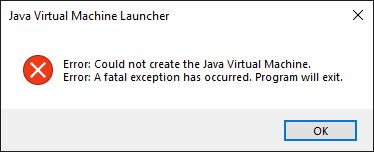
when I try to open 1.18.1 modpack with curseforge it keeps on saying could not create java virtual machine

upper root
#

What curseforge version are you on?

#

CFsettings In the bottom left

spiral epoch
#

does 1.17.10 not exist?

upper root
#

No

#

There is 1.7.10 and 1.17.1

spiral epoch
#

ah nvm my friend was telling me the wrong version

lethal bloom
upper root
#

Try clear your java arguments in the minecraft category of the settings

lethal bloom
#

i already did

upper root
#

Try reinstall curseforge

steel ferry
#

whats this

rich flint
#

looks like you have multiple copies of the same mod

hard bear
rich flint
#

?notcf

red patioBOT
#
Your question is not related to CurseForge owned/maintained features or services.

Please use the appropriate game room by getting a game role from #786424115535544350.
Otherwise use #šŸ‘½ļø±game-support for game related help.

CurseForge does not make or maintain any of the content or games used on the site or app. Just because it's on the site/app does not make it a problem with CurseForge. Move rooms as requested, arguing about it will result in you being removed from the discord.

undone crag
#

unsure if i am allowed to ask this here &/or if this is the right channel but my mod has been taking a while to be approved on the website
i created the page in november but its yet to be approved, it got flagged once for not enough of a detailed description
but its just a utility / library mod that does nothing by itself, which i have stated in the description (and dont know what else to put there)
https://www.curseforge.com/minecraft/mc-mods/apexcore for mods/admins that can take a look this is the project in question

upper root
#

It needs a file to be uploaded to be approved

undone crag
upper root
#

And is it still asking you to change the description?

undone crag
#

nope says its awaiting approval

upper root
#

Will pass it on to someone, although its currently their weekend

undone crag
#

yeah thats fine, so long as i know its going to get approved
just taking a longer than other things ive published

upper root
#

If it takes more than a week then there is definitely something wrong

wet rock
#

Hey! I kinda new to this server but I have been using curseforge for a bit. I just started replaying MC through curseforge and I'm playing in a new Valhelsia modpack the (1.18 version) and I can play for a little bit but then MC crashes? Any ideas? I tried the repair installation already so I'm not really sure.

upper root
red patioBOT
#
Sending logs for support.
  1. Right-click the modpack profile icon OR click the CFmenu button in the modpack profile.
  2. Click CFfolderOpen Folder.
  3. Open the logs folder.
  4. Drag and drop the FILE named latest OR debug into discord.
wet rock
#

Oops! Sorry for the wrong channel! Posted the log there!

sage hatch
#

hi

#

can someone help me

#

with the app

#

help pls

half jackal
#

How can i repair my curseforge?

red patioBOT
#
Change your install path to the following:

For Windows: C:\CurseForge

For Mac: /Users/Shared/CurseForge

If Minecraft is not installed in CurseForge App:
  1. Click the cf in the top left.
  2. Select Minecraft from the list of games.
  3. Select the Advanced option and pick the location for your computer listed above.
  4. Click Continue.
If Minecraft is installed in CurseForge App:
  1. Click the CFsettings in the bottom left.
  2. Select the Minecraft tab.
  3. Click Change.
  4. Select the location for your computer listed above.
:no_entry_sign: Minecraft Files should NOT be installed inside the following locations :no_entry_sign:

:no_entry_sign: .minecraft folder.
:no_entry_sign: OneDrive folders.
:no_entry_sign: Desktop folder.
:no_entry_sign: iCloud enabled folders.
:no_entry_sign: or any other cloud saved folder.
:no_entry_sign: or folders with non-English characters in them.

If any of the above are in the path you need to change/move it!

queen storm
sage hatch
#

i dont know how to put mods in the app and launch minecrat

half jackal
sage hatch
#

i have to buy iy?

#

it

queen storm
#

Minecraft, yes

sage hatch
#

awww man:(

#

i wanted to play with the light saber of star wars

queen storm
brittle heart
#

Hello, can someone please give me the overwolf setup zip file

opal cipher
#

!getcf Second link

red patioBOT
#
Looking to install the CurseForge app?
<:windows:798410728188936222> Windows

Minimum Requirements:

  • OS Version: 7 (64 bit), 8.1, 10, 11
  • 64 bit Required.
  • 350MB storage space.
  • Microsoft .Net 4.8
  • Intel/AMD quad-core CPU
  • 8GB ram

Download: https://download.overwolf.com/install/Download?&PartnerId=4047

If you are having issues with the installer use the URL below to install Overwolf then go to the app store to download CurseForge.
https://content.overwolf.com/downloads/setup/latest/regular.html


<:mac:798410654418862130> Mac

Minimum Requirements:

  • OS Version 10.14 or newer.
  • 64 bit Required.

Download: https://curseforge.overwolf.com/downloads/curseforge-latest.dmg


:penguin: Linux

Minimum Requirements:
Yes. SOON:tm: ( Ķ”~ ĶœŹ– ͔°)

Download: :person_shrugging:

vagrant ether
red patioBOT
#
Your question is not related to CurseForge owned/maintained features or services.

Please use the appropriate game room by getting a game role from #786424115535544350.
Otherwise use #šŸ‘½ļø±game-support for game related help.

CurseForge does not make or maintain any of the content or games used on the site or app. Just because it's on the site/app does not make it a problem with CurseForge. Move rooms as requested, arguing about it will result in you being removed from the discord.

stark ravine
#

Hi there I can’t get my forge to download any mod pack

red patioBOT
#
Wording is important!

Forge = Minecraft Forge, This is a modloader often just called "Forge".
Fabric = Fabric MC, this is another modloader, just called "Fabric".
CurseForge = A Website/App that has content for games.
Mods = Individual mod files.
Modpacks = Multiple mods put into the mods folder or downloaded from CurseForge.

These are not Interchangeable! Please use the correct terms as it allows us to help you faster!

wide herald
#

Hey, i bought new computer. How do i get my addons from old computer to my new one? My old laptop is in Finland atm and im my self at Gran Canaria. So its not possible to check what i have and download new ones.

lyric crescent
#

Reinstall them? Idk what you expect to be able to do without access to the computer.

vital fable
lyric crescent
#

Just your modpack?

vital fable
#

well i booted up the pack, and it said Agricraft didnt work

#

or smtng

lyric crescent
#

!notcf

red patioBOT
#
Your question is not related to CurseForge owned/maintained features or services.

Please use the appropriate game room by getting a game role from #786424115535544350.
Otherwise use #šŸ‘½ļø±game-support for game related help.

CurseForge does not make or maintain any of the content or games used on the site or app. Just because it's on the site/app does not make it a problem with CurseForge. Move rooms as requested, arguing about it will result in you being removed from the discord.

vital fable
#

welp

lyric crescent
#

Read the message

royal bridge
lyric crescent
#

restart curseforge

royal bridge
#

aight

little kayak
#

it says to me failed to install mod

#

296062

#

its minecraft

#

and its part of sky factory 4

lyric crescent
#

try again later, the network is having some issues

royal bridge
hollow siren
#

Yea all my modpacks aren't installing/launching curseforge is slow rn

#

Just wait

little kayak
#

alright thanks

cinder nexus
#

how do I install forge on any launcher? Preferably lunar but else just the minecraft launcher

lyric crescent
#

!notcf

red patioBOT
#
Your question is not related to CurseForge owned/maintained features or services.

Please use the appropriate game room by getting a game role from #786424115535544350.
Otherwise use #šŸ‘½ļø±game-support for game related help.

CurseForge does not make or maintain any of the content or games used on the site or app. Just because it's on the site/app does not make it a problem with CurseForge. Move rooms as requested, arguing about it will result in you being removed from the discord.

lyric crescent
#

and we dont support 3rd party launchers

stuck falcon
#

im having trouble setting sf4 server

lyric crescent
#

!notcf

red patioBOT
#
Your question is not related to CurseForge owned/maintained features or services.

Please use the appropriate game room by getting a game role from #786424115535544350.
Otherwise use #šŸ‘½ļø±game-support for game related help.

CurseForge does not make or maintain any of the content or games used on the site or app. Just because it's on the site/app does not make it a problem with CurseForge. Move rooms as requested, arguing about it will result in you being removed from the discord.

stuck falcon
#

where do i find help

lyric crescent
#

read

prisma patio
#

guys, im having problems running the forgeserver.jar file, i cant get it to run while the vanilla server does run well. i have tried multiple java versions, what is the correct one?

lyric crescent
#

!notcf

red patioBOT
#
Your question is not related to CurseForge owned/maintained features or services.

Please use the appropriate game room by getting a game role from #786424115535544350.
Otherwise use #šŸ‘½ļø±game-support for game related help.

CurseForge does not make or maintain any of the content or games used on the site or app. Just because it's on the site/app does not make it a problem with CurseForge. Move rooms as requested, arguing about it will result in you being removed from the discord.

stuck falcon
#

yamza

#

i havae a question

#

may i ask

lyric crescent
#

if it's not related to CF then ask elsewhere

stuck falcon
#

it may be

#

do i need different java version for different stuff

#

or do i download latest

lyric crescent
stiff holly
#

anyone else experiencing long load times and/or timeouts on the cf website? šŸ¤”

queen storm
#

There are some issues, getting looked at

stiff holly
#

understood. thanks.

valid quiver
#

what does this mean?

lyric crescent
#

there was an error

valid quiver
#

how can i fix it?

lyric crescent
#

try again?

valid quiver
#

should I use a different browser?

valid quiver
lyric crescent
#

seems like the site is down, try later

gray orbit
#

when i'm in the curseforge app and try to browse minecrat dungeons in the folder, and I have it already installed, I can't seem to find it, I tried scanning but it doesn't work.

valid quiver
#

it worked

#

eventually

gray orbit
#

is there a way I can find it?

#

this is what i'm talking about

idle mango
#

Curseforge website down for anyone? It isn't loading any pages for me

safe elm
#

Ahhh, so can't install modpacks huh?

stray dew
#

And mods huh?

safe elm
#

Trying to Install Insane craft and it's just. No. xD

silent anvil
#

uh when's it gonna come back?

queen storm
#

When it is fixed

safe elm
#

Well, yeah.

cerulean perch
#

Is it just me or is the server lagging/Down

whole anchor
#

it works fine for me

cerulean perch
#

The page is working now, buts its extremely slow

digital roost
#

page is loading at a snails pace šŸ˜”

#

for me it's not loading

#

fun thing is, certain mod page will load just fine, and downloads work fine

opal cipher
#

They are looking at it, so just be patient.

digital roost
#

I could load minecraft mods page without issue

queen storm
#

Server is having issues, just have patience, complaining won't fix it!
Complaints will get removed

cosmic flint
#

I need help,My curseforge wont load

queen storm
#

!oops

red patioBOT
digital roost
#

I'm trying to make a profile so i can have minecraft mods but i keep getting "An exception occurred during a WebClient request" as an error.

#

plz help

rich flint
#

?webclient

red patioBOT
#

Timeout/WebClient errors are from networking issues to your computer. You can try a few things to fix it:

  1. Restart the computer.
  2. Restart your router/modem.
  3. Try another internet source like a hotspot, wired connection or moving closer to the WiFi.
  4. Pause/Stop other things using the internet. (Streams, music, etc)
  5. If this still doesn't work, try again in an hour and hope your connection is stable.
digital roost
#

I've tried everything on the support page and have no clue what to do (im also new to pc in general)

meager path
digital roost
#

So do you have any suggestions on what I should do?

heavy vale
#

anyone know why every time i try to get a mod pack i get this ''failed to install modpack''

rich flint
#

oops and webclient are usually problems with your own internet

heavy vale
#

it not my internet ive installed a modpack before

rich flint
#

your internet connection quality isn't a set thing. how many devices connected to your network, traffic, etc. in other words how well your connection is performing between your point A and the curseforge servers point B

heavy vale
#

its the same as it was before

rich flint
#

😐

stray ore
#

Please help trying to install mod packs for minecraft and something pops up

red patioBOT
#
Change your install path to the following:

For Windows: C:\CurseForge

For Mac: /Users/Shared/CurseForge

If Minecraft is not installed in CurseForge App:
  1. Click the cf in the top left.
  2. Select Minecraft from the list of games.
  3. Select the Advanced option and pick the location for your computer listed above.
  4. Click Continue.
If Minecraft is installed in CurseForge App:
  1. Click the CFsettings in the bottom left.
  2. Select the Minecraft tab.
  3. Click Change.
  4. Select the location for your computer listed above.
:no_entry_sign: Minecraft Files should NOT be installed inside the following locations :no_entry_sign:

:no_entry_sign: .minecraft folder.
:no_entry_sign: OneDrive folders.
:no_entry_sign: Desktop folder.
:no_entry_sign: iCloud enabled folders.
:no_entry_sign: or any other cloud saved folder.
:no_entry_sign: or folders with non-English characters in them.

If any of the above are in the path you need to change/move it!

stray ore
#

I have it installed here and it still doesn't work :<

queen storm
#

Last letter is not a-z

#

Of your name

stray ore
queen storm
#

Yeah, cant read that.
What does it say?

stray ore
#

path does not exist, check path and try again later

opal cipher
queen storm
#

Then make one?

stray ore
opal cipher
#

Exactly where I told you. C:\CurseForge

stray ore
#

eh, I'm not some technician and I don't know how to do it, I'll let go of playing on mods: <

wise anvil
#

Hi, I started my minecraft modded server on my windows 10 server desktop and when i go to join my server I am getting "Took too long to log in" is there a fix for this?

red patioBOT
#
Your question is not related to CurseForge owned/maintained features or services.

Please use the appropriate game room by getting a game role from #786424115535544350.
Otherwise use #šŸ‘½ļø±game-support for game related help.

CurseForge does not make or maintain any of the content or games used on the site or app. Just because it's on the site/app does not make it a problem with CurseForge. Move rooms as requested, arguing about it will result in you being removed from the discord.

upper root
# undone crag yeah thats fine, so long as i know its going to get approved just taking a longe...

Had a message back from them, it still requires changes to the project description. It is hard when its a lib, but see what other libs have done to pad their descriptions a bit.

Your project requires a better description. You can change this by clicking Settings above the description on the project page.

The project description must contain these facts:
-Features offered by the project.

  • How those features affect a user's experience
    Be as thorough as possible, and avoid vague statements. Potential users should have a reason to consider using what you are offering.

Things which do not qualify as a valid description:

  • Links to demonstration videos.
  • Links to descriptions of your project on another site.
  • Names of or links to other projects. These provide no explanation of what your project does, without prior knowledge of those projects.
  • A short story.
    -A question-and-answer session.
    An advertisement.
    -A biography.
undone crag
quiet notch
#

Hello šŸ‘‹ I recently downloaded a modpack (Valhelsia 3 to be exact) on the curseforge launcher. I click play, and it launches Minecraft and everything, only problem is.. It launches vanilla minecraft. No mods are loaded

upper root
#

!mc-installfix try this

red patioBOT
#

This is NOT instructions for Repair Profile! They are NOT the same! You need to do this!

  1. Click on the Minecraft Tab on the Left side of the CurseForge App.
  2. Click CFmenu button next to the Create Custom Profile option.
  3. Click CFrepair Repair Installation option.
  4. Play game.

NOTE: You will not lose any modpacks or worlds!

upper root
# undone crag still says its awaiting approval on my end and looking around others have put ab...

Try expand that sentence a bit, maybe in to two or more sentences.

This is my library mod used in all of my other mods, such as Apex's awsome mod 1 or apex's other cool mod. It does absolutely nothing on its own.
Other devs are free to/really shouldn't use it as I aim to keep it well documented/may break stuff randomly.
Any issue please report to the issues tab above/the commments section below/no one, I don't plan on fixing bugs

undone crag
#

just updated the description with what you mentioned and a little info on whats included (for devs)

vast gale
#

I can't update from 1.18.59 to 1.18.63

upper root
#

Update what?

mental hornet
#

when i try and launch my minecraft modpack it doesn't load up the game after i click play on the installer

#

any ideas?

vast gale
#

Minecraft forge 1.18.59 to 1.18.63

void marten
#

That's not a thing but you mean 39.0.59 - 39.0.63

vast gale
#

39.0.59 work OK!

upper root
#

!mc-updatemodloader

red patioBOT
#

You can update the mod loader within the same game version in the CurseForge app by following these steps!

  1. Click on the modpack profile you are working with.
  2. Click on the CFmenu button next to the play button.
  3. Click on the CFoptions Profile Options button.
  4. Select the mod loader version you want from the dropdown.
  5. Play!

If you need to update to a new game version, a new profile is required.

vast gale
scarlet basalt
#

hey I'm trying to setup a forge server and am running into serious issues, I keep getting this error message when I try and run my server

#

Exception in thread "main" [15:24:00] [main/INFO] [STDERR/]: [java.lang.ThreadGroup:uncaughtException:-1]: java.lang.NoSuchMethodError: sun.security.util.ManifestEntryVerifier.<init>(Ljava/util/jar/Manifest;)V

upper root
#

Downgrade your java 8 version to below 321

scarlet basalt
#

how do i go about doing that

upper root
scarlet basalt
#

I think that was it, thank you so much

dense hazel
steel ferry
#

hey i need help

#

hum

#

i want to started my minecraft server

#

but i deleted it to do a new one

#

but my start.bat says i dont have a version for it or something

#

i need to check software publisher

#

please help

upper root
#

What?

#

Can you explain what you deleted, and show the start.bat you are using to start it?

upper root
#

?mc-videocard

red patioBOT
upper root
#

Not what I asked

#

(The file contents, not the file)

steel ferry
#

how am is suppose to do that

upper root
#

Right click –> edit

#

And what did you delete?

steel ferry
#

i had a server already

#

i deleted it

#

and when i tried creating a new one

#

this is the problem and i cant get my mods folder wothout creating it myself is that ok?

#

i think i canceled the forge think to allow something too

red patioBOT
#
ā•°( ͔° ĶœŹ– ͔° )ć¤ā”€ā”€ā˜†*:・゚ *Ėœā€*°•.Ėœā€*°• Many Help •°*ā€Ėœ.•°*ā€Ėœ* <:curselit:796985620550385705>

Please provide a description of your issue with as much detail as possible. If you have an issue with a mod or modpack, tell us the name. Explain what you can see happening. Be specific!

CFarrow_right Tell us what is happening, we already know it "doesn't work".
CFarrow_right Avoid using words like "it", tell us exactly what "it" is.
CFarrow_right Don't assume anyone knows what you are talking about, be specific.
CFarrow_right Tell us what you expected to happen.

Provide screenshots or video if possible.
Provide a log if possible. ?mc-log

steel ferry
#

i deleted my old sever

#

and tried creating a new one

#

i didnt allow the forge to access and my start.bat not working

upper root
#

Try do a full reinstall (delete the server folder and download a new server installer). If the problem persists ask again in #šŸ‘½ļø±game-support

scarlet basalt
#

so im trying to set my server up and am still running into problems

#

it seems to mostly work and gets hung up on the wyrmroost mod

#

heres the errors that I am getting

#

[16:28:48] [Server thread/FATAL] [ne.mi.fm.lo.RuntimeDistCleaner/DISTXFORM]: Attempted to load class net/minecraft/client/gui/screen/Screen for invalid dist DEDICATED_SERVER
[16:28:48] [Server thread/WARN] [RoadRunner EntityClassGroup/]: Entity Class com.github.wolfshotz.wyrmroost.entities.dragon.CanariWyvernEntity could not be analysed because of a java.lang.RuntimeException: Attempted to load class net/minecraft/client/gui/screen/Screen for invalid dist DEDICATED_SERVER! Assuming the worst outcome, we're not going to override any behaviour here.
[16:28:48] [Server thread/WARN] [RoadRunner EntityClassGroup/]: (If the class above belongs to a mod, they probably forgot to annotate their client-only code).

fickle imp
#

so, curseforge is not letting me search for any mods to add to my own things...

#

its not an internet problem because I'm using discord on my computer

red patioBOT
#

Please visit the project page for the content you posted about and look for a way to contact the developer.
Somewhere on the page there is usually a method of contact. Look for one of the following things:

  • Issues tab like the image below.
  • Discord link.
  • Twitter link.
  • Comments section below the project.

If no contact method exists you will either have to remove the project or find a solution on your own.

upper root
#

Report to wyrmroost

scarlet basalt
#

would that be a direct wyrmroost problem? i can get it up and running on single payer

#

player

upper root
#

Yes. They try to use code that is only found on singleplayer, causing servers to crash

fickle imp
frozen heath
#

Hey my buddy is trying to download curseforge and its opening notepad
any idea why this is happening

upper root
#

They somehow made exe's open with notepad

#

Try google it

steel ferry
#

how can i make my server properties to biome o plenty

upper root
#

!notcf

red patioBOT
#
Your question is not related to CurseForge owned/maintained features or services.

Please use the appropriate game room by getting a game role from #786424115535544350.
Otherwise use #šŸ‘½ļø±game-support for game related help.

CurseForge does not make or maintain any of the content or games used on the site or app. Just because it's on the site/app does not make it a problem with CurseForge. Move rooms as requested, arguing about it will result in you being removed from the discord.

steel ferry
#

[21:13:48] [Server thread/INFO]: Starting minecraft server version 1.7.10
[21:14:21] [Server thread/INFO]: Loading properties
[21:14:21] [Server thread/INFO]: Default game type: SURVIVAL
[21:14:21] [Server thread/INFO]: Generating keypair
[21:14:21] [Server thread/INFO]: Starting Minecraft server on 174.93.186.56:25565
[21:14:21] [Server thread/WARN]: **** FAILED TO BIND TO PORT!
[21:14:21] [Server thread/WARN]: The exception was: java.net.BindException: Cannot assign requested address: bind
[21:14:21] [Server thread/WARN]: Perhaps a server is already running on that port?

#

i need help with the port

upper root
#

!notcf

red patioBOT
#
Your question is not related to CurseForge owned/maintained features or services.

Please use the appropriate game room by getting a game role from #786424115535544350.
Otherwise use #šŸ‘½ļø±game-support for game related help.

CurseForge does not make or maintain any of the content or games used on the site or app. Just because it's on the site/app does not make it a problem with CurseForge. Move rooms as requested, arguing about it will result in you being removed from the discord.

steel ferry
#

sorry

vocal geode
#

hey can someone help me out here, my memory heap keeps loading then going back down and repeats that until the launcher crashes...

supple plaza
#

???

rich flint
#

!notcf

red patioBOT
#
Your question is not related to CurseForge owned/maintained features or services.

Please use the appropriate game room by getting a game role from #786424115535544350.
Otherwise use #šŸ‘½ļø±game-support for game related help.

CurseForge does not make or maintain any of the content or games used on the site or app. Just because it's on the site/app does not make it a problem with CurseForge. Move rooms as requested, arguing about it will result in you being removed from the discord.

karmic crescent
#

whenever you open a mod does it take storage?

rich flint
#

when you open a mod?

karmic crescent
#

yes

rich flint
#

mods are files that get downloaded to your computer

karmic crescent
#

yeah like after you download it bc my friend says it takes space everytime u open it

rich flint
#

it doesn't increase in size. your world file is the only significant thing that would.

karmic crescent
#

ok so if you open / start a mod it doesnt take space in your storage

rich flint
#

this is not really an issue

karmic crescent
#

ok

brittle ibex
#

i cant detect any modpacks

#

did i do something wrong?

#

i moved the Instances file from my old computer to the new one (actually just different drive and reinstalled Curseforge)

open lance
#

I get this every time I load a world, here's a screenshot and log, if someone can tell me what's causing it it would be greatly appreciated :D

upper root
#

occultism is erroring

#

?projectissue

red patioBOT
#

Please visit the project page for the content you posted about and look for a way to contact the developer.
Somewhere on the page there is usually a method of contact. Look for one of the following things:

  • Issues tab like the image below.
  • Discord link.
  • Twitter link.
  • Comments section below the project.

If no contact method exists you will either have to remove the project or find a solution on your own.

brittle ibex
#

can someone help me

red patioBOT
#
ā•°( ͔° ĶœŹ– ͔° )ć¤ā”€ā”€ā˜†*:・゚ *Ėœā€*°•.Ėœā€*°• Many Help •°*ā€Ėœ.•°*ā€Ėœ* <:curselit:796985620550385705>

Please provide a description of your issue with as much detail as possible. If you have an issue with a mod or modpack, tell us the name. Explain what you can see happening. Be specific!

CFarrow_right Tell us what is happening, we already know it "doesn't work".
CFarrow_right Avoid using words like "it", tell us exactly what "it" is.
CFarrow_right Don't assume anyone knows what you are talking about, be specific.
CFarrow_right Tell us what you expected to happen.

Provide screenshots or video if possible.
Provide a log if possible. ?mc-log

digital roost
#

how do i edit a curseforge modpack? like- add mods to it and remove mods? friend just added me to our friend group modpack and vaguely told me how to change things except i understood none of what they said sobbing

red patioBOT
#
How to add/remove mods in a modpack.
  1. Click on the picture of the modpack.
  2. Click the CFaddonsAdd More Content button, IF this button is not there, see below before continuing.
  3. Find the Mods, Resource Packs or Maps you wish to Install and click Install on them.
  4. Wait for all the required mods to be downloaded.
  5. Start the modpack.
How to Enable/Disable content management for modpacks.
  1. Click on the picture of the modpack.
  2. Click on the CFmenu button next to the Play button.
  3. Click on CFoptionsProfile Options.
  4. Check the Allow content management for this profile option if you want to edit the content of the modpack, uncheck it to disable.

NOTE: The Allow content management for this profile option is what allows you to Delete, Disable, Update or Install any Mods, Resource Packs or Maps managed by CurseForge. It must be on to modify any of them! (Currently)

upper root
#

!mc-modifypack

digital roost
#

oh ok i couldnt see teh add more content button thumbsupcat

#

thank you

brittle ibex
upper root
#

Did you try restarting your computer?

brittle ibex
#

no

#

i restart it now

#

still cant detect any

#

when i download the same modpack, the file name will be modpack(1)

#

so how to fix it

upper root
#

Redownload each pack, then copy all the files across

brittle ibex
#

ok

cunning relic
#

so basically my C drive is completely full and I always install stuff into my d drive since it has 742 gb, how do I change where the mods are downloading to?

upper root
#

!mc-path second set of instructions

red patioBOT
#
Change your install path to the following:

For Windows: C:\CurseForge

For Mac: /Users/Shared/CurseForge

If Minecraft is not installed in CurseForge App:
  1. Click the cf in the top left.
  2. Select Minecraft from the list of games.
  3. Select the Advanced option and pick the location for your computer listed above.
  4. Click Continue.
If Minecraft is installed in CurseForge App:
  1. Click the CFsettings in the bottom left.
  2. Select the Minecraft tab.
  3. Click Change.
  4. Select the location for your computer listed above.
:no_entry_sign: Minecraft Files should NOT be installed inside the following locations :no_entry_sign:

:no_entry_sign: .minecraft folder.
:no_entry_sign: OneDrive folders.
:no_entry_sign: Desktop folder.
:no_entry_sign: iCloud enabled folders.
:no_entry_sign: or any other cloud saved folder.
:no_entry_sign: or folders with non-English characters in them.

If any of the above are in the path you need to change/move it!

upper root
#

It will still downlload them to a temp file on the c drive, but wont need more than a gb

cunning relic
upper root
#

Your gonna want to clean some of that out

cunning relic
#

okay now I have 6.2 gb i think it's enough

safe elm
#

Trying to setup a server for RLCraft, but there's no forge files.

upper root
#

!notcf

red patioBOT
#
Your question is not related to CurseForge owned/maintained features or services.

Please use the appropriate game room by getting a game role from #786424115535544350.
Otherwise use #šŸ‘½ļø±game-support for game related help.

CurseForge does not make or maintain any of the content or games used on the site or app. Just because it's on the site/app does not make it a problem with CurseForge. Move rooms as requested, arguing about it will result in you being removed from the discord.

digital roost
#

ok so i've added mods but i don't really understand what i do after that- like i added the mods on curseforge however do i need to do anything on the actual website? like u add updates n stuff and betas and releases etc- how do i go about that?

young bone
#

You made your own custom modpack through the Curseforge app?

digital roost
#

well a friend made it but his internet turns off at like 10 so i added the new mods

#

i ahve no idea how he made it

#

theres this page tho and idk what to do here- or if i even need to do anything here

young bone
#

That’s to publish a pack, you don’t need to do that

digital roost
#

it is a published modpack

#

wait

young bone
#

Is it a pack that’s been published before?

digital roost
#

yes

#

and i'm updating it

#

with a new version for ppl to update to

young bone
#

Do you have access to the pack page to publish that update?

digital roost
#

pack page?

young bone
#

This kind of page

#

The page you were on is to publish a new pack

digital roost
#

yes i do

#

ohhhh

#

okay

young bone
#

Go there to publish the update

digital roost
#

in what section would i do that?

young bone
#

In project overview, under the pack name will be three buttons: file, image, and manage project. Click the file button

digital roost
#

oh okay

#

thank you

fair tendon
#

Does anyone know y when i launch it doesn't open'

haughty compass
upper root
#

Try restart your computer

haughty compass
#

k

slim lintel
#

can I play curseforge mods using new launcher?

red patioBOT
#

Ignore the new launcher update. CF does not use it or works with it, yet.
Everything will work fine otherwise.

slim lintel
#

hmm ok

slim lintel
#

uhh so I downloaded curseforge ran the mod it openned my mc launcher and it only shows my bedrock edition account even though I migrated.

#

it shows my java as demo and also it doesn't accept my mojang account password and when i do forget password i dont receive an email.

queen storm
#

How did you get the java edition?

slim lintel
#

i bought it like a few years ago

#

nvm it works now I just had to log in again with microsoft.

#

thanks for the help anyways ā¤ļø

#

It worked and showed me my original mojang account, then I try launching curseforge mod and it opens again with my bedrock account only, and java edition is demo.

queen storm
#

Is the account you logged in the same on as you migrated?

slim lintel
#

its my hotmail account for bedrock, while my java is gmail.

queen storm
#

Then login on the gmail one with Microsoft, or wherever you migrated that account to.
If not working: ask Mojang, as this is their issue, not ours

digital roost
#

what should i do if curseforge cant open?

queen storm
#

!oops

red patioBOT
digital roost
#

so im trying to make my own little mod pack for an smp for me and my friends just on normal minecraft but it keeps crashing idk if im suposed to say it here but i got allot of the mods from curseforge i know its not my computer specs becouse they are 71 mods and a computer of about 3000$ can someone help me i already looked in the logs of my minecraft but i didn't see any intresting or something that crashes my mc

opal cipher
#

!notcf

red patioBOT
#
Your question is not related to CurseForge owned/maintained features or services.

Please use the appropriate game room by getting a game role from #786424115535544350.
Otherwise use #šŸ‘½ļø±game-support for game related help.

CurseForge does not make or maintain any of the content or games used on the site or app. Just because it's on the site/app does not make it a problem with CurseForge. Move rooms as requested, arguing about it will result in you being removed from the discord.

opal cipher
digital roost
#

k

digital roost
slim lintel
#

when I launch vault hunters using curseforge it opens minecraft with wrong account and tells me I dont own java and it shows me a demo with vault hunters installation, but when I launch the launcher normally it shows me my correct account with correct installations

red patioBOT
#
Minecraft Logins

Step 1: Get to the Microsoft login screen.
Step 2: Log in with a Microsoft account that owns the Java version of Minecraft.
Done!

Issues: If it says PLAY DEMO then the account used DOES NOT own Java Minecraft. Log in with one that does.

slim lintel
#

this is not a minecraft bug since minecraft when launched normally opens my accounts correctly.

slim lintel
# red patio

when I do it doesnt work. since it launches with cursed forge

red patioBOT
#

Hey there, it is Curseforge, not "Cursed forge"

slim lintel
#

however when I open normally it works and shows me correct amount

queen storm
#

Show a screenshot of both

#

And didn't I just tell you to talk to Mojang?

slim lintel
#

it is not a mojang bug

#

since when I open the minecraft launcher normally it works fine

#

this is with me using the curse forge launch of miencraft launcher

queen storm
#

Now show vanilla

slim lintel
#

this is normally launching minecraft launcher.

opal cipher
#

Different accounts.

#

Look at the profile picture

queen storm
#

Look at the top left

slim lintel
#

yes.

#

however same log in info

queen storm
#

You do know that curseforge uses the mojang launcher right?

#

Then click the account, can you switch?

slim lintel
#

ive been suffering trying to play vault hunters for hours now.

queen storm
slim lintel
#

so what am i supposed to do

queen storm
#

Login on both, step by step, using the same information

slim lintel
#

ok i logged out on vanilla

#

and logging in now.

#

oh hmm nvm i think i should log in with my hotmail...

#

not my gmail.

#

thank you so much ā¤ļø

queen storm
#

So wrong account after all

median kestrel
#

manifest file does not exist

#

?any idea

#

im downloading divinerpg

queen storm
#

Is that a mod or modpack?

median kestrel
#

modpack

#

a classic one actually

queen storm
#

Link please

median kestrel
#

the 1.7.10 version

upper root
#

That is not a modpack

#

It is a mod

#

!mc-installmods

red patioBOT
#
How to install mods in CurseForge App.
  1. Click + Create Custom Profile
  2. Name it, select the required Minecraft version, select the modloader & modloader version (usually the highest number), click Create.
  3. Click the profile icon.
  4. Click Add More Content
  5. Search and install the desired mods.
  6. Start the game!
How to install mods not on CurseForge.
  1. Right click the profile picture or Open the profile and click the CFmenu Icon next to the play button.
  2. Click CFfolderOpen Folder.
  3. Drag the mod(s) into the mods folder. (Note: Some mods will require others, to run. Make sure to read the instructions for the mod!)
  4. Start the game!
median kestrel
#

XD

#

omg

queen storm
#

I specifically asked...

median kestrel
#

THX

#

and sorry

long snow
#

Hello

#

I used the mods but the mods did not loade in

queen storm
#

Any errors? How did you install them?

main dirge
opal cipher
#

Yes, you wait.

main dirge
#

Ey alright mate, thank you! ā¤ļø

wind hatch
severe obsidian
#

hey guys can someone help please i keep getting this message after loading the game with forge 😭 no mods installed 1.18.1

queen storm
#

!mc-logs

red patioBOT
#
Sending logs for support.
  1. Right-click the modpack profile icon OR click the CFmenu button in the modpack profile.
  2. Click CFfolderOpen Folder.
  3. Open the logs folder.
  4. Drag and drop the FILE named latest OR debug into discord.
inland flint
#

hello

#

i created a mod pack

#

how do i share it

#

to my friend

young bone
red patioBOT
#
There are two ways to share a modpack you've made with others...
Export and Share - For Friends to Small Groups.
  1. Click the Icon for the modpack.
  2. Click the CFmenu button next to play.
  3. Click CFexportExport.
  4. Select the files that should be included.
  5. Send the zip to the people that want it! They can follow the instructions in !mc-installpack to install the pack!
Upload to Curseforge - For Public Release to Everyone.

This options will make your pack public to EVERYONE, it comes with extra requirements and will take some effort to set up.

  1. Go to here: https://www.curseforge.com/project/432/4471/create
  2. Fill out the information with a proper description of the pack. This should allow anyone to understand what the pack is.
  3. Click the Icon for the modpack in the CurseForge app.
  4. Click the CFmenu button next to play.
  5. Click CFexportExport.
  6. Select the files that should be included.
  7. Open your Project you made on the CurseForge site and Upload the file you just made.
  8. Wait for Moderation & Sync so it can show up in the client! (See !sync for limitations)
inland flint
#

ty

young bone
#

The first set of instructions if it’s just for your friends

strong hearth
#

Hello! I have issues with a modpack that i've downloaded, exit code 0. I have updated my java, reinstalled minecraft and reinstalled curseforge. I have all the mods matching and my ram is set to half of my available ram. I have tried downloading the modpack again too. Sometimes, exit code 0 seems to fix itself and than another time it doesnt work. Do any of you know how I can permamently fix my curseforge so exit code 0 doesnt happen?

red patioBOT
#
Error/Exit codes are useless. Follow these steps so someone can actually help you.
  1. Right-click the modpack profile icon OR click the CFmenu button in the modpack profile.
  2. Click CFfolderOpen Folder.
  3. Open the logs folder.
  4. Drag and drop the FILE named latest OR debug into discord.
strong hearth
#

šŸ‘

young bone
#

What version are you playing

strong hearth
#

1.12.2

#

same issue has arisen with 1.16.5

cursive roost
#

yo oki dis is odd, but why is my antivirus software acting up over curseforge?

slender widget
#

Hello! I recently reinstalled the curseforge mod app from overwolf and for some reason, whenever I try to create or open a new world for ATM 6, it freezes. it simply says the application is not responding and I am unable to do anything except close it, in which case the minecraft launcher says it has crashed. Does anybody know what I can do?

cursive roost
#

if u click anything at times it crashes

#

for me at least.

rich flint
red patioBOT
#

This is NOT instructions for Repair Profile! They are NOT the same! You need to do this!

  1. Click on the Minecraft Tab on the Left side of the CurseForge App.
  2. Click CFmenu button next to the Create Custom Profile option.
  3. Click CFrepair Repair Installation option.
  4. Play game.

NOTE: You will not lose any modpacks or worlds!

slender widget
#

I have, for about 7-10 minutes, with only Steam, Origin, and the Epic Games launcher open.

red patioBOT
#
How to set Global Minecraft RAM value.
  1. Click the CFsettings icon in the bottom left to open settings.
  2. Click the Minecraft tab.
  3. Scroll down.
  4. Slide slider to recommended ram range as seen below.
cursive roost
slender widget
rich flint
#

Bump your value up

slender widget
slender widget
cursive roost
slender widget
strong hearth
#

it says my minecraft is already running, i closed everything with task manager

slender widget
#

It worked! thanks!

rich flint
#

ATM 6 is larger because not as many mods released yet for 1.18. nature taking care of ATMs bloat problem

strong hearth
#

nvm

#

fixed it im stupid

slender widget
#

I was able to load into a world, I will figure the rest out from there!

shy beacon
#

just bought stadew valley from steam and curseforge cant find it is this a bug or what

strong hearth
red patioBOT
slender widget
#

@rich flint After allocating more RAM and memory and rebooting the profile, it runs like a charm! thanks so much for your help!

rich flint
cerulean abyss
#

my Forge dont starting

#

what can i do

lyric crescent
#

Restart your computer

cerulean abyss
#

ok thanks

molten salmon
#

my vanilla minecraft from minecraft launcher is working fine

lyric crescent
#

? mc-installfix

red patioBOT
#

This is NOT instructions for Repair Profile! They are NOT the same! You need to do this!

  1. Click on the Minecraft Tab on the Left side of the CurseForge App.
  2. Click CFmenu button next to the Create Custom Profile option.
  3. Click CFrepair Repair Installation option.
  4. Play game.

NOTE: You will not lose any modpacks or worlds!

cerulean abyss
#

oh

#

no

#

it doesnt work

#

s

lyric crescent
#

What is it doing

cerulean abyss
#

me

#

you meen me

young bone
#

You're the only other person talking in this channel

cerulean abyss
#

oh it works sorry

#

sorry

#

oh

#

anotherone thanks

vivid halo
#

When im trying to install a Minecraft Modpack there is no Forge installed when i do it i when i try to go to profil options my curse need to restart

#

I reinstalled curse and nothing changed

#

Even when i repair my minecraft installation there nothing changes

deft cliff
#

what do i do

lyric crescent
deft cliff
#

ive confirmed there are no duplicates

lyric crescent
red patioBOT
#
Your question is not related to CurseForge owned/maintained features or services.

Please use the appropriate game room by getting a game role from #786424115535544350.
Otherwise use #šŸ‘½ļø±game-support for game related help.

CurseForge does not make or maintain any of the content or games used on the site or app. Just because it's on the site/app does not make it a problem with CurseForge. Move rooms as requested, arguing about it will result in you being removed from the discord.

deft cliff
#

oh i gotta go over there?

#

sorry i just joined so i didnt know

lyric crescent
#

Why are you doing that?

#

That is an overwolf issue, not curseforge.

#

That is an overwolf issue, not curseforge.

restive fog
#

Anyone or any suggestions as to what might be going on with Version 0.191.1.5 - I am aware of the mods sometimes not deleting themselves when updating, but now I am running into issues with Exports. Quite literally over the past two days. Everything was fine I think Wednesday/Thursday. But now all of a sudden, I am going to Export a profile and not only is it taking quite an extended amount of time to Export a profile with 89 Mods, but once it finally gets the tree together and I check the boxes to Export, it goes ahead and takes another extended amount of time to build the zip, only then do I find out that some of the Mods (that are hosted on CurseForge, and in the Manifest, and still on the CurseForge site, as it not archived) are showing up in the overides Mod folder? Then I delete the .zip and repeat the whole process over again, only to find that the original maybe 2 mods are no longer in the override mods folder but now like a single mod that wasn't in that folder before is in there. Is this a new api rolling out issue?

queen storm
lyric crescent
#

should be fixed with the next cf version within the next day or two

restive fog
digital roost
#

How do I unlock files

#

It says my files are locked so I cannot delete Foolcraft

lyric crescent
#

?mc-editpack

red patioBOT
#
How to add/remove mods in a modpack.
  1. Click on the picture of the modpack.
  2. Click the CFaddonsAdd More Content button, IF this button is not there, see below before continuing.
  3. Find the Mods, Resource Packs or Maps you wish to Install and click Install on them.
  4. Wait for all the required mods to be downloaded.
  5. Start the modpack.
How to Enable/Disable content management for modpacks.
  1. Click on the picture of the modpack.
  2. Click on the CFmenu button next to the Play button.
  3. Click on CFoptionsProfile Options.
  4. Check the Allow content management for this profile option if you want to edit the content of the modpack, uncheck it to disable.

NOTE: The Allow content management for this profile option is what allows you to Delete, Disable, Update or Install any Mods, Resource Packs or Maps managed by CurseForge. It must be on to modify any of them! (Currently)

digital roost
#

It still say files are locked

molten salmon
#

I cant load my world anymore, I closed it completely fine. But when I tried to open it the first time after reading world data disappeared nothing happened and my system crashed, I had to restore windows to a previous version and then now when I try to open it, the same thing happens except instead of system crash its just game crash

lyric crescent
molten salmon
#

where can I find this log

lyric crescent
digital roost
#

hello, I am new to forge and I wanted to scan Minecraft dungeons, but what should I press? (C:) or Multimedis (E:) ?

queen storm
#

Where is it installed?

noble marsh
#

Currently in the midst of developing my Modpack just finished a lot of bug fixing and a new problem has arose with the horizon constantly flashing black, upon researching the only result i could get is to close down Overwolf as it is a problem that Overwolf is frequent to occur onto clients, issue is for the pack to be released its going to be put on Curseforge and i can see this being a potential issue, by any chance is there a fix to this issue

I will attach a video in a moment

lyric crescent
#

?owlogs

red patioBOT
#
<:overwolf:857375414002384916> How to get CurseForge App logs! <:overwolf:857375414002384916>
  1. Click the CFlog Create logs zip in the CFsupport menu.
  2. Drag and drop the file it just made to this chat room to upload it.
  3. Wait for someone to look at it so they can help you.
lyric crescent
#

@noble marsh ā¬†ļø

abstract idol
#

doese anybody know were i could find a mod and file id in curseforge to add to my manifest file?

lyric crescent
#

mod id is on the project page, file id you hover over the download and look at the url

abstract idol
#

thx

noble marsh
noble marsh
inland flint
#

can i make a multi mc pack run on curseforge?

#

or is that not possible

lyric crescent
#

ask multimc šŸ¤·ā€ā™‚ļø

noble marsh
#

are you able to find the solution or are you still looking into it

lyric crescent
#

I passed it on to the Overwolf team, they said a fix is coming. No ETA however.

inland flint
lyric crescent
#

no idea

median kestrel
#

any idea whats the problem here?

queen storm
#

Ask multimc

livid sentinel
#

I've installed Fabulously Optimized, but it links to the older minecraft launcher and none of my worlds or texture packs are there. Did I install it wrong?

digital roost
#

Is this the right server to ask for help with regarding java modded servers?

young bone
#

You know what I find very odd, chance cubes released an update 5 days ago and that update still hasn’t synced to the CF app

dense musk
#

can ya show me the tag ya guys using on how to install cf?

narrow minnow
#

!getcf

red patioBOT
#
Looking to install the CurseForge app?
<:windows:798410728188936222> Windows

Minimum Requirements:

  • OS Version: 7 (64 bit), 8.1, 10, 11
  • 64 bit Required.
  • 350MB storage space.
  • Microsoft .Net 4.8
  • Intel/AMD quad-core CPU
  • 8GB ram

Download: https://download.overwolf.com/install/Download?&PartnerId=4047

If you are having issues with the installer use the URL below to install Overwolf then go to the app store to download CurseForge.
https://content.overwolf.com/downloads/setup/latest/regular.html


<:mac:798410654418862130> Mac

Minimum Requirements:

  • OS Version 10.14 or newer.
  • 64 bit Required.

Download: https://curseforge.overwolf.com/downloads/curseforge-latest.dmg


:penguin: Linux

Minimum Requirements:
Yes. SOON:tm: ( Ķ”~ ĶœŹ– ͔°)

Download: :person_shrugging:

dense musk
#

dang i thought ya would have had images on how to install

narrow minnow
dense musk
#

thx tho

undone crag
narrow minnow
young bone
#

It is, thank you

brave hemlock
#

my friends were able to download it fine

#

but its not working for me and keeps saying that

opal cipher
#

Try restarting CurseForge.

#

And if that doesn't work, restart your computer.

brave hemlock
#

ok ill try

#

thx

native flume
#

Is there a problem with me y curseforge it's buggering up my modpack installations and other modpacks I have like pixelmon and atm magic is something up as it's stressing me out

ornate wadi
#

Hi! My Minecraft modpack got denied during the review due to "References invalid fileIDs: fileID: 3097188, projectID 410482 (project-410482)." I believe this means it includes a mod that's not allowed on CurseForge. But I have no idea what mod it is! Any help would be much appreciated!

opal cipher
#

It's a deleted mod, you can find which one in the app, in the list of mods of your modpack.

ornate wadi
#

Ah, I see there are two "archived" mods in there. That's the ones, right?

opal cipher
#

Sounds like it yeah

red patioBOT
#
ā•°( ͔° ĶœŹ– ͔° )ć¤ā”€ā”€ā˜†*:・゚ *Ėœā€*°•.Ėœā€*°• Many Help •°*ā€Ėœ.•°*ā€Ėœ* <:curselit:796985620550385705>

Please provide a description of your issue with as much detail as possible. If you have an issue with a mod or modpack, tell us the name. Explain what you can see happening. Be specific!

CFarrow_right Tell us what is happening, we already know it "doesn't work".
CFarrow_right Avoid using words like "it", tell us exactly what "it" is.
CFarrow_right Don't assume anyone knows what you are talking about, be specific.
CFarrow_right Tell us what you expected to happen.

Provide screenshots or video if possible.
Provide a log if possible. ?mc-log

ornate wadi
digital roost
#

what should i do if neither overwolf or curseforge cant start it just dissapears when it has loaded

rich flint
slate gorge
#

Hey--if I'm trying to upload a modpack, and one of the mods (which is on Curseforge) requires a library which isn't on Curseforge... what do I do?

glass marsh
#

anyone know why the app is loading so slowly now?

glass marsh
#

if not, ask the dev to put it on CF and/or ask CF to add it to the list

slate gorge
glass marsh
frosty spruce
#

Why, or more accurately, how, do I end up getting rejected for

The following files belong to CurseForge-hosted projects, and should therefore not be added directly to zip files

if I exported with curseforge and didn't mess with the zip myself? This has happened to me many times when exporting and I can never quite figure out how it's happening. I know how to fix it, sort of, but I'm just confused on why it's happening in the first place

glass marsh
#

did you download it off the site and then put it in your modpack? If so, re-download it from the launcher

red patioBOT
#
The following files belong to CurseForge-hosted projects, and should therefore not be added directly to zip files:
  • Remove any mods listed in the error message from the profile you exported. Then reinstall them with the CurseForge app. DO NOT drag and drop files from the site.

  • Export the profile again, open the new zip that was just made. Check for the overrides/mods folder. If you still see any mods in that folder do the step above again for each mod.

  • Upload the zip once complete and no more mods show in the overrides/mods folder.

slate gorge
frosty spruce
glass marsh
#

yeah do what @slate gorge said

frosty spruce
# upper root ?reject-cfhosted

in my case, I'm just trying to figure out where I went wrong before exporting, since I didn't drag-and-drop from the site

upper root
#

The app is currently known to mess stuff up like this rn

rich flint
#

the app has had issues with exporting and the new app version is pushing out to help fix

#

it's being rolled out right now

frosty spruce
#

okey-doke. I was just trying to preclude the possibility it was my fault. As long as it's NOT my fault and I can get it working, all good šŸ™‚

rich flint
#

always 100% of the time check inside your export ZIP file to confirm no mods got exported into an overrides/mods folder

#

if they do then use app to delete mods > reinstall mods > try again

frosty spruce
#

thanks all

#

file approval is part of the automated pipeline right? No specific time of the week?

#

(For approved projects at least)

rich flint
#

unless it gets flagged for something (they keep exactly what things do that under wraps i believe)

frosty spruce
#

as they should for anything potentially abusive

stark frigate
#

Hey everyone! Ive been trying to publish a modpack for a week or so now, and im still lost with what to do. It got approved, but im still unable to find it/search it in the curseforge client or website directly. I think its missing files? Although, im unsure of that, and not sure how to check. Would anyone be able to possibly help me? Thanks in advance so much!

young bone
#

What is the name of the pack

stark frigate
young bone
#

I found it in the curseforge app

stark frigate
#

It just showed up, but its saying I only have 4 mods installed, even though I have 115 picked out?

outer bramble
#

Well the modpacks there.

stark frigate
#

Thats the most progress ive had in a week, I appreciate it!

#

Did I perhaps upload the mods wrong or something?

outer bramble
#

We have a issue here with your modpack.

#

It seems no mods are there.

#

you sure you didnt just upload some zip with no mod?

stark frigate
#

I try to export the pack from the curse forge app, and upload the zip file, but it gives me this error

outer bramble
#

Hmm..

#

Did you export the mods folder?

#
  • Config Folder?
stark frigate
#

This is whats in the zip I tried to upload

outer bramble
#

oh wait a second.

#

do you have the jar there.

#

o-o

stark frigate
#

Where would I look for that?

outer bramble
#

whats in the overrides/mods?

stark frigate
outer bramble
#

get rid of the jar

#

thats probably why

#

cause it saying

#

you shouldnt have that in your zip file.

#

so get rid of that

upper root
#

?reject-cfhosted

red patioBOT
#
The following files belong to CurseForge-hosted projects, and should therefore not be added directly to zip files:
  • Remove any mods listed in the error message from the profile you exported. Then reinstall them with the CurseForge app. DO NOT drag and drop files from the site.

  • Export the profile again, open the new zip that was just made. Check for the overrides/mods folder. If you still see any mods in that folder do the step above again for each mod.

  • Upload the zip once complete and no more mods show in the overrides/mods folder.

upper root
#

Follow these steps ^^

stark frigate
#

So uninstalling the forge app and redownload and take it from the top?

upper root
#

No

#

Uninstall the mentioned mod then reinstall it

rich flint
#

do not include the extra folders in the 'mods' folder when you export 1.12.2 packs either

stark frigate
#

So what should be in the mods folder, as I didnt adjust anything, I just let the curse app export it however it did

rich flint
#

assuming you have no approved 3rd parrty mods - nothing, there should be no mods folder exported

#

it all gets indexed in manifest.json

stark frigate
#

This is whats in the mods folder, I think the project E is being the problem, so what should I remove?

rich flint
#

use the app to delete and then reinatall project E

then export again, in the screen where you checkbox things uncheck the folders inside the mods folder

stark frigate
#

Ok, did that, im going to export again, and these are the ones the curse auto selected to export, is this ok? just these 2

upper root
#

Expand mods and unselect the folders

main dirge
#

Heya, anyone know why my CF is just not closing down MC when I quit the game? I don't know what I need for you to help me so please just let me know.

upper root
#

? can you explain more

stark frigate
#

So in that folder is all the mods, should I unselect folder 1.12.2 and memory repo?

main dirge
#

I can try, so I open MC with CF and then close it down again (I am making a modpack so lots of testing) but for some reason when I quit the game, Minecraft doesn't get closed down, it just get's sent to background tasks instead so I have to go into Task Manager and end task on MC or Java.

upper root
stark frigate
upper root
#

Unselect the math parser, I think thats auto downloaded by one of the mods. Otherwise leave chickenasm

final aurora
#

can someone tell me why my minecraft wont start?

upper root
#

!notcf

red patioBOT
#
Your question is not related to CurseForge owned/maintained features or services.

Please use the appropriate game room by getting a game role from #786424115535544350.
Otherwise use #šŸ‘½ļø±game-support for game related help.

CurseForge does not make or maintain any of the content or games used on the site or app. Just because it's on the site/app does not make it a problem with CurseForge. Move rooms as requested, arguing about it will result in you being removed from the discord.

final aurora
#

sorry

upper root
#

You should probably take it up with multimc

#

seems to be a launcher problem

final aurora
#

okay thanks ill try a different one

arctic pagoda
#

I'm having a problem with my stone block world where I cant craft modded items is there anyway to fix this

hollow vapor
#

do i need to buy the mustard virus pack off their patreon in order to play it?

upper root
main dirge
upper root
#

And you don't have anything that could be messing with it?

main dirge
#

As far as I'm aware no.

#

Let me try another profile rq

#

Wait, it seems to only be that profile.

woeful nimbus
#

This just started today, I did a google search and this error seems to be common with Curseforge Launcher. Any ideas how to fix it so I can play/build my 1.18 packs? https://i.imgur.com/Ps8B306.png

upper root
#

What cf version? CFsettings bottom left

woeful nimbus
#

v. 0.191.2.1

upper root
#

Any java arguments?

woeful nimbus
#

I've try without Arguments and even try launching a pack with no mods in it and it = the same result

#

the only thing I have not done is fully uninstall the curseforge launcher and try reinstalling it

rich flint
#

-XX:+IgnoreUnrecognizedVMOptions

put that into your JVM arg box in settings

upper root
#

Darn it. Beat me to it briar

rich flint
#

had a late coffee

main dirge
#

Isn't that error that the allocated RAM is too much?

rich flint
#

it's something java 16/17 doesn't recognize because deprecated

woeful nimbus
#

Well That worked, I have been fighting this error all day. Thank you @rich flint

rich flint
#

going to your vanilla launcher install and hitting the reset box on jvm args / save, quit out and re-do might also fix

upper root
main dirge
#

Ey that's true.

subtle geode
#

i can't create a new installation of minecraft with CF, does anyone know if the CF app needs to be installed in the .minecraft folder in order for minecraft to pick it up as a new installation? i can't add it as a new installation because it's not on the list of versions to select

upper root
#

Launch modpacks with the play button in app

#

You must not have the launcher open when you do that

subtle geode
#

thank you so much!

drifting crescent
#

how do i play a mod pack with a friend

rich flint
#

by both of you joining a server - one you run yourself or one you find to both join

drifting crescent
#

sorry im just a little confused so i downloaded a mod pack and the only way i could play with him was by being on the same internet

rich flint
#

that's LAN. it usually doesn't work for modded minecraft

#

sounds like it might be eassiest if you youtube search about minecraft servers

#

or again - find a modpack with a public server running you can both join