#🔥︱curseforge-support
1 messages · Page 598 of 1
 empty marsh
 lyric crescent
no?
 magic anvil
how do i let a friend search up my modpack
lyric crescent
is it on the website?
magic anvil
no th eoverwolf addon
 red patioBOT
There are two ways to share a modpack you've made with others...
Export and Share - For Friends to Small Groups.
- Click the Icon for the modpack.
- Click the
 button next to play.
 - Click

Export. - Select the files that should be included.
- Send the zip to the people that want it! They can follow the instructions in
!mc-installpackto install the pack!
Upload to Curseforge - For Public Release to Everyone.
This options will make your pack public to EVERYONE, it comes with extra requirements and will take some effort to set up.
- Go to here: https://www.curseforge.com/project/432/4471/create
- Fill out the information with a proper description of the pack. This should allow anyone to understand what the pack is.
- Click the Icon for the modpack in the CurseForge app.
- Click the button next to play.
- Click
Export. - Select the files that should be included.
- Open your Project you made on the CurseForge site and Upload the file you just made.
- Wait for Moderation & Sync so it can show up in the client! (See
!syncfor limitations)
 keen vector
The status of the file Crafters Advanced V1.0.1 (Crafters Advanced) has been changed to Rejected
Notes:
The following files belong to CurseForge-hosted projects, and should therefore not be added directly to zip files:
overrides/mods/ChickenChunks-1.12.2-2.4.2.74-universal.jar
overrides/mods/the-fifth-world-0.5.1.jar
overrides/mods/UniversalModCore-1.12.2-forge-1.1.3.jar
These files should, instead, be referenced in the manifest.json file generated by the Twitch Desktop App during a profile export.
If you have any questions please contact our support team https://support.curseforge.com.

CurseForge Support
We're here to get you informed on everything you need to know about CurseForge, including helpful guides and troubleshooting articles to back you up when you get in a pickle
how do i fix this??
red patioBOT
The following files belong to CurseForge-hosted projects, and should therefore not be added directly to zip files:
-
Remove any mods listed in the error message from the profile you exported. Then reinstall them with the CurseForge app. DO NOT drag and drop files from the site.
-
Export the profile again, open the new zip that was just made. Check for the
overrides/modsfolder. If you still see any mods in that folder do the step above again for each mod. -
Upload the zip once complete and no more mods show in the
overrides/modsfolder.
keen vector
ok thx
 cloud kernel
Heya! So curseforge is being alittle odd... Ive tried repairing the installation for MC and redownloading curseforge

It doesnt list any versions
like at all
So I cant create a custom profile
Any ideas?
 queen storm
What version are you on?
cloud kernel
Curseforge version?
queen storm
Yes
cloud kernel
 queen storm
Can you install any modpack?
queen storm
What was it?
 fallow kestrel
is curseforge not deleting old mods when i click the update button a known bug?
 fleet bear
yes
 unkempt briar
What is the difference between Total Downloads and Popularity?
lyric crescent
Good question, but not really a support issue. #💬︱general-chat
unkempt briar
ok thanks
 outer kettle
Hey Im having issue with the actual addons folder. So when I launch retail its telling me I have addons but none of said addons are actually installed as its showing me my Epsilon addons (A Private RP server) and not actually giving me an option to put my retail addons anywhere so Im kinda stuck on what to do here and I dont want to break everything
fleet bear
That doesn't sound like a CF problem?
Curseforge just puts the addons in the folder you tell it to.
outer kettle
Yeah but its not actually giving me an option to look at those addons on the app
outer kettle
Like I have these two? Some reason both for private servers
 red patioBOT
How to add WoW flavours to CurseForge!
WoW installs are only shown valid mods for the install selected.
If the app didn't find all of your installed game versions use these steps to fix it!
- Make sure Sync is disabled. It's not aware of the game versions and can cause issues!
- Try the

Scan computer for gamesoption from the menu, then click the
  button by
 Game Specific - If the app didn't find all the versions, you use the
Manually add a gameoption and point it to one of the following locations.
a._retail_for the main game.
b._classic_for BCC.
c._classic_era_for the new classic install.
fleet bear
Do that
outer kettle
Er..how do I turn sync off
fleet bear
In the settings for wow under the icon
outer kettle
Ty so much my god Im such a flipping pillka
fleet bear
They system is kinda bad too, not entirely your fault for not understanding it.
 mellow isle
Is there a way once a pack is approved to archive a version i didnt upload the right one
fleet bear
click All files select the check box on the file you want to remove and then click archive.
mellow isle
ok thanks
 fallow verge
I had a world I spent hours on but today it said that there was a new launcher version? It took me out of curseforge and into my basic java minecraft, and the world is no longer there. Is this fixable?
red patioBOT
Ignore the new launcher update. CF does not use it or works with it, yet.
Everything will work fine otherwise.
fallow verge
Thank u turtle
 loud gale
prostill doesnt work
 thorn juniper
red patioBOT
thorn juniper
red patioBOT
There are two ways to share a modpack you've made with others...
Export and Share - For Friends to Small Groups.
- Click the Icon for the modpack.
- Click the button next to play.
- Click
Export. - Select the files that should be included.
- Send the zip to the people that want it! They can follow the instructions in
!mc-installpackto install the pack!
Upload to Curseforge - For Public Release to Everyone.
This options will make your pack public to EVERYONE, it comes with extra requirements and will take some effort to set up.
- Go to here: https://www.curseforge.com/project/432/4471/create
- Fill out the information with a proper description of the pack. This should allow anyone to understand what the pack is.
- Click the Icon for the modpack in the CurseForge app.
- Click the button next to play.
- Click
Export. - Select the files that should be included.
- Open your Project you made on the CurseForge site and Upload the file you just made.
- Wait for Moderation & Sync so it can show up in the client! (See
!syncfor limitations)
 slender sinew
when i launch the modpack i installed and minecraft loads there arent any mods
 upper root
Restart your computer then try again
 hasty whale
i can't even open the app
upper root
!mc-installfix try this
red patioBOT
This is NOT instructions for Repair Profile! They are NOT the same! You need to do this!
- Click on the Minecraft Tab on the Left side of the CurseForge App.
- Click button next to the
Create Custom Profileoption. - Click

Repair Installationoption. - Play game.
NOTE: You will not lose any modpacks or worlds!
 cobalt saffron
I have a problem
when I try and play pixelmon it loads up and it goes on a white screen with the mojang logo and then crashes
this :
 upper root
!mc-logs drop this into #👽︱game-support
red patioBOT
Sending logs for support.
- Right-click the modpack profile icon OR click the button in the modpack profile.
- Click

Open Folder. - Open the
logsfolder. - Drag and drop the FILE named
latestORdebuginto discord.
 wild basin
I have an issue
I tried to switch the minecraft launcher to the new version through the files but it crashed, even after I switched it back

should I redownload the app?
upper root
did you try manually move curseforge files around 
slender sinew
repairing the installation didnt work
upper root
Are you opening the launcher manually (without cf's play button) at all
slender sinew
i havent yet
upper root
what do you mean, 'yet'?
slender sinew
i just got the pc and i havent started up minecraft without curseforge
upper root
Maybe try do that first then? Youll probably have to restart your computer again inbetween launching normal mc for the first time and launching cf
upper root
wild basin
Delete the entire install folder, you really shouldnt be messing around with those files
 flat oasis
hi
i need some help here
some mods in my modpack need a higher version of forge 1.12.2 to run, but the curseforge app doesnt have it.
what can i do?
nvm i think i found a way
nope i didnt
plz i need help
wait i stupid
the latest is at the bottom lol
 covert jacinth
I need help with a modpack inquiry.
If someone can take the time to be accountable for an issue I've had with the curseforge website, that would be appreciated.
upper root
Explain your problem, if someone can help they will
 subtle kayak
https://www.mediafire.com/file/21grx23hvkjbv2l/crp+craft.zip/file why my resoursepack keep getting rejected?

MediaFire
this is the link for the file
The status of the file crp craft (crp craft) has been changed to Rejected
File is not a valid resource or texture pack.
If you have any questions please contact our support team https://support.curseforge.com.
CurseForge Support
We're here to get you informed on everything you need to know about CurseForge, including helpful guides and troubleshooting articles to back you up when you get in a pickle
this is what it says
I wasnt able to find this topic in the suport
upper root
There are two problems with that, first you need to zip the files inside the crp craft folder (not the folder itself), and second you need to remove all the DS-STORE and MACOSX files/folders from the zip.
You should also actually include a license
fleet bear
Why is this just an upload of MC assets anyway...
It's literally just the MC resources stripped out of the game.
subtle kayak
upper root
There are two problems with that, first you need to zip the files inside the `cr...
I did upload just what inside crp craft but when I put in mediafire it creates this macosx folders
I forgot to modify
Its from the default resorcepack
I find that on the web
 digital roost
How do you change the file from documents to app support on macOS?
subtle kayak
TextEdit can do that
digital roost
Huh?
upper root
Are you trying to change the minecraft modding folder?
fleet bear
subtle kayak
I forgot to modify
 digital roost
upper root
Are you trying to change the minecraft modding folder?
digital roost
upper root
Are you trying to change the minecraft modding folder?
Yeah
upper root
!mc-path
red patioBOT
Change your install path to the following:
For Windows: C:\CurseForge
For Mac: /Users/Shared/CurseForge
If Minecraft is not installed in CurseForge App:
- Click the
 in the top left.
 - Select Minecraft from the list of games.
- Select the
Advancedoption and pickC:\drive. - Click
Continue.
If Minecraft is installed in CurseForge App:
- Click the in the bottom left.
- Select the Minecraft tab.
- Click
Change. - Select the
C:\drive.
:no_entry_sign: Minecraft Files should NOT be installed inside the following locations :no_entry_sign:
:no_entry_sign: .minecraft folder.
:no_entry_sign: OneDrive folders.
:no_entry_sign: Desktop folder.
:no_entry_sign: iCloud enabled folders.
:no_entry_sign: or any other cloud saved folder.
:no_entry_sign: or folders with non-English characters in them.
If any of the above are in the path you need to change/move it!
fleet bear
subtle kayak
I find that on the web
Explain why you are trying to upload this file.
It's clearly not yours and you didn't do anything with it.
 marble arch
hey im trying to make a modpack but it keeps crashing can someone help these r my mods--its for 1.18

 digital roost
upper root
!mc-path
digital roost
upper root
!mc-path
ty I'll be back if it doesn't work for me :')
LMAO <3
upper root
That bot messsage wasnt for you
subtle kayak
The point its that my resource packs keeps getting reject what I do/
fleet bear
marble arch
hey im trying to make a modpack but it keeps crashing can someone help these r m...
!notcf
red patioBOT
Your question is not related to CurseForge owned/maintained features or services.
Please use the appropriate game room by getting a game role from #786424115535544350.
Otherwise use #👽︱game-support for game related help.
CurseForge does not make or maintain any of the content or games used on the site or app. Just because it's on the site/app does not make it a problem with CurseForge. Move rooms as requested, arguing about it will result in you being removed from the discord.
digital roost
upper root
!mc-path
how C:\ drive? :')
fleet bear
subtle kayak
The point its that my resource packs keeps getting reject what I do/
The point is about to ban you from this discord and report you to the CF mod team to have you removed also.
subtle kayak
fleet bear
The point is about to ban you from this discord and report you to the CF mod tea...
why?
fleet bear
Because this is clearly not your file and you refuse to explain what you are doing.
upper root
digital roost
how C:\ drive? :')
Change it to For Mac: /Users/Shared/CurseForge, the C drive is for windows users only (not sure why its in the main instructions
fleet bear
It's about as shady as it gets.
So, you have one final chance to explain what you are doing before you are removed.
subtle kayak
I downloaded the default resorcepack
minecraft default
Its from nobody
With the Minecraft default texture pack you can create your own resource pack. The download links are completely free.
subtle kayak
fleet bear
So, you have one final chance to explain what you are doing before you are remov...
I didnt stole from nobody
I download this to make my onw texturepack
you can download and see for yourself that its the same pack.mcmeta
its just the vanila template please
fleet bear
Yes you are. You don't own the minecraft game assets. You do not have the right to reupload them.
The file you are uploading is entirely unchanged and does nothing (except add some tips), you literally get everything it provides from the game already. It also has questionable content in it that clearly shouldn't be there.
subtle kayak
its not there is music in there
upper root
That site is also not official minecraft, they just stole the assets themselves and uploaded them
subtle kayak
ok sorry I didnt know that I coundnt put default thextures in my texturepack
please dont ban
digital roost
upper root
Change it to `For Mac: /Users/Shared/CurseForge`, the C drive is for windows use...
I'm in the file it shows when I click change but idk how to switch it to For Mac: /Users/Shared/CurseForge 😅
subtle kayak
I am from brazil and becouse of that I wasnt undertanding
upper root
digital roost
I'm in the file it shows when I click change but idk how to switch it to `For Ma...
Can you navigate to the Users folder? If so, there should be a folder in there called Shared. Go inside that. Create a folder inside that and name it Curseforge, set that as the modding path
subtle kayak
fleet bear
Yes you are. You don't own the minecraft game assets. You do not have the right ...
Are you going to ban My?
please dont
I wont do that again
digital roost
upper root
Can you navigate to the `Users` folder? If so, there should be a folder in there...
Do caps matter?
subtle kayak
I am sorry
upper root
digital roost
Do caps matter?
yes
digital roost
And how do you set modding path :')
fleet bear
subtle kayak
Are you going to ban My?
No, because you explained what you where doing and it's clear you don't understand how these work.
I advise you look into how resource packs work.
upper root
The Minecraft wiki is a good place to start, although it doesn't appear to have a Portuguese translation: https://minecraft.fandom.com/wiki/Resource_Pack
subtle kayak
fleet bear
No, because you explained what you where doing and it's clear you don't understa...
Ok thanks
 midnight snow
Hey I just update my ATM 7 and I am unable to load my world, there is a resource pack that it says in "incompatible" and I tried to remove it from the in-game menu but it isn't letting me. Anyone know what I can do to fix this? Thank you
upper root
The incompatible resource pack is caused by lazy mod authors, ignore it
!mc-logs post this into #👽︱game-support
red patioBOT
Sending logs for support.
- Right-click the modpack profile icon OR click the button in the modpack profile.
- Click
Open Folder. - Open the
logsfolder. - Drag and drop the FILE named
latestORdebuginto discord.
digital roost
upper root
Can you navigate to the `Users` folder? If so, there should be a folder in there...
How do you set a modding path :')
I'm so sorry for the bother qwq
 slim yoke
i keep getting oops something went wrong.... and then has relaunch i have restarted my computer reinstalled please help
upper root
digital roost
How do you set a modding path :')
I'm so sorry for the bother qwq
Go to the settings in the bottom left of CF (), then the minecraft section. Click Change next to the current path.
This will open file explorer, navigate to the Users folder. Inside that go into the Shared folder. Create a folder inside that and name it Curseforge, select that and then press the confirm or select button, (on windows its Select Folder)
midnight snow
This is the log what should I do now?
upper root
Post it in #👽︱game-support not here
digital roost
upper root
Go to the settings in the bottom left of CF (<:CFsettings:798388925072408577>), ...
halp :')
LMAO
 upper root
Does that happen when you change it?
digital roost
Ye
upper root
Or when you install a modpack after changing it
digital roost
Oh yeah #2 when I install a modpack after changing
upper root
Try restart your computer
digital roost
Oki doki
 civic girder
curseforge is not letting me install any modpacks, it keeps crashing when installing mods
digital roost
upper root
Try restart your computer
It says the same thing :')
upper root
!owlogs send these
red patioBOT
<:overwolf:857375414002384916> How to get Overwolf logs! <:overwolf:857375414002384916>
digital roost
Wait- so should it not be in the shared folder?
upper root
it should be inside a folder inside the shared folder
upper root
Oh, the logs?
Actually, there should be a button in cf for them
Click the question mark button in the bottom left i think
digital roost
Send them here?
upper root
Yeah
digital roost
upper root
Hmm, your the third to have that error in the last half hour ish
digital roost
030
upper root
What pack is it?
digital roost
Uh it's a custom pack for a private server
upper root
So importing a zip?
digital roost
It works for many other people tho 🤔
digital roost
upper root
So importing a zip?
Yessir
Sorry it took my slow brain a bit to understand lol
upper root
Try again in half an hour/hour, these sorts of issues are normally temporary
digital roost
Oki :)
upper root
In this case discord is where you are getting support so you would put it here.
You should explain your issue first tho, owlogs may not be neccessary
 hardy rose
im trying to download a modpack and it keeps crashing partway through, the odd part is ive used this pack before with no issue
and the odd part is that the mod i think its getting stuck on doesnt make a lot of sense
its a music pack i believe
digital roost
Anyone else having a strange problem of mods randomly deactivating themselves?
I'm making a modpack and I'm not sure if it's to do with me force closing the game at times because some of the mods I've been testing wasn't allowing the world to generate so it was getting stuck on the loading screen. (I think that's how I reproduced the bug although it could be something else)
 hidden fern
hardy rose
im trying to download a modpack and it keeps crashing partway through, the odd p...
hidden fern
hardy rose
im trying to download a modpack and it keeps crashing partway through, the odd p...
Which modpack?
 vague veldt
HTTP Code: 500
Status Text: error
Address: https://www.curseforge.com/minecraft/modpacks/boab-modpack/screenshots
Date: Tue Jan 25 2022 08:48:46 GMT+0100 (centraleuropeisk normaltid)
Request: POST /project/570023/images/upload
Why cant i upload an image?
vague veldt
So i just have to wait until its fixed?
 opal cipher
Might wanna check your screenshot that you're trying to post, could be that it's too big, the wrong format, or anything of the above.
opal cipher
I'd suppose less than 5MB, and preferably in PNG/JPG.
As the upload modal doesn't say.
vague veldt
Oh i found the problem. My title of the image was only one letter, but when i chose a title with more than one letter it worked.
 iron dawn
is forge and curseforge sam ?
upper root
!!=
red patioBOT
Wording is important!
Forge = Minecraft Forge, This is a modloader often just called "Forge".
Fabric = Fabric MC, this is another modloader, just called "Fabric".
CurseForge = A Website/App that has content for games.
Mods = Individual mod files.
Modpacks = Multiple mods put into the mods folder or downloaded from CurseForge.
These are not Interchangeable! Please use the correct terms as it allows us to help you faster!

 unborn basin
iron dawn
bc this error shows up when i install the server
unborn basin
iron dawn
bc this error shows up when i install the server
How is this CurseForge related?
 dapper pine
hello i want to upload my mod to the site how can i do
iron dawn
unborn basin
How is this CurseForge related?
it is foge releated that is why i asked is forge and curseforge sam
unborn basin
dapper pine
hello i want to upload my mod to the site how can i do
Go to the website and start a project
iron dawn
unborn basin
How is this CurseForge related?
clearly it is not lol
dapper pine
unborn basin
Go to the website and start a project
thank you
 cold fiber
Hmm, any idea how to fix this? Trying to upload a new file to my modpack and this happens..
 queen storm
@unborn basin
 abstract dove
 unborn basin
cold fiber
Hmm, any idea how to fix this? Trying to upload a new file to my modpack and thi...
unborn basin
cold fiber
Hmm, any idea how to fix this? Trying to upload a new file to my modpack and thi...
Can you please send me your logs?
Also, make sure you don't have any duplicate mods as a part of your modpack, and if you do please delete the redundant ones
red patioBOT
<:overwolf:857375414002384916> How to get Overwolf logs! <:overwolf:857375414002384916>
unborn basin
cold fiber
In 5 minutes - entirely restart your app, and try again
Also make sure you don't have any duplicates like I said before
cold fiber
unborn basin
In 5 minutes - entirely restart your app, and try again
And get a new zip file?
unborn basin
cold fiber
And get a new zip file?
Any updates?
cold fiber
unborn basin
Any updates?
just uploaded the file, gonna see if it fails or not
upper root
You can check the file yourself without having to wait on review
queen storm
cold fiber
it says processing
You can also open up the zip and check if there is anything in overrides/mods next time
Without uploading
 inland matrix
hey i want to play a mod pack with my friends and not all mods load, what can i do
queen storm
inland matrix
oh sorry
 crystal harbor
hello 🙂 i need help today my server don't start : https://paste.md-5.net/aqarufocax.md
red patioBOT
Your question is not related to CurseForge owned/maintained features or services.
Please use the appropriate game room by getting a game role from #786424115535544350.
Otherwise use #👽︱game-support for game related help.
CurseForge does not make or maintain any of the content or games used on the site or app. Just because it's on the site/app does not make it a problem with CurseForge. Move rooms as requested, arguing about it will result in you being removed from the discord.
 odd comet
is there a way to set the curseforge launcher on the latest java default without changing it every time
upper root
No. There is no need to tho
odd comet
There is a need to my mc works with the newest Java but keeps crashing when there is too much track
And the mod maker says that the Java curse use is too old
upper root
Its actually the java vanilla uses
odd comet
But I need the newest one to let 2 mods work
lyric crescent
why would you need that?
odd comet
To prevent crashing with a lot of rails
lyric crescent
If the mod is developed to use something other than the standard java that comes with minecraft, then that is something the mod dev should fix.
That is just bad design.
The only way to apply a specific java version with curseforge is to open the minecraft launcher settings every time you load the profile and set a java argument to do so.
odd comet
O oké sad
It cause a wierd crash with out of video memory but I have 6gs and when I updated Java the crash was gone
why dont you just make that you can choose your own java
lyric crescent
Because I don't have anything to do with what the app does. It has been asked for since the app was made. Doesn't seem like it'll be happening any time soon.
unborn basin
cold fiber
it says processing
Any news?
opal cipher
In 1-3 work days, if it's a new project. And about 1hr if it's an update, and not marked for manual review
unborn basin
cold fiber
so it should get approved soon
Sounds good
cold fiber
opal cipher
In 1-3 work days, if it's a new project. And about 1hr if it's an update, and no...
its a update
opal cipher
Which is why I updated my text ^^
 tacit vine
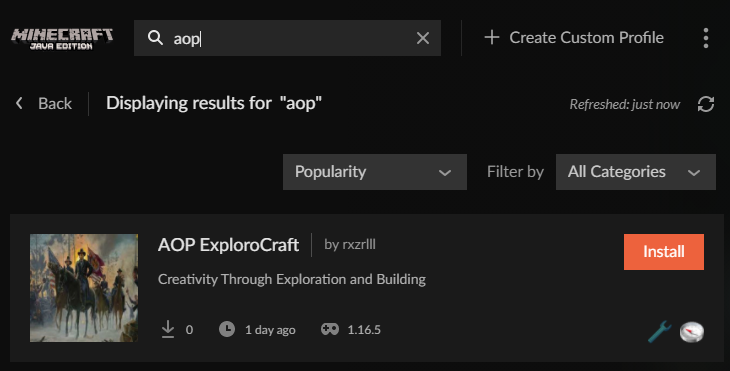
My mod pack AOP ExploroCraft is not showing up in the list of modpack when i search it but it is showing up under my creator name?
lyric crescent
link?
lyric crescent
seems to be there https://i.imgur.com/FpU1jyP.png
 tacit vine
Sweet thanks I may need to restart my computer
Thanks so much for confirming you are the best
lyric crescent
make sure you have beta enabled in your settings, since you set it as a beta type
 proud sandal
Does any1 have issues submitting a new bukkit project? Please @ me.
queen storm
Why are you asking to be pinged for project issues?
queen storm
@proud sandal
proud sandal
Because I opened a ticket 17 days ago and still no one replied oof
and because I mute every server and without a ping I wouldn't check
queen storm
You are asking for people with problems, without giving your own problem, then we can't help.
If you want help then you need to stay active here for an hour
lyric crescent
maybe provide some details as well
proud sandal
The issue is that it just reloads the page when hitting submit, without giving me any error.
queen storm
What page?
proud sandal
 queen storm
Did you check the network console in your browser?
https://www.curseforge.com/project/432/5/create
Try this one
 tropic cliff
Hey, curseforge export profile just gets stuck on this page and doesn't progress anywhere? Any ideas?
 red patioBOT
<:overwolf:857375414002384916> How to get Overwolf logs! <:overwolf:857375414002384916>
tropic cliff
Just these?
unborn basin
tropic cliff
Hey, curseforge export profile just gets stuck on this page and doesn't progress...
Things are slow at the moment, we know, and are working on a fix as we speak. For the time being, give it some time - it should work after a while
lyric crescent
Ah okay.
tropic cliff
unborn basin
Things are slow at the moment, we know, and are working on a fix as we speak. Fo...
Ahhh right if that's a case I'll wait it out should I mention if it takes any longer or just wait it out?
proud sandal
The new website works, however, it breaks some of my images (they show up fine when editing) but they show like this on project overview.

nvm, just have to re-add them, inconvenient but works I guess
I had no idea about the new website lmao
queen storm
What new website? There is no new website
proud sandal
the curseforge one
I was going on bukkit.dev this whole time
Probably not "new" , just new to me
 mighty kestrel
 lyric crescent
restart curseforge
mighty kestrel
Ok
 viral talon
hello 👋
i tried to install a mod pack but it said this... "Sorry, we can't load this project. Missing dependency: 3566236" mean?
if this is the wrong place then im sorry
lyric crescent
which pack
viral talon
Medieval Minecraft [FORGE] - 1.16.5
lyric crescent
Also getting an error on it. Looking into it.
Assuming the cause is the network slowness mentioned above: #🔥︱curseforge-support message
I've poked them on it anyway. It is installing now, just very slowly.
digital roost
Is curseforge down right now? I am unable to download any curseforge pack on any launcher
lyric crescent
The message above should explain it..
digital roost
LMAO damn I’m stupid sorry bro
 dense plank
im still unable to update my modpack
can someone please help me with my minecraft modpack
lyric crescent
what is the issue
dense plank
whenever i try to upload my new version it says
"Internal Server Error
An internal server error has occurred. Please try again later. If the error continues please reach out to support."
it's been happening for a day now
chief arug knows what im talkin about
would you mind goin into a call a bit later and helpin me?
lyric crescent
I don't do calls.
Currently Curseforge is having network issues anyway, which may or may not be related to this. But even if it's not related there isn't really any way to know that until they clear up. Usually you would want to try a different browser for an issue like that, but you might just want to try again at a later time anyway.
dense plank
ok
 void marten
Does anyone know how I can 'push' a mod update through the app?
I am building my modpack and one particular mod 'Aequivaleo' has updated several times, over several weeks, most recently 3 days ago, but several updates do not show on the app so I can only choose the 1.16 version rather than the 1.18 version shown on the website
 rich flint
They only have done alpha versions so far for 1.18.1. Download the mod file directly from the website and paste it into the mods folder.
 solid breach
sorry wrong server! Don't worry about it
iron dawn
what to do if a mod is download bar is stuck ?
lyric crescent
what
iron dawn
stuck at 3%
 lyric crescent
probably this
#🔥︱curseforge-support message
iron dawn
??
lyric crescent
two question marks doesnt say anything
 elfin gorge
okay so im not able to launch anything on curseforge because it decides to use the old launcher from before the migration (it dosent let me log in even though i changed my password like 5 times) and idk what to do. i completely got rid of the old launcher from my computer but it still uses it.
queen storm
Did you buy the java version?
elfin gorge
queen storm
Did you buy the java version?
ive had it for years :p
yes
ive bought it from the minecraft website
 fluid cargo
Can someone help me with the "exit code 0" problem ?
red patioBOT
Error/Exit codes are useless. Follow these steps so someone can actually help you.
- Right-click the modpack profile icon OR click the button in the modpack profile.
- Click
Open Folder. - Open the
logsfolder. - Drag and drop the FILE named
latestORdebuginto discord.
queen storm
elfin gorge
ive had it for years :p
Everybody is using that launcher.
The new launcher does not work with CF
red patioBOT
Ignore the new launcher update. CF does not use it or works with it, yet.
Everything will work fine otherwise.
elfin gorge
well it wont let me loggin ._.
queen storm
!mc-installfix
red patioBOT
This is NOT instructions for Repair Profile! They are NOT the same! You need to do this!
- Click on the Minecraft Tab on the Left side of the CurseForge App.
- Click button next to the
Create Custom Profileoption. - Click
Repair Installationoption. - Play game.
NOTE: You will not lose any modpacks or worlds!
iron dawn
what do i do :(
 lyric crescent
That looks like an issue with your internet. Nothing that involves Curseforge is happening at that point.
 undone belfry
Hey staff! 👋
I'd like to report a bruh moment.
When I update a mod (in Minecraft) the old version doesn't get deleted, so I end up having 2 of the same mod
lyric crescent
Its a known issue
 digital roost
im getting this error
Internal Exception: io.netty.handler.codec.EncoderException: java.lang.IllegalArgumentException: unable to fit 2372012 into 3
upper root
!mc-logs into #👽︱game-support
red patioBOT
Sending logs for support.
- Right-click the modpack profile icon OR click the button in the modpack profile.
- Click
Open Folder. - Open the
logsfolder. - Drag and drop the FILE named
latestORdebuginto discord.
 narrow minnow
iron dawn
guys
narrow minnow
iron dawn
guys
?mc-installfix
red patioBOT
This is NOT instructions for Repair Profile! They are NOT the same! You need to do this!
- Click on the Minecraft Tab on the Left side of the CurseForge App.
- Click button next to the
Create Custom Profileoption. - Click
Repair Installationoption. - Play game.
NOTE: You will not lose any modpacks or worlds!
covert jacinth
Hello,
Hope you're all well.
I'm seeking assistance with a situation dating back to 3 months ago.
I have felt like this issue had been given the runaround and no one has responded to me or the mod developer concerning the non-curseforge mods list to comply with curseforge's modpack upload terms.
I had created multiple Support Tickets through the curseforge website requesting assistance with this inquiry and would like for the right people to assist us.
We understand that you all may not be able to assist us, but an attempt to send us in the right direction would be helpful.
This is the support ticket in question: #109324
Please review and advise at your earliest convenience.
Best Regards.
lyric crescent
The best way to solve this would be for the dev to upload the mod to curseforge. I don't believe anyone is actively updating that list or adding anything to it.
fleet bear
covert jacinth
Hello,
Hope you're all well.
I'm seeking assistance with a situation dating ba...
What is the mod? We can't see tickets.
lyric crescent
Pixelmonforms by daem0ns
covert jacinth
fleet bear
What is the mod? We can't see tickets.
Thanks for the response.
The mod is called PixelmonForms. It's a private mod I paid for that is made by Daem0nS that allows you to change the forms of existing Pokemon using Pixelmon's code.
fleet bear
So you own the mod?
covert jacinth
lyric crescent
The best way to solve this would be for the dev to upload the mod to curseforge....
This would make sense. We're trying to just have curseforge prevent from rejecting any of our modpacks because it would have PixelmonForms.
 dry vale
Hello, I need some help because Ive installed a bunch of modpacks and after changing a few start up settings and restarting my pc all my modpacks disappeared and I have to reinstall them all with no data. is there anyway to get my modpacks back with my data?
covert jacinth
fleet bear
So you own the mod?
I own a copy of the mod. Daem0nS is the maker of the mod. I only own the rights to use the mod on my server.
fleet bear
So you don't own the mod.
upper root
dry vale
Hello, I need some help because Ive installed a bunch of modpacks and after chan...
Your instances will be stored wherever your Minecraft modding folder was set to before you changed whatever you changed. Do you happen to know where that was?
dry vale
upper root
Your instances will be stored wherever your Minecraft modding folder was set to ...
i can most likely find it but would i just have to move it to the current folder?
fleet bear
covert jacinth
I own a copy of the mod. Daem0nS is the maker of the mod. I only own the rights ...
What is the license of the mod? All rights reserved? Is it on github?
upper root
dry vale
i can most likely find it but would i just have to move it to the current folder...
copying the entire contents over to the current one should work, or setting the folder back to where it was
lyric crescent
Were you using a removable drive for curseforge by chance?
 molten verge
CF wont open
covert jacinth
fleet bear
What is the license of the mod? All rights reserved? Is it on github?
this is the full extent of the ToS for the usage of PixelmonForms

I can supply whatever other piece of information necessary for this process and can also provide the contact information for Daem0ns
dry vale
upper root
copying the entire contents over to the current one should work, or setting the ...
thank you i found out where they are. theyre under a twitch file
fleet bear
covert jacinth
this is the full extent of the ToS for the usage of PixelmonForms
You can't use this mod on CurseForge.
You also can't get it approved for use either.
You also shouldn't be supporting paid for mods, that's against the Mojang ELUA and not to mention this TOS is downright awful. (not to mention it's contradictory.)
lyric crescent
Basically to get the mod on the list or curseforge anyone has to be allowed to use it. I'm hoping this just a situation where you paid someone to make this mod and not that you paid to use it.
covert jacinth
fleet bear
You can't use this mod on CurseForge.
You also can't get it approved for use eit...
This has not been an issue before. I have an outdated version of the modpack with this mod in curseforge currently.
fleet bear
It absolutely should not be there.
 patent tinsel
The first things to ask, is have you tried restarting your PC?
Also re-downloading the client
Also what is your operating system?
Not that it should be necessary, but mayhaps because of your firewall settings. Try running it as administrator?
@molten verge if you can provide any answers to those questions, we might get you headed the right way.
molten verge
no
no (OW wont open)
idk
patent tinsel
If you're running windows, you can right click the shortcut and run as administrator.
You could try that to see if it works.
You should try restarting your PC first.
If you're using windows -> window key(start key) -> click the power icon -> restart
lyric crescent
!getcf
red patioBOT
Looking to install the CurseForge app?
<:windows:798410728188936222> Windows
Minimum Requirements:
- OS Version: 7 (64 bit), 8.1, 10, 11
- 64 bit Required.
- 350MB storage space.
- Microsoft .Net 4.8
- Intel/AMD quad-core CPU
- 8GB ram
Download: https://download.overwolf.com/install/Download?&PartnerId=4047
If you are having issues with the installer use the URL below to install Overwolf then go to the app store to download CurseForge.
https://content.overwolf.com/downloads/setup/latest/regular.html
<:mac:798410654418862130> Mac
Minimum Requirements:
- OS Version 10.14 or newer.
- 64 bit Required.
Download: https://curseforge.overwolf.com/downloads/curseforge-latest.dmg
:penguin: Linux
Minimum Requirements:
Yes. SOON:tm: ( ͡~ ͜ʖ ͡°)
Download: :person_shrugging:
lyric crescent
Use the 2nd link
patent tinsel
That is probably loads easier actually ^^^
I originally came here with a question as well.
I have a problem with exporting modpacks.
Everytime I export a modpack on this modpack i created a week ago. It puts almost every mod into the overrides folder. Even though it shouldn't. I cannot upload the export if it has override mods elsewise it gets denied on curse-forge.
Does anyone know a way to make it so it doesn't do that?
The only way I seem deemable to do that so far, is by reinstalling mods again via curse-forge. But I just ponder why they pop into the overrides folder anyway? Or if there is a manual way to add them to the manifest or modlist in the exported file
upper root
new launcher not support thanks carl
red patioBOT
Ignore the new launcher update. CF does not use it or works with it, yet.
Everything will work fine otherwise.
lyric crescent
patent tinsel
I originally came here with a question as well.
I have a problem with exporting...
?reject-cfhosted
red patioBOT
The following files belong to CurseForge-hosted projects, and should therefore not be added directly to zip files:
-
Remove any mods listed in the error message from the profile you exported. Then reinstall them with the CurseForge app. DO NOT drag and drop files from the site.
-
Export the profile again, open the new zip that was just made. Check for the
overrides/modsfolder. If you still see any mods in that folder do the step above again for each mod. -
Upload the zip once complete and no more mods show in the
overrides/modsfolder.
lyric crescent
You can do it manually if this doesn't work but it's complicated
patent tinsel
Is there a guide for manual process? Either way i'll have to reinstall loads of mods nevertheless.
lyric crescent
No
 tranquil bramble
sus

 left hazel
anyone know a mod to claim areas for 1.15.2?

 spice meteor
 glass karma
what does the +3 mean?
glass karma
what does the +3 mean?
Think that means 3 more version are available or works with those versions as well.
spice meteor
hold your mouse over it it should show a drop down of them
glass karma
ok thanks
 livid hazel
alr can someone help me? i keep crashing and i genuinely cant read the error sheet
lyric crescent
 median magnet
anyone have a good idea for a mod to play with friends?
 austere pine
just installed the curseforge app and set up a minecraft fabric profile but when i add all my mods to my mod folder in curseforge, none of them load up. just ones i have downloaded from the app
fleet bear
austere pine
just installed the curseforge app and set up a minecraft fabric profile but when...
Install them with the app. It has issues showing mods you manually move.
austere pine
fleet bear
Install them with the app. It has issues showing mods you manually move.
ty, i managed to get them installed. only issue im having now is optifine loading since im using fabric with optifabric
austere pine
👀
fleet bear
We don't support optifine, if you have issue go to their server.
austere pine
ahh ok, ty
 young bone
I want to export my modpack to send to someone else so they can try and help me, the export menu is telling me the pack contains mod versions not available on CF and yet, not one mod gives that warning
upper root
Do you have any duplicated mod files?
young bone
Apparently there was one
And then there's the known problem of mods that were added correctly and are the latest available version are appearing in overrides
Does that make a file bigger when that happens?
upper root
The resulting zip will be a lot bigger, yes
Instead of a couple kilobytes per mod its a couple mgabytes (depending on the size of the mod)
young bone
Every mod in overrides is a varying amount, with the whole exported pack being 10.3 MB
Can I delete the mods from override and it not screw up downloading it for someone else?
upper root
You can, however those mods will not be downloaded for the other person
You would need to manually edit the manifest.json to include them
young bone
upper root
You can, however those mods will not be downloaded for the other person
That's screwing it up
And I know nothing about editing the manifest
And I don't know what to use to edit it
upper root
Notepad, and you just copy the existing entries then replace the project and file ids
 quiet shell
Is FTB Revelation going to get updated to 3.5.0? If so, when???
young bone
That's not something anyone of us could answer
upper root
!mc-ftb
red patioBOT
We do not provide support for FTB Modpacks or the FTB App.
If you are looking to play FTB modpacks use the FTB launcher.
https://www.feed-the-beast.com/
Any Overwolf FTB launcher issues you have should be directed here:
https://github.com/FTBTeam/FTB-App/issues/426
quiet shell
young bone
That's not something anyone of us could answer
It's already out, it's just not added to Cursed forge
red patioBOT
Hey there, it is Curseforge, not "Cursed forge"
young bone
Looking at the manifest, there's one mod that's set to false and I don't know how to check either IDs
upper root
Project id is on the right of the project page, file id is the number at the end of the download url
young bone
That doesn't exactly help to find the mod quicker
It'd be nice to be able to filter by project ID
young bone
I typed in a project ID in the CF site search bar and it returned nothing
What does it mean when it's set to false
upper root
I have no idea, maybe its disabled?
young bone
I guess that makes sense, as it stands, that mod is only really useful in multiplayer with its 1.16 version
 regal trench
Exporting a minecraft modpack doesn't export with mods even tho the option is selected
upper root
How do you know it isnt exporting the mods?
regal trench
I open the zip and it only has overrides, manifest and modlist.html
In override it only has config
upper root
There should never be any mods in the overides folder
Instead, mods should be referenced in the manifest.json, which the CF app does automatically
young bone
How do I save the manifest
regal trench
Ah ok, its under review so I guess thats fine
upper root
young bone
How do I save the manifest
Ctrl + S
You will need to of unzipped the folder first, and then re-zip it once you finished editing it
regal trench
How do I make a server pack while I'm at it?
upper root
!mc-serverpack
red patioBOT
Serverpacks are special files uploaded alongside an existing project file. If the main file is rejected the server pack is also rejected.
You require an already uploaded export file to upload a server pack!
- Make the server pack by zipping up the required files by selecting the required folders & files. It should include the config and mod folders at a minimum, plus anything else you specifically required to run the server. Start/Run/Setup scripts are optional. Don't include modloader files or the minecraft server jar.
- Go to the
Filestab on the project. - Click the name of the file you wish to upload the server pack to. The pack and server should match pack versions.
- Click
Upload Additional File. - Fill out the form.
regal trench
What do I zip up...? It doesn't explain much there
 upper root
Pretty much any folder that you have modified the contents of
so mods, config, kubejs, local, defaultconfigs, scripts
although I do question why you have both kubejs and crafttweaker
rich flint
keep in mind that just because all of your things work on a client doesnn't mean they will on a server. test it as a server before you actually make your serverpack zip
regal trench
upper root
although I do question why you have both kubejs and crafttweaker
Got rid of crafttweaker
But doing what you said, added those folders and made it a zip
regal trench
That didn't work
rich flint
the above instructions aren't 'how to make a working server pack' - the instructions are 'how to create a server pack zip file after you know how server files work'
 little mauve
Yo how do i check what version of curse forge i have
rich flint
app settings > bottom / left
 next sierra
im trying to install a modpack and it just isnt letting me install it. i tried installing a different one but it said the same thing
thats what it said
 rich flint
?webclient
red patioBOT
Timeout/WebClient errors are from networking issues to your computer. You can try a few things to fix it:
- Restart the computer.
- Restart your router/modem.
- Try another internet source like a hotspot, wired connection or moving closer to the WiFi.
- Pause/Stop other things using the internet. (Streams, music, etc)
- If this still doesn't work, try again in an hour and hope your connection is stable.
 rocky dagger
Every time I launch the game it does this even if it did it before
How would I fix this?
 rocky dagger
C:\Curseforge Minecraft
rich flint
?mc-installfix
red patioBOT
This is NOT instructions for Repair Profile! They are NOT the same! You need to do this!
- Click on the Minecraft Tab on the Left side of the CurseForge App.
- Click button next to the
Create Custom Profileoption. - Click
Repair Installationoption. - Play game.
NOTE: You will not lose any modpacks or worlds!
rich flint
try that
 sharp kernel
after i install a modpack when i try play it it thinks i am in the demo. i had also migrated my Minecraft account prior to this, is a curse forge thing or a mc thing. because the normal mc launcher works fine
rich flint
?mc-login
red patioBOT
Minecraft Logins
Step 1: Get to the Microsoft login screen.
Step 2: Log in with a Microsoft account that owns the Java version of Minecraft.
Done!
Issues: If it says PLAY DEMO then the account used DOES NOT own Java Minecraft. Log in with one that does.
 sharp kernel
its the same account though
rich flint
log out of any and all MC launchers, restart your computer, try again
 median radish
Ok
I would like to make a server on modpack but I don't know how someone will send me a suggestion on a private one, preferably in Polish
queen storm
 hearty rover
Heyo o/
I'm here because someone asked me to come here and ask for the approbation of one of my sidemods to be allowed to pack it on a Curseforge Pack !
and thy've talked about that yesterday iirc
hearty rover
fleet bear
You can't use this mod on CurseForge.
You also can't get it approved for use eit...
Fiddy asked me to come here for allowing him to put the client side version of my PixelmonForms sidemod in his CurseForge Pack.
I've completed the form on the CurseForge Website there is something like a month ago iirc but I never got any reply or validation.
You also shouldn't be supporting paid for mods : It's mainly because I was commissioned by someone to make it and this person defined its price / chosen to make it paid. Honestly, the most part of stuff you can find on the pixelmon scene is paid since it's a "big" territory where everybody want to have better stuff than others and wants custom stuff so a lot of paid stuff is around pixelmon.
that's against the Mojang ELUA : What's exactly against EULA ? 
and not to mention this TOS is downright awful : I know, I'm french and my english isn't really good.. I've tried to make them to protect myself against problems peoples who get it can engender. They've also not really been defined by myself exactly but several other pixelmon devs validated them / "completed" them with specific stuff.
not to mention it's contradictory : What is contradictory ? And for these ToS, they're mainly designed for the ServerSide version of the sidemod. The client is allowed to be on modpacks / CurseForge packs / Technic Packs / Custom launchers for example.
That's why I would like to know if it's possible to let peoples pack the client side version of the mod inside packs.
Thanks you in advance !
 delicate ginkgo
hey so im trying to make my modpack and i dont find mods
a lot of mods that i want
queen storm
Like?
delicate ginkgo
avaritia,tinkers,ender io,flux networks
queen storm
And for what modloader? What game version?
delicate ginkgo
1.18
queen storm
Tinkers has no 1.18 yet 🤷♂️
delicate ginkgo
ow man
queen storm
Google the mods and check for yourself first
delicate ginkgo
k thx for telling me
fleet bear
hearty rover
Fiddy asked me to come here for allowing him to put the client side version of m...
-
Your mod will never be accepted. It's a minefield of rules that will never be enforced by CF.
-
Commissioned mods are not the same as paid to use/access mods.
-
You are not allowed to sell accesses to mods according to the TOS. You can pay someone to make mods, but you then either must keep it private or allow anyone to use it for free. I advise you read the TOS if this is unknown to you.
-
Being French has nothing to so with making a shitty TOS. You clearly don't understand how licensing works as you can't apply a license then add arbitrary rules to those license elements restricting them after the fact after you already gave freedoms to do things with it. You either use a permissive license or you don't.
-
Your entire TOS goes directly against the
Creative Commons Attribution-NonCommercial-NoDerivatives 4.0license you have applied to the mod. You can't restrict people from using the mod and you can't restrict people from redistributing the mod in the provided binary form in either case as long as they provide credit.
rocky dagger
worked fine yesterday
did nothing
tried repairing profile and restarting curseforge
specific to this one pack Project Ozone 3
 queen storm
!mc-installfix
red patioBOT
This is NOT instructions for Repair Profile! They are NOT the same! You need to do this!
- Click on the Minecraft Tab on the Left side of the CurseForge App.
- Click button next to the
Create Custom Profileoption. - Click
Repair Installationoption. - Play game.
NOTE: You will not lose any modpacks or worlds!
 pallid flame
i can't launch any 1.18 modpacks does anyone know why?
queen storm
pallid flame
i can't launch any 1.18 modpacks does anyone know why?
What error do you get?

 red patioBOT
Error/Exit codes are useless. Follow these steps so someone can actually help you.
- Right-click the modpack profile icon OR click the button in the modpack profile.
- Click
Open Folder. - Open the
logsfolder. - Drag and drop the FILE named
latestORdebuginto discord.
opal cipher
(And I understand it, since I'm from sweden)
pallid flame
pallid flame
so this one is the one that matters?
opal cipher
Do you have any java arguments in the settings? If yes, clear them. If no, check the launcher for additional arguments.
pallid flame
java arguments?
opal cipher
pallid flame
java arguments?
 pallid flame
oh i don't have any
upper root
What version of curseforge are you on? in the bottom left
pallid flame
v.0.174.1.22
upper root
!outdated
red patioBOT
Your CurseForge App version is outdated!
To use CurseForge with the latest features & fixes you should update your CurseForge App.
You can do this by uninstalling the app from your computer programs and then install it again from https://download.curseforge.com/
NOTE: Uninstalling CurseForge will not remove any game/mod data, It's entirely safe to remove and install again!
pallid flame
ok time for a new problem everytime i try to open the installer it opens a new page but doesn't download the curseforge app
queen storm
Can you open overwolf?
rocky dagger
Why do pages get stuck loading sometimes and take ages?
rocky dagger
also why can't Curseforge half download a modpak and then finish installing it later for people with slow internet?
 full wren
I made a Modpack on curseforge but every time I try to open it, it crashes with exit code -1 and i cant figure out how do fix it does anyone know how?
red patioBOT
Error/Exit codes are useless. Follow these steps so someone can actually help you.
- Right-click the modpack profile icon OR click the button in the modpack profile.
- Click
Open Folder. - Open the
logsfolder. - Drag and drop the FILE named
latestORdebuginto discord.
full wren
upper root
Export the instance, and any others that you want to keep then do the following
!mc-path
red patioBOT
Change your install path to the following:
For Windows: C:\CurseForge
For Mac: /Users/Shared/CurseForge
If Minecraft is not installed in CurseForge App:
- Click the in the top left.
- Select Minecraft from the list of games.
- Select the
Advancedoption and pick the location for your computer listed above. - Click
Continue.
If Minecraft is installed in CurseForge App:
- Click the in the bottom left.
- Select the Minecraft tab.
- Click
Change. - Select the location for your computer listed above.
:no_entry_sign: Minecraft Files should NOT be installed inside the following locations :no_entry_sign:
:no_entry_sign: .minecraft folder.
:no_entry_sign: OneDrive folders.
:no_entry_sign: Desktop folder.
:no_entry_sign: iCloud enabled folders.
:no_entry_sign: or any other cloud saved folder.
:no_entry_sign: or folders with non-English characters in them.
If any of the above are in the path you need to change/move it!
 hardy spoke
actually actually that's just a broken mod, but since this is not a cf problem, i think it would be better if this move to #👽︱game-support or some other room
 opal cipher
!mc-log Post logs in #👽︱game-support
red patioBOT
Sending logs for support.
- Right-click the modpack profile icon OR click the button in the modpack profile.
- Click
Open Folder. - Open the
logsfolder. - Drag and drop the FILE named
latestORdebuginto discord.
queen storm
You got told in #👽︱game-support
iron dawn
?
cold fiber
iron dawn
?
bruv put the log in game support
iron dawn
cold fiber
bruv put the log in game support
ok
queen storm
#🔎︱mod-hunting @limpid nimbus
 limpid nimbus
Which mod
queen storm
Ask in #🔎︱mod-hunting, that is not a curseforge support issue
 molten salmon
I just downloaded create using curseforge, how do I add optifine
queen storm
!mc-optifine
red patioBOT
We do not offer support for Optifine!
If you have issues with Optifine, remove it. If you want further support try the discord found on their website.
https://www.optifine.net/home
Installing Optifine with modpacks on Curseforge:
- Right click the modpack icon, select
Open Folder. - Put the
Optifine.jarinto themodsfolder. - Now start the modpack.
queen storm
#💬︱general-chat for that
 uncut notch
its been a bit over a week and I haven't got my pay-out from cf, how long should it take for the 1st time?
lyric crescent
Paypal orders go out the first week of a month typically.
uncut notch
ahh
 ember current
Hello I need a solution for Exit code:0 bug
red patioBOT
Error/Exit codes are useless. Follow these steps so someone can actually help you.
- Right-click the modpack profile icon OR click the button in the modpack profile.
- Click
Open Folder. - Open the
logsfolder. - Drag and drop the FILE named
latestORdebuginto discord.
lyric crescent
neither of those is what was asked for
lyric crescent
?mc-installfix
red patioBOT
This is NOT instructions for Repair Profile! They are NOT the same! You need to do this!
- Click on the Minecraft Tab on the Left side of the CurseForge App.
- Click button next to the
Create Custom Profileoption. - Click
Repair Installationoption. - Play game.
NOTE: You will not lose any modpacks or worlds!
queen storm
 pearl sage
ty
 feral juniper
My modpack keeps getting rejected it says: Missing "manifest.json" file. You can read more about this at
But I do have a minifest file
lyric crescent
show the message
feral juniper
I was generated on the curseforge app
Missing "manifest.json" file. You can read more about this at https://support.curseforge.com/en/support/solutions/articles/9000197279-moderation-policies.
If you have any questions please contact our support team https://support.curseforge.com.
CurseForge Support
We're here to get you informed on everything you need to know about CurseForge, including helpful guides and troubleshooting articles to back you up when you get in a pickle
lyric crescent
show the contents of your zip
feral juniper
What if there is something wrong in the manifest.jason
lyric crescent
not what i said
feral juniper
I can’t send the entire modpack its to heavy
 lyric crescent
show the whole window
 lyric crescent
yes, like that. but actually the whole window
feral juniper
Don’t want to show my entire desktop in a discord server
lyric crescent
Ok then. I'll just assume you've done something wrong with the zip.
Seeing as you are on mac, messing with it at all has a likelihood of it being formatted incorrectly since mac messes with zips.
feral juniper
If I send you the modpack in mediafire, this would help?
lyric crescent
It would just confirm what i've already said really.
feral juniper
Ok so what i do?
lyric crescent
export it without touching the zip, or find the mac option that messes with zips and disable it.
feral juniper
I can’t find any option!
lyric crescent
Me either, I don't have a mac.
If you are taking the file directly from the curseforge app making it, and uploading that without opening it or editing it in any way then your computer is doing something to mess with it.
feral juniper
Can I send you the a zip and you than tou unzip and zip again in you windows?
Please
lyric crescent
No thanks. Than you will just ask me or someone else to do it every time. Better to actually solve the problem.
feral juniper
Ok
What if there is something wrong in the file? I tried using WinZip and it didnt work as well
opal cipher
How big is the zip file, if you can't post it? It sounds like there's a lot of mods ending up in the overrides folder.
lyric crescent
it was being rejected for not having a manifest.json, which means the zip is incorrectly formatted
opal cipher
Sounds strange.. And CF is up to date?
feral juniper
MediaFire
There is no mods in the overrides forder just a heavy world
The file will be inside OSX folder
Or something like that
It generates automatically when I put on mediafire
How can I see the CF version?
lyric crescent
Yea, this is not how the zip should be
whatever that is should not exist at all
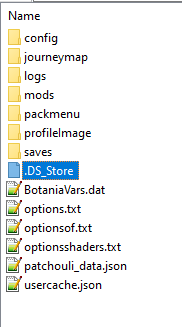
its in every folder
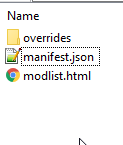
this is what you should see upon opening it. https://i.imgur.com/N7GdiA9.png
 opal cipher
feral juniper
How can I see the CF version?
opal cipher
feral juniper
How can I see the CF version?
Check settings in CurseForge, lower left,  icon. And then the numbers in the lower left corner.
 feral juniper
But this has nothing to do with the manifest.json I think
What about BotaniaVars.dat how can the sistem know what can and what can’t?
lyric crescent
no, that doesnt. the fact that your zip is not formatted correctly is the issue
feral juniper
I did tried in winZip
I will try to download a compressor
Can I upload in winRAR
queen storm
No, the app should export it
lyric crescent
needs to be .zip, doesnt matter how it is made.
it should just work from the app, that fact that you are doing anything with the zip after creation is wrong
feral juniper
I am not I just click export and than compress
queen storm
Why compress?
opal cipher
.. Time to record that video on how to properly export modpacks perhaps.
feral juniper
If do not compress is just a regular folder
lyric crescent
then there is your problem
curseforge makes a .zip
if it is not a zip then it is your computer messing the file up
 viscid wave
anyone can explain me how to install a curseforge modpack into my my self hosted server pls ? (iif it's possible )
red patioBOT
Your question is not related to CurseForge owned/maintained features or services.
Please use the appropriate game room by getting a game role from #786424115535544350.
Otherwise use #👽︱game-support for game related help.
CurseForge does not make or maintain any of the content or games used on the site or app. Just because it's on the site/app does not make it a problem with CurseForge. Move rooms as requested, arguing about it will result in you being removed from the discord.
 prisma sierra
Hi guys I recently installed curseforge and I have minecraft installed, but when I try to download minecraft with curseforge this message appears, I didnt found any solution on google so I would be grateful if someone could help me 😃
 lyric crescent
?mc-path
red patioBOT
Change your install path to the following:
For Windows: C:\CurseForge
For Mac: /Users/Shared/CurseForge
If Minecraft is not installed in CurseForge App:
- Click the in the top left.
- Select Minecraft from the list of games.
- Select the
Advancedoption and pick the location for your computer listed above. - Click
Continue.
If Minecraft is installed in CurseForge App:
- Click the in the bottom left.
- Select the Minecraft tab.
- Click
Change. - Select the location for your computer listed above.
:no_entry_sign: Minecraft Files should NOT be installed inside the following locations :no_entry_sign:
:no_entry_sign: .minecraft folder.
:no_entry_sign: OneDrive folders.
:no_entry_sign: Desktop folder.
:no_entry_sign: iCloud enabled folders.
:no_entry_sign: or any other cloud saved folder.
:no_entry_sign: or folders with non-English characters in them.
If any of the above are in the path you need to change/move it!
 lyric crescent
issue was that it was trying to install to a folder with some kind of protection
prisma sierra
oh thats why it wans violation access denied
 fierce summit
how do i upload my modpack so my friends can use it
lyric crescent
?mc-packshare
red patioBOT
There are two ways to share a modpack you've made with others...
Export and Share - For Friends to Small Groups.
- Click the Icon for the modpack.
- Click the button next to play.
- Click
Export. - Select the files that should be included.
- Send the zip to the people that want it! They can follow the instructions in
!mc-installpackto install the pack!
Upload to Curseforge - For Public Release to Everyone.
This options will make your pack public to EVERYONE, it comes with extra requirements and will take some effort to set up.
- Go to here: https://www.curseforge.com/project/432/4471/create
- Fill out the information with a proper description of the pack. This should allow anyone to understand what the pack is.
- Click the Icon for the modpack in the CurseForge app.
- Click the button next to play.
- Click
Export. - Select the files that should be included.
- Open your Project you made on the CurseForge site and Upload the file you just made.
- Wait for Moderation & Sync so it can show up in the client! (See
!syncfor limitations)
fierce summit
would giving them the zip file and manually doing it work as well?
lyric crescent
that is the top option
fierce summit
!mc-installpack
red patioBOT
How to install modpacks with the search features in app.
- Open the

Minecraftsection of the app. - Click the top search bar where it says
Search for modpacksOR Click theBrowse ModpacksTab. - Find the Modpack you want to install and click install on it.
- Wait for CurseForge app to download and unpack all the required files.
- Once finished, click
Play!
How to install modpacks from a Export. (Custom/Private/Site downloaded Modpack zip)
- Get CurseForge App if you don't have it, use
!downloadfor a link. - Get the exported modpack from CurseForge or someone else,
!mc-packshareexplains how to make them. - Open the
Minecraftsection of the app. - Click
Create Custom Profile - Click the
Importoption. - Find the file you just downloaded in step 2 and select it.
- CurseForge app will now attempt to download and unpack the modpack. If it fails, try steps 4-6 again.
- Once finished, click
Play!
 fierce summit
!download
red patioBOT
Looking to install the CurseForge app?
<:windows:798410728188936222> Windows
Minimum Requirements:
- OS Version: 7 (64 bit), 8.1, 10, 11
- 64 bit Required.
- 350MB storage space.
- Microsoft .Net 4.8
- Intel/AMD quad-core CPU
- 8GB ram
Download: https://download.overwolf.com/install/Download?&PartnerId=4047
If you are having issues with the installer use the URL below to install Overwolf then go to the app store to download CurseForge.
https://content.overwolf.com/downloads/setup/latest/regular.html
<:mac:798410654418862130> Mac
Minimum Requirements:
- OS Version 10.14 or newer.
- 64 bit Required.
Download: https://curseforge.overwolf.com/downloads/curseforge-latest.dmg
:penguin: Linux
Minimum Requirements:
Yes. SOON:tm: ( ͡~ ͜ʖ ͡°)
Download: :person_shrugging:
 shy talon
Howdy support. Just upgraded to latest version, now getting this. I can run the standard MC vanilla launcher and it all works fine. Hmmmmm? I can send the crash report?
 lyric crescent
Upgraded to the latest version of what? This looks like a Minecraft error, not a CurseForge one.
shy talon
Upgraded Curseforge
lyric crescent
And what are you doing to get this?
shy talon
Clicking play on any of these. Was working fine yesterday
 lyric crescent
?mc-installfix
red patioBOT
This is NOT instructions for Repair Profile! They are NOT the same! You need to do this!
- Click on the Minecraft Tab on the Left side of the CurseForge App.
- Click button next to the
Create Custom Profileoption. - Click
Repair Installationoption. - Play game.
NOTE: You will not lose any modpacks or worlds!
shy talon
Imma try this. Brb
shy talon
Brilliant! Seems to have fixed that. What does 'mismatched mod channel list' mean?
lyric crescent
your mods dont match the server
shy talon
Ok Im waiting for our modpack to be approved first I guess
https://www.curseforge.com/minecraft/modpacks/smp-o-plenty-1-16-5 First time trying all this. Excuse the noob 🙂
red patioBOT
Project Moderation Time
Project/File moderation is done on these days unless otherwise mentioned:
Sunday, Monday, Tuesday, Wednesday, Thursday: <t:1631170800:t> - <t:1631199600:t> (Your time)
Friday, Saturday: No Moderation!
Projects are moderated First in, First out. If you submit late in the work day, it will likely get left until the next day!
New Projects or anything flagged for manual review: 1-3 Working Days
Updates to approved projects not needing manual approval: 1 Hour
-If your file has been "Under Review" for more than an hour, then it is at manual review!
Changes will only show in the app if the project meets the requirements in the ?sync command and up to 24 hours has passed from when it was accepted.
lyric crescent
!status
shy talon
Thanks u rock
shy talon
connection closed - mismatched mod channel list
Any tools to diagnose which is the culprit?
lyric crescent
the log, but this is not a curseforge issue #👽︱game-support
shy talon
Is there a diagnostic mod?
lyric crescent
looking for mods is not a curseforge issue either
shy talon
ok
 vague slate
ok so a new version of the minecraft launcher came out and every time I click to play one of my modpacks it opens up the other launcher and it fails.
upper root
new launcher no worky see botty
red patioBOT
Ignore the new launcher update. CF does not use it or works with it, yet.
Everything will work fine otherwise.
upper root
As for it not working, does it show it crashed?
vague slate
oh that makes sence. It says that java could not create virtual machine
upper root
Oh woa
vague slate
0.180.1.3
upper root
!outdated
red patioBOT
Your CurseForge App version is outdated!
To use CurseForge with the latest features & fixes you should update your CurseForge App.
You can do this by uninstalling the app from your computer programs and then install it again from https://download.curseforge.com/
NOTE: Uninstalling CurseForge will not remove any game/mod data, It's entirely safe to remove and install again!
vague slate
oops
vague slate
ok thanks
 foggy ridge
I can't get into my support account to view my ticket. I didn't have an account so I guess it made one for me, but the problem is I didn't know that because it got sent to my spam folder. So I didn't know my password and just requested a password reset. It never came, so I checked my spam. Lo and behold, the email about the account activation was there, but nothing about password reset. I moved that out of my spam and clicked the activation link, and it just brings me to the "forgot password" page. Except it still won't send me a password reset email, so that page is kinda useless to me.
And it feels like it would be kiiiinda silly to open up a new support ticket when the first one hasn't been updated (at least I assume, based on the fact that I haven't gotten any more emails about it, but I wasn't sure which is why I wanted to check) and I wouldn't be able to log in to see the ticket anyways.
fleet bear
If you open a ticket without an account signing up for an account with the same email will associate them. It sounds like you never made one.
fleet bear
foggy ridge
I can't get into my support account to view my ticket. I didn't have an account ...
Just make an account with the same email and it should set it up correctly.
foggy ridge
It says email has already been taken.
Because it auto-created an account when I made a support ticket, according to the email.
fleet bear
it shouldn't have?
foggy ridge
"Welcome to Overwolf support. A new Overwolf support account has been created for you. Use it to follow up with your ticket status. Please click the url below to activate your support account." Followed by a link which, as stated, just brings me to the forgotten password page.
fleet bear
They must have changed something then. Open a support ticket for that too then.
foggy ridge
I will not be able to access said support ticket.
Do you have a solution for that part of the problem?

 fleet bear
foggy ridge
I will not be able to access said support ticket.
fleet bear
foggy ridge
I will not be able to access said support ticket.
You have accesses via email.
digital roost
fleet bear
You have accesses via email.
how do i fix my issue
foggy ridge
fleet bear
You have accesses via email.
As far as I am aware, I cannot use my email to check the status of any of my tickets. Is there a way to do so that I haven't seen explained?
 placid sluice
this has happened 3 times already each time I replace the mod that is causing this and another mod is found right after....
 foggy ridge
Funnily enough that's what my original support ticket was about so I'd like to know how to fix that too
placid sluice
its chipping away at my patience to use CF for any kind of upload...
foggy ridge
Honestly same, there always seems to be some issue that the end-user is always somehow an idiot for running into, even if the way to avoid the issue is incredibly unclear
upper root
?reject-cfhosted
red patioBOT
The following files belong to CurseForge-hosted projects, and should therefore not be added directly to zip files:
-
Remove any mods listed in the error message from the profile you exported. Then reinstall them with the CurseForge app. DO NOT drag and drop files from the site.
-
Export the profile again, open the new zip that was just made. Check for the
overrides/modsfolder. If you still see any mods in that folder do the step above again for each mod. -
Upload the zip once complete and no more mods show in the
overrides/modsfolder.
 gray token
My modpack got approved 3 days ago, but i cant find it on the curseforge overwolf app.
upper root
Link?
red patioBOT
Sync and your Project.
CurseForge App and site do not share the same requirements! You can find things on the site but this does not mean it will be in the app!
For a mod to show up in the app:
- Projects MUST have a file marked as RELEASE
 or BETA
- Projects MUST be APPROVED
- Projects MUST have a file marked for the GAME VERSION SELECTED/LOADED
- Projects CAN'T be EXPERIMENTAL
- Projects CAN'T be ABANDONED
Files can take a while to show up in the app. If your files still have not shown up either your project is new and you have yet to mark a file as Release/Beta or there is issues with the sync system making it slow.
Vote this issue up if you would like to know when the last sync was! https://curseforge-ideas.overwolf.com/ideas/CF-I-1617
foggy ridge
red patio
I feel like a much easier solution would be to have the CF app export the packs correctly, but I'll give this a shot. Thank you for pulling this up, ChiefArug.
Wait, I have a problem. It says do not drag and drop files from the site, but for some mods, there's literally no other way to get them into the pack because they don't show up in the app.
upper root
Are they 1.18 mods and the profile is 1.18.1?
foggy ridge
Yes.
upper root
Then tell the mod authors to mark their mods corrrectly
foggy ridge
And for the ones who just never respond? Because that happens very frequently.
upper root
Then there is nothing you can do about it
Its not up to CF to check and mark if mods work for each version
foggy ridge
I never said it was?
upper root
Thats fine, there have been others who come in thinking that it is, so its kind of a stock reply for them
foggy ridge
Okay well I didn't. All I've done is ask what exactly I'm supposed to do, and your response was basically to tell me I'm shit outta luck and get snippy at me over an opinion you just randomly assumed I had. Literally all I want is to figure out how to get these mods to my friends for our server, that's it.
I really and truly just want this whole thing to work
I feel like that's not a crazy request you know?
I'm really trying my absolute best to remain chill despite how frustrating this whole thing is, and someone snippily telling me "that isn't our job" makes that a lot harder. So please try to remember there is a person with actual emotions on the other side of your interactions.
rich flint
Every time you make an export file check inside the zip to confirm no "mods" folder exists. If it does then it didn't export properly (unless they are approved 3rd party mods you added on purpose manually)
foggy ridge
It does have them and I'm not sure how to get it to not do that and keep the mods I need
rich flint
If this is only a friend's thing you can for now throw them the zip file manually and they can import the file
foggy ridge
I already released the modpack, I'm just trying to make an update for it. Ideally I'd really like it to remain simple where people can just use the CF app to install the pack, as over time it will get more difficult to send it to everyone on the server as we add more people. Is there a simpler way?
rich flint
Deleting the misfiring mod and reinstalling it via the in-app search / install usually fixes the link issue
foggy ridge
There are some mods that that's not an option for as they do not appear in the search due to being tagged as 1.18 instead of 1.18.1, and not every mod author responds when this is pointed out.
rich flint
Ah then manually editing your manifest.json may be required
foggy ridge
That's fine, I'm willing to do that if needed, I just need to know what to edit and how.
rich flint
Sure open the manifest.json w text editor and look. Each file is inside brackets as modID and fileID
Find the corresponding numbers on the project page. FileID us the file url
 glass shore
Anywhere I can conact the support staff or someone who can contact them. I've had a ticket pending for 5 days now with no responce.
 proper portal
why does curse always crash the first time it loads and then take 4 minutes to load the modpacks and another 7 to infinity minutes to load the mods? and a lot of times updating a mod doesn't get rid of the old version
fleet bear
foggy ridge
As far as I am aware, I cannot use my email to check the status of any of my tic...
You would get an email with the status change or a reply.
fleet bear
foggy ridge
That's fine, I'm willing to do that if needed, I just need to know what to edit ...
Just note that manually editing files may not always exist. You should always tell devs to update their files.
foggy ridge
I plan to, but as stated before, they don't always do it. They don't always respond to comments. Many times, I've posted comments and not gotten responses from the mod devs. I can't exactly posses them and make them update their files, hence my asking for an alternate option for when I inevitably get ignored by a mod dev because not everyone has their lives revolve around the hobby that is modmaking.
fleet bear
Comments are the worst way to contact most people. Github issues, Discords, CF Dm, comments in that order is what's best.
fleet bear
glass shore
Anywhere I can conact the support staff or someone who can contact them. I've ha...
What is it for? Did you follow up with something they requested?
You have provided little information, also 5 days ago would have put you at the start of the weekend.
fleet bear
proper portal
why does curse always crash the first time it loads and then take 4 minutes to l...
There's some bugs with updates currently.
glass shore
fleet bear
What is it for? Did you follow up with something they requested?
You have provid...
I summited a support ticket about a issue with a modpackj I creatied. They havnt responded yet its been 5 days, which does put opening ot Saturday
fleet bear
and the issue is?
 patent wing
Hello I'm encountering some issues trying to import a file into Curseforge if anyone is available to help me
red patioBOT
Hey there, it is Curseforge, not "Cursed forge"
fleet bear
patent wing
Hello I'm encountering some issues trying to import a file into Curseforge if an...
you can only import modpack zips.
patent wing
Alr it gave me an error message though
red patioBOT
╰( ͡° ͜ʖ ͡° )つ──☆*:・゚ *˜”*°•.˜”*°• Many Help •°*”˜.•°*”˜* <:curselit:796985620550385705>
Please provide a description of your issue with as much detail as possible. If you have an issue with a mod or modpack, tell us the name. Explain what you can see happening. Be specific!
 Tell us what is happening, we already know it "doesn't work".
Avoid using words like "it", tell us exactly what "it" is.
Don't assume anyone knows what you are talking about, be specific.
Tell us what you expected to happen.
Provide screenshots or video if possible.
Provide a log if possible. ?mc-log
 ember cloak
How would i go about transferring my modded world to an updated version of the pack
 stiff holly
Is there a way to have a client download missing mods from the server's mod folder?
upper root
Not with curseforge
stiff holly
I decided to manually download mods one by one from the cf site btw
I'm guessing there might be a mod that does such a thing then? 🤔
rich flint
is it because of a message you are seeing
stiff holly
oh, no it's not. I'm thought maybe it could possibly be more efficient to load up mods on my private server instead of testing and launching both the server and client back and forth
or is there really no avoiding that tenuous part of installing mods? lol
I feel like I'm doing double work in a sense
rich flint
no avoiding - welcome to pack authoring
stiff holly
hehehe gotcha xD
rich flint
unless you're doing some automation witchcraft
stiff holly
I need to really force myself to do these mods one at a time then
and not overwhelm myself by installing batches of mods
upper root
If its a server on the same computer/doesnt need to be a remote server you can run the server in the same folder as the client
rich flint
yup get the MC role in #786424115535544350 and use the MC channels for mc specific discussions
stiff holly
rich flint
yup get the MC role in <#786424115535544350> and use the MC channels for mc spe...
ah thank you
digital roost
can I have help everytime i try to open better minecraft my game just crashes
ember cloak
How would i go about transferring my modded world to an updated version of the pack
fleet bear
ember cloak
How would i go about transferring my modded world to an updated version of the p...
Just update the profile?
Otherwise copy the saves folder from one to the other.
fleet bear
digital roost
can I have help everytime i try to open better minecraft my game just crashes
!notcf
red patioBOT
Your question is not related to CurseForge owned/maintained features or services.
Please use the appropriate game room by getting a game role from #786424115535544350.
Otherwise use #👽︱game-support for game related help.
CurseForge does not make or maintain any of the content or games used on the site or app. Just because it's on the site/app does not make it a problem with CurseForge. Move rooms as requested, arguing about it will result in you being removed from the discord.
ember cloak
copy the save files ?
Ive been trying to do that but i must be doing something wrong
rich flint
discuss game issues in game channels - such as #👽︱game-support or get a #786424115535544350
digital roost
hey i need help trying to setup my own mod pack but cant find certain mods
'pls dm for help
upper root
You should ask here, no ones going to dm you to help you with a mostly unknown problem
Also #📛︱rules 4️⃣, stick to a single channel please
digital roost
well im making a 12.2 mod pack and i cant find galatic craft
upper root
Its not on curseforge, however it is in the approved third party mods list
digital roost
well how would i add it to the modpack?
upper root
Get it from its offical page and add it to the mods folder
https://micdoodle8.com/mods/galacticraft/downloads
!mc-installmods
red patioBOT
How to install mods in CurseForge App.
- Click
+ Create Custom Profile - Name it, select the required Minecraft version, select the modloader & modloader version (usually the highest number), click
Create. - Click the profile icon.
- Click
Add More Content - Search and install the desired mods.
- Start the game!
How to install mods not on CurseForge.
- Right click the profile picture or Open the profile and click the Icon next to the play button.
- Click
Open Folder. - Drag the mod(s) into the
modsfolder. (Note: Some mods will require others, to run. Make sure to read the instructions for the mod!) - Start the game!
 upper root
Second lot of instructions ^
digital roost
well i got that down
so i have my mod pack
i ant trying to upload it but is there a way i can just give it to my friends instead
rich flint
yes just throw them the export.zip file and have them create custom profile > import
digital roost
well i can find a import button
rich flint
little text at top of custom profile window
rich flint
k
 hybrid verge
can someone help me?
Im trying to create a modpack but when I upload the file, it doesnt accept it
fleet bear
!mc-packshare
red patioBOT
There are two ways to share a modpack you've made with others...
Export and Share - For Friends to Small Groups.
- Click the Icon for the modpack.
- Click the button next to play.
- Click
Export. - Select the files that should be included.
- Send the zip to the people that want it! They can follow the instructions in
!mc-installpackto install the pack!
Upload to Curseforge - For Public Release to Everyone.
This options will make your pack public to EVERYONE, it comes with extra requirements and will take some effort to set up.
- Go to here: https://www.curseforge.com/project/432/4471/create
- Fill out the information with a proper description of the pack. This should allow anyone to understand what the pack is.
- Click the Icon for the modpack in the CurseForge app.
- Click the button next to play.
- Click
Export. - Select the files that should be included.
- Open your Project you made on the CurseForge site and Upload the file you just made.
- Wait for Moderation & Sync so it can show up in the client! (See
!syncfor limitations)
hybrid verge
thx
 lethal arch
Whats the usual time for a mod to be either denied or accepted?
upper root
!status
red patioBOT
Project Moderation Time
Project/File moderation is done on these days unless otherwise mentioned:
Sunday, Monday, Tuesday, Wednesday, Thursday: <t:1631170800:t> - <t:1631199600:t> (Your time)
Friday, Saturday: No Moderation!
Projects are moderated First in, First out. If you submit late in the work day, it will likely get left until the next day!
New Projects or anything flagged for manual review: 1-3 Working Days
Updates to approved projects not needing manual approval: 1 Hour
-If your file has been "Under Review" for more than an hour, then it is at manual review!
Changes will only show in the app if the project meets the requirements in the ?sync command and up to 24 hours has passed from when it was accepted.
 gusty mountain
Been getting this for a while now and don't particularly know why as it was working before, anything I can do to try and fix it?
 red patioBOT
You had an "Oops, that was not supposed to happen!"
https://support.curseforge.com/en/support/solutions/articles/9000194900-curseforge-troubleshooting#oops
Please follow these instructions
 molten hawk
Curseforge says that "
The status of the file AyyMD-Pack-BETA1.1-1.16.5 (AyyMD Community Pack) has been changed to Rejected
Notes:
The following files belong to CurseForge-hosted projects, and should therefore not be added directly to zip files:
overrides/mods/ChickenDropFeathers-1.0-forge-1.16.5-36.0.0.jar
overrides/mods/comforts-forge-1.16.5-4.0.1.3.jar
overrides/mods/CTM-MC1.16.1-1.1.2.6.jar
overrides/mods/Cucumber-1.16.5-4.1.12.jar
overrides/mods/FastFurnace-1.16.5-4.5.0.jar
overrides/mods/FastLeafDecay-v25.2.jar
overrides/mods/FastWorkbench-1.16.5-4.6.1.jar
overrides/mods/jei-1.16.5-7.7.1.145.jar
overrides/mods/Patchouli-1.16.4-53.2.jar
overrides/mods/Placebo-1.16.5-4.6.1.jar
overrides/mods/ScalableCatsForce-2.13.5-build-2-with-library.jar
overrides/mods/smarterfarmers-1.16.5-1.2.1.jar
overrides/mods/StorageDrawers-1.16.3-8.5.1.jar
overrides/mods/swingthroughgrass-1.16.4-1.5.3.jar"
Despite I just having extracted my project from the app
red patioBOT
The following files belong to CurseForge-hosted projects, and should therefore not be added directly to zip files:
-
Remove any mods listed in the error message from the profile you exported. Then reinstall them with the CurseForge app. DO NOT drag and drop files from the site.
-
Export the profile again, open the new zip that was just made. Check for the
overrides/modsfolder. If you still see any mods in that folder do the step above again for each mod. -
Upload the zip once complete and no more mods show in the
overrides/modsfolder.
young bone
When did you try to put it up for review
molten hawk
young bone
When did you try to put it up for review
after i recently created the project
young bone
I want to know the day, how recently
Curseforge currently has a bug where mods are just randomly appearing in the overrides folder
molten hawk
oh, 2 days ago if memory serves
so it's probably that
so do i just remove the mods from the overrides folder or do i have to reinstall them?
lyric crescent
do what the message says
also make sure there are no duplicates of mods in the folder
 shadow mural
The minecraft laucher wont let me start RLcraft any reason why
queen storm
Any errors?
shadow mural
yes it says theres a error
 thin bluff
hey if i remove a library mod will it remove all the mods that require it as a dependency?
queen storm
shadow mural
yes it says theres a error
Then show that error, can't do a guessing game here
queen storm
thin bluff
hey if i remove a library mod will it remove all the mods that require it as a d...
Yes, and the other way as well for now sadly
thin bluff
weird, i just removed cucumber and it didnt remove any other mods
 queen storm
!mc-logs
red patioBOT
Sending logs for support.
- Right-click the modpack profile icon OR click the button in the modpack profile.
- Click
Open Folder. - Open the
logsfolder. - Drag and drop the FILE named
latestORdebuginto discord.
young bone
That is correct
red patioBOT
Change your install path to the following:
For Windows: C:\CurseForge
For Mac: /Users/Shared/CurseForge
If Minecraft is not installed in CurseForge App:
- Click the in the top left.
- Select Minecraft from the list of games.
- Select the
Advancedoption and pick the location for your computer listed above. - Click
Continue.
If Minecraft is installed in CurseForge App:
- Click the in the bottom left.
- Select the Minecraft tab.
- Click
Change. - Select the location for your computer listed above.
:no_entry_sign: Minecraft Files should NOT be installed inside the following locations :no_entry_sign:
:no_entry_sign: .minecraft folder.
:no_entry_sign: OneDrive folders.
:no_entry_sign: Desktop folder.
:no_entry_sign: iCloud enabled folders.
:no_entry_sign: or any other cloud saved folder.
:no_entry_sign: or folders with non-English characters in them.
If any of the above are in the path you need to change/move it!
opal cipher
Not only that, it appears that they might need to fix the install as well. Saw something about empty class.
shadow mural
yall speaking in a different language to me
lyric crescent
shadow mural
should I redownload it now or is it good now
opal cipher
Did you change path?
opal cipher
Then you might need to download RLCraft again
shadow mural
it worked thanks
young bone
Rule 5
lyric crescent
ping wasnt needed, but yw
shadow mural
my b
 upper blade
Hello, I have RLCraft for Minecraft. A problem it runs on my primary GPU, but it's really bad. (Can be viewed in photo) I want to run on GPU 1 instead. RX 5500M. I've gotten support from the Minecraft Community Support Server but they were clueless. Help me. Please. I've tried everything and my fps is an hate crime to look at. I've tried changing graphic settings, my AMD Radeon Software settings but nothing seems to work properly.
 limpid nimbus
hello i have a question why does 1.18.1 work or is it only for me
queen storm
upper blade
Hello, I have RLCraft for Minecraft. A problem it runs on my primary GPU, but it...
!mc-videocard
red patioBOT
How to set minecraft to use your videocard
Got NVIDIA?
 queen storm
limpid nimbus
hello i have a question why does 1.18.1 work or is it only for me
queen storm
limpid nimbus
hello i have a question why does 1.18.1 work or is it only for me
What error do you get?
queen storm
Then it is for #👽︱game-support
upper blade
ok
queen storm
queen storm
What error do you get?
@limpid nimbus And you got asked a counter question already
queen storm
Don't you see the reply stuff? I asked about your error
limpid nimbus
it says game crash
but is only a mod inside
queen storm
Show the error!
limpid nimbus
i'm stupid don't know where
queen storm
!mc-logs
red patioBOT
Sending logs for support.
- Right-click the modpack profile icon OR click the button in the modpack profile.
- Click
Open Folder. - Open the
logsfolder. - Drag and drop the FILE named
latestORdebuginto discord.
limpid nimbus
this
queen storm
latest.log
limpid nimbus
?
queen storm
!mc-installfix
red patioBOT
This is NOT instructions for Repair Profile! They are NOT the same! You need to do this!
- Click on the Minecraft Tab on the Left side of the CurseForge App.
- Click button next to the
Create Custom Profileoption. - Click
Repair Installationoption. - Play game.
NOTE: You will not lose any modpacks or worlds!
 spiral sierra
anyone know why i can see mods in other modpacks but then they dont come up when i search them to add to my modpack even if its the same version?
queen storm
spiral sierra
anyone know why i can see mods in other modpacks but then they dont come up when...
Also same modloader? Exact same mc version?
limpid nimbus
@red patio where nummber 2
queen storm
limpid nimbus
<@!235148962103951360> where nummber 2
- That is a bot, won't reply to you.
- Show a screenshot of what you are looking at

 dense musk
is there a future implementation to automate server files to be installed on servers without manually uploading all the server files to a server directory
fleet bear
dense musk
is there a future implementation to automate server files to be installed on ser...
That would be something your host needs to do regardless of if CF made a tool or not for it.
Theres currently no plans in the works for said tools either.
queen storm
limpid nimbus
The app, not the site
dense musk
i am using cubecoders AMP they say you guys do not have a automatic way of listing server files to be installed to the server
and i am on a vps
 glacial merlin
i can't transfer my worlds

only the rypr is being recognised
i was told to post here
lyric crescent
need to explain what you are doing to know how it is failing
queen storm
lyric crescent
dense musk
i am using cubecoders AMP they say you guys do not have a automatic way of listi...
What are you expecting to get here?
dense musk
to twist ya arms to add a tool to add it to future so it makes it easy for the little minded users.
lyric crescent
!feedback then
red patioBOT
<:CFidea:798388634972717066> Have an idea on how to improve CurseForge? <:CFidea:798388634972717066>
CurseForge is looking for great ideas and user feedback! Get into the CurseForge Community by providing some feedback and voting on what's important to you!
Think some game should be supported? Post an idea and explain why!
Got a to die for feature idea? Let's hear it!
Location In-app
- Click the
 button on the bottom left of the app.
 - Click on

Suggest a Featureoption!
dense musk
and lazy users
now you hit a hammer in the right spot
cause i do not know if there is a suggestion for it already
queen storm
Probably
dense musk
basically it is kinda like the devs of the panel thing needs to log into your api to get info from the servers to install the files to the server it is requested from
lyric crescent
Then that is something they need to address.
queen storm
And then handle it accordingly
More talk in #💬︱general-chat If you want to continue
 frail hill
hi i am trying to get onto curse forge but it says that there was a error and that i should contact support i dont know what to do.
lyric crescent
what error
frail hill
it says that it failed to start applacation
lyric crescent
screenshot?
 lyric crescent
Contact overwolf support for that
frail hill
ok
 proper wren
hey i need help i changed pc and backed up modpacks but curseforge doesn't detect them
pls help me
@lyric crescent
proper wren
proper wren
hey i need help i changed pc and backed up modpacks but curseforge doesn't detec...
for this pls
lyric crescent
No, you don't need my help. You need to wait for someone to answer you.
proper wren
after the curseforge app the first time does not open the second yes
do you know how to fix it
 queen storm
Is the path correct?
queen storm
!mc-path
red patioBOT
Change your install path to the following:
For Windows: C:\CurseForge
For Mac: /Users/Shared/CurseForge
If Minecraft is not installed in CurseForge App:
- Click the in the top left.
- Select Minecraft from the list of games.
- Select the
Advancedoption and pick the location for your computer listed above. - Click
Continue.
If Minecraft is installed in CurseForge App:
- Click the in the bottom left.
- Select the Minecraft tab.
- Click
Change. - Select the location for your computer listed above.
:no_entry_sign: Minecraft Files should NOT be installed inside the following locations :no_entry_sign:
:no_entry_sign: .minecraft folder.
:no_entry_sign: OneDrive folders.
:no_entry_sign: Desktop folder.
:no_entry_sign: iCloud enabled folders.
:no_entry_sign: or any other cloud saved folder.
:no_entry_sign: or folders with non-English characters in them.
If any of the above are in the path you need to change/move it!
proper wren
all these modpacks I got them from one pc and transferred them to another
queen storm
As you said
proper wren
i said i got the modpacks from a pc
and i passed them in this i think is a minecraftinstance.json problem
lyric crescent
show this https://i.imgur.com/7Bb1VIe.png
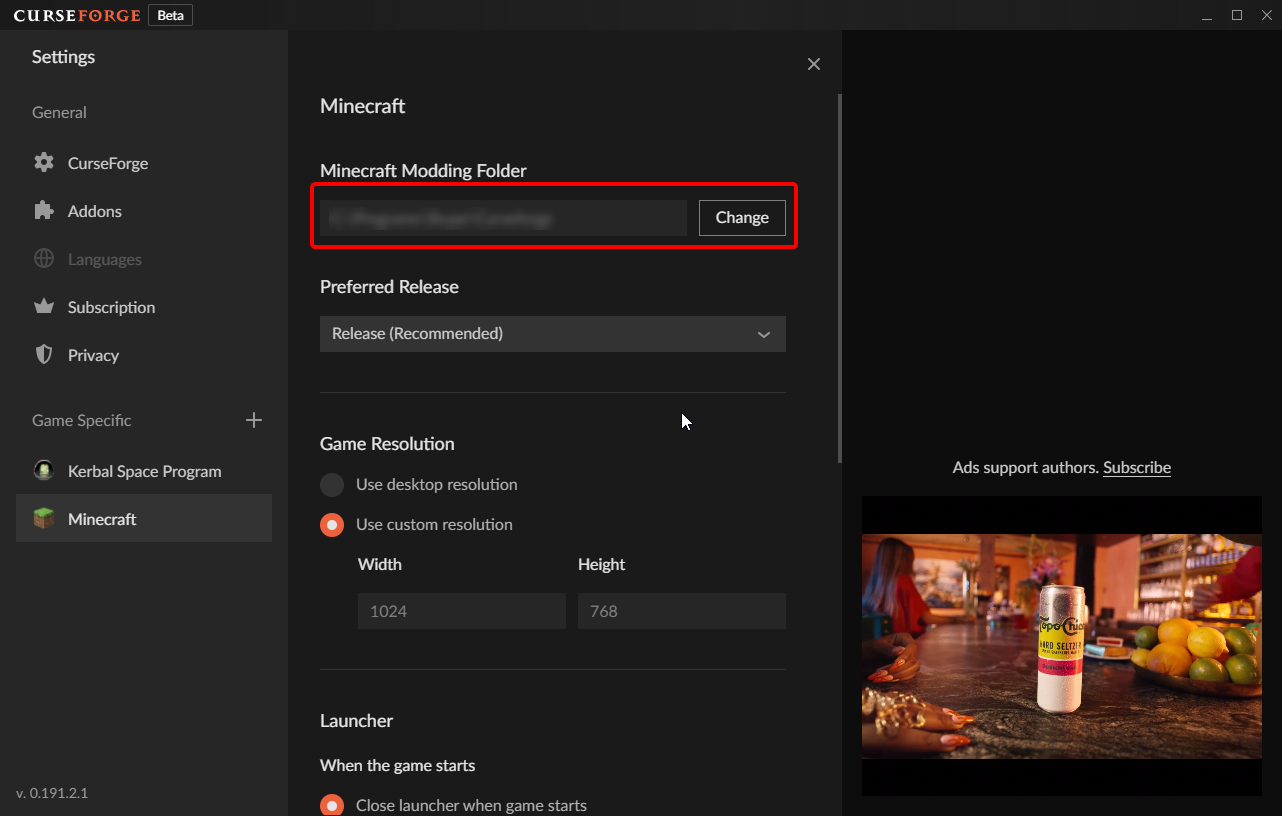


 fresh swift
does anyone know why my cursedforge installer keeps saying to check the connection?
lyric crescent
there is something wrong with your connection probably
fresh swift
ive checked my wifi and it seems fine
hidden fern
fresh swift
ive checked my wifi and it seems fine
Where are you from?
fresh swift
uk
molten verge
CF wont open
hidden fern
fresh swift
uk
DM me please
lyric crescent
molten verge
CF wont open
Has it opened before?
 opaque cargo
is there a way to share a profile with a friend through curseforge?
queen storm
!mc-packshare