#🔥︱curseforge-support
1 messages · Page 596 of 1
 lyric crescent
 vale ember
Not only does it not work but some evil genius are doing it harder

are some of the description checks automatic?
lyric crescent
What resolution is your screen
lyric crescent
which are what
 polar jay
Sorry for the late reply. I'll definitely send it tomorrow since I am out of time today.
vale ember
1920 * 1200 | 1920 * 1080
 opal cipher
What browser are you using?
vale ember
Opera GX
opal cipher
Try another browser.
vale ember
how about no
opal cipher
I've seen multiple people have issues with Opera GX because of some of the extensions they use in it.
lyric crescent
well if you dont want the issue fixed, okay then
opal cipher
So, it was a suggestion, to see if it works better in another browser.
vale ember
imma do the easy way of writing a description then removing what a wrote
lyric crescent
vale ember
imma do the easy way of writing a description then removing what a wrote
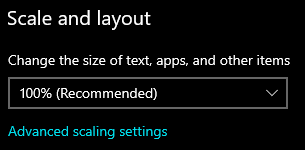
You have this set to something besides 100%?
https://i.imgur.com/xpNYLMc.png
 lyric crescent
do you have your browser window zoomed in?
vale ember
no
and the same things happends on chrome and edge
looking and inspect element overflow is set to auto and the element size is set way to small
lyric crescent
Should be able to submit a ticket with the app
 digital roost
Im trying to add already made and custom modpacks (imported) modpacks but it's constantly cancelling itself after it's done, I tried with and without anything running in the background. Good and bad connected and it installed modpacks just fine even with bad connect back then. but it wont work at all now.
Retrying to get help bc i didnt get responce but here i go again.
And this friend who sent me the modpack to import, it worked for be before but now it doesnt, and he sent the same thing to me and my other friends. It worked for everyone but me,
lyric crescent
Did you get the answer to my question yet?
 nova maple
Hello, I'm getting the oops error and can't load curseforge to update my WoW addons... is it safe to assume there's an excess of requests at this moment or should I try some troubleshooting? Last week it was working fine and I've seen some outage reports, hence why I'm asking
lyric crescent
!oops
 red patioBOT
You had an "Oops, that was not supposed to happen!"
https://support.curseforge.com/en/support/solutions/articles/9000194900-curseforge-troubleshooting#oops
Please follow these instructions
nova maple
Yes, I had read that already
 grim wraith
On the Curseforge website it says I have 37 notifications but when I check the notifications page it only lists 20 and idk how to show the older remaining 17. Anybody know how to get around this? I really wanna make sure I'm not missing any important mod updates or responses from mod creators about bugs and questions
lyric crescent
?owlogs send this and i will pass it to support
red patioBOT
<:overwolf:857375414002384916> How to get Overwolf logs! <:overwolf:857375414002384916>
 rich flint
Is it already submitted as a project?
 tight bronze
ya
This is a new project. Once a file is uploaded for this project, it will be reviewed by a moderator.Until approved by a moderator, the project will not be visible to others, and its files will not synchronize across CurseForge.
rich flint
?mc-packshare
red patioBOT
There are two ways to share a modpack you've made with others...
Export and Share - For Friends to Small Groups.
- Click the Icon for the modpack.
- Click the
 button next to play.
 - Click

Export. - Select the files that should be included.
- Send the zip to the people that want it! They can follow the instructions in
!mc-installpackto install the pack!
Upload to Curseforge - For Public Release to Everyone.
This options will make your pack public to EVERYONE, it comes with extra requirements and will take some effort to set up.
- Go to here: https://www.curseforge.com/project/432/4471/create
- Fill out the information with a proper description of the pack. This should allow anyone to understand what the pack is.
- Click the Icon for the modpack in the CurseForge app.
- Click the button next to play.
- Click
Export. - Select the files that should be included.
- Open your Project you made on the CurseForge site and Upload the file you just made.
- Wait for Moderation & Sync so it can show up in the client! (See
!syncfor limitations)
rich flint
Did you mark your export file as beta or release?
tight bronze
let me chack
rich flint
It must be tagged as beta or release, alpha will not work to sync with launcher app.
rich flint
If you just created/submitted this project it will still be waiting for review most likely
opal cipher
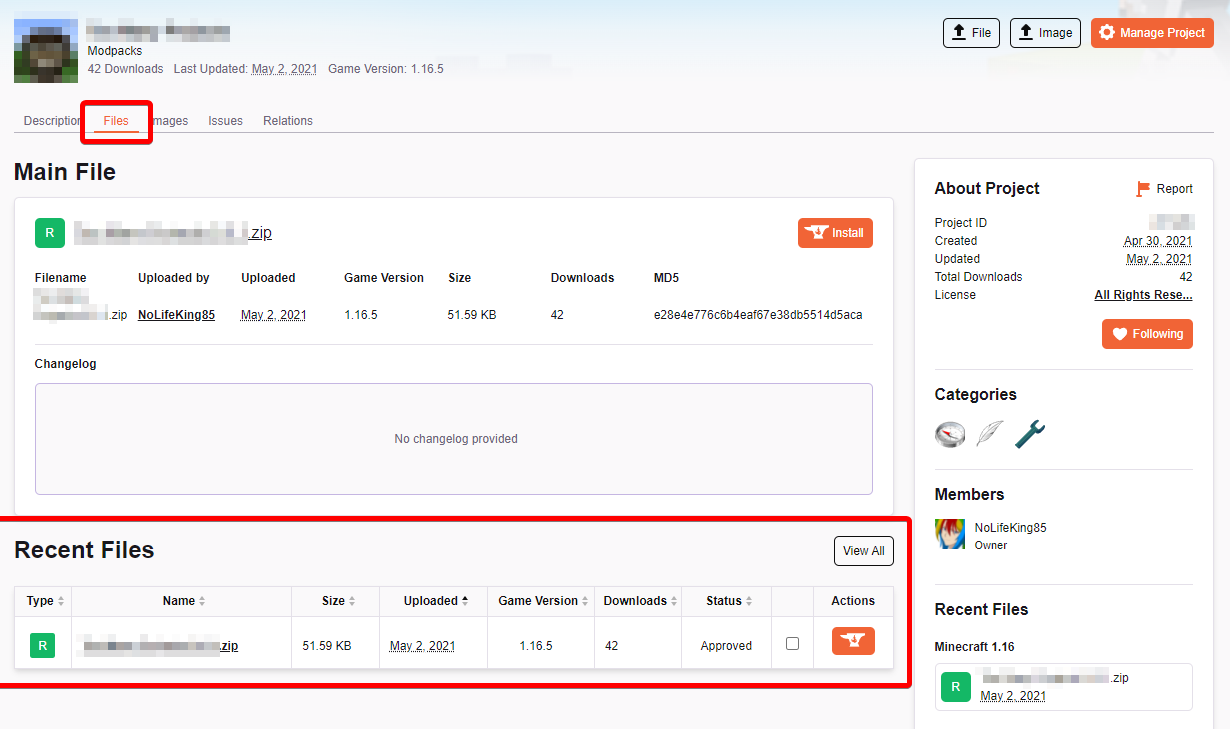
Show a screenshot of the files tab of the project
opal cipher
Like this.. https://itssm.pl/33ywxrQ
 opal cipher
No, we can't, since the project is probably not approved yet.
There should be a red message box, saying something.
tight bronze
i did
rich flint
How long ago did you create your project page
tight bronze
a week ago
lyric crescent
screen shot the project page
lyric crescent
do what i asked
tight bronze
i dont how to do that
lyric crescent
what part
tight bronze
the screen shot
lyric crescent
 ember wyvern
My computer has this problem, it's windows 7. how do i solve it?
"To run this application, you must first install one of the following versions of the .NET Framework: v4.0"
 grim wraith
On the Curseforge website it says I have 37 notifications but when I check the notifications page it only lists 20 and idk how to show the older remaining 17. Anybody know how to get around this? I really wanna make sure I'm not missing any important mod updates or responses from mod creators about bugs and questions
lyric crescent
ember wyvern
My computer has this problem, it's windows 7. how do i solve it?
"To run this a...
install 4.8
tight bronze
there
 lyric crescent
you uploaded a .jpeg as a modpack?
tight bronze
how to do that
lyric crescent
that is a question
tight bronze
ya
 lapis arrow
Anyone got any idea why it wont let me add better end to my mods folder on mcprohosting?
like it worked just fine yesterday, but i had to restart today and reupload all mods
red patioBOT
Your question is not related to CurseForge owned/maintained features or services.
Please use the appropriate game room by getting a game role from #786424115535544350.
Otherwise use #👽︱game-support for game related help.
CurseForge does not make or maintain any of the content or games used on the site or app. Just because it's on the site/app does not make it a problem with CurseForge. Move rooms as requested, arguing about it will result in you being removed from the discord.
lyric crescent
tight bronze
ya
?mc-packshare This is how to correctly upload a modpack. ⤵️
red patioBOT
There are two ways to share a modpack you've made with others...
Export and Share - For Friends to Small Groups.
- Click the Icon for the modpack.
- Click the button next to play.
- Click
Export. - Select the files that should be included.
- Send the zip to the people that want it! They can follow the instructions in
!mc-installpackto install the pack!
Upload to Curseforge - For Public Release to Everyone.
This options will make your pack public to EVERYONE, it comes with extra requirements and will take some effort to set up.
- Go to here: https://www.curseforge.com/project/432/4471/create
- Fill out the information with a proper description of the pack. This should allow anyone to understand what the pack is.
- Click the Icon for the modpack in the CurseForge app.
- Click the button next to play.
- Click
Export. - Select the files that should be included.
- Open your Project you made on the CurseForge site and Upload the file you just made.
- Wait for Moderation & Sync so it can show up in the client! (See
!syncfor limitations)
digital roost
why does eveything tske so long to download
lyric crescent
what is everything and how long is so long
lyric crescent
care to be more specific? also not sure what disk has to do with it

 lyric crescent
gunna tell what pack this is?
 stone hamlet
I just started to download a modpack for minecraft, and it said failed to download it. im trying it again. but this hasnt happened to me before.
digital roost
yeah thats happening too

 lyric crescent
!oops
red patioBOT
You had an "Oops, that was not supposed to happen!"
https://support.curseforge.com/en/support/solutions/articles/9000194900-curseforge-troubleshooting#oops
Please follow these instructions
 proper cove
then this happens with either option i choose
lyric crescent
stone hamlet
For me its MC Eternal
After you click install, does it sit at validating manifest files?
stone hamlet
lyric crescent
After you click install, does it sit at `validating manifest files`?
No it starts downloading mods, but last time after a while it just said failed
 red patioBOT
<:overwolf:857375414002384916> How to get Overwolf logs! <:overwolf:857375414002384916>
stone hamlet
just finished didnt fail this time.
lyric crescent
Guessing its due to the new cf patch rollout. Bet there'll be more of this.
lyric crescent
?mc-packshare
red patioBOT
There are two ways to share a modpack you've made with others...
Export and Share - For Friends to Small Groups.
- Click the Icon for the modpack.
- Click the button next to play.
- Click
Export. - Select the files that should be included.
- Send the zip to the people that want it! They can follow the instructions in
!mc-installpackto install the pack!
Upload to Curseforge - For Public Release to Everyone.
This options will make your pack public to EVERYONE, it comes with extra requirements and will take some effort to set up.
- Go to here: https://www.curseforge.com/project/432/4471/create
- Fill out the information with a proper description of the pack. This should allow anyone to understand what the pack is.
- Click the Icon for the modpack in the CurseForge app.
- Click the button next to play.
- Click
Export. - Select the files that should be included.
- Open your Project you made on the CurseForge site and Upload the file you just made.
- Wait for Moderation & Sync so it can show up in the client! (See
!syncfor limitations)
How to install modpacks with the search features in app.
- Open the

Minecraftsection of the app. - Click the top search bar where it says
Search for modpacksOR Click theBrowse ModpacksTab. - Find the Modpack you want to install and click install on it.
- Wait for CurseForge app to download and unpack all the required files.
- Once finished, click
Play!
How to install modpacks from a Export. (Custom/Private/Site downloaded Modpack zip)
- Get CurseForge App if you don't have it, use
!downloadfor a link. - Get the exported modpack from CurseForge or someone else,
!mc-packshareexplains how to make them. - Open the
Minecraftsection of the app. - Click

Create Custom Profile - Click the
Importoption. - Find the file you just downloaded in step 2 and select it.
- CurseForge app will now attempt to download and unpack the modpack. If it fails, try steps 4-6 again.
- Once finished, click
Play!
 digital roost
k so i tried everything on the page + uninstalled and reinstalled
 lyric crescent
?ow-logs send this
red patioBOT
<:overwolf:857375414002384916> How to get Overwolf logs! <:overwolf:857375414002384916>
digital roost
bet
 faint dawn
forge isnt working
 digital roost
1 wrong place to go to for forge issues 2 1.18 forge is still brand new still with bugs use 1.17 forge for now
faint dawn
k
 tawdry sinew
is anyone else having issues with certain mods not detecting the version of curseforge used? I'm trying to run some minecraft mods but a couple are claiming that Im using an older version of curseforge, even though Ive made sure to update it, and therefore they wont work
I suppose its also possible that something didnt get updated properly
lyric crescent
digital roost
yamza heres the logs
Passed this on to the CF Devs to check.
lyric crescent
tawdry sinew
is anyone else having issues with certain mods not detecting the version of curs...
Mods wouldn't care about what version of curseforge you use. Curseforge only installs mods.
digital roost
lyric crescent
Passed this on to the CF Devs to check.
guessing they will @ me ?
lyric crescent
or i will if they answer me. probably will be a while as its outside working hours.
 reef oasis
tawdry sinew
is anyone else having issues with certain mods not detecting the version of curs...
reef oasis
tawdry sinew
is anyone else having issues with certain mods not detecting the version of curs...
I had the same issue but now for some reason all the mods work
tawdry sinew
lyric crescent
Mods wouldn't care about what version of curseforge you use. Curseforge only ins...
any idea what might be causing this then? im launching it via the curseforge app, im assuming that might have something to do with it?
 lyric crescent
change your forge version. this isnt related to curseforge at all
?mc-updatemodloader
red patioBOT
You can update the mod loader within the same game version in the CurseForge app by following these steps!
- Click on the modpack profile you are working with.
- Click on the button next to the play button.
- Click on the
 Profile Options button.
 - Select the mod loader version you want from the dropdown.
- Play!
If you need to update to a new game version, a new profile is required.
tawdry sinew
gotcha, Ill look into that. thanks

 rich flint
?notcf
red patioBOT
Your question is not related to CurseForge owned/maintained features or services.
Please use the appropriate game room by getting a game role from #786424115535544350.
Otherwise use #👽︱game-support for game related help.
CurseForge does not make or maintain any of the content or games used on the site or app. Just because it's on the site/app does not make it a problem with CurseForge. Move rooms as requested, arguing about it will result in you being removed from the discord.
digital roost
when i launch forge nothing happens but if i do it again it says it is already open but nothing opens or happens whats should i do?
 west folio
digital roost
when i launch forge nothing happens but if i do it again it says it is already o...
west folio
digital roost
when i launch forge nothing happens but if i do it again it says it is already o...
did you wait more than 1 second
lyric crescent
forge, or curseforge?
red patioBOT
Your question is not related to CurseForge owned/maintained features or services.
Please use the appropriate game room by getting a game role from #786424115535544350.
Otherwise use #👽︱game-support for game related help.
CurseForge does not make or maintain any of the content or games used on the site or app. Just because it's on the site/app does not make it a problem with CurseForge. Move rooms as requested, arguing about it will result in you being removed from the discord.
digital roost
west folio
did you wait more than 1 second
i waited 2 hours
digital roost
i need help im trying to upload my modpack files, and it keeps rejecting it saying i need to pt the files in the manifest.json how do i do that
lyric crescent
?mc-packshare
red patioBOT
There are two ways to share a modpack you've made with others...
Export and Share - For Friends to Small Groups.
- Click the Icon for the modpack.
- Click the button next to play.
- Click
Export. - Select the files that should be included.
- Send the zip to the people that want it! They can follow the instructions in
!mc-installpackto install the pack!
Upload to Curseforge - For Public Release to Everyone.
This options will make your pack public to EVERYONE, it comes with extra requirements and will take some effort to set up.
- Go to here: https://www.curseforge.com/project/432/4471/create
- Fill out the information with a proper description of the pack. This should allow anyone to understand what the pack is.
- Click the Icon for the modpack in the CurseForge app.
- Click the button next to play.
- Click
Export. - Select the files that should be included.
- Open your Project you made on the CurseForge site and Upload the file you just made.
- Wait for Moderation & Sync so it can show up in the client! (See
!syncfor limitations)
 hybrid coyote
can somebody tell me, why my Cursforge Launcher runs slowly?
lyric crescent
slowly in what way
digital roost
I've done that it keeps getting rejected
digital roost
my pack is approved but everytime i upload a file it gets rejected and it says i need to add the mods to the manifest.json

 lyric crescent
next time just show the message. what you said isnt the same as what this says
!reject-cfhosted
red patioBOT
The following files belong to CurseForge-hosted projects, and should therefore not be added directly to zip files:
-
Remove any mods listed in the error message from the profile you exported. Then reinstall them with the CurseForge app. DO NOT drag and drop files from the site.
-
Export the profile again, open the new zip that was just made. Check for the
overrides/modsfolder. If you still see any mods in that folder do the step above again for each mod. -
Upload the zip once complete and no more mods show in the
overrides/modsfolder.
 tacit vine
Hello! Im New here! I just made a new modpack for me and my friends! I was wondering how long it takes to get approved? Thanks!
lyric crescent
!status
red patioBOT
Project Moderation Time
Project/File moderation is done on these days unless otherwise mentioned:
Sunday, Monday, Tuesday, Wednesday, Thursday: <t:1631170800:t> - <t:1631199600:t> (Your time)
Friday, Saturday: No Moderation!
Projects are moderated First in, First out. If you submit late in the work day, it will likely get left until the next day!
New Projects or anything flagged for manual review: 1-3 Working Days
Updates to approved projects not needing manual approval: 1 Hour
-If your file has been "Under Review" for more than an hour, then it is at manual review!
Changes will only show in the app if the project meets the requirements in the ?sync command and up to 24 hours has passed from when it was accepted.
 raven leaf
Idk if this is the right channel but MC Java on Curseforge won't load without crashing and it's not happening on vanilla.
lyric crescent
?mc-installfix
red patioBOT
This is NOT instructions for Repair Profile! They are NOT the same! You need to do this!
- Click on the Minecraft Tab on the Left side of the CurseForge App.
- Click button next to the
Create Custom Profileoption. - Click

Repair Installationoption. - Play game.
NOTE: You will not lose any modpacks or worlds!
red patioBOT
Sending logs for support.
- Right-click the modpack profile icon OR click the button in the modpack profile.
- Click

Open Folder. - Open the
logsfolder. - Drag and drop the FILE named
latestORdebuginto discord.
raven leaf
Ok
raven leaf
didn't work
 uncut jolt
So I’m a noob and am looking to play forged labs mods for mine craft how do I do so is there anything I. Need to download
digital roost
yo why cant i open curseforge
i got like 20 modpacks in it but i cant open it anymore
 sage finch
Hey guys
My brother is having an issue with running a modpack (insanecraft). Me and him have the same pc and ram and my pc runs it fine. He gets error code 0 if that means anything
red patioBOT
Error/Exit codes are useless. Follow these steps so someone can actually help you.
- Right-click the modpack profile icon OR click the button in the modpack profile.
- Click
Open Folder. - Open the
logsfolder. - Drag and drop the FILE named
latestORdebuginto discord.
digital roost
lyric crescent
Did you get the answer to my question yet?
It says it at the bottom
Idk but he been using it before and it worked until now. And same modpack was sent to other friends, worked for them but me.
And to let you know
It doesnt declide immediately, it loads in stuff fine but at the end, it cancels itself
Same thing happens to imported custom modpacks and already made ones such as
All the mods 7, Decimation, etc.
lyric crescent
why
 steel pasture
Stuck on "Downloading Mods 0%" when installing new instances
lyric crescent
Yea, it's slow currently due to a cf patch being rolled out
steel pasture
any update on the status of that patch

 west prism
i am trying too play sb but when i open 1.8.9 forge it loads like in thhe mc launcher but after that it doesnt open the game
 wintry valve
west prism
i am trying too play sb but when i open 1.8.9 forge it loads like in thhe mc lau...
wintry valve
west prism
i am trying too play sb but when i open 1.8.9 forge it loads like in thhe mc lau...
probably cuz theres a patch being rolled out
for cf
west prism
when will it be out?
wintry valve
no idea when its gonna be done
lyric crescent
likely another day before its fully out
digital roost
lyric crescent
likely another day before its fully out
still didnt work
 lyric crescent
what version is your curseforge?
lyric crescent
⚙️ bottom left
digital roost
 lyric crescent
need to wait until you get the patch, it should fix that
digital roost
the file being rejected?
lyric crescent
export failing, which leads to that, yes
lyric crescent
mods being in overrides is literally export failing
lyric crescent
?mc-editpack
red patioBOT
How to add/remove mods in a modpack.
- Click on the picture of the modpack.
- Click the

Add More Contentbutton, IF this button is not there, see below before continuing. - Find the Mods, Resource Packs or Maps you wish to Install and click
Installon them. - Wait for all the required mods to be downloaded.
- Start the modpack.
How to Enable/Disable content management for modpacks.
- Click on the picture of the modpack.
- Click on the button next to the
Playbutton. - Click on
Profile Options. - Check the
Allow content management for this profileoption if you want to edit the content of the modpack, uncheck it to disable.
NOTE: The Allow content management for this profile option is what allows you to Delete, Disable, Update or Install any Mods, Resource Packs or Maps managed by CurseForge. It must be on to modify any of them! (Currently)
lyric crescent
if you do this and it has issues though, you're on your own
 mossy trench
Ty
west prism
likely another day before its fully out
@lyric crescent so no body is able too play rn because it’s not out?
because mine just won’t let me launch 1.8.9 forge
lyric crescent
..what
west prism
so no body is able too play forge until its out?
lyric crescent
i dont get the question
why are you assuming this?
downloading modpacks is slow, has nothing to do with forge or playing anything you have already
west prism
So am i able too play forge or no
because rn when i launch forge from the mc launcher nothing happens
it just loads then nothing shows up
lyric crescent
yes..? forge and curseforge are not the same thing
west prism
i thought this was the forge server?
lyric crescent
 fleet bear

 young bone
Forge and Curseforge are not the same thing
lyric crescent
hey! I said that!
young bone
We might need to say it more
 hushed bluff
is there any way to find addons to a specific mod
lyric crescent
only if it's got the mods name in it's name, or google maybe. there is no specific feature for that currently
hushed bluff
that would be a nice feature if you would add it
lyric crescent
!feedback
red patioBOT
<:CFidea:798388634972717066> Have an idea on how to improve CurseForge? <:CFidea:798388634972717066>
CurseForge is looking for great ideas and user feedback! Get into the CurseForge Community by providing some feedback and voting on what's important to you!
Think some game should be supported? Post an idea and explain why!
Got a to die for feature idea? Let's hear it!
Location In-app
- Click the
 button on the bottom left of the app.
 - Click on

Suggest a Featureoption!
raven leaf
raven leaf
didn't work
Yamaza I got the log.
 dim prairie
One message removed from a suspended account.
 hidden light
I have an issue.
I'm trying to play All the Mods 7 on Mac, but when I do, I get a code 0 (game crashed before even starting up).
Now normally, what I'd do is manually download the right version of forge into the bin folder, the thing is that this isn't the FTB launcher.
Any way someone could help me?
 lyric crescent
? mc-installfix
red patioBOT
This is NOT instructions for Repair Profile! They are NOT the same! You need to do this!
- Click on the Minecraft Tab on the Left side of the CurseForge App.
- Click button next to the
Create Custom Profileoption. - Click
Repair Installationoption. - Play game.
NOTE: You will not lose any modpacks or worlds!
lyric crescent
dim prairie
One message removed from a suspended account.
Not that I am aware of?
dim prairie
lyric crescent
Not that I am aware of?
One message removed from a suspended account.
 sage jacinth
does anyone know how to fix this?
 dim prairie
sage jacinth
does anyone know how to fix this?
dim prairie
sage jacinth
does anyone know how to fix this?
One message removed from a suspended account.
sage jacinth
the mods folder is in the overrides is that the problem?
dim prairie
One message removed from a suspended account.
rich flint
it is a problem, make a new folder for example C:\curseforge and change your path to that
?mc-path
red patioBOT
Change your install path to the following:
For Windows: C:\CurseForge
For Mac: /Users/Shared/CurseForge
If Minecraft is not installed in CurseForge App:
- Click the
 in the top left.
 - Select Minecraft from the list of games.
- Select the
Advancedoption and pickC:\drive. - Click
Continue.
If Minecraft is installed in CurseForge App:
- Click the
 in the bottom left.
 - Select the Minecraft tab.
- Click
Change. - Select the
C:\drive.
:no_entry_sign: Minecraft Files should NOT be installed inside the following locations :no_entry_sign:
:no_entry_sign: .minecraft folder.
:no_entry_sign: OneDrive folders.
:no_entry_sign: Desktop folder.
:no_entry_sign: iCloud enabled folders.
:no_entry_sign: or any other cloud saved folder.
:no_entry_sign: or folders with non-English characters in them.
If any of the above are in the path you need to change/move it!
sage jacinth
thanks guys i got it working at it got accepted : )
sage jacinth
i have one more question does cursefoge automatically upload your modpack to the curseforge app or do you have to manually do it?
lyric crescent
You upload it to the website. Then it becomes available on the app after approval.
digital roost
Is there a prescribed order of operations for encouraging the CurseForge app to update? I'm still on 0190.3.1 and it doesn't seem to be automatically updating to 0191.1.5 despite restarting CurseForge, Overwolf and my PC.
lyric crescent
Might not be available for you yet. It's not fully released yet
digital roost
Ah! Ok, thanks. I wanted to check in before I took more severe steps. Appreciate it, Yamza.
 lunar bolt
I'm trying to get a curseforge modpack I made onto my Shockbyte server but I can't find a custom.jar anyone know what I gotta do?
 upper root
!notcf and the bold is unessecary
red patioBOT
Your question is not related to CurseForge owned/maintained features or services.
Please use the appropriate game room by getting a game role from #786424115535544350.
Otherwise use #👽︱game-support for game related help.
CurseForge does not make or maintain any of the content or games used on the site or app. Just because it's on the site/app does not make it a problem with CurseForge. Move rooms as requested, arguing about it will result in you being removed from the discord.
upper root
They are used to select files to delete them, so yes, select them if you want
 distant onyx
Is there some cookie I can set or some setting I can change to not have the website prompt me to open in the app? I run Linux so there isn't even a build of the app for my platform, and it's generally just a pain when I want to download modpacks.
actually, nevermind, it seems MultiMC has an interface for the prompts
red patioBOT
Your question is not related to CurseForge owned/maintained features or services.
Please use the appropriate game room by getting a game role from #786424115535544350.
Otherwise use #👽︱game-support for game related help.
CurseForge does not make or maintain any of the content or games used on the site or app. Just because it's on the site/app does not make it a problem with CurseForge. Move rooms as requested, arguing about it will result in you being removed from the discord.
 river lagoon
sorry
 subtle kayak
I have more than 70 mods on my modpack but curseforge only recognises 3 of then what I do?

yes they are all aveliable on curseforge
upper root
Install them with the app
subtle kayak
I alredy did that
opal cipher
Restart CurseForge.
subtle kayak
it did not worked
I tried duplicating the mod pack and now he recognises 69 mods but there is 72
rich flint
make a duplicate of the profile, and on the copy try "repair profile" option
 sullen wyvern
hi all!) Where is the best place to ask about my sc2mapster account?=)
opal cipher
!notcf
red patioBOT
Your question is not related to CurseForge owned/maintained features or services.
Please use the appropriate game room by getting a game role from #786424115535544350.
Otherwise use #👽︱game-support for game related help.
CurseForge does not make or maintain any of the content or games used on the site or app. Just because it's on the site/app does not make it a problem with CurseForge. Move rooms as requested, arguing about it will result in you being removed from the discord.
opal cipher
Hang on..
Since when was this a part of CF? xD Haven't even seen this anywhere. Sorry, my mistake.
The login is bound to your Twitch account.
sullen wyvern
The thing is - i lost access to e-mail associated with my account and can't login=( Twitch support only wishes me luck=( Is it possible to transfer my old account information to new one?
opal cipher
Ah.. Well.. only thing that I can suggest (I do not work for Overwolf/CurseForge, so I do not have access to anything fancy), is creating a ticket, and hope that they are more helpful than Twitch.
sullen wyvern
more than nothing. Thank you NoLifeKing)
 mental radish
quick question, would I make a support ticket to push the approval of a project, or is that strictly a patience thing, not a problem of course if it is.
opal cipher
It's a patience thing.
red patioBOT
Project Moderation Time
Project/File moderation is done on these days unless otherwise mentioned:
Sunday, Monday, Tuesday, Wednesday, Thursday: <t:1631170800:t> - <t:1631199600:t> (Your time)
Friday, Saturday: No Moderation!
Projects are moderated First in, First out. If you submit late in the work day, it will likely get left until the next day!
New Projects or anything flagged for manual review: 1-3 Working Days
Updates to approved projects not needing manual approval: 1 Hour
-If your file has been "Under Review" for more than an hour, then it is at manual review!
Changes will only show in the app if the project meets the requirements in the ?sync command and up to 24 hours has passed from when it was accepted.
mental radish
thank you very much
 opal cipher
 solid wyvern
?
upper root
Change the path to
For Windows: C:\CurseForge
solid wyvern
C:\Users\user\AppData\Roaming.minecraft this?
 meager jewel
hello i need help with something
upper root
solid wyvern
C:\Users\user\AppData\Roaming\.minecraft this?
No, the path i posted. The .minecraft folder is NOT a good place to put it
meager jewel
when i load up the mod pack in game it says i have a old forge version and it needs a higher version
Where could i download the newest version
solid wyvern
upper root
No, the path i posted. The .minecraft folder is NOT a good place to put it
so where should I put it when I have the original minecraft
opal cipher
**C:\CurseForge\ **
upper root
meager jewel
when i load up the mod pack in game it says i have a old forge version and it ne...
You can update the mod loader within the same game version in the CurseForge app by following these steps!
- Click on the modpack profile you are working with.
- Click on the button next to the play button.
- Click on the Profile Options button.
- Select the mod loader version you want from the dropdown.
- Play!
If you need to update to a new game version, a new profile is required.
upper root
solid wyvern
so where should I put it when I have the original minecraft
It doesnt matter where that is installed, this folder is where cf stores its copies of all the important stuff so your original minecraft stuff doesnt get corrupted or anything else bad happen to it
solid wyvern
upper root
It doesnt matter where that is installed, this folder is where cf stores its cop...
ok ok it works thanks
meager jewel
upper root
>>> You can update the mod loader within the same game version in the CurseForge...
thank u so much (:
 queen storm
Start of the new year does that.
opal cipher
 cinder palm
so it will go back or no?
cinder palm
so it will go back or no?
https://mailchi.mp/overwolf/whats-new-with-overwolf-curseforge-january
Read the part about "Point Drops"
cinder palm
@opal cipher oic.. ty! Freaked me out when I saw how dramatically it had fallen.
is there a document explaining how payouts work?
opal cipher
No clue :D
cinder palm
have any idea how long it takes to get the funds to pp once you've placed the order?
opal cipher
Since there was large payouts recently, I think there might be some delays, because PayPal is being PayPal, putting temporary holds on things and stuff. Which also was explained in the newsletter I linked.
cinder palm
I saw that for December. Ok, ty.. I'm just happy to have $70 for my efforts.
10% of my monthly income so alot of $ for me.
 mighty plover
im unable to uninstall curseforge
opal cipher
Quite understandable. :) But normally, they are manually handled at the start of each month, but I think it might be a slight delay on that, if I understand things right. But I'm not employed by either Overwolf or CurseForge. So my guess is just based on the information I've seen in public spaces. ^^
mighty plover
any solutions for that?
opal cipher
What happens when you try to uninstall it?
red patioBOT
Looking to install the CurseForge app?
<:windows:798410728188936222> Windows
Minimum Requirements:
- OS Version: 7 (64 bit), 8.1, 10, 11
- 64 bit Required.
- 350MB storage space.
- Microsoft .Net 4.8
- Intel/AMD quad-core CPU
- 8GB ram
Download: https://download.overwolf.com/install/Download?&PartnerId=4047
If you are having issues with the installer use the URL below to install Overwolf then go to the app store to download CurseForge.
https://content.overwolf.com/downloads/setup/latest/regular.html
<:mac:798410654418862130> Mac
Minimum Requirements:
- OS Version 10.14 or newer.
- 64 bit Required.
Download: https://curseforge.overwolf.com/downloads/curseforge-latest.dmg
:penguin: Linux
Minimum Requirements:
Yes.
Download: :person_shrugging:
opal cipher
!getcf
mighty plover
my brain typed uninstall by muscle memory
opal cipher
Use the second link, and then install CurseForge through the appstore in Overwolf
mighty plover
yeah i know
but when i install curseforge through the installer it doesnt have like a specific app for ow
or does it?
opal cipher
When you use the CurseForge Installer, it will install Overwolf and CurseForge.
As Overwolf is the framework/app that makes CurseForge on Windows work at all.
mighty plover
ahh so i prolly just click "Dont make OW shortcut"
after i install OW, should i use the main installer after?
opal cipher
Nah, you can open Overwolf then, and go to the appstore, and from there you can install CurseForge
 red patioBOT
Change your install path to the following:
For Windows: C:\CurseForge
For Mac: /Users/Shared/CurseForge
If Minecraft is not installed in CurseForge App:
- Click the in the top left.
- Select Minecraft from the list of games.
- Select the
Advancedoption and pickC:\drive. - Click
Continue.
If Minecraft is installed in CurseForge App:
- Click the in the bottom left.
- Select the Minecraft tab.
- Click
Change. - Select the
C:\drive.
:no_entry_sign: Minecraft Files should NOT be installed inside the following locations :no_entry_sign:
:no_entry_sign: .minecraft folder.
:no_entry_sign: OneDrive folders.
:no_entry_sign: Desktop folder.
:no_entry_sign: iCloud enabled folders.
:no_entry_sign: or any other cloud saved folder.
:no_entry_sign: or folders with non-English characters in them.
If any of the above are in the path you need to change/move it!
mighty plover
it says network error
but my network is perfectly fine
im able to do internet things normally
opal cipher
Oh. I'm normally used to see that screen when the user needs to change path. Sorry x)
!owlogs
red patioBOT
<:overwolf:857375414002384916> How to get Overwolf logs! <:overwolf:857375414002384916>
mighty plover
is cool
opal cipher
Grab those logs, post here, and I'll poke someone with a bit more insight.
Did you read the "Learn more"-link btw?
mighty plover
yeah
it ssays i open "support" in the curseforge tray icon
and the zip with logs will be there
opal cipher
Thanks, I'll poke someone!
opal cipher
Ah, ok. ^^
 daring delta
@opal cipher i dont mean to bother you im just curious. Did the devs find any porblems?
opal cipher
Haven't received a word from them yet.
daring delta
alr thanks
lyric crescent
change it on twitch
lyric crescent
relog
 cunning nacelle
ok
 queen storm
!notcf
red patioBOT
Your question is not related to CurseForge owned/maintained features or services.
Please use the appropriate game room by getting a game role from #786424115535544350.
Otherwise use #👽︱game-support for game related help.
CurseForge does not make or maintain any of the content or games used on the site or app. Just because it's on the site/app does not make it a problem with CurseForge. Move rooms as requested, arguing about it will result in you being removed from the discord.
 bold belfry
 opal cipher
Still not related to CurseForge.
You need Java to install Forge with the installer like that.
queen storm
Or use curseforge if it is for a client
young bone
And you do not put .jar files in text editors
digital roost
may i have help seting up 1.17.1 forge server on mac
red patioBOT
Your question is not related to CurseForge owned/maintained features or services.
Please use the appropriate game room by getting a game role from #786424115535544350.
Otherwise use #👽︱game-support for game related help.
CurseForge does not make or maintain any of the content or games used on the site or app. Just because it's on the site/app does not make it a problem with CurseForge. Move rooms as requested, arguing about it will result in you being removed from the discord.
 vague veldt
I do not understand what to do?
lyric crescent
What version of the curseforge app do you have?
⚙️ bottom left
vague veldt
0.191.1.5
lyric crescent
?reject-cfhosted
red patioBOT
The following files belong to CurseForge-hosted projects, and should therefore not be added directly to zip files:
-
Remove any mods listed in the error message from the profile you exported. Then reinstall them with the CurseForge app. DO NOT drag and drop files from the site.
-
Export the profile again, open the new zip that was just made. Check for the
overrides/modsfolder. If you still see any mods in that folder do the step above again for each mod. -
Upload the zip once complete and no more mods show in the
overrides/modsfolder.
lyric crescent
I think the resource packs may still be rejected due to an ongoing issue, but lets see if the mods get fixed first.
vague veldt
ok
yeah the mods are fixed now but I guess I will have to add the resource packs later in a update when the issue is fixed. Thanks
opal cipher
Known issue.
tacit vine
Does the mod pack automatically go up when approved by moderators?
red patioBOT
Sync and your Project.
CurseForge App and site do not share the same requirements! You can find things on the site but this does not mean it will be in the app!
For a mod to show up in the app:
- Projects MUST have a file marked as RELEASE
 or BETA
- Projects MUST be APPROVED
- Projects MUST have a file marked for the GAME VERSION SELECTED/LOADED
- Projects CAN'T be EXPERIMENTAL
- Projects CAN'T be ABANDONED
Files can take a while to show up in the app. If your files still have not shown up either your project is new and you have yet to mark a file as Release/Beta or there is issues with the sync system making it slow.
Vote this issue up if you would like to know when the last sync was! https://curseforge-ideas.overwolf.com/ideas/CF-I-1617
tacit vine
Can’t be alpha?
 night sparrow
i accidentaly clicked on the recommed version of curseforge can i change it to expert somewhere or do i neeed to reinstall everything?
tacit vine
Sorry I’m new to mod pack creation me and my friends wanted a cool custom one
opal cipher
As the command explained, it has to be either Release or Beta. So no, it can't be Alpha.
tacit vine
Gotcha I’ll figure out how to change it
opal cipher
But, if it's just a modpack between friends, you can export it and send the zip to your friends instead.
lyric crescent
gunna need a video for this
opal cipher
lyric crescent
*gunna need a video for this*
Means I have to create a new modpack. D; So I can show things.
night sparrow
night sparrow
i accidentaly clicked on the recommed version of curseforge can i change it to e...
can i still put mods in finished modpacks now?
lyric crescent
you just upload a new zip
lyric crescent
?mc-log
red patioBOT
Sending logs for support.
- Right-click the modpack profile icon OR click the button in the modpack profile.
- Click
Open Folder. - Open the
logsfolder. - Drag and drop the FILE named
latestORdebuginto discord.
 zinc pollen
why wont forge 1.12.2 launch? it just crashes every time
subtle kayak
Why my world keeps getting rejected? what I must do? https://www.curseforge.com/minecraft/worlds/the-reborn-titans-world-modpack-required/files/all
lyric crescent
show the reject message would be helpful
lyric crescent
zinc pollen
why wont forge 1.12.2 launch? it just crashes every time
see the message above yours
subtle kayak
The status of the file The Reborn Titans Map.zip (The reborn titans (world, modpack required)) has been changed to Rejected
There was an error processing your file! Please reach out to https://support.curseforge.com for assistance!
If you have any questions please contact our support team https://support.curseforge.com.

CurseForge Support
We're here to get you informed on everything you need to know about CurseForge, including helpful guides and troubleshooting articles to back you up when you get in a pickle
CurseForge Support
We're here to get you informed on everything you need to know about CurseForge, including helpful guides and troubleshooting articles to back you up when you get in a pickle
lyric crescent
seems like they want you to make a ticket to ask about it
subtle kayak
lyric crescent
seems like they want you to make a ticket to ask about it
I dont get it
lyric crescent
you dont get..?
how to click that link and click request support?
 near hamlet
is anyone else having problems accessing curseforge?
 atomic blade
near hamlet
is anyone else having problems accessing curseforge?
atomic blade
near hamlet
is anyone else having problems accessing curseforge?
Yeah, the website has been super slow for the past week, taking several minutes to load one page sometimes.
near hamlet
atomic blade
Yeah, the website has been super slow for the past week, taking several minutes ...
mine wont load at all, its times out
 still barn
i am also experiencing issues with curseforge at the moment
 sour kestrel
same here
raven leaf
I tried the repair installation thing but minecraft keeps crashing on startup
 amber warren
is the curseforge (website) down again?
 viral birch
just noticed the website is down
opal cipher
They're working on it.
amber warren
opal cipher
They're working on it.
is it a ddos attack?
opal cipher
There's literally no way for me to know that without asking them. I just know that they're working on it.
amber warren
opal cipher
There's literally no way for me to know that without asking them. I just know th...
ok, thanks
lyric crescent
ddos'd themselves again 😂
 velvet elk
guys, curseforge is down?
lyric crescent
yes
velvet elk
oh no
viral birch
ya
dim prairie
One message removed from a suspended account.
amber warren
lyric crescent
*ddos'd themselves again* 😂
wait what
lyric crescent
site is back now
 magic plover
 viral birch
same error here as well
amber warren
I dont think that the website is back:
Error Unfortunately, an error occurred while processing your request.
lyric crescent
try again
amber warren
 viral birch
some mod pages are up and some are not it seems
lyric crescent
give it like 10 minutes, lmk if its still an issue after that
amber warren
i cant go on mod sites... weird
amber warren
lyric crescent
give it like 10 minutes, lmk if its still an issue after that
ok
nice the website is back
magic plover

 royal cypress
hi guys, how can i create a minecraft server for stoneblock 2?
red patioBOT
Your question is not related to CurseForge owned/maintained features or services.
Please use the appropriate game room by getting a game role from #786424115535544350.
Otherwise use #👽︱game-support for game related help.
CurseForge does not make or maintain any of the content or games used on the site or app. Just because it's on the site/app does not make it a problem with CurseForge. Move rooms as requested, arguing about it will result in you being removed from the discord.
magic plover
please solve as quickly as possible I need to download some mods
www.curseforge.com
Host
Error
lyric crescent
try again at XX:30 minutes
dim prairie
One message removed from a suspended account.
dim prairie
One message removed from a suspended account.
opal cipher
*reloads page* Seems to be working, on my machine.
lyric crescent
Can you check my machine rq?
opal cipher
Sure, I'll check it on my way to work tomorrow.
dim prairie
One message removed from a suspended account.
 fiery cradle
Hey, when i want to install a modpack, CurseForge gives me an error at the end
(one or more errors ocurred)
lyric crescent
?owlogs send this
red patioBOT
<:overwolf:857375414002384916> How to get Overwolf logs! <:overwolf:857375414002384916>
fiery cradle
lyric crescent
try installing a diffrent pack
lyric crescent
which ones
lyric crescent
im guessing it's related to the pack downloads being slow, caused by a curseforge patch rollout. You can keep trying, or try again later.
I don't think anything is actually wrong here, other than that.
fiery cradle
ok so just try it again or later
lyric crescent
yea
fiery cradle
allright, thanks!
lyric crescent
subtle kayak
its normal for afile to be under review for 3 hours?
upper root
Yes
lyric crescent
!status
red patioBOT
Project Moderation Time
Project/File moderation is done on these days unless otherwise mentioned:
Sunday, Monday, Tuesday, Wednesday, Thursday: <t:1631170800:t> - <t:1631199600:t> (Your time)
Friday, Saturday: No Moderation!
Projects are moderated First in, First out. If you submit late in the work day, it will likely get left until the next day!
New Projects or anything flagged for manual review: 1-3 Working Days
Updates to approved projects not needing manual approval: 1 Hour
-If your file has been "Under Review" for more than an hour, then it is at manual review!
Changes will only show in the app if the project meets the requirements in the ?sync command and up to 24 hours has passed from when it was accepted.
subtle kayak
ok thanks
 candid steeple
Do i need to have an internet connection to play singleplayer modded minecraft?
lyric crescent
yes
candid steeple
Why is that?
opal cipher
At least while starting it. Can probably turn it off after Minecraft has launched and loaded, so that you can log in with the Minecraft launcher.
candid steeple
seems pointless
sage finch
It does
lyric crescent
ok, but it is
sage finch
But that’s how the launcher works
To protect people from trying to play without buying u have to sign in then play
lyric crescent
even the new minecraft launcher requires a periodic internet connection for validation
candid steeple
thats even more dumb
opal cipher
Tell that to Microsoft/Mojang.
queen storm
Can argue what you want about it, not gonna change anytime soon.
candid steeple
I know.
lyric crescent
!feedback is a better place to voice your disapproval.
red patioBOT
<:CFidea:798388634972717066> Have an idea on how to improve CurseForge? <:CFidea:798388634972717066>
CurseForge is looking for great ideas and user feedback! Get into the CurseForge Community by providing some feedback and voting on what's important to you!
Think some game should be supported? Post an idea and explain why!
Got a to die for feature idea? Let's hear it!
Location In-app
- Click the button on the bottom left of the app.
- Click on
Suggest a Featureoption!
 real cove
Im playing create above and beyond but jei wont let me view through crafting recipes without kicking me out and saying cheats arent. anyone know how to fix this?
lyric crescent
?projectissue
red patioBOT
Please visit the project page for the content you posted about and look for a way to contact the developer.
Somewhere on the page there is usually a method of contact. Look for one of the following things:
Issuestab like the image below.- Discord link.
- Twitter link.
- Comments section below the project.
If no contact method exists you will either have to remove the project or find a solution on your own.
 real cove
thanks
tacit vine
yaw know how i can change my project from alpha to beta?
lyric crescent
change the release state on the file page
tacit vine
thanks so much
 wild mirage
why is it... every damn time... i have to fix curseforge from updating apps ..... 7 mods... all from curseforge.. downloaded and installed through the curseforge app.... says its not from cursesforge and goes in overrides.... this gonna be fixed anytime this year?

 river nexus
So uhh i have a question. I made a modpack right. just so me and my friends could play, but whenever they try to search the name up it doesnt pop up
lyric crescent
did you upload it to the site?
river nexus
i compiled it through the desktop app
lyric crescent
wild mirage
why is it... every damn time... i have to fix curseforge from updating apps .......
What CF version did you export this on?
lyric crescent
river nexus
i compiled it through the desktop app
that wasnt the question
wild mirage
says v 0.191.1.5
lyric crescent
river nexus
i compiled it through the desktop app
?mc-packshare ⤵️
red patioBOT
There are two ways to share a modpack you've made with others...
Export and Share - For Friends to Small Groups.
- Click the Icon for the modpack.
- Click the button next to play.
- Click
Export. - Select the files that should be included.
- Send the zip to the people that want it! They can follow the instructions in
!mc-installpackto install the pack!
Upload to Curseforge - For Public Release to Everyone.
This options will make your pack public to EVERYONE, it comes with extra requirements and will take some effort to set up.
- Go to here: https://www.curseforge.com/project/432/4471/create
- Fill out the information with a proper description of the pack. This should allow anyone to understand what the pack is.
- Click the Icon for the modpack in the CurseForge app.
- Click the button next to play.
- Click
Export. - Select the files that should be included.
- Open your Project you made on the CurseForge site and Upload the file you just made.
- Wait for Moderation & Sync so it can show up in the client! (See
!syncfor limitations)
lyric crescent
wild mirage
says v 0.191.1.5
?reject-cfhosted try this
red patioBOT
The following files belong to CurseForge-hosted projects, and should therefore not be added directly to zip files:
-
Remove any mods listed in the error message from the profile you exported. Then reinstall them with the CurseForge app. DO NOT drag and drop files from the site.
-
Export the profile again, open the new zip that was just made. Check for the
overrides/modsfolder. If you still see any mods in that folder do the step above again for each mod. -
Upload the zip once complete and no more mods show in the
overrides/modsfolder.
wild mirage
this been ongoing for months and months.. im sick of having to fix the erros of curseforge.
cant wait for modrinth tbh
lyric crescent
alright, you just here to complain, or help find a solution?
wild mirage
you didnt give me a soultion.
lyric crescent
just did
river nexus
!sync
red patioBOT
Sync and your Project.
CurseForge App and site do not share the same requirements! You can find things on the site but this does not mean it will be in the app!
For a mod to show up in the app:
- Projects MUST have a file marked as RELEASE or BETA
- Projects MUST be APPROVED
- Projects MUST have a file marked for the GAME VERSION SELECTED/LOADED
- Projects CAN'T be EXPERIMENTAL
- Projects CAN'T be ABANDONED
Files can take a while to show up in the app. If your files still have not shown up either your project is new and you have yet to mark a file as Release/Beta or there is issues with the sync system making it slow.
Vote this issue up if you would like to know when the last sync was! https://curseforge-ideas.overwolf.com/ideas/CF-I-1617
wild mirage
lyric crescent
just did
your solution is what im doing to fix the damn curseforge issues
fix curesforge
lyric crescent
k not gunna waste my time then
wild mirage
thats ok. you cant fix it anyway.. but its a major pain in the ass taht your app.. cant update / install mods and export packs corretly without issues.
having to delete and re add the mods over and over
only for other mods to show up.. and have to do it over agin
lyric crescent
again, do you want it to be fixed, or just complain about it?
if you want to complain, take it to #💬︱general-chat
 tender panther
anyone had issues with forge crashing when updating mods?
lyric crescent
forge, or curseforge?
tender panther
curseforge
lyric crescent
?owlogs send this
red patioBOT
<:overwolf:857375414002384916> How to get Overwolf logs! <:overwolf:857375414002384916>
red patioBOT
Your question is not related to CurseForge owned/maintained features or services.
Please use the appropriate game room by getting a game role from #786424115535544350.
Otherwise use #👽︱game-support for game related help.
CurseForge does not make or maintain any of the content or games used on the site or app. Just because it's on the site/app does not make it a problem with CurseForge. Move rooms as requested, arguing about it will result in you being removed from the discord.
dim prairie
One message removed from a suspended account.
 compact depot
tacit vine
compact depot
tacit vine
not a question, just a thankyou Yamza for all your help! My modpack is out on the App!
 teal pebble
hi there when I try to launch curse forge but it says "oops that was not supposed to happen" I did the stuff on the curseforge site to try and fix it
lyric crescent
?owlogs send this
red patioBOT
<:overwolf:857375414002384916> How to get Overwolf logs! <:overwolf:857375414002384916>
lyric crescent
Suggest reading the rules this time, there won't be another warning.
 delicate pebble
Hey, anyone knows how to insert a gif file into project description? Is it possible at all?
 mighty kestrel
Hello! I created a custom modpack for my friends and I, but i can't find an option to download server software for it.
lyric crescent
Curseforge doesn't have server software, you get that from whatever modloader website you are using
mighty kestrel
Ok. how would I get the mods i put into the pack off of curseforge?
lyric crescent
Open the mods folder and copy them
mighty kestrel
ok thanks!
 restive fog
Anyone experiencing some odd behavior with 0.191.1.5? Specifically Minecraft. A couple of times now I have noticed that mods are showing a new version within the Modpack like normal. You go to update the mod, CurseForge installs the updated Mod, all is good and you launch your pack and play like normal. After a session is done I exit my game exit my app etc. Re-load it a little while later, maybe an couple hours or so and the mods that were just updated are again saying they need to be updated but to the same version that they were just updated too in the previous session. Its almost like the app is rolling back the update or not saving the previously installed update. It is so random I cannot even pinpoint it. I originally though maybe it was the Mod Author pushing out an updated version but using the same version number or whatever the case may be. But a simple visit to the Mod page shows that is not the case and it is indeed the CurseForge app.
Secondly I am also noticing that when Exporting a Profile, it is taking a significant amount of time and often times when it is done a CurseForge mod is placed into the Overrides folder, which as we know shouldn't be there because it has been supposedly validated against the manifest and is hosted on Curse. Perhaps it is a server issue? Again I am only noticing these on 0.191.1.5
I can submit logs sure, but these are so random I am unsure about it, or maybe it is being worked on and is currently known
 signal vale
For some reason the app keeps crashing every time I open it.
lyric crescent
restive fog
Anyone experiencing some odd behavior with 0.191.1.5? Specifically Minecraft. A ...
After you update the mod check the mod folder for duplicates.
 peak flint
how do I fix forge 1.18.1 "exit erro 0" thing
1.18 forge works, but 1.18.1 does not work
lyric crescent
?mc-log
red patioBOT
Sending logs for support.
- Right-click the modpack profile icon OR click the button in the modpack profile.
- Click
Open Folder. - Open the
logsfolder. - Drag and drop the FILE named
latestORdebuginto discord.
restive fog
lyric crescent
After you update the mod check the mod folder for duplicates.
Oh wow, your right. Looks like it is infact duping the mods. Interesting.
That wouldn't have occurred to me cause they aren't showing up as dupes on the list or triggering the multiple instance error when you launch minecraft.
lyric crescent
Yep, it's a known issue. Recent patch was meant to fix that but uh.. didn't lol
Yea it's weird that it loads
restive fog
Alrighty well that about solves it then. I'lll just do a double check after I do an update and such
peak flint
@lyric crescent is that upload correct?
lyric crescent
It is but I can't look at it right now.
peak flint
gotcha
 hollow geode
curseforge crashes when i start it, it says forging your library for a split second then says it crashes unexpectedly.
peak flint
@hollow geode ive got the same problem, you get error 0?
mighty kestrel
It keeps giving me a "Fatally Missing Registry Entries" but i literally copy-pasted the mods and configs
Client Logs
Server Logs
hollow geode
peak flint
<@!234410623239192578> ive got the same problem, you get error 0?
it doesnt say any error other than it crashed unexpectedly
peak flint
hmmm
hollow geode

 spring crown
ok i need a little help i some how zoomed in in the app cand cant fix it what do i do
peak flint
"Missing mandatory dependencies: minecraft" does anyone know how to fix this?
sage jacinth
i changed the minecraft modding folder and i want to change it back the original modding folder becuase i have a lot of worlds on it
 tender pulsar
Why is only a third of the games on the API /v1/games?
lyric crescent
What
tender pulsar
only 15 of the 35 games games from https://www.curseforge.com/all-games are returned
even if I make the pageSize something like 100
lyric crescent
sage jacinth
i changed the minecraft modding folder and i want to change it back the original...
You can change it in settings, Minecraft.
What games are we talking about
tender pulsar
all of them, I am looking for the gameId for Demeo but I can't find it anywhere
This is what I get back
lyric crescent
I have absolutely no idea what you're asking about. Never heard of demeo
tender pulsar
Fine, lets say I want to get API info on StarCraft II,
I can't because I don't know the gameId and I can't get the gameId because it is not on /v1/games
lyric crescent
NVM I get it.. the API isn't complete afaik. No idea what is or should be included at this point. I'll let them know you're looks ng for that.
tender pulsar
Thank you
 fiery jetty
hi i was wondering if i could find some help here about why i cant get a minecraft mod pack set up
it gets suck on not responding once it gets to 100% of world generation then i cant get in to the world
lyric crescent
!notcf
red patioBOT
Your question is not related to CurseForge owned/maintained features or services.
Please use the appropriate game room by getting a game role from #786424115535544350.
Otherwise use #👽︱game-support for game related help.
CurseForge does not make or maintain any of the content or games used on the site or app. Just because it's on the site/app does not make it a problem with CurseForge. Move rooms as requested, arguing about it will result in you being removed from the discord.
 wet frigate
Hey question, idk what's causing this problem, but on some of my packs (it seems to be the ones I haven't touched in at least a few months) when I go to press the little update arrow, it downloads the new version of that mod and says it's updated, but it doesn't delete the old version
lyric crescent
Yea known issue
wet frigate
Alr
It seems to only be on older packs, although maybe that's just me thinking that
Older as in, packs I haven't used in a couple months
Ones that I use regularly seem to update their mods okay
mental radish
how would i go about letting the curseforge team know that the app failed on multiple counts to repack cloth config api (pull proper project id and file id), thus resulting in files being rejected, is that going to be a support ticket
obviously i know how to fix the file but doesnt hurt to let them know
polar jay
Hi, I did install fix and restart as you instructed but it didn't work. Still same issue of gaming crashing immediately after launching with code 0.
rich flint
polar jay
Hi, I did install fix and restart as you instructed but it didn't work. Still sa...
post your latest.log
?mc-logs
red patioBOT
Sending logs for support.
- Right-click the modpack profile icon OR click the button in the modpack profile.
- Click
Open Folder. - Open the
logsfolder. - Drag and drop the FILE named
latestORdebuginto discord.
polar jay
Here's both debug and latest log.
upper root
Found Mod Locators : (mods folder:null) this is... odd
 stray oyster
I am trying to download the conquest resource pack for 1.12.2 but it keeps on trying to give me the newest version instead of the one I picked
wtf do I do
upper root
How are you trying to download it?
polar jay
upper root
`Found Mod Locators : (mods folder:null)` this is... odd
Does it mean it thinks there's no mods in the mods folder? (I have checked and mods seem there.)
upper root
I think it means it doesnt think the mods folder exists
Try setting the 'java' version in => Minecraft to automatic, then changing your forge version
polar jay
I don't think there's a way to modify forge version in modpacks though? I have set the Java version to automatic. (It was already on automatic tho)
upper root
!mc-modifypack turn this on temporarily
red patioBOT
How to add/remove mods in a modpack.
- Click on the picture of the modpack.
- Click the
Add More Contentbutton, IF this button is not there, see below before continuing. - Find the Mods, Resource Packs or Maps you wish to Install and click
Installon them. - Wait for all the required mods to be downloaded.
- Start the modpack.
How to Enable/Disable content management for modpacks.
- Click on the picture of the modpack.
- Click on the button next to the
Playbutton. - Click on
Profile Options. - Check the
Allow content management for this profileoption if you want to edit the content of the modpack, uncheck it to disable.
NOTE: The Allow content management for this profile option is what allows you to Delete, Disable, Update or Install any Mods, Resource Packs or Maps managed by CurseForge. It must be on to modify any of them! (Currently)
polar jay
Should I go with the latest version of forge 39 series? I don't see any recommended/stable/release versions.
The modpacks uses v39.0.9 and latest is 39.0.55
upper root
Try just go a couple versions up
polar jay
Okay
Tried going 3 versions up to 39.0.12. game still crashed at lauch with code 0.
logs jic
upper root
hmphm. that didnt change anything. You can undo the changes and turn content management back off if you want.
Do you have any java arguments set in the Minecraft settings section?
polar jay
I don't mess with those other than the allocated ram part, but even that is set up by the curseforge itself so I didn't do anything. Ah, but it's about Additional arguments in the curseforge app minecraft settings, then no. It's empty by default.


the JVM argument: -Xmx4096m -Xms256m -Dminecraft.applet.TargetDirectory="C:\Users\POZ\curseforge\minecraft\Instances\Team Rustic 4" -Dfml.ignorePatchDiscrepancies=true -Dfml.ignoreInvalidMinecraftCertificates=true -Duser.language=en -Duser.country=US
rich flint
-XX:+IgnoreUnrecognizedVMOptions
try adding that as a JVM just for science's sake. if it's not needed it will harmless
?mc-launcherlog
carl. for real please
red patioBOT
How to get the launcher log
- Right click a profile.
- Select
Open Folder - Go back two folders.
- Open the
Installfolder. - Drag the
launcher_log.txtinto discord.
polar jay
Yes, on it.
I ran the game with that argument slapped right after the "-Xmx4096m -Xms256m" part. Hope the position doesn't matter.
rich flint
it doesn't, and yeah saw it in the log actually
do you have any modpack profiles you want saved?
polar jay
Not really. I believe I can backup the only world I have on the Better Minecraft fabric modpack.
 split latch
Hey uh, does curseforge just not work when put on an extenal drive? Technic and MultiMC work fine. But when i have my curseforge mc library on an external drive it boots into the launcher, then gets stuck on preparing for ages, until it for some reason changes the downloaded amount to either kb or b when it was mb/gb before
rich flint
won't erase anything, but create a new folder such as C:\whatever and change your path to it
?mc-path
red patioBOT
Change your install path to the following:
For Windows: C:\CurseForge
For Mac: /Users/Shared/CurseForge
If Minecraft is not installed in CurseForge App:
- Click the in the top left.
- Select Minecraft from the list of games.
- Select the
Advancedoption and pickC:\drive. - Click
Continue.
If Minecraft is installed in CurseForge App:
- Click the in the bottom left.
- Select the Minecraft tab.
- Click
Change. - Select the
C:\drive.
:no_entry_sign: Minecraft Files should NOT be installed inside the following locations :no_entry_sign:
:no_entry_sign: .minecraft folder.
:no_entry_sign: OneDrive folders.
:no_entry_sign: Desktop folder.
:no_entry_sign: iCloud enabled folders.
:no_entry_sign: or any other cloud saved folder.
:no_entry_sign: or folders with non-English characters in them.
If any of the above are in the path you need to change/move it!
polar jay
rich flint
won't erase anything, but create a new folder such as C:\whatever and change you...
Got it
split latch
split latch
Hey uh, does curseforge just not work when put on an extenal drive? Technic and ...
?
polar jay
rich flint
won't erase anything, but create a new folder such as C:\whatever and change you...
I am supposed to change the minecraft modding folder, correct?
rich flint
yep
rich flint
try installing just a blank custom profile with forge 1.18.1 (and then play it)
polar jay
Why does the initial minecraft launcher download takes ages...? I swear it took 30 minutes today morning when I tried running it just to download like 150MB on a 12MBps connection!
Sorry for ranting. I may be a bit stressed. I know it's not your guys' fault.
opal cipher
Don't ask us, ask Minecraft/Microsoft/Mojang. :P I've had issues with that as well, CF downloads everything in a jiffy, and then the launcher grinds to a halt
digital roost
polar jay
Why does the initial minecraft launcher download takes ages...? I swear it took ...
are you using the old launcher?
digital roost
They (probably) made the old launcher slower on purpose so you download the newer one
opal cipher
Well that's a shitty move, and something we should talk about, in another channel, as it is not CF support
digital roost
yeah
queen storm
digital roost
They (probably) made the old launcher slower on purpose so you download the newe...
Got proof for that statement? Drop that in #💬︱general-chat
digital roost
Not quite, heard it a bunch of times from a bunch of people
Anyway, I have a question. I submitted a mod and it got reviewed in an hour or so, but then they asked to make changes in the images (they weren't loading) and so I did and now about 12 hours have passed and still no response, it says "This project is currently under review by the moderation staff, pending approval of the changes that have been made. Until approved by a moderator, the project will not be visible to others, and its files will not synchronize across CurseForge.", is it normal for it to take long?
rich flint
?status
red patioBOT
Project Moderation Time
Project/File moderation is done on these days unless otherwise mentioned:
Sunday, Monday, Tuesday, Wednesday, Thursday: <t:1631170800:t> - <t:1631199600:t> (Your time)
Friday, Saturday: No Moderation!
Projects are moderated First in, First out. If you submit late in the work day, it will likely get left until the next day!
New Projects or anything flagged for manual review: 1-3 Working Days
Updates to approved projects not needing manual approval: 1 Hour
-If your file has been "Under Review" for more than an hour, then it is at manual review!
Changes will only show in the app if the project meets the requirements in the ?sync command and up to 24 hours has passed from when it was accepted.
digital roost
rich flint
?status
thanks
polar jay
rich flint
try installing just a blank custom profile with forge 1.18.1 (and then play it)
Alright! Done. Same error. Sending logs now.
 jovial night
I keep trying to download this but its just not going up
 opal cipher
It's a really large mod, could also be why.
jovial night
It's been like an hour though and hasn't moved from 14%
jovial night
yeah it times out, then i retry
i undownloaded curse forge and redownloaded it and it still has not been fixed doe
opal cipher
Are you using Wifi or ethernet cable? (Still send us those logs, so I can pass them forward)
And, do you have a good internet connection?
jovial night
opal cipher
Are you using Wifi or ethernet cable? (Still send us those logs, so I can pass t...
I use wifi
and my internets decent ig
also mk
opal cipher
Try using a network cable and see if that improves the download speed.
jovial night
But I do not have a network cable 😔
opal cipher
Ah, ok. Just toss me those logs, so I can poke some people.
jovial night
Ok
jovial night
Oh
it suddenly fixed for some reason
Sorry for using your time ;-;
opal cipher
No worries.
digital roost
im downloading Astroblock, Can anyone help me on how to install it?
lyric crescent
open the curseforge app, search it, press install
digital roost
yes, After that?
lyric crescent
press play
queen storm
Why do you think it exists?
digital roost
Lol welp its my first time using the app and i thought itd be hard but its not lol
thanks anyways
 river coral
why the logo isn't centered in the CF page (it is centered in the description editor) and the url is so small when in the editor is the same size that the text above? 🤔

it should look like this
 opal cipher
Because the current editor isn't that good a WYSIWYG editor. For best results, one would use the code editor.
It's a known issue, and will probably be looked on, during the rewrite of the site. Can't promise anything.
river coral
okay, thanks
 sick gyro
the launcher says it crashed every time i open it
queen storm
Screenshot please
queen storm
Magic
 sudden osprey
So hi MaLiLib and MiniHUD (the mods I want to add to a modpack) isn't showing up in the launcher when I search fore the mods (idk if this is the right place too ask)
queen storm
Link the web page for both.
Tell what modloader / minecraft version you are on
sudden osprey
https://www.curseforge.com/minecraft/mc-mods/malilib
https://www.curseforge.com/minecraft/mc-mods/minihud
 queen storm
Just sync being slow
sudden osprey
queen storm
Just sync being slow
what dose that mean?
queen storm
That they will show up in a couple hours

 left charm
I need help with my curseforge
Here's the problem https://www.youtube.com/watch?v=iZq_1sEA7Wo

My Minecraft launcher isn't working pls HELP!!
queen storm
How long did you wait maximum?
left charm
it just won't open
queen storm
How long did you wait maximum?
left charm
It would just get stuck in a black screen
queen storm
I want to know a time, not that it gets stuck
left charm
i waited for 10 minutes but it was still stuck
queen storm
!mc-installfix
red patioBOT
This is NOT instructions for Repair Profile! They are NOT the same! You need to do this!
- Click on the Minecraft Tab on the Left side of the CurseForge App.
- Click button next to the
Create Custom Profileoption. - Click
Repair Installationoption. - Play game.
NOTE: You will not lose any modpacks or worlds!
digital roost
Hey i have a big problem...
I want to install a forge server but i if i use the "forge-....jar" data it doesnt create the "Eula.txt" when i use "minecraft_server....jar" data it is creating the rest i need
I every video i see everyone start the "forge....jar" data and they get the console
Pls help me
When I try to load a mod, it keeps crashing. Im on mac. https://paste.ee/p/lzyPP
 dim prairie
digital roost
Hey i have a big problem...
dim prairie
digital roost
Hey i have a big problem...
One message removed from a suspended account.
 pure basin
i tried to update sky factory 4 and accidentely deleted it and all the attached worlds can i get them back
dim prairie
pure basin
i tried to update sky factory 4 and accidentely deleted it and all the attached ...
One message removed from a suspended account.
pure basin
how do i do that
dim prairie
One message removed from a suspended account.
pure basin
ok
dim prairie
pure basin
how do i do that
One message removed from a suspended account.
pure basin
ok
queen storm
digital roost
When I try to load a mod, it keeps crashing. Im on mac. https://paste.ee/p/lzyPP
As you are using multimc: ask them for help
digital roost
queen storm
As you are using multimc: ask them for help
I have and they cant help because its using forge
queen storm
So? We support forge and fabric, why can't they?
Not gonna help with something their launcher could be doing
digital roost
So you cant help at all
queen storm
Not with that no. Not even looking at it when it is launched from something besides curseforge or vanilla
pure basin
@dim prairie it dint work
dim prairie
pure basin
<@!96701265748168704> it dint work
One message removed from a suspended account.
dim prairie
One message removed from a suspended account.
pure basin
i already reinstalled the pack after i deleted it the first time and there was no worlds in the singleplayer area
queen storm
pure basin
ok
 toxic marsh
there is this RPG mod which adds a ton of dimensions and ores and mobs (emphasis on the dimensions) quite a large mod with pretty insane balance and i think its recently updated... Does anyone think they might know the name of a mod that sounds like this, i completely forgot the name. Also has a levelling system i think.
mighty plover
toxic marsh
there is this RPG mod which adds a ton of dimensions and ores and mobs (emphasis...
AOA (Advent of Ascension)
toxic marsh
Thanks thats exactly it!
queen storm
#🔎︱mod-hunting next time please
real cove
curseforge wont load my library stopped working randomly last night. Still having no luck tried changing dns and all that
queen storm
What error do you get?
real cove
Oops, that was not supposed to happen
queen storm
!oops
red patioBOT
You had an "Oops, that was not supposed to happen!"
https://support.curseforge.com/en/support/solutions/articles/9000194900-curseforge-troubleshooting#oops
Please follow these instructions
queen storm
You did these?
real cove
the first two about to reinstall didnt realize they had more
will i lose my progress if i uninstall
queen storm
Nope
real cove
cool ill try it out and see if it works
its not just the app though i have trouble loading an curseforge sites on google as well but i know its not the internet connection because everything else runs fine
queen storm
Windows or mac?
 misty lance
im playing my pack and it simply disappears and to get it back i have to restart the whole computer and it doesn't save my progress
queen storm
What path are you using?
Curseforge, settings, Minecraft, at the top
misty lance
curseforge
queen storm
That is not a full path
misty lance
i just click play minecraft loads i load the world in minecraft then play then randomly after a few mintues it disappears
then i try the same thing again once it disappears and it will state that i cant load the world because an instance is open but i can not see it anywhere on my computer so i restart the computer and the same thing will happen again
queen storm
!mc-logs
red patioBOT
Sending logs for support.
- Right-click the modpack profile icon OR click the button in the modpack profile.
- Click
Open Folder. - Open the
logsfolder. - Drag and drop the FILE named
latestORdebuginto discord.
misty lance
queen storm
latest.log, not a compressed one
queen storm
!projectissue
red patioBOT
Please visit the project page for the content you posted about and look for a way to contact the developer.
Somewhere on the page there is usually a method of contact. Look for one of the following things:
Issuestab like the image below.- Discord link.
- Twitter link.
- Comments section below the project.
If no contact method exists you will either have to remove the project or find a solution on your own.
 silk hinge
hii do i come here for help
misty lance
i fixed it i believe it was a mod called create deco
rich flint
!help
red patioBOT
╰( ͡° ͜ʖ ͡° )つ──☆*:・゚ *˜”*°•.˜”*°• Many Help •°*”˜.•°*”˜* <:curselit:796985620550385705>
Please provide a description of your issue with as much detail as possible. If you have an issue with a mod or modpack, tell us the name. Explain what you can see happening. Be specific!
 Tell us what is happening, we already know it "doesn't work".
Avoid using words like "it", tell us exactly what "it" is.
Don't assume anyone knows what you are talking about, be specific.
Tell us what you expected to happen.
Provide screenshots or video if possible.
Provide a log if possible. ?mc-log
silk hinge
is that the command i use here? or do i use a different chat
rich flint
Problems with the CurseForge app or website here. Game issues in game channels
silk hinge
so probably game issues because its a modpack messin up?
rich flint
Yes post a screenshot or log file in #👽︱game-support
 torn wadi
I have a group of mods (not a pre-made mod pack) which has been working fine. I added optifine on my computer, but it doesn't show up on the curseforge launcher and when I go to multiplayer my server is no longer showing up. What am I doing wrong?
dim prairie
One message removed from a suspended account.
lyric crescent
optifine is not a curseforge mod, so it wont show up
torn wadi
ok thanks
 umbral elbow
hey, why does the Direwolf 1.16 modpack not show up on the curseforge client while the other version direwolf packs do?
red patioBOT
Your question is not related to CurseForge owned/maintained features or services.
Please use the appropriate game room by getting a game role from #786424115535544350.
Otherwise use #👽︱game-support for game related help.
CurseForge does not make or maintain any of the content or games used on the site or app. Just because it's on the site/app does not make it a problem with CurseForge. Move rooms as requested, arguing about it will result in you being removed from the discord.
dim prairie
umbral elbow
hey, why does the Direwolf 1.16 modpack not show up on the curseforge client whi...
One message removed from a suspended account.
umbral elbow
ah
 quaint reef
so ive tried to launch curse forge stuff, i went to uninstall a pack and cancelled it, and now that its happened, nothing would load


i was trying to update my R.A.D modpack for minecraft specifically to 1.49 instead of 1.47, curseforge would not let me, so i went to uninstall the modpack, and then cf wouldnt let me uninstall the modpack or cancel the uninstallation
and now curseforge just wont work period, i have uninstalled curseforge, and every time i try to load the modding folder up, it gives me the oops, something went wrong screen
 cedar stump
Is it possible to transfer modpacks from one pc to another pc? Same account just different devices, because for some reason none of the ones I have created are showing on my other device
dim prairie
cedar stump
Is it possible to transfer modpacks from one pc to another pc? Same account just...
One message removed from a suspended account.
fleet bear
quaint reef
i was trying to update my R.A.D modpack for minecraft specifically to 1.49 inste...
!owlogs
red patioBOT
<:overwolf:857375414002384916> How to get Overwolf logs! <:overwolf:857375414002384916>
cedar stump
dim prairie
One message removed from a suspended account.
oh ok
tacit vine
for the website, when i publish additonal files to my modpack, i added Hwyla, does it automaticall add the mod to my app profile?
dim prairie
tacit vine
for the website, when i publish additonal files to my modpack, i added Hwyla, do...
One message removed from a suspended account.
tacit vine
do you know how long it take to update to the app version?
red patioBOT
Sync and your Project.
CurseForge App and site do not share the same requirements! You can find things on the site but this does not mean it will be in the app!
For a mod to show up in the app:
- Projects MUST have a file marked as RELEASE or BETA
- Projects MUST be APPROVED
- Projects MUST have a file marked for the GAME VERSION SELECTED/LOADED
- Projects CAN'T be EXPERIMENTAL
- Projects CAN'T be ABANDONED
Files can take a while to show up in the app. If your files still have not shown up either your project is new and you have yet to mark a file as Release/Beta or there is issues with the sync system making it slow.
Vote this issue up if you would like to know when the last sync was! https://curseforge-ideas.overwolf.com/ideas/CF-I-1617
Project Moderation Time
Project/File moderation is done on these days unless otherwise mentioned:
Sunday, Monday, Tuesday, Wednesday, Thursday: <t:1631170800:t> - <t:1631199600:t> (Your time)
Friday, Saturday: No Moderation!
Projects are moderated First in, First out. If you submit late in the work day, it will likely get left until the next day!
New Projects or anything flagged for manual review: 1-3 Working Days
Updates to approved projects not needing manual approval: 1 Hour
-If your file has been "Under Review" for more than an hour, then it is at manual review!
Changes will only show in the app if the project meets the requirements in the ?sync command and up to 24 hours has passed from when it was accepted.
tacit vine
gotcha, it is approved, i assume its gonna take longer than an hour to syn with the app tho, thx
ok im stupid
i apparently dont know how to read
thanks my dood
?sync
red patioBOT
Sync and your Project.
CurseForge App and site do not share the same requirements! You can find things on the site but this does not mean it will be in the app!
For a mod to show up in the app:
- Projects MUST have a file marked as RELEASE or BETA
- Projects MUST be APPROVED
- Projects MUST have a file marked for the GAME VERSION SELECTED/LOADED
- Projects CAN'T be EXPERIMENTAL
- Projects CAN'T be ABANDONED
Files can take a while to show up in the app. If your files still have not shown up either your project is new and you have yet to mark a file as Release/Beta or there is issues with the sync system making it slow.
Vote this issue up if you would like to know when the last sync was! https://curseforge-ideas.overwolf.com/ideas/CF-I-1617
 cerulean idol

 red patioBOT
Your question is not related to CurseForge owned/maintained features or services.
Please use the appropriate game room by getting a game role from #786424115535544350.
Otherwise use #👽︱game-support for game related help.
CurseForge does not make or maintain any of the content or games used on the site or app. Just because it's on the site/app does not make it a problem with CurseForge. Move rooms as requested, arguing about it will result in you being removed from the discord.
 vernal radish
so i made a custom modpack for myself which is only 34 mods
guess what i cant load the same world twice
10 log files
fleet bear
!notcf
vernal radish
@fleet beardone
fleet bear
Why are you telling me...
fleet bear
So you break the rules again and ping me pointlessly?
vernal radish
lemme read them again rq
dont pop in here often
just everytime i have a problem with a modpack
fleet bear
I don't need you to tell me you followed directions to move.
!notcf
Fucking bot is dead...
Move to #👽︱game-support
 thick zodiac
ohh sorry i didnt see it changed
peak flint
how do I send a friend my ustom modpack
rich flint
?mc-packshare
red patioBOT
There are two ways to share a modpack you've made with others...
Export and Share - For Friends to Small Groups.
- Click the Icon for the modpack.
- Click the button next to play.
- Click
Export. - Select the files that should be included.
- Send the zip to the people that want it! They can follow the instructions in
!mc-installpackto install the pack!
Upload to Curseforge - For Public Release to Everyone.
This options will make your pack public to EVERYONE, it comes with extra requirements and will take some effort to set up.
- Go to here: https://www.curseforge.com/project/432/4471/create
- Fill out the information with a proper description of the pack. This should allow anyone to understand what the pack is.
- Click the Icon for the modpack in the CurseForge app.
- Click the button next to play.
- Click
Export. - Select the files that should be included.
- Open your Project you made on the CurseForge site and Upload the file you just made.
- Wait for Moderation & Sync so it can show up in the client! (See
!syncfor limitations)
 fluid flume
I am trying to install a minecraft modpack and it cancells and deletes the installation automatically
at 23%
cedar stump
Could anyone help me find out why my game is crashing? It keeps on crashing for the same reasoning (im pretty sure they're identical) here is it:
dim prairie
cedar stump
One message removed from a suspended account.
dim prairie
cedar stump
One message removed from a suspended account.
 lost compass
On Mac, for minecraft, does anyone have the problem where you launch a mod through curseforge but only the default installation shows up on in the minecraft launcher?
cedar stump
dim prairie
One message removed from a suspended account.
doing it rn
dim prairie
lost compass
On Mac, for minecraft, does anyone have the problem where you launch a mod throu...
One message removed from a suspended account.
lost compass
Possibly. Let me find out the model and look it up. I don't have the machine here... I'm trying to help my niece.
Does it just not work on M1 macs?
rich flint
If regular mc loads then not the issue
lost compass
Or is it just not finding the right installation folder for minecraft by default.
rich flint
?notcf
red patioBOT
Your question is not related to CurseForge owned/maintained features or services.
Please use the appropriate game room by getting a game role from #786424115535544350.
Otherwise use #👽︱game-support for game related help.
CurseForge does not make or maintain any of the content or games used on the site or app. Just because it's on the site/app does not make it a problem with CurseForge. Move rooms as requested, arguing about it will result in you being removed from the discord.
rich flint
Actually it may be the app lol 🤔
lost compass
She did the exact same procedure on her brother's PC and the MC launcher found the modded installation.
For the mac, it all goes the same, but when MC launcher comes up, there's not CF modded installation to chose from.
Maybe it's installing into the wrong folder.
rich flint
Did they just install all this?
lost compass
Yeah, these are fresh installs as of about 2 days ago.
Minecraft first, which worked, then curseforge, which has that one issue.
rich flint
Log out of the vanilla launcher sign in, reboot computer, try again
If no go then reinstall CF app and reboot, repeat
lost compass
Ooo.. I hope it's just like that.
Otherwise, I'll futz with the MC settings in FC until something wiggles.
Thanks!
mighty plover
i need a little help, how would i go about adding Optifine to a modpack?
since optifine isnt available in the curse mods
fleet bear
!mc-installmods
red patioBOT
How to install mods in CurseForge App.
- Click
+ Create Custom Profile - Name it, select the required Minecraft version, select the modloader & modloader version (usually the highest number), click
Create. - Click the profile icon.
- Click
Add More Content - Search and install the desired mods.
- Start the game!
How to install mods not on CurseForge.
- Right click the profile picture or Open the profile and click the Icon next to the play button.
- Click
Open Folder. - Drag the mod(s) into the
modsfolder. (Note: Some mods will require others, to run. Make sure to read the instructions for the mod!) - Start the game!
 mighty plover
ahh so i just yeet it into the mods folder
gotit
would it show up in the mods list?
like in the cf mods list?
 safe pagoda
 stoic panther
Anyone figured out how to solve the white screen when starting minecraft? Ive been restarting mc for 23 minutes now

 jade ridge
I have to ask a doubt y is there not any cross mod
 pastel narwhal
 rich flint
?notcf
red patioBOT
Your question is not related to CurseForge owned/maintained features or services.
Please use the appropriate game room by getting a game role from #786424115535544350.
Otherwise use #👽︱game-support for game related help.
CurseForge does not make or maintain any of the content or games used on the site or app. Just because it's on the site/app does not make it a problem with CurseForge. Move rooms as requested, arguing about it will result in you being removed from the discord.
 fiery ore
i keep getting this whenever i try to launch my 1.18.1 forge installation, any fixes?
 rich flint
?mc-installfix
red patioBOT
This is NOT instructions for Repair Profile! They are NOT the same! You need to do this!
- Click on the Minecraft Tab on the Left side of the CurseForge App.
- Click button next to the
Create Custom Profileoption. - Click
Repair Installationoption. - Play game.
NOTE: You will not lose any modpacks or worlds!
rich flint
if that doesn't work report
fiery ore
what is the "curseforge app"
rich flint
curseforge is not just a website. the company has a launcher app to manage modded minecraft profiles. i'm assuming that is what you used to get your modded MC open, and get here?
fiery ore
to get here ive only used your discord invite link and the standard installer, ill download the curseforge app now
 kind sapphire
does anyody know how to stream minecraft modded to discord
rich flint
?getcf
red patioBOT
Looking to install the CurseForge app?
<:windows:798410728188936222> Windows
Minimum Requirements:
- OS Version: 7 (64 bit), 8.1, 10, 11
- 64 bit Required.
- 350MB storage space.
- Microsoft .Net 4.8
- Intel/AMD quad-core CPU
- 8GB ram
Download: https://download.overwolf.com/install/Download?&PartnerId=4047
If you are having issues with the installer use the URL below to install Overwolf then go to the app store to download CurseForge.
https://content.overwolf.com/downloads/setup/latest/regular.html
<:mac:798410654418862130> Mac
Minimum Requirements:
- OS Version 10.14 or newer.
- 64 bit Required.
Download: https://curseforge.overwolf.com/downloads/curseforge-latest.dmg
:penguin: Linux
Minimum Requirements:
Yes.
Download: :person_shrugging:
rich flint
kind sapphire
does anyody know how to stream minecraft modded to discord
?notcf
red patioBOT
Your question is not related to CurseForge owned/maintained features or services.
Please use the appropriate game room by getting a game role from #786424115535544350.
Otherwise use #👽︱game-support for game related help.
CurseForge does not make or maintain any of the content or games used on the site or app. Just because it's on the site/app does not make it a problem with CurseForge. Move rooms as requested, arguing about it will result in you being removed from the discord.
rich flint
read above ? notcf
fiery ore
rich flint
if that doesn't work report
wdym report, what am i reporting?
still getting exit code 0
red patioBOT
Error/Exit codes are useless. Follow these steps so someone can actually help you.
- Right-click the modpack profile icon OR click the button in the modpack profile.
- Click
Open Folder. - Open the
logsfolder. - Drag and drop the FILE named
latestORdebuginto discord.
fiery ore
one moment, following all of the other instructions lol
working a bit slow
curseforge app has been installed
aha, its all working now!
tysm
rich flint
👍
fiery ore
well it has stopped working for me again, ill drop the latest.log in here in just a moment
rich flint
in #👽︱game-support not here
fiery ore
alright sure thing
 stuck totem
Hello, can anyone tell me other methods of correcting this "something went wrong" error? Ive tried all recommended steps already.
 dim prairie
One message removed from a suspended account.
wet frigate
I think I broke my CF, kinda
I reloaded it, and it said I had no games installed
So I installed Minecraft, but now it's telling me I don't have any modpacks installed in my modpacks folder, yet I have all of them there
queen storm
Is it pointing to the same folder as before?
wet frigate
Yeah it is
I was going to export some of my packs, but CF was lagging a lot, so I Alt+F4ed and reloaded it and then this happened and I don't know what to do now
It won't show me the packs
I tried to repair the installation but it didn't do anything

I mean they're all right there, I don't know why it can't see them
stuck totem
Here are the curseforge logs
stuck totem
Fix that worked for me. adoptopenjdk is now deprecated and has been replaced by the Temurin cask. Running "brew install temurin" worked for me.
amber warren
how can i make a "modlist.html"
upper root
!mc-packshare the zip from this contains a modlist.html
red patioBOT
There are two ways to share a modpack you've made with others...
Export and Share - For Friends to Small Groups.
- Click the Icon for the modpack.
- Click the button next to play.
- Click
Export. - Select the files that should be included.
- Send the zip to the people that want it! They can follow the instructions in
!mc-installpackto install the pack!
Upload to Curseforge - For Public Release to Everyone.
This options will make your pack public to EVERYONE, it comes with extra requirements and will take some effort to set up.
- Go to here: https://www.curseforge.com/project/432/4471/create
- Fill out the information with a proper description of the pack. This should allow anyone to understand what the pack is.
- Click the Icon for the modpack in the CurseForge app.
- Click the button next to play.
- Click
Export. - Select the files that should be included.
- Open your Project you made on the CurseForge site and Upload the file you just made.
- Wait for Moderation & Sync so it can show up in the client! (See
!syncfor limitations)
wet frigate
Btw why is Export button so slow
I fixed the issue from earlier, where it wouldn't show me my packs
But the Export button takes FOREVER to load the export options, and when it does it's not very responsive
amber warren
What does "Project sites" mean? (When i activate this nothing happens)
queen storm
Badly implemented wiki stuff
amber warren
nice xD
 icy harness
I just installed cf mc version 1.18.1, it crashed, can you please help me have a look and fix the problem? Also, I am wondering, can I use the client instead of installing the app? Tysm! I will dm the crashing code!
queen storm
icy harness
I just installed cf mc version 1.18.1, it crashed, can you please help me have a...
!mc-logs in #👽︱game-support
red patioBOT
Sending logs for support.
- Right-click the modpack profile icon OR click the button in the modpack profile.
- Click
Open Folder. - Open the
logsfolder. - Drag and drop the FILE named
latestORdebuginto discord.
icy harness
i just got this, i am not sure if this is it.
wet frigate
Okay one of my packs just straight up refuses to export
It'll go through the entire process but it never actually makes the .zip file
It seems like it does it, but when you go into the folder where you exported it to, it's not there
Nothing is there, in fact
Well, nothing new anyway
I exported 3 packs just fine, but this one just refuses
I thought maybe it was too big, but then one of the other packs I exported is WAY bigger, and that one exported fine
What the heck is wrong with this pack?
 long elbow
Hi! Is there a way to use the curseforge launcher without internet?
upper root
No
long elbow
Its a shame
upper root
wet frigate
What the heck is wrong with this pack?
!owlogs can you send these? I cant look rn but someone else may, or i will later
red patioBOT
<:overwolf:857375414002384916> How to get Overwolf logs! <:overwolf:857375414002384916>
icy harness
icy harness
i just got this, i am not sure if this is it.
umm..... can you please help me fix this?
 alpine belfry

 red patioBOT
You had an "Oops, that was not supposed to happen!"
https://support.curseforge.com/en/support/solutions/articles/9000194900-curseforge-troubleshooting#oops
Please follow these instructions
 quaint wing
About 3 weeks ago with Tuesday maintenance my WOW addon Adibags stopped working. I deleted it and reinstalled.. still shows 5 seperate bags. So I tried Bagnon just to see and it works fine, tried Sorted .. it works fine. Submitted a ticket and I was told I needed to contact the person who created the addon which I did and never received a response. Any other suggestions?
 celest spear
Hi, when i log into curseforge and want to start a mc modpack the mc launcher starts but then i get the message : Game crashed Exit code :0 but i dont know how to fix it
red patioBOT
Error/Exit codes are useless. Follow these steps so someone can actually help you.
- Right-click the modpack profile icon OR click the button in the modpack profile.
- Click
Open Folder. - Open the
logsfolder. - Drag and drop the FILE named
latestORdebuginto discord.
digital roost
digital roost
celest spear
Hi, when i log into curseforge and want to start a mc modpack the mc launcher st...
Same Problem
celest spear
wierdly valhalsia 3 is starting all the other modpacks not
other modpack same problem
 alpine abyss
Is it me or is the curseforge website not working?
amber warren
alpine abyss
Is it me or is the curseforge website not working?
its down
alpine abyss
Oh