#🔥︱curseforge-support
1 messages · Page 581 of 1
 lyric crescent
lyric crescent
lyric crescent
can you use another connection, or wired?
lyric crescent
send the log i asked for
 azure ravine
nvm i fixed it thanks tho
lyric crescent
"Opps" Error #1
Wifi: Yes
PC Restart: Yes
Router restart: Yes
Alternate Connection: no
Log: no
Fix: Reinstall Curseforge
azure ravine
i just uninstalled it and reinstalled in for like the 10th time and it works
worked#
 pulsar osprey
Everyone's Idol Majima#8528 Just a heads up, the user is in this Discord and sent me very suspicious messages.
lyric crescent
okay
 viscid matrix
Would I need to uninstall curseforge from my program files before reinstalling it?
 upper root
Probably
 fast coyote
pulsar osprey
Everyone's Idol Majima#8528 Just a heads up, the user is in this Discord and sen...
fast coyote
pulsar osprey
Everyone's Idol Majima#8528 Just a heads up, the user is in this Discord and sen...
One of those nitro scam links or something else?
 tepid ore
when i try installing a mod, it tells me "errors.unknownError" what should i do?
i am reinstalling curseforge to see if it works
 round cave
Hey all, I am trying to use curseforge's "add content" option to add select mods to a modpack. I am doing the same steps on two different machines, but I have noticed that one of them is weirdly omitting quite a few mods from the search for seemingly no reason. For example, on one machine, with the default sorting & filters, I see "appleskin" as one of the first mods on the list. But on my other machine, with the same sorting & filters, appleskin is absent, and if I search for it, nothing comes up. This is true for around half the mods as far as I can tell. Can anyone tell me what's gone wrong?
To be specific, this is with the curseforge app. Both machines run windows 10.
upper root
Are both profiles on the same version of mc?
 compact urchin
no
 rich flint
Only mods with file versions for that exact modloader version will filter to show
round cave
I am doublechecking that to be sure
Man, it's always something dumb. For some reason one of the modpacks is an earlier version even though I downloaded them at about the same time. Ok thanks guys, I was going insane lol
 lavish nebula
 upper root
You do not need to double ping me
upper root
When you reply it auto pings unless you turn it off
lyric crescent
Looks like you are not logged into your computer with an admin account
 digital roost
when submitting modpack, the website gives me this error
 compact urchin
is there a way to sort mods/modpacks by forge or fabric on say like 1.18
because when i sort by fabric/forge its not version specific and does every version?
lyric crescent
Mods by using the app. Modpacks no
compact urchin
im trying to compare mods from 1.18.1 and 1.18.0 but u cant have 2 instances of the app open like u can with a browser
it sucks
 red patioBOT
╰( ͡° ͜ʖ ͡° )つ──☆*:・゚ *˜”*°•.˜”*°• Many Help •°*”˜.•°*”˜* <:curselit:796985620550385705>
Please provide a description of your issue with as much detail as possible. If you have an issue with a mod or modpack, tell us the name. Explain what you can see happening. Be specific!
 Tell us what is happening, we already know it "doesn't work".
Avoid using words like "it", tell us exactly what "it" is.
Don't assume anyone knows what you are talking about, be specific.
Tell us what you expected to happen.
Provide screenshots or video if possible.
Provide a log if possible. ?mc-log
 pale pond
I follow the video to get/download fabric and then when I open the game its just normal. when I load into MC and look at the bottem of the main page it says im in fabric. nothing happends when im load into a server
upper root
What do you expect to happen?
pale pond
when I load in a menu to pop up with all of the avaible options like artosis or sum
upper root
Are you trying to install the origins mod?
pale pond
no fabric, I want baritione
upper root
So you are trying to get help to cheat...
upper root
Are you using the curseforge app?
pale pond
no
lyric crescent
Then you are in the wrong place for help.
 tacit agate
How do I set up a server with Course Forge?
rich flint
only by downloading a server pack off the website for whatever modpack hosts files there, that's the extent of it
 upper nova
im haveing trouble downloading skyfactory 4
compact urchin
im trying to add mods to my modpack. but the more i scroll down when looking for mods, the longer it takes for me to scroll, it keeps freezing.
is this a bug?
upper root
I would assume that's just it trying to load every single mod you have scrolled past. It would probably be better searching through the site for mods, or using the search bar in the app
compact urchin
i cant search through the site. they wont add the option to filter fabric/forge for version types.
ive tried suggesting it
but nothing
@upper root
upper root
If you suggest it here its highly unlikely someone who can do anything about it will see it
It would also take more than three hours to implement
red patioBOT
<:CFidea:798388634972717066> Have an idea on how to improve CurseForge? <:CFidea:798388634972717066>
CurseForge is looking for great ideas and user feedback! Get into the CurseForge Community by providing some feedback and voting on what's important to you!
Think some game should be supported? Post an idea and explain why!
Got a to die for feature idea? Let's hear it!
Location In-app
- Click the
 button on the bottom left of the app.
 - Click on

Suggest a Featureoption!
compact urchin
can u guys vote for my suggestions.
adding older mods to custom modpacks
https://curseforge-ideas.overwolf.com/ideas/CF-I-2291
forge/fabric filter for looking at mod versions when searching for modpacks/mods
https://curseforge-ideas.overwolf.com/ideas/CF-I-2290
rich flint
yeah can't happen as mods do not automatically have cross compatibility across MC versions. only certain MC versions are somewhat cross compatible with rare incompats.
that is exactly why the website allows mod authors to check boxes on the file to state which MC versions the mod is compatible with.
 regal zodiac
hello i just installed curseforge last night and it worked perfectly but i launched it today and doesn't work
this is what appears

i was hoping you could help me please
 unborn basin
regal zodiac
unborn basin
regal zodiac
!owlogs send me your logs please
red patioBOT
<:overwolf:857375414002384916> How to get Overwolf logs! <:overwolf:857375414002384916>
regal zodiac
give me a few minutes as i decide to reinstall the applicstion
 queen storm
Then why did you ask for help if you are gonna continue with other steps anyways?
unborn basin
Thanks
unborn basin
Which?
regal zodiac
oh wifi
unborn basin
Ok so connect through a mobile hotspot and try launching CF
regal zodiac
ok ill try
compact urchin
rich flint
yeah can't happen as mods do not automatically have cross compatibility across M...
back in early 1.16 modded u could add 1.16.3/4 mods to 1.6.5
rich flint
is the extremely rare exception
95% of the time enough changes that actual re-writes of important code is needed to make mods that do anything significant still work. because if one thing is constant is that coders = if it works, change it over and over
regal zodiac
it didn't work
regal zodiac
connected to hotspto
unborn basin
unborn basin
Send logs again
.
unborn basin
Do you have an antivirus?
regal zodiac
no just normal windows defender
unborn basin
Did you try restarting your computer?
regal zodiac
no not really as i had work
unborn basin
Do it
regal zodiac
i will the first chance i get
unborn basin
Send me a PM once you do it if it still doesn't work
regal zodiac
ok
 lime estuary
The last time i checked my file was on under review now the file is gone without notification
queen storm
Notifications are broken, check if you can change the status of the search
lime estuary
How?
queen storm
Go to the files tab
lime estuary
It has been rejected but why
upper root
We do not know, as Tim said notifs are broken right now
lime estuary
Okay
 shut current
Morning gamers, I wanted to ask you guys. Is this on my end?

Been like that for an hour now.
 unborn grove
!owlogs send logs, please
red patioBOT
<:overwolf:857375414002384916> How to get Overwolf logs! <:overwolf:857375414002384916>
unborn grove
If you have further issues with Curseforge, tell us. 🙂
digital roost
hey guys I have a question
Am I able to combine mods so that there can be multiple mods in 1 world? is it complicated enough that I would have to watch a tutorial or would anybody be able to give me instructions on how to do it here
queen storm
!mc-installmods
red patioBOT
How to install mods in CurseForge App.
- Click
+ Create Custom Profile - Name it, select the required Minecraft version, select the Forge version (usually the highest number), click
Create. - Click the profile icon.
- Click
Add More Content - Search and install the desired mods.
- Start the game!
How to install mods not on CurseForge.
- Right click the profile picture or Open the profile and click the
 Icon next to the play button.
 - Click

Open Folder. - Drag the mod(s) into the
modsfolder. (Note: Some mods will require others, to run. Make sure to read the instructions for the mod!) - Start the game!
 digital roost
thanks
1 more question
if the mods run in different versions will they not work together? i'm not sure what I should set the minecraft version to because all the mods have varying versions
queen storm
Mods are made for a single minecraft version, if they don't match then your game will crash
 rain horizon
is the uploading fixed now?
lyric crescent
try and see. all i know is that they were looking into it a few hours ago
 mystic spear
Oh im so sorry
Hello!
I buyed a M1 iMac and i wanted to play minecraft with mods but there is a error message:
The game crashed whilst initializing game
Error: java.lang.IllegalStateException: GLFW error before init: [0x10008]Cocoa: Failed to find service port for display
Exit-Code: 255
lyric crescent
**Current Issues **
The usual
mystic spear
Did you know, which Forge versions did work?
lyric crescent
the ones not mentioned
digital roost
how do I include mods from curseforge in my project?
obviously if allowed by the owner
some api mods have a maven link, but what if the mod doesnt have that
queen storm
What kind of project?
queen storm
Modpack? Mod? Resource pack?
queen storm
Why would you include a mod in your own mod?
queen storm
So mod in modpack? You install the mod, export using the app, upload to curseforge.
lyric crescent
?mc-installmods
red patioBOT
How to install mods in CurseForge App.
- Click
+ Create Custom Profile - Name it, select the required Minecraft version, select the Forge version (usually the highest number), click
Create. - Click the profile icon.
- Click
Add More Content - Search and install the desired mods.
- Start the game!
How to install mods not on CurseForge.
- Right click the profile picture or Open the profile and click the Icon next to the play button.
- Click
Open Folder. - Drag the mod(s) into the
modsfolder. (Note: Some mods will require others, to run. Make sure to read the instructions for the mod!) - Start the game!
lyric crescent
?mc-packshare
red patioBOT
There are two ways to share a modpack you've made with others...
Export and Share - For Friends to Small Groups.
- Click the Icon for the modpack.
- Click the button next to play.
- Click

Export. - Select the files that should be included.
- Send the zip to the people that want it! They can follow the instructions in
!mc-installpackto install the pack!
Upload to Curseforge - For Public Release to Everyone.
This options will make your pack public to EVERYONE, it comes with extra requirements and will take some effort to set up.
- Go to here: https://www.curseforge.com/project/432/4471/create
- Fill out the information with a proper description of the pack. This should allow anyone to understand what the pack is.
- Click the Icon for the modpack in the CurseForge app.
- Click the button next to play.
- Click
Export. - Select the files that should be included.
- Open your Project you made on the CurseForge site and Upload the file you just made.
- Wait for Moderation & Sync so it can show up in the client! (See
!syncfor limitations)
digital roost
I want to make a modpack. not for the curseforge app. im here because of the curseforge website, if theres maybe a way to put a mod from curseforge website in the build.gradle include somewhere
queen storm
Then it is not a modpack and questionable by default.
What platform will it be for?
digital roost
fabric
red patioBOT
Wording is important!
Forge = Minecraft Forge, This is a modloader often just called "Forge".
Fabric = Fabric MC, this is another modloader, just called "Fabric".
CurseForge = A Website/App that has content for games.
Mods = Individual mod files.
Modpacks = Multiple mods put into the mods folder or downloaded from CurseForge.
These are not Interchangeable! Please use the correct terms as it allows us to help you faster!
digital roost
its not really for any modpack platfrom
I want to make a bundled mod for my server for ease
singe jar with everything
queen storm
You are describing a modpack, but difficult
lyric crescent
this isnt something related to curseforge either then
queen storm
No, this is just about building something overly complicated when curseforge handles everything for you.
lyric crescent
!notcf
red patioBOT
Your question is not related to CurseForge owned/maintained features or services.
Please use the appropriate game room by getting a game role from #786424115535544350.
Otherwise use #👽︱game-support for game related help.
CurseForge does not make or maintain any of the content or games used on the site or app. Just because it's on the site/app does not make it a problem with CurseForge. Move rooms as requested, arguing about it will result in you being removed from the discord.
queen storm
Just use curseforge and be done with it
lyric crescent
try somewhere where people make mods, that isnt here.
digital roost
🍪 👍
 austere heart
Is there a reason why when I upload mods to a modpack on the curseforge site it get's rejected? New to all this, just trying to create a modpack so I can throw it on my server to have fun with friends.
 dense current
I cannot export my mc modpack via the cf app.
I click export, select the folders that need exporting, the cf client does its thing, creates a temp archive, but then once finished nothing is there.
lyric crescent
site is having issues at the moment, it's being worked on
austere heart
So there's no way to make a MP modpack right now is there?
lyric crescent
assuming the pack isnt being rejected for a legitimate reason you can keep trying to upload it until it goes through. some are, some arnt.
austere heart
Alright, I'll try again aha, thank you!
One more thing, is there a way to upload multiple files, instead of 1 at a time?
queen storm
!mc-packshare
red patioBOT
There are two ways to share a modpack you've made with others...
Export and Share - For Friends to Small Groups.
- Click the Icon for the modpack.
- Click the button next to play.
- Click
Export. - Select the files that should be included.
- Send the zip to the people that want it! They can follow the instructions in
!mc-installpackto install the pack!
Upload to Curseforge - For Public Release to Everyone.
This options will make your pack public to EVERYONE, it comes with extra requirements and will take some effort to set up.
- Go to here: https://www.curseforge.com/project/432/4471/create
- Fill out the information with a proper description of the pack. This should allow anyone to understand what the pack is.
- Click the Icon for the modpack in the CurseForge app.
- Click the button next to play.
- Click
Export. - Select the files that should be included.
- Open your Project you made on the CurseForge site and Upload the file you just made.
- Wait for Moderation & Sync so it can show up in the client! (See
!syncfor limitations)
lyric crescent
click upload again? not sure what you mean. why would you upload multipul files?
queen storm
He is uploading mod by mod
austere heart
^
lyric crescent
dense current
I cannot export my mc modpack via the cf app.
I click export, select the folders...
that's not how you make a pack, see above
austere heart
Like I stated earlier, I'm new to all of this so I don't understand much aha
lyric crescent
didnt mean to reply that..
lyric crescent
dense current
I cannot export my mc modpack via the cf app.
I click export, select the folders...
can you try exporting to a different folder?
dense current
I've tried that
And entirely different drives
it just doesnt seem to like creating a zip
lyric crescent
?owlogs
red patioBOT
<:overwolf:857375414002384916> How to get Overwolf logs! <:overwolf:857375414002384916>
lyric crescent
send that
dense current
gotcha
austere heart
So, when I export it, do I just upload the .zip to curseforge?
lyric crescent
@rain horizon@desert lintel
Site notifications are fixed now, you should see all your reject messages from your uploads as well. There may still be issues with uploading, but you can keep trying until they get through. They are currently working on this.
austere heart
When I exported it, the only things I had checked was "Mods" & "Configs"
queen storm
austere heart
When I exported it, the only things I had checked was "Mods" & "Configs"
Which is correct
austere heart
Perfect! I just have to wait as it's "under review" now.
dense current
lyric crescent
send that
lyric crescent
passed this on to the cf devs.
dense current
thank u
 fleet bear
dense current
fleet bear
dense current
Why are you exporting spark dumps?
fleet bear
config\\spark\\heap-2021-11-29_23.02.59.hprof this isn't something you should be adding to modpacks.
dense current
oh!
that could be it
its like
5 gigs
i forgot it keeps it in the config folder
fleet bear
Spark puts it there...?
dense current
yep
fleet bear
WHY
dense current
i had some bad issues with server hangs so thread dumps were necessary
i wonder if that'll fix it

 fleet bear
that's a stupid place to store things that aren't configs.
fleet bear
🤷
dense current

fleet bear
It takes 2 seconds to find out, look at the upload page or sort box.
lyric crescent
Course not. You can't just change mc versions of packs as that would lead to lots of broken worlds
lyric crescent
Minor versions can still have breaking changes
dense current
agreed, but if someone doesnt know what theyre doing its their own fault
so i have to create an entirely new profile and move everything across just to go up to 1.18.1?
lyric crescent
But then it becomes our/cf's problem
dense current
fair enough if so, just wondering
lyric crescent
Easier to just avoid it
dense current
fleet bear
`config\\spark\\heap-2021-11-29_23.02.59.hprof` this isn't something you should ...
that was the problem. i assume because the files were huge it wasnt compressing
lyric crescent
Yes you need a new profile, and devs need to go tag their mods for them to be found
unborn basin
dense current
What name are you giving the file?
dense current
dmc-builders-alpha
unborn basin
Try just dmc a sec
dense current
but we got it, it was because spark puts the profiler dumps in the config folder, and theyre gigabytes
lyric crescent
fleet bear
`config\\spark\\heap-2021-11-29_23.02.59.hprof` this isn't something you should ...
we figured it out, they were including a file that shouldnt have been there. ☝️
but there should have been some kind of message about it
unborn basin
Oh, was that the problem?
dense current
yeah
i dont know if my hdd didnt have enoigh space for it or what, but 3 hprof dumps are 16gb
 kind sapphire
!sync
lyric crescent
#🟢︱user-bot-spam please
kind sapphire
thx
austere heart
how long does it usually take for "under review" to be accepted?
lyric crescent
!status
red patioBOT
Project Moderation Time
Project/File moderation is done on these days unless otherwise mentioned:
Sunday, Monday, Tuesday, Wednesday, Thursday: <t:1631170800:t> - <t:1631199600:t> (Your time)
Friday, Saturday: No Moderation!
Projects are moderated First in, First out. If you submit late in the work day, it will likely get left until the next day!
New Projects or anything flagged for manual review: 1-3 Working Days
Updates to approved projects not needing manual approval: 1 Hour
-If your file has been "Under Review" for more than an hour, then it is at manual review!
Changes will only show in the app if the project meets the requirements in the ?sync command and up to 24 hours has passed from when it was accepted.
digital roost
hey is there like a download link for 1.18 forge bc i wanted to download it and your app seems to just restart my minecraft launcher which includes deleting every minecraft version that have been downloaded on it
lyric crescent
eh?
digital roost
me want forge 1.18 on minecraft where can i get it
digital roost
where is it located
lyric crescent
use google
 desert lintel
qq, can i get some assistance on doing this request as now i am getting my messages in CF
The following files belong to CurseForge-hosted projects, and should therefore not be added directly to zip files:
overrides/mods/wings-1.1.6-1.12.2.jar
These files should, instead, be referenced in the manifest.json file generated by the Twitch Desktop App during a profile export.
digital roost
there are only mods for minecraft
lyric crescent
Google: Forge minecraft 🤦♂️
red patioBOT
The following files belong to CurseForge-hosted projects, and should therefore not be added directly to zip files:
-
Remove any mods listed in the error message from the profile you exported. Then reinstall them with the CurseForge app. DO NOT drag and drop files from the site.
-
Export the profile again, open the new zip that was just made. Check for the
overrides/modsfolder. If you still see any mods in that folder do the step above again for each mod. -
Upload the zip once complete and no more mods show in the
overrides/modsfolder.
lyric crescent
desert lintel
The following files belong to CurseForge-hosted projects, and should therefore n...
!reject-cfhosted
digital roost
ok thank you
desert lintel
ah ok must have been a hang up when i added it to the pack thank you so much!! 🙂
 lyric crescent
?mc-log
red patioBOT
Sending logs for support.
- Right-click the modpack profile icon OR click the button in the modpack profile.
- Click
Open Folder. - Open the
logsfolder. - Drag and drop the FILE named
latestORdebuginto discord.
 sleek quiver
i want to download a mob but there was a error and i don´t no what i should do
lyric crescent
what error
digital roost
lyric crescent
digital roost
this is still not related to curseforge.
red patioBOT
Your question is not related to CurseForge owned/maintained features or services.
Please use the appropriate game room by getting a game role from #786424115535544350.
Otherwise use #👽︱game-support for game related help.
CurseForge does not make or maintain any of the content or games used on the site or app. Just because it's on the site/app does not make it a problem with CurseForge. Move rooms as requested, arguing about it will result in you being removed from the discord.
sleek quiver
it said that I can't download this
lyric crescent
show what you're talking about please
sleek quiver
it said general install error
lyric crescent
screenshot
 honest furnace
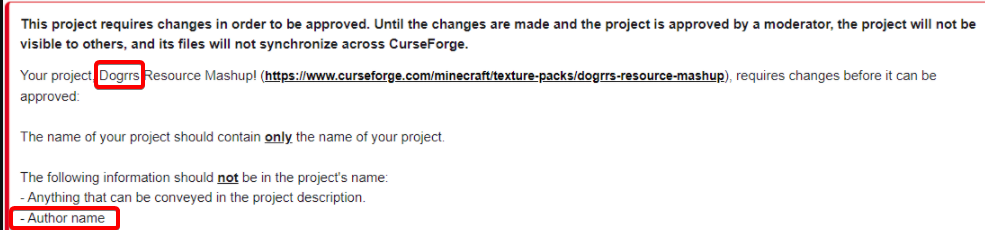
So, I recently created a Curseforge Project for Minecraft. Today I received a message saying this:
The name of your project should contain only the name of your project.```
The issue I am having is that it is the name of my Project.so what is the name... idk why you'd remove the relevant part
lyric crescent
is that the entire message you got?
sleek quiver
okay sorry for the waste of time, now it work
honest furnace
heres a pic of the message
 lyric crescent
 dense current
im pretty sure theres a few with author's name in it 
honest furnace
It's apart the name tho
lyric crescent
probably
dense current
new rule?
lyric crescent
since last year, yea
fleet bear
Likely
 maiden sail

maiden sail
honest furnace
Darn. Idk what to call it anymore lol. I'll just name it Resource Mashup
doge's
because its not your name
honest furnace
Yeah, I could try that. Thanks alot.
 elfin mesa
Heyo, server files are getting rejected because of a specific project file being removed from curseforge when it's quite literally not.
The following file versions have been removed from CurseForge:
/mods/lazydfu-1.0-1.18+.jar
and the file that is "removed" is available here:
https://www.curseforge.com/minecraft/mc-mods/lazy-dfu-forge/files/3544496
tried redownloading it, same thing. Any ideas?
queen storm
digital roost
i need assistance
!help
red patioBOT
╰( ͡° ͜ʖ ͡° )つ──☆*:・゚ *˜”*°•.˜”*°• Many Help •°*”˜.•°*”˜* <:curselit:796985620550385705>
Please provide a description of your issue with as much detail as possible. If you have an issue with a mod or modpack, tell us the name. Explain what you can see happening. Be specific!
Tell us what is happening, we already know it "doesn't work".
Avoid using words like "it", tell us exactly what "it" is.
Don't assume anyone knows what you are talking about, be specific.
Tell us what you expected to happen.
Provide screenshots or video if possible.
Provide a log if possible. ?mc-log
digital roost
Okay so basicaly
my friend cant use the curseforge website
and i made a custom modpack for our SMP, but im having trouble uploading it
is there a way i can send it to him via curseforge app without uploading it
queen storm
!mc-packshare
red patioBOT
There are two ways to share a modpack you've made with others...
Export and Share - For Friends to Small Groups.
- Click the Icon for the modpack.
- Click the button next to play.
- Click
Export. - Select the files that should be included.
- Send the zip to the people that want it! They can follow the instructions in
!mc-installpackto install the pack!
Upload to Curseforge - For Public Release to Everyone.
This options will make your pack public to EVERYONE, it comes with extra requirements and will take some effort to set up.
- Go to here: https://www.curseforge.com/project/432/4471/create
- Fill out the information with a proper description of the pack. This should allow anyone to understand what the pack is.
- Click the Icon for the modpack in the CurseForge app.
- Click the button next to play.
- Click
Export. - Select the files that should be included.
- Open your Project you made on the CurseForge site and Upload the file you just made.
- Wait for Moderation & Sync so it can show up in the client! (See
!syncfor limitations)
lyric crescent
use an upload site?
queen storm
Not our issue how you get it to your friend though.
digital roost
oh
 kindred hatch
can I get here help with Better Nether Reforged mod? I cant load it and i dont know what is the issue
red patioBOT
Your question is not related to CurseForge owned/maintained features or services.
Please use the appropriate game room by getting a game role from #786424115535544350.
Otherwise use #👽︱game-support for game related help.
CurseForge does not make or maintain any of the content or games used on the site or app. Just because it's on the site/app does not make it a problem with CurseForge. Move rooms as requested, arguing about it will result in you being removed from the discord.
lyric crescent
!mc-installpack
red patioBOT
How to install modpacks with the search features in app.
- Open the

Minecraftsection of the app. - Click the top search bar where it says
Search for modpacksOR Click theBrowse ModpacksTab. - Find the Modpack you want to install and click install on it.
- Wait for CurseForge app to download and unpack all the required files.
- Once finished, click
Play!
How to install modpacks from a Export. (Custom/Private/Site downloaded Modpack zip)
- Get CurseForge App if you don't have it, use
!downloadfor a link. - Get the exported modpack from CurseForge or someone else,
!mc-packshareexplains how to make them. - Open the
Minecraftsection of the app. - Click

Create Custom Profile - Click the
Importoption. - Find the file you just downloaded in step 2 and select it.
- CurseForge app will now attempt to download and unpack the modpack. If it fails, try steps 4-6 again.
- Once finished, click
Play!
 digital roost
thanks
 spiral bear
So if my project got reviewed and i had to make changes is it going to take another 1-3 days ?
lyric crescent
probably
spiral bear
Okay thank you.
desert lintel
qq, both my client and server pack are approved, normally i seem them show up most times around 30 mins, not really asked but what is the ETA on new version packs showing up in the CF UI of your modpack for update.
 lyric crescent
!status
red patioBOT
Project Moderation Time
Project/File moderation is done on these days unless otherwise mentioned:
Sunday, Monday, Tuesday, Wednesday, Thursday: <t:1631170800:t> - <t:1631199600:t> (Your time)
Friday, Saturday: No Moderation!
Projects are moderated First in, First out. If you submit late in the work day, it will likely get left until the next day!
New Projects or anything flagged for manual review: 1-3 Working Days
Updates to approved projects not needing manual approval: 1 Hour
-If your file has been "Under Review" for more than an hour, then it is at manual review!
Changes will only show in the app if the project meets the requirements in the ?sync command and up to 24 hours has passed from when it was accepted.
desert lintel
ya i would agree to this but i see it all the time get approved and added outside of these listed times
lyric crescent
up to 24 hours has passed from when it was accepted. 
desert lintel
ah ok that is the catcher thanks as always 🙂
desert lintel
?sync DragonMire
red patioBOT
Sync and your Project.
CurseForge App and site do not share the same requirements! You can find things on the site but this does not mean it will be in the app!
For a mod to show up in the app:
- Projects MUST have a file marked as RELEASE
 or BETA
- Projects MUST be APPROVED
- Projects MUST have a file marked for the GAME VERSION SELECTED/LOADED
- Projects CAN'T be EXPERIMENTAL
- Projects CAN'T be ABANDONED
Files can take a while to show up in the app. If your files still have not shown up either your project is new and you have yet to mark a file as Release/Beta or there is issues with the sync system making it slow.
Vote this issue up if you would like to know when the last sync was! https://curseforge-ideas.overwolf.com/ideas/CF-I-1617
queen storm
desert lintel
?sync DragonMire
It is not a command to resync things
desert lintel
ya i see that now lol
queen storm
There is nothing to force stuff anyways, so don't try
desert lintel
ya i was reading the site and App status page lol
finally get the pack approved for a critical patch but no one can download to the latest version so will just have to tell them to wait.
elfin mesa
elfin mesa
Heyo, server files are getting rejected because of a specific project file being...
Ideas on this?
rain horizon
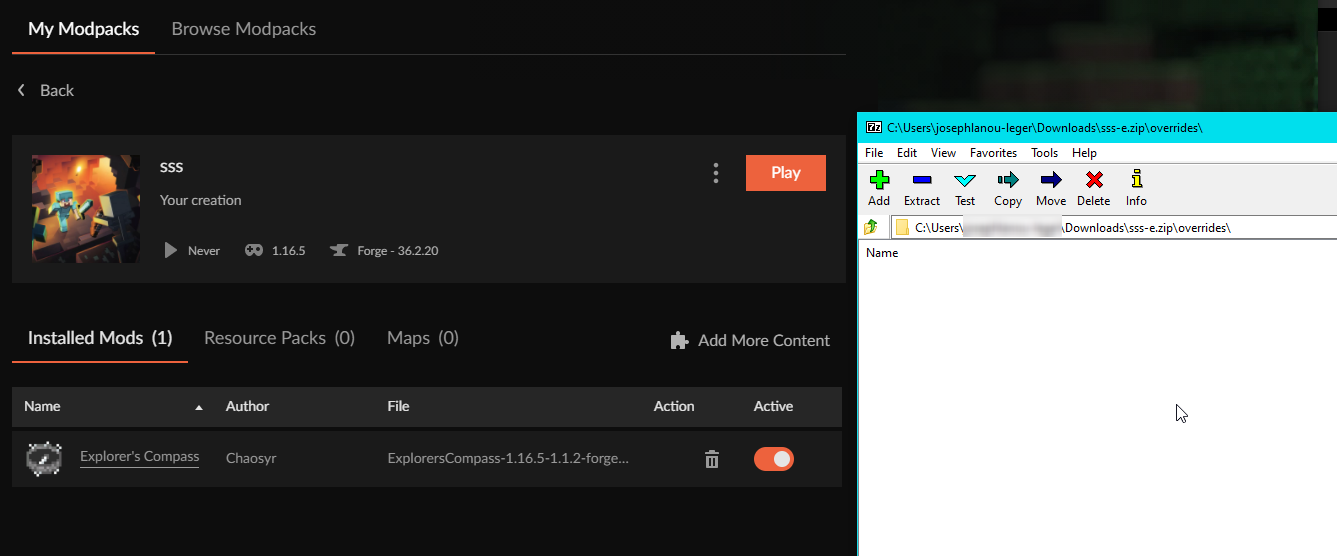
well I know why now my pack wasnt uploading
but for some reason explorers compass doesnt get put in the generated manifest
help
lyric crescent
!reject-cfhosted
red patioBOT
The following files belong to CurseForge-hosted projects, and should therefore not be added directly to zip files:
-
Remove any mods listed in the error message from the profile you exported. Then reinstall them with the CurseForge app. DO NOT drag and drop files from the site.
-
Export the profile again, open the new zip that was just made. Check for the
overrides/modsfolder. If you still see any mods in that folder do the step above again for each mod. -
Upload the zip once complete and no more mods show in the
overrides/modsfolder.
rain horizon

I didnt add mods directly
this is inside the pack
but its not getting generated
I know its being rejected because of the file inside the override mods
but why isnt it being generated into the manifest
 supple vortex
Hey guys im having a problem With curseforge
When i open the app apears this message
rain horizon
well I downgraded one version and it worked
supple vortex
 supple vortex
rain horizon
well I downgraded one version and it worked
supple vortex
rain horizon
well I downgraded one version and it worked
I do not now how i do this
rain horizon
that message is not for you
supple vortex
Oh sorry
supple vortex
Ok
rain horizon
use snipping tool
lyric crescent
rain horizon
but why isnt it being generated into the manifest
so do what the message said and see if it's fixed?
supple vortex
Wait a minute please
rain horizon
@lyric crescent that wouldnt work because I searched the project ID in the manifest and exploreers compass wasnt there
but I downgraded explorers compass and it generated
its fine now
lyric crescent
can you link the mod page
supple vortex
I can't take a snip becouse im without internet in my pc
rain horizon
then thats why you cant connect to curse
supple vortex
I Will take a better picture
rain horizon
simple get internet and your problem will go away
@lyric crescent https://www.curseforge.com/minecraft/mc-mods/explorers-compass
The top one is the one I had installed before downgrading
 supple vortex
rain horizon
then thats why you cant connect to curse
supple vortex
rain horizon
then thats why you cant connect to curse
I thougt curse not need Internet to play
lyric crescent
it does
supple vortex
Okay guys thanks
rain horizon
how else would you download modpacks and forge
or whatever game your modding
ofc it requires internet to work x3
ok Yamza I will leave you with that to check out why its not generating in the manifest but Im going to update my pack not and continue developing my server
lyric crescent
yea im testing it myself
 rain horizon
I see that wasnt the case for me, I will update it back and see if it works
well it worked
I guess it was just a weird bug
sorry for poking
desert lintel
Ok so looks like my critical patch for my modpack just showed up in the portal so looks like all is good now. Thanks all for the help and sorry for all the nagging lol
digital roost
This keeps happening to curseforge and the games that I load with it
 fleet bear
!mc-art
red patioBOT
How do I get rid of the strange white artifacts in my launcher/applications?
If you have a NVIDIA-card, you have to turn off Image Sharpening in the NVIDIA control panel.
 digital roost
That was fast thanks 👍🏼
 lavish moss
Hi, I need help with the CurseForge Launcher. Mainly picking the correct Forge version (for 1.12.2).
I've been using the launcher to setup my modpacks, but I want to also be able to play the modpack without CurseForge going. Problem is, it's not using the latest Forge version and I don't know how to make it do so.
I need it to be using 'release forge-14.23.5.2860', and instead it's using 'release forge-14.23.5.2854' and I cannot find the 2860 version in the version list.
What do I do?
upper root
!mc-updatemodloader
red patioBOT
You can update the mod loader within the same game version in the CurseForge app by following these steps!
- Click on the modpack profile you are working with.
- Click on the button next to the play button.
- Click on the
 Profile Options button.
 - Select the mod loader version you want from the dropdown.
- Play!
If you need to update to a new game version, a new profile is required.
lavish moss
This doesn't help in the Minecraft Launcher.
upper root
You said you where using the curseforge launcher. Those are instructions for that.
lavish moss
I'm sorry, the issue is complicated to explain.
lyric crescent
You're asking about how to not use the curseforge app, in the support channel for the curseforge app?
lavish moss
I'm talking about not having to use CurseForge, but use what CurseForge set up in the Minecraft Launcher (to not have to launch CurseForge to play).
CurseForge launches the Minecraft Launcher.
 dense cloak
Please fix the app so it doesn't freeze/lag while scrolling through mods and such.
Getting very annoying.
lyric crescent
dense cloak
Please fix the app so it doesn't freeze/lag while scrolling through mods and suc...
Mind sending your logs while this is happening, and a screenshot of the ram usage?
?owlogs
red patioBOT
<:overwolf:857375414002384916> How to get Overwolf logs! <:overwolf:857375414002384916>
dense cloak
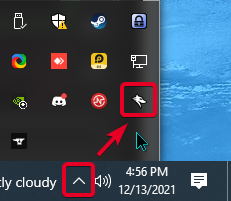
Never seen any 'Tray Icon'.
lyric crescent
so you are on mac then?
lyric crescent
then it's not possible that you don't have the icon
dense cloak
What can I do then.
dense cloak
It is.
lyric crescent
Do you know where the tray is..?
lyric crescent
 lyric crescent
Then follow the other set of instructions
lyric crescent
and ram usage?
 lyric crescent
Thanks. Keeping a record of this for review.
dense cloak
Alright.
This may happen in other areas, but I mainly noticed it in the Add Moe Content part of the app.
@lyric crescent
lyric crescent
what is the ping for..?
dense cloak
Just letting them know.
lyric crescent
Know what.. you didn't say anything. Don't ping me please.
dense cloak
Sorry.
 forest quest
can you add maps with open folder?
austere heart
!mc-status
forest quest
?
 last storm
so my overwolf/curseforge will not load up it shows that it's loading but will not come up and i've uninstalled it and reinstalled it and still nothing changes and i'm not sure why it's doing it
 pallid fossil
Is it possible to change my avatar on the CF website right now, while the account management tab is under construction?
 fleet bear
pallid fossil
Is it possible to change my avatar on the CF website right now, while the accoun...
fleet bear
pallid fossil
Is it possible to change my avatar on the CF website right now, while the accoun...
It still uses the twitch account data. Change It there and then log out and back in on CF to sync it
pallid fossil
Ah, got it. I changed my Twitch avater a while back, and assumed CF was no longer using it since it never updated. Logging out and back in got it synced.
 grand robin
for some reason whenever I try and opem up curseforge it says opps that wasnt supposed to happen try again and its been like that for a year
 tropic spindle
Help please
 rich flint
tropic spindle
Help please
rich flint
tropic spindle
Help please
?mc-installfix
red patioBOT
- Click on the Minecraft Tab on the Left side of the CurseForge App.
- Click button next to the
Create Custom Profileoption. - Click

Repair Installationoption. - Play game.
NOTE: You will not lose any modpacks or worlds, These are saved in the Instances folder. DO NOT TOUCH THIS FOLDER OR YOU WILL LOSE EVERYTHING
tropic spindle
 upper root
That shows it worked, now try play again
tropic spindle
sweet, it looks like it working now. thank you
 glacial wind
i was trying to launch curseforge, but it says launching from overwolf, but it opens nothing i am not using dual monitor.
queen storm
Can you launch overwolf on its own?
glacial wind
i can launch overwolf
but curseforge wont open
i reinstalled it but still nothing happened. it was great before rebooting my computer.
glacial wind
any ideas? hello?
queen storm
Tried to reboot again?
glacial wind
yea
queen storm
!owlogs Please drop them here
red patioBOT
<:overwolf:857375414002384916> How to get Overwolf logs! <:overwolf:857375414002384916>
glacial wind
here is it
unborn basin
glacial wind
here is it
Did you install curseforge?
glacial wind
yea

 glacial wind
it just displays click animation but nothing happens
 bright tusk
is curseforge comming to linux any time soon???
queen storm
!roadmap
red patioBOT
Organize anything, together. Trello is a collaboration tool that organizes your projects into boards. In one glance, know what's being worked on, who's working on what, and where something is in a process.
bright tusk
tnx
 mellow gate
How do you add mods to modpacks if that makes sense
queen storm
Packs you downloaded?
queen storm
!mc-editpack
red patioBOT
How to add/remove mods in a modpack.
- Click on the picture of the modpack.
- Click the

Add More Contentbutton, IF this button is not there, see below before continuing. - Find the Mods, Resource Packs or Maps you wish to Install and click
Installon them. - Wait for all the required mods to be downloaded.
- Start the modpack.
How to Enable/Disable content management for modpacks.
- Click on the picture of the modpack.
- Click on the button next to the
Playbutton. - Click on
Profile Options. - Check the
Allow content management for this profileoption if you want to edit the content of the modpack, uncheck it to disable.
NOTE: The Allow content management for this profile option is what allows you to Delete, Disable, Update or Install any Mods, Resource Packs or Maps managed by CurseForge. It must be on to modify any of them! (Currently)
queen storm
Do keep in mind that they are not made to add extra mods, might break gameplay
mellow gate
Okay ty
 keen kettle
whenever i try to download the curseforge app my computer deletes it automatically
queen storm
!getcf Use the second link
red patioBOT
Looking to install the CurseForge app?
<:windows:798410728188936222> Windows
Minimum Requirements:
- OS Version: 7 (64 bit), 8.1, 10, 11
- 64 bit Required.
- 350MB storage space.
- Microsoft .Net 4.8
- Intel/AMD quad-core CPU
- 8GB ram
Download: https://download.overwolf.com/install/Download?&PartnerId=4047
If you are having issues with the installer use the URL below to install Overwolf then go to the app store to download CurseForge.
https://content.overwolf.com/downloads/setup/latest/regular.html
<:mac:798410654418862130> Mac
Minimum Requirements:
- OS Version 10.14 or newer.
- 64 bit Required.
Download: https://curseforge.overwolf.com/downloads/curseforge-latest.dmg
:penguin: Linux
Minimum Requirements:
Yes.
Download: :person_shrugging:
spiral bear
I need help writing a summary as the one I thought would be fine isn’t fine. My previous summary “A pack with some mods to make the Vanilla experience better”
lyric crescent
That's what any number of mods does, but what is unique about yours?
upper root
That describes pretty much every modpack, they all improve vanilla.
How is your one different? Is it mob focused? Gear focused? Touch of tech or magic?
spiral bear
Neither it was a pack made for me and my friends that is oriented around a light pack that I stream on :/ we all have bad PCs so it only has like 20 or so mods the most ground breaking mod is Pam’s, tinkers, and apotheosis.
queen storm
Then just share it between your friends?
lyric crescent
Curseforge is a public space, and the things uploaded there should reflect that. It's not a private upload service.
spiral bear
A few of them can’t download the export file bc of their computer using too much resources while having discord open. Which is why I wanted the modpack uploaded plus I was planning on getting a better server later on for viewers that wanted to join, plus none of them know how to use curseforge so I’d have to walk them through it every time I updated something in the pack.
lyric crescent
Then put the effort into writing a proper summary and description if you want it on curseforge. Or teach your friends how to import a zip.
?mc-installpack
red patioBOT
How to install modpacks with the search features in app.
- Open the
Minecraftsection of the app. - Click the top search bar where it says
Search for modpacksOR Click theBrowse ModpacksTab. - Find the Modpack you want to install and click install on it.
- Wait for CurseForge app to download and unpack all the required files.
- Once finished, click
Play!
How to install modpacks from a Export. (Custom/Private/Site downloaded Modpack zip)
- Get CurseForge App if you don't have it, use
!downloadfor a link. - Get the exported modpack from CurseForge or someone else,
!mc-packshareexplains how to make them. - Open the
Minecraftsection of the app. - Click
Create Custom Profile - Click the
Importoption. - Find the file you just downloaded in step 2 and select it.
- CurseForge app will now attempt to download and unpack the modpack. If it fails, try steps 4-6 again.
- Once finished, click
Play!
red patioBOT
<:overwolf:857375414002384916> How to get Overwolf logs! <:overwolf:857375414002384916>
lyric crescent
send that
spiral bear
lyric crescent
Then put the effort into writing a proper summary and description if you want it...
I came in here asking for help with writing the summary then got shut down the instant i started explaining the pack :/
lyric crescent
You got two answers telling you what you need to write..
 hollow needle
Where can I submit a request for a CurseForge feature update?
queen storm
What feature?
hollow needle
Searching for modpacks. I'd like to have the ability to look for a pack with multiple features like quests/exploring/etc, but currently you can only search one at a time in the filter dropdown.
queen storm
!feedback
red patioBOT
<:CFidea:798388634972717066> Have an idea on how to improve CurseForge? <:CFidea:798388634972717066>
CurseForge is looking for great ideas and user feedback! Get into the CurseForge Community by providing some feedback and voting on what's important to you!
Think some game should be supported? Post an idea and explain why!
Got a to die for feature idea? Let's hear it!
Location In-app
- Click the button on the bottom left of the app.
- Click on
Suggest a Featureoption!
hollow needle
Thanks 🙂
spiral bear
lyric crescent
You got two answers telling you what you need to write..
Yes but as ive said it isn't mob or magic or tech oriented its vanilla oriented to make the vanilla experience better.. its 25 mods with only tinkers, pams, and apotheosis that change the world.
lyric crescent
I don't know what you are trying to accomplish here. Arguing with me isn't fixing your summary. If you can't tell people why your pack is unique then it shouldn't be on Curseforge.
digital roost
Why my modpack stopped growing up? I got 200/300 downloads everyday (modpack). Yesterday and today and have 0 new downloads. It's on all my modpacks.
Is this a bug?
(NewCraft, Light Craft, SkyFactQry 5)
lyric crescent
download counts are always broken in some way, been an ongoing issue for as long as curseforge has
eventually it will catch up
 gritty pond
is curse forge down?
digital roost
lyric crescent
eventually it will catch up
I hope, because I run a download counter on modpacks (which I consider to be even a good encouragement from the reader) e.g. 20,400
queen storm
gritty pond
is curse forge down?
Nope
unborn grove
Does it give you some kind of error or does the app won't launch?
gritty pond
yea I don't know if the error came up due to a small power outage I had
queen storm
Show the error please if there is one
 slim fractal
Hello! Quick question: Can I install Fabric along with Forge?
red patioBOT
Wording is important!
Forge = Minecraft Forge, This is a modloader often just called "Forge".
Fabric = Fabric MC, this is another modloader, just called "Fabric".
CurseForge = A Website/App that has content for games.
Mods = Individual mod files.
Modpacks = Multiple mods put into the mods folder or downloaded from CurseForge.
These are not Interchangeable! Please use the correct terms as it allows us to help you faster!
gritty pond
 slim fractal
lyric crescent
no
slim fractal
lyric crescent
no
Just to clarify, I don't want to load Forge mods along with Fabric mods. Is it possible to just run a Fabric profile separately, or does the installation change the core .minecraft folder that I can't install both modloaders?
queen storm
You can install both using curseforge just fine
unborn grove
gritty pond
Can you please send logs?
lyric crescent
slim fractal
Just to clarify, I don't want to load Forge mods along with Fabric mods. Is it p...
just make a profile for each
unborn grove
and do make sure your internet connection is good.
 dim salmon
why do I keep getting security checks coming up whenever I'm trying to visit the cursforge site?
unborn grove
!owlogs
red patioBOT
<:overwolf:857375414002384916> How to get Overwolf logs! <:overwolf:857375414002384916>
slim fractal
lyric crescent
just make a profile for each
Okay! Last question: Does Fabric make a second mod folder or do both modloaders share the same mod folder? Stupid question, I know, but since I already have a mod folder from my Forge installation I was wondering if Fabric would create its own mod folder or think one was already installed because of Forge.
queen storm
slim fractal
Okay! Last question: Does Fabric make a second mod folder or do both modloaders ...
All instances are separated from each other
lyric crescent
when you use curseforge
fleet bear
dim salmon
why do I keep getting security checks coming up whenever I'm trying to visit the...
Because its automated.
slim fractal
lyric crescent
when you use curseforge
I have to use curseforge for a dual installation to work?
gritty pond
queen storm
slim fractal
I have to use curseforge for a dual installation to work?
Makes things easier, that is for sure 🤷♂️
dim salmon
fleet bear
Because its automated.
what's weird is that my browser saved the Ip so I normally hit C then click the link or hit ENTER and it's never done this till now
slim fractal
queen storm
Makes things easier, that is for sure 🤷♂️
Can't I just run MC with seperate profiles using the default vanilla launcher? (One profile for Forge, another for Fabric?)
lyric crescent
if you arnt using curseforge you're kinda on your own on how to seperate the two as it's not really supported by vanilla
fleet bear
dim salmon
what's weird is that my browser saved the Ip so I normally hit C then click the ...
Ok... and? It doesnt change anything. It's an automated system it picks whatever it thinks might need verification.
slim fractal
lyric crescent
if you arnt using curseforge you're kinda on your own on how to seperate the two...
I see. So using the vanilla launcher, installing both modloaders isn't a good idea. I thought running one modloader's profile wouldn't conflict with the other modloader.
lyric crescent
that's a question to ask the devs of the modloaders, this is support for curseforge
slim fractal
I'll contact them. Thanks for the help!
unborn grove
gritty pond
Thank you. Can you tell me if you got any antivirus working right now?
unborn grove
Good! if you have any more issues with the app, please tell us~
gritty pond
thank you
 tender panther
anyone know a fix for this exit code: 0 error?
red patioBOT
Error/Exit codes are useless. Follow these steps so someone can actually help you.
- Right-click the modpack profile icon OR click the button in the modpack profile.
- Click
Open Folder. - Open the
logsfolder. - Drag and drop the FILE named
latestORdebuginto discord.
 sand dove
So after the new update (v 0.188.1.4) am not able to load any of my files? Is it normal or im doing something wrong?
lyric crescent
need to explain what that means
sand dove
I mean i cant load any of my files
lyric crescent
meaning what? lol
sand dove
there like corrupted or something
lyric crescent
explain what is happening
 vital panther
Hi
Does forge version transfer to an exported profile? I want to update forge in my modpack, upload it to the CF Project to fix the security issue; Will simply updating forge and updating the project install the new forge if people update the pack?
lyric crescent
yes
vital panther
Cool
sand dove
lyric crescent
explain what is happening
Yesterday i had everything and played and today i don't have anything
i still have the files of the modpacks i played, but i can't load them
lyric crescent
why cant you
sand dove
lyric crescent
why cant you
idk, i think something broke or got corrupted after the update but im not sure
lyric crescent
So to recap: "something broke" is about all I know of your issue. I hope you can understand that this is not an acceptable explanation if you want help.
sand dove
Well ill try some stuff if they don't work ill try some other day. Thank you
I did something and i got them all back. Everything is good now
 worldly lintel
Hi, im having trouble launching medieval minecraft after the newest update to the modpack. The game just crashes when i launch it. Anyone know a fix?
lyric crescent
?mc-log
red patioBOT
Sending logs for support.
- Right-click the modpack profile icon OR click the button in the modpack profile.
- Click
Open Folder. - Open the
logsfolder. - Drag and drop the FILE named
latestORdebuginto discord.
worldly lintel
lyric crescent
remove optifine, try again
worldly lintel
it seems to work without optifine, but why did a small update like that cause optifine not to work?
lyric crescent
?mc-optifine
red patioBOT
We do not offer support for Optifine!
If you have issues with Optifine, remove it. If you want further support try the discord found on their website.
https://www.optifine.net/home
Installing Optifine with modpacks on Curseforge:
- Right click the modpack icon, select
Open Folder. - Put the
Optifine.jarinto themodsfolder. - Now start the modpack.
lyric crescent
ask them 🤷♂️
worldly lintel
thanks for the help, ill see if they know why👍
digital roost
Hello guys since yestrday i cannt upload any images and files to my project, does someone have same issue?
Files are stuck "under review" and images just dont upload after hit upload button
lyric crescent
what do you mean "stuck" under review? review can take 3+ days
digital roost
ye but in all other 100 uploads it took less then 5 minutes
red patioBOT
Project Moderation Time
Project/File moderation is done on these days unless otherwise mentioned:
Sunday, Monday, Tuesday, Wednesday, Thursday: <t:1631170800:t> - <t:1631199600:t> (Your time)
Friday, Saturday: No Moderation!
Projects are moderated First in, First out. If you submit late in the work day, it will likely get left until the next day!
New Projects or anything flagged for manual review: 1-3 Working Days
Updates to approved projects not needing manual approval: 1 Hour
-If your file has been "Under Review" for more than an hour, then it is at manual review!
Changes will only show in the app if the project meets the requirements in the ?sync command and up to 24 hours has passed from when it was accepted.
digital roost
Ok but this is not new project i already uploaded 99.9% same file , strange it can be flagged for manual review if code is 99.9% same
lyric crescent
not strange at all
digital roost
ok then year 1870 here we go 😄
Maybe i can save it to floppy disk and transfer by horse vagon to Curse HQ, ty anyway for answer i guess about image upload since it is 10kb big then i will wait 2 hours before CF servers can process it
queen storm
It is marked for manual approval, how would a floppy fix that?
fleet bear
don't question them they clearly are superior and thus must be correct
digital roost
Btw it is approved already there was some lag on servers, however "image upload" problem still persist
 unique delta
My game keeps crashing
 lyric crescent
!notcf
red patioBOT
Your question is not related to CurseForge owned/maintained features or services.
Please use the appropriate game room by getting a game role from #786424115535544350.
Otherwise use #👽︱game-support for game related help.
CurseForge does not make or maintain any of the content or games used on the site or app. Just because it's on the site/app does not make it a problem with CurseForge. Move rooms as requested, arguing about it will result in you being removed from the discord.
lyric crescent
modlist from chrome? what is that?
 tidal adder
my friend sent a mod list with a zip file that im trying to install on curseforge as a mod pack
im struggling
fleet bear
!mc-installpack
red patioBOT
How to install modpacks with the search features in app.
- Open the
Minecraftsection of the app. - Click the top search bar where it says
Search for modpacksOR Click theBrowse ModpacksTab. - Find the Modpack you want to install and click install on it.
- Wait for CurseForge app to download and unpack all the required files.
- Once finished, click
Play!
How to install modpacks from a Export. (Custom/Private/Site downloaded Modpack zip)
- Get CurseForge App if you don't have it, use
!downloadfor a link. - Get the exported modpack from CurseForge or someone else,
!mc-packshareexplains how to make them. - Open the
Minecraftsection of the app. - Click
Create Custom Profile - Click the
Importoption. - Find the file you just downloaded in step 2 and select it.
- CurseForge app will now attempt to download and unpack the modpack. If it fails, try steps 4-6 again.
- Once finished, click
Play!
tidal adder
the pack i want to install isnt on curseforge, its a custom list of mods that came from curseforge
i cant browse for it
 signal ridge
Was it made using the CurseForge app and exported? How did your friend make the zip file
tidal adder
i think it was exported
signal ridge
Then do the second part of the bot message above
tidal adder
thank youuu
 cold fiber
https://www.curseforge.com/minecraft/mc-mods/claycorp-mod
hmm, having trouble finding this mod in the curse app, any ideas?
lyric crescent
make a profile of the same version the mod is on
compact urchin
what happend to the version filter for the app when looking for modpacks?
cold fiber
lyric crescent
make a profile of the same version the mod is on
alright
lyric crescent
was there a version filter before? 👀
fleet bear
cold fiber
https://www.curseforge.com/minecraft/mc-mods/claycorp-mod
hmm, having trouble fi...
 digital roost
curseforge is broken i think... would it help if i delete the file containing curse forge and reinstall it??? or would that make things worse
upper root
Wdym by 'broken', there may be a simpler fix for your problem if you explain it
digital roost
ok. usually when i open it nothing loads.. and when it does load it doesnt let me do anything like delete the mods from my downloaded stuff...
idk if its a bug but its not working
and when i try to close it it doesnt close
and if i try to close it using the toolbar at the bottom of the screen and reopen it curseforge is pitch black...
is it a bug?
or a glitch? or something
id really like to know
 faint quail
did downloads stop counting?
upper root
digital roost
id really like to know
A reinstall is probably a good start
digital roost
like delete the file and reinstall it???
upper root
You should be able to uninstall it from settings
digital roost
which settings? ive never had to uninstall anything in settings before
upper root
Windows or mac
digital roost
ah i uninstalled it by deleting the file. mabye the file became corrupted?
upper root
🤷 idk
digital roost
thats the only way i can see it happening...
ik files can become currupted but... idr how... thats super weird...
 feral drift
does anyone wanna play sky odyssey with me ?
digital roost
umm just to check what do i do if it keeps doing it
i think its hung but idr what to do if a aplication hangs
i was going to email my old computer teacher for help... but i cant... her email isnt there... mabye she quit???
lyric crescent
compact urchin
what happend to it>
Should be back within the next few days, hopefully 😋
digital roost
nvm i found out how to put cheats into the game. but i still did like using curseforge. i really wanna know why it stopped working 😭
 sudden prism
created a modpack profile for minecraft on the curseforge launcher, how do i share it with friends that will be on my server?
upper root
!mc-packshare
red patioBOT
There are two ways to share a modpack you've made with others...
Export and Share - For Friends to Small Groups.
- Click the Icon for the modpack.
- Click the button next to play.
- Click
Export. - Select the files that should be included.
- Send the zip to the people that want it! They can follow the instructions in
!mc-installpackto install the pack!
Upload to Curseforge - For Public Release to Everyone.
This options will make your pack public to EVERYONE, it comes with extra requirements and will take some effort to set up.
- Go to here: https://www.curseforge.com/project/432/4471/create
- Fill out the information with a proper description of the pack. This should allow anyone to understand what the pack is.
- Click the Icon for the modpack in the CurseForge app.
- Click the button next to play.
- Click
Export. - Select the files that should be included.
- Open your Project you made on the CurseForge site and Upload the file you just made.
- Wait for Moderation & Sync so it can show up in the client! (See
!syncfor limitations)
sudden prism
!sync
red patioBOT
Sync and your Project.
CurseForge App and site do not share the same requirements! You can find things on the site but this does not mean it will be in the app!
For a mod to show up in the app:
- Projects MUST have a file marked as RELEASE or BETA
- Projects MUST be APPROVED
- Projects MUST have a file marked for the GAME VERSION SELECTED/LOADED
- Projects CAN'T be EXPERIMENTAL
- Projects CAN'T be ABANDONED
Files can take a while to show up in the app. If your files still have not shown up either your project is new and you have yet to mark a file as Release/Beta or there is issues with the sync system making it slow.
Vote this issue up if you would like to know when the last sync was! https://curseforge-ideas.overwolf.com/ideas/CF-I-1617
sudden prism
sorry, i see bot-spam now
 magic flower
Currently trying to export a minecraft modpack to fix an issue where the old version doesn't have the proper forge version.
For some reason, the export tool is now including the .jar file for Twilight Forest despite the fact that I have changed nothing and that mod hasn't been updated in the pack recently.
I've checked as well, Twilight Forest is no longer being put in the manifest.json as far as I can tell.
I've tried restarting the curseforge client, but the same thing is happening.
fleet bear
Uninstall the mod and reinstall it
magic flower
That seems to have worked. I don't understand this program sometimes...
lyric crescent
curseforge sometimes forgets what a mod is, need to kick it
fleet bear
There's another to add to your list yamza.
lyric crescent
this was supposed to be fixed already
 agile marten
ok so i have tried to upload a new version of my pack on curseforge for a few days now and it keeps getting rejected, every time it says there was an error processing the file. the file follows the requirements and is in the correct format, is there any way to fix this issue?
fleet bear
no. just upload it again
fleet bear
show the message then
 tribal gorge
Helo! Sorry for bothering, but I have a problem-
So i'm currently trying to install my Minecraft some mods, but some(the mayority) just download as an openable file(image) and not as the java thingy, not letting me install them to my Minecraft
How do I solve it-?
(Sorry for bad english, it's not my main languague)
upper root
are you using the curseforge app?
tribal gorge
this is how they install-
 tribal gorge
upper root
are you using the curseforge app?
tribal gorge
upper root
are you using the curseforge app?
no, just the website
lyric crescent
you messed up the file association to .jar files. doesn't matter really, just use the app. much easier.
upper root
!getcf use the app to manage mods and modpacks
red patioBOT
Looking to install the CurseForge app?
<:windows:798410728188936222> Windows
Minimum Requirements:
- OS Version: 7 (64 bit), 8.1, 10, 11
- 64 bit Required.
- 350MB storage space.
- Microsoft .Net 4.8
- Intel/AMD quad-core CPU
- 8GB ram
Download: https://download.overwolf.com/install/Download?&PartnerId=4047
If you are having issues with the installer use the URL below to install Overwolf then go to the app store to download CurseForge.
https://content.overwolf.com/downloads/setup/latest/regular.html
<:mac:798410654418862130> Mac
Minimum Requirements:
- OS Version 10.14 or newer.
- 64 bit Required.
Download: https://curseforge.overwolf.com/downloads/curseforge-latest.dmg
:penguin: Linux
Minimum Requirements:
Yes.
Download: :person_shrugging:
tribal gorge
but I have installed them like that before, do I need the app for some of them-?
lyric crescent
you dont have to do anything to them, they are fine.
 orchid bluff
hi, I was making a modpack for a Minecraft server that I was making for a group of friends, I couldn't upload the modpack through discord. Is there any way my modpack can get approved so we can play?
fleet bear
!status
red patioBOT
Project Moderation Time
Project/File moderation is done on these days unless otherwise mentioned:
Sunday, Monday, Tuesday, Wednesday, Thursday: <t:1631170800:t> - <t:1631199600:t> (Your time)
Friday, Saturday: No Moderation!
Projects are moderated First in, First out. If you submit late in the work day, it will likely get left until the next day!
New Projects or anything flagged for manual review: 1-3 Working Days
Updates to approved projects not needing manual approval: 1 Hour
-If your file has been "Under Review" for more than an hour, then it is at manual review!
Changes will only show in the app if the project meets the requirements in the ?sync command and up to 24 hours has passed from when it was accepted.
lyric crescent
or use an upload site 😉
orchid bluff
ok thanks
red patioBOT
Error/Exit codes are useless. Follow these steps so someone can actually help you.
- Right-click the modpack profile icon OR click the button in the modpack profile.
- Click
Open Folder. - Open the
logsfolder. - Drag and drop the FILE named
latestORdebuginto discord.
 elfin laurel
Did they remove the ability to browse modpacks by game version on the app? I can't seem to find it now. It's on the website, just not the launch app.
lyric crescent
yea, it's a bug. will be fixed in the next few days
 strange bone
!webclient
red patioBOT
Timeout/WebClient errors are from networking issues to your computer. You can try a few things to fix it:
- Restart the computer.
- Restart your router/modem.
- Try another internet source like a hotspot, wired connection or moving closer to the WiFi.
- Pause/Stop other things using the internet. (Streams, music, etc)
- If this still doesn't work, try again in an hour and hope your connection is stable.
elfin laurel
Oh phew, thx
signal ridge
strange bone
!webclient
Use #🟢︱user-bot-spam if you want to test out bot commands
 weak gull
if I can get a little help I'm happy
signal ridge
Dont ask to ask, just ask
weak gull
sorry who can I ask even if I can speak to a person in private
signal ridge
What is it about?
upper root
Read what the bot posted in #👽︱game-support. Explain your issue or noone can help you
weak gull
then the problem that I am playing a mod pack the ragmod VI the problem that I start it but it doesn't even make me walk and I can turn it around
signal ridge
Define "it" ?
weak gull
I have a problem that I can not walk that to play my pc is not bad components but nothing to do
signal ridge
If I understand this right, you join a world and cannot move at all?
weak gull
good and that's my problem I was wrong in setting the graphics or I can not understand
if I can do a screen sharing so you understand the problem
signal ridge
Have you checked the controls settings?
 prime zealot
is CF still broken?
lyric crescent
many things are broken, some more than others. you should be more specific
weak gull
I can send a link of the video so we can write what I'm talking about
signal ridge
weak gull
I can send a link of the video so we can write what I'm talking about
Post it in #👽︱game-support
 lavish eagle
I have a server with a friend and when I try to enter it indicates that a mod is missing, I look at the folder and it is not there, I add it and when I enter it again it indicates the same thing again, it seems that when I access the server or start minecraft that mod removes it and the one using the normal launcher doesn't have the problem, just me using the curse
signal ridge
lavish eagle
I have a server with a friend and when I try to enter it indicates that a mod is...
!notcf
red patioBOT
Your question is not related to CurseForge owned/maintained features or services.
Please use the appropriate game room by getting a game role from #786424115535544350.
Otherwise use #👽︱game-support for game related help.
CurseForge does not make or maintain any of the content or games used on the site or app. Just because it's on the site/app does not make it a problem with CurseForge. Move rooms as requested, arguing about it will result in you being removed from the discord.
 white locust
I am having an issue where I can’t use the 1.18 Version of Better Minecraft Fabric, when i search it up on the app it says it isn’t there but when I search it up on the website it’s there. I have tried to use the new feature of downloading packs from the website to the launcher but when I do that it doesn’t download, can someone shed some light on why this isn’t working. Ty
agile marten
agile marten
ok so i have tried to upload a new version of my pack on curseforge for a few da...
pain
 fleet bear
agile marten
pain
fleet bear
agile marten
pain
link to the project please
fleet bear
Post the zip you are uploading please
fleet bear
Seems fine, Thanks. Someone will look at it tomorrow.
agile marten
thank you
 fleet bear
7zip opened it fine for me?
upper root
Huh. it does. windows doesnt like it tho
fleet bear
Yeah...
fleet bear
agile marten
What did you make this zip with?
agile marten
WinRAR, just like all of my other packs
i tried deleting the zip and making a new one, no luck
fleet bear
You renamed this file?
agile marten
no
 fleet bear
I'd remake the file with another program. Either the default windows 10/11 zip support or something like 7zip
 unique furnace
yo can i get some help rq with my curseforge

whenever i open it this is what i see
I tried reinstalling curseforge but it didn't change anything
strange bone
signal ridge
Use <#525819185712988180> if you want to test out bot commands
Ohhhh I was just looking at it again since it still isn’t working after like a month and a half of trying sorry
 shrewd fern
Can't play anithing on curseforge
I was playing create: above and beyond yesterday just fine, but today it won't load, no log is generateed
I believe it could have something to do with the launcher update for log4j
 timber hedge
Prolly a noob question but is there anyway to use curse forge offline? Already got a pack installed but can’t figure out how to open it now that my internet died
upper root
No, you cannot use curseforge offline
shrewd fern
I created a empty instance wof 1.18.1 on latest fabric and it doesn't open too
upper root
!mc-installfix try this
red patioBOT
- Click on the Minecraft Tab on the Left side of the CurseForge App.
- Click button next to the
Create Custom Profileoption. - Click
Repair Installationoption. - Play game.
NOTE: You will not lose any modpacks or worlds, These are saved in the Instances folder. DO NOT TOUCH THIS FOLDER OR YOU WILL LOSE EVERYTHING
timber hedge
There anyway to work around it or am I just out of luck?
 bitter marsh
The version selection disappeared from Find Minecraft Mode. What happened?
shrewd fern
timber hedge
There anyway to work around it or am I just out of luck?
you could install the modloader in your .minecraft and copy the mods/saves to there, them you just need to launch the minecraft launcher, no need to open curseforge this way
timber hedge
I shall attempt that, thanks
upper root
bitter marsh
The version selection disappeared from Find Minecraft Mode. What happened?
Known bug, will be fixed
bitter marsh
tks
shrewd fern
upper root
!mc-installfix try this
worked, thank you
fleet bear
you don't.
fleet bear
Not with curseforge. The client hasn't been released yet
 fallen valve
do you know how long that will take?
fleet bear
sometime around February is all we know
fleet bear
any of them
 cinder coyote
how long does it usually take when a Modpack gets approved for it to actually update on the Curseforge app (update to the Modpack becomes available)?
fleet bear
!status
red patioBOT
Project Moderation Time
Project/File moderation is done on these days unless otherwise mentioned:
Sunday, Monday, Tuesday, Wednesday, Thursday: <t:1631170800:t> - <t:1631199600:t> (Your time)
Friday, Saturday: No Moderation!
Projects are moderated First in, First out. If you submit late in the work day, it will likely get left until the next day!
New Projects or anything flagged for manual review: 1-3 Working Days
Updates to approved projects not needing manual approval: 1 Hour
-If your file has been "Under Review" for more than an hour, then it is at manual review!
Changes will only show in the app if the project meets the requirements in the ?sync command and up to 24 hours has passed from when it was accepted.
fleet bear
!sync
red patioBOT
Sync and your Project.
CurseForge App and site do not share the same requirements! You can find things on the site but this does not mean it will be in the app!
For a mod to show up in the app:
- Projects MUST have a file marked as RELEASE or BETA
- Projects MUST be APPROVED
- Projects MUST have a file marked for the GAME VERSION SELECTED/LOADED
- Projects CAN'T be EXPERIMENTAL
- Projects CAN'T be ABANDONED
Files can take a while to show up in the app. If your files still have not shown up either your project is new and you have yet to mark a file as Release/Beta or there is issues with the sync system making it slow.
Vote this issue up if you would like to know when the last sync was! https://curseforge-ideas.overwolf.com/ideas/CF-I-1617
cinder coyote
"Files can take a while to show up in the app" thats what i'm asking
fleet bear
I don't know what more that you want. Both of them tell you exactly what to expect.
cinder coyote
Alright, when it IS already accepted - how long does it take for the APP to update with the accepted modpack
Those above only tell me how to get it accepted
fleet bear
Did you even try reading them...?
cinder coyote
I read all of it
fleet bear
Well you sure did a terrible job at it then.
Changes will only show in the app if the project meets the requirements in the ?sync command and up to 24 hours has passed from when it was accepted.
rich flint
0-6 hours imho
fleet bear
Files can take a while to show up in the app. If your files still have not shown up either your project is new and you have yet to mark a file as Release/Beta or there is issues with the sync system making it slow.
cinder coyote
rich flint
0-6 hours imho
thank you
fleet bear
We should just start kicking people for not waiting more than 12-24 hours for things...
 distant palm
hello, i have a question:
When i update a modpack to the newest version in the application it makes a new profile; is there a way i can transfer my data like my worlds and options to the newest version from the last ?
fleet bear
copy the saves folder to the new one
distant palm
oh okay thanks
 unkempt briar
is the eaaster egg being able to jing the bells?
upper root
Thats part of it, but not all.
upper root
FYI both of those identical messages are scams
 onyx hornet
k
 cerulean kelp
how do I submit my modpack onto the curseforge app
upper root
!mc-packshare
red patioBOT
There are two ways to share a modpack you've made with others...
Export and Share - For Friends to Small Groups.
- Click the Icon for the modpack.
- Click the button next to play.
- Click
Export. - Select the files that should be included.
- Send the zip to the people that want it! They can follow the instructions in
!mc-installpackto install the pack!
Upload to Curseforge - For Public Release to Everyone.
This options will make your pack public to EVERYONE, it comes with extra requirements and will take some effort to set up.
- Go to here: https://www.curseforge.com/project/432/4471/create
- Fill out the information with a proper description of the pack. This should allow anyone to understand what the pack is.
- Click the Icon for the modpack in the CurseForge app.
- Click the button next to play.
- Click
Export. - Select the files that should be included.
- Open your Project you made on the CurseForge site and Upload the file you just made.
- Wait for Moderation & Sync so it can show up in the client! (See
!syncfor limitations)
upper root
Yikes, if you want help deciphering crash logs post them in #👽︱game-support
 stable fog
when is curseforge gonning to beon the new minecraft launcher
queen storm
What?
 proud wind
Can someone help me with installing forge server?
doesnt matter what version I try, I get the same error
I have already tried uninstalling and reinstalling java
upper root
!notcf use #👽︱game-support
red patioBOT
Your question is not related to CurseForge owned/maintained features or services.
Please use the appropriate game room by getting a game role from #786424115535544350.
Otherwise use #👽︱game-support for game related help.
CurseForge does not make or maintain any of the content or games used on the site or app. Just because it's on the site/app does not make it a problem with CurseForge. Move rooms as requested, arguing about it will result in you being removed from the discord.
 iron crescent
hi i have a question which mod loader have immersive portal mod ?
queen storm
Link the mod, click a file, check for yourself
upper root
!mc-installmods follow the instructions below to install mods with the curseforge app
red patioBOT
How to install mods in CurseForge App.
- Click
+ Create Custom Profile - Name it, select the required Minecraft version, select the Forge version (usually the highest number), click
Create. - Click the profile icon.
- Click
Add More Content - Search and install the desired mods.
- Start the game!
How to install mods not on CurseForge.
- Right click the profile picture or Open the profile and click the Icon next to the play button.
- Click
Open Folder. - Drag the mod(s) into the
modsfolder. (Note: Some mods will require others, to run. Make sure to read the instructions for the mod!) - Start the game!
upper root
That particular file is 1.16.5 forge
queen storm
Link the mod, not the file itself 🤦♂️
queen storm
That would be forge, like Chief already said...
iron crescent
but what the dimesnion stack does ?
iron crescent
iron crescent
but what the dimesnion stack does ?
in the immersive portal mod ?
and what loop does ?
 hollow breach
iron crescent
in the immersive portal mod ?
hollow breach
iron crescent
in the immersive portal mod ?
puts nether below the overworld so you can drop into it
iron crescent
and what happens if i enable the loop?
hollow breach
its pretty cool
iron crescent
hollow breach
puts nether below the overworld so you can drop into it
how ?
but what is the loop? and what happens if i enable it
hollow breach
dont know
queen storm
#👽︱game-support or check if they have a discord of their own @iron crescent
iron crescent
ok
hollow breach
they do https://discord.gg/BZxgURK
iron crescent
oik
 woven oak
i get over 200 fps but lagspikes every 2 seconds, i downloaded a mod called general disasters and deleted it then the problem started.
also it never crashes only lagspikes
queen storm
Then make a new world without it or move to #👽︱game-support
hollow breach
Whoops posted in the wrong channel:
Anyone else's minecraft mod download numbers haven't been updating or the last few days? Mine is stuck at 21k and it looks like everyone's numbers are also stuck
queen storm
There are a bunch of issues going on with the site right now
hollow breach
Is there a public announcement somewhere? Kinda curious to see if it's related to the log4j CVE lol.
queen storm
It is not
 wanton jasper
Okey.... So I uploaded a file to Curseforge and it got rejected because ''plugins needs to be uploaded as Jar''... Idk exactly what the problem is.. Anyways, its frustrating because I cannot download the zip file as a backup anymore, even if I see it on the website. Is there any way?
queen storm
There is a zip inside that export, remove it
wanton jasper
ohhh that's the issue.... Yeah thats possible. Omg you're amazing..
But the problem is... Idk if I still have the file on my pc.. mhh but thats my fault
queen storm
Then you export it again?
red patioBOT
╰( ͡° ͜ʖ ͡° )つ──☆*:・゚ *˜”*°•.˜”*°• Many Help •°*”˜.•°*”˜* <:curselit:796985620550385705>
Please provide a description of your issue with as much detail as possible. If you have an issue with a mod or modpack, tell us the name. Explain what you can see happening. Be specific!
Tell us what is happening, we already know it "doesn't work".
Avoid using words like "it", tell us exactly what "it" is.
Don't assume anyone knows what you are talking about, be specific.
Tell us what you expected to happen.
Provide screenshots or video if possible.
Provide a log if possible. ?mc-log
wanton jasper
I like how the vot is called lmao
wanton jasper
 wicked glen
i cant fins sky factory
wicked glen
i cant fins sky factory
sky factory 4?
wanton jasper
https://www.curseforge.com/minecraft/modpacks/skyfactory-4
You can download it here as well
With the orange install button or manually
 upper root
Try skyfactory 4
 lost elm
hey whene i launch curseforge it just crashes im on windows 11 insider program
queen storm
Screenshot please
lost elm
of what
queen storm
The crash, or don't you get anything?
queen storm
How do you know it crashes?
queen storm
You mean the thing I wanted a screenshot from?
lost elm
 queen storm
Can you start overwolf on its own?
queen storm
!overwolf-support
red patioBOT
lost elm
ok
upper root
What the... its rudolph the red nosed reinwolf. Huh
lyric crescent
make a project for the mod, upload to it
 lunar bough
thank you
lyric crescent
how would we know, it's your mod
lunar bough
My picture don't match. It's annoying
lyric crescent
your picture of what doesnt match what..
lunar bough
the ratio
lyric crescent
no idea what you're talking about. generic 2 word answer doesnt explain anything
digital roost
Having a severe problem with shaders
Whenever i use any shader with optifine and load into a game i get stuck on a blank dirt screen while i can still hear audio of the game
red patioBOT
We do not offer support for Optifine!
If you have issues with Optifine, remove it. If you want further support try the discord found on their website.
https://www.optifine.net/home
Installing Optifine with modpacks on Curseforge:
- Right click the modpack icon, select
Open Folder. - Put the
Optifine.jarinto themodsfolder. - Now start the modpack.
 queen storm
How long did you wait?
 jade wadi
5 minutes
 inner spruce
eyo, when i click install on a modpack, where do the files go?
queen storm
inner spruce
eyo, when i click install on a modpack, where do the files go?
Where you configured them to go
lyric crescent
right click the modpack and open folder
inner spruce
thanks to both ❤️
 vague oak
lyric crescent
vague oak
lyric crescent
explain the problem
 clear junco
where can i send a photo
lyric crescent
here
clear junco
 red patioBOT
<:overwolf:857375414002384916> How to get Overwolf logs! <:overwolf:857375414002384916>
lyric crescent
How'd you fix it?
 eager granite


 lyric crescent
looks like its working
digital roost
I only have 7 mods installed but when I launch it says 9
there is only 7 in the files
becuz API and minecraft are "mods"
 pulsar island
are downloads stuck again
pulsar island
my downloads are not increasing
lyric crescent
downloads get stuck all the time
digital roost
and its the exact same mod folder
pulsar island
lyric crescent
downloads get stuck all the time
they were fixed between
lyric crescent
root cause has never been fixed
pulsar island
there was problem like a month ago again
pulsar island
lyric crescent
root cause has never been fixed
so will it be anytime soon or how will download increase
lyric crescent
the count will sync eventually, thus it is and always has been.
pulsar island
ok
 lilac latch
it just doesnt wanna load...
 fleet bear
pulsar island
there was problem like a month ago again
fleet bear
pulsar island
there was problem like a month ago again
mate, bugging us about downloads constantly is annoying.
You have been told multiple times they don't update instantly and that it's only the site that's behind. They are all still counted.
lyric crescent
digital roost
but I cant join the server
This isnt the place to discuss issues with servers, please use #👽︱game-support for that.
digital roost
please read the rest
lyric crescent
i read the rest, then you moved onto servers.