#🔥︱curseforge-support
1 messages · Page 580 of 1
 lyric crescent
 red patioBOT
<:overwolf:857375414002384916> How to get Overwolf logs! <:overwolf:857375414002384916>
 round dew
It wouldnt be curseforge without downtime on the one day of the week people use the site.
thanks
lyric crescent
oh no, people get a weekend off
 odd comet
lyric crescent
!owlogs send this please
odd comet
lyric crescent
!owlogs send this please
its now done with installing the modpack and its done
it now only use 5%
lyric crescent
guess that was why then..
odd comet
i think yes
 velvet dune
If i install curseforge then it gives me an error
Im in the curseforge installer and everytime it finishes it gives me an error
 bold plover
This is what happened when I tried to load any mod pack
 lyric crescent
you need to log in with an account that owns java minecraft
 fleet bear
round dew
It wouldnt be curseforge without downtime on the one day of the week people use ...
fleet bear
round dew
It wouldnt be curseforge without downtime on the one day of the week people use ...
You mean everyday all the time?
bold plover
Opp wrong account
lyric crescent
tell the error
velvet dune
wait
it says installation error
It also says: We have encountered a problem during the installation
 gleaming needle
What are the criteria for showing up in the search option for mods?
https://www.curseforge.com/minecraft/mc-mods/search?search=essential
https://www.curseforge.com/minecraft/mc-mods/essential-mod my mod doens't show up for some reason
lyric crescent
velvet dune
It also says: We have encountered a problem during the installation
screenshot the error please
 lyric crescent
!getcf try the 2nd link
red patioBOT
Looking to install the CurseForge app?
<:windows:798410728188936222> Windows
Minimum Requirements:
- OS Version: 7 (64 bit), 8.1, 10, 11
- 64 bit Required.
- 350MB storage space.
- Microsoft .Net 4.8
- Intel/AMD quad-core CPU
- 8GB ram
Download: https://download.overwolf.com/install/Download?&PartnerId=4047
If you are having issues with the installer use the URL below to install Overwolf then go to the app store to download CurseForge.
https://content.overwolf.com/downloads/setup/latest/regular.html
<:mac:798410654418862130> Mac
Minimum Requirements:
- OS Version 10.14 or newer.
- 64 bit Required.
Download: https://curseforge.overwolf.com/downloads/curseforge-latest.dmg
:penguin: Linux
Minimum Requirements:
Yes.
Download: :person_shrugging:
lyric crescent
the 2nd blue text
velvet dune
ok
lyric crescent
gleaming needle
https://www.curseforge.com/minecraft/mc-mods/search?search=essential
https://www...
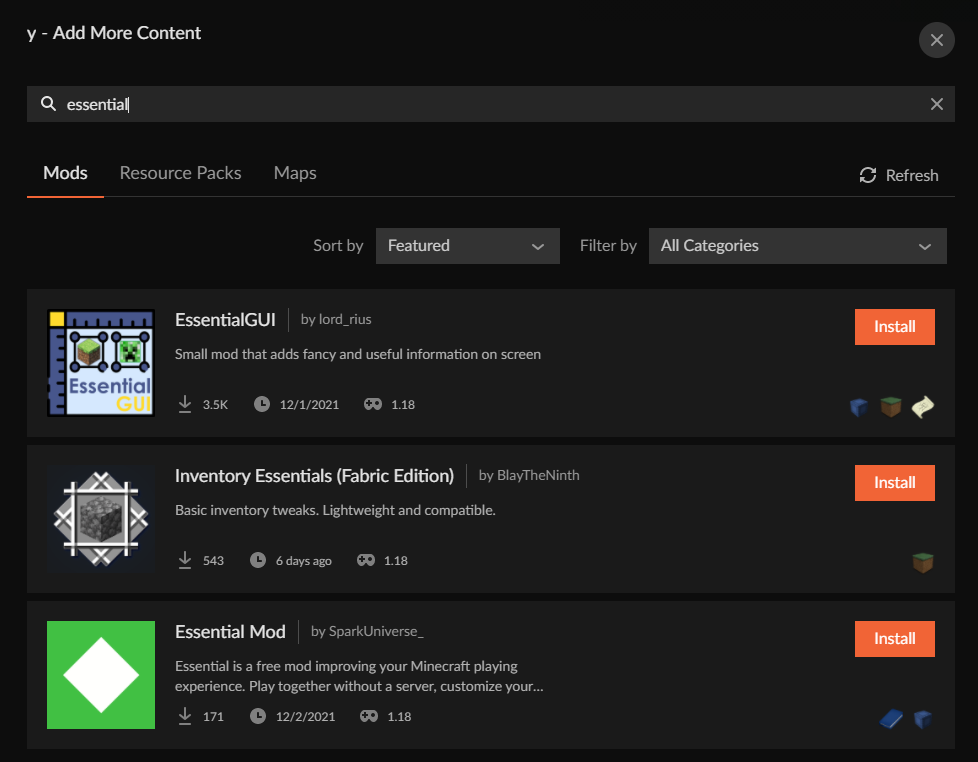
site search has been quite broken for a while, it shows in the app though https://i.imgur.com/vfPiccT.png
 round dew
fleet bear
You mean everyday all the time?
round dew
fleet bear
You mean everyday all the time?
Wasnt trying to make this a thing sorry. but i get almost all of my attention on projects, and have the most free time to do this kind of work on saturdays and sundays when people are home playing video games.
 shy horizon
How does one get hypixel based mods and make them work (Im bad at this)
lyric crescent
!notcf
red patioBOT
Your question is not related to CurseForge owned/maintained features or services.
Please use the appropriate game room by getting a game role from #786424115535544350.
Otherwise use #👽︱game-support for game related help.
CurseForge does not make or maintain any of the content or games used on the site or app. Just because it's on the site/app does not make it a problem with CurseForge. Move rooms as requested, arguing about it will result in you being removed from the discord.
 clever steeple
Cuseforge isn't working for me, I am on macOS Monterey, Curseforge starts up fine, but when I try to click play, It goes to the " Oops, that was not supposed to happen" screen within 10 seconds
 desert lintel
quick question my modpack has been in review since thursday anyone know what might be going on
lyric crescent
!status
red patioBOT
Project Moderation Time
Project/File moderation is done on these days unless otherwise mentioned:
Sunday, Monday, Tuesday, Wednesday, Thursday: <t:1631170800:t> - <t:1631199600:t> (Your time)
Friday, Saturday: No Moderation!
Projects are moderated First in, First out. If you submit late in the work day, it will likely get left until the next day!
New Projects or anything flagged for manual review: 1-3 Working Days
Updates to approved projects not needing manual approval: 1 Hour
-If your file has been "Under Review" for more than an hour, then it is at manual review!
Changes will only show in the app if the project meets the requirements in the ?sync command and up to 24 hours has passed from when it was accepted.
desert lintel
a dam got to wait for tomorrow then, already got version 1.2 ready with server config.
 lime estuary
I get that issue when trying to enter the website of Iron Chests in Curseforge
 lyric crescent
works fine
lime estuary
That weird
 zealous jacinth
Is the website down?
 narrow minnow
Yeah, working on it
lyric crescent
no
 urban stump
No use the old version of sky factory the one under the newest one
 pulsar island
lyric crescent
works fine
pulsar island
lyric crescent
works fine
its down right
 patent sigil
website seems to have died, im guessing from the amount of people suddenly trying to update forge stuffs
 cold vessel
Tam tam taaaaaaaam
 zenith ocean
What happened to the site
zealous jacinth
zenith ocean
What happened to the site
💥
 muted escarp
Ive been trying to load modded mc and i have 4 gigs of ram allocated its 98 mods ive been able to load 300+ before ive tried many different launchers and they all stop responding crash or i get terrible lag spikes when im IN can anyone help please
zealous jacinth
muted escarp
Ive been trying to load modded mc and i have 4 gigs of ram allocated its 98 mods...
download more ram
zealous jacinth
muted escarp
ive allocated 10
i have 4 gigs of ram allocated
 digital roost
Site is down🫁 🚬 😿
zenith ocean
You mean dead lol
muted escarp
zealous jacinth
> i have 4 gigs of ram allocated
ive tried more ram
zenith ocean
Because it is on and off
muted escarp
its something else
zealous jacinth
muted escarp
its something else
what OS?
zenith ocean
Like I can get to the featured games but not anywhere else
zealous jacinth
The site just loaded for me 🥳
muted escarp
zealous jacinth
what OS?
windowa
zealous jacinth
muted escarp
windowa
use task manager to check if you have limited resources
if nothing else you probably have a bad mod causing memory leak or incompatibility
zealous jacinth
muted escarp
any mods that do that
not that I am aware, the only time i had issues like that was with optifine and schematica
gleaming needle
Is there a way to mark an existing 1.18 release as also supporting 1.18.1?
my mod has no changes from the two versions and the website will deny the file since its the same hash
 sharp hazel
I keep trying to submit a file for my project I started in April of 2020, I had no problem before, now the files I submit won't go through. What am I doing wrong?
 solar merlin
gleaming needle
Is there a way to mark an existing 1.18 release as also supporting 1.18.1?
solar merlin
gleaming needle
Is there a way to mark an existing 1.18 release as also supporting 1.18.1?
On the page for the file, you can click the edit button and change the supported versions
 marsh rampart
(b) is there supposed to be NO versions of forge avail?
 gleaming needle
solar merlin
On the page for the file, you can click the edit button and change the supported...
gleaming needle
solar merlin
On the page for the file, you can click the edit button and change the supported...
THANK YOU
solar merlin
No problem 🙂
marsh rampart
marsh rampart
(b) is there supposed to be NO versions of forge avail?
(b) nvm, app is being a few minutes of lag again...
marsh rampart
 strange torrent
Yo fam i need some Minecraft help
strange torrent
Yo fam i need some Minecraft help
(b) try the minecraft channels
strange torrent
i didnt have roles, smh
digital roost
Anyone else having an issue where when you try to open profile options for a minecraft modpack, the curseforge app crashes?
 exotic blade
Hey guys. So i opened a minecraft server with mods. It may sound a bit stupid but im playing a modded version for the first time so yeah.. My friend downloded forge and the same mods aswell but it doesnt work for her? Is there something we did wrong? Or is it because of the version or smth? I would appreciate some help thank you 🙏🏼
 finite wagon
i dont know how to find the updated forge in the app someone know how to check it?
 cloud violet
exotic blade
Hey guys. So i opened a minecraft server with mods. It may sound a bit stupid bu...
cloud violet
exotic blade
Hey guys. So i opened a minecraft server with mods. It may sound a bit stupid bu...
Are there any specific error messages
lyric crescent
exotic blade
Hey guys. So i opened a minecraft server with mods. It may sound a bit stupid bu...
!notcf
red patioBOT
Your question is not related to CurseForge owned/maintained features or services.
Please use the appropriate game room by getting a game role from #786424115535544350.
Otherwise use #👽︱game-support for game related help.
CurseForge does not make or maintain any of the content or games used on the site or app. Just because it's on the site/app does not make it a problem with CurseForge. Move rooms as requested, arguing about it will result in you being removed from the discord.
fleet bear
finite wagon
i dont know how to find the updated forge in the app someone know how to check i...
Restart the app, the new versions should show up
lyric crescent
finite wagon
i dont know how to find the updated forge in the app someone know how to check i...
You make a new profile to select it
cloud violet
When my players import my custom profile, their in-game settings (like audio and stuff) gets reset, and I'm not sure why
fleet bear
cloud violet
When my players import my custom profile, their in-game settings (like audio and...
Because you included them in the export
cloud violet
I only have mods and config checked tho
lyric crescent
You are including an options.txt
digital roost
config folder doesn't have those settings in it
fleet bear
Well, then you have mods or configs that are resetting the values.
digital roost
Yeah you need the options.txt file
finite wagon
lyric crescent
You make a new profile to select it
is the one that ends with 2318
cloud violet
lyric crescent
You are including an options.txt
 lyric crescent
Then they are doing something wrong
fleet bear
Or you have mods/configs that reset it.
lyric crescent
finite wagon
is the one that ends with 2318
What is this number? If you don't include the whole thing we have no idea what it is
finite wagon
lyric crescent
What is this number? If you don't include the whole thing we have no idea what i...
forge - 11.15.1.2318 is that one?
lyric crescent
For what mc version
finite wagon
1.8.9
finite wagon
oh
fleet bear

 flint ermine
So, about the security thing- is it safe to play on a non safe forge versian if I have the forge debug log off?
lime estuary
Sorry to ask again but what times curseforge staff works?
lyric crescent
!status also discord has a search function 😉
red patioBOT
Project Moderation Time
Project/File moderation is done on these days unless otherwise mentioned:
Sunday, Monday, Tuesday, Wednesday, Thursday: <t:1631170800:t> - <t:1631199600:t> (Your time)
Friday, Saturday: No Moderation!
Projects are moderated First in, First out. If you submit late in the work day, it will likely get left until the next day!
New Projects or anything flagged for manual review: 1-3 Working Days
Updates to approved projects not needing manual approval: 1 Hour
-If your file has been "Under Review" for more than an hour, then it is at manual review!
Changes will only show in the app if the project meets the requirements in the ?sync command and up to 24 hours has passed from when it was accepted.
lime estuary
Thanks i just need to remember the command
 digital nexus
So, I migrated my Minecraft account and now I can’t use mods
Because curseforge won’t work with Microsoft
Is there a way I could use the Microsoft launcher
lyric crescent
? mc-login
red patioBOT
Minecraft Logins
CurseForge does not handle or touch the Minecraft Login.
You must own JAVA Edition
If you have a DEMO button instead of a PLAY button in the launcher you are logged into an account that does not own the game. CurseForge requires you to own the game to use it.
Follow the steps in the pictures below. If you bought Minecraft after October 2020 or you have transferred your account you will use a Microsoft account.
Otherwise you must use a Mojang account until you transfer it!
 digital nexus
That’s for Java
lyric crescent
Well yea..?
digital nexus
I explicitly said “I migrated my account”
lime estuary
You can migrate from Java
digital nexus
So, I watched a YouTube video
lyric crescent
Which also is java
lime estuary
Be more specific
digital nexus
Ok, gimme a second
lime estuary
I think he is on bedrock
lyric crescent
Then he is in the wrong place
digital nexus
Oh, wait that’s my bad. I meant I migrated to the Microsoft launcher
And I’m on login with mojang
lyric crescent
So follow the instructions provided
digital nexus
It doesn’t take me there
lyric crescent
what doesn't take you where
digital nexus

 lime estuary
Press Migrate
lime estuary
Complete it
digital nexus
I did it
Account has been migrated to an Microsoft account, please log in with your Microsoft account using the green “sign in with Microsoft” button above
There is no green sign in with Microsoft button
lime estuary
Well login with your micro account
digital nexus
That’s what I’m trying to do
lime estuary
Is it possible to send a photo of the screen?
digital nexus
 lime estuary
Did you try logging through minecraft launcher?
digital nexus
How do I use curse forge with the Minecraft launcher?
Or am I not understanding what you mean by Minecraft launcher
digital nexus
I can
lime estuary
 digital nexus
But I can’t use mods with that
lyric crescent
Didn't even read the instructions as usual
lime estuary
It should be like that
digital nexus
I did, the instructions lead me nowhere
lime estuary
It should say log in with microsoft account in the launcher
lyric crescent
Go back until you get to the Mojang/Microsoft account screen shown in the instructions
Then log in with Microsoft
digital nexus
Because hitting “go back” doesn’t send me to where the instructions say it will
digital nexus
lime estuary
It sends me to this
lime estuary
Then click one of the accounts
lime estuary
And what happened?
digital nexus
Because the account was migrated
 digital nexus
No.
 maiden trellis
!help
lime estuary
lime estuary
Press Add account and it should lead you to this
 lime estuary
Well enjoy playing
digital nexus
Oh you gotta be ducking joking right now. It’s not accepting my password
That’s a Minecraft thing tho
I’ll go somewhere else with that
lime estuary
Login with your microsoft pass
digital nexus
Yey
 steep wedge
? i cant download forge?

 fast coyote
Oh

 rich flint
no you want the latest 36.2.20.
you understand this is curseforge discord, not forge right?
steep wedge
;-;
rich flint
!!=
red patioBOT
Wording is important!
Forge = Minecraft Forge, This is a modloader often just called "Forge".
Fabric = Fabric MC, this is another modloader, just called "Fabric".
CurseForge = A Website/App that has content for games.
Mods = Individual mod files.
Modpacks = Multiple mods put into the mods folder or downloaded from CurseForge.
These are not Interchangeable! Please use the correct terms as it allows us to help you faster!
steep wedge
same problem btw
 lyric crescent
steep wedge
same problem btw
lyric crescent
steep wedge
same problem btw
this isnt a curseforge problem, report it to forge
 tranquil schooner
hi i would like to know how can i change settings so that when i install a modpack on forge it goes into my external harddrive instead of my computer memorie because it says that i have no more place
lyric crescent
you will still need space on your main drive for it to work, but you change the curseforge install location like this..
?mc-path
red patioBOT
Change your install path to the following:
For Windows: C:\CurseForge
For Mac: /Users/Shared/CurseForge
If Minecraft is not installed in CurseForge App:
- Click the
 in the top left.
 - Select Minecraft from the list of games.
- Select the
Advancedoption and pickC:\drive. - Click
Continue.
If Minecraft is installed in CurseForge App:
- Click the
 in the bottom left.
 - Select the Minecraft tab.
- Click
Change. - Select the
C:\drive.
:no_entry_sign: Minecraft Files should NOT be installed inside the following locations :no_entry_sign:
:no_entry_sign: .minecraft folder.
:no_entry_sign: OneDrive folders.
:no_entry_sign: Desktop folder.
:no_entry_sign: iCloud enabled folders.
:no_entry_sign: or any other cloud saved folder.
:no_entry_sign: or folders with non-English characters in them.
If any of the above are in the path you need to change/move it!
 finite ether
curseforge just doesnt work on the mac lol
 drowsy geode
hi, does anyone know how to add my name at the 'by ...' part of my modpack?
 lyric crescent
can you link the project
lyric crescent
i would say to make a ticket on this. not sure why the name wouldnt be shown as it seems to be in the manifest
?ticket-app
red patioBOT
:bug: Reporting via the CurseForge App :bug:
-
Click the
 icon in the bottom left.
 -
Select

Open a Ticket. -
Fill out the form with accurate detailed information, "It doesn't work" isn't helpful! What exactly doesn't work and why doesn't it work should be easy to answer!
-
Make sure to upload your Overwolf logs with the
Upload Fileoption on the ticket, information on how to get these logs can be found here https://support.overwolf.com/en/support/solutions/articles/9000176827-how-to-get-your-overwolf-logs -
Submit!
 drowsy geode
okay thanks for the help
 spiral bear
So i am attempting to make a project but it doesn't show up when i look at my profie under projects, but i can go to the project page, is this because it hasn't been approved by a mod yet?
spiral bear
relog
log out and log back bc mine also looked like that then when i just signed out and signed in it put my images back
 tawdry nebula
Hello there, what is the typical turnaround time for a new modpack project to be approved on Curseforge?
lyric crescent
!status
red patioBOT
Project Moderation Time
Project/File moderation is done on these days unless otherwise mentioned:
Sunday, Monday, Tuesday, Wednesday, Thursday: <t:1631170800:t> - <t:1631199600:t> (Your time)
Friday, Saturday: No Moderation!
Projects are moderated First in, First out. If you submit late in the work day, it will likely get left until the next day!
New Projects or anything flagged for manual review: 1-3 Working Days
Updates to approved projects not needing manual approval: 1 Hour
-If your file has been "Under Review" for more than an hour, then it is at manual review!
Changes will only show in the app if the project meets the requirements in the ?sync command and up to 24 hours has passed from when it was accepted.
tawdry nebula
Cool, thanks so much!
spiral bear
So if i submitted something this morning at like 5am est then it might be done by sunday?
lyric crescent
doubtful, but possible i guess
tawdry nebula
Also, will the size of my project affect turnaround time?
lyric crescent
no
tawdry nebula
Understood, thanks for your time!
 tepid cargo
is there a way to mass update forge versions to the latest for every profile?
lyric crescent
no
tepid cargo
f
lyric crescent
there isnt a need to anyway?
tepid cargo
im trying to update to the latest version rn on all my profiles
cuz of that new exploit
lyric crescent
there isnt any need to do that, is what im saying
tepid cargo
all my 1.12.2 profiles are on .2855 instead of .2859
and i believe .2857 is the update that protects you from the exploit
but ill just do it manually
lyric crescent
i get what you think is an issue, but it really isnt unless you do not use curseforge
tepid cargo
i do tho
tepid cargo
lyric crescent
<#525372338653626389>
ah i see now thanks
i read the announcement on another server
that didnt say that
 fervent talon
how do i update an installed modpacks version?
lyric crescent
update the modpack
fervent talon
lyric crescent
update the modpack
how? i dont see an option
lyric crescent
is there an update?
fervent talon
lyric crescent
is there an update?
fabulously optimized alpha was updated from an alpha for 1.18 to 1.18.1
lyric crescent
and what version do you have?
fervent talon
lyric crescent
and what version do you have?
lyric crescent
since it's an alpha, you cannot update it with the app. you need to download the file and import it
fervent talon
lyric crescent
since it's an alpha, you cannot update it with the app. you need to download the...
thanks!
lime estuary
Can i delete a file that being under review?
 snow gate
how do i delete curseforge and all the changes it made
lyric crescent
the changes it made? to what?
You just remove it like any other program.
 vague ferry
Is there a rough timeframe or best time for submitting new projects? I submitted a new file for a new project about 3 hours ago and was wondering if it was worth me announcing the new project now before going to bed or if it will likely not be verified/reviewed until next week (due to it being a weekend).
 signal ridge
vague ferry
Is there a rough timeframe or best time for submitting new projects? I submitted...
signal ridge
vague ferry
Is there a rough timeframe or best time for submitting new projects? I submitted...
!status
red patioBOT
Project Moderation Time
Project/File moderation is done on these days unless otherwise mentioned:
Sunday, Monday, Tuesday, Wednesday, Thursday: <t:1631170800:t> - <t:1631199600:t> (Your time)
Friday, Saturday: No Moderation!
Projects are moderated First in, First out. If you submit late in the work day, it will likely get left until the next day!
New Projects or anything flagged for manual review: 1-3 Working Days
Updates to approved projects not needing manual approval: 1 Hour
-If your file has been "Under Review" for more than an hour, then it is at manual review!
Changes will only show in the app if the project meets the requirements in the ?sync command and up to 24 hours has passed from when it was accepted.
lyric crescent
Best to assume it'll be the 3 days if you're over an hour. Could always distribute manually if you cant wait.
 fickle warren
help
digital roost
trying to send my friend a mod pack for minecraft with outdated mods how would i go about doing that ?
lyric crescent
? mc-packshare
red patioBOT
There are two ways to share a modpack you've made with others...
Export and Share - For Friends to Small Groups.
- Click the Icon for the modpack.
- Click the
 button next to play.
 - Click

Export. - Select the files that should be included.
- Send the zip to the people that want it! They can follow the instructions in
!mc-installpackto install the pack!
Upload to Curseforge - For Public Release to Everyone.
This options will make your pack public to EVERYONE, it comes with extra requirements and will take some effort to set up.
- Go to here: https://www.curseforge.com/project/432/4471/create
- Fill out the information with a proper description of the pack. This should allow anyone to understand what the pack is.
- Click the Icon for the modpack in the CurseForge app.
- Click the button next to play.
- Click
Export. - Select the files that should be included.
- Open your Project you made on the CurseForge site and Upload the file you just made.
- Wait for Moderation & Sync so it can show up in the client! (See
!syncfor limitations)
digital roost
i can export the mod pack but it keep updating the outdated mods and breaking the mod pack
lyric crescent
Exporting a pack doesn't update mods
digital roost
then why does it keep giving the error ?
signal ridge
Screen shot the error your getting then
 willow vale
I'm trying to install a mod pack but a red screen pops up and stops responding
digital roost
okay
 upper root
willow vale
I'm trying to install a mod pack but a red screen pops up and stops responding
upper root
willow vale
I'm trying to install a mod pack but a red screen pops up and stops responding
Show a screenshot of the problem

 upper root
Install spartan weaponry
digital roost
Also gives an error
upper root
willow vale
That is normal, wait for it to load
signal ridge
Depends on the pack and your pc
willow vale
It's fine even if it's not responding?
signal ridge
willow vale
4gb is also rather low for atm6. Might want to try upping the allocated ram to 6gb if you are able too (your pc has more then 8gb of ram)
red patioBOT
How to set Global Minecraft RAM value.
- Click the icon in the bottom left to open settings.
- Click the Minecraft tab.
- Scroll down.
- Slide slider to recommended ram range as seen below.
 willow vale
Ok thanks
digital roost
he just keeps crashing with he mod installed
 upper root
What version of spartan weaponry?
digital roost
@fickle warren
fickle warren
1.12.2
upper root
Not the minecraft version. The mod version
digital roost
1.2.0?
upper root
You will probably have to remove spartan fire then, it seems to be dead and no longer getting updates
lime estuary
How i can delete a file from my modpa ck
 nocturne bane
can you play with freinds?
signal ridge
nocturne bane
can you play with freinds?
With a server yes. Can either make your own, rent one or find a public one. For server support use #👽︱game-support OR one one the minecraft related channels (Goto #786424115535544350 get the minecraft role to see them)
nocturne bane
how do i play with the mods from curseforge with my freinds?
digital roost
still crashing
fickle warren
upper root
You will probably have to remove spartan fire then, it seems to be dead and no l...
i removed it, and now its giving me a new error message
now its saying theres an issue with a different mod
 wind forum
I have a problem to pass the folder that I downloaded from the curseforge page, when importing it to the application of the same name, it told me something about an invalid profile, and it never let me import it, what could it be?
lyric crescent
Going to need to be more specific
upper root
Explain what 'invalid profile' means, with a screenshot prefferably. Say what project it is you are working with.
 upper root
What file are you trying to import?
 gray tulip
does anyone know how to fix this im new to the modding stuff

 lament wedge
Are uploads acting funky for other people at the moment? Been able to upload perfectly fine recently, but today after seeing some mods got updates and tried pushing through the updated pack for my server and all my submissions seem to be deleted without approval/rejection
nvm
i see they were rejected... just didnt go through my normal notifications (and without reason for rejection  )
)
upper root
Yes. Curseforge has been breaking over the past couple days, wait a bit and it will work eventually
lament wedge
aight cool thanks :)
gray tulip
is that the reason for my error?
lament wedge
which mod is it? if i could get a curseforge name
id say link but sharing links in a discord maybe not the best idea
lament wedge
aight cool
gray tulip
i get this error every time i try to download
 red patioBOT
- Click on the Minecraft Tab on the Left side of the CurseForge App.
- Click button next to the
Create Custom Profileoption. - Click

Repair Installationoption. - Play game.
NOTE: You will not lose any modpacks or worlds, These are saved in the Instances folder. DO NOT TOUCH THIS FOLDER OR YOU WILL LOSE EVERYTHING
gray tulip
when i try that it says minecraft is currently open when its not
lament wedge
ahhh
might be kinda running in the background still
try closing any minecraft things in task manager?
shouldnt be further than one of the top ones
 gray tulip
still getting the previous message not the minecraft still open one but the other one
lament wedge
rip
gray tulip
the biggest l ive ever taken
lament wedge
could you install/play minecraft before hand without issue?
lament wedge
gray tulip
the biggest l ive ever taken
LMAO
gray tulip
yea
lament wedge
is this modpack 1.18?
gray tulip
naw but im playing on an older version
gray tulip
thx for the help anyway
 slow wren
I cant open cursedforge what do I do to fix this?
 lyric crescent
are you on wifi?
 foggy wing
The "Vanilla+," "FancyMenu," and "Lucky Blocks" (under Addons) buttons cannot be pressed: https://www.curseforge.com/minecraft/mc-mods
Tested on Vivaldi Chromium 5.0.2497.28 (Stable channel), Chrome 96.0.4664.93, and Firefox 91.0.1
upper root
Known bug, the person who implemented those mucked it up
foggy wing
ah, okay 👍
lament wedge
is curse's issue atm recognizing what is and what isnt on its platform?
lyric crescent
???
lament wedge
er
how to explain quickly
hosting a modpack, which is completely mods from curseforge,
get error when exporting "hey youre using an unsupported mod", thinking to myself ok ill check again just in case since im working on this with a friend, if there is one that isnt hosted by curse it should be something like optifine.
anywhoooo i go chunk by chunk thru the hundred files and isolate it to one that IS on curse
:I
lyric crescent
gunna tell what it is then, and what the issue with it is exactly?
lament wedge
dunno curse launcher doesnt recognize "geckolib"
gray tulip
ya boy got it working
lament wedge
lament wedge
gray tulip
ya boy got it working
purr good to hear
gray tulip
had an outdated version of java
lyric crescent
did you use the app to install it?
lament wedge
gray tulip
had an outdated version of java
the worst
 ornate vigil
So, I downloaded a minecraft modpack and it is fine up until launching, at which point it has errors that there are missing mods from the installation, do I have to manually add the list of missing mods?
gray tulip
truley
lament wedge
lyric crescent
did you use the app to install it?
oh rip perhaps not, ill try using the launcher to reconstruct it
normally it seems to see any i've downloaded manually?
anywho ill try it file by file

upper root
Curseforge is weird when manually adding mods sometimes
lyric crescent
manually installing mods isnt really a good idea since the app has issues recognizing them
lament wedge
wackkkkk
ok thanks y'all
just never had an issue before
i feel reallll stupid now
;-;
 potent bay
Im trying to install all of fabric 3 but it comes up with a dependency error what do i do?
lyric crescent
show the error
 spring oar
when i try to play modpacks the mincreaft say the launcher is not compatible. ive downloaded the mincraft for windows on the Microsoft app store so why does it say that
lyric crescent
screenshot that? idk what you're talking about
 upper root
spring oar
Me?
upper root
spring oar
Me?
Show a screenshot of the message you get
potent bay
this is the error
 lyric crescent
potent bay
here
lyric crescent
potent bay
here
Think something is wrong with the project mentioned there, will pass this on to the CF devs to look at.
spring oar
How do I take a screenshot on my computer
 +
spring oar
+
spring oar
I don’t have that window button on my keyboard but I’ll use the one that does the same function
ornate vigil
So what is my best action in this situation
 lyric crescent
!notcf
red patioBOT
Your question is not related to CurseForge owned/maintained features or services.
Please use the appropriate game room by getting a game role from #786424115535544350.
Otherwise use #👽︱game-support for game related help.
CurseForge does not make or maintain any of the content or games used on the site or app. Just because it's on the site/app does not make it a problem with CurseForge. Move rooms as requested, arguing about it will result in you being removed from the discord.
 upper root
Click i understand
spring oar
now it's just this
 upper root
You cannot play with curseforge mods with bedrock edition. You need to play java edition
spring oar
now i feel dumb
i got a new computer so i had to reinstal some things and at one point the java said play demo. but i guess it's fixed somehow
 rain nexus
(minecraft java edition)
i'm having a kinda silly issue: i recently migrated my account, so the java-login dont work anymore. which would be a perfectly okay thing if it wasnt for the fact that my curseforge still uses the old launcher instead of the new one. is there a way i can fix that?
lyric crescent
?mc-login
red patioBOT
Minecraft Logins
CurseForge does not handle or touch the Minecraft Login.
You must own JAVA Edition
If you have a DEMO button instead of a PLAY button in the launcher you are logged into an account that does not own the game. CurseForge requires you to own the game to use it.
Follow the steps in the pictures below. If you bought Minecraft after October 2020 or you have transferred your account you will use a Microsoft account.
Otherwise you must use a Mojang account until you transfer it!
rain nexus
this, uh... doesn't exactly answer the question. to rephrase, how do i get curseforge to use the new launcher instead of the old one? just uninstall the old one, or smth else?
red patioBOT
Ignore the new launcher update. CF does not use it or works with it, yet.
Everything will work fine otherwise.
rain nexus
ok i am so sorry, but i just found the issue. literally all i had to do was hit "add new account". my bad
 heady parcel
hay is anyone else unable to sign into their minecraft account from the curse forge launcher after making the mojan swtch\
upper root
!mc-login
red patioBOT
Minecraft Logins
CurseForge does not handle or touch the Minecraft Login.
You must own JAVA Edition
If you have a DEMO button instead of a PLAY button in the launcher you are logged into an account that does not own the game. CurseForge requires you to own the game to use it.
Follow the steps in the pictures below. If you bought Minecraft after October 2020 or you have transferred your account you will use a Microsoft account.
Otherwise you must use a Mojang account until you transfer it!
lyric crescent
how is this so friggen common that people cant use a login system
heady parcel
pretty sure because something broke
lyric crescent
what's broke exactly?
heady parcel
oh wait I got it if you were using a mojang you have to make a new sign in profile
lyric crescent
you just go back to the login in screen and pick microsoft
heady parcel
yea sorry my fault
lyric crescent
- https://i.imgur.com/i42zB9t.png
- https://i.imgur.com/l1CacML.png
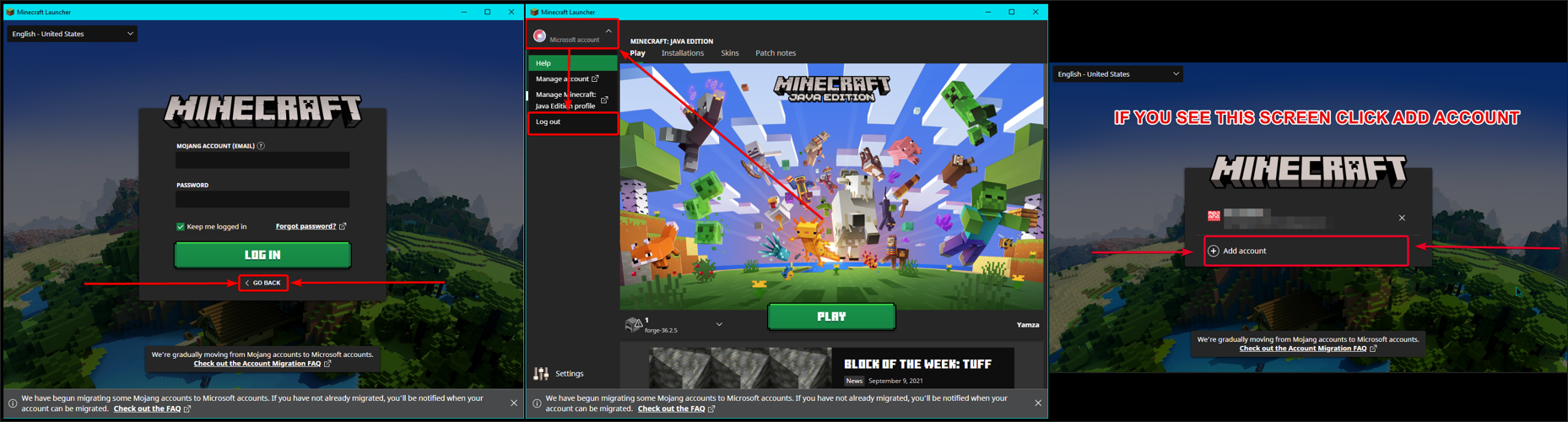
- https://i.imgur.com/qCOHMRZ.png
- Log in with an account that owns Java Minecraft.
- Done!
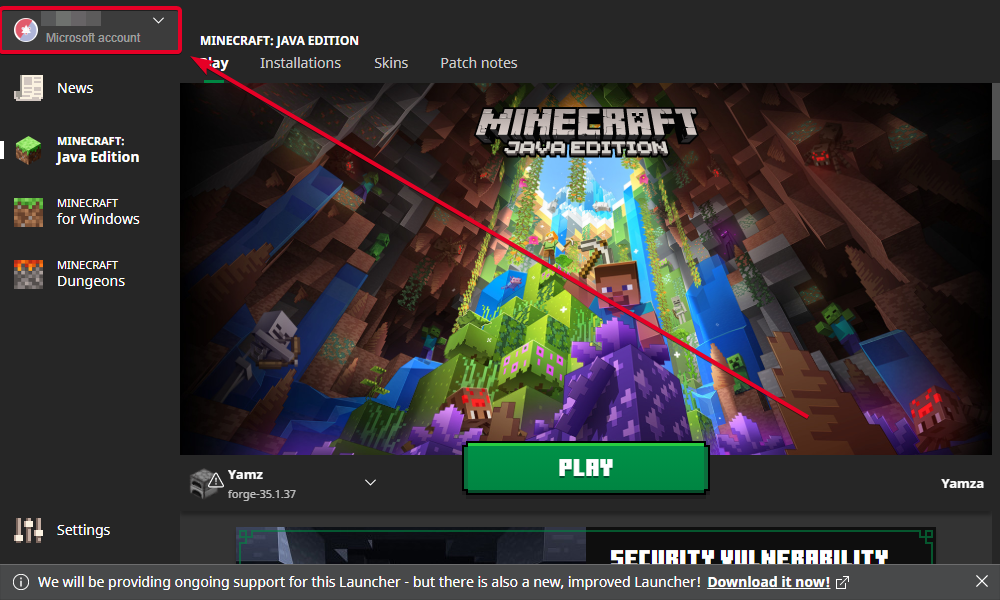

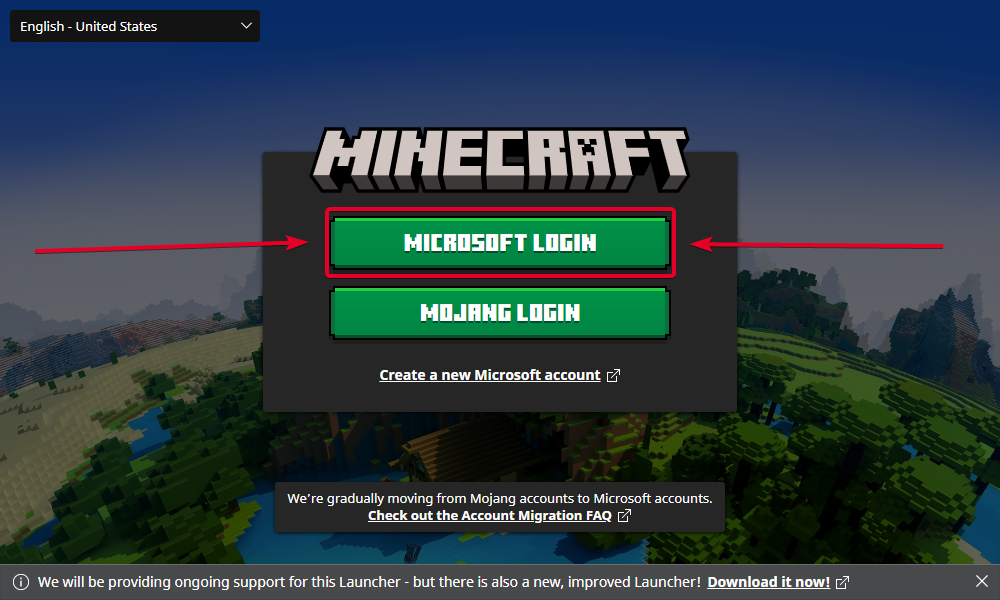
did you have to do anything different than this?
rain nexus
technically, i went through the same process your command showed but with a singular extra step inbetween
since ive played with my mojang account before, despite transferring, it still counted as an existing account. so, when i clicked "go back" from the mojang login, it took me to the screen that shows existing accounts and "add account". you have to click "add account" to get to that last image
i know, it's a very simple thing, but hey. i'm dumb
idk if its the same for the other guy
lyric crescent
i mean this comes up like 5 times a day, so it's not that you're dumb. it's poorly designed i guess
but people still argue about doing this so idk where the disconnect is
 lavish nebula
How would I fix it if the curseforge.exe file wont open?
rain nexus
i just think i froze up because i didnt end up on the screen i expected to, so i didnt bother reading the very obvious button in front of me
lavish nebula
lavish nebula
How would I fix it if the curseforge.exe file wont open?
Does anyonee know how to fix this?
lyric crescent
cant seem to get to any add account screen..
rain nexus
you sure you dont see a screen smth like this?
(Attachment later removed for privacy sake)
lyric crescent
nah, only this https://i.imgur.com/gjlLubG.png
 lavish nebula
Is your account bought hrough microsoft or mojang?
lyric crescent
lavish nebula
How would I fix it if the curseforge.exe file wont open?
try reinstalling curseforge?
rain nexus
idk.
lyric crescent
tried a computer restart?
lavish nebula
Yea
lyric crescent
can you open overwolf?
lyric crescent
no, the app
lyric crescent
!getcf 2nd link here
red patioBOT
Looking to install the CurseForge app?
<:windows:798410728188936222> Windows
Minimum Requirements:
- OS Version: 7 (64 bit), 8.1, 10, 11
- 64 bit Required.
- 350MB storage space.
- Microsoft .Net 4.8
- Intel/AMD quad-core CPU
- 8GB ram
Download: https://download.overwolf.com/install/Download?&PartnerId=4047
If you are having issues with the installer use the URL below to install Overwolf then go to the app store to download CurseForge.
https://content.overwolf.com/downloads/setup/latest/regular.html
<:mac:798410654418862130> Mac
Minimum Requirements:
- OS Version 10.14 or newer.
- 64 bit Required.
Download: https://curseforge.overwolf.com/downloads/curseforge-latest.dmg
:penguin: Linux
Minimum Requirements:
Yes.
Download: :person_shrugging:
lyric crescent
rain nexus
you sure you dont see a screen smth like this?
(Attachment later removed for pri...
gunna swipe this screenshot i guess
rain nexus
not that i dont already get spammed or something, but is it an okay thing that my email is there?
lyric crescent
i'll blur it
rain nexus
cheers. i'll delete my attachment in a minute or two as well
lyric crescent
you are
 tiny lantern
understood thanks
lyric crescent
lavish nebula
It is getting aggravating
disable any antivirus, firewalls, windows defender etc
lavish nebula
ok
lyric crescent
nah
**Step 1: Get to the Microsoft log in screen. **
https://i.imgur.com/4goKCP5.png
Step 2: Log in with a Microsoft account that owns the Java version of Minecraft.
https://i.imgur.com/B5YvoBR.png
Done!
 upper root
Use this link to install overwolf then install curseforge through overwolfs app store: https://content.overwolf.com/downloads/setup/latest/regular.html
lavish nebula
Ok thank you
 deft saffron
i need help trying to install world edit on my mac version of curse forge
 lavish nebula
upper root
Use this link to install overwolf then install curseforge through overwolfs app ...
lavish nebula
upper root
Use this link to install overwolf then install curseforge through overwolfs app ...
This is what came up
upper root
Unzip it first
 dark moth
I need more details on whats wrong with my project or at least an ETA on when my ticket can get read, I published a modpack but it says "Optifine is not a CurseForge hosted mod, therefore we do not allow to include it (file level) on projects / files." even though optifine is not in the modpack, and my ticket from 11 days ago is still being processed
lyric crescent
can you upload your zip somewhere and link it here, and also provide the ticket number?
digital roost
guys is curseofrge safe to use with this new java hack?
digital roost
thanks
im kind of confused so if i have the actual curseforge app im safe from the virus
or hack or whatever the hell it is
lyric crescent
what's written in announcements is as clear as it gets
digital roost
yes im aware but can u just tell me lol
upper root
Read the instructions in #📢︱news.
If you follow them you are safe. If you do not you may be at risk if you play mutliplayer
digital roost
so if i open to lan in singleplayer will i be at risk
upper root
 dense chasm
Wait the does the multiplayer thing only effect multiplayer or does it effect everyone?
rich flint
Single player is safe
 robust mirage
this isn't the discord for forge mods specifically is it? just curseforge loader?
rich flint
Curseforge is webhosting of modded gaming content and has an app for using said content.
Forge is a Minecraft mod loading system
There are more mc channels here once you get role in #786424115535544350
 hallow glade
rich flint
Single player is safe
hallow glade
rich flint
Single player is safe
is it still safe even with internet on?
lyric crescent
did you read the post?
robust mirage
rich flint
There are more mc channels here once you get role in <#786424115535544350>
thanks
 tardy jungle
hey ive just downloaded the pixelmon modpack and when I launch the game none of the servers show up, is this on purpose or do i need to do something?
upper root
!notcf
red patioBOT
Your question is not related to CurseForge owned/maintained features or services.
Please use the appropriate game room by getting a game role from #786424115535544350.
Otherwise use #👽︱game-support for game related help.
CurseForge does not make or maintain any of the content or games used on the site or app. Just because it's on the site/app does not make it a problem with CurseForge. Move rooms as requested, arguing about it will result in you being removed from the discord.
 crystal cipher
What do I do if I keep getting the "an exception occurred during a webclient request" error while trying to download a modpack in the curseforge app? Im getting really desperate because I genuinely can not download anything and its getting in my nerves
upper root
!webclient
red patioBOT
Timeout/WebClient errors are from networking issues to your computer. You can try a few things to fix it:
- Restart the computer.
- Restart your router/modem.
- Try another internet source like a hotspot, wired connection or moving closer to the WiFi.
- Pause/Stop other things using the internet. (Streams, music, etc)
- If this still doesn't work, try again in an hour and hope your connection is stable.
crystal cipher
I’ve tried everything on that list. Will I just not be able to play any modpacks at all with the curseforge?
upper root
Theres nothing we can do about webclient, its all on your end.
If you are on wifi move closer to the router or plug in with ethernet
 long willow
Theres a 1.16.3 mod that works completely fine in 1.16.5
i want to add it to my modpack but it keeps not adding it
how do i fix this
upper root
!mc-installmods second set of instructions
red patioBOT
How to install mods in CurseForge App.
- Click
+ Create Custom Profile - Name it, select the required Minecraft version, select the Forge version (usually the highest number), click
Create. - Click the profile icon.
- Click
Add More Content - Search and install the desired mods.
- Start the game!
How to install mods not on CurseForge.
- Right click the profile picture or Open the profile and click the Icon next to the play button.
- Click

Open Folder. - Drag the mod(s) into the
modsfolder. (Note: Some mods will require others, to run. Make sure to read the instructions for the mod!) - Start the game!
 dark moth
lyric crescent
can you upload your zip somewhere and link it here, and also provide the ticket ...
upper root
dark moth
lyric crescent
can you upload your zip somewhere and link it here, and also provide the ticket ...
upper root
Install sodium. You haven't got it installed in that instance
Provide the logs then
!mc-logs and lets move to #👽︱game-support
red patioBOT
Sending logs for support.
- Right-click the modpack profile icon OR click the button in the modpack profile.
- Click
Open Folder. - Open the
logsfolder. - Drag and drop the FILE named
latestORdebuginto discord.
hallow glade
lyric crescent
did you read the post?
yes, just double checking
 unique grove
Is the user elito banned?
fleet bear
Need their full tag
unique grove
elito#1103
fleet bear
Nope
fleet bear
idk
 queen storm
Why are you asking?
unique grove
Does rule 6 work with orther people too? I guess yes
queen storm
Yes, works with everybody
unique grove
Ok yea he said some sketch stuff about the deep web and a 1to1 guide on how to get like working credit card codes and how to navigate the amazon thing
I could dm screenshots
fleet bear
!dm
red patioBOT
Don't want scam DM?
 unique grove
I’ve got no problem with sketch dms i just report them i guess
queen storm
Should have gotten to the point faster though
unique grove
Ok
fleet bear
banning them from the server doesn't do anything really either. They just make more accounts. Report them as spam and delete them.
fleet bear
They use throw away accounts that discord deletes like every week or month.
IP bans are useless.
spiral bear
I fully understand if you don't want to answer but i am just curious as to how many projects there are backed up to be reviewed?
spiral bear
Okay and the average time it would take if one was to create a new project lets say saturday morning? and estimate is fine or if you don't know thats fine as well, just trying to ease some people since they keep asking so many questions about it.
fleet bear
!status
red patioBOT
Project Moderation Time
Project/File moderation is done on these days unless otherwise mentioned:
Sunday, Monday, Tuesday, Wednesday, Thursday: <t:1631170800:t> - <t:1631199600:t> (Your time)
Friday, Saturday: No Moderation!
Projects are moderated First in, First out. If you submit late in the work day, it will likely get left until the next day!
New Projects or anything flagged for manual review: 1-3 Working Days
Updates to approved projects not needing manual approval: 1 Hour
-If your file has been "Under Review" for more than an hour, then it is at manual review!
Changes will only show in the app if the project meets the requirements in the ?sync command and up to 24 hours has passed from when it was accepted.
spiral bear
Okay thank you!
lime estuary
How can i delete a file from my modpack?
fleet bear
like any other file. Just delete it from the folder?
fleet bear
you archive it
upper root
!notcf try #👽︱game-support
red patioBOT
Your question is not related to CurseForge owned/maintained features or services.
Please use the appropriate game room by getting a game role from #786424115535544350.
Otherwise use #👽︱game-support for game related help.
CurseForge does not make or maintain any of the content or games used on the site or app. Just because it's on the site/app does not make it a problem with CurseForge. Move rooms as requested, arguing about it will result in you being removed from the discord.
 valid solar
Hello my cuseforge installer wont open i download it then try to open it and it does not
Hello?
queen storm
!getcf Use the second link
red patioBOT
Looking to install the CurseForge app?
<:windows:798410728188936222> Windows
Minimum Requirements:
- OS Version: 7 (64 bit), 8.1, 10, 11
- 64 bit Required.
- 350MB storage space.
- Microsoft .Net 4.8
- Intel/AMD quad-core CPU
- 8GB ram
Download: https://download.overwolf.com/install/Download?&PartnerId=4047
If you are having issues with the installer use the URL below to install Overwolf then go to the app store to download CurseForge.
https://content.overwolf.com/downloads/setup/latest/regular.html
<:mac:798410654418862130> Mac
Minimum Requirements:
- OS Version 10.14 or newer.
- 64 bit Required.
Download: https://curseforge.overwolf.com/downloads/curseforge-latest.dmg
:penguin: Linux
Minimum Requirements:
Yes.
Download: :person_shrugging:
valid solar
Thanks bot
lime estuary
My file has been uploaded 55 minutes ago and it still on under review
queen storm
!status
red patioBOT
Project Moderation Time
Project/File moderation is done on these days unless otherwise mentioned:
Sunday, Monday, Tuesday, Wednesday, Thursday: <t:1631170800:t> - <t:1631199600:t> (Your time)
Friday, Saturday: No Moderation!
Projects are moderated First in, First out. If you submit late in the work day, it will likely get left until the next day!
New Projects or anything flagged for manual review: 1-3 Working Days
Updates to approved projects not needing manual approval: 1 Hour
-If your file has been "Under Review" for more than an hour, then it is at manual review!
Changes will only show in the app if the project meets the requirements in the ?sync command and up to 24 hours has passed from when it was accepted.
 shell copper
pff, mc bedrock files always take 3 days for example 😄
for some reason java resource packs get approved faster
 dense current
I cannot export my mc modpack via the cf app.
I click export, select the folders that need exporting, the cf client does its thing, creates a temp archive, but then once finished nothing is there.
 hollow schooner
are the old forge versions (under 1.12) still vulnerable? not the curseforge versions, just the forge versions
lyric crescent
dark moth
ticket #105132
https://drive.google.com/file/d/1fN32zPq2Ih9HYIbJBOg1tK448iePkWW6...
Can you provide the project link as well.
 gritty ingot
v
Do I need java 18 to ran minecraft 1.18? Cause I'm getting exit code 0 error every time i try to run a 1.18 modpack
red patioBOT
Error/Exit codes are useless. Follow these steps so someone can actually help you.
- Right-click the modpack profile icon OR click the button in the modpack profile.
- Click
Open Folder. - Open the
logsfolder. - Drag and drop the FILE named
latestORdebuginto discord.
 tight sky
My curseforge won't load
it will load onto my library but when I click on a modpack it runs into a error
lyric crescent
what error
tight sky
nvm i'm trying something else
queen storm
Change your name on twitch, relog
queen storm
Link what account?
 kind sapphire
The update for my project has been waiting for approval for 13h and unlike previous occasions, it sits at 0 downloads.
Is that something to be concerned about or is it just a long wait today?
queen storm
 tidal spear
you said i need to change my twitch
tidal spear
you said i need to change my twitch
What do you want to change?
queen storm
kind sapphire
The update for my project has been waiting for approval for 13h and unlike previ...
!status
red patioBOT
Project Moderation Time
Project/File moderation is done on these days unless otherwise mentioned:
Sunday, Monday, Tuesday, Wednesday, Thursday: <t:1631170800:t> - <t:1631199600:t> (Your time)
Friday, Saturday: No Moderation!
Projects are moderated First in, First out. If you submit late in the work day, it will likely get left until the next day!
New Projects or anything flagged for manual review: 1-3 Working Days
Updates to approved projects not needing manual approval: 1 Hour
-If your file has been "Under Review" for more than an hour, then it is at manual review!
Changes will only show in the app if the project meets the requirements in the ?sync command and up to 24 hours has passed from when it was accepted.
tidal spear
i want to change my name in curseforge
queen storm
tidal spear
i want to change my name in curseforge
That is your twitch name
tidal spear
but how do i link my twitch to curseforge
queen storm
It is the same account already, nothing to link
tidal spear
ok i will try it
kind sapphire
queen storm
!status
Is the fact that it is on 0 downloads when it usually gets to 1 download once under review not an issue?
queen storm
If it is gonna be one then it will be in 3 days
dense current
dense current
I cannot export my mc modpack via the cf app.
anyone?
 nimble gale
Hello, I have a problem that when I try to knock on any mod pack, I get an error and write there: Failed to synchronize registry data from server, closing connection and I do not know what to do aternos server and previously I could normally knock on the server on this modpack and now I can't on any
 lyric folio
I added a mod to my "Custom Modpack", it somehow deleted 3 other mods.
Now I cant find out which ones are missing. Is there a log?
nimble gale
nimble gale
Hello, I have a problem that when I try to knock on any mod pack, I get an error...
By the way, is there any person in the administration who can speak Polish?
queen storm
nimble gale
By the way, is there any person in the administration who can speak Polish?
There is not, #📛︱rules 1
And #👽︱game-support for servers
 gentle cradle
Curseforge.com seem to be down.
fleet bear
gentle cradle
Curseforge.com seem to be down.
seems fine to me?
gentle cradle
Huh, it's not loading or responding on my end.
Nothing was loading for the past 10-15 minutes here, now it seems to work again.
 mellow gate
How do you update your curseforge
fleet bear
restart or reinstall
mellow gate
How do you know if you've updated your curseforge?
fleet bear
it gives you the news
mellow gate
And how do you check ?
fleet bear
check what?
fleet bear
it gives you the changes news
mellow gate
Oh and what is the newest version?
mellow gate
I'm on 0.187.3.1 and the only version I can find is 0.187.2.1
So is backwards later or more recent ?
fleet bear
then you have the latest version
long willow
red patio
When I search the mod it doesn’t appear because there’s no 1.16.5 file
Only a 1.16.3 file
Which works on 1.16.5
queen storm
long willow
When I search the mod it doesn’t appear because there’s no 1.16.5 file
Then tell the developer to fix the tags
long willow
queen storm
Then tell the developer to fix the tags
Inactive developer
queen storm
🤷♂️
queen storm
Yeah, you read the second part
long willow
Manually install
long willow
long willow
Manually install
K I’ll try this
lime estuary
kind sapphire
The update for my project has been waiting for approval for 13h and unlike previ...
For me too
 vague dune
What is the overwolf discord? And is there a place to ask for creating mods/modpacks? (I read through #👋︱welcome )
queen storm
vague dune
What is the overwolf discord? And is there a place to ask for creating mods/modp...
#🧱︱mc-other-help for the modpacks, overwolf discord is in that exact channel.
vague dune
Thank you :).
 scarlet remnant
hi, I just started Minecraft and wanted to download Curseforge but it kept on removing itself. what do i do
queen storm
!getcf Use the second link
red patioBOT
Looking to install the CurseForge app?
<:windows:798410728188936222> Windows
Minimum Requirements:
- OS Version: 7 (64 bit), 8.1, 10, 11
- 64 bit Required.
- 350MB storage space.
- Microsoft .Net 4.8
- Intel/AMD quad-core CPU
- 8GB ram
Download: https://download.overwolf.com/install/Download?&PartnerId=4047
If you are having issues with the installer use the URL below to install Overwolf then go to the app store to download CurseForge.
https://content.overwolf.com/downloads/setup/latest/regular.html
<:mac:798410654418862130> Mac
Minimum Requirements:
- OS Version 10.14 or newer.
- 64 bit Required.
Download: https://curseforge.overwolf.com/downloads/curseforge-latest.dmg
:penguin: Linux
Minimum Requirements:
Yes.
Download: :person_shrugging:
scarlet remnant
thank u
 woven heron
I am using the Cruseforge app and the mods in my own pack has updates but the App is not updating to see the updates. can you add a "Refresh" button for updates for mods in your own mod pack.
lyric crescent
a refresh button isnt going to make the app know about updates if it doesnt already
woven heron
I already set it to check for updates every 15 minutes. but after 15 minutes gone by and it does not see that the mod has an update
lyric crescent
then the app doesnt know about it yet
wanna specify what we're even talking about
woven heron
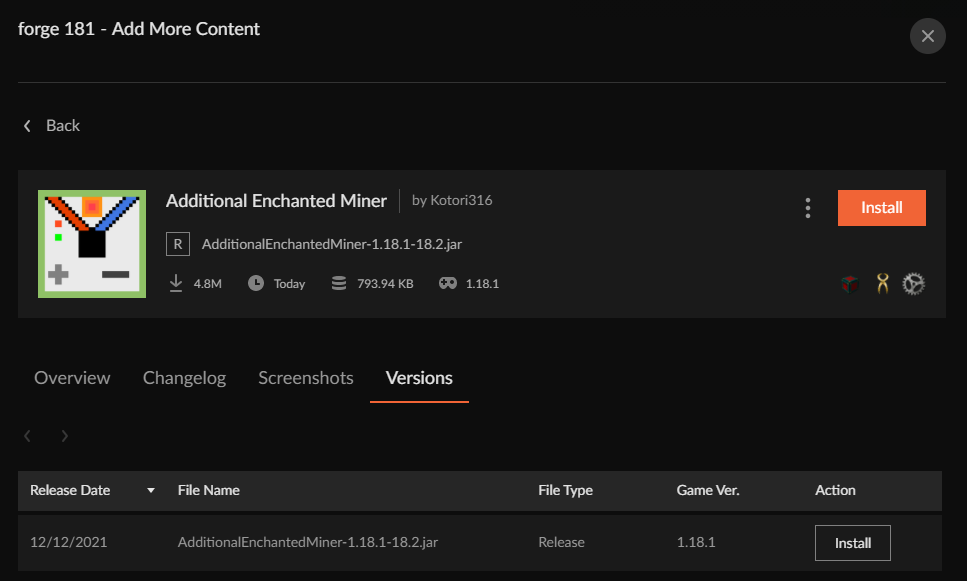
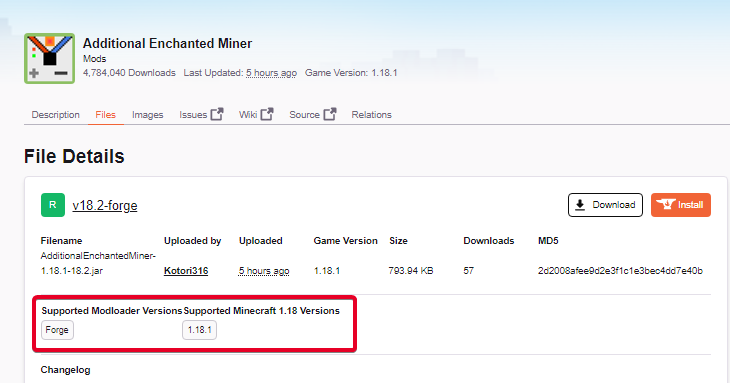
the mod Additional Enchanted Miner just got an update 5 hours ago. to V18.2 in there mod version list but the launcher does not show that there is an update.
I have V18.1 but says there is no update

there update on the Cruseforge website

 lyric crescent
dont know
woven heron
That would mean i would have to make a new mod pack?! dangit...
 unkempt briar
i have not been able to find 1.18 mods with fabric on 1.18.1 profile
i think the 2 would work together
lyric crescent
you wont, the files need to be tagged as 1.18.1 to find them
unkempt briar
why dont they give the option in search to allow for all in a major version
lyric crescent
major version isnt any guarentee either
1.16 mods dont work on 1.16.5 for example
etc
unkempt briar
there should be an option to select acceptable versions in search
woven heron
wait how do i change the minecraft version used in the mod pack?
lyric crescent
what do you consider "acceptable"? Who makes that decision exactly?
unkempt briar
the user
lyric crescent
As it is, mod devs test their mods and tag it approprately. if not, that's on them
user cant be trusted enough to make that call and not come here complaining about how things dont work. if you want to do it yourself then just put the mods in the mods folder
unkempt briar
ok
 vague hazel
Heelo everyone I am having some issues witgh trying to instasll a randomizer mod on minecraft it says something about a later forge
requires forge 35.1.10
unkempt briar
which forge do you have?#
unkempt briar
looks like you need to update
unkempt briar
there should be way to set version i think
vague hazel
can I DM you the screen shot
 hardy sluice
how do i share a mod pack i made??\
signal ridge
!mc-packshare
red patioBOT
There are two ways to share a modpack you've made with others...
Export and Share - For Friends to Small Groups.
- Click the Icon for the modpack.
- Click the button next to play.
- Click
Export. - Select the files that should be included.
- Send the zip to the people that want it! They can follow the instructions in
!mc-installpackto install the pack!
Upload to Curseforge - For Public Release to Everyone.
This options will make your pack public to EVERYONE, it comes with extra requirements and will take some effort to set up.
- Go to here: https://www.curseforge.com/project/432/4471/create
- Fill out the information with a proper description of the pack. This should allow anyone to understand what the pack is.
- Click the Icon for the modpack in the CurseForge app.
- Click the button next to play.
- Click
Export. - Select the files that should be included.
- Open your Project you made on the CurseForge site and Upload the file you just made.
- Wait for Moderation & Sync so it can show up in the client! (See
!syncfor limitations)
 patent sigil
its unusual it takes that long, does it have a lot of mods not available on curseforge?
signal ridge
 limpid nimbus
Any notifications of any kind?
signal ridge

 signal ridge
See all notifications show anything?
patent sigil
im not having any notifications for files that were accepted or rejected, really need to know why one of them was rejected
have other people mentioned this issue?
signal ridge
limpid nimbus
Can you link the project please
limpid nimbus
no
signal ridge
That a no to the notifications or linking the project from the site?


 limpid nimbus
here is my project
signal ridge
Thats not what I asked for. Copy the url of your project on the site. So I can send it to higher ups
 timber nest
plz help
signal ridge
timber nest
plz help
Which app are you opening? Curseforge or the Overwolf app?
signal ridge
What os are you on? and does the overwolf app itself open
limpid nimbus
signal ridge
Which app are you opening? Curseforge or the Overwolf app?
where
signal ridge
limpid nimbus
where
Im waiting on the url from you.Get the Link to your project from the site.
limpid nimbus
files ?
signal ridge
limpid nimbus
files ?
Go to your project on the site. Copy this and send it here
timber nest
wait i just got a new update for my windows 10 let me try and uptade it
limpid nimbus
signal ridge
I have sent this to the higher ups, I will either ping you with their reply or they will message you the answer.
timber nest
guh it still wont open gets the same error
limpid nimbus
thanks
signal ridge
Uninstall both ow and cf apps. Try the second link (win) bellow once they are both unistalled
!getcf
red patioBOT
Looking to install the CurseForge app?
<:windows:798410728188936222> Windows
Minimum Requirements:
- OS Version: 7 (64 bit), 8.1, 10, 11
- 64 bit Required.
- 350MB storage space.
- Microsoft .Net 4.8
- Intel/AMD quad-core CPU
- 8GB ram
Download: https://download.overwolf.com/install/Download?&PartnerId=4047
If you are having issues with the installer use the URL below to install Overwolf then go to the app store to download CurseForge.
https://content.overwolf.com/downloads/setup/latest/regular.html
<:mac:798410654418862130> Mac
Minimum Requirements:
- OS Version 10.14 or newer.
- 64 bit Required.
Download: https://curseforge.overwolf.com/downloads/curseforge-latest.dmg
:penguin: Linux
Minimum Requirements:
Yes.
Download: :person_shrugging:
signal ridge
correct, unistall both ow and cf first
timber nest
ok
 quick salmon
anyone here know how to use minecraft forge/fabric mods on the data packs? they are not showing up when i add them to the datapack folder
on optifine\
signal ridge
!notcf
red patioBOT
Your question is not related to CurseForge owned/maintained features or services.
Please use the appropriate game room by getting a game role from #786424115535544350.
Otherwise use #👽︱game-support for game related help.
CurseForge does not make or maintain any of the content or games used on the site or app. Just because it's on the site/app does not make it a problem with CurseForge. Move rooms as requested, arguing about it will result in you being removed from the discord.
gritty ingot
Could someone explain me why my files are getting deleted once uploaded? even after being approved the modpack files just disappear. The weird thing is that other modpack devs can upload
Is there a limit at how many files can I upload? My modpack have 19 files
signal ridge
Are you getting any notifications on the site? 
signal ridge
Link the project
signal ridge
Try rexporting your pack form the cf app, check and make sure there are no mods in the zip (overides\mods) then upload again. May just be a weird hiccup
lime estuary
I uploaded my file 6 hours ago it still on under review and on 0 Downloads
signal ridge
!status
red patioBOT
Project Moderation Time
Project/File moderation is done on these days unless otherwise mentioned:
Sunday, Monday, Tuesday, Wednesday, Thursday: <t:1631170800:t> - <t:1631199600:t> (Your time)
Friday, Saturday: No Moderation!
Projects are moderated First in, First out. If you submit late in the work day, it will likely get left until the next day!
New Projects or anything flagged for manual review: 1-3 Working Days
Updates to approved projects not needing manual approval: 1 Hour
-If your file has been "Under Review" for more than an hour, then it is at manual review!
Changes will only show in the app if the project meets the requirements in the ?sync command and up to 24 hours has passed from when it was accepted.
queen storm
How many times do we have to send that exact same command? Did it multiple times myself already @lime estuary
timber nest
thanks yoyok9 its fixed
lime estuary
queen storm
How many times do we have to send that exact same command? Did it multiple times...
I know i don't want the people to wait
queen storm
Then why do you keep saying it?
lime estuary
Cause i want to know what exact time it will be so i can tell them
queen storm
There is no exact time, it is first in, first out, always was
lime estuary
Okay
 tranquil bluff
gritty ingot
Could someone explain me why my files are getting deleted once uploaded? even af...
tranquil bluff
gritty ingot
Could someone explain me why my files are getting deleted once uploaded? even af...
same thing has been happening to me
gritty ingot
tranquil bluff
same thing has been happening to me
Have you exported your pack from CF App?
tranquil bluff
yes, i'll try re-exporting it
 fair trail
For some reason I'm able to load modpacks fine, start the minecraft launcher, but its taking forever to actually start minecraft. Any idea why this is?
queen storm
Forge loading takes time
gritty ingot
tranquil bluff
yes, i'll try re-exporting it
pls let me know if you find a fix
 steep kernel
yo i need some help
queen storm
!help
red patioBOT
╰( ͡° ͜ʖ ͡° )つ──☆*:・゚ *˜”*°•.˜”*°• Many Help •°*”˜.•°*”˜* <:curselit:796985620550385705>
Please provide a description of your issue with as much detail as possible. If you have an issue with a mod or modpack, tell us the name. Explain what you can see happening. Be specific!
 Tell us what is happening, we already know it "doesn't work".
Avoid using words like "it", tell us exactly what "it" is.
Don't assume anyone knows what you are talking about, be specific.
Tell us what you expected to happen.
Provide screenshots or video if possible.
Provide a log if possible. ?mc-log
steep kernel
so im making a modpack and idk how to put the mods in the project and where can i put them
queen storm
!mc-packshare
red patioBOT
There are two ways to share a modpack you've made with others...
Export and Share - For Friends to Small Groups.
- Click the Icon for the modpack.
- Click the button next to play.
- Click
Export. - Select the files that should be included.
- Send the zip to the people that want it! They can follow the instructions in
!mc-installpackto install the pack!
Upload to Curseforge - For Public Release to Everyone.
This options will make your pack public to EVERYONE, it comes with extra requirements and will take some effort to set up.
- Go to here: https://www.curseforge.com/project/432/4471/create
- Fill out the information with a proper description of the pack. This should allow anyone to understand what the pack is.
- Click the Icon for the modpack in the CurseForge app.
- Click the button next to play.
- Click
Export. - Select the files that should be included.
- Open your Project you made on the CurseForge site and Upload the file you just made.
- Wait for Moderation & Sync so it can show up in the client! (See
!syncfor limitations)
tranquil bluff
gritty ingot
pls let me know if you find a fix
i will
steep kernel
for the love of god no one press that
 prime zealot
I made a modpack but the modpack keeps getting rejected and I'm not receiving any information on why
steep kernel
prime zealot
I made a modpack but the modpack keeps getting rejected and I'm not receiving an...
question
im making a modpack
im having issues
upper root
Explain them then
upper root
prime zealot
I made a modpack but the modpack keeps getting rejected and I'm not receiving an...
The not getting notified is cause CF is rather broken atm, nothing much we can do about it
prime zealot
ok, I'll try again tomorrow then
 tropic fern
hello, my friend is not able to download modpack called mineshafts and monsters even tho i downloaded it without any problem, this is what it says to him : curseforge timeout attempting to download
upper root
!webclient
red patioBOT
Timeout/WebClient errors are from networking issues to your computer. You can try a few things to fix it:
- Restart the computer.
- Restart your router/modem.
- Try another internet source like a hotspot, wired connection or moving closer to the WiFi.
- Pause/Stop other things using the internet. (Streams, music, etc)
- If this still doesn't work, try again in an hour and hope your connection is stable.
 gray bluff
Why have I stopped receiving any mod update notifications that I am following on the site?
upper root
The site is broken right now, we just have to wait on CF to fix it
tropic fern
upper root
!webclient
thanks, will try 🙂
gray bluff
upper root
The site is broken right now, we just have to wait on CF to fix it
Ok, I got it
tropic fern
@upper rootdo you think curseforge will fix this problem in the future? :/ its not my friend's problem... even tho his internet is slow he always manages to download anything from steam or somewhere else
upper root
There is nothing curseforge can do, timeouts are your friends internet and nothing else. If he is on wifi get him to move closer to the router or plug in via ethernet.
digital roost
i want to delete all my addons
how do i do this
its hard doing it one by one
and you cant do it in settings
lyric crescent
Delete the folder they are in
digital roost
like the file???
 fallen escarp
do any of you know if there is a fix for a game not loading because im trying this with minecraft it loads the launcher perfectly fine but when i click play in the launcher it just doesnt load and when i try to launch it again a message appears in curseforge that says "Minecraft is already running: There's an instance of Minecraft already running or a related process that is stuck. Would you like to terminate it and continue?" and the options are "cancel" and "continue" if you can find a fix for this or something thatll help please say something about it please and thank you
upper root
Restart your computer then try again
fallen escarp
ok got it
digital roost
upper root
Restart your computer then try again
i thought u were talking to me. oof. umm what should i try???
upper root
I don't know, I don't play WOW and so have no experience with its addons
lyric crescent
Go to the folder they are installed in and delete them. If you don't know how to do that then just do what you are doing already.
digital roost
upper root
I don't know, I don't play WOW and so have no experience with its addons
???
digital roost
lyric crescent
Go to the folder they are installed in and delete them. If you don't know how to...
what folder???
lyric crescent
"do what you are doing already"
I don't have wow, I can't spoon feed you instructions on how to find it.
lyric crescent
You said "addons". Addons are for world of warcraft
digital roost
no
... umm curseforge isnt just world of warcraft... its also minecraft
which also have addons in the thing
...
lyric crescent
It's called mods, and you were not specific with your question
digital roost
i think curseforge is broken either way
tropic fern
upper root
There is nothing curseforge can do, timeouts are your friends internet and nothi...
? 😄 its their download system problem... he has no such problems on any other platform, this is the first time it happened so its their fault
lyric crescent
Right click your profile, open folder. Find the mods folder. Delete them
digital roost
it keeps freezing and whenever i try to close it using the X it doesnt close
upper root
tropic fern
? 😄 its their download system problem... he has no such problems on any other p...
You said yourself he has slow internet. Curseforge cannot fix that
digital roost
who
upper root
I am not talking to you. I am talking to the person i replied to, like you just did to me
lyric crescent
Dude, he replied to the person he was talking to, it's obvious who he was talking to
 rain horizon
why is my pack not being reviewed or notified why its not going through
the file just disapears after going under review
upper root
Known issue, curseforge is a bit broken rn
rain horizon
how long will it last
lyric crescent
Til it's fixed. Just poked them again about it
tropic fern
upper root
You said yourself he has slow internet. Curseforge cannot fix that
yes he has but he is still able to download on any other platform 🙂 yet curseforge has some problem with it
rain horizon
make an announment when the site is fixed
 urban granite
Whenever I click play on my minecraft modpack it takes me to the old launcher which I can't log in through because I migrated. Help?
upper root
!mc-login
red patioBOT
Minecraft Logins
Step 1: Get to the Microsoft login screen.
Step 2: Log in with a Microsoft account that owns the Java version of Minecraft.
Done!
Issues: If it says PLAY DEMO then the account used DOES NOT own Java Minecraft. Log in with one that does.
 urban granite
I can't get to the microsoft login screen
it will only let me login through a mojang account
urban granite
Oh! I got it, thanks!
rain horizon
how do I get to curseforge achieves
lyric crescent
Archives of what
rain horizon
files for my modpack
lyric crescent
Go to files, view all, sort by status -
rain horizon
I think I found a workaround to update my modpack
if at least one file is in the project it doesnt get put under review and bugged out
lyric crescent
Can you link your project
desert lintel
ok so i have see my project get deleted 2 times now after upload it gets to under review then just disappears. i have no message or anything as to why its gone anyone know whats going on?
upper root
Known bug, curseforge is broke rn and the people who need poking have been poked about it
desert lintel
ah ok that sucks as i was uploading a critical patch to my pack
rain horizon
well the workaround didnt fix it
 lavish isle
hey can i get in a call with someone and can they walk me through setting up mods from curse forge on apex servers
rain horizon
make a modpack see if it runs copy the modpack mods into your server mods
easiest way to do it
it lists the compatable versions and uses them
signal ridge
#👽︱game-support or minecraft channels for server support. CF has nothing to do with Servers
lyric crescent
When will someone link their project that got the rejections..
fallen escarp
ok im back
fallen escarp
the restarting computer thing worked
but after a bit the launcher says the game crashed
upper root
!mc-logs into #👽︱game-support
red patioBOT
Sending logs for support.
- Right-click the modpack profile icon OR click the button in the modpack profile.
- Click
Open Folder. - Open the
logsfolder. - Drag and drop the FILE named
latestORdebuginto discord.
rain horizon
rain horizon
https://www.curseforge.com/minecraft/modpacks/magi-ka/files/all
@lyric crescent
desert lintel
since my modpack for critical patch got deleted i can see if i can post it here but i got no message as to why it was removed
desert lintel
ya i was going to post the log that was asked for
upper root
The log was for MCfan
lyric crescent
desert lintel
since my modpack for critical patch got deleted i can see if i can post it here ...
Link the project
desert lintel
i posted version 1.3 plus the server corrections with the server version but both got deleted, was in under review refreshed about 5 mins later and it was gone as if i never uploaded it
lyric crescent
Nothing in the notifications?
rain horizon
no
lyric crescent
Click it, nothing shows up?
rain horizon
no
desert lintel
no i have freshed i restarted my system and cleared my cache and when i click on the bell or messages there is nothing listed.
i can upload again if you want to watch it get deleted again
lyric crescent
Sure go ahead
rain horizon
I never cleared my cache but nothijng showed in notifications after upload
desert lintel
ok stand by
fallen escarp
here is screenshot proof of the game crashing after me pressing the play button
 rain horizon
@fallen escarp #👽︱game-support
fallen escarp
k
desert lintel
ok i just uploaded DragonMire 1.3 here https://www.curseforge.com/minecraft/modpacks/dragonmire/files

now its under review

and now its gone
it looked like this

now i only have these showing

and here is the notification area

no PMs either
 rain horizon
exactly the same for me
upper root
No. You get notifications for rejected/accepted projects anyway
 wild escarp
But only new ones. I get messages when I add a new project, and it's approved the first time. But nothing after that unless I've enabled notifications for them.
lyric crescent
It's an issue with the site. Has nothing to do with what you're saying.
wild escarp
oki doki.
crawls back into his corner 😺
desert lintel
ya i was going to say i have got messages before when something is rejected and why but till they fix it no way to know
ok so interesting i just freshed and now i see them all show up but as rejected but still no message as to why.

 zealous mulch
 upper root
Move to #👽︱game-support, and could you post a slightly wider screenshot? Theres info missing
rain horizon
any fix yet?
tropic fern
can i download the modpack somehow else than through curseforge launcher?
upper root
You can download each mod indivdually off the website, but otherwise no
 obsidian scarab
why is curse deleting my server pack for my modpack and still saying its still there?
upper root
Curseforge is broke rn, weird stuff is happening to files on the site
obsidian scarab
so i cant have a server pack thne?
upper root
Till they fix it
 tawny epoch
Not sure if I'm posting in the correct place but, I It keeps telling me "Failed to create custom profile" I'm trying to make one for minecraft 1.18.1 Forge. I get the same error when I try the Fabric one as well.
 compact urchin
im trying to make a custom modpack in the launcher. for 1.18.1 but im trying to add 1.18.0 mods? how do i see them?
its only showing 1.18.1
instead of all 1.18.x mods
upper root
That is because the authors haven't yet tagged their mods as 1.18.1. You can still install them mnaully by downloading them from the site and following the instructions below
!mc-installmods
red patioBOT
How to install mods in CurseForge App.
- Click
+ Create Custom Profile - Name it, select the required Minecraft version, select the Forge version (usually the highest number), click
Create. - Click the profile icon.
- Click
Add More Content - Search and install the desired mods.
- Start the game!
How to install mods not on CurseForge.
- Right click the profile picture or Open the profile and click the Icon next to the play button.
- Click
Open Folder. - Drag the mod(s) into the
modsfolder. (Note: Some mods will require others, to run. Make sure to read the instructions for the mod!) - Start the game!
compact urchin
oh so i just make a new profile for 1.18.0 and then move them when i picked the ones i want
upper root
Yes. Or just download them from the sitee
rain horizon
is it fixed yet
upper root
No. You do not need to ask every hour
 night cairn
so I cant play any mods?
rain horizon
well sorry if a whole server is waiting on this
upper root
night cairn
so I cant play any mods?
Whats your isssue?
night cairn
upper root
Whats your isssue?
it says something and I cant update my mods
upper root
!help
red patioBOT
╰( ͡° ͜ʖ ͡° )つ──☆*:・゚ *˜”*°•.˜”*°• Many Help •°*”˜.•°*”˜* <:curselit:796985620550385705>
Please provide a description of your issue with as much detail as possible. If you have an issue with a mod or modpack, tell us the name. Explain what you can see happening. Be specific!
Tell us what is happening, we already know it "doesn't work".
Avoid using words like "it", tell us exactly what "it" is.
Don't assume anyone knows what you are talking about, be specific.
Tell us what you expected to happen.
Provide screenshots or video if possible.
Provide a log if possible. ?mc-log
night cairn
I try to open a mod It says "exception of type curse.radium.installmanagement.installtaskfaileddexception was thrown"
 lyric crescent
rain horizon
well sorry if a whole server is waiting on this
lyric crescent
rain horizon
well sorry if a whole server is waiting on this
There isn't likely to be a fix for at least the next 8 hours
rain horizon
ok
 thin breach
hello! i recently made a modpack for me and my friends and we are having some difficulty installing it. everything goes well up until we click download and then it doesnt show up in our curseforge launcher. anyone know the issue?
LInk to mod: https://www.curseforge.com/minecraft/modpacks/kingdoms-of-warfare/files/3562040
red patioBOT
How to install modpacks with the search features in app.
- Open the

Minecraftsection of the app. - Click the top search bar where it says
Search for modpacksOR Click theBrowse ModpacksTab. - Find the Modpack you want to install and click install on it.
- Wait for CurseForge app to download and unpack all the required files.
- Once finished, click
Play!
How to install modpacks from a Export. (Custom/Private/Site downloaded Modpack zip)
- Get CurseForge App if you don't have it, use
!downloadfor a link. - Get the exported modpack from CurseForge or someone else,
!mc-packshareexplains how to make them. - Open the
Minecraftsection of the app. - Click

Create Custom Profile - Click the
Importoption. - Find the file you just downloaded in step 2 and select it.
- CurseForge app will now attempt to download and unpack the modpack. If it fails, try steps 4-6 again.
- Once finished, click
Play!

 limber solstice
hey! i’m trying to upload a modpack to curseforge and it shows that it is accepted, but when i go to the launcher, my modpack will not give me the option to update nor does it show it updated. any solutions to this?
thin breach
upper root
Install it using the search feature in the app
yeah it doesnt show up with that either
upper root
How long has it been approved for?
rich flint
is it labeled release, beta, or alpha?
thin breach
release
upper root
Try download the zip then import into cf using the instrcutions posted by the bot above
signal ridge
This for the project that was linked above? if so, projects marked as abandoned dont sync with the app. Will need to manually install them
rich flint
thin breach
release
for some weird reason your file is a 1.12.2 inside the manifest, yet it's file is tagged as 1.16 as a file, and the 'recent files' shows multiple items to click of various versions.
is your pack actuallly 1.12.2 based?
i'm guessing yes - click on your file on the website, edit it, remove the checkboxes so that only 1.12.2 is selected
lyric crescent
limber solstice
hey! i’m trying to upload a modpack to curseforge and it shows that it is accept...
link the project
limber solstice
lyric crescent
seems like it hasnt synced to the app yet, can take up to 24 hours
limber solstice
alright. thank you for the notice!
 azure ravine
My game is saying " oops that was not supposed to happen!" what do i do to fix this?
lyric crescent
are you on wifi?
lyric crescent
!webclient
red patioBOT
Timeout/WebClient errors are from networking issues to your computer. You can try a few things to fix it:
- Restart the computer.
- Restart your router/modem.
- Try another internet source like a hotspot, wired connection or moving closer to the WiFi.
- Pause/Stop other things using the internet. (Streams, music, etc)
- If this still doesn't work, try again in an hour and hope your connection is stable.
red patioBOT
<:overwolf:857375414002384916> How to get Overwolf logs! <:overwolf:857375414002384916>
azure ravine
i dont think its my internet its the game bc even when my internet was cutting out it was working
this started to happen after i reset my computer
lyric crescent
good thing that step 1 is restarting the computer
lyric crescent
what didnt
azure ravine
restarted my computer didnt work it still says "oops that was not supposed to happen "
lyric crescent
so then step 2
azure ravine
that didnt work too
lyric crescent
when did you try it? you only said you restarted your computer. usually takes longer than 2 minutes for a router to reconnect
azure ravine
bc i already have i restarted my internet and my computer and my router like 4 hours ago when the problem started to happen and nothing worked