
#🔥︱curseforge-support
1 messages · Page 576 of 1
 digital roost
please help
 placid kraken
Quick question… is there a limit for how many mods I can put in my curseforge modpack, I’m trying to put a total of 615 mods in it (and yes, I’m doing it correctly and all of the mods are able to be in a modpack, I just can’t get them all in one at the same time) and it’s only going up to 410, does anyone know how I could get all 615 in?
placid kraken
placid kraken
Quick question… is there a limit for how many mods I can put in my curseforge mo...
Just to clarify, I am using the drag and drop method instead of individually searching 615 mods on the curseforge launcher and taking a billion years because I’d have to type every name out
 fleet bear
drag and drop doesn't always work correctly.
placid kraken
Damn
fleet bear
you need to use the app if you want the mods to be tracked.
placid kraken
fleet bear
drag and drop doesn't always work correctly.
So do I have to do it all manually?
fleet bear
until they fix the issue yes.
fleet bear
Well, start with the 410 you have
that's 410 less to search. Plus the app will download required files for you.
placid kraken
True true
placid kraken
fleet bear
until they fix the issue yes.
Hopefully one day it gets fixed cause I do a lot of big modpack stuff
fleet bear
then just use the app to start with...?
like, you wouldn't have this issue if you had it there and downloaded the mods in the app to start with lol
placid kraken
True, guess I could just keep that in mind so I don’t end up having to both download the mods and add them to curseforge
 fading harbor
So, is there a way to update versions for a custom modpack? I've tried right-clicking the icon in the "My Modpacks" screen like some tutorials say to do, but I don't have the "Versions" option on the dropdown... Or do I have to manually recreate the modpack again for 1.18...?
 fleet bear
fading harbor
So, is there a way to update versions for a custom modpack? I've tried right-cli...
fleet bear
fading harbor
So, is there a way to update versions for a custom modpack? I've tried right-cli...
The versions tab is only for released modpacks. You can't update a profile across versions otherwise. You need to make a new one.
fading harbor
Damn. That kinda sucks... I have a small server that I share this modpack with so that's sort of inconvenient...
fading harbor
I mean... that makes sense. I just know that the Xaero's map mods basically get lost or reset when recreating it from scratch.
 upper root
You can copy the instance folder across, minus the mods and config folder and all that data will be saved
placid kraken
 rich flint
consider different versions of MC different games
rich flint
consider different versions of MC different games
When you look at the first few versions of Minecraft and how it is now, it does look like a different game
digital roost
fleet bear
!notcf
 red patioBOT
Your question is not related to CurseForge owned/maintained features or services.
Please use the appropriate game room by getting a game role from #786424115535544350.
Otherwise use #👽︱game-support for game related help.
CurseForge does not make or maintain any of the content or games used on the site or app. Just because it's on the site/app does not make it a problem with CurseForge. Move rooms as requested, arguing about it will result in you being removed from the discord.

 unborn basin
 thorn nebula
Mac or windows?
red patioBOT
╰( ͡° ͜ʖ ͡° )つ──☆*:・゚ *˜”*°•.˜”*°• Many Help •°*”˜.•°*”˜* <:curselit:796985620550385705>
Please provide a description of your issue with as much detail as possible. If you have an issue with a mod or modpack, tell us the name. Explain what you can see happening. Be specific!
 Tell us what is happening, we already know it "doesn't work".
Avoid using words like "it", tell us exactly what "it" is.
Don't assume anyone knows what you are talking about, be specific.
Tell us what you expected to happen.
Provide screenshots or video if possible.
Provide a log if possible. ?mc-log
digital roost
suddenly, my curseforge's minecraft launcher wont launch the game
i press play and it does nothing
its always worked fine
unborn basin
digital roost
its always worked fine
Is vanilla working fine?
digital roost
yea on the actual minecraft launcher from microsoft
unborn basin
from here
 digital roost
but if i try through curseforge no
not even vanilla through curseforge
will open
and ive repaired
unborn basin
Send logs please
digital roost
how?
red patioBOT
Sending logs for support.
- Right-click the modpack profile icon OR click the
 button in the modpack profile.
 - Click

Open Folder. - Open the
logsfolder. - Drag and drop the FILE named
latestORdebuginto discord.
unborn basin
?mc-log
red patioBOT
Sending logs for support.
- Right-click the modpack profile icon OR click the button in the modpack profile.
- Click
Open Folder. - Open the
logsfolder. - Drag and drop the FILE named
latestORdebuginto discord.
digital roost
i dont have any bc it wont open
- Click on the icon in the bottom left of Curseforge.
- Click the Minecraft Tab.
- Click Change next to the Minecraft Modding Folder Option.
- Select the folder named Install.
- Delete it.
- Restart CurseForge App. (close and open)
- It will ask to install MC again, do so.
- Play game.
i tried that ^
unborn basin
Restart your computer and try again
unborn basin
!owlogs
red patioBOT
<:overwolf:857375414002384916> How to get Overwolf logs! <:overwolf:857375414002384916>
unborn basin
Send me your logs
 balmy solstice
Hey, does anyone know if there's a way to stop the app from constantly putting icons on the desktop?
unborn basin
balmy solstice
Hey, does anyone know if there's a way to stop the app from constantly putting i...
Which icons?
balmy solstice
 digital roost
unborn basin
Send me your logs
digital roost
unborn basin
Send me your logs
ok i got the zip how do i send
balmy solstice
I don't know when specifically. Not immediately, though, only after a while
unborn basin
digital roost
ok i got the zip how do i send
Drag it here
unborn basin
balmy solstice
I don't know when specifically. Not immediately, though, only after a while
Do you have 2 icons of CF right now?
balmy solstice
I had moved one to a folder, and another appeared on the desktop after a while
digital roost
unborn basin
digital roost
Do you have an antivirus?
unborn basin
Onedrive?
unborn basin
What?
digital roost
i had onedrive
unborn basin
And now it's working?
unborn basin
Might
digital roost
huh
unborn basin
It looks like you have another program that is using minecraft, might be an antivirus or onedrive of something of that sort
unborn basin
You changed something though
digital roost
yeah idk what
i was messing with some network settings and configuring java but i put them back to normal
unborn basin
Send me your java config
Or you know what, just remove the arguments
See if that solves it
digital roost
wym
unborn basin
What did you change when you configured java?
digital roost
dont remember
how do i send u config
i was configuring it btw bc i always get this rly annoying error when i try to join a realm/some servers
internal exception java.io.ioexception an existing connection was forcibly closed by the remote host
 spice vigil
Search by keyword still not added?
unborn basin
spice vigil
Search by keyword still not added?
Search is still being a looney toon
unborn basin
digital roost
internal exception java.io.ioexception an existing connection was forcibly close...
Are you connected via wifi or cable?
digital roost
wifi
spice vigil
unborn basin
Search is still being a looney toon
What it means?
digital roost
and i have good wifi
unborn basin
digital roost
and i have good wifi
Let's try connecting a cable?
unborn basin
spice vigil
What it means?
That the search feature is not the best atm, got it like this from twitch and we will need to fix it
unborn basin
digital roost
i cant do that
Can you get closer to your router?
Let's try something else
digital roost
it has always worked, even with my former wifi which was way slower and laggier
unborn basin
Click on repair installation here

Then click on minecraft on the side tab
And pick a different path (something like D:/CurseForge)
digital roost
ive done that like 5 times
digital roost
the repair thing i did
unborn basin
You didn't let me finish
digital roost
sorry lol
unborn basin
You repair -> then pick a different path
digital roost
oh
digital roost
uh yeah
unborn basin
pick a - different one
unborn basin
Read messages
unborn basin
That is not a CF problem
That's a decision making problem
Just pick a different drive
Not C
unborn basin
I don't know, can you?
rich flint
yes make drive:\whatever and set path to that
digital roost
okok
balmy solstice
balmy solstice
I don't know when specifically. Not immediately, though, only after a while
I've done a few things in the twenty minutes since I moved the icon off the desktop to test
• Common use (booted a modpack)
• Restarted the app
• Slept and awoke my computer
and of course, effectively waited 20 minutes.
I'm going to restart my computer to see if it's the boot-on-startup that causes this, for whatever reason
That didn't do it either. That makes 0 running theories on my end
I mean I know it isn't exactly a critical bug or flaw it's just annoying
upper root
Do you have something like onedrive sync set up on your desktop?
Ive had it duplicate icons on me before (tho that was between pcs)
balmy solstice
Nope
I've now also tried adding a desktop icon using another program (Steam) while it's running, also nothing.
I'm just gonna wait to see when it happens again. If it does something overnight somehow I'm gonna be mad
thorn nebula
unborn basin
Mac or windows?
windows
unborn basin
thorn nebula
windows
!owlogs
red patioBOT
<:overwolf:857375414002384916> How to get Overwolf logs! <:overwolf:857375414002384916>
unborn basin
Send me your logs please
thorn nebula
ive fixed it just uninstalled and reinstalled
 vital panther
!help
red patioBOT
╰( ͡° ͜ʖ ͡° )つ──☆*:・゚ *˜”*°•.˜”*°• Many Help •°*”˜.•°*”˜* <:curselit:796985620550385705>
Please provide a description of your issue with as much detail as possible. If you have an issue with a mod or modpack, tell us the name. Explain what you can see happening. Be specific!
Tell us what is happening, we already know it "doesn't work".
Avoid using words like "it", tell us exactly what "it" is.
Don't assume anyone knows what you are talking about, be specific.
Tell us what you expected to happen.
Provide screenshots or video if possible.
Provide a log if possible. ?mc-log
vital panther
!commands
 queen storm
Yeah, wrong channel for that, #🟢︱user-bot-spam or just say what you need @vital panther
vital panther
Oh, Yeah I wanted the command to see what times projects are approved, and sorry for using the wrong channel
queen storm
!status
red patioBOT
Project Moderation Time
Project/File moderation is done on these days unless otherwise mentioned:
Sunday, Monday, Tuesday, Wednesday, Thursday: <t:1631170800:t> - <t:1631199600:t> (Your time)
Friday, Saturday: No Moderation!
Projects are moderated First in, First out. If you submit late in the work day, it will likely get left until the next day!
New Projects or anything flagged for manual review: 1-3 Working Days
Updates to approved projects not needing manual approval: 1 Hour
Changes will only show in the app if the project meets the requirements in the ?sync command and up to 24 hours has passed from when it was accepted.
vital panther
Ty
 next dew
Project is owner by FTB, files are uploaded by FTB, all points go to FTB, what else do I have to do to prove that it's FTB mod 
 queen storm
Not again 🤦♂️
Link please
queen storm
Thanks
next dew
I think last time I got told that the project has to be owned by FTB account
which it was before uploading first file
does it have to be created by FTB account?
queen storm
next dew
https://www.curseforge.com/minecraft/mc-mods/ftb-industrial-contraptions
Forwarded to staff
next dew
thank you
digital roost
this keep coming up lmao how do i fix it
 queen storm
!mc-logs
red patioBOT
Sending logs for support.
- Right-click the modpack profile icon OR click the button in the modpack profile.
- Click
Open Folder. - Open the
logsfolder. - Drag and drop the FILE named
latestORdebuginto discord.
digital roost
that*
 opal cipher
In CurseForge, on the profile you tried to play.
digital roost
u mean this?
 opal cipher
Yup. But looks like there isn't a log folder there.
 opal cipher
Did you create the modpack?
digital roost
yes
opal cipher
What version of Minecraft did you select? Was it 1.18?
digital roost
yes 1.18
opal cipher
Does it work with other versions? (Just to try it)
opal cipher
Then it probably is something that's not working properly in 1.18 yet in the Mac version (as the #📢︱news says)
digital roost
breh sorry i didnt see it
opal cipher
np ^^
digital roost
Yo huh I have a question 😄
just say
so i kinda lost m progess in a profile in curseforge
and i ws wondering if there was a way to get my world back
per chance
 round barn
uh still getting the java virtual machine couldnt be created, so and so
i repaired instillation and it didnt work
 opaque harbor
i made a 1.17 resource pack recently and when i try to put the zip file ans submit it, its gets declined do i need to use a folder?
queen storm
Show the rejection message
 twilit flax
i got crash rapport when trying to launch mc with mods
opaque harbor
opaque harbor
i made a 1.17 resource pack recently and when i try to put the zip file ans subm...
can anyone help??
queen storm
opaque harbor
can anyone help??
I asked you for the rejection message
opaque harbor
queen storm
I asked you for the rejection message
i cleared the notifications
why is my name dotsandlines
queen storm
opaque harbor
i cleared the notifications
Then make a new file, needs a change, upload, wait for notification.
And because your name was dots and lines, I changed it so we could actually tag you
queen storm
Zip
queen storm
Make sure to change the content else it will get rejected for double upload
opaque harbor
wdym by change the content
queen storm
Zip can't be the exact same as you uploaded before
queen storm
Yes
opaque harbor
ok
red patioBOT
╰( ͡° ͜ʖ ͡° )つ──☆*:・゚ *˜”*°•.˜”*°• Many Help •°*”˜.•°*”˜* <:curselit:796985620550385705>
Please provide a description of your issue with as much detail as possible. If you have an issue with a mod or modpack, tell us the name. Explain what you can see happening. Be specific!
Tell us what is happening, we already know it "doesn't work".
Avoid using words like "it", tell us exactly what "it" is.
Don't assume anyone knows what you are talking about, be specific.
Tell us what you expected to happen.
Provide screenshots or video if possible.
Provide a log if possible. ?mc-log
 narrow fern
 red patioBOT
Timeout/WebClient errors are from networking issues to your computer. You can try a few things to fix it:
- Restart the computer.
- Restart your router/modem.
- Try another internet source like a hotspot, wired connection or moving closer to the WiFi.
- Pause/Stop other things using the internet. (Streams, music, etc)
- If this still doesn't work, try again in an hour and hope your connection is stable.

 cloud crown
I've been waiting for a long time, will curseforge be supported by linux soon?
 lyric crescent
soon™️
cloud crown
Good
red patioBOT
- Click on the Minecraft Tab on the Left side of the CurseForge App.
- Click button next to the
Create Custom Profileoption. - Click

Repair Installationoption. - Play game.
NOTE: You will not lose any modpacks or worlds, These are saved in the Instances folder. DO NOT TOUCH THIS FOLDER OR YOU WILL LOSE EVERYTHING
 normal spruce
 lyric crescent
the fix above your message
lyric crescent
?mc-log
red patioBOT
Sending logs for support.
- Right-click the modpack profile icon OR click the button in the modpack profile.
- Click
Open Folder. - Open the
logsfolder. - Drag and drop the FILE named
latestORdebuginto discord.
queen storm
@narrow fern Rule 1
queen storm
What do you get then?
narrow fern
 queen storm
Did you follow our instructions or did you just post the same image again?
narrow fern
yes i did
queen storm
You send the exact same image twice, does not work that way

 queen storm
Install discord on your pc please (or use the web version) and take screenshots
narrow fern
sorry but i dont understand what i will do
queen storm
Screenshot instead of photo

 opal cipher
Looks like your computer has issues with downloading data from minecraft.net, so I'd guess there's an issue on their end, or something like that.
opal cipher
Wait until they fix it. It's not a CurseForge problem, it's a Minecraft problem.
 crisp cedar
next dew
Project is owner by FTB, files are uploaded by FTB, all points go to FTB, what e...
crisp cedar
next dew
Project is owner by FTB, files are uploaded by FTB, all points go to FTB, what e...
Thanks for notifying, I've approved it
next dew

 flat pelican
anyone else server pack not getting approved or stuck on Under Review? usually its approved within 10 mins
lyric crescent
if it's been more than 1 hour it's at manual review
 rugged star
I tried doing all the above, repairing my minecraft and removing JVM values but i still get an error. My latest.log gives the following
[15:25:56] [main/INFO]: ModLauncher running: args [--username, <name>, --version, forge-38.0.8, --gameDir, B:\MinecraftCurseforge\Instances\1.18, --assetsDir, B:\MinecraftCurseforge\Install\assets, --assetIndex, 1.18, --uuid, 93709588646a49138a006222ce3d2c4a, --accessToken, ????????, --clientId, NWQ1ZGVmNGItYTVmMC00MjVhLTkxNTgtYWIzOGY1ZjA1MzJk, --xuid, 2535438787175179, --userType, msa, --versionType, release, --width, 854, --height, 480, --launchTarget, forgeclient, --fml.forgeVersion, 38.0.8, --fml.mcVersion, 1.18, --fml.forgeGroup, net.minecraftforge, --fml.mcpVersion, 20211130.085255]
[15:25:56] [main/INFO]: ModLauncher 9.0.7+91+master.8569cdf starting: java version 17.0.1 by Microsoft
[15:25:56] [main/INFO]: SpongePowered MIXIN Subsystem Version=0.8.5 Source=union:/B:/MinecraftCurseforge/Install/libraries/org/spongepowered/mixin/0.8.5/mixin-0.8.5.jar%2318! Service=ModLauncher Env=CLIENT
[15:25:56] [main/INFO]: Found mod file fmlcore-1.18-38.0.8.jar of type LIBRARY with locator net.minecraftforge.fml.loading.moddiscovery.MinecraftLocator@503d56b5
[15:25:56] [main/INFO]: Found mod file javafmllanguage-1.18-38.0.8.jar of type LANGPROVIDER with locator net.minecraftforge.fml.loading.moddiscovery.MinecraftLocator@503d56b5
[15:25:56] [main/INFO]: Found mod file mclanguage-1.18-38.0.8.jar of type LANGPROVIDER with locator net.minecraftforge.fml.loading.moddiscovery.MinecraftLocator@503d56b5
[15:25:56] [main/INFO]: Found mod file client-1.18-20211130.085255-srg.jar of type MOD with locator net.minecraftforge.fml.loading.moddiscovery.MinecraftLocator@503d56b5
[15:25:56] [main/INFO]: Found mod file forge-1.18-38.0.8-universal.jar of type MOD with locator net.minecraftforge.fml.loading.moddiscovery.MinecraftLocator@503d56b5
And this error message
 lyric crescent
what is "all the above" that you did?
unborn basin
rugged star
I tried doing all the above, repairing my minecraft and removing JVM values but ...
What are you trying to run and is this the only thing in your latest.log?
rugged star
unborn basin
What are you trying to run and is this the only thing in your latest.log?
Yes i am trying to start the 1.18 version of curseforge
rugged star
red patio
@lyric crescent
And also the steps mentioned in #📢︱news
With removing the JVM arguments
lyric crescent
can you load anything that isnt 1.18?
rugged star
I can run the vanilla through the curseforge launcher
But let me try for another version of minecraft
Hmm same issue on the 1.17.1 version of forge
Same latest.log file
unborn basin
rugged star
Yes i am trying to start the 1.18 version of curseforge
Which version of CF are you on?
rugged star
v. 0.172.1.5
rugged star
Is there no update option in the launcher?
unborn basin
?getcf
red patioBOT
Looking to install the CurseForge app?
<:windows:798410728188936222> Windows
Minimum Requirements:
- OS Version: 7 (64 bit), 8.1, 10, 11
- 64 bit Required.
- 350MB storage space.
- Microsoft .Net 4.8
- Intel/AMD quad-core CPU
- 8GB ram
Download: https://download.overwolf.com/install/Download?&PartnerId=4047
If you are having issues with the installer use the URL below to install Overwolf then go to the app store to download CurseForge.
https://content.overwolf.com/downloads/setup/latest/regular.html
<:mac:798410654418862130> Mac
Minimum Requirements:
- OS Version 10.14 or newer.
- 64 bit Required.
Download: https://curseforge.overwolf.com/downloads/curseforge-latest.dmg
:penguin: Linux
Minimum Requirements:
Yes.
Download: :person_shrugging:
unborn basin
I think you got a version where we had a bug with updating
Don't worry no modpack will be deleted or anything like that
rugged star
Don't have anything yet on this launcher so all good, updating now
unborn basin
The latest version is 0.187.2.1
Just so you'll understand how far behind you are
Many great features were added
rugged star
@unborn basin You are a legend, thanks man!
 glacial wind
when i run any packs, when i enter the world, it says could not read preprocessor functions in .zs files. i even fixed my profile multiple times and redownloaded cursedforge and those packs, but it is still like this
lyric crescent
can you show the error please
 lyric crescent
!notcf
red patioBOT
Your question is not related to CurseForge owned/maintained features or services.
Please use the appropriate game room by getting a game role from #786424115535544350.
Otherwise use #👽︱game-support for game related help.
CurseForge does not make or maintain any of the content or games used on the site or app. Just because it's on the site/app does not make it a problem with CurseForge. Move rooms as requested, arguing about it will result in you being removed from the discord.
glacial wind
bruh ok i will ask to another one
 oak grove
how do i update a 1.17.1 curseforge profile to 1.18?
lyric crescent
make a new profile, you cant change mc versions of profiles
oak grove
seriously?
oak grove
java.lang.RuntimeException: Error reading C:\Users\furry\Twitch\Minecraft\Install\versions\1.18\1.18.jar
at net.fabricmc.loader.impl.game.GameProviderHelper.findFirstClass(GameProviderHelper.java:109)
at net.fabricmc.loader.impl.game.minecraft.MinecraftGameProvider.locateGame(MinecraftGameProvider.java:197)
at net.fabricmc.loader.impl.launch.knot.Knot.createGameProvider(Knot.java:172)
at net.fabricmc.loader.impl.launch.knot.Knot.init(Knot.java:125)
at net.fabricmc.loader.impl.launch.knot.Knot.launch(Knot.java:71)
at net.fabricmc.loader.impl.launch.knot.KnotClient.main(KnotClient.java:23)
Caused by: java.util.zip.ZipException: zip END header not found
at java.base/java.util.zip.ZipFile$Source.findEND(ZipFile.java:1469)
at java.base/java.util.zip.ZipFile$Source.initCEN(ZipFile.java:1477)
at java.base/java.util.zip.ZipFile$Source.<init>(ZipFile.java:1315)
at java.base/java.util.zip.ZipFile$Source.get(ZipFile.java:1277)
at java.base/java.util.zip.ZipFile$CleanableResource.<init>(ZipFile.java:709)
at java.base/java.util.zip.ZipFile.<init>(ZipFile.java:243)
at java.base/java.util.zip.ZipFile.<init>(ZipFile.java:172)
at java.base/java.util.zip.ZipFile.<init>(ZipFile.java:186)
at net.fabricmc.loader.impl.game.GameProviderHelper.findFirstClass(GameProviderHelper.java:106)
... 5 more
ERR
queen storm
!mc-installfix
red patioBOT
- Click on the Minecraft Tab on the Left side of the CurseForge App.
- Click button next to the
Create Custom Profileoption. - Click
Repair Installationoption. - Play game.
NOTE: You will not lose any modpacks or worlds, These are saved in the Instances folder. DO NOT TOUCH THIS FOLDER OR YOU WILL LOSE EVERYTHING
oak grove
java.lang.RuntimeException: Error reading C:\Users\furry\Twitch\Minecraft\Install\versions\1.18\1.18.jar
at net.fabricmc.loader.impl.game.GameProviderHelper.findFirstClass(GameProviderHelper.java:109)
at net.fabricmc.loader.impl.game.minecraft.MinecraftGameProvider.locateGame(MinecraftGameProvider.java:197)
at net.fabricmc.loader.impl.launch.knot.Knot.createGameProvider(Knot.java:172)
at net.fabricmc.loader.impl.launch.knot.Knot.init(Knot.java:125)
at net.fabricmc.loader.impl.launch.knot.Knot.launch(Knot.java:71)
at net.fabricmc.loader.impl.launch.knot.KnotClient.main(KnotClient.java:23)
Caused by: java.util.zip.ZipException: zip END header not found
at java.base/java.util.zip.ZipFile$Source.findEND(ZipFile.java:1469)
at java.base/java.util.zip.ZipFile$Source.initCEN(ZipFile.java:1477)
at java.base/java.util.zip.ZipFile$Source.<init>(ZipFile.java:1315)
at java.base/java.util.zip.ZipFile$Source.get(ZipFile.java:1277)
at java.base/java.util.zip.ZipFile$CleanableResource.<init>(ZipFile.java:709)
at java.base/java.util.zip.ZipFile.<init>(ZipFile.java:243)
at java.base/java.util.zip.ZipFile.<init>(ZipFile.java:172)
at java.base/java.util.zip.ZipFile.<init>(ZipFile.java:186)
at net.fabricmc.loader.impl.game.GameProviderHelper.findFirstClass(GameProviderHelper.java:106)
... 5 more
 atomic valve
red patioBOT
atomic valve
red patioBOT
Your question is not related to CurseForge owned/maintained features or services.
Please use the appropriate game room by getting a game role from #786424115535544350.
Otherwise use #👽︱game-support for game related help.
CurseForge does not make or maintain any of the content or games used on the site or app. Just because it's on the site/app does not make it a problem with CurseForge. Move rooms as requested, arguing about it will result in you being removed from the discord.
lyric crescent
oak grove
java.lang.RuntimeException: Error reading C:\Users\furry\Twitch\Minecraft\Instal...
?mc-path ⤵️
red patioBOT
Change your install path to the following:
For Windows: C:\CurseForge
-Go to C:\ drive. Make a new folder. Name it Curseforge.
For Mac: /Users/Shared/CurseForge
If Minecraft is not installed in CurseForge App:
- Click the
 in the top left.
 - Select Minecraft from the list of games.
- Select the
Advancedoption and pick the folder you just made. - Click
Continue.
If Minecraft is installed in CurseForge App:
- Click the
 in the bottom left.
 - Select the Minecraft tab.
- Click
Change. - Select the folder you just made.
:no_entry_sign: Minecraft Files should NOT be installed inside the following locations :no_entry_sign:
:no_entry_sign: .minecraft folder.
:no_entry_sign: OneDrive folders.
:no_entry_sign: Desktop folder.
:no_entry_sign: Drive roots I.E. Directly into the C:\ drive.
:no_entry_sign: iCloud enabled folders.
:no_entry_sign: or any other cloud saved folder.
:no_entry_sign: or folders with non-English characters in them.
If any of the above are in the path you need to change/move it!
 alpine magnet
i can't download any modpacks. whenever i try it says "underlying connection lost" how can i fix it?
lyric crescent
show the error please
alpine magnet
 lyric crescent
?owlogs send this
red patioBOT
<:overwolf:857375414002384916> How to get Overwolf logs! <:overwolf:857375414002384916>
alpine magnet
lyric crescent
!webclient
red patioBOT
Timeout/WebClient errors are from networking issues to your computer. You can try a few things to fix it:
- Restart the computer.
- Restart your router/modem.
- Try another internet source like a hotspot, wired connection or moving closer to the WiFi.
- Pause/Stop other things using the internet. (Streams, music, etc)
- If this still doesn't work, try again in an hour and hope your connection is stable.
lyric crescent
i already passed this on to support, but if you prefer to make a ticket then
red patioBOT
:bug: Reporting via the CurseForge App :bug:
-
Click the
 icon in the bottom left.
 -
Select

Open a Ticket. -
Fill out the form with accurate detailed information, "It doesn't work" isn't helpful! What exactly doesn't work and why doesn't it work should be easy to answer!
-
Make sure to upload your Overwolf logs with the
Upload Fileoption on the ticket, information on how to get these logs can be found here https://support.overwolf.com/en/support/solutions/articles/9000176827-how-to-get-your-overwolf-logs -
Submit!
 flat pelican
how long will a manual review take since my serverpack has been under review for more than an hour?
red patioBOT
Project Moderation Time
Project/File moderation is done on these days unless otherwise mentioned:
Sunday, Monday, Tuesday, Wednesday, Thursday: <t:1631170800:t> - <t:1631199600:t> (Your time)
Friday, Saturday: No Moderation!
Projects are moderated First in, First out. If you submit late in the work day, it will likely get left until the next day!
New Projects or anything flagged for manual review: 1-3 Working Days
Updates to approved projects not needing manual approval: 1 Hour
-If your file has been "Under Review" for more than an hour, then it is at manual review!
Changes will only show in the app if the project meets the requirements in the ?sync command and up to 24 hours has passed from when it was accepted.
 sand plaza
What does this mean when I try to load up minecraft using curseforge
 flat pelican
dont know why as its always been approved in minutes
lyric crescent
sand plaza
What does this mean when I try to load up minecraft using curseforge
restart the app
sand plaza
lyric crescent
restart the app
Ok
sand plaza
lyric crescent
restart the app
Restarting didn’t work
lyric crescent
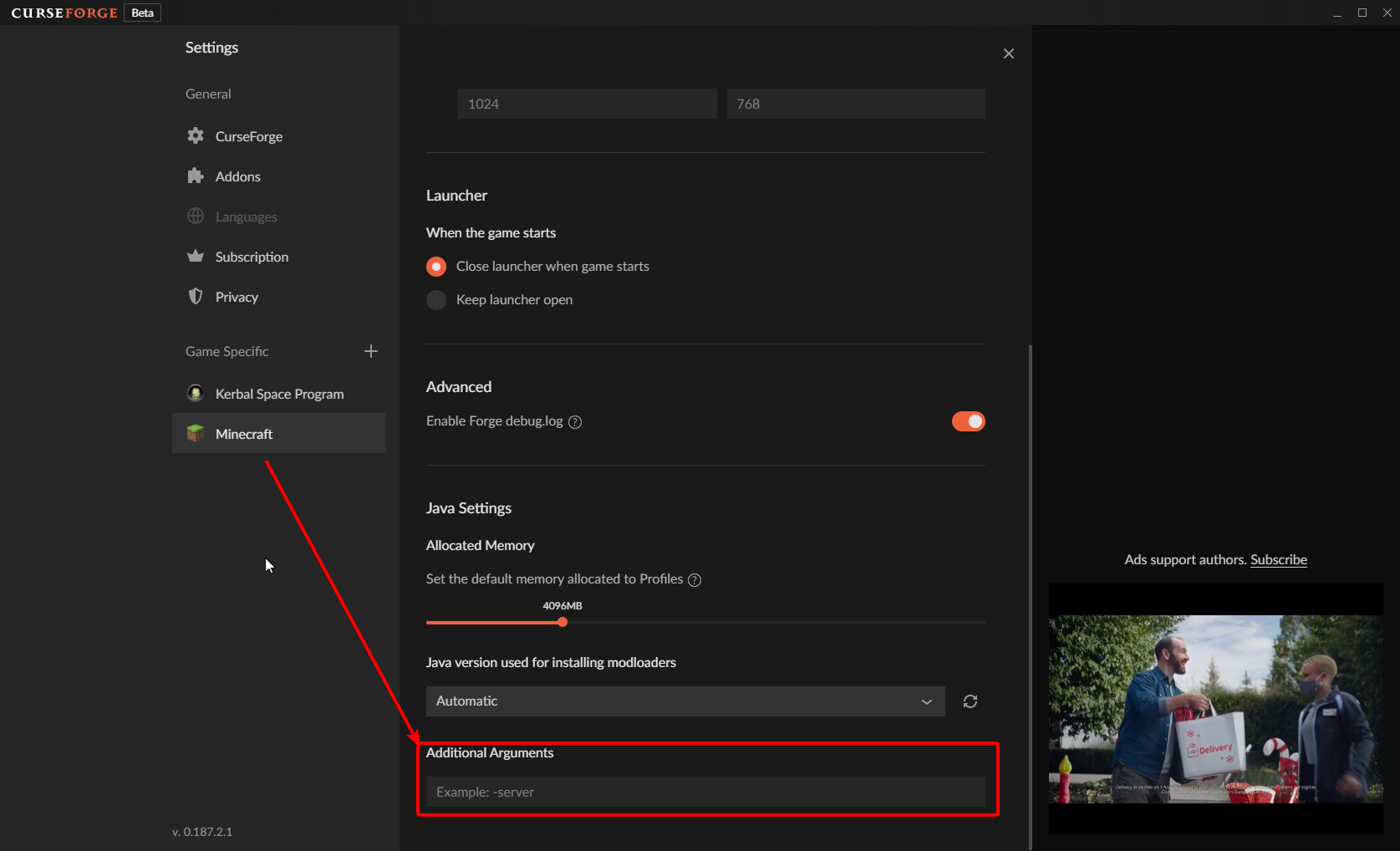
do you have custom java arguments?
sand plaza
lyric crescent
do you have custom java arguments?
What do you mean by that
lyric crescent
java arguments, custom, do you have?
sand plaza
What is a java argument. That’s what I meant 😶
 lyric crescent
?mc-path
red patioBOT
Change your install path to the following:
For Windows: C:\CurseForge
-Go to C:\ drive. Make a new folder. Name it Curseforge.
For Mac: /Users/Shared/CurseForge
If Minecraft is not installed in CurseForge App:
- Click the in the top left.
- Select Minecraft from the list of games.
- Select the
Advancedoption and pick the folder you just made. - Click
Continue.
If Minecraft is installed in CurseForge App:
- Click the in the bottom left.
- Select the Minecraft tab.
- Click
Change. - Select the folder you just made.
:no_entry_sign: Minecraft Files should NOT be installed inside the following locations :no_entry_sign:
:no_entry_sign: .minecraft folder.
:no_entry_sign: OneDrive folders.
:no_entry_sign: Desktop folder.
:no_entry_sign: Drive roots I.E. Directly into the C:\ drive.
:no_entry_sign: iCloud enabled folders.
:no_entry_sign: or any other cloud saved folder.
:no_entry_sign: or folders with non-English characters in them.
If any of the above are in the path you need to change/move it!
 reef prawn
 lyric crescent
digital roost
https://paste.gg/p/anonymous/7877da27d2d04c41bb777a16b36df133
lyric crescent
digital roost
https://paste.gg/p/anonymous/7877da27d2d04c41bb777a16b36df133
is this something you made? does it happen for every pack?
digital roost
Something I’ve made
lyric crescent
!notcf
red patioBOT
Your question is not related to CurseForge owned/maintained features or services.
Please use the appropriate game room by getting a game role from #786424115535544350.
Otherwise use #👽︱game-support for game related help.
CurseForge does not make or maintain any of the content or games used on the site or app. Just because it's on the site/app does not make it a problem with CurseForge. Move rooms as requested, arguing about it will result in you being removed from the discord.
 amber otter
So when i try to do 1.18 modded im having it where it say could not create the java virtual machine but the weird thing is vanilla is just fine
digital roost
lyric crescent
is this something you made? does it happen for every pack?
What can I do to fix
lyric crescent
Go to the correct channel as said above
lyric crescent
amber otter
So when i try to do 1.18 modded im having it where it say could not create the ...
restart the app
 ripe knoll
Where should I ask questions about installing modpacks?
lyric crescent
ask the question
ripe knoll
Hi, I have a problem, can you help? When installing modpacks, he writes the error "exception during a web client error", information about this could not be found on the Internet. (I translate Russian through an interpreter, if anything, excuse me).
lyric crescent
!webclient
red patioBOT
Timeout/WebClient errors are from networking issues to your computer. You can try a few things to fix it:
- Restart the computer.
- Restart your router/modem.
- Try another internet source like a hotspot, wired connection or moving closer to the WiFi.
- Pause/Stop other things using the internet. (Streams, music, etc)
- If this still doesn't work, try again in an hour and hope your connection is stable.
digital roost
lyric crescent
Go to the correct channel as said above
What channel
digital roost
I’m confused
lyric crescent
You tell them to come here for their own issues. And do exactly what the message says, remove what it says to remove.
ripe knoll
red patio
I have an Internet connection because I download files through the browser without any problems. Could it be that he has a time limit for installation and if he does not have time, he disables the installation himself? I also tried restarting the computer
lyric crescent
it does have a time limit.
 sudden rapids
Hi there, I'm trying to submit my first modpack on curseforge and got this response upon it's rejection:
The following files belong to CurseForge-hosted projects, and should therefore not be added directly to zip files:
overrides/mods/MedievalCraft-1.16.5-1.16.2.jar
These files should, instead, be referenced in the manifest.json file generated by the Twitch Desktop App during a profile export.
lyric crescent
?reject-cfhosted
red patioBOT
The following files belong to CurseForge-hosted projects, and should therefore not be added directly to zip files:
-
Remove any mods listed in the error message from the profile you exported. Then reinstall them with the CurseForge app. DO NOT drag and drop files from the site.
-
Export the profile again, open the new zip that was just made. Check for the
overrides/modsfolder. If you still see any mods in that folder do the step above again for each mod. -
Upload the zip once complete and no more mods show in the
overrides/modsfolder.
sudden rapids
am I not able to use this mod in pack?
 frosty current
anytime i open a mod pack minecraft crashes after like 5 mins no crash report just a crash
lyric crescent
?mc-log
red patioBOT
Sending logs for support.
- Right-click the modpack profile icon OR click the button in the modpack profile.
- Click
Open Folder. - Open the
logsfolder. - Drag and drop the FILE named
latestORdebuginto discord.
sudden rapids
- Remove any mods listed in the error message from the profile you exported. Then reinstall them with the CurseForge app. DO NOT drag and drop files from the site.
How am I supposed to download the mod but not drag and drop from the site? and there's no option to download mods on the app as far as I can see
lyric crescent
?mc-installmods
red patioBOT
How to install mods in CurseForge App.
- Click
+ Create Custom Profile - Name it, select the required Minecraft version, select the Forge version (usually the highest number), click
Create. - Click the profile icon.
- Click
Add More Content - Search and install the desired mods.
- Start the game!
How to install mods not on CurseForge.
- Right click the profile picture or Open the profile and click the Icon next to the play button.
- Click
Open Folder. - Drag the mod(s) into the
modsfolder. (Note: Some mods will require others, to run. Make sure to read the instructions for the mod!) - Start the game!
 sudden rapids
thx
 keen bough
I've already tried the suggested fixed on the website, and so far no luck. I don't want to resort to the last option, can anyone help me?
 lyric crescent
what fix was that
keen bough
Before I put the link, is it safe to put the link here?
lyric crescent
yes
keen bough

CurseForge Support
We're here to get you informed on everything you need to know about CurseForge, including helpful guides and troubleshooting articles to back you up when you get in a pickle
lyric crescent
There's a number of solutions here, which have you done?
keen bough
Firewall and VPN.
lyric crescent
And that means... what? That you disabled both?
keen bough
I tried to use the VPN and see if I could play after which didn't work, and after I tired to turn off my Firewall for a couple of minutes, and that still didn't work.
lyric crescent
Are you using wifi?
keen bough
No, I'm connected using a Powerline which is connected to Ethernet.
lyric crescent
Tried disabling ipv6?
keen bough
That's the thing, that's last resort and I'd prefer to not go that way since it's not recommended.
round barn
1.18 modpack mentions something about refusing the Java connection or something
lyric crescent
!webclient
red patioBOT
Timeout/WebClient errors are from networking issues to your computer. You can try a few things to fix it:
- Restart the computer.
- Restart your router/modem.
- Try another internet source like a hotspot, wired connection or moving closer to the WiFi.
- Pause/Stop other things using the internet. (Streams, music, etc)
- If this still doesn't work, try again in an hour and hope your connection is stable.
lyric crescent
try those steps, if you still cant get the app to work you'll need to make a ticket
!ticket-site
red patioBOT
:bug: Reporting via Website :bug:
Can't open the app or would rather use the website? You can do so here: https://support.curseforge.com/en/support/tickets/new
Fill out the form with accurate detailed information, "It doesn't work" isn't helpful! What exactly doesn't work and why doesn't it work should be easy to answer!
Make sure to upload your Overwolf logs with the Upload File option on the ticket, information on how to get these logs can be found here https://support.overwolf.com/en/support/solutions/articles/9000176827-how-to-get-your-overwolf-logs
keen bough
Yeah, I tried all of those yesterday...
lyric crescent
ok then "you'll need to make a ticket"
keen bough
Alright, thanks.
lyric crescent
round barn
1.18 modpack mentions something about refusing the Java connection or something
can you show the error please
round barn
Uh
It’s the same one in announcements
Like Java refusing connection
Idk how to delete the file for it as it says
Like “Java machine refused connection”
lyric crescent
I'm not sure what you are referencing in announcements.
round barn
2nd to current one
lyric crescent
that doesnt say what you are saying
 lyric crescent
“Java machine refused connection”
is not
could not create JVM
🤔
round barn
Well I can’t get on my computer and I thought it was the same thing sorry
My memory failed me basically
lyric crescent
if you have custom arguments, you go to settings > minecraft and remove them from the box
round barn
Uh okay
Thanks, I’ll try it when I have time
And get the exact error message and such, have a good one
 vale remnant
Where does curse forge put files for modding dungeons?
Like what folder are the mods put in
Ping me with answer pls
 jaunty silo
Hi, I need help downloading Forge 1.16.5
opal cipher
!getcf
red patioBOT
Looking to install the CurseForge app?
<:windows:798410728188936222> Windows
Minimum Requirements:
- OS Version: 7 (64 bit), 8.1, 10, 11
- 64 bit Required.
- 350MB storage space.
- Microsoft .Net 4.8
- Intel/AMD quad-core CPU
- 8GB ram
Download: https://download.overwolf.com/install/Download?&PartnerId=4047
If you are having issues with the installer use the URL below to install Overwolf then go to the app store to download CurseForge.
https://content.overwolf.com/downloads/setup/latest/regular.html
<:mac:798410654418862130> Mac
Minimum Requirements:
- OS Version 10.14 or newer.
- 64 bit Required.
Download: https://curseforge.overwolf.com/downloads/curseforge-latest.dmg
:penguin: Linux
Minimum Requirements:
Yes.
Download: :person_shrugging:
opal cipher
And when you have CurseForge, you can create a profile with 1.16.5. 🎉
jaunty silo
Ok Thank you, I do need a little more help, I just got a new laptop and my personal modpacks and worlds that I play are on my other computer, how would I get them to this laptop?
upper root
You can copy them over into the new instance folders. Do note if you copy over the mods folders manually not all mods will display on the cf app, but they will work fine
jaunty silo
How do I get to that folder?
upper root
Right click on the instance in curseforge then click Open Folder
If you go back a folder level from that you can also see all the other instances folders
jaunty silo
This is all I see
 upper root
Yep. When you boot the instance for tht first time it will create other folders like saves, options, config
jaunty silo
Ok so If I run minecraft all the mods, saves from my other computer will appear?
upper root
No.
You need to copy those across yourself
upper root
No, neither curseforge or mojang sync anything between devices for minecraft
jaunty silo
Oh so how would I copy the files and stuff?
upper root
Do you use curseforge on the other computer?
jaunty silo
yep
upper root
That makes it quite a bit easier.
Open the instance folder like above, then hold ctrl and click on all the folders you want to transfer (saves, configs and mods at a minimum probably). Then right click one and select send to zip. Now transfer this zip folder to the other computer and unzip it, copying all the folders in it to the instance folder on cf
jaunty silo
Do I have to be using the same micrsoft account to do this?
upper root
No
Accounts do not matter at all, they only affect the username you have in game (or who you are on a server)
jaunty silo
Ok I got to the zip part but how to I transfer it to my laptop?
upper root
I would suggest the internet, but a usb stick or bluetooth also works
jaunty silo
Oh yea I forgot about the usb stuff I’ll get that later thanks!
Do you know how I would transfer the stuff if I were to use the internet rather than a usb
upper root
Google drive, onedrive, icloud, a boosted discord server
 green hemlock
hey guys, i recently tried to download better minecraft plus and it seems like every time I try to do that it start downloading and in about 5 minuts an error occures which tells me taht time to download was to long, every time. Can I do something about that or its a matter of curseforge thing?
red patioBOT
Timeout/WebClient errors are from networking issues to your computer. You can try a few things to fix it:
- Restart the computer.
- Restart your router/modem.
- Try another internet source like a hotspot, wired connection or moving closer to the WiFi.
- Pause/Stop other things using the internet. (Streams, music, etc)
- If this still doesn't work, try again in an hour and hope your connection is stable.
jaunty silo
upper root
Google drive, onedrive, icloud, a boosted discord server
Small problem, when I opened the zip file on my laptop it came up as notes what do I do to fix that?
upper root
Wdym by notes?
jaunty silo
upper root
Wdym by notes?
 upper root
They are still the correct file type (JAR File), you must of just opened them with notepad once
lyric crescent
could just export it from the old pc and then import it
upper root
.....
🤦
jaunty silo
upper root
They are still the correct file type (JAR File), you must of just opened them wi...
So It would still work if I were to load Minecraft?
upper root
yes
upper root
yep
 red patioBOT
Minecraft Logins
CurseForge does not handle or touch the Minecraft Login.
You must own JAVA Edition
If you have a DEMO button instead of a PLAY button in the launcher you are logged into an account that does not own the game. CurseForge requires you to own the game to use it.
Follow the steps in the pictures below. If you bought Minecraft after October 2020 or you have transferred your account you will use a Microsoft account.
Otherwise you must use a Mojang account until you transfer it!

 deft hearth
Can I see these pictures?
lyric crescent
well they didnt load so i guess not
deft hearth
Shit
lyric crescent
deft hearth
AH thank you
digital roost
Hello! I'm back with another problem 😅
I want to download a certain modpack ||Crucial 2|| and It says web client error or even when I connect my VPN, it doesn't download all the modpack and cancels halfway there.
Is there another way I can install modpacks?
Why do some Modpacks act up like this?
How can I check if my settings are Right for modpack installation and Minecraft Forge Versions?
Please ping me
upper root
!webclient Webclient errors are problems on your end. The only other way to install modpacks is download all the mods off the site one by one. The reason some modpacks act up is cause they are just bigger than others
red patioBOT
Timeout/WebClient errors are from networking issues to your computer. You can try a few things to fix it:
- Restart the computer.
- Restart your router/modem.
- Try another internet source like a hotspot, wired connection or moving closer to the WiFi.
- Pause/Stop other things using the internet. (Streams, music, etc)
- If this still doesn't work, try again in an hour and hope your connection is stable.
upper root
@digital roost 👆
digital roost
red patio
I did those, nothing changed
they download but they don't ever finish
isn't there a way I can download a Zip file that contains all the things the Curseforge Folder in Appdata has?
lyric crescent
nope
you can download the mods individually and try to rebuild the pack mod by mod if you want
 vague ridge
approval staff hasnt went home for the day right? Ya'll dont approve on fridays right?
asking for a friend
upper root
!status
red patioBOT
Project Moderation Time
Project/File moderation is done on these days unless otherwise mentioned:
Sunday, Monday, Tuesday, Wednesday, Thursday: <t:1631170800:t> - <t:1631199600:t> (Your time)
Friday, Saturday: No Moderation!
Projects are moderated First in, First out. If you submit late in the work day, it will likely get left until the next day!
New Projects or anything flagged for manual review: 1-3 Working Days
Updates to approved projects not needing manual approval: 1 Hour
-If your file has been "Under Review" for more than an hour, then it is at manual review!
Changes will only show in the app if the project meets the requirements in the ?sync command and up to 24 hours has passed from when it was accepted.
upper root
yep, fridays a no mod
vague ridge
oh god
lyric crescent
yes? you called?
vague ridge
I for sure called
lyric crescent

 torpid mist
Can anyone help? I uploaded something in customization 2 days ago it was approved but still does not show up when I search for it.
lyric crescent
link it
 cedar crater
Can i use curse forge on mobile?
torpid mist
k
lyric crescent
cedar crater
Can i use curse forge on mobile?
no
lyric crescent
it's not showing up where? the app?
torpid mist
no im searching for it on the website
upper root
Are you searching the correct category? (Customization)
lyric crescent
yea im not seeing it either
torpid mist
upper root
Are you searching the correct category? (Customization)
yes
lyric crescent
shows when sorted by date created, or last updated
torpid mist
I see thats so weird
lyric crescent
passed this on to the cf devs
torpid mist
ok thx
amber otter
So when I try to start up 1.18 modded and I hit play on the launcher screen it says could not create Java machine but I can play vanilla 1.18 just fine can anyone help?
lyric crescent
restart the app
 robust orbit
Can forge 1.16.5 be downloaded for Linux or ubuntu?
 signal ridge
Forge yes, curseforge no
signal ridge
!!=
red patioBOT
Wording is important!
Forge = Minecraft Forge, This is a modloader often just called "Forge".
Fabric = Fabric MC, this is another modloader, just called "Fabric".
CurseForge = A Website/App that has content for games.
Mods = Individual mod files.
Modpacks = Multiple mods put into the mods folder or downloaded from CurseForge.
These are not Interchangeable! Please use the correct terms as it allows us to help you faster!
robust orbit
Ok I need help how as I get the untrusted source error whenever trying to install forge
signal ridge
Either need to go to the forge discord for that OR #👽︱game-support or the minecraft related channels. CF has nothing to do with that
 stiff grail
I despretly need help, Im trying to import a world from the normal java edition onto my forge worlds and nothing is working and i just dont know what to do please help
pls dm me
signal ridge
What have you done so far? Was the world created in the same mc version as the forge pack?
stiff grail
idk
its a custom profile so it has the mods i want on it, and i just cant figure out how to import the world
oh
yes it was made on the same vertion
signal ridge
open the packs folder and put your world in the saves folder
stiff grail
that is what i have been trying to do but nothing happens
signal ridge
Is the world a zip file OR normal folder?
 fallen loom
You've been leaving the saves list while doing this, right?
stiff grail
idk
fallen loom
Like leaving it and going back letting it refresh?
signal ridge
or restarting the pack completely works too
stiff grail
signal ridge
open the packs folder and put your world in the saves folder
where is the packs folder
signal ridge
Are you using the curseforge app?
stiff grail
ya
signal ridge
Right click the packs profile picture > open folder
signal ridge
yep, put your world in the saves folder in the packs folder
stiff grail
ok
lets see
OMG THANK YOU SO MUCH
IT WORKED
IM SO HAPPY
THANK YOU THANK YOU THANK YOU
omg
just as i get it i need to get off lol
good night
hope your day is well
 royal vault
is the curseforge app crashing for anyone else?
 plucky hare
can someone help me
i keep getting a error when downloading a modpack it says an error occured during web client request
red patioBOT
Timeout/WebClient errors are from networking issues to your computer. You can try a few things to fix it:
- Restart the computer.
- Restart your router/modem.
- Try another internet source like a hotspot, wired connection or moving closer to the WiFi.
- Pause/Stop other things using the internet. (Streams, music, etc)
- If this still doesn't work, try again in an hour and hope your connection is stable.
round barn
"Error: Could not create the Java Virtual Machine."
"Error: A fatal exception has occurred. Program will exit."
anyone know how to fix this?
 fallen loom
I... was referring to the highlighted bit...
fallen loom
?mc-launcherlog
red patioBOT
How to get the launcher log
- Right click a profile.
- Select
Open Folder - Go back two folders.
- Open the
Installfolder. - Drag the
launcher_log.txtinto discord.
round barn
"If you are still getting could not create JVM errors after the update DELETE YOUR JVM ARGUMENTS IN THE CF APP SETTINGS FOR MINECRAFT!" is in the announcments but i dont know what it wants me to do
round barn
 fallen loom
?owlogs then
red patioBOT
<:overwolf:857375414002384916> How to get Overwolf logs! <:overwolf:857375414002384916>
round barn
round barn
"If you are still getting could not create JVM errors after the update DELETE YO...
Did you see this btw?
fallen loom
Yes I saw
round barn
So does that not work?
lyric crescent
well no, since you have nothing there. the screenshot shows this
round barn
Aight
fallen loom
I did ask you for a different kind of log btw
round barn
yeah sorry
was dealing with something
now im gonna do that
uh overwolf wont even open
curseforge does by not over
wolf
aight done
 obsidian scarab
guys i disabled third party support for all my packs but someone was still able to download it via multimc?
i thought you wouldnt be able to download the packs on anything but curse?
lyric crescent
the api hasnt changed yet, and wont for a few months
 maiden sail
out of curiosity, why would you do that?
obsidian scarab
so it doesnt matter if its enabled yet?
lyric crescent
not until the new api is in use
obsidian scarab
because i dont want to lose my curse points
i only make 8-10 a day but i dont want to lose that
maiden sail
wait, enabling that makes you forefit that?
lyric crescent
Technically you dont "lose" anything either way, but please take this to #909494727341121607
maiden sail
sorry
round barn
uh so what should i do rn
obsidian scarab
thats wat i heard
that downloads on third party apps dont cont in the new changes
round barn
since i kinda wanted to try one point eighteen but it just doesnt work
digital roost
the one probe is not working
 mighty plover
digital roost
the one probe is not working
mighty plover
digital roost
the one probe is not working
bring it up with the dev
not here
this is curse support
digital roost
its not working with my mod pack
its not the mod it self
is it a config issue i need to set
royal vault
what logs do I need to grab so that someone will actually help me?
mighty plover
digital roost
is it a config issue i need to set
mighty plover
royal vault
what logs do I need to grab so that someone will actually help me?
depends on your problem but we should discuss this in #👽︱game-support
royal vault
how is #👽︱game-support the right place when it's the curseforge app in and of itself (and not a game) that has the issue?
fleet bear
!notcf
red patioBOT
Your question is not related to CurseForge owned/maintained features or services.
Please use the appropriate game room by getting a game role from #786424115535544350.
Otherwise use #👽︱game-support for game related help.
CurseForge does not make or maintain any of the content or games used on the site or app. Just because it's on the site/app does not make it a problem with CurseForge. Move rooms as requested, arguing about it will result in you being removed from the discord.
fleet bear
royal vault
how is <#778097796410376242> the right place when it's the curseforge app in and...
Try reinstalling the app
royal vault
trying that now
but you're wrong about my issue not being over CurseForge services
unless you want to say the CurseForge app isn't owned or maintained by CurseForge
c***!
It's overwolf as a whole doing it....
fleet bear
I wouldnt be giving you support if that was the case. I didn't see any context to say otherwise until you posted in the other room.
At this point it doesnt mater though.
royal vault
I generally only use Overwolf for CurseForge
fleet bear
What's the error its giving you
royal vault
it doesn't
it just show's a blank window frame, and crashes the app
I'll try restarting Overwolf
fleet bear
K
 shy tartan
dont know if this is the right chat for this but how do I update a modpack?
I used to see an "update" arrow kind of thing before but I dont anymore
upper root
Make sure content management is off in the profiles options
 orchid lake
My friend met this problem

When he installed Dungeons Dragons and Space Shuttles and met the problem
he can't install it

The deleted name cannot be resolved: "edge.forgecdn.net"
digital roost
Im having a issue with curseforge
I uploaded a modpack file
but it gets rejected everytime
due to-
The status of the file Best MC Forge 1.16.5-1.0 (Best MC) has been changed to Rejected
Notes:
The following files belong to CurseForge-hosted projects, and should therefore not be added directly to zip files:
overrides/openloader/data/Repurposed_Structures-Better_Strongholds_Forge.zip
These files should, instead, be referenced in the manifest.json file generated by the Twitch Desktop App during a profile export.
If you have any questions please contact our support team https://support.curseforge.com.
 ebon estuary
i think i know
ebon estuary
since CF added the new anti redistribution rule, you gotta check for all the mods if any of these have it enabled
digital roost
im using- https://github.com/TelepathicGrunt/RepurposedStructures/releases/tag/0.0.11
but it is considering- https://www.curseforge.com/minecraft/texture-packs/repurposed-structures-better-strongholds-datapack

GitHub
Add this datapack (the .zip file) to the world's datapack folder to add compatibility between Repurposed Structures and Better Strongholds. This datapack will make Repurposed Structures's N...
this is a datapack
ebon estuary
makes sense, dont use resource packs for a modpack
ebon estuary
any changes inside the files can be related to piracy
so i recommend you to just put the mods and not change files
lyric crescent
It's not a mod..
ebon estuary
just change settings and put a folder inside the zip with the folders
lyric crescent
You are not reading or understanding the issue here
ebon estuary
datapack is not related to mods so its lead to a minecraft feature
digital roost
command not showing up
ebon estuary
i made my ticket and got my account working again
lyric crescent
upper root
lyric crescent
!ticket-app
🐛 Reporting via the CurseForge App 🐛
Click the
Select
Fill out the form with accurate detailed information, "It doesn't work" isn't helpful! What exactly doesn't work and why doesn't it work should be easy to answer!
Make sure to upload your Overwolf logs with the Upload File option on the ticket, information on how to get these logs can be found here https://support.overwolf.com/en/support/solutions/articles/9000176827-how-to-get-your-overwolf-logs
Submit!
digital roost
thx i made my ticket
 vernal isle
Does anyone know how I'd be able to put a modpack I made in curseforge onto Aternos so I can host a server for some friends?
mighty plover
vernal isle
Does anyone know how I'd be able to put a modpack I made in curseforge onto Ater...
is it aldready there on aternos?
like is it a decently famous modpack?
vernal isle
no, I don't know how I'd make it one I can select
red patioBOT
Your question is not related to CurseForge owned/maintained features or services.
Please use the appropriate game room by getting a game role from #786424115535544350.
Otherwise use #👽︱game-support for game related help.
CurseForge does not make or maintain any of the content or games used on the site or app. Just because it's on the site/app does not make it a problem with CurseForge. Move rooms as requested, arguing about it will result in you being removed from the discord.
 frosty lark
can someone tell me why my profile picture won't change?
queen storm
frosty lark
can someone tell me why my profile picture won't change?
Which one?
frosty lark
twitch wont sync with curseforge
mighty plover
vernal isle
no, I don't know how I'd make it one I can select
aternos doesnt support copy and paste of modapcks
frosty lark
it changed on the app
mighty plover
you'll have to manually add all the mods
frosty lark
not on site tho
queen storm
mighty plover
aternos doesnt support copy and paste of modapcks
Which was forwarded to a different channel: #🔥︱curseforge-support message
queen storm
frosty lark
twitch wont sync with curseforge
Logout of curseforge, log back in
mighty plover
queen storm
Which was forwarded to a different channel: https://discord.com/channels/4282282...
ahh thanks
 mellow barn
WebClient please tell me how to fix the error
red patioBOT
Timeout/WebClient errors are from networking issues to your computer. You can try a few things to fix it:
- Restart the computer.
- Restart your router/modem.
- Try another internet source like a hotspot, wired connection or moving closer to the WiFi.
- Pause/Stop other things using the internet. (Streams, music, etc)
- If this still doesn't work, try again in an hour and hope your connection is stable.
mellow barn
ty bot!!
 keen moat
hi i have a problem i cant play any of my modpacks i updated my java and also reinstalled minecraft and still it says exit code 0
queen storm
!mc-logs
red patioBOT
Sending logs for support.
- Right-click the modpack profile icon OR click the button in the modpack profile.
- Click
Open Folder. - Open the
logsfolder. - Drag and drop the FILE named
latestORdebuginto discord.
keen moat
here
queen storm
Remove optifine, try again
keen moat
no still error 0
queen storm
Then post a new log
keen moat
here is the new one
queen storm
No idea which mod is causing that sadly
digital roost
i think about better dungeon mod
keen moat
should i just start testing mods like put in folder 5 test them if they are working and so on?
queen storm
Yes
keen moat
okey thanks for help
 red patioBOT
Timeout/WebClient errors are from networking issues to your computer. You can try a few things to fix it:
- Restart the computer.
- Restart your router/modem.
- Try another internet source like a hotspot, wired connection or moving closer to the WiFi.
- Pause/Stop other things using the internet. (Streams, music, etc)
- If this still doesn't work, try again in an hour and hope your connection is stable.
opal cipher
Also, next time. Write full sentences, not 1-2 words per message you send.
digital roost
i stopped the stream running in background
it worked god
anyone can help me? my account is actually working on the microsoft's minecraft launcher is there any way i can move minecraft launcher to microsoft's minecraft launcher
red patioBOT
Minecraft Logins
CurseForge does not handle or touch the Minecraft Login.
You must own JAVA Edition
If you have a DEMO button instead of a PLAY button in the launcher you are logged into an account that does not own the game. CurseForge requires you to own the game to use it.
Follow the steps in the pictures below. If you bought Minecraft after October 2020 or you have transferred your account you will use a Microsoft account.
Otherwise you must use a Mojang account until you transfer it!
digital roost
no thats not the prroblam
the problam
is
minecraft launcher is opening
instead of microsoft's minecraft launcher
opal cipher
Yes, as it should.
lyric crescent
No you cannot move a launcher. The launcher is not the issue.

 gloomy shell
hello, i have read thru the history for the last 5 or so minutes to make sure my support question has been answered and it wasn't answered completely. it was basically go somewhere else. I'd like it if Curseforge worked for this particular problem.
so the problem I'm having is that i own the steam version of Stardew Valley. i hit search for game and it says i do not have it. i try to manually add the exe location and it says its an invalid location or unsupported game. is Curseforge unable to be linked to the steam instillation of stardew valley? is support going to be coming in the future?
queen storm
digital roost
Now you hit play
queen storm
gloomy shell
hello, i have read thru the history for the last 5 or so minutes to make sure my...
!stardew
red patioBOT
Overwolf maintains a known list of issues here, some with solutions, others without.
https://support.curseforge.com/en/support/solutions/articles/9000196615-curseforge-known-issues
Scroll down, look at "Other games"
digital roost
and now see
gloomy shell
or is it PEBKEC lol
digital roost
queen storm
Now you hit play
 queen storm
digital roost
queen storm
digital roost
!mc-logs
red patioBOT
Sending logs for support.
- Right-click the modpack profile icon OR click the button in the modpack profile.
- Click
Open Folder. - Open the
logsfolder. - Drag and drop the FILE named
latestORdebuginto discord.
queen storm
More words in a message
digital roost
sorry
queen storm
No
digital roost
no log folder
i guess because
its not working from
curseforge
queen storm
No buts
I want bigger lines, no single word messages / lines
Show a screenshot of the folder
digital roost
 queen storm
!mc-debuglog
red patioBOT
Missing the debug.log file? Enable it by following these steps.
- Click the icon in the bottom left.
- Click the

Minecrafttab. - Turn on the
Enable Forge debug.logoption.
digital roost
i can't understand it.
queen storm
They are steps in Curseforge
digital roost
did it
 subtle river
i have problem with downloading valhelsia 4
opal cipher
Timeouts or WebClient?
queen storm
digital roost
can u watch my screen
No, why would I?
flat pelican
back here again to say my serverpacks stil not getting approved even after new updated modpack version for 1.18, looking at other modpacks most of then dont have serverpacks either, and yes i know your just going to say wait 1-3 days but there is something wrong and needs to be looked into, this has never happened before and files always get accepted under 10 mins
queen storm
Then they are marked for manual approval
lyric crescent
when it's been passed 3 working days we can bring it up, until then not going to.
 west escarp
If I download the new minecraft launcher, will curseforge use that new launcher, or does it have the current one built into it
red patioBOT
Ignore the new launcher update. CF does not use it or works with it, yet.
Everything will work fine otherwise.
west escarp
lmao, wasn't expecting that, thanks bot
Ok new question, why is the launcher not letting me log in with my microsoft account?
queen storm
!mc-login
red patioBOT
Minecraft Logins
CurseForge does not handle or touch the Minecraft Login.
You must own JAVA Edition
If you have a DEMO button instead of a PLAY button in the launcher you are logged into an account that does not own the game. CurseForge requires you to own the game to use it.
Follow the steps in the pictures below. If you bought Minecraft after October 2020 or you have transferred your account you will use a Microsoft account.
Otherwise you must use a Mojang account until you transfer it!
 obsidian halo
I'm getting:
Error: Could not create the Java Virtual Machine whenever I try to load any 1.18 Fabric Modpack.
queen storm
obsidian halo
I'm getting:
Error: Could not create the Java Virtual Machine whenever I try to ...
See #📢︱news
west escarp
queen storm
!mc-login
Problem is my microsoft account is already in the account list, and when I click on it I just get this with no explanation
 queen storm
Then remove it, add it again?
obsidian halo
queen storm
See <#525372338653626389>
Ty.
west escarp
Alright that worked, thank you
obsidian halo
queen storm
See <#525372338653626389>
The place I need to clear is the additional arguments bit, right?
lyric crescent
Yes
obsidian halo
It worked. Thanks.
 patent flume
i downloaded a mod in the curseforge website but it isnt on the curseforge how can i play it?
red patioBOT
Looking to install the CurseForge app?
<:windows:798410728188936222> Windows
Minimum Requirements:
- OS Version: 7 (64 bit), 8.1, 10, 11
- 64 bit Required.
- 350MB storage space.
- Microsoft .Net 4.8
- Intel/AMD quad-core CPU
- 8GB ram
Download: https://download.overwolf.com/install/Download?&PartnerId=4047
If you are having issues with the installer use the URL below to install Overwolf then go to the app store to download CurseForge.
https://content.overwolf.com/downloads/setup/latest/regular.html
<:mac:798410654418862130> Mac
Minimum Requirements:
- OS Version 10.14 or newer.
- 64 bit Required.
Download: https://curseforge.overwolf.com/downloads/curseforge-latest.dmg
:penguin: Linux
Minimum Requirements:
Yes.
Download: :person_shrugging:
How to install mods in CurseForge App.
- Click
+ Create Custom Profile - Name it, select the required Minecraft version, select the Forge version (usually the highest number), click
Create. - Click the profile icon.
- Click
Add More Content - Search and install the desired mods.
- Start the game!
How to install mods not on CurseForge.
- Right click the profile picture or Open the profile and click the Icon next to the play button.
- Click
Open Folder. - Drag the mod(s) into the
modsfolder. (Note: Some mods will require others, to run. Make sure to read the instructions for the mod!) - Start the game!
patent flume
thanks
 wispy willow
i cant launch the curseforge app
signal ridge
Win or mac?
wispy willow
win
signal ridge
Do you get any errors?
wispy willow
it says opps that was not supposed to happen when i try to launch it
this is what it looks like
 signal ridge
ah ok, does the overwolf app open?
wispy willow
no
signal ridge
Are you on wifi by chance?
wispy willow
yes
signal ridge
Able to try a cable connection? Wifi can be unstable at times
wispy willow
yeah
signal ridge
Try the cabled connection then try the cf app again
wispy willow
its the same message
 signal ridge
reboot your pc, try again
 pastel pagoda
how is that even possible ?
just tagged as 1.18, has half of my downloads, and was created months ago
and all the downloads are very old
so how can it be more popular than my pack ?
signal ridge
Download count is broken from time to time.
pastel pagoda
ye, my pack was added to the popularity list like 36 hours ago
and it already has like 1.2k downloads
signal ridge
¯_(ツ)_/¯
pastel pagoda
so is the algorithm classing my pack like if it had 500 downloads ?
the problem with the popularity list was due to the fact my project was the only one to be only 1.18
signal ridge
or the other one has more then it shows. So no idea sorry
pastel pagoda
projects with several versions are already very advantaged
wispy willow
signal ridge
reboot your pc, try again
that didnt do anything
pastel pagoda
so if there's bugs with 1.18 only projects, that's definitely not cool 😦
signal ridge
wispy willow
that didnt do anything
Does launching the overwolf app spit out any errors?
signal ridge
!getcf try uninstalling > reinstalling them both(second link)
red patioBOT
Looking to install the CurseForge app?
<:windows:798410728188936222> Windows
Minimum Requirements:
- OS Version: 7 (64 bit), 8.1, 10, 11
- 64 bit Required.
- 350MB storage space.
- Microsoft .Net 4.8
- Intel/AMD quad-core CPU
- 8GB ram
Download: https://download.overwolf.com/install/Download?&PartnerId=4047
If you are having issues with the installer use the URL below to install Overwolf then go to the app store to download CurseForge.
https://content.overwolf.com/downloads/setup/latest/regular.html
<:mac:798410654418862130> Mac
Minimum Requirements:
- OS Version 10.14 or newer.
- 64 bit Required.
Download: https://curseforge.overwolf.com/downloads/curseforge-latest.dmg
:penguin: Linux
Minimum Requirements:
Yes.
Download: :person_shrugging:
wispy willow
ok that worked thank you
digital roost
is curseforge on linux a thing
signal ridge
No, just mac and windows atm
digital roost
ok will it every come to linux
lyric crescent
Linux is coming in the next few months
digital roost
thanks
flat pelican
@pastel pagoda your serverpack also not getting approved?
pastel pagoda
flat pelican
<@!528704235630493716> your serverpack also not getting approved?
hey 🙂
so, i haven't released a serverpack now
however
a serverpack i released for my 1.17.1 pack took 10 hours
to not even be approved
queen storm
flat pelican
<@!528704235630493716> your serverpack also not getting approved?
We told you how it was, no need to keep going on about it
pastel pagoda
flat pelican
<@!528704235630493716> your serverpack also not getting approved?
i recommend to delete it and reupload it again (be sure to change a file to not upload the same file)
 iron crescent
i need help
flat pelican
Im pointing out that something is clearly wrong and all i get is no
flat pelican
pastel pagoda
i recommend to delete it and reupload it again (be sure to change a file to not ...
ive tried that
pastel pagoda
cuz generaly, it takes 10 minutes for me
signal ridge
iron crescent
i need help
!help
red patioBOT
╰( ͡° ͜ʖ ͡° )つ──☆*:・゚ *˜”*°•.˜”*°• Many Help •°*”˜.•°*”˜* <:curselit:796985620550385705>
Please provide a description of your issue with as much detail as possible. If you have an issue with a mod or modpack, tell us the name. Explain what you can see happening. Be specific!
Tell us what is happening, we already know it "doesn't work".
Avoid using words like "it", tell us exactly what "it" is.
Don't assume anyone knows what you are talking about, be specific.
Tell us what you expected to happen.
Provide screenshots or video if possible.
Provide a log if possible. ?mc-log
queen storm
pastel pagoda
i recommend to delete it and reupload it again (be sure to change a file to not ...
Will just put it at the back of the queue again 🤷
iron crescent
that i doawnloaded a curseforge app and i dont know how to add a modpack identioty mod to curseforge
flat pelican
pastel pagoda
cuz generaly, it takes 10 minutes for me
looked at 1.18 fabric packs and it seems new updated ones dont get serverpacks approved
pastel pagoda
hmmm, that's really annoying
pastel pagoda
flat pelican
looked at 1.18 fabric packs and it seems new updated ones dont get serverpacks a...
but hey, you don't even have a new 1.18 pack afaik
your pack better mc 1.18 is the same project than the 1.17 one, right ?
flat pelican
yeah better mc 1.18 is out
signal ridge
iron crescent
that i doawnloaded a curseforge app and i dont know how to add a modpack identio...
So your trying to install a modpack? OR add a mod to a premade pack?
iron crescent
signal ridge
So your trying to install a modpack? OR add a mod to a premade pack?
idk but i want to add a indentity mod this mod:
pastel pagoda
the problems i got for my pack were just here because my pack was the first 1.18-only one, i don't think that's the same issues
signal ridge
iron crescent
idk but i want to add a indentity mod this mod:
Ah ok did you make the modpack your want to add the mod too?
iron crescent
signal ridge
Ah ok did you make the modpack your want to add the mod too?
how to make it then ?
signal ridge
!mc-installmods
red patioBOT
How to install mods in CurseForge App.
- Click
+ Create Custom Profile - Name it, select the required Minecraft version, select the Forge version (usually the highest number), click
Create. - Click the profile icon.
- Click
Add More Content - Search and install the desired mods.
- Start the game!
How to install mods not on CurseForge.
- Right click the profile picture or Open the profile and click the Icon next to the play button.
- Click
Open Folder. - Drag the mod(s) into the
modsfolder. (Note: Some mods will require others, to run. Make sure to read the instructions for the mod!) - Start the game!
iron crescent
because isee this and i am on this page
 signal ridge
Read and do what the bot says
iron crescent
so i must to create a profile ?
signal ridge
Make sure to make the custom profile for the same version of mc your mod is for
signal ridge
either leave it at what it suggests or latest

 signal ridge
0.12.8 is the latest then
signal ridge
yep, keep following the bot
queen storm
Don't run a command after being told to scroll up
iron crescent
wyhy ?
queen storm
Because it is annoying, and you can just scroll
iron crescent
but what i need to press to open the all the moorphing mod that i cna select any mob
queen storm
Look at your keybinds for that
iron crescent
ok
 timid swallow
just curious, not trying to ruffle any feathers. why does it seem like 1.18 server packs aren't getting approved? especially when there normal packs are getting approved and working great??
iron crescent
but why my launch game crashes ?
opal cipher
timid swallow
just curious, not trying to ruffle any feathers. why does it seem like 1.18 serv...
Probably manual approval.
 signal ridge
iron crescent
signal ridge
iron crescent
!mc-logs
red patioBOT
Sending logs for support.
- Right-click the modpack profile icon OR click the button in the modpack profile.
- Click
Open Folder. - Open the
logsfolder. - Drag and drop the FILE named
latestORdebuginto discord.
iron crescent
i cant find wheree is the. in the first step
in the curseforge or minecraft laucnher ??
signal ridge
Curseforge
signal ridge
!mc-installfix try this then
red patioBOT
- Click on the Minecraft Tab on the Left side of the CurseForge App.
- Click button next to the
Create Custom Profileoption. - Click
Repair Installationoption. - Play game.
NOTE: You will not lose any modpacks or worlds, These are saved in the Instances folder. DO NOT TOUCH THIS FOLDER OR YOU WILL LOSE EVERYTHING
signal ridge
If there is no logs folder in the packs folder, then go back to the curseforge app and do as the bot says
signal ridge
once the repair installation is done, press play on your pack
iron crescent
ok
signal ridge
If you have any other minecrafts open make sure to close them first
iron crescent
but why then i every time open a minecraf launcher i need to login
iron crescent
signal ridge
If you have any other minecrafts open make sure to close them first
i have opened and laucnehd a lunar client minerasft
on 1.16.5
version
so i need to close it ?
signal ridge
Close that, its probably why your cf pack is crashing
signal ridge
Modded can take time to load,
iron crescent
ok
timid swallow
opal cipher
Probably manual approval.
Is that something that we'll have to look to for 1.18, needing to wait longer for server pack updates to be manually approved?
signal ridge
As far as I know server packs have always been manual approval
iron crescent
so what i need to press when i got this
 timid swallow
1.17 ones from Sharkie have been like 15mins for approval?
iron crescent
iron crescent
so what i need to press when i got this
help me pls
signal ridge
Just need to be patient. Spamming is annoying and not helpful
signal ridge
!mc-logs
red patioBOT
Sending logs for support.
- Right-click the modpack profile icon OR click the button in the modpack profile.
- Click
Open Folder. - Open the
logsfolder. - Drag and drop the FILE named
latestORdebuginto discord.
signal ridge
How did you install the mod? Did you put it in the mods folder OR use the app to install it?
signal ridge
Ok looks like the mod you have is for 1.17.1, you made a 1.17 profile. Need to make a 1.17.1 custom profile. Then use the curseforge app to install the mod
iron crescent
and i used this link to install https://www.curseforge.com/minecraft/mc-mods/identity
ok]
so i need to delete the current profile picture ?
signal ridge
If you want,
timid swallow
yeah that mod is 1.17.1, you were trying to load 1.17
signal ridge
You need to make a new one for the 1.17.1 profile. You cannot edit the 1.17 one to make it 1.17.1
signal ridge
The mod is fabric so loader would be fabric
signal ridge
Different mods, different way of loading the game
timid swallow
two different mod loaders for different mods
signal ridge
care to share it?
 signal ridge
Looks like you may need to update your video drivers (google how for your pc)
signal ridge
I just told you, google how to do it for your pc
signal ridge
thats one option
iron crescent
ok but then what the the other options ?
opal cipher
Ask someone who knows a thing or two about computers, and ask them to help you.
These are not CurseForge problems, so either you need to ask for support in another channel, so that other people that need help can ask for it here, or you need to be able to ask someone you know that can help you.
iron crescent
***`Update the device driver
In the search box on the taskbar, enter device manager, then select Device Manager.
Select a category to see names of devices, then right-click (or press and hold) the one you’d like to update.
Select Search automatically for updated driver software.
Select Update Driver.
If Windows doesn't find a new driver, you can try looking for one on the device manufacturer's website and follow their instructions.
Reinstall the device driver
In the search box on the taskbar, enter device manager, then select Device Manager.
Right-click (or press and hold) the name of the device, and select Uninstall.
Restart your PC.
Windows will attempt to reinstall the driver.
***`
so i need to to this step ?
opal cipher
You will have to solve this part on your own, we can't help you with this.
Ask someone you know for help. Like a grown up.
iron crescent
ok
i have an idea
i will try to find this mod for 1.16.5 version
becaise my pc can carry 1.16.5 version and older versions
yeye 1.16.5 is working
finnaly
 north bramble


 sand carbon
maybe your browser ?