#🔥︱curseforge-support
1 messages · Page 571 of 1
 lyric crescent
 opal cipher
Right click one of your profiles/packages, open folder, go up one level, zip the "Instances" folder, move the zip to the new computer, unzip it on the new computer.
 digital roost
The same thing keeps happening to me with the same message and I already did it zip
 queen storm
Drop the file here
digital roost
they removed it from me
queen storm
You don't have it on your pc?
digital roost
why did they delete it?
queen storm
You don't have it on your pc?
digital roost
If I have it, I uploaded it and I think someone deleted it
queen storm
I am not talking about the website, they can't delete files from YOUR pc
digital roost
I mean, I uploaded it here and some moderator or someone deleted it, I'm going to try to send it again
queen storm
You uploaded an image, not the actual zip
digital roost
it won't let me upload it tells me download failed or something like that
it's in spanish and says failed upload
 queen storm
How big is it?
digital roost
22mb
queen storm
Then show a screenshot of the file in your file explorer
digital roost
 queen storm
Now enable file extensions and repeat
digital roost
how do I do that
queen storm
Can't find it now, not on windows, google it
digital roost
I'm trying to upload it to discord or to curse forge
queen storm
Just waiting on that screenshot
lyric crescent
thought you were trying to show the extensions
digital roost
 lyric crescent
open it and show what's inside
 lyric crescent
and you tried to upload this zip?
digital roost
yes
lyric crescent
show the message you got when you uploaded this
digital roost
Is it in Spanish the same?
lyric crescent
??
lyric crescent
yea
digital roost
 lyric crescent
upload it to curseforge
 lyric crescent
what are you doing..
did you try downloading a resource pack to double check what you did is correct?
lyric crescent
hi. your file is wrong. you need to figure out what you've done wrong
 drifting tendon
opal cipher
Right click one of your profiles/packages, open folder, go up one level, zip the...
drifting tendon
opal cipher
Right click one of your profiles/packages, open folder, go up one level, zip the...
it's no work
hello with this question, I mainly write to someone with help. I have a question because on my old laptop I was playing on two packages of mods and if it could be transferred to my new one, I would ask for a quick answer
also with my worlds?? it's in crushe froge
 molten violet
Whats the problem? I have downloaded from curseforge and now its still not good
 lyric crescent
? reject-cfhosted
 red patioBOT
The following files belong to CurseForge-hosted projects, and should therefore not be added directly to zip files:
-
Remove any mods listed in the error message from the profile you exported. Then reinstall them with the CurseForge app. DO NOT drag and drop files from the site.
-
Export the profile again, open the new zip that was just made. Check for the
overrides/modsfolder. If you still see any mods in that folder do the step above again for each mod. -
Upload the zip once complete and no more mods show in the
overrides/modsfolder.
lyric crescent
drifting tendon
hello with this question, I mainly write to someone with help. I have a question...
Right click the pack, open folder. Copy the saves folder. Then paste it to the new pack.
molten violet
So, i must delete that file and add it via ''add projects'' at the bottom of the site?
lyric crescent
Doesn't say anything like that..
 strong isle
why when i open the launcher it doesn't work and it turns black
 lyric crescent
@strong isle@hybrid moon Restart your computer.
Lexi: also dont open any launchers. Just press play on curseforge.
 hybrid moon
thanks 
strong isle
it didn't work
lyric crescent
reinstall curseforge
 distant tiger
So this has been an ongoing issue and I've not found it listed in any support topics.
Any time i try to update packs I have to create a new profile, and I have to manually delete install folders rather than going through the app because this popup appears every time.
 lyric crescent
distant tiger
So this has been an ongoing issue and I've not found it listed in any support to...
lyric crescent
distant tiger
So this has been an ongoing issue and I've not found it listed in any support to...
send this please
?owlogs
red patioBOT
<:overwolf:857375414002384916> How to get Overwolf logs! <:overwolf:857375414002384916>
hybrid moon
lyric crescent
<@!761621099145330688><@!501786131285803009> Restart your computer.
Lexi: also d...
not work bro
 lyric crescent
strong isle
it didn't work
lyric crescent
strong isle
it didn't work
which launcher are we talking about
hybrid moon
 distant tiger
lyric crescent
distant tiger
distant tiger
lyric crescent
distant tiger
?mc-path
red patioBOT
Change your install path to the following:
For Windows: C:\CurseForge
-Go to C:\ drive. Make a new folder. Name it Curseforge.
For Mac: /Users/Shared/CurseForge
If Minecraft is not installed in CurseForge App:
- Click the
 in the top left.
 - Select Minecraft from the list of games.
- Select the
Advancedoption and pick the folder you just made. - Click
Continue.
If Minecraft is installed in CurseForge App:
- Click the
 in the bottom left.
 - Select the Minecraft tab.
- Click
Change. - Select the folder you just made.
:no_entry_sign: Minecraft Files should NOT be installed inside the following locations :no_entry_sign:
:no_entry_sign: .minecraft folder.
:no_entry_sign: OneDrive folders.
:no_entry_sign: Desktop folder.
:no_entry_sign: Drive roots I.E. Directly into the C:\ drive.
:no_entry_sign: iCloud enabled folders.
:no_entry_sign: or any other cloud saved folder.
:no_entry_sign: or folders with non-English characters in them.
If any of the above are in the path you need to change/move it!
lyric crescent
hybrid moon
not work bro
?mc-installfix
red patioBOT
- Click on the Minecraft Tab on the Left side of the CurseForge App.
- Click
 button next to the
 Create Custom Profileoption. - Click

Repair Installationoption. - Play game.
NOTE: You will not lose any modpacks or worlds, These are saved in the Instances folder. DO NOT TOUCH THIS FOLDER OR YOU WILL LOSE EVERYTHING
distant tiger
its not the minecraft install directory, thats just the folder name for my curseforge instances, but if itll make a difference Ill try
lyric crescent
it's not supposed to be the minecraft directory
distant tiger
its not, is what im saying
hybrid moon
lyric crescent
?mc-installfix
I hope will be
lyric crescent
whatever your F drive is seems to be the issue
distant tiger
its one of several hard disks in my pc, what specifically is it having a problem with?
lyric crescent
the drive 🤷♂️
distant tiger
:/
strong isle
minecraft launcher
opal cipher
Do you have 10GB free on your system drive and the drive where you want to install things?
distant tiger
if thats directed at me i have plenty of spacee available
lyric crescent
Oh i wonder if this is the thing where it gets confused by changing folders. i see two drives referenced
distant tiger
possible, I've had to redirect where it pointed for minecraft instances
lyric crescent
would reinstall curseforge and point it to the proper drive on install
distant tiger
ill give it a shot
lyric crescent
sounds like the issue is the pack then, i suggest talking to the pack developers
hybrid moon
how do i do this bro?
strong isle
it didn't work too
lyric crescent
hybrid moon
how do i do this bro?
?projectissue
red patioBOT
Please visit the project page for the content you posted about and look for a way to contact the developer.
Somewhere on the page there is usually a method of contact. Look for one of the following things:
Issuestab like the image below.- Discord link.
- Twitter link.
- Comments section below the project.
If no contact method exists you will either have to remove the project or find a solution on your own.
 lyric crescent
strong isle
it didn't work too
lyric crescent
strong isle
it didn't work too
?mc-installfix
red patioBOT
- Click on the Minecraft Tab on the Left side of the CurseForge App.
- Click button next to the
Create Custom Profileoption. - Click
Repair Installationoption. - Play game.
NOTE: You will not lose any modpacks or worlds, These are saved in the Instances folder. DO NOT TOUCH THIS FOLDER OR YOU WILL LOSE EVERYTHING
strong isle
it didn't work too
 brisk flicker
my first project somehow didn't upload JEI even thought I already applied it and therefore I couldn't open the game since JEI tweaks required JEI
lyric crescent
strong isle
it didn't work too
?ticket-app
red patioBOT
:bug: Reporting via the CurseForge App :bug:
-
Click the
 icon in the bottom left.
 -
Select

Open a Ticket. -
Fill out the form with accurate detailed information, "It doesn't work" isn't helpful! What exactly doesn't work and why doesn't it work should be easy to answer!
-
Make sure to upload your Overwolf logs with the
Upload Fileoption on the ticket, information on how to get these logs can be found here https://support.overwolf.com/en/support/solutions/articles/9000176827-how-to-get-your-overwolf-logs -
Submit!
 brisk flicker
my first project somehow didn't upload JEI even thought I already applied it and...
brisk flicker
brisk flicker
my first project somehow didn't upload JEI even thought I already applied it and...
I feel bad for those 6 people who downloaded the modpack
lyric crescent
Are you asking a question? otherwise I don't see how that belongs here.
brisk flicker
yes I'm asking how do I avoid these kind of things, when you request a modpack with the following mods but once it uploads some of it gets missing.
lyric crescent
you test the zip before uploading it to make sure it works correctly
 honest adder
CF Points seem to have broken again - no points were given out yesterday.
queen storm
Happens sometimes
honest adder
It does indeed. That´s why I´m mentioning it here, so it can get fixed - since it needs to be manually fixed 🙂
queen storm
Points will be compensated on the next run 🤷♂️
lyric crescent
doesnt need any manual fix
honest adder
Yeah, points will be compensated - the system just needs to get running again ^^
Are you sure it doesn´t need to be manually rebooted? That´s what I was informed earlier this year
 opal tree
how would i be able to make a server that other people can join and have mods on it? if anyone could help that would be amazing, thank you for your time
for minecraft
lyric crescent
!notcf
red patioBOT
Your question is not related to CurseForge owned/maintained features or services.
Please use the appropriate game room by getting a game role from #786424115535544350.
Otherwise use #👽︱game-support for game related help.
CurseForge does not make or maintain any of the content or games used on the site or app. Just because it's on the site/app does not make it a problem with CurseForge. Move rooms as requested, arguing about it will result in you being removed from the discord.
opal tree
thank you for pointing me in the right directtion
 placid ginkgo
how long does the curseforge website usually take to sync with the app
queen storm
!sync
red patioBOT
Sync and your Project.
CurseForge App and site do not share the same requirements! You can find things on the site but this does not mean it will be in the app!
For a mod to show up in the app:
- Projects MUST have a file marked as RELEASE
 or BETA
- Projects MUST be APPROVED
- Projects MUST have a file marked for the GAME VERSION SELECTED/LOADED
- Projects CAN'T be EXPERIMENTAL
- Projects CAN'T be ABANDONED
Files can take a while to show up in the app. If your files still have not shown up either your project is new and you have yet to mark a file as Release/Beta or there is issues with the sync system making it slow.
Vote this issue up if you would like to know when the last sync was! https://curseforge-ideas.overwolf.com/ideas/CF-I-1617
 minor karma
any plans on when curseforge will be available on windows 11?
lyric crescent
it is?

 foggy dragon
red patioBOT
foggy dragon
red patioBOT
We do not offer support for Optifine!
If you have issues with Optifine, remove it. If you want further support try the discord found on their website.
https://www.optifine.net/home
Installing Optifine with modpacks on Curseforge:
- Right click the modpack icon, select
Open Folder. - Put the
Optifine.jarinto themodsfolder. - Now start the modpack.
lyric crescent
that's overwolf, not curseforge. and it doesnt work with insider as it says, but does work for win11.
lyric crescent
an issue with overwolf is not an issue with curseforge. you should use their support.
 fleet bear
minor karma
you need insider to get win11
fleet bear
minor karma
you need insider to get win11
No you dont.
lyric crescent
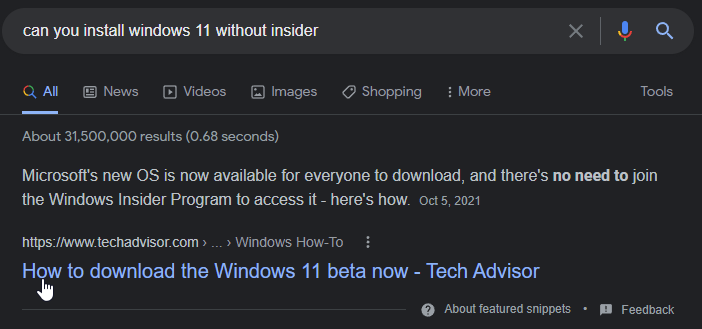 fleet bear
It was released like a month ago.
minor karma
weird cause thats how it tells you how to install it
 latent iron
can someone help me with a kerbal space program problem?
lyric crescent
need to say what the problem is first
latent iron
alright so let me send a screenshot.

the mods won't load in-game
and I think it's because of the ''this addon could be corrupt''
can anyone help?
lyric crescent
i would suggest you just use CKAN instead for mods. curseforge doesn't really.. work.
latent iron
lyric crescent
i would suggest you just use CKAN instead for mods. curseforge doesn't really.. ...
CKAN? what's that?
lyric crescent
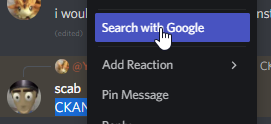
google, what's that?
lyric crescent
 latent iron
lyric crescent
i would suggest you just use CKAN instead for mods. curseforge doesn't really.. ...
latent iron
lyric crescent
i would suggest you just use CKAN instead for mods. curseforge doesn't really.. ...
curseforge worked amazing earlier
lyric crescent
you can stop pinging me please.
idk what earlier means for you, but it's been quite useless with KSP for months.
latent iron
alright sorry for asking, have a good day
 versed ravine
curseforge on mac doesn't load, it gets very close but then an error pops up
latent iron
versed ravine
curseforge on mac doesn't load, it gets very close but then an error pops up
mate it's mac
not a gaming computer
 opal tiger
Is the Fire Storm modifier for TC unavailable in Enigmatica 2 Expert? Trying to make a good cleaver with it
versed ravine
yeah but it worked before
latent iron
versed ravine
yeah but it worked before
not gonna lie i'm surprised it even worked
lyric crescent
opal tiger
Is the Fire Storm modifier for TC unavailable in Enigmatica 2 Expert? Trying to ...
!notcf
red patioBOT
Your question is not related to CurseForge owned/maintained features or services.
Please use the appropriate game room by getting a game role from #786424115535544350.
Otherwise use #👽︱game-support for game related help.
CurseForge does not make or maintain any of the content or games used on the site or app. Just because it's on the site/app does not make it a problem with CurseForge. Move rooms as requested, arguing about it will result in you being removed from the discord.
lyric crescent
latent iron
not a gaming computer
This is a support channel. If you arn't going to offer something helpful, don't comment.
lyric crescent
versed ravine
curseforge on mac doesn't load, it gets very close but then an error pops up
What is the error?
versed ravine
it goes to the “forging your library” screen before an error pops up
sometimes the app loads but my modpacks don’t before another error
lyric crescent
so.. what is the error
lyric crescent
ez fix
 rough linden
???
 opal cipher
rough linden
???
opal cipher
rough linden
???
 bright quail
I have a problem with the forge server, can somone helps me?
lyric crescent
!notcf
red patioBOT
Your question is not related to CurseForge owned/maintained features or services.
Please use the appropriate game room by getting a game role from #786424115535544350.
Otherwise use #👽︱game-support for game related help.
CurseForge does not make or maintain any of the content or games used on the site or app. Just because it's on the site/app does not make it a problem with CurseForge. Move rooms as requested, arguing about it will result in you being removed from the discord.
 eternal sigil
wow
fleet bear
wow what?
lyric crescent
upload a new file
 copper vigil
does it have to be approved
lyric crescent
yes
copper vigil
its going to take the same amount of time?
lyric crescent
it can
copper vigil
ok
 deft hearth
Does curse forge work on the Microsoft launcher now?
Or is it still being worked on?
fleet bear
deft hearth
Does curse forge work on the Microsoft launcher now?
No. You don't need the new launcher anyway. CF doesn't care about any of the stuff it adds at the current time.
red patioBOT
Ignore the new launcher update. CF does not use it or works with it, yet.
Everything will work fine otherwise.
digital roost
hello is there anyway to join a forge server without the mods?
lyric crescent
no
 fallen loom
digital roost
hello is there anyway to join a forge server without the mods?
fallen loom
digital roost
hello is there anyway to join a forge server without the mods?
Only if every single mod on the server allows you to and doesn't add anything to the registries
Which, imo for a modded game, defeats the purpose
digital roost
k
 storm saddle

Anyone know how to fix this? Can't figure out how to fix this. I disables my firewall and tried a different connection. Im guessing it is a network issue but can't figure it out
fallen loom
?owlogs
red patioBOT
<:overwolf:857375414002384916> How to get Overwolf logs! <:overwolf:857375414002384916>

 upper root
!notcf
red patioBOT
Your question is not related to CurseForge owned/maintained features or services.
Please use the appropriate game room by getting a game role from #786424115535544350.
Otherwise use #👽︱game-support for game related help.
CurseForge does not make or maintain any of the content or games used on the site or app. Just because it's on the site/app does not make it a problem with CurseForge. Move rooms as requested, arguing about it will result in you being removed from the discord.
upper root
Move to #👽︱game-support or get  a from #786424115535544350 and use an mc channel
copper vigil
lyric crescent
upload a new file
i have a world mad
will it delete it if i upload and update file?
upper root
Worlds will not get deleted if you upload files to the website, only if you delete the profile they were made on.
copper vigil
i dont know how to update it with new mods
upper root
Once you have added the new mods export it like you did the first time, then go to the projects curseforge page and click 'upload file' and upload the new export
 upper root
Not sure.
Tho isnt there an option to add one through a bar at the top of the list?
 upper root
Idk, leave them as default
copper vigil
ok
upper root
Its for if something is required, and how required. Little bit more useful for other games
upper root
The name of what?
 upper root
Those are the file names, they don't really matter
copper vigil
oh ok
so on curseforge it will be the same modpack
just we have to change the version
upper root
Yes
copper vigil
ok thanks
 undone vault
so ive been having trouble downloading some modpacks off the app and when i go to download some modpacks i want to try i always get a time out error when downloading the modpack. what would the problem be fopr that? cause i really wanna play those certain modpacks and it gives me the time out error everytime.
this is for minecraft
fleet bear
undone vault
so ive been having trouble downloading some modpacks off the app and when i go t...
Your internet is too slow.
 minor kayak
How do we swap to Classic: Season of Mastery on the Curseforge Client? I want to get addons for it, but I only have the drop down menu for BBC and Retail
fleet bear
minor kayak
How do we swap to Classic: Season of Mastery on the Curseforge Client? I want to...
did you scan for games?
minor kayak
Yeah and nothing changed
 upper root
It means the file you uploaded is the exact same file as you previously uploaded
copper vigil
i add two new mods
fleet bear
minor kayak
Yeah and nothing changed
?wow-flavours
red patioBOT
How to add WoW flavours to CurseForge!
WoW installs are only shown valid mods for the install selected.
If the app didn't find all of your installed game versions use these steps to fix it!
- Make sure Sync is disabled. It's not aware of the game versions and can cause issues!
- Try the

Scan computer for gamesoption from the menu, then click the  button by
 Game Specific - If the app didn't find all the versions, you use the
Manually add a gameoption and point it to one of the following locations.
a._retail_for the main game.
b._classic_for BCC.
c._classic_era_for the new classic install.
 fervent citrus
would anyone know a reason i get the error message "expecting chunk trailer" i tried fixing installation and restarting my computer but the mods arent downloading
 wanton marsh
How do I add little videos in my mod page? (Like in the Epic Fight mod below "Synopsis")
 waxen mantle

i cant download curseforge for some reason
it shows me this
i deleted overwolf and tried again but it still didnt work
 inner ember
hi ! someone know why i cant hit dragon? ice and fire 1.12.2 1.9.1
just in server , its work to hit on snigleplayer
single*
 rich flint
inner ember
hi ! someone know why i cant hit dragon? ice and fire 1.12.2 1.9.1
just in ser...
rich flint
inner ember
hi ! someone know why i cant hit dragon? ice and fire 1.12.2 1.9.1
just in ser...
do game questions in game channels #786424115535544350
 coral mortar
why is this happening?

I have internet and stuff but it still wont load
could someone please help me
digital roost
@fleet bear ^^^
opal cipher
Why are you pinging clay? Rule 5
upper root
!status times are here ⤵️
red patioBOT
Project Moderation Time
Project/File moderation is done on these days unless otherwise mentioned:
Sunday, Monday, Tuesday, Wednesday, Thursday: <t:1631170800:t> - <t:1631199600:t> (Your time)
Friday, Saturday: No Moderation!
Projects are moderated First in, First out. If you submit late in the work day, it will likely get left until the next day!
New Projects or anything flagged for manual review: 1-3 Working Days
Updates to approved projects not needing manual approval: 1 Hour
Changes will only show in the app if the project meets the requirements in the ?sync command and up to 24 hours has passed from when it was accepted.
 quasi cradle
thank you
 flint veldt
Hey! when i try to open a mod pack I get a display error that says " internal exception java.net.socketTimeoutException; Read time out" does anyone know what I can do to fix this?
rich flint
Post your log file in a game channel
 flat pelican
trying to export 1.12.2 modpacks getting this error constantly
 rich flint
Are you accidentally trying to export the libraries folder or something
fallen loom
Does your pack have WorldEdit in it, or has it had WorldEdit in it in the past?
flat pelican
nah to both
it has OTG
adding extra files in the mods folder
seems those folder are causing it
 rich flint
Don't export any folders that auto generate from the mod files themselves
If that's not it than something else you're trying to include is the culprit with massive file count
 old oasis
can i have some help pls, i recently changed the 'Minecraft Modding Folder' directory and now this is happening whenever i try to install any modpack on curseforge. ive also tried reinstalling curseforge but that has not fixed it
 upper root
What did you change it to
old oasis
a different drive
it was on my C drive but its now on my F drive. i can drag and drop modpacks in but i cant install from curseforge
upper root
What exactly did you change the path to
old oasis
F:\Minecraft Modded [Curseforge]
upper root
Try without the square brackets
upper root
Yay!
 inner finch
im not sure if this is the right place to ask but is anybody having problems with loading all the mods once the new minecraft launcher updates. Mine just keeps crashing
queen storm
You don't update it for curseforge
 river cargo
i need help
red patioBOT
╰( ͡° ͜ʖ ͡° )つ──☆*:・゚ *˜”*°•.˜”*°• Many Help •°*”˜.•°*”˜* <:curselit:796985620550385705>
Please provide a description of your issue with as much detail as possible. If you have an issue with a mod or modpack, tell us the name. Explain what you can see happening. Be specific!
 Tell us what is happening, we already know it "doesn't work".
Avoid using words like "it", tell us exactly what "it" is.
Don't assume anyone knows what you are talking about, be specific.
Tell us what you expected to happen.
Provide screenshots or video if possible.
Provide a log if possible. ?mc-log
river cargo
 queen storm
Restart your pc, try again
river cargo
okay
river cargo
queen storm
Restart your pc, try again
still the same :(
queen storm
You on a VPN?
river cargo
no
queen storm
!owlogs Gather these, send them here, then I will see if I can get somebody to look at it
red patioBOT
<:overwolf:857375414002384916> How to get Overwolf logs! <:overwolf:857375414002384916>
 indigo temple
when I start the application, it stucks on forging your library, and then such an inscription
 river cargo
queen storm
!owlogs Gather these, send them here, then I will see if I can get somebody to l...
river cargo
queen storm
!owlogs Gather these, send them here, then I will see if I can get somebody to l...
this ?
queen storm
Yes
digital roost
getting an exit code 0 when I try to play my modpack
 digital roost
Because when choosing a category, I don't get the pvp category in my resurepack
lyric crescent
that isnt a category for resource packs
digital roost
and what do I put on it
queen storm
What kind of resourcepack is it?
digital roost
I do not know, I did it but I do not know very well what category it would be
lyric crescent
so pick one that applies? you made it, you should know what it fits under.
digital roost
is there any video in which all categories are seen?
lyric crescent
no idea
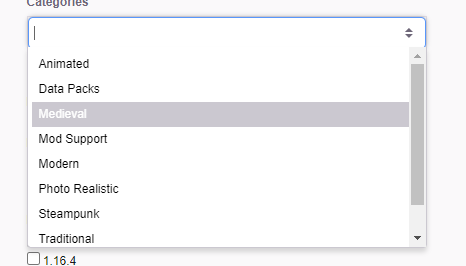 lyric crescent
if you click the resource pack tab on the site, they are listed on the left
digital roost
opal cipher
https://itssm.pl/3oLQiD0
would be cool if there was category for texturepacks vanilla+ like texturepacks that don't change minecraft vanilla texturepack philosophy
queen storm
digital roost
would be cool if there was category for texturepacks vanilla+ like texturepacks ...
!feedback
red patioBOT
<:CFidea:798388634972717066> Have an idea on how to improve CurseForge? <:CFidea:798388634972717066>
CurseForge is looking for great ideas and user feedback! Get into the CurseForge Community by providing some feedback and voting on what's important to you!
Think some game should be supported? Post an idea and explain why!
Got a to die for feature idea? Let's hear it!
Location In-app
- Click the button on the bottom left of the app.
- Click on

Suggest a Featureoption!
opal cipher
I would also go for "Traditional" on that one or "Misc"
 lapis sparrow
what am I supposed to do to fix that?
 lyric crescent
are you on wifi?
 full needle
This might have been already asked, but I can't find it searching, so just wondering how can I change the version of a modpack on a profile. In the old launcher (Curseforge, not Minecraft) there was the option to 'change version' from the dropdown menu on each profile, effectively allowing you to roll back to an earlier release, or force a reinstall, but this option doesn't seem to be in the new launcher. My specific use case is that there is a mod pack update, but it's not showing as available on my launcher (though it was released about a week ago) so I want to do a forced update. I'd rather avoid deleting the profile and downloading it again, that seems unnecessary and breaks saved maps, key binds, etc. Thanks for pointing me in the right direction on this one 😄
lyric crescent
what modpack
full needle
Chroma Technology 2 in my case, I have 1.1.5 installed, but 1.1.7 has been out over a week
but still being able to roll back (ie if an update has broken features) to an alternate version would be good
lyric crescent
the option does exist normally in the from the packs profile page
lyric crescent
 full needle
yeah that's not showing on my client
lyric crescent
what version of curseforge do you have. settings, then bottom left corner
lyric crescent
that is the current version
do you have the option in any modpack?
ah i see
you unlocked the profile
full needle
ooooh
lyric crescent
that disables the ability to change versions
full needle
that's weird, that's not affected previous updates, is that a change?
I have a profiler installed so that I can find lag on our server
lyric crescent
it is somewhat recent, beacuse if you mess with the pack, updating it can break whatever you did
full needle
hmmm, that is fair, i think it should still be an option, even if there is a prompt to say 'you unlocked this mod pack and made changes, these will be lost on update' or the likes, something to make it more intuitive as to what is going on
lyric crescent
yea, that does seem a bit of an overreach since you need to unlock profiles to add resource packs
full needle
changing it back to locked allows me to update, thank you so much for pointing this out, it will also help me troubleshoot if anyone else on the server is having the same issue 😄
full needle
I appreciate the very quick support 😄 and hope to see some updates to this area in the future to make it a bit more intuitive. have a great day!
 vale ember
Just wanted to let you guys know that under project list i get this
 lyric crescent
what are we seeing here?
vale ember
i got no idea some ui mistakes on the website
 lyric crescent
not seeing anything like that. what browser are you using? does it happen on others?
vale ember
opera gx i've not tested it on others give me a sec
 vale ember
works on chrome
opal cipher
Looks like an modal/alert that for some reason isn't hidden in OperaGX/Firefox Nightly then.
vale ember
hmm...
digital roost
i will try to do that on chromium gimme sec
vale ember
OperaGX uses Chromium so its quite weird
digital roost
so on chromium there is same problem
 vale ember
what browser?
digital roost
browser called Chromium
digital roost
thats the best browser if i would like to use chromium based but i more like firefox smh
digital roost
vale ember
what about edge i got 2auth and my phone is dead
edge is just chromium with microsoft
vale ember
i know but it works fine on chrome
digital roost
well website can use chrome api ._.
gimme while
i will install chrome but im little scared about chrome
vale ember
it will steal all your kids
digital roost
no, its just about privacy
 tropic cove
Hey, just downloaded CurseForge for the first time, (app) was going to download a MC mod for sibling, followed all relevant steps hit install, but keep getting this error "An exception occurred during a WebClient request" tried disabling anti-virus in case it interfered but to no extent, any solutions?
Might try a complete redownload if any files didnt download/corrupt
 opal cipher
!webclient
red patioBOT
Timeout/WebClient errors are from networking issues to your computer. You can try a few things to fix it:
- Restart the computer.
- Restart your router/modem.
- Try another internet source like a hotspot, wired connection or moving closer to the WiFi.
- Pause/Stop other things using the internet. (Streams, music, etc)
- If this still doesn't work, try again in an hour and hope your connection is stable.
digital roost
even on chrome there is
 lyric crescent
on what page
digital roost
vale ember
all author pages seem to have it
lyric crescent
 digital roost
go down
opal cipher
Yup, I got it here as well.
digital roost
 opal cipher
It's a messagebox.
 digital roost
bruh
 digital roost
¯_(ツ)_/¯
digital roost
lyric crescent
https://i.imgur.com/PQnAHMS.png
what browser?
vale ember
i dont have them on chrome either and i disabled all ad blockers
lyric crescent
chrome
digital roost
i tried chrome and there is same thing
lyric crescent
issue has been passed on
vale ember
vale ember
I looked at inspect element on chrome and i cant find these classes in there
digital roost
so someone just made bad frontend
vale ember
Probably left over from some website update by mistake
queen storm
Enough discussion about it, passed on to staff as Yamza said.
digital roost
I dont know if i am right here but i have the following problem
on my Server they are not spawning any kind of structeres no Villiages no Fortress in Nether
in Server_Properties the generate-structures is on true
maybe someone can help me
Thanks 🙂
 signal ridge
digital roost
I dont know if i am right here but i have the following problem
on my Server the...
signal ridge
digital roost
I dont know if i am right here but i have the following problem
on my Server the...
!notcf
red patioBOT
Your question is not related to CurseForge owned/maintained features or services.
Please use the appropriate game room by getting a game role from #786424115535544350.
Otherwise use #👽︱game-support for game related help.
CurseForge does not make or maintain any of the content or games used on the site or app. Just because it's on the site/app does not make it a problem with CurseForge. Move rooms as requested, arguing about it will result in you being removed from the discord.
signal ridge
huh?
 idle isle
i mean on my curseforge side is no dark mode how can i enable it?
 lyric crescent
There is none
idle isle
oh
lyric crescent
!getcf @stark owl use the 2nd link here
red patioBOT
Looking to install the CurseForge app?
<:windows:798410728188936222> Windows
Minimum Requirements:
- OS Version: 7 (64 bit), 8.1, 10, 11
- 64 bit Required.
- 350MB storage space.
- Microsoft .Net 4.8
- Intel/AMD quad-core CPU
- 8GB ram
Download: https://download.overwolf.com/install/Download?&PartnerId=4047
If you are having issues with the installer use the URL below to install Overwolf then go to the app store to download CurseForge.
https://content.overwolf.com/downloads/setup/latest/regular.html
<:mac:798410654418862130> Mac
Minimum Requirements:
- OS Version 10.14 or newer.
- 64 bit Required.
Download: https://curseforge.overwolf.com/downloads/curseforge-latest.dmg
:penguin: Linux
Minimum Requirements:
Yes.
Download: :person_shrugging:
 worldly scaffold
Im having problem running the insane craft on my pc is there someone that can help me get it working
 stark owl
lyric crescent
!getcf <@!502920358907609091> use the 2nd link here
stark owl
lyric crescent
!getcf <@!502920358907609091> use the 2nd link here
still not
lyric crescent
still not what
lyric crescent
then something on your computer is blocking it
stark owl
lyric crescent
then something on your computer is blocking it
how do i know whats blocking it
digital roost
how can i install a costem map ?
lyric crescent
to what
tropic cove
tropic cove
Hey, just downloaded CurseForge for the first time, (app) was going to download ...
Rep to this, it is not my network, i have suspended all other downlaods/uploads, disabled antivirus, restarted PC as well as router eveen using a hotspot, i have 45 Mbps download and yet it still wont work
lyric crescent
it is your network, that's what that error means
tropic cove
i know but no amount of troubleshooting has affected iy
signal ridge
May have to just try again another time when things are more stable. Network connections are "special" sometimes.
digital roost
how do i transfer my minecraft world saves?
lyric crescent
copy the save folder, paste it
digital roost
how do i get to the saves folder?
lyric crescent
right click the modpack, open folder
digital roost
thanks
 solemn laurel
optifine crashing modpac
lyric crescent
!mc-optifine
red patioBOT
We do not offer support for Optifine!
If you have issues with Optifine, remove it. If you want further support try the discord found on their website.
https://www.optifine.net/home
Installing Optifine with modpacks on Curseforge:
- Right click the modpack icon, select
Open Folder. - Put the
Optifine.jarinto themodsfolder. - Now start the modpack.
 narrow minnow
stark owl
how do i know whats blocking it
narrow minnow
stark owl
how do i know whats blocking it
?getcf
red patioBOT
Looking to install the CurseForge app?
<:windows:798410728188936222> Windows
Minimum Requirements:
- OS Version: 7 (64 bit), 8.1, 10, 11
- 64 bit Required.
- 350MB storage space.
- Microsoft .Net 4.8
- Intel/AMD quad-core CPU
- 8GB ram
Download: https://download.overwolf.com/install/Download?&PartnerId=4047
If you are having issues with the installer use the URL below to install Overwolf then go to the app store to download CurseForge.
https://content.overwolf.com/downloads/setup/latest/regular.html
<:mac:798410654418862130> Mac
Minimum Requirements:
- OS Version 10.14 or newer.
- 64 bit Required.
Download: https://curseforge.overwolf.com/downloads/curseforge-latest.dmg
:penguin: Linux
Minimum Requirements:
Yes.
Download: :person_shrugging:
narrow minnow
lyric crescent
they said they did that
 tawny token
 red patioBOT
- Click on the Minecraft Tab on the Left side of the CurseForge App.
- Click button next to the
Create Custom Profileoption. - Click
Repair Installationoption. - Play game.
NOTE: You will not lose any modpacks or worlds, These are saved in the Instances folder. DO NOT TOUCH THIS FOLDER OR YOU WILL LOSE EVERYTHING
narrow minnow
stark owl
i got the overwolf thing
search CurseForge from the appstore
and install it

 novel minnow
hi deos anyone know how to remove a mod from the overrides folder because it is a curseforge mod
lyric crescent
delete the mod from your profile, reinstall it with the app
novel minnow
it says These files should, instead, be referenced in the manifest.json file generated by the Twitch Desktop App during a profile export but i have no clue clue how to reference it in the manifest cause it is a bunch of random numbers XD
lyric crescent
just said how to fix it
novel minnow
like just reinstall the mod through the curseforge app?
queen storm
Yes
novel minnow
that is where i got the original mod from is the curseforge website
 balmy kestrel
Yo guys
novel minnow
my curseforge app only has modpacks
balmy kestrel
I have a problem & I can't install a modpack how can I fix it ?
upper root
novel minnow
my curseforge app only has modpacks
!mc-installmods ⤵️
red patioBOT
How to install mods in CurseForge App.
- Click
+ Create Custom Profile - Name it, select the required Minecraft version, select the Forge version (usually the highest number), click
Create. - Click the profile icon.
- Click
Add More Content - Search and install the desired mods.
- Start the game!
How to install mods not on CurseForge.
- Right click the profile picture or Open the profile and click the Icon next to the play button.
- Click

Open Folder. - Drag the mod(s) into the
modsfolder. (Note: Some mods will require others, to run. Make sure to read the instructions for the mod!) - Start the game!
 lyric crescent
balmy kestrel
I have a problem & I can't install a modpack how can I fix it ?
lyric crescent
balmy kestrel
I have a problem & I can't install a modpack how can I fix it ?
First step is to say what the problem is..
balmy kestrel
Ok wait
lyric crescent
novel minnow
my curseforge app only has modpacks
Are you saying you made a modpack, but didnt use the app?
balmy kestrel
 lyric crescent
!webclient
red patioBOT
Timeout/WebClient errors are from networking issues to your computer. You can try a few things to fix it:
- Restart the computer.
- Restart your router/modem.
- Try another internet source like a hotspot, wired connection or moving closer to the WiFi.
- Pause/Stop other things using the internet. (Streams, music, etc)
- If this still doesn't work, try again in an hour and hope your connection is stable.
 median crane
if I download the "improved launcher" minecraft has will my curseforge instances adapt to it?
lyric crescent
dont mess with the launcher
balmy kestrel
Ok thanks
 rugged burrow
I'm having an issue with loading Curse Forge. It stucks on "Forging your library..." and after a while tells me something's not right and to retry.
Things I've tried:
- Restart PC;
- Reinstalled Curge Forge client;
- Rebooted router;
- Deleted any instances of minecraft modpacks installed (made backups first);
- Deleted whole curseforge minecraft installation folder to recreate it later if I get pass the initial screen;
So far nothing helped :/
lyric crescent
?owlogs send that
red patioBOT
<:overwolf:857375414002384916> How to get Overwolf logs! <:overwolf:857375414002384916>
rugged burrow
This for me?
lyric crescent
yup
rugged burrow
Do I send it here or..?
lyric crescent
yup
rugged burrow
Here you go
lyric crescent

CurseForge Support
We're here to get you informed on everything you need to know about CurseForge, including helpful guides and troubleshooting articles to back you up when you get in a pickle
rugged burrow
Do I need to restart PC after that?
narrow minnow
no
rugged burrow
Ok, this didn't solve my issue but gave me and idea. Did a dns flush and it actually resolved the issue... amazing
Thank you 🙂
 novel plank
Can i somehow add optifime to a midpack?
Modpack
Or its going to brrak the modpack
red patioBOT
We do not offer support for Optifine!
If you have issues with Optifine, remove it. If you want further support try the discord found on their website.
https://www.optifine.net/home
Installing Optifine with modpacks on Curseforge:
- Right click the modpack icon, select
Open Folder. - Put the
Optifine.jarinto themodsfolder. - Now start the modpack.
queen storm
! mc-optifine
 uncut jungle
When I'm looking at the installed mods, is there no search option?
I can't even seem to use ctrl+f
median crane
Could stopping a server startup create any negative effect
novel plank
No
digital roost
what problem
 ornate heart
I have an error with mineraft. it says that
digital roost
what says?
ornate heart
 queen storm
First the problem is curseforge, then Minecraft?
ornate heart
curseforge launcher of minecraft
queen storm
!mc-installfix
red patioBOT
- Click on the Minecraft Tab on the Left side of the CurseForge App.
- Click button next to the
Create Custom Profileoption. - Click
Repair Installationoption. - Play game.
NOTE: You will not lose any modpacks or worlds, These are saved in the Instances folder. DO NOT TOUCH THIS FOLDER OR YOU WILL LOSE EVERYTHING
queen storm
It is pretty specific, curseforge app, left side
ornate heart
on settings ?
queen storm
Main page...
queen storm
Follow the steps, not gonna repeat them
ornate heart
yes but what is minecraft tab ?
queen storm
The thing with the Minecraft block on it
queen storm
Show a screenshot of the button you pressed last
ornate heart
 queen storm
! ticket-app
red patioBOT
:bug: Reporting via the CurseForge App :bug:
-
Click the
icon in the bottom left. -
Select
Open a Ticket. -
Fill out the form with accurate detailed information, "It doesn't work" isn't helpful! What exactly doesn't work and why doesn't it work should be easy to answer!
-
Make sure to upload your Overwolf logs with the
Upload Fileoption on the ticket, information on how to get these logs can be found here https://support.overwolf.com/en/support/solutions/articles/9000176827-how-to-get-your-overwolf-logs -
Submit!
 vocal oriole
Hullo

 dense cloak
import
 pearl pasture
heyy i need some help
 topaz estuary
how do i fix this
 pearl pasture
soo curseforge just Litterally wont open
topaz estuary
the error is that its not loading
pearl pasture
well it says "loading" and then "curseforge has crashed"
topaz estuary
I Just wanted to play demon slayer and That Happened
pearl pasture
it says "launching app on overwolf" and then curseforge has crashed
topaz estuary
sucks to suck
 tough stratus
topaz estuary
how do i fix this
tough stratus
topaz estuary
how do i fix this
i can help you on dm
signal ridge
pearl pasture
bro is nobody on? wtf
#📛︱rules 5,
 hearty rampart
not everyones up so late or early depending on timezone
hearty rampart
topaz estuary
how do i fix this
you try the install fix?
 undone coyote
How do i change the amount of mods i can see at the same time? I saw some screenshots of people showing more mods than just 2
 hearty rampart
undone coyote
How do i change the amount of mods i can see at the same time? I saw some screen...
hearty rampart
undone coyote
How do i change the amount of mods i can see at the same time? I saw some screen...
change window size or scroll down some
undone coyote
how do i change window size?

 undone coyote
you mean the "_ □ x" right?
hearty rampart
yes
undone coyote
it doesn't do much when expanding or reducing the size of the screen itself
Making it the smaller or bigger i can do and still only show 2 at a time
 undone coyote
1920x1080
undone coyote
on curseforge? if yes, how?
only screen dimensions settings i see are for minecraft
not curseforge itself
hearty rampart
thats usual screen size

for 1920x1080
this is about size curseforge should show
 undone coyote

mines just like that idk how to explain
"ctrl -" doesn't work for zooming out either
upper root
You could try changing the windows setting for scale, however it would affect all apps, not just CF
 undone coyote
upper root
You could try changing the windows setting for scale, however it would affect al...
undone coyote
upper root
You could try changing the windows setting for scale, however it would affect al...
yeah, it didn't work either tho
thanks for the help tho, ig i'll just use the folder to manage the mods
 candid moat
I installed the Mac version of CurseForge today in the hopes of syncing over my WoW add-ons, but I’ve run into a weird issue. The Sync button appears to be non-interactive. It doesn’t respond to clicking, and nothing even happens visually when I hover over it.
If anyone has any ideas for me, I’d be very appreciative.
copper vigil
how to add addons pack in a modpack
upper root
What do you mean by an addon pack?
 quasi bough
hey @everyone i need help
 random tiger
I'm having problems finding stardew valley with curse forge. Like it can't locate the game
fleet bear
!stardew
red patioBOT
Overwolf maintains a known list of issues here, some with solutions, others without.
https://support.curseforge.com/en/support/solutions/articles/9000196615-curseforge-known-issues
Scroll down, look at "Other games"
 final quarry
hello
so
i have been strugling for the past hour ish with trying to get mc mods to launch
fallen loom
?mc-logs
red patioBOT
Sending logs for support.
- Right-click the modpack profile icon OR click the button in the modpack profile.
- Click
Open Folder. - Open the
logsfolder. - Drag and drop the FILE named
latestORdebuginto discord.
red patioBOT
Your question is not related to CurseForge owned/maintained features or services.
Please use the appropriate game room by getting a game role from #786424115535544350.
Otherwise use #👽︱game-support for game related help.
CurseForge does not make or maintain any of the content or games used on the site or app. Just because it's on the site/app does not make it a problem with CurseForge. Move rooms as requested, arguing about it will result in you being removed from the discord.
 silk pebble
can i play modpack with my friend
queen storm
!mc-installserver
red patioBOT
How to **manually** install a server - **On your own PC**
- Check if the modpack has a server pack, if it does: use that and skip below.
- Go to the Forge website http://files.minecraftforge.net/ and download the Installer for the forge version the pack is using.
- Run the installer and choose
Install server. Do not install to your desktop. Also do not install inside a OneDrive folder. - Run the server using the forge.jar. A file called
eula.txtwill be generated. Open it and changeeula=falsetoeula=true - From the Client; Copy the
modsfolder,configfolder, and any other folders needed for the pack to work into the server folder. If the modpack has a server pack, use this instead! - Run the server again.
- Port forward your machine if needed. (Google it)
Long version: https://pastebin.com/83DXfGTH
 surreal raptor
What is this error ?
I only created a Forge 1.14.4 profile and launched it...
 mortal maple
Can someone explain to me how after downloading a zip of a mod to actually playing it
queen storm
mortal maple
Can someone explain to me how after downloading a zip of a mod to actually playi...
That is a modpack
!mc-installmods
red patioBOT
How to install mods in CurseForge App.
- Click
+ Create Custom Profile - Name it, select the required Minecraft version, select the Forge version (usually the highest number), click
Create. - Click the profile icon.
- Click
Add More Content - Search and install the desired mods.
- Start the game!
How to install mods not on CurseForge.
- Right click the profile picture or Open the profile and click the Icon next to the play button.
- Click
Open Folder. - Drag the mod(s) into the
modsfolder. (Note: Some mods will require others, to run. Make sure to read the instructions for the mod!) - Start the game!
surreal raptor
surreal raptor
What is this error ?
I only created a Forge 1.14.4 profile and launched it...
Timtower do you know the error ?
queen storm
Nope
 jaunty notch
is the only thing you can download from the app modpacks?
for minecraft
the website has mods datapacks and other stuff for minecraft but the app doesnt
queen storm
jaunty notch
queen storm
https://discord.com/channels/428228256236306434/782027635252920322/9112310291409...
What about texture packs and stuff
queen storm
Go to Add more content, look at the bar above the mods.
jaunty notch
How to uninstall a mod from a profile
queen storm
There is a trash button next to the mod after clicking on the icon
jaunty notch
queen storm
There is a trash button next to the mod after clicking on the icon
Where?
 queen storm
Show a full size screenshot please
jaunty notch
 queen storm
Stop cropping things, I want the full app. Hit back at least, then a screenshot of the entire window
jaunty notch
queen storm
Stop cropping things, I want the full app. Hit back at least, then a screenshot ...

Is that good
 queen storm
Hit back again, it is not on add more content, main page of the modpack, it lists the mods there, there is a trashcan next to all mods
jaunty notch
thanks
 midnight knot
So basically I have a custom modpack (forge 36.2.0 mc 1.16.5). so I found an alternative to optifine called iris and i saw people telling that it gets better fps and better chunk loading, so i tried installing it but it just aint coming. if i try to install it from curseforge website with the symbol , and i load up the game IT SAYS that thats a fabric mod and couldnt be loaded
could someone help me with this, i could share more info if you could reply
digital roost
its only for fabric
it will never be for forge
u need use fabric as modloader
not forge
if u want use iris
midnight knot
is there a better one for modpacks than optifine coz whenever i use shaders in modpacks (this issue doesnt occur in normal mc and lunar client)my *only the mc application * SCREEN goes complete black and its really annoying sometimes
and i want to see if its the issue with compatibility with optifine and the other mods i use so...
pls recommend
digital roost
optifine is super uncomatible with mods, and there is only iris that is only for fabri
midnight knot
nothing for forge?
digital roost
nothing
 glossy spire
@digital roost Hi, I have a problem after migrating MC to microsft MC I can't log in via the launcher, I choose the modpack I want to play, the MC login window pops up and it tells me that the email or password is wrong, but when I log in to the classic MC launcher I it works, can anyone advise me how to put it into operation? PS: apology for English translated by google. : D
midnight knot
gotta sue optifine now then, they havin the monopoly in the market
midnight knot
glossy spire
<@456226577798135808> Hi, I have a problem after migrating MC to microsft MC I c...
didnt need to @ all
digital roost
optifine after 1.13 just made worse
midnight knot
digital roost
optifine after 1.13 just made worse
yeah but most of the mods i use are for .16 so...
glossy spire
midnight knot
didnt need to @ all
sorry so who should I tag so he can advise me?
lyric crescent
Please take this discussion to an appropriate channel. #👽︱game-support
midnight knot
you dont need to tag people
digital roost
glossy spire
<@456226577798135808> Hi, I have a problem after migrating MC to microsft MC I c...
u need use microsoft option, not mojang
glossy spire
digital roost
u need use microsoft option, not mojang
I used it and it still tells me it's wrong
digital roost
u click microsoft, it opens a login to microsoft, so it should work becuz they are same launchers
lyric crescent
? mc-login
red patioBOT
Minecraft Logins
CurseForge does not handle or touch the Minecraft Login.
You must own JAVA Edition
If you have a DEMO button instead of a PLAY button in the launcher you are logged into an account that does not own the game. CurseForge requires you to own the game to use it.
Follow the steps in the pictures below. If you bought Minecraft after October 2020 or you have transferred your account you will use a Microsoft account.
Otherwise you must use a Mojang account until you transfer it!
 glossy spire
digital roost
u click microsoft, it opens a login to microsoft, so it should work becuz they a...
glossy spire
digital roost
u click microsoft, it opens a login to microsoft, so it should work becuz they a...
yes, but when I want to log in, it doesn't work, I solved it with micresoft and he referred me to someone who works with the launcher through which I run it.
glossy spire
digital roost
this ↑
Nice to admit that I didn't think to give it back and add another account already it works thanks for the advice 🙂
 teal jacinth
Good evening, I have a problem recently I installed curseforge on my computer but every time I run modpack don't run modpack but classic minecraft could you please help me?
queen storm
What do you get then?
teal jacinth
I can send you a video
queen storm
Or just tell it...
digital roost
teal jacinth
Good evening, I have a problem recently I installed curseforge on my computer bu...
u click Start, it opens a minecraft launchers and u click Play
teal jacinth
as i wrote when i turn modpack over curseforge turns on classic minecraft not modpack
yes, when I give play I turn on minecraft not modpack
queen storm
Define "classic", non-modded?
teal jacinth
I'll select modpack I'll play then I'll play play in minecraft and my classic mc will turn on
classic vanilla singleplayer / multiplayer minecraft without mods
queen storm
!mc-installfix Then a pc restart, then you try again
red patioBOT
- Click on the Minecraft Tab on the Left side of the CurseForge App.
- Click button next to the
Create Custom Profileoption. - Click
Repair Installationoption. - Play game.
NOTE: You will not lose any modpacks or worlds, These are saved in the Instances folder. DO NOT TOUCH THIS FOLDER OR YOU WILL LOSE EVERYTHING
queen storm
!status
red patioBOT
Project Moderation Time
Project/File moderation is done on these days unless otherwise mentioned:
Sunday, Monday, Tuesday, Wednesday, Thursday: <t:1631170800:t> - <t:1631199600:t> (Your time)
Friday, Saturday: No Moderation!
Projects are moderated First in, First out. If you submit late in the work day, it will likely get left until the next day!
New Projects or anything flagged for manual review: 1-3 Working Days
Updates to approved projects not needing manual approval: 1 Hour
Changes will only show in the app if the project meets the requirements in the ?sync command and up to 24 hours has passed from when it was accepted.
 steady gorge
thks
digital roost
queen storm
!status
u said 3 days max ye? becuz they didnt approved in 3 days ._.
lyric crescent
If it's been more than 3 working days there is likely something wrong with what you uploaded
Show the message
queen storm
digital roost
u said 3 days max ye? becuz they didnt approved in 3 days ._.
3 working days, pretty specific, and everything needs to follow the requirements
digital roost
lyric crescent
If it's been more than 3 working days there is likely something wrong with what ...
there is no message and im still waiting ._.
queen storm
File or project?
digital roost
and its after 17:00 (what is saying in !status) so its kinda impossible
 umbral gust
how can i add worlds i used with the normal launcher to curse forge
 dire storm
when i click on the mod pack to load it, loads the old majong instead of the new Microsoft launcher how do i fix this???
queen storm
dire storm
when i click on the mod pack to load it, loads the old majong instead of the new...
Not
digital roost
and im still waiting ._.
dire storm
@queen stormyes
queen storm
digital roost
and im still waiting ._.
Again: file or project
queen storm
dire storm
<@!525950791710801921>yes
You can't change it
digital roost
queen storm
Again: file or project
file and project
dire storm
@queen storm then how do i get it to load?
queen storm
digital roost
file and project
Show screenshot
queen storm
dire storm
<@!525950791710801921> then how do i get it to load?
Just press play
dire storm
@queen storm if u have migrated your account it wont let u sign into the old majong
queen storm
!mc-login
red patioBOT
Minecraft Logins
CurseForge does not handle or touch the Minecraft Login.
You must own JAVA Edition
If you have a DEMO button instead of a PLAY button in the launcher you are logged into an account that does not own the game. CurseForge requires you to own the game to use it.
Follow the steps in the pictures below. If you bought Minecraft after October 2020 or you have transferred your account you will use a Microsoft account.
Otherwise you must use a Mojang account until you transfer it!
digital roost
well im on phone so i cant look on right ._.
 queen storm
Need the project, not your notifications
digital roost
this?
 queen storm
Now look at the files
digital roost
oh wait sorry, its saying that i was uploaded 2 days ago ._.
like on 17 and now is 19
 foggy reef
can i have virus on curseforge ? or all mods is checked before uploading ?
queen storm
All are checked
 pliant wasp
I have problem with the launcher in curseforge. When I try to turn on Minecraft, I got error that says I need to upgrade to newer launcher and when i click cancel I got this error.
 signal ridge
pliant wasp
I have problem with the launcher in curseforge. When I try to turn on Minecraft,...
signal ridge
pliant wasp
I have problem with the launcher in curseforge. When I try to turn on Minecraft,...
!mc-logs
red patioBOT
Sending logs for support.
- Right-click the modpack profile icon OR click the button in the modpack profile.
- Click
Open Folder. - Open the
logsfolder. - Drag and drop the FILE named
latestORdebuginto discord.
signal ridge
As for the new launcher ⤵️
red patioBOT
Ignore the new launcher update. CF does not use it or works with it, yet.
Everything will work fine otherwise.
pliant wasp
signal ridge
!mc-installfix
red patioBOT
- Click on the Minecraft Tab on the Left side of the CurseForge App.
- Click button next to the
Create Custom Profileoption. - Click
Repair Installationoption. - Play game.
NOTE: You will not lose any modpacks or worlds, These are saved in the Instances folder. DO NOT TOUCH THIS FOLDER OR YOU WILL LOSE EVERYTHING
signal ridge
pliant wasp
Do the above
pliant wasp
I will try this
rich flint
The Ocelot error 😅
upper root
bad kitty
 quick sleet
Sorry i have a problem with a map, i'm trying to play project ozone 2 i have done all the things, but i don't know where to put the file with the map, any clue?
rich flint
Love that one - easy to diagnose
upper root
quick sleet
Sorry i have a problem with a map, i'm trying to play project ozone 2 i have don...
In the saves folder inside the instance folder. It needs to be unzipped as well
quick sleet
upper root
In the saves folder inside the instance folder. It needs to be unzipped as well
in the saves folder of the normal minecraft, because i can't find the one of curse forge?
signal ridge
pliant wasp
That's not my problem, I am helping my friend.
Have your friend join then, Can help them here
upper root
quick sleet
in the saves folder of the normal minecraft, because i can't find the one of cur...
Right click the packs profile picture and click Open Folder to open that instances folder. That is the instance folder you need to put it in
pliant wasp
he doesn't have phone number verified on his discord account 😅
signal ridge
He needs to do the install fix then as I sent above. that should fix the issue
pliant wasp
signal ridge
He needs to do the install fix then as I sent above. that should fix the issue
Thank you so much, that fixed the issue.
quick sleet
upper root
Right click the packs profile picture and click <:CFfolder:798388587099324446> `...
i found the folder and i've done all the steps but i can't find the map in game
 fleet bear
quick sleet
i found the folder and i've done all the steps but i can't find the map in game
fleet bear
quick sleet
i found the folder and i've done all the steps but i can't find the map in game
It's a zipped folder... You can't load that.
quick sleet
fleet bear
It's a zipped folder... You can't load that.
so like this?
 fleet bear
quick sleet
so like this?
fleet bear
quick sleet
so like this?
That's not even a world... What are you trying to do?
quick sleet
sorry if i'm stupid but it's the first time that i playing modded minecraft
upper root
That is the server pack, used for if you want to host a server. To make a world launch the pack, click singleplayer and then click create new world.
quick sleet
upper root
That is the server pack, used for if you want to host a server. To make a world ...
but this map is like a skyblock
it is not supposed to be played in normal world
upper root
The pack makers will of made sure that a world created will be skyblocky, not normal
quick sleet
i tried but it has created a normal world, btw i solved putting the normal skyblock world in that folder, thanks
i promise i won't waste your time in future with stupid problem like this
 leaden mist
Hey guys im having trouble launching minecraft from the launcher. Ive tried the repair minecraft and tried the deleting the install folder
And yes ive allocated enough ram 17.15 gb
upper root
That is waaay too much ram, Minecarft can get unhappy if you allocate more than 6-8gb (12 for really large packs, these should say it on their cf page)
fleet bear
!mc-log
red patioBOT
Sending logs for support.
- Right-click the modpack profile icon OR click the button in the modpack profile.
- Click
Open Folder. - Open the
logsfolder. - Drag and drop the FILE named
latestORdebuginto discord.
fleet bear
so the game isn't even launching?
leaden mist
nope i get to the game launcher press the launch button and nothing happens
fleet bear
did you do an installfix?
leaden mist
the tree dot on the upper right
fleet bear
yes
leaden mist
yes twice
fleet bear
take a screenshot of the profile folder by opening it via right click on the profile picture.
leaden mist
 fleet bear
That's not what was requested
leaden mist
hopefully this is it
 leaden mist
yes
 maiden hare
@fleet bear Sry for the ping could you maby help me in #🧱︱mc-other-help
fleet bear
leaden mist
yes
does the launcher that opens show the correct profile in the bottom left when you start it?
fleet bear
click the 3 dots in the top right again and hit the run vanilla
maiden hare
Any idea where i could get help ?
fleet bear
by waiting
 placid sluice
File uploads been under review for 2 hours
fleet bear
!status
red patioBOT
Project Moderation Time
Project/File moderation is done on these days unless otherwise mentioned:
Sunday, Monday, Tuesday, Wednesday, Thursday: <t:1631170800:t> - <t:1631199600:t> (Your time)
Friday, Saturday: No Moderation!
Projects are moderated First in, First out. If you submit late in the work day, it will likely get left until the next day!
New Projects or anything flagged for manual review: 1-3 Working Days
Updates to approved projects not needing manual approval: 1 Hour
Changes will only show in the app if the project meets the requirements in the ?sync command and up to 24 hours has passed from when it was accepted.
placid sluice
Ty
leaden mist
it brought up the launcher and is downloading
@fleet bear my internet download speed just dropped way down so this is going to take awhile. ill @ you when its done if you dont mind
fleet bear
k
 light hazel
i have a problem with installing curse. ive done all the things on the FAQS help page for it "not working when installation is finished," and it still wont wor, can i get some help maybe
 grave reef
hey just to clarify, shaders aren't compatible with forge yet, right?
for 1.17.1 i mean
upper root
Vanilla 'fabulous' shaders are. Optifine shaders probably are too, tho we do not offer support for optifine here.
fleet bear
!notcf
red patioBOT
Your question is not related to CurseForge owned/maintained features or services.
Please use the appropriate game room by getting a game role from #786424115535544350.
Otherwise use #👽︱game-support for game related help.
CurseForge does not make or maintain any of the content or games used on the site or app. Just because it's on the site/app does not make it a problem with CurseForge. Move rooms as requested, arguing about it will result in you being removed from the discord.
upper root
!notcf move back to #👽︱game-support and be patient.
red patioBOT
Your question is not related to CurseForge owned/maintained features or services.
Please use the appropriate game room by getting a game role from #786424115535544350.
Otherwise use #👽︱game-support for game related help.
CurseForge does not make or maintain any of the content or games used on the site or app. Just because it's on the site/app does not make it a problem with CurseForge. Move rooms as requested, arguing about it will result in you being removed from the discord.
rich flint
do this in #👽︱game-support
 inland stream
Umm... I think I broke Curseforge.
I keep trying to export a pack I made, but every time I do, the exported pack has little contents, literally two files and no mods folder. What did I do wrong?
upper root
Mods do not get exported. Instead curseforge compiles a list of them (manifest.json) for the app to download when importing them
This makes sure the zip is nice and small, and avoids violating any copyrights that redistributing mod files would cause
inland stream
Ahh. So it's normal for the file to be 2.8 megabytes?
 strong ermine
Error: java.lang.NullPointerException: Initializing game
i keep geteting this error when im runnning my custom modpack
rich flint
strong ermine
Error: java.lang.NullPointerException: Initializing game
i keep geteting this e...
post your log file in #👽︱game-support or get the MC role and use MC rooms #786424115535544350
fallen loom
inland stream
Ahh. So it's normal for the file to be 2.8 megabytes?
This is how Curse saves a LOT of file storage
inland stream
Ahh, fair enough. Thank youuu~
 agile gale
This may be a silly question, but is there any reason why Overwolf has two folders? One from a month ago numbered 0.181.0.11 and one from 11/9 numbered 0.184.0.35? Could this be related to CurseForge failing to install/run?
 stark pilot
I require assistance on something I've never seen before
I got this error when attempting to install "FTB Builder's Paradise"

Clicking Learn More didn't help obviously
rich flint
either the mod file is no longer on curseforge or the CF tagging system is messed up for the file (again)
stark pilot
Well whatever caused it seems to have magically vanished
Modpack downloaded just fine... what.
I think it was because I tried downloading the file via the versions tab whereas now I tried it by clicking "install" 😐
Okay here's something else to note
The mod "Item Zoom" seems to be the mod causing that problem due to it being removed
Though my question is why was it removed from curse...
Anyways thanks for the help
fleet bear
dev likely removed it
 lofty laurel
...I uh
I just started messing with this today
Having problems even getting CurseForge started
I keep getting the 'Oops' screen, even after trying everything that the 'learn more' page suggested
...anything else I can try?
I mean
...I've reinstalled it, changed the DNS settings, disabled IPv6, let it through the firewall...nothing
it stills says that it won't load
rich flint
windows/mac?
lofty laurel
windows
rich flint
what version
lofty laurel
11
rich flint
have windows insider? i don't actually know what it is, just that it interferes lol
new things are bad grumble
lofty laurel
seems like I do
...and yeah, Windows 11 has been nothing but a pain in butt and I have no idea how to go back
rich flint
11 is supposed to work, just not insider
lofty laurel
Let me see if I can mess around with Insider
rich flint
lofty laurel
Danke
inland stream
I'm not upgrading to Windows 11 until it's less... New, basically.
New things aren't bad, but we had the same problem when Windows 10 came out. Few things supported it and had massive problems until everything started to update to support it.
lofty laurel
I hope those updates come fast, cause I am seriously regretting this decision
lofty laurel
rich flint
https://support.overwolf.com/en/support/solutions/articles/9000197893-windows-in...
...crap. That didn't seem to work
I'm sorry, I'm new this all of this myself, and I can't even get the damn thing started
rich flint
Better Google around how to disable or remove insider then
Don't ask for help just state your issue
lofty laurel
well
crap
I can keep messing with it tomorrow, I guess
thanks for the help, even if it didn't go anywhere
 floral wagon
When I want to join a Server then it just stands "invalid move player packet received" and Im playing with mods so what can I do to join the server?
 cobalt shoal
Hello, I can't delete my comments.
It gives me this info:
HTTP Code: 403
Status Text: error
Address: https://www.curseforge.com/minecraft/mc-mods/gildedarmor
Date: Sat Nov 20 2021 10:49:48 GMT+0000 (Western European Standard Time)
Request: GET /comments/5065339/delete
Known issue
cobalt shoal
Can I do anything about it?
queen storm
Only thing you can do is report it
 echo dove
Is there a way to search keywords on Curseforge and restrict the search by version, as well (and preferably also by Forge/Fabric)?
 eager oxide
I have to ask, why is it that most of the mods in the "featured" section of Curseforge are missing key parts of the mod? I've tried to play quite a few of the mod packs on the featured section of Curseforge, but so far only Skyfactory 4 and Better Minecraft Forge Edition are complete, the rest are either out of date, or missing crucial files that break the modpack and make it unplayable.
The specific mods I've tried to play that didn't work are:
The Pixelmon Modpack
Valhelsia 3
SevTech: Ages of the Sky
All the Magic Spellbound
Levitated
Include
UVision
The problem with these mods is either they're out of date, or are simply missing files that allow the mod to work, giving me a report saying that multiple mod files are missing.
This is usually what I get when trying to load in most of the mods on Curseforge
 digital roost
just click don't show again
its just update for xaero's minimap that u dont need care
¯_(ツ)_/¯
becuz the update says that there is a 1.17.1 version
eager oxide

 uneven zodiac
how to install fabric on curseforge(can you even do it that way?) if not then how to install it so Ican run modpacks for it
 pallid marten
How do I open curseforge again after I close it without redownloading it?
digital roost
uneven zodiac
how to install fabric on curseforge(can you even do it that way?) if not then ho...
like installing forge, just change from Forge when creating new profile to fabric
pallid marten
How do I open curseforge again after I close it without redownloading it?
digital roost
by clicking on curseforge icon app on desktop and when u click it, there should be on left center a menu of overwolf from here u can open curseforge
uneven zodiac
digital roost
like installing forge, just change from Forge when creating new profile to fabri...
Thanks. when downloading modpacks it will be already toogled right(modpacks for fabric)?
digital roost
or open overwolf app
digital roost
uneven zodiac
Thanks. when downloading modpacks it will be already toogled right(modpacks for ...
yes, it will automaticaly set a modloader
uneven zodiac
digital roost
yes, it will automaticaly set a modloader
Thanks 😄
pallid marten
I know about the icon on the left of my screen but it always disapeers?
digital roost
like on left center when u slide with mouse here, there should show a overwolf menu that has curseforge ._.
pallid marten
it's not there, it just disapeered. I only have the desktop icons
digital roost
 pallid marten
got it, Thanks!
 signal ridge
 silk arrow
!getcf try the second link for windows
red patioBOT
Looking to install the CurseForge app?
<:windows:798410728188936222> Windows
Minimum Requirements:
- OS Version: 7 (64 bit), 8.1, 10, 11
- 64 bit Required.
- 350MB storage space.
- Microsoft .Net 4.8
- Intel/AMD quad-core CPU
- 8GB ram
Download: https://download.overwolf.com/install/Download?&PartnerId=4047
If you are having issues with the installer use the URL below to install Overwolf then go to the app store to download CurseForge.
https://content.overwolf.com/downloads/setup/latest/regular.html
<:mac:798410654418862130> Mac
Minimum Requirements:
- OS Version 10.14 or newer.
- 64 bit Required.
Download: https://curseforge.overwolf.com/downloads/curseforge-latest.dmg
:penguin: Linux
Minimum Requirements:
Yes.
Download: :person_shrugging:
 lyric folio
https://maven.minecraftforge.net/net/minecraftforge/forge/1.16.5-36.2.11/forge-1.16.5-36.2.11-changelog.txt
When will these new Forge versions be available?
signal ridge
On the cf app? or released from forge itself?
lyric folio
lyric folio
https://maven.minecraftforge.net/net/minecraftforge/forge/1.16.5-36.2.11/forge-1...
on the CF App
signal ridge
May take some time to sync seeing how they only came out today. Otherwise the team is back to work on sunday
 wanton flame
Good evening, I can't upload resource pack file to curseforge: I tried to upload it in rar and zip, when I try rar, it says, that I should upload it in zip, but when I try zip, it says, that this file type is incorrect. What do I need to do? (The resource pack works)
Resource pack file
signal ridge
Sounds like a question for aternos.
Forge or Curseforge? They are not the same thing
What mod?
Any chance you can do more then a few lines per enter? Its annoying to read
So what exactly are you trying to do?
Where did you get the mod from? How did you add it to the cf app?
then you need to install the same mods with the app
!mc-installmods
red patioBOT
How to install mods in CurseForge App.
- Click
+ Create Custom Profile - Name it, select the required Minecraft version, select the Forge version (usually the highest number), click
Create. - Click the profile icon.
- Click
Add More Content - Search and install the desired mods.
- Start the game!
How to install mods not on CurseForge.
- Right click the profile picture or Open the profile and click the Icon next to the play button.
- Click
Open Folder. - Drag the mod(s) into the
modsfolder. (Note: Some mods will require others, to run. Make sure to read the instructions for the mod!) - Start the game!
wanton flame
wanton flame
Good evening, I can't upload resource pack file to curseforge: I tried to upload...
please
signal ridge
ok?
wanton flame
you didn't install mods
signal ridge
Need to have the mods on your client to connect to a modded server. Otherwise no mods on the client
wanton flame
Good evening, I can't upload resource pack file to curseforge: I tried to upload it in rar and zip, when I try rar, it says, that I should upload it in zip, but when I try zip, it says, that this file type is incorrect. What do I need to do? (The resource pack works)
signal ridge
I forwarded this on
fleet bear
wanton flame
Good evening, I can't upload resource pack file to curseforge: I tried to upload...
It must be a zip.
The files inside the resource pack must be in the top level. You cant have a folder directly inside.
digital roost
How do I install any mod from CurseForge website because ill even get a .jar file
And in the app I can just get modpacks but not the mod
fleet bear
!mc-installmods
red patioBOT
How to install mods in CurseForge App.
- Click
+ Create Custom Profile - Name it, select the required Minecraft version, select the Forge version (usually the highest number), click
Create. - Click the profile icon.
- Click
Add More Content - Search and install the desired mods.
- Start the game!
How to install mods not on CurseForge.
- Right click the profile picture or Open the profile and click the Icon next to the play button.
- Click
Open Folder. - Drag the mod(s) into the
modsfolder. (Note: Some mods will require others, to run. Make sure to read the instructions for the mod!) - Start the game!
 lost ocean
hi, when i try to install curseforge, my windows dont refuse to dowload the file. What i need to do?
windows says that the file have viruses
rich flint
if you are getting the file from the curseforge website then it doesn't have a virus, tell windows to accept
 digital roost
I know what browser are you using
lost ocean
-_-
digital roost
Do you have opera or opera GX
digital roost
The gaming Browser from Opera
digital roost
Ask Claycorpor any other person but at this Browser i'm shure it will work but i test it at edge wait a short time pls
At edge it also work
lost ocean
Microsoft edge?
digital roost
Yes
digital roost
digital roost
The gaming Browser from Opera
gaming browsers are scam smh
 digital roost
thats a problem of anti virus u have installed i think
lost ocean
Hmmmm
digital roost
so u should disable that anti virus
queen storm
!getcf Use the second link
red patioBOT
Looking to install the CurseForge app?
<:windows:798410728188936222> Windows
Minimum Requirements:
- OS Version: 7 (64 bit), 8.1, 10, 11
- 64 bit Required.
- 350MB storage space.
- Microsoft .Net 4.8
- Intel/AMD quad-core CPU
- 8GB ram
Download: https://download.overwolf.com/install/Download?&PartnerId=4047
If you are having issues with the installer use the URL below to install Overwolf then go to the app store to download CurseForge.
https://content.overwolf.com/downloads/setup/latest/regular.html
<:mac:798410654418862130> Mac
Minimum Requirements:
- OS Version 10.14 or newer.
- 64 bit Required.
Download: https://curseforge.overwolf.com/downloads/curseforge-latest.dmg
:penguin: Linux
Minimum Requirements:
Yes.
Download: :person_shrugging:
lost ocean
I have the antivirus of windows
I think
I turned the antivirus off and it remove my file... i just wanted to play pixelmon
queen storm
Did you try the second link?
 hoary basin
heya! How do I setup the new Minecraft launcher for CF? because the old one will kick you from the game every 30 minutes and ask you to use the new launcher
red patioBOT
Ignore the new launcher update. CF does not use it or works with it, yet.
Everything will work fine otherwise.
queen storm
hoary basin
heya! How do I setup the new Minecraft launcher for CF? because the old one will...
What makes you think the launcher does that?
 versed beacon
hello so im trying to download add on from the site and i press the click here option if it dosent downloading right away
and its still not working how can i make it work?
lyric crescent
use the app
versed beacon
cant find the addon in the app
lyric crescent
how so
queen storm
Link please
lyric crescent
if this is wow, you need to be using the correct flavor of wow in your profile
versed beacon
yes i just tbc folder and still not coming up
lyric crescent
send the link to the addon
maybe not the link directly to the download..
doesnt look like the addon is tagged for TBC
versed beacon
hmm my friends has it and we play tbc both of us
 void prawn
This seems very basic of a question but how do i make a pack public so i can play with friends?
queen storm
void prawn
This seems very basic of a question but how do i make a pack public so i can pla...
Export, send them the zip
lyric crescent
?mc-packshare
red patioBOT
There are two ways to share a modpack you've made with others...
Export and Share - For Friends to Small Groups.
- Click the Icon for the modpack.
- Click the button next to play.
- Click

Export. - Select the files that should be included.
- Send the zip to the people that want it! They can follow the instructions in
!mc-installpackto install the pack!
Upload to Curseforge - For Public Release to Everyone.
This options will make your pack public to EVERYONE, it comes with extra requirements and will take some effort to set up.
- Go to here: https://www.curseforge.com/project/432/4471/create
- Fill out the information with a proper description of the pack. This should allow anyone to understand what the pack is.
- Click the Icon for the modpack in the CurseForge app.
- Click the button next to play.
- Click
Export. - Select the files that should be included.
- Open your Project you made on the CurseForge site and Upload the file you just made.
- Wait for Moderation & Sync so it can show up in the client! (See
!syncfor limitations)
void prawn
tyty
versed beacon
ahwell nvm
 simple tundra
I am trying to upload a modpack but it says Invalid manifest.json file How do I fix this
queen storm
How did you export it?
simple tundra
with the curseforge app
queen storm
Show the rejection message
simple tundra
Invalid manifest.json file:
References file with invalid status: 3491309 (projectID 536884 - Deleted).
queen storm
Remove funi-mod
simple tundra
ok thanks
red patioBOT
╰( ͡° ͜ʖ ͡° )つ──☆*:・゚ *˜”*°•.˜”*°• Many Help •°*”˜.•°*”˜* <:curselit:796985620550385705>
Please provide a description of your issue with as much detail as possible. If you have an issue with a mod or modpack, tell us the name. Explain what you can see happening. Be specific!
Tell us what is happening, we already know it "doesn't work".
Avoid using words like "it", tell us exactly what "it" is.
Don't assume anyone knows what you are talking about, be specific.
Tell us what you expected to happen.
Provide screenshots or video if possible.
Provide a log if possible. ?mc-log
 winter shuttle
my curseforge wont load and gives an "oops that's support to happen"
queen storm
!webclient
red patioBOT
Timeout/WebClient errors are from networking issues to your computer. You can try a few things to fix it:
- Restart the computer.
- Restart your router/modem.
- Try another internet source like a hotspot, wired connection or moving closer to the WiFi.
- Pause/Stop other things using the internet. (Streams, music, etc)
- If this still doesn't work, try again in an hour and hope your connection is stable.
winter shuttle
ok
 high sandal
Hello can i get some helt with updating curseforge, nothing happens i i press restart app to update
winter shuttle
my curseforge will not work and I have tried everything it gets stuck on "Forging your library" then gives me the error message
copper vigil
how do i buy a real server
fleet bear
!notcf
red patioBOT
Your question is not related to CurseForge owned/maintained features or services.
Please use the appropriate game room by getting a game role from #786424115535544350.
Otherwise use #👽︱game-support for game related help.
CurseForge does not make or maintain any of the content or games used on the site or app. Just because it's on the site/app does not make it a problem with CurseForge. Move rooms as requested, arguing about it will result in you being removed from the discord.
copper vigil
ok where do i go to ask?
fleet bear
You should try this thing they invented a few thousand years ago called reading.
 ashen timber
Hello everyone! I need to start a forge server on VPS, but I don't know how.
I was looking to a net, but nothing worked :/
There are every files what do i have rn
 queen storm
ashen timber
Hello everyone! I need to start a forge server on VPS, but I don't know how.
queen storm
ashen timber
Hello everyone! I need to start a forge server on VPS, but I don't know how.
!notcf
red patioBOT
Your question is not related to CurseForge owned/maintained features or services.
Please use the appropriate game room by getting a game role from #786424115535544350.
Otherwise use #👽︱game-support for game related help.
CurseForge does not make or maintain any of the content or games used on the site or app. Just because it's on the site/app does not make it a problem with CurseForge. Move rooms as requested, arguing about it will result in you being removed from the discord.
copper vigil
fleet bear
You should try this thing they invented a few thousand years ago called reading.
read what
queen storm
copper vigil
read what
 coarse dome


