#🔥︱curseforge-support
1 messages · Page 567 of 1
 queen storm
 bright flax
i tried and they didnt answer
queen storm
How long did you wait? And where did you ask?
queen storm
They are not very fast
 lyric crescent
24 hours isnt long enough for a ticket anywhere afaik. twitch takes weeks in general.
bright flax
😫
 fleet bear
Tim, your wrong. Rewards uses CF 2FA not Twitch.
Twitch can't help with this at all.
You need to open a support ticket to have the 2FA removed.
!ticket-site
 red patioBOT
:bug: Reporting via Website :bug:
Can't open the app or would rather use the website? You can do so here: https://support.curseforge.com/en/support/tickets/new
Fill out the form with accurate detailed information, "It doesn't work" isn't helpful! What exactly doesn't work and why doesn't it work should be easy to answer!
Make sure to upload your Overwolf logs with the Upload File option on the ticket, information on how to get these logs can be found here https://support.overwolf.com/en/support/solutions/articles/9000176827-how-to-get-your-overwolf-logs
fleet bear
Ignore the logs part.
 shell jackal
then and still continues in the file extraction screen
to no avail the other link you sent
fleet bear
Then you have something on your PC blocking it
shell jackal
can you help me ?
fleet bear
I just did...?
 queen storm
fleet bear
Tim, your wrong. Rewards uses CF 2FA not Twitch.
Twitch can't help with this at ...
queen storm
fleet bear
Tim, your wrong. Rewards uses CF 2FA not Twitch.
Twitch can't help with this at ...
That is very silly
queen storm
 cerulean pasture
!webclient
red patioBOT
Timeout/WebClient errors are from networking issues to your computer. You can try a few things to fix it:
- Restart the computer.
- Restart your router/modem.
- Try another internet source like a hotspot, wired connection or moving closer to the WiFi.
- Pause/Stop other things using the internet. (Streams, music, etc)
- If this still doesn't work, try again in an hour and hope your connection is stable.
fleet bear
queen storm
That is very silly
not sure how that's silly? CF doesn't have accesses to the Twitch accounts and it doesn't require 2FA to use the account.
 naive frost
guys how can i find better minecraft [OfflineTV Edition]
fleet bear
naive frost
guys how can i find better minecraft [OfflineTV Edition]
you use search or google.
cerulean pasture
My internet is not slow
 fleet bear
Webclient errors have nothing to do with internet speed.
naive frost
i can't find it
 long cipher
Hey I wanted to ask with the new Minecraft launcher now in Microsoft store how do I download mods or optifine?
naive frost
is it deleted
fleet bear
naive frost
i can't find it
Well yeah, this isn't search or google. You won't find it here.
cerulean pasture
fleet bear
Webclient errors have nothing to do with internet speed.
im uninstalled curseforge and
 lyric crescent
long cipher
Hey I wanted to ask with the new Minecraft launcher now in Microsoft store how d...
lyric crescent
long cipher
Hey I wanted to ask with the new Minecraft launcher now in Microsoft store how d...
you use the curseforge app
cerulean pasture
:/
cerulean pasture
long cipher
Hey I wanted to ask with the new Minecraft launcher now in Microsoft store how d...
İm download new Launcher
long cipher
Ok thank you
cerulean pasture
and never change
fleet bear
cerulean pasture
You would need to contact overwolf support.
 mellow gate
is there a way to have curseforge without overwolf?
fleet bear
Use a mac
 arctic tapir
would this be the right place to get help with crash's when launching?
fleet bear
 white locust
hello, i cant open curseforge, can someone help me?
it says "launching curse forge" and nothing happen
 wintry dirge
Hello, I'm trying to edit my project but I get this message when I try to edit any of the pages.

Only thing I can click on are "Members" and "Delete Project"
 hot surge
Is there a way to start the modpack without using the CurseForge Launcher? Just copy the folder into the Minecraft folder or has something else to be done?
 signal ridge
sure, but you would need to install forge manually if you did that. Easier to just use the cf app
hot surge
My issue is that it always resets the java arguments I change there
signal ridge
Are you setting them in the cf app itself OR the launcher that opens?
hot surge
The launcher that opens
red patioBOT
How to set Global Minecraft RAM value.
- Click the
 icon in the bottom left to open settings.
 - Click the Minecraft tab.
- Scroll down.
- Slide slider to recommended ram range as seen below.
 hot surge
Why make it simple if you can make it hard/ would be applied to my question haha
Thank you
signal ridge
the launcher that opens gets its ram settings from there every time you start a pack
 digital roost
Anyone knows how to upgrade the minecraft launcher for curseforge ?
when i open a modpack with the curseforge app , minecraft launches in the older version of the launcher. and it tells me to upgrade the launcher . But when i press the download now button for upgrading the launcher it says "play" ; as i had already downloaded the launcher before. and even if i press play , nothing happens. Is there anyway to fix this problem so that curseforge runs minecraft in the new launcher ?
thanks
digital roost
ok , thanks
 torpid oak
Someone knows how curseforge reacts when a file have multiple mod loader tags (fabric and forge)? What happens to the dependencies, is there a way to specify the dependency per mod loader?
An example is, what if a mod have Curios as a dependency for Forge, but Trinkets as a dependency for Fabric. CurseForge at least understands that it should not download Trinkets when in a Forge modpack?
fleet bear
wintry dirge
Hello, I'm trying to edit my project but I get this message when I try to edit a...
Can you link the project and tell me what your CF user name is please?
fleet bear
torpid oak
Someone knows how curseforge reacts when a file have multiple mod loader tags (f...
Dependencies are not project level.
They need to be set per file. If you do it wrong or there is no matching loader type it will download incorrect versions.
wintry dirge
https://www.curseforge.com/minecraft/mc-mods/unofficial-1-19-wild-update-1-16
My username is Bones404
torpid oak
But now you can set the file with multiple mod loader tags (for files that with a single file works on Forge and Fabric), so there is no way to specify the correct dependencies for that type of file?
fleet bear
No.
If your making a mod that required dependencies that don't match perhaps you shouldn't be using combined files?
torpid oak
Yeah my idea is just to make the final jar more user-friendly as some people downloads the wrong file sometimes (mainly because of the "Download" button on the website)
Thanks for the help!
fleet bear
Seems like that would make it more complicated.
as now they don't know what extra mods that are needed.
 cold trout
Hello
can anyone help me please?!
fleet bear
!help
red patioBOT
╰( ͡° ͜ʖ ͡° )つ──☆*:・゚ *˜”*°•.˜”*°• Many Help •°*”˜.•°*”˜* <:curselit:796985620550385705>
Please provide a description of your issue with as much detail as possible. If you have an issue with a mod or modpack, tell us the name. Explain what you can see happening. Be specific!
 Tell us what is happening, we already know it "doesn't work".
Avoid using words like "it", tell us exactly what "it" is.
Don't assume anyone knows what you are talking about, be specific.
Tell us what you expected to happen.
Provide screenshots or video if possible.
Provide a log if possible. ?mc-log
cold trout
I downloaded cursedforge, but when I try to play Minecraft with my modpacks nothing is loaded.
I can't install mods either
Does anyone have the problem and can help me with it?
lyric crescent
can you explain what is happening
cold trout
it loads in the my mopdpacks window, but nothing else happens
lyric crescent
did you click play?
 lyric crescent
tried restarting curseforge?
cold trout
yes but doesn´t work
lyric crescent
try restarting your computer
cold trout
ok one moment
 pseudo leaf
when will we be able to play with Microsoft accounts ?
cold trout
o.o Can't play Cursedforge with a microsoft account yet?
 west folio
pseudo leaf
west folio
pseudo leaf
nop when i try to lunch the game with a microsoft acount it says play demo
signal ridge
!mc-login
red patioBOT
Minecraft Logins
CurseForge does not handle or touch the Minecraft Login.
You must own JAVA Edition
If you have a DEMO button instead of a PLAY button in the launcher you are logged into an account that does not own the game. CurseForge requires you to own the game to use it.
Follow the steps in the pictures below. If you bought Minecraft after October 2020 or you have transferred your account you will use a Microsoft account.
Otherwise you must use a Mojang account until you transfer it!
 pseudo leaf
not what i ment
signal ridge
Thats how you log in if you have a microsoft account
pseudo leaf
 pseudo leaf
once you migrate your java deletes itself
it upgrades to microsoft account
i can not use the java edition of my account
signal ridge
Then do what the bot says, OR Screen shot your whole launcher so I can see the user thats logged in
lyric crescent
you need to log into an account that owns java minecraft
if it says demo, the account doesnt own java
pseudo leaf
yeah man ive been playing for like 6 years on an account that doesnt own java .... this happend eversince i migrated my account
lyric crescent
🤦♂️
signal ridge
Ok log out of what ever you have logged into now
I will walk you through this since you dont want to follow the bot I sent that fixes this
Once your logged out, Click log in > Click the Go Back at the bottom > Click Microsoft login > Sign in with the Microsoft account you migrated too > Play
cold trout
I reinstalled the program. Now everything is working again, thank you!
pseudo leaf
already tried and just now tried again same thing play demo
idk il just try reinstall and see if that fixes anything
signal ridge
Screen shot your whole Launcher. I want to see the account logged in
Dont reinstall, that wont fix account issues
lyric crescent
have you considered that you might have transferred to a different microsoft account?


 primal nest
Has the file upload approval process changed in the last few months? I don't recall my uploads ever being in "under review" for days at a time before.
red patioBOT
Project Moderation Time
Project/File moderation is done on these days unless otherwise mentioned:
Sunday, Monday, Tuesday, Wednesday, Thursday: <t:1631170800:t> - <t:1631199600:t> (Your time)
Friday, Saturday: No Moderation!
Projects are moderated First in, First out. If you submit late in the work day, it will likely get left until the next day!
New Projects or anything flagged for manual review: 1-3 Working Days
Updates to approved projects not needing manual approval: 1 Hour
Changes will only show in the app if the project meets the requirements in the ?sync command and up to 24 hours has passed from when it was accepted.
signal ridge
New project?
primal nest
It's a file for an existing project.
fleet bear
Are you using 3rd party mods?
primal nest
No, all my mods come from curseforge.
fleet bear
resourcepacks?
primal nest
Yes
fleet bear
CF or not?
primal nest
No, those are not from CF
fleet bear
Zipped?
primal nest
Yes
fleet bear
That's why
primal nest
?
fleet bear
Was either flagged for manual review or was caught in a processor bug that flags zipfiles in modpacks as bukkit plugins and was sent to manual review.
Should be approved tomorrow. They likely where a bit behind from the weekend still
primal nest
If I remove the resourcepacks, and resubmit, is there any chance the system will approve it without me having to wait until tomorrow?
fleet bear
yes
primal nest
Alrite, thanks.
 coarse moss
i have a problem im from Poland and my game directory contains special symbols that i cant change and it says directory cant contain any. Is there any way to bypass it?
signal ridge
coarse moss
i have a problem im from Poland and my game directory contains special symbols t...
!mc-path
red patioBOT
Change your install path to the following:
For Windows: C:\CurseForge
-Go to C:\ drive. Make a new folder. Name it Curseforge.
For Mac: /Users/Shared/CurseForge
If Minecraft is not installed in CurseForge App:
- Click the
 in the top left.
 - Select Minecraft from the list of games.
- Select the
Advancedoption and pick the folder you just made. - Click
Continue.
If Minecraft is installed in CurseForge App:
- Click the in the bottom left.
- Select the Minecraft tab.
- Click
Change. - Select the folder you just made.
:no_entry_sign: Minecraft Files should NOT be installed inside the following locations :no_entry_sign:
:no_entry_sign: .minecraft folder.
:no_entry_sign: OneDrive folders.
:no_entry_sign: Desktop folder.
:no_entry_sign: Drive roots I.E. Directly into the C:\ drive.
:no_entry_sign: iCloud enabled folders.
:no_entry_sign: or any other cloud saved folder.
:no_entry_sign: or folders with non-English characters in them.
If any of the above are in the path you need to change/move it!
coarse moss
signal ridge
!mc-path
thanks, you are very poggers
signal ridge
#👽︱game-support for this, and explain what your doing there as well
 placid sluice
How can I get my project to show up here

 upper root
!sync it needs to meet the requirements below
red patioBOT
Sync and your Project.
CurseForge App and site do not share the same requirements! You can find things on the site but this does not mean it will be in the app!
For a mod to show up in the app:
- Projects MUST have a file marked as RELEASE
 or BETA
- Projects MUST be APPROVED
- Projects MUST have a file marked for the GAME VERSION SELECTED/LOADED
- Projects CAN'T be EXPERIMENTAL
- Projects CAN'T be ABANDONED
Files can take a while to show up in the app. If your files still have not shown up either your project is new and you have yet to mark a file as Release/Beta or there is issues with the sync system making it slow.
Vote this issue up if you would like to know when the last sync was! https://curseforge-ideas.overwolf.com/ideas/CF-I-1617
upper root
And it can take up to 24 hours
signal ridge
placid sluice
How can I get my project to show up here
Have you uploaded your pack to the site?
placid sluice
signal ridge
Have you uploaded your pack to the site?
I tried to but the file was rejected, and it said Missing manifest.json file and some other stuff
 past yoke
Ive updated to the new launcher and deleted the old one but when i click play on a profile it opens the old one and i cant login :/
signal ridge
placid sluice
I tried to but the file was rejected, and it said Missing manifest.json file and...
Did you make it with the cf app?
signal ridge
past yoke
Ive updated to the new launcher and deleted the old one but when i click play on...
placid sluice
signal ridge
Did you make it with the cf app?
No
signal ridge
placid sluice
No
then that is why, for packs to show up on the cf launcher then need to be made by the app and exported using the cf app
past yoke
signal ridge
<#525372338653626389>
oh thx i see now
upper root
placid sluice
No
!mc-packshare follow the first few steps
red patioBOT
There are two ways to share a modpack you've made with others...
Export and Share - For Friends to Small Groups.
- Click the Icon for the modpack.
- Click the
 button next to play.
 - Click

Export. - Select the files that should be included.
- Send the zip to the people that want it! They can follow the instructions in
!mc-installpackto install the pack!
Upload to Curseforge - For Public Release to Everyone.
This options will make your pack public to EVERYONE, it comes with extra requirements and will take some effort to set up.
- Go to here: https://www.curseforge.com/project/432/4471/create
- Fill out the information with a proper description of the pack. This should allow anyone to understand what the pack is.
- Click the Icon for the modpack in the CurseForge app.
- Click the button next to play.
- Click
Export. - Select the files that should be included.
- Open your Project you made on the CurseForge site and Upload the file you just made.
- Wait for Moderation & Sync so it can show up in the client! (See
!syncfor limitations)
placid sluice
signal ridge
then that is why, for packs to show up on the cf launcher then need to be made b...
Waiting on the project to be listed as not experimental
 gleaming needle
Is there a way to make a project unlisted?
placid sluice
So that I can see it in my projects on the cf app
signal ridge
placid sluice
So that I can see it in my projects on the cf app
If you havent uploaded a file or if the file got rejected you wont see it in the cf app. Need a file to be able to see it
signal ridge
gleaming needle
Is there a way to make a project unlisted?
as in not see it in the app?
gleaming needle
on website
placid sluice
signal ridge
If you havent uploaded a file or if the file got rejected you wont see it in the...
The reason I cant see it in my creations on cf app is because of this "Projects CAN'T be EXPERIMENTAL"
signal ridge
gleaming needle
on website
Why?
placid sluice
My project is listed as experimental and I just requested that its changed to not
signal ridge
placid sluice
The reason I cant see it in my creations on cf app is because of this "Projects ...
ok, I got that but you said the file got rejected?
gleaming needle
so that the project page and things can be properly setup and not be visible until we want it
placid sluice
Yes
signal ridge
gleaming needle
so that the project page and things can be properly setup and not be visible unt...
Either dont upload anything until your ready OR set the file type to Alpha, alpha files dont sync on the site or app
signal ridge
placid sluice
Yes
Do you have any files currently uploaded to your project?
placid sluice
signal ridge
Do you have any files currently uploaded to your project?
No
signal ridge
then it wont sync either way. Need a file to be able to sync.
placid sluice
What can I upload to do that?
signal ridge
Make the pack with the cf app then export and upload that file
placid sluice
How do I do that, I am not familiar with the cf app
signal ridge
Do you have the cf app?
placid sluice
Yes
signal ridge
!mc-installmods
red patioBOT
How to install mods in CurseForge App.
- Click
+ Create Custom Profile - Name it, select the required Minecraft version, select the Forge version (usually the highest number), click
Create. - Click the profile icon.
- Click
Add More Content - Search and install the desired mods.
- Start the game!
How to install mods not on CurseForge.
- Right click the profile picture or Open the profile and click the Icon next to the play button.
- Click

Open Folder. - Drag the mod(s) into the
modsfolder. (Note: Some mods will require others, to run. Make sure to read the instructions for the mod!) - Start the game!
 signal ridge
Do that first, make a profile and use the app to install the mods, Test it to make sure it works then do this
!mc-packshare
red patioBOT
There are two ways to share a modpack you've made with others...
Export and Share - For Friends to Small Groups.
- Click the Icon for the modpack.
- Click the button next to play.
- Click
Export. - Select the files that should be included.
- Send the zip to the people that want it! They can follow the instructions in
!mc-installpackto install the pack!
Upload to Curseforge - For Public Release to Everyone.
This options will make your pack public to EVERYONE, it comes with extra requirements and will take some effort to set up.
- Go to here: https://www.curseforge.com/project/432/4471/create
- Fill out the information with a proper description of the pack. This should allow anyone to understand what the pack is.
- Click the Icon for the modpack in the CurseForge app.
- Click the button next to play.
- Click
Export. - Select the files that should be included.
- Open your Project you made on the CurseForge site and Upload the file you just made.
- Wait for Moderation & Sync so it can show up in the client! (See
!syncfor limitations)
placid sluice
What do I do if I cant find a certain mod on the cf app thats on the website
signal ridge
placid sluice
What do I do if I cant find a certain mod on the cf app thats on the website
Link the mod
placid sluice
signal ridge
what version of mc is your profile
placid sluice
1.16.5
signal ridge
Either tell the dev to fix their file tags if it works for 1.16.5 as well. or add it manually but this doesnt always work well with pack exports
placid sluice
signal ridge
Either tell the dev to fix their file tags if it works for 1.16.5 as well. or ad...
How can I add it manually?
signal ridge
Second part of the installmod bot
 glacial shard
Hello i have made a minecraftserver on nitrado
If i join the server there is the error that not the same mods are on the device and the server.
But if i add the mods to the server there comes another error. It sais:
io.netty.channel.abstractchannel$annotatedconnectexception connection timed out no further information
Do you know what i have to do?
signal ridge
glacial shard
Hello i have made a minecraftserver on nitrado
If i join the server there is the...
!notcf
red patioBOT
Your question is not related to CurseForge owned/maintained features or services.
Please use the appropriate game room by getting a game role from #786424115535544350 or use #👽︱game-support for help.
CurseForge does not make or maintain any of the content or games used on the site or app. Just because it's on the site/app does not make it a problem with CurseForge. Move rooms as requested, arguing about it will result in you being removed from the discord.
signal ridge
CF has nothing to do with servers
glacial shard
I am using the curseforgelauncher on my device and i am using a forge modpack
its called mediaval
signal ridge
CF is a hosting site, it doesnt own any of the content. Sever help in #👽︱game-support or one of the mc related channels ( #786424115535544350 mc role)
glacial shard
okay im sorry
 brittle swallow
Hey guys, curseforge won't actually install onto my computer. However, I can play it once I "install it". any help?

Like when I install it, it doesn't become an app, but it opens Overwolf, and I can play my game.
signal ridge
Any chance you can do more then a few words a line?
brittle swallow
yeah, my bad. Sorry
signal ridge
Open the ow app and isntall the cf app using the ow app.
brittle swallow
alright
placid sluice
signal ridge
Second part of the installmod bot
?
signal ridge
placid sluice
?
How to install mods not on CurseForge. (manually downloaded)
#🔥︱curseforge-support message
brittle swallow
Also, when I downloaded OverWolf and CurseForge, my mods were not there. Is there any way to get my mods, as well as my worlds back?
signal ridge
brittle swallow
Also, when I downloaded OverWolf and CurseForge, my mods were not there. Is ther...
Do you know where they were originally saved?
brittle swallow
Is there a way to tell?
signal ridge
Do you remember the name of one of the packs? Use the search in your file system
signal ridge
thats one option, did you use the Twitch app by chance before the cf app?
brittle swallow
No sadly.
brittle swallow
Yea, it seems I may have to restart. Thanks for trying anyway!
Wait no, it seems to have found it!
It's Sky Factory 3.5 FTB, so would that be it?
signal ridge
Screen shot
 signal ridge
Whats the path to that folder?
signal ridge
wait no, thats a server folder, not what you are looking for
 signal ridge
Thats the one.
brittle swallow
Alright, now what?
signal ridge
So 2 options, Can etither set the path in the app to that Curseforge folder OR just reinstall the packs and copy the worlds over (easier)
signal ridge
Your worlds are in the Instances\nameofpack\saves folder
brittle swallow
Alright, thanks!
signal ridge
np
placid sluice
@signal ridge so I dragged the mods that I couldnt find to the mods folder in the project and some of them were not detected

Out of 180 mods 78 are shown here
Will it still work or no?
signal ridge
sorry read the wrong issue
placid sluice
Its fine
signal ridge
The mods that are on the cf site reinstall em using the app. If they are for the wrong version tell the dev to fix it
Copy / pasting mods doesnt always work as it should
placid sluice
I see
signal ridge
better to reinstall
 strange mountain
How can I make it stop using the old launcher
strange mountain
simply ignore the update message and continue as normal. You cannot update the launcher Curseforge is using

wintry dirge
um can I get help for what I asked earlier? I already linked the project and my username
placid sluice
signal ridge
better to reinstall
Best way ive found so far is to drag in 1 by 1 and not all together.
signal ridge
wintry dirge
um can I get help for what I asked earlier? I already linked the project and my ...
Was sent to the higher ups, just need to be patient
signal ridge
wintry dirge
thank you
Try refreshing your page / log out and back in again. Looks like it was looked at
wintry dirge
it works! thank you!
 delicate ginkgo
i have a question,when i make a modpack does it automaticly makes public or i need to make it somehow public me?
 fallen loom
!sync
red patioBOT
Sync and your Project.
CurseForge App and site do not share the same requirements! You can find things on the site but this does not mean it will be in the app!
For a mod to show up in the app:
- Projects MUST have a file marked as RELEASE or BETA
- Projects MUST be APPROVED
- Projects MUST have a file marked for the GAME VERSION SELECTED/LOADED
- Projects CAN'T be EXPERIMENTAL
- Projects CAN'T be ABANDONED
Files can take a while to show up in the app. If your files still have not shown up either your project is new and you have yet to mark a file as Release/Beta or there is issues with the sync system making it slow.
Vote this issue up if you would like to know when the last sync was! https://curseforge-ideas.overwolf.com/ideas/CF-I-1617
placid sluice
So the best way to get mods you cannot find on the CF App is to download them from the website and drag them one by one into your CF projects mods folder and wait for the mods counter to go up by one before dragging the next one in. in case anyone else runs into this and is wondering
brittle swallow
Alright, so I got another bug. Whenever I move my mouse around, it teleports wildly for some reason. Is there any idea how to fix this?
I have footage of it happening btw, but I can't show it here due to size.
placid sluice
brittle swallow
Alright, so I got another bug. Whenever I move my mouse around, it teleports wil...
If you are getting low fps the mouse could be stuttering and appearing to teleport
brittle swallow
I'm not
delicate ginkgo
fallen loom
!sync
uh i cant make it public from curseforge app i need to make it on the site?
fallen loom
You would need to make it on the site
The client can build the pack zip that you will then put on the site
fallen loom
Have you made the project on the site yet?
strange mountain
is there a way i can make it so like, it just adds the modpack profiles into the regular launcher so I dont have to launch curseforge to launch the vanilla launcher + the mod pack so I can launch the profile with the modpack in it so I can play it once
delicate ginkgo
yes but i have trouble with the logo or is to small or it isnt good for the ratio
signal ridge
strange mountain
is there a way i can make it so like, it just adds the modpack profiles into the...
no,
strange mountain
why
fallen loom
strange mountain
is there a way i can make it so like, it just adds the modpack profiles into the...
You can manually ad the pack to the regular launcher, but Curse can't be set to automatically do it
fallen loom
It's to prevent Curse from clobbering the settings from the regular launcher
We don't want to deal with "CURSE DELETED THIS THING I SET UP THAT HAD NOTHING TO DO WITH IT"
signal ridge
or "My vanilla minecraft doesnt work, wtf!"
strange mountain
i didnt know it fucked with that
delicate ginkgo
fallen loom
Have you made the project on the site yet?
yes but i have trouble with the logo or is to small or it isnt good for the ratio
signal ridge
strange mountain
i didnt know it fucked with that
It can, thats why it is separate
fallen loom
delicate ginkgo
yes but i have trouble with the logo or is to small or it isnt good for the rati...
The site should list the logo requirements right next to where you upload it
delicate ginkgo
fallen loom
The site should list the logo requirements right next to where you upload it
yes but i tried at least 10 logos and not even one worked
signal ridge
delicate ginkgo
yes but i have trouble with the logo or is to small or it isnt good for the rati...
Win or mac?
delicate ginkgo
win
signal ridge
Logo Tutorials
Windows:
Paint 3d: https://puu.sh/HSFQG/e5e2eb7299.mp4
MS Paint: https://puu.sh/HSFWt/2f9fc9f924.mp4
strange mountain
gurg well it would be nice to have a setting per Curse profile to have it just automatically added to the regular modpack with like 4 different "are you sure" dialog boxes or something
fallen loom
strange mountain
gurg well it would be nice to have a setting per Curse profile to have it just a...
This is the same or more effort than adding it manually
signal ridge
people would just ignore the boxes and still get mad at us for things breaking. Heck they do it now
strange mountain
fallen loom
This is the same or more effort than adding it manually

fallen loom
If you want it in the regular launcher, install the right Forge version, and create a new "Installation", set the Forge version, and select the pack folder as the Game Directory
strange mountain
and then i would need to set a new pack folder every time the modpack updates
fallen loom
This would only need to be done once per pack
strange mountain
im not tryna argue with you i just think its lame and there are too many profiles
delicate ginkgo
signal ridge
Logo Tutorials
Windows:
Paint 3d: <https://puu.sh/HSFQG/e5e2eb7299.mp4>
MS Paint...
thx
fallen loom
strange mountain
and then i would need to set a new pack folder every time the modpack updates
As long as the pack uses the same folder, which it should do, it will only need to be done once
delicate ginkgo
signal ridge
Logo Tutorials
Windows:
Paint 3d: <https://puu.sh/HSFQG/e5e2eb7299.mp4>
MS Paint...
but it resets on paint 3D to other width/height
placid sluice
 signal ridge
delicate ginkgo
but it resets on paint 3D to other width/height
signal ridge
delicate ginkgo
but it resets on paint 3D to other width/height
Did you follow the videos? Should be a lock aspect ratio I think
delicate ginkgo
signal ridge
Did you follow the videos? Should be a lock aspect ratio I think
yes but it cant be perfect now i put it perfect but or i let it at 400x401/399x400
signal ridge
shouldnt do that?
placid sluice
@signal ridge I exported and tested the modpack to see if it would load all the mods correctly screenshot shows what happened.
signal ridge
placid sluice
<@!217048549706301442> I exported and tested the modpack to see if it would load...
!mc-logs
red patioBOT
Sending logs for support.
- Right-click the modpack profile icon OR click the button in the modpack profile.
- Click
Open Folder. - Open the
logsfolder. - Drag and drop the FILE named
latestORdebuginto discord.
placid sluice
signal ridge
delicate ginkgo
yes but it cant be perfect now i put it perfect but or i let it at 400x401/399x4...
Have you tried normal paint not the paint 3d?
signal ridge
placid sluice
Remove optifine, try again
delicate ginkgo
signal ridge
Have you tried normal paint not the paint 3d?
no
placid sluice
signal ridge
Remove optifine, try again
Its been removed
Heres a new one I dont think I put in the right one
signal ridge
delicate ginkgo
no
try the other option
delicate ginkgo
signal ridge
try the other option
ok im trying now
delicate ginkgo
signal ridge
try the other option
and now i need to export the file from curseforge app to the site i guess right?
signal ridge
delicate ginkgo
and now i need to export the file from curseforge app to the site i guess right?
yep
delicate ginkgo
k thx im trying for like half or a hour now
signal ridge
placid sluice
Heres a new one I dont think I put in the right one
Can you post this file C:\Users\Computer\curseforge\minecraft\Instances\2\crash-reports\crash-2021-11-08_14.50.13-fml.txt
delicate ginkgo
but wait what i need to put at package version?
placid sluice
signal ridge
Can you post this file `C:\Users\Computer\curseforge\minecraft\Instances\2\crash...
delicate ginkgo
signal ridge
As in the version of the file?
when you click export you need to put there package version
delicate ginkgo
signal ridge
As in the version of the file?
i think
signal ridge
delicate ginkgo
i think
Ah right, the version of the pack. EX: 0.0.1, 1.5, 165.0.8 etc
delicate ginkgo
its good if i put the version of the pack exactly 1.16.5?
signal ridge
placid sluice
easy_updates failed. Where did you get the file from? Link it
placid sluice
signal ridge
easy_updates failed. Where did you get the file from? Link it
Thats the thing that mod doesnt exist in my mods folder
signal ridge
delicate ginkgo
its good if i put the version of the pack exactly 1.16.5?
In the name no, I do my file versions as: 1.16.5-#.#.#
placid sluice
And I never installed a mod named easy updates
delicate ginkgo
so wait now i uploaded on the site now can anybody download it?and if yes even from the app?
signal ridge
delicate ginkgo
so wait now i uploaded on the site now can anybody download it?and if yes even f...
once approved and the file is marked as Beta or Release yes
signal ridge
placid sluice
And I never installed a mod named easy updates
May need to remake the pack, install using the app, only copy past versions you needed to download from the site. Something went wrong somewhere
delicate ginkgo
signal ridge
once approved and the file is marked as Beta or Release yes
and how i see if its approved and where i see if its marked with beta or release?
placid sluice
I believe the mod "easy_updates" appeared when I was updating mods using CF app
signal ridge
delicate ginkgo
and how i see if its approved and where i see if its marked with beta or release...
Click on the files tab, that will show you its status
Click on the files name and edit > can set the Release type there
!status
red patioBOT
Project Moderation Time
Project/File moderation is done on these days unless otherwise mentioned:
Sunday, Monday, Tuesday, Wednesday, Thursday: <t:1631170800:t> - <t:1631199600:t> (Your time)
Friday, Saturday: No Moderation!
Projects are moderated First in, First out. If you submit late in the work day, it will likely get left until the next day!
New Projects or anything flagged for manual review: 1-3 Working Days
Updates to approved projects not needing manual approval: 1 Hour
Changes will only show in the app if the project meets the requirements in the ?sync command and up to 24 hours has passed from when it was accepted.
delicate ginkgo
signal ridge
Click on the files tab, that will show you its status
Click on the files name an...
so the status is where is showing now under review right?
signal ridge
delicate ginkgo
so the status is where is showing now under review right?
Yes,
delicate ginkgo
and how do i get back at my modpack i press on my profile?
signal ridge
Will either say approved or you will get a notification if it is rejected
Upper right corner of the page > Click Dashboard > click View Projects > Your project
delicate ginkgo
signal ridge
Upper right corner of the page > Click Dashboard > click View Projects > Your pr...
or only on the site
signal ridge
delicate ginkgo
or only on the site
Site
delicate ginkgo
and if my friend download it he can play it?
signal ridge
Using the cf app yes, once it has been approved and synced
delicate ginkgo
ok thx again
delicate ginkgo
uh i have a problem again😅
signal ridge
whats up?
delicate ginkgo
it says i need a forge above 36.2.4 but how do i do that
delicate ginkgo
delicate ginkgo
it says i need a forge above 36.2.4 but how do i do that
on my mod
signal ridge
?mc-updatemodloader
red patioBOT
You can update the mod loader within the same game version in the CurseForge app by following these steps!
- Click on the modpack profile you are working with.
- Click on the button next to the play button.
- Click on the
 Profile Options button.
 - Select the mod loader version you want from the dropdown.
- Play!
If you need to update to a new game version, a new profile is required.
delicate ginkgo
so if didnt say anything just changing it workd right?
it gives again an error:(

i can do anything?
signal ridge
proceed
delicate ginkgo
yes but it could stop that means crash?
signal ridge
If it crashes it will, Also from this point on use #👽︱game-support as this is no longer a cf issue
 visual pivot
how do I make curseforge use the new launcher? I downloaded the new one and completely wiped the old one from my pc but its still somehow using the old one and telling me the message that there is a new one. anyone know how to fix this?
placid sluice
My file upload to my modpack was rejected again says "Invalid manifest.json file: References invalid fileIDs: fileID: 3413643, projectID 441164 (project-441164)."
signal ridge
looks like easy updates again
signal ridge
Re-export the pack
placid sluice
The "easy_updates" shouldnt exist
signal ridge
Did you export before OR after testing the pack?
placid sluice
After
placid sluice
Yes
I created a new profile and reuploaded the mods
The mods before they were updated
And downloaded the updates myself in case another "easy_updates" mod happened to show up
signal ridge
hmm
May need to forward this one along to a higher up. the project id leads to easy updates from what I can see.
Ill go poke someone on it
placid sluice
Not sure why, if easy updates was in there it would prevent me from loading into the pack
signal ridge
Not sure either, may be an issue with project ids
placid sluice
I believe the last time there was a easy updates mod I think it was a ghost file because there were 178 mods present and only 177 showed up on the mods list in the app
signal ridge
Ill see if I can import your zip, see what happens
placid sluice
Alright thanks
 spice meteor
did anyone else just get spammed by LT Jaxon?
signal ridge
placid sluice
Alright thanks
Found it. In the mods folder look for a mod named EU_1.16.5_1.1.0
signal ridge
spice meteor
did anyone else just get spammed by LT Jaxon?
Show proof screen shot
spice meteor
already blocked and reported it lets see if i can recover it
 slate sparrow
Does anyone know if there is a akin restorer for forge servers? Like a mod, as of now I know plugins have not been made for 1.17.1 from certain websites that allow you to use spigot plugins.
signal ridge
slate sparrow
Does anyone know if there is a akin restorer for forge servers? Like a mod, as o...
#🔎︱mod-hunting for this
slate sparrow
Oh thanks
 cold copper
I keep trying to download mods, but it keeps saying that it timesout, what should I do
signal ridge
cold copper
I keep trying to download mods, but it keeps saying that it timesout, what shoul...
What mod?
cold copper
Pixelmon reforged
signal ridge
thats a modpack
cold copper
my bad
signal ridge
are you using Wifi or a cable for internet?
cold copper
yeah, I have it pluged in
signal ridge
Could be your network is not stable/strong enough at this time. try these
!webclient
... right Turtles dead. 2 sec
Timeout/WebClient errors are from networking issues to your computer. You can try a few things to fix it:
- Restart the computer.
- Restart your router/modem.
- Try another internet source like a hotspot, wired connection or moving closer to the WiFi.
- Pause/Stop other things using the internet. (Streams, music, etc)
- If this still doesn't work, try again in an hour and hope your connection is stable.
cold copper
ok, thank you
 keen relic
Hello! I'm having issues having Curseforge locate my game file for Minecraft Dungeons. The automatic scan does not locate it and I've not been able to locate the location of the file for manual input.
I downloaded MC Dungeons from the Microsoft Store.
 chrome dirge
How do i make my curseforge launcher use the new minecraft launcher
fallen loom
You don't
 vernal edge
Hey so my curse forge mod pack launcher is insta crashing for all my mod packs
signal ridge
vernal edge
Hey so my curse forge mod pack launcher is insta crashing for all my mod packs
!mc-installfix try this
!mc-installfix
....
vernal edge
!mc-installfix
signal ridge
- Click on the Minecraft Tab on the Left side of the CurseForge App.
- Click button next to the Create Custom Profile option.
- Click
 Repair Installation option.
 - Play game.
NOTE: You will not lose any modpacks or worlds, These are saved in the Instances folder. DO NOT TOUCH THIS FOLDER OR YOU WILL LOSE EVERYTHING
 carmine axle
Is 7k MB the average for mods for memory?
fallen loom
How much RAM is in your PC?
carmine axle
32 gigs
fallen loom
4G-8G is the typical range of modded, but that's growing.
Rule of thumb is to never allocate more than half of your total RAM to Minecraft
carmine axle
Probably can do more but the mod pack I’m using recommends not to go too high
fallen loom
More RAM means the CPU has more to keep clean
carmine axle
So best to keep it at the recommendations basically for stability
vernal edge
YOKO I’ve done that it says “installations repaired successfully” and still does it
signal ridge
vernal edge
YOKO I’ve done that it says “installations repaired successfully” and still does...
Sending logs for support.
- Right-click the modpack profile icon OR click the button in the modpack profile.
- Click Open Folder.
- Open the logs folder.
- Drag and drop the FILE named
latestORdebuginto discord.
signal ridge
Try the isntallfix again, as soon as it is done restart your pc, Do Not do anything else until the reboot is done
 minor snow
Curse forge is having trouble working, as in it just simply wont start. i used the mothods on the help page and restarted my pc multiple times

this is what it looks like
signal ridge
minor snow
Are you using wifi or cable connection?
minor snow
wifi
signal ridge
are you able to use a cable? wifi can be unstable at times.
minor snow
well i can try, but it was working perfectly fine earlier
signal ridge
stability can change in a second
vernal edge
Yeah Yoyok that didn't work thanks anyway
fallen loom
Try repairing the profile instead
 wraith dove
curse forge just crashes instantly whenever i try to start up the minecraft launcher
I have the right versions and the correct amount of memory allocated and it still just crashes instantly when i try to start it up
 rich flint
try this - if it still doesn't work post your log file
 wraith dove
tried that already
rich flint
ok well post your log in #👽︱game-support
wraith dove
sounds good
 mild vine
is there a way to fix this?
 fallen loom
Uhhh. your pack is completely and utterly broken
That message means Curse is attempting to save WAY too many items into a zip, which should never be the case
Actually... last time I had someone report this it was because some mod was a complete knob and created thousands of files on first run
mild vine
there are only 138 mods in the modpack
 opal cipher
World Edit files maybe?
Show us what you're exporting (where you click the checkboxes)


 fallen loom
You shouldn't ever pack in the libraries folder
 vocal seal
what are you packing it for
you need only half or less selected of what you have selected currently
mods + config + scripts unless you specifically want the resourcepacks, options, and fonts
everything else seems unnecessary
mild vine
resources have custom menu items and options is for settings on certain things
here ill try without any of the library folders
ok ill try with just mods + config + scripts + resources + resourcepack (its 1 with 1 file inside) + options
dang still no
since if i dont export options then i dont need the resourcepack
so ill just try mods + config + scripts + resources
mild vine
fallen loom
What's in the resourcepacks folder?
its just a file named Silence.zip
fallen loom
what about resources?
mild vine
it contains a single audiofile which adds silence
resources contains images named in numbers and also just regular names like minereal.png or background.png
opal cipher
I'd check which folder contains tons of files.
mild vine
resources contains 20 files
fallen loom
King, do you remember where WorldEdit puts it's crap?
fallen loom
Ok, does mods have a worldedit folder?
mild vine
found the issue folder
also i dont have worldedit
found the folder with 69k files
and it was for a mod that wasn't installed
well anyway thanks
 loud tangle
how to delete a mod from a file on curseforge?? like on my modpack??
fallen loom
You remove the mod from the pack and upload a new version without it
loud tangle
ok
opal cipher
fallen loom
King, do you remember where WorldEdit puts it's crap?
Sorry, I don't recall sadly. I just remember that it is an issue.
 cedar bay
Hey, idk if anyone would be willing to help right now, but I have been having some troubles
red patioBOT
╰( ͡° ͜ʖ ͡° )つ──☆*:・゚ *˜”*°•.˜”*°• Many Help •°*”˜.•°*”˜* <:curselit:796985620550385705>
Please provide a description of your issue with as much detail as possible. If you have an issue with a mod or modpack, tell us the name. Explain what you can see happening. Be specific!
Tell us what is happening, we already know it "doesn't work".
Avoid using words like "it", tell us exactly what "it" is.
Don't assume anyone knows what you are talking about, be specific.
Tell us what you expected to happen.
Provide screenshots or video if possible.
Provide a log if possible. ?mc-log
cedar bay
Ok, so a new minecraft launcher came out, and I've been using it a bunch, but when I try to use cf it keeps redirecting me to the original launcher even after i deleted it from my apps list
All I know is I followed the guide the original launcher gives out to delete it and swap to the new version, but even after that it keeps changing when I try to use the new launcher
 scarlet mesa
ok, sense the new launcher came out, none of my mods have been working, I'm using the curseforge app. I've seen the announcement, but I'm not sure why it isn't letting play any of my mod packs. I have already deleted the old launcher, so is that why I cant play any mods anymore?
queen storm
Why would you delete the old launcher?
scarlet mesa
whenever I press play, it loads, the comes up with the exit code 0 problem
queen storm
!mc-logs
red patioBOT
Sending logs for support.
- Right-click the modpack profile icon OR click the button in the modpack profile.
- Click
Open Folder. - Open the
logsfolder. - Drag and drop the FILE named
latestORdebuginto discord.
delicate ginkgo
i have a question
 unborn basin
I have an answer
delicate ginkgo
how do i create quests on FTB quests?
unborn basin
!notcf
red patioBOT
Your question is not related to CurseForge owned/maintained features or services.
Please use the appropriate game room by getting a game role from #786424115535544350 or use #👽︱game-support for help.
CurseForge does not make or maintain any of the content or games used on the site or app. Just because it's on the site/app does not make it a problem with CurseForge. Move rooms as requested, arguing about it will result in you being removed from the discord.
delicate ginkgo
ok
 jovial flame
are uploads disabled?
queen storm
Should not, why?
jovial flame
it says this every time i try to upload: File exceeds the maximum allowed file size of -896MB
queen storm
How big is your file?
jovial flame
5,195 KB
queen storm
That is silly, can you post a project link?
queen storm
Will see if I can get somebody to look at it
jovial flame
thanks
 hidden tartan
hey, my friend is having trouble with curseforge and the new launcher. it won't show up on curseforge and opens the old one, which she has uninstalled, so she can't even run the game through that, is there any specific reason this is happening?
jovial flame
yeah, this is what it has looked like most of the day
 queen storm
hidden tartan
hey, my friend is having trouble with curseforge and the new launcher. it won't ...
queen storm
hidden tartan
hey, my friend is having trouble with curseforge and the new launcher. it won't ...
 kind sapphire
jovial flame
yeah, this is what it has looked like most of the day
kind sapphire
jovial flame
yeah, this is what it has looked like most of the day
Glad I'm not the only one
 north bramble

I have the same problem
25kb is pretty close to 900mb 😉
Hope they're working on a fix.
Glad the site is being actively worked on though!

🥳 seems to be fixed
kind sapphire
😒
 north bramble
try refreshing techno
kind sapphire
north bramble
try refreshing techno
Fantastic. Thanks for the heads up
north bramble
Works again on my end with both files
queen storm
jovial flame
yeah, this is what it has looked like most of the day
Please try again
 humble temple
as much as i not needing help with support more a bug so i not sure where to put this mods can help me if i need to change location but the overwolf overlay and maybe browsers are causing issues with the windows 11 taskbar not showing up correctly i not sure why it is but i kill all the overwolf task restart my windows explorer and the taskbar then comes back up normally this only seem to happen though to me on the startup so just a heads up not sure if this is a windows issue or a overwolf issues so i report it here first
fleet bear
humble temple
as much as i not needing help with support more a bug so i not sure where to put...
You should go to the overwolf discord for something like this as this is for curseforge only.
Theres an invite in #👋︱welcome
fleet bear
No, it's fine. I would have deleted it if need be.
lyric crescent
devs changed something, then reverted it
 inner ember
 red patioBOT
How do I get rid of the strange white artifacts in my launcher/applications?
If you have a NVIDIA-card, you have to turn off Image Sharpening in the NVIDIA control panel.

 wind hawk
ok so when i start curseforge and click play it sends me to mc screen but there is no mods in the forge it shows that i can play
fleet bear
Restart your computer.
wind hawk
thanks! it worked, also where can i find help for ftb ? is there a server or should i go overwolf ?
queen storm
!mc-ftb
red patioBOT
We do not provide support for FTB Modpacks or the FTB App.
If you are looking to play FTB modpacks use the FTB launcher.
https://www.feed-the-beast.com/
Any Overwolf FTB launcher issues you have should be directed here:
https://github.com/FTBTeam/FTB-App/issues/426
 fair merlin
i need help
i have an error when i try to open a modpack
in minecraft
it keeps crashing
queen storm
!mc-logs
red patioBOT
Sending logs for support.
- Right-click the modpack profile icon OR click the button in the modpack profile.
- Click
Open Folder. - Open the
logsfolder. - Drag and drop the FILE named
latestORdebuginto discord.
 magic moon
Greetings !
I have a problem with a Modpack Mc server | Modpack name : New Beginnings | Users affected : Only one
Description :
I have a local server configured with Hamachi, all of us have premium accounts, the problem is that 1 friend cannot join. When he tries to join the server, he gets timeout , on the server console, I see **Disconnected ** . I have searched on Google multiple times and we did everything possible from whitelist Hamachi , to Whitelist Port , uninstall- reinstall Hamachi -- different networks and still nothing. Can somebody assist me please ? I can also share the log file with whoever wants to help.
Thanks !
red patioBOT
Your question is not related to CurseForge owned/maintained features or services.
Please use the appropriate game room by getting a game role from #786424115535544350 or use #👽︱game-support for help.
CurseForge does not make or maintain any of the content or games used on the site or app. Just because it's on the site/app does not make it a problem with CurseForge. Move rooms as requested, arguing about it will result in you being removed from the discord.
queen storm
magic moon
Greetings !
I have a problem with a Modpack Mc server | Modpack name : New Begi...
!notcf
 rain parrot
Does anyone know why curseforge is broken for me.
Whenever I try to launch a minecraft mod of any type it launches the vanilla version of that mod without the actual mods inside so its curseforge but with no mods.
Thanks!
queen storm
rain parrot
Does anyone know why curseforge is broken for me.
Whenever I try to launch a min...
How are you launching it?
fair merlin
queen storm
!mc-logs
on it
rain parrot
queen storm
How are you launching it?
I go to "My modpacks" and click on the "play" button on the mod that I want to play
then it opens the minecraft launcher and launches the mod without the mods
queen storm
rain parrot
I go to "My modpacks" and click on the "play" button on the mod that I want to ...
!mc-installfix
red patioBOT
- Click on the Minecraft Tab on the Left side of the CurseForge App.
- Click button next to the
Create Custom Profileoption. - Click
Repair Installationoption. - Play game.
NOTE: You will not lose any modpacks or worlds, These are saved in the Instances folder. DO NOT TOUCH THIS FOLDER OR YOU WILL LOSE EVERYTHING
rain parrot
queen storm
!mc-installfix
it said "could not verify minecraft version" after I did that and pressed play
i am going to try again
queen storm
!mc-ram
red patioBOT
How to set Global Minecraft RAM value.
- Click the icon in the bottom left to open settings.
- Click the Minecraft tab.
- Scroll down.
- Slide slider to recommended ram range as seen below.
 fair merlin
4000
queen storm
Then put it at 6000
queen storm
It does, more is not always better
rain parrot
Launching mod
It says its downloading smthing in launcher
mild vine
what are things that would make a custom profile not import?
mild vine
through curseforge, and no issues with mod versions (all were installed through curseforge)
queen storm
What error do you get?
mild vine
 queen storm
Drop zip here please
mild vine
queen storm
Can you make your own 1.12 profile with forge 14.23.5.2855?
rain parrot
queen storm
!mc-installfix
I did that it downloaded the profile then downloaded minecraft then when I launched it it downloaded something again and when I tried to launch it it gave me a error
Here is the error
Failed to download file.
Name: zpig1.ogg
URL: https://resources.download.minecraft.net/ec/ec4b0396dd2fc2da8fab91ddc35218d3426349b3
Error details: Send failure: Connection was reset
Filename on disk: ec4b0396dd2fc2da8fab91ddc35218d3426349b3
Path: C:\Users\mrmar\curseforge\minecraft\Install\assets\objects\ec\ec4b0396dd2fc2da8fab91ddc35218d3426349b3
Exists: Nonexistent
mild vine
actualy this is on another user's curseforge
queen storm
mild vine
actualy this is on another user's curseforge
Then install the normal way?
mild vine
queen storm
Then install the normal way?
the modpack isnt on curseforge yet
red patioBOT
<:overwolf:857375414002384916> How to get Overwolf logs! <:overwolf:857375414002384916>
queen storm
Silly commands, please get that for me
rain parrot
rain parrot
Failed to download file.
Name: zpig1.ogg
URL: https://resources.download.minecra...
Can someone help me with this error?
I did the repair thing
But it did nothing
 fleet bear
digital roost
I have this problem
fleet bear
digital roost
I have this problem
This isn't Overwolf support. You would need to use the overwolf server, you can find an invite in #👋︱welcome
fleet bear
rain parrot
But it did nothing
Try again is all you can do.
rain parrot
Thats what I am doing for the second time
fleet bear
!notcf
red patioBOT
Your question is not related to CurseForge owned/maintained features or services.
Please use the appropriate game room by getting a game role from #786424115535544350 or use #👽︱game-support for help.
CurseForge does not make or maintain any of the content or games used on the site or app. Just because it's on the site/app does not make it a problem with CurseForge. Move rooms as requested, arguing about it will result in you being removed from the discord.
fleet bear
...?
digital roost
i through i send there something becuz i wanted to send one question .w.
fleet bear
I have no clue what you are even talking about.
digital roost
fleet bear
!notcf
so for what was that command send there? .w.
fleet bear
Someone that posted something that wasn't for this room and then deleted it it.....?
 jaunty plaza
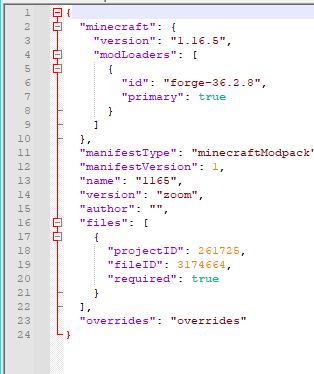
ItemZoom is still not properly exporting from the CF app, https://www.curseforge.com/minecraft/mc-mods/itemzoom/files/3174664
fleet bear
and that means...?
lyric crescent
looks like it did
jaunty plaza
It means when I export my modpack profile from the CF App, it adds itemzoom to the overrides folder, which then errors out when I upload it to CF
digital roost
hello, I created a modpack with mods inside, I would like to load them aternos to create a server how should I do?
lyric crescent
 fleet bear
digital roost
hello, I created a modpack with mods inside, I would like to load them aternos t...
fleet bear
digital roost
hello, I created a modpack with mods inside, I would like to load them aternos t...
!notcf
bot's still dead...
jaunty plaza
Hrmm... Maybe I will remove it from the pack and re-add it
fleet bear
jaunty plaza
It means when I export my modpack profile from the CF App, it adds itemzoom to t...
Delete the mod and install it via the app
digital roost
fleet bear
!notcf
sorry i speack english a little
lyric crescent
ask aternos
digital roost
lyric crescent
ask aternos
i?
lyric crescent
u
jaunty plaza
digital roost
i?
Yeah, you likely will have to manually add the modpack to the server. Most server hosting sites only add packs that have a certain number of downloads associated with them, and custom packs rarely make the list
digital roost
can i download my modpack from curseforge somewhere and then upload it to my server?
lyric crescent
ask aternos how to do it
fleet bear
This has nothing to do with CurseForge. You need to talk to the hosting company.
If you want to talk about server stuff do so in #👽︱game-support
jaunty plaza
It should already be in your instance folder. There are three dots next to the play button, click that and select open folder, that will allow you to add them to your server. But like Yamza and Claycorp said, it's not really a CF issue so you should reach out to Aternos
jaunty plaza
fleet bear
Delete the mod and install it via the app
That fixed it, thank you
fleet bear
👌
 silk arch
How do I fix Exception during a WebClient request?
opal cipher
!webclient
.. Right.
Restart your computer.
Try connecting through cable instead of wifi
silk arch
okay thank you ill try
opal cipher
Good luck!
 orchid lake
How i can do Russian folder if i can't rename my user to eng language?
lyric crescent
silk arch
opal cipher
Good luck!
i cant use ethernet but my download and upload speeds should be just fine 40+
lyric crescent
wifi connections are inherently unstable, curseforge doesnt like that
 odd echo
hello there, so my minecraft launcher was updated to the one for windows 10/11 and now my modpacks dont start anymore. how do i connect cf to the new minecraft launcher + transfer the modpacks if possible
odd echo
🙂
thx
DUCK
so i cant run cf on the new launcher ? thats shit
but nevermind, im addicted ill figure something out
lyric crescent
why does that matter
odd echo
autism
digital roost
fleet bear
<#525372338653626389>
that new minecraft launcher only matter for windows
 lapis fulcrum
None of the cf mods im using are running on the legacy launcher anymore, only 'normal' versions of minecraft are working...
lyric crescent
care to explain what you are doing
lapis fulcrum
nevermind it was the new launcher, i deleted it so it should be fine, it was preventing me from running anything that isnt 'normal' minecraft.
which is really weird
mild vine
queen storm
Then install the normal way?
Exported a version of the modpack without the options and it seemed to install properly
No issue
fleet bear
no
digital roost
wait, doesn't using fabric allow snapshots?
 jagged marsh
theres versions of fabric for snapshots yes but curseforge doesn't allow usage of snapshots unfortunately
 shadow jewel
Hello sorry for this ticket but i want play to this mod but a can't download it.. Actually when i am around 30% he make me this .
If you can help me please
(Sorry for my pretty bad english )
Hello sorry for this ticket but i want play to this mod but a can't download it.. Actually when i am around 30% he make me this .
If you can help me please
(Sorry for my pretty bad english )
[Medieval mod 1.17.1]
 fleet bear
Download the mod in the app not the site
fleet bear
what doesn't work
shadow jewel
Don't really know i just press on download bouton and when i am around 30% he make me the message fail
signal ridge
this a mod or modpack? they arent the same thing. Link it from the site
shadow jewel
Its a modpack
signal ridge
Link the pack, can see if I can download it
signal ridge
ok, just helps me find the pack easier. Installing it now
shadow jewel
Okep
signal ridge
Pack installed just fine for me? You on wifi for your internet by chance?
shadow jewel
Ho wait, my curse forge is not at the last version maybe this block the download
signal ridge
Relaunch your cf app
shadow jewel
I will uninstall it and download again for make sure
Well its done. i will try download the modpack
signal ridge
ok
digital roost
soo like i was trying this xray mod but it shows ores that arent there
red patioBOT
Your question is not related to CurseForge owned/maintained features or services.
Please use the appropriate game room by getting a game role from #786424115535544350 or use #👽︱game-support for help.
CurseForge does not make or maintain any of the content or games used on the site or app. Just because it's on the site/app does not make it a problem with CurseForge. Move rooms as requested, arguing about it will result in you being removed from the discord.
 odd pendant
getting "i/o error occurred" when trying to update mods in my pack [minecraft, 1.12.2]

learn more just takes me to the generic troubleshooting page which makes no reference to this error
lyric crescent
!owlogs
red patioBOT
<:overwolf:857375414002384916> How to get Overwolf logs! <:overwolf:857375414002384916>
lyric crescent
send that, will be a bit before i can check it tho
 void lintel
wrong place sorry
lyric crescent
odd pendant
"message": "The process cannot access the file 'C:\\Users\\kylea\\curseforge\\minecraft\\Instances\\ExplorationTech 1.0.0 (1) (1) (1) (1)\\mods\\astikorcarts-1.12.2-0.1.2.7.jar' because it is being used by another process.",
Try restarting your computer
 slim cliff
"modding folder cannot be set on OneDrive" and i reinstalled it and opened my onedrive to
 limpid crypt
Hi I could use some help if someone is available
I have been trying to download the top pixelmon modpack and it wont install, it just goes to downloading 1 of 7 mods and stops at 14%
lyric crescent
slim cliff
"modding folder cannot be set on OneDrive" and i reinstalled it and opened my on...
? mc-path
red patioBOT
Change your install path to the following:
For Windows: C:\CurseForge
-Go to C:\ drive. Make a new folder. Name it Curseforge.
For Mac: /Users/Shared/CurseForge
If Minecraft is not installed in CurseForge App:
- Click the in the top left.
- Select Minecraft from the list of games.
- Select the
Advancedoption and pick the folder you just made. - Click
Continue.
If Minecraft is installed in CurseForge App:
- Click the in the bottom left.
- Select the Minecraft tab.
- Click
Change. - Select the folder you just made.
:no_entry_sign: Minecraft Files should NOT be installed inside the following locations :no_entry_sign:
:no_entry_sign: .minecraft folder.
:no_entry_sign: OneDrive folders.
:no_entry_sign: Desktop folder.
:no_entry_sign: Drive roots I.E. Directly into the C:\ drive.
:no_entry_sign: iCloud enabled folders.
:no_entry_sign: or any other cloud saved folder.
:no_entry_sign: or folders with non-English characters in them.
If any of the above are in the path you need to change/move it!
lyric crescent
limpid crypt
I have been trying to download the top pixelmon modpack and it wont install, it ...
Either your internet is too slow or there is an issue with your connection
?webclient
red patioBOT
Timeout/WebClient errors are from networking issues to your computer. You can try a few things to fix it:
- Restart the computer.
- Restart your router/modem.
- Try another internet source like a hotspot, wired connection or moving closer to the WiFi.
- Pause/Stop other things using the internet. (Streams, music, etc)
- If this still doesn't work, try again in an hour and hope your connection is stable.
slim cliff
lyric crescent
? mc-path
idk where it is
lyric crescent
"it"?
slim cliff
my mc path
lyric crescent
Doesn't matter
slim cliff
then idk wtf to do cus its not working
lyric crescent
Read the instructions
wraith dove
How do i share a custom modpack to my friends?
I made it on curseforge
And now i dont see an option to publish or share it
limpid crypt
lyric crescent
Either your internet is too slow or there is an issue with your connection
Are there any other things it could be, because I have fairly good internet. It just seems to get to 14% everytime I try anything and then it stops and eventually if I wait long enought it times out
signal ridge
!mc-packshare
red patioBOT
There are two ways to share a modpack you've made with others...
Export and Share - For Friends to Small Groups.
- Click the Icon for the modpack.
- Click the button next to play.
- Click
Export. - Select the files that should be included.
- Send the zip to the people that want it! They can follow the instructions in
!mc-installpackto install the pack!
Upload to Curseforge - For Public Release to Everyone.
This options will make your pack public to EVERYONE, it comes with extra requirements and will take some effort to set up.
- Go to here: https://www.curseforge.com/project/432/4471/create
- Fill out the information with a proper description of the pack. This should allow anyone to understand what the pack is.
- Click the Icon for the modpack in the CurseForge app.
- Click the button next to play.
- Click
Export. - Select the files that should be included.
- Open your Project you made on the CurseForge site and Upload the file you just made.
- Wait for Moderation & Sync so it can show up in the client! (See
!syncfor limitations)
 placid ginkgo
!sync
red patioBOT
Sync and your Project.
CurseForge App and site do not share the same requirements! You can find things on the site but this does not mean it will be in the app!
For a mod to show up in the app:
- Projects MUST have a file marked as RELEASE or BETA
- Projects MUST be APPROVED
- Projects MUST have a file marked for the GAME VERSION SELECTED/LOADED
- Projects CAN'T be EXPERIMENTAL
- Projects CAN'T be ABANDONED
Files can take a while to show up in the app. If your files still have not shown up either your project is new and you have yet to mark a file as Release/Beta or there is issues with the sync system making it slow.
Vote this issue up if you would like to know when the last sync was! https://curseforge-ideas.overwolf.com/ideas/CF-I-1617
 indigo burrow
For about two days I've been having problems with curseforge, overwolf opens fine and all, but curseforge simply does not load. It shows the little loading bar for a second, and then nothing happens..
Any help?
I've also tried running as administrator and reinstailling
managed to fix it, had to close overwolf in task manager as well as exiting overwolf in the windows task bar thingy
and then reopen it
 pliant pagoda
hello can someone help me? i downloaded a modpack but it doesn't come with optifine how do i install optifine on it?
i placed here but i think doesn't work
 signal ridge
pliant pagoda
hello can someone help me? i downloaded a modpack but it doesn't come with optif...
signal ridge
pliant pagoda
hello can someone help me? i downloaded a modpack but it doesn't come with optif...
!mc-optifine
red patioBOT
We do not offer support for Optifine!
If you have issues with Optifine, remove it. If you want further support try the discord found on their website.
https://www.optifine.net/home
Installing Optifine with modpacks on Curseforge:
- Right click the modpack icon, select
Open Folder. - Put the
Optifine.jarinto themodsfolder. - Now start the modpack.
 trim wing
Hey!
I had to re-install windows and with it curseforge,
the development versions of all my modpacks aren't loading any more on the launcher/don't show up, is there a way to get them to work?
I only have the instance folder of both, nothing else.
I tried making new instances and replacing all the files inside but it didn't load up the mods (only like 13 mods out of the 400 actually inside)
What's the best way to deal with this? I've done a lot of work in both packs so kind of hard to start over with the latest version/zip
fallen loom
pliant pagoda
i placed here but i think doesn't work
OptiForge is not Optifine
digital roost
i have question
lyric crescent
trim wing
Hey!
I had to re-install windows and with it curseforge,
the development version...
Reinstall the mods that arnt detected
fallen loom
Do you plan to ask the question or are you going to wait for someone to commit to answering?
digital roost
no i just zoned out
sorry
i try to launch ksp with curseforge and mods, but it just get stuck on loading part upgrades
someone suggested ckan but it just does the same thing
lyric crescent
Sounds like the issue is the mods, as it clearly is not curseforge
lyric crescent
Or your pc
lyric crescent
Either way this isn't a curseforge issue
trim wing
lyric crescent
Reinstall the mods that arnt detected
there's kind of over 380 mods missing, not really an option ahaha
Before re-installing this didn't happen though, if i just copied an instance folder to Curseforge it would immediatelly work
lyric crescent
This has been an issue since the app came out
 scarlet zephyr
I cannot get All the Mods skyblock to load. it just causes the game to crash. what do I need to do
fallen loom
Is it crashing loading the launcher or launching the game?
scarlet zephyr
beginning to launch, gettin ghalfway through and then freezing
fallen loom
Is it returning to the launcher or is it just freezing?
scarlet zephyr
just freezing, screen greys out
scarlet zephyr
too long. it just sits there. it doesn't like kick me out of it or anything
i am loading it through curseforge. am I supposed to do it another way?
fallen loom
Are you tabbing out or selecting other windows while it loads?
scarlet zephyr
no
fallen loom
Can you give me an actual number rather than "too long"?
scarlet zephyr
also it doesnt load the new launcher either. not sure that an issue either. and no I can't it doesnt do anything. it sits there greyed out not doing anything
fallen loom
In regards to the new launcher: #📢︱news
I'm asking you how long you've let it sit before killing it, are you unable to estimate time or look at a clock?
scarlet zephyr
probably 10 minutes before I killed it
red patioBOT
Sending logs for support.
- Right-click the modpack profile icon OR click the button in the modpack profile.
- Click
Open Folder. - Open the
logsfolder. - Drag and drop the FILE named
latestORdebuginto discord.
fallen loom
I don't care if you think it does the same thing, please provide the file I asked for
scarlet zephyr
that one doesnt have a logs folder
fallen loom
Screenshot please
scarlet zephyr
 red patioBOT
How to get the launcher log
- Right click a profile.
- Select
Open Folder - Go back two folders.
- Open the
Installfolder. - Drag the
launcher_log.txtinto discord.
scarlet zephyr
scarlet zephyr
sorry just got back into minecraft. anything I can do?
fallen loom
I'd re commend trying more modern packs, when 1.13 came out Forge changed their loading system and it's a lot faster these days
scarlet zephyr
so what should i be looking for in terms of "numbers" (as in 1.7 etc)
fallen loom
Ideally, the latest version... 1.17.1
scarlet zephyr
kk thanks
upper root
Imo dont bother with 1.17 forge, there are so few mods on there its not worth looking for packs
signal ridge
some have, just not as common till 1.18, as most authors are skipping 1.17
fallen loom
upper root
Imo dont bother with 1.17 forge, there are so few mods on there its not worth lo...
There's plenty of mods...
upper root
Not in the way of big content 'staple' ones, like tinkers or thermal. Im also quite biased cause i play mainly tech, not adventure or magic, and so have absolutely no idea about those
rich flint
the added world size in 1.18 if gonna cause a huge rush for the exit door to anything 1.17 lol
fallen loom
Is it not in 1.17? I've seen a streamer go to negative Y in ATM7 but that could be a mod backporting the feature from a snapshot
 grim wraith
When I upload a Minecraft modpack to the Curseforge website, does it include all the resource packs and data packs that I use, even if they're not hosted on Curseforge? Will it cause any issues with users trying to install it via the app?
rich flint
I include a resource pack (which is also on CF), and datapacks in an "open loader" folder - in my own uploaded modpack files fwiw
 ripe jolt
When I open a mod in curse forge it makes me go into the old mincraft even though I have the new one
grim wraith
rich flint
I include a resource pack (which is also on CF), and datapacks in an "open loade...
Ive been busy with registration so i haven't had a chance to check urs that you sent me yet actually but ty
Actually I'll go download that rn
signal ridge
!notcf
red patioBOT
Your question is not related to CurseForge owned/maintained features or services.
Please use the appropriate game room by getting a game role from #786424115535544350 or use #👽︱game-support for help.
CurseForge does not make or maintain any of the content or games used on the site or app. Just because it's on the site/app does not make it a problem with CurseForge. Move rooms as requested, arguing about it will result in you being removed from the discord.
 fossil coyote
I am new in curseforge. I uploaded my mod file but forgot to write changelog. Can I edit the changelog now?
In short - How to edit the changelog after uploading the file?
fleet bear
click the file tab, click on the file name, click edit
 half crag
Why do I keep getting this error when I try to download any mod pack. errors.unknownError
Cannot find a work around for manual downloads either -_-
I'm trying to download the Enigmatica 6 modpack for Minecraft. But ALL mod packs give the "errors.unknownError" at the bottom of the curseforge app thingy.
rich flint
absolutely nothing else in the message?
half crag
I'll screen shot it if you like, but nope that's all I get
If I could just get a manual .zip file download, I could just install it old school style, but I cannot find a safe link for that.
Also, it dosen't even try to do anything, just pops up "errors.unknownError" tried restarting, re-installing, and updating everything.
Oh well, RIP minecraft... loL
Either I'm extremely foolish, or there is something else going on... Anyone with any little tiny clue would be really apricated..
upper root
The more information you can provide, the more likely someone is gonna be able to help.
Atm all we know is 'it doesn't do anything' and at some point in time whilst downloading a modpack, an error message containing the words 'errors.unknownError' came up. And apparently you managed to update 'everything'
 tough wadi
Hi, Ive just tried to install curse forge, but it keeps crashing and gives me no error code, any fix to this?
opal cipher
!getcf
red patioBOT
Looking to install the CurseForge app?
<:windows:798410728188936222> Windows
Minimum Requirements:
- OS Version: 7 (64 bit), 8.1, 10, 11
- 64 bit Required.
- 350MB storage space.
- Microsoft .Net 4.8
- Intel/AMD quad-core CPU
- 8GB ram
Download: https://download.overwolf.com/install/Download?&PartnerId=4047
If you are having issues with the installer use the URL below to install Overwolf then go to the app store to download CurseForge.
https://content.overwolf.com/downloads/setup/latest/regular.html
<:mac:798410654418862130> Mac
Minimum Requirements:
- OS Version 10.14 or newer.
- 64 bit Required.
Download: https://curseforge.overwolf.com/downloads/curseforge-latest.dmg
:penguin: Linux
Minimum Requirements:
Yes.
Download: :person_shrugging:
opal cipher
Use second link, that is, install Overwolf first and then CF through the app store
tough wadi
it just says seems like curseforge has crash unexpectedly, and provides no error code @opal cipher

 grizzled river
my minecraft crashes anytime I try to use a modpack that uses the old launcher is this a curseforge related issue or my minecraft launcher?
queen storm
!mc-logs
red patioBOT
Sending logs for support.
- Right-click the modpack profile icon OR click the button in the modpack profile.
- Click
Open Folder. - Open the
logsfolder. - Drag and drop the FILE named
latestORdebuginto discord.
tough wadi
i can't even access modpacks
grizzled river
one moment
queen storm
tough wadi
i can't even access modpacks
!owlogs
red patioBOT
<:overwolf:857375414002384916> How to get Overwolf logs! <:overwolf:857375414002384916>
grizzled river
is this the right file?
this is my latest from about 10 minutes ago?
files under log and named latest
rich flint
that is the log for your issue certainly. optifine caused most likely. the issue is a game issue, not the curseforge app - so discuss in #👽︱game-support or a game channel
grizzled river
okay thank you!
queen storm
And you are saying that why exactly? As it is the right file
queen storm
Everybody can be support here 🤷♂️
Still waiting on those logs from you
queen storm
Yes
tough wadi
is there anything wrong?
tough wadi
Already done that about 10 times
queen storm
And how are you doing that then?
tough wadi
How am I doing what?
queen storm
Reinstalling curseforge
queen storm
That is still not explaining how
queen storm
No, did you remove it in any way?
tough wadi
I uninstalled the setup before I redownloaded
queen storm
Go to overwolf, at the top click libraries, find curseforge, uninstall
tough wadi
done
 gaunt crypt
how can macOS use overwolf
red patioBOT
Looking to install the CurseForge app?
<:windows:798410728188936222> Windows
Minimum Requirements:
- OS Version: 7 (64 bit), 8.1, 10, 11
- 64 bit Required.
- 350MB storage space.
- Microsoft .Net 4.8
- Intel/AMD quad-core CPU
- 8GB ram
Download: https://download.overwolf.com/install/Download?&PartnerId=4047
If you are having issues with the installer use the URL below to install Overwolf then go to the app store to download CurseForge.
https://content.overwolf.com/downloads/setup/latest/regular.html
<:mac:798410654418862130> Mac
Minimum Requirements:
- OS Version 10.14 or newer.
- 64 bit Required.
Download: https://curseforge.overwolf.com/downloads/curseforge-latest.dmg
:penguin: Linux
Minimum Requirements:
Yes.
Download: :person_shrugging:
queen storm
!owlogs again, then I will get somebody from Curseforge to look at it
red patioBOT
<:overwolf:857375414002384916> How to get Overwolf logs! <:overwolf:857375414002384916>
tough wadi
gaunt crypt
how to solve this? i've try to change IP address, but also can't log in
 queen storm
gaunt crypt
how to solve this? i've try to change IP address, but also can't log in
queen storm
gaunt crypt
how to solve this? i've try to change IP address, but also can't log in
!owlogs Instructions for mac at the bottom
red patioBOT
<:overwolf:857375414002384916> How to get Overwolf logs! <:overwolf:857375414002384916>
gaunt crypt
plz, help
queen storm
I just told you what to do!
 tough wadi
any response from the guy from curse forge?
queen storm
tough wadi
any response from the guy from curse forge?
No, they are not that fast, patience
tough wadi
okay
queen storm
gaunt crypt
which is the macOS log? can't find it, sorry
Did you see what I posted? As I don't see a Contents folder anywehere there
tough wadi
@queen storm dm me when you get a response
queen storm
tough wadi
<@!525950791710801921> dm me when you get a response
They will contact you instead
tough wadi
okay
gaunt crypt
CurseForge.zip
is too big to upload...
queen storm
You already uploaded one...
unborn basin
gaunt crypt
how to solve this? i've try to change IP address, but also can't log in
Click retry a few times
gaunt crypt
gaunt crypt
is this enough?
queen storm
gaunt crypt
is this enough?
Send /Users/[Username]/Library/Log/CurseForge/main.log
gaunt crypt
queen storm
tough wadi
C:\Users\Joshu\AppData\Local\Overwolf\Extensions\cchhcaiapeikjbdbpfplgmpobbcdkdaphclbmkbj\0.185.5.1\plugins
Can you zip and send that folder?
opal cipher
gaunt crypt
Try restarting your computer.
gaunt crypt
icloud ID or APP
gaunt crypt
opal cipher
Try restarting your computer.
OK, i'll restart now
 hexed igloo
how do i delete files on a project?
unborn basin
gaunt crypt
icloud ID or APP
Disable it and try again
hexed igloo
I cant put an update on a modpack because its getting rejected due to a duplicate file thats in archive/duplicate file
queen storm
hexed igloo
I cant put an update on a modpack because its getting rejected due to a duplicat...
Then change the file you upload?
hexed igloo
queen storm
Then change the file you upload?
its archived already..
i cant move the file on archived though
unborn basin
After it's archived you can delete it
queen storm
hexed igloo
its archived already..
So you archived the file that is on your PC that you want to upload?
hexed igloo
queen storm
So you archived the file that is on your PC that you want to upload?
nono, its archived on the project
i cant delete it
 queen storm
hexed igloo
i cant delete it
queen storm
hexed igloo
i cant delete it
I know, that is why you change the file that you are supposed to upload, like, add an enter somewhere 🤷♂️
Why was it rejected in the first place?
hexed igloo
oh you have to click on the file name instead of trying to tick the checkbox
my bad.
hexed igloo
queen storm
Why was it rejected in the first place?
It was due to a duplicate file on the archive
sorry im new to this 
queen storm
So you try to upload that exact same file again?
hexed igloo
queen storm
So you try to upload that exact same file again?
yeah, i tried archiving it and uploading it. i thought by archiving it, it wouldnt make any more problems.
anyways i just deleted it completely just now
i think
hexed igloo
unborn basin
See?
if its like this it means its deleted now right?

 narrow minnow
right (or archived)
hexed igloo
does that mean i can upload the file again? 
i messed something up thats why i had to archive/delete it
narrow minnow
no, if it is archived, i don't think you can upload teh same exact file
hexed igloo
i just deleted it though
narrow minnow
what is the url to yoru project page?
narrow minnow
why not update the existing file?
if it is the same exact file
what do you want to change here?
hexed igloo
Change the alpha to release, i had no clue that its possible to change it


 narrow minnow
hexed igloo
where is the edit section, same place as where the delete was?
narrow minnow
hexed igloo
where is the edit section, same place as where the delete was?
Do you have this?
 tough wadi
@queen storm
there you go
I was emailed by support, they told me to download curse again. didnt work
narrow minnow
tough wadi
I'll DM you
 junior island
How long does it normally take to have a project/mod approved by a moderator?
unborn basin
!status
red patioBOT
Project Moderation Time
Project/File moderation is done on these days unless otherwise mentioned:
Sunday, Monday, Tuesday, Wednesday, Thursday: <t:1631170800:t> - <t:1631199600:t> (Your time)
Friday, Saturday: No Moderation!
Projects are moderated First in, First out. If you submit late in the work day, it will likely get left until the next day!
New Projects or anything flagged for manual review: 1-3 Working Days
Updates to approved projects not needing manual approval: 1 Hour
Changes will only show in the app if the project meets the requirements in the ?sync command and up to 24 hours has passed from when it was accepted.
 crimson gale
What Do I need to do?
