#🔥︱curseforge-support
1 messages · Page 565 of 1
 lyric crescent
 deft solstice
i need some assistance i just restored my pc a few days ago thx to W11 kept causing issues and now none of the modpacks i had saved are working cuz i keep getting the same error
lyric crescent
? mc-installfix
 red patioBOT
- Click on the Minecraft Tab on the Left side of the CurseForge App.
- Click
 button next to the
 Create Custom Profileoption. - Click

Repair Installationoption. - Play game.
NOTE: You will not lose any modpacks or worlds, These are saved in the Instances folder. DO NOT TOUCH THIS FOLDER OR YOU WILL LOSE EVERYTHING
deft solstice
i keep getting an error about the JEI (Just Enough Items)
Error: net.minecraftforge.fml.common.LoaderExceptionModCrash: Caught exception from Just Enough Items (jei)
Exit Code: -1
 upper root
!mc-logs
red patioBOT
Sending logs for support.
- Right-click the modpack profile icon OR click the button in the modpack profile.
- Click

Open Folder. - Open the
logsfolder. - Drag and drop the FILE named
latestORdebuginto discord.
upper root
red patio
Do this into #👽︱game-support
 violet vessel
heyy, tried running the new skyfactory one in curseforge, yet I get an error after; here's the logs for it:
 rich flint
probably just corrupted MC core files
 violet vessel
I already tried repair installation; didnt work. I'll try it again tho for safe measures
rich flint
you should see the MC files re-downloading in the vanilla launcher
red patioBOT
╰( ͡° ͜ʖ ͡° )つ──☆*:・゚ *˜”*°•.˜”*°• Many Help •°*”˜.•°*”˜* <:curselit:796985620550385705>
Please provide a description of your issue with as much detail as possible. If you have an issue with a mod or modpack, tell us the name. Explain what you can see happening. Be specific!
 Tell us what is happening, we already know it "doesn't work".
Avoid using words like "it", tell us exactly what "it" is.
Don't assume anyone knows what you are talking about, be specific.
Tell us what you expected to happen.
Provide screenshots or video if possible.
Provide a log if possible. ?mc-log
rich flint
you know there's a bot-spam channel right?
 rich flint
eh good enough. it's deleting files really
violet vessel
I see. I'll try launching it
rich flint
wait did you do the button "repair profile" or "repair installation" ?
oh i guess it's within the MC tab so must be the default message now
violet vessel
the repair installation button
violet vessel
you have to have an OptiFine installation I'm pretty sure
rich flint
?mc-optifine
red patioBOT
We do not offer support for Optifine!
If you have issues with Optifine, remove it. If you want further support try the discord found on their website.
https://www.optifine.net/home
Installing Optifine with modpacks on Curseforge:
- Right click the modpack icon, select
Open Folder. - Put the
Optifine.jarinto themodsfolder. - Now start the modpack.
 jaunty widget
how do i get that?
rich flint
read the autoreply. all of it.
rich flint
wherever their instructions wiki say?
jaunty widget
can u help me out with the link?
 hexed onyx
i still can't download better minecraft modpack
 plucky drift
Can someone help me out with this? TwT

I just wanna know how to change to the one i need to be on
 patent oak
get the older version?
plucky drift
yea
patent oak
what version of minecraft dungeon mod do u have?
patent oak

 fleet bear
!mc-updatemodloader
red patioBOT
You can update the mod loader within the same game version in the CurseForge app by following these steps!
- Click on the modpack profile you are working with.
- Click on the button next to the play button.
- Click on the
 Profile Options button.
 - Select the mod loader version you want from the dropdown.
- Play!
If you need to update to a new game version, a new profile is required.
 fleet bear
I gave you the instructions you need.
patent oak
oh yea that i forgot that was a feature
fleet bear
yes
 violet vessel
@rich flint it worked. thanks!
 swift pond
im so happy
that curse forge is gonna fix the mc launcher FINALLY THANK YOU DEVS!!!!
patent oak
wdym by that?
fleet bear
I have no clue what they are even talking about. Curseforge doesn't even make the game launcher.
hexed onyx
please fix the webclient error
lyric crescent
Webclient error is an issue with your connection
hexed onyx
my internet connection is fast
can someone just give the modpack for better minecraft because of my "slow internet connection"
fleet bear
Nobody said it had anything to do with a slow connection. There's far more to it than speed
hexed onyx
bruh i'm out i just want to play the modpack
fleet bear
Ok bye
hexed onyx
i'm just gonna download the server pack
 opal cipher
hexed onyx
i'm just gonna download the server pack
opal cipher
hexed onyx
i'm just gonna download the server pack
Did you run through all Windows Updates, as I asked you?
 lavish halo
So uh I can't even launch Curseforge anymore. I went to try it today, and I have even redownloaded, and it just. Won't launch without giving me the, "Oops, something went wrong..." error. I'm not even able to select a modpack.
lavish halo
Okay apparently uninstalling a reinstalling fixed it, let's hope it lasts. :T
 silent fulcrum
hey how do you add more modpacks to minecraft?
 signal ridge
Are you using the cf app?
signal ridge
Curseforge app
silent fulcrum
yeah I have it
signal ridge
Is this a pack you made or downloaded?
silent fulcrum
downloaded
signal ridge
!mc-modifypack
red patioBOT
How to add/remove mods in a modpack.
- Click on the picture of the modpack.
- Click the

Add More Contentbutton, IF this button is not there, see below before continuing. - Find the Mods, Resource Packs or Maps you wish to Install and click
Installon them. - Wait for all the required mods to be downloaded.
- Start the modpack.
How to Enable/Disable content management for modpacks.
- Click on the picture of the modpack.
- Click on the button next to the
Playbutton. - Click on
Profile Options. - Check the
Allow content management for this profileoption if you want to edit the content of the modpack, uncheck it to disable.
NOTE: The Allow content management for this profile option is what allows you to Delete, Disable, Update or Install any Mods, Resource Packs or Maps managed by CurseForge. It must be on to modify any of them! (Currently)
signal ridge
Just note that if you add, remove or change anything and the pack breaks your on your own to fix it.
signal ridge
Did you enable content management for the pack?
silent fulcrum
where is that
signal ridge
Read the bot message, it explains how
silent fulcrum
what does it mean picture of the modpack?
signal ridge
When you look at all the packs you have, the picture that is above the play button for that pack. That’s what it is talking about
signal ridge
Screen shot
silent fulcrum
idk how to screenshot it
signal ridge
Windows or Mac
silent fulcrum
windows
upper root
Win + shift + s
The screenshot is automatically copied to your clipboard so you can ctrl v into discord
 vale axle
I got a problem with Curseforge

If I'm correct it has something to do with the new launcher
signal ridge
Are you trying to update the cf launcher to the new launcher? Or does this happen when you try and play a pack?
vale axle
umm no, I just want to play PO2
silent fulcrum
the screenshot for windows 10 is just annoying me
signal ridge
vale axle
umm no, I just want to play PO2
!mc-installfix try this
red patioBOT
- Click on the Minecraft Tab on the Left side of the CurseForge App.
- Click button next to the
Create Custom Profileoption. - Click
Repair Installationoption. - Play game.
NOTE: You will not lose any modpacks or worlds, These are saved in the Instances folder. DO NOT TOUCH THIS FOLDER OR YOU WILL LOSE EVERYTHING
 worldly harness
Hi, need some advice. Someone I worked with for a project has suddenly removed my name and credit to part of the assets of the project in attempt to take credit for the asset (And also cf-points).
I contacted via a support ticket a while ago and I have not yet heard anything, therefor my next move to ask around here
vale axle
signal ridge
!mc-installfix try this
how?
signal ridge
silent fulcrum
the screenshot for windows 10 is just annoying me
How so? Hold those 3 keys and select the area. Then ctrl +v in discord
signal ridge
vale axle
how?
Read what the bot says?
vale axle
!mc-installfix
red patioBOT
- Click on the Minecraft Tab on the Left side of the CurseForge App.
- Click button next to the
Create Custom Profileoption. - Click
Repair Installationoption. - Play game.
NOTE: You will not lose any modpacks or worlds, These are saved in the Instances folder. DO NOT TOUCH THIS FOLDER OR YOU WILL LOSE EVERYTHING
opal cipher
Read what the bot says, don't need to post the command again..
silent fulcrum
 signal ridge
silent fulcrum
signal ridge
silent fulcrum
Click view profile then continue what the bot said to do
silent fulcrum
signal ridge
Click view profile then continue what the bot said to do
okay
signal ridge
vale axle
the method
You did repair installation correct? Not repair profile
Or did an error pop up
silent fulcrum
signal ridge
Click view profile then continue what the bot said to do
Okay but my other problem is that I can't find the Dropz mod
signal ridge
Is it for the version of Minecraft your currently playing?
silent fulcrum
elaborate
 queen storm
Mods for 1.16 will only show up on 1.16, not 1.17
silent fulcrum
the Dropz Mod pack idk what version it uses Idk if its 1,17 or 1,16
queen storm
Post a link
silent fulcrum
yeah
red patioBOT
How to install mods in CurseForge App.
- Click
+ Create Custom Profile - Name it, select the required Minecraft version, select the Forge version (usually the highest number), click
Create. - Click the profile icon.
- Click
Add More Content - Search and install the desired mods.
- Start the game!
How to install mods not on CurseForge.
- Right click the profile picture or Open the profile and click the Icon next to the play button.
- Click
Open Folder. - Drag the mod(s) into the
modsfolder. (Note: Some mods will require others, to run. Make sure to read the instructions for the mod!) - Start the game!
 signal ridge
What was the pack you were trying to add it too?
queen storm
That is not a pack
silent fulcrum
oh
queen storm
We want to know where you are trying to add it to
signal ridge
No I got that, earlier you were wanting to edit a modpack to add world edit too, is that the same pack you want to add dropz too? If so what pack is it
worldly harness
Should I come back later, seems this channel is a bit busy
opal cipher
worldly harness
Should I come back later, seems this channel is a bit busy
Nah, it's fine!
silent fulcrum
signal ridge
No I got that, earlier you were wanting to edit a modpack to add world edit too,...
yes I wanna have it have dropz and world edit
signal ridge
This isn’t busy, been worse
silent fulcrum
but I don't think that is possible
worldly harness
worldly harness
Hi, need some advice. Someone I worked with for a project has suddenly removed m...
Alright then.
Can I get some support for this question?
signal ridge
silent fulcrum
yes I wanna have it have dropz and world edit
Ok to what modpack? Still haven’t answered the question
silent fulcrum
signal ridge
Ok to what modpack? Still haven’t answered the question
Rlcraft
opal cipher
worldly harness
Alright then.
Can I get some support for this question?
I'll poke some higher ups.
signal ridge
silent fulcrum
Rlcraft
Rn raft is for 1.12.2, you cannot add a 1.16 mod to that, which is what dropz is.
silent fulcrum
signal ridge
Rn raft is for 1.12.2, you cannot add a 1.16 mod to that, which is what dropz is...
oh
than does vanilla minecraft work?
queen storm
signal ridge
Mods work by for the version of Minecraft they are made for, you can’t mix versions together. Like time said 1.16 mods will only work in 1.16
queen storm
Then follow the instructions
silent fulcrum
signal ridge
Mods work by for the version of Minecraft they are made for, you can’t mix versi...
so do I make a 1,16 custom profile and add drop z?
signal ridge
If you want sure, that will not add it to rlcraft tho, as it’s not available for that version of mc
silent fulcrum
signal ridge
If you want sure, that will not add it to rlcraft tho, as it’s not available for...
wait is 1,16,4/1,6,5 count as 1,16,
signal ridge
Also highly don’t recommend adding mods to packs you didn’t make, but that’s up too you
vale axle
my Curseforge is officially broken
signal ridge
You will need to look at the mod on the site and see what version of mc the mod is for.
vale axle
I'll need to re-install it
signal ridge
How so?
vale axle
windows update etc, was gonna startup PO2 but when I clicked play it went to Blue Screen of Death, update caused it, that's how Curseforge broke
fleet bear
worldly harness
Hi, need some advice. Someone I worked with for a project has suddenly removed m...
Can you please send me the ticket #?
Also what was your agreement with the owner of the project? Depending on what you agreed to they have every right to remove you from the project.
silent fulcrum
signal ridge
How so?
ok so I made the custom profile how do I add the Dropz Mod?
worldly harness
fleet bear
Can you please send me the ticket #?
Also what was your agreement with the owner...
Should I dm you?
fleet bear
If you wish to keep it out of the public space, sure.
queen storm
silent fulcrum
ok so I made the custom profile how do I add the Dropz Mod?
Not gonna post it again, read
 bitter hinge
How to fix this?
 signal ridge
You on wifi or cable connection for internet
bitter hinge
cable
vale axle
maybe dodgy lan
signal ridge
Does the overwolf app open?
silent fulcrum
queen storm
https://discord.com/channels/428228256236306434/782027635252920322/9057357718336...
so I tried adding the Dropz Mod but it was a 1,1,4 version as it said 🗿
signal ridge
Dropz is a mod not a modpack
silent fulcrum
sorry meant to put mod
vale axle
fixed my problem, good thing I had the saves backed up
silent fulcrum
and on curseforge it only has 1,1 and not 1,1,4
queen storm
silent fulcrum
so I tried adding the Dropz Mod but it was a 1,1,4 version as it said 🗿
To what?
silent fulcrum
queen storm
To what?
A custom profile
queen storm
silent fulcrum
A custom profile
Which modloader? Which minecraft version?
silent fulcrum
queen storm
Which modloader? Which minecraft version?
java
signal ridge
That’s not what he asked
queen storm
Modloader, the thing you picked on your custom profile
silent fulcrum
queen storm
Modloader, the thing you picked on your custom profile
the mod?
signal ridge
Mod loader: forge OR fabric
Mc version: 1.16.5, 1.16.4, 1.16.3 etc
silent fulcrum
for dropz it needs 1,1,4 but the problem 1,1 is the lowest it goes which means I can't use it
signal ridge
That’s the file version
silent fulcrum
yeah
queen storm
You are not answering our questions.
I will remove you if you keep doing that
Which modloader, which minecraft version?
silent fulcrum
queen storm
You are not answering our questions.
I will remove you if you keep doing that
forge and 1,16,5 if that is what you're asking
queen storm
Thank you, it only works on fabric
silent fulcrum
queen storm
Thank you, it only works on fabric
I know but the problem is fabric won't let me use the dropz mod when I clicked on the mod folder
vale axle
everything works A Okay, my farm and "Unfinished" factory is still going fine
queen storm
silent fulcrum
I know but the problem is fabric won't let me use the dropz mod when I clicked o...
That is why you need a fabric profile, not forge
silent fulcrum
queen storm
That is why you need a fabric profile, not forge
how do I get a fabric profile
silent fulcrum
okay so I picked fabric
 cinder palm
Can anyone help me with publishing to curse from git?
 dim quiver
whenever i try to start one of the mods it says i need to update the launcher which i followed the link and downloaded but curseforge keeps telling me to update the launcher
queen storm
Ignore it, just continue
dim quiver
ok ty for the help
 robust ice
Did a bit more digging into my issue; It seems that when I load the minecraftinstance.json files for packs that do work into Notepad++, they are validly formed JSON scripts, but when I load the minecraftinstance.json file for packs that don't load, it seems that they're corrupted, and just show tons of NULcharacters in NP++
I'm gonna go ahead and assume that's my issue, report it, and move on after 3 days of trying to assess and fix this
 versed crag
why is it doing this lol

 quiet flicker
Hello! Based on this
<#📢︱news message>
I would like you let you know that this issue is same for retail wow aswell
queen storm
quiet flicker
Hello! Based on this
<https://discord.com/channels/428228256236306434/5253723386...
red patioBOT
<:overwolf:857375414002384916> How to get Overwolf logs! <:overwolf:857375414002384916>
versed crag
 unborn basin
Send me your logs please
unborn basin
Send me your logs please
^^
 stone cliff
how do i update the modloader on my modpack?
fleet bear
!mc-updatemodloader
red patioBOT
You can update the mod loader within the same game version in the CurseForge app by following these steps!
- Click on the modpack profile you are working with.
- Click on the button next to the play button.
- Click on the Profile Options button.
- Select the mod loader version you want from the dropdown.
- Play!
If you need to update to a new game version, a new profile is required.
stone cliff
thx
 split hemlock
why can i only see 12 of my addons installed when i have 64?
lyric crescent
where do you see this?
how were they installed?
split hemlock
they are installed trought the curseforge app
yesterday i could see all of them in the curseforge app
today there is only 12
but they are all working
lyric crescent
Assuming this is WoW related, I suggest reporting this issue in #🧙🏼♂️︱warcraft-support
split hemlock
@lyric crescent okay thank u 🙂
 pine scaffold
how to update minecraft launcher on curseforge?
 azure violet
how do i allocate ram to minecraft
lyric crescent
?mc-ram
red patioBOT
How to set Global Minecraft RAM value.
- Click the
 icon in the bottom left to open settings.
 - Click the Minecraft tab.
- Scroll down.
- Slide slider to recommended ram range as seen below.
 azure violet
thsnks
 crystal yacht
I want to modify the modepack a little and share it with my friends, but for unknown reasons, some of the mode packs I sent to my friends disappear! How can I share the custom modepack with my friends while maintaining the mode, settings, and map of the mode pack I am playing?
lyric crescent
?mc-packshare
red patioBOT
There are two ways to share a modpack you've made with others...
Export and Share - For Friends to Small Groups.
- Click the Icon for the modpack.
- Click the button next to play.
- Click

Export. - Select the files that should be included.
- Send the zip to the people that want it! They can follow the instructions in
!mc-installpackto install the pack!
Upload to Curseforge - For Public Release to Everyone.
This options will make your pack public to EVERYONE, it comes with extra requirements and will take some effort to set up.
- Go to here: https://www.curseforge.com/project/432/4471/create
- Fill out the information with a proper description of the pack. This should allow anyone to understand what the pack is.
- Click the Icon for the modpack in the CurseForge app.
- Click the button next to play.
- Click
Export. - Select the files that should be included.
- Open your Project you made on the CurseForge site and Upload the file you just made.
- Wait for Moderation & Sync so it can show up in the client! (See
!syncfor limitations)
jaunty widget
someone pls help

 pine scaffold
The status of the file Albion-1.0.zip (Albion) has been changed to Rejected
Notes:
The following files belong to CurseForge-hosted projects, and should therefore not be added directly to zip files:
overrides/resourcepacks/Better-Leaves-6.0-1.13+6.zip
overrides/resourcepacks/Bonsai_Pots_1.4.zip
overrides/resourcepacks/FreshAnimations_v1.4.1.zip
overrides/resourcepacks/Transparent+GUI-1.17.X-R1.1.zip
overrides/resourcepacks/Updated+Seeds.zip
overrides/resourcepacks/Vanilla+Additions+Dark+GUI+Add-On+1.2.2.zip
overrides/resourcepacks/xali's+Enchanted+Books+v0.8.zip
These files should, instead, be referenced in the manifest.json file generated by the Twitch Desktop App during a profile export.
so i need to remove them trying to post a modpack?
 viral briar
 cunning marten
change version of what? mc version? or modloader version?
and why do you need to update curseforge?
lyric crescent
pine scaffold
The status of the file Albion-1.0.zip (Albion) has been changed to Rejected
Not...
?reject-cfhosted
red patioBOT
The following files belong to CurseForge-hosted projects, and should therefore not be added directly to zip files:
-
Remove any mods listed in the error message from the profile you exported. Then reinstall them with the CurseForge app. DO NOT drag and drop files from the site.
-
Export the profile again, open the new zip that was just made. Check for the
overrides/modsfolder. If you still see any mods in that folder do the step above again for each mod. -
Upload the zip once complete and no more mods show in the
overrides/modsfolder.
lyric crescent
..what
pine scaffold
yea I dont follow what i need to do here
lyric crescent
which part? it's written pretty clearly
lyric crescent
oh yea, missed that
 lyric crescent
?mc-login
red patioBOT
Minecraft Logins
CurseForge does not handle or touch the Minecraft Login.
You must own JAVA Edition
If you have a DEMO button instead of a PLAY button in the launcher you are logged into an account that does not own the game. CurseForge requires you to own the game to use it.
Follow the steps in the pictures below. If you bought Minecraft after October 2020 or you have transferred your account you will use a Microsoft account.
Otherwise you must use a Mojang account until you transfer it!

 median onyx
before that
lyric crescent
pine scaffold
I mean i am trying to have resource packs included
can you send me the project link for one of those resource packs
lyric crescent
can you send your project link as well
pine scaffold
lyric crescent
Need to pass this one on to the CF devs, will get back to you if I hear anything. For now, if you don't want to wait, you can remove the resource packs and upload again.
pine scaffold
ok
lyric crescent
 tame grail
my fault
cunning marten
viral briar
change version of what? mc version? or modloader version?
and why do you need to...
modpack version
I'm 3 updates behind
And I'm wondering if I can't see the change modpack version button because my CurseForge isn't up to date
lyric crescent
what version is your curseforge
cunning marten
I think it was 183.3.3? Not at my PC right now
lyric crescent
let us know when you are
cunning marten
Is there any other reason why I wouldn't have the "change version" button when I right-click a modpack?
lyric crescent
when you are able to use your pc we can continue this
cunning marten
alright, I'll let you know then
 sturdy quiver
Why does this pop up after i try to start a modpack

 pure prawn
is there an easy way to share a custom modpack with a friend?
pine scaffold
yes
lyric crescent
?mc-packshare
red patioBOT
There are two ways to share a modpack you've made with others...
Export and Share - For Friends to Small Groups.
- Click the Icon for the modpack.
- Click the button next to play.
- Click
Export. - Select the files that should be included.
- Send the zip to the people that want it! They can follow the instructions in
!mc-installpackto install the pack!
Upload to Curseforge - For Public Release to Everyone.
This options will make your pack public to EVERYONE, it comes with extra requirements and will take some effort to set up.
- Go to here: https://www.curseforge.com/project/432/4471/create
- Fill out the information with a proper description of the pack. This should allow anyone to understand what the pack is.
- Click the Icon for the modpack in the CurseForge app.
- Click the button next to play.
- Click
Export. - Select the files that should be included.
- Open your Project you made on the CurseForge site and Upload the file you just made.
- Wait for Moderation & Sync so it can show up in the client! (See
!syncfor limitations)
lyric crescent
click the file, edit, change it
lyric crescent
you cant upload a modpack with it, you can have anything you want in a modpack on your pc
 midnight fox
mods solved it
pine scaffold
lyric crescent
you cant upload a modpack with it, you can have anything you want in a modpack o...
yea i meant the first one may i ask why
lyric crescent
the dev of optifine doesnt allow it
pine scaffold
ah ok
cunning marten
Optifine is client-side right? So I can add it even if the server doesn't have it?
 magic moon
Greetings !
My curseforge uses the old Minecraft Launcher. How do I force it to open the new one. I got the new one from MS store cuz they redirected me there.
signal ridge
cunning marten
Optifine is client-side right? So I can add it even if the server doesn't have i...
Correct
signal ridge
magic moon
Greetings !
My curseforge uses the old Minecraft Launcher. How do I force it to...
magic moon
Thanks @signal ridge !
pine scaffold
how can i promote in #774423765509603419
lyric crescent
need a dev role, read the pins in #829596904589361162
pine scaffold
ah ok
 restive locust
hi
so i just got a new computer and wanna sync all my addons on wow to the new one
does anyone know how to do this? (:
lyric crescent
log in on the old pc and enable sync in the settings, then log in on the new one and do the same
restive locust
ok but i didnt get a options to logon to an account on curseforge?
how will it know what to sync from? my wow acc?
lyric crescent
it would sync to your curseforge account
restive locust
found it, twitch login. thanks man for the help! appreciated it 😄
 final fern
Umm so I'm making a modpack with the curseforge launcher and I know that two of the mods needed to be updated because I didn't update them recently but the launcher doesn't show the update icon anymore and is instead saying that a mod that is already up to date need to be updated.
Just for a proof. The two mods that used to be at the top were Champions and Forbidden and Arcanus.

Just wondering what's going on thanks 😄
I already tried reloading the launcher btw didn't fix it sadly.
And yes both champions and forbidden and are still in the pack.
lyric crescent
check the versions tab for the mods, see if you can update them that way
midnight fox
im trying to download a modpack but... the loading freezes
and an hour past and nothing moved
now i cant even enter the downloading
lyric crescent
download, or loading? they arnt the same thing
final fern
lyric crescent
check the versions tab for the mods, see if you can update them that way
Yes it does look like I can. Only unfortunate thing is that there are a lot of mods to go through to see which ones have a new update that way.
lyric crescent
midnight fox
loading? it doesnt even load in
?mc-log
red patioBOT
Sending logs for support.
- Right-click the modpack profile icon OR click the button in the modpack profile.
- Click
Open Folder. - Open the
logsfolder. - Drag and drop the FILE named
latestORdebuginto discord.
midnight fox
here
lyric crescent
final fern
Yes it does look like I can. Only unfortunate thing is that there are a lot of m...
it's possible that your instance is broken. try closing curseforge, removing the minecraftinstance.json, then open curseforge again
lyric crescent
midnight fox
here
?mc-ram
red patioBOT
How to set Global Minecraft RAM value.
- Click the icon in the bottom left to open settings.
- Click the Minecraft tab.
- Scroll down.
- Slide slider to recommended ram range as seen below.
lyric crescent
read the message?
final fern
lyric crescent
it's possible that your instance is broken. try closing curseforge, removing the...
Alright I'll give this a shot
No luck. Still shows the same thing :/
lyric crescent
explain what part you dont understand
lyric crescent
the curseforge app
lyric crescent
read
lyric crescent
ok so try playing the pack
midnight fox
restart the loading you mean?
lyric crescent
yes
final fern
Yeah for a split second it shows "No Mods Installed" in the profile and then I assume it generates a new minecraftinstance.json but it still doesn't show the correct updating information.
I'll try a quick pc restart but I doubt that'll fix it since closing the program with task manager and opening it again doesn't. Worth a shot at least.
final fern
Yeah still shows the same :/
lyric crescent
?ticket-app
red patioBOT
:bug: Reporting via the CurseForge App :bug:
-
Click the
 icon in the bottom left.
 -
Select

Open a Ticket. -
Fill out the form with accurate detailed information, "It doesn't work" isn't helpful! What exactly doesn't work and why doesn't it work should be easy to answer!
-
Make sure to upload your Overwolf logs with the
Upload Fileoption on the ticket, information on how to get these logs can be found here https://support.overwolf.com/en/support/solutions/articles/9000176827-how-to-get-your-overwolf-logs -
Submit!
 final fern
Alright will do.
midnight fox
omg my loading is above than before
 inner steppe
Is this a good place to ask about specific crash/error codes?
lyric crescent
?mc-log
red patioBOT
Sending logs for support.
- Right-click the modpack profile icon OR click the button in the modpack profile.
- Click
Open Folder. - Open the
logsfolder. - Drag and drop the FILE named
latestORdebuginto discord.
lyric crescent
yea, that's not related to curseforge, so doesnt belong here
inner steppe
The channel or the discord?
lyric crescent
inner steppe
The channel or the discord?
!notcf
red patioBOT
Your question is not related to CurseForge owned/maintained features or services.
Please use the appropriate game room by getting a game role from #786424115535544350 or use #👽︱game-support for help.
CurseForge does not make or maintain any of the content or games used on the site or app. Just because it's on the site/app does not make it a problem with CurseForge. Move rooms as requested, arguing about it will result in you being removed from the discord.
inner steppe
Alright. Hopefully I get acknowledged this time there 🤷🏻♂️🤷🏻♂️
Thanks
red patioBOT
There are two ways to share a modpack you've made with others...
Export and Share - For Friends to Small Groups.
- Click the Icon for the modpack.
- Click the button next to play.
- Click
Export. - Select the files that should be included.
- Send the zip to the people that want it! They can follow the instructions in
!mc-installpackto install the pack!
Upload to Curseforge - For Public Release to Everyone.
This options will make your pack public to EVERYONE, it comes with extra requirements and will take some effort to set up.
- Go to here: https://www.curseforge.com/project/432/4471/create
- Fill out the information with a proper description of the pack. This should allow anyone to understand what the pack is.
- Click the Icon for the modpack in the CurseForge app.
- Click the button next to play.
- Click
Export. - Select the files that should be included.
- Open your Project you made on the CurseForge site and Upload the file you just made.
- Wait for Moderation & Sync so it can show up in the client! (See
!syncfor limitations)
opal cipher
I can recommend #🟢︱user-bot-spam if you want to try commands
cunning marten
red patio
Can this be used to send a custom modpack to a server owner for them to use for the server?
I'm not 100% clear on how server mod installation works
lyric crescent
If the owner knows what they are doing. This isnt the place for server support however. If you have server questions they go in #👽︱game-support or #🧱︱mc-other-help
cunning marten
Alright, I'll ask there
cunning marten
lyric crescent
let us know when you are
huh, I just fired my PC up and I guess CurseForge updated or something
The change modpack version button is now there

red patioBOT
Your question is not related to CurseForge owned/maintained features or services.
Please use the appropriate game room by getting a game role from #786424115535544350 or use #👽︱game-support for help.
CurseForge does not make or maintain any of the content or games used on the site or app. Just because it's on the site/app does not make it a problem with CurseForge. Move rooms as requested, arguing about it will result in you being removed from the discord.
lyric crescent
!notcf
 grave lake
When I try to export my modpack it doesn't keep any of the mod files, it just gives a list of the mods that are supposed to be in it
lyric crescent
Yup, that's what it does
grave lake
o
so do I need to add them all in manually?
nvrmd figured it out
am just big dumb
how long will it usually take for it to get verified?
lyric crescent
!status
red patioBOT
Project Moderation Time
Project/File moderation is done on these days unless otherwise mentioned:
Sunday, Monday, Tuesday, Wednesday, Thursday: <t:1631170800:t> - <t:1631199600:t> (Your time)
Friday, Saturday: No Moderation!
Projects are moderated First in, First out. If you submit late in the work day, it will likely get left until the next day!
New Projects or anything flagged for manual review: 1-3 Working Days
Updates to approved projects not needing manual approval: 1 Hour
Changes will only show in the app if the project meets the requirements in the ?sync command and up to 24 hours has passed from when it was accepted.
 sand frost
I downloaded a couple different parts packs for ksp but only one of them is showing up in the game ( this is the first time I've ever used corseforge so I'm lost)
lyric crescent
Don't use curseforge for ksp. Just get ckan.
upper root
!help
red patioBOT
╰( ͡° ͜ʖ ͡° )つ──☆*:・゚ *˜”*°•.˜”*°• Many Help •°*”˜.•°*”˜* <:curselit:796985620550385705>
Please provide a description of your issue with as much detail as possible. If you have an issue with a mod or modpack, tell us the name. Explain what you can see happening. Be specific!
Tell us what is happening, we already know it "doesn't work".
Avoid using words like "it", tell us exactly what "it" is.
Don't assume anyone knows what you are talking about, be specific.
Tell us what you expected to happen.
Provide screenshots or video if possible.
Provide a log if possible. ?mc-log
cunning marten
When I export a custom pack I only get config and resourcepacks, despite having checked the "mods" option

also, the "resourcepacks" folder only has 1 out of the 3 resourcepacks
upper root
Mod files do not get included in the export, however a list of them is, so when you import it curseforge downloads them from the official source. I suspect this is the same for your two resourcepacks, if they are on CF
cunning marten
I'm sending this to a server owner for them to use for a server hosted by Apex, will the server be able to download from CF?
or do they need to import on CF first and then add to the server
upper root
They will need to import from CF first
cunning marten
okay, and then from there they'll be able to get the necessary "mods" and "config" folders right?
upper root
Yes. The configs are already all included in the zip. You can also make a specific server pack
!mc-serverpack
red patioBOT
Serverpacks are special files uploaded alongside an existing project file. If the main file is rejected the server pack is also rejected.
You require an already uploaded export file to upload a server pack!
- Make the server pack by zipping up the required files by selecting the required folders & files. It should include the config and mod folders at a minimum, plus anything else you specifically required to run the server. Start/Run/Setup scripts are optional. Don't include modloader files or the minecraft server jar.
- Go to the
Filestab on the project. - Click the name of the file you wish to upload the server pack to. The pack and server should match pack versions.
- Click
Upload Additional File. - Fill out the form.
cunning marten
This is just if you're making the pack public right
upper root
Yeah, though if the other person doesnt want to have to import through cf you could do that instead (it will increase the file size quite a bit)
cunning marten
ah, I'll just tell them to import from CF then. Thanks!
 slender atlas
Are there any tutorials for using forge for version 1.4.7
fleet bear
slender atlas
Are there any tutorials for using forge for version 1.4.7
!notcf
red patioBOT
Your question is not related to CurseForge owned/maintained features or services.
Please use the appropriate game room by getting a game role from #786424115535544350 or use #👽︱game-support for help.
CurseForge does not make or maintain any of the content or games used on the site or app. Just because it's on the site/app does not make it a problem with CurseForge. Move rooms as requested, arguing about it will result in you being removed from the discord.
 frail cedar
Hi, when I go to download mods for a certain game it says the game isn't downloaded and when I scan and try to manually add the game it won't work either.
fleet bear
What game.
frail cedar
Stardew Valley
fleet bear
!stardew
red patioBOT
Overwolf maintains a known list of issues here, some with solutions, others without.
https://support.curseforge.com/en/support/solutions/articles/9000196615-curseforge-known-issues
Scroll down, look at "Other games"
 hardy spoke
<@&524645667818307596>
fleet bear
Thanks
fleet bear
for what?
 cyan radish
everytime i try to play a Minecraft mod it keeps going back to the OLD launcher. it wont go to the new one. :(
 tepid lagoon
I have a problem with the microsoft account migration thing
I migrated my account but stayed on the old launcher
and whenever i launch a modpack, it makes me either log in with microsoft or mojang
red patioBOT
Minecraft Logins
CurseForge does not handle or touch the Minecraft Login.
You must own JAVA Edition
If you have a DEMO button instead of a PLAY button in the launcher you are logged into an account that does not own the game. CurseForge requires you to own the game to use it.
Follow the steps in the pictures below. If you bought Minecraft after October 2020 or you have transferred your account you will use a Microsoft account.
Otherwise you must use a Mojang account until you transfer it!
opal cipher
!mc-login
tepid lagoon
when i choose microsoft it makes me make a new account even if i enter my same gmail account
aww dang
when i tried using my old mojang account it didnt work
even though i checked both the password and email
whelp
 digital roost
when i wil play a modpack it sends me to the old luncher
opal cipher
Yes, let it do that.
queen storm
What old launcher?
digital roost
so how i play modpacks whit out it sends me to the old luncher
queen storm
Show a screenshot of the launcher
digital roost
eh sso the icon or the luncher when its open?
queen storm
No, a screenshot of the actual thing
digital roost
 queen storm
Yeah, just hit play
digital roost
no its not the modpack
queen storm
How are you starting that launcher?
digital roost
just click on it
queen storm
Are you hitting Play inside curseforge?
digital roost
yea
queen storm
Restart your pc, try again
queen storm
That is not the old launcher...
Show the button on curseforge that you are hitting
At least, the launcher is not your issue here
 queen storm
!mc-installfix
red patioBOT
- Click on the Minecraft Tab on the Left side of the CurseForge App.
- Click button next to the
Create Custom Profileoption. - Click
Repair Installationoption. - Play game.
NOTE: You will not lose any modpacks or worlds, These are saved in the Instances folder. DO NOT TOUCH THIS FOLDER OR YOU WILL LOSE EVERYTHING
digital roost
thank
queen storm
digital roost
? so you also dont know what to do?
Bit impatient within 2 minutes, please don't do that.
 queen storm
Did you try to do it twice?
digital roost
ys
queen storm
That doesn't work, do once, then play
queen storm
!mc-path
red patioBOT
Change your install path to the following:
For Windows: C:\CurseForge
-Go to C:\ drive. Make a new folder. Name it Curseforge.
For Mac: /Users/Shared/CurseForge
If Minecraft is not installed in CurseForge App:
- Click the
 in the top left.
 - Select Minecraft from the list of games.
- Select the
Advancedoption and pick the folder you just made. - Click
Continue.
If Minecraft is installed in CurseForge App:
- Click the in the bottom left.
- Select the Minecraft tab.
- Click
Change. - Select the folder you just made.
:no_entry_sign: Minecraft Files should NOT be installed inside the following locations :no_entry_sign:
:no_entry_sign: .minecraft folder.
:no_entry_sign: OneDrive folders.
:no_entry_sign: Desktop folder.
:no_entry_sign: Drive roots I.E. Directly into the C:\ drive.
:no_entry_sign: iCloud enabled folders.
:no_entry_sign: or any other cloud saved folder.
:no_entry_sign: or folders with non-English characters in them.
If any of the above are in the path you need to change/move it!
queen storm
What do you define as "old"
Because the launcher itself is fine.
opal cipher
Have you tried launching the modpack in the launcher it opens?
queen storm
What do you define as "old"
digital roost
mincraft just brought a new server out
digital roost
ohh sorry
 cerulean igloo
hey does anyone know how to create a online server im tryna create one for me and my brother
fleet bear
!notcf
red patioBOT
Your question is not related to CurseForge owned/maintained features or services.
Please use the appropriate game room by getting a game role from #786424115535544350 or use #👽︱game-support for help.
CurseForge does not make or maintain any of the content or games used on the site or app. Just because it's on the site/app does not make it a problem with CurseForge. Move rooms as requested, arguing about it will result in you being removed from the discord.
 graceful crystal
Hello everyone, i have a question regarding uploading modpacks to CurseForge. I have made my own modpack (through CurseForge). It is a modpack i like to call Minecraft: Timeless Edition. Basically, everything that is minecraft related (Dungeons, Earth, Beta, Story Mode) is in the modpack. However, CurseForge doesn't seem to allow the project to have the game name: Minecraft. Which i got a bit confused, since there are many many modpacks on CurseForge with "Minecraft" in their project title. Is this an error of some sort?
queen storm
No, those are old projects, it is a new rule
graceful crystal
Oh
 vocal dome
Hello everyone i just wanted to ask with the new minecraft launcher will the curse forge minecraft launcher change from the old one to the new one
vocal dome
oh thanks
 summer goblet
Hey, we have a small problem our server, we can not get it started and there comes such a message, has somebody a solution for that problem?
does not export sun.security.util to unnamed module @0x724b93a8
at cpw.mods.modlauncher.SecureJarHandler.lambda$static$1(SecureJarHandler.java:41)
at cpw.mods.modlauncher.api.LamdbaExceptionUtils.uncheck(LamdbaExceptionUtils.java:95)
at cpw.mods.modlauncher.SecureJarHandler.<clinit>(SecureJarHandler.java:41)
at cpw.mods.modlauncher.Launcher.lambda$new$6(Launcher.java:55)
at java.base/java.util.concurrent.ConcurrentHashMap.computeIfAbsent(ConcurrentHashMap.java:1708)
at cpw.mods.modlauncher.api.TypesafeMap.computeIfAbsent(TypesafeMap.java:52)
at cpw.mods.modlauncher.api.TypesafeMap.computeIfAbsent(TypesafeMap.java:47)
at cpw.mods.modlauncher.Environment.computePropertyIfAbsent(Environment.java:62)
at cpw.mods.modlauncher.Launcher.<init>(Launcher.java:55)
at cpw.mods.modlauncher.Launcher.main(Launcher.java:66)
at net.minecraftforge.server.ServerMain$Runner.runLauncher(ServerMain.java:63)
at net.minecraftforge.server.ServerMain$Runner.access$100(ServerMain.java:60)
at net.minecraftforge.server.ServerMain.main(ServerMain.java:57)
opal cipher
!notcf
red patioBOT
Your question is not related to CurseForge owned/maintained features or services.
Please use the appropriate game room by getting a game role from #786424115535544350 or use #👽︱game-support for help.
CurseForge does not make or maintain any of the content or games used on the site or app. Just because it's on the site/app does not make it a problem with CurseForge. Move rooms as requested, arguing about it will result in you being removed from the discord.
opal cipher
Try #👽︱game-support or #🧱︱mc-other-help ^^
summer goblet
ok, thank you very much ^^
opal cipher
You can get access to the Minecraft channels through #786424115535544350
 desert apex
!status
red patioBOT
Project Moderation Time
Project/File moderation is done on these days unless otherwise mentioned:
Sunday, Monday, Tuesday, Wednesday, Thursday: <t:1631170800:t> - <t:1631199600:t> (Your time)
Friday, Saturday: No Moderation!
Projects are moderated First in, First out. If you submit late in the work day, it will likely get left until the next day!
New Projects or anything flagged for manual review: 1-3 Working Days
Updates to approved projects not needing manual approval: 1 Hour
Changes will only show in the app if the project meets the requirements in the ?sync command and up to 24 hours has passed from when it was accepted.
 finite glen
Hey, everyone. I'm currently trying to install the pixelmon modpack, but the installation always freezes up on 14% and it timeouts after a while. I tried using different internet connections, and restarting my pc, but it still doesn't work. How do I fix this?
lyric crescent
internet isnt fast enough to download it
 pallid star
Uhm, I seem to have made the mistake of clicking "Update" on all the minecraft mods in my modpack that said there was an update available, and as a result CurseForge has "Updated" my mods from the 2020 release versions to the 2018 alpha versions. Is this a new bug?
lyric crescent
can you provide some detailed examples
pallid star
Certainly, I'll grab some screenshots of the modpack settings and the mods it's asking me to update backwards. Any other details I should grab at the same time?
lyric crescent
versions you had, versions it changed to. app logs would possibly help also
!owlogs
bot why
queen storm
Checking

Overwolf Support Help Center
We're here to get you informed on everything you need to know about Overwolf, including helpful guides and troubleshooting articles to back you up when you get in a pickle


 lyric crescent
uh, what order are these in
pallid star
lyric crescent
uh, what order are these in
Reverse order apparently 🙂
But you'll notice that it says "Recently updated" when I have the alpha version installed, and "Update" when I have the latest release version installed
And the last image is the profile options
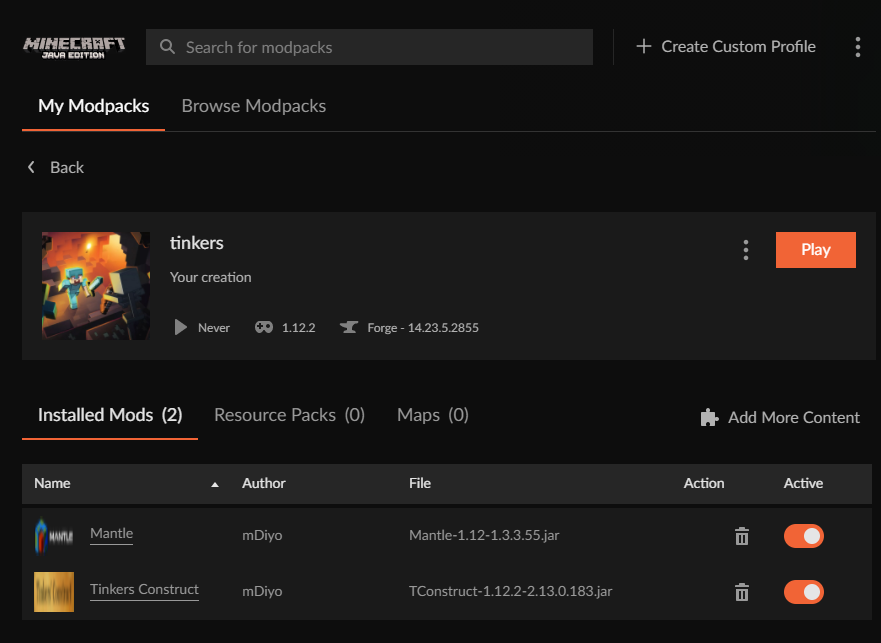 fleet bear
Yeah, that's the bug.
Theres something corrupting info or not properly getting the newest version.
pallid star
Interesting that you can't reproduce it. I don't know if it's easy to spot in my logs why it goes bad. Otherwise, is there any way I can clean my installation to un-corrupt it? I tried "repair" but that didn't make any difference.
For me it happens even with a brand new profile with only these two mods too
I can try restarting CurseForge...
fleet bear
Not that we are aware of. I'm still trying to get CF to look into the issue proper as it's been thus far unreproducible by them but more and more people keep showing it normally with new updates though. This is the first time something super old has been reported.
pallid star
Interesting, a restart of CF seems to have resolved it. Could the corruption be related to the update of CF that was installed when I first opened it today?
fleet bear
No idea as mentioned before
pallid star
Hmm, no, after the restart it was resolved for TConstruct, but now happens for other mods instead
lyric crescent
could you send the logs folder again please
pallid star
Yup, hang on. I tried to filter it for logs written today, but seem to have filtered too much, the logs I attached earlier contain no useful info.
lyric crescent
also which mod(s) are you noticing the problem with now
pallid star
ModelLoader, Refined Storage Addons, and TickCentral
There could be more that I "updated" and haven't manage to revert to "Release" yet.
This should contain all the logs'
 dry mica
im trying to use the new minecraft lancher but cant find the insctins path
dry mica
ow sorry
lyric crescent
pallid star
This should contain all the logs'
Can you give the versions of one or all of those mods? before and after
pallid star
ModelLoader - Installed latest release version (1.1.7) pressing "update" causes installation of latest beta version (1.1.4)

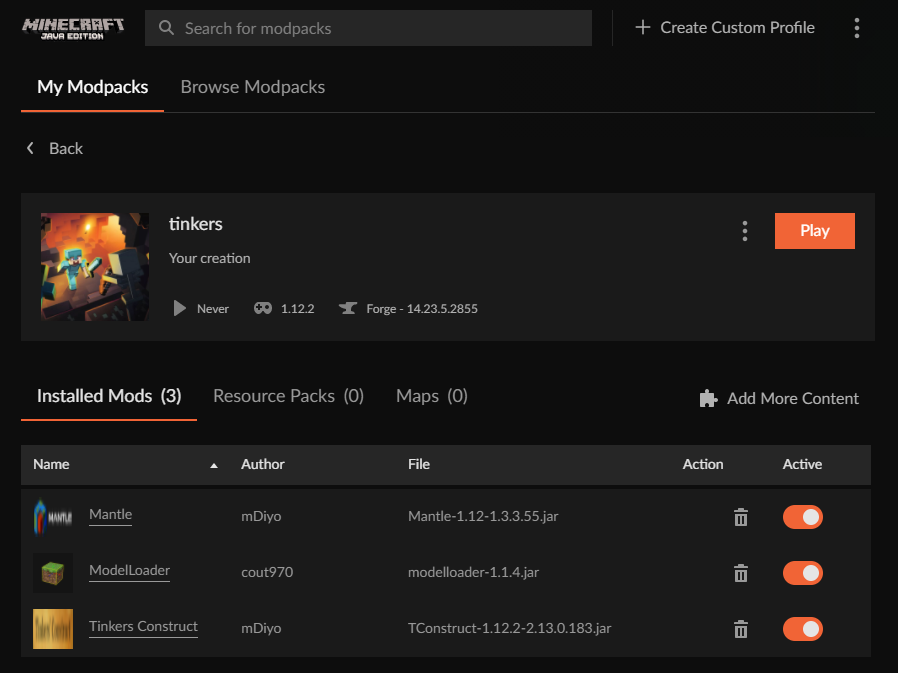 pallid star
Not just me then at least 🙂
pallid star
Better Advancements seems to have "updated" from release 1.12.2-0.1.0.77 to beta 1.12.2-0.0.17.75
Thanks to the very verbose logs it seems I can at least find out which mods I "updated" without having to check every single mod 🙂
finite glen
lyric crescent
internet isnt fast enough to download it
then there's no way to download it ever? I have no internet cable to use
lyric crescent
nothing we can do about your internet issues
not seeing that with better advancements 🤔
finite glen
lyric crescent
nothing we can do about your internet issues
It has never had any issues though, and other modpacks seem to work normally
pallid star
I'm not seeing it either with better advancements after I revert to the release version - perhaps that was only affected before I restarted, like TCon.
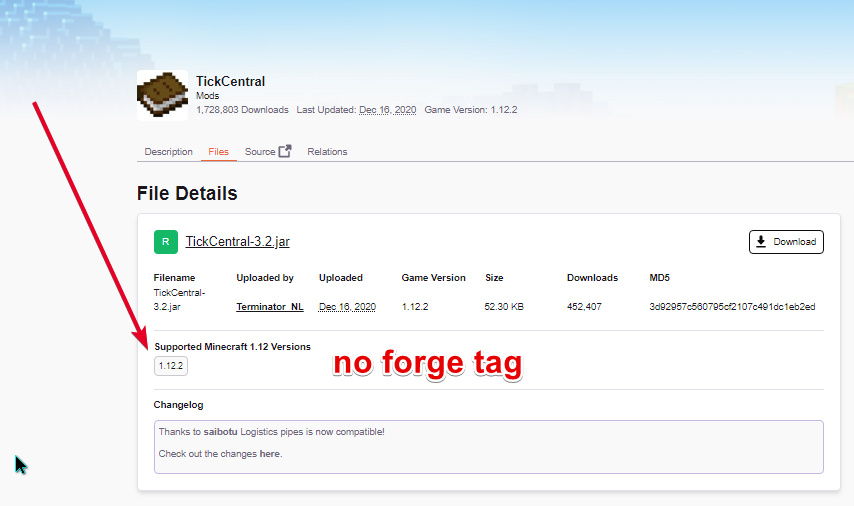
You will probably see it for TickCentral though, it wants to update from 3.2 to 1.0
lyric crescent
I did indeed. Since I was able to reproduce it for those mods we can hopefully get a solution to this, however it will likely not be for a few days, or weeks at worst. For a temp solution you will have to click the mods individually and make sure they are on the latest version by clicking the versions tab.
I did submit a report to the devs with all this info.
pallid star
Alright, thanks
And yeah, I'm checking the mods manually for now - again, thanks to the logs I don't have to check all 175 mods but can focus on the ones that I updated today.
"woot" even updated to a version that isn't even in the list, haha
lyric crescent
anything else you notice having this issue go ahead and let us know here. more info is better
wonder if this has something to do with the tag system 🤔
yea, i bet it does
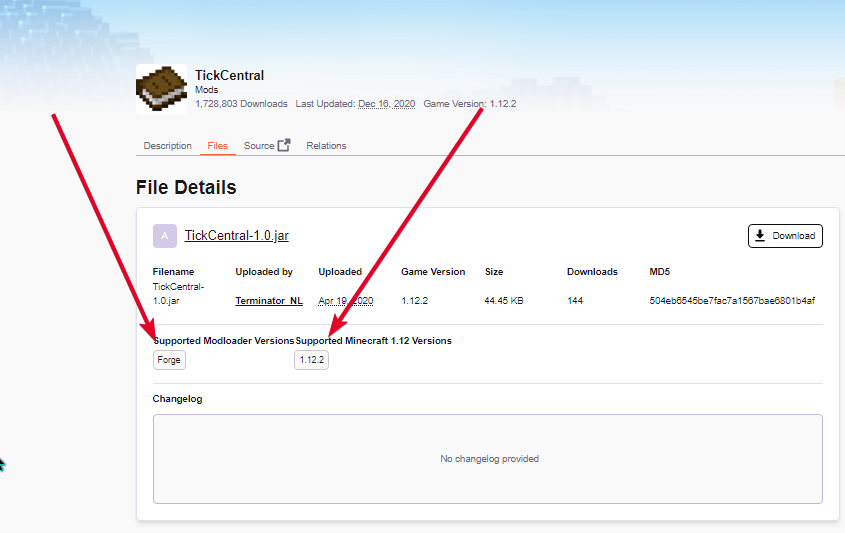 pallid star
How would that break it?
lyric crescent
 teal compass
hey! so i'm trying to download passivemobs for minecraft. i downloaded the file from the browser page but i'm not sure how i would get that into curseforge. the mod i'm looking for doesn't show up on the search page
mod: https://www.curseforge.com/minecraft/mc-mods/passive-mobs
pallid star
After reverting all the mods individually, these are the ones that remain, asking me to "update" backwards
 lyric crescent
that's not even the current version of tinkers
wait
tinkerscompliment
i get it for that also
teal compass
can normal forge run downloads from curseforge? (minecraft)
lyric crescent
yes
teal compass
oh swag! ty :)
lyric crescent
guess the real question is why tinkers had the issue before, but doesnt now
hopefully it's at least related and gets fixed with the other ones
pallid star
Since it got resolved by a restart of the app, I'm not too worried about that one, although I guess I should keep in mind to restart CF if it asks me to update anything again
 uncut notch
https://github.com/CaffeineMC/hydrogen-fabric
can i add this to a modpack and upload it to curseforge
[what im asking is if this mod is whitelisted]
GitHub
Things of which are too dangerous to put in Lithium. - GitHub - CaffeineMC/hydrogen-fabric: Things of which are too dangerous to put in Lithium.
lyric crescent
?mc-3rdparty
red patioBOT
Minecraft Modpack 3rd party
Mods not on CurseForge must be on the 3rd-party list to be included in modpacks uploaded to CurseForge. If a mod is not on this list it can't be included in the export of a modpack and must be removed before uploading. If you upload with a mod that isn't on this list the file will be rejected.
List of approved 3rd party mods:
https://docs.google.com/spreadsheets/d/176Wv-PZUo9hFxy6oC6N8tWdquBLPRtSuLbNK-r0_byM
uncut notch
ty
well that was easy

wait...

so i cant add it to my modpack even if [the mod]

im confused
 stuck dagger
Hi, i'm new here. I just downloaded the curseforge app but i only can search for modpacks. I want to search a specific mod, how can i do it?
queen storm
! mc-installmods
red patioBOT
How to install mods in CurseForge App.
- Click
+ Create Custom Profile - Name it, select the required Minecraft version, select the Forge version (usually the highest number), click
Create. - Click the profile icon.
- Click
Add More Content - Search and install the desired mods.
- Start the game!
How to install mods not on CurseForge.
- Right click the profile picture or Open the profile and click the Icon next to the play button.
- Click
Open Folder. - Drag the mod(s) into the
modsfolder. (Note: Some mods will require others, to run. Make sure to read the instructions for the mod!) - Start the game!
lyric crescent
uncut notch
wait...
If it's on the list you can use it in a curseforge modpack. If it's not on the list you cannot upload the modpack to curseforge with the mod.
The permissions you are looking at relate to the code, not usage of the mod.
uncut notch
lyric crescent
If it's on the list you can use it in a curseforge modpack. If it's not on the l...
I CANT READ
im soo sorry
 digital storm
Anyone know how I can remove the Void Island control tips(/island for help) or just spawn the default island at custom coordinates?
lyric crescent
?notcf
red patioBOT
Your question is not related to CurseForge owned/maintained features or services.
Please use the appropriate game room by getting a game role from #786424115535544350 or use #👽︱game-support for help.
CurseForge does not make or maintain any of the content or games used on the site or app. Just because it's on the site/app does not make it a problem with CurseForge. Move rooms as requested, arguing about it will result in you being removed from the discord.
 placid ginkgo
how do I make a modpack i made public
lyric crescent
? mc-packshare
red patioBOT
There are two ways to share a modpack you've made with others...
Export and Share - For Friends to Small Groups.
- Click the Icon for the modpack.
- Click the button next to play.
- Click
Export. - Select the files that should be included.
- Send the zip to the people that want it! They can follow the instructions in
!mc-installpackto install the pack!
Upload to Curseforge - For Public Release to Everyone.
This options will make your pack public to EVERYONE, it comes with extra requirements and will take some effort to set up.
- Go to here: https://www.curseforge.com/project/432/4471/create
- Fill out the information with a proper description of the pack. This should allow anyone to understand what the pack is.
- Click the Icon for the modpack in the CurseForge app.
- Click the button next to play.
- Click
Export. - Select the files that should be included.
- Open your Project you made on the CurseForge site and Upload the file you just made.
- Wait for Moderation & Sync so it can show up in the client! (See
!syncfor limitations)
 hollow escarp
Does someone know whether CurseForge fileIDs are always unique, or whether it is possible for two separate projects to contains a file with the same ID each?
digital roost
can someone add minecraft windows 10 for a modpack installer
cunning marten
I want to do a fresh install of Enigmatica 6, but CurseForge is detecting my modified E6 pack as the normal pack, meaning I can't install it. How do I stop it from registering the modified profile as Enigmatica 6?
 wanton finch
So how do i swap to the new laucher for minecraft
keep getting it and i downloaded it and it said unsitall the mojang one and theres only new one in my apps
 humble zephyr
wanton finch
keep getting it and i downloaded it and it said unsitall the mojang one and ther...
humble zephyr
wanton finch
keep getting it and i downloaded it and it said unsitall the mojang one and ther...
It doesn't work for me either
 tender nymph
digital roost
can someone add minecraft windows 10 for a modpack installer
tender nymph
digital roost
can someone add minecraft windows 10 for a modpack installer
what do you mean
cinder palm
how can I turn
https://cf.way2muchnoise.eu/versions/Build%20Curse%20Release_https://github.com/N6REJ/Adibags_Shadowlands_Jewels/actions/workflows/action.yml/badge.svg
into a useable badge in the description?
works fine in github
digital roost
i need help
just downloaded tropicraft and it turned into that but how do i use it in game? im new to java and curseforge
 signal ridge
Use the cf app to install your mods
upper root
!mc-installmods
red patioBOT
How to install mods in CurseForge App.
- Click
+ Create Custom Profile - Name it, select the required Minecraft version, select the Forge version (usually the highest number), click
Create. - Click the profile icon.
- Click
Add More Content - Search and install the desired mods.
- Start the game!
How to install mods not on CurseForge.
- Right click the profile picture or Open the profile and click the Icon next to the play button.
- Click
Open Folder. - Drag the mod(s) into the
modsfolder. (Note: Some mods will require others, to run. Make sure to read the instructions for the mod!) - Start the game!
 lyric crescent
You need to select a version that the mod works on. Check the mod page
 lyric crescent
That is one. Look in files for everything available
digital roost
damn i dont understand on the videos like paulsoaresjr and iballisticsquid there game is alot smoother for 2014 minecraft but when i try it is really slow
i already have it on a b team just it is really bad tbf
cunning marten
Is your PC slow?
digital roost
no its a 3060ti and ryzen 5 5600x ive just got it like 3 weeks ago
upper root
How much ram have you allocated?
digital roost
6gb
upper root
Huh, that should be fine
cunning marten
Are you getting generally low fps or lag spikes?
digital roost
on the videos it runs perfect but i try and it loads really slow and random lag spikes
lag spikes
cunning marten
hmm
digital roost
i used technic launcher for the official one he used
can we share play so i show u what i mean
i wont talk havent got mic lol
cunning marten
You might want to ask in Technic's server
cunning marten
welp
digital roost
i have the version on curseforge
Attack of the z team and attack of the b team reloaded
lyric crescent
#👽︱game-support since this isn't about curseforge
digital roost
it is
lyric crescent
It's not
 rich flint
Nop Curseforge is a file hosting site
lyric crescent
Using curseforge doesn't make it an issue with curseforge
cinder palm
any idea on the badge?
 drowsy bear
Hii, sorry if I bother, I´m having trouble installing the CurseForge app. Everytime I´ve tried it uninstalls itself, even turning off my antivirus, which is just windows defender. Does anyone know what could I do?
viral briar
!getcf use the second link , the middle one since you are having issues
red patioBOT
Looking to install the CurseForge app?
<:windows:798410728188936222> Windows
Minimum Requirements:
- OS Version: 7 (64 bit), 8.1, 10, 11
- 64 bit Required.
- 350MB storage space.
- Microsoft .Net 4.8
- Intel/AMD quad-core CPU
- 8GB ram
Download: https://download.overwolf.com/install/Download?&PartnerId=4047
If you are having issues with the installer use the URL below to install Overwolf then go to the app store to download CurseForge.
https://content.overwolf.com/downloads/setup/latest/regular.html
<:mac:798410654418862130> Mac
Minimum Requirements:
- OS Version 10.14 or newer.
- 64 bit Required.
Download: https://curseforge.overwolf.com/downloads/curseforge-latest.dmg
:penguin: Linux
Minimum Requirements:
Yes.
Download: :person_shrugging:
 dapper schooner
 upper root
!mc-logs
red patioBOT
Sending logs for support.
- Right-click the modpack profile icon OR click the button in the modpack profile.
- Click
Open Folder. - Open the
logsfolder. - Drag and drop the FILE named
latestORdebuginto discord.
upper root
And into #👽︱game-support, not this channel
 uneven zealot
if the server says "Can't keep up! Is the server overloaded? Running 25643ms or 512 ticks behind" that i just need more RAM ?
drowsy bear
viral briar
!getcf use the second link , the middle one since you are having issues
Thank youuu!!
upper root
uneven zealot
if the server says "Can't keep up! Is the server overloaded? Running 25643ms or ...
It means that somethings lagging your server, upgrading can help but removing the source of lag works as well
uneven zealot
ok thanks
i don't know what is the source i do a mod pack server on ragnamod VI and it always say it so... i don't know what it came from
upper root
I can help u find the source of lag, though we would need to move into either #👽︱game-support or one of the dedicated mc channels (go to #786424115535544350 to get them)
uneven zealot
ok let's go on game support x)
viral briar
drowsy bear
Thank youuu!!
No problem .
 cloud dome
can you update to the new launcher yet?
placid ginkgo
!mc sync
signal ridge
What are you looking for?
placid ginkgo
!sync
red patioBOT
Sync and your Project.
CurseForge App and site do not share the same requirements! You can find things on the site but this does not mean it will be in the app!
For a mod to show up in the app:
- Projects MUST have a file marked as RELEASE
 or BETA
- Projects MUST be APPROVED
- Projects MUST have a file marked for the GAME VERSION SELECTED/LOADED
- Projects CAN'T be EXPERIMENTAL
- Projects CAN'T be ABANDONED
Files can take a while to show up in the app. If your files still have not shown up either your project is new and you have yet to mark a file as Release/Beta or there is issues with the sync system making it slow.
Vote this issue up if you would like to know when the last sync was! https://curseforge-ideas.overwolf.com/ideas/CF-I-1617
opal cipher
For running bot commands, you can do them in #🟢︱user-bot-spam :)
signal ridge
Beat me too it King
placid ginkgo
sorry
opal cipher
No worries, just saying it. ^^
placid ginkgo
how long does it usually take to be upload to curse forge after you submit it
opal cipher
Seeing that it's well after their working hours right now, they're not gonna review things until sunday.
They review things between sunday and thursday. And it's not around midnight where they are, and review hours for them are between 10-18, if I don't remember it incorrectly.
!status
red patioBOT
Project Moderation Time
Project/File moderation is done on these days unless otherwise mentioned:
Sunday, Monday, Tuesday, Wednesday, Thursday: <t:1631170800:t> - <t:1631199600:t> (Your time)
Friday, Saturday: No Moderation!
Projects are moderated First in, First out. If you submit late in the work day, it will likely get left until the next day!
New Projects or anything flagged for manual review: 1-3 Working Days
Updates to approved projects not needing manual approval: 1 Hour
Changes will only show in the app if the project meets the requirements in the ?sync command and up to 24 hours has passed from when it was accepted.
placid ginkgo
okok thank you
lyric crescent
pine scaffold
The status of the file Albion-1.0.zip (Albion) has been changed to Rejected
Not...
Did you have optifine when you tried to upload this?
 candid siren
anyone know how to fix this
 pine scaffold
Yea i think so but i fixed it
signal ridge
candid siren
anyone know how to fix this
Where did you get the zip file from?
lyric crescent
pine scaffold
Yea i think so but i fixed it
so the reason it was rejected was optifine, not the resource packs.
pine scaffold
Yea i know
candid siren
signal ridge
Where did you get the zip file from?
its a modpack my friends gave me so i could play on their server
signal ridge
candid siren
its a modpack my friends gave me so i could play on their server
How did they make the zip? Did they export it from the cf app?
candid siren
I think so yes
signal ridge
Open the zip and take a screen shot of whats inside
candid siren
 signal ridge
drop the zip here please
candid siren
ill dm to you
signal ridge
candid siren
ill dm to you
Pack installed just fine for me. Reboot your pc then try again
candid siren
okok
 old storm
Hi there. I have a modpack on curseforge and am trying to install it on a server I just got from Empower Servers. But no "version number" comes up so it can't be installed. The Empower Servers help people say that a "server version" needs to be provided. How do I add this to my modpack?
signal ridge
old storm
Hi there. I have a modpack on curseforge and am trying to install it on a server...
!notcf
red patioBOT
Your question is not related to CurseForge owned/maintained features or services.
Please use the appropriate game room by getting a game role from #786424115535544350 or use #👽︱game-support for help.
CurseForge does not make or maintain any of the content or games used on the site or app. Just because it's on the site/app does not make it a problem with CurseForge. Move rooms as requested, arguing about it will result in you being removed from the discord.
candid siren
Now im getting this error when I try to open curse forge

ok after a retry it opened
ohhh, thanks @signal ridge just needed a restart!
signal ridge
Are you using wifi or cable connection for internet
candid siren
wifi
signal ridge
Wifi can be iffy sometimes, better to do a ethernet (wired) connection.
candid siren
ah ok got it, thanks!
pine scaffold
What happened with the server on discord
signal ridge
huh?
pine scaffold
It said something like can't acses do to a server error
signal ridge
No idea what your talking about, screen shot your error
pine scaffold
Can't fixed now but for a minute there was a red circle with a red esclemation point and when i clicked it it said something like can't acses do to a server error
signal ridge
game? Screen shot? log anything you can provide? Otherwise I have no idea what your talking about
pine scaffold
No on the discord server
signal ridge
ah ok now it makes more sense. that is usually a network connection issue on discord. Either something one your end, inbetween you and discords servers or an issue with the servers themselves.
Nothing to do with us here tho
pine scaffold
Ah ok
candid siren
@signal ridge got to mod 5, then same error
signal ridge
which one? the opps or the other one?
candid siren
like when I started the download it worked but it got to mod 5 (pixelmon) and then I got the same error message
the profil eone
signal ridge
Have your friend make a new export and send it too you
 stark dagger
i think i figured it out
stark dagger
signal ridge
I have one for you, have you read <#777323206884327484> 10?
yes sorry sorry
i will thank you anyway however because you are a good helper @signal ridge
signal ridge
Why the double ping...
candid siren
yeah the guys not on to give me another export
signal ridge
it worked just fine for me. ¯_(ツ)_/¯
 young bone
I submitted an update to my pack and it got rejected on grounds of it being a curseforge hosted project, when it was added directly from the curseforge app
stark dagger
signal ridge
Why the double ping...
sorry
young bone
It wasn't added the wrong way, it's just an older mod, not even an archived mod either
stark dagger
so um how fix this pls
 signal ridge
stark dagger
so um how fix this pls
signal ridge
stark dagger
so um how fix this pls
!webclient
red patioBOT
WebClient errors are from networking issues to your computer. You can try a few things to fix it:
- Restart the computer.
- Restart your router/modem.
- Try another internet source like a hotspot, wired connection or moving closer to the WiFi.
- Pause/Stop other things using the internet. (Streams, music, etc)
- If this still doesn't work, try again in an hour and hope your connection is stable.
signal ridge
young bone
I submitted an update to my pack and it got rejected on grounds of it being a cu...
?reject-cfhosted
red patioBOT
The following files belong to CurseForge-hosted projects, and should therefore not be added directly to zip files:
-
Remove any mods listed in the error message from the profile you exported. Then reinstall them with the CurseForge app. DO NOT drag and drop files from the site.
-
Export the profile again, open the new zip that was just made. Check for the
overrides/modsfolder. If you still see any mods in that folder do the step above again for each mod. -
Upload the zip once complete and no more mods show in the
overrides/modsfolder.
young bone
Did you see my second message about it
signal ridge
Yep, did you read the whole bot message?
young bone
Yes, working on that part right now
signal ridge
Try that, if there are mods in you mods folder in the overides folder of your export delete and reinstall them in the app
digital roost
Someone know what to do here?
 signal ridge
digital roost
Someone know what to do here?
signal ridge
digital roost
Someone know what to do here?
!mc-logs
red patioBOT
Sending logs for support.
- Right-click the modpack profile icon OR click the button in the modpack profile.
- Click
Open Folder. - Open the
logsfolder. - Drag and drop the FILE named
latestORdebuginto discord.
 deft geyser
Hey yall my curseforge for addons in WOW isn't working it just keeps saying Oops
digital roost
there is no "logs" folder when I click on "open Folder" there are just these folders
 signal ridge
digital roost
there is no "logs" folder when I click on "open Folder" there are just these fol...
signal ridge
digital roost
there is no "logs" folder when I click on "open Folder" there are just these fol...
!mc-installfix do this
red patioBOT
- Click on the Minecraft Tab on the Left side of the CurseForge App.
- Click button next to the
Create Custom Profileoption. - Click
Repair Installationoption. - Play game.
NOTE: You will not lose any modpacks or worlds, These are saved in the Instances folder. DO NOT TOUCH THIS FOLDER OR YOU WILL LOSE EVERYTHING
digital roost
 dusty crypt
Been getting this error for a couple weeks
Failed to download file.
Name: forge-37.0.70.jar
URL: https://launcher.mojang.com/v1/objects/8d9b65467c7913fcf6f5b2e729d44a1e00fde150/client.jar
Error details: Could not resolve host: launcher.mojang.com
Filename on disk: forge-37.0.70.jar
signal ridge
dusty crypt
Been getting this error for a couple weeks
Failed to download file.
Name: forge...
Where do you get this error?
 glacial oriole
Yo, i have been getting two forges opened at once
Is it cuz of having the new minecraft launcher?
signal ridge
forge or curseforge?
glacial oriole
Like when i open my minecraft i get two at same time
signal ridge
Didnt answer my question
glacial oriole
Curse
signal ridge
ok, for the launcher part ignore the update it talks abut. CF hasnt updated to use the new one yet
dusty crypt
signal ridge
Where do you get this error?
when clicking play on the launcher when trying to use a mod pack its either this error that comes up or an exit code: 0
 signal ridge
dusty crypt
when clicking play on the launcher when trying to use a mod pack its either this...
signal ridge
dusty crypt
when clicking play on the launcher when trying to use a mod pack its either this...
!mc-installfix do this
red patioBOT
- Click on the Minecraft Tab on the Left side of the CurseForge App.
- Click button next to the
Create Custom Profileoption. - Click
Repair Installationoption. - Play game.
NOTE: You will not lose any modpacks or worlds, These are saved in the Instances folder. DO NOT TOUCH THIS FOLDER OR YOU WILL LOSE EVERYTHING
glacial oriole
signal ridge
ok, for the launcher part ignore the update it talks abut. CF hasnt updated to u...
I mean like i have the new one installed along with the old one so i thought that's what's causing it
signal ridge
glacial oriole
I mean like i have the new one installed along with the old one so i thought tha...
Nope, cf uses its own version of the minecraft launcher. It doesnt touch any of your other mc applications
glacial oriole
Ah, okay so how i fix
signal ridge
Reboot your pc, play the pack, when the update message appears ignore it and play
glacial oriole
Okay
glacial oriole
signal ridge
Reboot your pc, play the pack, when the update message appears ignore it and pla...
I should be doing a physics project 🤣
signal ridge
digital roost
havent forgoten about you, lots going on. Is this a pack you made or downloaded?
glacial oriole
My dad isn't home to help me anyhow with setting up the machines sooo
digital roost
signal ridge
havent forgoten about you, lots going on. Is this a pack you made or downloaded?
downloaded ftb trident
signal ridge
ok, this isnt the channel for random chat. #🥑-off-topic-chat for random none support stuff
dusty crypt
signal ridge
!mc-installfix do this
followed the steps and still getting this error
 signal ridge
dusty crypt
followed the steps and still getting this error
signal ridge
dusty crypt
followed the steps and still getting this error
Do the installfix again, when its done DO NOT play anthing just reboot your pc
signal ridge
digital roost
downloaded ftb trident
Can either try reinstalling the pack, save any worlds you wish to keep OR report it to the packs author
glacial oriole
signal ridge
Can either try reinstalling the pack, save any worlds you wish to keep OR report...
Imma do it after i finish starting on my physics project and i will tell you how it goes
digital roost
signal ridge
Can either try reinstalling the pack, save any worlds you wish to keep OR report...
maybe what ist important to say is that it only is crashing when I wanna join on a server single player is working maybe you have an idea?
signal ridge
digital roost
maybe what ist important to say is that it only is crashing when I wanna join on...
Yes this would have been important info... Servers have nothing to do with CF tho so this is more a topic for one of the mc related rooms ( #786424115535544350 get mc role) OR #👽︱game-support
dusty crypt
signal ridge
Do the installfix again, when its done DO NOT play anthing just reboot your pc
thank you ^-^
digital roost
Okay thanks
 flat pelican
anyt reason why after the bug fix update for the launcher now no mods shows it needs updates? when it does have updates? and yes i got allow content management selected
 robust dome
my project is almost 3 days away and it still hasn't been approved should i worry?
signal ridge
robust dome
my project is almost 3 days away and it still hasn't been approved should i worr...
When did you upload it?
robust dome
2 days ago
signal ridge
!status
red patioBOT
Project Moderation Time
Project/File moderation is done on these days unless otherwise mentioned:
Sunday, Monday, Tuesday, Wednesday, Thursday: <t:1631170800:t> - <t:1631199600:t> (Your time)
Friday, Saturday: No Moderation!
Projects are moderated First in, First out. If you submit late in the work day, it will likely get left until the next day!
New Projects or anything flagged for manual review: 1-3 Working Days
Updates to approved projects not needing manual approval: 1 Hour
Changes will only show in the app if the project meets the requirements in the ?sync command and up to 24 hours has passed from when it was accepted.
signal ridge
So seeing how its after working hours, they wont be back till sunday.
robust dome
ok
 distant lily
curseforge is sending me to the old launcher or smthn because im tryna play these mods, but like ive deleted the old launcher i think? but i cant find it ive gone to apps and features to delete it
upper root
See #📢︱news for info about the new launcher.
In short: cf will use the old one for now, the new one is not supported
 mild zodiac


 zinc plaza
has anyone mentioned a way to get the un-intergrated version of the launcher back after migrating?
red patioBOT
Your question is not related to CurseForge owned/maintained features or services.
Please use the appropriate game room by getting a game role from #786424115535544350 or use #👽︱game-support for help.
CurseForge does not make or maintain any of the content or games used on the site or app. Just because it's on the site/app does not make it a problem with CurseForge. Move rooms as requested, arguing about it will result in you being removed from the discord.
 sand jolt
oh lmao my bad
glacial oriole
signal ridge
!notcf
Back, trying to open curse now
 fervent citrus
Has anyone else gotten the issue where the launcher for Minecraft wont go beyond opening but theres no image or buttons? Like its just grey and doesn't load
signal ridge
fervent citrus
Has anyone else gotten the issue where the launcher for Minecraft wont go beyond...
screen shot it
zinc plaza
signal ridge
are you using the curseforge app?
ah yes sorry. this is about minecraft. I need minecraft's launcher to be the old one for the curseforge one to work
signal ridge
zinc plaza
ah yes sorry. this is about minecraft. I need minecraft's launcher to be the old...
huh what? did you try to upgrade the mc launcher that opens when you hit play in the cf app
zinc plaza
well to be specific not me, but a freind. Thats not important tho.
to awnser the question, yes
signal ridge
Then your friend should be the one here.
fervent citrus
This is what I get
 signal ridge
Did you update the launcher at all? OF nothing loads in gen?
fervent citrus
It says forging my library then the mod packs it’s loading and then it brings up the main screen
signal ridge
!mc-installfix try this
red patioBOT
- Click on the Minecraft Tab on the Left side of the CurseForge App.
- Click button next to the
Create Custom Profileoption. - Click
Repair Installationoption. - Play game.
NOTE: You will not lose any modpacks or worlds, These are saved in the Instances folder. DO NOT TOUCH THIS FOLDER OR YOU WILL LOSE EVERYTHING
signal ridge
!webclient
red patioBOT
WebClient errors are from networking issues to your computer. You can try a few things to fix it:
- Restart the computer.
- Restart your router/modem.
- Try another internet source like a hotspot, wired connection or moving closer to the WiFi.
- Pause/Stop other things using the internet. (Streams, music, etc)
- If this still doesn't work, try again in an hour and hope your connection is stable.
fervent citrus
the issue is fixed now, thanks
 placid sluice
Mobs and my player model disappear for some reason, not quite sure why :(
https://cdn.discordapp.com/attachments/723599467172986962/906374681345523782/Minecraft__1.16.5_-_Singleplayer_2021-11-05_19-45-09.mp4
Only time it fixes is when I restart mc but even then it just happens again :((
signal ridge
!notcf
red patioBOT
Your question is not related to CurseForge owned/maintained features or services.
Please use the appropriate game room by getting a game role from #786424115535544350 or use #👽︱game-support for help.
CurseForge does not make or maintain any of the content or games used on the site or app. Just because it's on the site/app does not make it a problem with CurseForge. Move rooms as requested, arguing about it will result in you being removed from the discord.
digital roost
 signal ridge
digital roost
signal ridge
digital roost
!mc-logs
red patioBOT
Sending logs for support.
- Right-click the modpack profile icon OR click the button in the modpack profile.
- Click
Open Folder. - Open the
logsfolder. - Drag and drop the FILE named
latestORdebuginto discord.
digital roost
im trying to play this modpack but everytime i try to play it, it gives me an error
ok
will do
 dense pulsar
so does the new minecraft launcher work with curseforge?
signal ridge
dense pulsar
so does the new minecraft launcher work with curseforge?
No, cf is still using the old launcher atm
digital roost
hey i found a glitch with curseforge where when i download a core mod it ports it to a version above im on 1.12.2 and it just ports it to 1.13 so i have to manually download the core mods can some please fix this
upper root
!webclient
red patioBOT
WebClient errors are from networking issues to your computer. You can try a few things to fix it:
- Restart the computer.
- Restart your router/modem.
- Try another internet source like a hotspot, wired connection or moving closer to the WiFi.
- Pause/Stop other things using the internet. (Streams, music, etc)
- If this still doesn't work, try again in an hour and hope your connection is stable.
signal ridge
webclient error?
did you do what the bot said to do?
even the wait and try again later?
Web client errors are on your end as well, Nothing we can do to fix your network issues. You may have to just wait and try again when your internet is more stable
Be sure to read all 5 carefully
 mellow anchor
I know this question was asked alot so please tell me where to read it and if dont can you help me?
I'm playing modpack right now
and i wondering if i can add other mods
into that pack
upper root
!mc-modifypack
red patioBOT
How to add/remove mods in a modpack.
- Click on the picture of the modpack.
- Click the
Add More Contentbutton, IF this button is not there, see below before continuing. - Find the Mods, Resource Packs or Maps you wish to Install and click
Installon them. - Wait for all the required mods to be downloaded.
- Start the modpack.
How to Enable/Disable content management for modpacks.
- Click on the picture of the modpack.
- Click on the button next to the
Playbutton. - Click on
Profile Options. - Check the
Allow content management for this profileoption if you want to edit the content of the modpack, uncheck it to disable.
NOTE: The Allow content management for this profile option is what allows you to Delete, Disable, Update or Install any Mods, Resource Packs or Maps managed by CurseForge. It must be on to modify any of them! (Currently)
signal ridge
mellow anchor
into that pack
Just note, if the pack is one you did not make and what you add breaks the pack, your on your own for help. Best fix is to just reinstall the pack
mellow anchor
can i duplicate the thing?
like make a copy of it?
so the main pack won't break?
 dry dew
of course
mellow anchor
You guys just make me and my friend day better thank you for yourr help ❤️
dry dew
Right click the modpack under My Modpacks and click Duplicate Profile
mellow anchor
Yes, i did notice the function. Thank you so much
dry dew
👍
signal ridge
then might have to just wait till another time when your internet is more stable.
Apparently not if your getting webclient errors. Thats on your end
 raw beacon
Hello, I exported a minecraft modpack on OSX in CurseForge client, yet some people get the error of ".DS_Store:sounds.json" when launching the exported pack. You can entire log here: https://paste.ee/p/YZHvc
 upper root
!notcf
red patioBOT
Your question is not related to CurseForge owned/maintained features or services.
Please use the appropriate game room by getting a game role from #786424115535544350 or use #👽︱game-support for help.
CurseForge does not make or maintain any of the content or games used on the site or app. Just because it's on the site/app does not make it a problem with CurseForge. Move rooms as requested, arguing about it will result in you being removed from the discord.
raw beacon
I get this error when exporting from CurseForge launcher. I searched and this seems to be a file system error related to OSX. Since CF has Mac client support, I don't know where else to ask.
upper root
Oh, the problem here appears to be mac making random files in folders
so you'll need to delete those, it seems you can do that on a windows pc with hidden files enabled
raw beacon
I think it is the opposite. I cannot see DS_Store files on OSX. Normally CF does not include it by default. I checked every folder inside the pack and didn't see any file named DS_Store. Also this problem happens randomly on random operating systems who import the pack, no matter the user is using OSX or Windows or Linux.
upper root
can u send the pack? either a link or the zip
upper root
raw beacon
https://www.curseforge.com/minecraft/modpacks/the-winter-rescue/files/3513727
Yeah, there are a bunch of dstore files in there, which minecraft is looking at and freaking out about.
Thats a modpack, not a mod that your downloading then
and you can install modpacks with the app
raw beacon
When I export modpacks before, I never received such issues
upper root
Normally you don't have directorys that minecraft loads as resource packs, but kube adds those
 dense cloak
Curse launcher refuses to detect game versions and always installs the latest file. (Used a 1.12.2 profile. Curse installed a 1.16.5 file instead of a 1.12.2 file like its supposed to.)
raw beacon
upper root
Normally you don't have directorys that minecraft loads as resource packs, but k...
That kinda explains
Can you give me a screenshot of the DS_Store files in the kubejs folder?
signal ridge
dense cloak
Curse launcher refuses to detect game versions and always installs the latest fi...
What?
dense cloak
Read the message.
signal ridge
I did, it made 0 sense
upper root
raw beacon
Can you give me a screenshot of the DS_Store files in the kubejs folder?
Theres a lot, tho the one causing issues is in the sounds fodler i think
signal ridge
dense cloak
Read the message.
What mod did you install? need to add some more explanations
signal ridge
dense cloak
Dynamic Trees.
What version is your profile?
dense cloak
1.12.2.
signal ridge
using the app to install the mods?
dense cloak
Yep.
digital roost
dense cloak
Curse launcher refuses to detect game versions and always installs the latest fi...
i had the same issue
it happens to me with core mods
signal ridge
I just installed Dynamic trees with a 1.12.2 profile and got the 1.12.2 mod version
Screen shot your app showing it installed the wrong versions
dense cloak
If I use a 1.12.2 profile, all files downloaded should be the same version as the profile.
But the launcher downloades the wrong version.
digital roost
signal ridge
Screen shot your app showing it installed the wrong versions
i already manually' replaced them
but i did ask earlier
upper root
dense cloak
If I use a 1.12.2 profile, all files downloaded should be the same version as th...
i think this may be related to this: #💬︱general-chat message
signal ridge
prossibly
digital roost
upper root
i think this may be related to this: https://discord.com/channels/42822825623630...
yep
exactly that
dense cloak
Ah, ugh.
digital roost
well i guess you have to manually install things the old way until they fix it
raw beacon
upper root
Theres a lot, tho the one causing issues is in the sounds fodler i think
I don't think I have a sounds folder in my kubejs?
upper root
you don't, huh. no idea where the crash is getting the sounds.json file from then
raw beacon
so the file is under each folder?
upper root
In some of them
raw beacon
can you maybe show one of them so I can get some clue
upper root

 signal tapir
The game crashed whilst initializing game
Error: java.lang.RuntimeException: java.lang.reflect.InvocationTargetException
Exit Code: -1
help
mr
me
plz
upper root
!mc-logs into #👽︱game-support
red patioBOT
Sending logs for support.
- Right-click the modpack profile icon OR click the button in the modpack profile.
- Click
Open Folder. - Open the
logsfolder. - Drag and drop the FILE named
latestORdebuginto discord.
upper root
Do you have the CurseForge app?
lyric crescent
Modpacks need to be installed with the cf app
upper root
!mc-installpack
red patioBOT
How to install modpacks with the search features in app.
- Open the

Minecraftsection of the app. - Click the top search bar where it says
Search for modpacksOR Click theBrowse ModpacksTab. - Find the Modpack you want to install and click install on it.
- Wait for CurseForge app to download and unpack all the required files.
- Once finished, click
Play!
How to install modpacks from a Export. (Custom/Private/Site downloaded Modpack zip)
- Get CurseForge App if you don't have it, use
!downloadfor a link. - Get the exported modpack from CurseForge or someone else,
!mc-packshareexplains how to make them. - Open the
Minecraftsection of the app. - Click

Create Custom Profile - Click the
Importoption. - Find the file you just downloaded in step 2 and select it.
- CurseForge app will now attempt to download and unpack the modpack. If it fails, try steps 4-6 again.
- Once finished, click
Play!
 upper root
follow those instructions to install modpacks
raw beacon
upper root
Thanks!
digital roost
signal ridge
!mc-logs
apologies for the late reply, i had to reset my PC
signal ridge
digital roost
apologies for the late reply, i had to reset my PC
this something you made OR downloaded?
signal ridge
Did you add, remove or change anything in the pack?
digital roost
no i just downloaded it and clicked play
and each time i launch it
it shuts down and gives me that error message
signal ridge
has this pack ever worked?
digital roost
ive watched videos of others playing it so i would assume so
its other similar modpacks work just fine
signal ridge
Not what I asked, has it ever worked for you. this pack not others
digital roost
no as this is my first attempt downloading and trying to play it
signal ridge
Reinstall the pack
signal ridge
!mc-installfix try this
red patioBOT
- Click on the Minecraft Tab on the Left side of the CurseForge App.
- Click button next to the
Create Custom Profileoption. - Click
Repair Installationoption. - Play game.
NOTE: You will not lose any modpacks or worlds, These are saved in the Instances folder. DO NOT TOUCH THIS FOLDER OR YOU WILL LOSE EVERYTHING
 jade flame
why isnt curse forge now working for microsoft minecraft?
plus it somehow broke java so i vant log in to java version
signal ridge
It does,
If you migrated your account:
When your on the login screen click the "Go Back" at the bottom and pick the Microsoft option.
jade flame
worked ty uwu
 vale ermine
hello i need help with something

this keeps showing up in my custom profiles
what to do lol
signal ridge
its an error on your end, nothing we can do about webclient errors here
 deft trench
happened to me i waited until tomorrow and it worked
i restarted
uninstalled reinstalled, etc
vale ermine
vale ermine
the heck do i do heree
deft trench
legit everyhting i could do and yet it didnt work so i gave up and tried tomorrow
deft trench
vale ermine
you need to add a mod i think
vale ermine
deft trench
you need to add a mod i think
nah nah i found the solution lol
deft trench
alr
signal ridge
vale ermine
Someone replied to you the first time you posted this. #📛︱rules 4
 shell field
How did do play with my friends in skyfactory4; make a sever?
fleet bear
!notcf
red patioBOT
Your question is not related to CurseForge owned/maintained features or services.
Please use the appropriate game room by getting a game role from #786424115535544350 or use #👽︱game-support for help.
CurseForge does not make or maintain any of the content or games used on the site or app. Just because it's on the site/app does not make it a problem with CurseForge. Move rooms as requested, arguing about it will result in you being removed from the discord.
raw beacon
Hey i found that some modpacks use a forgecdn.net link to provide download to their modpack. Is there a way to get the forgecdn link to my file?
signal ridge
huh?