#🔥︱curseforge-support
1 messages · Page 564 of 1
 queen storm
 pallid heron
well it is support for curse forge related things
queen storm
Servers are not
pallid heron
but you offer server packs?
 red patioBOT
Your question is not related to CurseForge owned/maintained features or services.
Please use the appropriate game room by getting a game role from #786424115535544350 or use #👽︱game-support for help.
CurseForge does not make or maintain any of the content or games used on the site or app. Just because it's on the site/app does not make it a problem with CurseForge. Move rooms as requested, arguing about it will result in you being removed from the discord.
pallid heron
okay my bad so where should I go with this?
pallid heron
ty
 pine scaffold
How can I make it so you can click a image and it leads you to a link like a discord invite and how can i put in gifs in the description?
 fleet bear
you embed the image/gif
pine scaffold
how
pine scaffold
I tried this button but it idnt work

 lyric crescent
how
pine scaffold
I put in the link of the image i wanted but it just added text
lyric crescent
what is the link?
 lyric crescent
now show what you did with it
pine scaffold
its a imugur link
lyric crescent
yea, i can see that from the link name
pine scaffold
clicked it and pasted in source the link
 lyric crescent
i want to see the code that is used
pine scaffold
oh thx
 wise snow
I have a questiona bout the curseforge app, why does some mods appear on the website but not in the app, i'm trying to get the mods i want in my server in my modpack but they dont show up in the app. for example spiders 2.0
pine scaffold
how can i move the gif
queen storm
wise snow
I have a questiona bout the curseforge app, why does some mods appear on the web...
Wrong version probably
lyric crescent
wise snow
I have a questiona bout the curseforge app, why does some mods appear on the web...
app will only show mods that work on your profile version
pine scaffold
like move it around place
wise snow
but it says that spiders 2.0 is on 1.16.5 so why doesn't it show up
queen storm
wise snow
but it says that spiders 2.0 is on 1.16.5 so why doesn't it show up
Link please
queen storm
And on what profile are you?
wise snow
1.16.5
queen storm
Forge or fabric?
wise snow
fabric
lyric crescent
that is why
queen storm
It is a forge mod 🤦♂️
fleet bear
pine scaffold
like move it around place
You will need to edit the source.
wise snow
oh, ok
 wind hatch
care to DM me the ticket # please?
 wary canyon
I have the wildly eat mod downloaded, but when I want to import the file he can not make a profile
lyric crescent
?mc-installmods
red patioBOT
How to install mods in CurseForge App.
- Click
+ Create Custom Profile - Name it, select the required Minecraft version, select the Forge version (usually the highest number), click
Create. - Click the profile icon.
- Click
Add More Content - Search and install the desired mods.
- Start the game!
How to install mods not on CurseForge.
- Right click the profile picture or Open the profile and click the
 Icon next to the play button.
 - Click

Open Folder. - Drag the mod(s) into the
modsfolder. (Note: Some mods will require others, to run. Make sure to read the instructions for the mod!) - Start the game!
 lyric crescent
you dont import a mod
what are you talking about..
ok, and?
it is a mod
you follow the instructions for installing a mod, which you "already know"
 dense cloak
A new MC launcher came out. Please update.
queen storm
It is known, update is not a 5 minute fix, how old is that launcher?
queen storm
dense cloak
A new MC launcher came out. Please update.
Do you know how long ago they released it?
dense cloak
I have no idea.
Give it a few days or something as it is quite broken atm, but, was just mentioning.
queen storm
Was released yesterday, please give it a few days to get updated before asking for one.
lyric crescent
So they should update now, but also wait to update...
queen storm
First mention was an hour ago, before that we didn't know either, first thing that we did was poke Curseforge staff about it
 gleaming needle
wind hatch
care to DM me the ticket # please?
gleaming needle
wind hatch
care to DM me the ticket # please?
I tried adding you to DM but discord won't let me. Can you please accept my friend request
 carmine geyser
does not pass the moderation stage writes what is a bad resume
lyric crescent
what
carmine geyser
 lyric crescent
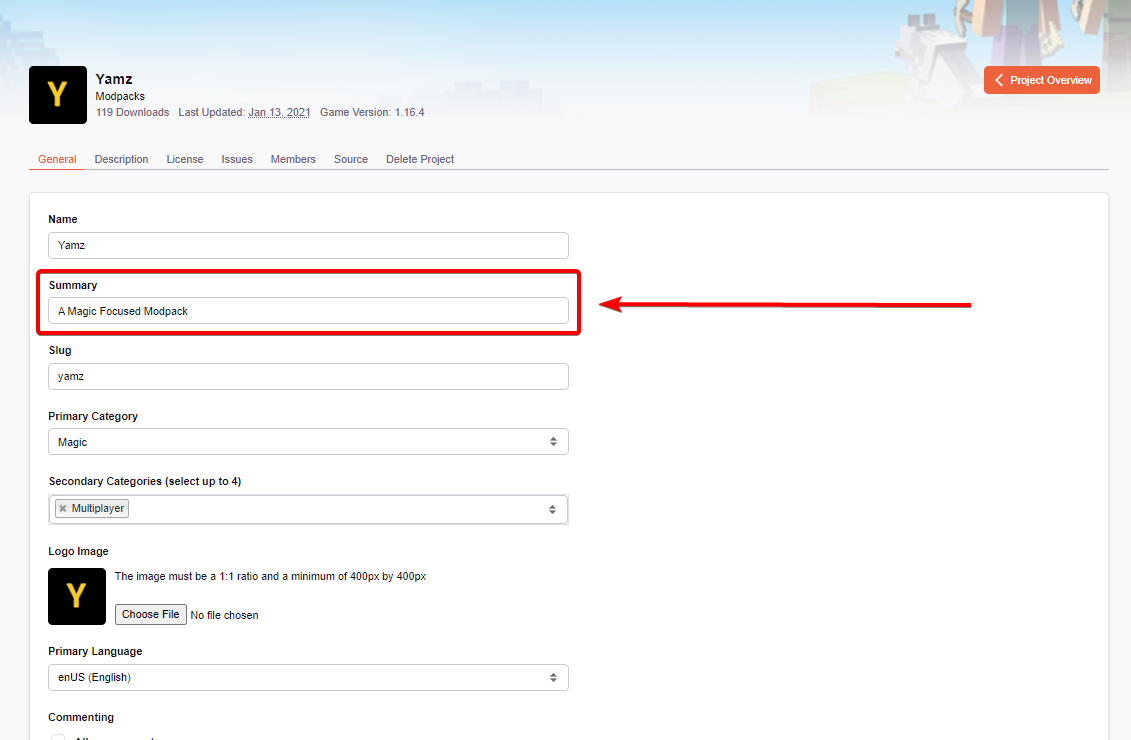
You need a better summary, it says this.
carmine geyser
I do not know how to write a resume in English, I use only a translator, you would be able to help with writing a resume, and where to write it
lyric crescent
so write it, then translate it.
carmine geyser
and where to write a resume, not in the description, right?
lyric crescent
 tacit matrix
I can´t run mod packs with curseforge with the new launcher of minecraft, anyone have an idea or solution?
lyric crescent
ignore it, use the launcher it comes with
tacit matrix
it´s not working
lyric crescent
what isnt
carmine geyser
and how long does the moderator check take?
lyric crescent
!status
red patioBOT
Project Moderation Time
Project/File moderation is done on these days unless otherwise mentioned:
Sunday, Monday, Tuesday, Wednesday, Thursday: <t:1631170800:t> - <t:1631199600:t> (Your time)
Friday, Saturday: No Moderation!
Projects are moderated First in, First out. If you submit late in the work day, it will likely get left until the next day!
New Projects or anything flagged for manual review: 1-3 Working Days
Updates to approved projects not needing manual approval: 1 Hour
Changes will only show in the app if the project meets the requirements in the ?sync command and up to 24 hours has passed from when it was accepted.
carmine geyser
aren't you planning to provide support for the Russian-speaking audience so as not to worry about translation?
lyric crescent
no
you can have your project description in russian, but it must also be in english
carmine geyser
it's sad somehow, because most of the minecraft community is Russian-speaking
lyric crescent
but curseforge is english
fleet bear
"Most of the minecraft community is russian speaking"
Uh... no?
 west folio
carmine geyser
it's sad somehow, because most of the minecraft community is Russian-speaking
west folio
carmine geyser
it's sad somehow, because most of the minecraft community is Russian-speaking
sorry to cut in here, but that is absolutely false, where did you get that from, outrageously at that
carmine geyser
and then I want to communicate with support in my own language without an interpreter
gleaming needle
Yamza could you please accept the friend request so I can dm you
lyric crescent
dont need to
lyric crescent
did you check if you disabled them
gleaming needle
i have mine off since my server has like 30k people and thousands of people try to dm me
carmine geyser
west folio
sorry to cut in here, but that is absolutely false, where did you get that from,...
I took it all from YouTube, I get most of the content from Russian-language content makers
 empty dirge
hello, i´ve got a problem with my Modpack. When i try to share it (which works fine). The file won´t start up normally and crashes with the Error Code: Exit Code: 0.
lyric crescent
?mc-log
red patioBOT
Sending logs for support.
- Right-click the modpack profile icon OR click the button in the modpack profile.
- Click
Open Folder. - Open the
logsfolder. - Drag and drop the FILE named
latestORdebuginto discord.
carmine geyser
it's just that the translator does not translate verbatim
west folio
carmine geyser
I took it all from YouTube, I get most of the content from Russian-language cont...
and you believe them? its not a stereotype, im talking from experience (i live next to russia so they're all the videos i get recommended when im not logged in, and everything is just clickbait, stealing content from the actual youtubers who speak english) russians seem to be quite ignorant of other parties, so its most likely they just think theyre the biggest community
lyric crescent
carmine geyser
it's just that the translator does not translate verbatim
There are no plans to have dedicated language support for anything other than English at this time. If you are upset with that you can drop a suggestion with the following link...
?feedback
red patioBOT
<:CFidea:798388634972717066> Have an idea on how to improve CurseForge? <:CFidea:798388634972717066>
CurseForge is looking for great ideas and user feedback! Get into the CurseForge Community by providing some feedback and voting on what's important to you!
Think some game should be supported? Post an idea and explain why!
Got a to die for feature idea? Let's hear it!
Location In-app
- Click the
 button on the bottom left of the app.
 - Click on

Suggest a Featureoption!
fleet bear
I need to update that..
empty dirge
 blissful edge
Hey guys I just noticed something pretty serious
My preference of mod updates is set to Alpha on Curseforge but watch this.
as we can see its one version 1.0.0 dating back to 1/23/2021!!
https://cdn.discordapp.com/attachments/231527759279685634/905121802324414514/unknown.png

 daring gale
Minor issue regarding relocating files: I love Curseforge, just started using it for the last two weeks, but accidentally downloaded my mods on my main drive rather than my external. I changed the Mod location download for Forge, and specifically Minecraft's mod folder as well. Now, Forge won't recognize the mods I moved over to the new drive under the right destination folder. Also, just reinstalling the mod pack I want doesn't work.
blissful edge
Not to mention 1.16.4
even though 1.16.5 2.0.1 is available since juli 8th of 2021!
https://cdn.discordapp.com/attachments/231527759279685634/905121944393875526/unknown.png

Worse yet this ISN'T a graphical bug!
https://cdn.discordapp.com/attachments/231527759279685634/905122020000403506/unknown.png

Is this an issue made by the dev of the mod or curseforge itself?
carmine geyser
west folio
and you believe them? its not a stereotype, im talking from experience (i live n...
maybe, but you know, let's say lololoshka, aid, demaster, teroser, this is only 1 thousandth of a percent of Russian minecraft bloggers
blissful edge
Cause now I have no real knowledge whether this happened to any other mods in my pack.. Which can lead to all sorts of issues.
lyric crescent
carmine geyser
maybe, but you know, let's say lololoshka, aid, demaster, teroser, this is only ...
We don't need any further discussion of this issue. This is not an issue related to the curseforge app. If you want to continue this take it to #🥑-off-topic-chat .
blissful edge
as you can see preferred release is alpha.
 fleet bear
blissful edge
as you can see preferred release is alpha.
fleet bear
blissful edge
as you can see preferred release is alpha.
It's just an api issue more than likely. I'll pass it off to get fixed.
blissful edge
Thank you Clay! That's very kind of you!
Is there a way to maybe get around this by rebooting or? No real knowledge of this issue as of yet?
fleet bear
Can you link me to the project page please?
blissful edge
Of course! One moment 🙂
carmine geyser
queen storm
<@!905109862734774274>Follow <#777323206884327484> 1
as I suffer with the translation from English to Russian and from Russian for English, it's okay, but you can't even do that.
blissful edge
fleet bear
Theres nothing you can do to get around it other than manually installing the mod and that may or may not work with exporting.
queen storm
carmine geyser
as I suffer with the translation from English to Russian and from Russian for En...
No, why would you want everybody to translate instead of just you?
blissful edge
Ah that's a bit annoying, is this just mod related or can this happen over any number of mods? And are we aware of this or does every mod need to be checked manually for this x.x? @fleet bear
lyric crescent
@carmine geyser #🥑-off-topic-chat
 robust jewel
quick question, i see microsoft just released a new launcher, i uninstalled the old one but CF still opens the old one. is this fine for now?
blissful edge
Ohh that might be a bit of an annoying issue... 😛
wellp off to check every 283 mods manually... /sigh 😄
lyric crescent
robust jewel
quick question, i see microsoft just released a new launcher, i uninstalled the ...
ignore it for now, you cant update it
daring gale
fleet bear
Theres nothing you can do to get around it other than manually installing the mo...
Okay, thank you. Hope to see Forge gets a Folder Finder feature like some other installation software do.
fleet bear
What..?
That wasnt in reply to you. You are just grabbing conversations that are unrelated.
fleet bear
daring gale
Minor issue regarding relocating files: I love Curseforge, just started using it...
Theres an issue with copying profiles around due to the way the app stores data. If you want them to show up again you will need to make new profiles and drop them in for now.
blissful edge
@fleet bear do you have an idea when it will be fixed when you forward it to wherever it needs to go :)? Or should I just do it manually for now since it will take a few days?
fleet bear
Should be fixed within 24hrs
 potent warren
new minecraft launcher is out is there a way to have it so when I launch a profile it uses the new launcher instead?
lyric crescent
ignore it for now, you cant update the launcher
potent warren
alright good to know
 grim wraith
Disabling mods when launching a modpack preserves all their settings and configs, right? And would disabling them help make load times a bit faster in large modpacks? (I need to test certain specific mods and it takes forever to keep opening and closing the game over and over whenever i change a config or add a new mod)
lyric crescent
removing any mod inherently would make load times faster as it's not being loaded.
all settings would remain untouched.
blissful edge
oh woah thats quick clay! Thank you :)!
how many reports do you get with these kinds of issues?
Do many people spot this or?
wise snow
can't play minecraft with the collective mod cause minecraft keeps on crashing when i try to start it, does anyone have a solution?
lyric crescent
wise snow
can't play minecraft with the collective mod cause minecraft keeps on crashing w...
grim wraith
lyric crescent
removing any mod inherently would make load times faster as it's not being loade...
Ty
 grand aurora
Hi, I have a problem. I want to import a custome profile and it dont work. I download modpack from curseforge.com. It makes me this mistake message:
 wise snow
here is the latest log
lyric crescent
wise snow
here is the latest log
issue with immersive portals
wise snow
well what do i do about it?
lyric crescent
?projectissue
red patioBOT
Please visit the project page for the content you posted about and look for a way to contact the developer.
Somewhere on the page there is usually a method of contact. Look for one of the following things:
Issuestab like the image below.- Discord link.
- Twitter link.
- Comments section below the project.
If no contact method exists you will either have to remove the project or find a solution on your own.
 wise snow
ok thanks for the help
 fair pendant
help i keep getting weblient errors, only on valhesia

ive restarted both the launcher and my computer
lyric crescent
!webclient
red patioBOT
WebClient errors are from networking issues to your computer. You can try a few things to fix it:
- Restart the computer.
- Restart your router/modem.
- Try another internet source like a hotspot, wired connection or moving closer to the WiFi.
- Pause/Stop other things using the internet. (Streams, music, etc)
- If this still doesn't work, try again in an hour and hope your connection is stable.
 steady fox
Hello i'm on the move and i'm only a mac version 10.11.6 i can't install another version and curse me a higher version do you have an alternative thank you
lyric crescent
no
 narrow lion
I have a question, are Payoneer rewards coming to Curseforge? Where I live prevents PayPal from being a viable way to receive money and using my points to buy things from Amazon essentially costs me the exact same price of the items, sometimes more, on import fees
red patioBOT
<:CFidea:798388634972717066> Have an idea on how to improve CurseForge? <:CFidea:798388634972717066>
CurseForge is looking for great ideas and user feedback! Get into the CurseForge Community by providing some feedback and voting on what's important to you!
Think some game should be supported? Post an idea and explain why!
Got a to die for feature idea? Let's hear it!
Location In-app
- Click the button on the bottom left of the app.
- Click on
Suggest a Featureoption!
narrow lion
Lol
It's already an idea here https://curseforge-ideas.overwolf.com/ideas/CF-I-887. As it's already been a year since the idea was proposed, I just wanted to know if there has been progress
lyric crescent
You can check the tracker linked in #👋︱welcome but i doubt it

 signal ridge
the pixelmon mod itself is rather large, can take a while to download for some. If your using wifi try a cabled connection if you can
 ashen arch
ive tried to download this multiple times since 2 days ago
signal ridge
Are you on wifi or cable connection?
ashen arch
wifi
signal ridge
Can you use a cable?
ashen arch
no
signal ridge
!webclient try the stuff form here then.
red patioBOT
WebClient errors are from networking issues to your computer. You can try a few things to fix it:
- Restart the computer.
- Restart your router/modem.
- Try another internet source like a hotspot, wired connection or moving closer to the WiFi.
- Pause/Stop other things using the internet. (Streams, music, etc)
- If this still doesn't work, try again in an hour and hope your connection is stable.
ashen arch
ive tried all of these T_T
signal ridge
just now you tried all of those? every single one?
ashen arch
no i did that yesterday and the day before
i just got on today to see if it would work but it didnt
signal ridge
may just have to leave it alone for a while then, your not the first to have issues with Pixelmon either
lyric crescent
issue is your end unfortunatly, nothing we can do about it
ashen arch
i think its the pixelmon mod in itself because i tried to download 3 other modpacks with it and they all stop at the pixelmon download
 keen ice
I have stardew valley installed through steam. I tried scanning, I installed in D drive and manually selected folder, then installed in C drive instead also scanning and choosing folder manuall, but it will not show as installed to download addons
lyric crescent
as explained above, it is a large mod. your internet is too slow to download it in time.
lyric crescent
keen ice
I have stardew valley installed through steam. I tried scanning, I installed in ...
!stardew
red patioBOT
Overwolf maintains a known list of issues here, some with solutions, others without.
https://support.curseforge.com/en/support/solutions/articles/9000196615-curseforge-known-issues
Scroll down, look at "Other games"
signal ridge
Pixelmon mod is a large mod full of many sprites, not much we can do to fix your internet being too slow to download it all
 coral bear
I'm having an issue post migration. I haven't been able to edit my modpack because it won't let me (says I don't have permission). It shows I am the owner but the uploaded file was uploaded by a deob version of my name.
Put in a support request a few days ago but never got a response and I need to update the pack
lyric crescent
did you try relogging?
coral bear
Yup
lyric crescent
gunna have to wait on the ticket then. if it's been more then 5 days make a reply to it.
coral bear
Just annoying that they want us to merge accounts and then because you merged your account your new modpack is inaccessible 😦
lyric crescent
Well they had to due to legal issues. Also that was over a year ago.
 lyric crescent
your internet/connection is too slow
 mossy anvil
steam downloading min 10mbs
and its this particular modpack
i tried downloading different one and worked just fine
lyric crescent
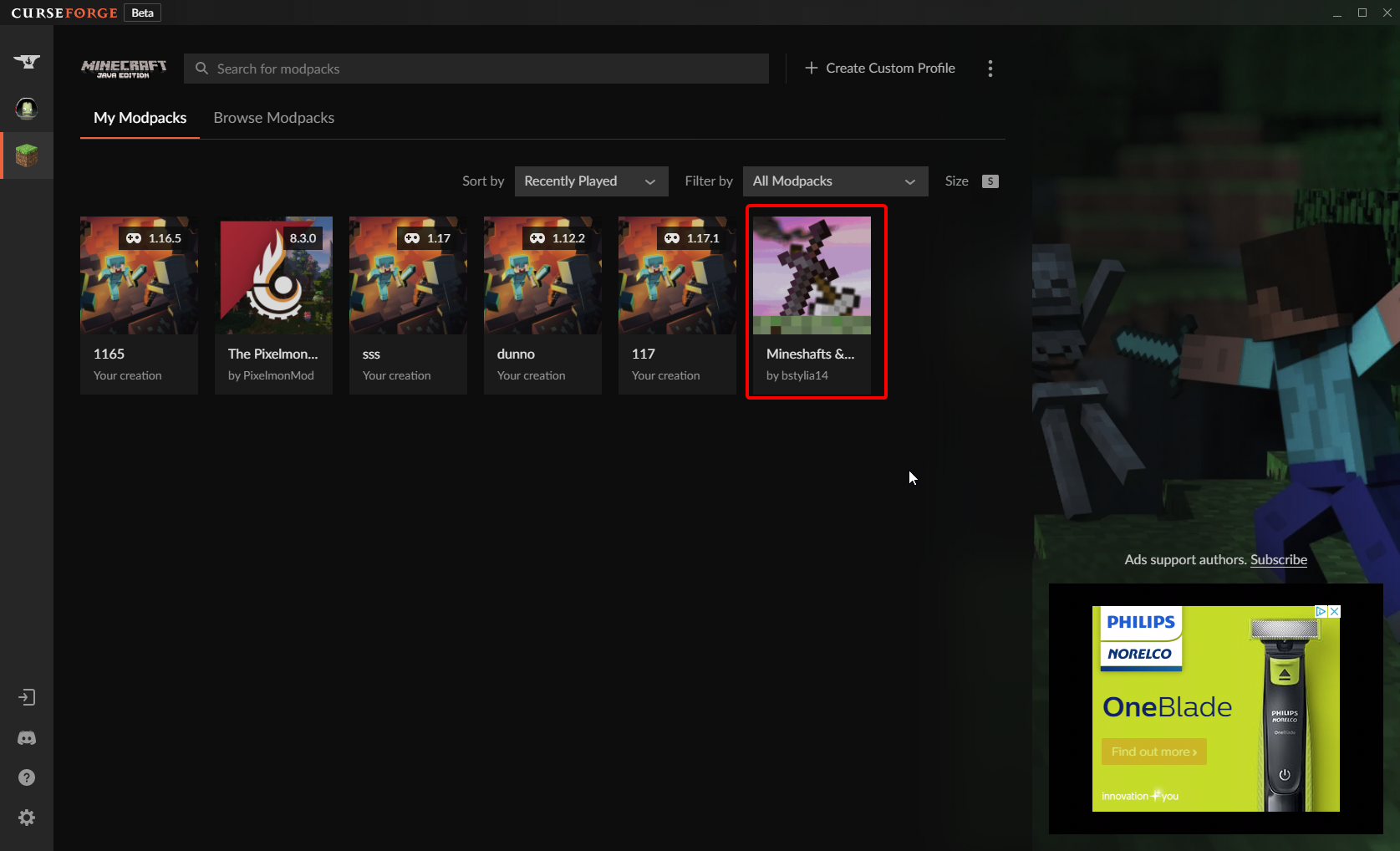
just installed it, no issue https://i.imgur.com/ZmftP7L.png
 mossy anvil
ye ik
 unique valley
can someone help me i downloaded the new launcher but curseforge launches the old one when i launch the modded profile
unique valley
oh thanks
 safe raven
I uploaded an update for my modpack, and it was approved but it's not showing in the curseforge app
lyric crescent
can take up to 24 hours for it to show up
safe raven
ok
 frigid needle
Can you not use curseforge when offline
lyric crescent
no
frigid needle
That's dumb
 topaz laurel
hi and question? how do i switch cursed forge MC launcher to newest verison? its not letting me play til i upgrade the MC launcher verison
red patioBOT
Hey there, it is Curseforge, not "Cursed forge"
 royal hill
eh, is there a way to repair the curseforge install without needing to uninstall first. was just using the app on laptop so forge is up, clearly on my side

 mossy chasm
hi im new i just did the new minecraft java launcher but my curse forge is not on the new one its on the old launcher how do i switch it so i can use mods on the new launcher
topaz laurel
yeah im having that same problem too @mossy chasm
mossy chasm
oh dang ok thanks
 plain orchid
np
topaz laurel
so we use the old verison til they update the curse forge verison then?
 onyx ledge
help
red patioBOT
╰( ͡° ͜ʖ ͡° )つ──☆*:・゚ *˜”*°•.˜”*°• Many Help •°*”˜.•°*”˜* <:curselit:796985620550385705>
Please provide a description of your issue with as much detail as possible. If you have an issue with a mod or modpack, tell us the name. Explain what you can see happening. Be specific!
 Tell us what is happening, we already know it "doesn't work".
Avoid using words like "it", tell us exactly what "it" is.
Don't assume anyone knows what you are talking about, be specific.
Tell us what you expected to happen.
Provide screenshots or video if possible.
Provide a log if possible. ?mc-log
onyx ledge
okay so im still new to the whole new launcher and im like dumb with it, but i did manage to get the game to load once nad now it crashes everytime. so i have a handful of mods (all from curseforge) and i try using them but the game crashes everytime. if someone can helkp me while watching my screen and guide me through what im doing wrong it would be much appreicated (this is for minecraft btw)
plain orchid
Wait until the curseforge update comes out
onyx ledge
when>?
plain orchid
Idk
signal ridge
onyx ledge
okay so im still new to the whole new launcher and im like dumb with it, but i ...
!mc-logs
red patioBOT
Sending logs for support.
- Right-click the modpack profile icon OR click the button in the modpack profile.
- Click
Open Folder. - Open the
logsfolder. - Drag and drop the FILE named
latestORdebuginto discord.
onyx ledge
signal ridge
Wrong one, one called latest
onyx ledge
crap
let me just try to run it again i suppose
is there a way i can remove overwolf and only use forge
signal ridge
All mods installed using the Curseforge app?
signal ridge
Should use the app to install the mods
onyx ledge
i dont like the app
signal ridge
Why not?
onyx ledge
i cant put my own custom handpicked mods into one game
signal ridge
the app makes it easier, so you dont need to deal with the bs of installing forge
Yes you can
signal ridge
!mc-installmods
red patioBOT
How to install mods in CurseForge App.
- Click
+ Create Custom Profile - Name it, select the required Minecraft version, select the Forge version (usually the highest number), click
Create. - Click the profile icon.
- Click
Add More Content - Search and install the desired mods.
- Start the game!
How to install mods not on CurseForge.
- Right click the profile picture or Open the profile and click the Icon next to the play button.
- Click
Open Folder. - Drag the mod(s) into the
modsfolder. (Note: Some mods will require others, to run. Make sure to read the instructions for the mod!) - Start the game!
onyx ledge
lol
signal ridge
thats how to install mods using the app or manually from other places.
onyx ledge
bruh...
signal ridge
Recommend using the cf app to install mods that come from the cf site
onyx ledge
okay but the mod still detects my installed mods form the website because i put them in the mods folder but the game crashes
signal ridge
sometimes things happen between copy and paste
 signal ridge
better then 200 mods
signal ridge
Also why is the forge installer in there? You dont need to install forge the app does it for you
onyx ledge
oh crap
i didnt even notice
what if that was the problem
omg
it was 5am when i was doing all this
lol
i gave up of sadness
signal ridge
logs talk about bewitchment, but having the forge installer in there may also cause issues. Highly recommend redownloading ¯_(ツ)_/¯
 oak orchid
can someone tell me what happened to Orespawn mod in 1.7.10?
signal ridge
read this: #🔥︱curseforge-support message
fleet bear
is it the app or the user?
signal ridge
then dont use it, no ones forcing you too
signal ridge
Did you read what the bot said?
fleet bear
you install them like we have for the last ~9 years?
onyx ledge
sadness
pine scaffold
Is there a curse forge application for phone?
 viral briar
No
signal ridge
Windows, mac only for the app
onyx ledge
can someone just like.. call on discord and help ill screen share
this is most likely user error
signal ridge
make a new custom profile in the app, make sure to set it to the version of minecraft your mods need.
Will do this step by step,
 signal ridge
I dont do calls
onyx ledge

signal ridge
Can explain step by step tho,
onyx ledge
sure..
signal ridge
Open the cf app
 signal ridge
Click + Create custom profile
signal ridge
What version of minecraft do your mods need?
Well we are starting from the begining
signal ridge
Which is? 1.17.1? 1.16.5? 1.15.2? 1.14.4? 1.12.2? and so on.
Link the video so I know what your talking about
onyx ledge

Hey guys! This video shows off over 20 mods that make Minecraft feel more like an exploration-focused RPG. You'll have tons of new structures, mobs and other features that you'll see in traditional RPGs like Minimap's, Waypoints, Fast Travel etc. Make sure to leave your own suggestions in the comments! I know a lot of people still want Fabric, b...
I have it set for 1.16.4
Aswell
The game still crashes
The inly mod i downloaded outside of these mods is tektopia
But I’ll probably need to remove it
signal ridge
onyx ledge
The game still crashes
slow down, did you install the mods with the app? yes or no
signal ridge
....
signal ridge
if they are on the site they are in the app, Screen shot how you are searching for the mods in the app
Also looking at your screen shot of your mods you got from the site earlier they arent even for the same versions of minecraft. this is why downloading from the site will cause issues...
 signal ridge
your searching in modpacks not mods
signal ridge
Going to listen to me now? or just skip ahead?
signal ridge
One the profile you made, right click on it and click view profile
fleet bear
imagine following directions 🙃
onyx ledge
sorry the app is confusing af
signal ridge
feel like a bot should be made explaining this at some point
signal ridge
onyx ledge
sorry the app is confusing af
Not really, it is pretty straight forward
fleet bear
you mean like the command we already have that gives the exact same instructions?
 ruby wharf
Heya, I am an executive dumbass, how does one add a game? I recently got stardew valley and saw it was an option to add but it refuses to acknowledge its existence
signal ridge
!stardew
red patioBOT
Overwolf maintains a known list of issues here, some with solutions, others without.
https://support.curseforge.com/en/support/solutions/articles/9000196615-curseforge-known-issues
Scroll down, look at "Other games"
ruby wharf
You are lovely, thank you
signal ridge
onyx ledge
sorry the app is confusing af
Here watch this if its still too confusing. I made a video of how to make and isntall mods for 1.16.4 https://puu.sh/ImBvs/e0736f4917.mp4
fleet bear
blissful edge
<@!117433042401886214> do you have an idea when it will be fixed when you forwar...
The mod you are installing only has one forge version released, this is the version you installed the other two are for fabric.
It's working as intended.
 digital roost
onyx ledge
sorry the app is confusing af
digital roost
onyx ledge
sorry the app is confusing af
Its so simple n user friendly tho🤣
 prime dew
I need support
im trying to use a modpack i have installed on curseforge for minecraft and whenever i try to open it, it opens minecraft the same way its supposed to and it does everything normally until i try and open a world
then it crashes and tells me i need to update the launcher
but i have the updated launcher already
lyric crescent
you cant update the launcher curseforge uses
prime dew
ok then what am i supposed to do about it crashing?
lyric crescent
?mc-log
red patioBOT
Sending logs for support.
- Right-click the modpack profile icon OR click the button in the modpack profile.
- Click
Open Folder. - Open the
logsfolder. - Drag and drop the FILE named
latestORdebuginto discord.
lyric crescent
this is using the curseforge app?
prime dew
yes
red patioBOT
Please visit the project page for the content you posted about and look for a way to contact the developer.
Somewhere on the page there is usually a method of contact. Look for one of the following things:
Issuestab like the image below.- Discord link.
- Twitter link.
- Comments section below the project.
If no contact method exists you will either have to remove the project or find a solution on your own.
prime dew
ok i can take it out
 molten vector
Hey so I have a modpack that when someone downloads it no mods show up in the modpack
lyric crescent
safe raven
oh ok
lyric crescent
molten vector
Hey so I have a modpack that when someone downloads it no mods show up in the mo...
how was the zip made? and what happens?
molten vector
lyric crescent
how was the zip made? and what happens?
I exported it through curseforge app. Someone in my server just downloaded it and it did not include a mods folder.
red patioBOT
How to install modpacks with the search features in app.
- Open the

Minecraftsection of the app. - Click the top search bar where it says
Search for modpacksOR Click theBrowse ModpacksTab. - Find the Modpack you want to install and click install on it.
- Wait for CurseForge app to download and unpack all the required files.
- Once finished, click
Play!
How to install modpacks from a Export. (Custom/Private/Site downloaded Modpack zip)
- Get CurseForge App if you don't have it, use
!downloadfor a link. - Get the exported modpack from CurseForge or someone else,
!mc-packshareexplains how to make them. - Open the
Minecraftsection of the app. - Click

Create Custom Profile - Click the
Importoption. - Find the file you just downloaded in step 2 and select it.
- CurseForge app will now attempt to download and unpack the modpack. If it fails, try steps 4-6 again.
- Once finished, click
Play!
 molten vector
lyric crescent
thats not how you install modpacks
molten vector
lyric crescent
thats not how you install modpacks
No thats how i made the modpack but they installed it through the curseforge website.
I just followed a guide I saw on youtube
lyric crescent
send the link to the pack
molten vector
lyric crescent
send the link to the pack
signal ridge
Downloaded from the site and imported to app, Can see mods no issue.
 ocean gull
Hello! i was wondering if i can share a custom pack that i made with a friend through curseforge, without having to file share or tell them the 100 mod list lol
signal ridge
ocean gull
Hello! i was wondering if i can share a custom pack that i made with a friend th...
!mc-packshare
red patioBOT
There are two ways to share a modpack you've made with others...
Export and Share - For Friends to Small Groups.
- Click the Icon for the modpack.
- Click the button next to play.
- Click

Export. - Select the files that should be included.
- Send the zip to the people that want it! They can follow the instructions in
!mc-installpackto install the pack!
Upload to Curseforge - For Public Release to Everyone.
This options will make your pack public to EVERYONE, it comes with extra requirements and will take some effort to set up.
- Go to here: https://www.curseforge.com/project/432/4471/create
- Fill out the information with a proper description of the pack. This should allow anyone to understand what the pack is.
- Click the Icon for the modpack in the CurseForge app.
- Click the button next to play.
- Click
Export. - Select the files that should be included.
- Open your Project you made on the CurseForge site and Upload the file you just made.
- Wait for Moderation & Sync so it can show up in the client! (See
!syncfor limitations)
molten vector
signal ridge
Downloaded from the site and imported to app, Can see mods no issue.
Oh ok I think i get it. Is there a way to have it on the app rather than having everyone import it? But that helps a lot thank you <3
ocean gull
signal ridge
!mc-packshare
what is that? how do you do that command and where?
signal ridge
molten vector
Oh ok I think i get it. Is there a way to have it on the app rather than having ...
Change the file type from Alpha to either Release or Beta
molten vector
Oh! Thank you!
signal ridge
ocean gull
what is that? how do you do that command and where?
Go to #🟢︱user-bot-spam , you can test commands for our bots there
molten vector
So once its updated to release it should appear on the curseforge app?
signal ridge
Can take some time to sync sometimes but yes
molten vector
Fab thank you for your help!
 eager crow
is this a good place to ask for help troubleshooting a modpack issue on minecraft?
fleet bear
!notcf
red patioBOT
Your question is not related to CurseForge owned/maintained features or services.
Please use the appropriate game room by getting a game role from #786424115535544350 or use #👽︱game-support for help.
CurseForge does not make or maintain any of the content or games used on the site or app. Just because it's on the site/app does not make it a problem with CurseForge. Move rooms as requested, arguing about it will result in you being removed from the discord.
eager crow
wow
signal ridge
Will be banned soon
signal ridge
not that I know of why?
eager crow
my minecraft games not working and a friend recommended updating curseforge
signal ridge
Relaunching the app is one way to see if their are any updates, other wise define not working
eager crow
my world doesnt really load, everytime i load it up it goes to loading world screen then to a blank dirt block minecraft loading screen before it just sits there and i have to close app
signal ridge
oh ok, so the same thing you posted in the other channel then?
eager crow
yes
signal ridge
🤦 Explains the confusion now.
Will go back to #👽︱game-support as this isnt really a curseforge issue.
blissful edge
@fleet bear oh.. so much for me being an r*tard
thanks clay.. sorry for causing a fuss lol
 hybrid oasis
 upper root
No you will not. Twitch is not connected in any way shape or form to the desktop app anymore
 wintry patrol
hello, I seem to be having a problem with playing with mods, when I click play on my mod pack when minecraft launches the only option I get is to play in demo. is there a way to fix this?
upper root
!mc-login
red patioBOT
Minecraft Logins
CurseForge does not handle or touch the Minecraft Login.
You must own JAVA Edition
If you have a DEMO button instead of a PLAY button in the launcher you are logged into an account that does not own the game. CurseForge requires you to own the game to use it.
Follow the steps in the pictures below. If you bought Minecraft after October 2020 or you have transferred your account you will use a Microsoft account.
Otherwise you must use a Mojang account until you transfer it!
 wintry patrol
I am logged in on the account that owns it
and only get the "play demo" button when I launch from curseforge
 rich flint
yeah this happens to people sometimes - follow the steps regardless
 cinder palm
for some reason the profile pic on my account is white.
fleet bear
CF randomly pulls the wrong icon. Just refresh or log out and back in and it will be fine
cinder palm
BINGO!! ty!
 jaunty widget
i needed help
 limpid orbit
Hello how to install shaders in your launcher?
jaunty widget
i have installed mods from the curse forge app but how am i supposed to load the mods?
queen storm
limpid orbit
Hello how to install shaders in your launcher?
!mc-optifine
red patioBOT
We do not offer support for Optifine!
If you have issues with Optifine, remove it. If you want further support try the discord found on their website.
https://www.optifine.net/home
Installing Optifine with modpacks on Curseforge:
- Right click the modpack icon, select
Open Folder. - Put the
Optifine.jarinto themodsfolder. - Now start the modpack.
queen storm
jaunty widget
i have installed mods from the curse forge app but how am i supposed to load the...
You hit play?
queen storm
Curseforge has a play button per modpack, click it
jaunty widget
ohh thnx
also
i wanted to run different mods on a single world
how to do that?
like better foliage
biomes o plenty
better caves/mineshafts
queen storm
You install multiple mods to the same modpack?
jaunty widget
queen storm
You install multiple mods to the same modpack?
how to do that
is there a video that shows
how it's done
queen storm
You said you installed mods, how did you do that?
And try to get more words on a single message
jaunty widget
i just took the better minecraft modpack for now
red patioBOT
How to install mods in CurseForge App.
- Click
+ Create Custom Profile - Name it, select the required Minecraft version, select the Forge version (usually the highest number), click
Create. - Click the profile icon.
- Click
Add More Content - Search and install the desired mods.
- Start the game!
How to install mods not on CurseForge.
- Right click the profile picture or Open the profile and click the Icon next to the play button.
- Click
Open Folder. - Drag the mod(s) into the
modsfolder. (Note: Some mods will require others, to run. Make sure to read the instructions for the mod!) - Start the game!
 hexed onyx
how to fix webclient error?
upper root
!webclient
red patioBOT
WebClient errors are from networking issues to your computer. You can try a few things to fix it:
- Restart the computer.
- Restart your router/modem.
- Try another internet source like a hotspot, wired connection or moving closer to the WiFi.
- Pause/Stop other things using the internet. (Streams, music, etc)
- If this still doesn't work, try again in an hour and hope your connection is stable.
upper root
Lol
hexed onyx
i'm trying to download better minecraft 1.16.5 but everytime when it's installing the warden mod or something it shows the error i did all the steps
i guess im gonna play 5d chess then
 thorn lantern
Hello, Can I have help please ?
upper root
!help
red patioBOT
╰( ͡° ͜ʖ ͡° )つ──☆*:・゚ *˜”*°•.˜”*°• Many Help •°*”˜.•°*”˜* <:curselit:796985620550385705>
Please provide a description of your issue with as much detail as possible. If you have an issue with a mod or modpack, tell us the name. Explain what you can see happening. Be specific!
Tell us what is happening, we already know it "doesn't work".
Avoid using words like "it", tell us exactly what "it" is.
Don't assume anyone knows what you are talking about, be specific.
Tell us what you expected to happen.
Provide screenshots or video if possible.
Provide a log if possible. ?mc-log
thorn lantern
Hello, I receve this message :
"The status of the file Echappe 1.0.zip ([MAP] [EN/FR] Escape 1- Échappe 1) has been changed to Rejected
File is a duplicate of an existing file. Echappe 1.0.zip on project-542559
If you have any questions please contact our support team https://support.curseforge.com."
the zip file has the same name but it is not duplicated. it is a différent fixed file
I had to fix some translations dialogue ingame, And I didnt find where to update the file, I did mistake by putting the same name on the change log, so I decided to delete the project-542559 and reposte it again.
Please excuse my mistake, I'm not used to forge project management, the last uploaded project with the name of [MAP] [EN/FR] Escape 1- Échappe 1 is the right project, the zip file is fixed.
Tell me what to do exactly to figure this out, and Thank you in advance !
The site still told me that it is duplicated but project 542559 is deleted .... it can't be duplicated because simply I deleted it !
upper root
Try to just rename the new file you are uploading
thorn lantern
I did it
I receve same message ...
I really dont know what to do more than this ...
I dont understaand ...
upper root
Oh, its exactly the same as the file previously uploaded it seems then
thorn lantern
Yes but I deleted the project ....
fleet bear
Deleting it doesn't remove it. Why are you deleting projects to upload files to start with?
thorn lantern
Because it was not the good one and I didnt know how to manage it
fleet bear
I don't get how that means you need to delete the whole project.
you had to click through the project settings to delete it...
thorn lantern
I put same name in the change log... That would be better if juste we can change file names in chalnge og project ! I have Echappe 1.0 and echappe 1.0 so I though that deleting and reposting is a good way to solve this
fleet bear
You can edit all of that...
 opal cipher
Fixes to projects usually also means that the version should be updated.
thorn lantern
Sorry I'am not good in managing projects on forge !
red patioBOT
Wording is important!
Forge = Minecraft Forge, This is a modloader often just called "Forge".
Fabric = Fabric MC, this is another modloader, just called "Fabric".
CurseForge = A Website/App that has content for games.
Mods = Individual mod files.
Modpacks = Multiple mods put into the mods folder or downloaded from CurseForge.
These are not Interchangeable! Please use the correct terms as it allows us to help you faster!
fleet bear
Next time instead of just deleting things you should ask for support or try looking at the site.
So now you either need to make a change to whatever it is you are uploading or open a support ticket to get your project back to fix the problem
thorn lantern
As a humain I think I did mistak 😄
I did support tiket for days no answer ! 😄
And Gui management is not that clear
Any way thanks for ... eh help ..
🤷♀️

I dont understand where to delete 😦
fleet bear
You don't need to delete anything for the 3rd time
just upload a new file or edit the existing one
thorn lantern
Oh ...
 swift pond
hi i need help with something...
when i open a mod on forge minecraft
its launches the old minecraft aluncher
not the new one
there is a new launcher for mc java on the microsoft store
swift pond
opal cipher
thorn lantern
i think i'am going to search for a ytb tutorial -_- how to manage file on forge ....
swift pond
i alredy saw one but its soooooo complicated
i might as wait for curse forge to fix it....
upper root
thorn lantern
i think i'am going to search for a ytb tutorial -_- how to manage file on forge ...
You could see if waiting for a day fixes it, or you could just edit the file a tiny bit
swift pond
might as well wait for some time
viral briar
Not really needing fixed when it still works . Just an update will be done when it’s done
swift pond
hmm
i dont want to wait.... i want them to fix it now
they didnt even say theyll fix it
thorn lantern
fleet bear
just upload a new file or edit the existing one
I did delete the project, and in file management of those files I can only archive them, so I can't upload or update file or any thing of a deleted project! do I have to archive them ?
fleet bear
I already told you what to do
queen storm
swift pond
i dont want to wait.... i want them to fix it now
They have job offers open, feel free to take one up.
Then you can fix it yourself.
Give them time to figure out how it works and how to deal with it
 forest snow
I’m trying to put a mod pack in Minecraft but it will not work
fleet bear
thorn lantern
I did delete the project, and in file management of those files I can only archi...
You have these options.
- Wait for the ticket to fix the existing project because you deleted it and now it won't work.
- Make a new project and upload a new file that isn't the same as the old one.
You pick one and do it.
swift pond
queen storm
They have job offers open, feel free to take one up.
Then you can fix it yoursel...
not bothered too
thorn lantern
fleet bear
You have these options.
1. Wait for the ticket to fix the existing project becau...
It is the same map world ! I juste changed some dialogue in minecraft ! so the file is the same even i I rename it ! I can wait for support but the project is deleted, May be I have to explain to you my probleme, All I want, is delete file on deleted project ! and in the project management page I can just archive or edit... let me try againe ...
fleet bear
swift pond
not bothered too
Well then you get to enjoy the wait.
swift pond
guess i do...
 lament girder
I need some help. I am trying to run all the mods 6 for my son but keep getting not responding or error message
swift pond
what game
queen storm
lament girder
I need some help. I am trying to run all the mods 6 for my son but keep getting ...
#👽︱game-support please
forest snow
Dose anyone know how to put cues forge mods in Minecraft when I try to add it it act like I never did
fleet bear
thorn lantern
It is the same map world ! I juste changed some dialogue in minecraft ! so the f...
YOU CAN'T DELETE THE FILE TO FIX IT
How many times do I need to tell you? You have TWO options, you pick one and do it. No "I want to do this or that" None.
I fail to understand how you are incapable of following the directions I gave you. You pick one, Do what it says, Move on with your day.
queen storm
forest snow
Dose anyone know how to put cues forge mods in Minecraft when I try to add it it...
!mc-installmods
red patioBOT
How to install mods in CurseForge App.
- Click
+ Create Custom Profile - Name it, select the required Minecraft version, select the Forge version (usually the highest number), click
Create. - Click the profile icon.
- Click
Add More Content - Search and install the desired mods.
- Start the game!
How to install mods not on CurseForge.
- Right click the profile picture or Open the profile and click the Icon next to the play button.
- Click
Open Folder. - Drag the mod(s) into the
modsfolder. (Note: Some mods will require others, to run. Make sure to read the instructions for the mod!) - Start the game!
fleet bear
I have no idea what you are typing at this point but it doesn't change what you have for options.
You pick option 1, or you pick option 2.
swift pond
how do you know what update of forge app you are using?
thorn lantern
omg ... YOU told me that I have to delete a file for uploading an other 😦 .... be more clear and please more kind ! i'am kind to I dont disrespecte you ! !!! I know its hard for you with all those questions but it is also for me I dont want to bother ppl but I tryed many times befor comming here ... Any way let's get wait .... but it would be goood if you can upgrade file management I dont know, I can fixe it by my self if I know how to do ... thank you any way.
fleet bear
I never told you to delete anything to upload it...
queen storm
swift pond
how do you know what update of forge app you are using?
Right click the 3 dots on the top right of the modpack, options
fleet bear
thorn lantern
omg ... YOU told me that I have to delete a file for uploading an other 😦 .... ...
The file management works fine. You just decided to start deleting things instead of looking around or asking for help.
queen storm
swift pond
the app version
Settings in bottom left
swift pond
thnx
thorn lantern
fleet bear
The file management works fine. You just decided to start deleting things instea...
I hate asking for help for that reason, ppl get condescension ... never mind.
fleet bear
Again, I never told you to delete anything...
thorn lantern
Never mind ... its ok
fleet bear
I specifically told you that you can't delete anything.
thorn lantern
I will wait till support get me answer overwize I will just give up
have a good day
(sorry for my english it is not my language )
swift pond
my minecraft finally wont crash with mods
im finally relieved
but they still have to switch to the new launcher
opal cipher
It will be done, when it's done.
swift pond
yes
hexed onyx
guess what i still can't fix webclient error
 robust ice
Howdy! I've been having trouble with the CF App the last few days. I'm not sure if it updated on its own or if something changed on my PC, but I've noticed a lot of my modpacks aren't showing up in my list of installed packs. Is this a known issue or is there a fix at all I can do short of redoing the packs into new profiles?
I've already double checked, and the pack folders and all the files still exist in my filesystem, they're just not showing up on the App's pack list for some reason
lament girder
why do i get a black screen when it is trying to load terrain
 twin trench
Hi, i am trying to play foolcraft 3 and this keeps showing up and than my game freezes, what can i do?
 queen storm
twin trench
Hi, i am trying to play foolcraft 3 and this keeps showing up and than my game f...
queen storm
twin trench
Hi, i am trying to play foolcraft 3 and this keeps showing up and than my game f...
#👽︱game-support please
twin trench
sorry
 unborn basin
hexed onyx
guess what i still can't fix webclient error
unborn basin
hexed onyx
guess what i still can't fix webclient error
Send me your logs please
!owlogs
red patioBOT
<:overwolf:857375414002384916> How to get Overwolf logs! <:overwolf:857375414002384916>
 brave gust
why I am not allowed to publish my modpack, they say that I have to avoid vague descriptions, I have changed everything 10 times and even so it seems that they do not like it, but other users who have only 1 written line allow them to publish the modpack

like this modpack (not mine), but has vague description and is posted
 fleet bear
And what do you have?
brave gust
fleet bear
And what do you have?
I'm editing it again, I'm going to put a "vague" description like that of the users who accept to see if I'm lucky
fleet bear
How about you just.. dont?
lyric crescent
That description says pretty much nothing about the pack. "Some mods are in the pack" is not a useful description. Every pack has some mods in it.
hexed onyx
unborn basin
Send me your logs please
actually nvm i'm downloading the mod in multimc
unborn basin
hexed onyx
actually nvm i'm downloading the mod in multimc
Right in the feels
Mind sending your logs anyways?
 limpid raven
Hello, is there any technological smart people here? I need to install forge but for some reason it won't open even though I've downloaded java.
 queen storm
limpid raven
Hello, is there any technological smart people here? I need to install forge but...
queen storm
limpid raven
Hello, is there any technological smart people here? I need to install forge but...
!mc-forge
red patioBOT
limpid raven
queen storm
!mc-forge
For support?
queen storm
Well, we are not forge, that is forge, so yes
 bronze sandal
why cant my laptop run valhelsia 2
and why does MC Eternal keep crashing "exit:0"?
queen storm
!mc-logs
red patioBOT
Sending logs for support.
- Right-click the modpack profile icon OR click the button in the modpack profile.
- Click
Open Folder. - Open the
logsfolder. - Drag and drop the FILE named
latestORdebuginto discord.
bronze sandal
hm
opal cipher
hexed onyx
Here
Would you like to try to install all Windows Updates that your computer can install, reboot, and keep doing that until there's no more updates to be installed? Because the Webclient error might be because of a bug in Windows.
 modest hare
I got the updated launcher for minecraft java but everytime I try to run something from forge it crashes. Anyone else have this problem?
queen storm
!mc-logs
red patioBOT
Sending logs for support.
- Right-click the modpack profile icon OR click the button in the modpack profile.
- Click
Open Folder. - Open the
logsfolder. - Drag and drop the FILE named
latestORdebuginto discord.
modest hare
queen storm
Can you try a different modpack?
 sage girder
Anyone else’s CurseForge not using the new Minecraft Launcher?
sage girder
Yeah I’m stupid I read it right after posting lol
carmine geyser
 lyric crescent
why would you be including any of that
carmine geyser
I don't understand what needs to be removed from the archive
opal cipher
Export packs from CurseForge, don't try to zip things manually.
 cloud dome
I klick on the icon and then it sas error "failed to start application please contact support"
lyric crescent
screenshot it please
cloud dome
how do i do that lmao
carmine geyser
lyric crescent
why would you be including any of that
and what is it in general and what is it responsible for
I just don't understand what it is
red patioBOT
There are two ways to share a modpack you've made with others...
Export and Share - For Friends to Small Groups.
- Click the Icon for the modpack.
- Click the button next to play.
- Click
Export. - Select the files that should be included.
- Send the zip to the people that want it! They can follow the instructions in
!mc-installpackto install the pack!
Upload to Curseforge - For Public Release to Everyone.
This options will make your pack public to EVERYONE, it comes with extra requirements and will take some effort to set up.
- Go to here: https://www.curseforge.com/project/432/4471/create
- Fill out the information with a proper description of the pack. This should allow anyone to understand what the pack is.
- Click the Icon for the modpack in the CurseForge app.
- Click the button next to play.
- Click
Export. - Select the files that should be included.
- Open your Project you made on the CurseForge site and Upload the file you just made.
- Wait for Moderation & Sync so it can show up in the client! (See
!syncfor limitations)
carmine geyser
I still don't get it
lyric crescent
dont get what
carmine geyser
do I need to remove only the folder because of which the service does not miss?
lyric crescent
you need to use the app to export your profile. whatever you did was wrong.
carmine geyser
I thought you could just download from the site
lyric crescent
you can, but if you want to upload a modpack you need to do it correctly.
#🔥︱curseforge-support message
carmine geyser
I did so as in the second case it is written, it is possible because of the wrong archive they do not want to skip
lyric crescent
you would not get an error like that if you did it correctly
carmine geyser
so I created an archive from the minecraft folder or rather moved the full main folder to the archive
queen storm
Which is wrong
 digital grove
I'm trying to release a pack for 1.18 Snapshot using Fabric, but the pack was rejected for the following reason
Fabric modpack file with ID 3513514 for Minecraft version 21w43a has FabricApi with no corresponding Minecraft version
Since 21w43a is the version and it was rejected, what should I do?
queen storm
carmine geyser
so I created an archive from the minecraft folder or rather moved the full main ...
Should not make an archive yourself
lyric crescent
digital grove
I'm trying to release a pack for 1.18 Snapshot using Fabric, but the pack was re...
did you make this export with the CF app?
digital grove
I used GDLauncher, which I use for all my packs. I run Linux and the CF app will not run on it
queen storm
Because it is a snapshot, CF does not support those
carmine geyser
and how then, I still have a custom menu there, will it be preserved? when creating the right modpack
digital grove
queen storm
Because it is a snapshot, CF does not support those
Then maybe it should not be an option on the pack file upload page
 queen storm
Then maybe you should not make things with GDLauncher and trying to put it on CF?
digital grove
queen storm
Then maybe you should not make things with GDLauncher and trying to put it on CF...
I would if CF was available on Linux
queen storm
They are working on it.
Might want to see on a windows machine what versions are available, then pick the same version on linux
 median onyx
how to change minecraft to microsoft on curseforge?
red patioBOT
Minecraft Logins
CurseForge does not handle or touch the Minecraft Login.
You must own JAVA Edition
If you have a DEMO button instead of a PLAY button in the launcher you are logged into an account that does not own the game. CurseForge requires you to own the game to use it.
Follow the steps in the pictures below. If you bought Minecraft after October 2020 or you have transferred your account you will use a Microsoft account.
Otherwise you must use a Mojang account until you transfer it!
lyric crescent
?mc-login
digital grove
queen storm
Might want to see on a windows machine what versions are available, then pick th...
Good idea. Might set up a VM
 hazy dagger
hi
median onyx
red patio
but when i want to play stoneblock on curseforge i need to login minecraft account but my login and password don't work because i need microsoft account. I have them, but it still doesn't work when I want to log in
lyric crescent
read the message
 opal cipher

 lyric crescent
this is not a curseforge issue. you follow the instructions in the message. if that doesnt fix it then you need to contact microsoft about your account.
brave gust
aahh I did this test, I put the same description as another modpack already approved and I have been rejected. gg

aproved modpack
 lyric crescent
brave gust
aproved modpack
lyric crescent
brave gust
aproved modpack
Doesn't matter what was approved already, that is not going to win you an approval from anyone. Rules changed, now you follow them or don't upload the pack.
opal cipher
brave gust
aahh I did this test, I put the same description as another modpack already appr...
It says Summary, not description.
brave gust
lyric crescent
Doesn't matter what was approved already, that is not going to win you an approv...
Have they changed less than 6 hours ago when that person updated their modpack?
lyric crescent
it does say summary 😂
 brave gust
They will be different fields but I have copied and pasted from another modpack approved 6 hours ago to see what happened and the rules were the same, but the other modpack has been approved with exactly the same data
lyric crescent
If you have an issue with someone else's description then report the project. No one here cares about what someone else did. Fix your pack by following the provided instructions.
brave gust
I have now put a summary exactly the same to a more experienced creator, I have spoken with him. we'll see what happens in a few minutes, and thanks
lyric crescent
Why are you even uploading packs if you can't be bothered to write your own summery and description.
brave gust
I have written my description more than 10 times, I have spent more than an hour writing everything to my liking until I have been rejected numerous times to the point of eliminating everything to seek approval
lyric crescent
Then write something actually useful?
brave gust
I have put colors, I have put photos, and more, I have removed everything
mossy anvil
lyric crescent
just installed it, no issue https://i.imgur.com/ZmftP7L.png
now it works for me too wtf
carmine geyser
I downloaded your application and I don't understand how to export, even though it is painted, I can't simply find these keys
lyric crescent
you need the pack to be made in the app first
 silk bane
i downloaded the new minecraft from microsoft store and now the CurseForge is not working
lyric crescent
curseforge has nothing to do with the microsoft store

 silk bane
ok
carmine geyser
and where to click next
lyric crescent
carmine geyser
you need to make the pack with the app
carmine geyser
how's that?
lyric crescent
how's what
carmine geyser
lyric crescent
you need to make the pack with the app
.
lyric crescent
that says nothing
opal cipher
- Create Custom Profile
- Select the correct version of Minecraft + the correct mod loader that the mods use.
- Add the mods
- Export the pack
- ????
- Profit
 plain turret
Hi, I installed the new minecraft launcher from microsoft store, but in Curse Forge App when I play a modpack it opens the old launcher (I know that because I see the red message at the bottom of the old launcher). What do I have to do to play curse forge modpacks with the new launcher?
plain turret
Ok thanks
 opal bolt
hey hi i have a problem uploading a file to curseforge can someone help me? I have not put any plugin but they are 2 datapacks and they were used for a modpack
The status of the file FANTASIA 1.1.9 (FANTASIA (the new world)) has been changed to Rejected
Notes:
Plugins must be uploaded in JAR format. For more information, see https://authors.curseforge.com/knowledge-base/minecraft/839-bukkit-plugins
If you have any questions please contact our support team https://support.curseforge.com.
queen storm
The database are the issue, can't have zips in there
digital roost
spanish?
 fallow iris
For some reason unknown to me, I can't leave a working link to the wiki. It just redirects me back to curseforge. The link is 100% correct. There's nothing unnecessary in the source code of this element either.
I did this link just by pasting it as plain text and as "create link" on the text. Both options don't work. I have an assumption that this is due to the automatic reformatting of the %27s part of the link into 's . The link from the "Wiki" tab that is in General works, but I want it in the description text.
Thank you for your time. 
//Feel free to ping me when you answer.
Update: Reducing original link to a shorter link (which did not include the problematic %27s) "fixed" the problem.


 true lion
SO, I just read the note on Curse Forge. Just so you all know. Curse Forge will in fact work with the new launcher. Once you have the new launcher, you click on the installation tab at the top of the screen. There you will select new installation. There you can name the installation you are creating. Then you will select the version of curse forge you wish to use (you will see versions of minecraft as well, if you don't see curse forge you will need to uninstall then reinstall). After selecting the version, you need to click the create button. Once done close the launcher and you may need to end task in the task manager. Go ahead and open the Curse forge app and select the mod you wish to play. When the launcher opens it will update and bam, you have your mods again.
lyric crescent
or, just leave it alone. cuz that is much easier
lyric crescent
took me longer to read what you said, and still dont understand it really
true lion
I can walk you through it if you would like
queen storm
Neither will you see a version of curseforge to use as it is not a modloader
lyric crescent
yea, pretty sure you're talking about forge there, not curseforge
true lion
I use curseforge
true lion
I will post screen shots just a moment I have to reboot
queen storm
No need
true lion
All I can say is what I have done. Mine works great with the new Minecraft Launcher. All the mods that I use load just fine.
fallow iris
Please ping me if anyone answers the question with setting up a working link. I may miss your answer.
lyric crescent
That's nice. Happy for you. But will not be recommending this to anyone even if it does work as this just introduces more potential issues, and the only benefit is not seeing the message to update.
true lion
to each their own I guess
opal bolt
queen storm
The database are the issue, can't have zips in there
How do I get it in there?
pine scaffold
Can i add resource packs to modpacks?
digital roost
anyone know why everytime i try and add optifine to a modpack it wont load? itll get stuck on freezing data and stay like that forever
lyric crescent
?mc-optifine
red patioBOT
We do not offer support for Optifine!
If you have issues with Optifine, remove it. If you want further support try the discord found on their website.
https://www.optifine.net/home
Installing Optifine with modpacks on Curseforge:
- Right click the modpack icon, select
Open Folder. - Put the
Optifine.jarinto themodsfolder. - Now start the modpack.
digital roost
thats what im doing
im trying with better minecraft which just says to remove magnesium
lyric crescent
unsure how you failed to read the top of that message
 sturdy kayak
"Exception during a WebClient request ", surely this problem was here 1000 times but i cant find any solution to it
lyric crescent
then report it to optifine, as it says
lyric crescent
sturdy kayak
"Exception during a WebClient request ", surely this problem was here 1000 times...
!webclient
red patioBOT
WebClient errors are from networking issues to your computer. You can try a few things to fix it:
- Restart the computer.
- Restart your router/modem.
- Try another internet source like a hotspot, wired connection or moving closer to the WiFi.
- Pause/Stop other things using the internet. (Streams, music, etc)
- If this still doesn't work, try again in an hour and hope your connection is stable.
 silent shore
digital roost
thats what im doing
silent shore
digital roost
thats what im doing
:D
pine scaffold
Can i add resource packs to modpacks?
digital roost
lyric crescent
then report it to optifine, as it says
really posted here just in case someone has had the same issues and was able to fix them
lyric crescent
post in optifine!
digital roost
whats it like?
lyric crescent
pine scaffold
Can i add resource packs to modpacks?
?mc-modifypack
red patioBOT
How to add/remove mods in a modpack.
- Click on the picture of the modpack.
- Click the

Add More Contentbutton, IF this button is not there, see below before continuing. - Find the Mods, Resource Packs or Maps you wish to Install and click
Installon them. - Wait for all the required mods to be downloaded.
- Start the modpack.
How to Enable/Disable content management for modpacks.
- Click on the picture of the modpack.
- Click on the button next to the
Playbutton. - Click on

Profile Options. - Check the
Allow content management for this profileoption if you want to edit the content of the modpack, uncheck it to disable.
NOTE: The Allow content management for this profile option is what allows you to Delete, Disable, Update or Install any Mods, Resource Packs or Maps managed by CurseForge. It must be on to modify any of them! (Currently)
pine scaffold
I mean the ones i post
lyric crescent
what
opal bolt
opal bolt
How do I get it in there?
hey i need help
lyric crescent
dont know what you're even asking. you put something into your zip that isnt allowed
pine scaffold
I am trying to make modpack which includes some resource packs how can i include then in the modpack?
lyric crescent
tick the box to export them when you export
pine scaffold
Ah ok
 solemn bay
how do i make a modpack? tried to and it got rejected because i know i did it wrong
queen storm
digital roost
spanish?
We only speak English here
digital roost
oh
lyric crescent
solemn bay
how do i make a modpack? tried to and it got rejected because i know i did it wr...
so show us the message
digital roost
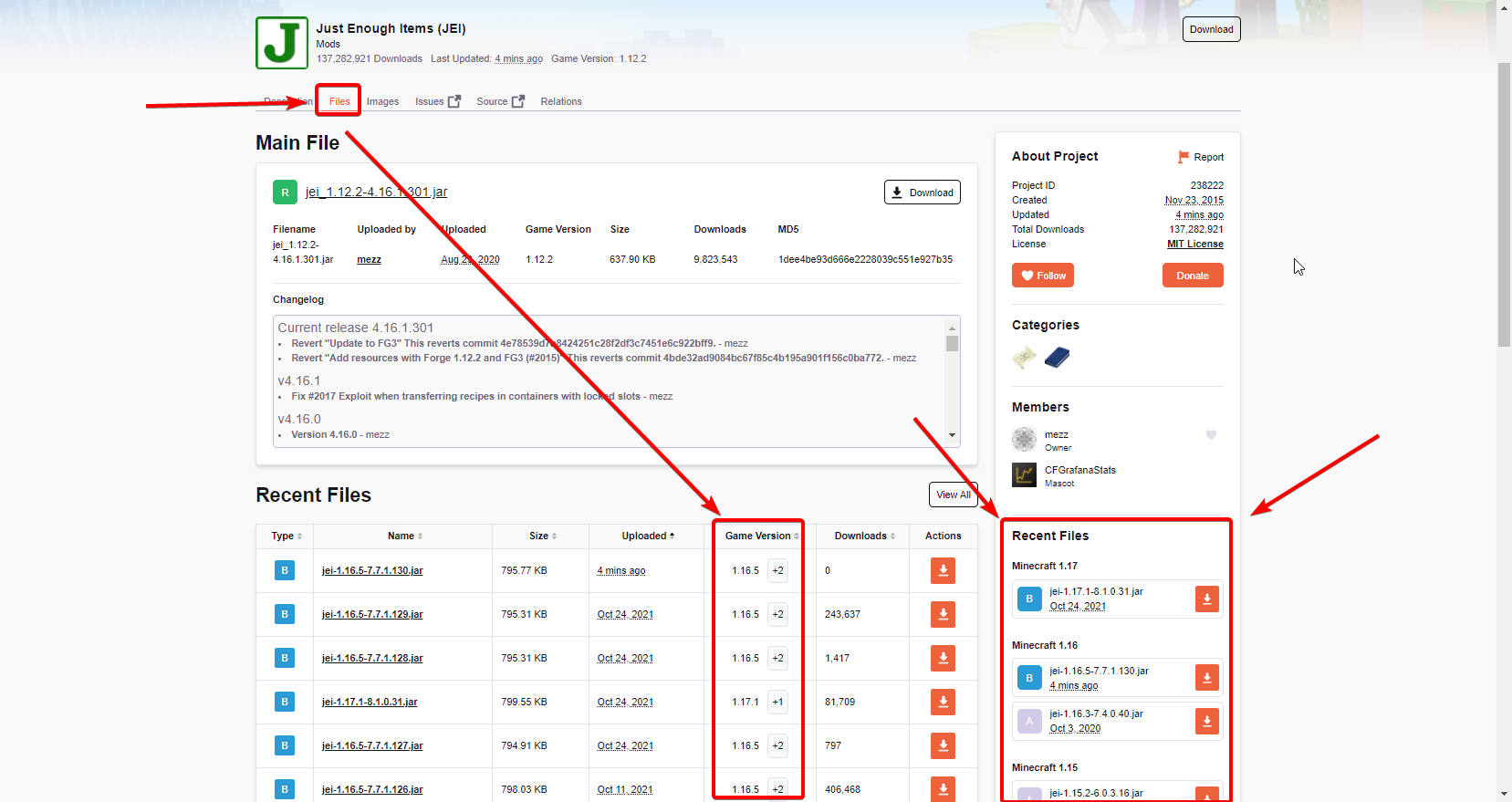
Well my question is: the mod "StatusEffectHUD" is available for 1.16.5 ???
lyric crescent
check the mod page
solemn bay
I uploaded a file I Ithought was getting added to the modpack but it got rejected because it already exists on the mods. so, how do i make a modpack?
lyric crescent
show the message
solemn bay
i don't really think it's going to help with the issue of me not knowing how to make a modpack
 digital roost
lyric crescent
check the mod page
digital roost
lyric crescent
check the mod page
where?
lyric crescent
solemn bay
i don't really think it's going to help with the issue of me not knowing how to ...
It does help beacuse now i know that you were trying to upload a mod, and not a modpack.
?mc-packshare
red patioBOT
There are two ways to share a modpack you've made with others...
Export and Share - For Friends to Small Groups.
- Click the Icon for the modpack.
- Click the button next to play.
- Click
Export. - Select the files that should be included.
- Send the zip to the people that want it! They can follow the instructions in
!mc-installpackto install the pack!
Upload to Curseforge - For Public Release to Everyone.
This options will make your pack public to EVERYONE, it comes with extra requirements and will take some effort to set up.
- Go to here: https://www.curseforge.com/project/432/4471/create
- Fill out the information with a proper description of the pack. This should allow anyone to understand what the pack is.
- Click the Icon for the modpack in the CurseForge app.
- Click the button next to play.
- Click
Export. - Select the files that should be included.
- Open your Project you made on the CurseForge site and Upload the file you just made.
- Wait for Moderation & Sync so it can show up in the client! (See
!syncfor limitations)
lyric crescent
digital roost
where?
 digital roost
lyric crescent
https://i.imgur.com/9lzhyh0.png
digital roost
lyric crescent
https://i.imgur.com/9lzhyh0.png
Yes, but when I look for the mod it tells me that it does not exist
lyric crescent
on google?
solemn bay
I selected the modpack option... not mod in that page. that's my problem and why the image doesn't help.
lyric crescent
you tried to upload a mod to a modpack project
solemn bay
i am asking how to make the modpack
i understand what i did and told you what i did wrong
lyric crescent
so read the instructions?
solemn bay
i will try to use those instructions, but i am not trying to share anything. Anyways, i found out how to make the modpack. and as i thought, it had nothing to do with the those instructions you gave me
lyric crescent
then idk what your issue was
solemn bay
i was asking how to make a modpack. i have been saying that.
lyric crescent
but what you did not say, i assume, is that you didnt know how to use the app, which is the piece that was missing
 dry parcel
i cant see terraria in the choose a game section
viral briar
Terraria is not on curseforge app, thus won’t find it
 severe shale
I get this when I try to enter to one mod
requiers version 0.406-b2 but client has 0.4.4
lyric crescent
Get the version it wants
severe shale
Is it like installation vlient or ehat
lyric crescent
what
severe shale
Installation client or what
lyric crescent
???
you get the version of the mod it says to get. has nothing to do with a client
grim wraith
Is there a way to make modpacks i export/import disable or enable their mods by default? I tried sending a WIP pack to my friend after exporting it from my Curseforge app but contrary to what I've been told here a few weeks ago (at least if I'm remembering correctly), most of the mods were still disabled when they imported my pack into their launcher.
grim wraith
I do want them in the pack tho
Someone here told me that modpacks i share with others while always have all included mods enabled by default, but that is not the case here. The mods I had disabled temporarily for testing reasons were still disabled when my friend imported the .zip on their end
fallow iris
fallow iris
For some reason unknown to me, I can't leave a working link to the wiki. It just...
Can anyone help with the error I described above? I still can't get it fixed. 
lyric crescent
grim wraith
Someone here told me that modpacks i share with others while always have all inc...
confirmed that disable does carry over in export. so not sure what the issue is?
 lilac frigate
Hello, I create a modpack this afternoon, it was accepted by moderators but it don't display on CurseForge app, why please ?
red patioBOT
Sync and your Project.
CurseForge App and site do not share the same requirements! You can find things on the site but this does not mean it will be in the app!
For a mod to show up in the app:
- Projects MUST have a file marked as RELEASE
 or BETA
- Projects MUST be APPROVED
- Projects MUST have a file marked for the GAME VERSION SELECTED/LOADED
- Projects CAN'T be EXPERIMENTAL
- Projects CAN'T be ABANDONED
Files can take a while to show up in the app. If your files still have not shown up either your project is new and you have yet to mark a file as Release/Beta or there is issues with the sync system making it slow.
Vote this issue up if you would like to know when the last sync was! https://curseforge-ideas.overwolf.com/ideas/CF-I-1617
lilac frigate
ok thank you
 ripe violet
hey i have a probleme because the new mc laucher want not start my modpack i got allway Exit-Code: 0
lyric crescent
?mc-log
red patioBOT
Sending logs for support.
- Right-click the modpack profile icon OR click the button in the modpack profile.
- Click
Open Folder. - Open the
logsfolder. - Drag and drop the FILE named
latestORdebuginto discord.
lyric crescent
fallow iris
Can anyone help with the error I described above? I still can't get it fixed. <:...
The wiki link on your page works already
ripe violet
lyric crescent
did you say you updated the launcher?
ripe violet
yes my normal mc launcher but not the mc launcher in the app
lyric crescent
k, that has nothing to do with curseforge then
not really sure what the issue is here
?mc-debuglog
red patioBOT
Missing the debug.log file? Enable it by following these steps.
- Click the
 icon in the bottom left.
 - Click the
Minecrafttab. - Turn on the
Enable Forge debug.logoption.
lyric crescent
send that log
fallow iris
lyric crescent
The wiki link on your page works already
Yes, I just removed part from the link title now and that "fixed" this problem. The full version of the link still doesn't work.
ripe violet
lyric crescent
?mc-installfix
red patioBOT
- Click on the Minecraft Tab on the Left side of the CurseForge App.
- Click button next to the
Create Custom Profileoption. - Click

Repair Installationoption. - Play game.
NOTE: You will not lose any modpacks or worlds, These are saved in the Instances folder. DO NOT TOUCH THIS FOLDER OR YOU WILL LOSE EVERYTHING
lyric crescent
fallow iris
Yes, I just removed part from the link title now and that "fixed" this problem. ...
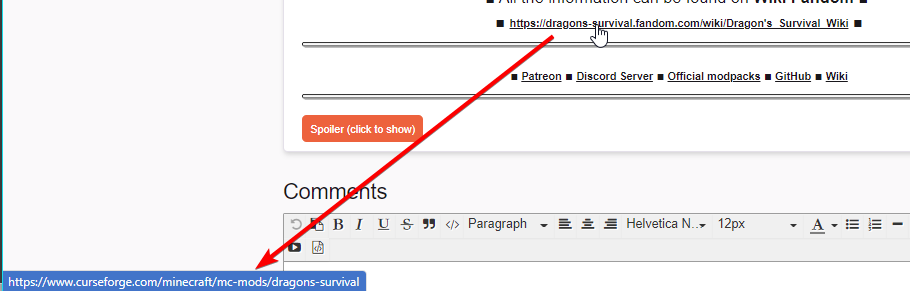
check the embeded link
fallow iris
lyric crescent
put the long link back on your page
I put the long link back in. You can check it out

 lyric crescent
fallow iris
I put the long link back in. You can check it out
lyric crescent
fallow iris
I put the long link back in. You can check it out
going to need to make a ticket on this
!ticket-site
red patioBOT
:bug: Reporting via Website :bug:
Can't open the app or would rather use the website? You can do so here: https://support.curseforge.com/en/support/tickets/new
Fill out the form with accurate detailed information, "It doesn't work" isn't helpful! What exactly doesn't work and why doesn't it work should be easy to answer!
Make sure to upload your Overwolf logs with the Upload File option on the ticket, information on how to get these logs can be found here https://support.overwolf.com/en/support/solutions/articles/9000176827-how-to-get-your-overwolf-logs
lyric crescent
digital roost
I need help
what do you need help with? this picture doesnt explain a problem.
fallow iris
There's no link to CF. I have checked this several times in the code of this element. When I try to remove the automatic link creation ( ) it doesn't help and the link is still generated like link on CF page. 

 raw sundial
how do i import a world to my modded profile the world at the same mods and stuff as the profile
lyric crescent
put it in the saves folder
fallow iris
In general, I have already corrected this problem by creating a short link without %27s, but if this information helps to improve CF, I would be glad.
lyric crescent
needs to be whatever it is? i dont really understand
No, also see #📛︱rules 8. You will be removed if you ask about pirated launchers again.
digital roost
lyric crescent
No, also see <#777323206884327484> 8. You will be removed if you ask about pirat...
ok
raw sundial
like when i put the world into the saves folder sould it be zip should the world be a folder or do you not know?
im testing it as a folder
digital roost
just a small thing that honestly isnt that big of an issue but any way to have curseforge use the new launcher on the windows store? i keep getting this message about a new launcher or whatever everytime i launch my modpack
 woven umbra
Hello. I need a little help with curseforge.
Im playing minecraft with curseforge for some time now. in fact I just played a modpack an hour ago. I was trying to play another modpack, but the launcher didnt show up even after I click play several times for almost 30 minutes now. I cant launch any modpack. what could be the issue? I have restarted my computer, as well as restarting curseforge.. I can open normal launcher, but not from here
lyric crescent
?mc-installfix
red patioBOT
- Click on the Minecraft Tab on the Left side of the CurseForge App.
- Click button next to the
Create Custom Profileoption. - Click
Repair Installationoption. - Play game.
NOTE: You will not lose any modpacks or worlds, These are saved in the Instances folder. DO NOT TOUCH THIS FOLDER OR YOU WILL LOSE EVERYTHING
 gaunt valley
I updated my minecraft launcher and whenever i try to play modded minecraft from cursed froge it just loads up normal minecraft with no mods in sight.
what do i do
lyric crescent
updating the launcher has nothing to do with curseforge
gaunt valley
well yeah but it has to do with when i load minecraft up from curse forge and the mods not working
lyric crescent
restart your pc, dont open any launcher that doesnt come from curseforge
lyric crescent
when they have had time to test with it
 real ridge
How do I install mods ?
lyric crescent
?MC-INSTALLMODS
red patioBOT
How to install mods in CurseForge App.
- Click
+ Create Custom Profile - Name it, select the required Minecraft version, select the Forge version (usually the highest number), click
Create. - Click the profile icon.
- Click
Add More Content - Search and install the desired mods.
- Start the game!
How to install mods not on CurseForge.
- Right click the profile picture or Open the profile and click the Icon next to the play button.
- Click
Open Folder. - Drag the mod(s) into the
modsfolder. (Note: Some mods will require others, to run. Make sure to read the instructions for the mod!) - Start the game!
 tame grail
how do i fix exit code 0 on every mod i try to use? they all fail around clientproxy$1 but sometimes itll load, my friend has no issues though
lyric crescent
?mc-installfix
red patioBOT
- Click on the Minecraft Tab on the Left side of the CurseForge App.
- Click button next to the
Create Custom Profileoption. - Click
Repair Installationoption. - Play game.
NOTE: You will not lose any modpacks or worlds, These are saved in the Instances folder. DO NOT TOUCH THIS FOLDER OR YOU WILL LOSE EVERYTHING
tame grail
thanks
 leaden kelp
it wont let me open curseforge at all
forest snow
Hi I'm looking for a starter house so when friends join on my server they will have one all ready to go but don't now were that be
opal cipher
!notcf
red patioBOT
Your question is not related to CurseForge owned/maintained features or services.
Please use the appropriate game room by getting a game role from #786424115535544350 or use #👽︱game-support for help.
CurseForge does not make or maintain any of the content or games used on the site or app. Just because it's on the site/app does not make it a problem with CurseForge. Move rooms as requested, arguing about it will result in you being removed from the discord.
forest snow
I played on a server that had that mod in it and I really want it
opal cipher
Check in #🔎︱mod-hunting, as this is not related to CurseForge.
forest snow
can you download another mod from another site I'm using multiplayer sleep mod but they don't have it
robust ice
Did anyone ever have any ideas on my problem with CF's app not showing up half my modpacks in my list? The files are still present, it's just not populating the list entirely for some reason
 gloomy galleon
Hey, so I'm having an issue. If anyone's available, I can post the crashlog. Just don't wanna interrupt anyone.
forest snow
I wish this was the old way were you download the curse Forge on your computer and then go though the mods and download them then put them into a mod file in minecraft that was way easier then this way
rich flint
Use game rooms for game problems #786424115535544350
 fallow mesa
For me, the old Minecraft launcher always opens when I want to open a mod and I have already uninstalled the old launcher and because curse forge launcher I have already downloaded again and I also reinstalled curse forge
forest snow
the new minecraft launcher will not let me put mods in it I'm not happy with this and I do not want to switch back and force
signal ridge
So copy paste and manually installing forge is easier then clicking install buttons?
!notcf
red patioBOT
Your question is not related to CurseForge owned/maintained features or services.
Please use the appropriate game room by getting a game role from #786424115535544350 or use #👽︱game-support for help.
CurseForge does not make or maintain any of the content or games used on the site or app. Just because it's on the site/app does not make it a problem with CurseForge. Move rooms as requested, arguing about it will result in you being removed from the discord.
fallow mesa
thanks
 random plover
How can I set the Max RAM for an installation?
 tender nymph
global settings for just for one installation
 uncut fern
Hi, I finished and uploaded a modpack on the site and its been approved, but still isn't up. This was three days ago now- how is it actually supposed to take for projects to show up on the site and the app?
signal ridge
uncut fern
Hi, I finished and uploaded a modpack on the site and its been approved, but sti...
Link your project
signal ridge
!sync
red patioBOT
Sync and your Project.
CurseForge App and site do not share the same requirements! You can find things on the site but this does not mean it will be in the app!
For a mod to show up in the app:
- Projects MUST have a file marked as RELEASE or BETA
- Projects MUST be APPROVED
- Projects MUST have a file marked for the GAME VERSION SELECTED/LOADED
- Projects CAN'T be EXPERIMENTAL
- Projects CAN'T be ABANDONED
Files can take a while to show up in the app. If your files still have not shown up either your project is new and you have yet to mark a file as Release/Beta or there is issues with the sync system making it slow.
Vote this issue up if you would like to know when the last sync was! https://curseforge-ideas.overwolf.com/ideas/CF-I-1617
signal ridge
You can edit your file and change it from alpha to beta or release
uncut fern
i know its for sure not up in the application but shouldn't it at least show up on the website?
signal ridge
Alpha files dont sync on app or site
uncut fern
ah i see. thank you
uncut fern
hey what does this mean
The following files belong to CurseForge-hosted projects, and should therefore not be added directly to zip files:
overrides/mods/playertrackingcompass_1.12.2-1.6.jar
These files should, instead, be referenced in the manifest.json file generated by the Twitch Desktop App during a profile export.
If you have any questions please contact our support team https://support.curseforge.com.
what are they saying to do? the mod page is up on the site but i couldn't find a trace of it on the app so i added it manually. i dont understand how they are asking me to fix it
fleet bear
!reject-cfhosted
red patioBOT
The following files belong to CurseForge-hosted projects, and should therefore not be added directly to zip files:
-
Remove any mods listed in the error message from the profile you exported. Then reinstall them with the CurseForge app. DO NOT drag and drop files from the site.
-
Export the profile again, open the new zip that was just made. Check for the
overrides/modsfolder. If you still see any mods in that folder do the step above again for each mod. -
Upload the zip once complete and no more mods show in the
overrides/modsfolder.
 north fox
so I got curseforge on my laptop but in my downloads all I have is curseforgeinstaller.exe and I can't just open curseforge from my desktop or when I search in windows
so I have to reinstall curseforge everytime I want to open it
viral briar
!getcf use the second (middle) link on the bot message since you are having issues
red patioBOT
Looking to install the CurseForge app?
<:windows:798410728188936222> Windows
Minimum Requirements:
- OS Version: 7 (64 bit), 8.1, 10, 11
- 64 bit Required.
- 350MB storage space.
- Microsoft .Net 4.8
- Intel/AMD quad-core CPU
- 8GB ram
Download: https://download.overwolf.com/install/Download?&PartnerId=4047
If you are having issues with the installer use the URL below to install Overwolf then go to the app store to download CurseForge.
https://content.overwolf.com/downloads/setup/latest/regular.html
<:mac:798410654418862130> Mac
Minimum Requirements:
- OS Version 10.14 or newer.
- 64 bit Required.
Download: https://curseforge.overwolf.com/downloads/curseforge-latest.dmg
:penguin: Linux
Minimum Requirements:
Yes.
Download: :person_shrugging:
 proper wren
ehi guys can you help me
 pliant vector
hey so today i wanted to play with a friend on minecraft with the modpack Better Miunecraft[FABRICK] and it says acces denied and my friend one works
proper wren
when i open the last snapshot crash windows 11 with stopcode error you know how to fix this problem
signal ridge
pliant vector
hey so today i wanted to play with a friend on minecraft with the modpack Better...
What says access denied?
pliant vector
when i try to boot up the modpack
signal ridge
Screen shot error
pliant vector
 proper wren
when i open the last snapshot crash windows 11 with stopcode error you know how ...
proper wren
proper wren
when i open the last snapshot crash windows 11 with stopcode error you know how ...
Yoyo can you helo me?
Sorry for disturbing
signal ridge
pliant vector
Do you share the pc with anyone? Or is it a school pc?
pliant vector
no its my own
signal ridge
In the cf app go to  > minecraft tab > screen shot the path the app is using
pliant vector
 signal ridge
Hmm. Do other packs work or same error?
pliant vector
same error
signal ridge
!mc-path follow this
red patioBOT
Change your install path to the following:
For Windows: C:\CurseForge
-Go to C:\ drive. Make a new folder. Name it Curseforge.
For Mac: /Users/Shared/CurseForge
If Minecraft is not installed in CurseForge App:
- Click the
 in the top left.
 - Select Minecraft from the list of games.
- Select the
Advancedoption and pick the folder you just made. - Click
Continue.
If Minecraft is installed in CurseForge App:
- Click the in the bottom left.
- Select the Minecraft tab.
- Click
Change. - Select the folder you just made.
:no_entry_sign: Minecraft Files should NOT be installed inside the following locations :no_entry_sign:
:no_entry_sign: .minecraft folder.
:no_entry_sign: OneDrive folders.
:no_entry_sign: Desktop folder.
:no_entry_sign: Drive roots I.E. Directly into the C:\ drive.
:no_entry_sign: iCloud enabled folders.
:no_entry_sign: or any other cloud saved folder.
:no_entry_sign: or folders with non-English characters in them.
If any of the above are in the path you need to change/move it!
pliant vector
ok
signal ridge
Then reinstall the pack and try again
pliant vector
Idk it didnt work
 signal ridge
 dapper schooner
!notcf
red patioBOT
Your question is not related to CurseForge owned/maintained features or services.
Please use the appropriate game room by getting a game role from #786424115535544350 or use #👽︱game-support for help.
CurseForge does not make or maintain any of the content or games used on the site or app. Just because it's on the site/app does not make it a problem with CurseForge. Move rooms as requested, arguing about it will result in you being removed from the discord.
signal ridge
pliant vector
Idk it didnt work
Show the new path your using
digital roost
Someone pass me the mod "StatusEffectHUD" for 1.16.5 ?? I do not get it when I look for it on the curseforge page
proper wren
[01:31:47] [main/WARN]: Failed to add PDH Counter: \Paging File(_Total)% Usage, Error code: 0xC0000BB8
[01:31:47] [main/WARN]: Failed to add counter for PDH counter: \Paging File(_Total)% Usage
[01:31:47] [main/WARN]: Disabling further attempts to query Paging File.
[01:31:51] [main/WARN]: COM exception: Invalid Query: SELECT PERCENTUSAGE FROM Win32_PerfRawData_PerfOS_PagingFile
ehi i had a problem with latest sanpshot of minecraft
robust ice
Is there some sort of log file I can access for the app's loading process (When the app starts)? I'd love to see why my pack list isn't populating correctly
signal ridge
digital roost
Someone pass me the mod "StatusEffectHUD" for 1.16.5 ?? I do not get it when I l...
If its not on the cf site then its not there. Also this is not the place for this.
proper wren
aand who can I ask I don't know who to ask
signal ridge
proper wren
[01:31:47] [main/WARN]: Failed to add PDH Counter: \Paging File(_Total)\% Usage,...
Care to explain what thr issue it instead of just postimg snippets of code
signal ridge
robust ice
Is there some sort of log file I can access for the app's loading process (When ...
As in the app itself or game logs? 2 different logs
robust ice
proper wren
In practice, the new minecraft launcher on windows 11 does not open the last snapshot and if I try again it makes me crash windows 11 how can I fix it?
robust ice
I've asked several times throughout the day about this
signal ridge
proper wren
In practice, the new minecraft launcher on windows 11 does not open the last sna...
Are you using the cf app?
proper wren
no new laucnher of mojang on curseforge i have not problem
digital roost
signal ridge
If its not on the cf site then its not there. Also this is not the place for thi...
but I am looking for the name as it is but it does not appear for any version
signal ridge
Then its an issue for microsoft. We have nothing to do with the new launcher for monecraft.
proper wren
and I don't know who to ask because I can't play
signal ridge
robust ice
I've asked several times throughout the day about this
Did the file path in the app change? Or did you copy and paste the packs / move em
proper wren
I do not want to disturb
robust ice
Neither
signal ridge
proper wren
and I don't know who to ask because I can't play
If there is no issue with the cf app and your talking about the vanilla launcher microsoft updated then you need to contact microsoft support. Which is not here
forest snow
why can't you download forge mods on a server and play it with friend it saying you are require forge to be installed on the client
signal ridge
digital roost
but I am looking for the name as it is but it does not appear for any version
Is it on the cf site?
proper wren
ok thanks
forest snow
I'm not using cf
signal ridge
forest snow
why can't you download forge mods on a server and play it with friend it saying ...
Mods need to be on both the client and server
digital roost
signal ridge
Is it on the cf site?
Yes, but the mod or the available versions do not appear
signal ridge
robust ice
Neither
Tried a pc reboot?
forest snow
I weas the one download them
signal ridge
digital roost
Yes, but the mod or the available versions do not appear
Link the mod
robust ice
Twice and a reinstall of the app
digital roost
signal ridge
Link the mod
one moment
signal ridge
robust ice
Twice and a reinstall of the app
Back up any worlds you wish to keep and then reinstall the packs
digital roost
digital roost
one moment
MD or here?
signal ridge
Here
forest snow
can you get a server from cf
signal ridge
No. Cf has nothing to do with servers
forest snow
It would make things a whole late easier
signal ridge
Cf is a hosting site. And app manager. That is all
digital roost
signal ridge
Here
forest snow
is there another platform instead of cf its not esasier to download mods off of
digital roost
this
signal ridge
forest snow
is there another platform instead of cf its not esasier to download mods off of
Sure but only trust mods for cf or autbors main sites.
forest snow
I'm starting to not like cf anymore I miss the old platform it was easier to download from
signal ridge
You can download mods in the cf app as well. Not that hard
digital roost
digital roost
https://www.curseforge.com/minecraft/mc-mods/statuseffecthud/download/2231810
bro
signal ridge
Thereslike 4 issues going on and im using a cell. Be patient
digital roost
ok
signal ridge
digital roost
bro
What version of mc did you make your custom profile?
forest snow
all you need to do is download forge and all the mod in one folder and put it in minecraft that way is the only way I did it
digital roost
signal ridge
What version of mc did you make your custom profile?
What do you mean
signal ridge
forest snow
all you need to do is download forge and all the mod in one folder and put it in...
Then do that. Or use the cf app, it will install forge for you then you install the mods a d play
signal ridge
digital roost
What do you mean
Screen shot how you are searching for the mod in the app
digital roost
signal ridge
Screen shot how you are searching for the mod in the app
I literally copy and paste the name and nothing
signal ridge
Screen shot.


 signal ridge
ok? Thats not the app that is the site
digital roost
oh
signal ridge
I know for a fact it is there as I can see it no problem. I made a 1.8 profile
 lyric crescent
digital roost
Someone pass me the mod "StatusEffectHUD" for 1.16.5 ?? I do not get it when I l...
lyric crescent
digital roost
Someone pass me the mod "StatusEffectHUD" for 1.16.5 ?? I do not get it when I l...
Told you earlier to check the mod page for the versions it works on. Clearly you did not do this. The mod does not have a 1.16.5 version. You would know this if you actually looked.
signal ridge
🤦
digital roost
lyric crescent
Told you earlier to check the mod page for the versions it works on. Clearly you...
:chingatepues:
So there is no version for that mod?
lyric crescent
look at the mod page
lyric crescent
signal ridge
then that is all there is
CF doesnt make the content on the site, would have to ask the mods author
lyric crescent
we dont make mods. if it doesnt exist then it doesnt exist.
digital roost
Ok
 rustic warren
can anyone help me with integrating a discord widget on my curseforge modpack page?
 lusty radish
How do I allow the unactivation of mods in a mod pack?