
#🔥︱curseforge-support
1 messages · Page 562 of 1
 queen storm
Why are you installing forge by hand?
 lavish umbra
i wasnt
queen storm
How did you get that then?
lavish umbra
i tried downloading for 1.8 and it came up
queen storm
Download what from where?
 livid tulip
when i download a modpack off of the chrome website for curseforge, nothing happens, it doesn't apear in my downloaded modpacks on the curseforge app, what do i need to do?
queen storm
livid tulip
when i download a modpack off of the chrome website for curseforge, nothing happ...
Install it using the app?
livid tulip
queen storm
Install it using the app?
the same mod isnt on the app
queen storm
livid tulip
the same mod isnt on the app
!mc-installpack
 red patioBOT
How to install modpacks with the search features in app.
- Open the

Minecraftsection of the app. - Click the top search bar where it says
Search for modpacksOR Click theBrowse ModpacksTab. - Find the Modpack you want to install and click install on it.
- Wait for CurseForge app to download and unpack all the required files.
- Once finished, click
Play!
How to install modpacks from a Export. (Custom/Private/Site downloaded Modpack zip)
- Get CurseForge App if you don't have it, use
!downloadfor a link. - Get the exported modpack from CurseForge or someone else,
!mc-packshareexplains how to make them. - Open the
Minecraftsection of the app. - Click

Create Custom Profile - Click the
Importoption. - Find the file you just downloaded in step 2 and select it.
- CurseForge app will now attempt to download and unpack the modpack. If it fails, try steps 4-6 again.
- Once finished, click
Play!
 livid tulip
for some reason
 surreal moss
Hi! I have dowloaded a modpack and i have clicked play multiple times i cant acces them/play them, what can i do?
queen storm
surreal moss
Hi! I have dowloaded a modpack and i have clicked play multiple times i cant acc...
!mc-installfix
red patioBOT
- Click on the Minecraft Tab on the Left side of the CurseForge App.
- Click
 button next to the
 Create Custom Profileoption. - Click

Repair Installationoption. - Play game.
NOTE: You will not lose any modpacks or worlds, These are saved in the Instances folder. DO NOT TOUCH THIS FOLDER OR YOU WILL LOSE EVERYTHING
surreal moss
I don't have repair installation, i do have repair profile is it the same?
queen storm
Go a page back
surreal moss
ive only got this...
 queen storm
surreal moss
ive only got this...
queen storm
surreal moss
ive only got this...
Yes, go a page up, hit the back button, you need to be on the page with all installed modpacks
 lime knot
I used the correct button but still not working
queen storm
Then show your log
lavish umbra
queen storm
Download what from where?
Forge from the forge website
queen storm
lavish umbra
Forge from the forge website
So you are installing it manually. Wrong discord.
red patioBOT
queen storm
Or use the curseforge app to do it all for you
red patioBOT
Looking to install the CurseForge app?
<:windows:798410728188936222> Windows
Minimum Requirements:
- OS Version: 7 (64 bit), 8.1, 10, 11
- 64 bit Required.
- 350MB storage space.
- Microsoft .Net 4.8
- Intel/AMD quad-core CPU
- 8GB ram
Download: https://download.overwolf.com/install/Download?&PartnerId=4047
If you are having issues with the installer use the URL below to install Overwolf then go to the app store to download CurseForge.
https://content.overwolf.com/downloads/setup/latest/regular.html
<:mac:798410654418862130> Mac
Minimum Requirements:
- OS Version 10.14 or newer.
- 64 bit Required.
Download: https://curseforge.overwolf.com/downloads/curseforge-latest.dmg
:penguin: Linux
Minimum Requirements:
Yes.
Download: :person_shrugging:
lavish umbra
queen storm
So you are installing it manually. Wrong discord.
Ahh cheers for the invite
 versed frost
its alright to delete this folder am I correct?

trying to uninstall cursedforge and i'm not sure if its okay to delete it or not
queen storm
Why are you trying to uninstall it? Deleting folders won't uninstall things
versed frost
i already removed the program through windows
i was managing my storage earlier and i found this folder lying around
queen storm
Then it is your call to delete it, not ours
versed frost
alright thanks.
lime knot
queen storm
Then show your log
that's the problem,logs don't work
queen storm
lime knot
that's the problem,logs don't work
Then what do you have?
lime knot
idk
i just get exit code 0 and i saw nothing problematic in shaders.log
i might try to just remove the mods 1 by 1 to find the one that makes everything crash
queen storm
shaders.log? How do you have a shaders.log?
lime knot
i mean i got the shaders mod ?
queen storm
Remove it
lime knot
i already removed all of my logs or you mean the mod ?
queen storm
The mod
lime knot
why tho ?
queen storm
Shaders break things
queen storm
Maybe, no idea.
Did you make the modpack?
 raw beacon
why curse is prompting me to update a mod to a previous version?
queen storm
raw beacon
why curse is prompting me to update a mod to a previous version?
Screenshot
 digital roost
i cant launch my mod when ever i press play in the launcher it says this Failed to download file.
Name: log4j-core-2.8.1.jar
URL: https://libraries.minecraft.net/org/apache/logging/log4j/log4j-core/2.8.1/log4j-core-2.8.1.jar
Error details: Send failure: Connection was reset
Filename on disk: log4j-core-2.8.1.jar
Path: C:\Users\samue\curseforge\minecraft\Install\libraries\org\apache\logging\log4j\log4j-core\2.8.1\log4j-core-2.8.1.jar
Exists: File
queen storm
!mc-installfix
red patioBOT
- Click on the Minecraft Tab on the Left side of the CurseForge App.
- Click button next to the
Create Custom Profileoption. - Click
Repair Installationoption. - Play game.
NOTE: You will not lose any modpacks or worlds, These are saved in the Instances folder. DO NOT TOUCH THIS FOLDER OR YOU WILL LOSE EVERYTHING
digital roost
did the coders here developed the modern war for minecraft tlauncher?
lime knot
queen storm
Maybe, no idea.
Did you make the modpack?
it was a modpack that i loved when i was younger 8 years ago
queen storm
Not an answer
queen storm
Try a blank profile, see if that works
lime knot
no,not working maybe i should try to remove every non .jar files ?
it's weird,every mods that are not .jar are not showing on the installed mod tab
and yeah,even without the .class .liteloader and the files ,it's not working
so it's not the mods
queen storm
Reinstall curseforge
lime knot
okay ig
 river anchor
hi, can someone help me out with this problem?
queen storm
Waits for problem to show up
river anchor
ok so last time i tried to upload a modpack but they rejected it

ok all good, no prob
BUT now i follow the suggestion of one user here and removed maxilols mod
and deleted the bleack-kd file and then replaced it with the cf install option
the thing is i don't have maxilols or bleach kd mod version it says here

how is it possible?
queen storm
Link the mod please
queen storm
And now a link to bleack please
river anchor
u mean bleach mod?
queen storm
Did you upload the right file?
queen storm
Please check, should not have mods in the overrides folder
river anchor
ok
 gilded herald
Hey guys, can I combine 2 modpacks in 1 for my personal use?
 delicate mortar
Hello, I have a question. My mod has been added to curseforge recently, but it's not published on the Curseforge App tho. Yall have any idea about that?
queen storm
gilded herald
Hey guys, can I combine 2 modpacks in 1 for my personal use?
Things will conflict
queen storm
delicate mortar
Hello, I have a question. My mod has been added to curseforge recently, but it's...
Link please
red patioBOT
Sync and your Project.
CurseForge App and site do not share the same requirements! You can find things on the site but this does not mean it will be in the app!
For a mod to show up in the app:
- Projects MUST have a file marked as RELEASE
 or BETA
- Projects MUST be APPROVED
- Projects MUST have a file marked for the GAME VERSION SELECTED/LOADED
- Projects CAN'T be EXPERIMENTAL
- Projects CAN'T be ABANDONED
Files can take a while to show up in the app. If your files still have not shown up either your project is new and you have yet to mark a file as Release/Beta or there is issues with the sync system making it slow.
Vote this issue up if you would like to know when the last sync was! https://curseforge-ideas.overwolf.com/ideas/CF-I-1617
queen storm
delicate mortar
https://www.curseforge.com/minecraft/mc-mods/soul-ghosts
!sync
delicate mortar
Got it. Thank you.
queen storm
 quick quarry
can anyone help me please?
quick quarry
can anyone help me please?
Rule 10 and 4
quick quarry
sorry
queen storm
Read them again, if you understand and can follow them you can ask your question
quick quarry
ok can i ask my question now?
queen storm
There is rule 10 again...
queen storm
Minecraft client or curseforge?
quick quarry
curseforge!
queen storm
Site or app?
quick quarry
yeah but i dont know where on the app to sign out?
queen storm
I am asking which one of the two 🤦♂️
queen storm
Click on the head thingy at the bottom left corner
 robust junco
everytime i try launching up a modpack it takes 5 mins to launch'
 lyric crescent
ok, that is normal
robust junco
lyric crescent
ok, that is normal
No it isn’t because it usually took around 30 seconds
lyric crescent
ok
lyric crescent
!notcf
red patioBOT
Your question is not related to CurseForge owned/maintained features or services.
Please use the appropriate game room by getting a game role from #786424115535544350 or use #👽︱game-support for help.
CurseForge does not make or maintain any of the content or games used on the site or app. Just because it's on the site/app does not make it a problem with CurseForge. Move rooms as requested, arguing about it will result in you being removed from the discord.
robust junco
lyric crescent
!notcf
i am using the right room because curseforge isnt working or launching the modpack😑
lyric crescent
curseforge installs mods and modloaders, and that is where curseforge ends.
digital roost
my curseforge loads than says theres a problem y help me
queen storm
Screenshot please
 digital roost
queen storm
Screenshot please
digital roost
queen storm
Screenshot please
there u go
 unborn basin
!owlogs
red patioBOT
<:overwolf:857375414002384916> How to get Overwolf logs! <:overwolf:857375414002384916>
unborn basin
Send me your logs please @digital roost
digital roost
k
digital roost
unborn basin
Send me your logs please <@456226577798135808>
how on mac?
unborn basin
Scroll to the bottom of the page
digital roost
what the bot sent one
unborn basin
?
unborn basin
Nope
digital roost
hm
red patioBOT
<:overwolf:857375414002384916> How to get Overwolf logs! <:overwolf:857375414002384916>
digital roost
it dosnet matter
 earnest oracle
I need help!
 opal cipher
earnest oracle
I need help!
opal cipher
earnest oracle
I need help!
!help
red patioBOT
╰( ͡° ͜ʖ ͡° )つ──☆*:・゚ *˜”*°•.˜”*°• Many Help •°*”˜.•°*”˜* <:curselit:796985620550385705>
Please provide a description of your issue with as much detail as possible. If you have an issue with a mod or modpack, tell us the name. Explain what you can see happening. Be specific!
 Tell us what is happening, we already know it "doesn't work".
Avoid using words like "it", tell us exactly what "it" is.
Don't assume anyone knows what you are talking about, be specific.
Tell us what you expected to happen.
Provide screenshots or video if possible.
Provide a log if possible. ?mc-log
earnest oracle
When i start my minecraft modpack, it starts my launcher as "Player" with demo version, but when i try to re-login, it's the same
queen storm
!mc-installfix
red patioBOT
- Click on the Minecraft Tab on the Left side of the CurseForge App.
- Click button next to the
Create Custom Profileoption. - Click
Repair Installationoption. - Play game.
NOTE: You will not lose any modpacks or worlds, These are saved in the Instances folder. DO NOT TOUCH THIS FOLDER OR YOU WILL LOSE EVERYTHING
digital roost
this is so annoying
earnest oracle
What?
digital roost
curseforge just donst load
queen storm
digital roost
curseforge just donst load
Then send those logs, else we can't help you
queen storm
earnest oracle
I am still registered as player
What button did you click? Show a screenshot please
digital roost
i cant
queen storm
Did you scroll down?
digital roost
i did everything the website said
 queen storm
earnest oracle
https://gyazo.com/d23d6b8d5e21882cf2bf7677be10c2bf
queen storm
earnest oracle
https://gyazo.com/d23d6b8d5e21882cf2bf7677be10c2bf
Wrong button
earnest oracle
i clicked orange button with "play"
queen storm
earnest oracle
i clicked orange button with "play"
Did you follow the instructions I send you?
queen storm
earnest oracle
Yes, i did. Three dots in the right upper corner
On the same screenshot?
digital roost
ive got an imac
earnest oracle
Yes
queen storm
digital roost
ive got an imac
Did you scroll down on that page? There are instructions for mac
queen storm
earnest oracle
Yes
Then you pressed repair profile
digital roost
and curseforge has stopped loading and yes
earnest oracle
No, it said repair intallation
queen storm
digital roost
and curseforge has stopped loading and yes
You already said that curseforge stopped loading 🤦
What step do you get stuck at?
queen storm
earnest oracle
No, it said repair intallation
Show a screenshot
digital roost
it dont let me get libary
earnest oracle
 queen storm
earnest oracle
https://gyazo.com/6b741f920bad114a483db3793e1a9daa
queen storm
earnest oracle
https://gyazo.com/6b741f920bad114a483db3793e1a9daa
Wrong button! Go up, to where all modpacks are
queen storm
digital roost
it dont let me get libary
What options do you have then? Show a screenshot please
earnest oracle
 opal cipher
digital roost
it dont let me get libary
opal cipher
digital roost
it dont let me get libary
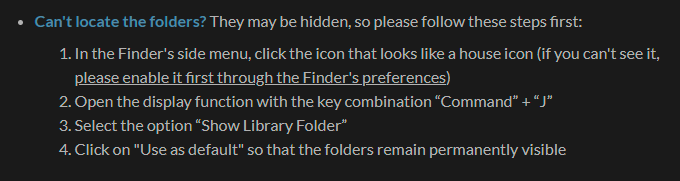
Did you read these instructions as well? https://itssm.pl/3GvLJoh
 digital roost
yes
queen storm
earnest oracle
https://gyazo.com/d03439776208ecbe83a959f5cba9143b
Now click those 3 dots
earnest oracle
And repair intallastion?
queen storm
earnest oracle
And repair intallastion?
Those are 2 different buttons. Make sure to read the text
 queen storm
That is the correct button
earnest oracle
What now? Repair installation?
queen storm
Yes, like the bot said
earnest oracle

 earnest oracle
install directory not found
queen storm
digital roost
And why are you in settings?
queen storm
earnest oracle
install directory not found
Now try to play
digital roost
∆
 queen storm
It is still using the wrong account for some reason
earnest oracle
I logged in with my email and password from my own account, and instead of my paid account, it shows me this
digital roost
im doing command j but it dosnt show show libary folder
queen storm
digital roost
im doing command j but it dosnt show show libary folder
What command? Show a screenshot then
queen storm
earnest oracle
I logged in with my email and password from my own account, and instead of my pa...
Restart your pc, try again
digital roost
no the key command
queen storm
digital roost
no the key command
What key command?
earnest oracle
Okay, brb
digital roost
on the keyboard
queen storm
digital roost
on the keyboard
You are just supposed to open a file window...
digital roost
how
queen storm
It is your pc, how do you normally open files?
digital roost
no its my dads but i just go on curseforge
queen storm
So you have no idea how it works? Then please ask your dad
earnest oracle
I'm back. Should i open curseforge?
digital roost
it dosnt matter
queen storm
earnest oracle
I'm back. Should i open curseforge?
Yes, then just try to play
 keen cedar
hey I want this when I want to install a mod pack
 queen storm
digital roost
it dosnt matter
queen storm
digital roost
it dosnt matter
Then you should not be complaining that it isn't loading here anymore
queen storm
keen cedar
hey I want this when I want to install a mod pack
!ticket-site
red patioBOT
:bug: Reporting via Website :bug:
Can't open the app or would rather use the website? You can do so here: https://support.curseforge.com/en/support/tickets/new
Fill out the form with accurate detailed information, "It doesn't work" isn't helpful! What exactly doesn't work and why doesn't it work should be easy to answer!
Make sure to upload your Overwolf logs with the Upload File option on the ticket, information on how to get these logs can be found here https://support.overwolf.com/en/support/solutions/articles/9000176827-how-to-get-your-overwolf-logs
earnest oracle
It's exactly the same: https://gyazo.com/69b95ecad867a443a110ddf8d7c1ef91
 queen storm
earnest oracle
It's exactly the same: https://gyazo.com/69b95ecad867a443a110ddf8d7c1ef91
queen storm
earnest oracle
It's exactly the same: https://gyazo.com/69b95ecad867a443a110ddf8d7c1ef91
!mc-path
red patioBOT
Change your install path to the following:
For Windows: C:\CurseForge
-Go to C:\ drive. Make a new folder. Name it Curseforge.
For Mac: /Users/Shared/CurseForge
If Minecraft is not installed in CurseForge App:
- Click the
 in the top left.
 - Select Minecraft from the list of games.
- Select the
Advancedoption and pick the folder you just made. - Click
Continue.
If Minecraft is installed in CurseForge App:
- Click the
 in the bottom left.
 - Select the Minecraft tab.
- Click
Change. - Select the folder you just made.
:no_entry_sign: Minecraft Files should NOT be installed inside the following locations :no_entry_sign:
:no_entry_sign: .minecraft folder.
:no_entry_sign: OneDrive folders.
:no_entry_sign: Desktop folder.
:no_entry_sign: Drive roots I.E. Directly into the C:\ drive.
:no_entry_sign: iCloud enabled folders.
:no_entry_sign: or any other cloud saved folder.
:no_entry_sign: or folders with non-English characters in them.
If any of the above are in the path you need to change/move it!
earnest oracle
done
there are no modpacks, so i think it changed the file succesfuly
should i install it again?
queen storm
Just try to play
earnest oracle
Vanilla?
queen storm
Install the pack, then play, if everything is fine: keep playing
 queen storm
!ticket-app
red patioBOT
:bug: Reporting via the CurseForge App :bug:
-
Click the
 icon in the bottom left.
 -
Select

Open a Ticket. -
Fill out the form with accurate detailed information, "It doesn't work" isn't helpful! What exactly doesn't work and why doesn't it work should be easy to answer!
-
Make sure to upload your Overwolf logs with the
Upload Fileoption on the ticket, information on how to get these logs can be found here https://support.overwolf.com/en/support/solutions/articles/9000176827-how-to-get-your-overwolf-logs -
Submit!

 jaunty plaza
CF Keeps exporting this file to the overrides folder. I can fix it manually, but thought I would mention it here.
https://www.curseforge.com/minecraft/mc-mods/itemzoom/files/3174664
queen storm
How did you install it?
earnest oracle
I can't remember, but i think trough curseforge website
queen storm
earnest oracle
I can't remember, but i think trough curseforge website
Wasn't talking to you though...
earnest oracle
OH sorry
jaunty plaza
queen storm
How did you install it?
In the app, building modpacks there is the easiest thing in the world lol
Also, sorry for the slow reply, I am at work
queen storm
Also when you just install that mod?
jaunty plaza
Oh, I would have added it to the pack from the start. I had this issue with the last update a week ago, and saw it happen again today, so figured I would drop yall a line about it. My modpack is https://www.curseforge.com/minecraft/modpacks/taraxia-golden
 molten dagger
Hello. How can I fix the world loading error in sf4?
 restive perch
can someone help me? when I click play on a modpack I open de minecraf launcher and after click in play on the launcher the greenbar charge and even like 10 minutes after doenst open anything
 hard pendant
Is there a way to check your curseforge project analytics?
 solid oasis
Hiii Can someone Help me? My CurseForge does not open and crashes

 prime kraken
Hi I'm trying to add among us to my curse forge client but it only let's me add games I dont have (but i have stardew valley)it let's me add only these games
 opal cipher
Among Us mods are installed manually from the website
prime kraken
What about stardew valley?
It is saying I dont have it but I do (but I had to redownload it)
opal cipher
!knownissues
red patioBOT
Known Issues with solutions or status of the issue.
Overwolf maintains a known list of issues here, some with solutions, others without.
https://support.curseforge.com/en/support/solutions/articles/9000196615-curseforge-known-issues
opal cipher
Check "other games"
prime kraken
I dont see that
opal cipher
 restive perch
hard pendant
Is there a way to check your curseforge project analytics?
restive perch
hard pendant
Is there a way to check your curseforge project analytics?
how can I open it?
 bold radish
Curseforge app is on an older version, dont know how to update it
 past pebble
This is a super longshot, but I'll post it anyway (I did log a support ticket). The Curseforge API that third-party updaters use for my WoW addon is returning totally the wrong data for "latestFiles". It was returning a version from a year ago as latest, I deleted the old files and now it's empty. https://addons-ecs.forgesvc.net/api/v2/addon/30359 Not sure how to get this to anyone who would understand/fix it.
past pebble
past pebble
This is a super longshot, but I'll post it anyway (I did log a support ticket). ...
It was fine until yesterday. I didn't do anything (no release, no changes, no edits) and it broke.
lyric crescent
hard pendant
I'm asking if it even exists
it does exist but there is currently no way to access it. wont be until after the website revamp that you can get it.
lyric crescent
bold radish
Curseforge app is on an older version, dont know how to update it
restart it, or reinstall it.
bold radish
i tried
digital roost
There have been some recent issues even within the CF App relating to WoW addons, Xodiv. Only searching for them that I know of, however. See the thread in this channel labelled, "WoW Cant search mods" if you think there's a chance of it being related. Yamza came up with an excellent workaround for the issue in the thread, but I thought I'd mention it on the off chance there's some correlation.
past pebble
Thank you for your help, I will see if I can find it.
 brazen marten
A person DM's me from this server
 lyric crescent
use the report button
past pebble
Hopefully someone will be able to "manually reset" my addon if that is what is needed to fix the API up.
 distant ore
i require help
Tekxit 3 just refused to work, it's just a black screen
and now it says minecraft failed to start
 rich flint
do game specific probs in game channels #786424115535544350
post your log file(s) over there
distant ore
oh my bad
 warm parcel
help

 stiff pollen
hello, how do I select a custom java version? I have another version installed but its not appearing.
 rich flint
only way afaik with CF app is via manually changing the java exe pointing in the vanilla launcher after you press 'play'
stiff pollen
and I have to do it every time I launch the game?
rich flint
for the CF app yes
stiff pollen
what if i replace jre-legacy in the runtime folder
 fallen shell
hey all, tryna run my own modpack but keep running into an error. here's the crash log
fallen shell
oh my bad
past pebble
past pebble
Hopefully someone will be able to "manually reset" my addon if that is what is n...
Seems like I do have some version of the earlier problem, you can no longer search for my addon LiteMount either
 peak wagon
hi is it just me or does curseforge ( the app) not have all of the mods on the website
bc i want to try the primitive modpack and i cant download it i did it into the mod file but nothing happens
the reason i want it on the app is bc it has the play button
and its easier
queen storm
Link the thing please
queen storm
!mc-installmods
red patioBOT
How to install mods in CurseForge App.
- Click
+ Create Custom Profile - Name it, select the required Minecraft version, select the Forge version (usually the highest number), click
Create. - Click the profile icon.
- Click
Add More Content - Search and install the desired mods.
- Start the game!
How to install mods not on CurseForge.
- Right click the profile picture or Open the profile and click the Icon next to the play button.
- Click

Open Folder. - Drag the mod(s) into the
modsfolder. (Note: Some mods will require others, to run. Make sure to read the instructions for the mod!) - Start the game!
 peak wagon
ohhhhh but its not on the app
queen storm
No, you are looking at modpacks, or you are looking at the wrong minecraft version
queen storm
Any name, it is the modpack name
queen storm
Show a screenshot
 queen storm
Do you notice the scrollbar on the right?
queen storm
Latest
queen storm
What minecraft version did you use?
 queen storm
So, how do you expect a 1.12 mod to work on 1.17?
 peak wagon
oh i got it mixed up
queen storm
 queen storm
Any version that you want to play on and has a file for this mod.
peak wagon
are they all the same
queen storm
No idea if it is just a port or if it adds content
queen storm
Show the new profile that you made for it then


 thorny stone
Hi, for some reason it says I need to leave the Windows Insider Program, but the issue is, I'm not in it...
 flat mica
fabric 1.17.1 shows this for every modpack
 queen storm
thorny stone
Hi, for some reason it says I need to leave the Windows Insider Program, but the...
queen storm
thorny stone
Hi, for some reason it says I need to leave the Windows Insider Program, but the...
You on windows 11?
queen storm
flat mica
fabric 1.17.1 shows this for every modpack
!mc-installfix
red patioBOT
- Click on the Minecraft Tab on the Left side of the CurseForge App.
- Click button next to the
Create Custom Profileoption. - Click
Repair Installationoption. - Play game.
NOTE: You will not lose any modpacks or worlds, These are saved in the Instances folder. DO NOT TOUCH THIS FOLDER OR YOU WILL LOSE EVERYTHING
queen storm
Can you show your windows insider settings?
thorny stone
Sure.
This?

When I press on "Leave the insider program" it goes to a webpage, and it says I'm not in it.
 queen storm
Is it the same email?
thorny stone
Yes
queen storm
Weird that an account is linked then. Because you should see this: https://s3.amazonaws.com/cdn.freshdesk.com/data/helpdesk/attachments/production/9120572919/original/ZZPJxl5nP6zuOAPDhub9PjT3dtU0JiFu2g.png?1611152052
 queen storm
 keen salmon
Hi. Why does the CurseForge app doesn't find Stardew Valley even with the manual find. I have it on steam
queen storm
keen salmon
Hi. Why does the CurseForge app doesn't find Stardew Valley even with the manual...
!stardew
red patioBOT
Overwolf maintains a known list of issues here, some with solutions, others without.
https://support.curseforge.com/en/support/solutions/articles/9000196615-curseforge-known-issues
Scroll down, look at "Other games"
queen storm
thorny stone
I don't have the setting
start a new line and type in AllowInsider=True

 fleet bear
People shouldn't be editing the file anymore?
You have a really old version of CF if you are still getting insider warnings
flat mica
queen storm
!mc-installfix
didnt work
queen storm
fleet bear
You have a really old version of CF if you are still getting insider warnings
Overwolf*
fleet bear
yes
 oak light
I have a question
I installed playerex and it's a mod for fabric but it won't start
there is just an error that I don't know
queen storm
Show the error
oak light
 queen storm
What fabric version do you use?
oak light
0.11.7
queen storm
Considered updating your fabric API version?
oak light
Do I need to download the new version from curse forge?
queen storm
Yes
 queen storm
So they way you read these: at the top: relicex requires, modname, version.
Keep installing what it is yelling
queen storm
Not something i can help with
oak light
I become a crash report should I send it?
queen storm
I can't read fabric logs
queen storm
Find somebody who can read logs
oak light
okay
 west folio
https://discord.gg/9qdEFmyU has always helped me when i needed fabric crash help
you can try there
oak light
yea thx
 sonic gull
why my curseforge cant run?
 ebon tulip
hey guys im on windows 11 and my forge isnt launching
sonic gull
||I just installed it||
ebon tulip
when i did the thing on the website
to enable insider
it still wasnt working
could anyone tell me what to do?
 restive perch
can someone help me? when I click play on a modpack I open de minecraf launcher and after click in play on the launcher the greenbar charge and even like 10 minutes after doenst open anything
and when I open directly from the launcher to play original minecraft with out mods or with mods launchs and doesnt give any problens
queen storm
ebon tulip
hey guys im on windows 11 and my forge isnt launching
Forge or curseforge?
queen storm
sonic gull
my curseforge still stuck
Is that curseforge or a started modpack?
 rapid bronze
how do i fix "could not create SSL/TLS secure channel" error when trying to install a mod
 rocky plaza
if I download the Waystones Mod on the webside, i can´t open it and in the app, it does not exsits
queen storm
Because that is not how it works... CF doesn't magically import all mods
!mc-installmods
red patioBOT
How to install mods in CurseForge App.
- Click
+ Create Custom Profile - Name it, select the required Minecraft version, select the Forge version (usually the highest number), click
Create. - Click the profile icon.
- Click
Add More Content - Search and install the desired mods.
- Start the game!
How to install mods not on CurseForge.
- Right click the profile picture or Open the profile and click the Icon next to the play button.
- Click
Open Folder. - Drag the mod(s) into the
modsfolder. (Note: Some mods will require others, to run. Make sure to read the instructions for the mod!) - Start the game!
 vital thunder
is there a way to download mods and not modpacks in the curseforge app for minecraft
 tidal badge
hello, my overwolf CF is 2837 version, but for electroblob need 2847 how do I upgrade Overwolf CF?
opal cipher
It should update itself, so try restarting CurseForge.
tidal badge
where can I check on CF what version it is right now?
opal cipher
Click the cogwheel in the lower left.
And the version number will be visible in the lower left.
 opal cipher
Do you mean Forge, and not CurseForge maybe?
 opal cipher
Are you playing a modpack or just a single mod?
tidal badge
RLcraft + electroblobs added
for EB you need at least 12.2....2847
but with this CF I have:

and can't make it higher
 fathom owl
I have the correct version and have reinstalled but the ksp mods won’t work
tidal badge
tf is ksp?
fathom owl
Kerbal space program
opal cipher
tidal badge
and can't make it higher
Modifying modpacks by adding other mods can be bothersome, as it is not really intended.
!mc-modifypack
red patioBOT
How to add/remove mods in a modpack.
- Click on the picture of the modpack.
- Click the

Add More Contentbutton, IF this button is not there, see below before continuing. - Find the Mods, Resource Packs or Maps you wish to Install and click
Installon them. - Wait for all the required mods to be downloaded.
- Start the modpack.
How to Enable/Disable content management for modpacks.
- Click on the picture of the modpack.
- Click on the button next to the
Playbutton. - Click on

Profile Options. - Check the
Allow content management for this profileoption if you want to edit the content of the modpack, uncheck it to disable.
NOTE: The Allow content management for this profile option is what allows you to Delete, Disable, Update or Install any Mods, Resource Packs or Maps managed by CurseForge. It must be on to modify any of them! (Currently)
opal cipher
If you do that, you might be able to upgrade the modloader version as well.
vital thunder
is there a way to download mods and not modpacks in the curseforge app for minecraft
 viral briar
!mc-installmods
red patioBOT
How to install mods in CurseForge App.
- Click
+ Create Custom Profile - Name it, select the required Minecraft version, select the Forge version (usually the highest number), click
Create. - Click the profile icon.
- Click
Add More Content - Search and install the desired mods.
- Start the game!
How to install mods not on CurseForge.
- Right click the profile picture or Open the profile and click the Icon next to the play button.
- Click
Open Folder. - Drag the mod(s) into the
modsfolder. (Note: Some mods will require others, to run. Make sure to read the instructions for the mod!) - Start the game!
 torn comet
The user @digital roost tried scamming me by telling me my steam account has been falsely reported please be aware of that.

I dont know if this is the right channel to inform you guys about that 😅
 worldly kettle
oops...
torn comet
The other Fletcher guy then tried ripping me off
lyric crescent
Report it to discord
red patioBOT
Don't want scam DM?
 restive perch
when I try to open the modpack my minecraft launcher crash, doesnt even open the game, how can I fix it?
 karmic spruce
it keeps showing me this picture for 2 days how can i fix it?
 lyric crescent
You on wifi?
lyric crescent
restive perch
when I try to open the modpack my minecraft launcher crash, doesnt even open the...
? mc-installfix
red patioBOT
- Click on the Minecraft Tab on the Left side of the CurseForge App.
- Click button next to the
Create Custom Profileoption. - Click
Repair Installationoption. - Play game.
NOTE: You will not lose any modpacks or worlds, These are saved in the Instances folder. DO NOT TOUCH THIS FOLDER OR YOU WILL LOSE EVERYTHING
karmic spruce
lyric crescent
You on wifi?
yeah
lyric crescent
!webclient
red patioBOT
WebClient errors are from networking issues to your computer. You can try a few things to fix it:
- Restart the computer.
- Restart your router/modem.
- Try another internet source like a hotspot, wired connection or moving closer to the WiFi.
- Pause/Stop other things using the internet. (Streams, music, etc)
- If this still doesn't work, try again in an hour and hope your connection is stable.
lyric crescent
try that stuff
karmic spruce
ok
 lyric crescent
ok
 lyric crescent
this is an overwolf issue, not curseforge
lyric crescent
 surreal meadow
I can't put any mod in pojav launcher.
queen storm
We don't support other launchers here
 mild sundial
lyric crescent
https://discord.gg/overwolf
mild sundial
lyric crescent
https://discord.gg/overwolf
thanks!
queen storm
surreal meadow
Where i can get help?
Pojav?
mild sundial
^^
lyric crescent
no idea, but not here
 gaunt pebble
Work it now Win11?
lyric crescent
yes, unless you have insider edition
gaunt pebble
The Win10 Edition are working at Win11, allright?
lyric crescent
???
queen storm
There is only 1 version for Windows
gaunt pebble
ok Thx
 twin trench
Hi, i am trying to launch foolcraft 3 with curseforge but when i click play this shows up. Does anyone know how to fix this?
 lyric crescent
?mc-path
red patioBOT
Change your install path to the following:
For Windows: C:\CurseForge
-Go to C:\ drive. Make a new folder. Name it Curseforge.
For Mac: /Users/Shared/CurseForge
If Minecraft is not installed in CurseForge App:
- Click the in the top left.
- Select Minecraft from the list of games.
- Select the
Advancedoption and pick the folder you just made. - Click
Continue.
If Minecraft is installed in CurseForge App:
- Click the in the bottom left.
- Select the Minecraft tab.
- Click
Change. - Select the folder you just made.
:no_entry_sign: Minecraft Files should NOT be installed inside the following locations :no_entry_sign:
:no_entry_sign: .minecraft folder.
:no_entry_sign: OneDrive folders.
:no_entry_sign: Desktop folder.
:no_entry_sign: Drive roots I.E. Directly into the C:\ drive.
:no_entry_sign: iCloud enabled folders.
:no_entry_sign: or any other cloud saved folder.
:no_entry_sign: or folders with non-English characters in them.
If any of the above are in the path you need to change/move it!
 lyric crescent
internet is too slow
 cobalt wasp
alright
 autumn vessel
can i get some help with installing curseforge its not installing on overwolf
lyric crescent
!getcf use the 2nd link
red patioBOT
Looking to install the CurseForge app?
<:windows:798410728188936222> Windows
Minimum Requirements:
- OS Version: 7 (64 bit), 8.1, 10, 11
- 64 bit Required.
- 350MB storage space.
- Microsoft .Net 4.8
- Intel/AMD quad-core CPU
- 8GB ram
Download: https://download.overwolf.com/install/Download?&PartnerId=4047
If you are having issues with the installer use the URL below to install Overwolf then go to the app store to download CurseForge.
https://content.overwolf.com/downloads/setup/latest/regular.html
<:mac:798410654418862130> Mac
Minimum Requirements:
- OS Version 10.14 or newer.
- 64 bit Required.
Download: https://curseforge.overwolf.com/downloads/curseforge-latest.dmg
:penguin: Linux
Minimum Requirements:
Yes.
Download: :person_shrugging:
 white dew
karmic spruce
it keeps showing me this picture for 2 days how can i fix it?
white dew
karmic spruce
it keeps showing me this picture for 2 days how can i fix it?
your internet is not conectate
 wraith sandal
When I press play on a modpack, the minecraft launcher does not open and the Play button goes from "cancel" to "Play" again
the solution provided by "? mc-installfix" does not work for me
lyric crescent
?mc-path
red patioBOT
Change your install path to the following:
For Windows: C:\CurseForge
-Go to C:\ drive. Make a new folder. Name it Curseforge.
For Mac: /Users/Shared/CurseForge
If Minecraft is not installed in CurseForge App:
- Click the in the top left.
- Select Minecraft from the list of games.
- Select the
Advancedoption and pick the folder you just made. - Click
Continue.
If Minecraft is installed in CurseForge App:
- Click the in the bottom left.
- Select the Minecraft tab.
- Click
Change. - Select the folder you just made.
:no_entry_sign: Minecraft Files should NOT be installed inside the following locations :no_entry_sign:
:no_entry_sign: .minecraft folder.
:no_entry_sign: OneDrive folders.
:no_entry_sign: Desktop folder.
:no_entry_sign: Drive roots I.E. Directly into the C:\ drive.
:no_entry_sign: iCloud enabled folders.
:no_entry_sign: or any other cloud saved folder.
:no_entry_sign: or folders with non-English characters in them.
If any of the above are in the path you need to change/move it!
lyric crescent
🙄
autumn vessel
well everytime i try to install it just says errors and the overwolf says reconnecting
 lyric folio
If you want to put a resourcepack published on CF into a modpack, is it still legal to publish the modpack with rhe RP?
lyric crescent
Yea
digital roost
what does this mean
 lyric crescent
Some fabric issue seems like
digital roost
how do i fix
digital roost
lyric crescent
Some fabric issue seems like
no way 🤯
lyric crescent
Try fabric support
 cloud forge

 brave gust
Hello, I have uploaded my modpack to curse, how long does it take to verify the modpacks?
 copper narwhal
i downloaded the launcher and it wont run anything till i turn my hotspot on for a sec to let it load is there not a offline mode
lyric crescent
No
 crystal dove
plz help, I dont know how to get mods, all that shows are modpacks
lyric crescent
? mc-installmods
red patioBOT
How to install mods in CurseForge App.
- Click
+ Create Custom Profile - Name it, select the required Minecraft version, select the Forge version (usually the highest number), click
Create. - Click the profile icon.
- Click
Add More Content - Search and install the desired mods.
- Start the game!
How to install mods not on CurseForge.
- Right click the profile picture or Open the profile and click the Icon next to the play button.
- Click
Open Folder. - Drag the mod(s) into the
modsfolder. (Note: Some mods will require others, to run. Make sure to read the instructions for the mod!) - Start the game!
crystal dove
oh ty
copper narwhal
lyric crescent
No
so theres not damn
lyric crescent
Why ping me..
lyric crescent
Then make a profile that those mods work on
copper narwhal
oh i didnt know that was pinging lol i was just doing a reply and i just wanted to make sure i read right
lyric crescent
Didn't say anything about twitch
lyric crescent
Read the instructions above
crystal dove
i did but it doesent show all mods
lyric crescent
It shows mods that work with what you selected
crystal dove
oh
 pastel horizon
I’m trying to download the bewitchment mod and I’m having trouble
 runic ether
when the game with the mod loads it says FML will not run in demo mode
lyric crescent
runic ether
when the game with the mod loads it says FML will not run in demo mode
? mc-login
red patioBOT
Minecraft Logins
CurseForge does not handle or touch the Minecraft Login.
You must own JAVA Edition
If you have a DEMO button instead of a PLAY button in the launcher you are logged into an account that does not own the game. CurseForge requires you to own the game to use it.
Follow the steps in the pictures below. If you bought Minecraft after October 2020 or you have transferred your account you will use a Microsoft account.
Otherwise you must use a Mojang account until you transfer it!
 runic ether
yes
runic ether
THANK YOU FOR THE HELP I CAN FINALY PLAY SKY FACTORY
 rustic hearth
It's been about 4 hours since I submitted a file to an approved project, it's still under review - are new files also not reviewed on friday or saturday like !status says new projects are?
!status
red patioBOT
Project Moderation Time
Project/File moderation is done on these days unless otherwise mentioned:
Sunday, Monday, Tuesday, Wednesday, Thursday: <t:1631170800:t> - <t:1631199600:t> (Your time)
Friday, Saturday: No Moderation!
Projects are moderated First in, First out. If you submit late in the work day, it will likely get left until the next day!
New Projects or anything flagged for manual review: 1-3 Working Days
Updates to approved projects not needing manual approval: 1 Hour
Changes will only show in the app if the project meets the requirements in the ?sync command and up to 24 hours has passed from when it was accepted.
rustic hearth
or is it because it's after the time listed?
fleet bear
or anything flagged for manual review: 1-3 Working Days
rustic hearth
how would i know something is flagged for manual review?
other files from the same project were usually approved within the hour, and sometimes a few hours or so
I see the "Under Review" status, but that also happens when it's approved within the hour (i assume automatically by a bot or algorithm?)
fleet bear
If it's taken more than ~30 minutes typically it's hit manual.
 chrome snow
hay can some one help me with somthing
 upper root
!help
red patioBOT
╰( ͡° ͜ʖ ͡° )つ──☆*:・゚ *˜”*°•.˜”*°• Many Help •°*”˜.•°*”˜* <:curselit:796985620550385705>
Please provide a description of your issue with as much detail as possible. If you have an issue with a mod or modpack, tell us the name. Explain what you can see happening. Be specific!
Tell us what is happening, we already know it "doesn't work".
Avoid using words like "it", tell us exactly what "it" is.
Don't assume anyone knows what you are talking about, be specific.
Tell us what you expected to happen.
Provide screenshots or video if possible.
Provide a log if possible. ?mc-log
 mellow bobcat
When u launch a modpack it wont open the modpack it will only show 1.17.1 and no others i try to launch it and it crashes any fixes on this?
 frosty chasm
Hey ive been trying to play atm6 and it loads up but once i try to join a server or world it crashes does anyone know why that might happen
I have a ryzen7 3500 16gb ram and 1650 just so you know what im running
upper root
frosty chasm
Hey ive been trying to play atm6 and it loads up but once i try to join a server...
!mc-logs into #👽︱game-support
red patioBOT
Sending logs for support.
- Right-click the modpack profile icon OR click the button in the modpack profile.
- Click
Open Folder. - Open the
logsfolder. - Drag and drop the FILE named
latestORdebuginto discord.
mellow bobcat
@ me if you can help
chrome snow
hay I'm trying to install a modpack and now its says that "the selected zip file contains an invalid profile" what should I do???
 signal ridge
mellow bobcat
@ me if you can help
signal ridge
mellow bobcat
@ me if you can help
If the modpack crashes on boot do the bot message above.
signal ridge
chrome snow
hay I'm trying to install a modpack and now its says that "the selected zip file...
Where did you get the zip file?
chrome snow
from a youtube video
signal ridge
Open the zip and screen shot it’s contents

 signal ridge
Yeah that’s not a modpack made by the curseforge app. Looks more like a datapack
chrome snow
oh ok
signal ridge
No idea what you downloaded, but it has nothing to do with curseforge
 signal ridge
mellow bobcat
signal ridge
mellow bobcat
!mc-installfix try this
red patioBOT
- Click on the Minecraft Tab on the Left side of the CurseForge App.
- Click button next to the
Create Custom Profileoption. - Click
Repair Installationoption. - Play game.
NOTE: You will not lose any modpacks or worlds, These are saved in the Instances folder. DO NOT TOUCH THIS FOLDER OR YOU WILL LOSE EVERYTHING
chrome snow
so I'm guessing I can't use it???
mellow bobcat
signal ridge
!mc-installfix try this
will that fix everything?
like i can open up modpacks
signal ridge
Possibly, try it
 signal ridge
Restart your pc, then try the install fix again
mellow bobcat
ight brb : /
mellow bobcat
signal ridge
Restart your pc, then try the install fix again
should i run the fix on the custom profile?
@signal ridge well uh dint work
 signal ridge
Your doing repair installation right? Not the repair profile?
mellow bobcat
signal ridge
Your doing repair installation right? Not the repair profile?
were is repair installation?
nvm
sonic gull
queen storm
Is that curseforge or a started modpack?
curseforge
 warm patrol
anyone know if there is a problem with Worldedit forge mod? keeps getting an error when attempting to download it
for 1.17.1
signal ridge
warm patrol
anyone know if there is a problem with Worldedit forge mod? keeps getting an err...
And that error would be?
warm patrol
doesn't say just says to check my connection
i downloaded all my other mods into my custom mod profile just fine. i forget how to look for the error in my logs
signal ridge
Are you using wifi?
warm patrol
yeah
mellow bobcat
.
signal ridge
Are you able to try a wired connection?
warm patrol
i don't have an available ethernet cable and i am not at home
mellow bobcat
wired connection wont do jack unless u have ass wifi
signal ridge
Ah, it’s possible then where ever you are doesn’t have a strong enough internet connection so it’s failing.
warm patrol
my net appears to be working just fine just that it won't let me download that one mod
im at my mother's on xfinity/comcast internet
mellow bobcat
dark run a internet test
signal ridge
Just because it is working doesn’t mean it’s working properly or is stable at this time.
warm patrol
ok well ty for taking the time to reply 🙂
mellow bobcat
dark run a internet test just in case
warm patrol
and then silly me... i restarted my app and it downloaded... so nvm xD
why don't i think of these things ahead of time? The world may never know...
 fallen loom
warm patrol
and then silly me... i restarted my app and it downloaded... so nvm xD
fallen loom
warm patrol
and then silly me... i restarted my app and it downloaded... so nvm xD

And so it begins....
From Episode 1 of The IT Crowd, "Yesterday's Jam"
warm patrol
lmao right?
 ornate leaf
hey whenever i install pixelmon it auto installs 8.3.1, but to make the server i need it requires 8.3.0 does anyone know how to fix this
signal ridge
ornate leaf
hey whenever i install pixelmon it auto installs 8.3.1, but to make the server i...
Right click the packs profile picture > open profile > beside the play button click the versions button > install the version you need.
ornate leaf
signal ridge
Right click the packs profile picture > open profile > beside the play button cl...
where is the pack profile picture
nvm found it
wait now when i try to log into the server it says its fatally missing registrey entries
upper root
!mc-logs could you send that into #👽︱game-support
red patioBOT
Sending logs for support.
- Right-click the modpack profile icon OR click the button in the modpack profile.
- Click
Open Folder. - Open the
logsfolder. - Drag and drop the FILE named
latestORdebuginto discord.
 placid sluice

 grim magnet
how do i run a curseforge server
what do i click

startserver doesnt work and the eula doesnt generate
i just put EULA = true in it because thats all i remember
 upper root
Try serverstart.bat
Also you are attempting to run a forge server, not curseforge
grim magnet
curseforge minecraft folder
grim magnet
upper root
Try `serverstart.bat`
Also you are attempting to run a forge server, not cursefo...
i have a normal server on docker running on same ip maybe thats why
rich flint
this is a minecraft thing not a curseforge thing. curseforge is not forge - lol
use a game room #786424115535544350
i know the problem, i'll tell you over there 😉 @grim magnet
 cloud hazel
trying to play a modpack, clicking play but minecraft never opens, but java SE is running. I've tried repairing the install and reinstalling the modpacks but nothing seems to work. When i close java in task manager and attempt to restart it, the launcher closes but java does not appear in background processes
this is what TM is showing
 rich flint
do you 'repair profile' or 'repair installation'?
cloud hazel
repair installation
 empty lagoon
where can i add a vein miner to stoneblock 2
red patioBOT
Your question is not related to CurseForge owned/maintained features or services.
Please use the appropriate game room by getting a game role from #786424115535544350 or use #👽︱game-support for help.
CurseForge does not make or maintain any of the content or games used on the site or app. Just because it's on the site/app does not make it a problem with CurseForge. Move rooms as requested, arguing about it will result in you being removed from the discord.
How to add/remove mods in a modpack.
- Click on the picture of the modpack.
- Click the
Add More Contentbutton, IF this button is not there, see below before continuing. - Find the Mods, Resource Packs or Maps you wish to Install and click
Installon them. - Wait for all the required mods to be downloaded.
- Start the modpack.
How to Enable/Disable content management for modpacks.
- Click on the picture of the modpack.
- Click on the button next to the
Playbutton. - Click on
Profile Options. - Check the
Allow content management for this profileoption if you want to edit the content of the modpack, uncheck it to disable.
NOTE: The Allow content management for this profile option is what allows you to Delete, Disable, Update or Install any Mods, Resource Packs or Maps managed by CurseForge. It must be on to modify any of them! (Currently)
 wanton fox
can someone pelase help?
my minecraft mod is stuck

on 14%
its been like this for 20 mins
opal cipher
It's a really large modpack, so if you don't have the fastest internet, it could probably timeout
wanton fox
it fixed itself
 dark bobcat
PSA Deleting mods from the mod list in the app sometimes deletes other mods too.
west folio
if you have a broken mouse that sometimes doubleclicks yes
 mental wraith
When I turn on the modpack it shows me the following message "This application will not run on your computer. To find a version for your computer, contact with software publisher" Please help
 dark bobcat
west folio
if you have a broken mouse that sometimes doubleclicks yes
dark bobcat
west folio
if you have a broken mouse that sometimes doubleclicks yes
Nope, brand new mouse, never had problems of deleting other mods. Even because doesn't happen with previous of following mod
wanton fox
my friend said he has a message that says
"timeout while attempting to download"
how 2 fix?
opal cipher
Try connecting through a network cable instead of using wifi.
wanton fox
if i migrate my acc to microsoft, will curseforge still work
queen storm
Yes
wanton fox
also my frinnd sent me this

 umbral plank
When i turn on minecraft modpack it shows me message "This aplication will not run on yout computer. To find a version to your computer, contact with software publisher" Any help?
 rotund halo
how many requests can i send per minute/ hour to avoid getting temporarily blocked by the server?
queen storm
rotund halo
how many requests can i send per minute/ hour to avoid getting temporarily block...
Requests where?
queen storm
wanton fox
also my frinnd sent me this
His internet is slow
wanton fox
queen storm
His internet is slow
can he still download it s omehow
queen storm
wanton fox
can he still download it s omehow
Getting a wired connection might help
rotund halo
queen storm
Requests where?
For example I've got a script where it gets the project id for let's 50 mods, what's the max amount of requests that I can send at a given time?
queen storm
To which API?
rotund halo
To the curseforge website itself, eg https://www.curseforge.com/minecraft/mc-mods/tinkers-construct
queen storm
So how are you doing it then? And why?
rotund halo
I have not find a way to retrieve a project id for a mod by it's name, so the script goes to these links, reads the html and extracts the project id.
queen storm
But why do you need that?
rotund halo
To automatically download mods
The script reads a txt file containing mod names and downloads them accordingly
Or is there a better way to do it? ;)
queen storm
!mc-installmods
red patioBOT
How to install mods in CurseForge App.
- Click
+ Create Custom Profile - Name it, select the required Minecraft version, select the Forge version (usually the highest number), click
Create. - Click the profile icon.
- Click
Add More Content - Search and install the desired mods.
- Start the game!
How to install mods not on CurseForge.
- Right click the profile picture or Open the profile and click the Icon next to the play button.
- Click
Open Folder. - Drag the mod(s) into the
modsfolder. (Note: Some mods will require others, to run. Make sure to read the instructions for the mod!) - Start the game!
rotund halo
There goes another brain cell
 shrewd magnet
if i try to install better minecraft it wont install theres an error
rotund halo
Thanks by the way!
queen storm
shrewd magnet
if i try to install better minecraft it wont install theres an error
What error?
shrewd magnet
something with error with webclient
queen storm
!webclient
red patioBOT
WebClient errors are from networking issues to your computer. You can try a few things to fix it:
- Restart the computer.
- Restart your router/modem.
- Try another internet source like a hotspot, wired connection or moving closer to the WiFi.
- Pause/Stop other things using the internet. (Streams, music, etc)
- If this still doesn't work, try again in an hour and hope your connection is stable.

 wet hull
hello i would like to know i have a problem with curseforge when i run a game its mark me demo
 rigid pilot
my wifi is super bad so it wont let me download pixelmon
is there a way to bypass this
because if a certain file is too big and takes too long
curse forge gives up on me
and stops the download
fleet bear
wet hull
hello i would like to know i have a problem with curseforge when i run a game it...
Then you either logged into the wrong account or dont own tha game.
!mc-login
red patioBOT
Minecraft Logins
CurseForge does not handle or touch the Minecraft Login.
You must own JAVA Edition
If you have a DEMO button instead of a PLAY button in the launcher you are logged into an account that does not own the game. CurseForge requires you to own the game to use it.
Follow the steps in the pictures below. If you bought Minecraft after October 2020 or you have transferred your account you will use a Microsoft account.
Otherwise you must use a Mojang account until you transfer it!
digital roost
Question, I have the Curseforge app installed on my pc and I was looking through the mods in my modpack when accidentally clicked the delete button 🗑 on a mod. I don’t know what mod it was, how do I check?
wet hull
thank you
fleet bear
digital roost
Question, I have the Curseforge app installed on my pc and I was looking through...
You dont. Its gone.
digital roost
… Are you planning on adding a “Deleted Recently” feature to it? Or at least dump them in the bin so that they’re not deleted straight away
fleet bear
No
digital roost
Fair enough
 ruby comet
@fleet bear I have a problem. My friend send me a zip file of his modpack , but I don't know how I can open the modpack via curseforge. As far as I know, the only way to install a modpack in that app is from the curseforge browsing system. How can I add a modpack file? I don't think he uploaded his modpack to curseforge.
upper root
!mc-packshare
red patioBOT
There are two ways to share a modpack you've made with others...
Export and Share - For Friends to Small Groups.
- Click the Icon for the modpack.
- Click the button next to play.
- Click

Export. - Select the files that should be included.
- Send the zip to the people that want it! They can follow the instructions in
!mc-installpackto install the pack!
Upload to Curseforge - For Public Release to Everyone.
This options will make your pack public to EVERYONE, it comes with extra requirements and will take some effort to set up.
- Go to here: https://www.curseforge.com/project/432/4471/create
- Fill out the information with a proper description of the pack. This should allow anyone to understand what the pack is.
- Click the Icon for the modpack in the CurseForge app.
- Click the button next to play.
- Click
Export. - Select the files that should be included.
- Open your Project you made on the CurseForge site and Upload the file you just made.
- Wait for Moderation & Sync so it can show up in the client! (See
!syncfor limitations)
upper root
Wait no
ruby comet
oh ok you ahve a bot for that?
upper root
!mc-installpack
red patioBOT
How to install modpacks with the search features in app.
- Open the
Minecraftsection of the app. - Click the top search bar where it says
Search for modpacksOR Click theBrowse ModpacksTab. - Find the Modpack you want to install and click install on it.
- Wait for CurseForge app to download and unpack all the required files.
- Once finished, click
Play!
How to install modpacks from a Export. (Custom/Private/Site downloaded Modpack zip)
- Get CurseForge App if you don't have it, use
!downloadfor a link. - Get the exported modpack from CurseForge or someone else,
!mc-packshareexplains how to make them. - Open the
Minecraftsection of the app. - Click
Create Custom Profile - Click the
Importoption. - Find the file you just downloaded in step 2 and select it.
- CurseForge app will now attempt to download and unpack the modpack. If it fails, try steps 4-6 again.
- Once finished, click
Play!
upper root
It has to be a zip
ruby comet
Thank you, it worked
upper root
Happy to help, next time maybe don't ping an admin tho 😄
 signal meteor
Need help. couldnt load launcher code from ..... dll:LoadErrorNotPresent
Unable to start minecraft runtime environment. This is most likely caused by a corruption. Please reinstall minecraft.
But when i try to open and play minecraft its fine
 placid sun
" World of Tanks " did a unplanned update to 1.14.1.2 , there is no slot open for it yet to upload updated files
 heavy willow
placid sun
" World of Tanks " did a unplanned update to 1.14.1.2 , there is no slot open f...
heavy willow
placid sun
" World of Tanks " did a unplanned update to 1.14.1.2 , there is no slot open f...
should be fixed 🙈
 round sigil
!mc-forge
red patioBOT
 eager crow
fleet bear
eager crow
fleet bear
!notcf
red patioBOT
Your question is not related to CurseForge owned/maintained features or services.
Please use the appropriate game room by getting a game role from #786424115535544350 or use #👽︱game-support for help.
CurseForge does not make or maintain any of the content or games used on the site or app. Just because it's on the site/app does not make it a problem with CurseForge. Move rooms as requested, arguing about it will result in you being removed from the discord.
 rose wadi
my cursefordge has been forging my library for over 10 minutes. Is this normal?
 ripe nimbus
anyone else getting this?

following support instructions, unistall and reinstall fixed it
 narrow minnow
So uninstall and reinstall fixed it?
digital roost
 narrow minnow
it probably mean you had a corrupted installation in the first place
ripe nimbus
It's been running fine for the last few months.
But yeah, reinstalling it fixed it. I had to reallocate RAM because it lost configs, but non issue
 small iris
curseforge keeps unistalling its self can someone help me
queen storm
small iris
curseforge keeps unistalling its self can someone help me
!getcf Use the secomd link
red patioBOT
Looking to install the CurseForge app?
<:windows:798410728188936222> Windows
Minimum Requirements:
- OS Version: 7 (64 bit), 8.1, 10, 11
- 64 bit Required.
- 350MB storage space.
- Microsoft .Net 4.8
- Intel/AMD quad-core CPU
- 8GB ram
Download: https://download.overwolf.com/install/Download?&PartnerId=4047
If you are having issues with the installer use the URL below to install Overwolf then go to the app store to download CurseForge.
https://content.overwolf.com/downloads/setup/latest/regular.html
<:mac:798410654418862130> Mac
Minimum Requirements:
- OS Version 10.14 or newer.
- 64 bit Required.
Download: https://curseforge.overwolf.com/downloads/curseforge-latest.dmg
:penguin: Linux
Minimum Requirements:
Yes.
Download: :person_shrugging:
brave gust
Hello, I have uploaded my modpack to curse, how long does it take to verify the modpacks?
signal ridge
!status
red patioBOT
Project Moderation Time
Project/File moderation is done on these days unless otherwise mentioned:
Sunday, Monday, Tuesday, Wednesday, Thursday: <t:1631170800:t> - <t:1631199600:t> (Your time)
Friday, Saturday: No Moderation!
Projects are moderated First in, First out. If you submit late in the work day, it will likely get left until the next day!
New Projects or anything flagged for manual review: 1-3 Working Days
Updates to approved projects not needing manual approval: 1 Hour
Changes will only show in the app if the project meets the requirements in the ?sync command and up to 24 hours has passed from when it was accepted.
 tiny tundra
I cant enter curseforge website is it down for me only?
 royal hill
is the curseforge network down? i was running an hour ago
 royal hill
launcher still aint workin though D:
tiny tundra
I think its down again. I think the status is unstable. I was able to access the website once and now it's down again
queen storm
Then just try again in an hour?
tiny tundra
Ok
royal hill
is there no option to start the launcher in offline mode :x
queen storm
No
 dense cloak
Site takes forever to load. My Wifi is fine, PC restarted twice.
queen storm
So site has an issue. Try again in an hour
 plush walrus
for 3 weeks now everytime i try to open a game pack it pulls up GAME CRASHED EXIT CODE 0
queen storm
plush walrus
for 3 weeks now everytime i try to open a game pack it pulls up GAME CRASHED EXI...
plush walrus
queen storm
<#778097796410376242>
every pack not just 1
queen storm
plush walrus
every pack not just 1
Does not change my answer
plush walrus
it nothing to do with the game it curseforge
queen storm
You gonna listen and move or not?
plush walrus
no because im in the right place it not the games its curseforge multiple ppl are encountering this problem not just me
queen storm
Goodbye then
 timid moon
What is the process for uploading a pack to curseforge?
rich flint
assuming you mean MC - you create a modpack project via curseforge.com, then once you make that page and it's approved you upload a modpack export file to get approved in the 'files' section
 simple tundra
Do you have to get permission from mod creators before you make a modpack.
queen storm
No
simple tundra
thanks
 gentle wind
i have a question
rose wadi
rose wadi
my cursefordge has been forging my library for over 10 minutes. Is this normal?
Im stuck on the Forging your library screen still please assist me
gentle wind
would anyone be good enough to tell me how can i put this mod on a server?
should i buy realm?
or i can with aternos?
rich flint
do game questions in game rooms #786424115535544350
 wild matrix
I'm trying to embed a youtube video in my modpack description and it has it shaped like a weird square, it will not let me resize it to any other dimensions
queen storm
! mc-packshare
red patioBOT
There are two ways to share a modpack you've made with others...
Export and Share - For Friends to Small Groups.
- Click the Icon for the modpack.
- Click the button next to play.
- Click
Export. - Select the files that should be included.
- Send the zip to the people that want it! They can follow the instructions in
!mc-installpackto install the pack!
Upload to Curseforge - For Public Release to Everyone.
This options will make your pack public to EVERYONE, it comes with extra requirements and will take some effort to set up.
- Go to here: https://www.curseforge.com/project/432/4471/create
- Fill out the information with a proper description of the pack. This should allow anyone to understand what the pack is.
- Click the Icon for the modpack in the CurseForge app.
- Click the button next to play.
- Click
Export. - Select the files that should be included.
- Open your Project you made on the CurseForge site and Upload the file you just made.
- Wait for Moderation & Sync so it can show up in the client! (See
!syncfor limitations)
 spare breach
does forge launcher not work on windows 11
queen storm
Curseforge works on Windows 11
spare breach
says i cant open the app
queen storm
Screenshot please
 queen storm
Considered clicking the left button?
spare breach
well now i do
 barren egret
hey i have a problem, what does that mean Recently updated? every time he tries to close the update something comes out ... please private message to me how to solve it ..... Please Notice: This is an automatically translated article!
Raider.IO Mythic Plus and Raids Progress*
signal ridge
Where are you seeing this?
barren egret
Menu cursoforge
barren egret
 signal ridge
Ah wow, Guessing it means it was recently updated.
barren egret
hmmm ok...
spare breach
!mc-installpack
red patioBOT
How to install modpacks with the search features in app.
- Open the
Minecraftsection of the app. - Click the top search bar where it says
Search for modpacksOR Click theBrowse ModpacksTab. - Find the Modpack you want to install and click install on it.
- Wait for CurseForge app to download and unpack all the required files.
- Once finished, click
Play!
How to install modpacks from a Export. (Custom/Private/Site downloaded Modpack zip)
- Get CurseForge App if you don't have it, use
!downloadfor a link. - Get the exported modpack from CurseForge or someone else,
!mc-packshareexplains how to make them. - Open the
Minecraftsection of the app. - Click
Create Custom Profile - Click the
Importoption. - Find the file you just downloaded in step 2 and select it.
- CurseForge app will now attempt to download and unpack the modpack. If it fails, try steps 4-6 again.
- Once finished, click
Play!
signal ridge
Use #🟢︱user-bot-spam if you want to test out bot commands
 atomic fable
this is where i ask about forge issues correct?
if so i need help to understand why my forge won't install because the launcher gets to around 39% and says there is an installation issue
every time
ah nevermind i fixed my issue
signal ridge
huh? What did you download and from where?
ok, what did you download? Need to explain more
Link what you downloaded
ok so that is a mod, it is supposed to be a jar file. Not a zip
Are you using the curseforge app?
ok? So what are you trying to do then?
huh? The jar file?
ok lets start over.
Are you using the Curseforge app?
Why not just use the app to download your mods. Makes it a lot easier
!mc-installmods
red patioBOT
How to install mods in CurseForge App.
- Click
+ Create Custom Profile - Name it, select the required Minecraft version, select the Forge version (usually the highest number), click
Create. - Click the profile icon.
- Click
Add More Content - Search and install the desired mods.
- Start the game!
How to install mods not on CurseForge.
- Right click the profile picture or Open the profile and click the Icon next to the play button.
- Click
Open Folder. - Drag the mod(s) into the
modsfolder. (Note: Some mods will require others, to run. Make sure to read the instructions for the mod!) - Start the game!
signal ridge
Screen shot how you are searching for the mod
You are searching in Modpacks not in Mods. They are not the same thing
Follow what the bot says
Did you make a 1.16.5 custom profile?

that would be why, need to make a profile that matches the same version the mod is made for
 sharp pulsar
im trying to make a modpack that i made and put it to where it is public how do i do it
rich flint
!mc-packshare
red patioBOT
There are two ways to share a modpack you've made with others...
Export and Share - For Friends to Small Groups.
- Click the Icon for the modpack.
- Click the button next to play.
- Click
Export. - Select the files that should be included.
- Send the zip to the people that want it! They can follow the instructions in
!mc-installpackto install the pack!
Upload to Curseforge - For Public Release to Everyone.
This options will make your pack public to EVERYONE, it comes with extra requirements and will take some effort to set up.
- Go to here: https://www.curseforge.com/project/432/4471/create
- Fill out the information with a proper description of the pack. This should allow anyone to understand what the pack is.
- Click the Icon for the modpack in the CurseForge app.
- Click the button next to play.
- Click
Export. - Select the files that should be included.
- Open your Project you made on the CurseForge site and Upload the file you just made.
- Wait for Moderation & Sync so it can show up in the client! (See
!syncfor limitations)
sharp pulsar
what if the zip is to large for discord
rich flint
this has nothing do do with discord.
sharp pulsar
i know but im trying to send him the zip through discord but the zip is to big
rich flint
did you make it with the launcher app export feature?
sharp pulsar
yes
rich flint
it should be indexing all of the curseforge.com hosted mods rather than having them. the 'mods' folder inside the zip should be empty except for any approved 3rd party mods.
upper root
Unless you included the saves folder, dont do that
 rancid nimbus
anyone know what this is org.spongepowered.asm.mixin.transformer.MixinProcessor.applyMixins(MixinProcessor.java:363)
[16:42:59] [main/INFO] [STDERR/]: [java.lang.Throwable:printEnclosedStackTrace:-1
im trying to download a modpack but it keeps showing errors
rich flint
rancid nimbus
anyone know what this is org.spongepowered.asm.mixin.transformer.MixinProcessor....
post the whole latest.log file in a game channel #786424115535544350
rancid nimbus
nvm i found out the error
 round barn
it says that i have some mods that have versions that arent in curseforge
i removed them all manually and it still says its there
it says 7 mods installed rn when i deleted them all
 nimble harbor
my friend keeps getting this error when they download the client for 1.14/1.15 forge. can this be fixed?
 red patioBOT
Your question is not related to CurseForge owned/maintained features or services.
Please use the appropriate game room by getting a game role from #786424115535544350 or use #👽︱game-support for help.
CurseForge does not make or maintain any of the content or games used on the site or app. Just because it's on the site/app does not make it a problem with CurseForge. Move rooms as requested, arguing about it will result in you being removed from the discord.
sonic gull
anyone can help me? this still stuck
 signal ridge
Are you using Wifi or ethernet connection?
sonic gull
signal ridge
Are you using Wifi or ethernet connection?
yeah
signal ridge
sonic gull
yeah
That didnt answer the question. There were 2 options Wifi OR Ethernet
sonic gull
signal ridge
That didnt answer the question. There were 2 options Wifi OR Ethernet
i use Wifi
signal ridge
Try a cabled connection. Wifi and the CF app dont always work well. Wifi can be unstable or weak at times
sonic gull
ok
 quick parrot
I have been having a issue where I can’t even open curse forge, I have waited quite awhile but it still doesn’t load. It started simple, I had a issue loading into it saying it crashed and a button saying that I could relaunch but it just would crash Over and over. I ended up reinstalling it but now I have the issue that I stated previously, it will not show in my task manager or show up at all after the initial launch loader finishes. I’m totally clueless as what the issue could be or what I could even do.
signal ridge
Curseforge app itself? OR a game your playing with CF?
signal ridge
tried a pc reboot?
quick parrot
Several
signal ridge
Win or mac?
signal ridge
!ticket
red patioBOT
Issue Reporting with Overwolf tickets!
Issues can be reported two ways!
Via the website, or in app. Instructions for both are below!
Make sure to include logs when reporting a problem!
Upload your Overwolf logs with the Upload File option on the ticket, information on how to get these logs can be found here https://support.overwolf.com/en/support/solutions/articles/9000176827-how-to-get-your-overwolf-logs
:bug: Reporting via Website :bug:
Can't open the app or would rather use the website? You can do so here: https://support.curseforge.com/en/support/tickets/new
Fill out the form with accurate detailed information, "It doesn't work" isn't helpful! What exactly doesn't work and why doesn't it work should be easy to answer!
:question: Ticket Status :question:
Tickets you have made can be looked at, replied to and closed if you make/login to an account. If you submit a ticket with a specific Email make sure to use that when you make your account so you can see your past tickets!
https://support.curseforge.com/en/support/tickets
Otherwise you will only get email replies at the email you used to open the ticket.
:bug: Reporting via the CurseForge App :bug:
- Click the icon in the bottom left.
- Select
Open a Ticket. - Fill out the form with accurate detailed information, "It doesn't work" isn't helpful! What exactly doesn't work and why doesn't it work should be easy to answer!!
- Upload your Overwolf logs with the
Upload Filesection. (see the top of this message for details) - Submit!
 red patioBOT
WebClient errors are from networking issues to your computer. You can try a few things to fix it:
- Restart the computer.
- Restart your router/modem.
- Try another internet source like a hotspot, wired connection or moving closer to the WiFi.
- Pause/Stop other things using the internet. (Streams, music, etc)
- If this still doesn't work, try again in an hour and hope your connection is stable.
fleet bear
!webclient
 hidden aspen
thanks
 analog phoenix
!help
red patioBOT
╰( ͡° ͜ʖ ͡° )つ──☆*:・゚ *˜”*°•.˜”*°• Many Help •°*”˜.•°*”˜* <:curselit:796985620550385705>
Please provide a description of your issue with as much detail as possible. If you have an issue with a mod or modpack, tell us the name. Explain what you can see happening. Be specific!
Tell us what is happening, we already know it "doesn't work".
Avoid using words like "it", tell us exactly what "it" is.
Don't assume anyone knows what you are talking about, be specific.
Tell us what you expected to happen.
Provide screenshots or video if possible.
Provide a log if possible. ?mc-log
 delicate nebula
I need help. I play wow tbc classic and I want to run the addon MoveAnything (link here)
https://www.curseforge.com/wow/addons/move-anything
I cannot find the addon on the curseforge client, so I use the website instead.
I go to install from the site and nothing happens. I click the link if nothing happens and still nothing happens. Please help
lyric crescent
 forest quest
i got the mod that it needs but it still says this

 gritty sail
Anyone know how to deal with this, the Twitch Desktop App no longer has CurseForge on it since its been on Overwolfs thing, I have no clue what do at this point
 digital roost
I got question can i request dev role for modpack i made i dident make the mods but i made themodpack
rich flint
You need 10,000 downloads for dev role
digital roost
ik that
but can u use any mods for the modpack or does the modpack got to have your own mods
rich flint
Ah well then 🧐
fleet bear
gritty sail
Anyone know how to deal with this, the Twitch Desktop App no longer has CurseFor...
?reject-cfhosted
red patioBOT
The following files belong to CurseForge-hosted projects, and should therefore not be added directly to zip files:
-
Remove any mods listed in the error message from the profile you exported. Then reinstall them with the CurseForge app. DO NOT drag and drop files from the site.
-
Export the profile again, open the new zip that was just made. Check for the
overrides/modsfolder. If you still see any mods in that folder do the step above again for each mod. -
Upload the zip once complete and no more mods show in the
overrides/modsfolder.
 neat inlet
is there anywhere I can share my pack link in this discord?
I saw a message from someone in another channel about #mc-self-promotion but I don't see anything of the sort
fleet bear
narrow minnow
delicate nebula
I need help. I play wow tbc classic and I want to run the addon MoveAnything (li...
Hey - The addon only has supported versions for retail
It is avail on Retail - for further wow related issues - please use #🧙🏼♂️︱warcraft-support
neat inlet
Is it more appropriate to use #768717413918179368 or #774423765509603419 for modpacks?
or am I able to use either/both?
delicate nebula
narrow minnow
It is avail on Retail - for further wow related issues - please use <#9042228762...
in the addon's page on the website it has a file you can download instead that works for TBC
I got it working
 acoustic sleet
How do i upload a mod to curse Forge?
queen storm
acoustic sleet
How do i upload a mod to curse Forge?
Mod or modpack?
acoustic sleet
one mod
queen storm
neat inlet
or am I able to use either/both?
Either, not both
queen storm
acoustic sleet
one mod
Make a mod project, upload file
queen storm
Make a mod project
acoustic sleet
Where is that?
queen storm
Website
acoustic sleet
ok
 lament talon
Having This problem where when I hit play this pops up
 red patioBOT
- Click on the Minecraft Tab on the Left side of the CurseForge App.
- Click button next to the
Create Custom Profileoption. - Click
Repair Installationoption. - Play game.
NOTE: You will not lose any modpacks or worlds, These are saved in the Instances folder. DO NOT TOUCH THIS FOLDER OR YOU WILL LOSE EVERYTHING
 rustic juniper
Hey I have a modpack and I am really struggling with adding it
can somebody like teach me
queen storm
Adding it where?
upper root
!mc-installpack
queen storm
rustic juniper
like uploading
Uploading after downloading it? What?
 crisp wraith
I can't install a modpack with curseforge app, it says "Failed to get mod loader from manifest"
queen storm
Which pack?
crisp wraith
Better Minecraft [FABRIC] - 1.17.1
queen storm
Can you make your own modpack with fabric or not?
crisp wraith
Yes
queen storm
Weird, I do know that there was a massive broken modpack, might be this one
crisp wraith
lol, that's weird
queen storm
Check the comments on the site please, might be a lot of complains
 odd horizon


 queen storm
! mc-installserver
red patioBOT
How to **manually** install a server - **On your own PC**
- Check if the modpack has a server pack, if it does: use that and skip below.
- Go to the Forge website http://files.minecraftforge.net/ and download the Installer for the forge version the pack is using.
- Run the installer and choose
Install server. Do not install to your desktop. Also do not install inside a OneDrive folder. - Run the server using the forge.jar. A file called
eula.txtwill be generated. Open it and changeeula=falsetoeula=true - From the Client; Copy the
modsfolder,configfolder, and any other folders needed for the pack to work into the server folder. If the modpack has a server pack, use this instead! - Run the server again.
- Port forward your machine if needed. (Google it)
Long version: https://pastebin.com/83DXfGTH
crisp wraith
queen storm
Weird, I do know that there was a massive broken modpack, might be this one
I just tried previous version and it works fine
 stark zenith
hi could someone help me with installing cursed forge as it says "an access violation occured when installing Minecraft launcher"
red patioBOT
Hey there, it is Curseforge, not "Cursed forge"
stark zenith
!help
red patioBOT
╰( ͡° ͜ʖ ͡° )つ──☆*:・゚ *˜”*°•.˜”*°• Many Help •°*”˜.•°*”˜* <:curselit:796985620550385705>
Please provide a description of your issue with as much detail as possible. If you have an issue with a mod or modpack, tell us the name. Explain what you can see happening. Be specific!
Tell us what is happening, we already know it "doesn't work".
Avoid using words like "it", tell us exactly what "it" is.
Don't assume anyone knows what you are talking about, be specific.
Tell us what you expected to happen.
Provide screenshots or video if possible.
Provide a log if possible. ?mc-log
stark zenith
I tried installing the Minecraft standard on cursedforge and the cursedforge app has a pop up saying there is an access violation occured. I tried giving the application permissions within my macbook but it still doesn't work.
queen storm
! mc-path
red patioBOT
Change your install path to the following:
For Windows: C:\CurseForge
-Go to C:\ drive. Make a new folder. Name it Curseforge.
For Mac: /Users/Shared/CurseForge
If Minecraft is not installed in CurseForge App:
- Click the in the top left.
- Select Minecraft from the list of games.
- Select the
Advancedoption and pick the folder you just made. - Click
Continue.
If Minecraft is installed in CurseForge App:
- Click the in the bottom left.
- Select the Minecraft tab.
- Click
Change. - Select the folder you just made.
:no_entry_sign: Minecraft Files should NOT be installed inside the following locations :no_entry_sign:
:no_entry_sign: .minecraft folder.
:no_entry_sign: OneDrive folders.
:no_entry_sign: Desktop folder.
:no_entry_sign: Drive roots I.E. Directly into the C:\ drive.
:no_entry_sign: iCloud enabled folders.
:no_entry_sign: or any other cloud saved folder.
:no_entry_sign: or folders with non-English characters in them.
If any of the above are in the path you need to change/move it!
 sleek lake
Hello. I have a question about Java. So I recently learned that in order to play 1.17, I need to have Java 16 installed. But I have no clue where to find it. I checked the Oracle website and still had trouble. Any advice please? Thanks.
1.17 Minecraft*
 muted gust
hello everyone I want to ask why when I want to install a mood happens like this "an exception occurred during a webclient request''what do I have to do
please help 😦
 queen storm
sleek lake
Hello. I have a question about Java. So I recently learned that in order to play...
queen storm
sleek lake
Hello. I have a question about Java. So I recently learned that in order to play...
Launcher has it, don't worry about it
queen storm
muted gust
hello everyone I want to ask why when I want to install a mood happens like this...
!webclient
red patioBOT
WebClient errors are from networking issues to your computer. You can try a few things to fix it:
- Restart the computer.
- Restart your router/modem.
- Try another internet source like a hotspot, wired connection or moving closer to the WiFi.
- Pause/Stop other things using the internet. (Streams, music, etc)
- If this still doesn't work, try again in an hour and hope your connection is stable.
sleek lake
@queen storm thanks, but when I tried to launch a 1.17 modpack, it says that the virtual machine couldn't be detected.
like this
 muted gust
@queen storm
Thank brother .
Now i can play modpack
Thank very much
 spice tree
HI can someone help me with the demon slayer mod pack
queen storm
Not till you tell what is wrong
 kind niche
I made a forge 1.16.5 modpack and they it says something about a bukkit plugin? I didnt even add one!

And they dont tell me the name of the plugin so i have no idea whats wrong!
 wary basalt
You probably created the project as a plugin rather than a modpack
queen storm
No, he probably has a zip in the export
kind niche
Do i need to unzip the files in the global resourcepack/datapack folders?
 waxen grove
Can someone tell me why when i press play my modpack won't open?
round barn
I add my modpack to curseforge but when i add it i cant see the mods in it and it doesnt work in my mods folder (can someone help please?)
that is i downloaded it but it wont show the mods because there arent any
digital roost
Hello guys, I wrote a JEI plugin for another brewery mod called "Just Enough Beer", and I received this: "please do not use alcohol in your mod try using phrases like "magic Potions"".
What change I should make exactly? And....I mean, why? It's a JEI plugin/addon for another mod.
 dawn meteor
how do i put 2 mods together
placid sun
I had new mod approved on WOT but , but file is not attached to link and link not showing on main page https://www.curseforge.com/worldoftanks/wot-mods/mirny-13-6th-sense-10-second-sound
small iris
queen storm
!getcf Use the secomd link
whats the second link
 zinc jasper
dose anyone know how u make a modded server u can play with friends with
queen storm
small iris
whats the second link
Different installer
queen storm
zinc jasper
dose anyone know how u make a modded server u can play with friends with
! mc-installserver
red patioBOT
How to **manually** install a server - **On your own PC**
- Check if the modpack has a server pack, if it does: use that and skip below.
- Go to the Forge website http://files.minecraftforge.net/ and download the Installer for the forge version the pack is using.
- Run the installer and choose
Install server. Do not install to your desktop. Also do not install inside a OneDrive folder. - Run the server using the forge.jar. A file called
eula.txtwill be generated. Open it and changeeula=falsetoeula=true - From the Client; Copy the
modsfolder,configfolder, and any other folders needed for the pack to work into the server folder. If the modpack has a server pack, use this instead! - Run the server again.
- Port forward your machine if needed. (Google it)
Long version: https://pastebin.com/83DXfGTH
fleet bear
placid sun
I had new mod approved on WOT but , but file is not attached to link and link no...
Looks like the project was approved but the file you uploaded got rejected?
Can you screenshot the files page for me?
zinc jasper
queen storm
! mc-installserver
What is that for? Is it a link or ip
queen storm
zinc jasper
What is that for? Is it a link or ip
They are instructions, look below my message
zinc jasper
Ahhh ok thx
 waxen loom
Hey i have downloaded the fully aged crop marker in what file map thing I need to put it ?
queen storm
waxen loom
Hey i have downloaded the fully aged crop marker in what file map thing I need t...
Follow rule 4 please
queen storm
waxen loom
Hey i have downloaded the fully aged crop marker in what file map thing I need t...
What even is it? Please post a link