#🔥︱curseforge-support
1 messages · Page 558 of 1
 halcyon musk
 lyric crescent
you can scroll up and see how they fixed it, the exact same way i told you to
lyric crescent
log doesnt say anything useful so idk
try making a 1.17.1 custom profile and see if it runs
 urban moth
heres a custom profile, this only occurs with 1.17
lyric crescent
?mc-path
 red patioBOT
Change your install path to the following:
For Windows: C:\CurseForge
-Go to C:\ drive. Make a new folder. Name it Curseforge.
For Mac: /Users/Shared/CurseForge
If Minecraft is not installed in CurseForge App:
- Click the
 in the top left.
 - Select Minecraft from the list of games.
- Select the
Advancedoption and pick the folder you just made. - Click
Continue.
If Minecraft is installed in CurseForge App:
- Click the
 in the bottom left.
 - Select the Minecraft tab.
- Click
Change. - Select the folder you just made.
:no_entry_sign: Minecraft Files should NOT be installed inside the following locations :no_entry_sign:
:no_entry_sign: .minecraft folder.
:no_entry_sign: OneDrive folders.
:no_entry_sign: Desktop folder.
:no_entry_sign: Drive roots I.E. Directly into the C:\ drive.
:no_entry_sign: iCloud enabled folders.
:no_entry_sign: or any other cloud saved folder.
:no_entry_sign: or folders with non-English characters in them.
If any of the above are in the path you need to change/move it!
lyric crescent
try that
urban moth
okay lemme attempt
For Windows: C:\CurseForge
-Go to C:\ drive. Make a new folder. Name it Curseforge.
this is all i do becuz im windows?
okay testing this issue
 swift portal
What does this mean? Only 1 person having issues downloading
 lyric crescent
means something is wrong with the zip
lyric crescent
?mc-debuglog
red patioBOT
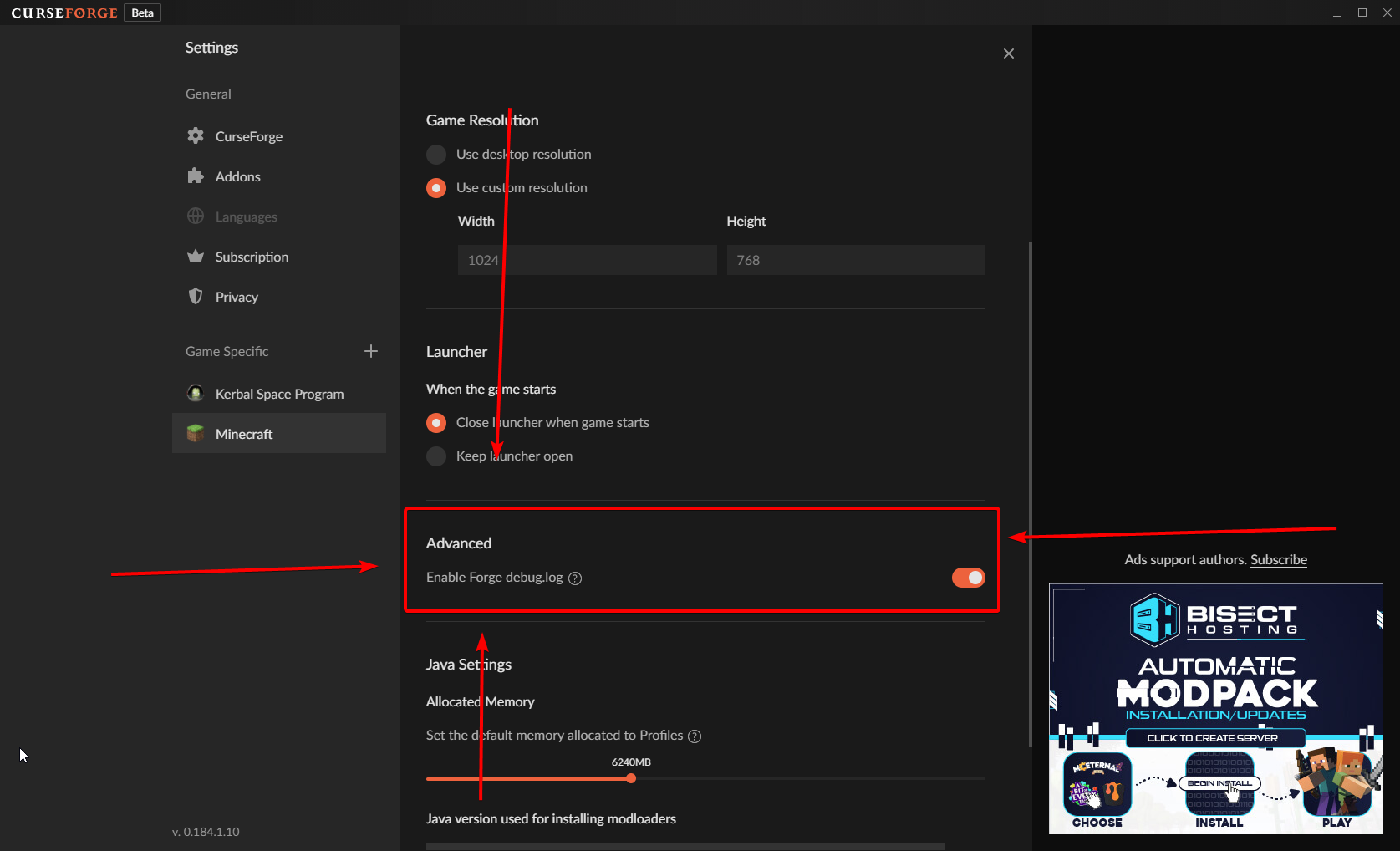
Missing the debug.log file? Enable it by following these steps.
- Click the icon in the bottom left.
- Click the

Minecrafttab. - Turn on the
Enable Forge debug.logoption.
lyric crescent
do that, run it again, send that log
swift portal
Would that be player side or creator side for zip?
urban moth
wheres Enable Forge debug.log even at??
this what I seee

- Turn on the Enable Forge debug.log option.
how ^^
 urban moth
I dont see it in this tab
Why dont I have that on mine
oh how do I update my curseforge
urs is a later version than mine
lyric crescent
close and open it
urban moth
now what
lyric crescent
now you say if it updated or not 🙂
lyric crescent
then delete and reinstall curseforge
urban moth
ight
yayyyyyyyyyyyyyyyyyyyyyyy
IT works NOWWWW
i just had to reinstall cursegorge
ty Yamiias
 digital roost
me and my friend are trying to play a multiplayer on a modpack and I'm hoping someone can tell me how we can play together because I don't know how to.
lyric crescent
!notcf
red patioBOT
The question you are asking about isn't related to CurseForge. Please use the appropriate game rooms by getting the role from #786424115535544350 or use #👽︱game-support for help.
This room is only for CurseForge Owned & Maintained features/services.
 eager junco
My question is, does forge and fabric for launching mean compatibility between both mods, or just the ability to launch them together?
lyric crescent
neither, it simply means a mod can be tagged as both if it works on both
eager junco
Ah,
 lyric crescent
are you on wifi?
 graceful oxide
yes
lyric crescent
!owlogs
red patioBOT
<:overwolf:857375414002384916> How to get Overwolf logs! <:overwolf:857375414002384916>
lyric crescent
send that

 opal cipher
They are usually paid out at the start of the month.
From what I've gathered in my memory banks about payouts
 quasi cradle
ah ok thanks
 ripe socket
 fleet bear
quasi cradle
how long does it take for paypal to go through
fleet bear
quasi cradle
how long does it take for paypal to go through
!rewards
red patioBOT
Question about the rearwards program?
Rewards TOS:
Enabling 2FA for rewards:
fleet bear
I suggest you read the FAQ 😛
quasi cradle
ah ok thanks
fleet bear
will answer everything you likely have questions about.
quasi cradle
again thanks you so much
fleet bear
👌
 fleet bear
 drowsy hawk
using wifi?
drowsy hawk
wired
fleet bear
drowsy hawk
wired
Did you try the steps in the learn more?
drowsy hawk
yes and they didnt work
fleet bear
drowsy hawk
yes and they didnt work
you disabled ipv6?
drowsy hawk
i did and it did nothing to help
 half horizon
I'm currently working on a tool to automatically generate server packs as a zip file when given a curseforge project and download ID. What URL path should I use to get files for mods/modpacks based on projectID instead of the mod/modpack name? On the curseforge webpage, the URL has the format https://www.curseforge.com/minecraft/modpacks/{modpack-name}/download/{fileID}/file which isn't ideal for my use case
also, is there a way to get the latest file upload for a given projectID
 lavish reef
can someone tell me which mod could be causing this error?
fleet bear
drowsy hawk
i did and it did nothing to help
Do you have an intel killer network product?
fleet bear
lavish reef
can someone tell me which mod could be causing this error?
!notcf
red patioBOT
The question you are asking about isn't related to CurseForge. Please use the appropriate game rooms by getting the role from #786424115535544350 or use #👽︱game-support for help.
This room is only for CurseForge Owned & Maintained features/services.
lyric crescent
half horizon
I'm currently working on a tool to automatically generate server packs as a zip ...
This has nothing to do with curseforge services.
half horizon
it sounds pretty related to curseforge to me, I'm just asking about url path structure for the official curseforge website
drowsy hawk
fleet bear
Do you have an intel killer network product?
no it is not
half horizon
but maybe I'm wronge
lyric crescent
Why would we want to help you do something that is already done with the official app.
fleet bear
drowsy hawk
no it is not
Then I don't know how to help, sounds like a firewall or some other thing blocking the app.
I'll have someone contact you tomorrow.
lyric crescent
Did you get ow logs?
drowsy hawk
fleet bear
Then I don't know how to help, sounds like a firewall or some other thing blocki...
thank you for the help
 wanton knot
hey im trying to play minecraft stoneblock and i have played before useing curseforge but now i cant play any moded games it always takes me to a very old minecraft login and it wont let me login i have already uninstalled curseforge and reinstalled it and nothing i try to do works
half horizon
lyric crescent
Why would we want to help you do something that is already done with the officia...
I mean, fair, but also there wasn't a need to get defensive like I'm proposing a competing product lol. I'm just doing something for personal/open source use that CF has no reason to care about. Guess I'll dig through some obscure launcher's source code
lyric crescent
Wasn't doing any of that. Just said it wasn't appropriate here.
fleet bear
wanton knot
hey im trying to play minecraft stoneblock and i have played before useing curse...
The last person that had this issue had the compatibility mode for something set wrong, let me see if I can find it.
wanton knot
ok thx
fleet bear
wanton knot
ok thx
Do you know how to get to the minecraft files for CurseForge?
wanton knot
no
fleet bear
Right click a profile, then click open folder.
wanton knot
ok now what?
fleet bear
Go back a folder.
wanton knot
ok
fleet bear
wanton knot
ok
do you see the Install folder?
wanton knot
no
fleet bear
show me what you have
wanton knot
sorry idk why but it wont let me send the pic
 outer kiln
Alright so i dont know if this is out of your range of support but I made a modpack that has a server pack so that my friend can use the modpack to make a server with mods (My friend is using shockbyte as a server host to make a server with mods). However the server pack doesnt have any .jar files. How do i add the .jar files to the server pack file
fleet bear
wanton knot
sorry idk why but it wont let me send the pic
Open the curseforge settings, go to the minecraft settings, then copy paste the Minecraft Modding Folder from the change window.
red patioBOT
Serverpacks are special files uploaded alongside an existing project file. If the main file is rejected the server pack is also rejected.
You require an already uploaded export file to upload a server pack!
- Make the server pack by zipping up the required files by selecting the required folders & files. It should include the config and mod folders at a minimum, plus anything else you specifically required to run the server. Start/Run/Setup scripts are optional. Don't include modloader files or the minecraft server jar.
- Go to the
Filestab on the project. - Click the name of the file you wish to upload the server pack to. The pack and server should match pack versions.
- Click
Upload Additional File. - Fill out the form.
fleet bear
outer kiln
Alright so i dont know if this is out of your range of support but I made a modp...
!mc-serverpack
outer kiln
i already did this and it was accepted but the .jar files arent in the server pack file
fleet bear
Then you made it wrong...?
outer kiln
how do i make it right
outer kiln
yeah you export it from the app right
fleet bear
no...
outer kiln
oh
fleet bear
where does it say to open something else?
You look at the modpack files, make a zip following the directions above.
not sure where you are getting all these other steps from
outer kiln
alright how do I find the config and mod folders
 light linden
so i saw a mod pack i wanted to download from the website but idk how to install it and make it appear on minecraft/ the curseforge app
fleet bear
outer kiln
alright how do I find the config and mod folders
right click the profile and open folder
fleet bear
light linden
so i saw a mod pack i wanted to download from the website but idk how to install...
search for it
light linden
?
outer kiln
fleet bear
right click the profile and open folder
alright thank you
light linden
fleet bear
search for it
where
light linden
yea ik
but it doesn't appear
it's a lucky block and only appears on the website
@fleet bear
fleet bear
thats not a modpack then...
 livid sparrow
its takes curseforge forever to load up the modded pack
light linden
fleet bear
thats not a modpack then...
then what it is? a mod? how can i get it on my game
fleet bear
link me to it
fleet bear
you install it following the instructions they provide.
light linden
and how do i get Lucky blocks, loot++ and potion core? the app?
light linden
yea
fleet bear
!mc-installmods
red patioBOT
How to install mods in CurseForge App.
- Click
+ Create Custom Profile - Name it, select the required Minecraft version, select the Forge version (usually the highest number), click
Create. - Click the profile icon.
- Click
Add More Content - Search and install the desired mods.
- Start the game!
How to install mods not on CurseForge.
- Right click the profile picture or Open the profile and click the
 Icon next to the play button.
 - Click

Open Folder. - Drag the mod(s) into the
modsfolder. (Note: Some mods will require others, to run. Make sure to read the instructions for the mod!) - Start the game!
 livid sparrow
so my problem is i click play then i get to the overlay i click play again then it takes forever to bring up the client any help
 turbid talon
fleet bear
turbid talon
fleet bear
stop pinging me if nobody replies in 2 minutes
light linden
sorry
 craggy kiln
lol
fleet bear
did you follow the directions as they are?
light linden
well im trying but if you check the link again it says to download some mods, when i try to download them they dont appear
fleet bear
you followed the instructions above to install them?
light linden
the download instructions
fleet bear
yes
light linden
yea it says it requires three mods. Lucky blocks, Loot++, and Potion Core
but neither of them appear when i try to search them on curseforge or when i click the links
fleet bear
they they don't exist for the game version you picked.
Did you read the instructions for the lucky block thing....?
fleet bear
and what game version did you make the profile for
light linden
1.8.9
fleet bear
show me a screenshot of the search you did for them
light linden
 fleet bear
You aren't following the instructions then if you are using the site...
light linden
on the app it doesn't appear anything
fleet bear
I just asked for a picture of you searching for it in the app
light linden
 fleet bear
you still aren't following the directions then.
light linden
im confused
fleet bear
that's the modpack search bar
fleet bear
Then you sure aren't following them!
light linden
OHHHH
fleet bear
You did 2 steps and then stopped
fleet bear
Your on your own for the next ~45 minutes because It's dinner time for me.
light linden
when i search for lucky blocks it only appears
youtuber's lucky blocks
and enjoy your food
 limber needle
what does this mean
 digital roost
i cant get a mod for among us on the app
 tender nymph
light linden
when i search for lucky blocks it only appears
tender nymph
light linden
when i search for lucky blocks it only appears
i think lucky blocks is not hosted on curseforge
light linden
tender nymph
i think lucky blocks is not hosted on curseforge
yea that's what i was thinking
it says to download on 7.0.2 but idk how to download it on that version cause look
 tender nymph
do you use forge or fabric
light linden
forge
tender nymph
which minecraft version
light linden
i need it for 1.8.9
 green portal
how do i move the curse forge from one drive because i cant run it
lyric crescent
? mc-path
red patioBOT
Change your install path to the following:
For Windows: C:\CurseForge
-Go to C:\ drive. Make a new folder. Name it Curseforge.
For Mac: /Users/Shared/CurseForge
If Minecraft is not installed in CurseForge App:
- Click the in the top left.
- Select Minecraft from the list of games.
- Select the
Advancedoption and pick the folder you just made. - Click
Continue.
If Minecraft is installed in CurseForge App:
- Click the in the bottom left.
- Select the Minecraft tab.
- Click
Change. - Select the folder you just made.
:no_entry_sign: Minecraft Files should NOT be installed inside the following locations :no_entry_sign:
:no_entry_sign: .minecraft folder.
:no_entry_sign: OneDrive folders.
:no_entry_sign: Desktop folder.
:no_entry_sign: Drive roots I.E. Directly into the C:\ drive.
:no_entry_sign: iCloud enabled folders.
:no_entry_sign: or any other cloud saved folder.
:no_entry_sign: or folders with non-English characters in them.
If any of the above are in the path you need to change/move it!
light linden
idk what version would be 7.0.2 tho
tender nymph
use the one for 1.8.9
green portal
is any one able to help
tender nymph
green portal
is any one able to help
look at the instructions from the bot
light linden
is it normal i dont have an addons file?
light linden
when i look on %appdata% -> Roaming -> .minecraft
and i saw a comment and it said to after go to addons-> lucky_block
but i dont have the addons folder
green portal
i cant install minecarft it says i need to move curseforge from one drive
tender nymph
a comment on what

 tender nymph
you need to put the lucky block jar into your mod folder
light linden
done
green portal
i cant install minecarft it says i need to move curseforge from one drive
light linden
 green portal
i cant install minecarft it says i need to move curseforge from one drive
light linden
now what?
green portal
everytime i try to intall minecraft on curseforge it says i cant run it on the one drive
tender nymph
green portal
everytime i try to intall minecraft on curseforge it says i cant run it on the o...
rule 4
green portal
whats rule 4 ?
tender nymph
4️⃣ ⪤ Do not spam. Stick to one room for questions.
Spam will be deleted, continuing to spam will result in a kick or ban. This includes posting the same thing repeatedly to multiple rooms. This includes randomly posting memes/content not related to a conversation.
tender nymph
light linden
now what?
i think you put it in the wrong directory you need to put it in your instances mod folder
light linden
tender nymph
i think you put it in the wrong directory you need to put it in your instances m...
wdym
 sullen granite
hey my curseforge just says an exception occurred during a webclient request
how do i fix this
lyric crescent
! webclient
red patioBOT
WebClient errors are from networking issues to your computer. You can try a few things to fix it:
- Restart the computer.
- Restart your router/modem.
- Try another internet source like a hotspot, wired connection or moving closer to the WiFi.
- Pause/Stop other things using the internet. (Streams, music, etc)
- If this still doesn't work, try again in an hour and hope your connection is stable.
 fossil agate
we have tried this and still does not work
light linden
tender nymph
i think you put it in the wrong directory you need to put it in your instances m...
wdym by instances mod folder
lyric crescent
We who
fossil agate
me and mumtin
lyric crescent
Issue is your internet, nothing we can do
green portal
i need help with curse forge
lyric crescent
green portal
i need help with curse forge
? mc-path
red patioBOT
Change your install path to the following:
For Windows: C:\CurseForge
-Go to C:\ drive. Make a new folder. Name it Curseforge.
For Mac: /Users/Shared/CurseForge
If Minecraft is not installed in CurseForge App:
- Click the in the top left.
- Select Minecraft from the list of games.
- Select the
Advancedoption and pick the folder you just made. - Click
Continue.
If Minecraft is installed in CurseForge App:
- Click the in the bottom left.
- Select the Minecraft tab.
- Click
Change. - Select the folder you just made.
:no_entry_sign: Minecraft Files should NOT be installed inside the following locations :no_entry_sign:
:no_entry_sign: .minecraft folder.
:no_entry_sign: OneDrive folders.
:no_entry_sign: Desktop folder.
:no_entry_sign: Drive roots I.E. Directly into the C:\ drive.
:no_entry_sign: iCloud enabled folders.
:no_entry_sign: or any other cloud saved folder.
:no_entry_sign: or folders with non-English characters in them.
If any of the above are in the path you need to change/move it!
green portal
i dont know how to do this
tender nymph
light linden
wdym by instances mod folder
youre creating your own modpack with curse forge and on curseforge every modpack has its own mod folder
light linden
tender nymph
youre creating your own modpack with curse forge and on curseforge every modpack...
OHHHHHH
so i put it there?
tender nymph
yes do you know how to get there
green portal
i dont know how to move curseforge from one drive
lyric crescent
Don't know how to do what
tender nymph
light linden
just try to run it?
i think so
light linden
tender nymph
i think so
okay
lyric crescent
Read the instructions?
green portal
i dont know how to do that i need some help
sullen granite
ey i figured it out
lyric crescent
Don't know how to read? Or what
sullen granite
i was on 5 ghz internet
lyric crescent
You're going to need to explain what you don't get then. It's written as simple as possible
light linden
i go to the curseforge app and just hit play on the modpack?
green portal
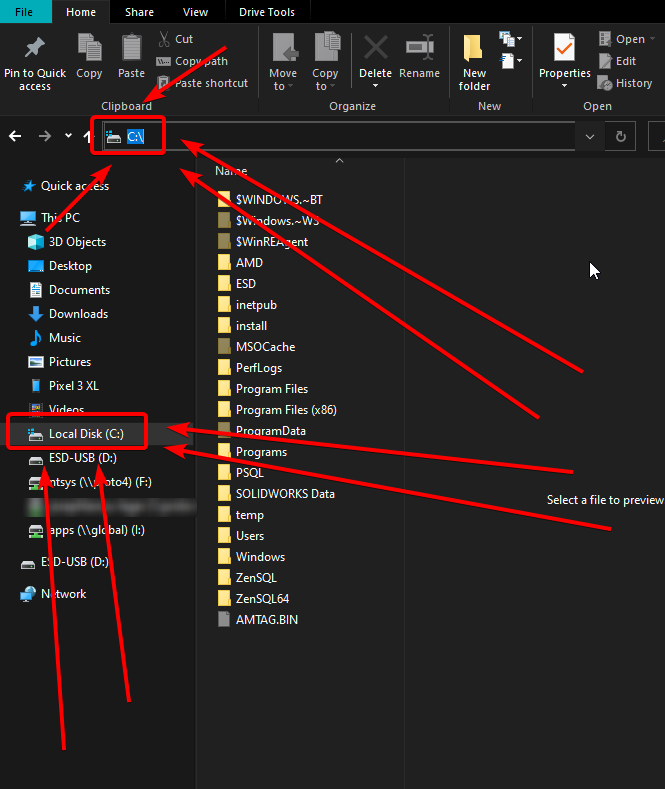
how do i acces c:\
tender nymph
that should do it
lyric crescent
Click "my computer" on the left side of the folder window
livid sparrow
i got a problem i click play then i get to the overlay i click play again then it takes forever to bring up the client any help
lyric crescent
livid sparrow
i got a problem i click play then i get to the overlay i click play again the...
Can you be more specific
livid sparrow
i click the mod to play i load up the Minecraft launcher i click play again there then it just never loads
lyric crescent
It gets stuck during loading?
livid sparrow
yes just never brings me to Minecraft
lyric crescent
?mc-ram
red patioBOT
How to set Global Minecraft RAM value.
- Click the icon in the bottom left to open settings.
- Click the Minecraft tab.
- Scroll down.
- Slide slider to recommended ram range as seen below.
 livid sparrow
nah i got the ram thats not the problem
lyric crescent
Then you arnt explaining the problem well enough to help
light linden
so i forgot to put the actual modpack @tender nymph
livid sparrow
the Minecraft launcher you click play and then it never shows me the game
green portal
wheres the my computer tab on the folder view where do i go on my computer
light linden
do i just put the zip file on the same mod pack i put the lucky block file?
lyric crescent
 tender nymph
light linden
do i just put the zip file on the same mod pack i put the lucky block file?
tender nymph
light linden
do i just put the zip file on the same mod pack i put the lucky block file?
What zip file
light linden
the one containing the actual mod
i was just adding the things needed for it
this is the actual mod
green portal
i did what the instructions said and nothing cahnged
lyric crescent
Then you didnt
tender nymph
So you have installed the lucky blocks mod now and it's working?
light linden
yes
light linden
now i just need to get the zip file
idk where to put it tho
the same place i put the lucky block file?
green portal
@lyric crescent i did what the instructions said but nothing happened
light linden
tender nymph
There should be another folder called "addons"
i dont have it
do i just make it?
lyric crescent
Then you didn't do it
green portal
 light linden
 tender nymph
Honestly I don't know what would be correct maybe yamza can help but my idea would also be to just create the necessary folders
green portal
i cant install minecraft on curseforge
light linden
tender nymph
Honestly I don't know what would be correct maybe yamza can help but my idea wou...
do i extract the file or leave it as a zip?
i made the addons folder myself just to try it
oh nvm
im so dumb
i found it
tender nymph
Where was it
light linden
it was on the curseforge modpack i made
but it doesnt work
do i extract the file?
everything works except that
tender nymph
I would extract it
 tender nymph
You need to extract the astral lucky block zip into the lucky_block folder
light linden
so place the astral lucky block file on the lucky_block file and then extract it?
and delete the one outside the lucky_block folder?
tender nymph
You can Also just move the one outside inside of the lucky_block folder
tender nymph
I hope that works
green portal
i cant install minecraft on curseforge
light linden
same
i'll try to run it and lyk
i hjave 2 now
1 unzipped and 1 zipped
do i delete the zipped one?
tender nymph
Idk
green portal
@fleet bear
i cant install minecraft on curseforge
light linden
it crashed for having both, so i deleted the zipped one
green portal
 fleet bear
Oh, i see someone already told you what to do and you didn't do it so you ping me instead.
green portal
i get this message everytime
red patioBOT
Change your install path to the following:
For Windows: C:\CurseForge
-Go to C:\ drive. Make a new folder. Name it Curseforge.
For Mac: /Users/Shared/CurseForge
If Minecraft is not installed in CurseForge App:
- Click the in the top left.
- Select Minecraft from the list of games.
- Select the
Advancedoption and pick the folder you just made. - Click
Continue.
If Minecraft is installed in CurseForge App:
- Click the in the bottom left.
- Select the Minecraft tab.
- Click
Change. - Select the folder you just made.
:no_entry_sign: Minecraft Files should NOT be installed inside the following locations :no_entry_sign:
:no_entry_sign: .minecraft folder.
:no_entry_sign: OneDrive folders.
:no_entry_sign: Desktop folder.
:no_entry_sign: Drive roots I.E. Directly into the C:\ drive.
:no_entry_sign: iCloud enabled folders.
:no_entry_sign: or any other cloud saved folder.
:no_entry_sign: or folders with non-English characters in them.
If any of the above are in the path you need to change/move it!
green portal
i did it but nothing works
tender nymph
light linden
it worked!!!!
Make sure everything works
fleet bear
You didn't do it if it's not working
green portal
i did exactly what it said
fleet bear
If you got an error message you did not follow the directions.
green portal
i went into my drive and made a folder named curseforge
fleet bear
post the path then
 tranquil lotus
so i made a curseforge modpack and i want to make a univerisal questbook any idea on how?
livid sparrow
https://cdn.discordapp.com/attachments/782027635252920322/899814801159643196/mp3_Trim.mp4 after that screen nothing happens
light linden
tender nymph
Make sure everything works
it does
fleet bear
livid sparrow
https://cdn.discordapp.com/attachments/782027635252920322/899814801159643196/mp3...
!mc-installfix
red patioBOT
- Click on the Minecraft Tab on the Left side of the CurseForge App.
- Click button next to the
Create Custom Profileoption. - Click

Repair Installationoption. - Play game.
NOTE: You will not lose any modpacks or worlds, These are saved in the Instances folder. DO NOT TOUCH THIS FOLDER OR YOU WILL LOSE EVERYTHING
green portal
 fleet bear
now pick that folder as the instructions say to
green portal
theres no minecraft tab for me
fleet bear
then use the other instructions
green portal
what other instructions?
tranquil lotus
so i made a curseforge modpack and i want to make a univerisal questbook any idea on how?
red patioBOT
The question you are asking about isn't related to CurseForge. Please use the appropriate game rooms by getting the role from #786424115535544350 or use #👽︱game-support for help.
This room is only for CurseForge Owned & Maintained features/services.
fleet bear
tranquil lotus
so i made a curseforge modpack and i want to make a univerisal questbook any ide...
!notcf
green portal
thank you very much i got it to work now greatly appreciated
 wooden hemlock
yo so a long time ago i made a modpack and it came up with a changes required and it simply needed more description, this time i make a modpack almost the exact same except named it different and worded it differently but this time i didnt get the "more description required" this time i got this

now im just gonna say i cant link a server that is not setup yet
i also want to point out the spelling error because im a pain in the rear
fleet bear
wooden hemlock
yo so a long time ago i made a modpack and it came up with a changes required an...
Not gonna lie, that's an interesting way to spell specific.
I'll have a chat with someone to find out what the goal of this kind of a reject is.
I have a feeling that whatever you made is for a group of people so linking to it's discord/website or whatever would be what it's after. Otherwise it's just a regular modpack with an official server.
wooden hemlock
obviously once i have the server and stuff setup i will add it but right now i wanted to get the modpack setup before anything else as that seems easiest to me
fleet bear
yeah
 amber flare
why does it crash when ever i try and put dynamic surrondings 1.17.1 on
fleet bear
!notcf
red patioBOT
The question you are asking about isn't related to CurseForge. Please use the appropriate game rooms by getting the role from #786424115535544350 or use #👽︱game-support for help.
This room is only for CurseForge Owned & Maintained features/services.
 dim glen
i try to put a world on tmodloder but its not there
fleet bear
dim glen
i try to put a world on tmodloder but its not there
!notcf
red patioBOT
The question you are asking about isn't related to CurseForge. Please use the appropriate game rooms by getting the role from #786424115535544350 or use #👽︱game-support for help.
This room is only for CurseForge Owned & Maintained features/services.
dim glen
fleet bear
That doesn't mean it's a curseforge problem. Follow the directions.
fleet bear
livid sparrow
ive joined the game as this user
!notcf
red patioBOT
Your question is not related to CurseForge owned/maintained features or services.
Please use the appropriate game room by getting a game role from #786424115535544350 or use #👽︱game-support for help.
CurseForge does not make or maintain any of the content hosted on the site. Just because it's on the site doesn't make it a problem with CurseForge. Move rooms as requested, arguing about it will result in you being removed from the discord.
livid sparrow
ive joined the game as this user
it says i already and i cant play at all whats going on
fleet bear
Read above.
livid sparrow
my fault
 onyx ruin
where do i change the seed on a forge server?
i dont see it in the server properties at all
wooden hemlock
hey clay where would i put the links in my pack? does it have to be in a specific place or just in description or something?
wooden hemlock
onyx ruin
where do i change the seed on a forge server?
that is in the server settings
onyx ruin
wooden hemlock
that is in the server settings
wheres that?
wooden hemlock
what server provider you using?
onyx ruin
wooden hemlock
what server provider you using?
im hosting it on my computer
fleet bear
onyx ruin
where do i change the seed on a forge server?
!notcf
red patioBOT
Your question is not related to CurseForge owned/maintained features or services.
Please use the appropriate game room by getting a game role from #786424115535544350 or use #👽︱game-support for help.
CurseForge does not make or maintain any of the content or games hosted on the site. Just because it's on the site doesn't make it a problem with CurseForge. Move rooms as requested, arguing about it will result in you being removed from the discord.
fleet bear
wooden hemlock
hey clay where would i put the links in my pack? does it have to be in a specifi...
just in the description would be fine.
wooden hemlock
oh then i have no idea, i thought you were using an actual server provider
onyx ruin
no 😭
wooden hemlock
thanks clay
onyx ruin
theres nothing about it on the internet either 😭
wooden hemlock
wait are you talking about a actual server or a singleplayer world?
onyx ruin
wooden hemlock
wait are you talking about a actual server or a singleplayer world?
server
wooden hemlock
sorry clay
 rigid dirge
how would i play with my friends on a lan sever for free
lyric crescent
!notcf
red patioBOT
Your question is not related to CurseForge owned/maintained features or services.
Please use the appropriate game room by getting a game role from #786424115535544350 or use #👽︱game-support for help.
CurseForge does not make or maintain any of the content or games used on the site or app. Just because it's on the site doesn't make it a problem with CurseForge. Move rooms as requested, arguing about it will result in you being removed from the discord.
fleet bear
Install JEID
 void stream
ok, thankyou
it crashed again
wopps sorry, i thought i clicked instal heheheh....
its installed now
fleet bear
Also next time please use #👽︱game-support
void stream
ok, sorry
 wary glen
hello I have a problem with the app. Every time I download a new modpack for minecraft all the older ones get deleted. Please help.
fleet bear
Sounds like you need to reinstall
wary glen
But its happened multiple times
red patioBOT
Change your install path to the following:
For Windows: C:\CurseForge
-Go to C:\ drive. Make a new folder. Name it Curseforge.
For Mac: /Users/Shared/CurseForge
If Minecraft is not installed in CurseForge App:
- Click the in the top left.
- Select Minecraft from the list of games.
- Select the
Advancedoption and pick the folder you just made. - Click
Continue.
If Minecraft is installed in CurseForge App:
- Click the in the bottom left.
- Select the Minecraft tab.
- Click
Change. - Select the folder you just made.
:no_entry_sign: Minecraft Files should NOT be installed inside the following locations :no_entry_sign:
:no_entry_sign: .minecraft folder.
:no_entry_sign: OneDrive folders.
:no_entry_sign: Desktop folder.
:no_entry_sign: Drive roots I.E. Directly into the C:\ drive.
:no_entry_sign: iCloud enabled folders.
:no_entry_sign: or any other cloud saved folder.
:no_entry_sign: or folders with non-English characters in them.
If any of the above are in the path you need to change/move it!
wary glen
ok thank you
 uneven steppe
hii
is there a way to convert fabric mods to forge?
or to make fabric mods work in a forge modpack?
uneven steppe
lol i cant even find a simple harvesting mod for forge
 upper root
Do you mean right click to harvest?
 queen storm
 vestal radish
in what folder do i have to put a shader pack for playing a modpack with the shader pack?
 tawny ridge
I am trying to move a modded minecraft instance from one computer to the other, but it is not being recognized when I put it in the instance folder. Is there a certain way I need to do it or something?
lyric crescent
did you put it in the correct place? did you restart the app after putting it there?
tawny ridge
I moved it from the instances folder on my laptop, to the instances folder on my desktop. I have also restarted the app yes.
lyric crescent
rename this file, just add .bak at the end of the name. then restart the app. https://i.imgur.com/Sr8xNwu.png
 tawny ridge
Still doesn't appear.
tawny ridge
It is a publicly available mod pack, not one I made if that changes anything? I am just trying to transfer and keep my save.
 unborn basin
tawny ridge
I am trying to move a modded minecraft instance from one computer to the other, ...
unborn basin
tawny ridge
I am trying to move a modded minecraft instance from one computer to the other, ...
Export and import it
tawny ridge
unborn basin
Export and import it
How do I do that? Will it keep my save/settings/etc?
unborn basin
Wait is it just a modpack? You didn't modify it in any way?
tawny ridge
No modifications, it is Cuboid Outpost. I am just trying to move it from my laptop to my desktop to play on my desktop.
unborn basin
Why can't you just download it from CF as usual ?
lyric crescent
they want to keep their save and stuff
 tawny ridge
I want to keep my save and such. I can just transfer it separately, but I figured just copy pasting it would work.
 tawny ridge
Yah, I know how to do that. I was just surprised copy and pasting the instance didn't work. Thank you then, I will just do that.
unborn basin
It won't work since there's more than that
But that's an interesting thing, to be able to move everything
tawny ridge
I could have sworn it was possible while everything was still with twitch, which is why I tried it, but may I am just remembering wrong.
lyric crescent
if it has the minecraftinstance.json why cant the app tell what the pack is supposed to be
 hardy cobalt
Hello. Recently I asked CF staff about 2-days review of my projects. But I'll do that again.
1 week ago I created 2 new projects, and they are still under review till today. What is happening, and maybe there is a problem on my side? Will be grateful for help.
tawny ridge
Awesome, thanks. I just figured that was the easiest way, rather than picking through the files I need lol. Also keeps one less download off your servers.
unborn basin
Can you tell me which folder did you try copying and pasting exactly?
Cause it actually works for me
lyric crescent
hardy cobalt
Hello. Recently I asked CF staff about 2-days review of my projects. But I'll do...
link the project, and screenshot the file page where it shows the status of review
unborn basin
Wait, are you using Mac by any chance?
tawny ridge
Me? No, both devices are windows machines.
unborn basin
k
lyric crescent
huh it did work actually.. 🤔
 unborn basin
Is there a chance you can send me the file you are trying to move?
tawny ridge
Yep, how would you like me to upload it? It is the whole file for the instance.
 unborn basin
Hmm it's too large to be sent here right?
lyric crescent
hardy cobalt
https://www.curseforge.com/minecraft/modpacks/lite-refined
i want to see the file status.
unborn basin
https://wetransfer.com/ works I think

WeTransfer is the simplest way to send your files around the world
lyric crescent
that is why it's not approved then. you need an approved file for the project to be approved.
tawny ridge
unborn basin
Hmm it's too large to be sent here right?
Yes, it is 142MB
hardy cobalt
lyric crescent
that is why it's not approved then. you need an approved file for the project to...
uh, oh. thanks then
lyric crescent
it says that right in the message...
hardy cobalt
sorry then
unborn basin
tawny ridge
Yes, it is 142MB
If you can upload it via wetransfer and send me a link that'd be great
tawny ridge
Uploading it now.
tawny ridge
unborn basin
If you can upload it via wetransfer and send me a link that'd be great
Here is the link. https://we.tl/t-akJ66kxSzk
1 file sent via WeTransfer, the simplest way to send your files around the world
unborn basin
Yeah
I think the best thing to do atm is to install it through CF and just copy the saves folder
I see what the problem is, and we'll look into it
 sinful ore
is the version on curseforge is up to date?
tawny ridge
Awesome thanks.
unborn basin
sinful ore
is the version on curseforge is up to date?
What version?
sinful ore
the one i downloaded on curseforge launcher is the latest dd&ss ?
just read some articles about dd&ss that artisan tools no longer need to be copper via quest, but i still had that quest so i assume i got an old version
for me its version 8.0_R1
lyric crescent
that is something you should talk to the pack developer about
digital roost
hi im new to moding
so basically i downloaded curseforge
and im downloading skyfactory 4
its stuck on 100%
for 15 minutes
lyric crescent
screenshot what is stuck please
digital roost
oh nvm i just realised its saying mod 57 / 202 my bad
it was saying 100% before i assumed
it would download everything at once
Hello i would like the customized preset feature to be implemented to 1.17 from 1.12 does anyone have a mod?
lyric crescent
dont know what that means but you'll want to ask in #🔎︱mod-hunting
 brisk sequoia
uhm
the curseforge is no longer work in my pc any more
due to windows insider program
so how should i leave/disable that ?
lyric crescent
..what
unborn basin
Yes
queen storm
brisk sequoia
so how should i leave/disable that ?
 acoustic fractal
Hi I just did an install on a new windows desktop, and the app “appears” to be working fine, except the full library of addons is not available upon search. Game is WoW, and I’ve successfully installed about 10 addons, but for example, when I search in Get More Addons for Handynotes, all it shows me is a very small subsection of the extensions, and not the actual addon. It won’t find Maxcam either. Thanks in advance for any help! Edit - filters are all categories and all game versions. Further edit - I am able to install by searching the project number on the website and typing that into the search bar. So they’re there, just not able to search.

 tranquil lotus
I uploaded my mod pack it got approved but not showing up anything else I have to do I searched by my name and exact modpack name
lyric crescent
!sync
red patioBOT
Sync and your Project.
CurseForge App and site do not share the same requirements! You can find things on the site but this does not mean it will be in the app!
For a mod to show up in the app:
- Projects MUST have a file marked as RELEASE
 or BETA
- Projects MUST be APPROVED
- Projects MUST have a file marked for the GAME VERSION SELECTED/LOADED
- Projects CAN'T be EXPERIMENTAL
- Projects CAN'T be ABANDONED
Files can take a while to show up in the app. If your files still have not shown up either your project is new and you have yet to mark a file as Release/Beta or there is issues with the sync system making it slow.
Vote this issue up if you would like to know when the last sync was! https://curseforge-ideas.overwolf.com/ideas/CF-I-1617
 dreamy pendant
Can I only download modpacks on curseforge or also mods?
I could download it from the internet page but if I open it in the Minecraft Launcher there is nothing happening
 hardy spoke
?mc-installmods
red patioBOT
How to install mods in CurseForge App.
- Click
+ Create Custom Profile - Name it, select the required Minecraft version, select the Forge version (usually the highest number), click
Create. - Click the profile icon.
- Click
Add More Content - Search and install the desired mods.
- Start the game!
How to install mods not on CurseForge.
- Right click the profile picture or Open the profile and click the Icon next to the play button.
- Click
Open Folder. - Drag the mod(s) into the
modsfolder. (Note: Some mods will require others, to run. Make sure to read the instructions for the mod!) - Start the game!
dreamy pendant
Ok thx
tranquil lotus
How do I change my approved mod pack to release
queen storm
tranquil lotus
How do I change my approved mod pack to release
Go to files, click the file, click edit
 eternal osprey
hi, is my problem been solved by anyone here yet?
lyric crescent
what problem
lyric crescent
nothing that we can do
eternal osprey
oh ok
opal cipher
Try getting a LAN/ethernet-dongle for your Mac, to get a better connection.
eternal osprey
oh i could try that thx
opal cipher
Not sure it will solve anything, but worth trying, since it works with your fathers computer
tranquil lotus
queen storm
Go to files, click the file, click edit
I changed it now so I just wait for it
 peak cobalt
Hey, my minecraft modpack got approved 2 hours ago, but now it no longer has a modpack file, and I can't edit it anymore. Is it a case of waiting or is something wrong with it? modpack name: SandwichCraft
It might be due to a typo in the short description - there was a comma at the end of the description, and this might mess up the data order in the database?
When i try to edit it says "you do not have permission to access this page"
lyric crescent
did you check your notices?
 lofty frost
I seem to be unable to submit crash reports. There's a small but inconvenient problem with one of the modpacks in Minecraft.
red patioBOT
Please visit the project page for the content you posted about and look for a way to contact the developer.
Somewhere on the page there is usually a method of contact. Look for one of the following things:
Issuestab like the image below.- Discord link.
- Twitter link.
- Comments section below the project.
If no contact method exists you will either have to remove the project or find a solution on your own.
 peak cobalt
@lyric crescent my last notice was a project approved one, 2 hour+ ago
lyric crescent
try relogging
peak cobalt
Just tried that and no luck
It's like I'm the project owner, but at the same time I'm not. and there's no project file.
lyric crescent
can you send the link
lyric crescent
passed this on to the overwolves, hopefully someone should address this soon.
peak cobalt
Thanks @lyric crescent 👍
digital roost
Hi I have a problem. When i open curseforge i get the error message: Oops, that was not supposted to happen. I have already uninstalled and re-downloaded and tried various things but nothing worked. Can someone help me?
tranquil lotus
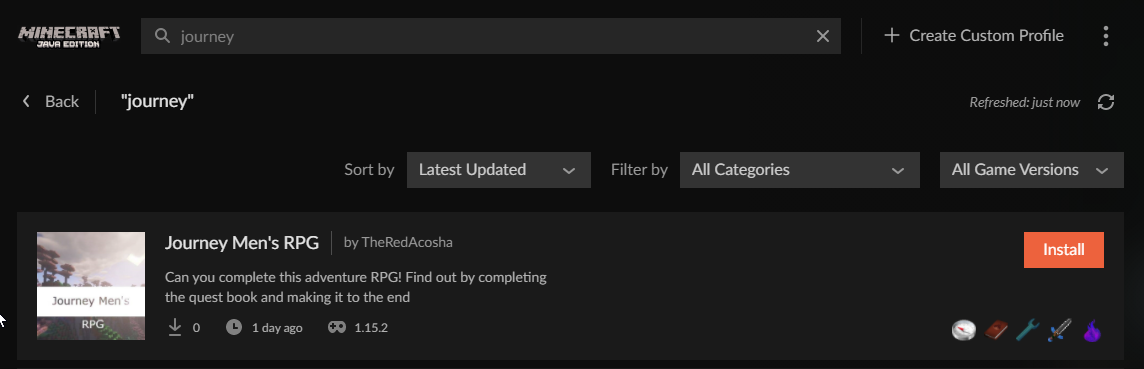
My modpack is not showing public and is on released and approved my modpack is Journey Men’s RPG
lyric crescent
link it
lyric crescent
digital roost
Hi I have a problem. When i open curseforge i get the error message: Oops, that ...
are you on wifi?
are you using a vpn?
digital roost
on wifi and no vpn
tranquil lotus
lyric crescent
link it
You talking to me?
lyric crescent
that is why my message is below yours
lyric crescent
digital roost
on wifi and no vpn
try connecting without wifi or try the following
!webclient
red patioBOT
WebClient errors are from networking issues to your computer. You can try a few things to fix it:
- Restart the computer.
- Restart your router/modem.
- Try another internet source like a hotspot, wired connection or moving closer to the WiFi.
- Pause/Stop other things using the internet. (Streams, music, etc)
- If this still doesn't work, try again in an hour and hope your connection is stable.
tranquil lotus
lyric crescent
seems to be just fine??? https://i.imgur.com/1ZQ34mz.png
 serene sphinx
yo, how do i access the curseforge changelog i accidently clicked out of the changelog
 humble nimbus
hello, when i tried to run Minecraft this happened:
 serene sphinx
copy full changelog into a pastebin
lyric crescent
serene sphinx
yo, how do i access the curseforge changelog i accidently clicked out of the cha...
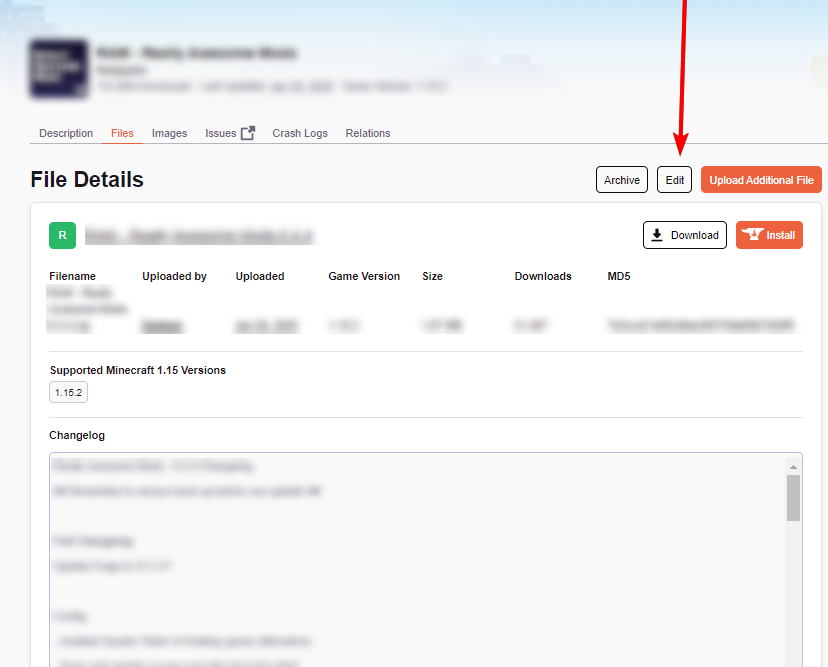
click the file > edit
serene sphinx
lyric crescent
click the file > edit
?
humble nimbus
I checked, and I saw that:
 serene sphinx
lyric crescent
click the file > edit
serene sphinx
lyric crescent
click the file > edit
why did you say that to me?
lyric crescent
for the reason i replied to...?
lyric crescent
 lyric crescent
you dont change things in the app
peak cobalt
@lyric crescent did you mention to them about the comma at the end of the short description. This could be messing up the data
 serene sphinx
lyric crescent
you dont change things in the app
serene sphinx
lyric crescent
you dont change things in the app
no, i want to see it again bc i misclicked and didnt get to read it
I want to read the changelog again thats all
bc i missed it
lyric crescent
the curseforge changelog?
serene sphinx
yes with the app
lyric crescent
click ?, then what's new.
 quartz mesa
Hey yall
serene sphinx
hey
quartz mesa
Recently my curseforge minecraft launcher gets stuck on preparing when trying to launch the game
lyric crescent
?mc-installfix
red patioBOT
- Click on the Minecraft Tab on the Left side of the CurseForge App.
- Click button next to the
Create Custom Profileoption. - Click
Repair Installationoption. - Play game.
NOTE: You will not lose any modpacks or worlds, These are saved in the Instances folder. DO NOT TOUCH THIS FOLDER OR YOU WILL LOSE EVERYTHING
quartz mesa
Does it for everything including vanilla mc
I already reinstalled both curseforge and minecraft
This literally was my last resort
Spent hours browsing trying to find a similar issue
lyric crescent
ok, but did you do the thing i sent 4 messages ago?
lyric crescent
?mc-path
red patioBOT
Change your install path to the following:
For Windows: C:\CurseForge
-Go to C:\ drive. Make a new folder. Name it Curseforge.
For Mac: /Users/Shared/CurseForge
If Minecraft is not installed in CurseForge App:
- Click the in the top left.
- Select Minecraft from the list of games.
- Select the
Advancedoption and pick the folder you just made. - Click
Continue.
If Minecraft is installed in CurseForge App:
- Click the in the bottom left.
- Select the Minecraft tab.
- Click
Change. - Select the folder you just made.
:no_entry_sign: Minecraft Files should NOT be installed inside the following locations :no_entry_sign:
:no_entry_sign: .minecraft folder.
:no_entry_sign: OneDrive folders.
:no_entry_sign: Desktop folder.
:no_entry_sign: Drive roots I.E. Directly into the C:\ drive.
:no_entry_sign: iCloud enabled folders.
:no_entry_sign: or any other cloud saved folder.
:no_entry_sign: or folders with non-English characters in them.
If any of the above are in the path you need to change/move it!
quartz mesa
I have them on a USB drive
lyric crescent
that is likely the issue
quartz mesa
I'll move it and see
It wasn't an issue before
This started happening about 3 days ago
That seems to have been the issue. Thanks 😊
 lapis mantle
Hi, I have created my own Minecraft modpack and wanted to try it out but every time I want to start Minecraft I get Error Code 1. Can someone please help me.
lyric crescent
?mc-log
red patioBOT
Sending logs for support.
- Right-click the modpack profile icon OR click the button in the modpack profile.
- Click
Open Folder. - Open the
logsfolder. - Drag and drop the FILE named
latestORdebuginto discord.
lapis mantle
lyric crescent
nothing specific in there, you'll have to remove mods until it works.
 glacial junco
How do ticked Java versions affect project visibility?
lyric crescent
Not really sure it does anything. @fleet bear might know.
 torn compass
Hello Guys, a friend of me would like to play the Sky Factory Mod Pack but he gets the error
"Exception error during a web client request". What can he do?
lyric crescent
!webclient
red patioBOT
WebClient errors are from networking issues to your computer. You can try a few things to fix it:
- Restart the computer.
- Restart your router/modem.
- Try another internet source like a hotspot, wired connection or moving closer to the WiFi.
- Pause/Stop other things using the internet. (Streams, music, etc)
- If this still doesn't work, try again in an hour and hope your connection is stable.
 errant oxide
Why does it take hours for a project to be re approved over a tiny issue in the description in comparison to first upload 5 minutes wait
lyric crescent
!status
red patioBOT
Project Moderation Time
Project/File moderation is done on these days unless otherwise mentioned:
Sunday, Monday, Tuesday, Wednesday, Thursday: <t:1631170800:t> - <t:1631199600:t> (Your time)
Friday, Saturday: No Moderation!
Projects are moderated First in, First out. If you submit late in the work day, it will likely get left until the next day!
New Projects or anything flagged for manual review: 1-3 Working Days
Updates to approved projects not needing manual approval: 1 Hour
Changes will only show in the app if the project meets the requirements in the ?sync command and up to 24 hours has passed from when it was accepted.
lyric crescent
lucky if it was only hours
errant oxide
So I might as well just delete and reupload?
lyric crescent
uh.. no??
 neat inlet
new to submitting a pack on curseforge. got rejected because the server pack doesn't have a manifest.json file. I don't know how to make that for the server side. the instructions I have had me go to "open folder" in the curse client, copy everything except for .curseclient, minecraftinstance.json, and mods/modlist.json (which, there's of course a mods folder, but no modlist.json file) into a new folder, and then in that new folder, install forge server. I've done all that, but there's no manifest.json. that's in the client zip file. I zipped everything in said new folder. what am I doing wrong here?
lyric crescent
how did you come to that conclusion
lyric crescent
so you want to reupload so it takes several days? not sure i get the logic
errant oxide
I've already been waiting for 4 days
Might as well reupload to get first in the queue tommorow
lyric crescent
file approval and project approval are diffrent things as well
lyric crescent
neat inlet
new to submitting a pack on curseforge. got rejected because the server pack doe...
server packs need to be uploaded as an additional file to a client upload
neat inlet
I understand that. That wasn't my question.
fleet bear
errant oxide
Might as well reupload to get first in the queue tommorow
That would put you at the end of the current queue...
neat inlet
Does it not need a manifest.json separately in the server zip?
lyric crescent
it does not
neat inlet
Okay. So if the pack I create from the app has only the files for the client, and the server has different stuff, specifically for server only, is that a problem?
lyric crescent
no
fleet bear
If the server pack was rejected for not having a manifest file 99.99% of the time you uploaded it wrong.
neat inlet
hm, not sure how that could have happened? every time I've made a change to it, I export it again and include everything that's needed and it makes a zip file. then I go to my project page and choose the file upload option and upload the client file. I definitely uploaded the server file separately last time, so now that I know what to do with it, that is easy to fix
just not sure what you mean by uploaded it wrong and I don't want to keep doing it wrong, being stuck in a rejection loop lol
doesn't seem like this should be difficult
fleet bear
You dont upload it via the file upload.
You upload it as an additional file to the main file.
!mc-serverpack
red patioBOT
Serverpacks are special files uploaded alongside an existing project file. If the main file is rejected the server pack is also rejected.
You require an already uploaded export file to upload a server pack!
- Make the server pack by zipping up the required files by selecting the required folders & files. It should include the config and mod folders at a minimum, plus anything else you specifically required to run the server. Start/Run/Setup scripts are optional. Don't include modloader files or the minecraft server jar.
- Go to the
Filestab on the project. - Click the name of the file you wish to upload the server pack to. The pack and server should match pack versions.
- Click
Upload Additional File. - Fill out the form.
neat inlet
I think you read what I said wrong
lyric crescent
we didn't. but if you got an error about a missing manifest then you did not try to upload as an additional file
neat inlet
perhaps not, but .. I'm uploading the client file, that I created on the curse client. I know now that I need to add the server file as an additional file.
so I have to upload the main pack I exported from the app as an additional file too? it didn't say that in my rejection info
fleet bear
Then you didn't use the app to export the pack if theres no manifest file.
fleet bear
Or the file was modified/corrupt.
lyric crescent
the thing you export from the app is the "main file", the client file.
errant oxide
neat inlet
I did use the app
Windows 11? I've had a few problems with exporting modpacks on w11
neat inlet
no, not windows 11.
errant oxide
Oh okay then
neat inlet
I exported my client pack from the app. I created it all in the app.
I understand I uploaded the server file wrong. that's on me and that's not confusing me. ** then I go to my project page and choose the file upload option and upload the client file. ** apparently this is correct, which is why I said I think you read my message wrong
anyway, I think I get it now. upload the client file through the file upload and add the server one as an additional file
fleet bear
Yes
neat inlet
don't make changes to the client zip file after it's exported and there shouldnt' be an issue
fleet bear
Correct.
neat inlet
thanks for the assistance
 south solstice
hello can any one help me .I found not the mod Refined Storage in the lounger for my custom modpack can any one help ?
red patioBOT
How to install mods in CurseForge App.
- Click
+ Create Custom Profile - Name it, select the required Minecraft version, select the Forge version (usually the highest number), click
Create. - Click the profile icon.
- Click
Add More Content - Search and install the desired mods.
- Start the game!
How to install mods not on CurseForge.
- Right click the profile picture or Open the profile and click the Icon next to the play button.
- Click
Open Folder. - Drag the mod(s) into the
modsfolder. (Note: Some mods will require others, to run. Make sure to read the instructions for the mod!) - Start the game!
lyric crescent
?mc-installmods
south solstice
where i can found the mods what not in it ?
lyric crescent
Either your profile is not the correct version for the mod, or you are not searching correctly.
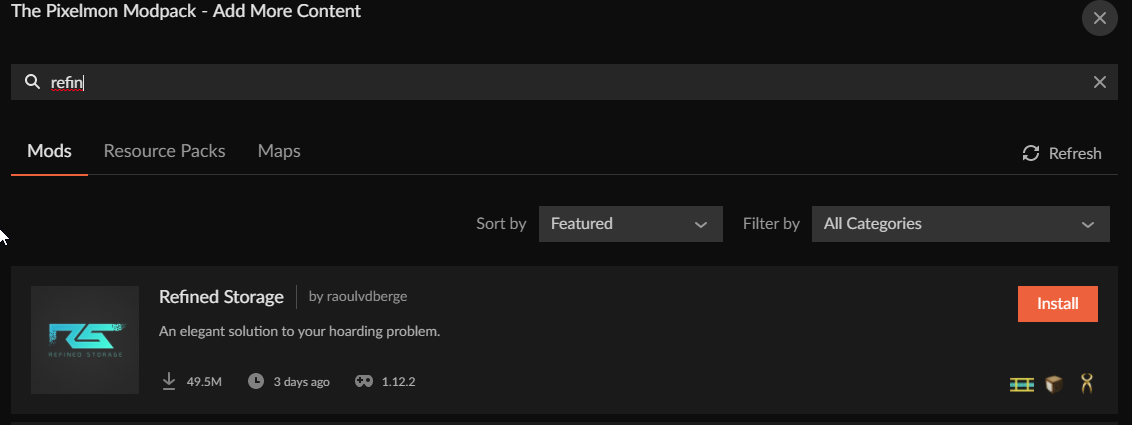 lyric crescent
one that the mod is available on. check the mod page.
south solstice
thanks
 dry hedge
Hey, I have a little problem. After I migrated my Minecraft account to a microsoft account I wanted to use curseforge after a long time. The only problem is, I can't log into the launcher because it gives me a Exception (see image). Anyone know what to do?
 queen storm
!mc-login
red patioBOT
Minecraft Logins
CurseForge does not handle or touch the Minecraft Login.
You must own JAVA Edition
If you have a DEMO button instead of a PLAY button in the launcher you are logged into an account that does not own the game. CurseForge requires you to own the game to use it.
Follow the steps in the pictures below. If you bought Minecraft after October 2020 or you have transferred your account you will use a Microsoft account.
Otherwise you must use a Mojang account until you transfer it!
 dry hedge
Maybe this isn't the best place for this but I, for whatever reason, still have this launcher, how does that work with that?
 queen storm
Reinstall curseforge
 dry hedge
queen storm
Reinstall curseforge
dry hedge
queen storm
Reinstall curseforge
Alright, thanks!
lyric crescent
where did the zip come from?
swift portal
Someone got this
 lyric crescent
internet is too slow, or you're on wifi
swift portal
And idk how to fix (sorry for linebreak im on mobile)
 young pawn
lyric crescent
where did the zip come from?
young pawn
lyric crescent
where did the zip come from?
i figured out the mod it wont install

this 1
 red patioBOT
WebClient errors are from networking issues to your computer. You can try a few things to fix it:
- Restart the computer.
- Restart your router/modem.
- Try another internet source like a hotspot, wired connection or moving closer to the WiFi.
- Pause/Stop other things using the internet. (Streams, music, etc)
- If this still doesn't work, try again in an hour and hope your connection is stable.
neat inlet
and I'm back.... it got rejected again
Invalid manifest.json file:
References invalid fileIDs: fileID: 2892136, projectID 364399 (project-364399)
how is this happening if I haven't changed anything after exporting it from the curse app?
and how do I determine which file that is?
lyric crescent
put the project id into the search bar on the app
usually happens if a dev deletes a file, but can be other issues. just try reinstalling that mod
neat inlet
alright
you mean when you go to add new content like you're adding another mod, right? that search bar?
lyric crescent
yea
neat inlet
cause if that's what you mean, nothing comes up when I search for it
lyric crescent
pretty sure either one works
lyric crescent
yea whatever that was is gone now 🤔
neat inlet
okay.. what's the solution then? I'd have to add it as a third party I assume? but I don't have a clue what one it is
lyric crescent
are there any  next to mods in your mod list?
you cant include mods that are not from curseforge unless on the approved list
!mc-3rdparty
red patioBOT
Minecraft Modpack 3rd party
Mods not on CurseForge must be on the 3rd-party list to be included in modpacks uploaded to CurseForge. If a mod is not on this list it can't be included in the export of a modpack and must be removed before uploading. If you upload with a mod that isn't on this list the file will be rejected.
List of approved 3rd party mods:
https://docs.google.com/spreadsheets/d/176Wv-PZUo9hFxy6oC6N8tWdquBLPRtSuLbNK-r0_byM
neat inlet
right, like I said though, they're all on the list
some are even on curseforge but abandoned so they didn't come up in the search
but they're still on the site and able to be downloaded
neat inlet
yes I did. look, I'm new to this.
I'm not sure if that project ID would reflect third party mods or not or if it's just the ones I coudl find in the app
so that would be why we're talking about third party mods
the symbol you mentioned is non-existent
I have a few I can update under action and then the only other option I have is to delete
nothing else odd is showing up in the list
lyric crescent
so since none of the things that should work, work. what you can do is edit the manifest to remove the line that references that project id, then import the pack and compare to see what is missing.
neat inlet
okay. thanks.
is it reasonable to assume that these are listed in the manifest in the same order that they're listed in the app?
lyric crescent
no, just search the id
neat inlet
I did that, was just seeing if I could count down both lists to the same position to find the mod that way. I'll try your suggestion then.
neat inlet
the good news - I found the culprit.
the dumb news - it was in the mod list as just the project ID the entire time.
lyric crescent
peak cobalt
Hey, my minecraft modpack got approved 2 hours ago, but now it no longer has a m...
Your modpack got rejected for including optifine. The permission issues should be fixed though, can you try now?
 dense current
is there a way to make alpha mods show up on the launcher when trying to add content?
 narrow minnow
dense current
is there a way to make alpha mods show up on the launcher when trying to add con...
narrow minnow
dense current
is there a way to make alpha mods show up on the launcher when trying to add con...
Try from the settings
 narrow minnow
not sure it works, but worth a try
dense current
just in general, i want to be able to update to alpha mods
project rankine rn
but i know theres a few im missing
queen storm
If they have no files in release then it won't show in the app
dense current
it does
i just wnat to update to the alpha
from the app
but i guess alphas dont show
lyric crescent
for what mod
dense current
dense current
project rankine rn
^
it shows on the website ofc
but not in the app
lyric crescent
link?
dense current

i have the release installed in my pack but i was hoping theres a setting to let me get the update button if alphas are released
narrow minnow
@dense current it might be a bug on our end


 narrow minnow
on the profile optinos there is also this option
 lyric crescent
oh they didnt tag modloader
narrow minnow
I think that if it isn't tagged, it goes for Forge by default
but it is best to tag
actually, it seems to only show Forge versions, so that might be the issue
narrow minnow
dense current
i can let them know
please let them know and we'll also see if we can fix this in an upcoming version
dense current
also; am i going nuts or have i seen way too many human verification captchas recently?
narrow minnow
Are you working from a public place? like a school?
dense current
nope
narrow minnow
not sure why then, but it is detecting you as a potential bot 🙂
dense current

narrow minnow
sorry bout that
dense current
i used to be able to spam open like 15 mod tabs at home
narrow minnow
maybe use the client as much as you can 🙂
dense current
currently staying with my partners grandparents and its bene like this since i got here
narrow minnow
(once we fix alpha)
dense current
LOL
narrow minnow
but on a serious note, it is a service we work with and out of our control
so, i won't be able to help there
lavish reef
I don't know if this is a game issue or curseforge issue but on my minecraft output log it's saying vanilla jar may be corrupt
lyric crescent
?mc-installfix
red patioBOT
- Click on the Minecraft Tab on the Left side of the CurseForge App.
- Click button next to the
Create Custom Profileoption. - Click
Repair Installationoption. - Play game.
NOTE: You will not lose any modpacks or worlds, These are saved in the Instances folder. DO NOT TOUCH THIS FOLDER OR YOU WILL LOSE EVERYTHING
lavish reef
Mc is still running but task manager says otherwise
lyric crescent
restart your computer and then do the fix
lyric crescent
what are you saying
lavish reef
Task manager overwolf automatically closes forge and then mc
lyric crescent
not sure how that is related to what i said
lavish reef
I'm just saying it's easier this way
lyric crescent
if it works, sure. which it doesnt always. which is why i didn't say to do that.
lavish reef
Worked
 soft minnow
I hope this is the correct place to ask. When I open a Minecraft Mod pack to play I am not able to log into Minecraft using my migrated Mojang Microsoft account. When I open just the Minecraft launcher I can log in just fine. So it has to be on the Curse side of things. Can anyone help me with this issue? Thanks.
lyric crescent
?mc-login
red patioBOT
Minecraft Logins
CurseForge does not handle or touch the Minecraft Login.
You must own JAVA Edition
If you have a DEMO button instead of a PLAY button in the launcher you are logged into an account that does not own the game. CurseForge requires you to own the game to use it.
Follow the steps in the pictures below. If you bought Minecraft after October 2020 or you have transferred your account you will use a Microsoft account.
Otherwise you must use a Mojang account until you transfer it!
soft minnow
This doesn't help me. I've had my purchased Minecraft account since 2012. I migrated my Minecraft Mojang account about 2 weeks ago to Microsoft. Until today I was able to play mod packs on Curse just fine. Today when I opened SkyFactory One to play on my world the launcher asked me to log in to my Minecraft account. Which I did but it will not let me log in. I tested my log in by opening the vanilla Minecraft launcher and was able to log in. Did this several times back and forth. I do not have a Demo button. I have JAVA edition. I would really appreciate some help with this as it seems to be on the Curse side. Thank you.
lyric crescent
click go back on the login page
soft minnow
Thank you so much. I didn't even see that "go back" button down there.
lyric crescent
if only there had been like a picture
soft minnow
wow
The strange thing I had gone back to that page before where I could choose accounts and it didn't let me log in. Clicked back several times.
lyric crescent
Don't worry. It's not just you. Just baffles me how we can put the information directly infront of people and they completely ignore it.
 viral briar
lyric crescent
Don't worry. It's not just you. Just baffles me how we can put the information d...
viral briar
lyric crescent
Don't worry. It's not just you. Just baffles me how we can put the information d...
The “go back” solution is definitely the most common thing to be happening after the migration and the fact mojang even stated these things
soft minnow
I thought Mojang had put the "go back" words there. With no explanation as to what you are going back to. And yes, thank you Brad, the log in still did not work after going back several times.
Are you the peanut gallery?
lol.
Alright, thanks for the help people
 humble maple
can someone simplify this for me?
The status of the file EPAA 1.1 alpha (E.P.A.A. (Easy Progression And Automation)) has been changed to Rejected
Notes:
The following files belong to CurseForge-hosted projects, and should therefore not be added directly to zip files:
overrides/mods/CraftTweaker-1.16.5-7.1.0.371.jar
These files should, instead, be referenced in the manifest.json file generated by the Twitch Desktop App during a profile export.
If you have any questions please contact our support team https://support.curseforge.com.
hardy spoke
humble maple
The status of the file EPAA 1.1 alpha (E.P.A.A. (Easy Progression And Automation...
!reject-cfhosted
red patioBOT
The following files belong to CurseForge-hosted projects, and should therefore not be added directly to zip files:
-
Remove any mods listed in the error message from the profile you exported. Then reinstall them with the CurseForge app. DO NOT drag and drop files from the site.
-
Export the profile again, open the new zip that was just made. Check for the
overrides/modsfolder. If you still see any mods in that folder do the step above again for each mod. -
Upload the zip once complete and no more mods show in the
overrides/modsfolder.
opal cipher
@digital roost Please don't write random things in the support channel, or post random gifs. :)
fleet bear
Yeah, if you arent here for support quit spamming crap...
 loud hearth
i keep crashing with exit code 1
loud hearth
loud hearth
i keep crashing with exit code 1
wrong channel
lyric crescent
Then fix it or say what your issue is with fixing it.
 royal depot
I have a problem with custom modpacks
Sometimes when I set it to Forge, it downloads the Fabric API
And I can't remove it
And most of the time I only notice it after I've downloaded all the mods I want
Meaning I have to remake the profile
Is there anyway to remove the Fabric API from my modpack?
fleet bear
that's because a mod has incorrectly marked files
you will need to open the folder to delete it
 upbeat junco
hey
I can download modpacks normally, when I click play on curse forge it opens the minecraft launcher, but when I click play on it nothings happens
 pseudo wasp
how do you upload files to your modpack thats on the website because its not popping up on my curseforge app
fleet bear
!mc-packshare
red patioBOT
There are two ways to share a modpack you've made with others...
Export and Share - For Friends to Small Groups.
- Click the Icon for the modpack.
- Click the button next to play.
- Click

Export. - Select the files that should be included.
- Send the zip to the people that want it! They can follow the instructions in
!mc-installpackto install the pack!
Upload to Curseforge - For Public Release to Everyone.
This options will make your pack public to EVERYONE, it comes with extra requirements and will take some effort to set up.
- Go to here: https://www.curseforge.com/project/432/4471/create
- Fill out the information with a proper description of the pack. This should allow anyone to understand what the pack is.
- Click the Icon for the modpack in the CurseForge app.
- Click the button next to play.
- Click
Export. - Select the files that should be included.
- Open your Project you made on the CurseForge site and Upload the file you just made.
- Wait for Moderation & Sync so it can show up in the client! (See
!syncfor limitations)
upbeat junco
upbeat junco
hey
I can download modpacks normally, when I click play on curse forge it opens ...
can someone help me?
pseudo wasp
also how do you upload a picture for your project?
 winter galleon
can some one help me
 lyric crescent
!notcf
red patioBOT
Your question is not related to CurseForge owned/maintained features or services.
Please use the appropriate game room by getting a game role from #786424115535544350 or use #👽︱game-support for help.
CurseForge does not make or maintain any of the content or games used on the site or app. Just because it's on the site/app does not make it a problem with CurseForge. Move rooms as requested, arguing about it will result in you being removed from the discord.
lyric crescent
pseudo wasp
also how do you upload a picture for your project?
Same place as you upload the file
 azure kettle
I've developed a modpack (https://www.curseforge.com/minecraft/modpacks/istari) for MC 1.7.10, and I'd like to use a mod which has since been marked abandoned (https://www.curseforge.com/minecraft/mc-mods/vending-block/files/2289924). However, since the mod is marked abandoned, it doesn't show up the in CurseForge modpack builder interface. If I add it on my own (after downloading it from CurseForge), I get a warning that it may not be "publicly" distributable. I'm 100% sure the mod as downloaded from CurseForge will work just fine with my modpack. How can I work around this limitation to include the mod in my pack?
lyric crescent
Cant
 west pollen
Hi. I can't find addons for WoW in Win10 app. When my friend trying to search for "gathermate2" on his pc its finds few addons. But when i am trying on my, it finds only one addon. All settings matching with my friends. On the website its OK
Video:
https://drive.google.com/file/d/1eAD0r5DSIrtuOasTonhwqEUlX6GslEyw/view?usp=sharing
Google Drive
fleet bear
west pollen
Hi. I can't find addons for WoW in Win10 app. When my friend trying to search fo...
Are you searching in the same game space? You can only see addons for the selected game version.
west pollen
versions are same
fleet bear
Not sure what to say then.
 spare breach
how do i send modpacks to people
fleet bear
!mc-packshare
red patioBOT
There are two ways to share a modpack you've made with others...
Export and Share - For Friends to Small Groups.
- Click the Icon for the modpack.
- Click the button next to play.
- Click
Export. - Select the files that should be included.
- Send the zip to the people that want it! They can follow the instructions in
!mc-installpackto install the pack!
Upload to Curseforge - For Public Release to Everyone.
This options will make your pack public to EVERYONE, it comes with extra requirements and will take some effort to set up.
- Go to here: https://www.curseforge.com/project/432/4471/create
- Fill out the information with a proper description of the pack. This should allow anyone to understand what the pack is.
- Click the Icon for the modpack in the CurseForge app.
- Click the button next to play.
- Click
Export. - Select the files that should be included.
- Open your Project you made on the CurseForge site and Upload the file you just made.
- Wait for Moderation & Sync so it can show up in the client! (See
!syncfor limitations)
spare breach
!mc-installpack
red patioBOT
How to install modpacks with the search features in app.
- Open the
Minecraftsection of the app. - Click the top search bar where it says
Search for modpacksOR Click theBrowse ModpacksTab. - Find the Modpack you want to install and click install on it.
- Wait for CurseForge app to download and unpack all the required files.
- Once finished, click
Play!
How to install modpacks from a Export. (Custom/Private/Site downloaded Modpack zip)
- Get CurseForge App if you don't have it, use
!downloadfor a link. - Get the exported modpack from CurseForge or someone else,
!mc-packshareexplains how to make them. - Open the
Minecraftsection of the app. - Click

Create Custom Profile - Click the
Importoption. - Find the file you just downloaded in step 2 and select it.
- CurseForge app will now attempt to download and unpack the modpack. If it fails, try steps 4-6 again.
- Once finished, click
Play!
 pseudo wasp
Hi
My Curseforge project has been up for around 5-10 hours and It has not been verified yet
hardy spoke
?status
red patioBOT
Project Moderation Time
Project/File moderation is done on these days unless otherwise mentioned:
Sunday, Monday, Tuesday, Wednesday, Thursday: <t:1631170800:t> - <t:1631199600:t> (Your time)
Friday, Saturday: No Moderation!
Projects are moderated First in, First out. If you submit late in the work day, it will likely get left until the next day!
New Projects or anything flagged for manual review: 1-3 Working Days
Updates to approved projects not needing manual approval: 1 Hour
Changes will only show in the app if the project meets the requirements in the ?sync command and up to 24 hours has passed from when it was accepted.
 sage mauve
As Anyone uninstall allthemodium mod
fleet bear
!notcf
red patioBOT
Your question is not related to CurseForge owned/maintained features or services.
Please use the appropriate game room by getting a game role from #786424115535544350 or use #👽︱game-support for help.
CurseForge does not make or maintain any of the content or games used on the site or app. Just because it's on the site/app does not make it a problem with CurseForge. Move rooms as requested, arguing about it will result in you being removed from the discord.
 fringe echo
My curseforge launcher isn't launching, the message: "Oops, that was not supposed to happen" showed up and it linked me to this discord
 balmy plank
Hello, Curseforge wont find all the addons like Littlewigs which is super popular and if I go to the website link and ask to download by curseforge it only blinks
balmy plank
west pollen
Hi. I can't find addons for WoW in Win10 app. When my friend trying to search fo...
Im having this issue and Ive reinstalled from 0
tranquil lotus
How would I add a modpack when my modpack is approved already
 rich flint
add it to what? is this your own modpack project on curseforge.com?
 fresh shale
Can someone help me with this crashlog? I've never seen one like it before
fleet bear
!notcf
red patioBOT
Your question is not related to CurseForge owned/maintained features or services.
Please use the appropriate game room by getting a game role from #786424115535544350 or use #👽︱game-support for help.
CurseForge does not make or maintain any of the content or games used on the site or app. Just because it's on the site/app does not make it a problem with CurseForge. Move rooms as requested, arguing about it will result in you being removed from the discord.
fleet bear
fresh shale
Can someone help me with this crashlog? I've never seen one like it before
Remove optifine and log out of the launcher and back in.
tranquil lotus
rich flint
add it to what? is this your own modpack project on curseforge.com?
my own modpack project
rich flint
did it just happen? if so - you gotta wait until the CF system syncs up for it to show up in the app
tranquil lotus
Im sorry i mean i want to add more mods to my modpack project
 silent temple
upbeat junco
hey
I can download modpacks normally, when I click play on curse forge it opens ...
silent temple
upbeat junco
hey
I can download modpacks normally, when I click play on curse forge it opens ...
one of your mods are probably broken check crash logs
also check task manager to look for a java se runtime if its there its probably this issue
rich flint
tranquil lotus
Im sorry i mean i want to add more mods to my modpack project
You simply upload another modpack file to your project?
tranquil lotus
ok will i have to wait to get approved
fleet bear
not if you already have a project and you don't include 3rd party mods
tranquil lotus
ok
 waxen fable
What exactly do the featured and popularity sorting options mean, when searching for mods?
As far as Minecraft mods go, anyway.
fleet bear
Exactly as it says?
It shows you the current featured projects and the current most popular projects?
waxen fable
I guess I was hoping for something more specific, I'm a bit confused as to... I guess within what context. Like does popular take into account the version being searched for? Or the popularity of a mod across several versions?
Though I could very well be overthinking this.
fleet bear
waxen fable
I guess I was hoping for something more specific, I'm a bit confused as to... I ...
it's just the project as a whole.
waxen fable
Gotcha
 wind copper
hello ive had this issue for a while, my issue is that when i open curseforge or do other things on the launcher and it keeps coming up with the "Oops that was not supposed to happen!" btw im on mac for context
 plain tartan
Noob question. Can I open a mod pack via normal Minecraft launcher or do I have to open Curseforge and Overwolf just to have Pixelmon active?
fleet bear
you need to use the app
plain tartan
So if I just click the Minecraft block then the option for Pixelmon won’t be there Gotcha
Now if only Minecraft launcher would stop just giving me an eternal grey screen of nothing half the time…
plain tartan
Am I supposed to see this every time I click “play”?
 fleet bear
does it go away?
plain tartan
Once the Minecraft launcher opens
And I get a blank window but that’s another issue
fleet bear
yes that's normal
plain tartan
I think I may have broke something… ima just delete the mod pack and re download it… I was in the files the other day following some server setup instructions… I think I did a bad somewhere
rich flint
server setup should have zero to do with installing the modpack on a launcher app
plain tartan
Well no it’s just… during that server thing I did some dragging a dropping when I had a technical issue… and stuff… went wrong…
rich flint
the launcher app downloads and installs it's own files that have zero to do with any previous files/installs on your computer
unless you altered that modpack the app itself installed
plain tartan
I may have dragged stuff from the pixelmon folders in curseforge and placed them elsewhere thinking I was copying them
rich flint
ah k
plain tartan
The Minecraft launcher is still just a blank grey screen :/
I click play on Pixelmon. Launcher opens. Grey screen.
Ugh… It’s late… I think I best give up for the night…
fleet bear
!mc-installfix
red patioBOT
- Click on the Minecraft Tab on the Left side of the CurseForge App.
- Click button next to the
Create Custom Profileoption. - Click
Repair Installationoption. - Play game.
NOTE: You will not lose any modpacks or worlds, These are saved in the Instances folder. DO NOT TOUCH THIS FOLDER OR YOU WILL LOSE EVERYTHING
 fair garden
hey i have a question, when i try to download pokehaan from the launcher, it get to intsalling pixelmon then stops saying it timed out, is there a fix for this?
opal cipher
Are you connected via WiFi? If yes, connect with network cable instead. If no, you probably need to get better internet, because it takes too long to download it (it's really large)
opal cipher
It might work, it's not a perfect solution.
fair garden
anything is better than nothin
 tacit tusk
Not sure if this is the right place to ask, but I have a weird question with a forge modpack I've uploaded.
I've uploaded several modpack revisions and they were all fine to begin with, but now more recent uploads no longer have the orange install button (only the download button)? So anyone just installing the pack from the launcher gets the older versions.
I compared the old/new modpack contents and there's nothing obvious that might cause it to break.. does anyone know what is required in the pack to get the install button?
queen storm
Got a file marked as release?
tacit tusk
yeah, my most recent one is marked as release.. but earlier ones were all beta, some of which have the install button but some dont
it's almost like CF doesnt think its an installable modpack 🤔 even in the search results, it doesn't have the install button now because i archived the older versions
(i didnt want people installing the older version by default)
tacit tusk
yeah but anyone using other launchers (like GDLauncher) it prevents installing too 😕
fleet bear
no?
tacit tusk
well, it doesn't prevent it.. you just cant click the default install option, you have to click in to select a specific version
if i just click the default "install latest" it will take the older one with the install button.. but if i click to choose a specific version the newer ones are listed there
it's not a huge issue, it's mostly for a small community so i can tell people to install a specific version but it is a bit of a pain 😕
i guess at least it's good to know i didnt do something wrong
 trim wing
Hey, if I disable a mod (not delete) a mod and export it, does it get disabled for everyone as well in the next update?
queen storm
Believe not
tacit tusk
fleet bear
its a known issue
Thanks for letting me know btw.
Do you know if there's a way to fix the issue for this specific file/project? Is it possible for support to fix it somehow?
fleet bear
tacit tusk
Thanks for letting me know btw.
Do you know if there's a way to fix the issue fo...
It should just fix itself eventually
tacit tusk
fleet bear
It should just fix itself eventually
Oh nice, good to know. Thanks! 👍
 vital dove
Hi!
I'm working on a simple set of tooling to intall, update (and remove) minecraft modpacks with a script
Currently what's stopping me is the downloading of a zip (in my case enigmatica 6) of server files, where I'm running into the cloudflare captcha that must be performed.
The URL i'm using: https://www.curseforge.com/minecraft/modpacks/enigmatica6/download/3430619/file
curl command: ```sh
curl -L -o "absolute/path/to/location/modpackFile.zip" "https://www.curseforge.com/minecraft/modpacks/enigmatica6/download/3430619/file"
**My question is the following**, is there a way (like an endpoint) to properly download these files programmatically? I've seen an API, but it seems to be made for modpack creators, not users
I know that I can trace the origin of a download (eg via firefox) to a url like https://media.forgecdn.net/files/3472/900/Enigmatica6Server-0.5.14.zip but getting the url that way is about as much work as copying the zip to my server with scp manually at that pointYou will always get flagged doing it like this as theres currently no allowed way to get downloads.
Wait about another two weeks for some news to release and you will have options.
 torn sundial
im trying to install better mc and got this error, what does this mean? i have full r&w control over the volume

did reinstall several times
lyric crescent
hmm this looks like mac?
Do you have cloud backups enabled in that folder path?
torn sundial
nope
oh and
i installed the fabric one
it failed the first time (same error)
but the second time it went fine
lyric crescent
?owlogs