#🔥︱curseforge-support
1 messages · Page 552 of 1
 iron bloom
or the .minecraft folder
when looking at the instructions above "For Windows: C:\CurseForge
-Go to C:\ drive. Make a new folder. Name it Curseforge."
i dont have a drive folder what would be the replacement?
 fallen loom
drive is not a folder
It's the type of storage
C drive means the drive (hard drive, solid state drive, floppy drive, CD Drive) with the letter C assigned to it
iron bloom
ohh ok so i have the c thing but do i just make a folder there with the name Curseforge?
fallen loom
Yes
iron bloom
so the folder has read/write perms but it still says theres a violation
 raw talon
Hello, I just tried starting a modded minecraft server for my friends through AMP by cubecoders, and we ended up running into an issue where we are unable to set Forge Versions. Any help at all would be greatly appreciated .
 signal ridge
raw talon
Hello, I just tried starting a modded minecraft server for my friends through AM...
signal ridge
raw talon
Hello, I just tried starting a modded minecraft server for my friends through AM...
!notcf
 red patioBOT
The question you are asking about isn't related to CurseForge. Please use the appropriate game rooms by getting the role from #786424115535544350 or use #👽︱game-support for help.
This room is only for CurseForge Owned & Maintained features/services.
signal ridge
Also if your having issues with a server provider contact their support
iron bloom
iron bloom
so the folder has read/write perms but it still says theres a violation
i got it nvm
 cursive dagger
what does this mean and how do I fix this error?

 raven path
trying to play modded mc and when i try to curseforge just says it couldnt verify mc version (was working this morning and yesterday)
 slow edge
when ever i load a modpack it is legit so laggy and sometimes it just crashes how do i fix it my fps on it was like 1 and it crashes when i try to play sometimes
raven path
raven path
trying to play modded mc and when i try to curseforge just says it couldnt verif...
also i think curseforge updated so maybe this is the issue?
 odd eagle
Quick question: A library for a modpack I'm making has not been updated correctly on CF, therefore I must install it manually. How can I do this globally? Does the Open Folder option only do this to your device or to anyone who installs the modpack?
 rich flint
slow edge
when ever i load a modpack it is legit so laggy and sometimes it just crashes ho...
rich flint
slow edge
when ever i load a modpack it is legit so laggy and sometimes it just crashes ho...
get the MC role in #786424115535544350 and post in a MC help channel what modpack you are using and your computer stats
rich flint
odd eagle
Quick question: A library for a modpack I'm making has not been updated correctl...
when you export a modpack to an 'export' file - it either indexes the mods present in the mods folder, or it doesn't
slow edge
how do i find my stats
odd eagle
rich flint
when you export a modpack to an 'export' file - it either indexes the mods prese...
I'm sorry, I'm still slightly confused... what does that mean exactly?
How can I add the library manually then?
rich flint
windows settings > about
processor/ram
download from curseforge.com and copy/paste to mods folder - the app doesn't especially like that happening though. sometimes it likes it, sometimes it doesn't index properly
odd eagle
rich flint
download from curseforge.com and copy/paste to mods folder - the app doesn't esp...
which folder? dragging it to the mod list (the automatic one below) doesn't do anything

oh
ignore the left img
rich flint
right click profile image > open folder. you need to learn how to use windows explorer (or whatever the kids call it now)
odd eagle
rich flint
right click profile image > open folder. you need to learn how to use windows ...
I know how to use explorer...
It's just when I do that, it seems to not be globally
Like its only for my profile, considering putting Optifine in it doesn't affect everyone else.
 wind fractal
anyone know how to fix low fps on any curseforge modpack
 short hatch
My Curse forge is coming up with the message could not verify minecraft verson for every mod pack i have downloaded, how can i fix this?
signal ridge
short hatch
My Curse forge is coming up with the message could not verify minecraft verson f...
!mc-installfix try this
red patioBOT
- Click on the Minecraft Tab on the Left side of the CurseForge App.
- Click
 button next to the
 Create Custom Profileoption. - Click

Repair Installationoption. - Play game.
NOTE: You will not lose any modpacks or worlds, These are saved in the Instances folder. DO NOT TOUCH THIS FOLDER OR YOU WILL LOSE EVERYTHING
short hatch
Its still coming up with the same message
signal ridge
in the cf app go to  > minecraft tab > take a screen shot of the modded minecraft folder path you have set
 signal ridge
!mc-path Follow this,
red patioBOT
Change your install path to the following:
For Windows: C:\CurseForge
-Go to C:\ drive. Make a new folder. Name it Curseforge.
For Mac: /Users/Shared/CurseForge
If Minecraft is not installed in CurseForge App:
- Click the
 in the top left.
 - Select Minecraft from the list of games.
- Select the
Advancedoption and pick the folder you just made. - Click
Continue.
If Minecraft is installed in CurseForge App:
- Click the in the bottom left.
- Select the Minecraft tab.
- Click
Change. - Select the folder you just made.
:no_entry_sign: Minecraft Files should NOT be installed inside the following locations :no_entry_sign:
:no_entry_sign: .minecraft folder.
:no_entry_sign: OneDrive folders.
:no_entry_sign: Desktop folder.
:no_entry_sign: Drive roots I.E. Directly into the C:\ drive.
:no_entry_sign: iCloud enabled folders.
:no_entry_sign: or any other cloud saved folder.
:no_entry_sign: or folders with non-English characters in them.
If any of the above are in the path you need to change/move it!
signal ridge
Will need to reinstall your packs but you can transfer world saves if needed
short hatch
perfect thanks for the help
 gilded estuary
Is there a way to see what datapacks or datapack based mods are installed on the curseforge launcher? I didn't think I had any but anytime I try to make a new world it says the data pack failed the load and doesn't let me create the world
 formal urchin
I have two Minecraft accounts and whenever I type in the password and gmail it activates the demo one
I’m retarded though so
yes both their password is the same and I want to know if I could become the one I bred to use for modding
gilded estuary
Well first of all, you shouldn't be using such language as it's used to downgrade a group of people, but okay-
rich flint
it's not quite like that mysterical - the datapack system is used by mods internally as well - so it's likely the issue is something related to that.
gilded estuary
rich flint
it's not quite like that mysterical - the datapack system is used by mods intern...
So how can I solve the issue?
formal urchin
one of them is a Microsoft Xbox account I believe
rich flint
post your logs showing the issues in a minecraft channel #786424115535544350
iron bloom
if i download a mod from the website how do i get it to be in my forge thing
take the file and move it to the folder?
i just tried that and i think it worked
gilded estuary
It should work
iron bloom
this is my first time using the forge and it says i need to reinstall minecraft
gilded estuary
Are you using regular forge? Or the curseforge app?
iron bloom
curseforge app
gilded estuary
I'm not sure then
 heavy jolt
hey im trying to play insane craft is not letting me how can i fix this issue
rich flint
heavy jolt
hey im trying to play insane craft is not letting me how can i fix this issue
post your log file(s) in #👽︱game-support or a minecraft channel #786424115535544350
 lyric crescent
!notcf
red patioBOT
The question you are asking about isn't related to CurseForge. Please use the appropriate game rooms by getting the role from #786424115535544350 or use #👽︱game-support for help.
This room is only for CurseForge Owned & Maintained features/services.
iron bloom
i keep getting error code 5 and i cant find anything in the support about it does anyone know anything about it
lyric crescent
?mc-log
red patioBOT
Sending logs for support.
- Right-click the modpack profile icon OR click the button in the modpack profile.
- Click

Open Folder. - Open the
logsfolder. - Drag and drop the FILE named
latestORdebuginto discord.
 tranquil schooner
Hey there, so I was playing Minecraft earlier before work perfectly fine, I've come back and it's thrown the "Could not verify Minecraft version" at me. I've done the following;
Force restarted Curse and Overwolf.
Done the Repair Installation button (which finished very quickly, so I assume that's fine).
Any ideas?
tranquil schooner
Okay so I just clicked off Minecraft and onto another game in Forge, and now it's asking me to set up my mod folder again?
lyric crescent
tranquil schooner
Hey there, so I was playing Minecraft earlier before work perfectly fine, I've c...
?mc-path try that
red patioBOT
Change your install path to the following:
For Windows: C:\CurseForge
-Go to C:\ drive. Make a new folder. Name it Curseforge.
For Mac: /Users/Shared/CurseForge
If Minecraft is not installed in CurseForge App:
- Click the in the top left.
- Select Minecraft from the list of games.
- Select the
Advancedoption and pick the folder you just made. - Click
Continue.
If Minecraft is installed in CurseForge App:
- Click the in the bottom left.
- Select the Minecraft tab.
- Click
Change. - Select the folder you just made.
:no_entry_sign: Minecraft Files should NOT be installed inside the following locations :no_entry_sign:
:no_entry_sign: .minecraft folder.
:no_entry_sign: OneDrive folders.
:no_entry_sign: Desktop folder.
:no_entry_sign: Drive roots I.E. Directly into the C:\ drive.
:no_entry_sign: iCloud enabled folders.
:no_entry_sign: or any other cloud saved folder.
:no_entry_sign: or folders with non-English characters in them.
If any of the above are in the path you need to change/move it!
 bronze jolt
lyric crescent
?mc-path try that
bronze jolt
lyric crescent
?mc-path try that
yamza
bronze jolt
sorry
iron bloom
so ever time i try to install a mod from the curseforge app it keeps saying a access to a path is denied and it different for each mod
lyric crescent
try the instructions above
tranquil schooner
Got it sorted, for some reason it moved the path at some point, but it's all good now 🙂
Thanks anyway! ❤️
iron bloom
is the logs folder and the laucher log note pad the same thing you were talking about earlier
because i looked everywhere and cannot find the logs folder
lyric crescent
iron bloom
so ever time i try to install a mod from the curseforge app it keeps saying a ac...
 viral ruin
Pretty sure you can just change it
iron bloom
its not working
viral ruin
did you change your minecraft modding foder?
viral ruin
Try to repair installation
iron bloom
im trying to delete this folder but it says i have no permission
and i just gave myself permission
rich flint
are you not on a user account that has permissions to add/remove files?
iron bloom
viral ruin
Try to repair installation
i hit repair profile and now it seems to be working
viral ruin
K nice to hear
iron bloom
its the fabric profile
 modern cloak
how do you join a friends world
iron bloom
idk about forge yet
viral ruin
should work
rich flint
modern cloak
how do you join a friends world
someone hosts a server instance of the modpack running the world - either on a home pc or via paid webhost
viral ruin
can't you also host a LAN world if you connect to the same ip?
signal ridge
Modpacks dont play well with lan. Better to either rent or make a local server. Server support is in #👽︱game-support tho
 quartz cipher
Hey can someone help? Betterend isn't installing. I'm using the website btw
It goes as normal, does the count down, and says it's installing. However, it never downloads
 viral briar
when it's doing the countdown there is a bit where it says "if it doesn't click here" which you click "here" and that will do the download
quartz cipher
I pressed that
Still didn't work
Even stranger, after I try a download my chrome tabs just don't load
@viral briar any way to troubleshoot on the website?
signal ridge
!help
red patioBOT
╰( ͡° ͜ʖ ͡° )つ──☆*:・゚ *˜”*°•.˜”*°• Many Help •°*”˜.•°*”˜* <:curselit:796985620550385705>
Please provide a description of your issue with as much detail as possible. If you have an issue with a mod or modpack, tell us the name. Explain what you can see happening. Be specific!
 Tell us what is happening, we already know it "doesn't work".
Avoid using words like "it", tell us exactly what "it" is.
Don't assume anyone knows what you are talking about, be specific.
Tell us what you expected to happen.
Provide screenshots or video if possible.
Provide a log if possible. ?mc-log
 digital roost
!help
red patioBOT
╰( ͡° ͜ʖ ͡° )つ──☆*:・゚ *˜”*°•.˜”*°• Many Help •°*”˜.•°*”˜* <:curselit:796985620550385705>
Please provide a description of your issue with as much detail as possible. If you have an issue with a mod or modpack, tell us the name. Explain what you can see happening. Be specific!
Tell us what is happening, we already know it "doesn't work".
Avoid using words like "it", tell us exactly what "it" is.
Don't assume anyone knows what you are talking about, be specific.
Tell us what you expected to happen.
Provide screenshots or video if possible.
Provide a log if possible. ?mc-log

 thorn portal
!help
red patioBOT
╰( ͡° ͜ʖ ͡° )つ──☆*:・゚ *˜”*°•.˜”*°• Many Help •°*”˜.•°*”˜* <:curselit:796985620550385705>
Please provide a description of your issue with as much detail as possible. If you have an issue with a mod or modpack, tell us the name. Explain what you can see happening. Be specific!
Tell us what is happening, we already know it "doesn't work".
Avoid using words like "it", tell us exactly what "it" is.
Don't assume anyone knows what you are talking about, be specific.
Tell us what you expected to happen.
Provide screenshots or video if possible.
Provide a log if possible. ?mc-log
signal ridge
!notcf
red patioBOT
The question you are asking about isn't related to CurseForge. Please use the appropriate game rooms by getting the role from #786424115535544350 or use #👽︱game-support for help.
This room is only for CurseForge Owned & Maintained features/services.
 humble wagon
forge
signal ridge
#👽︱game-support for forge issues. Curseforge and Forge are not the same thing
 halcyon whale
whenever I try to open up any of my mod packs it says ''Could not verify Minecraft version.'' is there any fix for this? I was playing completely fine earlier.
signal ridge
halcyon whale
whenever I try to open up any of my mod packs it says ''Could not verify Minecra...
!mc-installfix try this
red patioBOT
- Click on the Minecraft Tab on the Left side of the CurseForge App.
- Click button next to the
Create Custom Profileoption. - Click
Repair Installationoption. - Play game.
NOTE: You will not lose any modpacks or worlds, These are saved in the Instances folder. DO NOT TOUCH THIS FOLDER OR YOU WILL LOSE EVERYTHING
halcyon whale
I tried that a few minutes ago before asking, same message pops up.
signal ridge
In the cf app click > minecraft tab > screen shot your modded minecraft path the app is using
 halcyon whale
yeah I was playing like 2 hours prior
I closed my pack and tried reopening it
and that message popped up
signal ridge
Try the installfix again, as soon as it finishes reboot your pc. Do Not play a pack after its done the installfix
halcyon whale
gotcha
 plain cloak
halcyon whale
signal ridge
Try the installfix again, as soon as it finishes reboot your pc. Do Not play a p...
plain cloak
halcyon whale
signal ridge
Try the installfix again, as soon as it finishes reboot your pc. Do Not play a p...
alright so I just restarted my pc and it seems like all my packs got uninstalled? like they're still there I just have to reinstall them. was that supposed to happen?
signal ridge
halcyon whale
alright so I just restarted my pc and it seems like all my packs got uninstalled...
shouldnt have uninstalled any packs? Check your modded folder path in the settings, make sure its the same as what you had before
halcyon whale
yeah it's the same
It works though, I don't mind reinstalling them. I just reinstalled one I added mods to and everything is still there so.
signal ridge
if your alright with at. Try playing it, see if it lets you
 brazen reef
when i try to open ATM6 it launches the minecraft launcher then i click play and then it just closes any ideas?
 finite swift
brazen reef
finite swift
brazen reef
it was running fine yesterday?
signal ridge
!mc-installfix Do this, as soon as it finishes reboot your pc
red patioBOT
- Click on the Minecraft Tab on the Left side of the CurseForge App.
- Click button next to the
Create Custom Profileoption. - Click
Repair Installationoption. - Play game.
NOTE: You will not lose any modpacks or worlds, These are saved in the Instances folder. DO NOT TOUCH THIS FOLDER OR YOU WILL LOSE EVERYTHING
signal ridge
huh? It shouldnt have. Doesnt touch the instances folder
Did you set it to the same folder it was before?
signal ridge
mac or windows?
signal ridge
Do you know where the folder was originally? Can you find it in your filefolders?
 uneven wolf
I haven’t touched anything since this issue began. I was playing RLCraft a few hours ago and when I logged back in I couldn’t launch anything, clicked modding folder and have been stuck since
signal ridge
Open a file folder > click "This PC" then in your search bar look for Instances
May take a bit to load while it searches your pc for the folder. It may find more then 1 so screen shot the results
Ive got those turned off at the moment with all the bot scam stuff.
Should be safe here tho. Can delete it after
ok, click on it. then copy the file path
ok,
Go up one folder so your in the Curseforge folder
nope
Alright, go back a folder from the Instances folder so that you are in the Curseforge folder. Then copy the Folder path from that folder. EX: mine looks like this
 uneven wolf
I seem to be having the same problem Kozanie is having. In my instances I have everything, but my RLCraft data
signal ridge
After that go back to the CF app and click the advanced option. Put the path you got from the cf folder as the path for the advanced option. Then hit continue
Thats fine. As long as the path to the Curseforge folder is the same as what your putting into the Advanced option. Here:

Oh nice, If you hit continue does it load?
.... Gunna be a long week now...
Go to this pc in a folder, Right click your C Drive and click Properties
How much space is free?
ok, thats the error reason then. Might want to clean up that drive or move your stuff to another one. Bad to not have space on your C drive
Sure, can delete their folders in the instance folder. I still Highly recommend cleaning up your C drive. If that drive gets full it is very possible for your pc to stop or crash
Never a good idea to let the drive holding your Operating system max out...
Something you may also want to do is empty your Recycling bin and clean up the downloads folder as well. Those are 2 hot spots for file build up
fallen loom
Deleting the installer won't delete the installed program
signal ridge
Who told you this? Unless apps are physically installed to the download folder, deleting things from there wont delete them off your pc
fallen loom
If it's not an installer but the app itself, then yes it would be deleting the app
 amber flare
so i shared my modpack to 2 people and they are having problems can someone tell me whats wrong?
fallen loom
"having problems" is a bit vague
amber flare
uh
signal ridge
Describe the problems
amber flare
they can't get it to work
signal ridge
Do they get errors when trying to import the pack?
amber flare
i was thinking it was optfine
odd eagle
I believe I may have had this before a while back, however this time it actually loads for a bit before crashing, rather than the immediate profiling error.
Upon launching a modpack, this is the error string:
The game crashed whilst initializing game
Error: org.spongepowered.asm.mixin.transformer.throwables.MixinTransformerError: An unexpected critical error was encountered
Exit Code: -1
Does anyone know what this could mean?
signal ridge
amber flare
i was thinking it was optfine
Should probably remove that then re-export the pack and send it to your friends to import again
fallen loom
Have them remove Optifine then
amber flare
they did nothing chanaged
 floral grove
are there people alive?
amber flare
uh
floral grove
welp
signal ridge
Do you need support?
floral grove
yes
odd eagle
signal ridge
Do you need support?
Can you assist me..?
floral grove
ok so my problem is that i was given a modpack file and i had to download forge for it, but i extract it and nothing is there
fallen loom
?mc-installpack
red patioBOT
How to install modpacks with the search features in app.
- Open the

Minecraftsection of the app. - Click the top search bar where it says
Search for modpacksOR Click theBrowse ModpacksTab. - Find the Modpack you want to install and click install on it.
- Wait for CurseForge app to download and unpack all the required files.
- Once finished, click
Play!
How to install modpacks from a Export. (Custom/Private/Site downloaded Modpack zip)
- Get CurseForge App if you don't have it, use
!downloadfor a link. - Get the exported modpack from CurseForge or someone else,
!mc-packshareexplains how to make them. - Open the
Minecraftsection of the app. - Click

Create Custom Profile - Click the
Importoption. - Find the file you just downloaded in step 2 and select it.
- CurseForge app will now attempt to download and unpack the modpack. If it fails, try steps 4-6 again.
- Once finished, click
Play!
 odd eagle
I believe I may have had this before a while back, however this time it actually...
odd eagle
odd eagle
I believe I may have had this before a while back, however this time it actually...
I asked here, just unsure what to do now its persistent.
signal ridge
odd eagle
Can you assist me..?
!mc-logs
red patioBOT
Sending logs for support.
- Right-click the modpack profile icon OR click the button in the modpack profile.
- Click
Open Folder. - Open the
logsfolder. - Drag and drop the FILE named
latestORdebuginto discord.
odd eagle
signal ridge
!mc-logs
floral grove
is any of this directed to me
 wintry lark
Does anyone know why suddenly I would need to redownload my modpack when I already have it downloaded and I can look inside of it and see my game saves and everything?
signal ridge
floral grove
is any of this directed to me
This was #🔥︱curseforge-support message
floral grove
thank you!
amber flare
i think the other one is afk eak
floral grove
guys i got it working thank you so much
odd eagle
signal ridge
Try removing the Replay mod. If you have it
Okay, but how come?
signal ridge
odd eagle
Okay, but how come?
No idea, was just what I found when looking up the error. You would need to report the issue to the mods author
floral grove
i mean it might interfere (is that the word idk lol) with other mods therefore making the whole modpack to come down
fallen loom
interfere is probably the word you want
 deft belfry
nimodo
 near sonnet
What do you do when you get the curseforge app and you don't get overwolf with it and also it wouldn't let you chose any of the options on minecraft modpacks like standard or advance?
when you have enough space for em
signal ridge
!getcf try the second link for windows
red patioBOT
Looking to install the CurseForge app?
<:windows:798410728188936222> Windows
Minimum Requirements:
- OS Version: 7, 8.1, 10
- 64 bit Required.
- 350MB storage space.
- Microsoft .Net 4.8
- Intel/AMD quad-core CPU
- 8GB ram
Download: https://download.overwolf.com/install/Download?&PartnerId=4047
If you are having issues with the installer use the URL below to install Overwolf then go to the app store to download CurseForge.
https://content.overwolf.com/downloads/setup/latest/regular.html
<:mac:798410654418862130> Mac
Minimum Requirements:
- OS Version 10.14 or newer.
- 64 bit Required.
Download: https://curseforge.overwolf.com/downloads/curseforge-latest.dmg
:penguin: Linux
Minimum Requirements:
Yes.
Download: :person_shrugging:
signal ridge
At least yeah,
 sleek pasture
 sleek pasture
signal ridge
At least yeah,
sleek pasture
signal ridge
At least yeah,
bruh, i have 4 gb...
sleek pasture
signal ridge
Were you planing to play modded minecraft?
yeah, i lost my steam account in a move, so i wanted to try and play this modpack from my childhoot, race to the moon
im trying the second link, i smoked a decent amount weed a little while ago
signal ridge
Modded minecraft needs a minimum of 4gb allocated to it to play. Most packs need 5-8gb total. May not be able to play modded on a 4gb total ram pc.
sleek pasture
signal ridge
Modded minecraft needs a minimum of 4gb allocated to it to play. Most packs need...
ok, ill died trying
it puts up a warning about temp folder
@signal ridge
sorry
 shell copper
Is there a way to force CF launcher to check for updates?
 queen storm
Restart it
shell copper
Tried
also tried checking the Overwolf app store for an update button
guess I'll just have to wait some more
queen storm
shell copper
guess I'll just have to wait some more
Probably, these things are phased to be easy on the servers
 verbal pendant
shell copper
also tried checking the Overwolf app store for an update button
verbal pendant
shell copper
also tried checking the Overwolf app store for an update button
fancy seeing you here I came to ask the same question about how to get CF to update
😅
 fleet bear
It takes ~24hrs to roll out usually.
So tomorrow just restart the app and it should be updated.
verbal pendant
👍
 abstract elk
so im trying to make a server and i did everthing right im folowing a video and every time i try and run forge it does not open


run.bat screenshot
queen storm
!notcf
red patioBOT
The question you are asking about isn't related to CurseForge. Please use the appropriate game rooms by getting the role from #786424115535544350 or use #👽︱game-support for help.
This room is only for CurseForge Owned & Maintained features/services.
 brittle cargo
I saw that some modpacks you can download a version thats only for running servers, how do I add that for my modpack?
Or do I misunderstand what the ''download server pack'' thing is
red patioBOT
Serverpacks are special files uploaded alongside an existing project file. If the main file is rejected the server pack is also rejected.
You require an already uploaded export file to upload a server pack!
- Make the server pack by zipping up the required files by selecting the required folders & files. It should include the config and mod folders at a minimum, plus anything else you specifically required to run the server. Start/Run/Setup scripts are optional. Don't include modloader files or the minecraft server jar.
- Go to the
Filestab on the project. - Click the name of the file you wish to upload the server pack to. The pack and server should match pack versions.
- Click
Upload Additional File. - Fill out the form.
 silent temple
loaded for a long time and this happened
oh i just removed electroblob and related mods, and some of the rewards in the quest system might have broke
any fixes?
fleet bear
!notcf
red patioBOT
The question you are asking about isn't related to CurseForge. Please use the appropriate game rooms by getting the role from #786424115535544350 or use #👽︱game-support for help.
This room is only for CurseForge Owned & Maintained features/services.
 barren hatch
The game crashed whilst initializing game
Error: java.lang.NoClassDefFoundError: net/minecraft/client/renderer/GlStateManager
Exit Code: -1 (From minecraft launcher-launching SKYBLOCK 4, 4.22) emm help?
fleet bear
!mc-installfix
red patioBOT
- Click on the Minecraft Tab on the Left side of the CurseForge App.
- Click button next to the
Create Custom Profileoption. - Click
Repair Installationoption. - Play game.
NOTE: You will not lose any modpacks or worlds, These are saved in the Instances folder. DO NOT TOUCH THIS FOLDER OR YOU WILL LOSE EVERYTHING
barren hatch
didnt work 😦 @fleet bear
silent temple
sry
lyric crescent
?mc-log
red patioBOT
Sending logs for support.
- Right-click the modpack profile icon OR click the button in the modpack profile.
- Click
Open Folder. - Open the
logsfolder. - Drag and drop the FILE named
latestORdebuginto discord.
barren hatch
This one?
lyric crescent
?mc-path try this. remember to note the current folder incase you need anything from it (like saves)
red patioBOT
Change your install path to the following:
For Windows: C:\CurseForge
-Go to C:\ drive. Make a new folder. Name it Curseforge.
For Mac: /Users/Shared/CurseForge
If Minecraft is not installed in CurseForge App:
- Click the in the top left.
- Select Minecraft from the list of games.
- Select the
Advancedoption and pick the folder you just made. - Click
Continue.
If Minecraft is installed in CurseForge App:
- Click the in the bottom left.
- Select the Minecraft tab.
- Click
Change. - Select the folder you just made.
:no_entry_sign: Minecraft Files should NOT be installed inside the following locations :no_entry_sign:
:no_entry_sign: .minecraft folder.
:no_entry_sign: OneDrive folders.
:no_entry_sign: Desktop folder.
:no_entry_sign: Drive roots I.E. Directly into the C:\ drive.
:no_entry_sign: iCloud enabled folders.
:no_entry_sign: or any other cloud saved folder.
:no_entry_sign: or folders with non-English characters in them.
If any of the above are in the path you need to change/move it!
 queen storm
Watch the bad language
 deft snow
i cant play with my pack mods ! i lost all my save so ??
queen storm
How many space do you have left on your drive?
deft snow
And ? im sad if i lost all my ssave
i play on my mod this morning and i would kike to play now but i cant ..
im really happy
queen storm
Waits for answer
 lyric crescent
Do you actually want help, or just to complain?
lyric crescent
then maybe answer the question..
queen storm
deft snow
I thinks you dont undertand ... btw
queen storm
Why do you think that? We want to know how much free space you have on your hard drive.
deft snow
9 GB
queen storm
Need 10 at least
viral briar
Probably cause your system hadn’t applied the update yet
deft snow
That just ridiculous btw good curse forge btw never see problem but now with curse only ..
queen storm
It is still curseforge...
And they did that to protect against full disks and having silly errors with it
fleet bear
adds system to stop people from filling drives and losing data
Gets yelled at.
doesn't do anything and users lose data or app doesnt work because drive is full
Gets yelled at.
🤔
barren hatch
hey thanks @lyric crescent it worked 🙂
 north forge
Anyone know how to fix "Could not verify Minecraft Version"
lyric crescent
north forge
Anyone know how to fix "Could not verify Minecraft Version"
How much free space is on your drive?
north forge
8.8GB
lyric crescent
need at least 10gb
north forge
lyric crescent
need at least 10gb
It worked. Thanks for time.
 old nymph
ok so i put my modpack onto the curseforge app but for some reason i cant put the icon in?
lyric crescent
only packs that are uploaded to the website will have an icon
lyric crescent
?mc-packshare
red patioBOT
There are two ways to share a modpack you've made with others...
Export and Share - For Friends to Small Groups.
- Click the Icon for the modpack.
- Click the button next to play.
- Click

Export. - Select the files that should be included.
- Send the zip to the people that want it! They can follow the instructions in
!mc-installpackto install the pack!
Upload to Curseforge - For Public Release to Everyone.
This options will make your pack public to EVERYONE, it comes with extra requirements and will take some effort to set up.
- Go to here: https://www.curseforge.com/project/432/4471/create
- Fill out the information with a proper description of the pack. This should allow anyone to understand what the pack is.
- Click the Icon for the modpack in the CurseForge app.
- Click the button next to play.
- Click
Export. - Select the files that should be included.
- Open your Project you made on the CurseForge site and Upload the file you just made.
- Wait for Moderation & Sync so it can show up in the client! (See
!syncfor limitations)
old nymph
does this mean that the files wont show up until it has been approved or there just isnt a file?

 dawn whale
I've received the reply of a "ticket" through the "support"
Should I reply through email or another "ticket"?
(ping me when replying)
lyric crescent
dawn whale
I've received the reply of a "ticket" through the "support"
Should I reply throu...
What are you talking about?
dawn whale
I meant, How should I reply to a [Overwolf Support Reply]
In email or another ticket(overwolf support)?
lyric crescent
What does the reply say?
lyric crescent
I assume it say how you should reply..
old nymph
hey yamza does this mean the file wont show til upload or there just isnt a file?
 lyric crescent
not sure what part of "this" you are questioning exactly.
dawn whale
No, I'm sure that it didn't say how I should reply
old nymph
well "the project has no files" does that mean the files wont show up until it has been approved or is there no file?
queen storm
old nymph
well "the project has no files" does that mean the files wont show up until it h...
Needs approved file first
dawn whale
Anyway, I'm now determined to reply by email, it won't be a big deal if I just reply in a wrong way
And a new ticket will not contain the previous discussion.
old nymph
ah ok thanks tim
queen storm
dawn whale
Anyway, I'm now determined to reply by email, it won't be a big deal if I just r...
Think you can open the ticket page itself, there is a comment box there
dawn whale
OK, I'll do that then
 twin knot
guys i have already install moding file in curse forge and its do like this any solution?
 queen storm
Did you had any warnings?
queen storm
Then clear out your storage?
queen storm
Needs 10 at least I believe
twin knot
ah
okay
i ll try
okay its worked
but
all modpacks
are re install
is my save will gone?
queen storm
Did you select the same folder as before then?
And try to make longer messages instead of single word lines
 vestal sinew
modding folder cant be sent on one drive. what can i do to fix it
lyric crescent
?mc-path
red patioBOT
Change your install path to the following:
For Windows: C:\CurseForge
-Go to C:\ drive. Make a new folder. Name it Curseforge.
For Mac: /Users/Shared/CurseForge
If Minecraft is not installed in CurseForge App:
- Click the in the top left.
- Select Minecraft from the list of games.
- Select the
Advancedoption and pick the folder you just made. - Click
Continue.
If Minecraft is installed in CurseForge App:
- Click the in the bottom left.
- Select the Minecraft tab.
- Click
Change. - Select the folder you just made.
:no_entry_sign: Minecraft Files should NOT be installed inside the following locations :no_entry_sign:
:no_entry_sign: .minecraft folder.
:no_entry_sign: OneDrive folders.
:no_entry_sign: Desktop folder.
:no_entry_sign: Drive roots I.E. Directly into the C:\ drive.
:no_entry_sign: iCloud enabled folders.
:no_entry_sign: or any other cloud saved folder.
:no_entry_sign: or folders with non-English characters in them.
If any of the above are in the path you need to change/move it!
vestal sinew
If Minecraft is not installed in CurseForge App:
- Click the in the top left.
- Select Minecraft from the list of games.
- Select the Advanced option and pick the folder you just made.
- Click Continue.
It didnt work
lyric crescent
in what way
vestal sinew
dw i fixed it
 opal cipher
How did you fix it, so we know for future troubleshooting?
lyric crescent
muted for spam
queen storm
You calm down, don't need a message that is a single word
lyric crescent
lucky for you it doesnt work
queen storm
Now say what you need
Start overwolf first please, then start curseforge
Your minecraft launcher is not something we handle here.
!getcf Use the second link
red patioBOT
Looking to install the CurseForge app?
<:windows:798410728188936222> Windows
Minimum Requirements:
- OS Version: 7, 8.1, 10
- 64 bit Required.
- 350MB storage space.
- Microsoft .Net 4.8
- Intel/AMD quad-core CPU
- 8GB ram
Download: https://download.overwolf.com/install/Download?&PartnerId=4047
If you are having issues with the installer use the URL below to install Overwolf then go to the app store to download CurseForge.
https://content.overwolf.com/downloads/setup/latest/regular.html
<:mac:798410654418862130> Mac
Minimum Requirements:
- OS Version 10.14 or newer.
- 64 bit Required.
Download: https://curseforge.overwolf.com/downloads/curseforge-latest.dmg
:penguin: Linux
Minimum Requirements:
Yes.
Download: :person_shrugging:
 remote musk
So im a bit confused I summited a modpack and it got rejected saying. The following files belong to CurseForge-hosted projects, and should therefore not be added directly to zip files. then it listed the files. the files should, instead, be referenced in the manifest.json file generated by the Twitch Desktop App during a profile export. sorry im not sure what this means.
lyric crescent
!reject-cfhosted
red patioBOT
The following files belong to CurseForge-hosted projects, and should therefore not be added directly to zip files:
-
Remove any mods listed in the error message from the profile you exported. Then reinstall them with the CuseForge app. DO NOT drag and drop files from the site.
-
Export the profile again, open the new zip that was just made. Check for the
overrides/modsfolder. If you still see any mods in that folder do the step above again for each mod. -
Upload the zip once complete and no more mods show in the
overrides/modsfolder.
 north dagger
Hi, My mod downloads aren't updating
lyric crescent
sometimes it takes a bit
 ocean harness
Hello, so im new to modding like brand new i watched a guide on how to do it for minecraft and i have successfully installed the better minecraft mod which I'm so excited to play. I've already started my adventure on it but I've noticed some differences from my game to the videos I watch. it looks like in the vids they have the mod as well as optifine but mine does not have it, I tried to install the 1.16.5 version of optifine and I have installed it but it still hasnt added to my game. I installed better minecraft through the cursed forge app and I tried finding optifine through the curse forge app but can not find it. does anyone know how to install it onto the mod because all these amazing biomes would look so much better with it. any help would be appreciated
red patioBOT
Hey there, it is Curseforge, not "Cursed forge"
lyric crescent
?mc-optifine
red patioBOT
We do not offer support for Optifine!
If you have issues with Optifine, remove it. If you want further support try the discord found on their website.
https://www.optifine.net/home
Installing Optifine with modpacks on Curseforge:
- Right click the modpack icon, select
Open Folder. - Put the
Optifine.jarinto themodsfolder. - Now start the modpack.
ocean harness
where is the modpack icon?
lyric crescent
the picture where the name of the pack is
ocean harness
okay sweet, sorry im seriously new to all of this
 twilit flax
curse says cant verifi mc version but says it i n the files and worked few minutes ago
lyric crescent
how much space is available on your drive
twilit flax
lyric crescent
how much space is available on your drive
8 gig
lyric crescent
app needs 10gb minimum
twilit flax
oh
 unborn basin
CurseForge is running, it is minimized to tray menu

Where's overwolf?..
Launch it
Launch just Overwolf
Send me your logs
~owlogs
!owlogs
red patioBOT
<:overwolf:857375414002384916> How to get Overwolf logs! <:overwolf:857375414002384916>
unborn basin
Oh you have it?
What are you talking about?
Do you see the tray icon or not?

Restart your machine
And try again
 warped steeple
modpacks dont load to the minecraft launcher
im using mac
and i dont know what to do
every modpack dont load
queen storm
warped steeple
every modpack dont load
Tried starting it using curseforge?
 vivid canyon
@vestal ivy Hey there LEO from Overwolf here I wanted to ping you and ask your help in order to solve the intel Killer issue you had... Please ping me if you are up for it
 queen storm
warped steeple
without the modpack
queen storm
warped steeple
without the modpack
!mc-installfix
red patioBOT
- Click on the Minecraft Tab on the Left side of the CurseForge App.
- Click button next to the
Create Custom Profileoption. - Click
Repair Installationoption. - Play game.
NOTE: You will not lose any modpacks or worlds, These are saved in the Instances folder. DO NOT TOUCH THIS FOLDER OR YOU WILL LOSE EVERYTHING
lyric crescent
also close the launcher window
unborn basin
*<|:D/-<
 errant niche
Hay there I noticed that 3 files are on curseforge set (as released) but don't show on the curseforge app
https://www.curseforge.com/minecraft/mc-mods/cc-tweaked/files/3104639
https://www.curseforge.com/minecraft/mc-mods/mana-and-artifice/files/3139136
https://www.curseforge.com/minecraft/mc-mods/simple-magnets/files/3101208
queen storm
Which version are you on?
errant niche
1.16.4
queen storm
Forge or fabric?
 carmine wolf
Why were downloads not counted on the first version of my mod? What caused this?
At the same time, I know that this version was downloadeds.
 errant niche
Forge
queen storm
carmine wolf
Why were downloads not counted on the first version of my mod? What caused this?...
Website is broken
queen storm
errant niche
Forge
Will see if I can get somebody to look at them
errant niche
cool thanks
lyric crescent
confirmed it's not showing, for CC-Tweaked anyway
any reason this would need to be fixed though, that version is pretty old
errant niche
they don't need to be fixed just happened to notice and just want to let you all know
lyric crescent
okie
unborn basin
errant niche
Hay there I noticed that 3 files are on curseforge set (as released) but don't s...
Try now
warped steeple
i get this error
 queen storm
!mc-logs
red patioBOT
Sending logs for support.
- Right-click the modpack profile icon OR click the button in the modpack profile.
- Click
Open Folder. - Open the
logsfolder. - Drag and drop the FILE named
latestORdebuginto discord.
 lyric crescent
guessing you might have some kind of cloud saving enabled there that messes with the install
warped steeple
im using mac maybe theres somethingi need to enable or something
errant niche
unborn basin
Try now
it works now thanks 😄
 dim widget
ok Im confused , I just downloaded rlcraft I played it, I left. And then the mod just gone from the list
how do I save the mod?
 lyric crescent
how much space is available on your drive?
red patioBOT
Hey there, it is Curseforge, not "Cursed forge"
 hard pagoda
1GB
lyric crescent
you need at least 10gb for the app to work
 cosmic fulcrum
why
lyric crescent
What
cosmic fulcrum
why do you need 10gb of free space
lyric crescent
To prevent corruption due to lack of space
cosmic fulcrum
yeah but 10gb is quite alot
lyric crescent
Not really
cosmic fulcrum
..yes really? i mean you can do quite alot with 10gb of space
but alright
viral briar
10gb is not a lot at all
lyric crescent
You should never have less than 10gb free in general anyway..
cosmic fulcrum
ok
lyric crescent
post a log in #👽︱game-support
digital roost
Okay. I thought this was the right one, my mistake.
 jovial obsidian
can anyone help? just assumed to go here cause it says overwolf

 uncut notch
so i have a mod on my modpack that lets me go faster when in /fly, if someone reports my modpack for "hacks" will my modpack be banned?
lyric crescent
no
 lyric crescent
mods are hacks to begin with, why/how would your pack be banned for that
lyric crescent
that person is talking about something completely diffrent (hacked clients)
digital roost
Missing manifest.json file.
Client modpack files must be created from within the Twitch Desktop App: https://authors.curseforge.com/knowledge-base/game-specific-support/120-how-to-create-a-modpack
Server modpack files should be uploaded as an Additional File on a client modpack file.
so I got this as rejection, what do they mean with note 2 and 3?
uncut notch
yeh but my modpack is calles "Client"
well not Just "client" but it has client in the name to show its a client modpack
lyric crescent
nothing you can do about this but wait
every modpack is a client modpack, that is completely irrelevant and unnecessary.
digital roost
wtf I dont understand my rejection
lyric crescent
post a log in #👽︱game-support
 torn compass
Sry
lyric crescent
digital roost
wtf I dont understand my rejection
how was this zip made?
digital roost
lyric crescent
how was this zip made?
I yeeted my whole instance into a zip file
lyric crescent
and that is why
digital roost
oh
lyric crescent
?mc-packshare
red patioBOT
There are two ways to share a modpack you've made with others...
Export and Share - For Friends to Small Groups.
- Click the Icon for the modpack.
- Click the button next to play.
- Click
Export. - Select the files that should be included.
- Send the zip to the people that want it! They can follow the instructions in
!mc-installpackto install the pack!
Upload to Curseforge - For Public Release to Everyone.
This options will make your pack public to EVERYONE, it comes with extra requirements and will take some effort to set up.
- Go to here: https://www.curseforge.com/project/432/4471/create
- Fill out the information with a proper description of the pack. This should allow anyone to understand what the pack is.
- Click the Icon for the modpack in the CurseForge app.
- Click the button next to play.
- Click
Export. - Select the files that should be included.
- Open your Project you made on the CurseForge site and Upload the file you just made.
- Wait for Moderation & Sync so it can show up in the client! (See
!syncfor limitations)
lyric crescent
that you didnt follow these instructions
digital roost
thats right cos I have GDlauncher
lyric crescent
then ask gdlauncher's support for how to export a modpack correctly
 wild comet
Hi, can i create my modpack with the mods i want ?
lyric crescent
?mc-installmods
red patioBOT
How to install mods in CurseForge App.
- Click
+ Create Custom Profile - Name it, select the required Minecraft version, select the Forge version (usually the highest number), click
Create. - Click the profile icon.
- Click
Add More Content - Search and install the desired mods.
- Start the game!
How to install mods not on CurseForge.
- Right click the profile picture or Open the profile and click the Icon next to the play button.
- Click
Open Folder. - Drag the mod(s) into the
modsfolder. (Note: Some mods will require others, to run. Make sure to read the instructions for the mod!) - Start the game!
 digital roost
where is the manifest.json located tho?
lyric crescent
it is made by the export function in the instructions above
digital roost
k
lemme invade gdlauncher disc
ty for the help!
ok so I found a .zip file with the manifest.json which is cool, but what do they mean with "Server modpack files should be uploaded as an Additional File on a client modpack file."?
lyric crescent
means your zip was made incorrectly
digital roost
oh
 sullen zealot
 winged hill
I've been getting a CloudFlare Error 1020 for the past 12hrs whenever I've tried to manually download mods from the site. I've cleared my browser's cache and cookies, and flushed my DNS. Any ideas?
I also have another support request, but I'd like to get this solved first.
lyric crescent
my answer was right under the previous time you asked this..
there is nothing you can do but wait for it to stop. this is a cloudflare issue, not curseforge.
 winged hill
My mistake. I deleted and reposted thinking it got lost in the previous conversation. I thought your reply was to the other person with the missing .json file. I'll give it some time, then. Thank you!
 valid light
why can i join not on my nitraodo server with mods ?
warped steeple
warped steeple
anyone knows why
i tried to fix it fro more then 2 hours and im really frustrated
im using mac
lyric crescent
just looks like a minecraft launcher?
lyric crescent
so what have you tried
warped steeple
and snapshots arent enebled on the launcher so thats wired
warped steeple
lyric crescent
so what have you tried
asking for anseweres all day LMAO
lyric crescent
ok so you havent tried anything
warped steeple
every modpack i try to play it opnes a normal launcher
lyric crescent
restart your computer
warped steeple
i tried stuff and they havent worked
already did
someone told me to press repair instellantions
i did that and i got the modpack
but it didnt load
so i tried again
and im back in the normal lachncher
lancher
launcher*
lyric crescent
can we do less message spam please
warped steeple
soory
lyric crescent
told you earlier to look into cloud saves, have you done that? never saw any update on it
warped steeple
how do i do that
warped steeple
lyric crescent
told you earlier to look into cloud saves, have you done that? never saw any upd...
you did say that?
warped steeple
okay
thanks
oh
wait what
i just opned the launcher i
and i saw the modpack
lyric crescent
less spam..
warped steeple
soory for message spam i just always press the enter button while im typing
warped steeple
warped steeple
i just opned the launcher i
that happned here
i got exit code 0
it crashed
it gives me this error
 lyric crescent
need an answer to the question still.
is the folder that is being installed to in use by icloud backup?
warped steeple
let me check
when i was about to check the mod appered in the launcher so i didnt check it
is this what you mean?

you mean the modding folder is used by the icloud?
lyric crescent
yes
warped steeple
okay
il try to figure this out cuz im bad at this kind of stuff
okay
i dont think this is the problom
it says you need to be connected to an apple id to have icloud but i have no apple id connected
lyric crescent
?mc-log
red patioBOT
Sending logs for support.
- Right-click the modpack profile icon OR click the button in the modpack profile.
- Click
Open Folder. - Open the
logsfolder. - Drag and drop the FILE named
latestORdebuginto discord.
warped steeple
i dont see logs
 red patioBOT
:bug: Reporting via the CurseForge App :bug:
-
Click the
 icon in the bottom left.
 -
Select

Open a Ticket. -
Fill out the form with accurate detailed information, "It doesn't work" isn't helpful! What exactly doesn't work and why doesn't it work should be easy to answer!
-
Make sure to upload your Overwolf logs with the
Upload Fileoption on the ticket, information on how to get these logs can be found here https://support.overwolf.com/en/support/solutions/articles/9000176827-how-to-get-your-overwolf-logs -
Submit!

 deft vapor
When I make a download of my mod in the curseforge website the download counter don't work
 hushed thicket
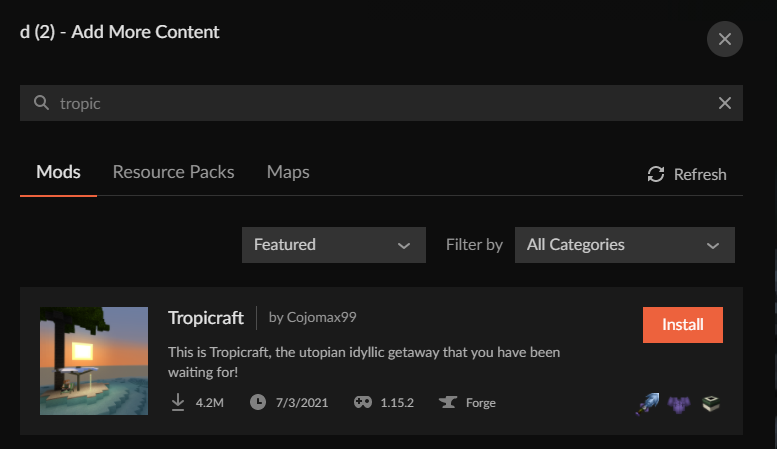
so I was trying to download and play Tropicraft from the curseforge website but idk how to add it to the launcher since it's just a .jar file and can't find the game in the launcher when I search it either
lyric crescent
?mc-installmods
red patioBOT
How to install mods in CurseForge App.
- Click
+ Create Custom Profile - Name it, select the required Minecraft version, select the Forge version (usually the highest number), click
Create. - Click the profile icon.
- Click
Add More Content - Search and install the desired mods.
- Start the game!
How to install mods not on CurseForge.
- Right click the profile picture or Open the profile and click the Icon next to the play button.
- Click
Open Folder. - Drag the mod(s) into the
modsfolder. (Note: Some mods will require others, to run. Make sure to read the instructions for the mod!) - Start the game!
deft vapor
Yamza can you please help me?
lyric crescent
nothing to help with. download counter doesn't update in real time.
deft vapor
Hmm i think i gonna delete and remake the page
lyric crescent
beacuse the download count is off..?
🤔
deft vapor
Problably
lyric crescent
then you will just have another page with the same situation. dont really understand that
digital roost
I just did another export, is it handy to first ask a dev/mod or just upload it and pray?
lyric crescent
ask what
digital roost
if its good to get approved
fallen loom
"Is it good to clean the house before the maid arrives?"
hushed thicket
so I did the thing you sent about adding the mod into curseforge and it worked for adding it, it just crashes with a Exit Code: 0 error
digital roost
uhh no?
lyric crescent
use the app to add the mod
 eternal beacon
Uhhh is insane craft and ATM 6 broken because it won't load in minecraft
hushed thicket
I did use the app
lyric crescent
?mc-log
red patioBOT
Sending logs for support.
- Right-click the modpack profile icon OR click the button in the modpack profile.
- Click
Open Folder. - Open the
logsfolder. - Drag and drop the FILE named
latestORdebuginto discord.
hushed thicket
here ya go
I'm normally used to just downloading the mods normally through curseforge, weird that tropicraft isn't on there lol
eternal beacon
insane craft file too complicated holy
but it could be the amount of mods it has that won't work for minecraft
red patioBOT
Sync and your Project.
CurseForge App and site do not share the same requirements! You can find things on the site but this does not mean it will be in the app!
For a mod to show up in the app:
- Projects MUST have a file marked as RELEASE
 or BETA
- Projects MUST be APPROVED
- Projects MUST have a file marked for the GAME VERSION SELECTED/LOADED
- Projects CAN'T be EXPERIMENTAL
- Projects CAN'T be ABANDONED
Files can take a while to show up in the app. If your files still have not shown up either your project is new and you have yet to mark a file as Release/Beta or there is issues with the sync system making it slow.
Vote this issue up if you would like to know when the last sync was! https://curseforge-ideas.overwolf.com/ideas/CF-I-1617
lyric crescent
hushed thicket
I'm normally used to just downloading the mods normally through curseforge, weir...
what are you talking about. it's right here https://www.curseforge.com/minecraft/mc-mods/tropicraft/
hushed thicket
I just mean the launcher
eternal beacon
Whenever I try to play insane craft or ATM 6, it downloads again everytime and then stops responding

lyric crescent
how much ram have you allocated
digital roost
under review again
digital roost
eternal beacon
Whenever I try to play insane craft or ATM 6, it downloads again everytime and t...
atm 6 reqs 8 gb allocated
eternal beacon
digital roost
atm 6 reqs 8 gb allocated
My computer has over terrobytes of storage so it should work though....
 eternal beacon
digital roost
how many allocated?
eternal beacon
digital roost
how many allocated?
only used like 64 gigs on this pv
hushed thicket
bruh
eternal beacon
pc*
hushed thicket
guess I need to update my launcher lmao
digital roost
but the launcher 🙂
like launcher has a cap of ram to use
so it doesnt crash ur pc
(how do I take screenshot then ill show)
hushed thicket
lyric crescent
https://i.imgur.com/yhkBbtQ.png
I look up the same thing and it has completely different mods, might have to just reinstall
 eternal beacon
only thing that works is pixelmon and crazy craft
lyric crescent
you didnt follow the instructions
that is modpack search, ofc you wont find mods in it
digital roost
lmfao
eternal beacon
lyric crescent
that is modpack search, ofc you wont find mods in it
do y'all have the crazy craft 3.0?
lyric crescent
lyric crescent
eternal beacon
prob advanced search
digital roost
I dont play crazyc sry
eternal beacon
digital roost
I dont play crazyc sry
ok then what about the new mod that was added by sparkuniverse for that ssundee youtuber?
lyric crescent
can you guys take this to #💬︱general-chat
deft vapor
btw, yamza, me and my friend, created the project and only two weeks later we started uploading the files, that's why the download counter don't work?
digital roost
btw I am under review 
lyric crescent
the download counter is not broken, it simply does not work in real time as i said.
deft vapor
Okk
lyric crescent
send a new log
hushed thicket
lyric crescent
?mc-installfix
red patioBOT
- Click on the Minecraft Tab on the Left side of the CurseForge App.
- Click button next to the
Create Custom Profileoption. - Click
Repair Installationoption. - Play game.
NOTE: You will not lose any modpacks or worlds, These are saved in the Instances folder. DO NOT TOUCH THIS FOLDER OR YOU WILL LOSE EVERYTHING
lyric crescent
!notcf
red patioBOT
The question you are asking about isn't related to CurseForge. Please use the appropriate game rooms by getting the role from #786424115535544350 or use #👽︱game-support for help.
This room is only for CurseForge Owned & Maintained features/services.
 strange pine
Hello guys I'am really strugglin too put mods on my game...can somebody help me
lyric crescent
?mc-installmods
red patioBOT
How to install mods in CurseForge App.
- Click
+ Create Custom Profile - Name it, select the required Minecraft version, select the Forge version (usually the highest number), click
Create. - Click the profile icon.
- Click
Add More Content - Search and install the desired mods.
- Start the game!
How to install mods not on CurseForge.
- Right click the profile picture or Open the profile and click the Icon next to the play button.
- Click
Open Folder. - Drag the mod(s) into the
modsfolder. (Note: Some mods will require others, to run. Make sure to read the instructions for the mod!) - Start the game!
eternal beacon
also is valhesia broken right now? It kept crashing lol
Well I'm running insane craft again after repairing the minecraft thing, so I'll let u know yamza if it stops responding again
lyric crescent
didnt bother to answer my question tho
eternal beacon
lyric crescent
didnt bother to answer my question tho
which question?
lyric crescent
lyric crescent
how much ram have you allocated
^
 faint plume
Yo, how do I make it so CurseForge app uses my OpenJDK 8 to run the game instead of Oracle's crappy one?
eternal beacon
lyric crescent
^
where do I check?
lyric crescent
faint plume
Yo, how do I make it so CurseForge app uses my OpenJDK 8 to run the game instead...
can only do that by setting it in the minecraft launcher
?mc-ram, and quit pinging me
?mc-ram
red patioBOT
How to set Global Minecraft RAM value.
- Click the icon in the bottom left to open settings.
- Click the Minecraft tab.
- Scroll down.
- Slide slider to recommended ram range as seen below.
 faint plume
Is it java.exe or javaw.exe that I should use?
digital roost
?commands
eternal beacon
faint plume
Is it java.exe or javaw.exe that I should use?
prob normal java
lyric crescent
digital roost
?commands
#🟢︱user-bot-spam
digital roost
k
eternal beacon
Pog insane craft hasn’t stopped responding on the download thankfully but let’s hope it lets me start a world when it finishes
eternal beacon
Nah still not working
 tough hill
I created a new project on the 23rd...how long should I wait with it sitting on "New" and not "Approved" before I start inquiring about it? And if that time is now, where should I inquire?
queen storm
tough hill
I created a new project on the 23rd...how long should I wait with it sitting on ...
Did you upload a file?
tough hill
other than the thumbnail, it never let me.
queen storm
Go to the page, go to files
tough hill
I just realized the site didn't autologin, so when I clicked the project page from my dashboard, it said "no page found"...after logging in I can finally upload a file
queen storm
Projects without files won't even get looked at
tough hill
I've been waiting patiently, unable to see the project page and not realizing why...I feel silly now
eternal beacon
pog insane craft still not working
 thin island
what this mean
lyric crescent
you need a mod to extend the id range, jeid
thin island
eternal beacon
pog insane craft still not working
iit dont load when it get to 6/7
thin island
lyric crescent
you need a mod to extend the id range, jeid
who me
eternal beacon
thin island
iit dont load when it get to 6/7
yea will have to tell the creators of the game that its bugged, because I have enough ram for the game but it keeps crashing
thin island
ye
eternal beacon
thin island
ye
because after seeing sigils, biffle and so on play it and the amount of amazing mods it has I really wanted to play it, but multiplayer and other stuff don't work when u play the mods, plus insane craft just doesn't work in general
even ATM 6 doesn't work
thin island
ye
digital roost
eternal beacon
yea will have to tell the creators of the game that its bugged, because I have e...
but, how many ram have you allocated to curseforge??
queen storm
thin island
who me
Yes you
thin island
what so like not wnough ids
eternal beacon
digital roost
but, how many ram have you allocated to curseforge??
I set it to 8k
queen storm
thin island
what so like not wnough ids
That is what we told you yes
eternal beacon
but it doesn't say how much I have used though
eternal beacon
digital roost
how many ur pc has?
6 terobytes because of a hardrive I use
 marble mortar
Hey! I am trying to download better Minecraft plus, and it seems the installer is stuck downloading a mod called Blueskies. What can I do?
eternal beacon
digital roost
6 terabytes!!
Yea I use 2 hard drives lol
digital roost
sure ur not talking rom 🙂
queen storm
eternal beacon
6 terobytes because of a hardrive I use
You are confusing ram and hard drive
eternal beacon
queen storm
You are confusing ram and hard drive

queen storm
marble mortar
Hey! I am trying to download better Minecraft plus, and it seems the installer i...
How long?
digital roost
googled
an example
RAM stands for random-access memory, but what does that mean? Your computer RAM is essentially short term memory where data is stored as the processor needs it. ... RAM can slow down your computer if there isn't enough of it for the processor to perform the tasks you ask it to.
queen storm
@digital roost #🥑-off-topic-chat please
digital roost
k
marble mortar
Well this is the 4th time I have tried to redownload the mod. But each time I have let it sit for atleast 30 minutes.
queen storm
Probably a very big mod
eternal beacon
digital roost
k
not even close to using up all my ram it says
marble mortar
My PC has no trouble downloading anything else
queen storm
marble mortar
My PC has no trouble downloading anything else
See how big the mod is
viral briar
Blueskies 16.5 file is 93mb
 dawn owl
what do you do if it says seems like we could not load curseforge on mac and still wont load when i retry
digital roost
Hello, I'm uploading a modpack to curse forge with custom main menu in it, however, when I go to put resources in it as I use the resource loader mod curse forge seems to not allow this and instead just doesn't allow it in the pack how do I fix this?
eternal beacon
Ok I have 8gb of ram, with 7.84gb usable so then could it be the computer in general that makes the modpack not respond?
queen storm
Yeah, modpacks won't like that
 quasi cradle
where are the CF logs located in file explorer
queen storm
quasi cradle
where are the CF logs located in file explorer
!mc-logs
red patioBOT
Sending logs for support.
- Right-click the modpack profile icon OR click the button in the modpack profile.
- Click
Open Folder. - Open the
logsfolder. - Drag and drop the FILE named
latestORdebuginto discord.
quasi cradle
thanks
eternal beacon
Yea All The Mods 6 stopped responding again so It might jus tbe the laptop then
dawn owl
when i download curseforge it said seems like we could no load than i retryed it and it still wont load what does that mean
and its for mac
queen storm
! ticket-app
red patioBOT
:bug: Reporting via the CurseForge App :bug:
-
Click the
icon in the bottom left. -
Select
Open a Ticket. -
Fill out the form with accurate detailed information, "It doesn't work" isn't helpful! What exactly doesn't work and why doesn't it work should be easy to answer!
-
Make sure to upload your Overwolf logs with the
Upload Fileoption on the ticket, information on how to get these logs can be found here https://support.overwolf.com/en/support/solutions/articles/9000176827-how-to-get-your-overwolf-logs -
Submit!
 plain rover
hey can i get some help? ive been struggling for a bit trying to get curse to work
queen storm
plain rover
hey can i get some help? ive been struggling for a bit trying to get curse to wo...
Follow rule 4
 nimble tundra
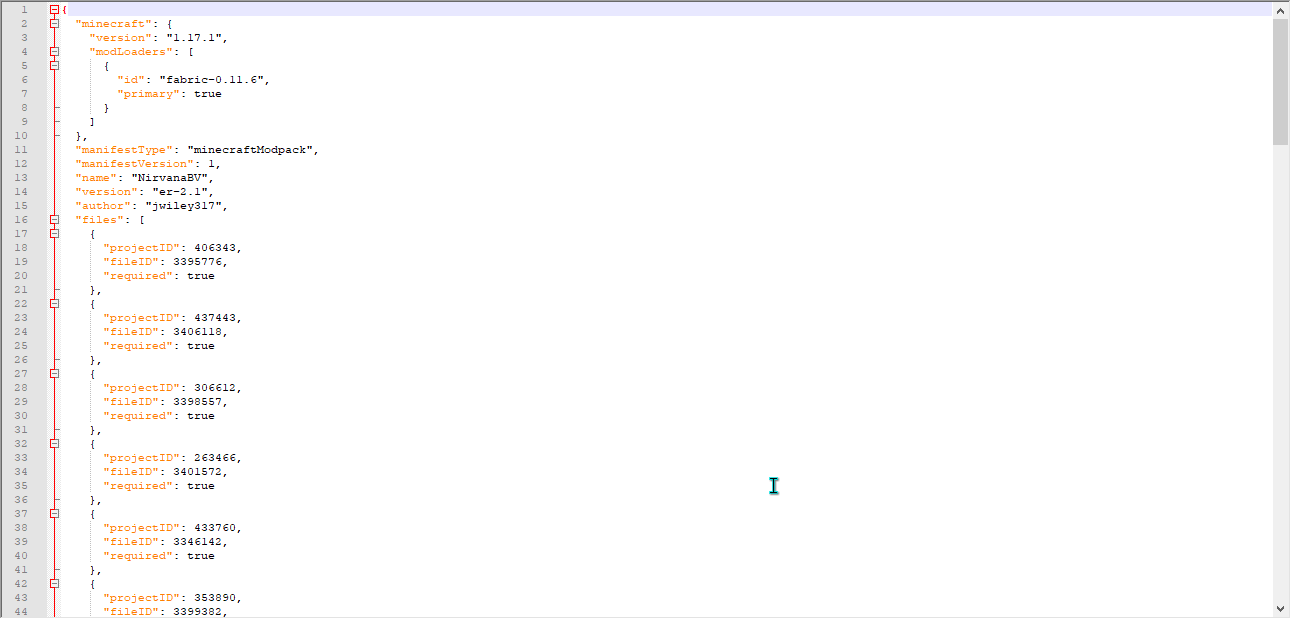
Getting a "Failed to get mod loader from manifest!" error on the latest version of this pack (er-2.2)
https://www.curseforge.com/minecraft/modpacks/nirvana-vanilla
Only changes between this version and the last aside from Curseforge's general bugginess, is the addition of Lithium, Enchantment Descriptions, and updating fabric to version 0.11.7
plain rover
sorry
lyric crescent
nimble tundra
Getting a "Failed to get mod loader from manifest!" error on the latest version ...
and what are you doing to get this
nimble tundra
update/download
nimble tundra
the pack to the launcher
version er-2.2 of nirvana - better vanilla being downloaded to the curseforge launcher
lyric crescent
file isnt tagged for fabric
also the manifest seems messed up. might want to reupload that
well, re-export
nimble tundra
ah gotcha
lyric crescent
your manifest https://i.imgur.com/MdatVIz.png
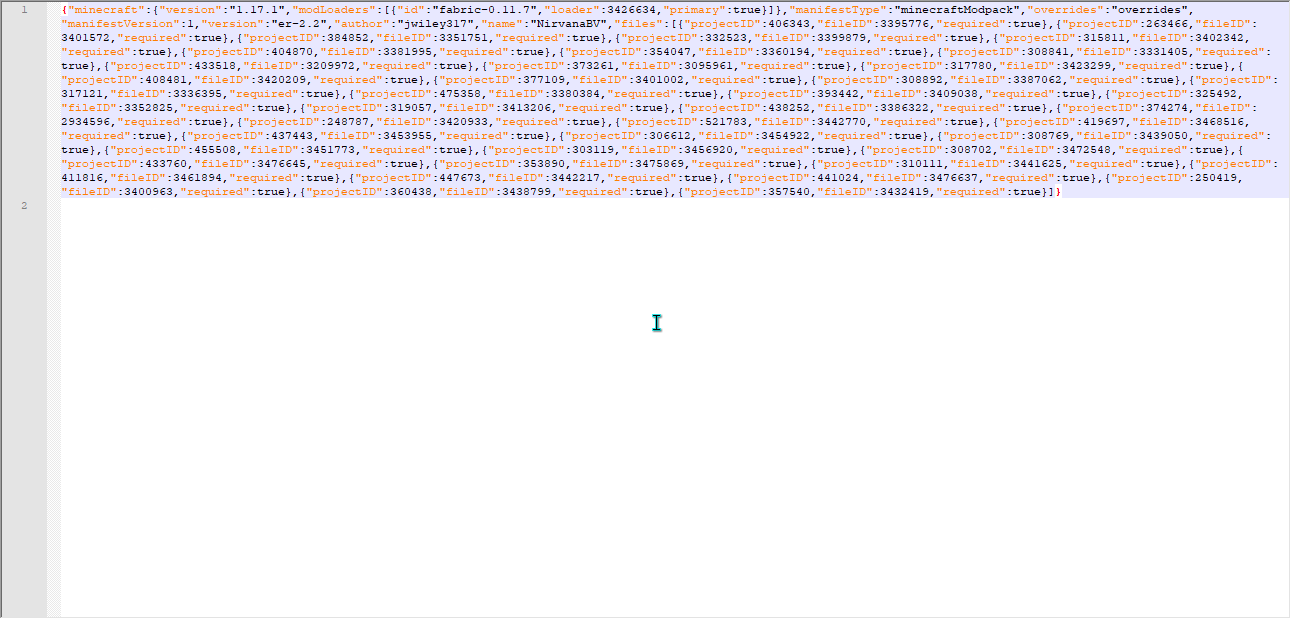
vs what it should be https://i.imgur.com/0Bl07RH.png
 fallen loom
Unless the parser is shitty the whitespace difference shouldn't matter
lyric crescent
it might be
could be something else messed up with that manifest. shouldnt look like that so who knows
fallen loom
OH
They're using a Fabric version that's not on Curse yet
I'm assuming this was a pack zip made by GD?
lyric crescent
@nimble tundra 👆
 granite vigil
I download java onto my mac, I dont know where it is though.
does anybody know where it is?
lyric crescent
how would we?
lyric crescent
so download it again?
granite vigil
thats not how computers work
if I download something it goes to a location
since you cant specify where it goes on java
lyric crescent
curseforge does not provide java
fallen loom
CurseForge provides the MinecraftLauncher, which should be the one providing Java
fallen loom
.....
lyric crescent
!notcf
red patioBOT
The question you are asking about isn't related to CurseForge. Please use the appropriate game rooms by getting the role from #786424115535544350 or use #👽︱game-support for help.
This room is only for CurseForge Owned & Maintained features/services.
nimble tundra
fallen loom
I'm assuming this was a pack zip made by GD?
ah yeah it was bc my CF is a mess with various packs and I didn't feel like dealing with it lol, I'll get it fixed up in a bit
 agile pebble
Hi, I downloaded Enigmatica 6 for minecraft to play with a friend but his server was on an older version to which i switched.
Now it says i need curseforge 36.2.4 and that i'm on 36.2.2, but when i initially launched it, curseforge version was 36.2.4
red patioBOT
Wording is important!
Forge = Minecraft Forge, This is a modloader often just called "Forge".
Fabric = Fabric MC, this is another modloader, just called "Fabric".
CurseForge = A Website/App that has content for games.
Mods = Individual mod files.
Modpacks = Multiple mods put into the mods folder or downloaded from CurseForge.
These are not Interchangeable! Please use the correct terms as it allows us to help you faster!
lyric crescent
sounds like you are not using the correct version of the pack
 lyric folio
If you export your pack into a .zip, why do the resourcepacks not get packed into the zip?
agile pebble
how would i check? i used the launcher to change to the version my friend said to switch to
lyric crescent
it says the version right on the pack icon
lyric crescent
lyric folio
If you export your pack into a .zip, why do the resourcepacks not get packed int...
did you select that to be included?
lyric crescent
no, selecting it should export them
lyric folio
lyric folio
Do I need to manually add them to the zipped file?
Will the project site not accept it if I do that?
 forest wedge
excuse me, but why when I put the mod vics modern warfarare, I go to the sections of the objects, I get to the totem of undead and then crashes me?
lyric crescent
?projectissue
red patioBOT
Please visit the project page for the content you posted about and look for a way to contact the developer.
Somewhere on the page there is usually a method of contact. Look for one of the following things:
Issuestab like the image below.- Discord link.
- Twitter link.
- Comments section below the project.
If no contact method exists you will either have to remove the project or find a solution on your own.
 lyric folio
lyric crescent
is the resource pack from curseforge?
lyric folio
lyric crescent
is the resource pack from curseforge?
no
lyric crescent
then that is why it doesnt export, and it would not be approved
 solar halo
My first project was approved this morning, but I cant find the modpack on the curseforge app. Am i doing anything wrong?
fallen loom
!sync
red patioBOT
Sync and your Project.
CurseForge App and site do not share the same requirements! You can find things on the site but this does not mean it will be in the app!
For a mod to show up in the app:
- Projects MUST have a file marked as RELEASE or BETA
- Projects MUST be APPROVED
- Projects MUST have a file marked for the GAME VERSION SELECTED/LOADED
- Projects CAN'T be EXPERIMENTAL
- Projects CAN'T be ABANDONED
Files can take a while to show up in the app. If your files still have not shown up either your project is new and you have yet to mark a file as Release/Beta or there is issues with the sync system making it slow.
Vote this issue up if you would like to know when the last sync was! https://curseforge-ideas.overwolf.com/ideas/CF-I-1617
agile pebble
thanks for the earlier help
solar halo
Omg thank you life saved
 wise socket
hello i have a question. this mod "Storage Drawers", it is in the game but not in my world. why?
srry for my english i`m not the best
lyric crescent
not sure how it can be "in your game" and "not in your world"
is it in the mods folder?
wise socket
its in the mod folder and i have it in the options for a new game but when i will crafting it, i cant
lyric crescent
?projectissue
red patioBOT
Please visit the project page for the content you posted about and look for a way to contact the developer.
Somewhere on the page there is usually a method of contact. Look for one of the following things:
Issuestab like the image below.- Discord link.
- Twitter link.
- Comments section below the project.
If no contact method exists you will either have to remove the project or find a solution on your own.
wise socket
ok or is it because the game is at 1.17?
lyric crescent
is the mod for 1.17? either way if the mod is in the mod folder and it didnt crash during loading then the issue is with the mod and there is nothing we can do about it.
wise socket
ok
 near spire
I installed CurseForge 1.16.5 into the minecraft launcher so I can add a mod I made but every time I try to load it, it crashes and says:
The game crashed whilst rendering overlay
Error: java.lang.RuntimeException: One of more entry values did not copy to the correct id. Check log for details!
Exit Code: -1
red patioBOT
Wording is important!
Forge = Minecraft Forge, This is a modloader often just called "Forge".
Fabric = Fabric MC, this is another modloader, just called "Fabric".
CurseForge = A Website/App that has content for games.
Mods = Individual mod files.
Modpacks = Multiple mods put into the mods folder or downloaded from CurseForge.
These are not Interchangeable! Please use the correct terms as it allows us to help you faster!
near spire
Forge, sorry
lyric crescent
!notcf
red patioBOT
The question you are asking about isn't related to CurseForge. Please use the appropriate game rooms by getting the role from #786424115535544350 or use #👽︱game-support for help.
This room is only for CurseForge Owned & Maintained features/services.
 iron grotto
why does the report button on the site just not work
lyric crescent
seems to work fine?
 neat pasture
Help! Curse Forge updated and now I can't find my modpacks.
iron grotto
lyric crescent
seems to work fine?
hmm, it's not clickable for me
fallen loom
Might be an adblocker stopping CF's JavaScript from running
 acoustic pulsar
https://www.curseforge.com/minecraft/mc-mods/fixed-glow-squids
my project's download count looks broken
8 comments, no downloads
been up for 2 weeks and even got feedback about how i forgot to change a certain feature, so it probably has been downloaded at least once
 lethal flicker
So how much space do I need to even use curseforge minecraft
So I'm trying to get a modpack but I somehow don't have enough space
lyric crescent
10gb minimum
lyric crescent
no
 timber wyvern
Hey, Im trying to upload a pack, but :
"has been changed to Rejected
Notes:
The following files are corrupt or otherwise cannot be checked for validity:
overrides/mods/1.7.10/ForgeMultipart-1.7.10-1.1.2.331-universal.jar"
ive reuploaded a fresh install, but same message automatically, any ideas?
odd eagle
Custom modpack crash report. Any help to source the issue is appreciated.
 plain hatch
 ancient dust
I just downloaded and installed w11 from the media creation tool yet when I try to launch it says insider builds aren't allowed
when I'm on windows 11 stable
22000.194
this is a bug that needs fixing asap
fallen loom
It's not a bug
fallen loom
I don't see a download button on the Windows 11 page or any option to upgrade without using Insiders... it's still in beta and that check exists as a defense against foot guns
fallen loom
You think they'd be linking that on the "GET WINDOWS 11" page https://www.microsoft.com/en-us/windows/get-windows-11
But no
ancient dust
perhaps they want people to wait while they see which machines they can upgrade
lol
either way they need to update it so it recognises it as a stable build
can a dev please ping me once this is fixed
fallen loom
iirc there's a config file you can change to effectively say "I understand the risk, do it anyway"
ancient dust
yeah there is but i never figured out how to save the file with it in it
ctrl s would just come up as save as
fallen loom
You have to start notepad as admin iirc https://support.overwolf.com/en/support/solutions/articles/9000197893-windows-insider-support-removal

Overwolf Support Help Center
We're here to get you informed on everything you need to know about Overwolf, including helpful guides and troubleshooting articles to back you up when you get in a pickle
How the hell did you get to that Windows 11 download page anyway?
ancient dust
if you google 'windows 11 software download' it comes up
fleet bear
https://blogs.windows.com/windowsexperience/2021/10/04/windows-11-a-new-era-for-the-pc-begins-today/

Windows Experience Blog
Today marks an exciting milestone in the history of Windows. As the day becomes October 5 in each time zone around the world, availability of Windows 11 begins through a free upgrade on eligible Windows 10 PCs and on new PCs pre-installed with Window
 cinder spear
In the curseforge launcher for minecraft, when i want to load up a modpack I need to login through mojang, but since I migrated my account I cant do that, will you impliment a microsoft login in the future?
fleet bear
cinder spear
In the curseforge launcher for minecraft, when i want to load up a modpack I nee...
!mc-login
red patioBOT
Minecraft Logins
CurseForge does not handle or touch the Minecraft Login.
If you have a DEMO button instead of a PLAY button in the launcher you are logged into an account that does not own the game. CurseForge requires you to own the game to use it.
Follow the steps in the pictures below. If you bought Minecraft after October 2020 or you have transferred your account you will use a Microsoft account.
Otherwise you must use a Mojang account until you transfer it!
 fleet bear
ancient dust
if you google 'windows 11 software download' it comes up
fleet bear
ancient dust
if you google 'windows 11 software download' it comes up
Win 11 is still unsupported until the overwolf team tests and approves it.
ancient dust
even though it's stable?
fleet bear
I'm unsure where I mentioned anything about stability.
fleet bear
I didn't say anything about builds.
lyric crescent
Unsupported means unsupported.
fallen loom
Come back when Microsoft actually links the download on other pages instead of one page that Google managed to crawl its bots all over
fleet bear
Once they test it and confirm things to work as they should then they will allow windows 11 like any other OS.
fleet bear
fallen loom
Come back when Microsoft actually links the download on other pages instead of o...
Read the post I posted.
ancient dust
i think they was just comparing time
fleet bear
It's starting to roll out to people.
fallen loom
fleet bear
It's starting to roll out to people.
I won't count it as truly released until that download page is acknowledged by other pages just like Windows 10
This still feels like closed beta if it's being slowly rolled out
ancient dust
I'm surprised it doesn't come up when you type in windows 11 download
fallen loom
It's being rolled out via Windows Update
I feel like the page you found is linked by a blurb in Windows Update when a device gets chosen and isn't meant to be found other ways
Bah, I'm theorizing too much now
fleet bear
Your just being an ass about something your wrong about at this point...
The page literally says they are launching windows 11 in the first sentence of the 3rd paragraph...
Among countless other articles, links and support docs saying it's getting released based off specific timed availability.
fallen loom
How am I being an ass? If anything I'm just being an idiot
odd eagle
Custom modpack crash report. Any help to source the issue is appreciated. Just looking for a quick answer e.g mod removal if its any other sort let me know but I won't waste your time.
Oh and it does this consistently, it is not playable at the moment.
Error code is -1.
fallen loom
!notcf
red patioBOT
The question you are asking about isn't related to CurseForge. Please use the appropriate game rooms by getting the role from #786424115535544350 or use #👽︱game-support for help.
This room is only for CurseForge Owned & Maintained features/services.
odd eagle
fallen loom
!notcf
I'm not sure if you're referring to me, but this is indeed related to CF
odd eagle
Yes it is. This only occurs on CF, and I've gotten similar answers from community support here, none telling me it was CF unrelated.
Unseen on GD.
 fallen loom
That's not Curse...
Penguins... how do you have the app set to use the old jar launcher? That option was removed months ago
lyric crescent
Need to reinstall curseforge
odd eagle
fallen loom
Have you tried removing Optifine?
Yes, however I was able to source this was not the issue as I've been testing the compatibility between mods for a while and it must've been one I recently added, because opt has been installed for a while and worked fine, apologies if this is in the wrong category but i'd still appreciate your help if you can locate anything from the strings given.
cinder spear
lyric crescent
Need to reinstall curseforge
ah ok
ig i just didnt update it or smth
 latent fjord
does anyone know how to get/install minecraft on cursefordge
cinder spear
latent fjord
does anyone know how to get/install minecraft on cursefordge
u can follow tutorial on yt
latent fjord
ok
fallen loom
odd eagle
Yes, however I was able to source this was not the issue as I've been testing th...
I'm getting the same crash without using Curse... you sure your GD tests had the same mods, versions, and configs?
Looks like an issue between JEI and TConstruct to me
odd eagle
odd eagle
Yes, however I was able to source this was not the issue as I've been testing th...
@fallen loom Do you know anything on this?
fallen loom
odd eagle
fallen loom
<https://discord.com/channels/428228256236306434/778097796410376242/894760712008...
Thank you. I'll be trying this
 swift portal
Hey, Few people trying to download my pack, They getting web client issue
fallen loom
!webclient
red patioBOT
WebClient errors are from networking issues to your computer. You can try a few things to fix it:
- Restart the computer.
- Restart your router/modem.
- Try another internet source like a hotspot, wired connection or moving closer to the WiFi.
- Pause/Stop other things using the internet. (Streams, music, etc)
- If this still doesn't work, try again in an hour and hope your connection is stable.

 last quest
Hello good evening, I would like to know if i can see or download the graphics of the downloads of my mods, I would like to know if it is possible, thanks.
fleet bear
 stark dagger
halp 😭
stark dagger
halp 😭
What does learn more say?
fleet bear
last quest
Hello good evening, I would like to know if i can see or download the graphics o...
No idea what this means?
stark dagger
fleet bear
What does learn more say?
couldnt find anything useful in it
fleet bear
alright try again.
stark dagger
fleet bear
alright try again.
try downloading again? or
fleet bear
yes
fleet bear
just now?
stark dagger
yep
fleet bear
try again in 5 minutes and let me know
stark dagger
lol okay
digital roost
yo how do you share your own modpack
fallen loom
?mc-sharepack
red patioBOT
There are two ways to share a modpack you've made with others...
Export and Share - For Friends to Small Groups.
- Click the Icon for the modpack.
- Click the button next to play.
- Click
Export. - Select the files that should be included.
- Send the zip to the people that want it! They can follow the instructions in
!mc-installpackto install the pack!
Upload to Curseforge - For Public Release to Everyone.
This options will make your pack public to EVERYONE, it comes with extra requirements and will take some effort to set up.
- Go to here: https://www.curseforge.com/project/432/4471/create
- Fill out the information with a proper description of the pack. This should allow anyone to understand what the pack is.
- Click the Icon for the modpack in the CurseForge app.
- Click the button next to play.
- Click
Export. - Select the files that should be included.
- Open your Project you made on the CurseForge site and Upload the file you just made.
- Wait for Moderation & Sync so it can show up in the client! (See
!syncfor limitations)
 topaz barn
Ok got a question/need help. So my computer was running like crap so I did a factory restart on it. Before that I was able to play Minecraft with curseforge. Now I get this.

i get this when I try to open curseforge to play minecraft.
fallen loom
Check Windows update?
topaz barn
yep. says its 100% up to date.
I even re did the fac reset just incase I ended up getting something messed up still got the same msg after installing cures.
fleet bear
What windows version are you using?
topaz barn
10
 fallen loom
4.8 might be one of those dot net versions that's a WIndows component, so it doesn't like you installing manually
topaz barn
tried. still the same thing.
fallen loom
Try this I guess https://www.microsoft.com/en-us/download/details.aspx?id=30135

Microsoft Download Center
This tool detects and tries to fix some frequently occurring issues with the setup of Microsoft .NET Framework or with updates to the Microsoft .NET Framework.
 fleet bear
well it dun looks like something is fucked up
topaz barn
Lol. Kinda what I was thinking.
fleet bear
"Not even I the tool to fix the problems can fix this mess"
wonder how you managed to do this....
topaz barn
Not sure. All I did was the factory restart.
Started running like crap after my granddaughter was watching YouTube.
fleet bear
🤔
fallen loom
Oh god how many ads did she click?
And have you tried this? https://dotnet.microsoft.com/download/dotnet-framework/thank-you/net48-web-installer


 opal cipher
fleet bear
Can you download and install .NET on it's own?
opal cipher
fleet bear
Can you download and install .NET on it's own?
Yes, yes you can. It's not even a strange thing. Most of the time, it's installed by Windows or applications dependent of .NET Framework.
topaz barn
will try that next and not sure. lmao. she has since been band from my computer. hahaha
fleet bear
opal cipher
Yes, yes you can. It's not even a strange thing. Most of the time, it's installe...
The question wasn't if it was possible but if they tried.
opal cipher
Oh.
Just arrived at the office, no coffee or energy drink yet. So I misread the tone of the question.
topaz barn
Tried the other .net fix. Still not working.
topaz barn
Well going to try another factory restart. Idk maybe it will finally work.
fallen loom
Don't do it again