#🔥︱curseforge-support
1 messages · Page 547 of 1
 signal ridge
Normal launcher also saves in a different location.
Could try changing the path. Follow this:
!mc-path
 red patioBOT
Change your install path to the following:
For Windows: C:\CurseForge
-Go to C:\ drive. Make a new folder. Name it Curseforge.
For Mac: /Users/Shared/CurseForge
If Minecraft is not installed in CurseForge App:
- Click the
 in the top left.
 - Select Minecraft from the list of games.
- Select the
Advancedoption and pick the folder you just made. - Click
Continue.
If Minecraft is installed in CurseForge App:
- Click the
 in the bottom left.
 - Select the Minecraft tab.
- Click
Change. - Select the folder you just made.
:no_entry_sign: Minecraft Files should NOT be installed inside the following locations :no_entry_sign:
:no_entry_sign: .minecraft folder.
:no_entry_sign: OneDrive folders.
:no_entry_sign: Desktop folder.
:no_entry_sign: Drive roots I.E. Directly into the C:\ drive.
:no_entry_sign: iCloud enabled folders.
:no_entry_sign: or any other cloud saved folder.
:no_entry_sign: or folders with non-English characters in them.
If any of the above are in the path you need to change/move it!
 glass prism
do i need to add the file if i already have a curseforge file there
signal ridge
?
 rich flint
it's not a file - it's the folder location where curseforge installs everything to be used
glass prism
hm well i mean there was already a curseforge folder on the drive
signal ridge
glass prism
hm well i mean there was already a curseforge folder on the drive
as in there was already on in the C:\ location? Or the one located in the student folder?
glass prism
signal ridge
as in there was already on in the `C:\` location? Or the one located in the stud...
nvm i see now. didnt go to the proper location
also i have some pre existing modpacks, which folder do those go in-?
signal ridge
if your transfering from the old location to the new one, copy them out of the old instances folder and put them in the new one the app creates.
glass prism
still denying, pain 
signal ridge
When you installed the CF app did you allow it to read/write on the pc? Or did you say no to that option
glass prism
i doubt i denied any requested permissions but i'm not entirely sure
where can i allow access
 bleak cradle
curse forge stole my account
signal ridge
glass prism
where can i allow access
May just be easier to reinstall both cf and ow.
signal ridge
bleak cradle
curse forge stole my account
Huh? which account?
bleak cradle
my mojang account
signal ridge
CF has nothing to do with account login for minecraft.
glass prism
signal ridge
May just be easier to reinstall both cf and ow.
gotchu
bleak cradle
it had me log in to minecraft and now i cant get into it because my password was changed
signal ridge
May want to check with mojang/microsoft for that. CF uses their launcher.
 jovial flame
My file has been stuck under review for 12 hours.
Am I not allowed to include this mod?
https://github.com/Technici4n/FastTransferLib
It's in many mods

GitHub
A fast energy api for the Fabric ecosystem. Contribute to Technici4n/FastTransferLib development by creating an account on GitHub.
signal ridge
!status
red patioBOT
It is 04:51AM on Monday for CurseForge my dudes.
Project Moderation Time
Temporary moderation changes! See #announcements for more info
- 15th & 16th No Moderation
- 17th & 18th No Moderation (Normal weekend)
- 19th Moderation will be done!
- 20th & 21st No Moderation
- 22nd & 23rd Moderation will be done!
- 24th & 25th No Moderation (Normal weekend)
- Normal Moderation hours and days resume after this!
Project/File moderation is done on;
Sunday, Monday, Tuesday, Wednesday, Thursday: 10AM - 6PM GMT+2
Friday, Saturday: No Moderation!
This process is First in, First out. Thus files submitted late in the work day may not be checked until the next work day.
New Projects or uploads requiring manual approval: 1-3 Working Days
Updates to approved projects not needing manual approval: 1 Hour
File sync to the Curseforge app may take up to 24 hours after approval.
rich flint
jovial flame
My file has been stuck under review for 12 hours.
Am I not allowed to include th...
gotta be a mod hosted on curseforge.com or one on the approved 3rd party list to be included in a modpack
 digital roost
how do i add optiforge to a modpack?
rich flint
!mc-optifine
red patioBOT
Optifine and Curseforge
To install Optifine with modpacks on Curseforge:
Right click the modpack icon, select Open Folder.
Put the Optifine.jar into the mods folder.
Now load the modpack normally.
We do not offer support for Optifine. If you have issues with Optifine, remove it. If you want further support try the discord found on their website.
https://www.optifine.net/home
 wooden sand
I downloaded the CurseForge app because I couldn't download any mods on the website. When I got on the app i could download the mod but when I did it got rid of all my installations except vanilla Minecraft, the latest snapshot, and the mod. My Optifine, Forge, and extra installations were just gone. It did make me sign in to my Microsoft account again so I don't know if that was the problem or not.
 queen storm
Curseforge has its own instances, close minecraft, then start it via the old way again, then the old ones are back
 patent goblet
I keep getting this error exporting my modpack

I haven't found any solution anywhere can you help me?
 opal cipher
What folders are you exporting, when you are exporting the modpack?
Do you have WorldEdit? Because I think that one might add a lot of files/folders.
queen storm
Show the things you select when exporting please
 lavish rivet
what do i do to fix this
 queen storm
!mc-forge
red patioBOT
 stray shale
 queen storm
!mc-path
red patioBOT
Change your install path to the following:
For Windows: C:\CurseForge
-Go to C:\ drive. Make a new folder. Name it Curseforge.
For Mac: /Users/Shared/CurseForge
If Minecraft is not installed in CurseForge App:
- Click the in the top left.
- Select Minecraft from the list of games.
- Select the
Advancedoption and pick the folder you just made. - Click
Continue.
If Minecraft is installed in CurseForge App:
- Click the in the bottom left.
- Select the Minecraft tab.
- Click
Change. - Select the folder you just made.
:no_entry_sign: Minecraft Files should NOT be installed inside the following locations :no_entry_sign:
:no_entry_sign: .minecraft folder.
:no_entry_sign: OneDrive folders.
:no_entry_sign: Desktop folder.
:no_entry_sign: Drive roots I.E. Directly into the C:\ drive.
:no_entry_sign: iCloud enabled folders.
:no_entry_sign: or any other cloud saved folder.
:no_entry_sign: or folders with non-English characters in them.
If any of the above are in the path you need to change/move it!
 woven shard
Hey ^^
The System that reject or approve new Mods/Packs and Serverfiles got some problems atm ?
Just uploaded a Serverpack for my Modpack Version.
It got rejected because the version of a mod got removed from Curseforge.
But the mod Version still exist on Curseforge Site and also in the Launcher for download.
The following file versions have been removed from CurseForge:
mods/ForgeEndertech-1.16.5-7.2.0.0-build.0177.jar
and ForgeEndertech-1.16.5-7.2.0.0-build.0177.jar still exist on site and in launcher.
 lyric crescent
Unfortunately a known issue that hasn't been addressed yet.
woven shard
lyric crescent
Unfortunately a known issue that hasn't been addressed yet.
ok
any ideas how to fix this to upload it again ?
cant change the version to the newest or a older version because the entire Modpack will not work anymore xD
lyric crescent
other than not including the mod, no
woven shard
so i need to take the same way like the atm team with a custom serverinstaller who download the normal modpack and removes all clientside things ?
lyric crescent
you could
 primal nest
I changed my name on Twitch a while back, and unfortunately it changed my CurseForge name, which is attached to all my modpacks. It has made it a bit confusing for people who are used to the name I originally put the modpacks out under. I have changed my name back on Twitch weeks ago, but it did not update my CurseForge name back to what it was. How can I change my CurseForge name back to what it was originally?
lyric crescent
!ticket-site
red patioBOT
:bug: Reporting via Website :bug:
Can't open the app or would rather use the website? You can do so here: https://support.curseforge.com/en/support/tickets/new
Fill out the form with accurate detailed information, "It doesn't work" isn't helpful! What exactly doesn't work and why doesn't it work should be easy to answer!
Make sure to upload your Overwolf logs with the Upload File option on the ticket, information on how to get these logs can be found here https://support.overwolf.com/en/support/solutions/articles/9000176827-how-to-get-your-overwolf-logs
 cobalt dagger
So I have used curseforge for a while to download and play minecraft modpacks such as Better Minecraft etc with no issues about 3 months ago. I needed some space on my hard drive so I deleted the modpacks but kept overwolf and curseforge. Fast forward to 3 months later (now) and when I tried to redownload Minecraft via curseforge and Im getting an error (an access violation occurred when attempting to install minecraft launcher. Make sure system user has sufficient permissions to write/rewrite to your modding folder.) I have my firewall set to allow both curseforge and overwolf and the app used to work just fine. Any tips would help a lot, thanks.
lyric crescent
that's more of a folder permission issue, not firewall
?mc-path should bypass that
red patioBOT
Change your install path to the following:
For Windows: C:\CurseForge
-Go to C:\ drive. Make a new folder. Name it Curseforge.
For Mac: /Users/Shared/CurseForge
If Minecraft is not installed in CurseForge App:
- Click the in the top left.
- Select Minecraft from the list of games.
- Select the
Advancedoption and pick the folder you just made. - Click
Continue.
If Minecraft is installed in CurseForge App:
- Click the in the bottom left.
- Select the Minecraft tab.
- Click
Change. - Select the folder you just made.
:no_entry_sign: Minecraft Files should NOT be installed inside the following locations :no_entry_sign:
:no_entry_sign: .minecraft folder.
:no_entry_sign: OneDrive folders.
:no_entry_sign: Desktop folder.
:no_entry_sign: Drive roots I.E. Directly into the C:\ drive.
:no_entry_sign: iCloud enabled folders.
:no_entry_sign: or any other cloud saved folder.
:no_entry_sign: or folders with non-English characters in them.
If any of the above are in the path you need to change/move it!
cobalt dagger
Thank you very much I will try this now and let you know if this fixes the problem.
I fixed it! The problem was my fault because about a month ago I changed my windows users folder name from a string of numbers to my name and curseforge was still trying to install to the old folder that doestnt exist anymore. When I click on minecraft I needed to click advanced and change the destination to my new user folder. I would have not been able to figure this out without your input. Thanks a million.
 upbeat hound
am i allowed to put galacticraft in curseforge modpacks
lyric crescent
?mc-3rdparty
red patioBOT
Minecraft Modpack 3rd party
Mods not on CurseForge must be on the 3rd-party list to be included in modpacks uploaded to CurseForge. If a mod is not on this list it can't be included in the export of a modpack and must be removed before uploading. If you upload with a mod that isn't on this list the file will be rejected.
List of approved 3rd party mods:
https://docs.google.com/spreadsheets/d/176Wv-PZUo9hFxy6oC6N8tWdquBLPRtSuLbNK-r0_byM
upbeat hound
right then im gaming
lyric crescent
!status
red patioBOT
It is 07:13PM on Monday for CurseForge my dudes.
Project Moderation Time
Temporary moderation changes! See #announcements for more info
- 15th & 16th No Moderation
- 17th & 18th No Moderation (Normal weekend)
- 19th Moderation will be done!
- 20th & 21st No Moderation
- 22nd & 23rd Moderation will be done!
- 24th & 25th No Moderation (Normal weekend)
- Normal Moderation hours and days resume after this!
Project/File moderation is done on;
Sunday, Monday, Tuesday, Wednesday, Thursday: 10AM - 6PM GMT+2
Friday, Saturday: No Moderation!
This process is First in, First out. Thus files submitted late in the work day may not be checked until the next work day.
New Projects or uploads requiring manual approval: 1-3 Working Days
Updates to approved projects not needing manual approval: 1 Hour
File sync to the Curseforge app may take up to 24 hours after approval.
 desert apex
i uploaded 18th this month
lyric crescent
uh huh
desert apex
it was late 18th
lyric crescent
uh huh
desert apex
yes weird right
lyric crescent
no
desert apex
are u one of the moderators that reviews projects?
lyric crescent
no
desert apex
lyric crescent
no
why not weird?
lyric crescent
read the information above to see why
desert apex
"- 19th Moderation will be done!"
lyric crescent
read it all 
lyric crescent
🤦♂️
desert apex
timesones ig
lyric crescent
New Projects or uploads requiring manual approval: 1-3 Working Days
How many working days has it been?
desert apex
1
lyric crescent
1, indeed
desert apex
yes
lyric crescent
so there are still 2 more to go potentially
lyric crescent
then we look at the dates above, and see when that might be
digital roost
so, since some months ago i can't open any modpacks in curseforge
queen storm
!mc-logs
red patioBOT
Sending logs for support.
Right-click the modpack profile icon OR click the  button in the modpack profile.
Click 
Open Folder.
Open the logs folder.
Find the file called debug.log OR latest.log and drag it into discord into this channel
digital roost
queen storm
!mc-installfix
red patioBOT
- Click on the Minecraft Tab on the Left side of the CurseForge App.
- Click button next to the
Create Custom Profileoption. - Click

Repair Installationoption. - Play game.
NOTE: You will not lose any modpacks or worlds, These are saved in the Instances folder. DO NOT TOUCH THIS FOLDER OR YOU WILL LOSE EVERYTHING
lyric crescent
Is this a trick question?
 stiff stag
I have a screenshot
 stiff stag
lyric crescent
Is this a trick question?
stiff stag
lyric crescent
Is this a trick question?
No
stiff stag
stiff stag
I have a screenshot
.
lyric crescent
how about an explaination
lyric crescent
did you put it there manually, or install it with the app?
stiff stag
 stiff stag
lyric crescent
did you put it there manually, or install it with the app?
stiff stag
lyric crescent
did you put it there manually, or install it with the app?
Installed it from the app
It works just fine but when I export it:
lyric crescent
delete it from the folder, close the app, then install it with the app again
stiff stag
stiff stag
It works just fine but when I export it:
It shows in the mods folder
stiff stag
stiff stag
It works just fine but when I export it:
.
lyric crescent
can you stop spam replying stuff, i read it...
stiff stag
lyric crescent
can you stop spam replying stuff, i read it...
And everything should ve fine
Be*
lyric crescent
stop pinging me as well
stiff stag
lyric crescent
stop pinging me as well
Ok
lyric crescent
did you even do what i said yet?
stiff stag
I have 10 mods with this problem, I deleted about 7
lyric crescent
does that fix the problem?
stiff stag
Hol up
No
I deleted them all,then closed CF,then downloaded them again from CF,then I closed CF,again
lyric crescent
!ticket-app
red patioBOT
:bug: Reporting via the CurseForge App :bug:
-
Click the
 icon in the bottom left.
 -
Select

Open a Ticket. -
Fill out the form with accurate detailed information, "It doesn't work" isn't helpful! What exactly doesn't work and why doesn't it work should be easy to answer!
-
Make sure to upload your Overwolf logs with the
Upload Fileoption on the ticket, information on how to get these logs can be found here https://support.overwolf.com/en/support/solutions/articles/9000176827-how-to-get-your-overwolf-logs -
Submit!

 sudden mica
hi does anyone know if you can access the biomes o' plenty modpack for minecraft on curse forge if so how because i have been able to find it
red patioBOT
How to install mods in CurseForge App.
- Click
+ Create Custom Profile - Name it, select the required Minecraft version, select the Forge version (usually the highest number), click
Create. - Click the profile icon.
- Click
Add More Content - Search and install the desired mods.
- Start the game!
How to install mods not on CurseForge.
- Right click the profile picture or Open the profile and click the Icon next to the play button.
- Click
Open Folder. - Drag the mod(s) into the
modsfolder. (Note: Some mods will require others, to run. Make sure to read the instructions for the mod!) - Start the game!

 neat meadow
does this server help with setting up forge servers
lyric crescent
 round nexus
I got some errors trying to load some Minecraft mods saying I need Forge 36.1.65, 36.1.30 and 36.2.0 and that currently Forge is 36.1.25
queen storm
Then change it?
round nexus
That’s the thing, I don’t know how
queen storm
Click the profile, click the 3 dots, profile options
round nexus
Ah I see, thank you
 vital ferry
I just recently migrated my Mojang account to Microsoft but when I tried to get back into curseforge it tried to get me to sign in through mojang. When I tried to play Minecraft through my Microsoft account it said I didn’t have Minecraft. Any idea what I can do? I really wanna play modded Minecraft.
 viral briar
When it tried to sign in via mojang . You would have just needed to click “ go back” then login via the Microsoft login of the account you migrated your account to
vital ferry
Oh I didn’t know it would do that, I thought it would just take me back to curse forge. Thank you. I’ll come back if I have any more questions.
 shrewd apex
signal ridge
shrewd apex
signal ridge
!mc-logs
red patioBOT
Sending logs for support.
Right-click the modpack profile icon OR click the button in the modpack profile.
Click Open Folder.
Open the logs folder.
Find the file called debug.log OR latest.log and drag it into discord into this channel
 short igloo
Hi uh my mods are doing that thing where they dont load up minecraft and the repair installation isnt working because its saying minecraft is running; its not even in task manager
 oak radish
its been like an hour we need help lol
signal ridge
!notcf
red patioBOT
The question you are asking about isn't related to CurseForge. Please use the appropriate game rooms by getting the role from #786424115535544350 or use #👽︱game-support for help.
This room is only for CurseForge Owned & Maintained features/services.
 jovial obsidian
ok lav xx
 sage dove
uhm theres a bug happening for me whenever i open curseforge, a white screen appears and i have to close down it with taks manager and restart it
 ionic apex
Just a quick question. i submitted a new addon yesterday morning. It is still in the "new" status. I just updated one of my old addons and it got approved within a minute. What is the typical turnaround on getting addons approved nowadays? thanks.
signal ridge
!status
red patioBOT
It is 12:16AM on Tuesday for CurseForge my dudes.
Project Moderation Time
Temporary moderation changes! See #announcements for more info
- 20th & 21st No Moderation
- 22nd & 23rd Moderation will be done!
- 24th & 25th No Moderation (Normal weekend)
- Normal Moderation hours and days resume after this!
Project/File moderation is done on;
Sunday, Monday, Tuesday, Wednesday, Thursday: 10AM - 6PM GMT+2
Friday, Saturday: No Moderation!
This process is First in, First out. Thus files submitted late in the work day may not be checked until the next work day.
New Projects or uploads requiring manual approval: 1-3 Working Days
Updates to approved projects not needing manual approval: 1 Hour
File sync to the Curseforge app may take up to 24 hours after approval.
ionic apex
Thank you!
 solemn raptor
how do you install cursefordge
 fleet bear
solemn raptor
how do you install cursefordge
fleet bear
solemn raptor
how do you install cursefordge
!getcf
red patioBOT
Looking to install the CurseForge app?
<:windows:798410728188936222> Windows
Minimum Requirements:
- OS Version: 7, 8.1, 10
- 64 bit Required.
- 350MB storage space.
- Microsoft .Net 4.8
- Intel/AMD quad-core CPU
- 8GB ram
Download: https://download.overwolf.com/install/Download?&PartnerId=4047
If you are having issues with the installer use the URL below to install Overwolf then go to the app store to download CurseForge.
https://content.overwolf.com/downloads/setup/latest/regular.html
<:mac:798410654418862130> Mac
Minimum Requirements:
- OS Version 10.14 or newer.
- 64 bit Required.
Download: https://curseforge.overwolf.com/downloads/curseforge-latest.dmg
:penguin: Linux
Minimum Requirements:
Yes.
Download: :person_shrugging:
digital roost
please help me when ever i try to play electrobobs wizardry mod it crashes and says
 fleet bear
!notcf
red patioBOT
The question you are asking about isn't related to CurseForge. Please use the appropriate game rooms by getting the role from #786424115535544350 or use #👽︱game-support for help.
This room is only for CurseForge Owned & Maintained features/services.
 placid sluice
How can I fix this?
 rich flint
how can a mod like that with almost no description get approved? anyways... lol.
placid sluice
Idk
 fallen loom
placid sluice
How can I fix this?
fallen loom
placid sluice
How can I fix this?
Make sure your @Mod and your mods.toml match
 modern ether
Idk if this is the right place to ask this but I’m gonna go ahead and try here.
So my friend and I have been making a modpack which has about 85 mods atm. The question is, if I host a dedicated server on my pc for us to play on with the mods. Do I need to allocate more ram to the server running the mods, or my actual Minecraft running the mods?
I currently have the server running on 8gb of ram for xmx and xms, and my actual Minecraft running at 6gb of ram.
Thank you in advance.
fleet bear
modern ether
Idk if this is the right place to ask this but I’m gonna go ahead and try here.
...
!notcf
red patioBOT
The question you are asking about isn't related to CurseForge. Please use the appropriate game rooms by getting the role from #786424115535544350 or use #👽︱game-support for help.
This room is only for CurseForge Owned & Maintained features/services.
modern ether
It’s a forge server? That’s related isn’t it??
fleet bear
!!=
red patioBOT
Wording is important!
Forge = Minecraft Forge, This is a modloader often just called "Forge".
Fabric = Fabric MC, this is another modloader, just called "Fabric".
CurseForge = A Website/App that has content for games.
Mods = Individual mod files.
Modpacks = Multiple mods put into the mods folder or downloaded from CurseForge.
These are not Interchangeable! Please use the correct terms as it allows us to help you faster!
modern ether
Ah icic
fleet bear
I really don't understand how people screw this up so much...
modern ether
Bc curseforge is the website where u download the server stuff and everything ig
fleet bear
Not at all.
There's plenty of people that don't have things on CurseForge.
and the "server" pack you download is just a file someone else made for you.
That's like saying CurseForge is Google because I can find it on google.
patent goblet
Hey, I'm trying to upload a modpack to curseforge and I had to make changes for it to be accepted. The problem is that 1 day after I have no update on the thing. How much time should I wait until there may be a problem?
fleet bear
!status
red patioBOT
It is 10:21AM on Tuesday for CurseForge my dudes.
Project Moderation Time
Temporary moderation changes! See #announcements for more info
- 20th & 21st No Moderation
- 22nd & 23rd Moderation will be done!
- 24th & 25th No Moderation (Normal weekend)
- Normal Moderation hours and days resume after this!
Project/File moderation is done on;
Sunday, Monday, Tuesday, Wednesday, Thursday: 10AM - 6PM GMT+2
Friday, Saturday: No Moderation!
This process is First in, First out. Thus files submitted late in the work day may not be checked until the next work day.
New Projects or uploads requiring manual approval: 1-3 Working Days
Updates to approved projects not needing manual approval: 1 Hour
File sync to the Curseforge app may take up to 24 hours after approval.
patent goblet
Okay ty
 urban portal
hi guys i need help . so i downloaded my mod packs into a diferent hard drive now the app does not recognize them, how to i fix this?
queen storm
!mc-path
red patioBOT
Change your install path to the following:
For Windows: C:\CurseForge
-Go to C:\ drive. Make a new folder. Name it Curseforge.
For Mac: /Users/Shared/CurseForge
If Minecraft is not installed in CurseForge App:
- Click the in the top left.
- Select Minecraft from the list of games.
- Select the
Advancedoption and pick the folder you just made. - Click
Continue.
If Minecraft is installed in CurseForge App:
- Click the in the bottom left.
- Select the Minecraft tab.
- Click
Change. - Select the folder you just made.
:no_entry_sign: Minecraft Files should NOT be installed inside the following locations :no_entry_sign:
:no_entry_sign: .minecraft folder.
:no_entry_sign: OneDrive folders.
:no_entry_sign: Desktop folder.
:no_entry_sign: Drive roots I.E. Directly into the C:\ drive.
:no_entry_sign: iCloud enabled folders.
:no_entry_sign: or any other cloud saved folder.
:no_entry_sign: or folders with non-English characters in them.
If any of the above are in the path you need to change/move it!
 solar cedar
ayo, just installed skyfactory 4, and it crashes on bootup, anyone know why this may be? thanks
 rare ermine
I have a problem with overwolf, it says its up to date but my friends version is newer... I cant join his modded minecraft server because of this. Any ideas?
 queen storm
That is not your overwolf of curseforge acting up
rare ermine
How to fix? xD
queen storm
Show the actual issue
 upbeat hound
whats are the moderation times
rare ermine
What do you mean with moderation time?
 brittle cargo
!status
red patioBOT
It is 01:14PM on Tuesday for CurseForge my dudes.
Project Moderation Time
Temporary moderation changes! See #announcements for more info
- 20th & 21st No Moderation
- 22nd & 23rd Moderation will be done!
- 24th & 25th No Moderation (Normal weekend)
- Normal Moderation hours and days resume after this!
Project/File moderation is done on;
Sunday, Monday, Tuesday, Wednesday, Thursday: 10AM - 6PM GMT+2
Friday, Saturday: No Moderation!
This process is First in, First out. Thus files submitted late in the work day may not be checked until the next work day.
New Projects or uploads requiring manual approval: 1-3 Working Days
Updates to approved projects not needing manual approval: 1 Hour
File sync to the Curseforge app may take up to 24 hours after approval.
upbeat hound
like 9pm-12pm
queen storm
rare ermine
Forge or the mods are not compatible
rare ermine
Ive checked the mods 3 times and its the same as he uses, and forge is the same too
queen storm
Show me
queen storm
How are you checking it yourself?
rare ermine
I ask him to share screens with me
queen storm
Same modpack? Same mod versions?
rare ermine
Yes, we put together some of our favorites
queen storm
Are you using the same export?
rare ermine
What do you mean by export?
rare ermine
How do you pack share?
queen storm
queen storm
I said that the bot died
 dull radish
how can i fix it
 lyric crescent
go to the overwolf discord
digital roost
why don't some mods show up in the application?
lyric crescent
you need to make a profile on the version the mods are made for
digital roost
then do you install them from the website to the profile?
lyric crescent
?mc-installmods
red patioBOT
How to install mods in CurseForge App.
- Click
+ Create Custom Profile - Name it, select the required Minecraft version, select the Forge version (usually the highest number), click
Create. - Click the profile icon.
- Click
Add More Content - Search and install the desired mods.
- Start the game!
How to install mods not on CurseForge.
- Right click the profile picture or Open the profile and click the Icon next to the play button.
- Click
Open Folder. - Drag the mod(s) into the
modsfolder. (Note: Some mods will require others, to run. Make sure to read the instructions for the mod!) - Start the game!
digital roost
kk thanks
 strange linden
Seems like Changing the java version on the CurseForge Overworlf app does nothing. Minecraft launcher keeps overriding it an launching with the legacy version
Someone knows if there's a fix for that?
queen storm
Why do you need to change it?
 restive sonnet
Hello, I need to use Java 11 with my modpack but changing it on curseforge does nothing. It still uses the bundled Java 8
queen storm
restive sonnet
Hello, I need to use Java 11 with my modpack but changing it on curseforge does ...
Why do you need java 11?
restive sonnet
A mod I use needs Java 11+
queen storm
restive sonnet
A mod I use needs Java 11+
Then yell at the dev for that
strange linden
Some mods require java 11 or at least the latest java 8 build, wich by default isn't what the mc launcher downloads
lyric crescent
What mod?
restive sonnet
Why am I yelling at the dev for a feature broken in curseforge
lyric crescent
Devs should not be making mods that dont work on the same java minecraft uses to run is why
strange linden
Curse has a feature to change java that doesn't work, this is why we're coming here. I can change manually the java version every time i open the modpack, but that's annoying and seems to be a curse side issue.
 restive sonnet
lyric crescent
Devs should not be making mods that dont work on the same java minecraft uses to...
restive sonnet
lyric crescent
Devs should not be making mods that dont work on the same java minecraft uses to...
ModernUI
lyric crescent
The feature was intentionally disabled due to forge not loading properly
strange linden
strange linden
Curse has a feature to change java that doesn't work, this is why we're coming h...
Even with Java 11 set on the Curse launcher, the minecraft still opens with an older version of java 8, wich isn't even the latest build
restive sonnet
So that Java version option does only work for vanilla or maybe fabric?
lyric crescent
It does not work at all. If you must change it, then do it in the launcher.
restive sonnet
then why is there an option to set it that I don't understand. It just works fine when I set it from launcher. Why can't I use the option inside curseforge for ease of use?
lyric crescent
beacuse it does not work as i said
so what is this mystery mod that requires a special java version?
restive sonnet
ModernUI
I can live without it, but its weird to not be able to set java version though I understand there are incompatibilities
viral briar
if you read closely it doesn't say you NEED to use java 11 , only that the mod dev recommends it if you get a certain java error/warning
lyric crescent
also it crashes with a java version above what it says it needs. mod is just broken.
restive sonnet
I could argue whether the mod is working, broken or not but that is irrelevant. What matters is why is there an option to change the version if it does nothing at all. I can use 11 with mc just fine, saying it does not work and disabling the option doesn't make sense to me. After all it should be my responsibility to use java builds other than the default 8, right?
lyric crescent
Why there is an option?
People asked for the ability to change java versions
Why it doesn't work?
Forge would not properly load in certain cases with altered java versions.
restive sonnet
Alright that answers my question, i just wish rather than disabling it there could be a tooltip to warn users that the modloader will not properly load with altered java versions.
Thanks for help
lyric crescent
Doubt it was intended to be disabled for so long. So goes app development.
Also most people don't read tooltips. Better to just prevent the issue entirely.
restive sonnet
There are ways to prevent that, like pop ups, confirmations saying the option is dangerous or experimental, hiding the option behind a switch etc. I don't think thats a good way to look at things but its just my opinion
most users wont need that so I get your point
lyric crescent
lyric crescent
The feature was intentionally disabled due to forge not loading properly
People barely read direct replies to their own questions -cough-
restive sonnet
I did read your reply
queen storm
!feedback
red patioBOT
<:CFidea:798388634972717066> Have an idea on how to improve CurseForge? <:CFidea:798388634972717066>
CurseForge is looking for great ideas and user feedback! Get into the CurseForge Community by providing some feedback and voting on what's important to you!
Think some game should be supported? Post an idea and explain why!
Got a to die for feature idea? Let's hear it!
Location In-app
- Click the button on the bottom left of the app.
- Click on

Suggest a Featureoption!
 glossy kernel
hey i'm trying to launch skyfactory4 and this keeps showing up, also happened with RLcraft
 queen storm
What OS?
glossy kernel
what's os
glossy kernel
oh windows
queen storm
Did you add anything?
queen storm
!mc-logs
red patioBOT
Sending logs for support.
Right-click the modpack profile icon OR click the button in the modpack profile.
Click Open Folder.
Open the logs folder.
Find the file called debug.log OR latest.log and drag it into discord into this channel
glossy kernel
yo?
lyric crescent
Looks like a driver issue. Update your drivers and restart your computer.
glossy kernel
how do i update the drivers?
 worldly minnow
is there a command for how to send crashes ?
glossy kernel
glossy kernel
how do i update the drivers?
also someone told me i need to update my graphics card so do i need to update both of them?
worldly minnow
glossy kernel
how do i update the drivers?
You need to use Nvidia or AMDs website
or Nvidia Experience
glossy kernel
well which one is better?
lyric crescent
the one that applies to your gpu
glossy kernel
but do i need to update my graphics card too?
lyric crescent
that is what gpu means
glossy kernel
ah alr
 clear spruce
what
glossy kernel
it says it already has the best drivers installed
rich flint
Uninstalling your graphics card drivers, reinstalling, and rebooting your computer wouldn't be out of the question
glossy kernel
so do i need to do that or..
lyric crescent
Going to have you move this issue over to #👽︱game-support since the issue here is not related to curseforge.
glossy kernel
oh okay
 carmine furnace
Hello good people
I tried to install a Sevtech: Ages Server on my PC (it's a Minecraft Modpack). But for some reason, there is no EULA.txt to be found in the downloaded folder and I need to edit it to succesfully start the server. Any idea where it could have gone/where I can get itr from?
Thx in advance!
red patioBOT
The question you are asking about isn't related to CurseForge. Please use the appropriate game rooms by getting the role from #786424115535544350 or use #👽︱game-support for help.
This room is only for CurseForge Owned & Maintained features/services.
 dusty kite
whenever i download a modpack and try to play it, minecraft crashes no matter how large or small the modpack is however this didnt use to happen and it used to work with modpacks but those modpacks dont work either
red patioBOT
The question you are asking about isn't related to CurseForge. Please use the appropriate game rooms by getting the role from #786424115535544350 or use #👽︱game-support for help.
This room is only for CurseForge Owned & Maintained features/services.
 livid hill
yo anytime i try loading up curse forge it just says "oops something went wrong" and the things it suggests to do are not working, help plz
worldly minnow
can i redownload default configs ?
livid hill
ive redownloaded it, checked my antivirus/firewall, and did one of the other suggestions it said as a last resort, still wont load and will say "oops that wasnt supposed to happen"
lyric crescent
are you using wifi?
signal ridge
worldly minnow
can i redownload default configs ?
As in the configs from the default configs folder in a modpack or the normal configs folder?
worldly minnow
signal ridge
As in the configs from the `default configs` folder in a modpack or the normal c...
normal
signal ridge
If it was ones that came with the modpack easiest to save your world elsewhere and reinstall. If its something your making run the pack, it will regenerate new default ones
signal ridge
Are you making this pack?
worldly minnow
yes
signal ridge
Then sure, if you want a fresh start then delete the configs and then run the pack.
worldly minnow
it runs like trash  so i wanted to use default, maybe i did smth wrong :D
signal ridge
Just know that configs arent the only thing that can cause a pack to shit itself. There are other factors as well.
worldly minnow
yes, i also deleted some mods and added some different ones. I orientate at valhelsia 3
signal ridge
Also seeing as this isnt really a cf issue, this may be better in one of the mc- channels
 tacit hare
Is the site getting ddosed again or something? I keep running into Captchas
lyric crescent
seems fine
 lyric crescent
i think by fine i mean the site is working normally, thus not being ddos'd like you suggested
 tall wadi
evrytime i try to make a custom profile for mods this pops up dose enybody know how to fix it?
 lyric crescent
!webclient
red patioBOT
WebClient errors are from networking issues to your computer. You can try a few things to fix it:
- Restart the computer.
- Restart your router/modem.
- Try another internet source like a hotspot, wired connection or moving closer to the WiFi.
- Pause/Stop other things using the internet. (Streams, music, etc)
- If this still doesn't work, try again in an hour and hope your connection is stable.
 chilly dune
how long does it usually take for a minecraft modpack to get approved?
lyric crescent
!status
red patioBOT
It is 12:58AM on Wednesday for CurseForge my dudes.
Project Moderation Time
Temporary moderation changes! See #announcements for more info
- 20th & 21st No Moderation
- 22nd & 23rd Moderation will be done!
- 24th & 25th No Moderation (Normal weekend)
- Normal Moderation hours and days resume after this!
Project/File moderation is done on;
Sunday, Monday, Tuesday, Wednesday, Thursday: 10AM - 6PM GMT+2
Friday, Saturday: No Moderation!
This process is First in, First out. Thus files submitted late in the work day may not be checked until the next work day.
New Projects or uploads requiring manual approval: 1-3 Working Days
Updates to approved projects not needing manual approval: 1 Hour
File sync to the Curseforge app may take up to 24 hours after approval.
chilly dune
okay thank you!

 digital roost
is there a way to get a custom modpack to reinstall mods?
fleet bear
 unique helm
Why is there no Dungeons Content?
unique helm
Why is there no Dungeons Content?
!sync
red patioBOT
Sync and your Project.
CurseForge App and site do not share the same requirements! You can find things on the site but this does not mean it will be in the app!
For a mod to show up in the app:
- Projects MUST have a file marked as RELEASE
 or BETA
- Projects MUST be APPROVED
- Projects MUST have a file marked for the GAME VERSION SELECTED/LOADED
- Projects CAN'T be EXPERIMENTAL
- Projects CAN'T be ABANDONED
Files can take a while to show up in the app. If your files still have not shown up either your project is new and you have yet to mark a file as Release/Beta or there is issues with the sync system making it slow.
Vote this issue up if you would like to know when the last sync was! https://curseforge-ideas.overwolf.com/ideas/CF-I-1617
signal ridge
Dungeons content shows up for me. Forge 1.16.5
digital roost
digital roost
is there a way to get a custom modpack to reinstall mods?
i had to clear the mods in its folder as something wasent from curse somehow, even though everything was downloaded through the app, but now theirs no way to install them back
signal ridge
If it was a custom profile then you will need to redownload them manually. using the app
 livid birch
how do I add vanilla advancements to my custon forge modpack, its 1.17.1
digital roost
signal ridge
If it was a custom profile then you will need to redownload them manually. using...
so theres no way to just reinstall all mods
they are all from the curse forge app
signal ridge
digital roost
so theres no way to just reinstall all mods
If you made the pack and deleted all the mods then you need to reinstall them. If it was a pack you downloaded just reinstall the pack.
digital roost
alright, i dont understand why the repair proffile dosent check the mods but okay
signal ridge
Did you get an error or notification saying that a mod wasnt from cf?
digital roost
yes which is why i deleted all them in the first place thanking i could use the repair profile to get the mods just from curse
signal ridge
Did it not say what mod?
digital roost
no
signal ridge
Where did you get this notification?
digital roost
when going to the export modpack tab
signal ridge
If you continued with the export and then looked in the zips overrides/mods folder you could have seen what mod it was having troubles with.
digital roost
well i guess i will see soon if it does it again
because it will be a public modpack due it being on an server
signal ridge
If you have an older export of the same pack you could also import that into the app and get some work back
digital roost
signal ridge
If you have an older export of the same pack you could also import that into the...
didint have one as this was the first version
signal ridge
Ah, then yeah only option is to redownload. Taking the mods out of the recycle bin can be risky. Better to just use the app to install mods
 fading lichen
can i get help i keep trying to install cursed forge and it keeps telling me there was a problem installing it
red patioBOT
Hey there, it is Curseforge, not "Cursed forge"
unique helm
Does CurseForge automatically downloads dependency mods that the mods I added uses?
fleet bear
if you use the app yes
 signal ridge
!getcf try the second link for windows
red patioBOT
Looking to install the CurseForge app?
<:windows:798410728188936222> Windows
Minimum Requirements:
- OS Version: 7, 8.1, 10
- 64 bit Required.
- 350MB storage space.
- Microsoft .Net 4.8
- Intel/AMD quad-core CPU
- 8GB ram
Download: https://download.overwolf.com/install/Download?&PartnerId=4047
If you are having issues with the installer use the URL below to install Overwolf then go to the app store to download CurseForge.
https://content.overwolf.com/downloads/setup/latest/regular.html
<:mac:798410654418862130> Mac
Minimum Requirements:
- OS Version 10.14 or newer.
- 64 bit Required.
Download: https://curseforge.overwolf.com/downloads/curseforge-latest.dmg
:penguin: Linux
Minimum Requirements:
Yes.
Download: :person_shrugging:
 lyric crescent
2nd link
 signal ridge
!webclient
red patioBOT
WebClient errors are from networking issues to your computer. You can try a few things to fix it:
- Restart the computer.
- Restart your router/modem.
- Try another internet source like a hotspot, wired connection or moving closer to the WiFi.
- Pause/Stop other things using the internet. (Streams, music, etc)
- If this still doesn't work, try again in an hour and hope your connection is stable.
fading lichen
ight sound

 lyric crescent
not sure what this is supposed to tell us?
livid birch
I want vanilla advancements in my custom profile but I don't know how
lyric crescent
curseforge has nothing to do with that
livid birch
figured it out
 lyric crescent
?mc-log
red patioBOT
Sending logs for support.
Right-click the modpack profile icon OR click the button in the modpack profile.
Click Open Folder.
Open the logs folder.
Find the file called debug.log OR latest.log and drag it into discord into this channel
fading lichen
 radiant sandal
Downloaded a pack and press play but when you go to join it just doesnt load anything
viral briar
!mc-installfix try this
red patioBOT
- Click on the Minecraft Tab on the Left side of the CurseForge App.
- Click button next to the
Create Custom Profileoption. - Click
Repair Installationoption. - Play game.
NOTE: You will not lose any modpacks or worlds, These are saved in the Instances folder. DO NOT TOUCH THIS FOLDER OR YOU WILL LOSE EVERYTHING
 lean grotto
why is curseforge using so much of my disk?
 tired jolt
mod cache?
digital roost
hi i need help i need idk how to install mods from curseforge to tlaucnher directly i wanna play https://www.curseforge.com/minecraft/modpacks/pwrdowns-zombie-apocalypse/screenshots
this
how to download this?
https://www.curseforge.com/minecraft/modpacks/pwrdowns-zombie-apocalypse/screenshots
pls tell
signal ridge
digital roost
hi i need help i need idk how to install mods from curseforge to tlaucnher direc...
#📛︱rules 4 and 8
digital roost
okkkkkkkkkk
 soft laurel
So, I just migrated my minecraft mojang account to microsoft because it asked me to. Then when I go to download a MC modpack, I cant sign into my account. Any ideas why or how to fix? Ive already tried to change my password a couple times and restarted my computer
signal ridge
soft laurel
So, I just migrated my minecraft mojang account to microsoft because it asked me...
When you click on the login for minecraft in the launcher cf opens, Click the Go back option at the bottom and select the Microsoft login option
digital roost
signal ridge
You wont get support here for TLauncher
bro telll
pls
i need it
i wanna publish in yt
i am a youtuber
signal ridge
digital roost
bro telll
Stop pinging me. You are not going to get any support here for the Tlauncher. We do not Support Piracy here. #📛︱rules 8
digital roost
see my connection
signal ridge
Last warning
 woeful summit
hey, none of my curseforge modpacks are working properly
when I start from Forge, they'll load up the minecraft launcher, but aside from once or twice where the game loaded properly, when I try to start the game from the launcher, the launcher closes but stays open in the background but the game itself never starts
I have 6 gb allocated, and my java and graphics cards are up to date
vanilla still works, and I've tried to repair installation, but still nno dice
queen storm
!mc-logs
red patioBOT
Sending logs for support.
Right-click the modpack profile icon OR click the button in the modpack profile.
Click Open Folder.
Open the logs folder.
Find the file called debug.log OR latest.log and drag it into discord into this channel
woeful summit
hmm...
you can see it when you download it but no preview. is that normal?
I'm fairly certain the game thinks it's running, because it claims it is and if I, for example, try to load up vanilla, it says it will have to close my other instance of the game, but for all intents and purposes, there IS no other instance of the game
red patioBOT
- Click on the Minecraft Tab on the Left side of the CurseForge App.
- Click button next to the
Create Custom Profileoption. - Click
Repair Installationoption. - Play game.
NOTE: You will not lose any modpacks or worlds, These are saved in the Instances folder. DO NOT TOUCH THIS FOLDER OR YOU WILL LOSE EVERYTHING
queen storm
You did that?
woeful summit
yeah I've done that
it's like it wants to start the game, and it thinks it has I'm pretty sure, but it won't actually bring up the game itself. Never ran into this one before
viral briar
does it say anything along the lines of "....is already running" when you try?
I do know some people have done the installfix then restarted their pc
then tried to play it after doing such and usually works.
woeful summit
viral briar
does it say anything along the lines of "....is already running" when you try?
...
yeah if I go back into curseforge and I click play it says there's an instance already running
wait wtf it just loaded up but it took like literally 5 minutes...
I still don't think the problem is solved though it should be taking like 1-2 min max to load up all those mods
viral briar
then if you are confident enough to end tasks on task manager , you'll find one saying " java binary " which is usually what minecraft is listed as
if not then just restart pc and do the installfix afterwards then try play
woeful summit
viral briar
then if you are confident enough to end tasks on task manager , you'll find one...
ahh ok I'll try installfix the next time I play and see if that fixes it
 verbal blade
Hello! So; I've been recently getting this error in my game anytime I open my menu, or inventory, and I was wondering how do I fix it through curseforge itself, since I believe it's through curseforge that it's happening (already did the adding a file to the minecraft bin, but it didn't work because it's curseforge that it's happening on I assume)

But I thought that curseforge just goes through the minecraft stuff itself, so confusion
after some testing, yes; it is curseforge
queen storm
Curseforge is only a mod manager, does not need to be running when you start the game.
!mc-logs
red patioBOT
Sending logs for support.
Right-click the modpack profile icon OR click the button in the modpack profile.
Click Open Folder.
Open the logs folder.
Find the file called debug.log OR latest.log and drag it into discord into this channel
verbal blade
queen storm
Curseforge is only a mod manager, does not need to be running when you start the...
Well; I'm unsure about this, because I've confirmed that if I run it through curseforge (pressing play and such), it gives me that which is basically saying my drivers or something are out of date, but when I did the fix for the normal MC; it works perfectly fine, except for the curseforge packs.
I have no log since it's not a crash log or anything to my knowledge.
queen storm
verbal blade
I have no log since it's not a crash log or anything to my knowledge.
You always have logs....
verbal blade
queen storm
You always have logs....
I’ll look for it tomorrow, then; since it isn’t really a game breaking thing, but god is it annoying seeing that message in the ss be sent every. fricking. minute.
 grim rampart
how to make minecraft modded ver use my amd gpu its only use my cpu
queen storm
!mc-videocard
red patioBOT
How to set minecraft to use your videocard
Got NVIDIA?

 heady crater
Hi, what is the average time for the reward store to deliver an order ? I was expecting to get my paypal orders instantly, it's been 8 days, i did a support ticket 2 days ago and didn't get an answer.
queen storm
Start of the new month
 hushed plover
reported comments weeks ago and they're still there, any active mods with comment editing privileges that can help me out?
queen storm
Those are not on here
hushed plover
yikes
if they would fix the years old bug preventing addon devs removing their own comments it wouldn't be an issue
queen storm
True, that is why they are working on the site, full rewrite
fleet bear
Just delete the top level comment or edit it to empty.
It's not really worth their time to constantly go around and clean up comments that arent breaking rules.
 covert ferry
someone help
queen storm
Remove optifine, try again
covert ferry
the thing is i want optifine for a texture pack
and i didnt have any problems like this before
queen storm
My response stays the same, optifine breaks stuff, not even gonna look at the logs as long as it is installed
lyric crescent
take the issue to optifine if you want it fixed, we dont do support for optifine here
 hazy sandal
i have this issuse on the website where the install button sents me the this page but the installing doesnt happen and when i press "click here" it just reloads the page and still no installing
 red patioBOT
Looking to install the CurseForge app?
<:windows:798410728188936222> Windows
Minimum Requirements:
- OS Version: 7, 8.1, 10
- 64 bit Required.
- 350MB storage space.
- Microsoft .Net 4.8
- Intel/AMD quad-core CPU
- 8GB ram
Download: https://download.overwolf.com/install/Download?&PartnerId=4047
If you are having issues with the installer use the URL below to install Overwolf then go to the app store to download CurseForge.
https://content.overwolf.com/downloads/setup/latest/regular.html
<:mac:798410654418862130> Mac
Minimum Requirements:
- OS Version 10.14 or newer.
- 64 bit Required.
Download: https://curseforge.overwolf.com/downloads/curseforge-latest.dmg
:penguin: Linux
Minimum Requirements:
Yes.
Download: :person_shrugging:
lyric crescent
then install will never work, since it's meant to use the app to install
queen storm
hazy sandal
well im on windows 11

Overwolf Support Help Center
We're here to get you informed on everything you need to know about Overwolf, including helpful guides and troubleshooting articles to back you up when you get in a pickle
hazy sandal
i dont wanna go away from windows 11
queen storm
Did you see the link?
lyric crescent
then use the override
but if you do that then there is currently no support for any issues you may run into
 arctic moat
Hi everyone, i have a quick question if anyone can tell me info about this. So i looked into the Atlas addon and the other pieces for it, and in the application it says for WoW 9.0.5 but in the website 9.1.0 so i wondering if maybe in the application the version number not was updated yet?
queen storm
Can you link it?
queen storm
Which file version are you looking at in the client?
arctic moat
i mean 9.0.1 sorry i just seen it now but still it's kind of odd to see a way older version in the app while in the website it show the latest
Atlas
and the Atlas Dungeon Locations
lyric crescent
what version number
queen storm
v1.49.02?
 lyric crescent
version number of the addon, not the game version
though that looks like its going to install the correct one
arctic moat
1.49.02
arctic moat
it's just odd to see the game version of the addon in the app is 9.0.1 instead of 9.1.0
 chrome nimbus
When I downloaing curseforge is stuck at extracting files
queen storm
chrome nimbus
When I downloaing curseforge is stuck at extracting files
!getcf Use the second link
red patioBOT
Looking to install the CurseForge app?
<:windows:798410728188936222> Windows
Minimum Requirements:
- OS Version: 7, 8.1, 10
- 64 bit Required.
- 350MB storage space.
- Microsoft .Net 4.8
- Intel/AMD quad-core CPU
- 8GB ram
Download: https://download.overwolf.com/install/Download?&PartnerId=4047
If you are having issues with the installer use the URL below to install Overwolf then go to the app store to download CurseForge.
https://content.overwolf.com/downloads/setup/latest/regular.html
<:mac:798410654418862130> Mac
Minimum Requirements:
- OS Version 10.14 or newer.
- 64 bit Required.
Download: https://curseforge.overwolf.com/downloads/curseforge-latest.dmg
:penguin: Linux
Minimum Requirements:
Yes.
Download: :person_shrugging:
queen storm
And you installed curseforge how then?
chrome nimbus
me?
queen storm
Yes, you
chrome nimbus
no
queen storm
I asked how, was not a yes / no question
chrome nimbus
i don't understant
queen storm
That video, it is curseforge
queen storm
You start with stuck at extracting, tell you to use a different link, then I get a video of the wrong link.
That is why I started asking questions
chrome nimbus
 chrome nimbus
queen storm
You start with stuck at extracting, tell you to use a different link, then I get...
chrome nimbus
queen storm
You start with stuck at extracting, tell you to use a different link, then I get...
no
i show you is stuck i post it late
now i got it
sorry for errors
i am not from america
i am not good at grammers
red patioBOT
╰( ͡° ͜ʖ ͡° )つ──☆*:・゚ *˜”*°•.˜”*°• Many Help •°*”˜.•°*”˜* <:curselit:796985620550385705>
Please provide a description of your issue with as much detail as possible. If you have an issue with a mod or modpack, tell us the name. Explain what you can see happening. Be specific!
 Tell us what is happening, we already know it "doesn't work".
Avoid using words like "it", tell us exactly what "it" is.
Don't assume anyone knows what you are talking about, be specific.
Tell us what you expected to happen.
Provide screenshots or video if possible.
Provide a log if possible. ?mc-log
 bronze bramble
help i closed ALL my tabs ALL my pc and it say this no mc open its like that [and its not leting me download a mod to add]
 queen storm
Considered a pc restart?
viral briar
did you actually do a restart then?
also wouldn't go pinging folk since it's against rules and annoying to those who you ping
and don't be expecting instant help , people have busy lives and will help when they can here
just be patient when asking for help
queen storm
bronze bramble
i did
And what happened after?
queen storm
So you restarted your pc, tried to hit play right away?
bronze bramble
yes
queen storm
!mc-installfix
red patioBOT
- Click on the Minecraft Tab on the Left side of the CurseForge App.
- Click button next to the
Create Custom Profileoption. - Click
Repair Installationoption. - Play game.
NOTE: You will not lose any modpacks or worlds, These are saved in the Instances folder. DO NOT TOUCH THIS FOLDER OR YOU WILL LOSE EVERYTHING
bronze bramble
will brake install
ation?
thing
i have worked 3 weeks on the thing and if its gone then i will get mad
queen storm
How about typing slower so you get full words.
bronze bramble
ok sorrry i have worked 3 weeks on the thing and if its gone then i will get mad
queen storm
bronze bramble
ok sorrry i have worked 3 weeks on the thing and if its gone then i will get mad
Did you see the message itself? Everything you asked is in there
bronze bramble
queen storm
> NOTE: You will not lose any modpacks or worlds
[its on all my installations]
:/
queen storm
bronze bramble
[its on all my installations]
Are you missing the point? You will not lose anything!
 willow bolt
I got two questions about a notice I recieved for my minecraft modpacks that is pending. 1. You have to keep the Galacticraft version in your pack up to date - see next section. Is it because my Galacticraft is outdated and I need to update it (I doubt it cause I took the file from the official project like less that a week ago). Also, there is nothing in the next section about Galacticraft. 2. You don't have to provide a link to our download site (obviously your modpack will contain the .jar files already). But you do have to provide a link to this Wiki, so that players looking for help come to the right place! Ok, fine, but which wiki are they talking about? There is no link to any Wiki on the message.
queen storm
willow bolt
I got two questions about a notice I recieved for my minecraft modpacks that is ...
willow bolt
Thanks Timtower, do I need to change anything else for Galacticraft?
queen storm
bronze bramble
still 😦
Show a screenshot of the repair button you are pressing
queen storm
willow bolt
Thanks Timtower, do I need to change anything else for Galacticraft?
Not 100% sure, don't work for CF
willow bolt
Oh, ok, thanks anyways!
bronze bramble
 queen storm
bronze bramble
queen storm
bronze bramble
And that is where you are pressing the wrong button
queen storm
Read the message, figure it out yourself, I am done for today
queen storm
I broke it while you were pressing buttons you should not be pressing? What?
 queen storm
If you are gonna be impatient then I will remove you from this discord.
lyric crescent
spamming and dming now as well
 steep oracle
im trying to download "light craft 1.17" modpack but when it's at half way it crashes and says "cannot find child addon file (and some numbers)" can someone help me?
queen storm
steep oracle
im trying to download "light craft 1.17" modpack but when it's at half way it cr...
Show the message
 queen storm
Forwarding to staff
 coarse totem
Where can i see my screenshots?
lyric crescent
right click the modpack icon, open folder, see screenshot folder
coarse totem
thx
brittle cargo
If I upload a modpack with a disabled mod in it will the mod still be disabled in the release?
queen storm
Why would you upload a disabled mod?
brittle cargo
Just temporarily until the mod is a bit more usable
queen storm
Then just remove it instead, or export andimport to see
brittle cargo
So the mod wont be disabled in the release?
queen storm
No idea
 potent grail
Do we still have download counter problem ?
lyric crescent
probably, havent gotten any feedback from the devs on it
brittle cargo
brittle cargo
So the mod wont be disabled in the release?
For anyone curious, no it doesnt, they will be enabled
 zealous tide
Hello! I was just curious if someone had an easy fix. Im trying to install ThermalShade and whenever i go to install it onto the launcher I get "Manifest file does not exist." any ideas?
red patioBOT
How to install mods in CurseForge App.
- Click
+ Create Custom Profile - Name it, select the required Minecraft version, select the Forge version (usually the highest number), click
Create. - Click the profile icon.
- Click
Add More Content - Search and install the desired mods.
- Start the game!
How to install mods not on CurseForge.
- Right click the profile picture or Open the profile and click the Icon next to the play button.
- Click
Open Folder. - Drag the mod(s) into the
modsfolder. (Note: Some mods will require others, to run. Make sure to read the instructions for the mod!) - Start the game!
zealous tide
and through this method there's no way to just install a pre-existing modpack entirely? Ill have to go through and select each mod?
 small matrix
hai ^^
am getting this error thingy, what do i do?
 lyric crescent
need to wait for it to be fixed. i passed it on to the devs.
small matrix
how long would that take, not demanding, just asking out of curiosity
lyric crescent
probably a few hours
small matrix
oki, thanks for responding quickly ^^
 glossy ridge
hi so i have this issue i cant download forge
queen storm
Forge or curseforge?
glossy ridge
for some reason while ago i downloaded 1.12 version of forge and in
dont fuking tell me im in wrong discord again
queen storm
Yes, yes you are
glossy ridge
oh fuck me
queen storm
Nahh, I pass
 boreal kiln
My friend is having this issue with an update for a pack what should i do
 fleet bear
Uh..
fleet bear
boreal kiln
My friend is having this issue with an update for a pack what should i do
Have them exit the app completely and start it again?
Otherwise they can come here for support directly.
 astral orchid
i need help sometimes my curseforge refuses to open and sometimes it opens but it wont actually let me use it because i cant load any mods or create a profile

 plain prism
Hello, my mod has been "under review" for 24 hours now and it normally is only "under review" for 5 min. I know about how long these things can take, its just that my mod has been "new" for 48+ hours and still is not posted.
Hope you can help - Herculuke
 fleet bear
astral orchid
i need help sometimes my curseforge refuses to open and sometimes it opens but i...
fleet bear
astral orchid
i need help sometimes my curseforge refuses to open and sometimes it opens but i...
Sounds like you have a network issue?
fleet bear
plain prism
Hello, my mod has been "under review" for 24 hours now and it normally is only "...
!status
red patioBOT
It is 09:36PM on Wednesday for CurseForge my dudes.
Project Moderation Time
Temporary moderation changes! See #announcements for more info
- 22nd & 23rd Moderation will be done!
- 24th & 25th No Moderation (Normal weekend)
- Normal Moderation hours and days resume after this!
Project/File moderation is done on;
Sunday, Monday, Tuesday, Wednesday, Thursday: 10AM - 6PM GMT+2
Friday, Saturday: No Moderation!
This process is First in, First out. Thus files submitted late in the work day may not be checked until the next work day.
New Projects or uploads requiring manual approval: 1-3 Working Days
Updates to approved projects not needing manual approval: 1 Hour
File sync to the Curseforge app may take up to 24 hours after approval.
astral orchid
fleet bear
Sounds like you have a network issue?
how do i fix it
fleet bear
No idea. I dont know your internet setup
plain prism
fleet bear
!status
its the 22nd
why is it not being reviewed?
also I submitted 2 days ago
fleet bear
plain prism
its the 22nd
Try reading the whole thing.
Specifically the "new projects part"
plain prism
plain prism
also I submitted 2 days ago
^ and I still have another day
im confused
3 days
fleet bear
It has nothing to do with timezones..
fleet bear
Read the annoucment about the last 3 weeks of holiday time.
They have had limited moderation hours.
astral orchid
fleet bear
Read the annoucment about the last 3 weeks of holiday time.
do you know a link to where i could find help with it?
 stray prawn
What problem?
 fleet bear
astral orchid
do you know a link to where i could find help with it?
fleet bear
astral orchid
do you know a link to where i could find help with it?
!ticket-app
red patioBOT
:bug: Reporting via the CurseForge App :bug:
-
Click the
icon in the bottom left. -
Select
Open a Ticket. -
Fill out the form with accurate detailed information, "It doesn't work" isn't helpful! What exactly doesn't work and why doesn't it work should be easy to answer!
-
Make sure to upload your Overwolf logs with the
Upload Fileoption on the ticket, information on how to get these logs can be found here https://support.overwolf.com/en/support/solutions/articles/9000176827-how-to-get-your-overwolf-logs -
Submit!
fleet bear
stray prawn
What problem?
!mc-path
red patioBOT
Change your install path to the following:
For Windows: C:\CurseForge
-Go to C:\ drive. Make a new folder. Name it Curseforge.
For Mac: /Users/Shared/CurseForge
If Minecraft is not installed in CurseForge App:
- Click the in the top left.
- Select Minecraft from the list of games.
- Select the
Advancedoption and pick the folder you just made. - Click
Continue.
If Minecraft is installed in CurseForge App:
- Click the in the bottom left.
- Select the Minecraft tab.
- Click
Change. - Select the folder you just made.
:no_entry_sign: Minecraft Files should NOT be installed inside the following locations :no_entry_sign:
:no_entry_sign: .minecraft folder.
:no_entry_sign: OneDrive folders.
:no_entry_sign: Desktop folder.
:no_entry_sign: Drive roots I.E. Directly into the C:\ drive.
:no_entry_sign: iCloud enabled folders.
:no_entry_sign: or any other cloud saved folder.
:no_entry_sign: or folders with non-English characters in them.
If any of the above are in the path you need to change/move it!
stray prawn
fleet bear
!mc-path
thanks
boreal kiln
Yeah still doesn't work what should I do?
 fleet bear
boreal kiln
Yeah still doesn't work what should I do?
fleet bear
boreal kiln
Yeah still doesn't work what should I do?
!ticket-app
red patioBOT
:bug: Reporting via the CurseForge App :bug:
-
Click the
icon in the bottom left. -
Select
Open a Ticket. -
Fill out the form with accurate detailed information, "It doesn't work" isn't helpful! What exactly doesn't work and why doesn't it work should be easy to answer!
-
Make sure to upload your Overwolf logs with the
Upload Fileoption on the ticket, information on how to get these logs can be found here https://support.overwolf.com/en/support/solutions/articles/9000176827-how-to-get-your-overwolf-logs -
Submit!
 wintry dock
Hi I'm trying to upload a file but I get this error "
The status of the file Game 'N Chill Modpack (Game 'N Chill) has been changed to Rejected
**Notes:
The following files belong to CurseForge-hosted projects, and should therefore not be added directly to zip files:
overrides/mods/chunk_claim-9.jar
These files should, instead, be referenced in the manifest.json file generated by the Twitch Desktop App during a profile export.
If you have any questions please contact our support team https://support.curseforge.com. "**
How do I change the file "as they suggest" to .json? And what will the flown have been... sorry if it's unclear but I don't understand why he says this and I'm afraid he doesn't work anymore.
lyric crescent
why did you try to upload a mod as a modpack
 kind knot
is it possible to use curse forge on windows 11 yet?
wintry dock
lyric crescent
why did you try to upload a mod as a modpack
it's a modpack that i created for my server.
wanted to update the modpack, but it's giving me this error
rich flint
wintry dock
Hi I'm trying to upload a file but I get this error "
The status of the file Ga...
You can't include 3rd party mods that aren't on the approved 3rd party mods list
rich flint
Is that mod actually on curseforge?
kind knot
@wintry dock go into the zip, and into overrides > mods > and delete the mod in there called "chunk_claim-9.jar"
wintry dock
it's a minecraft 1.12.2 server with spongeforge
rich flint
Regardless - uploaded modpack files can only contain referenced curseforge hosted mods (in manifest.json), or mods on the approved 3rd party list in 'mods' overrides folder
wintry dock
okey thank you guys for helping me out!! I deleted teh "chunk_claim-9.jar" and hope they will aprove the file 🙂
tacit hare
if you want players to have that jar you need to either add that mod to your modpack's manifest, or it needs to be on the approved third party mods list and your upload will require manual override of the initial rejection and reupload (as a few have experienced with e.g. AE2: Trousers Edition)
 muted igloo
Hey, im just curious as there isnt much help towards this, if you have a mod that isnt on curseforge but is approved, how do you go about adding them to a pack?
lyric crescent
put it in the mods folder
 frosty forge
im trying to add an already made modpack but when i open my files it shows up to the stuff i opened yesterday
downloaded yesterday
 lone relic
I'm having some issues with Curseforge, whenever I'm using Skyfactory, I keep getting kicked out of servers [My friends don't have issues with it], and whenever I try installing a modpack it keeps cancling. With a custom profile [my friends have no issues with] it says there was an invalid profile in the zip file, and I have to continuesly restart a download to download a pack as I get a "Exception during a WebClient request occured"
lyric crescent
! webclient
red patioBOT
WebClient errors are from networking issues to your computer. You can try a few things to fix it:
- Restart the computer.
- Restart your router/modem.
- Try another internet source like a hotspot, wired connection or moving closer to the WiFi.
- Pause/Stop other things using the internet. (Streams, music, etc)
- If this still doesn't work, try again in an hour and hope your connection is stable.
lone relic
I have used curseforge on a different pc and it seems to work fine.
using the same internet*
lone relic
Its strange because it worked fine a week ago
 shrewd tide
Yeah I litterally cannot open or download Curseforge at all
 halcyon whale
any fix for this? every mod pack I attempt to install keeps saying this

 edgy sapphire
Can someone help me? I have been trying to log into my minecraft account on curseforge and the password I know I used the password I put and nothing has worked
shrewd tide
I litterally cant open curseforge like
I click on it
and it wont open
it just says to go to the discord or the webiste
halcyon whale
edgy sapphire
Can someone help me? I have been trying to log into my minecraft account on curs...
have you tried checking your task manager?
force close it through task manager
if you haven't already
halcyon whale
weird, have you tried re-installing it?
shrewd tide
I cant find the uninstaller
shrewd tide
it wont uninstall everything though will it?
halcyon whale
I think if you sign in it might keep your packs, but don't take my word for it.
I'm not sure
edgy sapphire
halcyon whale
have you tried checking your task manager?
I will try that
edgy sapphire
oh XD
edgy sapphire
Its okay
 lethal roost
every time I try to play a mod in Minecraft it opens the wrong account and i cannot change it
 hearty rampart
for some reason when i try to search these 2 packs there not showing up and there both approved modpacks


also my bot i use for curse updates has been inactive lately so 2nd one has been updated twice sense zed version
 normal sparrow
Is it possible to combine sodium mod and rlcraft
 whole spruce
I've added more ram sticks into my pc, it doesn't read the new ram capacity in the curseforge launcher how do I fix this?
signal ridge
The cf launcher has a max of 12gb of ram for mc. You would need to change the arguments in the launcher itself each time. though why you would need more then 12 gb? More ram doesnt == better.
 rocky breach
I have a problem with getting minecraft mod thing installed. Something about onedrive being incompatible.
 daring kraken
my curseforge wont open
fleet bear
rocky breach
I have a problem with getting minecraft mod thing installed. Something about one...
!mc-path
red patioBOT
Change your install path to the following:
For Windows: C:\CurseForge
-Go to C:\ drive. Make a new folder. Name it Curseforge.
For Mac: /Users/Shared/CurseForge
If Minecraft is not installed in CurseForge App:
- Click the in the top left.
- Select Minecraft from the list of games.
- Select the
Advancedoption and pick the folder you just made. - Click
Continue.
If Minecraft is installed in CurseForge App:
- Click the in the bottom left.
- Select the Minecraft tab.
- Click
Change. - Select the folder you just made.
:no_entry_sign: Minecraft Files should NOT be installed inside the following locations :no_entry_sign:
:no_entry_sign: .minecraft folder.
:no_entry_sign: OneDrive folders.
:no_entry_sign: Desktop folder.
:no_entry_sign: Drive roots I.E. Directly into the C:\ drive.
:no_entry_sign: iCloud enabled folders.
:no_entry_sign: or any other cloud saved folder.
:no_entry_sign: or folders with non-English characters in them.
If any of the above are in the path you need to change/move it!
rocky breach
fleet bear
!mc-path
Thx
 smoky socket
My friend keeps trying to open the curseforge installer but it will not open or download
is there anyway to fix this?
lyric crescent
friend should ask
smoky socket
he's not on the server and can't find how to fix it online
fleet bear
then they can join and find out
smoky socket
it won't be any different from me asking but I'll inv him
fleet bear
yes it's very different. You don't have his computer and we don't play telephone.
smoky socket
i've invited him
 void geyser
hi
fleet bear
Installer doesn't work at all?
void geyser
it's just not opening and can't install
i've tried using overwolf installer but that won't work
fleet bear
no antivirus blocking it?
void geyser
I don't have any antivirus
fleet bear
Windows comes with windows defender built in
fleet bear
Make sure to update it too as it's known to sometimes delete CurseForge or mark mods as trojans when they aren't depending on how old it is.
void geyser
It was the firewall, thank you
fleet bear
👌
 royal vault
whole spruce
I've added more ram sticks into my pc, it doesn't read the new ram capacity in t...
royal vault
whole spruce
I've added more ram sticks into my pc, it doesn't read the new ram capacity in t...
Curseforge doesn't check your ram capacity
go into the Minecraft tab of CurseForge's Settings menu
woeful summit
ok I was suggested to use installfix but I'm not sure which one to use
can anyone suggest me a safe link so I don't install spyware on my PC
woeful summit
woeful summit
ahh ok I'll try installfix the next time I play and see if that fixes it
basically here and up
I've been having an issue with my curseforge modpacks either not loading or when they do load, doing it extremely slowly
red patioBOT
- Click on the Minecraft Tab on the Left side of the CurseForge App.
- Click button next to the
Create Custom Profileoption. - Click
Repair Installationoption. - Play game.
NOTE: You will not lose any modpacks or worlds, These are saved in the Instances folder. DO NOT TOUCH THIS FOLDER OR YOU WILL LOSE EVERYTHING
woeful summit
ah yeah I've already done that it didn't work haha
fleet bear
!mc-log
red patioBOT
Sending logs for support.
Right-click the modpack profile icon OR click the button in the modpack profile.
Click Open Folder.
Open the logs folder.
Find the file called debug.log OR latest.log and drag it into discord into this channel
woeful summit
oh there we go it looks like it's working now
ok so the last few times it HAS worked but it's taking upwards of 4-5 min to even begin to bring up the loading progress screen. Glad it's working... but I'm not sure what's causing it to go so slow. I have a pretty strong PC and 6 gb allocated ram
 indigo bay
i need help
everytime i try to launch curse forge minecraft the game crashes and it gives me a error code
signal ridge
indigo bay
everytime i try to launch curse forge minecraft the game crashes and it gives me...
!mc-logs
red patioBOT
Sending logs for support.
Right-click the modpack profile icon OR click the button in the modpack profile.
Click Open Folder.
Open the logs folder.
Find the file called debug.log OR latest.log and drag it into discord into this channel
indigo bay
woeful summit
I'm also getting a lot of error 0s which is... annoying
indigo bay
is that right?
signal ridge
yep
woeful summit
signal ridge
indigo bay
Looks like your in demo mode. Log out of your current account and make sure you relogin to the correct one.
indigo bay
in minecraft or cursed forge?
red patioBOT
Hey there, it is Curseforge, not "Cursed forge"
signal ridge
indigo bay
in minecraft or cursed forge?
the launcher that curseforge opens when you click play in the cf app
indigo bay
im so confused
signal ridge
With?
indigo bay
how do i get out of demo mode
signal ridge
Do you own the Java Edition of minecraft?
signal ridge
Did you migrate recently?
fleet bear
You didn't log into the correct account/account type if you have demo mode.
log out, click the back button and then pick the right type.
indigo bay
that worked this is weird though when i press play on curseforge it tells me to log into minecraft which put me in demo mode so i had to re log out and re log in
Thanks!
digital roost
How do I get single mods instead of modpacks on the curseforge app?
signal ridge
!mc-installmods
red patioBOT
How to install mods in CurseForge App.
- Click
+ Create Custom Profile - Name it, select the required Minecraft version, select the Forge version (usually the highest number), click
Create. - Click the profile icon.
- Click
Add More Content - Search and install the desired mods.
- Start the game!
How to install mods not on CurseForge.
- Right click the profile picture or Open the profile and click the Icon next to the play button.
- Click
Open Folder. - Drag the mod(s) into the
modsfolder. (Note: Some mods will require others, to run. Make sure to read the instructions for the mod!) - Start the game!
digital roost
lol
 strong trench
is it safe to sign into curseforge?
queen storm
Yes
strong trench
r u sure
queen storm
Why would it not be safe?
strong trench
idk
queen storm
It is using the vanilla launcher, does not touch it at all
 fleet bear
!mc-art
red patioBOT
How do I get rid of the strange white artifacts in my launcher/applications?
If you have a NVIDIA-card, you have to turn off Image Sharpening in the NVIDIA control panel.
 digital roost
that will solve it?
fleet bear
yes
fleet bear
👍
digital roost
i think i turned it on to make my other games look better
but i guess it'll doesnt make any difference at all
 humble cloak
anyone there?
i need a helper
@fleet bear i need your help can you fix my problem
viral briar
curseforge admins/mods won't be able to help with your issue which is why timtower pinged someone earlier who may but they may be busy with other things
viral briar
read what I just said above. be patient and polite especially with not breaking rules of this server and you'll get help when available.
queen storm
I already told the right person!
humble cloak
then i am waiting since a long time
queen storm
O no, a couple hours
viral briar
2 hours is not long.
queen storm
They also got lives, just be patient, if you don't want to wait here then make a ticket
fleet bear
then wait a week 🤣
humble cloak
ugh anoying ill use something else
fleet bear
ok bye
 west spear
i have a question, i saw that i can download the mod "Tough as Nails" on Google but when i go to the curseforge app on my pc i can´t downoad the "Tough as Nails" Mod
queen storm
!mc-installmods
red patioBOT
How to install mods in CurseForge App.
- Click
+ Create Custom Profile - Name it, select the required Minecraft version, select the Forge version (usually the highest number), click
Create. - Click the profile icon.
- Click
Add More Content - Search and install the desired mods.
- Start the game!
How to install mods not on CurseForge.
- Right click the profile picture or Open the profile and click the Icon next to the play button.
- Click
Open Folder. - Drag the mod(s) into the
modsfolder. (Note: Some mods will require others, to run. Make sure to read the instructions for the mod!) - Start the game!
west spear
queen storm
!mc-installmods
Thanks
digital roost
I have an issue when i load curseforge is just keeps shutting down
queen storm
Shutting down how?
hearty rampart
hearty rampart
for some reason when i try to search these 2 packs there not showing up and ther...
. Still need it fixed
queen storm
Links please
digital roost
so I claimed some paypal cash from the reward store for the first time, but didn't receive anything on my paypal account, does it take time?
queen storm
Beginning of next month probably
digital roost
oh ok, thanks
fleet bear
yes. Paypal payouts are only done the first week of the next month from order.
digital roost
Hey everyone! I'm currently having an issue with CurseForge on overwolf, i click launch for Curseforge in overwolf and nothing happens, if i try boot curseforge seperately it shows a loading bar however nothing else happens either, any help would be appreciated thanks! 😄
fleet bear
Did you try reinstalling it?
digital roost
yes! i have reinstalled it a few times and i just encounter the same issue unfortunately
fleet bear
Have you made sure to check that your antivirus isnt blocking it?
digital roost
The only anti-virus i have active is Windows defender, i had curseforge working just fine in the past
fleet bear
That doesn't mean it suddenly didn't get an update that decided to block it
Please try disabling it for 5 minutes and loading the app
digital roost
I will do, thank you 😄
 simple garden
Is there a way I can download individual mods for minecraft instead of modpacks on the app?
lyric crescent
?mc-installmods
red patioBOT
How to install mods in CurseForge App.
- Click
+ Create Custom Profile - Name it, select the required Minecraft version, select the Forge version (usually the highest number), click
Create. - Click the profile icon.
- Click
Add More Content - Search and install the desired mods.
- Start the game!
How to install mods not on CurseForge.
- Right click the profile picture or Open the profile and click the Icon next to the play button.
- Click
Open Folder. - Drag the mod(s) into the
modsfolder. (Note: Some mods will require others, to run. Make sure to read the instructions for the mod!) - Start the game!
 jolly umbra
hey, when i try to launch a modpack via curseforge for minecraft. it wants me to login. i cant use my microsoft data to do so. im wondering if im doing something wrong, or if i can workaround this issue somehow? thanks in advance, for anyone willing to help
lyric crescent
do you own java minecraft?
jolly umbra
yes and it should have been migrated
lyric crescent
log out, then log in with the correct account
jolly umbra
im not logged in. i start curseforge, i select the pack, click on play, launcher opens, wants me to login
lyric crescent
then you issue is with microsoft, curseforge doesnt handle accounts
jolly umbra
yea surly you cant do anything in that pariticular regard. i was just wondering, if its something else beside me not able to login. thanks man
is there any way, i can bypass the need to login? if i start the regular minecraft launcher from the desktop, im logged in with no issues. cant i somehow link that, so i dont need to login via curseforge mc launcher application start?
red patioBOT
- Click on the Minecraft Tab on the Left side of the CurseForge App.
- Click button next to the
Create Custom Profileoption. - Click
Repair Installationoption. - Play game.
NOTE: You will not lose any modpacks or worlds, These are saved in the Instances folder. DO NOT TOUCH THIS FOLDER OR YOU WILL LOSE EVERYTHING
lyric crescent
really dont understand how people keep getting this messed up
jolly umbra
i cant link curseforge with microsoft or do i?
lyric crescent
no
jolly umbra
yea i just found out why. i need to have mojang login data to login through curseforge in minecraft?
viral briar
if you migrated you need to login via the microsoft login option on the mc launcher when you press play on CF
lyric crescent
you dont log in with curseforge at all, that is completely seperate from minecraft
jolly umbra
ive lost my account years ago. yesterday i contacted the support and they helped to restore it. they dircetly migrated it. so i dont know any old account data. and whenever i try to launch a modpack via curseforge, the login window from the mc launcher dosnt want me to login with my microsoft data. wich does work when i launch the mc launcher directly from my desktop
lyric crescent
did you do the instructions above?
just migrated my own account just now and it worked as expected. 🙃
jolly umbra
and you used your regular microsoft data?
lyric crescent
yep
jolly umbra
aye yea i got it
the tool above. led me to choose if i wanna use mojang or microsoft option. i probably choosed mojang some time ago.:D and i diddnt had the option to change login useage. ty for the help @lyric crescent
viral briar
noticing that a lot just now that so many people when they migrate it has kept them in the mojang login so they just assume to login in that window but they need to press "go back" and select microsoft login
lyric crescent
yea, guessing that is where the issue arises
viral briar
the migration period I think is till next year I believe
jolly umbra
not sure if i had the option to select go back. but yea its def confusing, if you had that installed a while ago
lyric crescent
Account Migration Issues
If you are still signed in, then log out of your account.
If you see the login window below then click go back.
You MUST select Microsoft Login to be able to log in!
https://i.imgur.com/d400Bfn.png
https://i.imgur.com/qe7YtSC.png
https://i.imgur.com/B5YvoBR.png
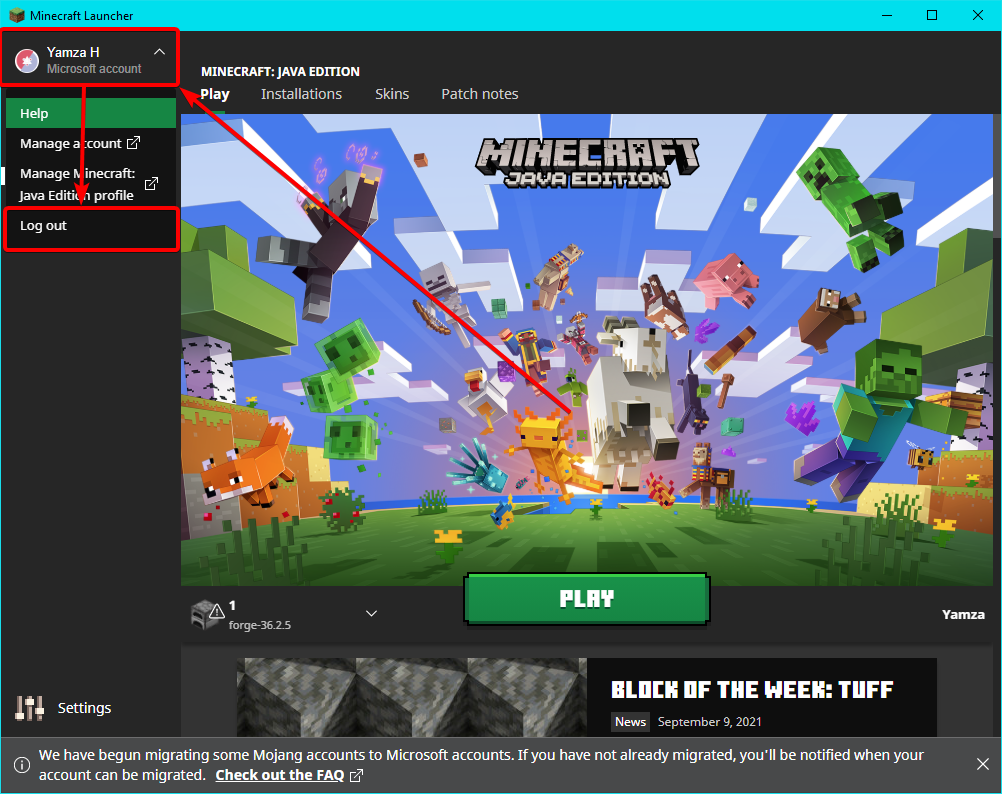

 lyric crescent
**Account Migration Issues**
If you are still signed in, then log out of your ac...
lyric crescent
lyric crescent
**Account Migration Issues**
If you are still signed in, then log out of your ac...
they even tell you https://i.imgur.com/ha8sh37.png
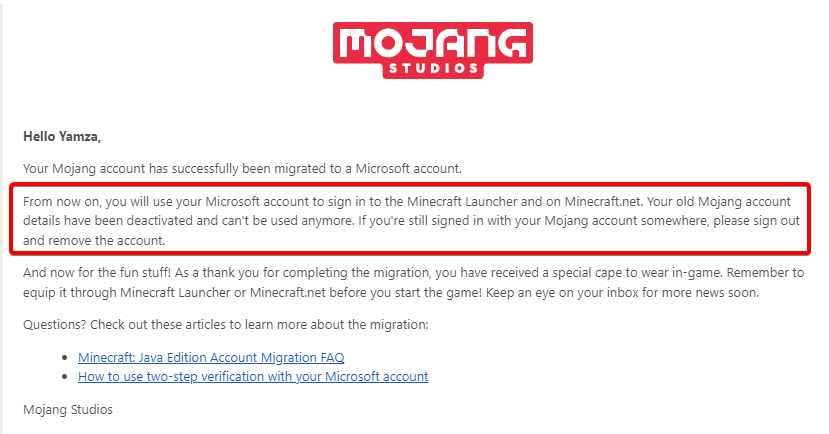
 trim pivot
hey, i wanted to play a modpack which i found on curseforge and but i have to log in, the problem is i dont know if it is safe to log in and because of that, i can't really play that modpack. i have had issues with my account being hacked before and i don't want to risk it getting hacked again
lyric crescent
log in to what
trim pivot
to my account
queen storm
That is why Curseforge is using the default launcher and not some third party thing
lyric crescent
other mod managers definitely can (and have) stolen accounts, that is why curseforge does not use custom login stuff like they do.
viral briar
as long as you have changed your password from the last time you got hacked then you should be fine
also note if you use the same password elsewhere , change that also of course , should never use the same password on other things at all
as then you pretty much handing the keys to the hackers to your online life.
trim pivot
viral briar
as long as you have changed your password from the last time you got hacked then...
i have changed my password since and have migrated my account, just making sure, now that i know it is safe im alot less scared of using it
viral briar
curseforge is safe as it does not have anything to do with the login process of minecraft , that is pure original in that part and microsoft has 2FA
which is the main benefit of using microsoft account over mojang, tbh should use 2FA on anything these days. just that extra protection
rocky breach
digital roost
I will do, thank you 😄
Did it work? I'm having the same problem.
 still plume
i cant download Prime's HD Texture
why?
queen storm
Link?
 red orbit
how to play my hero academia
lyric crescent
Not sure what this has to do with curseforge?
queen storm
People*
And install the mod, play?
queen storm
Link hero academia
halcyon whale
Whenever I try Installing this pack ''Aquatic Adventure'' it says it ''cannot find child addon file: 2703045'', any fix?

 verbal spade
is here an Admin who can give me Support in German?
lyric crescent
no
verbal spade
😦
lyric crescent
halcyon whale
Whenever I try Installing this pack ''Aquatic Adventure'' it says it ''cannot fi...
Passed this on to the CF devs, should be fixed in a few hours.
halcyon whale
thank you!
have the dev's figured out why that's becoming an issue though? it keeps happening to me for every mod pack I try to install.
lyric crescent
no idea. just report whatever id's you get
halcyon whale
alrighty, will do.
 cedar coral
Hello again. Probably you remember me by question about anti-steal system (yea, I'm still waiting answer in CF ticket support).
So... There is another question. Is there any list of rules for projects?
I found this, but it tells nothing useful: https://support.curseforge.com/en/support/solutions/articles/9000197279-moderation-policies
lyric crescent
no, there is no list that i am aware of
cedar coral
🥲
 little trout
when I install a modpack does it come with a skin pack/meshes?
lyric crescent
no


 lyric crescent
wrong place for gdlauncher
 wanton finch
i even tried to use other laucher but always 1.17.1 course forge crashes
i know
i used cursedforged on it
1.17.1 keeps crashing on curseforge
lyric crescent
that is not a screenshot from curseforge..?
wanton finch
the first one is
lyric crescent
first one is a screenshot from the minecraft launcher, not curseforge.
lyric crescent
?mc-log
red patioBOT
Sending logs for support.
Right-click the modpack profile icon OR click the button in the modpack profile.
Click Open Folder.
Open the logs folder.
Find the file called debug.log OR latest.log and drag it into discord into this channel
red patioBOT
- Click on the Minecraft Tab on the Left side of the CurseForge App.
- Click button next to the
Create Custom Profileoption. - Click
Repair Installationoption. - Play game.
NOTE: You will not lose any modpacks or worlds, These are saved in the Instances folder. DO NOT TOUCH THIS FOLDER OR YOU WILL LOSE EVERYTHING
red patioBOT
 gilded forum
trying to install a mod pack from the curseforge site and it will attempt but then I get a missing child. [[won't someone please think of the children? ]]
Thanks for any help with this.
 lyric crescent
Passed it on to the CF devs, should be fixed in a few hours.
 ebon wolf
HEy my minecraft modpack is uploaded on curseforge and it got alowed by moderators
but
when i try to install it or search it up it dosnt do anything
like when i search it up on curseforge app/web it dosnt show but the link works
lyric crescent
send the link
digital roost
Hey um I'm having an issue with curseforge
lyric crescent
!sync
red patioBOT
Sync and your Project.
CurseForge App and site do not share the same requirements! You can find things on the site but this does not mean it will be in the app!
For a mod to show up in the app:
- Projects MUST have a file marked as RELEASE or BETA
- Projects MUST be APPROVED
- Projects MUST have a file marked for the GAME VERSION SELECTED/LOADED
- Projects CAN'T be EXPERIMENTAL
- Projects CAN'T be ABANDONED
Files can take a while to show up in the app. If your files still have not shown up either your project is new and you have yet to mark a file as Release/Beta or there is issues with the sync system making it slow.
Vote this issue up if you would like to know when the last sync was! https://curseforge-ideas.overwolf.com/ideas/CF-I-1617
ebon wolf
ok thankos
digital roost
I launch it up, works fine and normal. I try to load a mod pack up (decimation and others) then it tells me to log into my Microsoft account. It randomly chooses one of my emails and I have to switch to another email. I put the right email and password in, then after a few seconds it asks me to log in with the previous email I have to keep switching. Keeps doing it until I close minecraft application.
red patioBOT
- Click on the Minecraft Tab on the Left side of the CurseForge App.
- Click button next to the
Create Custom Profileoption. - Click
Repair Installationoption. - Play game.
NOTE: You will not lose any modpacks or worlds, These are saved in the Instances folder. DO NOT TOUCH THIS FOLDER OR YOU WILL LOSE EVERYTHING
digital roost
This should work?
lyric crescent
might
digital roost
Give me a minute
 neat sapphire
I'm trying to update a minecraft modpack, but it fail everytime
it cannot find part of the path
and shows me a path to another modpack
(trying to update terrafirmagreg and cannot find path to farmingvalley folder)
it does not make sense
digital roost
@lyric crescent ty bro it fixed it
 sudden jungle
im trying to open profile option for mc modpacks but everytime i do this i get this screen