#🔥︱curseforge-support
1 messages · Page 544 of 1
 surreal kernel
 scenic rune
how to i allocate more ram to my modded game
 queen storm
!mc-ram
 red patioBOT
How to set Global Minecraft RAM value.
- Click the
 icon in the bottom left to open settings.
 - Click the Minecraft tab.
- Scroll down.
- Slide slider to recommended ram range as seen below.
 scenic rune
oh alr
 glossy heron
Does this when I try to update or delete any pack. I've never used an 'E:' pathway for anything having to do with Minecraft/Curseforge, nor do I have this instance downloaded anywhere
 queen storm
! mc-path
red patioBOT
Change your install path to the following:
For Windows: C:\CurseForge
-Go to C:\ drive. Make a new folder. Name it Curseforge.
For Mac: /Users/Shared/CurseForge
If Minecraft is not installed in CurseForge App:
- Click the
 in the top left.
 - Select Minecraft from the list of games.
- Select the
Advancedoption and pick the folder you just made. - Click
Continue.
If Minecraft is installed in CurseForge App:
- Click the in the bottom left.
- Select the Minecraft tab.
- Click
Change. - Select the folder you just made.
:no_entry_sign: Minecraft Files should NOT be installed inside the following locations :no_entry_sign:
:no_entry_sign: .minecraft folder.
:no_entry_sign: OneDrive folders.
:no_entry_sign: Desktop folder.
:no_entry_sign: Drive roots I.E. Directly into the C:\ drive.
:no_entry_sign: iCloud enabled folders.
:no_entry_sign: or any other cloud saved folder.
If any of the above are in the path you need to change/move it!
 worthy urchin
so i tried this custom portal mod but everytime I launch i get a error
my game also crashes
queen storm
What error?
worthy urchin
i don't get the error but my game keeps crashing
queen storm
!mc-logs
red patioBOT
Sending logs for support.
Right-click the modpack profile icon OR click the  button in the modpack profile.
Click 
Open Folder.
Open the logs folder.
Find the file called debug.log OR latest.log and drag it into discord.
worthy urchin
ill try ty
queen storm
Where are you looking?
 vital panther
Hello.
I'm asking the question again after making a ticket since I"ve not gotten any response in over a month.
I've lost access to one of my curseforge projects. I can still access it, but I can't upload files, I can't access the settings except for "manage users" and "delete project".
I'm the owner of the project
queen storm
Ticket is the only way for that, respond to the ticket
vital panther
you guys haven't had this before/dont know any solution?
 viral briar
Ticket is the way to solve it . Nothing for us to do
queen storm
The solution is to let curseforge fix it
vital panther
how long should a ticket take to get response?
queen storm
Yours is long, did you respond to it?
vital panther
I just made a response.
oh
I made the ticket 10 days ago lol, it just feels like a month
welp
guess I'll wait longer
queen storm
Quite a big difference there
 winter nest
Hey, in a modpack I am a developer for, the pack was denied approval under the reasons that `
Under Galacticraft's license, permission is automatically granted for modpacks, as long as you're not charging money for your modpack.
There are two basic conditions to bear in mind:
- You have to keep the Galacticraft version in your pack up to date - see next section.
- You don't have to provide a link to our download site (obviously your modpack will contain the .jar files already). But you do have to provide a link to this Wiki, so that players looking for help come to the right place!`
However, in our modpack description we provide a link to the wiki, and the galaticraft version in the modpack is the most recent for the minecraft version. Any ideas?
 deep pebble
Bonjour, j'ai un soucis avec curseforge, quand je veux installer des dossier addons pour warcraft, cela me les mets dans d'autre dossier ( et je ne peux ni changer ou bien paramètrer )
Quelqu'un pourrai m'aider ? merci 😉
queen storm
Only English in this discord
deep pebble
Hello, I have a problem with curseforge, when I want to install addons folders for warcraft, it puts them in another folder ( and I can neither change or set )
Can someone help me? thank you😉
deep pebble
queen storm
Only English in this discord
okay but u can say hello, and say #📛︱rules
queen storm
deep pebble
okay but u can say hello, and say <#777323206884327484>
Yeah, I am dealing with this stuff all day, not gonna say hi to everybody.
Pick the wow role in #786424115535544350 and ask in #768028293231542303
deep pebble
queen storm
Yeah, I am dealing with this stuff all day, not gonna say hi to everybody.
ok but stay polite, ty
queen storm
You accepted the rules, did not follow them, I pointed that out.
 rancid moon
hello if i want connect on curseforge minecraft is said "modding folder cannot be set on onedrive" or "choosing invalid dossier" who can be help me
queen storm
!mc-path
red patioBOT
Change your install path to the following:
For Windows: C:\CurseForge
-Go to C:\ drive. Make a new folder. Name it Curseforge.
For Mac: /Users/Shared/CurseForge
If Minecraft is not installed in CurseForge App:
- Click the in the top left.
- Select Minecraft from the list of games.
- Select the
Advancedoption and pick the folder you just made. - Click
Continue.
If Minecraft is installed in CurseForge App:
- Click the in the bottom left.
- Select the Minecraft tab.
- Click
Change. - Select the folder you just made.
:no_entry_sign: Minecraft Files should NOT be installed inside the following locations :no_entry_sign:
:no_entry_sign: .minecraft folder.
:no_entry_sign: OneDrive folders.
:no_entry_sign: Desktop folder.
:no_entry_sign: Drive roots I.E. Directly into the C:\ drive.
:no_entry_sign: iCloud enabled folders.
:no_entry_sign: or any other cloud saved folder.
If any of the above are in the path you need to change/move it!
rancid moon
thanks timtower
 digital roost
Hello. I keep getting curseforge cannot find child addon 2856736 when trying to install modpack.
queen storm
Child addon or child addon file?
digital roost
addon file
queen storm
Forwarding to staff
digital roost
Thanks
 robust junco
My curseforge Minecraft isn’t launching
Like the launcher works but when I press launch it just doesn’t launch
queen storm
Then what does happen?
queen storm
Does the minecraft launcher show up?
robust junco
Yep
queen storm
!mc-logs
robust junco
Wat
queen storm
Bot is down again, second time today
robust junco
Lol
queen storm
queen storm
What error?
 turbid cypress
why it doenst exist minecraft modpack 36.1.12 ?
queen storm
turbid cypress
why it doenst exist minecraft modpack **36.1.12** ?
Was skipped I believe
turbid cypress
but servers only have 36.1.12
queen storm
turbid cypress
but servers only have 36.1.12
Then the servers are weird
 wary plover
I just tried to load up a modpack but my max RAM has gone from 10k mb to 3.5k mb which means I can't run any of the modpacks I have installed.
How do I fix this?
queen storm
wary plover
I just tried to load up a modpack but my max RAM has gone from 10k mb to 3.5k mb...
You change it back?
wary plover
queen storm
You change it back?
I've tried looking at my curseforge settings as well as my PC setting but I can't find anything to change it
queen storm
wary plover
I've tried looking at my curseforge settings as well as my PC setting but I can'...
Curseforge, settings, minecraft, ram?
wary plover
queen storm
Curseforge, settings, minecraft, ram?
Yea. I've been dealing with for 10 minutes now but nothing I try work
queen storm
wary plover
Yea. I've been dealing with for 10 minutes now but nothing I try work
Does it change in curseforge or not?
wary plover
queen storm
Does it change in curseforge or not?
I'm not getting any visual changes in Curseforge but when I boot up a modpack it says my RAM is at 3.5k mb when it's supposed to be at 10k mb
queen storm
So the slider does not move?
wary plover
queen storm
So the slider does not move?
My slider when loading the modpack says 3.502 mb but just earlier today it was at 10.000 mb
queen storm
Then move the slider!
wary plover
queen storm
Then move the slider!
I'm looking at my Curseforge setting and I don't have a slider
queen storm
wary plover
I'm looking at my Curseforge setting and I don't have a slider
Screenshot
 hidden fern
YOU CAN CALM DOWN
hidden fern
wary plover
I'm looking at my Curseforge setting and I don't have a slider
But also it's under your minecraft tab in your curseforge settings
wary plover
hidden fern
But also it's under your minecraft tab in your curseforge settings
ooooooooooohhhhhhh
found it
I'm gonna test it
hidden fern
wary plover
found it
Oh no the slider isn't supposed to be there
wary plover
It's working, although I'm not sure how it changed in the first place
hidden fern
Also I was joking, there's supposed to be a slider there
wary plover
IK
hidden fern
I'm funny like that, I specialize in slider related jokes.
queen storm
Just slide them down to #🥑-off-topic-chat please
hidden fern
 sorry boss
wary plover
well thanks for the help anyways
 slender lark
So basically I installed rlcraft, then added 3 mods, and now everything is broken and wacky
for example
when I place snow over grass
queen storm
And you complain here about that why?
queen storm
Yeah, but what you are asking is a modification on a functional modpack, we have no idea what tricks they pulled.
So best is to stick in #👽︱game-support
slender lark
k
 scarlet island
hello, I'm getting an error when downloading any modpack. Says it cannot find child addon file
for Minecraft
queen storm
What number?
queen storm
Forwarded to staff
scarlet island
okay, thank you. Is there a fix in the mean time? I've tried damn near everything I can think of but haven't found one
queen storm
No, server issue
scarlet island
I see. Thank you
 versed umbra
If I create a custom mod pack thru curseforge how do I then make it a featured or browsable mod pack?
queen storm
versed umbra
If I create a custom mod pack thru curseforge how do I then make it a featured o...
versed umbra
!mc-packshare
queen storm
The bot is down so I send you the result instead
versed umbra
ok
versed umbra
2nd question lol can you run Forge and spigot for plugins on the same server?
queen storm
Nope
versed umbra
hmmm
 rich flint
fyi minecraft channels via getting role in #786424115535544350
 queen storm
#🔥︱curseforge-support message
Use the second link
 thorn jolt
i need help so basically im tryna get optifine for mc java and i got curseforge a bit back for something else and it keeps wanting to open .jar files with curse forge. (i dont want that) ive deleted all curseforge files and the cursefforge download file and its just being weird and wanting to open with curseforge
thorn jolt
one sec i think its fixed
if minecraft loads i can see 🥲
ah fixed it
i have no clue to change the "open with" without downloading anything else
 thorn jolt
ok thx
 quasi blade
Do you guys do modded server support?
The modded servers that I used to run about 6 months ago all of a sudden stopped working
But the vanilla ones work
Here's the error:
queen storm
quasi blade
The modded servers that I used to run about 6 months ago all of a sudden stopped...
 echo grove
What is the official rlcraft discord
queen storm
Look at their project page? Probably a big banner there
echo grove

How do I fix this
I can't get into the server because I need to verify a phone number but I still don't have one yet because of covid and the whole employment thing
 fallen loom
Looks like you have the wrong pack version for the server
echo grove
I tried multiple
fallen loom
Multiple or ALL?
rich flint
that photo clearly states that it is looking for certain versions of mods and the versions are different. you just need to find out what exact modpack version you need to match the server
 hexed parcel
So, I set up a modpack on curseforge, and i decided to procrastinate on it until the day i needed to. How long does it take on average for a project to be reviewed by Curseforge moderators, so i can plan accordingly?
queen storm
Can't plan a queue
rich flint
is it for friends? you can just give them the export file
hexed parcel
rich flint
is it for friends? you can just give them the export file
is that reasonable through email? with like 170 mods?
queen storm
Mods are not in the file itself
rich flint
yeah the export files only index where to get the mods from cf - the only reason the file would be big is if you had a ton of other customizations or resource packs added
 rich flint
 trim ledge
anyone know how to fix this
trim ledge
anyone know how to fix this
playing MC 1.17 requires java 16 be installed as the windows java path
rich flint
why not?
rich flint
there's a workaround to actually juggling installs when you use the CF app but it's' wonky - re-pointing the java path in the vanilla launcher every time you run the pack
 patent sky
queen storm
https://discord.com/channels/428228256236306434/782027635252920322/8866179043579...
patent sky
queen storm
https://discord.com/channels/428228256236306434/782027635252920322/8866179043579...
this is not working it says the website has a problem loading
i used microsoft edge and firefox
and chrome
says it cant provide a good connection
digital roost
This curse forge app is not working for me anyone got any alternitives?
 fleet bear
rich flint
playing MC 1.17 requires java 16 be installed as the windows java path
fleet bear
rich flint
playing MC 1.17 requires java 16 be installed as the windows java path
What...?
I dont believe this is the case at all. The launcher itself should be handling this.
digital roost
the game crashes every time I load any mod packs :/
 narrow minnow
digital roost
the game crashes every time I load any mod packs :/
narrow minnow
digital roost
the game crashes every time I load any mod packs :/
Did you try to repair installation?

It usually means you got some corrupted files due to an improper shutdown (not curseforge related, but minecraft related)
robust junco
my server keeps on crashing in Better minecraft and i cant find the reason
my server logs
rich flint
fleet bear
I dont believe this is the case at all. The launcher itself should be handling t...
fair enough - it does, turns out the person was actually using multimc which doesn't java juggle for the user. typical problem presented without enough information 🙂
digital roost
how do I add datapacks to a curseforge profile
when i export my profile it doesnt show the mods on the profile
in the zip folder
 lyric crescent
That means it worked correctly. The mods all go into the manifest.
rich flint
digital roost
how do I add datapacks to a curseforge profile
add to the folder named 'datapacks' inside the world folder. to have them apply to all worlds you'd get the mod "openloader" and put in the openloader > data > datpackfolder location
digital roost
ah, thank you. I need a mod to use datapacks? huh
rich flint
no - you can place them into the save > worldfolder > datapacks folder alternatively
digital roost
ah thanks!
 junior crypt
for some reason loading any 1.16.5 modpack crashes with error 0 but it never happens with any 1.12.2 packs
rich flint
junior crypt
for some reason loading any 1.16.5 modpack crashes with error 0 but it never hap...
can you post your latest.log file? use #👽︱game-support or get the MC tag in #786424115535544350
junior crypt
 versed cobalt
a couple of days ago my mouse started being spotty and when i play minecraft i have to click multiple times to do anything. And i cant solve this because i am on mac and everyone is talking about. please help!
rich flint
junior crypt
you should probably first try the "repair profile" button which i think clears and re-gets the actual MC files
rich flint
next to play button - 3 dot menu
junior crypt
still crashes when i do that :(
junior crypt
junior crypt
still crashes when i do that :(
nvm i fixie
 low cedar
i made a curseforge modpack but i installed a mod from the offical app but its causing my game to crash should i send a crash log?
rich flint
server stuff is'nt curseforge it's minecraft - ask in #👽︱game-support or get MC role in #786424115535544350
echo grove
rich flint
that photo clearly states that it is looking for certain versions of mods and th...
Alright thx
hexed parcel
So, if i can export the file, can i also apply it to a server? the issue here is we're trying to set u pa server with my modpack using Apex hosting. We need to add the files manually i think, will the export file suffice?
 stark merlin
I have a mod
and i put it in my mods folder
and it wont pop up on forge mods list?
Im on the right version
 maiden willow
can someone guide me through downloading permafrost for a server
im tryna play with my friend
echo grove
rich flint
that photo clearly states that it is looking for certain versions of mods and th...
The thing is I'm using the newest rlcraft version but the mods in the modpack are not the newest version so it does not make sense
 ripe dune
Game wont start with curseforge with my mods but not sure what ones braking it
rich flint
echo grove
The thing is I'm using the newest rlcraft version but the mods in the modpack a...
idk then - you should ask on the RLcraft discord i suppose
rich flint
ripe dune
Game wont start with curseforge with my mods but not sure what ones braking it
what game? minecraft? can you post your log file(s)?
rich flint
ripe dune
only 2gb of ram/memory is allocated. in a lot of cases that is not enough for modded minecraft. 4-6gb is pretty standard
if you get the exact same error with more ram allocated that is useful to know
rich flint
?mc-ram
red patioBOT
How to set Global Minecraft RAM value.
- Click the icon in the bottom left to open settings.
- Click the Minecraft tab.
- Scroll down.
- Slide slider to recommended ram range as seen below.
rich flint
won't work how - does it crash same way, does the ram not allocate?
ripe dune
dosent allocate
i did it
Failed to download file.
Name: forge-14.23.5.2855.jar
URL: https://s3.amazonaws.com/Minecraft.Download/versions/forge-14.23.5.2855/forge-14.23.5.2855.jar
Filename on disk: forge-14.23.5.2855.jar
Path: C:\Users\nadin\curseforge\minecraft\Install\versions\forge-14.23.5.2855\forge-14.23.5.2855.jar
Exists: File
this comss up
when i open it
rich flint
ouch
ripe dune
mh?
rich flint
do the profile repair button in the 3 dot menu next to "play"
 outer owl
hi um.. so im making a modpack and theres a bug where a search a mod that i see on another modpack but when i search in the mod it doesnt show
fleet bear
Then you don't have the correct version for the mod. You can only see mods for the version you picked.
the dev needs to mark it correctly or update.
outer owl
ok thank u
ripe dune
dOSENT WORK'
Keeps getng the same message
The game crashed whilst initializing game
Error: java.lang.NoSuchMethodError: kotlin.jvm.internal.Reflection.getOrCreateKotlinClass(Ljava/lang/Class;)Lkotlin/reflect/KClass;
Exit Code: -1
fleet bear
looks like you are missing a mod
fleet bear
did you install the mods by hand?
fleet bear
Then how is this a curseforge problem...?
ripe dune
I Downloaed it though curseforge tho? and using cureesfrge for it
fleet bear
why arent you just downloading it via the app then...
ripe dune
i did
fleet bear
and just because you downloaded it from curseforge doesn't mean it's a curseforge problem
ripe dune
ok
fleet bear
ripe dune
i did
Claycorp: did you install the mods by hand?
[8:44 PM] Russia: Yes
[8:44 PM] Russia: manual
This says the opposite.
ripe dune
Im saying manul though curesforge but ok
fleet bear
that's not manual
 steep trench
hey
so
my friend has this issue
where everytime he wants to launch curseforge
he has to install it again
the modpack files stay
but the app itself does not
fleet bear
then tell your friend to come get help.
steep trench
@dry echo
fleet bear
What antivirus are you using?
 dry echo
windows defender
fleet bear
nothing else?
dry echo
no
fleet bear
Make sure to update the definitions it's using and to apply any windows updates.
It's likely removing it.
dry echo
wdym definitions
fleet bear
the stuff it uses to detect programs as bad
dry echo
ah ok
dry echo
ok it's fixed
fleet bear
👌
 zealous loom
How can I change my nickname? I am currently using a Twitch account.
I want to change my nickname to English, but I can't change my nickname on Twitch because it's not in English.
queen storm
Need to change it on Twitch for now
 oak bluff
I downloaded a Pack that only has 3 Mods, Biomes o Plenty, Fabric and Origins, but Minecraft tells me that an Error has ocured and Fabric and Orgins cannot be loaded because they are Fabric mods... they are in the Mod Folder, jut not ingame. In the logs i found this: "fabric-api-0.30.0+1.16.jar is missing mods.toml file" and "Origins-1.16.4-0.4.6.jar is missing mods.toml file"
oak bluff
The Pack's name is "origins + biomes o plenty"
queen storm
Link please
 verbal blade
Fabric is like forge, an entirely separate thing.
If you search for Fabric 1.16.5 installer, you should find it easily
viral briar
or just use the curseforge app...
queen storm
Yeah, looks like the pack dev just combined a couple mods and didn't test
oak bluff
oof
verbal blade
viral briar
or just use the curseforge app...
or this
I always forget CF has fabric
oak bluff
i downloaded it from the Curseforge launcher
queen storm
And the pack is broken
viral briar
why do people make modpacks and not test them 
oak bluff
https://www.curseforge.com/minecraft/modpacks/origins-smp-no this one also has a problem, it crashed when breeding cows because of some target error and cannot be downloaded now
queen storm
oak bluff
https://www.curseforge.com/minecraft/modpacks/origins-smp-no this one also has a...
File downloads fine
oak bluff
?
queen storm
From the website you can download it
viral briar
if you cannot download it , do you get an error message, if so what do you get?
oak bluff
for me it says cannot find child addon 3159126, in the laucher
queen storm
child addon or child addon file?
queen storm
Forwarding to staff
oak bluff
thank you
 placid night
Hi
I'm waiting for two weeks now for my project approval
I heard of people having theirs accepted even though they submitted it after me...
queen storm
Project or file?
placid night
Project
queen storm
Show the red banner on the project please
placid night
 queen storm
Did you upload a file?
queen storm
It will not get approval till there is a file
placid night
ugh
queen storm
Else there would be approval for a lot of random empty projects
placid night
My bad
 twin laurel
What is the normal wiating time for a new project to be approved if everything that is needed is applied to the project? I know the moderators doesn't work on fridays and saturdays...
waiting*
queen storm
How long has it been?
twin laurel
Approx. 24-30 hours
queen storm
Take at least 3 working days
twin laurel
Oh, thats ok. Thanks
 vale coral
The following file versions have been removed from CurseForge
but the versions are there as I just downloaded them... much confused 
 timid sierra
can you check my log and tell me where is the problem?
queen storm
timid sierra
can you check my log and tell me where is the problem?
How about posting the logs as well?
queen storm
Remove optifine, try again
 tranquil marten
When support optifine?
queen storm
!mc-optifine
red patioBOT
Optifine and Curseforge
To install Optifine with modpacks on Curseforge:
Right click the modpack icon, select Open Folder.
Put the Optifine.jar into the mods folder.
Now load the modpack normally.
We do not offer support for Optifine. If you have issues with Optifine, remove it. If you want further support try the discord found on their website.
https://www.optifine.net/home
tranquil marten
But I just checked the page on optifine and it said not compatible with forge 🤔
queen storm
We don't deal with optifine here.
tranquil marten
But I just asked the optifine community and they said its theoretically compatible, forge just needs to update their loader to accept it
So I'm confused now
 west folio
forge isnt curseforge
queen storm
!!=
red patioBOT
Wording is important!
Forge = Minecraft Forge, This is a modloader often just called "Forge".
Fabric = Fabric MC, this is another modloader, just called "Fabric".
CurseForge = A Website/App that has content for games.
Mods = Individual mod files.
Modpacks = Multiple mods put into the mods folder or downloaded from CurseForge.
These are not Interchangeable! Please use the correct terms as it allows us to help you faster!
digital roost
please can anyone help me with the error when downloading forge?
queen storm
!notcf
red patioBOT
The question you are asking about isn't related to CurseForge. Please use the appropriate game rooms by getting the role from #786424115535544350 or use #👽︱game-support for help.
This room is only for CurseForge Owned & Maintained features/services.
 soft vigil
My minecraft is crashing when I start it up with exit code 0.
lyric crescent
?mc-installfix
red patioBOT
- Click on the Minecraft Tab on the Left side of the CurseForge App.
- Click button next to the
Create Custom Profileoption. - Click

Repair Installationoption. - Play game.
NOTE: You will not lose any modpacks or worlds, These are saved in the Instances folder. DO NOT TOUCH THIS FOLDER OR YOU WILL LOSE EVERYTHING
soft vigil
it dont work
lyric crescent
?mc-log
red patioBOT
Sending logs for support.
Right-click the modpack profile icon OR click the button in the modpack profile.
Click Open Folder.
Open the logs folder.
Find the file called debug.log OR latest.log and drag it into discord.
soft vigil
it might have worked actualy
say let me check
it didnt work tell them it didnt work
soft vigil
one second
 surreal raptor
How can i upload a second version of my modpack ?
lyric crescent
same way as the first
surreal raptor
okay
soft vigil
[14:57:13] [main/INFO]: Loading tweak class name net.minecraftforge.fml.common.launcher.FMLTweaker
[14:57:13] [main/INFO]: Using primary tweak class name net.minecraftforge.fml.common.launcher.FMLTweaker
[14:57:13] [main/INFO]: Calling tweak class net.minecraftforge.fml.common.launcher.FMLTweaker
[14:57:13] [main/INFO]: Forge Mod Loader version 14.23.5.2855 for Minecraft 1.12.2 loading
[14:57:13] [main/INFO]: Java is Java HotSpot(TM) 64-Bit Server VM, version 1.8.0_51, running on Windows 10:amd64:10.0, installed at C:\Users\noahj\curseforge\minecraft\Install\runtime\jre-legacy\windows-x64\jre-legacy
[14:57:14] [main/INFO]: Searching C:\Users\noahj\curseforge\minecraft\Instances\Balls\mods for mods
Expand
message.txt
11 KB
There
Download it
and sned it
surreal raptor
should i copy paste the modpack description ?
lyric crescent
🤷♂️
vale coral
Same way you made the first version. Export from CurseForge app, then on your App page click "+ Flie"
surreal raptor
okay that was a supid question because i made some changes xD
i mean the question with the description
vale coral
surreal raptor
should i copy paste the modpack description ?
This should describe the changes. (Eg Updated Mod X, Added Mod Y. etc)
surreal raptor
i sag it just 2 secons before you message thx 🙂
lyric crescent
read them
 naive eagle
I have.
lyric crescent
then read them again
lyric crescent
dont ping me
surreal raptor
can i upload server files ?
lyric crescent
yes
surreal raptor
and how can i say curseforge that it isn't a new version from my modpack ?
lyric crescent
i dont understand
queen storm
surreal raptor
and how can i say curseforge that it isn't a new version from my modpack ?
You click the original pack, then you can upload an additional file
naive eagle
Please someone help
 opal cipher
"Required mixin config mixins.stevekung's_lib.json requires mixin subsystem version 0.7.11"
lyric crescent
Mixin config mixins.stevekung's_lib.json requires mixin subsystem version 0.7.11 but 0.6.6 was found. The mixin config will not be applied.
naive eagle
What?
opal cipher
The pack is probably broken
vale coral
surreal raptor
can i upload server files ?
go to the version you uploaded, click Upload Additional File and specify it as Server Pack
 queen storm
!projectissue
red patioBOT
Please visit the project page for the content you posted about and look for a way to contact the developer.
Somewhere on the page there is usually a method of contact. Look for one of the following things:
Issuestab like the image below.- Discord link.
- Twitter link.
- Comments section below the project.
If no contact method exists you will either have to remove the project or find a solution on your own.
 queen storm
naive eagle
Laughing is aagainst rules?
queen storm
naive eagle
Laughing is aagainst rules?
It is offtopic, don't need that here
And to you
naive eagle
Which mod is it for tho
queen storm
The pack
surreal raptor
vale coral
go to the version you uploaded, click Upload Additional File and specify it as S...
ah thx
naive eagle
 opal cipher
Did you make the modpack yourself?
queen storm
It is on the website
naive eagle
Yes
lyric crescent
install the correct version of mixin then
opal cipher
It's a mod, that is a dependency of another mod that you've added.
And that needs to be the correct version.
surreal raptor
does a update verification needs the same time like the first one ?
naive eagle
I dont have mixin
queen storm
surreal raptor
does a update verification needs the same time like the first one ?
Maybe, maybe not
surreal raptor
okay
lyric crescent
actually seems to be an issue with the mod itself
naive eagle
which
vale coral
Also looks like Server packs need to be approved before the final version (Based on my pack status)
queen storm
vale coral
Also looks like Server packs need to be approved before the final version (Based...
They do, but there is a big time difference between automatic and manual
lyric crescent
dont know, one of your mods is providing an old mixin version and breaking others
surreal raptor
could it be that it only needs about 5 minutes ?
because i can read Approved
on both versions
queen storm
surreal raptor
could it be that it only needs about 5 minutes ?
If the bot does it: yes
surreal raptor
nice thx
lyric crescent
might be lesslag
surreal raptor
Does the bot also works if the moderators like on the weekend doesn't work ?
lyric crescent
bot checks every upload, even if it requires manual approval
surreal raptor
but my update wasn't approved manual because it only needs 2-5 minutes
lyric crescent
ok?
surreal raptor
i mean does the bot also works on the weekend ?
lyric crescent
bot never stops
surreal raptor
okay thx
lyric crescent
show the message
screenshot
show the description now
assuming the issue is with the image. can make a ticket if you need more information
naive eagle
My minecraft just showed this
The game crashed whilst there was a severe problem during mod loading that has caused the game to fail
Error: net.minecraftforge.fml.common.LoaderExceptionModCrash: Caught exception from Just Enough Items (jei)
Exit Code: -1```send the log
naive eagle
lyric crescent
the issue is the spacing of the image
red patioBOT
How to set Global Minecraft RAM value.
- Click the icon in the bottom left to open settings.
- Click the Minecraft tab.
- Scroll down.
- Slide slider to recommended ram range as seen below.
lyric crescent
make a ticket if you dont understand
wow someone told me to ask the people who actually rejected the description
vital panther
!help
red patioBOT
╰( ͡° ͜ʖ ͡° )つ──☆*:・゚ *˜”*°•.˜”*°• Many Help •°*”˜.•°*”˜* <:curselit:796985620550385705>
Please provide a description of your issue with as much detail as possible. If you have an issue with a mod or modpack, tell us the name. Explain what you can see happening. Be specific!
 Tell us what is happening, we already know it "doesn't work".
Avoid using words like "it", tell us exactly what "it" is.
Don't assume anyone knows what you are talking about, be specific.
Tell us what you expected to happen.
Provide screenshots or video if possible.
Provide a log if possible. ?mc-log
digital roost
one of my modpacks download count have been stuck for more than 2 weeks, while my other packs download are slow to update but they do change at least.
help
 oak echo
my nephew wants to play stoneblock2 with his friends. Currently I am hosting a standard Minecraft server for him and his friends. Can someone point me in the direction as to how to host this mod for him?
digital roost
hello
 subtle badger
is there any other way to create a CurseForge account besides twitch registration e.g. with email. I don't have a twitch account and don't want to create one.
lyric crescent
not currently
subtle badger
is it planned to offer further login options? And if so, when can I expect it?
 white hornet
Is there proper API documentation for the main site? Im trying to figure out how to sort by modloader for minecraft mods to no avail
lyric crescent
The API is not publicly available.
lyric crescent
subtle badger
is it planned to offer further login options? And if so, when can I expect it?
Likely not for a few months at least.
white hornet
lyric crescent
The API is not publicly available.
Welp, time for trail and error
Thanks anyway
 hollow heart
hey, i'm trying to log in to Minecraft through curseforge and i need to log in. But when i log in i'm greeted with "wrong password" or "wrong email" i know its the right one because when i needed to log in through Minecraft's launcher it worked. So my problem is that i can't log in with my account anywhere else than Minecraft's own launcher. This started when i immigrate my mojang account to Microsoft.
lyric crescent
curseforge opens minecraft's launcher. just log out of whatever you might be logged into then log in with the correct account.
hollow heart
i logged out from minecraft, launched cursedforge but still couldn't log in and when i went back to "minecraft's launcher" i could log in
lyric crescent
?mc-installfix
red patioBOT
- Click on the Minecraft Tab on the Left side of the CurseForge App.
- Click button next to the
Create Custom Profileoption. - Click
Repair Installationoption. - Play game.
NOTE: You will not lose any modpacks or worlds, These are saved in the Instances folder. DO NOT TOUCH THIS FOLDER OR YOU WILL LOSE EVERYTHING
hollow heart
i have no idea it still doesn't work
lyric crescent
then your issue is with microsoft, not curseforge
hollow heart
alright then thanks anyways
 agile nymph
Change password I always do that but if it doesn't work then i dont now
 flint ermine
can I see how long ive played a modpack?
lyric crescent
no
 split helm
hi
 thorn oak
Hello, I'm trying to make a custom minecraft modpack in the curseforge app, and everytime I try to do this, I get the error "The underlying connection was closed: An unexpected error occurred on a send." If anybody could help with this, I would greatly appreciate it
thorn oak
Sorry, I thought they were two different channels, not rooms, my bad
digital roost
I’m trying to install the “captiwe maps series via mods” but when downloading it says “cannot find child addon: 2404485”
queen storm
child addon or child addon file?
digital roost
oak echo
my nephew wants to play stoneblock2 with his friends. Currently I am hosting a ...
have them download a version that has a server file (check down bellow), then you download the server file and launch the server.
 digital roost
queen storm
child addon or child addon file?
digital roost
queen storm
child addon or child addon file?
Child addon
@queen storm actually it’s child addon file
queen storm
🤦 You even checked
 mellow isle
quick question i selected all the scripts files when i exported my profile but when i load it back in no scripts are shown am i doing it wrong?
digital roost
I just want help @queen storm
queen storm
And there is a big difference if it is a child addon or child addon file, server people need to fix it, they are very different things there
digital roost
mellow isle
quick question i selected all the scripts files when i exported my profile but w...
you only need to select the scripts folder
mellow isle
digital roost
you only need to select the scripts folder
so just the folder not the files
digital roost
yes
 obtuse oracle
Im tying to play mod pack but its keep crashing
queen storm
!mc-logs
red patioBOT
Sending logs for support.
Right-click the modpack profile icon OR click the button in the modpack profile.
Click Open Folder.
Open the logs folder.
Find the file called debug.log OR latest.log and drag it into discord.
obtuse oracle
queen storm
!mc-installfix
red patioBOT
- Click on the Minecraft Tab on the Left side of the CurseForge App.
- Click button next to the
Create Custom Profileoption. - Click
Repair Installationoption. - Play game.
NOTE: You will not lose any modpacks or worlds, These are saved in the Instances folder. DO NOT TOUCH THIS FOLDER OR YOU WILL LOSE EVERYTHING
 hardy cobalt
Hi all. How can it be that my project cannot be found in CF modpack search on CF site?
queen storm
hardy cobalt
Hi all. How can it be that my project cannot be found in CF modpack search on CF...
Link it please
queen storm
!sync
red patioBOT
Sync and your Project.
CurseForge App and site do not share the same requirements! You can find things on the site but this does not mean it will be in the app!
For a mod to show up in the app:
- Projects MUST have a file marked as RELEASE
 or BETA
- Projects MUST be APPROVED
- Projects MUST have a file marked for the GAME VERSION SELECTED/LOADED
- Projects CAN'T be EXPERIMENTAL
- Projects CAN'T be ABANDONED
Files can take a while to show up in the app. If your files still have not shown up either your project is new and you have yet to mark a file as Release/Beta or there is issues with the sync system making it slow.
Vote this issue up if you would like to know when the last sync was! https://curseforge-ideas.overwolf.com/ideas/CF-I-1617
hardy cobalt
got it, thanks
oak echo
@digital roost
 queen storm
oak echo
<@456226577798135808>
queen storm
oak echo
<@456226577798135808>
 craggy glacier
I'm having an issue with the CurseForge Launcher itself. I'm doing an update for my modpack, but the mods are saying that they are in need of an update but trying to downgrade and mods that have updates aren't being displayed. Is there a fix for this issue?
lyric crescent
lost me here
"but trying to downgrade and mods that have updates aren't being displayed. "
craggy glacier
In the modlist, there are buttons that show that an update for the mod is available. The button is appearing for certain mods that I have gone in and updated the version manually, but is trying to send me back to that older version. On other mods that do have updates, it isn't showing the button at all implying there is no update (Even though I can see that there is).
lyric crescent
example of a mod doing this?
craggy glacier
Minecolonies was not showing the new update and I had to manually update, and the Occultism mod was manually updated to the 1.11.3 version but is trying to "update" to 1.11.1
lyric crescent
what do you mean by manually update?
craggy glacier
I clicked on the mod's information, clicked on version, and clicked on "install" next to the most up to date version
lyric crescent
what mc version?
craggy glacier
1.16.5
lyric crescent
and what versions of minecolonies are we talking about
craggy glacier
I was on 0.14.369-BETA and moved to their 1.0.0 RELEASE
The larger issue remains that there seems to be a bug where mods that have more up-to-date versions available are not being indicated in the launcher
lyric crescent
Not seeing any issue updating those mods. have you tried restarting the app?
craggy glacier
The issue isn't updating them, it is that the feature where the launcher lets me know which mods have updates available seems to be working incorrectly.
I have tried restarting several times.
opal cipher
Modpacks have set versions of their mods, unless you choose to modify packs
craggy glacier
I'm the modpack owner and I'm trying to set the version for updating the modpack.
opal cipher
Oh..
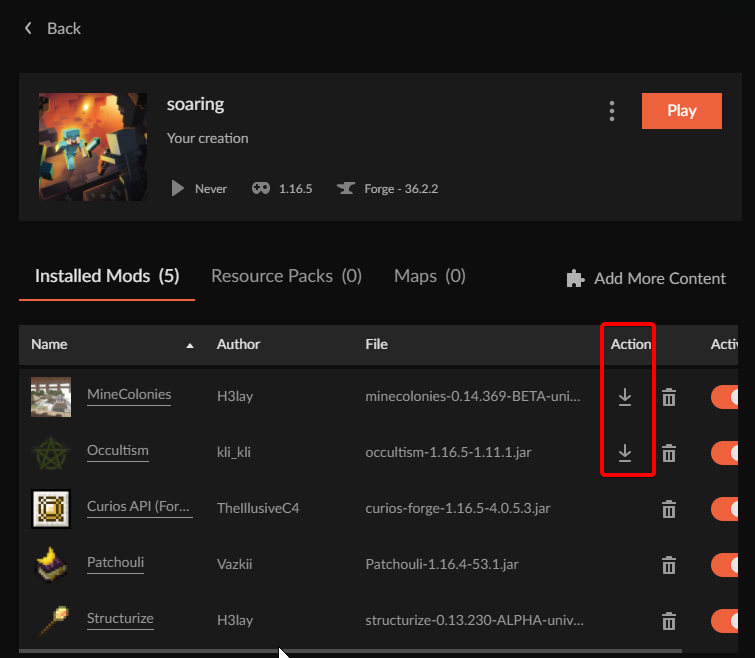 craggy glacier
Ok. Cool. Thanks @lyric crescent That means it is a local bug. Very frustrating.
lyric crescent
!ticket-app
red patioBOT
:bug: Reporting via the CurseForge App :bug:
-
Click the
 icon in the bottom left.
 -
Select

Open a Ticket. -
Fill out the form with accurate detailed information, "It doesn't work" isn't helpful! What exactly doesn't work and why doesn't it work should be easy to answer!
-
Make sure to upload your Overwolf logs with the
Upload Fileoption on the ticket, information on how to get these logs can be found here https://support.overwolf.com/en/support/solutions/articles/9000176827-how-to-get-your-overwolf-logs -
Submit!
 craggy glacier
Just to show what I am seeing.
 craggy glacier
I do. I attempted to update my Java version as well and I have had no success.
 astral latch
how do I use vanilla tweaks on curse forge its a texture pack and I want to move it from a folder to curse forge
lyric crescent
open folder on the pack you are playing and put it in the resource packs folder
 low raven
hello i buy minecraft in the microsoft store but curse froge say i dont have it ? the say me play the demo why
 fiery gulch
Hi everyone,
I renamed my user on Windows 10 and ever since I'm having a lot of problems with Curseforge so I reinstalled it, added all modpacks via Install and copied the data from a backup.
I also moved my Mojang account to Microsoft.
Now if I want to remove any installed modpack I'm getting the alert that the profile cannot be found since it's looking for the former user name of mine...
Does that sound familiar to anyone? Any help is much appreciated!
Sorry, found my mistake so I edited the question above
 fast tinsel
I'm not sure where to look for a better answer for this, so I'll try here;
I've downloaded a few different Minecraft mods (35) from CF and when I try to run any of them, I get a error: 'unexpected issue' and exit code 0. This has been happening for two weeks; I've never actually gotten any to open. They go to a screen where it says which packs are loading and then crashes.
I've un-and-re-installed everything, turned off my firewall/antivirus, restarted my computer, tried different wifi's, basically everything I can think of. Any advice/direction would be appreciated!
lyric crescent
low raven
hello i buy minecraft in the microsoft store but curse froge say i dont have it ...
Log in to the account you bought it on. Must be Java version, not bedrock, or windows 10.
lyric crescent
fiery gulch
Hi everyone,
I renamed my user on Windows 10 and ever since I'm having a lot of...
?mc-path
red patioBOT
Change your install path to the following:
For Windows: C:\CurseForge
-Go to C:\ drive. Make a new folder. Name it Curseforge.
For Mac: /Users/Shared/CurseForge
If Minecraft is not installed in CurseForge App:
- Click the in the top left.
- Select Minecraft from the list of games.
- Select the
Advancedoption and pick the folder you just made. - Click
Continue.
If Minecraft is installed in CurseForge App:
- Click the in the bottom left.
- Select the Minecraft tab.
- Click
Change. - Select the folder you just made.
:no_entry_sign: Minecraft Files should NOT be installed inside the following locations :no_entry_sign:
:no_entry_sign: .minecraft folder.
:no_entry_sign: OneDrive folders.
:no_entry_sign: Desktop folder.
:no_entry_sign: Drive roots I.E. Directly into the C:\ drive.
:no_entry_sign: iCloud enabled folders.
:no_entry_sign: or any other cloud saved folder.
If any of the above are in the path you need to change/move it!
lyric crescent
fast tinsel
I'm not sure where to look for a better answer for this, so I'll try here;
I've...
?mc-installfix
red patioBOT
- Click on the Minecraft Tab on the Left side of the CurseForge App.
- Click button next to the
Create Custom Profileoption. - Click
Repair Installationoption. - Play game.
NOTE: You will not lose any modpacks or worlds, These are saved in the Instances folder. DO NOT TOUCH THIS FOLDER OR YOU WILL LOSE EVERYTHING
 fading summit
!sinc
fiery gulch
Thanks Yamza, I'm trying your solution right now
fast tinsel
lyric crescent
?mc-installfix
It worked!! Thank you so much for your help 🥰
 still pelican
Is there a way to make curseforge force check mods for updates?
 little pawn
hi! ive been having trouble installing any mods atm. it keeps saying that webclient is failing each time
red patioBOT
WebClient errors are from networking issues to your computer. You can try a few things to fix it:
- Restart the computer.
- Restart your router/modem.
- Try another internet source like a hotspot, wired connection or moving closer to the WiFi.
- Pause/Stop other things using the internet. (Streams, music, etc)
- If this still doesn't work, try again in an hour and hope your connection is stable.
lyric crescent
!webclient
 quiet coyote
@lyric crescent hello can you help me?
viral briar
kind of hard for anyone to help you when you don't say the issue and apparently don't read the rules.
!notcf
red patioBOT
The question you are asking about isn't related to CurseForge. Please use the appropriate game rooms by getting the role from #786424115535544350 or use #👽︱game-support for help.
This room is only for CurseForge Owned & Maintained features/services.
fiery gulch
Unfortunately this doesn't solve my problem. :/
Moved as suggested above, re-installed the modpacks but still I'm getting Vanilla MC when launching a Create+ for example.
I'll look into it again tomorrow/ later
Update: that DID fix my problems. Thx again!
viral briar
I have a lovely life thank you
lyric crescent
Sad that you can't ban people who leave on mobile.
 atomic spade
uhh so alot of my instances crash with exit code 0, i have no information about it, how can i fix it?
 signal ridge
atomic spade
uhh so alot of my instances crash with exit code 0, i have no information about ...
signal ridge
atomic spade
uhh so alot of my instances crash with exit code 0, i have no information about ...
!mc-logs can have a look
red patioBOT
Sending logs for support.
Right-click the modpack profile icon OR click the button in the modpack profile.
Click Open Folder.
Open the logs folder.
Find the file called debug.log OR latest.log and drag it into discord.
signal ridge
sure
signal ridge
Did you make OR download this pack?
atomic spade
i made it\
signal ridge
atomic spade
i made it\
All mods downloaded with the curseforge app?
atomic spade
yea
red patioBOT
- Click on the Minecraft Tab on the Left side of the CurseForge App.
- Click button next to the
Create Custom Profileoption. - Click
Repair Installationoption. - Play game.
NOTE: You will not lose any modpacks or worlds, These are saved in the Instances folder. DO NOT TOUCH THIS FOLDER OR YOU WILL LOSE EVERYTHING
signal ridge
!mc-installfix try this
digital roost
@signal ridge hey buddy can you help me? me and my friend we are trying to download forge 1.8 but when we click the file it doesn't open do you know why? or its only for us?
 humble nebula
Looking for assistance in self-hosting skyfactory3. I can self host vanilla but when I try to host I get “a problem running the server launcher.Java……(long error)”
I’ve gone through the wiki steps a few different times
signal ridge
digital roost
<@!217048549706301442> hey buddy can you help me? me and my friend we are trying...
#📛︱rules 5
signal ridge
humble nebula
Looking for assistance in self-hosting skyfactory3. I can self host vanilla but ...
!notcf
red patioBOT
The question you are asking about isn't related to CurseForge. Please use the appropriate game rooms by getting the role from #786424115535544350 or use #👽︱game-support for help.
This room is only for CurseForge Owned & Maintained features/services.
digital roost
signal ridge
<#777323206884327484> 5
its not ''unnecessarily'' so i am right
do you know what unnecessarily means yoyo?
signal ridge
I do, Are you using the Curseforge app?
digital roost
who me?
signal ridge
yes you
digital roost
but i told you we can't run the file how i am using it?
red patioBOT
Wording is important!
Forge = Minecraft Forge, This is a modloader often just called "Forge".
Fabric = Fabric MC, this is another modloader, just called "Fabric".
CurseForge = A Website/App that has content for games.
Mods = Individual mod files.
Modpacks = Multiple mods put into the mods folder or downloaded from CurseForge.
These are not Interchangeable! Please use the correct terms as it allows us to help you faster!
digital roost
oh ok so where to ask help?
signal ridge
Either #👽︱game-support or on of the mc- channels
#🔥︱curseforge-support message
queen storm
 fathom yacht
keeps saying curseforge crashed unexpectedly
fathom yacht
keeps saying curseforge crashed unexpectedly
Screenshot please
 queen storm
!owlogs
red patioBOT
<:overwolf:857375414002384916> How to get Overwolf logs! <:overwolf:857375414002384916>
queen storm
Get those please
fathom yacht
queen storm
Get those please
i think i found the problem, i accidentally clicked my friend's house's network which is pretty weak, could that be a reason
queen storm
Could be
queen storm
Then we still need those logs
 unborn basin
fathom yacht
unborn basin
fathom yacht
Mac or windows?
fathom yacht
windows
fathom yacht
queen storm
Then we still need those logs
should i dm what it says to u
unborn basin
Can you try connecting to a mobile hotspot and try again?
queen storm
No, Zappah needs them
fathom yacht
unborn basin
Can you try connecting to a mobile hotspot and try again?
tried it now, crashed yet again
shall i dm the logs to u
unborn basin
fathom yacht
tried it now, crashed yet again
Do you know what is your MC modding folder?
fathom yacht
umm can u dumb it down a little for me
unborn basin
Send me your logs
unborn basin
fathom yacht
umm can u dumb it down a little for me
!owlogs
red patioBOT
<:overwolf:857375414002384916> How to get Overwolf logs! <:overwolf:857375414002384916>
unborn basin
Follow the instructions
fathom yacht
k just a sec
fleet bear
:| The mac instructions are still wrong.
digital roost
someone help pls
my modpack's version 1.7 is showing up on the website but not on the app
curseforge desktop
yo, i want to get one mod instead of a modpack from the curse forge app but idk how, all i see is "browse modpacks" and "my modpacks"
 dense musk
digital roost
digital roost
yo, i want to get one mod instead of a modpack from the curse forge app but idk ...
dense musk
digital roost
digital roost
yo, i want to get one mod instead of a modpack from the curse forge app but idk ...
custome profile > add content > add any mods you want
thank you ppl
is curseforge desktop broken
i cant download versions of my modpack and it wont show the next version that i uploaded like 15 mins ago
queen storm
Can take up to 24 hours to show up
queen storm
And synching takes time
 queen storm
You on a vpn?
digital roost
nope
queen storm
@unborn basin
 cedar tundra
Hi i have an issue
queen storm
Then share that issue
cedar tundra
So I play on a private server my friend has setup which includes only one modd All of Fabric 3, there's four of us that play on it. So this problem happens not all the time and is fixed by disconnecting from his server and reentering his server. Some times when i open a chest it opens as normal the same goes for the other items you can interact with. But then other times i will only be able to pick the chest up and not properly interact with items, i then must disconnect then reconnect to fix it
queen storm
#👽︱game-support for that stuff
queen storm
For curseforge things, servers don't fall under that
opal cipher
Some servers seem to fall sometimes
 lean flint
idk what to do, everytime I load the app this just shows up
 opal cipher
!owlogs
red patioBOT
<:overwolf:857375414002384916> How to get Overwolf logs! <:overwolf:857375414002384916>
 plucky granite

 tender forge
Does anyone know If there is magical crops armouy for 1.6.4?
opal cipher
tender forge
Ok sorry
opal cipher
np ^^
 brittle cargo
How do I make my latest release for my modpack update automatically instead of ''Change version'' button always next to play
queen storm
You can't have them auto update
brittle cargo
I mean that the play button changes in update when its not on the latest version/when there's a new release
 topaz mist
hello
do you know the issue where mc wont use the graphic card
it wont use grpahic card at all
queen storm
!mc-videocard
red patioBOT
How to set minecraft to use your videocard
Got NVIDIA?

 queen storm
topaz mist
1984
queen storm
topaz mist
1984
Random year?
queen storm
Then I don't know

 echo fractal
Does anyone else have this display issue with 1440p monitors? When I click or focus on a different application it goes very low quality.
 queen storm
You sure it is not the overlay?
 ember slate
Trying to upload a modpack file to a project. It gets rejected saying Plugins must be uploaded in JAR format. along with a link for bukkit plugins.
But i do not believe the modpack has bukkit plugins.
queen storm
ember slate
Trying to upload a modpack file to a project. It gets rejected saying `Plugins m...
Forwarded to staff
ember slate
ty 😄
queen storm
To help them out: can you link your project?
Is there a resource pack in the export?
ember slate
sure, would it be fine to send the link here?
and yes it does
queen storm
Yeah, here is fine
 mental matrix
I've been playing RLcraft on Curse for a few days, when I opened it now all my games are "not installed" and when I try and click on Minectraft I get this error "Failed to create Minecraft directories" is my RLcraft world and such gone now?
 queen storm
ember slate
https://www.curseforge.com/minecraft/modpacks/complex-skies
queen storm
ember slate
https://www.curseforge.com/minecraft/modpacks/complex-skies
Remove the resource pack, try again
ember slate
will try 😄
queen storm
mental matrix
I've been playing RLcraft on Curse for a few days, when I opened it now all my g...
They probably still exist, search for "RLcraft" on your pc
ember slate
should i leave the quark-programmer.zip in there? idk what its ment for(resourcepack)
queen storm
Remove all resourcepacks
mental matrix
queen storm
They probably still exist, search for "RLcraft" on your pc
Nothing shows up :c
queen storm
Do you know where your modding folder was previous?
mental matrix
No idea no
ember slate
ok, and to be safe what about scripts about kubejs and crafttweaker
queen storm
They are fine
mental matrix
mental matrix
I've been playing RLcraft on Curse for a few days, when I opened it now all my g...
Also I still can't run minecraft AT ALL through Curse cuz of the error
opal cipher
Try launching CurseForge as admin. Because if it was started as admin the first time (or because of permission issues), it always needs to be run as admin after that.
mental matrix
opal cipher
Try launching CurseForge as admin. Because if it was started as admin the first ...
Didn't work 😦
opal cipher
Try exiting the app fully, and close Overwolf as well, and start it as admin.
mental matrix
opal cipher
Try exiting the app fully, and close Overwolf as well, and start it as admin.
Still No
ember slate
do you still have the modpacks in C:\Users\YourPCNameHere\Twitch\Minecraft\Instances?
queen storm
mental matrix
Also I still can't run minecraft AT ALL through Curse cuz of the error
!mc-path
red patioBOT
Change your install path to the following:
For Windows: C:\CurseForge
-Go to C:\ drive. Make a new folder. Name it Curseforge.
For Mac: /Users/Shared/CurseForge
If Minecraft is not installed in CurseForge App:
- Click the in the top left.
- Select Minecraft from the list of games.
- Select the
Advancedoption and pick the folder you just made. - Click
Continue.
If Minecraft is installed in CurseForge App:
- Click the in the bottom left.
- Select the Minecraft tab.
- Click
Change. - Select the folder you just made.
:no_entry_sign: Minecraft Files should NOT be installed inside the following locations :no_entry_sign:
:no_entry_sign: .minecraft folder.
:no_entry_sign: OneDrive folders.
:no_entry_sign: Desktop folder.
:no_entry_sign: Drive roots I.E. Directly into the C:\ drive.
:no_entry_sign: iCloud enabled folders.
:no_entry_sign: or any other cloud saved folder.
If any of the above are in the path you need to change/move it!
mental matrix
queen storm
!mc-path
Ok well I got Minecraft to open to My Modpacks page but my RLcraft isn't there so does that mean my world is gone?
 north dagger
Why don't my mod downloads get updated?
opal cipher
Please link the mod in question.
north dagger
opal cipher
Thanks.
ember slate
mod by itself as a downloaded file, or mod in a modpack
opal cipher
I'll forward the question to the staff.
ember slate
i think you have to replace the modfile itself when you want to update them
opal cipher
I think they mean the number of downloads. ^^
ember slate
oooh sry
opal cipher
Forwarded to staff, I'll ping you, or they'll ping you.
north dagger
Thanks!
topaz mist
minecraft no word ):
opal cipher
Did you do as the instructions told you to do?
Beacuse it looked like you were in Windows-settings instead of nvidia/AMD
mental matrix
Still out here looking to get my RLCraft world back
opal cipher
Best way to do that, would be searching through your computer after the old instance folder, and then move it to a new place, and make CurseForge work with that place instead.
mental matrix
Ok but how do I go about doing that, because searching RLCraft through all my folders hasn't found a single thing. Is there maybe something else I can search for?
unborn basin
mental matrix
Ok but how do I go about doing that, because searching RLCraft through all my fo...
Do you have anything in there? c:/users/your-user-name/curseforge/minecraft
mental matrix
unborn basin
Do you have anything in there? `c:/users/your-user-name/curseforge/minecraft`
I looked for that folder before I made a new one to try the last solution and it didn't exist.
unborn basin
mental matrix
I've been playing RLcraft on Curse for a few days, when I opened it now all my g...
What path do you see when you click on "Advanced" here?
 rose fog
Sup
mental matrix
I can't remember what it was because I changed it to the new Location
rose fog
I need help on me modpack
unborn basin
mental matrix
I can't remember what it was because I changed it to the new Location
send me your logs please
!owlogs
red patioBOT
<:overwolf:857375414002384916> How to get Overwolf logs! <:overwolf:857375414002384916>
unborn basin
rose fog
I need help on me modpack
Are you the dudette?
rose fog
?
unborn basin
Dudesse?
opal cipher
No, they're medelyess.
topaz mist
opal cipher
Beacuse it looked like you were in Windows-settings instead of nvidia/AMD
hm
i dont have the nivdea thing
oh wait
opal cipher
What GPU do you have?
rose fog
Can I get help ?
unborn basin
Yes you can
rose fog
My internet is strong like ant
opal cipher
rose fog
Can I get help ?
You need to explain the issue to get help
Our mind readers are all on vacation right now
topaz mist
 rose fog
Ok
unborn basin
rose fog
My internet is strong like ant
That doesn't sound like a problem, unless you have a problem with ants
queen storm
topaz mist
Needs to point to java.exe
rose fog
Umm it says that I need smt .JSON on me file
mental matrix
unborn basin
send me your logs please
Should i send it here or DM it?
queen storm
rose fog
Umm it says that I need smt .JSON on me file
What says that? Screenshot please
unborn basin
Doesn't matter
opal cipher
rose fog
Umm it says that I need smt .JSON on me file
You need to export the modpack through CurseForge.
mental matrix
@unborn basin
topaz mist
cant find java.exe
opal cipher
Because my guess is that it's missing "manifest.json"
Because the instance was manually zipped.
rose fog
queen storm
What says that? Screenshot please
A sec pls
topaz mist
opal cipher
Because the instance was manually zipped.
me??
queen storm
rose fog
A sec pls
I don't need messages telling me to wait, just send it when you have it
opal cipher
topaz mist
me??
No, not you. :)
unborn basin
mental matrix
<@!724559318288039937>
D:\\Documents\\Curse\\Minecraft
Is this the new path or the old?
queen storm
!mc-packshare
red patioBOT
There are two ways to share a modpack you've made with others...
Export and Share - For Friends to Small Groups.
- Click the Icon for the modpack.
- Click the button next to play.
- Click

Export. - Select the files that should be included.
- Send the zip to the people that want it! They can follow the instructions in
!mc-installpackto install the pack!
Upload to Curseforge - For Public Release to Everyone.
This options will make your pack public to EVERYONE, it comes with extra requirements and will take some effort to set up.
- Go to here: https://www.curseforge.com/project/432/4471/create
- Fill out the information with a proper description of the pack. This should allow anyone to understand what the pack is.
- Click the Icon for the modpack in the CurseForge app.
- Click the button next to play.
- Click
Export. - Select the files that should be included.
- Open your Project you made on the CurseForge site and Upload the file you just made.
- Wait for Moderation & Sync so it can show up in the client! (See
!syncfor limitations)
mental matrix
unborn basin
`D:\\Documents\\Curse\\Minecraft`
Neither, I don't have a D: harddrive
mental matrix
mental matrix
Neither, I don't have a D: harddrive
I have a C: and a K:
unborn basin
lol
 unborn basin
mental matrix
I have a C: and a K:
unborn basin
mental matrix
I have a C: and a K:
Then K:\\Documents\\Curse\\Minecraft?
opal cipher
topaz mist
That looks like the correct process, yes.
rose fog
queen storm
!mc-packshare
Thx alot
topaz mist
opal cipher
That looks like the correct process, yes.
thanks bb
opal cipher
No clue who the russian would be though.
queen storm
To all doing the offtopic stuff: please don't
topaz mist
literally 1984
mental matrix
unborn basin
Then `K:\\Documents\\Curse\\Minecraft`?
Oh its there!
unborn basin
Try to set this to be your modding folder
rose fog
queen storm
To all doing the offtopic stuff: please don't
Da best instructions I've ever seen
unborn basin
See if that works for you
mental matrix
How do I set it?
unborn basin
!mc-path
red patioBOT
Change your install path to the following:
For Windows: C:\CurseForge
-Go to C:\ drive. Make a new folder. Name it Curseforge.
For Mac: /Users/Shared/CurseForge
If Minecraft is not installed in CurseForge App:
- Click the in the top left.
- Select Minecraft from the list of games.
- Select the
Advancedoption and pick the folder you just made. - Click
Continue.
If Minecraft is installed in CurseForge App:
- Click the in the bottom left.
- Select the Minecraft tab.
- Click
Change. - Select the folder you just made.
:no_entry_sign: Minecraft Files should NOT be installed inside the following locations :no_entry_sign:
:no_entry_sign: .minecraft folder.
:no_entry_sign: OneDrive folders.
:no_entry_sign: Desktop folder.
:no_entry_sign: Drive roots I.E. Directly into the C:\ drive.
:no_entry_sign: iCloud enabled folders.
:no_entry_sign: or any other cloud saved folder.
If any of the above are in the path you need to change/move it!
mental matrix
unborn basin
!mc-path
Yessss! it worked TY so much ❤️
queen storm
ember slate
Removing the resourcepack didnt work
Put it up in the internal support channels already, somebody will probably contact you
ember slate
internal support channel?
queen storm
Staff channel
ember slate
i dont think i have access to that if thats a discord channel here
queen storm
No, that is why it is a staff channel, you are not supposed to have access
 jovial flame
my file is under review yet can be downloaded from the launcher, is the website being slow/buggy and will the downloads be counted?
queen storm
Under review and able to download does not make any sense

 jovial flame
ive closed my browser and reopened and its still under review.
no notification to say its been approved, just the one to say under review
ember slate
might want to reload still. For me closing browser doesnt really equal a refresh most of the time
queen storm
ctrl+f5 also ignores the cache
rose fog
bruh my modpacc got refused and they told me The following files belong to CurseForge-hosted projects, and should therefore not be added directly to zip files:
pls help am desperate rn
lyric crescent
?reject-cfhosted
red patioBOT
The following files belong to CurseForge-hosted projects, and should therefore not be added directly to zip files:
-
Remove any mods listed in the error message from the profile you exported. Then reinstall them with the CuseForge app. DO NOT drag and drop files from the site.
-
Export the profile again, open the new zip that was just made. Check for the
overrides/modsfolder. If you still see any mods in that folder do the step above again for each mod. -
Upload the zip once complete and no more mods show in the
overrides/modsfolder.
 plush void
https://dev.bukkit.org/projects/serveroptimizer https://www.curseforge.com/minecraft/bukkit-plugins/serveroptimizer funny that this scam plugin isn't removed for months in both bukkit and curseforge sites

It’s a scam
lyric crescent
report it with the report button
plush void


 plush void
lyric crescent
report it with the report button
plush void
lyric crescent
report it with the report button
I have and plenty others to
God people fell for that to
white hornet
Will the API ever be public?
lyric crescent
There are no plans for doing so.
white hornet
Alrighty then
lyric crescent
?feedback pretty sure there are already requests for this you can support.
red patioBOT
<:CFidea:798388634972717066> Have an idea on how to improve CurseForge? <:CFidea:798388634972717066>
CurseForge is looking for great ideas and user feedback! Get into the CurseForge Community by providing some feedback and voting on what's important to you!
Think some game should be supported? Post an idea and explain why!
Got a to die for feature idea? Let's hear it!
Location In-app
- Click the button on the bottom left of the app.
- Click on

Suggest a Featureoption!
white hornet
plush void
Holy crap thats scary how much data it got
white hornet
lyric crescent
?feedback pretty sure there are already requests for this you can support.
Yea building an auto-updater kinda reqires and API
red patioBOT
The question you are asking about isn't related to CurseForge. Please use the appropriate game rooms by getting the role from #786424115535544350 or use #👽︱game-support for help.
This room is only for CurseForge Owned & Maintained features/services.
 eager pewter
red patioBOT
eager pewter
red patioBOT
Wording is important!
Forge = Minecraft Forge, This is a modloader often just called "Forge".
Fabric = Fabric MC, this is another modloader, just called "Fabric".
CurseForge = A Website/App that has content for games.
Mods = Individual mod files.
Modpacks = Multiple mods put into the mods folder or downloaded from CurseForge.
These are not Interchangeable! Please use the correct terms as it allows us to help you faster!
 kind shore
i cant install miniHUD can someone help me. i am using a mac.
 harsh blaze
i am trying to run the curseforge installer on my windows computer but instead it opens up the microsoft store any idea why?
 uncut elm
Hi, I'm getting the error 'CMD configuration may be causing issues' when trying to launch a custom mc modpack. I've tried reinstalling curseforge into a different directory and changing the location of the mod folder but i'm still getting the same error
lyric crescent

CurseForge Support
We're here to get you informed on everything you need to know about CurseForge, including helpful guides and troubleshooting articles to back you up when you get in a pickle
 clear dove
Hi there, I created an addon for WOW TBC and want to upload it at curseforge.com. The addon is simple structured and contains only a single *.toc and *.lua file. I have put both of them inside of a simple *.zip file (no addiontal sub folders...) and tried to upload it at my project as curseforge.com. When I do so i get the message: "... has been rejected. Archive contains root-level fiesl: xxx.lua, xxx.toc....". Does anyone knows what I am doing wrong. Thanks for your support!
lyric crescent
sounds like you might be setting up the zip incorrectly. did you try comparing it to an already uploaded zip?
 fallow onyx
Are there any way to stop download timeouts?
lyric crescent
!webclient
red patioBOT
WebClient errors are from networking issues to your computer. You can try a few things to fix it:
- Restart the computer.
- Restart your router/modem.
- Try another internet source like a hotspot, wired connection or moving closer to the WiFi.
- Pause/Stop other things using the internet. (Streams, music, etc)
- If this still doesn't work, try again in an hour and hope your connection is stable.
fallow onyx
That doesn't help sadly there needs to be a way to edit the timeout for slower connections
lyric crescent
there is not
clear dove
lyric crescent
sounds like you might be setting up the zip incorrectly. did you try comparing i...
Perfect. Despite the fact that I have red in some explainations not to use a sub-folder with the addon name. This solved the issue. I found it while looking on other uploaded *.zip files. Thanks
 thorn chasm
hi
 dim pendant
Hello,
Is it possible to download a modpack and modify its mods?
lyric crescent
?mc-modifypack
red patioBOT
How to add/remove mods in a modpack.
- Click on the picture of the modpack.
- Click the

Add More Contentbutton, IF this button is not there, see below before continuing. - Find the Mods, Resource Packs or Maps you wish to Install and click
Installon them. - Wait for all the required mods to be downloaded.
- Start the modpack.
How to Enable/Disable content management for modpacks.
- Click on the picture of the modpack.
- Click on the button next to the
Playbutton. - Click on

Profile Options. - Check the
Allow content management for this profileoption if you want to edit the content of the modpack, uncheck it to disable.
NOTE: The Allow content management for this profile option is what allows you to Delete, Disable, Update or Install any Mods, Resource Packs or Maps managed by CurseForge. It must be on to modify any of them! (Currently)
dim pendant
lyric crescent
?mc-modifypack
Thanks, that solved it for me. 🙂
digital roost
I wanna switch to the advanced mod browser but accidently clicked on standard, how do I change it?
lyric crescent
"advanced mod browser" what is that?
 timid sierra
lyric crescent
"advanced mod browser" what is that?
timid sierra
lyric crescent
"advanced mod browser" what is that?
i dont know
 amber plover
Always i install anymod in the CurseForge this menssege appears for me
amber plover
amber plover
Always i install anymod in the CurseForge this menssege appears for me
i dont can install some mod
help, please
lyric crescent
!webclient
red patioBOT
WebClient errors are from networking issues to your computer. You can try a few things to fix it:
- Restart the computer.
- Restart your router/modem.
- Try another internet source like a hotspot, wired connection or moving closer to the WiFi.
- Pause/Stop other things using the internet. (Streams, music, etc)
- If this still doesn't work, try again in an hour and hope your connection is stable.
amber plover
1- dont work
2 - Dont wok
3 - I dont know how make that
4 - Dont work
5 - Dont work
lyric crescent
then your internet connection sucks, cant fix that
amber plover
for my is fine
 lyric crescent
!ticket-app
red patioBOT
:bug: Reporting via the CurseForge App :bug:
-
Click the
icon in the bottom left. -
Select
Open a Ticket. -
Fill out the form with accurate detailed information, "It doesn't work" isn't helpful! What exactly doesn't work and why doesn't it work should be easy to answer!
-
Make sure to upload your Overwolf logs with the
Upload Fileoption on the ticket, information on how to get these logs can be found here https://support.overwolf.com/en/support/solutions/articles/9000176827-how-to-get-your-overwolf-logs -
Submit!
 lyric crescent
then make a ticket
amber plover
i uninstall the program and install again
 keen herald
can someone say me how repair curseforge it don't want to start
 keen herald
can someone say me how repair curseforge it don't want to start
keen herald
keen herald
can someone say me how repair curseforge it don't want to start
but when it turn on, nothing happens
pls help
lyric crescent
can you open overwolf?
keen herald
if i open it nothing happens
lyric crescent
if you cant open overwolf then you should take this to overwolf support
keen herald
oh ok
surreal raptor
does sb knows what that means ?
 robust junco
my minecraft wont launch when i use curseforgr for some reason
queen storm
robust junco
my minecraft wont launch when i use curseforgr for some reason
Follow rule 4
queen storm
robust junco
whats rule 4
If you need to ask that then something is wrong
harsh blaze
I installed the curseforge installer but when the download reaches 23% it stops and an error pops up saying download failed so i downloaded over wolf to see if it would fix it but downloading curseforge through the overwolf deck just made it worse because when i tried to install it it just sat on "installing" for more than an hour
Is there any other way to download curseforge through the normal setup way without overwolf?
robust junco
queen storm
If you need to ask that then something is wrong
sorry i dont have the rules memorized
 wheat dew
I'm using curseforge for modding minecraft. Is there a way to change the icon of the modpacks i create?
signal ridge
wheat dew
I'm using curseforge for modding minecraft. Is there a way to change the icon of...
Currently the only way to is to set the packs picture when you upload it to the site.
lyric crescent
Good thing the rules are listed in an easily accessable place for you to review.

 lyric crescent
!webclient
red patioBOT
WebClient errors are from networking issues to your computer. You can try a few things to fix it:
- Restart the computer.
- Restart your router/modem.
- Try another internet source like a hotspot, wired connection or moving closer to the WiFi.
- Pause/Stop other things using the internet. (Streams, music, etc)
- If this still doesn't work, try again in an hour and hope your connection is stable.
amber plover
I have this problem
Soo long time
hahaha
My internet not is the problem
I dont know how i can fix this...
signal ridge
Webclient errors are network errors. Did you try all the steps?
lyric crescent
make a ticket then
signal ridge
Just now you did the first 4?
lyric crescent
!ticket-app
red patioBOT
:bug: Reporting via the CurseForge App :bug:
-
Click the
icon in the bottom left. -
Select
Open a Ticket. -
Fill out the form with accurate detailed information, "It doesn't work" isn't helpful! What exactly doesn't work and why doesn't it work should be easy to answer!
-
Make sure to upload your Overwolf logs with the
Upload Fileoption on the ticket, information on how to get these logs can be found here https://support.overwolf.com/en/support/solutions/articles/9000176827-how-to-get-your-overwolf-logs -
Submit!
signal ridge
Do what yamza said then. Make a ticket
lyric crescent
dont spam here
amber plover
the problem i dont know write good in english
If use the translate is cringe hahaha
 static venture
my friend made a custom profile is there any way that i can find it?
lyric crescent
?mc-packshare
red patioBOT
There are two ways to share a modpack you've made with others...
Export and Share - For Friends to Small Groups.
- Click the Icon for the modpack.
- Click the button next to play.
- Click
Export. - Select the files that should be included.
- Send the zip to the people that want it! They can follow the instructions in
!mc-installpackto install the pack!
Upload to Curseforge - For Public Release to Everyone.
This options will make your pack public to EVERYONE, it comes with extra requirements and will take some effort to set up.
- Go to here: https://www.curseforge.com/project/432/4471/create
- Fill out the information with a proper description of the pack. This should allow anyone to understand what the pack is.
- Click the Icon for the modpack in the CurseForge app.
- Click the button next to play.
- Click
Export. - Select the files that should be included.
- Open your Project you made on the CurseForge site and Upload the file you just made.
- Wait for Moderation & Sync so it can show up in the client! (See
!syncfor limitations)
 solar bobcat
I want to install this epic mod called FabricTickRate but I can't find it in curseforge app
I can only see it in the curseforge website
pls I need help
lyric crescent
? mc-installmods
red patioBOT
How to install mods in CurseForge App.
- Click
+ Create Custom Profile - Name it, select the required Minecraft version, select the Forge version (usually the highest number), click
Create. - Click the profile icon.
- Click
Add More Content - Search and install the desired mods.
- Start the game!
How to install mods not on CurseForge.
- Right click the profile picture or Open the profile and click the Icon next to the play button.
- Click
Open Folder. - Drag the mod(s) into the
modsfolder. (Note: Some mods will require others, to run. Make sure to read the instructions for the mod!) - Start the game!

 topaz dock
So I reinstalled wow to my internal ssd from my external hd. My addons are tied to the external location. how do I move them to the new install location.
fleet bear
!wow-flavours
red patioBOT
How to add WoW flavours to CurseForge!
WoW installs are only shown valid mods for the install selected.
If the app didn't find all of your installed game versions use these steps to fix it!
- Make sure Sync is disabled. It's not aware of the game versions and can cause issues!
- Try the

Scan computer for gamesoption from the menu, then click the  button by
 Game Specific - If the app didn't find all the versions, you use the
Manually add a gameoption and point it to one of the following locations.
a._retail_for the main game.
b._classic_for BCC.
c._classic_era_for the new classic install.
topaz dock
there are two profiles for wow retail. retail and retail 2.
 fleet bear
 elfin maple
attempting to update a modpack and getting this error
elfin maple
attempting to update a modpack and getting this error
try again.
elfin maple
more than 10 or less than 5

 fleet bear
uhh right now should work
topaz dock
thats what it did for me
fleet bear
topaz dock
thats what it did for me
ok now delete the ones you don't need via the settings.
elfin maple
fleet bear
uhh right now should work
still same error

from the discord logs, this is a known server issue and is just being forwarded to staff, correct?