#🔥︱curseforge-support
1 messages · Page 542 of 1
 inner current
 lyric crescent
did you log into that account on the launcher
inner current
Yes into the Microsoft account
lyric crescent
so what is the issue
 signal ridge
Im gunna take a wild guess, does your pack have the mod ReAuth by chance?
inner current
When signing in to the modpack with the Microsoft account it does not let us join servers
No reauth
lyric crescent
what does not. dont say "it".
show the error
lyric crescent
how does that relate to your account type
inner current
I’ll ask him to send a pic
I’m not sure that’s why I’m asking if there is a known issue with Microsoft accounts
 red patioBOT
The question you are asking about isn't related to CurseForge. Please use the appropriate game rooms by getting the role from #786424115535544350 or use #👽︱game-support for help.
This room is only for CurseForge Owned & Maintained features/services.
inner current
inner current
I’m not sure that’s why I’m asking if there is a known issue with Microsoft acco...
Microsoft accounts AND curseforge
lyric crescent
your issue has nothing to do with curseforge
inner current
My issue is does curseforge support Microsoft accounts for Java Minecraft
lyric crescent
curseforge is not involved in the login process, thus not related
curseforge opens the launcher
then you log in
signal ridge
I removed by accident. Forgot what channel I was in. Yes they do work, mine works just fine no issues (microsoft account with cf)
Should be good to go now for this child id
 elder aurora
sweet
elder aurora
signal ridge
Should be good to go now for this child id
well now theres a different error to it
"Cannot find child addon file: 2904477"
signal ridge
Sending it
 jade lichen
Hello! How much time need to moderators to approve my new minecraft modpack, not the first? When I approving my first modpack it takes 1 - 2 days. Now it is 5th day without any results(
red patioBOT
It is 11:19PM on Wednesday for CurseForge my dudes.
Project Moderation Time
Temporary moderation changes! See #announcements for more info
- 6th, 7th, & 8th No Moderation
- 9th Moderation will be done!
- 10th & 11th No Moderation (Normal weekend)
- **12th, 13th & 14th Moderation will be done! **
- 15th & 16th No Moderation
- 17th & 18th No Moderation (Normal weekend)
- 19th Moderation will be done!
- 20th & 21st No Moderation
- 22nd & 23rd Moderation will be done!
- 24th & 25th No Moderation (Normal weekend)
- Normal Moderation hours and days resume after this!
Project/File moderation is done on;
Sunday, Monday, Tuesday, Wednesday, Thursday: 10AM - 6PM GMT+2
Friday, Saturday: No Moderation!
This process is First in, First out. Thus files submitted late in the work day may not be checked until the next work day.
New Projects or uploads requiring manual approval: 1-3 Working Days
Updates to approved projects not needing manual approval: 1 Hour
File sync to the Curseforge app may take up to 24 hours after approval.
signal ridge
jade lichen
Hello! How much time need to moderators to approve my new minecraft modpack, not...
!status
jade lichen
Oh now I see. Thank you. I dont see this on site, so( Sorry
 zealous roost
i downloaded forge 1.16 then downloaded 1.8 and this is happening help?

i removed 1.16 forge btw
signal ridge
This in the cursforge app?
zealous roost
no in minecraft launcher
signal ridge
!notcf
red patioBOT
The question you are asking about isn't related to CurseForge. Please use the appropriate game rooms by getting the role from #786424115535544350 or use #👽︱game-support for help.
This room is only for CurseForge Owned & Maintained features/services.
 rain sable
is there a way to uh put profiles that i made on to another device
 signal ridge
zealous roost
signal ridge
zealous roost
#👽︱game-support for none cf issues. Curseforge and Forge are not the same thing
zealous roost
oh
signal ridge
rain sable
is there a way to uh put profiles that i made on to another device
This for minecraft?
rain sable
for curseforge
signal ridge
Which game tho are you asking about? or for the app itself
rain sable
im talking about modded minecraft profiles on the curseforge app
is there a way to just put them on to another device
red patioBOT
Change your install path to the following:
For Windows: C:\CurseForge
-Go to C:\ drive. Make a new folder. Name it Curseforge.
For Mac: /Users/Shared/CurseForge
If Minecraft is not installed in CurseForge App:
- Click the
 in the top left.
 - Select Minecraft from the list of games.
- Select the
Advancedoption and pick the folder you just made. - Click
Continue.
If Minecraft is installed in CurseForge App:
- Click the
 in the bottom left.
 - Select the Minecraft tab.
- Click
Change. - Select the folder you just made.
:no_entry_sign: Minecraft Files should NOT be installed inside the following locations :no_entry_sign:
:no_entry_sign: .minecraft folder.
:no_entry_sign: OneDrive folders.
:no_entry_sign: Desktop folder.
:no_entry_sign: Drive roots I.E. Directly into the C:\ drive.
:no_entry_sign: iCloud enabled folders.
:no_entry_sign: or any other cloud saved folder.
If any of the above are in the path you need to change/move it!
rain sable
thanks
signal ridge
after changing the location in the app, you can then copy the folders inside the old instances folder to the new instances folder in the new loaction
rain sable
ohhh
 fleet bear
🤔
 flint ermine
Just got a message on my virus detecter saying that 'overwolfapp just tried to connect to a suspicious connection' (mcafee)
fleet bear
Mcafee bad
 minor sierra
hi! i just got a error message that says "failed to get mod loader from manifest" what do i do?
lyric crescent
what did you do
 viscid nebula
bruh
@signal ridge
btw my pfp is satire
remember me
when my forge was crashing?
signal ridge
ok? lots of people have that. I dont remember everyone. Lots of issues daily
lyric crescent
send info first...
lyric crescent
signal ridge
<#777323206884327484> 5 and no?
^
viscid nebula
i didnt know bruh
lyric crescent
he told you, minutes before
viscid nebula
whats the big deal for 1 ping
lyric crescent
now give info for your issue if you want help.
viscid nebula
can i send the log?
lyric crescent
is this related to cursefoge? if not use #👽︱game-support
minor sierra
hi! i just got a error message that says "failed to get mod loader from manifest" what do i do?
lyric crescent
What did you do
minor sierra
i was downloading a mod pack
lyric crescent
How
minor sierra
from curse forge,,?
lyric crescent
The website? The app?
minor sierra
the app
lyric crescent
Which pack?
minor sierra
ive tried several ones andd its all the same
lyric crescent
Did you try restarting the app
lyric crescent
? mc-path
red patioBOT
Change your install path to the following:
For Windows: C:\CurseForge
-Go to C:\ drive. Make a new folder. Name it Curseforge.
For Mac: /Users/Shared/CurseForge
If Minecraft is not installed in CurseForge App:
- Click the in the top left.
- Select Minecraft from the list of games.
- Select the
Advancedoption and pick the folder you just made. - Click
Continue.
If Minecraft is installed in CurseForge App:
- Click the in the bottom left.
- Select the Minecraft tab.
- Click
Change. - Select the folder you just made.
:no_entry_sign: Minecraft Files should NOT be installed inside the following locations :no_entry_sign:
:no_entry_sign: .minecraft folder.
:no_entry_sign: OneDrive folders.
:no_entry_sign: Desktop folder.
:no_entry_sign: Drive roots I.E. Directly into the C:\ drive.
:no_entry_sign: iCloud enabled folders.
:no_entry_sign: or any other cloud saved folder.
If any of the above are in the path you need to change/move it!
 narrow shuttle
?instal
 pearl mango
hi im trying to download mods on the curseforge launcher and it says " cannot find child addon file:2780520" HELP?
signal ridge
Passed it on to the ones that can fix it
pearl mango
thnx man
signal ridge
pearl mango
thnx man
Try installing it again in 10min
pearl mango
alright
 pseudo pebble
im getting Exit code 0 and nothing is working can someone help?
signal ridge
pseudo pebble
im getting Exit code 0 and nothing is working can someone help?
!mc-logs
red patioBOT
Sending logs for support.
Right-click the modpack profile icon OR click the  button in the modpack profile.
Click 
Open Folder.
Open the logs folder.
Find the file called debug.log OR latest.log and drag it into discord.
pseudo pebble
signal ridge
pseudo pebble
!mc-installfix do this
red patioBOT
- Click on the Minecraft Tab on the Left side of the CurseForge App.
- Click button next to the
Create Custom Profileoption. - Click

Repair Installationoption. - Play game.
NOTE: You will not lose any modpacks or worlds, These are saved in the Instances folder. DO NOT TOUCH THIS FOLDER OR YOU WILL LOSE EVERYTHING
pseudo pebble
im not seeing the repair install?
signal ridge
 pseudo pebble
ohh I see im blind...
 feral fox
I get this error whenever i try launching minecraft from curseforge and i have not found a way to fix it
 fleet bear
!mc-installfix
red patioBOT
- Click on the Minecraft Tab on the Left side of the CurseForge App.
- Click button next to the
Create Custom Profileoption. - Click
Repair Installationoption. - Play game.
NOTE: You will not lose any modpacks or worlds, These are saved in the Instances folder. DO NOT TOUCH THIS FOLDER OR YOU WILL LOSE EVERYTHING
feral fox
same error after trying repair installation
signal ridge
feral fox
same error after trying repair installation
Try the install fix again, as soon as it is done reboot your pc
feral fox
okay
 restive fog
I am assuming this would be the proper place to make a post about this as it related directly to the Curseforge website. Is there some type of problem currently with new project submissions? I am looking around various spots and can't seem to find any notices anywhere but have had a Modpack submitted about 3 or 4 days ago and still says "under review." I originally thought that maybe the Holiday weekend had something to do with it? But I've been a CurseForge member for about a decade now lmao and this is the longest I've ever seen a submission take. Or if there is a backlog or some issue usually the authors are notified somehow but I haven't seen anything. So I was just curious. (Minecraft Modpack Submission btw) Thanks.
signal ridge
!status Its a holiday month for the OW team
red patioBOT
It is 12:56AM on Thursday for CurseForge my dudes.
Project Moderation Time
Temporary moderation changes! See #announcements for more info
- 6th, 7th, & 8th No Moderation
- 9th Moderation will be done!
- 10th & 11th No Moderation (Normal weekend)
- **12th, 13th & 14th Moderation will be done! **
- 15th & 16th No Moderation
- 17th & 18th No Moderation (Normal weekend)
- 19th Moderation will be done!
- 20th & 21st No Moderation
- 22nd & 23rd Moderation will be done!
- 24th & 25th No Moderation (Normal weekend)
- Normal Moderation hours and days resume after this!
Project/File moderation is done on;
Sunday, Monday, Tuesday, Wednesday, Thursday: 10AM - 6PM GMT+2
Friday, Saturday: No Moderation!
This process is First in, First out. Thus files submitted late in the work day may not be checked until the next work day.
New Projects or uploads requiring manual approval: 1-3 Working Days
Updates to approved projects not needing manual approval: 1 Hour
File sync to the Curseforge app may take up to 24 hours after approval.
restive fog
Can I repost this on the forums? There are a few posts on there that people are wondering about and this would be excellent to know lol
signal ridge
Will return to normal tho in october. and sure. Know there are a few That I added too that could use the update as well
restive fog
Got it thanks
signal ridge
ill go check the forums now
pearl mango
It happened again this time its child addon file 2942107
signal ridge
Sending it as well
 graceful forge
Hello, where can I seek support for Minecraft mod packs?
signal ridge
Dont ask to ask just ask your question, will go from there
graceful forge
This my problem on modpack that has no discord, lol. Simply but I am stuck in swimming state and do not know how to reset my self...
 signal ridge
ok so for this you should go to #786424115535544350 get the minecraft role and we can see whats up down in #🧱︱mc-other-help
feral fox
okay i have tried to do the install fix 3 times and rebooted each time and the same error occured
 signal ridge
 verbal osprey
Just hit play, also servers arent really a cf issue so please use #👽︱game-support or one of the MC- related channels( #786424115535544350 get mc role) for server help
verbal osprey
@signal ridge it dont let him play
 fallen loom
Make sure all mods and configs are the same on client and server
signal ridge
Will take this to #👽︱game-support
fallen loom
signal ridge
Will take this to <#778097796410376242>
Oh, right... derp!
signal ridge
That would do it
 fallen loom
At some point the mods list gets too big for the ping protocol so Forge has to dump some data to make it fit, meaning it's not 100% accurate after a certain point
Once the login and play connections are made there are bigger packets for Forge to play with
 supple veldt
can anyone explain why i get barely 70 fps with a 5700xt and a ryzen 5 2600 in java minecraft
fleet bear
!notcf
red patioBOT
The question you are asking about isn't related to CurseForge. Please use the appropriate game rooms by getting the role from #786424115535544350 or use #👽︱game-support for help.
This room is only for CurseForge Owned & Maintained features/services.
fleet bear
That's still not related to curseforge.
fleet bear
Read the message above.
 scenic crypt
how can i publish a modpack
fleet bear
!mc-packshare
red patioBOT
There are two ways to share a modpack you've made with others...
Export and Share - For Friends to Small Groups.
- Click the Icon for the modpack.
- Click the button next to play.
- Click

Export. - Select the files that should be included.
- Send the zip to the people that want it! They can follow the instructions in
!mc-installpackto install the pack!
Upload to Curseforge - For Public Release to Everyone.
This options will make your pack public to EVERYONE, it comes with extra requirements and will take some effort to set up.
- Go to here: https://www.curseforge.com/project/432/4471/create
- Fill out the information with a proper description of the pack. This should allow anyone to understand what the pack is.
- Click the Icon for the modpack in the CurseForge app.
- Click the button next to play.
- Click
Export. - Select the files that should be included.
- Open your Project you made on the CurseForge site and Upload the file you just made.
- Wait for Moderation & Sync so it can show up in the client! (See
!syncfor limitations)
fleet bear
!notcf
red patioBOT
The question you are asking about isn't related to CurseForge. Please use the appropriate game rooms by getting the role from #786424115535544350 or use #👽︱game-support for help.
This room is only for CurseForge Owned & Maintained features/services.
 vale bough
help, i've been having problems whit curseforge from months, and the only versions i can play are from 1.13 to 1.16.5.
i've been trying to fix it, but nothing
 ashen oyster
 fleet bear
vale bough
help, i've been having problems whit curseforge from months, and the only versio...
fleet bear
vale bough
help, i've been having problems whit curseforge from months, and the only versio...
!mc-installfix
red patioBOT
- Click on the Minecraft Tab on the Left side of the CurseForge App.
- Click button next to the
Create Custom Profileoption. - Click
Repair Installationoption. - Play game.
NOTE: You will not lose any modpacks or worlds, These are saved in the Instances folder. DO NOT TOUCH THIS FOLDER OR YOU WILL LOSE EVERYTHING
 lament sigil
is there a way to show "incompatible" mods when you use "add more content", for example, add a 1.16.4 mod which will work with 1.16.5 modpack, cause they aren't showing up
lament sigil
well, I think that feature should be added, cause mod devs are lazy
fleet bear
No
 long dawn
dude
it's not that simple lol
there's no way to tell
it's based on the mod
also: mod devs work for free, unless you're paying them something?
fleet bear
If devs don't mark the mod correctly it's their problem. Not CurseForge.
If they decide to ignore it then that's how it be. You find something else to use or go install it manually.
long dawn
don't say they're lazy if you don't even know them nor their situation
fleet bear
devs are lazy though
long dawn
well they work for free
lament sigil
well, at least ignore minor versions, like show 1.16.4 mods for 1.16.5, since 99% they will work, cause it's annoying when searching for something and it doesn't show up
long dawn
i've interacted with some devs before, and the dev for blood magic isn't working on his mod right now because he's earning a PHD
they're really not obligated to make content for anyone but themselves
fleet bear
Not entirely true but that't doesn't change anything.
the whole "I work on this for free" thing is an awful stance to take. You can still say people should make quality things regardless.
fleet bear
lament sigil
well, at least ignore minor versions, like show `1.16.4` mods for `1.16.5`, sinc...
Except this isn't always true and isn't guaranteed.
long dawn
people have lives outside of creating content though
lament sigil
what's so bad about adding a settings for it, it's just a filter
long dawn
I think there's no point in trying to pressure someone to fix their own mods if they don't have time to
fleet bear
So?
almost everyone living and playing the game does too
long dawn
yeah but are they obligated to make content?
fleet bear
Nope, just as much as I'm not obligated to deal with the poor choices they make.
fleet bear
lament sigil
what's so bad about adding a settings for it, it's just a filter
Uum idk, the few hundred thousand users that don't know anything and complain that CF broke their stuff because they installed stuff they didn't understand?
long dawn
sometimes people pester them to work on things that they clearly can't work on
lament sigil
@fleet bear that's why it should be a settings that's off by default
fleet bear
Just because you know how stuff works doesn't mean everyone else does. There's no amount of warnings or anything that will stop people from using it and then ending up here whining about it.
long dawn
lament sigil
<@!117433042401886214> that's why it should be a settings that's off by default
dude sometimes
people just ignore warnings
fleet bear
We still deal with people to this day trying to use mods on incorrect versions nearly every week.
long dawn
sometimes
people encounter issues and flick random settings in their things to try and fix them
sometimes
people misunderstand something
and then they come here or write a support ticket
and waste people's time
also here's a tip: if you want 1.16.4 mods that badly, just use the website and then manually drop the file into your mods profile
lament sigil
ik, it just annoying, since the website likes to be slow af for no reason
anyway, is there even api that someone can use to make a "third-party mod manager"?
long dawn
probably the number of people using it lagging the infrastructure
fleet bear
It's not CurseForge's job to make workarounds for devs not doing what they should be. If anything, it should be more strict to what devs mark things as.
No there's no publicly approved API. Anything that exists for CF outside of the platform isn't supported and based off reverse engineered things.
 graceful timber
how do i publish my modpack?
fleet bear
!mc-packshare
red patioBOT
There are two ways to share a modpack you've made with others...
Export and Share - For Friends to Small Groups.
- Click the Icon for the modpack.
- Click the button next to play.
- Click
Export. - Select the files that should be included.
- Send the zip to the people that want it! They can follow the instructions in
!mc-installpackto install the pack!
Upload to Curseforge - For Public Release to Everyone.
This options will make your pack public to EVERYONE, it comes with extra requirements and will take some effort to set up.
- Go to here: https://www.curseforge.com/project/432/4471/create
- Fill out the information with a proper description of the pack. This should allow anyone to understand what the pack is.
- Click the Icon for the modpack in the CurseForge app.
- Click the button next to play.
- Click
Export. - Select the files that should be included.
- Open your Project you made on the CurseForge site and Upload the file you just made.
- Wait for Moderation & Sync so it can show up in the client! (See
!syncfor limitations)
lament sigil
what about this https://support.curseforge.com/en/support/solutions/articles/9000197321-curseforge-api ?

CurseForge Support
We're here to get you informed on everything you need to know about CurseForge, including helpful guides and troubleshooting articles to back you up when you get in a pickle
this looks it's for mods/plugins, not what I'm looking for,
long dawn
huh
fleet bear
I just said what you want doesn't exist.
lament sigil
curseforge really loves makings things more difficult than it needs to be :/
fleet bear

 vale socket
fleet bear
*devs are lazy though*
vale socket
fleet bear
*devs are lazy though*
Wdym, I am lazy!!!!!!!!! 🤔
 balmy blade
How do I use an older version of curseforge? I installed 1.12 but it was a zip file idk what to do with it lol
fallen loom
!!=
red patioBOT
Wording is important!
Forge = Minecraft Forge, This is a modloader often just called "Forge".
Fabric = Fabric MC, this is another modloader, just called "Fabric".
CurseForge = A Website/App that has content for games.
Mods = Individual mod files.
Modpacks = Multiple mods put into the mods folder or downloaded from CurseForge.
These are not Interchangeable! Please use the correct terms as it allows us to help you faster!
balmy blade
I'm trying to use the jj skill mode but it keeps saying I need an older version
 rich flint
this channel is for problems with the CurseForge website or launcher app - that sounds like a minecraft problem
balmy blade
Well it's for applying an older version of curseforge to run the mod.
rich flint
Forge isn't Curseforge abbrieviated - they are different things that sound like the same word
as the auto reply said Curseforge is a website for hosting modded games. Forge is a minecraft mod loader system
balmy blade
Oh. Okay ty
rich flint
ask in community support channel and post a link to what you are trying to make work?
 digital roost
So I ran into a problem when making my modpack
It saids there are mods in the pack that not on curseforge but the mods are on the website but not on the launcher
 opal cipher
Which mod is not in the app, but on the website then?
Could you link it?
digital roost
that mod doesnt show up on my modlist on the launcher but is on my modlist in the files it self
meaning i had to manually install it and it still doesnt appear in my list
digital roost
yep
opal cipher
Hang on, I'll create a local modpack and see if I can find it
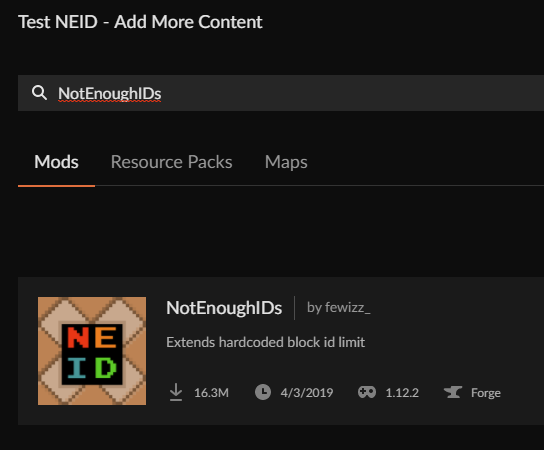
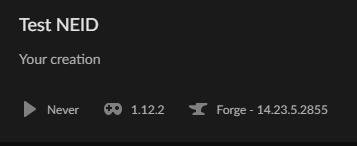
Created a profile with the recommended forge version, and I could find it at least.
digital roost
Maybe I did something wrong when I was searching
 digital roost
I just manually removed the mod and installed it using curse and it worked
opal cipher
Ah, awesome!
digital roost
I just wouldn’t read it when I manually installed it for some reason
fleet bear
manual bad. Have the app do it all
digital roost
Ok also why does it when I export the profile it puts a mod in the override file instead of putting with the rest of the mods
opal cipher
Because of silly bugs that do that sometimes.
So, just re-export and make sure that only actual mods not available on CF is in that folder
fleet bear
if the mod is on curseforge delete it and install it again with the app.
If not you need to follow the 3rd party list.
digital roost
It on curse forge and I used the app to get the mod but it still puts it in the override folder then when I put the mod in the mod folder. When people go to install the pack it tells them a mod is missing even though I put it in the pack and have the pack specify that it there but I won’t detect it so I have to put it as a required dependency
It does it only with reborn core
fleet bear
delete the mod and install it again. Adding it as a required dependency doesn't do anything.
rich flint
digital roost
I just manually removed the mod and installed it using curse and it worked
heads up - even the mod notenoughID's itself recommends getting the mod JustEnoughIDs (JEID) instead
digital roost
rich flint
heads up - even the mod notenoughID's itself recommends getting the mod JustEnou...
I will try that
 rustic sable
I tried clicking restart when it said the curseforge launcher had an update, but it does nothing.
Is this an issue with curseforge or with my device?
fleet bear
rustic sable
I tried clicking restart when it said the curseforge launcher had an update, but...
uninstall and reinstall the app
rustic sable
will do
 tardy turret


 queen storm
!status
red patioBOT
It is 09:43AM on Thursday for CurseForge my dudes.
Project Moderation Time
Temporary moderation changes! See #announcements for more info
- 6th, 7th, & 8th No Moderation
- 9th Moderation will be done!
- 10th & 11th No Moderation (Normal weekend)
- **12th, 13th & 14th Moderation will be done! **
- 15th & 16th No Moderation
- 17th & 18th No Moderation (Normal weekend)
- 19th Moderation will be done!
- 20th & 21st No Moderation
- 22nd & 23rd Moderation will be done!
- 24th & 25th No Moderation (Normal weekend)
- Normal Moderation hours and days resume after this!
Project/File moderation is done on;
Sunday, Monday, Tuesday, Wednesday, Thursday: 10AM - 6PM GMT+2
Friday, Saturday: No Moderation!
This process is First in, First out. Thus files submitted late in the work day may not be checked until the next work day.
New Projects or uploads requiring manual approval: 1-3 Working Days
Updates to approved projects not needing manual approval: 1 Hour
File sync to the Curseforge app may take up to 24 hours after approval.
 rose fog
I have a question pls
fleet bear
!help
red patioBOT
╰( ͡° ͜ʖ ͡° )つ──☆*:・゚ *˜”*°•.˜”*°• Many Help •°*”˜.•°*”˜* <:curselit:796985620550385705>
Please provide a description of your issue with as much detail as possible. If you have an issue with a mod or modpack, tell us the name. Explain what you can see happening. Be specific!
 Tell us what is happening, we already know it "doesn't work".
Avoid using words like "it", tell us exactly what "it" is.
Don't assume anyone knows what you are talking about, be specific.
Tell us what you expected to happen.
Provide screenshots or video if possible.
Provide a log if possible. ?mc-log
queen storm
Give the issue
queen storm
If it is just for friends: don't make the project
And it is a command for us, not a magic answer all
rose fog
i thaught this would've made a ticket or smt
queen storm
Nope
queen storm
Is it just for friends?
queen storm
Then you should write what it is about
rose fog
i wrote but still not approved
opal cipher
Then it probably wasn't a good enough description to what the modpack does.
What did you write?
queen storm
Not approved or rejected?
rose fog
HIDDEN A NAME is a an RPG style modpack where you are adventuring In the wilderness collecting various resources and materials to forge yourself the best gear possible !
HIDDEN A NAME adds new custom dungeons from different mods. It adds some custom crafts too ! use jei to see them.It also contains mods that can change villager's behavior and makes villager raids better and funnier. You can also discover loads of new biomes !
Death is inevitable as you may be confronted to deadly dangers YOU are living in a world where only elites survive. (note: bosses get harder and harder the more you respawn them)
The modpack is still on 1.16.5 because most of the mods are still not updated so pls wait . :)
When playing this modpack, you preferably get familiar with tinkers construct Tutorial will be listed.
i replaced the mdpk name
i just hid it
You can soon enjoy the multiplayer rpg aspect of this modpack in our server. (cracked players are allowed)
note: playing with shaders can enhance your visual experience just like increasing your volume
To run this modpack properly you need at least 1.5gb of DEDICATED RAM and to run with shaders we advise you to use sildur's vibrant shaders ( you can download here ) you need between 2-4 gb of DEDICATED RAM.
You can request mods that we can add by simply clicking here.
fleet bear
What was the reject message?
opal cipher
(cracked players are allowed)
I would reject this. x)
fleet bear
i have a feeling that's why it was rejected.
 oblique geyser
HI everyone... Planning to upload server files for my mod pack which is still under review
the complete zip file is 1.5GB for server files
but curseforge allows max of 1.2GB
can i put it in parts or provide external dropbox links in description (will this be against any TOS) ?
fleet bear
😨
queen storm
How is it 1.5GB?
oblique geyser
resource packs in config folder
immersive railroading stuff
queen storm
Resource pack on the server? What?
oblique geyser
yes...
fleet bear
servers don't need resource packs?
queen storm
Client has them already?
oblique geyser
both server and client needs them to work

the rp has custom models data which works with immersive railroads mod
oblique geyser
my work would have been easier if it was only client side 😛 but i guess not
fleet bear
and they are on minimum work duty for the next ~2 weeks.
oblique geyser
sure. waiting for pack to be approved.. Once thats done will raise a ticket
 quaint coral
I go this: "Cannot find child addon file: 3375873" when attempting to install "ArchitPack Greg 2" modpack
opal cipher
Sent to staff!
opal cipher
quaint coral
I go this: "Cannot find child addon file: 3375873" when attempting to install "A...
Try again in 5 minutes
quaint coral
opal cipher
Try again in 5 minutes
all is well, thanks
 worn wedge
quick question
when i install a mod
into my custom modpack
does it automatically install the required dependencies?
opal cipher
If you do it through the app, yes
worn wedge
ok ty
rose fog
fleet bear
What was the reject message?
sry for replying late it was sayin like u should tell more bout da modpack
 static jay
Hi, my friend gets "Cannot find child addon file: 2924386" while trying to install Enigmatica 4
opal cipher
Then extrapolate the description even more
opal cipher
static jay
Hi, my friend gets "Cannot find child addon file: 2924386" while trying to insta...
Passing to staff!
rose fog
can I pls get help
lyric crescent
opal cipher
We don't support cracked clients.
opal cipher
Then they need to get money.
rose fog
oh lol
opal cipher
But I'd guess that you'd have to explain a bit more what the modpack does in detail.
And remove the part about cracked clients
lyric crescent
There is no argument here for piracy. Curseforge does not support piracy.
rose fog
opal cipher
But I'd guess that you'd have to explain a bit more what the modpack does in det...
ok :D
THX for ur help
opal cipher
Good luck on your journeys, medelyess!
digital roost
guys
i made a mistake but i wanna know if it can still work
so i got minecraft but windows ten by acident :/
does curse forge use windows ten to 😦
lyric crescent
no. contact microsoft support
lyric crescent
yea
 night plaza
Hey everyone, I'm trying to download a modpack for Minecraft and it keeps cancelling because it cannot find child addon file?
digital roost
night plaza
Hey everyone, I'm trying to download a modpack for Minecraft and it keeps cancel...
"child"
oh no
 unborn basin
night plaza
Hey everyone, I'm trying to download a modpack for Minecraft and it keeps cancel...
unborn basin
night plaza
Hey everyone, I'm trying to download a modpack for Minecraft and it keeps cancel...
What is the file number?
 lyric crescent
@digital roost This is a support channel for Curseforge, if you don't need support with Curseforge please don't comment here.
digital roost
kk wait so it doesnt work with windows ten right
lyric crescent
No.
digital roost
digital roost
kk wait so it doesnt work with windows ten right
oh ok ima go then since this probably wont be any use
digital roost
lyric crescent
No.
cya
night plaza
Curseforge doesnt work with win10? What does it work with :S
lyric crescent
They are asking about Bedrock Minecraft aka "minecraft for windows 10"..
unborn basin
night plaza
Try now
night plaza
unborn basin
Try now
Worked whatever you did thank you
opal cipher
static jay
Hi, my friend gets "Cannot find child addon file: 2924386" while trying to insta...
Make your friend try now!
static jay
It works, thanks very much!
opal cipher
Yes, thank you, awesome Overwolf/CurseForge people!
 pearl talon
hello i cant find the real ice and fire mod and i dont know what to do pls help
night plaza
Question, I previously joined a server that had a bunch of mods when I didn't have Curse. But I'm curious to host a server for my friends. Now the server in question share their modpack via curseforge but the version isn't up to date for me to play Realms - is it possible they haven't uploaded their latest version?
Probably is common practice so people don't compete with their own stuff I guess
red patioBOT
The question you are asking about isn't related to CurseForge. Please use the appropriate game rooms by getting the role from #786424115535544350 or use #👽︱game-support for help.
This room is only for CurseForge Owned & Maintained features/services.
 white anchor
Is there a way to find out what mod keeps making my game crash?
lyric crescent
post a log in #👽︱game-support
white anchor
lyric crescent
post a log in <#778097796410376242>
alright posted it
white anchor
lyric crescent
dont see why i would need a ping for that..
<#777323206884327484>
mb I forgot to turn off the @ for it
rose fog
@opal cipher can i send you my desc and u rate it ?
opal cipher
I do not hold any power over how it's gonna be rated/reviewed later, and I have DMs closed, sorry. ^^
opal cipher
Use pastebin or some service and link it ^^
 placid sleet
What else am I expected to write I don't understand


Do I need to write an essay convincing the players to use my mod or smthn
rose fog
ye
placid sleet
Bruh
rose fog
i wrote one
placid sleet
I'm not doing all that
opal cipher
rose fog
i have link
Good amount of descriptions to the mods added to the pack. But I'd use a bit more spacing/paragraphs, to make it a bit easier to read. ^^
lyric crescent
Doesn't explain why you would unstrip wood. What is the reason someone would use this?
rose fog
opal cipher
Good amount of descriptions to the mods added to the pack. But I'd use a bit mor...
ok :)
placid sleet
Ppl accidently strip wood all the time
No literally it happens all the time
Builders always complain about it
You have to go get new wood bc they accidentally strip the wood
Also it's literally in the summary
rose fog
opal cipher
Good amount of descriptions to the mods added to the pack. But I'd use a bit mor...
do i have to skip a line every sentence
placid sleet
Anyone who regularly plays the game knows why you'd unstrip wood why do I have to write about that
lyric crescent
I dont..
placid sleet
You don't regularly play the game?
lyric crescent
I don't have any idea what you are talking about, or why anyone would strip wood.
opal cipher
rose fog
do i have to skip a line every sentence
Nah, you can have some blocks, but I'd split it up a bit at least. Give it some breathing room.
rose fog
ok imma do it rn
signal ridge
Description should explain for those that may be new to this version, just because you know what it is doesn’t always mean that others will.
opal cipher
You can take inspiration from other modpacks on how to "design" the description. ^^
placid sleet
signal ridge
Description should explain for those that may be new to this version, just becau...
The summary already gives an explanation tho
lyric crescent
Ok, then make a ticket and argue with them. None of us have any control over what is accepted.
opal cipher
Yeah, true. But a summary is supposed to be short and nice, while the description can be filled with images, videos and things about it.
I for one, didn't even know that stripping wood was a thing until I saw your post.
So I'd have no clue what it'd do.
rose fog
opal cipher
Nah, you can have some blocks, but I'd split it up a bit at least. Give it some ...
i just made the desc into chapters its alot nicer i agree
opal cipher
rose fog
i just made the desc into chapters its alot nicer i agree
Awesome!
 lyric crescent
?reject-cfhosted
red patioBOT
The following files belong to CurseForge-hosted projects, and should therefore not be added directly to zip files:
-
Remove any mods listed in the error message from the profile you exported. Then reinstall them with the CuseForge app. DO NOT drag and drop files from the site.
-
Export the profile again, open the new zip that was just made. Check for the
overrides/modsfolder. If you still see any mods in that folder do the step above again for each mod. -
Upload the zip once complete and no more mods show in the
overrides/modsfolder.
 lyric crescent
wrong name seems like
lyric crescent
from where
 uncut notch
website
lyric crescent
link it?
 cold zodiac
Modpack that i make on curseforge, can i put them into the feed the beast launcher, if so how??
lyric crescent
we have nothing to do with that launcher
cold zodiac
Yh i know
rose fog
yamza can i get rated pls ?
lyric crescent
so ask the people who do?
lyric crescent
this is not a question for curseforge
rose fog
wat
lyric crescent
I have no interest in "rating" your description. Fix it as they said and wait for it to be checked.
uncut notch
so its aprooved and it still aint' showin
lyric crescent
link?
uncut notch
lyric crescent
link?
opal cipher
It's probably gonna take a while for it to sync to the app.. Like up to 24+ hours in worst case
lyric crescent
what is sniff client
digital roost
How can I downloaded mods on to my playstation 4 for realm
lyric crescent
Can't.
Curseforge mods are for java version only. PS4 is Bedrock.
And they don't work on realms anyway.
 worldly minnow
hey there! I created a project but somehow cant edit anything anymore, even tho im the owner D:
"you dont have permission"
lyric crescent
try relogging
 lyric crescent
gunna need a ticket then
red patioBOT
:bug: Reporting via Website :bug:
Can't open the app or would rather use the website? You can do so here: https://support.curseforge.com/en/support/tickets/new
Fill out the form with accurate detailed information, "It doesn't work" isn't helpful! What exactly doesn't work and why doesn't it work should be easy to answer!
Make sure to upload your Overwolf logs with the Upload File option on the ticket, information on how to get these logs can be found here https://support.overwolf.com/en/support/solutions/articles/9000176827-how-to-get-your-overwolf-logs
lyric crescent
!ticket-site
worldly minnow
thx :3 i did :)
Is there a forum topic, where i can see how to set up a server pack for cf ?
lyric crescent
?mc-serverpack
red patioBOT
Serverpacks are special files uploaded alongside an existing project file. If the main file is rejected the server pack is also rejected.
You require an already uploaded export file to upload a server pack!
- Make the server pack by zipping up the required files by selecting the required folders & files. It should include the config and mod folders at a minimum, plus anything else you specifically required to run the server. Start/Run/Setup scripts are optional. Don't include modloader files or the minecraft server jar.
- Go to the
Filestab on the project. - Click the name of the file you wish to upload the server pack to. The pack and server should match pack versions.
- Click
Upload Additional File. - Fill out the form.
uncut notch
can i upload a modpack that is just a .mc folder, Just in case anyone wants to get a modpack but does not have curseforge app, Hope it made sence
lyric crescent
no
uncut notch
ok
rose fog
wat does the changes made status means ?
lyric crescent
?
rose fog
my project status is changes made
lyric crescent
screenshot
lyric crescent
From the context I would assume that means you made changes and it''s waiting to be checked.
rose fog
ok (:
 oak egret
can someone help me installing a minimap
 worthy mauve
oak egret
can someone help me installing a minimap
worthy mauve
oak egret
can someone help me installing a minimap
journey map is great for a minimap
oak egret
how do i instal it
worthy mauve
you can download it through modpacks like "kinda crazy craft" thats all ik
oak egret
ok thx man
worthy mauve
np
lyric crescent
?mc-installmods
red patioBOT
How to install mods in CurseForge App.
- Click
+ Create Custom Profile - Name it, select the required Minecraft version, select the Forge version (usually the highest number), click
Create. - Click the profile icon.
- Click
Add More Content - Search and install the desired mods.
- Start the game!
How to install mods not on CurseForge.
- Right click the profile picture or Open the profile and click the Icon next to the play button.
- Click
Open Folder. - Drag the mod(s) into the
modsfolder. (Note: Some mods will require others, to run. Make sure to read the instructions for the mod!) - Start the game!
 worthy mauve
@oak egret yamza got ya the walkthrough thanks @lyric crescent
lyric crescent
can we not with the unneeded pings..
worthy mauve
sorry i was just saying thanks yeesh
oblique geyser
Usually how long does it take for a modpack to be approved? Since you guys are in limited work for next 2 weeks as informed before
New modpack author questions 😅
lyric crescent
!status
red patioBOT
It is 06:30PM on Thursday for CurseForge my dudes.
Project Moderation Time
Temporary moderation changes! See #announcements for more info
- 6th, 7th, & 8th No Moderation
- 9th Moderation will be done!
- 10th & 11th No Moderation (Normal weekend)
- **12th, 13th & 14th Moderation will be done! **
- 15th & 16th No Moderation
- 17th & 18th No Moderation (Normal weekend)
- 19th Moderation will be done!
- 20th & 21st No Moderation
- 22nd & 23rd Moderation will be done!
- 24th & 25th No Moderation (Normal weekend)
- Normal Moderation hours and days resume after this!
Project/File moderation is done on;
Sunday, Monday, Tuesday, Wednesday, Thursday: 10AM - 6PM GMT+2
Friday, Saturday: No Moderation!
This process is First in, First out. Thus files submitted late in the work day may not be checked until the next work day.
New Projects or uploads requiring manual approval: 1-3 Working Days
Updates to approved projects not needing manual approval: 1 Hour
File sync to the Curseforge app may take up to 24 hours after approval.
 timid sierra
could somebody help me?
worthy mauve
whats up nerv?
timid sierra
i tried dragging mods from a modpack to curseforge modpack and it gives me errors when running minecraft. i tried several things. one of them is, 1 by 1, istalling and searching every mod on curseforge, not dragging it, cuz seemly, it isnt working, so, i searched and downloaded every single mod from the modpack on the curseforge app and it still gives me errors when launching
 worthy mauve
some of the mods might be outdated or not supported anymore
timid sierra
but they were in the curseforge app
i think that they should be when i downloaded them from the app
?mc-installmods
red patioBOT
How to install mods in CurseForge App.
- Click
+ Create Custom Profile - Name it, select the required Minecraft version, select the Forge version (usually the highest number), click
Create. - Click the profile icon.
- Click
Add More Content - Search and install the desired mods.
- Start the game!
How to install mods not on CurseForge.
- Right click the profile picture or Open the profile and click the Icon next to the play button.
- Click
Open Folder. - Drag the mod(s) into the
modsfolder. (Note: Some mods will require others, to run. Make sure to read the instructions for the mod!) - Start the game!
worthy mauve
hmm dunno then
timid sierra
i did exactly what is told in How to install mods in CurseForge App.
is the problem in the forge version, idk
lyric crescent
why are you dragging and dropping mods?
timid sierra
because at first i didnt want to download every mod, i looked at it as a waste of time
but i noticed it isnt working
lyric crescent
What is it you are trying to do exactly
timid sierra
thenn, i made a new custom profile and started downloading every mod, 1 by 1
i am trying to play a modpack, a modpack that isnt in curseforge app
i mean, yk how there are ready modpacks for u to play
this one is from 100 days videos, i downloaded it, and i just want to play
i can even dm you the video link
lyric crescent
should probably ask whoever made it for instructions then
lyric crescent
then dont use it
opal cipher
It's not really an support issue for CurseForge, if they don't want to share the pack in working condition
lyric crescent
Very much so.
If the person who made the thing can't be bothered to help people use it then why bother?
There are thousands of packs made by people who do support them, pick one of those.
timid sierra
yes, but i really want to play that, pillager apocalypse kind of thing and there is no such modpack, atleast i havent seen one
timid sierra
opal cipher
It's not really an support issue for CurseForge, if they don't want to share the...
smth in the installation is wrong, because i downloaded every mod separately, it isnt like i dragged his mods, i downloaded them from the curseforge app and all of them are up to date
red patioBOT
The question you are asking about isn't related to CurseForge. Please use the appropriate game rooms by getting the role from #786424115535544350 or use #👽︱game-support for help.
This room is only for CurseForge Owned & Maintained features/services.
opal cipher
So check in #👽︱game-support or #🧱︱mc-other-help and see if anyone is willing to help out
digital roost
Hello i need a help. When i want to update addons to WoW TBC i get a announcement "Missing required disk permissions for installation". I did everything what is written in helpdesk but nothing happend. What should I do?
 late remnant
hello,Anyone know how to fix "An exception occurred during a webclient request"?
lyric crescent
!webclient
red patioBOT
WebClient errors are from networking issues to your computer. You can try a few things to fix it:
- Restart the computer.
- Restart your router/modem.
- Try another internet source like a hotspot, wired connection or moving closer to the WiFi.
- Pause/Stop other things using the internet. (Streams, music, etc)
- If this still doesn't work, try again in an hour and hope your connection is stable.
late remnant
cheers
rose fog
bruh y is moderation takin alot long
fleet bear
!status
red patioBOT
It is 07:43PM on Thursday for CurseForge my dudes.
Project Moderation Time
Temporary moderation changes! See #announcements for more info
- 6th, 7th, & 8th No Moderation
- 9th Moderation will be done!
- 10th & 11th No Moderation (Normal weekend)
- **12th, 13th & 14th Moderation will be done! **
- 15th & 16th No Moderation
- 17th & 18th No Moderation (Normal weekend)
- 19th Moderation will be done!
- 20th & 21st No Moderation
- 22nd & 23rd Moderation will be done!
- 24th & 25th No Moderation (Normal weekend)
- Normal Moderation hours and days resume after this!
Project/File moderation is done on;
Sunday, Monday, Tuesday, Wednesday, Thursday: 10AM - 6PM GMT+2
Friday, Saturday: No Moderation!
This process is First in, First out. Thus files submitted late in the work day may not be checked until the next work day.
New Projects or uploads requiring manual approval: 1-3 Working Days
Updates to approved projects not needing manual approval: 1 Hour
File sync to the Curseforge app may take up to 24 hours after approval.
rose fog
its 9
digital roost
SO is there anyone who can help me?
rose fog
yesterday when 'moderation wont be done' my project got moderated 3 times in less than 2 hrs
lyric crescent
your point?
lyric crescent
digital roost
SO is there anyone who can help me?
!help
Also#📛︱rules 10
red patioBOT
╰( ͡° ͜ʖ ͡° )つ──☆*:・゚ *˜”*°•.˜”*°• Many Help •°*”˜.•°*”˜* <:curselit:796985620550385705>
Please provide a description of your issue with as much detail as possible. If you have an issue with a mod or modpack, tell us the name. Explain what you can see happening. Be specific!
Tell us what is happening, we already know it "doesn't work".
Avoid using words like "it", tell us exactly what "it" is.
Don't assume anyone knows what you are talking about, be specific.
Tell us what you expected to happen.
Provide screenshots or video if possible.
Provide a log if possible. ?mc-log
digital roost
!help When i want to update addons to WoW TBC i get a announcement "Missing required disk permissions for installation". I did everything what is written in helpdesk but nothing happend.
lyric crescent
!ticket-site
red patioBOT
:bug: Reporting via Website :bug:
Can't open the app or would rather use the website? You can do so here: https://support.curseforge.com/en/support/tickets/new
Fill out the form with accurate detailed information, "It doesn't work" isn't helpful! What exactly doesn't work and why doesn't it work should be easy to answer!
Make sure to upload your Overwolf logs with the Upload File option on the ticket, information on how to get these logs can be found here https://support.overwolf.com/en/support/solutions/articles/9000176827-how-to-get-your-overwolf-logs
 stiff canyon
Hey, I'm having an issue trying to add a mod to my Minecraft pack.
Mod is still in alpha, but considering that my pack is set to accept alphas, that shouldn't be a problem.
What could be the problem then?
lyric crescent
alpha's dont appear in the app, you need to add it manually
stiff canyon
Like what? Move in the jar file?
red patioBOT
How to install mods in CurseForge App.
- Click
+ Create Custom Profile - Name it, select the required Minecraft version, select the Forge version (usually the highest number), click
Create. - Click the profile icon.
- Click
Add More Content - Search and install the desired mods.
- Start the game!
How to install mods not on CurseForge.
- Right click the profile picture or Open the profile and click the Icon next to the play button.
- Click
Open Folder. - Drag the mod(s) into the
modsfolder. (Note: Some mods will require others, to run. Make sure to read the instructions for the mod!) - Start the game!
lyric crescent
part 2
lyric crescent
no
 gray shuttle
Basically@stiff canyon if you add mods to modpacks manually not through curseforge then it will count as extra file and will not be able to be uploaded to curseforge and approved but works well between friends
stiff canyon
i actually want to publish the pack at some point 🥲
lyric crescent
mod owner needs to make a release version then
gray shuttle
Yeah or the mods need removed from the pack
My own pack still isn't reviewed but that's okay lol
The issue is that all these times aren't declared on a specific time zone lol
fleet bear
All of them are.
gray shuttle
Ah
fleet bear
The status command even gives you the current time for them.
And theres a link in the announcements to their current time and date.
fleet bear
Yes. Moderation is likely done for the day. Will need to wait for next week.
queen storm
That is what you get with holidays 🤷
fleet bear
Happens once (or twice idk) a year. You will survive
lyric crescent
This isn't the service I paid for.
fleet bear
Well dang
rose fog
how long does it take to get moderation ?
queen storm
!status
red patioBOT
It is 09:38PM on Thursday for CurseForge my dudes.
Project Moderation Time
Temporary moderation changes! See #announcements for more info
- 6th, 7th, & 8th No Moderation
- 9th Moderation will be done!
- 10th & 11th No Moderation (Normal weekend)
- **12th, 13th & 14th Moderation will be done! **
- 15th & 16th No Moderation
- 17th & 18th No Moderation (Normal weekend)
- 19th Moderation will be done!
- 20th & 21st No Moderation
- 22nd & 23rd Moderation will be done!
- 24th & 25th No Moderation (Normal weekend)
- Normal Moderation hours and days resume after this!
Project/File moderation is done on;
Sunday, Monday, Tuesday, Wednesday, Thursday: 10AM - 6PM GMT+2
Friday, Saturday: No Moderation!
This process is First in, First out. Thus files submitted late in the work day may not be checked until the next work day.
New Projects or uploads requiring manual approval: 1-3 Working Days
Updates to approved projects not needing manual approval: 1 Hour
File sync to the Curseforge app may take up to 24 hours after approval.
rose fog
queen storm
!status
no i mean how llong does it takes to mod to notice ur changes ?
its been like 5hrs
 solar trout
cant open the installer it asks for permission then i accept then just wont open for some reason
i did what the article told me to do still cant fix
queen storm
rose fog
no i mean how llong does it takes to mod to notice ur changes ?
What mod?
rose fog
modpack
queen storm
What needs to notice what then?
rose fog
desc
heres da last msg i got
The status of the project ... has been changed to Changes Required
Notes:
The description for ... doesn't fully explain what it provides:
queen storm
Then you need to wait till they are working again
lyric crescent
No one in this discord will review your project.
rose fog
ok thx
queen storm
Nobody can either
rose fog
?
queen storm
And even then: still first in, first out
People in here manage the discord, not approval
rose fog
ohhhhhhh
solar trout
solar trout
cant open the installer it asks for permission then i accept then just wont open...
anyone know how can i fix it?
digital roost
I think downloads on my modpack are frozen, is that a known issue?
gray shuttle
@solar trout if your on a Mac not much can be done for Windows try running as admin then downloading pack again
 wind cedar
does anyone know how to fix the "a block in the world is causing problems" error
red patioBOT
It is 10:21PM on Thursday for CurseForge my dudes.
Project Moderation Time
Temporary moderation changes! See #announcements for more info
- 6th, 7th, & 8th No Moderation
- 9th Moderation will be done!
- 10th & 11th No Moderation (Normal weekend)
- **12th, 13th & 14th Moderation will be done! **
- 15th & 16th No Moderation
- 17th & 18th No Moderation (Normal weekend)
- 19th Moderation will be done!
- 20th & 21st No Moderation
- 22nd & 23rd Moderation will be done!
- 24th & 25th No Moderation (Normal weekend)
- Normal Moderation hours and days resume after this!
Project/File moderation is done on;
Sunday, Monday, Tuesday, Wednesday, Thursday: 10AM - 6PM GMT+2
Friday, Saturday: No Moderation!
This process is First in, First out. Thus files submitted late in the work day may not be checked until the next work day.
New Projects or uploads requiring manual approval: 1-3 Working Days
Updates to approved projects not needing manual approval: 1 Hour
File sync to the Curseforge app may take up to 24 hours after approval.
scenic crypt
how long does it take for a moderator to review a modpack
its been like over 7 hours for me
 hardy spoke
be patient, they're not working right now
also moderation is first in, first out
hardy spoke
red patio
** **
**It is 10:21PM on Thursday for CurseForge my dudes.**
if you read this you'll see that is 10pm for them
also if you read it you'll see that they didnt work in the last 3 days, and today was the only day they work
the magic of reading ✨
 glass wave
is there anyway to uninstall a game from the curseforge client, because it says i have a game installed that i do not
hardy spoke
red patio
** **
**It is 10:21PM on Thursday for CurseForge my dudes.**
this?
 proud rapids
Hi, how update my mod in modepack?

 worn pine
Does anyone know how i can reduce lag? I already cranked up the allocated memory, but the game keeps being really shocky. My laptop really aint that bad so do yall know a solution?
I'm trying to play the Zombie Apocalypse mod from ForgeLabs
solar trout
why does my game crash when i put optfine in the mods folder
i need it to use shaders
lyric crescent
! mc-optifine
red patioBOT
Optifine and Curseforge
To install Optifine with modpacks on Curseforge:
Right click the modpack icon, select Open Folder.
Put the Optifine.jar into the mods folder.
Now load the modpack normally.
We do not offer support for Optifine. If you have issues with Optifine, remove it. If you want further support try the discord found on their website.
https://www.optifine.net/home
solar trout
is there any other way i can use shaders without optfine
lyric crescent
No
solar trout
how did chosenarchtecit use optfine with betterminecraft mod pack
 signal pivot
When i try to download a installer it wouldnt do anything what do i do
signal pivot
solar trout
how did chosenarchtecit use optfine with betterminecraft mod pack
He prob added optifine to it
solar trout
worn pine
Does anyone know how i can reduce lag? I already cranked up the allocated memory...
render distance maybe
lyric crescent
Please read the message above, this is not optifine support
worn pine
If you click on the 3 dots when you have the mod selected in curseforge, you can click on ''Open Folder'' or something along those lines, then go to the Mods folder and drag optifine in
solar trout
lyric crescent
Please read the message above, this is not optifine support
okay sorry
signal pivot
signal pivot
When i try to download a installer it wouldnt do anything what do i do
Can someone help me with this
worn pine
solar trout
render distance maybe
It's already on like 8
lyric crescent
What installer
signal pivot
The minecraftforge installer
worn pine
worn pine
Does anyone know how i can reduce lag? I already cranked up the allocated memory...
I'll just wait here
red patioBOT
Wording is important!
Forge = Minecraft Forge, This is a modloader often just called "Forge".
Fabric = Fabric MC, this is another modloader, just called "Fabric".
CurseForge = A Website/App that has content for games.
Mods = Individual mod files.
Modpacks = Multiple mods put into the mods folder or downloaded from CurseForge.
These are not Interchangeable! Please use the correct terms as it allows us to help you faster!
signal pivot
Oh oke sorry
solar trout
its ok
worn pine
Alright my turn hehe
lyric crescent
!notcf
red patioBOT
The question you are asking about isn't related to CurseForge. Please use the appropriate game rooms by getting the role from #786424115535544350 or use #👽︱game-support for help.
This room is only for CurseForge Owned & Maintained features/services.
signal pivot
Is there a discord server for forge
lyric crescent
There is, look for Minecraft forge.
signal pivot
Oke
 spiral halo
So I have my gamma set to 100.0 instead of 1.0 so I’m able to see in the dark without torches or anything but when I launched Minecraft with a mod pack that I made that has 4 mods I can’t see in the dark anymore
signal ridge
Forge or a custom profile on Curseforge? Curseforge and Forge are not the same
Will take this to #👽︱game-support as this is not a Curseforge issue
Not the place for this
What does it have to do with Curseforge support?
Say that next time then, dont post spam
Anyways, you want to make a mod or modpack? They are not the same thing
this for minecraft?
 vestal musk
hello, I allow myself to come here following a problem with my friend's mc, he has updated his windows so reinstall, reinstall mc and the modpack, it still runs at 0-1 fps, it has a radeon rx 550 4gb of vram and 16gb of ram, on the normal mc it runs mc normally without worries, do you have any idea? it has been on it for 2 months, thank you!
Sorry, I'm French, thank you google translation ^^
spiral halo
so every time i add optifine zoom to my modpack it doesnt work it just crashes every time i try to play
fleet bear
vestal musk
hello, I allow myself to come here following a problem with my friend's mc, he h...
Can they come here instead?
fleet bear
spiral halo
so every time i add optifine zoom to my modpack it doesnt work it just crashes e...
!notcf
red patioBOT
The question you are asking about isn't related to CurseForge. Please use the appropriate game rooms by getting the role from #786424115535544350 or use #👽︱game-support for help.
This room is only for CurseForge Owned & Maintained features/services.
signal ridge
Can have a look in #👽︱game-support
fallen loom
Once the launcher is up and running it's a Minecraft thing rather than a Curse thing
spiral halo
whats the point of curseforge if you cant use it
fallen loom
Curse support is for the app and the site
fleet bear
Curseforge doesn't make any of the mods. Also we dont support optifine.
 tawny narwhal
ok so ive been trying to link my minecraft account to my curseforge acocunt, thinking i could maybe connect it with twitch, boy was i wrong. not only is my twitch accoun now (supposedly) linked to my brothers account, i cant even switch which account is connected to curseforge i am seriously pissed that nothing is helping
fleet bear
Why are you trying to do any of that...?
tawny narwhal
i want to download mods and the website wont work
tawny narwhal
yes i do own the game
but since my brother used the app before theres no clear way to change the account the app is linked to
fleet bear
Then install the curseforge app, click minecraft and set it up.
The app isnt linked to anything mate.
fallen loom
Are you trying to connect an old Curse account from the pre-Twitch days to your Twitch account so you can use it again?
fleet bear
🤦
lyric crescent
Guessing they don't know that the Minecraft launcher has a log out option in the upper left corner
fleet bear
That's what I figure too
fallen loom
Funnily enough the launcher supports account switching 😛
fleet bear
If your not here for support spamming the support room is going to lead to a swift ban
 stark rapids
1.7.10 keeps crashing
signal ridge
 bright belfry
my favorite mod is probably slow zombies
bright belfry
my favorite mod is probably slow zombies
Go to #786424115535544350 get the minecraft role then head to one of the mc- channels if you want to about minecraft
fallen loom
!notcf
red patioBOT
The question you are asking about isn't related to CurseForge. Please use the appropriate game rooms by getting the role from #786424115535544350 or use #👽︱game-support for help.
This room is only for CurseForge Owned & Maintained features/services.
fleet bear
stark rapids
1.7.10 keeps crashing
Only 1.7.10?
stark rapids
yes
fleet bear
Did you try multiple packs?
stark rapids
no
fleet bear
Then do what the message said above.
 echo idol
Can I make a server for free on curse forge
fleet bear
No
fallen loom
Curse doesn't do anything with servers
Unless you're talking about server-specific pack files
 jade bane
Is the site broken rn?
tawny narwhal
tawny narwhal
hold on i got to do something
anyways im back now. what im trying to say is that when i happen to click "run vanilla minecraft" it switches to my brothers account and not mine.
fleet bear
Then log out....?
tawny narwhal
but that wont just switch it to mine and i can just download mods
that just logs out the account
anditll just log back in when i click run vanilla minecraft again
fleet bear
Why are you clicking run vanilla anyway..?
fleet bear
None of what you are saying makes any sense.
If you log out of the other account and log into yours theres no way for it open any other account
Or you log into both and just switch them in the launcher before hitting play.
tawny narwhal
ok so let me try to explain. you see all these mods? i didnt download them. it was from when my brother used the computer i have currently. now all i want to know is that if theres a way where i can possibly just make an entirely new account or something. but yes i will try that;.
 fleet bear
I already said that the app doesn't care about who's logged in.
Just delete what you dont want.
Theres no user profiles on the app. Anyone who uses it sees the same everything.
 meager dagger
i launched curse forge and all my mods are gone
fleet bear
Your folder changed or something else deleted them
meager dagger
no they are in the files but not showing up in curseforge
tawny narwhal
ok so i finally changed the "linked" minecraft account. thanks for the help guys (im serious)
fleet bear
meager dagger
no they are in the files but not showing up in curseforge
That's because the folder likely changed then
!mc-path
red patioBOT
Change your install path to the following:
For Windows: C:\CurseForge
-Go to C:\ drive. Make a new folder. Name it Curseforge.
For Mac: /Users/Shared/CurseForge
If Minecraft is not installed in CurseForge App:
- Click the in the top left.
- Select Minecraft from the list of games.
- Select the
Advancedoption and pick the folder you just made. - Click
Continue.
If Minecraft is installed in CurseForge App:
- Click the in the bottom left.
- Select the Minecraft tab.
- Click
Change. - Select the folder you just made.
:no_entry_sign: Minecraft Files should NOT be installed inside the following locations :no_entry_sign:
:no_entry_sign: .minecraft folder.
:no_entry_sign: OneDrive folders.
:no_entry_sign: Desktop folder.
:no_entry_sign: Drive roots I.E. Directly into the C:\ drive.
:no_entry_sign: iCloud enabled folders.
:no_entry_sign: or any other cloud saved folder.
If any of the above are in the path you need to change/move it!
digital roost
Whenever i try to log in it won't let me
it keeps saying "Oops, Lets try this one more time."
lyric crescent
Are you on wifi?
 brazen creek
Whenever i try to download this modpack called ''Planetary'' the modpack finishes downloading and says ''Cannot find child addon file: 2827997'', is there any way i can solve this?
scenic crypt
hardy spoke
also if you read it you'll see that they didnt work in the last 3 days, and toda...
I’m a bit late to this but for some reason a moderator reviewed my modpack on the 8th but it just didn’t meet requirements so I just imagined they didn’t take breaks😅😅
digital roost
lyric crescent
Are you on wifi?
yeah
red patioBOT
It is 02:33AM on Friday for CurseForge my dudes.
Project Moderation Time
Temporary moderation changes! See #announcements for more info
- 6th, 7th, & 8th No Moderation
- 9th Moderation will be done!
- 10th & 11th No Moderation (Normal weekend)
- **12th, 13th & 14th Moderation will be done! **
- 15th & 16th No Moderation
- 17th & 18th No Moderation (Normal weekend)
- 19th Moderation will be done!
- 20th & 21st No Moderation
- 22nd & 23rd Moderation will be done!
- 24th & 25th No Moderation (Normal weekend)
- Normal Moderation hours and days resume after this!
Project/File moderation is done on;
Sunday, Monday, Tuesday, Wednesday, Thursday: 10AM - 6PM GMT+2
Friday, Saturday: No Moderation!
This process is First in, First out. Thus files submitted late in the work day may not be checked until the next work day.
New Projects or uploads requiring manual approval: 1-3 Working Days
Updates to approved projects not needing manual approval: 1 Hour
File sync to the Curseforge app may take up to 24 hours after approval.
 fleet bear
brazen creek
Whenever i try to download this modpack called ''Planetary'' the modpack finishe...
fleet bear
brazen creek
Whenever i try to download this modpack called ''Planetary'' the modpack finishe...
try again
brazen creek
fleet bear
try again
I've tried multiple times, i installed curseforge again and it still shows up.
I downloaded another modpack and it works just fine.
fleet bear
digital roost
excuse me what
This is a relatively recent rule change. All the old packs that had it in the name got to keep it.
fleet bear
brazen creek
I've tried multiple times, i installed curseforge again and it still shows up.
I fixed the file so it should work now. It has nothing to do with you, just try again.
brazen creek
fleet bear
I fixed the file so it should work now. It has nothing to do with you, just try ...
Thanks, I'll tell you if it works.
 rain spire
I am not sure if this is the right place to ask: I created a Modpack, how long does it take to be approved?
lyric crescent
!status
red patioBOT
It is 03:20AM on Friday for CurseForge my dudes.
Project Moderation Time
Temporary moderation changes! See #announcements for more info
- 6th, 7th, & 8th No Moderation
- 9th Moderation will be done!
- 10th & 11th No Moderation (Normal weekend)
- **12th, 13th & 14th Moderation will be done! **
- 15th & 16th No Moderation
- 17th & 18th No Moderation (Normal weekend)
- 19th Moderation will be done!
- 20th & 21st No Moderation
- 22nd & 23rd Moderation will be done!
- 24th & 25th No Moderation (Normal weekend)
- Normal Moderation hours and days resume after this!
Project/File moderation is done on;
Sunday, Monday, Tuesday, Wednesday, Thursday: 10AM - 6PM GMT+2
Friday, Saturday: No Moderation!
This process is First in, First out. Thus files submitted late in the work day may not be checked until the next work day.
New Projects or uploads requiring manual approval: 1-3 Working Days
Updates to approved projects not needing manual approval: 1 Hour
File sync to the Curseforge app may take up to 24 hours after approval.
 alpine lion
Will the app for curseforge ever have texture packs like the website?
lyric crescent
It does, resource packs
alpine lion
When did they add that? Have I rly not used curse forge app that long?
lyric crescent
Long ago 🤷
fleet bear
it's had it before it had mods
 shrewd umbra
I dragged mods into a folder in a custom pack but they don't show up loaded into the "mods" section? When I download mods from in the app and they get added to a pack they show up fine.
fallen loom
Are the mods you added mods that can be found on Curse? Like the exact same files?
shrewd umbra
Is that required?
I think some of them are on the site but not in app. I can't remember because it's several.
fallen loom
Curse can only track mods that it has info on, random jar files won't be recognized... Minecraft itself will still see them though
shrewd umbra
That makes sense.
fallen loom
My guess is the feature works by submitting the jar's file hash to the server to get metadata, so an identical file would need to be known by Curse for it to work (unpublished versions wouldn't work)
shrewd umbra
Ah.
Well I think then I'll just use the vanilla launcher for the one set of mods and Curse for everything else for now. Good to know it was that simple. 😅
fallen loom
Minecraft will still use the jars, you just won't be able to manage them with Curse
fleet bear
correct
the game and app aren't aware of each other at all. The app just manages files in folders
fleet bear
yep
shrewd umbra
Oh. I think I have one more question. How can I copy over settings configs to the modpacks for certain mods?
fleet bear
repalce the config in the config folder like normal.
shrewd umbra
Ah okay.
 unique vapor
hi
i cannot open it
this is what it shows

i am on mac
and when i open it it shows this

 steel pendant
how do i combine two modpacks
unique vapor
pfft
opal cipher
.. or you can upgrade? :D
fleet bear
time for a new computer?
unique vapor
dude lol will u pay for it
fleet bear
Nope. Need to replace my own.
 fleet bear
No...
opal cipher
.. can that machine even play modded minecraft? :P
fleet bear
Yeah, so is mine.
unique vapor
yes lol
fleet bear
My current PC is 7 or 8 years old now.
opal cipher
Mine is.. depending on parts, a bit over 14 years old. Most components have been replaced, but I still have some old harddrives that I haven't managed to replace yet.
fleet bear
There's a point where stuff just becomes outdated, OW doesn't support anything below 10.15 currently. All you can do is update or find another service.
say what? It's a custom built PC. There's no brand.
opal cipher
It in english
unique vapor
th is this
opal cipher
:3
opal cipher
Since neither of us work at Overwolf/CurseForge we can't make promises that a version that will support outdated operating systems.
unique vapor
ooo
opal cipher
They have passed their end of life-date, and is therefor no longer supported
unique vapor
no sftware update
fleet bear
Why are you wasting our time when we told you the option is to
A. Upgrade
or
B. Find another app that works.
unique vapor
i just updated it
opal cipher
And I'm sorry, but I don't know any other modmanagers for Mac, but perhaps there are some
unique vapor
fleet bear
Why are you wasting our time when we told you the option is to
A. Upgrade
or
B....
b and suggestion
opal cipher
Apple should allow upgrades too then, but they also decided to not let you install 10.15.
steel pendant
can someone tell me how to combine two modpacks
unique vapor
me
fleet bear
This has nothing to do with CurseForge any longer.
You have your options, if you keep continuing on it will be considered spam.
fleet bear
steel pendant
can someone tell me how to combine two modpacks
You don't. They will break.
steel pendant
then how do i get superpowers in a city
fleet bear
You install the mods required?
steel pendant
i have superpowers but i want a city to swing in
fleet bear
then download a map or city generation mod?
steel pendant
wait what how
fleet bear
!mc-installmods
red patioBOT
How to install mods in CurseForge App.
- Click
+ Create Custom Profile - Name it, select the required Minecraft version, select the Forge version (usually the highest number), click
Create. - Click the profile icon.
- Click
Add More Content - Search and install the desired mods.
- Start the game!
How to install mods not on CurseForge.
- Right click the profile picture or Open the profile and click the Icon next to the play button.
- Click
Open Folder. - Drag the mod(s) into the
modsfolder. (Note: Some mods will require others, to run. Make sure to read the instructions for the mod!) - Start the game!
steel pendant
this did not help me
fleet bear
then I don't know what you want me to do.
steel pendant
can i put a city into my modpack
fleet bear
!mc-modifypack
red patioBOT
How to add/remove mods in a modpack.
- Click on the picture of the modpack.
- Click the

Add More Contentbutton, IF this button is not there, see below before continuing. - Find the Mods, Resource Packs or Maps you wish to Install and click
Installon them. - Wait for all the required mods to be downloaded.
- Start the modpack.
How to Enable/Disable content management for modpacks.
- Click on the picture of the modpack.
- Click on the button next to the
Playbutton. - Click on

Profile Options. - Check the
Allow content management for this profileoption if you want to edit the content of the modpack, uncheck it to disable.
NOTE: The Allow content management for this profile option is what allows you to Delete, Disable, Update or Install any Mods, Resource Packs or Maps managed by CurseForge. It must be on to modify any of them! (Currently)
fleet bear
you click the delete option
steel pendant
where dat
fleet bear
the trashcan?
steel pendant
oh my screen wasnt full
is there a way to make it so that the game doesnt freeze every ive seconds
fleet bear
!notcf
red patioBOT
The question you are asking about isn't related to CurseForge. Please use the appropriate game rooms by getting the role from #786424115535544350 or use #👽︱game-support for help.
This room is only for CurseForge Owned & Maintained features/services.
steel pendant
sorry
 dark atlas
hey could someone help me, everytime i try adding optifine and starting 1.17.1, it crashes
although it works with the other mods i have
opal cipher
!mc-optifine
red patioBOT
Optifine and Curseforge
To install Optifine with modpacks on Curseforge:
Right click the modpack icon, select Open Folder.
Put the Optifine.jar into the mods folder.
Now load the modpack normally.
We do not offer support for Optifine. If you have issues with Optifine, remove it. If you want further support try the discord found on their website.
https://www.optifine.net/home
 sick girder
How do I test if a mod is safe?
queen storm
Define "safe"
sick girder
Lets go with not a virus? 
queen storm
There are multiple things that you could mean, that is why I asked.
If you got it from Curseforge it is safe
sick girder
I trust curseforge, but apparently this mod I want to install is a mod in a shady client....
queen storm
Then you need to know how to decompile it and read the code.
But that is not a curseforge issue.
sick girder
Ok then, thanks
 vale coral
Is it normal to lose the ability to edit a modpack while its pending moderator approval?
queen storm
New project?
vale coral
Yeah, yesterday I could upload files, edit the description etc, but no longer have permissions
 azure trail
Hey there I got a question: Nitrado only supports CurseForge up to version 36.1.12. I made a new Modpack but can not go to an older version than 37.0.0. What are my options to still play my own Modpack? I just tried it with 37.0.0 but it just crashes before even loading into the starting screen of minecraft
opal cipher
Might need to lower the version of Minecraft, to be able to select an older Forge loader.
Also.
!!=
red patioBOT
Wording is important!
Forge = Minecraft Forge, This is a modloader often just called "Forge".
Fabric = Fabric MC, this is another modloader, just called "Fabric".
CurseForge = A Website/App that has content for games.
Mods = Individual mod files.
Modpacks = Multiple mods put into the mods folder or downloaded from CurseForge.
These are not Interchangeable! Please use the correct terms as it allows us to help you faster!
azure trail
And how do I change that version?
vale coral
do you have access to FTP? you might just need to manually upload a custom loader version (Assume Nitrado is a server host)
opal cipher
Oh, it's not related to CurseForge at all? I thought this was a modpack in CurseForge. Because if you want to lower the Minecraft version, you need to create a new profile, and reinstall the mods for that new version.
fleet bear
stupid server hosts
azure trail
It is related to CurseForge, I was asking how I change the Minecraft-version of the CurseForge modpack, but I think I just found it. The only problem I still have, is that Nitrado (yes, a server host) does only support CurseForge 36.1.12, which apparently isn´t even a version you can select for your modpack lmao
So I can select 36.1.10 or 36.1.13 for it, will it still run then?
opal cipher
No, it's Forge 36.1.12.
azure trail
Ohh for real?
opal cipher
CurseForge is the App where you download/manage modpacks/mods.
Forge is the modloader.
azure trail
Well then I can just use Forge 36.1.10, 36.1.13 versions I guess
opal cipher
And CurseForge doesn't build the modpacks, community members does.
azure trail
Just a mistake in wording then
vale coral
azure trail
It is related to CurseForge, I was asking how I change the Minecraft-version of ...
Might work with 36.1.13.
But if you have access to FTP you could just upload the 36.1.12 files
fleet bear
anyway
none of this has anything to do with CF at this point.
If you need help with something specific to CF you can ask here, otherwise move to #👽︱game-support please.
azure trail
vale coral
Might work with 36.1.13.
But if you have access to FTP you could just upload th...
Yeah I´m really new to this so how would I even get the 36.1.12 files, if I can not select it as my Forge version in the modpack?
Alright
vale coral
when u wanna fix your pack description but can't 😦
 fleet bear
vale coral
when u wanna fix your pack description but can't 😦
fleet bear
vale coral
when u wanna fix your pack description but can't 😦
can you give me the URL pleasE?
fleet bear
thanks, will pass it off to get fixed.
vale coral
thanks 🙂
 narrow minnow
vale coral
thanks 🙂
narrow minnow
vale coral
thanks 🙂
Can you try to sign out and in again?
vale coral
narrow minnow
Can you try to sign out and in again?
Tried and still only have permission to access to "Delete Project" page
narrow minnow
I'll DM you
vale coral
narrow minnow
I'll DM you
Sure, just enabled DMs
 barren crystal
Hello! i'm currently trying to download a modpack called Horrorcraft, and I keep getting a message which says "Cannot find child addon file 2530729" is there a fix for this? (this is a minecraft game modpack)
opal cipher
Hi! I have forwarded this to the staff, I (or someone else) will ping you once you can try again
worldly minnow
Hewo. I can't manage my project. even after removing connection from login and relogging etc

opal cipher
Forwarded info to staff, please note that it might take some time for responses, since there's a lot of holidays going on right now. (Check #📢︱news)
narrow minnow
worldly minnow
Hewo. I can't manage my project. even after removing connection from login and r...
Hi, please send the url to your project + a screenshot of the error you see
thanks
worldly minnow
@narrow minnow sure that ! 1 sec :3
opal cipher
barren crystal
Hello! i'm currently trying to download a modpack called Horrorcraft, and I keep...
Try again in around 5 minutes!
!mc-installfix
red patioBOT
- Click on the Minecraft Tab on the Left side of the CurseForge App.
- Click button next to the
Create Custom Profileoption. - Click
Repair Installationoption. - Play game.
NOTE: You will not lose any modpacks or worlds, These are saved in the Instances folder. DO NOT TOUCH THIS FOLDER OR YOU WILL LOSE EVERYTHING
worldly minnow
narrow minnow
Hi, please send the url to your project + a screenshot of the error you see

I can delete the project tho :D
Or can't I edit stuff bc it's not approved yet?  that would make sense tho
narrow minnow
worldly minnow
Give me a few
worldly minnow
Sure, no hurry. thank you for taking time 
narrow minnow
please try now @worldly minnow
 uncut ledge
hey i have a problem with my mods on curseforge they won't start up
narrow minnow
uncut ledge
hey i have a problem with my mods on curseforge they won't start up
Please send a screenshot
of which part doesn't work
uncut ledge
ok it will take a while
worldly minnow
If you got a .log i can also look into that @uncut ledge
 patent wren
i need help with plugins
 craggy cloak
Hey, sorry to bother, but I'm having the same issue as Texo right now... It was working fine until a few hours ago.
Can't edit or upload files to my project, but I can see the side itself and am listed as the Owner
narrow minnow
craggy cloak
Hey, sorry to bother, but I'm having the same issue as Texo right now... It was ...
please send me the url to your project page
worldly minnow
uncut ledge
ok
you can also put the log into #🧱︱mc-other-help , ppl know good there
worldly minnow
If its just minecraft crashing
queen storm
patent wren
i need help with plugins
#👽︱game-support and give the exact issue
uncut ledge
worldly minnow
If its just minecraft crashing
it have never crashed before
narrow minnow
craggy cloak
<https://www.curseforge.com/minecraft/modpacks/pixelhel>
Please try now
narrow minnow
worldly minnow
Sure, no hurry. thank you for taking time <:rooHappy1:580613117466116096>
Is it working now?
craggy cloak
Still not working, sadly...
It all started after I pressed the 'Account Info Missing?' button. But my Account made via Twitch before, so that shouldn't have been an issue, right
narrow minnow
craggy cloak
Still not working, sadly...
It all started after I pressed the 'Account Info Mis...
Can you try to sign out and in again
uncut ledge
It come up like this all the time
 opal cipher
uncut ledge
It come up like this all the time
opal cipher
uncut ledge
It come up like this all the time
!mc-log
red patioBOT
Sending logs for support.
Right-click the modpack profile icon OR click the button in the modpack profile.
Click Open Folder.
Open the logs folder.
Find the file called debug.log OR latest.log and drag it into discord.
opal cipher
So many swedes today :D
uncut ledge
opal cipher
!mc-log
I'm log in
opal cipher
No, read the command the bot wrote out. ^^
uncut ledge
Ok
worldly minnow
narrow minnow
Is it working now?
Yes! 
worldly minnow
uncut ledge
It come up like this all the time
if you have optifine installed, remove it and try again.
you can add it later again if we sort out the miscompatability
@narrow minnow thank you!
 spring monolith
curse forge crash evry time if i open it i already unistalt it how can i fix thise issue?
 worldly minnow
spring monolith
curse forge crash evry time if i open it i already unistalt it how can i fix thi...
worldly minnow
spring monolith
curse forge crash evry time if i open it i already unistalt it how can i fix thi...
You tried the troubleshooting already?
spring monolith
yes
narrow minnow
please try it, if it doesn't help, DM me
rose fog
sup can someone explain me what changes made status ?
queen storm
What?
rose fog
my project has the status changes made
queen storm
Then you still wait till it is approved
rose fog
oh ok
queen storm
Still hasn't changed from the other times we had this conversation
queen storm
!mc-packshare
red patioBOT
There are two ways to share a modpack you've made with others...
Export and Share - For Friends to Small Groups.
- Click the Icon for the modpack.
- Click the button next to play.
- Click
Export. - Select the files that should be included.
- Send the zip to the people that want it! They can follow the instructions in
!mc-installpackto install the pack!
Upload to Curseforge - For Public Release to Everyone.
This options will make your pack public to EVERYONE, it comes with extra requirements and will take some effort to set up.
- Go to here: https://www.curseforge.com/project/432/4471/create
- Fill out the information with a proper description of the pack. This should allow anyone to understand what the pack is.
- Click the Icon for the modpack in the CurseForge app.
- Click the button next to play.
- Click
Export. - Select the files that should be included.
- Open your Project you made on the CurseForge site and Upload the file you just made.
- Wait for Moderation & Sync so it can show up in the client! (See
!syncfor limitations)
 grizzled meteor
I can't download curse forge when I download and and when open it for instalttion it shows in hot bar but not opens
queen storm
 next wyvern
Can I share a creation to my friend that is not public?
next wyvern
Can I share a creation to my friend that is not public?
Just send the zip
queen storm
grizzled meteor
I can't download curse forge when I download and and when open it for instaltti...
!getcf Use the second link
red patioBOT
Looking to install the CurseForge app?
<:windows:798410728188936222> Windows
Minimum Requirements:
- OS Version: 7, 8.1, 10
- 64 bit Required.
- 350MB storage space.
- Microsoft .Net 4.8
- Intel/AMD quad-core CPU
- 8GB ram
Download: https://download.overwolf.com/install/Download?&PartnerId=4047
If you are having issues with the installer use the URL below to install Overwolf then go to the app store to download CurseForge.
https://content.overwolf.com/downloads/setup/latest/regular.html
<:mac:798410654418862130> Mac
Minimum Requirements:
- OS Version 10.14 or newer.
- 64 bit Required.
Download: https://curseforge.overwolf.com/downloads/curseforge-latest.dmg
:penguin: Linux
Minimum Requirements:
Yes.
Download: :person_shrugging:
grizzled meteor
ok