#🔥︱curseforge-support
1 messages · Page 541 of 1
 signal ridge

 digital roost
signal ridge
Id see if there is an issues or comments option on their project first
digital roost
signal ridge
Id see if there is an issues or comments option on their project first
there isn't
signal ridge
Whats the mod?
digital roost
um
signal ridge
 valid yarrow
i need help with this
valid yarrow
i need help with this
Win or mac?
valid yarrow
mac
 wise flax
Are there any instructions available for uploading a server file for a Minecraft modpack?
 neat whale
making a new folder and moving the instances folders to that fixed it lol 🙃
 bold valve
im trying to download curseforge but its stuck at extracting files
 foggy basin

 fleet bear
No
 uneven temple
any mods working today?
 hallow lodge
does anyone know why the achievments are not properly shown for sevtech ages of sky
 craggy glacier
Hi, I'm trying to make sure my modpack has the most upto date mods, but it isn't letting me know which mods need updates anymore. I know some of them do because I follow the discord for the mods and they have put out updates since the last time I checked.
 lyric crescent
Is the profile unlocked?
 weak latch
hey i have a question, how do you download 1 mod per time using the curseforge app?
signal ridge
!mc-installmods
 red patioBOT
How to install mods in CurseForge App.
- Click
+ Create Custom Profile - Name it, select the required Minecraft version, select the Forge version (usually the highest number), click
Create. - Click the profile icon.
- Click
Add More Content - Search and install the desired mods.
- Start the game!
How to install mods not on CurseForge.
- Right click the profile picture or Open the profile and click the
 Icon next to the play button.
 - Click

Open Folder. - Drag the mod(s) into the
modsfolder. (Note: Some mods will require others, to run. Make sure to read the instructions for the mod!) - Start the game!
 bold valve
im trying to download curseforge but its stuck at extracting files
 timid maple
hey, was just wondering if i could get a thumbs up on my description?
like an admin or someone who knows if it should get approved or not?
fleet bear
uneven temple
any mods working today?
what?
fleet bear
timid maple
like an admin or someone who knows if it should get approved or not?
Post it and I can likely give you a good grasp of it.
timid maple
Hey there and welcome to Lil Eak's server mod pack!
This modpack has everything from superheroes to ore spawn to even infinity Armour.
Conquer the twilight forest, build your own chicken farm, or create a massive Evil Lair! There's tons to do in the
This 1.12.2 modpack is just to have fun and a little thing I threw together that even low end computers should be able to run it. This was thrown together for myself and my friends to enjoy when we want to play minecraft, and i'm sure you and your friends will enjoy it too!
Due to the smaller amount of mods the optimization should be perfect for almost all pc's to run it, therefore, allowing even your friends with lower end computers able to tag along for the wild ride thats in store.
Lil Eak's server modpack contains a great variety of ways to explore and fight the various creatures that lie both above and below! Travel to the different ant dimensions and find out just where curiosity lead you, or, Jump into the twilight forest and see what awaits on the other side!
This Mod Pack includes the following mods!:
Applied Energetics 2
Avaritia 1.1x
Baubles
BetterFps
Biomes O' Plenty
Buildcraft
Carry On
Chickens
Chisels & Bits
CIT Injections
Code Chicken Lib 1.8.+
ConnectedTexturesMod
Enchantment Descriptions
Ender IO
Ender Storage 1.8.+
EnderCore
Expanded Equivalence
Extra Utilities
Globe
Hammer (Lib) Core
HeroesExpansion
iChunUtil
Industrial Foregoing
Infinity Craft
Inventory Pets
Iron Chests
JournyMap
Just Enough Items
LLibrary
LootBags
Lucraft: Core
Mantle
Mo' Creatures
More Chickens
Morph
Mowzie's Mobs
MrCrayfish's Gun Mod
Obfuscate
Orespawn
Patchouli
ProjectE
PymTech
Roost
Shadowfacts' Forgelin
Speedster Heroes
Techguns
Tesla Core Lib
The Twilight Forest
Tinkers Construct
Tinkers' Compliment
TIny Progressions
fleet bear
Pack will be rejected.
timid maple
oh?
fleet bear
Orespawn isn't on CurseForge and is blocked from use.
timid maple
so if i remove it, it'll be fine?
fleet bear
anything that has it had it before the ban was placed.
timid maple
oh okay
fleet bear
You can read more about it in the pinned messages in this room
timid maple
okay, thanks a bunch
 topaz patrol
what happened to the classic WoW option
fleet bear
What classic wow option?
fleet bear
where...?
topaz patrol
 fleet bear
Do you have it installed?
topaz patrol
yeah
fleet bear
!wow-flavours
red patioBOT
How to add WoW flavours to CurseForge!
WoW installs are only shown valid mods for the install selected.
If the app didn't find all of your installed game versions use these steps to fix it!
- Make sure Sync is disabled. It's not aware of the game versions and can cause issues!
- Try the

Scan computer for gamesoption from the menu, then click the
  button by
 Game Specific - If the app didn't find all the versions, you use the
Manually add a gameoption and point it to one of the following locations.
a._retail_for the main game.
b._classic_for BCC.
c._classic_era_for the new classic install.
topaz patrol
ty
bold valve
im trying to download curseforge but its stuck at extracting files
fleet bear
bold valve
im trying to download curseforge but its stuck at extracting files
!getcf use the second link under windows
red patioBOT
Looking to install the CurseForge app?
<:windows:798410728188936222> Windows
Minimum Requirements:
- OS Version: 7, 8.1, 10
- 64 bit Required.
- 350MB storage space.
- Microsoft .Net 4.8
- Intel/AMD quad-core CPU
- 8GB ram
Download: https://download.overwolf.com/install/Download?&PartnerId=4047
If you are having issues with the installer use the URL below to install Overwolf then go to the app store to download CurseForge.
https://content.overwolf.com/downloads/setup/latest/regular.html
<:mac:798410654418862130> Mac
Minimum Requirements:
- OS Version 10.14 or newer.
- 64 bit Required.
Download: https://curseforge.overwolf.com/downloads/curseforge-latest.dmg
:penguin: Linux
Minimum Requirements:
Yes.
Download: :person_shrugging:
 lucid bison
hello
i have a modded server with forge and my other friend and i are in...but one of my friends is stuck on the loggin in screen
hes restarted comp and mc, ive restarted server but he cant get past the screen
signal ridge
!notcf
red patioBOT
The question you are asking about isn't related to CurseForge. Please use the appropriate game rooms by getting the role from #786424115535544350 or use #👽︱game-support for help.
This room is only for CurseForge Owned & Maintained features/services.
 balmy shoal
how do i create a modpack?
 twin mist
anyone know why my pixelmon modpack wont download?
uneven temple
fleet bear
what?
Was wondering about my 2nd project I posted on curseforge about 9 hours ago, no progress has been made on it was wondering if any mods were working today
fleet bear
balmy shoal
how do i create a modpack?
!mc-installmods
red patioBOT
How to install mods in CurseForge App.
- Click
+ Create Custom Profile - Name it, select the required Minecraft version, select the Forge version (usually the highest number), click
Create. - Click the profile icon.
- Click
Add More Content - Search and install the desired mods.
- Start the game!
How to install mods not on CurseForge.
- Right click the profile picture or Open the profile and click the Icon next to the play button.
- Click
Open Folder. - Drag the mod(s) into the
modsfolder. (Note: Some mods will require others, to run. Make sure to read the instructions for the mod!) - Start the game!
fleet bear
uneven temple
Was wondering about my 2nd project I posted on curseforge about 9 hours ago, no ...
uneven temple
fleet bear
<#525372338653626389>
bummer, thanks I appreciate it guess the content creators will just have to wait
digital roost
signal ridge
And this has what to do with Curseforge? Also <#777323206884327484> 4
No but i need help pls this only place i know
When i use forge ti crash
signal ridge
Wasnt directed to you.
digital roost
Oh
signal ridge
digital roost
Oh
Open your config file, delete this config: forge-client.toml > restart your game
digital roost
Ok
digital roost
signal ridge
Open your config file, delete this config: `forge-client.toml` > restart your ga...
Omg ur so smart it workedd ty
 frosty quest
I can’t download the GLASS Minecraft mod
 buoyant pond
so i try to load a modpack on curseforge with 8k ram allocated. I press tsart on the minecraft menu and it dissapearing after pressing start but doesnt load
balmy shoal
how do i share my modpack with my friends
 fallen loom
buoyant pond
so i try to load a modpack on curseforge with 8k ram allocated. I press tsart on...
fallen loom
buoyant pond
so i try to load a modpack on curseforge with 8k ram allocated. I press tsart on...
8K?
red patioBOT
There are two ways to share a modpack you've made with others...
Export and Share - For Friends to Small Groups.
- Click the Icon for the modpack.
- Click the button next to play.
- Click

Export. - Select the files that should be included.
- Send the zip to the people that want it! They can follow the instructions in
!mc-installpackto install the pack!
Upload to Curseforge - For Public Release to Everyone.
This options will make your pack public to EVERYONE, it comes with extra requirements and will take some effort to set up.
- Go to here: https://www.curseforge.com/project/432/4471/create
- Fill out the information with a proper description of the pack. This should allow anyone to understand what the pack is.
- Click the Icon for the modpack in the CurseForge app.
- Click the button next to play.
- Click
Export. - Select the files that should be included.
- Open your Project you made on the CurseForge site and Upload the file you just made.
- Wait for Moderation & Sync so it can show up in the client! (See
!syncfor limitations)
fallen loom
balmy shoal
how do i share my modpack with my friends
?mc-packshare
buoyant pond
do i need java for curseforge
balmy shoal
!mc-installpack
red patioBOT
How to install modpacks with the search features in app.
- Open the

Minecraftsection of the app. - Click the top search bar where it says
Search for modpacksOR Click theBrowse ModpacksTab. - Find the Modpack you want to install and click install on it.
- Wait for CurseForge app to download and unpack all the required files.
- Once finished, click
Play!
How to install modpacks from a Export. (Custom/Private/Site downloaded Modpack zip)
- Get CurseForge App if you don't have it, use
!downloadfor a link. - Get the exported modpack from CurseForge or someone else,
!mc-packshareexplains how to make them. - Open the
Minecraftsection of the app. - Click
Create Custom Profile - Click the
Importoption. - Find the file you just downloaded in step 2 and select it.
- CurseForge app will now attempt to download and unpack the modpack. If it fails, try steps 4-6 again.
- Once finished, click
Play!

 dapper marlin
Hello, I'm having trouble getting ksp mods to work
lyric crescent
Recommend just using ckan for ksp mods. Curseforge doesn't currently work well.
dapper marlin
how do I use that?
 naive wraith
ie been play all the mod 6 for a long time and i was using xp bucket placed it on the floor and crashed
The game crashed whilst unexpected error
Error: java.lang.ArrayIndexOutOfBoundsException: -5
Exit Code: -1
fleet bear
!notcf
red patioBOT
The question you are asking about isn't related to CurseForge. Please use the appropriate game rooms by getting the role from #786424115535544350 or use #👽︱game-support for help.
This room is only for CurseForge Owned & Maintained features/services.
 versed stump
anyone know how to upload pictures to curseforge mod description
fleet bear
you embed them
fleet bear
click the button that looks like a picture and fill it out
 fleet bear
upload the image to the project
versed stump
ya i uploaded
versed stump
ok
 rigid plume
Hey guys, out of curiosity whats the standard time for a project to go from being approved on the website to being available on the app?
fleet bear
!sync
red patioBOT
Sync and your Project.
CurseForge App and site do not share the same requirements! You can find things on the site but this does not mean it will be in the app!
For a mod to show up in the app:
- Projects MUST have a file marked as RELEASE
 or BETA
- Projects MUST be APPROVED
- Projects MUST have a file marked for the GAME VERSION SELECTED/LOADED
- Projects CAN'T be EXPERIMENTAL
- Projects CAN'T be ABANDONED
Files can take a while to show up in the app. If your files still have not shown up either your project is new and you have yet to mark a file as Release/Beta or there is issues with the sync system making it slow.
Vote this issue up if you would like to know when the last sync was! https://curseforge-ideas.overwolf.com/ideas/CF-I-1617
rigid plume
Thanks clay ❤️ confirmed its release version and approved so ill refresh the client every 30 mins or so and wait for it to show up 😉
fleet bear
link me to the project and I can look myself to see if it's an issue or not
 fleet bear
👌

 blazing ether
bonk
fleet bear
versed stump
wat is this?
You need to wait for a human to look at the mod
versed stump
fleet bear
You need to wait for a human to look at the mod
how?
fleet bear
by waiting...?
versed stump
wait how long hehe
 tight frost
as far as i know i don't have any mods installed/plugged into forge, yet the launcher keeps giving me the Exit Code: 0 error. I tried looking on the forums but I couldn't find anything, any advice would be greatly appreciated
versed stump
fleet bear
<#525372338653626389>
ok
tight frost
it is version 1.17.1-forge-37.0.53
fleet bear
!mc-installfix
red patioBOT
- Click on the Minecraft Tab on the Left side of the CurseForge App.
- Click button next to the
Create Custom Profileoption. - Click

Repair Installationoption. - Play game.
NOTE: You will not lose any modpacks or worlds, These are saved in the Instances folder. DO NOT TOUCH THIS FOLDER OR YOU WILL LOSE EVERYTHING
tight frost
i don't have the curseforge app, i guess i should get it
fleet bear
Then why are you asking for support in the curseforge room?
tight frost
because i'm using the forge client
fleet bear
You just said you weren't using CurseForge app
There's no such thing as a "forge client"
tight frost
it's the forge version of minecraft
fleet bear
!!=
red patioBOT
Wording is important!
Forge = Minecraft Forge, This is a modloader often just called "Forge".
Fabric = Fabric MC, this is another modloader, just called "Fabric".
CurseForge = A Website/App that has content for games.
Mods = Individual mod files.
Modpacks = Multiple mods put into the mods folder or downloaded from CurseForge.
These are not Interchangeable! Please use the correct terms as it allows us to help you faster!
fleet bear
Just because two words have "Forge" in them doesn't mean they are the same.
tight frost
it's the latest jar file on the website
fleet bear
Mate
Look at the URL
If it doesn't say "CurseForge.com" in it. It has nothing to do with us.
versed stump
curseforge support tl?
fleet bear
No. Buy the game

 autumn turret
Excuse me, but my Curseforge keeps crashing when ever i open it, and i cant get it to stop. Is there anything i can do about it or nah?
fleet bear
versed stump
why when i install mod on minecraft forge version 36.2.4 it just show this
You don't own the game
You must be using a cheating client too because forge doesn't run in demo mode either.
versed stump
fleet bear
You don't own the game
last it work but this week not working it just showing this
just 1.16.5 forge version will showing this
other version like 1.12 or 1.17.1 it is working
fleet bear
I don't believe you own the game because you asked about a cracked client. We don't support that here.
 vale socket
Show proof you have minecraft, for being believable (which I call believance coz I like to make words coz why not)
versed stump
fleet bear
I don't believe you own the game because you asked about a cracked client. We do...
ok
i use two client
one is cracked
 shell copper
All projects that were updated within the last 12h are stuck on 0 downloads. Is this a known issue?
 queen storm
Yes
shell copper
Got it, thanks
 eternal stream
Is there an auditor to help me?
This project is currently under review by the moderation staff, pending approval of the changes that have been made. Until approved by a moderator, the project will not be visible to others, and its files will not synchronize across CurseForge.
 unreal nebula
why does my mod not come up when I search it in the searchbar

its called "Trajan's Tanks"
other mods come up but why not mine?
Its not on the app search either...
Should I be concerned?
Is this a site thing or
@ me
red patioBOT
The question you are asking about isn't related to CurseForge. Please use the appropriate game rooms by getting the role from #786424115535544350 or use #👽︱game-support for help.
This room is only for CurseForge Owned & Maintained features/services.
fleet bear
!notcf
fleet bear
eternal stream
This project is currently under review by the moderation staff, pending approval...
!status
red patioBOT
It is 07:41AM on Tuesday for CurseForge my dudes.
Project Moderation Time
Temporary moderation changes! See #announcements for more info
- 6th, 7th, & 8th No Moderation
- 9th Moderation will be done!
- 10th & 11th No Moderation (Normal weekend)
- **12th, 13th & 14th Moderation will be done! **
- 15th & 16th No Moderation
- 17th & 18th No Moderation (Normal weekend)
- 19th Moderation will be done!
- 20th & 21st No Moderation
- 22nd & 23rd Moderation will be done!
- 24th & 25th No Moderation (Normal weekend)
- Normal Moderation hours and days resume after this!
Project/File moderation is done on;
Sunday, Monday, Tuesday, Wednesday, Thursday: 10AM - 6PM GMT+2
Friday, Saturday: No Moderation!
This process is First in, First out. Thus files submitted late in the work day may not be checked until the next work day.
New Projects or uploads requiring manual approval: 1-3 Working Days
Updates to approved projects not needing manual approval: 1 Hour
File sync to the Curseforge app may take up to 24 hours after approval.
fleet bear
unreal nebula
why does my mod not come up when I search it in the searchbar
then its not on the site and/pr publicly available?
unreal nebula
fleet bear
then its not on the site and/pr publicly available?
my friend told me the direct link works tho
red patioBOT
Sync and your Project.
CurseForge App and site do not share the same requirements! You can find things on the site but this does not mean it will be in the app!
For a mod to show up in the app:
- Projects MUST have a file marked as RELEASE or BETA
- Projects MUST be APPROVED
- Projects MUST have a file marked for the GAME VERSION SELECTED/LOADED
- Projects CAN'T be EXPERIMENTAL
- Projects CAN'T be ABANDONED
Files can take a while to show up in the app. If your files still have not shown up either your project is new and you have yet to mark a file as Release/Beta or there is issues with the sync system making it slow.
Vote this issue up if you would like to know when the last sync was! https://curseforge-ideas.overwolf.com/ideas/CF-I-1617
unreal nebula
But then shouldnt it show up in the site ?
how do i make it publ
icly available
i thought it was approved
fleet bear
Read what I just posted...
unreal nebula
It says thats for the app tho
I'm talking about both.
For a mod to show up in the app.
i want it to show up on the site.
fleet bear
Well if it shows up in the app it's gonna show up on the site then...
the app only shows what's searchable on the site
 surreal raptor
!status
red patioBOT
It is 07:48AM on Tuesday for CurseForge my dudes.
Project Moderation Time
Temporary moderation changes! See #announcements for more info
- 6th, 7th, & 8th No Moderation
- 9th Moderation will be done!
- 10th & 11th No Moderation (Normal weekend)
- **12th, 13th & 14th Moderation will be done! **
- 15th & 16th No Moderation
- 17th & 18th No Moderation (Normal weekend)
- 19th Moderation will be done!
- 20th & 21st No Moderation
- 22nd & 23rd Moderation will be done!
- 24th & 25th No Moderation (Normal weekend)
- Normal Moderation hours and days resume after this!
Project/File moderation is done on;
Sunday, Monday, Tuesday, Wednesday, Thursday: 10AM - 6PM GMT+2
Friday, Saturday: No Moderation!
This process is First in, First out. Thus files submitted late in the work day may not be checked until the next work day.
New Projects or uploads requiring manual approval: 1-3 Working Days
Updates to approved projects not needing manual approval: 1 Hour
File sync to the Curseforge app may take up to 24 hours after approval.
fleet bear
And as you where told.
Your issue doesn't have anything to do with CurseForge.
 ripe dune
sure then
fleet bear
If you keep spamming asking for help here I will just remove you from the discord.
CurseForge doesn't make, maintain or deal with any of the content on the site not working.
If the mod is broken tell the person that makes it
unreal nebula
fleet bear
Well if it shows up in the app it's gonna show up on the site then...
alr so it needs to fit the app conditions (beta or release) to show up in search?
or is my mod not approved or???
fleet bear
unreal nebula
alr so it needs to fit the app conditions (beta or release) to show up in search...
mate, the instructions are right there.
Read it over, if you say no to anything listed as "Required" that means nobody can find it!
If you say yes to anything that says "Don't do this" then nobody can find it!
unreal nebula
Alrighttt ill look at this when im less tired sir.
fleet bear
Seriously, whats with people and not following simple directions right now.
 opal cipher
fleet bear
Seriously, whats with people and not following simple directions right now.
opal cipher
fleet bear
Seriously, whats with people and not following simple directions right now.
It's late in their time zone, and everyone doesn't have an equally flipped sleep schedule as some others might have? :D
Not naming any Clays or Beans
 solar jolt
Is there a way to search for specific version Fabric mods yet?
That link in the post in #📢︱news doesn't work when I click it, it just shows all Fabric mods
queen storm
Install a fabric instance, then search for mods, or use google for it
 viral briar
Yeah using the curseforge app is the best option for fabric just now since the removal of that particular left hand fabric option on the website which you would’ve then paired with the top game version drop down
 eternal nova
how do i fix the child addon file thing on the app? i was told i could get help here
the number is 3222857 if that helps
fleet bear
try again in 5 minutes
eternal nova
ok
vale socket
Is there going to be no moderation today?
vale socket
fleet bear
<#525372338653626389>
Yea, I read, just checking.
fleet bear
Then you know if there's moderation or not. No need to ask.
 light reef
Can you play modpacks after closing tha overwolf?
fleet bear
if you started the game already yeah.
vale socket
light reef
Can you play modpacks after closing tha overwolf?
yes
 little flame
im trying to play greg block
my cmputer has all the requirement
but it keeps crashing
can somebody help pls ?
anybody ?
opal cipher
!notcf
red patioBOT
The question you are asking about isn't related to CurseForge. Please use the appropriate game rooms by getting the role from #786424115535544350 or use #👽︱game-support for help.
This room is only for CurseForge Owned & Maintained features/services.
 sour pond
i keep on having problems downloading the modpack just not enough mods 2
i restarted my laptop
i keep on getting an error about a child addon file not found
opal cipher
What number?
opal cipher
Yeah, no worries.
sour pond
 opal cipher
Thanks. I'll forward it to staff
sour pond
how long will it take to be fixed because my friends made a server for this mod
opal cipher
Depends on if there's some staff available to poke that file.
But from the time they poke it, it's around 5-10 minutes.
sour pond
ok thx
 azure dune
Hello, i had some issue with curseforge when deleting or changing version of modpacks (It says "the device is not ready"), someone know what could it mean?
queen storm
Sounds like it was running on an external hard disk
azure dune
So just change the directory?
queen storm
Yup
azure dune
Okay! Thx 😄
opal cipher
sour pond
i think the problem got fixed
Yeah, it was fixed earlier, sorry that I didn't ping you, I was away at lunch.
 stoic goblet
i cant upload pictures
i want to make a modpack but its required to upload a picture and i cant do that
it says it has to be 1x1 400px x 400px
queen storm
Why can't you upload a logo then?
opal cipher
It has to be a square
 kindred terrace
Similar issue as another user, attempting to install a modpack and getting "Cannot find child addon file" any help would be appreciated
 opal cipher
Forwarding to staff.
stoic goblet
none work
kindred terrace
opal cipher
Forwarding to staff.
Thanks heaps.
stoic goblet
 opal cipher
stoic goblet
opal cipher
stoic goblet
That one is 350x350..
opal cipher
At least when I opened the image here in discord as a separate tab
 stoic goblet
opal cipher
And it doesn't work if you save it as a PNG either?
stoic goblet
opal cipher
And it doesn't work if you save it as a PNG either?
no
opal cipher
Strange..
kindred terrace
opal cipher
Forwarding to staff.
Any word yet?
opal cipher
Nope
 arctic barn
Not curseforge related but I'm having a issue, enigmatica 2, some times when I break an item it drops away from where I am. Its been as far as 35 blocks away. See Photo, this is a bout 12 squares. red circle is where the item was, purple is where it landed. Any ideas what causes this?
 queen storm
!notcf
red patioBOT
The question you are asking about isn't related to CurseForge. Please use the appropriate game rooms by getting the role from #786424115535544350 or use #👽︱game-support for help.
This room is only for CurseForge Owned & Maintained features/services.
 marble pollen
is there a curseforge launcher ?
red patioBOT
Looking to install the CurseForge app?
<:windows:798410728188936222> Windows
Minimum Requirements:
- OS Version: 7, 8.1, 10
- 64 bit Required.
- 350MB storage space.
- Microsoft .Net 4.8
- Intel/AMD quad-core CPU
- 8GB ram
Download: https://download.overwolf.com/install/Download?&PartnerId=4047
If you are having issues with the installer use the URL below to install Overwolf then go to the app store to download CurseForge.
https://content.overwolf.com/downloads/setup/latest/regular.html
<:mac:798410654418862130> Mac
Minimum Requirements:
- OS Version 10.14 or newer.
- 64 bit Required.
Download: https://curseforge.overwolf.com/downloads/curseforge-latest.dmg
:penguin: Linux
Minimum Requirements:
Yes.
Download: :person_shrugging:
digital roost
Everytime i press play on a modpack i've installed it just opens a normal MC launcher without the modpack version selected.
queen storm
!mc-installfix
red patioBOT
- Click on the Minecraft Tab on the Left side of the CurseForge App.
- Click button next to the
Create Custom Profileoption. - Click
Repair Installationoption. - Play game.
NOTE: You will not lose any modpacks or worlds, These are saved in the Instances folder. DO NOT TOUCH THIS FOLDER OR YOU WILL LOSE EVERYTHING
digital roost
Already tried it and didn't work.
queen storm
Mac or windows?
digital roost
mac
queen storm
Did you make a ticket?
digital roost
Yes
queen storm
Did you get a reply?
digital roost
Not yet i sent a recording of what was happening.
lyric crescent
restart your pc, open only curseforge. press play on the pack. use the launcher that appears
digital roost
although i only sent a reply not long ago
 barren orbit
can i get some help?
digital roost
lyric crescent
restart your pc, open only curseforge. press play on the pack. use the launcher ...
i'll try that now.
queen storm
barren orbit
can i get some help?
Rule 10
barren orbit
srry
but i recently migrated to a microsoft accout and now it only shows up as a demo version when i go on mod packs
queen storm
Then logout, log back in
barren orbit
thx for the help
digital roost
digital roost
i'll try that now.
still the same.
marble pollen
opal cipher
No, but there's a CurseForge Mod/Modpack manager.
i saw ppl who made a video about the launcher
opal cipher
Maybe they mean the app?
opal cipher
I can't see what you have on your screen.
But it's also the ones I linked before: #🔥︱curseforge-support message
marble pollen
on the website, there is : " Browse, Get Desktop, Feedback etc
on the official site
opal cipher
Ok, on Curseforge.com. Yes, it's Get Desktop, and then Windows if you have Windows, or MacOS if you have that.
digital roost
lyric crescent
restart your pc, open only curseforge. press play on the pack. use the launcher ...
sorry to ping but tried that and it's still the same.
lyric crescent
then wait for the ticket
digital roost
ok
opal cipher
marble pollen
is a grafik card with 6gb enough ?
Should be, I think.
queen storm
!getcf
red patioBOT
Looking to install the CurseForge app?
<:windows:798410728188936222> Windows
Minimum Requirements:
- OS Version: 7, 8.1, 10
- 64 bit Required.
- 350MB storage space.
- Microsoft .Net 4.8
- Intel/AMD quad-core CPU
- 8GB ram
Download: https://download.overwolf.com/install/Download?&PartnerId=4047
If you are having issues with the installer use the URL below to install Overwolf then go to the app store to download CurseForge.
https://content.overwolf.com/downloads/setup/latest/regular.html
<:mac:798410654418862130> Mac
Minimum Requirements:
- OS Version 10.14 or newer.
- 64 bit Required.
Download: https://curseforge.overwolf.com/downloads/curseforge-latest.dmg
:penguin: Linux
Minimum Requirements:
Yes.
Download: :person_shrugging:
queen storm
Silly Yamza
opal cipher
No, silly Carl
 violet briar
Hi,
I am trying to install forge for a minecraft server and whenever I open up the installer this keeps popping up. I tried to uninstall and reinstall both minecraft and java and it still doesn't fix it. I tried using older versions of java and that didn't work. I tried to use the java development kit thing and that didn't work. I also tried using windows powershell and cmd and it still doesnt work. I also tried to use a .bat file to run it and it still doesn't work. I could not for the life of me find a solution on the internet. Could someone please help me, that would be great.
Thank you
 lyric crescent
!notcf
red patioBOT
The question you are asking about isn't related to CurseForge. Please use the appropriate game rooms by getting the role from #786424115535544350 or use #👽︱game-support for help.
This room is only for CurseForge Owned & Maintained features/services.
opal cipher
@violet briar, This would be an error with the Forge installer itself. What version of minecraft are you making a server for? And lets move over to #👽︱game-support
 quaint delta
Hii there. I keep on getting an issue when I am trying to install a custom Profile from an exported one from a friend's pc. I keep getting a "Selected ZIP File Contains an Invalid Profile". Thank you in advanced
lyric crescent
can you show what is in the zip
quaint delta
I can forward it if you like
lyric crescent
screenshot is enough
quaint delta
 lyric crescent
open it and show what is inside
quaint delta
 lyric crescent
full window please
quaint delta
Ah sorry. My bad
 lyric crescent
dont see any issue here. did they try to import it?
digital roost
hey guys. i need some help in exporting profiles on the curseforge desktop app. can someone help me please
quaint delta
I have tried a few times but no look. My friend has managed to import it okay
lyric crescent
try restarting the app
digital roost
me?
quaint delta
lyric crescent
try restarting the app
No look from restarting the app
lyric crescent
!ticket-app
red patioBOT
:bug: Reporting via the CurseForge App :bug:
-
Click the
 icon in the bottom left.
 -
Select

Open a Ticket. -
Fill out the form with accurate detailed information, "It doesn't work" isn't helpful! What exactly doesn't work and why doesn't it work should be easy to answer!
-
Make sure to upload your Overwolf logs with the
Upload Fileoption on the ticket, information on how to get these logs can be found here https://support.overwolf.com/en/support/solutions/articles/9000176827-how-to-get-your-overwolf-logs -
Submit!
 lyric crescent
digital roost
me?
lyric crescent
digital roost
me?
you need to provide an issue to help with
digital roost
lyric crescent
you need to provide an issue to help with
i did
digital roost
digital roost
hey guys. i need some help in exporting profiles on the curseforge desktop app. ...
.
i tried exporting a custom modpack
but it didn't export a single one except the 3 mods that i put in myself cuz they aren't available in curseforge (galacticraft)
opal cipher
As it should be then.
All other mods are referenced in manifest.json instead, and will be downloaded by the client when the modpack is installed.
digital roost
oh. so when i import my file to the curseforge website, will everything be good?
like, no mods will be missing?
opal cipher
Exactly.
digital roost
okay. thanks so much.
opal cipher
As long as the modpack is approved, that is
quaint delta
Thank you for the help. Just created a ticket on the app
digital roost
because i cancelled the process of installing a version. i heard that i wasn't supposed to do that
anyway, thanks for you help.
 opaque wraith
I have a quick question. Is it allowed to promote a sponsor on a project page?
lyric crescent
there are no specific rules related to that. if it is approprate it should be fine
 clear saffron
ok so i've migrated my account and i cant login to play minecraft?
with mods of course
nvm i fixed it
opal cipher
🎉
 cold zodiac
Can you make the custom minecraft mods made in curseforge into ftb?
lyric crescent
what
viral briar
how would curseforge know what ftb do these days? they have their own app
 wispy rose
I have an issue, my mod has not yet been accepted by a moderator, it's been 17 hours
what can i do?
my english is not so good, sorry
red patioBOT
It is 05:59PM on Tuesday for CurseForge my dudes.
Project Moderation Time
Temporary moderation changes! See #announcements for more info
- 6th, 7th, & 8th No Moderation
- 9th Moderation will be done!
- 10th & 11th No Moderation (Normal weekend)
- **12th, 13th & 14th Moderation will be done! **
- 15th & 16th No Moderation
- 17th & 18th No Moderation (Normal weekend)
- 19th Moderation will be done!
- 20th & 21st No Moderation
- 22nd & 23rd Moderation will be done!
- 24th & 25th No Moderation (Normal weekend)
- Normal Moderation hours and days resume after this!
Project/File moderation is done on;
Sunday, Monday, Tuesday, Wednesday, Thursday: 10AM - 6PM GMT+2
Friday, Saturday: No Moderation!
This process is First in, First out. Thus files submitted late in the work day may not be checked until the next work day.
New Projects or uploads requiring manual approval: 1-3 Working Days
Updates to approved projects not needing manual approval: 1 Hour
File sync to the Curseforge app may take up to 24 hours after approval.
 ocean cloak
when i open the curseforge app it says its starting up then gets stuck on this screen for a few minutes. Is this happening to anybody else? and is there a way to fix this?

 serene jolt
I didnt know the difference so i put it in both, can you tell me the difference?
lyric crescent
being related to curseforge vs not
 abstract crest
Hi my friend and I maintain a mod called Dagnuia Feui (he makes it, I write changelogs and stuff) and our latest version was rejected as a duplicate. How do we fix this?
 lyric crescent
something is wrong with the zip. export it again
abstract crest
its a mod not a modpack
lyric crescent
actually wait. open the zip and show the contents of overrides/mods
uh
send the project link
lyric crescent
Elevating this.
abstract crest
alr
lyric crescent
yea, it seems the file you uploaded was messed up
abstract crest
hmm
lyric crescent

 prisma palm
Hello. I am having the issue "failed to get mod loader from manifest curseforge" when trying to download all of fabric 4. I tried to close it down and open it but it didnt work. Any ideas how to fix it?
 little rivet
I was curious if you could put mods from curse forge into a server?
signal ridge
little rivet
I was curious if you could put mods from curse forge into a server?
Sure, dont see why not. Also please use #👽︱game-support for server questions
signal ridge
prisma palm
Hello. I am having the issue "failed to get mod loader from manifest curseforge"...
Ill have a look
little rivet
ok thanks
prisma palm
signal ridge
Ill have a look
Okay thanks
signal ridge
prisma palm
Okay thanks
How are you installing it? Latest version of all of fabric 4 installed just fine for me
lyric crescent
restart curseforge
prisma palm
signal ridge
How are you installing it? Latest version of all of fabric 4 installed just fine...
The latest version of all of fabric 4 on the curseforge launcher
prisma palm
lyric crescent
restart curseforge
I already tried that :/
signal ridge
Worked just fine for me. Win or mac?
prisma palm
Windows
lyric crescent
?mc-path
red patioBOT
Change your install path to the following:
For Windows: C:\CurseForge
-Go to C:\ drive. Make a new folder. Name it Curseforge.
For Mac: /Users/Shared/CurseForge
If Minecraft is not installed in CurseForge App:
- Click the
 in the top left.
 - Select Minecraft from the list of games.
- Select the
Advancedoption and pick the folder you just made. - Click
Continue.
If Minecraft is installed in CurseForge App:
- Click the in the bottom left.
- Select the Minecraft tab.
- Click
Change. - Select the folder you just made.
:no_entry_sign: Minecraft Files should NOT be installed inside the following locations :no_entry_sign:
:no_entry_sign: .minecraft folder.
:no_entry_sign: OneDrive folders.
:no_entry_sign: Desktop folder.
:no_entry_sign: Drive roots I.E. Directly into the C:\ drive.
:no_entry_sign: iCloud enabled folders.
:no_entry_sign: or any other cloud saved folder.
If any of the above are in the path you need to change/move it!
prisma palm
Okay i Will check
prisma palm
lyric crescent
?mc-path
It did not work sadly
lyric crescent
does anything else install?
prisma palm
Forge mods do work. Fabric mods don't.
lyric crescent
!ticket-app
red patioBOT
:bug: Reporting via the CurseForge App :bug:
-
Click the
icon in the bottom left. -
Select
Open a Ticket. -
Fill out the form with accurate detailed information, "It doesn't work" isn't helpful! What exactly doesn't work and why doesn't it work should be easy to answer!
-
Make sure to upload your Overwolf logs with the
Upload Fileoption on the ticket, information on how to get these logs can be found here https://support.overwolf.com/en/support/solutions/articles/9000176827-how-to-get-your-overwolf-logs -
Submit!
prisma palm
Okay!
 halcyon niche
Hi I am trying to install minecraft on curseforge and I am getting an access violation message and
a note saying please make sure your system user has sufficient permission (read/write) to your modding folder. I am trying to get this set up for my son and I am not sure how to change the user permissions it is talking about here. I appreciate your help and am sorry if I am not in the right spot for this question.
 pearl acorn
I'm getting an error for the FoolCraft 3 modpack, version 1.6
 signal ridge
pearl acorn
I'm getting an error for the FoolCraft 3 modpack, version 1.6
signal ridge
pearl acorn
I'm getting an error for the FoolCraft 3 modpack, version 1.6
Sent it to get fixed.
pearl acorn
I appreciate it. I stumbled across a thread with you saying to mention it here. Much thanks
signal ridge
Glad to see someone actually used the link in that thread 😄
signal ridge
pearl acorn
I appreciate it. I stumbled across a thread with you saying to mention it here. ...
Try again in 10 minutes
pearl acorn
signal ridge
Try again in 10 minutes
Will do!
 balmy laurel
ane one know what coses exit code : 0
pearl acorn
Foolcraft 3 is working and everythings downloaded, much appreciated!
balmy laurel
When I try to launch a mod Pack. it starts to launch then both my screen go black no for2 to 3 seconds then come back with a game crash error. 
signal ridge
balmy laurel
When I try to launch a mod Pack. it starts to launch then both my screen go ...
!mc-logs can have a look
red patioBOT
Sending logs for support.
Right-click the modpack profile icon OR click the button in the modpack profile.
Click Open Folder.
Open the logs folder.
Find the file called debug.log OR latest.log and drag it into discord.
balmy laurel
Hum trying to drag it over but I’m not sure how. And it’s doing it with different mod packs not just one. 
balmy laurel
signal ridge
!mc-logs can have a look
.
signal ridge
left click on the file called latest, then hold and drag it into discord and release
balmy laurel
balmy laurel
signal ridge
left click on the file called latest, then hold and drag it into discord and rel...
good?
signal ridge
!mc-installfix try this
red patioBOT
- Click on the Minecraft Tab on the Left side of the CurseForge App.
- Click button next to the
Create Custom Profileoption. - Click
Repair Installationoption. - Play game.
NOTE: You will not lose any modpacks or worlds, These are saved in the Instances folder. DO NOT TOUCH THIS FOLDER OR YOU WILL LOSE EVERYTHING
balmy laurel
signal ridge
!mc-installfix try this
hummm i got it agen exit code: 0
signal ridge
the black screen happen with other modpacks?
balmy laurel
ya
signal ridge
Does vanilla minecraft do the same thing?
balmy laurel
lets see
balmy laurel
signal ridge
Does vanilla minecraft do the same thing?
hhuummmm ya it crashed to
Possible problem with Java?
 minor pilot
I need help
signal ridge
balmy laurel
Possible problem with Java?
Could be java, could also be drivers as well. Make sure your drives are all up to date as well
signal ridge
minor pilot
I need help
!help
red patioBOT
╰( ͡° ͜ʖ ͡° )つ──☆*:・゚ *˜”*°•.˜”*°• Many Help •°*”˜.•°*”˜* <:curselit:796985620550385705>
Please provide a description of your issue with as much detail as possible. If you have an issue with a mod or modpack, tell us the name. Explain what you can see happening. Be specific!
 Tell us what is happening, we already know it "doesn't work".
Avoid using words like "it", tell us exactly what "it" is.
Don't assume anyone knows what you are talking about, be specific.
Tell us what you expected to happen.
Provide screenshots or video if possible.
Provide a log if possible. ?mc-log
minor pilot
when i try to get a modpack it says an exception during a web client request
bhecause i wanna do rlcraft
bruh nevermind
I will say when i need help
signal ridge
!webclient
red patioBOT
WebClient errors are from networking issues to your computer. You can try a few things to fix it:
- Restart the computer.
- Restart your router/modem.
- Try another internet source like a hotspot, wired connection or moving closer to the WiFi.
- Pause/Stop other things using the internet. (Streams, music, etc)
- If this still doesn't work, try again in an hour and hope your connection is stable.
minor pilot
i will shutdown my pc and open it again
balmy laurel
signal ridge
!webclient
updating drivers now
minor pilot
I gonna try to reinstall curse forger
signal ridge
minor pilot
I gonna try to reinstall curse forger
Did you try the other steps in the bot? Webclient errors are network issues
minor pilot
but my internet is just fine no issues?
signal ridge
minor pilot
but my internet is just fine no issues?
well if you are gettign a webclient error there is something going on in the network
minor pilot
I don't know tho
signal ridge
Try the other steps in the bot if the first one didnt work
minor pilot
how do i "pause" stuff using the internet
minor pilot
I can't do anything else because if i switch internet i might switch back and my connection is stable so last thing i will do is restart router
signal ridge
If the first 4 steps dont work then you will have to try again later.
balmy laurel
signal ridge
If your watching videos, steams, music. press pause?
updating the drivers worked thanks bud ^^
minor pilot
I just got the expansion pack where it shows you all the mods and now i got it
signal ridge
!notcf
red patioBOT
The question you are asking about isn't related to CurseForge. Please use the appropriate game rooms by getting the role from #786424115535544350 or use #👽︱game-support for help.
This room is only for CurseForge Owned & Maintained features/services.
 bright tiger
I installed the better minecraft forge edition. And i got to wanting to clear out the upper floors of the battle tower that im not going to be using. How do i go about adding world edit to the modpack
signal ridge
!mc-modifypack
red patioBOT
How to add/remove mods in a modpack.
- Click on the picture of the modpack.
- Click the

Add More Contentbutton, IF this button is not there, see below before continuing. - Find the Mods, Resource Packs or Maps you wish to Install and click
Installon them. - Wait for all the required mods to be downloaded.
- Start the modpack.
How to Enable/Disable content management for modpacks.
- Click on the picture of the modpack.
- Click on the button next to the
Playbutton. - Click on

Profile Options. - Check the
Allow content management for this profileoption if you want to edit the content of the modpack, uncheck it to disable.
NOTE: The Allow content management for this profile option is what allows you to Delete, Disable, Update or Install any Mods, Resource Packs or Maps managed by CurseForge. It must be on to modify any of them! (Currently)
 bright helm
hi all i trying update the apps add-on for wow. when i try it say failed to delete addon(s). any suggest?
bright tiger
signal ridge
!mc-modifypack
Ok thank you one more thing if you dont mind. I was looking for the 1.17.1 world edit....and well.....I found it but I am unsure if it is the right one because it says world edit 1.17.1 Fabric/Forge. I dont want to mess up the modpack or encounter headaches down the road because it clashed with something.
signal ridge
bright tiger
Ok thank you one more thing if you dont mind. I was looking for the 1.17.1 world...
Im not sure, make sure the file says it is for the modloader your pack is using. Would also recommend making a world back up in case as well. If you dont know how can explain in #🧱︱mc-other-help
 twilit path
Does CF still have a way to force an updated Java version to be used? Picking the version in the CF Minecraft Settings does absolutely nothing, and the old -version1.8 seems to broken now too?
lyric crescent
Not currently.
Something was broke with the ability to change it where the cf app wouldn't load, so it was disabled.
twilit path
RIP. Guess it's finally come to the point where we need to tell people to use a different launcher.
Also Hi Yamza 😄
fleet bear
lyric crescent
Something was broke with the ability to change it where the cf app wouldn't load...
No, the issue was the requirements of forge itself.
It caused too many support requests and other problems of people not understanding what changing java did.
fleet bear
twilit path
Does CF still have a way to force an updated Java version to be used? Picking th...
Command line support depends on the Java version installed. the "version trick" trick doesn't work for all types.
twilit path
Hmm I tried Oracle and openjdk :/
fleet bear
There shouldn't be any reason to need to change from the java version provided from Mojang unless a mod dev decided to force a version when they shouldn't be.
twilit path
There is a very much known compatibility problem when running with Foamfix and Immersive Engineering which can be fixed by upgrading the java version.
Hmm I wonder what happens if you replace the bundled version
fleet bear
There's also very much known compatibility problems between hundreds of mods that can be fixed by removing one or picking something else to play.
twilit path
Indeed. I'll just tell the users to use another launcher
 dark bay
Hey yall! Ive used mods in WoW forever using Cforge, with no issues. Now, im trying to download the lotr mod for minecraft, but curseforge is saying " Modding folder cannot be set on onedrive". Anyone know what to do?
signal ridge
!mc-path
red patioBOT
Change your install path to the following:
For Windows: C:\CurseForge
-Go to C:\ drive. Make a new folder. Name it Curseforge.
For Mac: /Users/Shared/CurseForge
If Minecraft is not installed in CurseForge App:
- Click the in the top left.
- Select Minecraft from the list of games.
- Select the
Advancedoption and pick the folder you just made. - Click
Continue.
If Minecraft is installed in CurseForge App:
- Click the in the bottom left.
- Select the Minecraft tab.
- Click
Change. - Select the folder you just made.
:no_entry_sign: Minecraft Files should NOT be installed inside the following locations :no_entry_sign:
:no_entry_sign: .minecraft folder.
:no_entry_sign: OneDrive folders.
:no_entry_sign: Desktop folder.
:no_entry_sign: Drive roots I.E. Directly into the C:\ drive.
:no_entry_sign: iCloud enabled folders.
:no_entry_sign: or any other cloud saved folder.
If any of the above are in the path you need to change/move it!
dark bay
yall are awesome, much love ❤️
 proven nexus
Was trying to install an older version of all the mods 6 from jan 19th and ended upgetting this error
 signal ridge
Will pass this on to staff
proven nexus
ty ty !
fleet bear
try in about 5 minutes
 rancid night
so whenever i play a modpack or any mod it shuts off my pc is there any reason why
signal ridge
How much memory did you allocate to the cf app and how much do you have total? Sounds like its crapping out
rancid night
i have no idea
signal ridge
win or mac?
rancid night
win
signal ridge
on the task bar in the search bar search: system info > open the system information app > on the right side scroll down to: Installed physical memory (ram) how much is listed in Gb
rancid night
16 gb
signal ridge
!mc-ram what is it set to here
red patioBOT
How to set Global Minecraft RAM value.
- Click the icon in the bottom left to open settings.
- Click the Minecraft tab.
- Scroll down.
- Slide slider to recommended ram range as seen below.

 floral rune
I have tried opening the curseforge installer and nothing happens
rancid night
its 4096mb
signal ridge
If you have never touched the ram setting in cf then it is more likely an issue with your pc itself, run some virus scans and make sure drives are up to date as well.
rancid night
it only happens when i play mods though so im not sy\ure
signal ridge
would need to know what the crash looks like, otherwise not really a cf issue
rancid night
my whole pc just restarts
it dosent crash it just restarts and its not that my pc overheats
proven nexus
You guys are gonna hate me... but i got a new error this time Looks like the modpack is just not having it today >.<
 fleet bear
Try again
proven nexus
Ok ill get it downloading
floral rune
I downloaded the curseforge beta from the website and when I click for it to run the installer I get the pop up to allow access and click yes, Then nothing happens and the app isnt on my computer. Any help please
proven nexus
Right at the end.. This modpack is something else
 fleet bear
try again
proven nexus
We go again 😅 im so sorry
fleet bear
not your fault at all
proven nexus
It worked! Thank you!!
 edgy pulsar
im having an issue with curseforge im trying to launch a modded version of minecraft. ive tried with both forge and fabric pacs and it always gives me the same error. it says some thing like unexpected errror encountered and the game has crashed exit code 0
fleet bear
edgy pulsar
im having an issue with curseforge im trying to launch a modded version of minec...
!mc-installfix
red patioBOT
- Click on the Minecraft Tab on the Left side of the CurseForge App.
- Click button next to the
Create Custom Profileoption. - Click
Repair Installationoption. - Play game.
NOTE: You will not lose any modpacks or worlds, These are saved in the Instances folder. DO NOT TOUCH THIS FOLDER OR YOU WILL LOSE EVERYTHING
 sick flax
Ok so I just uploaded an modpack onto the site with the file about 2 days ago, and I am still waiting for a mod to approve. I am just wondering how long that usually takes so I don't have to keep refreshing my page?
fleet bear
!status
red patioBOT
It is 01:35AM on Wednesday for CurseForge my dudes.
Project Moderation Time
Temporary moderation changes! See #announcements for more info
- 6th, 7th, & 8th No Moderation
- 9th Moderation will be done!
- 10th & 11th No Moderation (Normal weekend)
- **12th, 13th & 14th Moderation will be done! **
- 15th & 16th No Moderation
- 17th & 18th No Moderation (Normal weekend)
- 19th Moderation will be done!
- 20th & 21st No Moderation
- 22nd & 23rd Moderation will be done!
- 24th & 25th No Moderation (Normal weekend)
- Normal Moderation hours and days resume after this!
Project/File moderation is done on;
Sunday, Monday, Tuesday, Wednesday, Thursday: 10AM - 6PM GMT+2
Friday, Saturday: No Moderation!
This process is First in, First out. Thus files submitted late in the work day may not be checked until the next work day.
New Projects or uploads requiring manual approval: 1-3 Working Days
Updates to approved projects not needing manual approval: 1 Hour
File sync to the Curseforge app may take up to 24 hours after approval.
 woven jetty
so I just installed curseforge to join my friends modded server and I just bought minecraft on the microsoft store today I signed in with my microsoft account on the curseforge app and it just says play demo like I dont own the game??
fleet bear
woven jetty
so I just installed curseforge to join my friends modded server and I just bough...
You bought Bedrock, you need java.
viral briar
yeah minecraft via microsoft store is bedrock edition , java edition is the one that allows mods which at the moment is only available via minecraft.net
woven jetty
so where do I buy java edition?
viral briar
the main minecraft website - minecraft.net
edgy pulsar
That worked Thankyou
 grand ferry
Having trouble updating addons for world of warcraft
 calm locust
https://gyazo.com/711ab0940763aefa31b0c4758c8f331f still having the same issue like a week later. Modpack Update approved, Server Pack uploaded as additional file to the approved update. Yet the Additional file was rejected for containing the same mod and update as the approved modpack update.

That update is still on curse^ for ForgeEndertech
 fleet bear
calm locust
https://gyazo.com/711ab0940763aefa31b0c4758c8f331f still having the same issue l...
fleet bear
calm locust
https://gyazo.com/711ab0940763aefa31b0c4758c8f331f still having the same issue l...
uhg this again....
I'll pass it off to someone to look into.
 trail pumice
is there a crashing issue after updating to a microsoft account for modpacks?
valid yarrow
like 6 or 7 days with this problem
 fleet bear
trail pumice
is there a crashing issue after updating to a microsoft account for modpacks?
fleet bear
trail pumice
is there a crashing issue after updating to a microsoft account for modpacks?
your login method has nothing to do with the game?
fleet bear
valid yarrow
like 6 or 7 days with this problem
have you tried another internet source?
trail pumice
i just switched to the Microsoft account and now i am crashing.
haven't been playing in a while but 2 days ago i know i booted up the game and got to the menu.
red patioBOT
Sending logs for support.
Right-click the modpack profile icon OR click the button in the modpack profile.
Click Open Folder.
Open the logs folder.
Find the file called debug.log OR latest.log and drag it into discord.
 left ingot
 trail pumice
just even reinstalled the modpack
fleet bear
!mc-installfix
red patioBOT
- Click on the Minecraft Tab on the Left side of the CurseForge App.
- Click button next to the
Create Custom Profileoption. - Click
Repair Installationoption. - Play game.
NOTE: You will not lose any modpacks or worlds, These are saved in the Instances folder. DO NOT TOUCH THIS FOLDER OR YOU WILL LOSE EVERYTHING
fleet bear
left ingot
Can you try another internet source?
valid yarrow
fleet bear
have you tried another internet source?
like what???
fleet bear
anything?
fleet bear
your phone hot spot, wired vs wifi, another wifi source
left ingot
I'm using a India network, I can visit curseforge website and download some addons from the website but the client not working.
valid yarrow
fleet bear
your phone hot spot, wired vs wifi, another wifi source
i did it but didn't work
fleet bear
ok, have you tried a reinstall?
valid yarrow
but does it delete every mod that you hvae installed???
fleet bear
no
left ingot

cant open the settings
i'd like to looking for a network proxy settings or something
trail pumice
working now thanks clay
fleet bear
How does settings have anything to do with you using another source for internert?
left ingot
Ok, no relation, I have tried switching wifi, 4g, 5g, data traffic, still not working properly.
 fleet bear
did you try a reinstall?
left ingot
YES
I tried to find if the web proxy is available in the app and the problem is that simple, I can't open it, if that's my problem, that's it.
fleet bear
!owlogs
red patioBOT
<:overwolf:857375414002384916> How to get Overwolf logs! <:overwolf:857375414002384916>
left ingot
I use the mac client, which I have reinstalled many times
fleet bear
follow the directions please
 fleet bear
Try reading all of it
left ingot
why?
I just need to read the mac os section
In the mac os section, I didn't find the log that you need
fleet bear
Yeah and there's a whole other paragraph that you aren't even reading that specifically helps with what you are trying to do.
Hence read ALL of it.
valid yarrow
didn't work
fleet bear
Follow the log information above.
left ingot
I am a golang programmer and I know what you need, you need logging, but your solution is perfunctory.
I didn't find the log you need in the url you provided, so you need to update your tutorial or solve the actual problem.
fleet bear
If you where a programmer you would know to read all the information provided to you instead of complaining "it doesn't work" half way through.
Oh look, more text
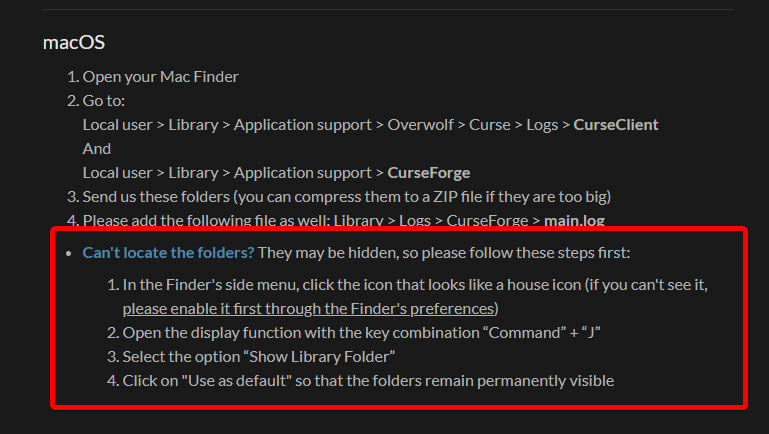 left ingot
 valid yarrow
fleet bear
https://i.imgur.com/YGJtLxi.png
valid yarrow
fleet bear
https://i.imgur.com/YGJtLxi.png
i can't find Overwolf
left ingot
-
In MacOS Big Sur 11.5+, I can't find the Overwolf folder in the following path
user > Library > Application support, it's not a problem of hidden files, maybe it's a system change or something, Apple changed some policies in BigSur. -
I found that CurseForge Client is written in Electron, so I found the output log by debugging.
 kind moss
Hello there-- Can someone help me with Conflicting Mod Exception error?

 fleet bear
kind moss
Hello there-- Can someone help me with Conflicting Mod Exception error?
fleet bear
kind moss
Hello there-- Can someone help me with Conflicting Mod Exception error?
!notcf
red patioBOT
The question you are asking about isn't related to CurseForge. Please use the appropriate game rooms by getting the role from #786424115535544350 or use #👽︱game-support for help.
This room is only for CurseForge Owned & Maintained features/services.
valid yarrow
left ingot
1. In MacOS Big Sur 11.5+, I can't find the Overwolf folder in the following pat...
i'm on 10.15.6
left ingot
The client cannot open https://curseforge.overwolf.com/downloads/client-overrides-v1.json and tries to connect to an unavailable port e.g. 127.0.0.1:60001, this could be a forced update from the client or something, this is the reason why the client is stuck.
However, this file I can open through my browser, so it should not be a problem with my network, you may need to re-adapt the macos client.

 steel orchid
Cannot find child addon file: 3184535 😦
signal ridge
Will forward it on to those that can fix it
signal ridge
steel orchid
Cannot find child addon file: 3184535 😦
try again in 5 minutes
 supple veldt
can someone help me with my minecraft using like 80 of my cpu
signal ridge
supple veldt
can someone help me with my minecraft using like 80 of my cpu
#📛︱rules 4
supple veldt
thanks instead of helping you point out rules
signal ridge
Yep, follow em.
supple veldt
why have a tag that says community support if you dont support people
signal ridge
have you tried a pc reboot?
supple veldt
yes
signal ridge
130 what?
signal ridge
Could be your pc has trouble running modded. What processor is it?
supple veldt
ryzen 5 2600
signal ridge
Drivers up to date
supple veldt
yep
signal ridge
You checked them just now?
Run a pack and then press F3 and take a screen shot, post it here
supple veldt
yes 1 sec
i kid you not when i finally load into the world i run no more than like 5 fps
 pseudo stirrup
hi can someone help me why is these two text small they a should not be small i have selected font size as 18 but here its much smaller

 opal cipher
Take on the right side of the screen as well
It contains info about CPU and GPU used
supple veldt
 opal cipher
Thanks
opal cipher
Could you check if this thread has any possible solutions?
https://www.reddit.com/r/AMDHelp/comments/g1olsn/terrible_performance_in_minecraft_with_rx_5700_xt/
supple veldt
 opal cipher
Wait, was this in modded MC?
red patioBOT
How to set Global Minecraft RAM value.
- Click the icon in the bottom left to open settings.
- Click the Minecraft tab.
- Scroll down.
- Slide slider to recommended ram range as seen below.
supple veldt
its at like 8 gigs
opal cipher
Huh, screenshot says it's slightly lower than 4GB
 opal cipher
And in taskmanager it's slightly above 5. x)
Yeah, just for science, increase that to 8092MB
supple veldt
and restart my game right
opal cipher
And then restart minecraft (all the way, including the launcher)
Yup!
But other than that, from what I could see in the thread I posted, it looks like it's possible to upgrade drivers/chipset. But I don't have instructions on how to upgrade all that, and therefor can't support it fully either.
opal cipher
Try setting "Smooth FPS" to off in Minecraft
It seems to have helped one user in the AMD Community forums
 opal cipher
But there's a lot of users who've had issues with specifically RX 5700 XT and Minecraft when it comes to performance
supple veldt
I dont see it
opal cipher
No clue there, :|
supple veldt
Where would it be
opal cipher
This is where I found the suggestion
At least we got it up to ~30 for now, but I think that's the extent of what I can think of.. sorry :|
supple veldt
All good ima keep at it
 rich flint
supple veldt
All good ima keep at it
rich flint
supple veldt
All good ima keep at it
i use several of the ones listed under Forge 1.16 and they help a fair amount
ferrite core, entity culling, out of sight, etc
 short comet
Hello everybody.
I'm having problems with the curseforge app...
it shows that it will load, but it doesn't open.
Can you help me?
queen storm
What does show then?
 jagged meteor
So my power went out due to a thunder storm a couple hours ago and it wont let me open the modpack folder for any of my modpacks. anybody think they can help?
queen storm
Do the folders still exist?
fleet bear
Are you logged into the correct windows account?
jagged meteor
yea
fleet bear
It doesn't sound like it as that's usually the only way to not have permissions for a folder.
What's the path you are using?
fleet bear
In the minecraft settings of curseforge.
fleet bear
Mac?
fleet bear
That's not a full path then.
queen storm
Show a screenshot of the minecraft settings in curseforge
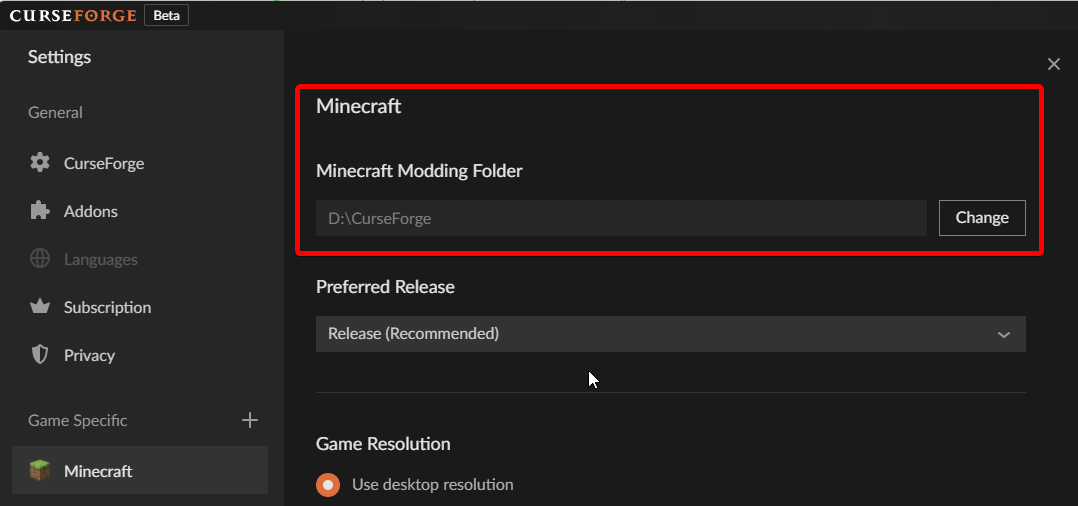 jagged meteor
 opal cipher
And you are logged in as that user?
And you didn't start CurseForge as admin before?
queen storm
Go to that folder please, can you open it?
jagged meteor
no just says access denied
like i said
its been giving me that after my power went out due to a storm
queen storm
Then to which folder can you get?
jagged meteor
i can only get into instances from changing the modding folder location
if i try to open file from the modpack in curse it wont work
queen storm
I am not talking about curseforge now, only your normal file explorer
jagged meteor
wont even let me into curseforge from file explorer
fleet bear
Can we get a screenshot without the edits?
I'm still 99.9999% sure your logged into the wrong windows user.
fleet bear
Then prove it... file path no edits.
jagged meteor
the edited part is just my last name
fleet bear
Ok.. so? Hundreds or even thousands of people have the same last name and we wouldn't know that if you didn't say anything.
If you want help you do as requested, this isnt a place to argue and hide information from people trying to provide support. If you refuse to provide the info then everything ends here.
 fleet bear
Ok, now open the users folder
fleet bear
You cant open the Users folder...?
 fleet bear
Ok, so you cant open anything here or just the instances folder?
Or a specific modpack
jagged meteor
Yep
fleet bear
You get an error?
 queen storm
Now show you opening it normally
jagged meteor
You mean how I usually do
 tardy turret
what should i do?
 queen storm
Wait?
fleet bear
tardy turret
what should i do?
Wait. PayPal payments are done the first week of the next month.
jagged meteor
 queen storm
🤦♂️
I am out. If you can't show opening the folder without touching curseforge then I can't help you.
queen storm
And that is the issue, I don't want you to be there for this
jagged meteor
Do you want me to screen share vc you?
queen storm
No
 tardy turret
win + prt scr no?
jagged meteor
phone pic bc i dont want to go through the trouble on getting rid of my 2nd monitors pic
fleet bear
Ok, did you try changing the path to something else then change it back?
jagged meteor
yep
tardy turret
jagged meteor
phone pic bc i dont want to go through the trouble on getting rid of my 2nd moni...
win + shift + prt scr
tardy turret
opal cipher
Otherwise Win + Shift + S
Oh, that's what I meant, I'm sorry. Sketch & Ship
fleet bear
jagged meteor
yep
Close curseforge and overwolf and open as admin.
jagged meteor
k
did
still access denied
ill just google around and see if i can find a fix
thanks for trying to help
jagged meteor
at first it was made in my downloads file
not sure why
but i couldnt transfer it so
i just ended deleting it out of there
 gleaming wraith
Hello, So I have this issue where I have a game installed (Stardew Valley) but it doesn't want to "register" in curseforge. I've tried locating the game by scanning both of my hard drives which didn't work and I also tried to manually add it but it said "This is an invalid directory or unsupported game". I have it installed on steam and I can see the Stardew Valley.exe in the local files so I don't reall know the issue. Can somebody help?
queen storm
!stardew
red patioBOT
Overwolf maintains a known list of issues here, some with solutions, others without.
https://support.curseforge.com/en/support/solutions/articles/9000196615-curseforge-known-issues
Scroll down, look at "Other games"
gleaming wraith
thanks
 true leaf
Hello during the installation of curseforge (overwolf) the page opens but remains blocked for hours, know where the problem comes from?
queen storm
!getcf Use the second link please
red patioBOT
Looking to install the CurseForge app?
<:windows:798410728188936222> Windows
Minimum Requirements:
- OS Version: 7, 8.1, 10
- 64 bit Required.
- 350MB storage space.
- Microsoft .Net 4.8
- Intel/AMD quad-core CPU
- 8GB ram
Download: https://download.overwolf.com/install/Download?&PartnerId=4047
If you are having issues with the installer use the URL below to install Overwolf then go to the app store to download CurseForge.
https://content.overwolf.com/downloads/setup/latest/regular.html
<:mac:798410654418862130> Mac
Minimum Requirements:
- OS Version 10.14 or newer.
- 64 bit Required.
Download: https://curseforge.overwolf.com/downloads/curseforge-latest.dmg
:penguin: Linux
Minimum Requirements:
Yes.
Download: :person_shrugging:
true leaf
thanks I will try
 median eagle
Hello,
For over an hour my modpack has been in ender review while the server file is already approved
Can you tell me when this one will be approved?
Thanks,
https://www.curseforge.com/minecraft/modpacks/chroma-technology-2
queen storm
!status
red patioBOT
It is 02:02PM on Wednesday for CurseForge my dudes.
Project Moderation Time
Temporary moderation changes! See #announcements for more info
- 6th, 7th, & 8th No Moderation
- 9th Moderation will be done!
- 10th & 11th No Moderation (Normal weekend)
- **12th, 13th & 14th Moderation will be done! **
- 15th & 16th No Moderation
- 17th & 18th No Moderation (Normal weekend)
- 19th Moderation will be done!
- 20th & 21st No Moderation
- 22nd & 23rd Moderation will be done!
- 24th & 25th No Moderation (Normal weekend)
- Normal Moderation hours and days resume after this!
Project/File moderation is done on;
Sunday, Monday, Tuesday, Wednesday, Thursday: 10AM - 6PM GMT+2
Friday, Saturday: No Moderation!
This process is First in, First out. Thus files submitted late in the work day may not be checked until the next work day.
New Projects or uploads requiring manual approval: 1-3 Working Days
Updates to approved projects not needing manual approval: 1 Hour
File sync to the Curseforge app may take up to 24 hours after approval.
 stable gorge
Hi support 👋 ,
What would be the best place to contact someone regarding missing payments of my two latest reward store orders, even though they are marked fulfilled?
lyric crescent
!ticket-site
red patioBOT
:bug: Reporting via Website :bug:
Can't open the app or would rather use the website? You can do so here: https://support.curseforge.com/en/support/tickets/new
Fill out the form with accurate detailed information, "It doesn't work" isn't helpful! What exactly doesn't work and why doesn't it work should be easy to answer!
Make sure to upload your Overwolf logs with the Upload File option on the ticket, information on how to get these logs can be found here https://support.overwolf.com/en/support/solutions/articles/9000176827-how-to-get-your-overwolf-logs
stable gorge
I tried that, but it gives an error on my end 😒
Liquid error: undefined method `html_safe' for nil:NilClass
lyric crescent
try another browser, works fine
 eternal wren
When will Russian be added to curseforge?
stable gorge
Same problem in another browser. But I just tried logging out, which fixed it. So it seems to be a server-side auth issue.
lyric crescent
eternal wren
When will Russian be added to curseforge?
?feedback
red patioBOT
<:CFidea:798388634972717066> Have an idea on how to improve CurseForge? <:CFidea:798388634972717066>
CurseForge is looking for great ideas and user feedback! Get into the CurseForge Community by providing some feedback and voting on what's important to you!
Think some game should be supported? Post an idea and explain why!
Got a to die for feature idea? Let's hear it!
Location In-app
- Click the button on the bottom left of the app.
- Click on

Suggest a Featureoption!
eternal wren
ok
 young osprey
soooooooooooooooooo minecraft shaders its hell to get it -_-
lyric crescent
and has nothing to do with curseforge
young osprey
yea
viral briar
https://www.curseforge.com/minecraft/customization , hell to get?
a good few are right there on the site.
digital roost
i uploadet my own modpack, but i dont find it at the curseforge luncher.
The Modpack is definatly aproved!
can sb help me pls
queen storm
Link please
queen storm
!sync
red patioBOT
Sync and your Project.
CurseForge App and site do not share the same requirements! You can find things on the site but this does not mean it will be in the app!
For a mod to show up in the app:
- Projects MUST have a file marked as RELEASE or BETA
- Projects MUST be APPROVED
- Projects MUST have a file marked for the GAME VERSION SELECTED/LOADED
- Projects CAN'T be EXPERIMENTAL
- Projects CAN'T be ABANDONED
Files can take a while to show up in the app. If your files still have not shown up either your project is new and you have yet to mark a file as Release/Beta or there is issues with the sync system making it slow.
Vote this issue up if you would like to know when the last sync was! https://curseforge-ideas.overwolf.com/ideas/CF-I-1617
queen storm
That description is really bad btw
digital roost
i know... its just for my friends!
If i have time, i would change it
queen storm
Then you should have send them the zip
digital roost
okay
queen storm
Or just ask the question right away 🤷♂️
tardy turret
!status
red patioBOT
It is 04:19PM on Wednesday for CurseForge my dudes.
Project Moderation Time
Temporary moderation changes! See #announcements for more info
- 6th, 7th, & 8th No Moderation
- 9th Moderation will be done!
- 10th & 11th No Moderation (Normal weekend)
- **12th, 13th & 14th Moderation will be done! **
- 15th & 16th No Moderation
- 17th & 18th No Moderation (Normal weekend)
- 19th Moderation will be done!
- 20th & 21st No Moderation
- 22nd & 23rd Moderation will be done!
- 24th & 25th No Moderation (Normal weekend)
- Normal Moderation hours and days resume after this!
Project/File moderation is done on;
Sunday, Monday, Tuesday, Wednesday, Thursday: 10AM - 6PM GMT+2
Friday, Saturday: No Moderation!
This process is First in, First out. Thus files submitted late in the work day may not be checked until the next work day.
New Projects or uploads requiring manual approval: 1-3 Working Days
Updates to approved projects not needing manual approval: 1 Hour
File sync to the Curseforge app may take up to 24 hours after approval.
tardy turret
ok
 lyric crescent
did you upload a file
tardy turret
yea
lyric crescent
then wait until it gets checked

 white anchor
Why can't i run 1.15.2 mods on my mac
queen storm
white anchor
Why can't i run 1.15.2 mods on my mac
!mc-logs
red patioBOT
Sending logs for support.
Right-click the modpack profile icon OR click the button in the modpack profile.
Click Open Folder.
Open the logs folder.
Find the file called debug.log OR latest.log and drag it into discord.
white anchor
queen storm
!mc-logs
My friend is having this problem one sec lemme ask him to post it here
queen storm
Get your friend here instead
 crimson vault
I can't update any modpacks, it keeps asking for a folder tree that dosn't exist on my computer and never has.
 queen storm
Change the path
lyric crescent
!mc-path
red patioBOT
Change your install path to the following:
For Windows: C:\CurseForge
-Go to C:\ drive. Make a new folder. Name it Curseforge.
For Mac: /Users/Shared/CurseForge
If Minecraft is not installed in CurseForge App:
- Click the in the top left.
- Select Minecraft from the list of games.
- Select the
Advancedoption and pick the folder you just made. - Click
Continue.
If Minecraft is installed in CurseForge App:
- Click the in the bottom left.
- Select the Minecraft tab.
- Click
Change. - Select the folder you just made.
:no_entry_sign: Minecraft Files should NOT be installed inside the following locations :no_entry_sign:
:no_entry_sign: .minecraft folder.
:no_entry_sign: OneDrive folders.
:no_entry_sign: Desktop folder.
:no_entry_sign: Drive roots I.E. Directly into the C:\ drive.
:no_entry_sign: iCloud enabled folders.
:no_entry_sign: or any other cloud saved folder.
If any of the above are in the path you need to change/move it!
 willow mountain
white anchor
queen storm
Get your friend here instead
willow mountain
white anchor
queen storm
Get your friend here instead
@willow mountain that's my friend he sent the latest log now do your thing please
lyric crescent
now do your thing
crimson vault
this is my install path and it has always worked before, did something change in curseforge to break this?
 lyric crescent
possibly
willow mountain
pls help me 
lyric crescent
cant fix your problem. The issue is between you owning a mac and apple. can read about it here if you like: https://github.com/MinecraftForge/MinecraftForge/issues/7558
Only option is to use a mc version above 1.17, or play vanilla.
tardy turret
And where is the ad? I want to watch an ad:( (rofl)
 lyric crescent
it shows an ad when there is an ad available to show
tardy turret
Although the fact that there is no advertising, it is strange. I don't subscribe in Curseforge
tardy turret
lyric crescent
it shows an ad when there is an ad available to show
ah, got it
 last crown
I could use some login help. After Microsoft account migration, I can no longer login via the Minecraft Mojang launcher. Specifically the Curse launcher via modpacks. Any solutions? I tried password recovery but still nothing. Thanks!
lyric crescent
did you log out and log in with the correct account?
last crown
Yes. I used the correct email. I can still login to the microsoft account but not the Mojang one
lyric crescent
you dont have a mojang one anymore
tardy turret
oh, yes, i haven't had any ads for a month
last crown
That's what i thought. i thought the mojang launcher is now using the microsoft login but it's not working
tardy turret
last crown
I could use some login help. After Microsoft account migration, I can no longer...
You use button Microsoft Login?
last crown
I dont have that button on my launcher splash window
lyric crescent
screenshot the launcher
willow mountain
hey man i could use some support
opal cipher
!help
red patioBOT
╰( ͡° ͜ʖ ͡° )つ──☆*:・゚ *˜”*°•.˜”*°• Many Help •°*”˜.•°*”˜* <:curselit:796985620550385705>
Please provide a description of your issue with as much detail as possible. If you have an issue with a mod or modpack, tell us the name. Explain what you can see happening. Be specific!
Tell us what is happening, we already know it "doesn't work".
Avoid using words like "it", tell us exactly what "it" is.
Don't assume anyone knows what you are talking about, be specific.
Tell us what you expected to happen.
Provide screenshots or video if possible.
Provide a log if possible. ?mc-log
last crown
 tardy turret
last crown
tardy turret
last crown
go back
last crown
ohhh. gotcha. should i migrate or make a new account?
tardy turret
last crown
ohhh. gotcha. should i migrate or make a new account?
no...
tardy turret
you just need to log in to your Microsoft account
last crown

 gloomy lion
hey i tried to download a modpack and it wont work (i tried downloading it from the website and all other versions of it)
queen storm
last crown
Add account
queen storm
gloomy lion
hey i tried to download a modpack and it wont work (i tried downloading it from ...
Define won't work
gloomy lion
in the middle of curse downloading it modpack it says "addon random numbers" is not found
last crown
Perfect! It worked. Thanks so much!
opal cipher
child addon file: <numbers>? give us the numbers
gloomy lion
sec
tardy turret
i use MultiMC, the way it is just more convenient for me
 gray shuttle
willow mountain
pls help me <:Frog_Pray:857465403050557450>
gray shuttle
willow mountain
pls help me <:Frog_Pray:857465403050557450>
run through the minecraft default launcher not through curseforge. install minecraft then forge into that. then drag and drop the modpack files into the instance folder. it seems to be an occasional issue between macs and curseforge not getting along XD
queen storm
tardy turret
i use MultiMC, the way it is just more convenient for me
You are talking inside a support channel about things that are not related to the issue, please stop
gloomy lion
opal cipher
child addon file: <numbers>? give us the numbers
Hey sorry for the delay the numbers are: Addon: 2571988
opal cipher
gloomy lion
Hey sorry for the delay the numbers are: Addon: 2571988
Thanks a bunch!
Forwarding to staff, might take a while before I'll poke you, or someone else will poke you
gloomy lion
oh
okay thanks for the help either way.
btw is there any way to see what mods are in the modpack? @opal cipher its SpaceCraft (Galacticraft)
 hardy cobalt
Greetings. Could someone please tell me, why is my project (https://www.curseforge.com/minecraft/modpacks/techquest-hs-pack) and it's file are still being under review during last two days? I do not mean to accuse someone, just maybe there are some problems with project, or idk. Thanks.
opal cipher
gloomy lion
btw is there any way to see what mods are in the modpack? <@!139126154492641282>...
Gimme a second.
opal cipher
hardy cobalt
Greetings. Could someone please tell me, why is my project (https://www.cursefor...
Check #📢︱news
gloomy lion
thanks.
queen storm
hardy cobalt
Greetings. Could someone please tell me, why is my project (https://www.cursefor...
!status
red patioBOT
It is 05:07PM on Wednesday for CurseForge my dudes.
Project Moderation Time
Temporary moderation changes! See #announcements for more info
- 6th, 7th, & 8th No Moderation
- 9th Moderation will be done!
- 10th & 11th No Moderation (Normal weekend)
- **12th, 13th & 14th Moderation will be done! **
- 15th & 16th No Moderation
- 17th & 18th No Moderation (Normal weekend)
- 19th Moderation will be done!
- 20th & 21st No Moderation
- 22nd & 23rd Moderation will be done!
- 24th & 25th No Moderation (Normal weekend)
- Normal Moderation hours and days resume after this!
Project/File moderation is done on;
Sunday, Monday, Tuesday, Wednesday, Thursday: 10AM - 6PM GMT+2
Friday, Saturday: No Moderation!
This process is First in, First out. Thus files submitted late in the work day may not be checked until the next work day.
New Projects or uploads requiring manual approval: 1-3 Working Days
Updates to approved projects not needing manual approval: 1 Hour
File sync to the Curseforge app may take up to 24 hours after approval.
hardy cobalt
ok, got it. thanks. will be waiting
opal cipher
gloomy lion
thanks.
gloomy lion
thank you so much!
 merry echo
umm i have the curseforge app and i found a mod on the curseforge website but i cant find it on the app
lyric crescent
link the mod
merry echo
this is the mod https://www.curseforge.com/minecraft/mc-mods/ninjagocraft
lyric crescent
you made a profile?
merry echo
no i dont think i made one
lyric crescent
how are you looking for it then
merry echo
on the curseforge website
lyric crescent
" i cant find it on the app"
merry echo
i was on the website and then i searched up ninjago then i downloaded the app and i looked for it there and it wasnt there
the app is the curseforge app
lyric crescent
you used the modpack search bar then?
merry echo
yes
red patioBOT
How to install mods in CurseForge App.
- Click
+ Create Custom Profile - Name it, select the required Minecraft version, select the Forge version (usually the highest number), click
Create. - Click the profile icon.
- Click
Add More Content - Search and install the desired mods.
- Start the game!
How to install mods not on CurseForge.
- Right click the profile picture or Open the profile and click the Icon next to the play button.
- Click
Open Folder. - Drag the mod(s) into the
modsfolder. (Note: Some mods will require others, to run. Make sure to read the instructions for the mod!) - Start the game!
merry echo
tysm
 deep egret
when i try to play my game always crashes how do i fix it
lyric crescent
what game
queen storm
!mc-logs
red patioBOT
Sending logs for support.
Right-click the modpack profile icon OR click the button in the modpack profile.
Click Open Folder.
Open the logs folder.
Find the file called debug.log OR latest.log and drag it into discord.
 viral igloo
Does someone know what the longest time is for a file to be processed? I've uploaded a new version 21 hours ago and it's still processing: https://www.curseforge.com/wow/addons/krowi-achievement-filter/files
queen storm
!status
red patioBOT
It is 08:00PM on Wednesday for CurseForge my dudes.
Project Moderation Time
Temporary moderation changes! See #announcements for more info
- 6th, 7th, & 8th No Moderation
- 9th Moderation will be done!
- 10th & 11th No Moderation (Normal weekend)
- **12th, 13th & 14th Moderation will be done! **
- 15th & 16th No Moderation
- 17th & 18th No Moderation (Normal weekend)
- 19th Moderation will be done!
- 20th & 21st No Moderation
- 22nd & 23rd Moderation will be done!
- 24th & 25th No Moderation (Normal weekend)
- Normal Moderation hours and days resume after this!
Project/File moderation is done on;
Sunday, Monday, Tuesday, Wednesday, Thursday: 10AM - 6PM GMT+2
Friday, Saturday: No Moderation!
This process is First in, First out. Thus files submitted late in the work day may not be checked until the next work day.
New Projects or uploads requiring manual approval: 1-3 Working Days
Updates to approved projects not needing manual approval: 1 Hour
File sync to the Curseforge app may take up to 24 hours after approval.
lyric crescent
if it's processing though, it's probably messed up
viral igloo
 lyric crescent
that doesnt tell us anything, go to the status page
viral igloo
status page?
lyric crescent
 viral igloo
 lyric crescent
yea your file is broken. either incorrectly formatted or messed up during upload
viral igloo
So reuploading is the only option?
lyric crescent
you can try, not even sure if you can until that gets rejected
viral igloo
sigh...guess I wait. I can download the file without problems tough
 wild lagoon
Help
 lyric crescent
are you on wifi?
wild lagoon
yes
lyric crescent
try a cable connection
wild lagoon
i don't have a cable
lyric crescent
that sucks
wild lagoon
yeah
lyric crescent
can try restarting things
short comet
anyone speak portuguese?
short comet
lyric crescent
<#777323206884327484> 1
ok
I'm having problems opening curseforge.
I've already uninstalled it, reinstalled it, but it won't open...
Can you help me?
lyric crescent
try the link here #🔥︱curseforge-support message
short comet
lyric crescent
try the link here https://discord.com/channels/428228256236306434/78202763525292...
I've done this...
lyric crescent
so what happens
short comet
lyric crescent
so what happens
I click to open curseforge and it doesn't open...
It even shows the screen starting to load, but then nothing...
lyric crescent
!ticket-site
red patioBOT
:bug: Reporting via Website :bug:
Can't open the app or would rather use the website? You can do so here: https://support.curseforge.com/en/support/tickets/new
Fill out the form with accurate detailed information, "It doesn't work" isn't helpful! What exactly doesn't work and why doesn't it work should be easy to answer!
Make sure to upload your Overwolf logs with the Upload File option on the ticket, information on how to get these logs can be found here https://support.overwolf.com/en/support/solutions/articles/9000176827-how-to-get-your-overwolf-logs
short comet
👍🏻
 trail lichen


 plush pagoda
there no mod with a virus on curwse
signal ridge
Every file uploaded is scanned yes
plush pagoda
Or else no one weould use it
lyric crescent
except for the people that download mods from questionable places all the time
plush pagoda
^
its funny when
People go to a wacky ass webite that their anti virus warns them of, theydownload a mod from it, then mods from curse and then get blue screen and blame it on curse
 elder aurora
hey so
i keep getting an error message
"Cannot find addon child file: (and then some numbers)"
signal ridge
elder aurora
i keep getting an error message
Post the error with numbers
elder aurora
"Cannot find child addon file: 2914886"
signal ridge
Will forward this to the people that can fix it
elder aurora
thanks
elder aurora
signal ridge
Post the error with numbers
i just tried installing a different mod and it worked
signal ridge
the child id # is linked to a specific mod. So not surprised a different mod worked
supple veldt
can anybody help me get better fps in a modded mine craft world
on a diffrent mod pack i get like 120 with a 5700xt but on the modpack all the mods i barealy get 40
i also have 10 gigs for the game if it needs it and still nothing
 lean beacon
Its probably too many mods for your computer to handle.
supple veldt
i have a very good computor
lean beacon
huh.
supple veldt
ryzen 5 2600 5700xt
 inner current
Are Microsoft accounts supported for Minecraft yet?
signal ridge
Should be? Since Microsoft owns Minecraft
lyric crescent
They have been supported for over a year now 🤔
inner current
I mean can I use a Microsoft account for Java Minecraft to play online modded through curseforge
lyric crescent
well yea