#🔥︱curseforge-support
1 messages · Page 526 of 1
 reef olive
 red patioBOT
How to install modpacks with the search features in app.
- Open the

Minecraftsection of the app. - Click the top search bar where it says
Search for modpacksOR Click theBrowse ModpacksTab. - Find the Modpack you want to install and click install on it.
- Wait for CurseForge app to download and unpack all the required files.
- Once finished, click
Play!
How to install modpacks from a Export. (Custom/Private/Site downloaded Modpack zip)
- Get CurseForge App if you don't have it, use
!downloadfor a link. - Get the exported modpack from CurseForge or someone else,
!mc-packshareexplains how to make them. - Open the
Minecraftsection of the app. - Click

Create Custom Profile - Click the
Importoption. - Find the file you just downloaded in step 2 and select it.
- CurseForge app will now attempt to download and unpack the modpack. If it fails, try steps 4-6 again.
- Once finished, click
Play!

 digital roost
i can see, i forget which ones i added
i can compare the two though
i'm importing the old version i have saved into curseforge to see
so the old version that i know was functional and was the exact file i put into and is what my server runs is freezing too

just installed SF4 to attempt that and its broken too, seems like any mod

 prime shale
As long as I know, I don't have Overwolf installed
 fleet bear
digital roost
just installed SF4 to attempt that and its broken too, seems like any mod
fleet bear
digital roost
just installed SF4 to attempt that and its broken too, seems like any mod
!mc-logs
red patioBOT
Sending logs for support.
Right-click the modpack profile icon OR click the  button in the modpack profile.
Click 
Open Folder.
Open the logs folder.
Find the file called debug.log OR latest.log and drag it into discord.
fleet bear
are any other logs getting created?
fleet bear
nothing in the instance folder?
digital roost
theres a zip
 zenith gyro
Hey everytime i try to load up better minecraft it crashes. It worked earlier today but its not working now and I tried the repair installing thing and it still wont work. any tips?
digital roost
where is the instances folder, you mean like instances where you select each modpack you have downloaded?
fleet bear
the files would be in the same place as you find the logs/mods folders
fleet bear
zenith gyro
Hey everytime i try to load up better minecraft it crashes. It worked earlier t...
!mc-installfix
red patioBOT
- Click on the Minecraft Tab on the Left side of the CurseForge App.
- Click button next to the
Create Custom Profileoption. - Click

Repair Installationoption. - Play game.
NOTE: You will not lose any modpacks or worlds, These are saved in the Instances folder. DO NOT TOUCH THIS FOLDER OR YOU WILL LOSE EVERYTHING
digital roost
thats my logs folder
 digital roost
 fleet bear
that's up 2 folders
 digital roost
huh
red patioBOT
- Click on the Minecraft Tab on the Left side of the CurseForge App.
- Click button next to the
Create Custom Profileoption. - Click
Repair Installationoption. - Play game.
NOTE: You will not lose any modpacks or worlds, These are saved in the Instances folder. DO NOT TOUCH THIS FOLDER OR YOU WILL LOSE EVERYTHING
digital roost
ok
zenith gyro
fleet bear
!mc-installfix
ive done that already but i guess i can try again
digital roost
says this but definitley not open
 fleet bear
zenith gyro
ive done that already but i guess i can try again
fleet bear
zenith gyro
ive done that already but i guess i can try again
!mc-logs
red patioBOT
Sending logs for support.
Right-click the modpack profile icon OR click the button in the modpack profile.
Click Open Folder.
Open the logs folder.
Find the file called debug.log OR latest.log and drag it into discord.
fleet bear
digital roost
says this but definitley not open
restart computer, do repair, launch game.
digital roost
ok
 lyric crescent
try without optifine
zenith gyro
okay will try
digital roost
fleet bear
restart computer, do repair, launch game.
i got further this time

but still doesnt work
is there any way to fix it
 foggy wing
Is there any more documentation on the Curse API then https://support.curseforge.com/en/support/solutions/articles/9000197321-curseforge-api ?
It is a very small page focused on uploading jars through the API. I am trying to find out if I can get the total number of downloads for a developer. I know this is tracked because it is shown here: https://authors.curseforge.com/dashboard

CurseForge Support
We're here to get you informed on everything you need to know about CurseForge, including helpful guides and troubleshooting articles to back you up when you get in a pickle
 queen storm
foggy wing
Is there any more documentation on the Curse API then https://support.curseforge...
queen storm
foggy wing
Is there any more documentation on the Curse API then https://support.curseforge...
Not possible now
foggy wing
😭 Okay thank you
I didn't want to have to scrape dashboard but it looks like that is the way to go
queen storm
Why do you need them?
foggy wing
I don't really need it, but it would be cool. I made a self-updating GitHub README, and I want to have an accurate download count on it. I already wrote a script to use the Modrinth API to poll downloads, but it looks like it will be a bit trickier for Curseforge
queen storm
Not to mention that app is always behind on the count, same for website
!feedback Request an endpoint instead
red patioBOT
<:CFidea:798388634972717066> Have an idea on how to improve CurseForge? <:CFidea:798388634972717066>
CurseForge is looking for great ideas and user feedback! Get into the CurseForge Community by providing some feedback and voting on what's important to you!
Think some game should be supported? Post an idea and explain why!
Got a to die for feature idea? Let's hear it!
Location In-app
- Click the
 button on the bottom left of the app.
 - Click on

Suggest a Featureoption!
fleet bear
digital roost
i got further this time
there's something very wrong with something on your computer then. Nothing we can do about it really..
 fleet bear
 signal dew
I get this popup every time I try to load my server
signal dew
I get this popup every time I try to load my server
!notcf
red patioBOT
The question you are asking about isn't related to CurseForge. Please use the appropriate game rooms by getting the role from #786424115535544350 or use #👽︱game-support for help.
This room is only for CurseForge Owned & Maintained features/services.
foggy wing
queen storm
!feedback Request an endpoint instead
Thank you, I have submitted to CurseForge Ideas
 hallow flax
how to i have it so my custom pack shows up on the modpack search?
 cinder stag
anyone here really well versed with forge that can help me out?
hallow flax
i may be able to help, what is the issue
cinder stag
i'm trying to download a couple mods my friend sent me but i keep getting "selected zip file contains an invalid profile"
hallow flax
uhh im sorry i have no idea
cinder stag
maybe you could give me alternate ideas on how to download them
cuz ik the way i'm trying rn is really unorthodox lol
hallow flax
i just make a custom profile and then add the mods manually lol
cinder stag
bruh ok it's working now thx 🙂
hallow flax
lol, glad i could sort of help
 viral briar
hallow flax
how to i have it so my custom pack shows up on the modpack search?
viral briar
hallow flax
how to i have it so my custom pack shows up on the modpack search?
That would be publishing your modpack on the website to do such
!mc-sharepack
red patioBOT
There are two ways to share a modpack you've made with others...
Export and Share - For Friends to Small Groups.
- Click the Icon for the modpack.
- Click the button next to play.
- Click

Export. - Select the files that should be included.
- Send the zip to the people that want it! They can follow the instructions in
!mc-installpackto install the pack!
Upload to Curseforge - For Public Release to Everyone.
This options will make your pack public to EVERYONE, it comes with extra requirements and will take some effort to set up.
- Go to here: https://www.curseforge.com/project/432/4471/create
- Fill out the information with a proper description of the pack. This should allow anyone to understand what the pack is.
- Click the Icon for the modpack in the CurseForge app.
- Click the button next to play.
- Click
Export. - Select the files that should be included.
- Open your Project you made on the CurseForge site and Upload the file you just made.
- Wait for Moderation & Sync so it can show up in the client! (See
!syncfor limitations)
digital roost
ive got a problem
ive got no tree punching and havent been able to get sticks from anything
queen storm
digital roost
ive got no tree punching and havent been able to get sticks from anything
That is a pack issue, not for curseforge
digital roost
queen storm
That is a pack issue, not for curseforge
would you know a way i could add a drop manually?
queen storm
digital roost
would you know a way i could add a drop manually?
!projectissue
red patioBOT
Please visit the project page for the content you posted about and look for a way to contact the developer.
Somewhere on the page there is usually a method of contact. Look for one of the following things:
Issuestab like the image below.- Discord link.
- Twitter link.
- Comments section below the project.
If no contact method exists you will either have to remove the project or find a solution on your own.
 queen storm
Ask multimc instead
 dusty monolith
i just realized that my bad
hallow flax
i think i might be either blind or dumb but i submitted a project to be created but i didnt see anywhere to have the mod manifest, i assume this comes after the modpack is approved or i missed something and need to start again
queen storm
hallow flax
i think i might be either blind or dumb but i submitted a project to be created ...
Mod manifest? What are you talking about?
hallow flax
queen storm
Mod manifest? What are you talking about?
idk a list of the mods, sorry im super tired right now and probably shouldnt be trying to make a modpack
queen storm
hallow flax
idk a list of the mods, sorry im super tired right now and probably shouldnt be ...
Go to sleep, needs to be approved first
hallow flax
queen storm
Go to sleep, needs to be approved first
thank you for your help, have a nice night! 🙂
queen storm
hallow flax
thank you for your help, have a nice night! 🙂
Timezones 🤷
 tough crescent
I’ve been playing sky factory recently and the curse forge app seems to of automatically logged out but I was never signed into the curse forge app only the website now the world is gone and I don’t know how to get it back can anyone help me
queen storm
You do realize that the world is stored on your pc right?
tough crescent
Well I’m not sure how to retrieve it I tried the import button on my Mac but it didn’t nothing
queen storm
Did you switch machines?
tough crescent
No
queen storm
Right click the modpack icon, open folder, go to "saves"
tough crescent
Ok
Ya there’s nothing there because when I opened curse forge it was like a new account
There was nothing there
queen storm
Then you moved your modding folder, find the old one
tough crescent
But I know I have a backup of my world somewhere in my computer

 granite trail
Yeah Reinstalled It 10 times
queen storm
Bit overkill for a server issue
queen storm
granite trail
Exact Time For The Response
No idea
 peak pine
Why am I getting this error? It worked the whole time just fine.
 queen storm
Windows 11?
peak pine
Yes
queen storm

Overwolf Support Help Center
We're here to get you informed on everything you need to know about Overwolf, including helpful guides and troubleshooting articles to back you up when you get in a pickle
peak pine
I used the override, because I won't reinstall my computer.
And MC (what I play) is supported.
 frozen copper
I have a weird Question.....I found the Minecraft Dragon Mounts: Legacy Mod on the Curse Forge Website and Downloaded it from there. It downloaded a file that I don't know what to do with. On top of that, when searching for the Mod on the Desktop app, it doesn't exist and it doesn't show up in my list of downloaded mods. What do I do here ?
If it helps, I can send the link of said page and I can show you the file
queen storm
frozen copper
I have a weird Question.....I found the Minecraft **Dragon Mounts: Legacy** Mod ...
!mc-installmods
red patioBOT
How to install mods in CurseForge App.
- Click
+ Create Custom Profile - Name it, select the required Minecraft version, select the Forge version (usually the highest number), click
Create. - Click the profile icon.
- Click
Add More Content - Search and install the desired mods.
- Start the game!
How to install mods not on CurseForge.
- Right click the profile picture or Open the profile and click the Icon next to the play button.
- Click
Open Folder. - Drag the mod(s) into the
modsfolder. (Note: Some mods will require others, to run. Make sure to read the instructions for the mod!) - Start the game!
 frozen copper
Okay, I'll try that. Thx
frozen copper
queen storm
!mc-installmods
The Webpage doesn't tell me which version of Minecraft it's for....what do I do for that ?
queen storm
frozen copper
The Webpage doesn't tell me which version of Minecraft it's for....what do I do ...
Link it
frozen copper
queen storm
Link it
queen storm
1.16.5
frozen copper
Where did you find that ?
queen storm
In the files tab
 tiny herald
do you know how i can fix that

 brisk sequoia
Uhmm...
Why a modpack stop downloading cuz missing a mod in the pack ?
I mean it can't find a chile addon with id is the mod project id
But it still available on the website ??
 modest vault
someone know why i can't upload any image?

 errant oxide
modest vault
someone know why i can't upload any image?
errant oxide
modest vault
someone know why i can't upload any image?
Has to be minimum size of 600x600
modest vault
oh
errant oxide
Your image is smaller than 600x600, make it bigger
modest vault
ok
viral briar
brisk sequoia
I mean it can't find a chile addon with id is the mod project id
post website link of the modpack and the ID code that the error shows just in the case it's one that the team don't know about
just in case you didn't know it is related to this that happened a couple of days ago - #📢︱news message
 tight glacier
Hey so my modpack got accepted by cruseforge but everytime I start it up it crashes and says (MixinTransformerError the cut off text)
 fleet bear
tight glacier
Hey so my modpack got accepted by cruseforge but everytime I start it up it cras...
fleet bear
tight glacier
Hey so my modpack got accepted by cruseforge but everytime I start it up it cras...
So you uploaded a pack without testing it and its broken...?
tight glacier
fleet bear
So you uploaded a pack without testing it and its broken...?
Yes should have tested it but whats the reason why it dosent work?
fleet bear
🤦
red patioBOT
The question you are asking about isn't related to CurseForge. Please use the appropriate game rooms by getting the role from #786424115535544350 or use #👽︱game-support for help.
This room is only for CurseForge Owned & Maintained features/services.
fleet bear
tight glacier
Yes should have tested it but whats the reason why it dosent work?
!notcf and post your logs if you want help.
 untold imp
PLS help i get always when i download something this message:an unkrown error occured.I updated the minecraft and launcher but i still get this message.(i haev the curseforge downloaded version)
pls someone HELP
queen storm
Screenshot please
untold imp
k
queen storm
And don't break rule 4
 viral briar
!webclient
red patioBOT
WebClient errors are from networking issues to your computer. You can try a few things to fix it:
- Restart the computer.
- Restart your router/modem.
- Try another internet source like a hotspot, wired connection or moving closer to the WiFi.
- Pause/Stop other things using the internet. (Streams, music, etc)
- If this still doesn't work, try again in an hour and hope your connection is stable.
untold imp
i will try it
 summer oyster
wierd bug/glitch , not able to select "Fabric" on the curseforge site in minecraft mods (video in the zip)
and i can tuse the verion filter , because i need certain version of game (1.17.1 currently)
viral briar
summer oyster
wierd bug/glitch , not able to select "Fabric" on the curseforge site in minecra...
it was done intentionally , it is not a bug
read > #📢︱news message
summer oyster
they say it isnt needed , but it is needed
viral briar
is it though? the app works pretty well for fabric things since the full support was added
 outer forge
Hey, I'm trying to install a modpack (Engineer's life 2) on the app, which worked perfectly fine a couple of days ago but now (without pack updates) it gives me the error in the image. To me, this sounds like curseforge cant find a specific mod. I've checked all mods (in the list posted on the information page under the screenshots on v1.07) and none have the id of the error. What's going on?

 void otter
i have question: does the minecraft migration thingy works on curseforge?
queen storm
outer forge
Hey, I'm trying to install a modpack (Engineer's life 2) on the app, which worke...
Did you restart curseforge?
queen storm
void otter
i have question: does the minecraft migration thingy works on curseforge?
Yes
outer forge
Yes. And reinstall minecraft, curseforge and overwolf
void otter
oh
queen storm
outer forge
Yes. And reinstall minecraft, curseforge and overwolf
Then I am gonna poke somebody for you
outer forge
thank you sir
void otter
since when is curseforge bought by overwolf?
lyric crescent
almost a year ago now lol
void otter
I remeber that curseforge was just on its own
lyric crescent
back in 2014
void otter
im old then xD
 neon sun
I remember when Curseforge was owned by Twitch
lyric crescent
 mortal edge
it say that i dont that i dont have minecraft installed but i have it
lyric crescent
what say?
mortal edge
not installed
lyric crescent
screenshot
mortal edge
how to screenshot
outer forge
there's a printscreen button on your keyboard somewhere probably
mortal edge
ok thanx
lyric crescent
Google: how to screen shot <insert OS type>
mortal edge
 lyric crescent
so you click minecraft, and then it installs. it will not use your vanilla install as it needs to modify things diffrently.
 granite gust
Curseforge keeps crashing whenever i do an action and shows the (Oops that was not suposed to happen) how can i fix this?!
red patioBOT
<:overwolf:857375414002384916> How to get Overwolf logs! <:overwolf:857375414002384916>
mortal edge
???
 unborn basin
You do realize there's minecraft in the screenshot you've sent here right?
mortal edge
yes
unborn basin
Click on it
mortal edge
yes
mortal edge
it opens
mortal edge
minecraft launcher
unborn basin
Answer please
lyric crescent
could try using some words with your nouns so we can understand the situation
 lyric crescent
more words
mortal edge
 lyric crescent
?mc-path
red patioBOT
Change your install path to the following:
For Windows: C:\CurseForge
-Go to C:\ drive. Make a new folder. Name it Curseforge.
For Mac: /Users/Shared/CurseForge
If Minecraft is not installed in CurseForge App:
- Click the
 in the top left.
 - Select Minecraft from the list of games.
- Select the
Advancedoption and pick the folder you just made. - Click
Continue.
If Minecraft is installed in CurseForge App:
- Click the
 in the bottom left.
 - Select the Minecraft tab.
- Click
Change. - Select the folder you just made.
:no_entry_sign: Minecraft Files should NOT be installed inside the following locations :no_entry_sign:
:no_entry_sign: .minecraft folder.
:no_entry_sign: OneDrive folders.
:no_entry_sign: Desktop folder.
:no_entry_sign: Drive roots I.E. Directly into the C:\ drive.
:no_entry_sign: iCloud enabled folders.
:no_entry_sign: or any other cloud saved folder.
If any of the above are in the path you need to change/move it!
mortal edge
i add minecraft to the folder but its not showing minecraft in the folder from curseforge
lyric crescent
no idea what that means
 misty swan
I keep crashing when downloading modpacks
lyric crescent
you dont add minecraft to any folder, curseforge installs it
mortal edge
what to do here someone explain
 lyric crescent
yw
lyric crescent
misty swan
I keep crashing when downloading modpacks
Please explain
 red patioBOT
Sending logs for support.
Right-click the modpack profile icon OR click the button in the modpack profile.
Click Open Folder.
Open the logs folder.
Find the file called debug.log OR latest.log and drag it into discord.
 meager mist
does it crash or stop responding
misty swan
Sorry english isn't my main language, but yeah it crashes
mortal edge
to download a mod i need minecraft open?
red patioBOT
How to install mods in CurseForge App.
- Click
+ Create Custom Profile - Name it, select the required Minecraft version, select the Forge version (usually the highest number), click
Create. - Click the profile icon.
- Click
Add More Content - Search and install the desired mods.
- Start the game!
How to install mods not on CurseForge.
- Right click the profile picture or Open the profile and click the Icon next to the play button.
- Click
Open Folder. - Drag the mod(s) into the
modsfolder. (Note: Some mods will require others, to run. Make sure to read the instructions for the mod!) - Start the game!
lyric crescent
no
mortal edge
thnx
red patioBOT
How to set Global Minecraft RAM value.
- Click the icon in the bottom left to open settings.
- Click the Minecraft tab.
- Scroll down.
- Slide slider to recommended ram range as seen below.
 misty swan
lyric crescent
start with adding more ram
misty swan
lyric crescent
start with adding more ram
How much do you recommend?
lyric crescent
what it says there
misty swan
Oh... Sorry for being stupid 😄
 limpid imp
Curseforge doesnt recognise .mcpack files as "recent files" in the minecraft addons category
 queen storm
limpid imp
Curseforge doesnt recognise .mcpack files as "recent files" in the minecraft add...
queen storm
limpid imp
Curseforge doesnt recognise .mcpack files as "recent files" in the minecraft add...
Is it approved?
mortal edge
??????
 limpid imp
queen storm
Is it approved?
limpid imp
queen storm
Is it approved?
yes. I checked a couple of packs. all have the same issue
queen storm
mortal edge
??????
Need to improve your internet connection
queen storm
limpid imp
yes. I checked a couple of packs. all have the same issue
Link one
limpid imp
for my own its displaying an old version that was uploaded while .zip's were still possible
mortal edge
queen storm
Need to improve your internet connection
i tried 5 times
queen storm
limpid imp
but its not showing my more recent .mcpack files as recent file
Will forward
 tough iron
i was wonder what -Failed to get mod loader manifest -mean since every modpack i try do downloading, i keep getting that same message message
 dense current
how can i get my launcher to force update and show the mods that need updating?
it seems to be stuck as it was last night and only sometimes picks up that theres mods that need updating
queen storm
tough iron
i was wonder what -Failed to get mod loader manifest -mean since every modpack i...
Make a custom profile, can you make a fabric pack?
tough iron
nope
queen storm
tough iron
nope
Reinstall curseforge
tough iron
but wouldnt all my worlds get deleted
queen storm
Nope
tough iron
okay if u say so
 white lodge
I'm getting an error that states: Selected zip has an invalid profile. How can I fix this?
queen storm
white lodge
I'm getting an error that states: Selected zip has an invalid profile. How can I...
Hitting install or importing?
white lodge
Importing
queen storm
Show the content of the zip
white lodge
 tough iron
okay now its saying object reference not set to an instance of an object
yet it says that for all modpacks now
fleet bear
Exit the client and overwolf and relaunch
tough iron
i dont have overwolf
i been downloading and playing modpacks with out ti for a while
do i need it
fleet bear
Then your on mac?
tough iron
yeah
outer forge
@queen storm any luck finding help on my issue?
viral briar
outer forge
<@!525950791710801921> any luck finding help on my issue?
your "cannot find child addon......" issue was part of a ongoing issue the team were fixing
would say the team do know about it if timtower said "Then I am gonna poke somebody for you"
outer forge
my bad, i thought he meant he was gonna poke someone to help me further. apologies
lyric crescent
that pack should be working now
lyric crescent
restart the app
outer forge
i started it just now
lyric crescent
poked them again
outer forge
awesome, thank you
tough iron
okayi restarted open closed open and it still says the same thing hmmmmmmmmmmmmmm
what the heck did cursed forge do to make this happen
red patioBOT
Hey there, it is Curseforge, not "Cursed forge"
outer forge
😂
lyric crescent
?mc-installfix
red patioBOT
- Click on the Minecraft Tab on the Left side of the CurseForge App.
- Click button next to the
Create Custom Profileoption. - Click
Repair Installationoption. - Play game.
NOTE: You will not lose any modpacks or worlds, These are saved in the Instances folder. DO NOT TOUCH THIS FOLDER OR YOU WILL LOSE EVERYTHING
tough iron
okay well time to quit using using cursed forge and find another luancher but thanks for helping
red patioBOT
Hey there, it is Curseforge, not "Cursed forge"
tough iron
also the problem was that modpacks could download
 untold canyon
hey, i have a question.I dont know if it is the right place to ask it. sorry if is not. But i want to play with friends with a modpack so i downloaded CurseForge App and downloaded the modpack. I have the game open, so what do i have to do right now to play multi. Do we need to creat a server?
lyric crescent
outer forge
awesome, thank you
try now
outer forge
i was about to send another message here to say its working beautifully. you saved my day!
lyric crescent
cool, have fun 🙂
lyric crescent
untold canyon
hey, i have a question.I dont know if it is the right place to ask it. sorry if ...
Yes, however making servers is not related to curseforge.
red patioBOT
The question you are asking about isn't related to CurseForge. Please use the appropriate game rooms by getting the role from #786424115535544350 or use #👽︱game-support for help.
This room is only for CurseForge Owned & Maintained features/services.
untold canyon
oke so i have to ask is in 'community-support'?
lyric crescent
as the message says
 opal bolt
hey hi i have a problem but i don't know if it's because of a curseforge mod or for minecraft when i play on a modpack via the desktop app and i play after a few seconds it crashes
lyric crescent
?mc-log
red patioBOT
Sending logs for support.
Right-click the modpack profile icon OR click the button in the modpack profile.
Click Open Folder.
Open the logs folder.
Find the file called debug.log OR latest.log and drag it into discord.
 kind osprey
first thing i usually check is if theres enough ram allocated to the game
opal bolt
opal bolt
kind osprey
first thing i usually check is if theres enough ram allocated to the game
yes there are 10gb of ram for the game
red patioBOT
Please visit the project page for the content you posted about and look for a way to contact the developer.
Somewhere on the page there is usually a method of contact. Look for one of the following things:
Issuestab like the image below.- Discord link.
- Twitter link.
- Comments section below the project.
If no contact method exists you will either have to remove the project or find a solution on your own.
opal bolt
lyric crescent
looks like an issue with `toughasnails`
ok thx
opal bolt
lyric crescent
looks like an issue with `toughasnails`
ok since I entered on issues what do I do?
lyric crescent
whatever they want you to do
opal bolt
lyric crescent
whatever they want you to do
that is?
opal bolt
lyric crescent
idk im not the dev
ok
opal bolt
lyric crescent
idk im not the dev
I tried to download the older version but it still doesn't work
lyric crescent
stop pinging me
contact the dev
opal bolt
ok sorry
 lyric crescent
?mc-path
red patioBOT
Change your install path to the following:
For Windows: C:\CurseForge
-Go to C:\ drive. Make a new folder. Name it Curseforge.
For Mac: /Users/Shared/CurseForge
If Minecraft is not installed in CurseForge App:
- Click the in the top left.
- Select Minecraft from the list of games.
- Select the
Advancedoption and pick the folder you just made. - Click
Continue.
If Minecraft is installed in CurseForge App:
- Click the in the bottom left.
- Select the Minecraft tab.
- Click
Change. - Select the folder you just made.
:no_entry_sign: Minecraft Files should NOT be installed inside the following locations :no_entry_sign:
:no_entry_sign: .minecraft folder.
:no_entry_sign: OneDrive folders.
:no_entry_sign: Desktop folder.
:no_entry_sign: Drive roots I.E. Directly into the C:\ drive.
:no_entry_sign: iCloud enabled folders.
:no_entry_sign: or any other cloud saved folder.
If any of the above are in the path you need to change/move it!
 hazy flower
thx
 chilly lagoon
before i say something stupid, was the child addon file error fixed?
lyric crescent
possibly
fleet bear
Most have been
chilly lagoon
aah ok, i thought i found a fix but nvm
lyric crescent
if you still got the error then tell us what it was
chilly lagoon
nah i used to get it yesterday but my friend tried something today and now both of our games work
maybe it was just fixed
 teal pilot
I have been playing a modded world on 1.17.1 with shaders on curse forge. I tried to mod for 1.16.5 in curse forge and the shaderpack folder isnt showing up in mc
can anyone help?
fleet bear
!notcf
red patioBOT
The question you are asking about isn't related to CurseForge. Please use the appropriate game rooms by getting the role from #786424115535544350 or use #👽︱game-support for help.
This room is only for CurseForge Owned & Maintained features/services.
digital roost
can an admin make an announcement about overwolf removing insider support?
so others know what to do
fleet bear
It's not supported and this isnt the overwolf discord.
Not on us to announce
 lunar hull
lunar hull
lunar hull
bump
teal pilot
okay next question. How to add shaders to curse forge
teal pilot
i installed optifine so now how do I attach it to curse forge
teal pilot
i did this already once for 1.17.1
what
i have working shaders for 1.17.1 but completely forgot the process
lyric crescent
?mc-optifine
red patioBOT
Optifine and Curseforge
To install Optifine with modpacks on Curseforge:
Right click the modpack icon, select Open Folder.
Put the Optifine.jar into the mods folder.
Now load the modpack normally.
We do not offer support for Optifine. If you have issues with Optifine, remove it. If you want further support try the discord found on their website.
https://www.optifine.net/home
lyric crescent
lunar hull
bump
log doesnt say anything useful
lunar hull
ik anyone else know?
 kind acorn
when i downloaded forge 1.17.1 it says "an unexpected error accourd and the game crashed were sorry for the inconvenience"
red patioBOT
The question you are asking about isn't related to CurseForge. Please use the appropriate game rooms by getting the role from #786424115535544350 or use #👽︱game-support for help.
This room is only for CurseForge Owned & Maintained features/services.
lyric crescent
#🟢︱user-bot-spam
lyric crescent
for?
 shrewd wasp
to help share pack
lyric crescent
?mc-packshare
red patioBOT
There are two ways to share a modpack you've made with others...
Export and Share - For Friends to Small Groups.
- Click the Icon for the modpack.
- Click the button next to play.
- Click
Export. - Select the files that should be included.
- Send the zip to the people that want it! They can follow the instructions in
!mc-installpackto install the pack!
Upload to Curseforge - For Public Release to Everyone.
This options will make your pack public to EVERYONE, it comes with extra requirements and will take some effort to set up.
- Go to here: https://www.curseforge.com/project/432/4471/create
- Fill out the information with a proper description of the pack. This should allow anyone to understand what the pack is.
- Click the Icon for the modpack in the CurseForge app.
- Click the button next to play.
- Click
Export. - Select the files that should be included.
- Open your Project you made on the CurseForge site and Upload the file you just made.
- Wait for Moderation & Sync so it can show up in the client! (See
!syncfor limitations)
shrewd wasp
k thx
lyric crescent
its even in the pins
shrewd wasp
oh
dense current
is there an eta for when the fabric tag will be fixed?
dense current
ah, splitting forge/fabric?
digital roost
What ?
 lyric crescent
!ticket-site
red patioBOT
:bug: Reporting via Website :bug:
Can't open the app or would rather use the website? You can do so here: https://support.curseforge.com/en/support/tickets/new
Fill out the form with accurate detailed information, "It doesn't work" isn't helpful! What exactly doesn't work and why doesn't it work should be easy to answer!
Make sure to upload your Overwolf logs with the Upload File option on the ticket, information on how to get these logs can be found here https://support.overwolf.com/en/support/solutions/articles/9000176827-how-to-get-your-overwolf-logs
digital roost
Can you help me or not ?
lyric crescent
you can make a ticket as suggested
digital roost
Why make a ticket when you are a moderator and you can help me, right?
lyric crescent
i think you misunderstand the definition of moderator for one. and if i could help i wouldn't suggest a ticket.
digital roost
I'm gonna have to wait a long time for something fake, probably great*
lyric crescent
if you follow the instructions and provide the info it says to then you should not get "something fake". whatever that means..
digital roost
I just hit the install button nothing more
lyric crescent
k. put that information in your ticket
shrewd wasp
!sync
red patioBOT
Sync and your Project.
CurseForge App and site do not share the same requirements! You can find things on the site but this does not mean it will be in the app!
For a mod to show up in the app:
- Projects MUST have a file marked as RELEASE
 or BETA
- Projects MUST be APPROVED
- Projects MUST have a file marked for the GAME VERSION SELECTED/LOADED
- Projects CAN'T be EXPERIMENTAL
- Projects CAN'T be ABANDONED
Files can take a while to show up in the app. If your files still have not shown up either your project is new and you have yet to mark a file as Release/Beta or there is issues with the sync system making it slow.
Vote this issue up if you would like to know when the last sync was! https://curseforge-ideas.overwolf.com/ideas/CF-I-1617
lyric crescent
#🟢︱user-bot-spam
 agile owl
whats going on with curse forge i cant download anything or the app
lyric crescent
why not
agile owl
i dont know i give access and then i justg takes me to thank you
lyric crescent
!getcf
red patioBOT
Looking to install the CurseForge app?
<:windows:798410728188936222> Windows
Minimum Requirements:
- OS Version: 7, 8.1, 10
- 64 bit Required.
- 350MB storage space.
- Microsoft .Net 4.8
- Intel/AMD quad-core CPU
- 8GB ram
Download: https://download.overwolf.com/install/Download?&PartnerId=4047
If you are having issues with the installer use the URL below to install Overwolf then go to the app store to download CurseForge.
https://content.overwolf.com/downloads/setup/latest/regular.html
<:mac:798410654418862130> Mac
Minimum Requirements:
- OS Version 10.14 or newer.
- 64 bit Required.
Download: https://curseforge.overwolf.com/downloads/curseforge-latest.dmg
:penguin: Linux
Minimum Requirements:
Yes.
Download: :person_shrugging:
lyric crescent
try that
agile owl
me and my friend both tried and he say it dose the same thing
ok
It worked thank you so much
kind acorn
when i downloaded forge 1.17.1 it says "an unexpected error accourd and the game crashed were sorry for the inconvenience"
anyone know how to fix it?
red patioBOT
The question you are asking about isn't related to CurseForge. Please use the appropriate game rooms by getting the role from #786424115535544350 or use #👽︱game-support for help.
This room is only for CurseForge Owned & Maintained features/services.
 unborn socket
for some reason is not adding the image
 queen storm
That is not a direct image link
unborn socket
how can i get a direct image link
queen storm
Send the link
unborn socket
nvm i just did copy image and worked xD
 upper pewter
how do i let my friend install my profile thing?
lyric crescent
?mc-packshare
red patioBOT
There are two ways to share a modpack you've made with others...
Export and Share - For Friends to Small Groups.
- Click the Icon for the modpack.
- Click the button next to play.
- Click
Export. - Select the files that should be included.
- Send the zip to the people that want it! They can follow the instructions in
!mc-installpackto install the pack!
Upload to Curseforge - For Public Release to Everyone.
This options will make your pack public to EVERYONE, it comes with extra requirements and will take some effort to set up.
- Go to here: https://www.curseforge.com/project/432/4471/create
- Fill out the information with a proper description of the pack. This should allow anyone to understand what the pack is.
- Click the Icon for the modpack in the CurseForge app.
- Click the button next to play.
- Click
Export. - Select the files that should be included.
- Open your Project you made on the CurseForge site and Upload the file you just made.
- Wait for Moderation & Sync so it can show up in the client! (See
!syncfor limitations)
digital roost
im trying to download ATM 6 and it wont download, it says the it can't recognize a zip file
 uncut notch
so how come i cant use MY OWN reasorce pack for a modpack or am i understanding wrong?
 lyric crescent
needs to be on curseforge
digital roost
lyric crescent
pick one place please <#777323206884327484> 4
i deleted the one i put in community
digital roost
digital roost
im trying to download ATM 6 and it wont download, it says the it can't recognize...
does anyone know whats wrong with it?
nvm it's just ATM 6 ARTM 5 works 
lyric crescent
installed just fine for me. try restarting your pc
digital roost
lyric crescent
installed just fine for me. try restarting your pc
didn't work, would you like to see the whole error code?

i already tried deleting that file itself and re downloading it
 valid beacon
Sorry can I get some help. Whenever I launch my curse-forge from the app it gets to the FML and the memory heap and then just stays there for ever at.
lyric crescent
try allocating more ram
valid beacon
I've allocated all of my ram.
lyric crescent
then allocate less. you cannot give it all of your ram
valid beacon
I've done that as well.
lyric crescent
?mc-log
red patioBOT
Sending logs for support.
Right-click the modpack profile icon OR click the button in the modpack profile.
Click Open Folder.
Open the logs folder.
Find the file called debug.log OR latest.log and drag it into discord.
red patioBOT
- Click on the Minecraft Tab on the Left side of the CurseForge App.
- Click button next to the
Create Custom Profileoption. - Click
Repair Installationoption. - Play game.
NOTE: You will not lose any modpacks or worlds, These are saved in the Instances folder. DO NOT TOUCH THIS FOLDER OR YOU WILL LOSE EVERYTHING
lyric crescent
also reinstall whatever you are trying to use
valid beacon
red patio
I've done this already
https://drive.google.com/file/d/1WzcbeTZoifk5s-E3m6-M09bwXv1SfXGE/view?usp=sharing

Google Docs
there is the log
 graceful carbon
digital roost
didn't work, would you like to see the whole error code?
graceful carbon
digital roost
didn't work, would you like to see the whole error code?
I have the same problem do you know how to fix it ?
digital roost
graceful carbon
I have the same problem do you know how to fix it ?
if you click on the modpack and go to versions click on the one below the newest one
lyric crescent
can you both provide your curseforge version please
digital roost
it's download the pack for me if i do that
lyric crescent
wondering if it has to do with that
valid beacon
lyric crescent
can you both provide your curseforge version please
Me?
lyric crescent
nope
digital roost
lyric crescent
wondering if it has to do with that
can you show me how to check it?
lyric crescent
click settings, lower left corner
graceful carbon
i am on v. 0.180.1.3
lyric crescent
valid beacon
I've done this already
https://drive.google.com/file/d/1WzcbeTZoifk5s-E3m6-M09b...
try updating your display drivers
digital roost
im on 0.181.1.1
valid beacon
I've also done that just today.
graceful carbon
digital roost
if you click on the modpack and go to versions click on the one below the newest...
i will try thank you
lyric crescent
well your gpu is causing the issue here. dont have anything else to tell you. sorry
digital roost
lyric crescent
well your gpu is causing the issue here. dont have anything else to tell you. so...
me or?
i fixed it, you have to download an old version and just update it @graceful carbon
graceful carbon
it's ok thank you so much 😄
digital roost
graceful carbon
it's ok thank you so much 😄
ofc
 manic urchin
When i try to export profile it says "cannot read property 'children' of null"
any idea why?
lyric crescent
try restarting the app
valid beacon
@lyric crescent https://gyazo.com/09fb239ee84856859567d8be2c606d2c?token=3d12043347b4bb9e80653a00f3d511de theres an ss if that helps at all
 lyric crescent
nope
 fair owl
GTA V is compatible with some mods on curseforge
queen storm
fair owl
GTA V is compatible with some mods on curseforge
If they didnt break yet
fair owl
It is a question
queen storm
Try and find out
lyric crescent
digital roost
didn't work, would you like to see the whole error code?
!owlogs can you send these
red patioBOT
<:overwolf:857375414002384916> How to get Overwolf logs! <:overwolf:857375414002384916>
 signal ridge
Read what it says and drop the ow logs here?
 dawn shuttle
New issue
It it just the game or are the mods not compatible
Btw Mods are:
The RC mod by Sk3rpz
Immersive portals (forge version) by qouteall

The game loads up just fine yet it crashes when i join a world
 exotic dew
Hi I game with my friend minecraft mod but because he have a problem with his pc he need to download curse forge app. We play minecraft 1.12.2 with forge 2854 but on the curseforge app there isn’t the vending mod. Please what can I do?
lyric crescent
link the mod
lyric crescent
?mc-installmods
red patioBOT
How to install mods in CurseForge App.
- Click
+ Create Custom Profile - Name it, select the required Minecraft version, select the Forge version (usually the highest number), click
Create. - Click the profile icon.
- Click
Add More Content - Search and install the desired mods.
- Start the game!
How to install mods not on CurseForge.
- Right click the profile picture or Open the profile and click the Icon next to the play button.
- Click
Open Folder. - Drag the mod(s) into the
modsfolder. (Note: Some mods will require others, to run. Make sure to read the instructions for the mod!) - Start the game!
lyric crescent
use the 2nd option
exotic dew
Thanks
Excuse me but he have a problem with Java he cant’t download forge I don’t know if he can download the mod for the Java problem
lyric crescent
dont need to download forge if you're using curseforge..
exotic dew
I know but he have a very broken pc…
lyric crescent
cant help with that
exotic dew
Thanks
dawn shuttle
dawn shuttle
Btw Mods are:
The RC mod by Sk3rpz
Immersive portals (forge version) by qouteall
Can i please have some help?
signal ridge
!mc-logs
red patioBOT
Sending logs for support.
Right-click the modpack profile icon OR click the button in the modpack profile.
Click Open Folder.
Open the logs folder.
Find the file called debug.log OR latest.log and drag it into discord.
dawn shuttle
heres the log
signal ridge
Need the one called Latest
dawn shuttle
here sorry

 tiny yarrow
I get this message when updating Better Minecraft
 tiny yarrow
I still get it
lyric crescent
!owlogs
red patioBOT
<:overwolf:857375414002384916> How to get Overwolf logs! <:overwolf:857375414002384916>
 quick nebula
I have a Sound issue and its for every modpack i play on not just 1.16, what do i do, there is not sound whatsoever and i had this issue before and it has been fixed before but it came back
lyric crescent
what did you do
tiny yarrow
i hit the drop down and clicked the new version
some reason it did not change like it should
lyric crescent
v34 was being falsely flagged for having a virus, i assume the app was trying to give you that version for some reason
tiny yarrow
interesting, thanks for the help
quick nebula
can i maybe get help?
 cinder bay
so any idea as to why this is happening?

Already did a fresh restart and that did jack
It's doing it with this too, nothing else

found out what it was, sharpening in Nvidia GPU was on
kay well now it's just hella blurry

until I hover over it, but when I click on a new window it goes back to being blurry
signal ridge
Restart your pc
fleet bear
Turn off image sharpening.
cinder bay
I did, that's what was causing it to look weird in the first two images
but now it's blurry
and nvidia settings won't change it
fleet bear
!mc-art
red patioBOT
How do I get rid of the strange white artifacts in my launcher/applications?
If you have a NVIDIA-card, you have to turn off Image Sharpening in the NVIDIA control panel.
 fleet bear
You did that?
 fleet bear
Dont know what to tell you then
granite gust
heyy
quick nebula
can i please get help with my issue?
I have a Sound issue and its for every modpack i play on not just 1.16, what do i do, there is not sound whatsoever and i had this issue before and it has been fixed before but it came back
 eager gazelle
anyone else having an issue with a virus when trying too update mythic dungeon tools?
digital roost
!mc-art
red patioBOT
How do I get rid of the strange white artifacts in my launcher/applications?
If you have a NVIDIA-card, you have to turn off Image Sharpening in the NVIDIA control panel.
digital roost
ok
fleet bear
eager gazelle
anyone else having an issue with a virus when trying too update mythic dungeon t...
Someone else reported issues with a wow addon earlier but left no details, what file and project?
 pale matrix
Microsoft Defender Antivirus has been spamming me with severe threat detections for the past several hours whenever the CurseForge app checks for WoW addon updates:

The zip files being downloaded to %TEMP%\CF are being detected as either Trojan:Script/Sabsik.FL.A!ml or Trojan:Script/Wacatac.B!ml.
 sick patrol
ah
i just came here because i cant download something minecraft related due to it being detected as

 north ocean
What were you trying to download?
sick patrol
BetterMinecraft [FORGE] 1.16.5
sick patrol
sick patrol
i just came here because i cant download something minecraft related due to it b...
i cant boot the game with the modpack on, and when i try to change the version from v35 to v34 it detects as the trojan, which is what caused that message to pop up
north ocean
sick patrol
BetterMinecraft [FORGE] 1.16.5
v34 is known for having that detection.
sick patrol
ah. any way to make it not do that or am i screwed?
north ocean
Disable realtime protection. Or talk to the modpack devs.
sick patrol
ill try that, thanks for the help :)
lyric crescent
Go to versions and select v35
quick nebula
I have a Sound issue and its for every modpack i play on not just 1.16, what do i do, there is not sound whatsoever and i had this issue before and it has been fixed before but it came back
north ocean
quick nebula
I have a Sound issue and its for every modpack i play on not just 1.16, what do ...
Have you verified Minecraft isn't muted in your sound mixer?
quick nebula
how would i do that?
north ocean
What os are you on
quick nebula
windows? lol
north ocean
Which version of windows
north ocean
Select the volume mixer from the speaker icon on your taskbar. Right click and choose Open Volume Mixer
Minecraft needs to be running
quick nebula
ok
ok thanks, i got it, i guess i have to up the volume in the Sound Mixer Options when i run each version for some reason
digital roost
Something is wrong with curseforge
It’s not loading anything… hmm nvm… but it froze for some reason… that’s odd
 jolly summit
I am coNFuSed. So I downloaded the All the Mods 6 mods and everything seems to work fine until I actually try to load in a world and usually it just get's stuck on the 'Joining World' screen. Sometimes I have to restart my computer cause it just completely freezes
north ocean
jolly summit
I am coNFuSed. So I downloaded the All the Mods 6 mods and everything seems to w...
How long do you give it? 10 minutes? 20 minutes?
jolly summit
I've given it like 15 minutes at most
north ocean
Have you looked at the logs to see if there are any errors?
jolly summit
Where would you findd that
north ocean
!mc-logs
red patioBOT
Sending logs for support.
Right-click the modpack profile icon OR click the button in the modpack profile.
Click Open Folder.
Open the logs folder.
Find the file called debug.log OR latest.log and drag it into discord.
north ocean
So you're struggling to run that pack. It's slow for you. Like really slow
jolly summit
Any suggestions on how to make it run faster?
north ocean
I don't see how much memory you're allocating, but it honestly just looks like your PC can't handle that size modpack. You can try performance mods like Sodium and not using the integrated java that ships with Minecraft
Also your server you're trying to connect to is denying you because you have mismatched mods. Perhaps different versions of the modpack
jolly summit
Where where do you find how much ram you're allocating? Also that was trying to connect to a single player world
north ocean
There is an entry trying to connect to a dedicated server, a free hosted one.
!mc-ram
red patioBOT
How to set Global Minecraft RAM value.
- Click the icon in the bottom left to open settings.
- Click the Minecraft tab.
- Scroll down.
- Slide slider to recommended ram range as seen below.
north ocean
jolly summit
Where where do you find how much ram you're allocating? Also that was trying to ...
[18:39:51] [Server thread/WARN]: Can't keep up! Is the server overloaded? Running 19213ms or 384 ticks behind <---- those entries in your log indicate Minecraft is lagging behind.
jolly summit
Oh yeah it was WAY less than recommended
north ocean
jolly summit
Oh yeah it was WAY less than recommended
-version:1.8+ -XX:+UseG1GC -Dsun.rmi.dgc.server.gcInterval=2147483646 -XX:+UnlockExperimentalVMOptions -XX:G1NewSizePercent=20 -XX:G1ReservePercent=20 -XX:MaxGCPauseMillis=50 -XX:G1HeapRegionSize=32M
Copy & paste all that in your ADDITIONAL ARGUMENTS
If you do not have Java 8 installed, go download and install the latest Java 8 release as well. It'll help with performance
jolly summit
I have the latest Java installed
Should I change the JAVA TO 64-bit in the settings?
north ocean
Specifically the part that says "-version:1.8+" will error out Minecraft from launching if you do not have Java 8 installed. That line specifies to use the installed version of Java, not the one that comes with Minecraft (which is old and legacy mode)
jolly summit
Ok!!
north ocean
Good luck and happy blocking!
 north ocean
Where you changed the memory usage, it's below it
jolly summit
Hashyabwd thanks :)
 echo plover
why am I not allowed to run curseforge on a windows insider build? why did they lock that off?
north ocean
There is a post somewhere about that. I just don't know where...
Overwolf Support Help Center
We're here to get you informed on everything you need to know about Overwolf, including helpful guides and troubleshooting articles to back you up when you get in a pickle
echo plover
thats rediculous, don't support it is one thing but not letting it normally run on windows 11 is dumb
No point in complaining though, thanks for the response!
 verbal trout
I have been working at trying to download a modpack (Valhelsia 3) for about 3 hours total time. The most I got it downloaded once was to 100% and then it stopped and gave me an small pop up saying it failed. I did a full uninstall and reinstall of curse forge/overwolf which also ran into so many problems the only way to get it back on my pc was to have a friend send me zip files via google drive to get it to install. I have followed every guide I found on how to fix and it still just wont install the modpack. Also to note I tried downloading a different a mod pack and had the same issue where it got to 100% download and then stopped working.
north ocean
verbal trout
I have been working at trying to download a modpack (Valhelsia 3) for about 3 ho...
Are you able to create a custom modpack and install mods via the app, or do you also have issues creating a custom pack and installing mods via the app?
verbal trout
nope looks like that download freezes as well
north ocean
!cf-ticket
Open a ticket, they'll want your logs. I'm sorry I don't know the proper command with the info and links for doing that.
!ticket-app
red patioBOT
:bug: Reporting via the CurseForge App :bug:
-
Click the
icon in the bottom left. -
Select

Open a Ticket. -
Fill out the form with accurate detailed information, "It doesn't work" isn't helpful! What exactly doesn't work and why doesn't it work should be easy to answer!
-
Make sure to upload your Overwolf logs with the
Upload Fileoption on the ticket, information on how to get these logs can be found here https://support.overwolf.com/en/support/solutions/articles/9000176827-how-to-get-your-overwolf-logs -
Submit!

 faint sparrow
the chest cavity mod is not showing on the curseforge app for fabric 1.17.1
because of this when exporting a pack it gets put in the overides directory
fleet bear
delete and reinstall the mod
north ocean
fleet bear
delete and reinstall the mod
Actually I verified it's marked as release, and it doesn't show up on a new (fabric) profile for me when searching for it.
fleet bear
!sync
red patioBOT
Sync and your Project.
CurseForge App and site do not share the same requirements! You can find things on the site but this does not mean it will be in the app!
For a mod to show up in the app:
- Projects MUST have a file marked as RELEASE or BETA
- Projects MUST be APPROVED
- Projects MUST have a file marked for the GAME VERSION SELECTED/LOADED
- Projects CAN'T be EXPERIMENTAL
- Projects CAN'T be ABANDONED
Files can take a while to show up in the app. If your files still have not shown up either your project is new and you have yet to mark a file as Release/Beta or there is issues with the sync system making it slow.
Vote this issue up if you would like to know when the last sync was! https://curseforge-ideas.overwolf.com/ideas/CF-I-1617
north ocean
It was released August 12th. 6 days ago
fleet bear
Then link me to the project please
valid beacon
Sorry can I get some help. Whenever I launch my curse-forge from the app it gets to the FML and the memory heap and then just stays there for ever at.
https://drive.google.com/file/d/1WzcbeTZoifk5s-E3m6-M09bwXv1SfXGE/view?usp=sharing <---- Lastest Log.
Google Docs
north ocean
valid beacon
Sorry can I get some help. Whenever I launch my curse-forge from the app it gets...
Try without Optifine.
 pure parrot
.
north ocean
valid beacon
<@!124045287789428740> ^
Find the Optifine jar in your mods folder, and rename it to optifine.jar.disabled
valid beacon
north ocean
Find the Optifine jar in your mods folder, and rename it to optifine.jar.disable...
 north ocean
Yes. Also you have Forge & Fabric mods mixed together. They will not work.
valid beacon
Hows that possbile I Specified it to show me the forge mods.
How can I find the ones that are fabric mods? So I can remove them.
signal ridge
check each mod, make sure it is in fact for forge. Some authors "forget" to tag their mods correctly
valid beacon
This is going to take a while with 242 mods lol.
signal ridge
Your log will also say what mods are fabric
valid beacon
Where would it show that.
north ocean
Luckily Forge will show you an error of which mods it skipped because they are Fabric mods. Your main problem first is getting rid of the problems created by Optifine.
signal ridge
Top of the log usually
Mod file Mod File: C:\Users\Adam A\curseforge\minecraft\Instances\Creative (1)\mods\cursemods-1.0.2-fabric.jar is missing mods.toml file
and others like that
valid beacon
north ocean
Luckily Forge will show you an error of which mods it skipped because they are F...
Right so I've removed the Optifine going to try and launch now
dense current
for the new overwolf creator fund form, what is the "author page"?
i guess its just my
 mellow sparrow
i am updating to mythic dungeon tools and its the only one updating and its pulling a virus then the app crashes anyone else having this issue
everytime i try and update the mdt it pops with a virus
wow related app
 dusky nest
hello! I was just curious bc I was using the curseforge desktop app and I couldn't find a mod for Minecraft on it, but I could find it on the actual website. Is this error on my part, or since it is in beta everything is not ported over yet?
dense current
dusky nest
hello! I was just curious bc I was using the curseforge desktop app and I couldn...
you need to install minecraft via curseforge to see any of them
dusky nest
dense current
you need to install minecraft via curseforge to see any of them
No yea I have Minecraft installed, and I can view most mods but specifically pams harvestcraft mods just aren’t on there. You can see them on the official webpage but not the desktop app
dusky nest
dense current
are you looking on Forge 1.16?
Yep I actually just installed it today, you can view the mod on the webpage but it isn’t on the actual desktop app
 dusky nest
dense current
you're typing `pam's` and not `pams` right?
dusky nest
dense current
you're typing `pam's` and not `pams` right?
Let me go try that I would hope I wasn’t that goofy brb
 fallen loom
Also make sure you're searching mods and not moddpacks
fallen loom
!help
red patioBOT
╰( ͡° ͜ʖ ͡° )つ──☆*:・゚ *˜”*°•.˜”*°• Many Help •°*”˜.•°*”˜* <:curselit:796985620550385705>
Please provide a description of your issue with as much detail as possible. If you have an issue with a mod or modpack, tell us the name. Explain what you can see happening. Be specific!
 Tell us what is happening, we already know it "doesn't work".
Avoid using words like "it", tell us exactly what "it" is.
Don't assume anyone knows what you are talking about, be specific.
Tell us what you expected to happen.
Provide screenshots or video if possible.
Provide a log if possible. ?mc-log
 latent shuttle
i want this to work

i want to download the forge file to play on it with mods but this pops up
red patioBOT
The question you are asking about isn't related to CurseForge. Please use the appropriate game rooms by getting the role from #786424115535544350 or use #👽︱game-support for help.
This room is only for CurseForge Owned & Maintained features/services.
latent shuttle
is the forge not curseforge wot?
fallen loom
!!=
red patioBOT
Wording is important!
Forge = Minecraft Forge, This is a modloader often just called "Forge".
Fabric = Fabric MC, this is another modloader, just called "Fabric".
CurseForge = A Website/App that has content for games.
Mods = Individual mod files.
Modpacks = Multiple mods put into the mods folder or downloaded from CurseForge.
These are not Interchangeable! Please use the correct terms as it allows us to help you faster!
latent shuttle
you guys have a lot of the dialogue in the bots huh
dusky nest
fallen loom
Also make sure you're searching mods and not moddpacks
So I did the create custom profile and then made a creation, clicked add more content, typed “pam’s” hit search and nothing
lyric crescent
Kinda like people come here with the same problems often
dusky nest
dusky nest
So I did the create custom profile and then made a creation, clicked add more co...
Also it is 100% in the mods section so this is weird
latent shuttle
have you guys seen my problem before?
viral briar
dusky nest
Also it is 100% in the mods section so this is weird
make sure you are on a forge 16.5 profile when searching "pam's" in the "add more content" section
 gleaming lynx
Hey so, I'm not sure if this issue particularly fits in this channel, but I think it's a problem with Curseforge specifically. This issue is regarding modded 1.12.2 Minecraft, but doesn't happen when I don't use Curseforge.
Before I remade my modpack onto Curseforge using the normal MC launcher, my modpack runs completely fine. However, for whatever reason one of the mods (JEI or Just Enough Items) appears to be completely incompatible with Curseforge.
When I run JEI on a normal MC forge launcher, everything loads as intended and no crash. However, today once I remade my modpack using Curseforge, loading JEI crashes the game upon startup. I've tested this using a modpack with only JEI, as well as downgrading by 20 versions (although my normal launcher uses the latest 1.12 version of JEI)
It can't be an issue with JEI specifically, because I can run my modpack without Curseforge, with the same exact mods and version number for each mod. For now I'm probably going to have to go back to using the standard MC Launcher, I think.
lyric crescent
Jei is in almost every major pack so it for sure runs on cf
gleaming lynx
I'm not sure why my modpack has issues on Curseforge then.. :(
It only loads up when I remove JEI
but I can load up the modpack with JEI without the Curseforge launcher
lyric crescent
I read what you said. Send the log with just jei
gleaming lynx
Well, Idk what was causing it before, but I guess now with only JEI it loads up fine on my "test" modpack...
Just the actual modpack itself just breaks and it says the issue is JEI
Do I send that log instead?
I'm just confused why Curseforge wont load the modpack, but the normal MC Launcher does
lyric crescent
Did you install all the mods using curseforge? If not you should do that, not copy paste them.
dense current
dense current
for the new overwolf creator fund form, what is the "author page"?
anyone around to confirm this?
 hoary stone
hi, wanted to check a couple things. have had curseforge for a bit for WoW addons but trying to update them today but they are causing a trojan alert from msoft defender, which sounds bad. jsut checking if its update related/addon related or something outside of that that i should dig deeper for. if this is the wrong channel then sry
 agile igloo
why the website not have fabric mods
 woeful nimbus
Any reason why when installing some Mods curseforge is thinking they are virus, This has seem to start on the latest update of the launcher
viral briar
agile igloo
why the website not have fabric mods
it does have fabric mods,
read this of the recent stuff they have done - #📢︱news message
 fathom hearth
i recently changed my server to an all the mods 6 server but even though my server says that its online, i cant connect
viral briar
fathom hearth
i recently changed my server to an all the mods 6 server but even though my serv...
!notcf
red patioBOT
The question you are asking about isn't related to CurseForge. Please use the appropriate game rooms by getting the role from #786424115535544350 or use #👽︱game-support for help.
This room is only for CurseForge Owned & Maintained features/services.
 fleet barn
guys how do i delete a curseforge profile
 wanton cradle
Anyone here having trouble with the latest build, Windows defender is saying it is a trogan virus
viral briar
fleet barn
guys how do i delete a curseforge profile
right click the profile in "my modpacks" on the CF app and delete profile
 wooden zealot
This isnt really an issue more of a question. but does anyone know how to update the curseforge launcher that opens when launching modpacks. The launcher that opens for me is the old mincraft launcher 1.6.93. Doesnt cause any issues id just like to look at the updated launcher instead of the old one
 jovial flame
one out of 2 mods that i try to download with the launcher trigger as a trojan, anything i can do?
 real flame
update your windows defender definition via process here https://www.microsoft.com/en-us/wdsi/defenderupdates . I've confirmed with microsoft and others this resolves issue. the false detections were a bad definition issued early wed morning. it was corrected wed afternoon but it doesn't auto update that often, so you can wait for next auto update and ignore messages for now, OR manually update it now and those false positives for trojans should go away
mods/OW should pin this
hoary stone
ahhh ok that makes sense
real flame
I know at least DBM and Leatrix got caught in false flags. not sure if any other mods. the files were checked to be clean early tuesday morning and microsoft notified and MS responded acknowledging issue and issued an update fixing it. That's TL/DR of it all
hoary stone
i know for sure DBM, mythic dungeon tools and infinite raid tools cause the flags
but yeah ill just update that
real flame
and I made sure to find a genuine microsoft knowledge base article for how to force update it too, so users didn't go "wait a minute, how do I know this is legit".
digital roost
i used curseforge to get infinity gauntlet and the stone for minecraft
 plucky saffron
For some reson whenever I try to open curseforge it give me the following error message: Oops, that was not supposed to happen! Seems like we could not load curseforge. Let's try this one more time! So I was wondering if anybody knows how to fit it.
viral briar
are you asking how to make spartan weaponry work with epic fight mod ?
if so- https://youtu.be/aTEDYgWZrbghttps://youtu.be/aTEDYgWZrbg this video is on epic fight's mod page showing you how
 drowsy glen
I'm getting an annoying captcha every single time i try to access the curseforge website
 wind hatch
real flame
update your windows defender definition via process here https://www.microsoft.c...
wind hatch
real flame
update your windows defender definition via process here https://www.microsoft.c...
 civic glacier
i cant open crackpack
it doesnt come up with child addon file addon anymore but it stops me from opening the game from the minecraft launcher
unborn basin
plucky saffron
For some reson whenever I try to open curseforge it give me the following error ...
Are you using windows or mac?
 proper nexus
i cant use overwolf becuase my mac is too old but my friends are making a modded smp is there a older version of curseforge i can use
my mac is 10.11.6
fallen loom
Does Apple still let you dual boot Windows?
queen storm
There is no older version of curseforge that will run on that probably
queen storm
Yes, using the website
proper nexus
ok
queen storm
Just need to install forge / fabric by hand
 floral imp
When trying to update Grid2: https://i.imgur.com/G7OeXWZ.png
I should have the latest windows defender definition as pinned msg from @real flame said: https://i.imgur.com/7ox0GEL.png
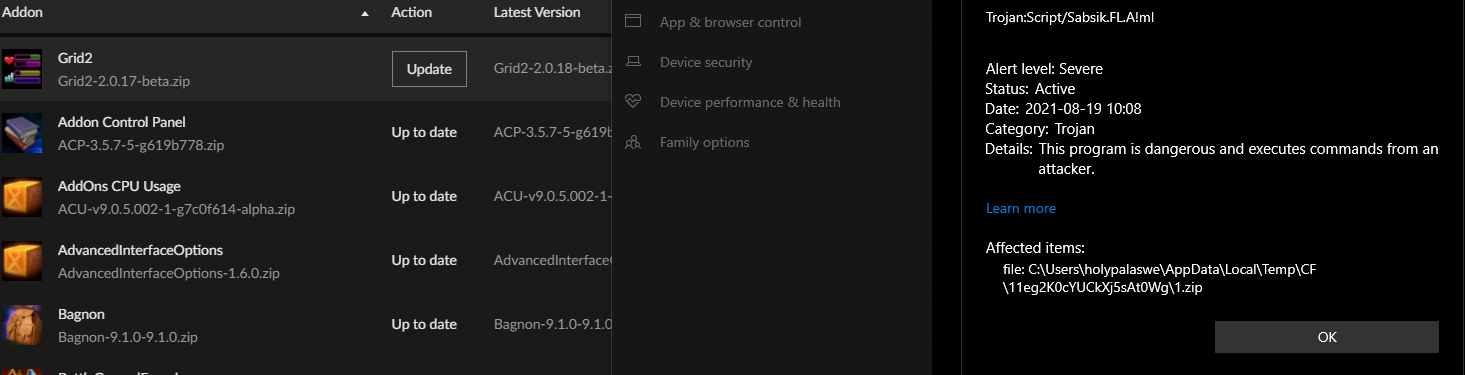
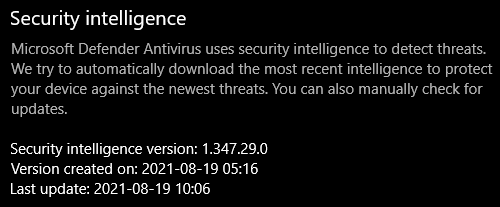
 abstract geyser
I have a question in my WoW Curseforge BETA. I have 4 different addon files for instance, I have one for TBC Retail PTR, and two for retail. But i can't get the the addons the same in both?
unborn basin
abstract geyser
I have a question in my WoW Curseforge BETA. I have 4 different addon files for ...
Why not?
 rare panther
floral imp
When trying to update Grid2: https://i.imgur.com/G7OeXWZ.png
I should have the l...
rare panther
floral imp
When trying to update Grid2: https://i.imgur.com/G7OeXWZ.png
I should have the l...
I got the trojan message while being on the latest security version already as well.
rare panther
real flame
update your windows defender definition via process here https://www.microsoft.c...
The website in your message is funny btw. Sometimes it shows the latest version as 1.347.29.0, but after most refreshes it shows 1.347.24.0. Not sure how that is even possible
rare panther
rare panther
I got the trojan message while being on the latest security version already as w...
Addon that I encounter the trojan message with is LinkWrangler: Trojan:Script/Wacatac.B!ml
 spark crown
floral imp
When trying to update Grid2: https://i.imgur.com/G7OeXWZ.png
I should have the l...
spark crown
floral imp
When trying to update Grid2: https://i.imgur.com/G7OeXWZ.png
I should have the l...
same issue but with general mod updating (MC). are the servers or database compromised?
digital roost
what does this mean, i've uploaded a mod before and it didn't ask me for this

 wise flax
Same issue with the Trojan warning for my own pack.
queen storm
digital roost
what does this mean, i've uploaded a mod before and it didn't ask me for this
Is it a clone / continuation
tight glacier
Yeah on my modpack that I wanted to update I had a trojan warning too I already had the update installed what does this mean?
 hidden heron
I cant join my own server even tho i have all the mods i need to join and curse forge has this rlly big screen that i cant change at all someone please help
queen storm
hidden heron
I cant join my own server even tho i have all the mods i need to join and curse ...
!notcf
red patioBOT
The question you are asking about isn't related to CurseForge. Please use the appropriate game rooms by getting the role from #786424115535544350 or use #👽︱game-support for help.
This room is only for CurseForge Owned & Maintained features/services.
 flat pelican
still getting this false posotive trojan script from the curseforge launcher, claycorp suggested to update my modpack which i did and its still occuring for players

not happened on other launchers, so idk if this needs to be looked into
viral briar
should read this possibly sharkie - #🔥︱curseforge-support message
 marsh minnow
umm not sure if its support but more of a question but is it possible to load the pixelmon mod with the replay mod?
queen storm
!mc-installmods
red patioBOT
How to install mods in CurseForge App.
- Click
+ Create Custom Profile - Name it, select the required Minecraft version, select the Forge version (usually the highest number), click
Create. - Click the profile icon.
- Click
Add More Content - Search and install the desired mods.
- Start the game!
How to install mods not on CurseForge.
- Right click the profile picture or Open the profile and click the Icon next to the play button.
- Click
Open Folder. - Drag the mod(s) into the
modsfolder. (Note: Some mods will require others, to run. Make sure to read the instructions for the mod!) - Start the game!
viral briar
marsh minnow
umm not sure if its support but more of a question but is it possible to load th...
You can definitely use replay mod with pixelmon mod as the last forge version of replay mod was on 12.2 before they went fabric only.
lyric crescent
flat pelican
still getting this false posotive trojan script from the curseforge launcher, cl...
I am unable to reproduce this. I downloaded the zip from the website as well as downloading through the app and neither got flagged for viruses.
flat pelican
doesnt happen to everyone
and happens randomly
happened to me after installing it 10 times or so on a previous version
 patent cave
Ahoy all, looking for support, just tried to install Spiderman mod for my boy, client doesn't recognize it
i've installed other mods without problem... versions seem correct, dependencies in place...
anyone can help me troubleshoot?
queen storm
Link please
queen storm
MC version you are using?
patent cave
new installation 1.16.5
queen storm
Forge or fabric?
patent cave
Forge
queen storm
462682
Put that in the search bar
queen storm
The one for mod installs in the client...
patent cave
ah
 elfin niche
how do I delete it? It's being all weird and not working like it does on my other computer. I can't see the downloaded app itself, but sometimes the overwolf dock comes out of nowhere
patent cave
no results
queen storm
elfin niche
how do I delete it? It's being all weird and not working like it does on my othe...
Delete what?
queen storm
patent cave
no results
Can you post a screenshot?
 lyric crescent
Do you have the curseforge app?
patent cave
Don't think so. think I installed Forge into the folder? I dunno was long time ago...
queen storm
!getcf
red patioBOT
Looking to install the CurseForge app?
<:windows:798410728188936222> Windows
Minimum Requirements:
- OS Version: 7, 8.1, 10
- 64 bit Required.
- 350MB storage space.
- Microsoft .Net 4.8
- Intel/AMD quad-core CPU
- 8GB ram
Download: https://download.overwolf.com/install/Download?&PartnerId=4047
If you are having issues with the installer use the URL below to install Overwolf then go to the app store to download CurseForge.
https://content.overwolf.com/downloads/setup/latest/regular.html
<:mac:798410654418862130> Mac
Minimum Requirements:
- OS Version 10.14 or newer.
- 64 bit Required.
Download: https://curseforge.overwolf.com/downloads/curseforge-latest.dmg
:penguin: Linux
Minimum Requirements:
Yes.
Download: :person_shrugging:
patent cave
curse force app makes this easier than dropping the .jars into the folder?
I mean.. I guess so... 😉
lyric crescent
Well, we don't do support for normal forge shenanigans, only for issues with the app.
 frank veldt
Help, I am trying to submit my mod as non experimental but an error message appears when i do so


 barren sluice
I cannot update my curseforge from the client
queen storm
barren sluice
I cannot update my curseforge from the client
Restart your pc
barren sluice
Is there an alternative method to do so
frank veldt
frank veldt
Help, I am trying to submit my mod as non experimental but an error message appe...
!
 agile jacinth
How do I fix this?
 lyric crescent
what were you doing
agile jacinth
I was tryna download All the Mods 6 and it just keeps on saying could not read such and such
queen storm
frank veldt
!
Pulled it up with staff
frank veldt
ok
agile jacinth
I've reinstalled the launcher, I've tried playing around with the files, but it just keeps on making a zipfile called 1, 4, 7 and just keeps going up in threes?
 opal cipher
The zipfile called <number>.zip, is probably the downloaded modpack, but with a temporary filename, to try and ensure that it doesn't hit the total filename limit imposed by the system.
lyric crescent
oh right, i forgot that was even a thing its been so long since that's happened
opal cipher
And the read access, could be Windows Defender blocking the access to it, because of some current issues with files getting false positives for different signatures.
Try updating your Windows Defender definitions, and then redownloading the modpack you tried to play.
agile jacinth
O: ty, I will try this
opal cipher
Hope it works!
barren sluice
After restarting my computer and even updating my computer I still cannot update my curseforge
agile jacinth
 lyric crescent
flat pelican
doesnt happen to everyone
lyric crescent
flat pelican
doesnt happen to everyone
For any other users that have this issue, will need logs submitted to here. https://forums.malwarebytes.com/topic/277792-curseforge-modpacks-false-positives/?tab=comments#comment-1475682
opal cipher
agile jacinth
the anti-virus thingo yeah?
Correcct
agile jacinth
opal cipher
Correcct
that's weird, it doesn't open
opal cipher
:(
agile jacinth
like I download it, and it's called mpam-fe and it doesn't open
opal cipher
Try updating through Windows Update.
I got a new update like an hour ago for definitions
flat pelican
lyric crescent
For any other users that have this issue, will need logs submitted to here. <htt...
not sure what logs they can submit since they cant download the modpack?
agile jacinth
aaaaah shit, I often delete the windows updates bc it fucks with my tablet drivers, do you think that plays into it?
opal cipher
Hm.. no clue about that one actually..
lyric crescent
flat pelican
not sure what logs they can submit since they cant download the modpack?
would need to have malwarebites installed, then submit the requested logs after the file gets rejected.
barren sluice
agile jacinth
Before i download it, does it just plainly not let you click on it even after spamming left click
agile jacinth
yeah it's like, I double click it, mouse spins for like 2 seconds, and stops
 zenith remnant
Trojan:Script/Wacatac.B!ml was found in two addons for WoW on the curseforge app
barren sluice
but the maybe later button works which was funny
 barren sluice
ok ill wait and not touch it
zenith remnant
updating my addons, Hydra UI and MaxDps Paladin and windows defender caught them
flat pelican
lyric crescent
would need to have malwarebites installed, then submit the requested logs after ...
the person who got it said their latest windows update fixed it
 mint shadow
Hey does anyone know how to fix this? I just installed RLcraft and whenever I press play on curseforge it loads me up into a new minecraft installer and gives me the RLcraft installation, but when I press play it will load up and immediately crash. Did i forgot to add something or am I in the wrong version?
 lyric crescent
?mc-log
red patioBOT
Sending logs for support.
Right-click the modpack profile icon OR click the button in the modpack profile.
Click Open Folder.
Open the logs folder.
Find the file called debug.log OR latest.log and drag it into discord.
agile jacinth
opal cipher
Hm.. no clue about that one actually..
okay I've updated my windows, but it continues to stop at 33% and then shows the error (which is what it did before), however, it tells me that a virus is being detected (Trojan:Script/Wacatac.B!ml)
opal cipher
Hm.. strange..
agile jacinth
opal cipher
Hm.. strange..
I think I've done it
I turned off Real-time protection in Virus & threat protection settings, and now it's downloading all the mods
opal cipher
Yeah, but that's only a workaround for now.. should probably turn that back on as soon as they are installed.
agile jacinth
yeah I'm just gonna wait for it to finish then turn it back on
it was weird bc there was no issue the first time I downloaded it, but I had to update it and then issues came to be
 west folio
where do i report that a mod has potentially a virus in the latest update? i have 2 mods that when i try to update the antivirus (and if i try to update via their version tab, curseforge itself) gives me a trojan/virus warning
lyric crescent
which
west folio
wonderful enchantments and traveler's backpack
lyric crescent
check if you have an update for windows
west folio
additional note, only happens to the mod's latest update, every other version is fine
west folio
lyric crescent
check if you have an update for windows
will do now
alright that did it
lyric crescent
interesting strategy microsoft..
viral briar
why did they have to go break stuff 😆 false flags everywhere. not me personally
 fringe rock
where do i find the fabric 1.17.1 mods?
lyric crescent
considering it's fine after updating i can only assume its to force people to update
viral briar
sounds like apple...
lyric crescent
make a fabric profile
fringe rock
on the site?
lyric crescent
on the app
fringe rock
im on the site not on the app
lyric crescent
then get the app
viral briar
would be much easier with app
fringe rock
isn't there a url or something
fringe rock
but thats for 1.16.5
lyric crescent
then no
barren sluice
I downloaded the windows security thing and double clicked on it, but it doesnt show anything, am i ok now? (im not even close to understanding pcs)
 raven rapids

uhm
curseforge wont open
it shows the loading screen and just never opens
i also tried reinstalling it but did nothing
barren sluice
It might be quite off topic but I cant even update overwolf which is concerning me
barren sluice
barren sluice
It might be quite off topic but I cant even update overwolf which is concerning ...
i had to reinstall the whole overwolf and curseforge to make it work
 dapper galleon
can someone help me with the can someone help me with the we have encounter a problem during installation please close the installer and try agin
red patioBOT
Looking to install the CurseForge app?
<:windows:798410728188936222> Windows
Minimum Requirements:
- OS Version: 7, 8.1, 10
- 64 bit Required.
- 350MB storage space.
- Microsoft .Net 4.8
- Intel/AMD quad-core CPU
- 8GB ram
Download: https://download.overwolf.com/install/Download?&PartnerId=4047
If you are having issues with the installer use the URL below to install Overwolf then go to the app store to download CurseForge.
https://content.overwolf.com/downloads/setup/latest/regular.html
<:mac:798410654418862130> Mac
Minimum Requirements:
- OS Version 10.14 or newer.
- 64 bit Required.
Download: https://curseforge.overwolf.com/downloads/curseforge-latest.dmg
:penguin: Linux
Minimum Requirements:
Yes.
Download: :person_shrugging:
queen storm
dapper galleon
can someone help me with the can someone help me with the we have encounter a pr...
!getcf Use the second link
raven rapids
uhm
curseforge wont open
it shows the loading screen and just never opens
i also tried reinstalling it but did nothing
 queen storm
raven rapids
uhm
curseforge wont open
it shows the loading screen and just never opens
i als...
queen storm
raven rapids
uhm
curseforge wont open
it shows the loading screen and just never opens
i als...
!ticket-site
red patioBOT
:bug: Reporting via Website :bug:
Can't open the app or would rather use the website? You can do so here: https://support.curseforge.com/en/support/tickets/new
Fill out the form with accurate detailed information, "It doesn't work" isn't helpful! What exactly doesn't work and why doesn't it work should be easy to answer!
Make sure to upload your Overwolf logs with the Upload File option on the ticket, information on how to get these logs can be found here https://support.overwolf.com/en/support/solutions/articles/9000176827-how-to-get-your-overwolf-logs
dapper galleon
how do i fix the an exception occured during a webclinet request when downloading mods
red patioBOT
WebClient errors are from networking issues to your computer. You can try a few things to fix it:
- Restart the computer.
- Restart your router/modem.
- Try another internet source like a hotspot, wired connection or moving closer to the WiFi.
- Pause/Stop other things using the internet. (Streams, music, etc)
- If this still doesn't work, try again in an hour and hope your connection is stable.
 next scaffold
I literally can't get curseforge app to link with my minecraft account, it won't accept the same information i used to make my minecraft account.
Twitch is also refusing that.
queen storm
next scaffold
I literally can't get curseforge app to link with my minecraft account, it...
It is the vanilla login on the client, you don't login on the curseforge app, only in the minecraft launcher
next scaffold
You're telling me i launch any mods, then login in the launcher?
queen storm
Yes
next scaffold
Annoying but it's okay lol
dapper galleon
tim my curse forge isnt working mi cant install any mods
queen storm
next scaffold
Annoying but it's okay lol
Curseforge doesn't touch the login process
queen storm
dapper galleon
tim my curse forge isnt working mi cant install any mods
And if I was able to help you with it then I would have done so already
dapper galleon
ive restarted my internet and my pc

 lyric crescent
put it in the mods folder
 fast briar
I can't download mods
 lyric crescent
no, that happens beacuse it is for and older forge version
fast briar
it say's it can not read it
next scaffold
how do i fix that
lyric crescent
get the curseforge app so you can install mods of the correct version
next scaffold
lyric crescent
get the curseforge app so you can install mods of the correct version
ok
i have curseforge, now what
lyric crescent
?mc-installmods
red patioBOT
How to install mods in CurseForge App.
- Click
+ Create Custom Profile - Name it, select the required Minecraft version, select the Forge version (usually the highest number), click
Create. - Click the profile icon.
- Click
Add More Content - Search and install the desired mods.
- Start the game!
How to install mods not on CurseForge.
- Right click the profile picture or Open the profile and click the Icon next to the play button.
- Click
Open Folder. - Drag the mod(s) into the
modsfolder. (Note: Some mods will require others, to run. Make sure to read the instructions for the mod!) - Start the game!
next scaffold
i did exact steps wydm
i dragged the mod into profile's mod file and all i receive is this error
 lyric crescent
you clearly did nothing like this if you downloaded a mod jar
next scaffold
then explain what am i supposed to do with a jar one
next scaffold
ok
this does not match my search at all.

all i only get is modpacks.
i am asking, how will i exactly download specific mods?
lyric crescent
you need to read the instructions. This is not what it says to do. 
next scaffold
where is instructions?
lyric crescent
lyric crescent
No, you did not.
next scaffold
How so?
lyric crescent
If you did the exact steps you would have found the mod search in add more content
next scaffold
Why is it that every mods i download, is now a jar?
queen storm
Because mods are jars


 lyric crescent
Then there is no release for the version you selected.
 tame parrot
i submitted a ticket 2 days ago, there should have been a answer now?
lyric crescent
we dont handle tickets here. they take as long as they take.
 upbeat tinsel
um i got a small probelm


is fabric api broken
im going to go try out microsoft edge
 lyric crescent
check the top pin here
signal ridge
upbeat tinsel
do i just wait ?
Says in the pin.
lyric crescent
you do what it says in the pin
lyric crescent
 glossy sable
hello i need to update my project mmo
glossy sable
hello i need to update my project mmo
press the update button?
glossy sable
where is the update button
lyric crescent
next to the thing you want to update, assuming there is an update
glossy sable
when i load into the server it says in chat i need to update so idk
lyric crescent
if you are using a modpack, you cannot update mods and still be able to connect to a server
digital roost
do yall have any ways i can fix my forge cause ive done everything and it wont launch
 minor whale
Hi, i just created a modpack and i added 2 mods that are not in curseforge, well actually they are in there, sodium is actually there but in an old version, and indium is there but it just says that u need to download it from an other page, so if i want to publish the mod what can i do?
lyric crescent
use the versions on curseforge
lyric crescent
digital roost
do yall have any ways i can fix my forge cause ive done everything and it wont l...
you need to explain the issue..
minor whale
lyric crescent
use the versions on curseforge
they are old versions, not 1.17.1
lyric crescent
then they cant be included
digital roost
if i double click it it wont launch to the main thing where i can choose the mods and stuff
lyric crescent
double click what
digital roost
 lyric crescent
contact overwolf support
minor whale
lyric crescent
then they cant be included
ok, and if i want to include them what i do? cuz older versions doesnt appears in the add more content page.
digital roost
i did
lyric crescent
minor whale
ok, and if i want to include them what i do? cuz older versions doesnt appears i...
wait for them to be properly updated and tagged so they can be used
digital roost
i did everything and it didnt work
lyric crescent
this isnt overwolf support, we cant help with overwolf issues
digital roost
mk
minor whale
lyric crescent
wait for them to be properly updated and tagged so they can be used
if i do the mod pack other mods can be added? i mean not into the mod pack, just externally
lyric crescent
what??
upbeat tinsel
tried the pinned comment, still nothing