#🔥︱curseforge-support
1 messages · Page 518 of 1
 timid birch
 worldly cape
but it says on the website
and if I try and download from the website
it says the file type might hurt my computer
timid birch
So what you want to do is tap create a custom profile
worldly cape
okay
timid birch
Select forge
timid birch
No
worldly cape
okay
 obtuse iron
im not sure but im sending a video soon
worldly cape
and so what mc version
timid birch
1.12.2
worldly cape
okay
timid birch
For your mod
worldly cape
and 2855 forge version?
timid birch
Yes
worldly cape
lego?
in my mods I see the profile name I made
which was please work but I dont see anything els
e
timid birch
Click the image above the name
 waxen imp
hey im loading a mod into minecraft and everything loads fine the problem that I am having is that it is running at 1 fps any sugesstiuons?
timid birch
Np
worldly cape
Bye!!!!
timid birch
Bye
worldly cape
Have a amazing day!!
timid birch
Thx
timid birch
waxen imp
hey im loading a mod into minecraft and everything loads fine the problem that I...
Is its a custom instance try installing optifine mod with it
So i have been trying all day to get a minecraft modpack running but it wont work. So i press play in curseforge and then in the “minecraft launcher” and then it goes back to curseforge and does nothing. Im on mac m1 chip. Can someone help?
 lyric crescent
?mc-installfix
 red patioBOT
- Click on the Minecraft Tab on the Left side of the CurseForge App.
- Click
 button next to the
 Create Custom Profileoption. - Click

Repair Installationoption. - Play game.
NOTE: You will not lose any modpacks or worlds, These are saved in the Instances folder. DO NOT TOUCH THIS FOLDER OR YOU WILL LOSE EVERYTHING
obtuse iron
 copper topaz
that backround lmao
lyric crescent
?mc-log
red patioBOT
Sending logs for support.
Right-click the modpack profile icon OR click the button in the modpack profile.
Click 
Open Folder.
Open the logs folder.
Find the file called debug.log OR latest.log and drag it into discord.
 rustic hearth
I couldn't find the pin that says when curseforge moderators are active - does anyone know the hours offhand?
lyric crescent
!status
red patioBOT
It is 11:42PM on Wednesday for CurseForge my dudes.
Project Moderation Time
Project/File moderation is done on;
Sunday, Monday, Tuesday, Wednesday, Thursday: 10AM - 6PM GMT+2
Friday, Saturday: No Moderation!
This process is First in, First out. Thus files submitted late in the work day may not be checked until the next work day.
New Projects or uploads requiring manual approval: 1-3 Working Days
Updates to approved projects not needing manual approval: 1 Hour
File sync to the Curseforge app may take up to 24 hours after approval.
rustic hearth
awesome, thank you!
waxen imp
timid birch
Is its a custom instance try installing optifine mod with it
downloading optifine didnt help
 tidal grotto
Does anybody know with the crazycraft mod
Why I get kicked when I click an ant
For some flight effect error?

 digital roost
Yo
lyric crescent
tidal grotto
Does anybody know with the crazycraft mod
!notcf
red patioBOT
The question you are asking about isn't related to CurseForge. Please use the appropriate game rooms by getting the role from #786424115535544350 or use #👽︱game-support for help.
This room is only for CurseForge Owned & Maintained features/services.
digital roost
Man why is the addons on wow not showing up on the game it's there in the character screen but not on the game
lyric crescent
try the wow channels. most people here dont know much about wow stuff
 soft mirage
i cant download valhelsia fabric but i tried downloading another mod pack and it downloaded just fine. how do i fix this?
digital roost
No one's there last message was like in march
lyric crescent
k then dont 🤷♂️
lyric crescent
soft mirage
i cant download valhelsia fabric but i tried downloading another mod pack and it...
need to explain the issue
 half flame
Hey question: is there a modpack with origins extra origins and addons that work with a shockbyte server ive been working for 5 hours and no result
red patioBOT
The question you are asking about isn't related to CurseForge. Please use the appropriate game rooms by getting the role from #786424115535544350 or use #👽︱game-support for help.
This room is only for CurseForge Owned & Maintained features/services.
half flame
o-o
soft mirage
lyric crescent
need to explain the issue
so when i try to download valhelsia fabric it gets to 55% then says "failed to get mod loader from manifest"
lyric crescent
can you download other packs?
soft mirage
yea i went toa different version and it downloaded just fine
lyric crescent
can you download it by going to versions and selecting it there
lyric crescent
they all?
soft mirage
yea
lyric crescent
all what
soft mirage
old versions of the mod pack
lyric crescent
soft mirage
yea i went toa different version and it downloaded just fine
????????
soft mirage
you said to go to versions on the mod pack and try installing from there and all the versions of the modpack will not install even the oldest one
lyric crescent
then what "downloaded just fine"??
soft mirage
a different mod pack
 opal bolt
hey hello I would like to put this texture which is for 1.16.4 for 1.16.5 but on the app there is no and therefore downloaded it from the site and manually inserted it in the folder but keep telling me this:
The following files belong to CurseForge-hosted projects, and should therefore not be added directly to zip files:
overrides / resourcepacks / fWhip + 1.16 + V1.10.zip
(i am creating a modpack)
lyric crescent
soft mirage
a different mod pack
try restarting your pc
lyric crescent
opal bolt
hey hello I would like to put this texture which is for 1.16.4 for 1.16.5 but on...
you will need to tell the dev to tag it as available for 1.16.5 to include it
 clear estuary
hey is there a way i can increase my fps when using curseforge? usually when i play minecraft i get 200-300 fps but on curseforge i get 7-8. ive looked around in the settings a bunch but i found nothing.
 fallow wagon
bro what key is it to see what you need to craft something when hovering over it if there is
 fallen loom
If you have NEI/JEI it's R
 pale shuttle
how do you run mods with ksp?
 vestal flicker
How do i make a addon for a mc mod? (Please note i don't understand java so please don't be mad)
 fleet bear
Then you dont.
vestal flicker
ok
fallen loom
If the mod has a system for making addons out of jsons and text files without requiring programming then that's a question for the developers of that mod.
If you want to make an addon for a mod without a system like that, or one that expects its addons to be other mods then you need to know Java in order to make the addon.
fallow wagon
@fallen loom ty btw
digital roost
im not sure whats going wrong but whenever i try to launch all the mods 6 it opens the red box youre supposed to get but it also opens vanilla minecraft and it never actually opens modded minecraft
 violet jackal
cant edit mods folder directly anymore? curseforge wont even read new mod files??
lyric crescent
you can edit it, just dont expect the app to recognise what you did
violet jackal
it used to recognise
wow it doesnt even read modpack folders anymore
what is this
where does it even save them, i delete minecraftinstance.json while curseforge totally closed and it puts pack the json with same data
obtuse iron
copper topaz
that backround lmao
<3
fleet bear
violet jackal
where does it even save them, i delete minecraftinstance.json while curseforge t...
What are you trying to do even..?
violet jackal
edit mods from windows file explorer
but not able to view the changes in curseforge app or export the edited version
lyric crescent
use the app to do that
 slate dust
!status
red patioBOT
It is 01:53AM on Thursday for CurseForge my dudes.
Project Moderation Time
Project/File moderation is done on;
Sunday, Monday, Tuesday, Wednesday, Thursday: 10AM - 6PM GMT+2
Friday, Saturday: No Moderation!
This process is First in, First out. Thus files submitted late in the work day may not be checked until the next work day.
New Projects or uploads requiring manual approval: 1-3 Working Days
Updates to approved projects not needing manual approval: 1 Hour
File sync to the Curseforge app may take up to 24 hours after approval.
fleet bear
violet jackal
edit mods from windows file explorer
it works the same way any modded profile works... mods go in the mods folder.
The mods not on CF don't show in the app and it exports fine.
obtuse iron
obtuse iron
does anyone know what in the curse forge is going on here?
im sorry to be a bother i just wanna get worldedit deprerately
red patioBOT
- Click on the Minecraft Tab on the Left side of the CurseForge App.
- Click button next to the
Create Custom Profileoption. - Click
Repair Installationoption. - Play game.
NOTE: You will not lose any modpacks or worlds, These are saved in the Instances folder. DO NOT TOUCH THIS FOLDER OR YOU WILL LOSE EVERYTHING
obtuse iron
fleet bear
!mc-installfixc
o ty
violet jackal
fleet bear
it works the same way any modded profile works... mods go in the mods folder.
Th...
if i remove a mod file, it wont remove it from curseforge's data. Exporting will include the mod but ofc launching the game wont include the mod
and will keep showing in the app ofc until i delete using the button
it is just easier to edit files directly...
how come they broke this
fleet bear
that's not how the app works at all
if you remove the mod from the folder the app doesn't keep any info about it
fleet bear
Two mods:
https://i.imgur.com/3z6xODB.png
Delete one from folder:
https://i.imgur.com/dp246CF.png
Export:
https://i.imgur.com/uvkM9Ib.png
Import:
https://i.imgur.com/UphlLRK.png
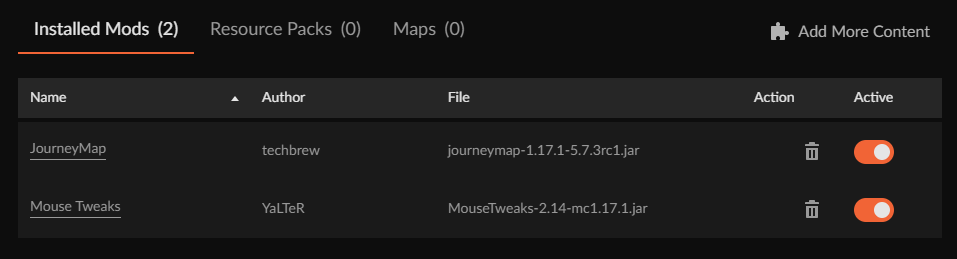
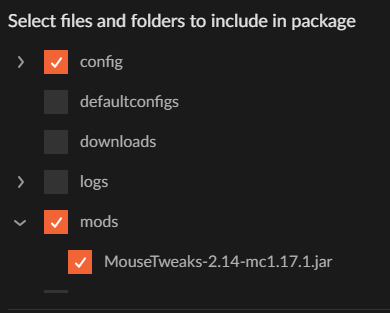
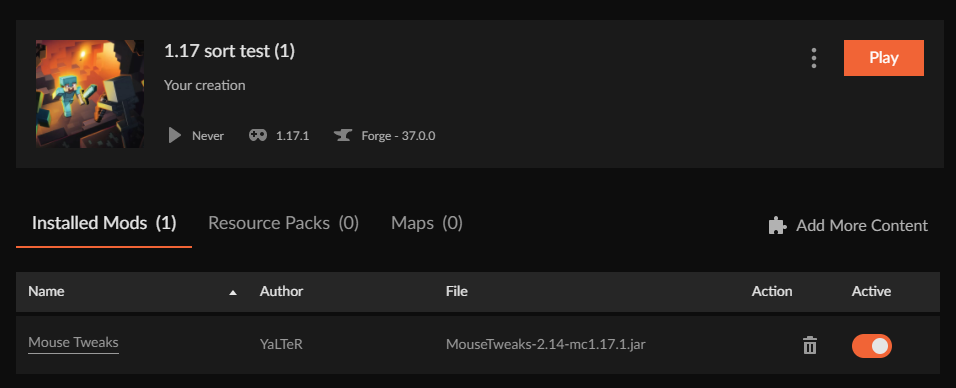
works fine
Nothing changed.
violet jackal
maybe you dont have a very new version of curseforge?
i just literally deleted \AppData\Local\Overwolf\
fleet bear
I always have the most recent version. I write the change logs and test them.
violet jackal
which also deleted curseforge
and i reinstalled
but it still has the same data
shows 1 mod while i have like 10
fleet bear
thats because you have no idea what you are deleting.
Overwolf has nothing to do with Curseforge data for installed games.
fleet bear
GameInstances isn't even used to store minecraft data...
Its all in the modding folder.
fallen loom
Was Curse closed when you deleted that file?
fleet bear
No.
violet jackal
welp, go see it
fleet bear
Oh, you asking the other person.
fallen loom
Yes I was
violet jackal
fallen loom
Was Curse closed when you deleted that file?
yes overwolf too
the json file i said contains all the mod files infos
check it
fallen loom
and not everything is stored in the MCRoot, Clay... I learned that the hard way and also abused the hell out of it
violet jackal
contains modpacks infos too just everything
fleet bear
Everything shown in the app for a profile and what's loaded for it is stored in the mc root
violet jackal
\AppData\Local\Overwolf\Curse\GameInstances\MinecraftGameInstance.json
what i dont understand is i delete everything and that json comes back with same info
maybe stores data on my ram and nothing about curseforge / overwolf in task manager
lyric crescent
seems like if the app is closed it doesnt understand what happened. deleted antique atlas with curseforge closed and its still in the mod list https://i.imgur.com/4UqhSPS.png
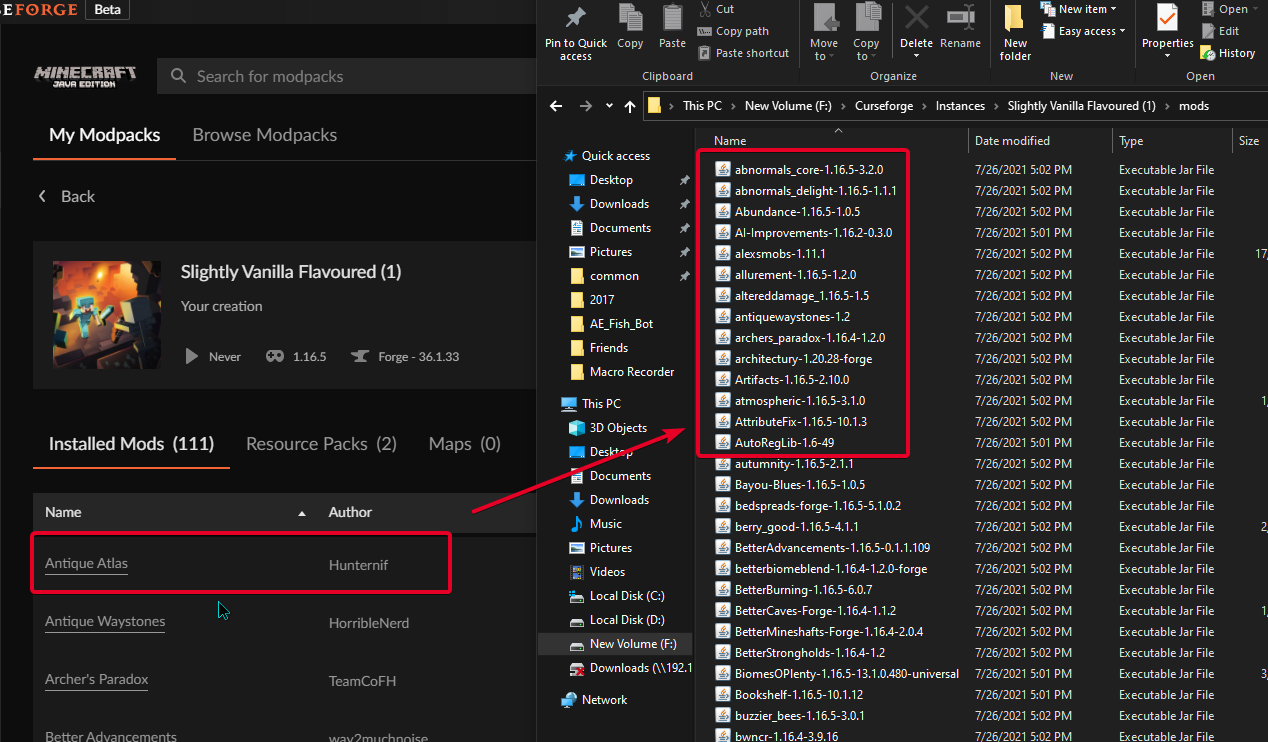 fleet bear
Likely needs to refresh. Close and open the profile again and it should check the files.
violet jackal
lyric crescent
seems like if the app is closed it doesnt understand what happened. deleted anti...
oh removing a mod while the app is open works
fleet bear
Similarly the count of mods in the profile doesn't update right away when deleting from the folder.
violet jackal
but not adding back
lyric crescent
nope. changed profiles and restarted the app. mod is still in the list
fleet bear
As you have been told 3 times now. If you are installing mods you should be using the app to do so
If they don't exist on CF they don't show in the list
fleet bear
lyric crescent
nope. changed profiles and restarted the app. mod is still in the list
does it export with it?
violet jackal
it will export with it in the manifest
fleet bear
I didn't ask you.
lyric crescent
need to reproduce it, clicked delete on the app and it was gone
violet jackal
mhm i will try restarting my computer after i delete MinecraftGameInstance.json while curseforge is closed.
also minecraftinstance.json from actual instance folder
lyric crescent
actually the profile seems completely screwed now..
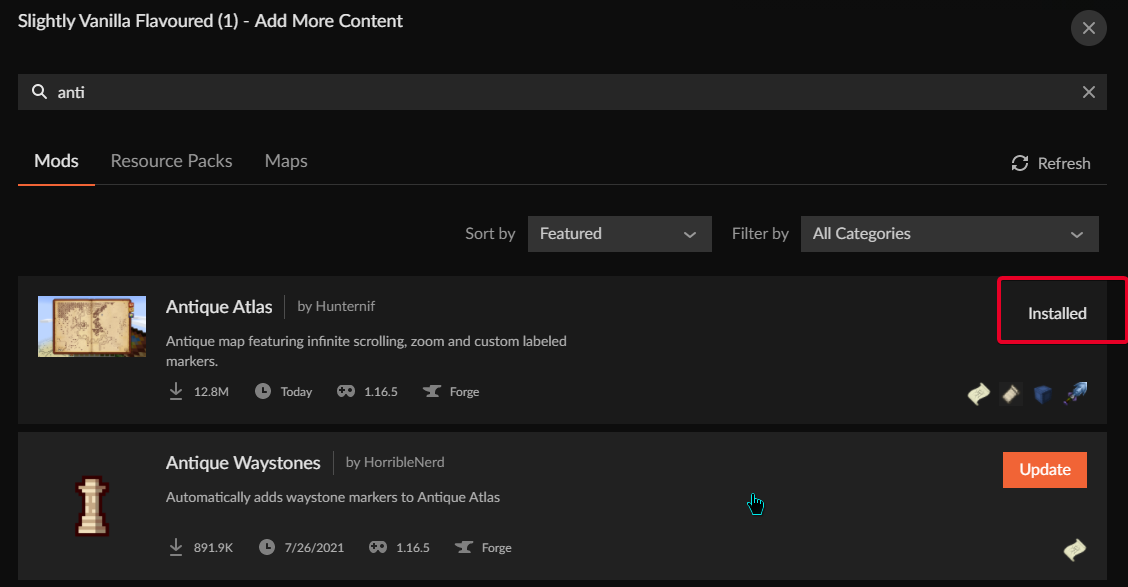
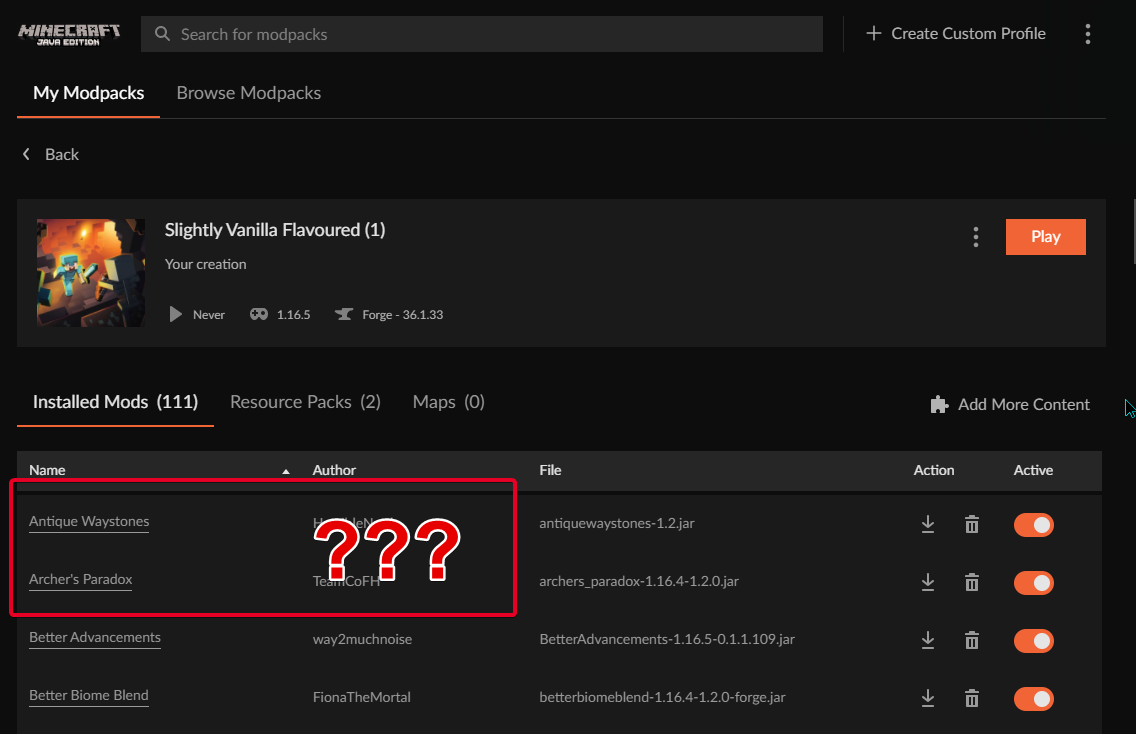 fleet bear
Yep can reproduce. Waiting on export to fucking load.
lyric crescent
its no longer at the top cuz its uptodate lol
violet jackal
restarted pc and MinecraftGameInstance.json isn't there, now launching curseforge
fallen loom
So after doing some testing I've determined that MinecraftGameInstance.json seems to just be a running merge of each pack's minecraftinstances.json
fallen loom
Yes but I like testing for myself
lyric crescent
ok we're back to this point now. not in the actual folder but on the list. lets see if it exports.. https://i.imgur.com/ZnwsFW0.png
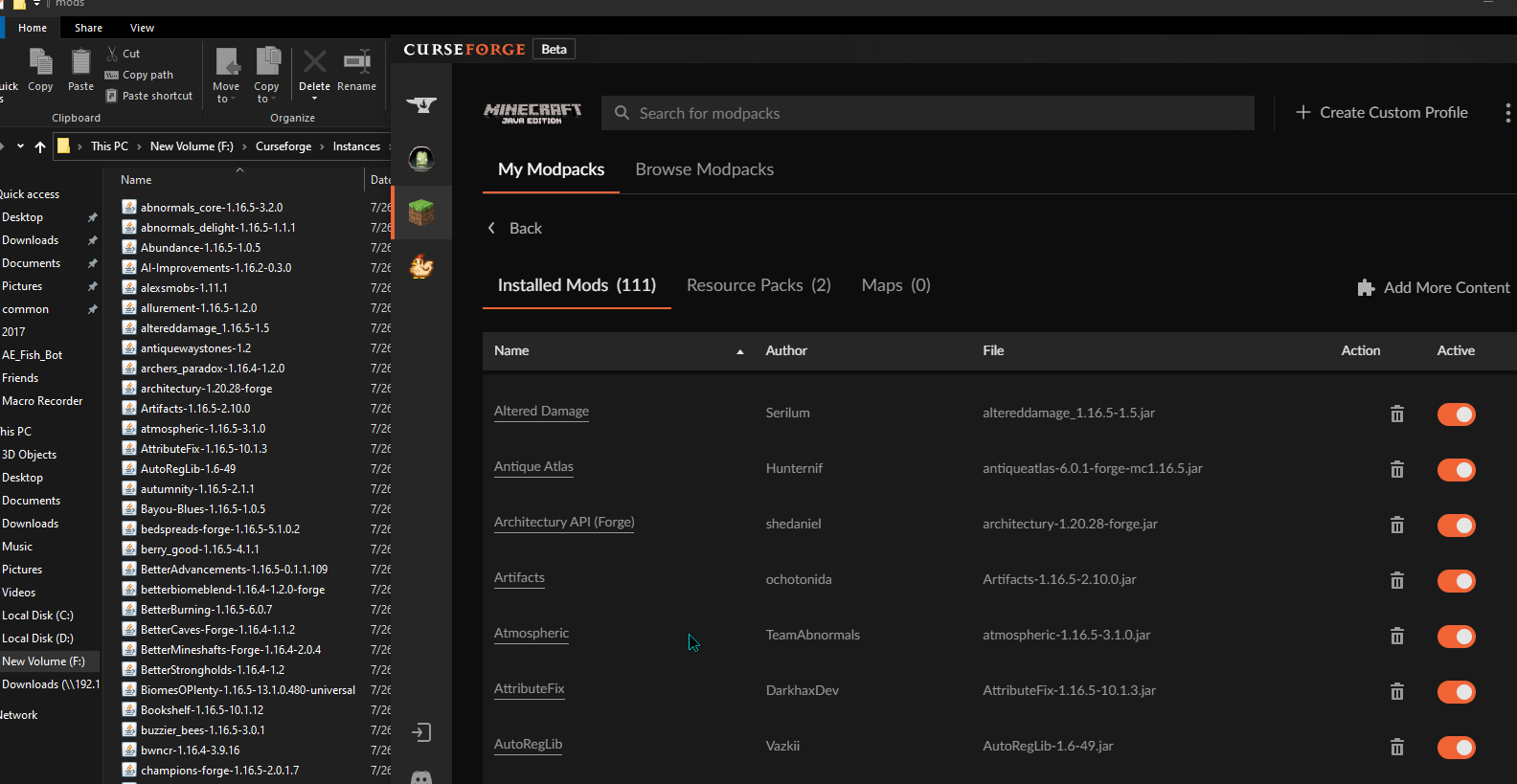 fleet bear
Either deleting this mod with the app closed breaks the app or something else happened cause I can't get shit to load at all.
fallen loom
also now I'm wondering why the heck the merged json exists...
fleet bear
To display the info in the pack list?
violet jackal
violet jackal
restarted pc and MinecraftGameInstance.json isn't there, now launching curseforg...
it just didn't show up my modpack that doesn't have a minecraftinstance.json anymore
and recreated MinecraftGameInstance.json with up to date info from the minecraft files, if i didn't restart my pc it was gonna use outdated info even if curseforge isn't even running
fallen loom
No I mean if the info is stored in the mcroot why create the merged version?
Is it purely a cacheing measure?
fleet bear
because that's what i'm going to assume is displaying the data on the pack list.
Otherwise it would need to check the pack folders every time that part is loaded.
lyric crescent
it did export https://i.imgur.com/5F0tXeC.png
fleet bear
well there's a bug
violet jackal
if i didn't restart my pc it was gonna use outdated info even if curseforge isn't even running
i will retry this
fleet bear
Packs not updating contents after modification while the app is closed then started.
lyric crescent
i've been saying this since the app began
fleet bear
It's likely been reported but isn't that huge of an issue as why would you be editing them by hand with the app closed?
violet jackal
 lyric crescent
doesnt work properly with the app opened either. thats why so many people get mods thrown into overrides
fleet bear
That's not the same issue.
violet jackal
deleted \Local\Overwolf\Curse while curse is closed
lyric crescent
the issue is not reading the mods folder. seems the same?
fallen loom
Alex... stop
Clay's been saying it since the beginning and I confirmed it independently
fleet bear
Manually adding a file is the app not correctly assigning an ID to the file.
This should be fairly straightforward tracking. It should know what projects are missing because they are already tracked.
Why it's not updating that the file is missing beats me.
fallen loom
What you're deleting isn't actually in charge of anything, it's just a merged version of everything in the instance folders and is apparently used only to make the pack list overview screen more responsive
lyric crescent
anyway, for the issue at hand. just do changes with the app. dont mess with the folder.
fleet bear
Good one for zappah to look into. I'll write up a note for him in the support room.
You can also delete but not add files manually with the app open.
violet jackal
okay yeah the merged one just regenerates from instance folders
fleet bear
🤦
violet jackal
i mean i agree with DaemonUmbra
digital roost
digital roost
im not sure whats going wrong but whenever i try to launch all the mods 6 it ope...
^ if anybody knows please help me out
fleet bear
Alright, task sent to someone to take care of it. I doubt either issue will be fixed quickly due to the fact that 99% of people aren't messing with folders when the app is closed.
violet jackal
adding while app open doesnt work
fleet bear
as you have been told 4 times now
violet jackal
then there isnt an issue that needs to be solved with your logic
fleet bear
If you want to install mods on curseforge and have the app track them as it should you need to INSTALL THEM WITH THE APP
No. I'm telling you it's a known issue that manually installing mods doesn't always work as it should.
You shouldn't even need to manually install mods as thats the whole purpose of using the app in the first place
violet jackal
fleet bear
Alright, task sent to someone to take care of it. I doubt either issue will be f...
but you are talking about "while app closed"
violet jackal
fleet bear
No. I'm telling you it's a known issue that manually installing mods doesn't alw...
always worked before
fleet bear
No it did not.
It's never worked correctly.
I've been doing support for the app since they added MC modding to curse/curseforge. It's always been an issue.
violet jackal
i never got an issue while swapping mod files
fleet bear
Again, why are you manually changing files anyway...
violet jackal
digital roost
^ if anybody knows please help me out
ask in their discord server: (you can find the invite here) https://github.com/AllTheMods/ATM-6
fleet bear
The whole purpose of the app is to manage and install mods. if you are doing it all by hand use something else.
digital roost
violet jackal
ask in their discord server: (you can find the invite here) https://github.com/A...
thank you
violet jackal
fleet bear
Again, why are you manually changing files anyway...
moving multiple files at once
fleet bear
why....
violet jackal
much easier and less confusing
fleet bear
You click update or download. It's not hard.
violet jackal
than disabling/enabling one by one and keeping their names in mind
fallen loom
I think that's a request for batch/bulk actions in the client, Clay
 glossy aurora
hi uh sorry for not saying anything the entire day i was busy but the problem still persists, the folder is not using any cloud sync
violet jackal
it is for testing like when you have incompatibility etc
or need to test performance
whatever
lets hope it works like it did before, soon
fleet bear
then the profiles don't matter if they show what mods they have or not.
It works exactly as it did before.
fleet bear
Sure but if i'm telling you that its working as it always has (minus the delete update issue) what you are going to be told is the same thing.
!ticket-app
fucking carl
-
Click the
 icon in the bottom left.
 -
Select

Open a Ticket. -
Fill out the form with accurate detailed information, "It doesn't work" isn't helpful! What exactly doesn't work and why doesn't it work should be easy to answer!
-
Make sure to upload your Overwolf logs with the
Upload Fileoption on the ticket, information on how to get these logs can be found here https://support.overwolf.com/en/support/solutions/articles/9000176827-how-to-get-your-overwolf-logs -
Submit!
glossy aurora
oh uh also don't really know if this helps but i tried fabric loader separate from curse forge and it did the same thing
lyric crescent
tried a pc restart?
glossy aurora
yeah
glossy aurora
alright ill try
fleet bear
carl doesn't even show any issues on the status page... this bot is crap
fallen loom
!commands
?mc-path
It just doesn't like you
Oh sure Yamza... delete the responses and make me look like a liar
fleet bear
🤣
violet jackal
Okay, pretty sure there is an issue if you change mod files fastly.
If you move a mod file out of mods, it will be removed from the list in the app, but if you do Ctrl+Z instantly, it won't come back to the list because you changed files too fast.
You can get the mod back in list by moving it out again and moving back after 1-2 seconds.
Same happens if you move multiple files at the same time. Doesn't matter if adding or removing. Might be async issues
fleet bear
I don't know how many times its required to say this....
violet jackal
how about you reading
fleet bear
Manually ADDING mods has issues and doesn't work correctly, It's a KNOWN issue and YOU SHOULD BE USING THE APP to install them
How about you read?
fleet bear
No. It 100% has not
violet jackal
reported using the ticket thing
fallen loom
That was before the app rebuild
fleet bear
It's working like it ALWAYS has for the LAST 7 years.
fleet bear
It wasn't.
You just didn't know that they broke because for a long time the app used to just show everything in the folder.
fallen loom
I thought for sure Twitch did a hash lookup or something
glossy aurora
lyric crescent
try that. if that doesnt help it's gunna be ticket time
doesn't work 
fleet bear
I've always had issues dropping files into the folder without installing from the app
fallen loom
Because I swear I used to put mods in manually and it would link up and show versions
fleet bear
The current app does the same thing. It's just shit at doing so.
lyric crescent
i always built packs manually in the twitch app
mostly due to search being pure trash with fabric. at least 1.15+
fleet bear
ah
 lyric crescent
sorry
 solid tusk
Something is wrong, Curseforge app won't load
I've tried pressing "retry", but it won't work
it went back to the same screen after the loading bar was done
 placid sluice
So im trying to host a modded server and most of the mods are not working correctly
And when I was in the process of creating the server it didnt make a mods folder on its own
 signal ridge
!notcf
red patioBOT
The question you are asking about isn't related to CurseForge. Please use the appropriate game rooms by getting the role from #786424115535544350 or use #👽︱game-support for help.
This room is only for CurseForge Owned & Maintained features/services.
solid tusk
nvm
 cobalt seal
 fallen loom
!notcf
red patioBOT
The question you are asking about isn't related to CurseForge. Please use the appropriate game rooms by getting the role from #786424115535544350 or use #👽︱game-support for help.
This room is only for CurseForge Owned & Maintained features/services.
fallen loom
99% of the time crashes are not caused by Curse... please follow what the bot said and move to a more appropriate room
obtuse iron
!status
red patioBOT
It is 04:43AM on Thursday for CurseForge my dudes.
Project Moderation Time
Project/File moderation is done on;
Sunday, Monday, Tuesday, Wednesday, Thursday: 10AM - 6PM GMT+2
Friday, Saturday: No Moderation!
This process is First in, First out. Thus files submitted late in the work day may not be checked until the next work day.
New Projects or uploads requiring manual approval: 1-3 Working Days
Updates to approved projects not needing manual approval: 1 Hour
File sync to the Curseforge app may take up to 24 hours after approval.
obtuse iron
Ok
 fresh magnet
I have a problem with opening the curseforge installer. when i click yes on the popup after opening it nothing happens
i was able to download the twitch launcher just fine
fallen loom
!getcf
red patioBOT
Looking to install the CurseForge app?
<:windows:798410728188936222> Windows
Minimum Requirements:
- OS Version: 7, 8.1, 10
- 64 bit Required.
- 350MB storage space.
- Microsoft .Net 4.8
- Intel/AMD quad-core CPU
- 8GB ram
Download: https://download.overwolf.com/install/Download?&PartnerId=4047
If you are having issues with the installer use the URL below to install Overwolf then go to the app store to download CurseForge.
https://content.overwolf.com/downloads/setup/latest/regular.html
<:mac:798410654418862130> Mac
Minimum Requirements:
- OS Version 10.14 or newer.
- 64 bit Required.
Download: https://curseforge.overwolf.com/downloads/curseforge-latest.dmg
:penguin: Linux
Minimum Requirements:
Yes.
Download: :person_shrugging:
digital roost
when i try to open curseforge it loads then just crashes
 crisp zenith
when i try to play sky factory 4 its instantly crashes and says error code zero what should i do
signal ridge
crisp zenith
when i try to play sky factory 4 its instantly crashes and says error code zero ...
!mc-logs
red patioBOT
Sending logs for support.
Right-click the modpack profile icon OR click the button in the modpack profile.
Click Open Folder.
Open the logs folder.
Find the file called debug.log OR latest.log and drag it into discord.
crisp zenith
@signal ridge
red patioBOT
- Click on the Minecraft Tab on the Left side of the CurseForge App.
- Click button next to the
Create Custom Profileoption. - Click
Repair Installationoption. - Play game.
NOTE: You will not lose any modpacks or worlds, These are saved in the Instances folder. DO NOT TOUCH THIS FOLDER OR YOU WILL LOSE EVERYTHING
signal ridge
crisp zenith
<@!217048549706301442>
!mc-installfix
crisp zenith
thank you
 severe kernel
yooooooooooooooooooooooooooooooooooooooooooooooooooooooooooooooooooooooooooooooooooooo
 severe kernel
hi im neew
signal ridge
Do you need help with something? Otherwise this isnt the channel for just chat
 runic depot
help why this keep happening
runic depot
runic depot
help why this keep happening
still couldnt load after rebooting the system
signal ridge
!ticket
red patioBOT
Issue Reporting with Overwolf tickets!
Issues can be reported two ways!
Via the website, or in app. Instructions for both are below!
Make sure to include logs when reporting a problem!
Upload your Overwolf logs with the Upload File option on the ticket, information on how to get these logs can be found here https://support.overwolf.com/en/support/solutions/articles/9000176827-how-to-get-your-overwolf-logs
:bug: Reporting via Website :bug:
Can't open the app or would rather use the website? You can do so here: https://support.curseforge.com/en/support/tickets/new
Fill out the form with accurate detailed information, "It doesn't work" isn't helpful! What exactly doesn't work and why doesn't it work should be easy to answer!
:question: Ticket Status :question:
Tickets you have made can be looked at, replied to and closed if you make/login to an account. If you submit a ticket with a specific Email make sure to use that when you make your account so you can see your past tickets!
https://support.curseforge.com/en/support/tickets
Otherwise you will only get email replies at the email you used to open the ticket.
:bug: Reporting via the CurseForge App :bug:
- Click the icon in the bottom left.
- Select
Open a Ticket. - Fill out the form with accurate detailed information, "It doesn't work" isn't helpful! What exactly doesn't work and why doesn't it work should be easy to answer!!
- Upload your Overwolf logs with the
Upload Filesection. (see the top of this message for details) - Submit!
runic depot
thanks
 olive kestrel
so everytime i enter curseforge it says 'Oops, that was not supposed to happen! Seems like we could not load CurseForge. Let's try one more time!'
 unborn basin
runic depot
thanks
unborn basin
runic depot
thanks
PMed you
 soft thunder
Hey I play my own Modpack but it doesent working I will try to copy the crash report perhaps you know the answer also sorry for my english
Hear
here
I hope you can help me
 ripe marsh
hi, im trying to open a modpack folder from the app but it doesnt work and i dont know why
it says that the access is denied
maybe you can help me
 lunar orbit
hey guys im kinda stuck here i download the curse forge app and when i try opening the installer it just deosnt download any help please ?
!ticket
red patioBOT
Issue Reporting with Overwolf tickets!
Issues can be reported two ways!
Via the website, or in app. Instructions for both are below!
Make sure to include logs when reporting a problem!
Upload your Overwolf logs with the Upload File option on the ticket, information on how to get these logs can be found here https://support.overwolf.com/en/support/solutions/articles/9000176827-how-to-get-your-overwolf-logs
:bug: Reporting via Website :bug:
Can't open the app or would rather use the website? You can do so here: https://support.curseforge.com/en/support/tickets/new
Fill out the form with accurate detailed information, "It doesn't work" isn't helpful! What exactly doesn't work and why doesn't it work should be easy to answer!
:question: Ticket Status :question:
Tickets you have made can be looked at, replied to and closed if you make/login to an account. If you submit a ticket with a specific Email make sure to use that when you make your account so you can see your past tickets!
https://support.curseforge.com/en/support/tickets
Otherwise you will only get email replies at the email you used to open the ticket.
:bug: Reporting via the CurseForge App :bug:
- Click the icon in the bottom left.
- Select
Open a Ticket. - Fill out the form with accurate detailed information, "It doesn't work" isn't helpful! What exactly doesn't work and why doesn't it work should be easy to answer!!
- Upload your Overwolf logs with the
Upload Filesection. (see the top of this message for details) - Submit!
 rain geyser
My PayPal reward purchase says Fulfilled but my PayPal is still empty. any clues? Does it take some time even after it says Fuffilled
 bold cave
I'm trying to make myself a modpack but whenever I lauch it I get this:

In mods folder there are no duplicates tho

theyre all unique
red patioBOT
The question you are asking about isn't related to CurseForge. Please use the appropriate game rooms by getting the role from #786424115535544350 or use #👽︱game-support for help.
This room is only for CurseForge Owned & Maintained features/services.
bold cave
its Forge mod loader problem, that isnt connected?
red patioBOT
Wording is important!
Forge = Minecraft Forge, This is a modloader often just called "Forge".
Fabric = Fabric MC, this is another modloader, just called "Fabric".
CurseForge = A Website/App that has content for games.
Mods = Individual mod files.
Modpacks = Multiple mods put into the mods folder or downloaded from CurseForge.
These are not Interchangeable! Please use the correct terms as it allows us to help you faster!
bold cave

unborn basin
soft thunder
Hear
    Mod File: goblintraders-1.6.0-1.16.3.jar
    Failure message: Mod goblintraders only supports configured 1.0.0 or above
        Currently, configured is 0.4.2
    Mod Version: 1.6.0
    Mod Issue URL: https://github.com/MrCrayfish/GoblinTraders/issues
Exception message: MISSING EXCEPTION MESSAGE```Looks like the mod name is the same for the same mods just one has "base" in its name, try removing them see if that helps
 elfin mesa
!status
red patioBOT
It is 12:55PM on Thursday for CurseForge my dudes.
Project Moderation Time
Project/File moderation is done on;
Sunday, Monday, Tuesday, Wednesday, Thursday: 10AM - 6PM GMT+2
Friday, Saturday: No Moderation!
This process is First in, First out. Thus files submitted late in the work day may not be checked until the next work day.
New Projects or uploads requiring manual approval: 1-3 Working Days
Updates to approved projects not needing manual approval: 1 Hour
File sync to the Curseforge app may take up to 24 hours after approval.
rain geyser
bold cave
In mods folder there are no duplicates tho
remove the enderio jar
the one that just says enderio
 viral briar
You only need either enderio or enderio base . Do not use both
rain geyser
OP was already answered in #👽︱game-support
bold cave
yea, thx everyone as well tho <3
 glad hatch
I didnt get my paypal payment even though its marked as "Fullfilled", is that normal
 woven spruce
Hello, How does the search work on Minecraft mods?
I've created a mod named : "XP Obelisk" and when i search for "XP" it doesn't show up, only under "XP Obelisk" or "Obelisk"... changing the mod name doesn't help :/ How to find it with "XP" search ?
lyric crescent
It barely works. Its due for updating but will be some time yet.
Searching for two letters will always be worse than searching for a full word. Something to keep in mind when naming mods/packs.
viral briar
just like how having spaces or not having spaces matter in the search
lyric crescent
TBH I can't even find a mod named "XP Obelisk" with google..
woven spruce
lyric crescent
TBH I can't even find a mod named "XP Obelisk" with google..
I'm talk about CurseForge Minecraft Mod search 😮 sorry
lyric crescent
I know what you are talking about
looks like i found it with "xp"
https://i.imgur.com/44kdShQ.png
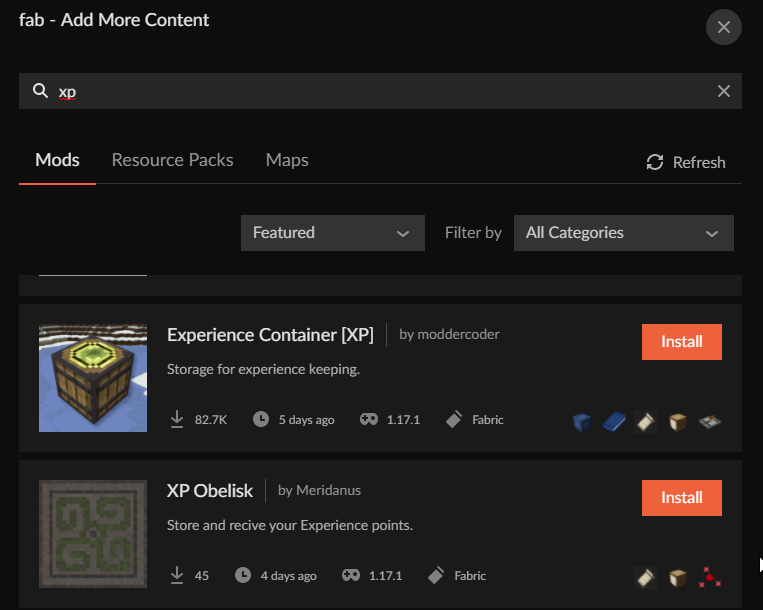 woven spruce
lyric crescent
looks like i found it with "xp"
https://i.imgur.com/44kdShQ.png
woven spruce
lyric crescent
looks like i found it with "xp"
https://i.imgur.com/44kdShQ.png
that's great maybe its only a problem on the Website or it doesn't show up for me as Owner 🤔 Thanks
lyric crescent
Already explained that it is a problem, and how to alleviate it.
 valid depot
Hi, nice to meet you, I tried to put this Curse Forge, but it says "an invalid folder path was chosen" and I don't know how to deal with it, so can you tell me?
lyric crescent
?mc-path
red patioBOT
Change your install path to the following:
For Windows: C:\CurseForge
-Go to C:\ drive. Make a new folder. Name it Curseforge.
For Mac: /Users/Shared/CurseForge
If Minecraft is not installed in CurseForge App:
- Click the
 in the top left.
 - Select Minecraft from the list of games.
- Select the
Advancedoption and pick the folder you just made. - Click
Continue.
If Minecraft is installed in CurseForge App:
- Click the
 in the bottom left.
 - Select the Minecraft tab.
- Click
Change. - Select the folder you just made.
:no_entry_sign: Minecraft Files should NOT be installed inside the following locations :no_entry_sign:
:no_entry_sign: .minecraft folder.
:no_entry_sign: OneDrive folders.
:no_entry_sign: Desktop folder.
:no_entry_sign: Drive roots I.E. Directly into the C:\ drive.
:no_entry_sign: iCloud enabled folders.
:no_entry_sign: or any other cloud saved folder.
If any of the above are in the path you need to change/move it!
 rancid stone
so can some admin message me to help me
lyric crescent
you can explain the issue here
digital roost
i keep seeing this message and when i press the restart button nothing happens , can anyone help plz ?
 lyric crescent
close the app and open it again
ripe marsh
ripe marsh
hi, im trying to open a modpack folder from the app but it doesnt work and i don...
can someone help me with this plz?
lyric crescent
do that #🔥︱curseforge-support message
ripe marsh
lyric crescent
do that https://discord.com/channels/428228256236306434/782027635252920322/87282...
i have to search that on my file browser?
lyric crescent
you follow the instructions
ripe marsh
im on windows and i search C:\CurseForge and it doesnt show anything
timid birch
Help im trying to run a modpack on my mac (m1 chip). But when i click play in the forge launcher and then in the mc launcher it goes back to forge again.
lyric crescent
m1 macs do not work with forge below 1.17
timid birch
Alr thx
lyric crescent
!!=
red patioBOT
Wording is important!
Forge = Minecraft Forge, This is a modloader often just called "Forge".
Fabric = Fabric MC, this is another modloader, just called "Fabric".
CurseForge = A Website/App that has content for games.
Mods = Individual mod files.
Modpacks = Multiple mods put into the mods folder or downloaded from CurseForge.
These are not Interchangeable! Please use the correct terms as it allows us to help you faster!
digital roost
Is CurseForge's website currently experiencing heavy traffic or something? I can't seem to upload an image to my project, it just hangs on "Upload". I let it stay for an hour, nothing changed, when I reloaded it wasn't there.
timid birch
lyric crescent
m1 macs do not work with forge below 1.17
Is it the curseforge launcher or forge that doesn’t work with m1 bc the modpack is fabric
red patioBOT
- Click on the Minecraft Tab on the Left side of the CurseForge App.
- Click button next to the
Create Custom Profileoption. - Click
Repair Installationoption. - Play game.
NOTE: You will not lose any modpacks or worlds, These are saved in the Instances folder. DO NOT TOUCH THIS FOLDER OR YOU WILL LOSE EVERYTHING
lyric crescent
?mc-path
red patioBOT
Change your install path to the following:
For Windows: C:\CurseForge
-Go to C:\ drive. Make a new folder. Name it Curseforge.
For Mac: /Users/Shared/CurseForge
If Minecraft is not installed in CurseForge App:
- Click the in the top left.
- Select Minecraft from the list of games.
- Select the
Advancedoption and pick the folder you just made. - Click
Continue.
If Minecraft is installed in CurseForge App:
- Click the in the bottom left.
- Select the Minecraft tab.
- Click
Change. - Select the folder you just made.
:no_entry_sign: Minecraft Files should NOT be installed inside the following locations :no_entry_sign:
:no_entry_sign: .minecraft folder.
:no_entry_sign: OneDrive folders.
:no_entry_sign: Desktop folder.
:no_entry_sign: Drive roots I.E. Directly into the C:\ drive.
:no_entry_sign: iCloud enabled folders.
:no_entry_sign: or any other cloud saved folder.
If any of the above are in the path you need to change/move it!
lyric crescent
do that in #🟢︱user-bot-spam
slate dust
ah ok
unborn basin
ripe marsh
im on windows and i search C:\CurseForge and it doesnt show anything
Did things work out for you?
 west stirrup
Hello, I'm trying to get support to help me with someone reuploading my modpack, I sent in a ticket and I haven't heard anything in over 4 days.
digital roost
lyric crescent
close the app and open it again
nothing have changed , still cant update it , its not laggy its just nothing happens when i press the restart button
lyric crescent
This one's for you zappah
unborn basin
digital roost
nothing have changed , still cant update it , its not laggy its just nothing hap...
If you restart the app nothing changes right?
digital roost
yes
fleet bear
west stirrup
Hello, I'm trying to get support to help me with someone reuploading my modpack,...
Report the project via the site report tools.
west stirrup
I have, twice
fleet bear
Link the project then and your project.
elfin mesa
So I'm getting server files rejected for a file that supposedly is removed but exists. 🤔
Ideas?
this one is "removed". but it exists
fleet bear
Delete the file and download it again.
west stirrup
Oh it's gone now 😁
elfin mesa
fleet bear
Delete the file and download it again.
Already did, didn't work.
same reject
fleet bear
west stirrup
Oh it's gone now 😁
Should check that before coming here. 😉
west stirrup
It wasn't when I originally posted 🤷
west stirrup
Thanks for your help irregardless 😊
fleet bear
elfin mesa
same reject
Post the whole message then.
elfin mesa
`August 5
The status of the file LL4 Server Files - v0.1.0 (TNP Limitless 4 - 1.17.1) has been changed to Rejected
Notes:
The following file versions have been removed from CurseForge:
mods/Xaeros_Minimap_21.14.1_Forge_1.17.1.jar`
elfin mesa
I have gotten this twice before, someone said its when the author removes the same update, then reuploads it, system gets confused or something
with same name etc
fleet bear
Yes, but deleting and downloading it again should fix it.
elfin mesa
it didnt.. sadly
fleet bear
Cause the file name doesn't do anything it's the hash of the file that does it
elfin mesa
hm, well I've tried 3 times. all of them rejected. Newly downloaded file aswell
fleet bear
Devs should stop uploading same named files as it confuses the users.
elfin mesa
fleet bear
Devs should stop uploading same named files as it confuses the users.
agreed
Guess I could for this update not include it on the server since its not technically needed there. Only missing some server side features.
lyric crescent
or try an older version?
fleet bear
Unless you want to wait till tomorrow. Cause the day is done for them I believe.
elfin mesa
yeah no worries
 hearty meteor
Evening. I've had a problem for a while, and it's beginning to drive me nuts. Every time I launch a Minecraft mod pack, CF insists on reinstalling Forge. The install seems to take longer and longer each time. Any idea why it feels the need to do this?
lyric crescent
What do you mean reinstalling forge?
hearty meteor
When I click the 'Play' button in CF, it starts giving me details of the 27 files it's installing for Forge before it launches the Minecraft loader window
 lyric crescent
click settings, minecraft. what is the modding folder path used
hearty meteor
 rustic hearth
!status
red patioBOT
It is 06:28PM on Thursday for CurseForge my dudes.
Project Moderation Time
Project/File moderation is done on;
Sunday, Monday, Tuesday, Wednesday, Thursday: 10AM - 6PM GMT+2
Friday, Saturday: No Moderation!
This process is First in, First out. Thus files submitted late in the work day may not be checked until the next work day.
New Projects or uploads requiring manual approval: 1-3 Working Days
Updates to approved projects not needing manual approval: 1 Hour
File sync to the Curseforge app may take up to 24 hours after approval.
rustic hearth
Dang
lyric crescent
use #🟢︱user-bot-spam for that
rustic hearth
Will do 👍
lyric crescent
hearty meteor
Never seen this before. Think you'll need to make a ticket to get it checked out.
!ticket-app
red patioBOT
:bug: Reporting via the CurseForge App :bug:
-
Click the
icon in the bottom left. -
Select
Open a Ticket. -
Fill out the form with accurate detailed information, "It doesn't work" isn't helpful! What exactly doesn't work and why doesn't it work should be easy to answer!
-
Make sure to upload your Overwolf logs with the
Upload Fileoption on the ticket, information on how to get these logs can be found here https://support.overwolf.com/en/support/solutions/articles/9000176827-how-to-get-your-overwolf-logs -
Submit!
 hearty meteor
Thanks for the info @lyric crescent - I'll log that now
 proper sinew
red patioBOT
proper sinew
red patioBOT
Overwolf maintains a known list of issues here, some with solutions, others without.
https://support.curseforge.com/en/support/solutions/articles/9000196615-curseforge-known-issues
Scroll down, look at "Other games"
viral briar
The bot message says why
lyric crescent
and what to do
hearty meteor
Have you tried adding it manually?
 viral briar
Again the bot message says why and what to do
 desert oak
The reward store doesn't work for me.
Does anyone know how to fix that?
 lyric crescent
what about it is not working
desert oak
I don't get any rewards. it basically is showing what you see up there and nothing is happening
lyric crescent
do you have 2fa enabled?
lyric crescent
Passed it on to the devs.
lyric crescent
Try with just one message, and also explain your problem.
fleet bear
desert oak
The reward store doesn't work for me.
Does anyone know how to fix that?
You dont have 2fa enabled for curseforge.
You need to enable it in the settings for the rewards program in the dashboard.
desert oak
I can't find the setting. In the rewards program setting I can only check that I want to be part of it
 teal pilot

Hello i was wondering how to get this to work
Id appreciate it if someone could help
fallen loom
You add the mod that it says is missing...
teal pilot
i cant find it
fallen loom
Where have you looked, because I found it in under 5 seconds
fallen loom
Screenshot of your search results?
teal pilot
sure hold on
fallen loom
Oh... oh wait I see
teal pilot
whats up?
fallen loom
The dev didn't mark the mod as Fabric-compatible so it's being filtered out
 somber gazelle
So people can release a mod to curseforge which can be used in modpacks, but people cannot use kubejs code from other modpacks in their modpacks?
teal pilot
i cant find a quarryplus mod to begin with
fallen loom
somber gazelle
So people can release a mod to curseforge which can be used in modpacks, but peo...
I think that depends on the license of the source modpack
somber gazelle
ARR@fallen loom
fallen loom
Does it say something else in the pack's description?
Have you messaged the pack dev about it?
teal pilot
lmao dude I deleted like one mod and added like 7 to my already existing mod pack and now it wont work
so im kinda confused
fallen loom
Changing anything about a working modpack is enough to break it if you don't understand what you're doing
teal pilot
alsoo is it possible to combine modpacks together or no?
somber gazelle
@teal pilot yes but it can have unintended consequences if they are not balanced
teal pilot
can you explain how i can do it
fallen loom
teal pilot
alsoo is it possible to combine modpacks together or no?
Not easily
somber gazelle
Literally drag and drop the mods from one pack onto another
signal ridge
Possible yes
Recommended no. Unless you made both packs its safer to just make your own custom profile and add the mods you want.
fleet bear
somber gazelle
So people can release a mod to curseforge which can be used in modpacks, but peo...
Uploading content to curseforge automatically gives anyone using the platform to make modpacks permission to make packs via curseforge and to upload that pack to the site.
You cant reuse anything that isnt uploaded to the site as separate project as this doesn't allow you to modify and reuplod or redistribute projects.
 lyric crescent
About to kick all of you.
@gloomy token @dense sedge @tepid linden @charred vector
Read the #📛︱rules
We do not review modpacks. You wait until they get checked.
 dense sedge
 gloomy token
Sorry
 unborn spruce
why u write that
unborn spruce
thats not okey
signal ridge
Bye
red patioBOT
The question you are asking about isn't related to CurseForge. Please use the appropriate game rooms by getting the role from #786424115535544350 or use #👽︱game-support for help.
This room is only for CurseForge Owned & Maintained features/services.
 narrow minnow
digital roost
hers a pikct
narrow minnow
digital roost
hers a pikct
Might be scanning your modpacks - did it finish?
 vast pawn
ı get this error when start
 narrow minnow
vast pawn
ı get this error when start
narrow minnow
vast pawn
ı get this error when start
Please click Advanced and a screenshot
vast pawn
same
narrow minnow
but what does the path show?
vast pawn
 narrow minnow
ok, that is becuase you used to have it under your desktop and we don't allow that anymore (because things would get corrupted)
Here's what you can do
Click and change to c:\curseforge

you might have to create that folder
then, from your desktop, copy the instances folder to c:\curseforge\instances
and don't forget to drink some coca cola
vast pawn
how to change
 vast mortar
hey I have a issue, I can't download mods
 narrow minnow
vast mortar
hey I have a issue, I can't download mods
narrow minnow
vast mortar
hey I have a issue, I can't download mods
any specific mod/modpack?
narrow minnow
vast pawn
how to change
i'll DM
vast mortar
narrow minnow
any specific mod/modpack?
no, I can't download any mods.
narrow minnow
try to exit and start again
 rancid stone
my curseforge sometimes restart and i lose the login and mmy saved worlds what i supposed to do
digital roost
hi i downloaded the kingdom of daldar from curseforge but for some reason the game won't open and an unexpected error has occurred that says error:code 0
signal ridge
digital roost
hi i downloaded the kingdom of daldar from curseforge but for some reason the ga...
!mc-logs
red patioBOT
Sending logs for support.
Right-click the modpack profile icon OR click the button in the modpack profile.
Click Open Folder.
Open the logs folder.
Find the file called debug.log OR latest.log and drag it into discord.
 vast pawn
aww man it want real minecraft really
signal ridge
vast pawn
what
Sign into the account you bought the Java Edition of minecraft with
vast pawn
ı dont have any account
signal ridge
digital roost
!mc-installfix give this a try
red patioBOT
- Click on the Minecraft Tab on the Left side of the CurseForge App.
- Click button next to the
Create Custom Profileoption. - Click
Repair Installationoption. - Play game.
NOTE: You will not lose any modpacks or worlds, These are saved in the Instances folder. DO NOT TOUCH THIS FOLDER OR YOU WILL LOSE EVERYTHING
vast pawn
ı dont have real minecraft
digital roost
what should i do now
signal ridge
vast pawn
ı dont have any account
If you want to use curseforge you need to buy the game. We dont support Cracked here #📛︱rules 8
signal ridge
digital roost
what should i do now
Did you do the installfix?
digital roost
I don't quite understand what to do from here, can you help me?
 fallen loom
I don't understand what you want done here
digital roost
so where is the Repair Installation
fleet bear
Read the instructions again
 gritty path
I keep getting this message after trying to play any modpack on the MC launcher. It looks like it's loading up then crashes.
 fleet bear
!mc-installfix
red patioBOT
- Click on the Minecraft Tab on the Left side of the CurseForge App.
- Click button next to the
Create Custom Profileoption. - Click
Repair Installationoption. - Play game.
NOTE: You will not lose any modpacks or worlds, These are saved in the Instances folder. DO NOT TOUCH THIS FOLDER OR YOU WILL LOSE EVERYTHING
 green citrus
 grizzled knoll
anyone know why this is happening? i also just cant play the game
 red patioBOT
How do I get rid of the strange white artifacts in my launcher/applications?
If you have a NVIDIA-card, you have to turn off Image Sharpening in the NVIDIA control panel.
 fleet bear
!mc-art
grizzled knoll
ah ty
digital roost
I have a question where is the Repair Installation button?
digital roost
yes i am talking about step 3 bro

 quiet yarrow
hey i would like to upload my modpack for 1.16.5 so others can play it how do i do that
fleet bear
!mc-packshare
red patioBOT
There are two ways to share a modpack you've made with others...
Export and Share - For Friends to Small Groups.
- Click the Icon for the modpack.
- Click the button next to play.
- Click

Export. - Select the files that should be included.
- Send the zip to the people that want it! They can follow the instructions in
!mc-installpackto install the pack!
Upload to Curseforge - For Public Release to Everyone.
This options will make your pack public to EVERYONE, it comes with extra requirements and will take some effort to set up.
- Go to here: https://www.curseforge.com/project/432/4471/create
- Fill out the information with a proper description of the pack. This should allow anyone to understand what the pack is.
- Click the Icon for the modpack in the CurseForge app.
- Click the button next to play.
- Click
Export. - Select the files that should be included.
- Open your Project you made on the CurseForge site and Upload the file you just made.
- Wait for Moderation & Sync so it can show up in the client! (See
!syncfor limitations)
quiet yarrow
thanks
 meager gyro
I updated my modpack, but it then caused my minecraft to crash. I can't figure out how to change the version anymore as it wont give me the option anymore
lyric crescent
version only goes up. if you want a diffrent version you need to install it again
digital roost
Every time i try to download a mod for curseforge it says "CHECK CONNECTION" or "SOMETHING WENT WRONG" even though im currently posting this WITH internet
lyric crescent
you on wifi?
digital roost
yes
lyric crescent
curseforge doesnt like wifi. hopefully they will fix that someday
lyric crescent
actually if you could, will you grab your overwolf logs. gunna report this to them and see where its at
!owlogs
red patioBOT
<:overwolf:857375414002384916> How to get Overwolf logs! <:overwolf:857375414002384916>
 vast gust
so recently I've been trying to make a 1.7.10 modpack, I have used 1.7.10 forge and have made a modpack before. The 1.12.2 works but anytime I make a 1.7.10 the minute I open minecraft it crashes even when the modpack has no mods
signal ridge
vast gust
so recently I've been trying to make a 1.7.10 modpack, I have used 1.7.10 forge ...
!mc-logs
red patioBOT
Sending logs for support.
Right-click the modpack profile icon OR click the button in the modpack profile.
Click Open Folder.
Open the logs folder.
Find the file called debug.log OR latest.log and drag it into discord.
vast gust
quiet yarrow
how long does it take for moderation and sync to apear?
red patioBOT
- Click on the Minecraft Tab on the Left side of the CurseForge App.
- Click button next to the
Create Custom Profileoption. - Click
Repair Installationoption. - Play game.
NOTE: You will not lose any modpacks or worlds, These are saved in the Instances folder. DO NOT TOUCH THIS FOLDER OR YOU WILL LOSE EVERYTHING
signal ridge
quiet yarrow
how long does it take for moderation and sync to apear?
!status
red patioBOT
It is 12:34AM on Friday for CurseForge my dudes.
Project Moderation Time
Project/File moderation is done on;
Sunday, Monday, Tuesday, Wednesday, Thursday: 10AM - 6PM GMT+2
Friday, Saturday: No Moderation!
This process is First in, First out. Thus files submitted late in the work day may not be checked until the next work day.
New Projects or uploads requiring manual approval: 1-3 Working Days
Updates to approved projects not needing manual approval: 1 Hour
File sync to the Curseforge app may take up to 24 hours after approval.
quiet yarrow
ok thanks
digital roost
I am not able to create a custom profile for minecraft on curseforge. I'm trying to make it ver 1.12.2, and everything auto selects, but the create button is faded out, so I cant actually create the profile.
fallen loom
Have you typed a name for the profile?
digital roost
 ❗
❗
 spring lantern
I cant download curdeforge
meager gyro
does anyone know how to stop the sky from flashing on a galacticraft mod? i did it before but i can't figure out what i did before
fleet bear
spring lantern
I cant download curdeforge
ok... would be wise to tell us whats your doin
fleet bear
meager gyro
does anyone know how to stop the sky from flashing on a galacticraft mod? i did ...
!notcf
red patioBOT
The question you are asking about isn't related to CurseForge. Please use the appropriate game rooms by getting the role from #786424115535544350 or use #👽︱game-support for help.
This room is only for CurseForge Owned & Maintained features/services.
meager gyro
sorry
spring lantern
fleet bear
ok... would be wise to tell us whats your doin
I used the twitch app and then i went to mods, We're pleased to announce a new home for CurseForge
The Mods feature has transitioned out of the Twitch Desktop App and into a new dedicated desktop app managed by Overwolf. To continue using Mods, visit Overwolf's site, where you can download the Overwolf desktop app and learn about their future plans for Mods and the CurseForge website.
digital roost

this is a duplicate of another modpack i have
for some reason it only works if i dont have a duplicate
 digital roost
i do too
spring lantern
man
fleet bear
digital roost
this is a duplicate of another modpack i have
what?
You duplicated the modpack and can't update it?
spring lantern
it wont let me download it
fleet bear
Make sure it's unlocked.
digital roost
unlocked?
fleet bear
!mc-modifypack
red patioBOT
How to add/remove mods in a modpack.
- Click on the picture of the modpack.
- Click the

Add More Contentbutton, IF this button is not there, see below before continuing. - Find the Mods, Resource Packs or Maps you wish to Install and click
Installon them. - Wait for all the required mods to be downloaded.
- Start the modpack.
How to Enable/Disable content management for modpacks.
- Click on the picture of the modpack.
- Click on the button next to the
Playbutton. - Click on

Profile Options. - Check the
Allow content management for this profileoption if you want to edit the content of the modpack, uncheck it to disable.
NOTE: The Allow content management for this profile option is what allows you to Delete, Disable, Update or Install any Mods, Resource Packs or Maps managed by CurseForge. It must be on to modify any of them! (Currently)
fleet bear
try this
digital roost
 fleet bear
spring lantern
it wont let me download it
fleet bear
spring lantern
it wont let me download it
Again, your not explaining the problem.
"It doesn't let me download" means nothing to me.
You click download, that's all there is to it.
digital roost
oh
fleet bear
yeah..
fleet bear
Anyway, uncheck the box and save, then recheck the box and save. Try to install again after that.
fleet bear
click done
digital roost
yeah still not working
fleet bear
does it happen with any profile you duplicate?
digital roost
let me see
 surreal raptor
if i use morph mod i get a crash
digital roost
nope doesnt work
fleet bear
surreal raptor
if i use morph mod i get a crash
!notcf
red patioBOT
The question you are asking about isn't related to CurseForge. Please use the appropriate game rooms by getting the role from #786424115535544350 or use #👽︱game-support for help.
This room is only for CurseForge Owned & Maintained features/services.
fleet bear
digital roost
nope doesnt work
What version do you have?
Click the in the bottom left and then tell me the number in the bottom left
digital roost
 spring lantern
fleet bear
Again, your not explaining the problem.
"It doesn't let me download" means nothi...
spring lantern
fleet bear
Again, your not explaining the problem.
"It doesn't let me download" means nothi...
When click on windows, it starts to download and when its done i try to open it and it donsint open
fleet bear
digital roost
aight you have the new version that just came out today then. I need to update before I can test.
fleet bear
spring lantern
When click on windows, it starts to download and when its done i try to open it...
!getcf
red patioBOT
Looking to install the CurseForge app?
<:windows:798410728188936222> Windows
Minimum Requirements:
- OS Version: 7, 8.1, 10
- 64 bit Required.
- 350MB storage space.
- Microsoft .Net 4.8
- Intel/AMD quad-core CPU
- 8GB ram
Download: https://download.overwolf.com/install/Download?&PartnerId=4047
If you are having issues with the installer use the URL below to install Overwolf then go to the app store to download CurseForge.
https://content.overwolf.com/downloads/setup/latest/regular.html
<:mac:798410654418862130> Mac
Minimum Requirements:
- OS Version 10.14 or newer.
- 64 bit Required.
Download: https://curseforge.overwolf.com/downloads/curseforge-latest.dmg
:penguin: Linux
Minimum Requirements:
Yes.
Download: :person_shrugging:
spring lantern
not working
fleet bear
ok, im not asking again
If you don't wish to elaborate on the issue you have beyond "it doesn't work" by posting an error message or what you are even talking about. I can't help you.
digital roost
should i also provide an error message?
rancid stone
my curseforge sometimes restart and i lose the login and mmy saved worlds what i supposed to do
fleet bear
digital roost
should i also provide an error message?
No, I'm currently updating my app to test.
fleet bear
rancid stone
my curseforge sometimes restart and i lose the login and mmy saved worlds what i...
!mc-path
red patioBOT
Change your install path to the following:
For Windows: C:\CurseForge
-Go to C:\ drive. Make a new folder. Name it Curseforge.
For Mac: /Users/Shared/CurseForge
If Minecraft is not installed in CurseForge App:
- Click the in the top left.
- Select Minecraft from the list of games.
- Select the
Advancedoption and pick the folder you just made. - Click
Continue.
If Minecraft is installed in CurseForge App:
- Click the in the bottom left.
- Select the Minecraft tab.
- Click
Change. - Select the folder you just made.
:no_entry_sign: Minecraft Files should NOT be installed inside the following locations :no_entry_sign:
:no_entry_sign: .minecraft folder.
:no_entry_sign: OneDrive folders.
:no_entry_sign: Desktop folder.
:no_entry_sign: Drive roots I.E. Directly into the C:\ drive.
:no_entry_sign: iCloud enabled folders.
:no_entry_sign: or any other cloud saved folder.
If any of the above are in the path you need to change/move it!
fleet bear
Guessing you are using one of the blacklisted file locations
fleet bear
digital roost
should i also provide an error message?
Are you duplicating an existing modpack like one you downloaded from within the app or one you made?
digital roost
well my friend gave me a modpack via zip file but i dont see why it should only work on the original
fleet bear
so it's one from an import
digital roost
yes
fleet bear
perfect thanks.
digital roost
shoudlnt matter since its happening for every duplicate i make
spring lantern
okay im trying to get rlcraft and i use a video and it tells me to get The New CurseForge App so i try to download when i try to download it says cant download because this is a virus.
fleet bear
spring lantern
okay im trying to get rlcraft and i use a video and it tells me to get The New C...
then turn off your antivirus or allow the program or follow the instructions in the command that I sent that said "for people having issues with the installer use this instead"
fleet bear
digital roost
shoudlnt matter since its happening for every duplicate i make
I can reproduce issues with duplicated profile, I'm going to test this a bit more after dinner and submit a bug report. For now all I can say is don't duplicate profiles, import another copy.
Seems like restarting the app fixed the profile not working also
spring lantern
idk how to
 formal harness
does sev tech sky have quests it says it does but there no book
 visual anchor
I'm having issues with the Curseforge client, it starts me as offline and when I try to ReAuth login, it cites "login failed: Invalid credentials. Invalid username or password."
I know for a fact, though, that I'm putting both my email and my password in correctly
 lucid gust
Hiya.

Im getting this crash report here.
however, I've reviewed it , and I do have the required mods.

any ideas why this issue persists?
signal ridge
This client or a server?
signal ridge
!mc-logs
red patioBOT
Sending logs for support.
Right-click the modpack profile icon OR click the button in the modpack profile.
Click Open Folder.
Open the logs folder.
Find the file called debug.log OR latest.log and drag it into discord.
lyric crescent
visual anchor
I'm having issues with the Curseforge client, it starts me as offline and when I...
Reauth doesn't work with Microsoft accounts. Just remove it
digital roost
ALso, minecraft keeps freezing every 5 minutes or 10 seconds
i only have like 40 mods, ive played with 150 and it hasnt had freezing
signal ridge
lucid gust
alright.
Just noticed this isnt even with the Curseforge app, My guess is you need something called smart render, either need to make sure they are both up to date, or just remove them
digital roost
Any help?
lucid gust
I have the smart render reboot mod.
but its still not funcitonng properly
here Ill try to see if Im using out of date mods
digital roost
ok
signal ridge
lucid gust
I have the smart render reboot mod.
May not be the right one if it is a reboot. Where did you get the mods?
 dense cloak
Was wanting to upload a resourcepack that fixes issues (Lang file)
with a mod, but the file just gets outright deleted without any response.
digital roost
digital roost
ALso, minecraft keeps freezing every 5 minutes or 10 seconds
any help?
signal ridge
lucid gust
curseforge webiste
Link the smart moving and Smart render mods
signal ridge
digital roost
any help?
Just need to be patient
dense cloak
dense cloak
Was wanting to upload a resourcepack that fixes issues (Lang file)
with a mod, b...
Help. ^
signal ridge
lucid gust
https://www.curseforge.com/minecraft/mc-mods/smart-moving-reboot/files
Smart Moving requires these mods to work, make sure you have all 3
 digital roost
wrong one sorry
signal ridge
Wasnt needed in general
 signal ridge
How much memory has been allocated to the app / pack?
 signal ridge
Depending on what mods your using may need to up that a bit.
 signal ridge
lucid gust
welp I got the mods
signal ridge
lucid gust
welp I got the mods
All 3 are up to date as well?
 digital roost
any idea how to fix the freezing btw?
signal ridge
Did you try the ram increase?
digital roost
ram?
lucid gust
digital roost
any idea how to fix the freezing btw?
use between 4-6 gb
digital roost
how do i do that
signal ridge
!mc-ram
red patioBOT
How to set Global Minecraft RAM value.
- Click the icon in the bottom left to open settings.
- Click the Minecraft tab.
- Scroll down.
- Slide slider to recommended ram range as seen below.
 signal ridge
lucid gust
signal ridge
lucid gust
Only other thing I can think of is try using the curseforge app and have it install the mods. Make aurr they are all fully updated. Otherwise you will have to contact the other. (Issues pages)
signal ridge
digital roost
is around 5500MB good enough?
How much ram does your pc have max?
lucid gust
ok
digital roost
How do i check?
lucid gust
thank you for your help
signal ridge
digital roost
How do i check?
Windows or mac?
digital roost
windows 10
signal ridge
In your search bar on your task bar search: system info. Open system information and on the right side scroll dowm to total physical mem
 rough mason
is there a way i can get optifine to work with the beta application?
signal ridge
!mc-optifine
red patioBOT
Optifine and Curseforge
To install Optifine with modpacks on Curseforge:
Right click the modpack icon, select Open Folder.
Put the Optifine.jar into the mods folder.
Now load the modpack normally.
We do not offer support for Optifine. If you have issues with Optifine, remove it. If you want further support try the discord found on their website.
https://www.optifine.net/home
 signal ridge
Yep. So the most you could set in the app before running into other issues on your pc is 6gb. So the 5k number you had is fine
signal ridge
Yeah.
signal ridge
If you plan to use close to 6gb for minecraft id close other apps. Win 10 os needs at least 2gb to run
 merry cypress
can you run curseforge on mac 10.11.6?
lyric crescent
!getcf
red patioBOT
Looking to install the CurseForge app?
<:windows:798410728188936222> Windows
Minimum Requirements:
- OS Version: 7, 8.1, 10
- 64 bit Required.
- 350MB storage space.
- Microsoft .Net 4.8
- Intel/AMD quad-core CPU
- 8GB ram
Download: https://download.overwolf.com/install/Download?&PartnerId=4047
If you are having issues with the installer use the URL below to install Overwolf then go to the app store to download CurseForge.
https://content.overwolf.com/downloads/setup/latest/regular.html
<:mac:798410654418862130> Mac
Minimum Requirements:
- OS Version 10.14 or newer.
- 64 bit Required.
Download: https://curseforge.overwolf.com/downloads/curseforge-latest.dmg
:penguin: Linux
Minimum Requirements:
Yes.
Download: :person_shrugging:
signal ridge
Correct, not sure why you would want more then that
fallen loom
Don't overdo it on ram
fallen loom
between 4 and 8 is the norm
 heady latch
4000mg and 8000mg?
fallen loom
anything above 8 and you better have the CPU power to GC it
fallen loom
8192 iirc
signal ridge
Start lower, up as needed usually
heady latch
ok thank you ❤️
 grim ledge
Hey i'm trying to download a minecraft mod from curseforge website but whenever I try it opens the app and does nothing
signal ridge
Use the app to install mods
grim ledge
I want the file so i can use it in a server
signal ridge
Click the files name on the site, then click the download button, not the install button
OR install it in the app and take it out of the mods folder for the pack
grim ledge
thanks
 pale wedge
!mc-installpack
red patioBOT
How to install modpacks with the search features in app.
- Open the

Minecraftsection of the app. - Click the top search bar where it says
Search for modpacksOR Click theBrowse ModpacksTab. - Find the Modpack you want to install and click install on it.
- Wait for CurseForge app to download and unpack all the required files.
- Once finished, click
Play!
How to install modpacks from a Export. (Custom/Private/Site downloaded Modpack zip)
- Get CurseForge App if you don't have it, use
!downloadfor a link. - Get the exported modpack from CurseForge or someone else,
!mc-packshareexplains how to make them. - Open the
Minecraftsection of the app. - Click

Create Custom Profile - Click the
Importoption. - Find the file you just downloaded in step 2 and select it.
- CurseForge app will now attempt to download and unpack the modpack. If it fails, try steps 4-6 again.
- Once finished, click
Play!
 grim ledge
another thing, how would i play a mod I have on the app with friends
 alpine lion
signal ridge
alpine lion
signal ridge
If you made the pack you can export it, otherwise they would need the same pack yyour playing and you would need to make, find or rent a server
!mc-packshare
red patioBOT
There are two ways to share a modpack you've made with others...
Export and Share - For Friends to Small Groups.
- Click the Icon for the modpack.
- Click the button next to play.
- Click
Export. - Select the files that should be included.
- Send the zip to the people that want it! They can follow the instructions in
!mc-installpackto install the pack!
Upload to Curseforge - For Public Release to Everyone.
This options will make your pack public to EVERYONE, it comes with extra requirements and will take some effort to set up.
- Go to here: https://www.curseforge.com/project/432/4471/create
- Fill out the information with a proper description of the pack. This should allow anyone to understand what the pack is.
- Click the Icon for the modpack in the CurseForge app.
- Click the button next to play.
- Click
Export. - Select the files that should be included.
- Open your Project you made on the CurseForge site and Upload the file you just made.
- Wait for Moderation & Sync so it can show up in the client! (See
!syncfor limitations)
grim ledge
how would i make a server, i have one but im realising its forge and the mod i want is fabric
grim ledge
how do i make a server
signal ridge
Ill post the server bot in #👽︱game-support as servers have nothing to do with Curseforge
grim ledge
oh alr
 slate laurel
Any special way to get the FTB retro packs to work?
signal ridge
!mc-ftb
red patioBOT
We do not provide support for FTB Modpacks or the FTB App.
If you are looking to play FTB modpacks use the FTB launcher.
https://www.feed-the-beast.com/
Any Overwolf FTB launcher issues you have should be directed here:
https://github.com/FTBTeam/FTB-App-Overwolf/issues
digital roost
 signal ridge
digital roost
signal ridge
digital roost
!mc-logs
red patioBOT
Sending logs for support.
Right-click the modpack profile icon OR click the button in the modpack profile.
Click Open Folder.
Open the logs folder.
Find the file called debug.log OR latest.log and drag it into discord.
digital roost
signal ridge
Remove optifine and try again
digital roost
why is it always fps boost mods
signal ridge
They change the way the game works, some mods dont act as they should when that happens
 still oxide
hey does anyone know if you can use optifine with the curse forge launcher?
signal ridge
!mc-optifine
red patioBOT
Optifine and Curseforge
To install Optifine with modpacks on Curseforge:
Right click the modpack icon, select Open Folder.
Put the Optifine.jar into the mods folder.
Now load the modpack normally.
We do not offer support for Optifine. If you have issues with Optifine, remove it. If you want further support try the discord found on their website.
https://www.optifine.net/home
still oxide
gracias my guy
 charred coral
i need help
i wana download a mod on the app but cant find it
Mo'Features
i donwloaded it using the website
signal ridge
charred coral
i donwloaded it using the website
!mc-installmods
red patioBOT
How to install mods in CurseForge App.
- Click
+ Create Custom Profile - Name it, select the required Minecraft version, select the Forge version (usually the highest number), click
Create. - Click the profile icon.
- Click
Add New Content - Search and install the desired mods.
- Start the game!
How to install mods not on CurseForge.
- Right click the profile picture or Open the profile and click the Icon next to the play button.
- Click
Open Folder. - Drag the mod(s) into the
modsfolder. (Note: Some mods will require others, to run. Make sure to read the instructions for the mod!) - Start the game!
 signal ridge
Use the app to install the mod
signal ridge
What mc version are you using ?
charred coral
1.17.1
you know what nvm
i just wanted to test my firnds mod
he relesaed it on cursed forge
red patioBOT
Hey there, it is Curseforge, not "Cursed forge"
signal ridge
ok?
signal ridge
Was just getting a 1.17.1 profile up to see if I can see it
 plush geyser
is there a way to change the size of some UI elements or resolution?
signal ridge
charred coral
😦
The mod is there
 signal ridge
Make sure you made a forge custom profile not a fabric one
fleet bear
plush geyser
is there a way to change the size of some UI elements or resolution?
only profile tiles.
plush geyser
dang
cause the mods page is almost unusable and has been since launch for me
this thing doesn't expand
 fleet bear
are you using a 600x800 screen?
cause unless your monitor is like 20 years old it shouldn't have any issues
plush geyser
possibly, let me check my resolution
fleet bear
Also check to make sure you have windows zoom/scaling off
plush geyser
ah, that's what was doing it
well guess I'll have to get used to having that off
thank you for that though!
 surreal tiger
how do i change the file that the mods go to since i cant put them in drive
signal ridge
!mc-path this?
red patioBOT
Change your install path to the following:
For Windows: C:\CurseForge
-Go to C:\ drive. Make a new folder. Name it Curseforge.
For Mac: /Users/Shared/CurseForge
If Minecraft is not installed in CurseForge App:
- Click the in the top left.
- Select Minecraft from the list of games.
- Select the
Advancedoption and pick the folder you just made. - Click
Continue.
If Minecraft is installed in CurseForge App:
- Click the in the bottom left.
- Select the Minecraft tab.
- Click
Change. - Select the folder you just made.
:no_entry_sign: Minecraft Files should NOT be installed inside the following locations :no_entry_sign:
:no_entry_sign: .minecraft folder.
:no_entry_sign: OneDrive folders.
:no_entry_sign: Desktop folder.
:no_entry_sign: Drive roots I.E. Directly into the C:\ drive.
:no_entry_sign: iCloud enabled folders.
:no_entry_sign: or any other cloud saved folder.
If any of the above are in the path you need to change/move it!
 ocean zinc
hi, will there ever be a version of curse for for older versions of macOS?
*curse forge
fleet bear
no
ocean zinc
ok thx
 quiet cave
how do i download file from web browser?
viral briar
Do you not use the curseforge app ? or is the thing you want to download something that is not on the app?
quiet cave
nope, can't find it on app, so i have to use the browser
viral briar
What is it that you trying to find?
quiet cave
my hero academia mod from butterjaffars video
viral briar
definitely is on the app , on a 16.5 forge profile, is it's latest version

!mc-installmods
red patioBOT
How to install mods in CurseForge App.
- Click
+ Create Custom Profile - Name it, select the required Minecraft version, select the Forge version (usually the highest number), click
Create. - Click the profile icon.
- Click
Add New Content - Search and install the desired mods.
- Start the game!
How to install mods not on CurseForge.
- Right click the profile picture or Open the profile and click the Icon next to the play button.
- Click
Open Folder. - Drag the mod(s) into the
modsfolder. (Note: Some mods will require others, to run. Make sure to read the instructions for the mod!) - Start the game!
 topaz escarp
i have a mod pack made into a server pack but it wont run in the curse forge launcher
(ping me if u respond plz)
quiet cave
viral briar
definitely is on the app , on a 16.5 forge profile, is it's latest version
wait, i cant find it tho
viral briar
make sure you are on the "add more content" section and not on "browse modpacks"
I literally typed "my hero academia" and it was there , I even double checked it was the correct mod from butterjaffa's video they posted 16 ish hours ago
quiet cave
wait, add more content?
viral briar
read the bot message how to install mods
make sure you create a 16.5 forge profile on the app
quiet cave
oh wait, how do i change the file from java? it wont for me?
viral briar
it's meant to be a jar , all mods are jars
 twilit apex
How do I fix this?
 fleet bear
twilit apex
How do I fix this?
fleet bear
twilit apex
How do I fix this?
you delete one
fleet bear
Well it's in the mods folder somewhere
or another mod has it inside of it already
Look at the info for the mods you have. This isn't a curseforge problem to start with
twilit apex
sorry
 lapis needle
 fleet bear
lapis needle
fleet bear
lapis needle
does this still happen if you delete and install the file again?
lapis needle
do you mean to delete the entire upload (not just server file)?
fleet bear
No the mod that's getting rejected
lapis needle
well. the thing is that it's a download from bisect. so unlike the regular pack, the server file just has the .jar, rather than the modlist that the pack generated upon exporting it. Is that how it normally is, or should I be exporting the server from curseforge?
 real urchin
Hey @fleet bear i could use some help installing curseforge for some reason when i try to install it just says extracting files forever and never does anything else
fleet bear
lapis needle
well. the thing is that it's a download from bisect. so unlike the regular pack,...
No your doing it right but if the file was replaced by the dev and they used the same names it would show the reject
fleet bear
real urchin
Hey <@!117433042401886214> i could use some help installing curseforge for some ...
!getcf
red patioBOT
Looking to install the CurseForge app?
<:windows:798410728188936222> Windows
Minimum Requirements:
- OS Version: 7, 8.1, 10
- 64 bit Required.
- 350MB storage space.
- Microsoft .Net 4.8
- Intel/AMD quad-core CPU
- 8GB ram
Download: https://download.overwolf.com/install/Download?&PartnerId=4047
If you are having issues with the installer use the URL below to install Overwolf then go to the app store to download CurseForge.
https://content.overwolf.com/downloads/setup/latest/regular.html
<:mac:798410654418862130> Mac
Minimum Requirements:
- OS Version 10.14 or newer.
- 64 bit Required.
Download: https://curseforge.overwolf.com/downloads/curseforge-latest.dmg
:penguin: Linux
Minimum Requirements:
Yes.
Download: :person_shrugging:
fleet bear
Try the other url here
lapis needle
huh, gotchya
fleet bear
if you download a new copy of the mod version and upload the file and it gets rejected again let me know
lapis needle
well welll welll, seems the same mod version now has a different file size than it did before
im sure that this will be the fix
lapis needle
"if i re sumbit it under the same name, my mistakes in this version will be erased"
fleet bear
might be time for a quick PSA for people to remind them of the issues it causes.
real urchin
@fleet bear It worked thank you so much i was so stuck
 drifting raft
Hey im having some trouble getting mods to download into the curseforge app
 hearty fulcrum
how do you import world saves into a modpack in curseforge?
 queen storm
drifting raft
Hey im having some trouble getting mods to download into the curseforge app
queen storm
drifting raft
Hey im having some trouble getting mods to download into the curseforge app
!mc-installmods
red patioBOT
How to install mods in CurseForge App.
- Click
+ Create Custom Profile - Name it, select the required Minecraft version, select the Forge version (usually the highest number), click
Create. - Click the profile icon.
- Click
Add New Content - Search and install the desired mods.
- Start the game!
How to install mods not on CurseForge.
- Right click the profile picture or Open the profile and click the Icon next to the play button.
- Click
Open Folder. - Drag the mod(s) into the
modsfolder. (Note: Some mods will require others, to run. Make sure to read the instructions for the mod!) - Start the game!
fleet bear
hearty fulcrum
how do you import world saves into a modpack in curseforge?
you open the profile folder and drop the world in the saves folder
 acoustic quiver
Hi, i have a weird problem that has been going on and off for the past 2 weeks.
When i try downloading the addons for World of Warcraft, i get a weird "general install error". When i try search some info about it,
i don't seem to be finding much. Is there actually any fix for this atm?
https://gyazo.com/2011b52c9d85f2e49655a22ea9afb042


 buoyant dragon
How do u centre an image in the mod descripstion?
acoustic quiver
acoustic quiver
Hi, i have a weird problem that has been going on and off for the past 2 weeks.
...
wanted to add that i did try pressing "Learn more", next to the error, and doesn't seem to have the "General error" msg in there.
fleet bear
acoustic quiver
wanted to add that i did try pressing "Learn more", next to the error, and doesn...
Have you tried an app reinstall?
buoyant dragon
buoyant dragon
How do u centre an image in the mod descripstion?
when I increase indent, it doesnt actually do anything
fleet bear
buoyant dragon
How do u centre an image in the mod descripstion?
edit the HTML source would likely be the easiest way if you know what you are doing.
buoyant dragon
how do u edit that
fleet bear
it's a button on the editor called source
buoyant dragon
ah thanks
acoustic quiver
fleet bear
Have you tried an app reinstall?
Yep, tried reinstall it 2x times over the weeks. Seem to still get the weird "general error" msg :/
I did notice tho that when i try manually downloading the "RaiderIO" addon through your website, doesn't seem to be going through either.
So it might be the case why it's not working, but i'm not sure
fleet bear
!bug-app
red patioBOT
:bug: Reporting via the CurseForge App :bug:
-
Click the
icon in the bottom left. -
Select
Open a Ticket. -
Fill out the form with accurate detailed information, "It doesn't work" isn't helpful! What exactly doesn't work and why doesn't it work should be easy to answer!
-
Make sure to upload your Overwolf logs with the
Upload Fileoption on the ticket, information on how to get these logs can be found here https://support.overwolf.com/en/support/solutions/articles/9000176827-how-to-get-your-overwolf-logs -
Submit!
fleet bear
report that as a bug please.
acoustic quiver
Aight, will do thank you!
digital roost
Can I use beta mods on my modpack?
I want use YUNoMakeGoodMap
But here is only beta files
not releases
and its have 5,5 m of downloads
can i use this mod in my modpack?
viral briar
https://www.curseforge.com/minecraft/mc-mods/yunomakegoodmap/relations/dependents many others do so course it will be fine
fleet bear
lapis needle
The problem persists
Ok, I'll make a note for the team. It wont get looked at till sunday though
 rocky dagger
Aren't I meant to see ads in the app? I don't see the ad anywhere.
fleet bear
You dont see the ad box?
digital roost
me too
rocky dagger
IDK I just see this. I don't see any ads.
 digital roost
 fleet bear
They dont always show and you might not see them for various reasons.
rocky dagger
Oh a more annoying issue: I dragged the mods I installed into another folder and then dragged some back to test, but they won't show up in the installed mods section
fleet bear
Yes. Because the app has issues with manually installing mods.
digital roost
may anyone plz help me
queen storm
digital roost
may anyone plz help me
Rule 10
rocky dagger
Yes, but I didn't manually install them haha
fleet bear
You need to install mods via the app for it to work correctly.
digital roost
plz help
 rocky dagger
fleet bear
You need to install mods via the app for it to work correctly.
rocky dagger
fleet bear
You need to install mods via the app for it to work correctly.
Yeah I did that..
queen storm
digital roost
plz help
Just hit continue?
fleet bear
Dragging them around is manually installing them
digital roost
i do hit continue
rocky dagger
fleet bear
Dragging them around is manually installing them
Dragging them around is moving them to a different folder and back. I still installed them through the launcher...
fleet bear
Once you remove them from the folder it's the same as deleting them.
rocky dagger
That's kinda annoying
fleet bear
That's how file systems work mate.
rocky dagger
Why do 6 of them still show up when I drag them back and not the others though?
fleet bear
Because as I just said, it has issues with manually installed mods.
rocky dagger
So it's iffy is what you're saying
fleet bear
Sometimes it's fine sometimes it's not. If you want it to work correctly you need to download them within the app and not touch them unless you are removing them.
rocky dagger
Yeah you said that already
Thanks for the info 😄
I'll use the feature in the app to toggle them on and off from now on
digital roost
Uh, when i try to open the curse forge app it keeps saying "Oops that wasn't suppose to happen!" I reinstalled it worked fore a day or so, then boom same error message...
hello plz help me
queen storm
digital roost
hello plz help me
What help do you need then, you did not give any issues
digital roost
my curseforge is broken