#🔥︱curseforge-support
1 messages · Page 507 of 1
 fleet bear
 dusty crater
 fleet bear
Seems like the game isnt configured correctly then? There should be a box to edit relations on the bottom. Is there one in the file upload?
dusty crater
no

thought i was going blind been looking around for it i think its just not added yet will bring it up with the people ive been talking to
fleet bear
You can ask gil about it or I can drop a message in my space to get someone to look at it.
 surreal stag
im trying to use mods with the "Create custom profile" feature. im in 1.12.2, with forge 14.23.5.2855. Ive done this lots of times before. when i try to install securitycraft, i click the install button and nothing happens. I can also right click the install button to pull up a different button but it says "cannot read property "id" of null"

also im on mac
dusty crater
fleet bear
You can ask gil about it or I can drop a message in my space to get someone to l...
been talking to gilgamesh for some time in DM he the one been help me get dungeons modding on curseforge am sure he get it fixed
fleet bear
K
 arctic kestrel
Someone help me
 steady badge
anyone know how to setup a server with mods
 prime cloak
@queen storm what u said still didnt help much cause its trying to make some twitch minecraft stuff and i just want my normal minecraft
fleet bear
arctic kestrel
Someone help me
try a better internet source?
fleet bear
steady badge
anyone know how to setup a server with mods
!notcf
 red patioBOT
The question you are asking about isn't related to CurseForge. Please use the appropriate game rooms by getting the role from #786424115535544350 or use #👽︱game-support for help.
This room is only for CurseForge Owned & Maintained features/services.
fleet bear
prime cloak
<@!525950791710801921> what u said still didnt help much cause its trying to mak...
what...?
fleet bear
surreal stag
im trying to use mods with the "Create custom profile" feature. im in 1.12.2, wi...
Does restarting the app help at all?
prime cloak
fleet bear
what...?
idk how to do the app stuff
surreal stag
fleet bear
Does restarting the app help at all?
no.
fleet bear
prime cloak
idk how to do the app stuff
You install it, set it up, then click buttons?
like without a specific topic you need help with I don't know what you want.
fleet bear
surreal stag
no.
Reinstall the app.
surreal stag
ok
prime cloak
fleet bear
You install it, set it up, then click buttons?
i installed it read the setup thing and tried to figure out my minecraft mod stuff but it either says i dont own minecraft or it creates a with folder and puts a mods folder on my pc
fleet bear
Then you logged into the wrong account if it says you don't own it.
prime cloak
fleet bear
Then you logged into the wrong account if it says you don't own it.
i dont understand what i even logged into cause i didnt log into anything yet
fleet bear
Then you didn't set up the game.
click the minecraft game, and click the continue button to set it up
surreal stag
@fleet bear that just gave me a new problem. im getting this and when i click install it loads for 1/2 a sec and then comes back
 prime cloak
fleet bear
click the minecraft game, and click the continue button to set it up
prime cloak
fleet bear
click the minecraft game, and click the continue button to set it up
ok
now what?
fleet bear
surreal stag
<@!117433042401886214> that just gave me a new problem. im getting this and when...
oh...? um
sounds like you have other issues then
can you pick a new folder location?
surreal stag
not sure how. is there a place i can get a quick tutorial?
i get so many problems with mac 😓
fleet bear
!mc-path
red patioBOT
**Minecraft Files should NOT be installed inside the following locations
.minecraft folder.
OneDrive folders.
Desktop folder.
Drive roots I.E. Directly into the C:\ drive.
iCloud enabled folders.
or any other cloud saved folder.
If any of the above are in the path you need to change/move it by following the instructions below!**
If Minecraft is not installed in CurseForge App, start here.
- Click the
 in the top left.
 - Select Minecraft from the list of games.
- Select the
Standardoption to Install to.
OR
3b. Select theAdvancedoption if you wish to change the folder location. - Click
Continue.
If Minecraft is installed in CurseForge App, follow these steps.
- Click the
 in the bottom left.
 - Select the Minecraft tab.
- Click
Change. - Make a folder in the root directory called
CurseForge. - Select the folder you just made.
The text box should show something like the following:
For Windows:C:\CurseForge
For Mac:/Users/Shared/CurseForge
prime cloak
surreal stag
i get so many problems with mac 😓
did u use bootcamp?
surreal stag
no
prime cloak
what mac do u have?
surreal stag
macbook air with m1 chip.
prime cloak
surreal stag
macbook air with m1 chip.
then look into bootcamp and see if it would help u out
surreal stag
ok, thanks
prime cloak
idk if u have a lot of storage space or not tho
or if u use the computer for other things
fleet bear
!mc-installmods
red patioBOT
How to install mods in CurseForge App.
- Click
+ Create Custom Profile - Name it, select the required Minecraft version, select the Forge version (usually the highest number), click
Create. - Click the profile icon.
- Click
Add New Content - Search and install the desired mods.
- Start the game!
How to install mods not on CurseForge.
- Right click the profile picture or Open the profile and click the
 Icon next to the play button.
 - Click

Open Folder. - Drag the mod(s) into the
modsfolder. (Note: Some mods will require others, to run. Make sure to read the instructions for the mod!) - Start the game!
 fleet bear
what other mods?
prime cloak
fleet bear
what other mods?
i have like 250 downloaded rn
i had more but i made a server and had to cut down so my friend could run the game
fleet bear
So you are using another client before then? Just make a profile and copy the mods over or download them all again.
CurseForge doesn't use other installs
prime cloak
fleet bear
So you are using another client before then? Just make a profile and copy the mo...
idk what u mean by another client
i use minecraft
and i use forge
thats it
surreal stag
@fleet bear i tried reinstalling again and it actually updated. ig it hasnt been updating
thanks for helping everyone
prime cloak
fleet bear
that's another program. CurseForge doesn't touch the default minecraft install.
so the app is useless to me?
surreal stag
surreal stag
<@!117433042401886214> i tried reinstalling again and it actually updated. ig it...
it did delete all my modpacks but thats fine. idc
fleet bear
surreal stag
it did delete all my modpacks but thats fine. idc
They all should be in the old location you had set.
fleet bear
prime cloak
so the app is useless to me?
If you are trying to use it on the default install of minecraft, yes. It's useless as it manages it's own space not another space.
You can just make a profile in it and copy the mods over like any other minecraft profile though to start using it.
prime cloak
fleet bear
If you are trying to use it on the default install of minecraft, yes. It's usele...
so if i use the app the app is then my launcher? if yes does everything work basically the same?
fleet bear
Yes and yes.
You install mods with the app to a profile, click play and the vanilla game launcher comes up ready to play that profile.
It's a separate install though so you won't see anything other than what CurseForge tells it to use.
prime cloak
fleet bear
Yes and yes.
You install mods with the app to a profile, click play and the vani...
oh so its like clicking forge as my game version?
fleet bear
yes
prime cloak
ok
fleet bear
Make a profile and try it out
prime cloak
so where is the curseforge minecraft then?
im not downloading all of these mods again
and not all r on curseforge
fleet bear
!mc-installmods
red patioBOT
How to install mods in CurseForge App.
- Click
+ Create Custom Profile - Name it, select the required Minecraft version, select the Forge version (usually the highest number), click
Create. - Click the profile icon.
- Click
Add New Content - Search and install the desired mods.
- Start the game!
How to install mods not on CurseForge.
- Right click the profile picture or Open the profile and click the Icon next to the play button.
- Click
Open Folder. - Drag the mod(s) into the
modsfolder. (Note: Some mods will require others, to run. Make sure to read the instructions for the mod!) - Start the game!
fleet bear
Follow the second part, just copy the mods from the one folder to the new one
prime cloak
fleet bear
Follow the second part, just copy the mods from the one folder to the new one
i cant
im not doin the twitch thing
fleet bear
what...?
prime cloak
i absolutely hate it
 signal ridge
Where in that is twitch?
fleet bear
When did I say anything about twitch.
prime cloak
my computer does
signal ridge
Curseforge app =/= Twitch?
 fallen loom
They probably started with twitch so their MCPath is in Twitch

 fleet bear
It's just a folder name dude.
signal ridge
Could be named applesauce and would still work
prime cloak
i had a hard time getting twitch off my computer a couple months ago
signal ridge
Its just a folder, its not connected to twitch.
signal ridge
If you really wanted you could make a new folder and just move everything to it. Otherwise it will work
fleet bear
If it really bothers you that much then change it and delete the twitch one?
prime cloak
fleet bear
If it really bothers you that much then change it and delete the twitch one?
its fine ig sorry
anyway
i copied the mods and is it ok for curseforge to say i only have 45 mods?
fleet bear
yes. it doesn't always find the mods on the site when you copy them.
it will still run with all the mods in the folder
prime cloak
is there an easy way to make the mods appear on there without going into the folder and deleting the mod and reinstalling from the app?
fleet bear
no
prime cloak
ugh
is there a way to use two mods folders?
like in the same game at the same time?
fleet bear
no
signal ridge
Why would you want to do that?
fleet bear
you make another profile
prime cloak
i would like to separate the curseforge mods from the others so ik what mods i need to google updates for still
signal ridge
Just make separate profiles
prime cloak
how does that help me?
signal ridge
Im not even sure what all your trying to do exactly (been trying to catch up)
fleet bear
you could make a folder with the game version and drop stuff there
prime cloak
i have like 250 mods in my mods older and the app only picks up like 45 of them
fleet bear
They are being lazy and not wanting to fix everything the one time it takes to fix it.
prime cloak
fleet bear
They are being lazy and not wanting to fix everything the one time it takes to f...
i am not being lazy im trying to see if there is a better way
fleet bear
no you are 100% being lazy
signal ridge
Easier to just use the app to reinstall, its the better way your looking for
Ive done it for my packs, its not that hard
fleet bear
You where told of the options to fix it and that wasn't good enough.
prime cloak
it takes hours to search updates for these mods especially since half od them have switched owners multiple times
signal ridge
I mean all you need to do is look up the name of the mod in the app. Owners dont matter that much
fleet bear
then you should want to spend the 30 minutes it would take to remake the profile so you have as many mods as you can have that auto check for updates
prime cloak
signal ridge
Easier to just use the app to reinstall, its the better way your looking for
the mods that curseforge has i was going to delete and reinstall in the app because i was told thats the only way but other mods like orespawn r not on curseforge as far as ik and they r berried in the folder of all the mods so i cant tell what is curseforge and what needs to b googled for update
prime cloak
fleet bear
*then you should want to spend the 30 minutes it would take to remake the profil...
this is not the problem im trying to solve
fleet bear
 signal ridge
This is where you make a list to keep track of what you downloaded from places other then cf. Thats what I used to do. Made life easy
Modpack making is as hard or as easy as you make it for yourself
prime cloak
signal ridge
This is where you make a list to keep track of what you downloaded from places o...
maybe i can like put a letter at the beginning of the file name to show its not a curseforge mod so ik i have to manually update
would that work?
signal ridge
I wouldnt go changing file names. that would just give you more issues. Just make a txt file with: Mod name, author, and url to download.
Or stick to using cf hosted mods. Those are really the only options.
If you want to go and mess with naming mods and risk messing things up thats up to you. Usually not a good idea to rename mods
 gray hollow
hello okay so i was playing the stoneblock modpack a few days ago and i closed my game went to sleep for the night and opened it up again to play some more the next day and i cant launch the game and it gave me an error once that says cannot open in demo mode
i own the game 10% i even confirmed it on the website so i have no idea whta going on
prime cloak
signal ridge
I wouldnt go changing file names. that would just give you more issues. Just mak...
the whole txt file thing sounds like a good idea but ngl thats a lot of work for all these mods
signal ridge
gray hollow
hello okay so i was playing the stoneblock modpack a few days ago and i closed m...
log out of your mc account and log back in with the account that owns the java edition of mc
gray hollow
signal ridge
log out of your mc account and log back in with the account that owns the java e...
the account does have it on there if you read the rest you would see that i already confirmed it was purchased on that account
cause i was playing on it for 9 hours straight the day before
signal ridge
prime cloak
the whole txt file thing sounds like a good idea but ngl thats a lot of work for...
Welcome to pack making. Its a lot of work if you want it done right. if you put in the effort you get a good pack. if you want to half ass it then you get what you get
gray hollow
also i can play vanilla/optifine with it
signal ridge
gray hollow
cause i was playing on it for 9 hours straight the day before
Log out and back in
prime cloak
signal ridge
Welcome to pack making. Its a lot of work if you want it done right. if you put ...
yeah i get it. ig i should get to work then
signal ridge
gray hollow
also uninstalled and reinstalled both minecraft and curseforge
Are you able to log in and play on the vanilla launcher? The one you get from mojang when you buy minecraft?
fleet bear
screenshot of the default install and screenshot of the CF launched one
gray hollow
?
signal ridge
open the vanilla launcher and take a screen shot of the launcher. Then do the same in the curseforge app
gray hollow
ah
signal ridge
Post em both here, with lables of which is which


 signal ridge
Looks fine? Says play not demo
gray hollow
ye
but then i launch it laucnhes minecraft then it closes and says cannot play in demo mode
fleet bear
click play, then post the log
prime cloak
@signal ridge i have started the list and i have finished a b and c
so much left tho
signal ridge
prime cloak
<@!217048549706301442> i have started the list and i have finished a b and c
so ...
Yep, its a process, I have spend the better part of a day (and night) working on my pack.
gray hollow
now it works -_- ima go find the old logs so we can still figure out what in the sam hill was going on
 jovial gate
I submited a modpack for a very closed community to use in a specific minecraft server, I need to give details of my modpack in the description ? since was the community that choose the mods and only we will use it?
jovial gate
and the description needs to be in english ?
jovial gate
fleet bear
Your posting it for millions of others to download and use
okay i understood
signal ridge
English yes
jovial gate
thanks for the help
gray hollow
fleet bear
click play, then post the log
please lemme know if you are able to get anything from that log cause this was really bugging me
and apparently everything has been reset
signal ridge
huh, demo mod but not demo mod. Did your alt produce the same thing?
signal ridge
and the same account on the vanilla launcher works no issues?
gray hollow
yep no issue on vanilla
fleet bear
load another pack
gray hollow
i was finally able to load into stoneblock on the main account i have no idea what was happening
but it seems that my inventory has been reset in the world im not sure why
oh my position has been to so im gonna need to cheat my way over or maybe go back to an old world save?
prime cloak
is it normal for curseforge to "update" a mod and have it go back a version?
fleet bear
gray hollow
oh my position has been to so im gonna need to cheat my way over or maybe go bac...
Sure sounds like you logged in with another account
fleet bear
prime cloak
is it normal for curseforge to "update" a mod and have it go back a version?
No.
gray hollow
fleet bear
Sure sounds like you logged in with another account
ye that was what i did
i logged in with my alt did not know it would affect my main
fleet bear
What mod did that, so i can send it to them to fix it
prime cloak
fleet bear
No.
ill copy and past so u can tell me if i read it wrong or not
fleet bear
gray hollow
i logged in with my alt did not know it would affect my main
Yes, every account is stored on its own.
prime cloak
curseforge gave me the one below it says it was added today
forestry_1.12.2-5.8.2.387.jar
the other one i have is
forestry_1.12.2-5.8.2.414.jar
that says it was updated november
fleet bear
Yep, I'll get that passed off to get flushed.
gray hollow
i could kiss whoever put in singleplayer backups right now
prime cloak
fleet bear
Yep, I'll get that passed off to get flushed.
thx
gray hollow
ok my problem is solved thank yall for the help i got all my stuff back and the game seems to be running fine now
 final ether
yo
i need some help
im trying to install forge but it just stops the install out of nowhere

its stuck on "data version.json"
fallen loom
!notcf
red patioBOT
The question you are asking about isn't related to CurseForge. Please use the appropriate game rooms by getting the role from #786424115535544350 or use #👽︱game-support for help.
This room is only for CurseForge Owned & Maintained features/services.
final ether
oh ok
prime cloak
ik its not a curseforge thing but how do i check my forge version? if u know pls lmk but if u dont u dont have to say its not a curseforge thing
signal ridge
prime cloak
ik its not a curseforge thing but how do i check my forge version? if u know pls...
in the app? or for a server?
prime cloak
signal ridge
in the app? or for a server?
uhhhh i mean like in my .minecraft maybe idk
signal ridge
If its on the app go into your packs area > Click > Profile Options. Can change forge versions there. Otherwise it should say what version you have under your packs name in the main area
fallen loom
Your .minecraft can contain any number of Forge versions...
It's where the versions folder lives
prime cloak
idk if i selected the right version for my pack
signal ridge
Are you using the curseforge app?
prime cloak
so i wanted to find out what i got
prime cloak
signal ridge
Are you using the curseforge app?
yeah im tryin to switch to it
signal ridge
 prime cloak
signal ridge
prime cloak
signal ridge
i did see that but i want to find what version i have installed
minecraft has been telling me i need to update it and i havent
signal ridge
Then the underlined one is what you currently are using
fallen loom
What do you mean it's been telling you to update?
signal ridge
My guess a mod needs higher version
prime cloak
fallen loom
What do you mean it's been telling you to update?
like yesterday i was on and it says in the bottom right new forge version available
so ik i dont have the newest
signal ridge
Does your pack boot? as in can you get to the main menu?
 prime cloak
signal ridge
Does your pack boot? as in can you get to the main menu?
prime cloak
signal ridge
Does your pack boot? as in can you get to the main menu?
i never tried the pack yet because i thought i had to get it all set up first
and the next thing i was doin is selecting the version of forge i have installed
signal ridge
prime cloak
i never tried the pack yet because i thought i had to get it all set up first
try it first, see if it loads
fallen loom
Back up... you said you're going from Standalone to Curse-managed without testing the pack at all?
prime cloak
fallen loom
Back up... you said you're going from Standalone to Curse-managed without testin...
am i not guarantied it to work?
fallen loom
I'm not even sure what you want here, you never played the pack at all?
signal ridge
Always good to test your pack. as changing things before you try it could break it. Better to know if it works or doesnt first before messing with it.
prime cloak
fallen loom
I'm not even sure what you want here, you never played the pack at all?
i have 250 mods that i use on normal 1.12.2 minecraft
one of the mods is forge
it works
i have moved all the mods into curse
i need to know the forge version to enter it in the pack
fallen loom
So what's the issue again? You want to check the Forge version.... is that the version you're already using or the version Curse is using?
prime cloak
fallen loom
So what's the issue again? You want to check the Forge version.... is that the v...
does curse come with like all the versions or something?
fallen loom
It installs them as needed
prime cloak
i think i have explained this good unless im missing something big like that
so if i select the newest forge it installs the newest forge?
fallen loom
Yes
 eternal sandal
So I uninstalled a mod from a custom profile I have
and suddenly like 4 to 6 mods are missing from my list
and its stuff that shouldnt have any dependency, like biomes ' o plenty
 sudden elbow
when i updated the launcher i cant launch mod packs anymore
fallen loom
Can you give any more info than that?
Does Curse show an error?
sudden elbow
when i click play it opens the default minecraft launcher and just says that it encountered a bug
fallen loom
Screenshot?
sudden elbow
 red patioBOT
- Click on the Minecraft Tab on the Left side of the CurseForge App.
- Click button next to the
Create Custom Profileoption. - Click

Repair Installationoption. - Play game.
NOTE: You will not lose any modpacks or worlds, These are saved in the Instances folder. DO NOT TOUCH THIS FOLDER OR YOU WILL LOSE EVERYTHING
sudden elbow
ok now it starts to launch but it crashed a soon as it does
fallen loom
So this is once the pack starts to load?
sudden elbow
once the pack loads then it crashes
fallen loom
Ok then that's a mod issue not a Curse issue, so we should move to #👽︱game-support or #🧱︱mc-other-help
sudden elbow
ok
fallen loom
Which one do you prefer?
sudden elbow
mc help is fine
 strange crow
my curse forge is broken
fallen loom
Can you be more specific?
strange crow
so when i try to launch it runs normaly but once it stops loading it just closes the cite
fallen loom
cite?
strange crow
it just closes the application
fallen loom
So it does the checking for updates thing and then closes?
strange crow
were can i post an image
fallen loom
Here is fine
strange crow
1 sec
fallen loom
I don't think Curse tracks mod compatibility down to Forge versions, I think it stops at Minecraft versions
fallen loom
You have 2 options, update Forge or backdate Mantle
 raw fox
won't updating it crash the other mods that are on 36.1.0
fallen loom
If it does they are badly designed mods and should be purged in fire
strange crow
it does this like normal then when it finish's like normal then it closes the app
 fallen loom
Go into your Overwolf Library and Uninstall/Reinstall Curse
signal ridge
Means there is a problem with your network (internet)
strange crow
well then how am i able to get to the site if the network is having an issues
having issues
signal ridge
Where are you seeing this?
 signal ridge
Restart your pc
strange crow
fine but i have done that many of times
signal ridge
and possibly yout router as well if you can
strange crow
it launches through the shortcuts but once it completely loaded just like curse forge it just closes the application
signal ridge
!ticket-site May need to just make a ticket if both apps are having issues
red patioBOT
:bug: Reporting via Website :bug:
Can't open the app or would rather use the website? You can do so here: https://support.curseforge.com/en/support/tickets/new
Fill out the form with accurate detailed information, "It doesn't work" isn't helpful! What exactly doesn't work and why doesn't it work should be easy to answer!
Make sure to upload your Overwolf logs with the Upload File option on the ticket, information on how to get these logs can be found here https://support.overwolf.com/en/support/solutions/articles/9000176827-how-to-get-your-overwolf-logs
 zealous jackal
why does all the mods i download something is missing
like twilight forest when I teleport to the dimension the floor is missing you cant hit any mobs
signal ridge
Are you using the curseforge app?
signal ridge
How much memory have you allocated to the app? AND how much does your pc have total?
zealous jackal
my pc has total of 64G
signal ridge
!mc-ram how much is allocated to the app?
red patioBOT
How to set Global Minecraft RAM value.
- Click the icon in the bottom left to open settings.
- Click the Minecraft tab.
- Scroll down.
- Slide slider to recommended ram range as seen below.
 prime cloak
signal ridge
!mc-ram how much is allocated to the app?
prime cloak
signal ridge
!mc-ram how much is allocated to the app?
i think i have an issue
 dapper pulsar
guys help im dumb and cant download a modpack i like
signal ridge
prime cloak
i think i have an issue
#📛︱rules 5 and 10
signal ridge
dapper pulsar
guys help im dumb and cant download a modpack i like
Are you getting an error?
signal ridge
Are you using the curseforge app?
dapper pulsar
yea
signal ridge
!mc-installmodpack
red patioBOT
How to install modpacks with the search features in app.
- Open the

Minecraftsection of the app. - Click the top search bar where it says
Search for modpacksOR Click theBrowse ModpacksTab. - Find the Modpack you want to install and click install on it.
- Wait for CurseForge app to download and unpack all the required files.
- Once finished, click
Play!
How to install modpacks from a Export. (Custom/Private/Site downloaded Modpack zip)
- Get CurseForge App if you don't have it, use
!downloadfor a link. - Get the exported modpack from CurseForge or someone else,
!mc-packshareexplains how to make them. - Open the
Minecraftsection of the app. - Click

Create Custom Profile - Click the
Importoption. - Find the file you just downloaded in step 2 and select it.
- CurseForge app will now attempt to download and unpack the modpack. If it fails, try steps 4-6 again.
- Once finished, click
Play!
 prime cloak
ok i have done some more investigating and i might really have a big issue
i saw ur think on allocating memory but i ran out
signal ridge
What do you mean "ran out" ?
Did it crash? Did you get an error somewhere? Are we just guessing?
prime cloak
signal ridge
What do you mean "ran out" ?
i am bout to launch to see
but i slid the thing all the way to the right
it only says 12.2gb so
i think my game will mess up
signal ridge
Slide it back to between 6-8 gb and try.
signal ridge
most pack should need no more then 10Gb at most. Allocating more then that means you usually have other issues
dapper pulsar
im trying the step but the modpack i downloaded from the site is a .jar file
i feel dumb
signal ridge
If its a .jar then it is a mod not a modpack
signal ridge
link what your trying to play
prime cloak
signal ridge
most pack should need no more then 10Gb at most. Allocating more then that means...
how many mods do u use?
signal ridge
prime cloak
how many mods do u use?
Currently I have roughly 190 but I have done packs with upwards 290 mods before.
signal ridge
But I know the gist of how making packs works. Been doing it since 2014
signal ridge
dapper pulsar
https://www.curseforge.com/minecraft/mc-mods/when-dungeons-arise/files
!mc-installmods
red patioBOT
How to install mods in CurseForge App.
- Click
+ Create Custom Profile - Name it, select the required Minecraft version, select the Forge version (usually the highest number), click
Create. - Click the profile icon.
- Click
Add New Content - Search and install the desired mods.
- Start the game!
How to install mods not on CurseForge.
- Right click the profile picture or Open the profile and click the Icon next to the play button.
- Click
Open Folder. - Drag the mod(s) into the
modsfolder. (Note: Some mods will require others, to run. Make sure to read the instructions for the mod!) - Start the game!
prime cloak
signal ridge
Currently I have roughly 190 but I have done packs with upwards 290 mods before.
idk what u run but i have many mods that r always working on something also i have a far render distance
i have tried to get some mods that help with performance and fix things in minecraft that dont matter normally but when u add mods it breaks the game an example is a furnace
signal ridge
prime cloak
idk what u run but i have many mods that r always working on something also i ha...
Well first off lower your render distance. That would help
 rich flint
Too much can be too much. Keeping total game load down is a concern at a certain point
prime cloak
i like having a far horizon and my computer can handle it
signal ridge
Your might, others may not if you plan to make this a public pack.
prime cloak
signal ridge
Your might, others may not if you plan to make this a public pack.
i dont
rich flint
Minecraft unfortunately isn't designed to take advantage of modern hardware like multi cores etc
signal ridge
that too
signal ridge
prime cloak
i dont
Are you able to boot your pack?
prime cloak
my friend has a super cheap old pos and runs my mods on my server with a render distance of 2
prime cloak
signal ridge
Are you able to boot your pack?
loading now but it cut the memory even more ill show u
 signal ridge
memory isnt the only focus for modded, cpu and other stuff comes into play as well
rich flint
prime cloak
loading now but it cut the memory even more ill show u
Use #🧱︱mc-other-help or something
prime cloak
rich flint
Use <#768367574001778729> or something
what would b different there?
rich flint
This is for curseforge app or website tech issues
signal ridge
Its more mc related. As this is moving away from curseforge now
prime cloak
and my issue is a curseforge issue
rich flint
But lightning hasn't struck yet lols
prime cloak
give me like 5 min and ill show u
signal ridge
Im still not even sure what the issue is. All I know is its a "big issue" as you put it
prime cloak
signal ridge
Im still not even sure what the issue is. All I know is its a "big issue" as you...
ok so im actually on the world now
it doesnt feel right
signal ridge
ok? Care to explain whats going on? Or should I start guessing?
prime cloak
its rapidly going from 4.5gb to like 8gb then dropping
and i just tried to destroy a few blocks and some of them kep reappearing so i had to destroy them again
signal ridge
Sounds like a mod issue. Believe Briar was trying to help you with that down in #🧱︱mc-other-help
signal ridge
Otherwise what did you set the ram too?
prime cloak
signal ridge
Otherwise what did you set the ram too?
i set it to 12 on curse but it says 10
and i set it to like 24 normally and only use about like 14-16 when in a serious situation
otherwise im at 6-11 normally
signal ridge
Will take this to #🧱︱mc-other-help for this now, as its not really a cf issue just a poorly built pack issue now
 jagged cipher
hello, can they help here if the code does not come when you try to enter your twitch account?
signal ridge
jagged cipher
hello, can they help here if the code does not come when you try to enter your t...
huh?
prime cloak
jagged cipher
hello, can they help here if the code does not come when you try to enter your t...
from what im getting from that no
im sorry
signal ridge
That seems like more of a question for Twitch. tho not sure what code your looking for?
jagged cipher
then sorry to bother you 🙂
I went on twitch, but after curse I can not
I'll go to the website, maybe there will be something, good luck
 wintry remnant
I installed CurseForge but the install version doesn't show up anywhere
I created a new installation and looked at all the drop-downs but isn't there at all
signal ridge
Windows or mac?
signal ridge
!getcf try the second link
red patioBOT
Looking to install the CurseForge app?
<:windows:798410728188936222> Windows
Minimum Requirements:
- OS Version: 7, 8.1, 10
- 64 bit Required.
- 350MB storage space.
- Microsoft .Net 4.8
- Intel/AMD quad-core CPU
- 8GB ram
Download: https://download.overwolf.com/install/Download?&PartnerId=4047
If you are having issues with the installer use the URL below to install Overwolf then go to the app store to download CurseForge.
https://content.overwolf.com/downloads/setup/latest/regular.html
<:mac:798410654418862130> Mac
Minimum Requirements:
- OS Version 10.14 or newer.
- 64 bit Required.
Download: https://curseforge.overwolf.com/downloads/curseforge-latest.dmg
:penguin: Linux
Minimum Requirements:
Yes.
Download: :person_shrugging:
 late storm
i gotta question is downloading from curse forge safe
signal ridge
Yes
late storm
just wanna make sure i dont have any viruses thanks
signal ridge
Your* safe
fallen loom
You're* 
 normal fulcrum
the forge mod loader says its too old to play my mods
how do i update it on the curseforge app
fallen loom
From the Modpack's Details page click next to the play button ->  Profile Options
normal fulcrum
ty i really appreciate you
dapper pulsar
is there anyway to add optifine to my mod
signal ridge
!mc-optifine
red patioBOT
Optifine and Curseforge
To install Optifine with modpacks on Curseforge:
Right click the modpack icon, select Open Folder.
Put the Optifine.jar into the mods folder.
Now load the modpack normally.
We do not offer support for Optifine. If you have issues with Optifine, remove it. If you want further support try the discord found on their website.
https://www.optifine.net/home
dapper pulsar
thought so
 digital roost
hello can i ask a mod support here??
signal ridge
Whats up?
signal ridge
ok? Care to share the issue?
digital roost
i have some mods they have same items but from different mods for eg copper i have 4 different types of copper how to fix this?
signal ridge
you go into each mods config and disable the ores you dont want
digital roost
ok ty
rich flint
digital roost
i have some mods they have same items but from different mods for eg copper i ha...
you can also get mods that do an auto-conversioni when picked up/processed
depends on what MC version you have
digital roost
1.16.5 i am using
rich flint
i use auto oredict conversion on that ver
digital roost
is that a mod?
signal ridge
np, if you need any help with doing either of those head to #786424115535544350 get the minecraft role and ask down in #🧱︱mc-other-help
digital roost
ok ty
digital roost
hello Briar Thrain, will the mod just convert only in the one world or in all the worlds??
 terse cloak
Hello I am trying to install curseforge so me and my friend can play modded minecraft, but the installer wont do anything it asks to change my device, I click yes, and nothing happens. How do i fix this?
rich flint
digital roost
hello Briar Thrain, will the mod just convert only in the one world or in all th...
the config files (there are 2) for that mod is located in the 'configs' folder - it will apply to any world
rich flint
terse cloak
Hello I am trying to install curseforge so me and my friend can play modded mine...
screenshot of the message? is it saying you need to select a different location/folder you mean?
terse cloak
no i click download for windows on the website, then i will click the box on the bottom left, it asks to make changes to my device, i click yes, and then nothing else happens
I even tried running the installer as admin and going into my firewall to make sure nothing else is blocked
dapper pulsar
okay thanks for everything bye
 terse lark
i have a problem whenver i try launchcing the curse forge ap it just shows an error,"oopsie that wasn't supposed to happen" and asks me to try again. When i launch on my browser it says curseforge cant provide a secure connection.
 kindred violet
I have submitted a project to curseforge,I havent got a reply yet
rich flint
terse lark
i have a problem whenver i try launchcing the curse forge ap it just shows an er...
occasionally the CF servers go down or somesuch - it sounds like it could be that or your own internet connection. resetting your local router and trying again is a reasonable thing to try out
 queen storm
kindred violet
I have submitted a project to curseforge,I havent got a reply yet
queen storm
kindred violet
I have submitted a project to curseforge,I havent got a reply yet
!status
red patioBOT
It is 07:36AM on Saturday for CurseForge my dudes.
Project Moderation Time
Project/File moderation is done on;
Sunday, Monday, Tuesday, Wednesday, Thursday: 10AM - 6PM GMT+2
Friday, Saturday: No Moderation!
This process is First in, First out. Thus files submitted late in the work day may not be checked until the next work day.
New Projects or uploads requiring manual approval: 1-3 Working Days
Updates to approved projects not needing manual approval: 1 Hour
File sync to the Curseforge app may take up to 24 hours after approval.
 stoic tangle
Hello I need some help, I have curseforge for wow tbc classic and for some reason the add ons are now showing in game anymore. I already tried re installing - any tips
they were working before just not anymore
 zealous wadi
ayo quick question
so i went through minecraft doing the things with curseforge
and my minecraft says that my modpack has an outdated version of xaero's minimap
i went through to get the updated version
and it still says it
should i just ignore i
rich flint
zealous wadi
ayo quick question
so i went through minecraft doing the things with curseforge
...
yes ignore. they give advance versions to Patreons that aren't posted on CF yet
zealous wadi
ah alright
 viral briar
well first thing don't put the same message in 3 different channels
queen storm
@zealous wadi @stoic tangle
Both follow rule 4
stoic tangle
Well I guess I need to read better
 viral pagoda
I've been having issues with exporting modpacks for minecraft. When I make a custom one, I hit export but it doesn't export the mod folder at all
queen storm
viral pagoda
I've been having issues with exporting modpacks for minecraft. When I make a cus...
It is not supposed to either.
Mids are in the manifest.json
 molten vector

 livid wolf
could someone help me ples? the link app curse forge doesnt show many modpacks that are on the website
this is one as example on what happens when i try to download it
queen storm
That button is all kind of broken
livid wolf
it also doesnt appear here after i try to download
 queen storm
Download downloads a zip
queen storm
!mc-installpack
red patioBOT
How to install modpacks with the search features in app.
- Open the
Minecraftsection of the app. - Click the top search bar where it says
Search for modpacksOR Click theBrowse ModpacksTab. - Find the Modpack you want to install and click install on it.
- Wait for CurseForge app to download and unpack all the required files.
- Once finished, click
Play!
How to install modpacks from a Export. (Custom/Private/Site downloaded Modpack zip)
- Get CurseForge App if you don't have it, use
!downloadfor a link. - Get the exported modpack from CurseForge or someone else,
!mc-packshareexplains how to make them. - Open the
Minecraftsection of the app. - Click
Create Custom Profile - Click the
Importoption. - Find the file you just downloaded in step 2 and select it.
- CurseForge app will now attempt to download and unpack the modpack. If it fails, try steps 4-6 again.
- Once finished, click
Play!
livid wolf
oh thanks
 pliant crown
I'll be happy if you can help me.

 cedar cedar
hello i need help
im having lag spike while have 99fps in mc eternal mod can somwne help me fix it
digital roost
cedar cedar
im having lag spike while have 99fps in mc eternal mod can somwne help me fix it
Rule 4
cedar cedar
my bad i thought at first i sended it in the wrong room
digital roost
it's okay
kindred violet
I have submitted a project to curseforge,I havent got a reply yet
 sharp island
I need help from u guys, when i try to set up a forge server for minecraft, i dont get a mods folder in the server folder
viral briar
kindred violet
I have submitted a project to curseforge,I havent got a reply yet
!status
red patioBOT
It is 02:28PM on Saturday for CurseForge my dudes.
Project Moderation Time
Project/File moderation is done on;
Sunday, Monday, Tuesday, Wednesday, Thursday: 10AM - 6PM GMT+2
Friday, Saturday: No Moderation!
This process is First in, First out. Thus files submitted late in the work day may not be checked until the next work day.
New Projects or uploads requiring manual approval: 1-3 Working Days
Updates to approved projects not needing manual approval: 1 Hour
File sync to the Curseforge app may take up to 24 hours after approval.
 last portal
Hello I have a question what are the rules of the comment sections of mods is there things can not do
queen storm
Be rude, offend people.
Things you would not do in person either
last portal
Ok so if I put a mod review in the mods page in the comments it’s fine
queen storm
As long as it is in a good tone
 tribal bane
logs
tribal bane
tribal bane
logs
.
viral briar
Remove optifine first and see if it works
tribal bane
k
 thorny frost
how to use app? Silly question, but i never used it. Why is there only modpacks? how to install individual mods?
viral briar
thorny frost
how to use app? Silly question, but i never used it. Why is there only modpacks?...
!mc-installmods
red patioBOT
How to install mods in CurseForge App.
- Click
+ Create Custom Profile - Name it, select the required Minecraft version, select the Forge version (usually the highest number), click
Create. - Click the profile icon.
- Click
Add New Content - Search and install the desired mods.
- Start the game!
How to install mods not on CurseForge.
- Right click the profile picture or Open the profile and click the Icon next to the play button.
- Click
Open Folder. - Drag the mod(s) into the
modsfolder. (Note: Some mods will require others, to run. Make sure to read the instructions for the mod!) - Start the game!
thorny frost
anyway i already deleted this useless shit
viral briar
Not useless at all
viral briar
And also illegal
zealous wadi
so i woke up to my curseforge deleting all of my data
the whole folder of mods allat
 light patrol
@narrow minnow - What is the Average Review time for a File?
 narrow minnow
zealous wadi
so i woke up to my curseforge deleting all of my data
narrow minnow
zealous wadi
so i woke up to my curseforge deleting all of my data
Hi, CurseForge shouldn't delete your modpacks - maybe the modding folder got reset
zealous wadi
narrow minnow
Hi, CurseForge shouldn't delete your modpacks - maybe the modding folder got res...
yea how do i prevent that
cause the whole folder is gone
zealous wadi
yea
well when i did that the folder rewrote where the folder was
the saves and modpacks themselves are gone
narrow minnow
The client doesn't rewrite files
unless you delete the modpacks
it just reads what you have on the disk
narrow minnow
you want to play more than one modpack at the same time?
 orchid rampart
yep
narrow minnow
you can't launch two instances of Minecraft, so it isn't possible
maybe you mean mods?
 narrow minnow
This isn't supported currently, since CurseForge uses the legit MC launcher - which doesn't allow more than one instance
narrow minnow
I don't think you'll be able to run more than one modpack at a time, no
zealous wadi
hold on wolfgang there is a way actually
zealous wadi
orchid rampart
it isnt recommended because some mods wont be compatible with others but make a new modpack. take all the mods inside of those 3 modpacks into 1.
zealous wadi
narrow minnow
it just reads what you have on the disk
yea the entire 1.17.0.13 folder is gone
 narrow minnow
zealous wadi
yea the entire 1.17.0.13 folder is gone
narrow minnow
zealous wadi
yea the entire 1.17.0.13 folder is gone
hmmm.. ok, yeah - if you placed your modding folder inside the Overwolf version directory, that can happen
Didn't even think of this case
so first - sorry about your saved games
secondly, if you don't want this to happen - place your modding folder to something like: e:\curseforge
zealous wadi
 i was just using the default save location
If it does that why make that the default save
narrow minnow
The default save location is: c:\users[your username]\curseforge
we'll add a feature to block this
zealous wadi
 ah
ah
 short summit
Does a modpack approval normally take more than 3 days?
And what are the weekdays where someone will actually look over it?
terse cloak
My installer for Overwolf and Curseforge are not working
viral briar
short summit
Does a modpack approval normally take more than 3 days?
!Status
red patioBOT
It is 04:21PM on Saturday for CurseForge my dudes.
Project Moderation Time
Project/File moderation is done on;
Sunday, Monday, Tuesday, Wednesday, Thursday: 10AM - 6PM GMT+2
Friday, Saturday: No Moderation!
This process is First in, First out. Thus files submitted late in the work day may not be checked until the next work day.
New Projects or uploads requiring manual approval: 1-3 Working Days
Updates to approved projects not needing manual approval: 1 Hour
File sync to the Curseforge app may take up to 24 hours after approval.
viral briar
If you uploaded it on Thursday evening, Friday or today (Saturday) then day 1 of 3 doesn’t start till Sunday
short summit
Okay
queen storm
Screenshot please
 queen storm
Those are files, not folders
 vast mortar
is it dumb or does it specifically require 1.17?
 narrow minnow
terse cloak
My installer for Overwolf and Curseforge are not working
narrow minnow
terse cloak
My installer for Overwolf and Curseforge are not working
?getcf
red patioBOT
Looking to install the CurseForge app?
<:windows:798410728188936222> Windows
Minimum Requirements:
- OS Version: 7, 8.1, 10
- 64 bit Required.
- 350MB storage space.
- Microsoft .Net 4.8
- Intel/AMD quad-core CPU
- 8GB ram
Download: https://download.overwolf.com/install/Download?&PartnerId=4047
If you are having issues with the installer use the URL below to install Overwolf then go to the app store to download CurseForge.
https://content.overwolf.com/downloads/setup/latest/regular.html
<:mac:798410654418862130> Mac
Minimum Requirements:
- OS Version 10.14 or newer.
- 64 bit Required.
Download: https://curseforge.overwolf.com/downloads/curseforge-latest.dmg
:penguin: Linux
Minimum Requirements:
Yes.
Download: :person_shrugging:
narrow minnow
Use the regular.html link
queen storm
vast mortar
is it dumb or does it specifically require 1.17?
!mc-optifine
red patioBOT
Optifine and Curseforge
To install Optifine with modpacks on Curseforge:
Right click the modpack icon, select Open Folder.
Put the Optifine.jar into the mods folder.
Now load the modpack normally.
We do not offer support for Optifine. If you have issues with Optifine, remove it. If you want further support try the discord found on their website.
https://www.optifine.net/home
queen storm
 viral wolf
where is the folder
viral wolf
where is the folder
Right click the image, open folder
 vast mortar
queen storm
!mc-optifine
vast mortar
queen storm
!mc-optifine
I don't think that helped, I'm running optifabric.
queen storm
viral wolf
where
Then find the mods folder
viral wolf
there isnt one
queen storm
vast mortar
I don't think that helped, I'm running optifabric.
Then ask them about it?
queen storm
viral wolf
there isnt one
Well, did you click the same modpack then?
 unkempt leaf
i cant locate stardew valley
queen storm
!stardew
red patioBOT
Overwolf maintains a known list of issues here, some with solutions, others without.
https://support.curseforge.com/en/support/solutions/articles/9000196615-curseforge-known-issues
Scroll down, look at "Other games"
queen storm
viral wolf
wdym click
For the mods folder...
viral wolf
wait
something is happeinng
thanks for help
i think its working
oh no
it crashed my game
but everything else is working fine
is it cuz of my pc
queen storm
It is modded Minecraft, can crash by looking at it funny
 buoyant torrent
should the modpack be a release to get approved by a moderatir or does alphas work too
queen storm
Release shows up in the app
buoyant torrent
ok thanks
 glad hatch
 lyric crescent
no
buoyant torrent
how do i delete archived files
queen storm
Not
 reef nacelle
How does this setting come when the program is first installed?
 lyric crescent
how?
light patrol
Hello @MODS - Good afternoon and question - Is 16 hours normal for approval of a FILE/Plug in for an existing Add-on - is that normal? - if so let me know I'm going to start working on the 15 others I need to do and pray to god this on I'm waiting on is right 8)
queen storm
light patrol
Hello @MODS - Good afternoon and question - Is 16 hours normal for approval of a...
!status
red patioBOT
It is 08:27PM on Saturday for CurseForge my dudes.
Project Moderation Time
Project/File moderation is done on;
Sunday, Monday, Tuesday, Wednesday, Thursday: 10AM - 6PM GMT+2
Friday, Saturday: No Moderation!
This process is First in, First out. Thus files submitted late in the work day may not be checked until the next work day.
New Projects or uploads requiring manual approval: 1-3 Working Days
Updates to approved projects not needing manual approval: 1 Hour
File sync to the Curseforge app may take up to 24 hours after approval.
 granite valve
I keep having issues with a few modpacks from like one developer, and I think maybe a few others as well. But basically every time I try to create a singe player world or join my server that I am paying for the game crashes when it gets to usually the loading terrain phase I think. And another issue I am noticing is that it says there's already an instance of minecraft running, when there is clearly not, and I even looked through task manager and saw nothing. Any help is appreciated. I have been asking for help in the developer of the modpack's server but have not been receiving an answer.
viral briar
minecraft will usually show as " java binary" in task manager
granite valve
Yes, I am aware. As I said it's not there.
Now the game is working, but I am sure that as soon as I close it and re-open later today I will have issues trying to get it up and running.
 last estuary
Hi i was wondering why the version of my pack isnt showing up (so it needs to say 1.16.5) When i change the selected version to 1.16.4 it works but ofcourse then the pack doesnt work. But when i select 1.16.5 it says Failed to create modpack: "name modpack"

any help on why this happens?
 slender crag
It has passed 3 days since my pack has been approved and hasn't been shown on curseforge yet, (modpack Fotoncraft), how much time more till it make to curse?
 hardy spoke
!sync
red patioBOT
Sync and your Project.
CurseForge App and site do not share the same requirements! You can find things on the site but this does not mean it will be in the app!
For a mod to show up in the app:
- Projects MUST have a file marked as RELEASE or BETA
- Projects MUST be APPROVED
- Projects MUST have a file marked for the GAME VERSION SELECTED/LOADED
- Projects CAN'T be EXPERIMENTAL
- Projects CAN'T be ABANDON
Files can take a while to show up in the app. If your files still have not shown up either your project is new and you have yet to mark a file as Release/Beta or there is issues with the sync system making it slow.
Vote this issue up if you would like to know when the last sync was! https://curseforge-ideas.overwolf.com/ideas/CF-I-1617
 hard echo
Somethings happends, ill play an mod, i click on the button play, starts, the game close and crashed, but my pc is very good
 south epoch
Can I send the server to a friend and he hosts it?
fleet bear
hard echo
Somethings happends, ill play an mod, i click on the button play, starts, the ga...
On only one or any of them?
hard echo
fleet bear
On only one or any of them?
any of them
fleet bear
!mc-installfix
red patioBOT
- Click on the Minecraft Tab on the Left side of the CurseForge App.
- Click button next to the
Create Custom Profileoption. - Click
Repair Installationoption. - Play game.
NOTE: You will not lose any modpacks or worlds, These are saved in the Instances folder. DO NOT TOUCH THIS FOLDER OR YOU WILL LOSE EVERYTHING
south epoch
south epoch
Can I send the server to a friend and he hosts it?
for example, he downloads everything to set up the server and I transfer him the world folder.
Is that ok?
fleet bear
!notcf
red patioBOT
The question you are asking about isn't related to CurseForge. Please use the appropriate game rooms by getting the role from #786424115535544350 or use #👽︱game-support for help.
This room is only for CurseForge Owned & Maintained features/services.
hard echo
fleet bear
!mc-installfix
says me: "Failed to the installation, Minecraft still running" but i close Minecraft🤔
fleet bear
Restart the computer and do it again.
hard echo
ok
 upbeat patio
I need help with crafttweaker and alchemistry
fleet bear
!notcf
red patioBOT
The question you are asking about isn't related to CurseForge. Please use the appropriate game rooms by getting the role from #786424115535544350 or use #👽︱game-support for help.
This room is only for CurseForge Owned & Maintained features/services.
granite valve
granite valve
I keep having issues with a few modpacks from like one developer, and I think ma...
I'm still having issues with this even when I left the game open and left for a bit.
upbeat patio
community support is no help tho
 scarlet wing
how do I downlaod 1.12.2 version on curseforge?
fleet bear
granite valve
I'm still having issues with this even when I left the game open and left for a ...
Post the errors then
scarlet wing
wa easire when linked to twitch
fleet bear
upbeat patio
community support is no help tho
Too bad?
fleet bear
scarlet wing
how do I downlaod 1.12.2 version on curseforge?
It hasn't changed. You make a new profile, click 1.12 out of the list.
scarlet wing
why do I have to change my profile?
fleet bear
That's how it's always worked...?
fallen loom
It really should be called "Instance" instead of Profile...
Would clear up confusion for a lot of people
fleet bear
Instance/profile/whatever
You say one and people call it the other. They are the same thing essentially.
granite valve
fleet bear
Post the errors then
I do not believe there are any errors, I just get exit code 0 which means it closed correctly.
scarlet wing
tbf when it was linked to twitchI never had a problem until it wasn't linked o twitch
fleet bear
granite valve
I do not believe there are any errors, I just get exit code 0 which means it clo...
The post the log.
fleet bear
scarlet wing
tbf when it was linked to twitchI never had a problem until it wasn't linked o t...
You are complaining about something that never changed mate. It's been the same for the last 7 years.
scarlet wing
thank you for your advice and I still can't join my friends in game
fleet bear
You make a new instance/profile.
Click the version in the dropdown you want.
Give it a name.
Click create.
Sure sounds like you dont know what the problem actually is then.
scarlet wing
this is what curseforge gives me
 fleet bear
Click minecraft...
Make a profile/instance...
Follow the prompt..
If you did it when it was called twitch app. It works exactly the same.
scarlet wing
is this the right version?
 fleet bear
Idk that would be something you need to ask the person who is doing the server.
scarlet wing
thank you
finally someone who is actually helping
I'll ask them
scarlet wing
Will try again next month :(
At least there's always vanilla
fleet bear
Are they using a pack or something they made on curseforge app for the server?
scarlet wing
Yeah they"re using froggy pack 1.12.2.
red patioBOT
How to install modpacks with the search features in app.
- Open the
Minecraftsection of the app. - Click the top search bar where it says
Search for modpacksOR Click theBrowse ModpacksTab. - Find the Modpack you want to install and click install on it.
- Wait for CurseForge app to download and unpack all the required files.
- Once finished, click
Play!
How to install modpacks from a Export. (Custom/Private/Site downloaded Modpack zip)
- Get CurseForge App if you don't have it, use
!downloadfor a link. - Get the exported modpack from CurseForge or someone else,
!mc-packshareexplains how to make them. - Open the
Minecraftsection of the app. - Click
Create Custom Profile - Click the
Importoption. - Find the file you just downloaded in step 2 and select it.
- CurseForge app will now attempt to download and unpack the modpack. If it fails, try steps 4-6 again.
- Once finished, click
Play!
scarlet wing
I'm kinda annoyed atm and thank you for help. Time to sleep and try again tomorrow. Rn I'm feeling dumb and miss playing MC.
Am thinking new pc isn't helping
 mossy orbit
Having a problem with downloading mods for Minecraft at the moment. Whenever I try to download a mod, it doesn't download all the way and it says that the manifest file does not exist. I've already tried reinstalling curseforge and using the repair installation button, but I still get the same error code. Anyone know how to fix this?
fleet bear
mossy orbit
Having a problem with downloading mods for Minecraft at the moment. Whenever I t...
How are you trying to download the mods?
mossy orbit
fleet bear
How are you trying to download the mods?
I search up the mod on the curseforge website and click on the orange install button
mossy orbit
It always used to for me. I'll try doing it in the app though
mossy orbit
Well it does redirect me to the app after I click on the button, but yeah, that's how I did it and now it's not working for some reason
For example, I tried to download an Adventure Time mod just a little bit ago, clicked on the orange button, computer opened a new tab to ask me if I wanted it to redirect me to the app, I always click yes, it redirected me, started to install, but then stopped and gave me that error message
 gritty dew
How do I download the Kimetsu no Yaiba (Demon Slayer) mod
https://www.curseforge.com/minecraft/mc-mods/demonslayer/download
digital roost
just download it
digital roost
click on download, then drag and drop it in your mods file
yea its not like the forge launcher
mossy orbit
If nobody knows what I'm talking about, it's the orange button with the curseforge logo on it, and you use that instead of manually downloading a mod. If you already knew that, then great
digital roost
click windows + R then type %appdata% go .minecraft and there it should be normaly
gritty dew
tysm
digital roost
how can i download the twitlight forest mod for tlauncher
fallen loom
Buy the game
 tired ether
So I installed ranodmpatches(forge) to my game but now evertime i try to run it my game just instantly crashes with no error code
fallen loom
Have you tried removing randompatches?
digital roost
fallen loom
Buy the game
do you know that i can´t pay it?
fallen loom
gg wrong reply
fleet bear
Phone wasnt showing a reply.
fleet bear
digital roost
do you know that i can´t pay it?
Buy the game.
fallen loom
If you can't pay you can't play
digital roost
ok bye
fleet bear
mossy orbit
Well it does redirect me to the app after I click on the button, but yeah, that'...
Yes as I said it's only for modpacks not mods.
It's never worked for single mods.
 twilit galleon
uhm hi do you guys know how to fix connecting to lan servers using the better minecraft mod
fleet bear
!notcf
red patioBOT
The question you are asking about isn't related to CurseForge. Please use the appropriate game rooms by getting the role from #786424115535544350 or use #👽︱game-support for help.
This room is only for CurseForge Owned & Maintained features/services.
 heavy fjord
im trying to start a forge server for 1.12.2. everything goes fine till i try to start the forge .jar, and it does not open. i have java 8, can anyone help me?
fleet bear
!notcf
red patioBOT
The question you are asking about isn't related to CurseForge. Please use the appropriate game rooms by getting the role from #786424115535544350 or use #👽︱game-support for help.
This room is only for CurseForge Owned & Maintained features/services.
digital roost
hey i am having an issue where im trying to make a modpack for 1.12.2 but everytime it keeps crashing
 halcyon shell
Hello! I am trying to open the application on my MacOS, and it keeps saying "Seems like we could not load CurseForge!" Should I just re-install the application?
 shell juniper
halcyon shell
Hello! I am trying to open the application on my MacOS, and it keeps saying "See...
shell juniper
halcyon shell
Hello! I am trying to open the application on my MacOS, and it keeps saying "See...
I didnt experience that issue when i downloaded it. You could try that
halcyon shell
shell juniper
I didnt experience that issue when i downloaded it. You could try that
I have been using it frequently before this, I dont know why it wont open now - it was working perfectly yesterday
shell juniper
halcyon shell
I have been using it frequently before this, I dont know why it wont open now - ...
Thats really odd
halcyon shell
shell juniper
Thats really odd
I will just re-download the application - Maybe an update went wrong
shell juniper
halcyon shell
I will just re-download the application - Maybe an update went wrong
perhaps
 silent girder
I cant seem to be able to load curse forge. Every time i try it gives me and oops screen.
oof
fleet bear
silent girder
I cant seem to be able to load curse forge. Every time i try it gives me and oop...
Try reinstalling the app.
halcyon shell
fleet bear
Try reinstalling the app.
I am having the same issue - I tried re-installing and it has the same message too
fleet bear
I dont know then.
digital roost
hi
i just added the Blockcraftery mod but it does not work, i cant see the mod blocks
@fleet bear
fleet bear
 calm geyser
Does the mods have viruses?
calm geyser
Does the mods have viruses?
Shouldn't be
fleet bear
digital roost
<@!117433042401886214>
And you pinged me why?
I cant do anything about broken mods
digital roost
Yeah I’m sorry I have to go offline in 2 mins
fleet bear
!mc-optifine
red patioBOT
Optifine and Curseforge
To install Optifine with modpacks on Curseforge:
Right click the modpack icon, select Open Folder.
Put the Optifine.jar into the mods folder.
Now load the modpack normally.
We do not offer support for Optifine. If you have issues with Optifine, remove it. If you want further support try the discord found on their website.
https://www.optifine.net/home
 dense cloak
@fleet bear (Sorry for the ping.) You could easily replace the useless OptiFine message with a link leading to the IrisShaders mod. Which is on Curse.
It's pretty much OptiFine but done in a less hacky and less This Vs. This type way (Curse and OptiFine hating each other).
fleet bear
That has nothing to do with someone asking for help with optifine...
dense cloak
Sorry. I'm just saying.
digital roost
Can I use curseforge on minecraft windows 10?
hardy spoke
dense cloak
<@!117433042401886214> (Sorry for the ping.) You could easily replace the useles...
also iris is only for fabric, that wont help anyone that uses forge
fleet bear
digital roost
Can I use curseforge on minecraft windows 10?
No
 ripe garnet
How do u update the mine craft native launcher
fleet bear
ripe garnet
How do u update the mine craft native launcher
you restart it?
ripe garnet
I tried that it still says unable to update minecraft native launcher
signal ridge
digital roost
anyone here?
#📛︱rules 5
 signal ridge
!webclient
red patioBOT
WebClient errors are from networking issues to your computer. You can try a few things to fix it:
- Restart the computer.
- Restart your router/modem.
- Try another internet source like a hotspot, wired connection or moving closer to the WiFi.
- Pause/Stop other things using the internet. (Streams, music, etc)
- If this still doesn't work, try again in an hour and hope your connection is stable.
digital roost
i did that
signal ridge
Those are the steps to fix webclient errors. Its a networking issue on your end
digital roost
so there is no fix?
digital roost
yesterday i tried
signal ridge
Try em again
digital roost
alright
 raven rapids
its been 3 days and my modpack havent been reviewed yet... im getting impatient
signal ridge
raven rapids
its been 3 days and my modpack havent been reviewed yet... im getting impatient
!status
red patioBOT
It is 07:19AM on Sunday for CurseForge my dudes.
Project Moderation Time
Project/File moderation is done on;
Sunday, Monday, Tuesday, Wednesday, Thursday: 10AM - 6PM GMT+2
Friday, Saturday: No Moderation!
This process is First in, First out. Thus files submitted late in the work day may not be checked until the next work day.
New Projects or uploads requiring manual approval: 1-3 Working Days
Updates to approved projects not needing manual approval: 1 Hour
File sync to the Curseforge app may take up to 24 hours after approval.
signal ridge
They were on their weekend break, they are back to work in a few hours
raven rapids
alright cool
 vestal sequoia
Hey ive been having a problem on curse forge for a couple months now and it just gets stuck on loading here ill show you


Ive tried uninstalling it and reinstalling it and closing it and re-opening it but it just dosent work
 dark bobcat
Same, until a week ago, sometimes it just pops out. I had to solve the captcha that day and today, during the week had no problems. Maybe it is rate limited on week ends?
 random turret
curse forge isnt loading and the retry isnt working. anything i can do
i also closed and reopend it
and uninstalled and reinstalled
queen storm
random turret
curse forge isnt loading and the retry isnt working. anything i can do
@crisp cedar Seems like one for you
random turret
@crisp cedar curse forge isnt loading and the retry isnt working. anything i can do
[4:04 PM]
i also closed and reopend it
[4:04 PM]
and uninstalled and reinstalled
 young cipher
Excuse me is any able to walk me threw fixing the an access violation occured while installing minecraft
dark bobcat
There definitely something going on lol

 crisp cedar
queen storm
<@787607489919057930> Seems like one for you
crisp cedar
queen storm
<@787607489919057930> Seems like one for you
@unborn basin
 lost gust
Can some 1 help me(again) I want to play a Modpack from Curseforge.com because on the Curseforge App it canʹt find the modpack. Itʹs the All The Mods 3 Modpack (https://www.curseforge.com/minecraft/modpacks/all-the-mods-3) and I donʹt know how to play it. When I download it, there is a .zip file but when I extract it and Copy it into my Instances folder, it isnʹt on my Minecraft Curseforge. It is also structured differently than modpacks that you can create yourself because there are more folders in the modpack folder. Can some 1 help me?
rich flint
lost gust
Can some 1 help me(again) I want to play a Modpack from Curseforge.com because o...
do not use the file off the website. use the launcher app to search for and install modpacks
lost gust
The modpack cannot be found in the launcher app
 trail egret
I have a problem with optifine, I can´t put it on in my minecraft, with the pack better minecraft modpack
rich flint
trail egret
I have a problem with optifine, I can´t put it on in my minecraft, with the pack...
optifine only works when it's not conflicting with things - which it does all the time
rich flint
lost gust
The modpack cannot be found in the launcher app
i just booted the CF app up > typed in "all the mods 3" - found it. i don't know what else to say.
 young sandal
hello admin i need help
lost gust
rich flint
i just booted the CF app up > typed in "all the mods 3" - found it. i don't kno...
Sorry
trail egret
rich flint
optifine only works when it's not conflicting with things - which it does *all t...
F in the chat xd
young sandal
F

 fluid bolt
Every single time i try to use it. Uninstalled and re-installed. Ran as admin. Firewall issue for aus?

 last sierra
My friend gave me his Fabulosly Optimized settings but when I launch it it always crashes


 opal cipher
Launch CF as admin, or select a path where it doesn't require you to run as admin.
 steel yew
it doesn't work
opal cipher
Try using Advanced, and then create a folder in one of your root drives. (C:\), name it CurseForge and then select it in the Advanced step.
last sierra
How do I install a modpack my friend gave me?
opal cipher
!mc-installpack
red patioBOT
How to install modpacks with the search features in app.
- Open the
Minecraftsection of the app. - Click the top search bar where it says
Search for modpacksOR Click theBrowse ModpacksTab. - Find the Modpack you want to install and click install on it.
- Wait for CurseForge app to download and unpack all the required files.
- Once finished, click
Play!
How to install modpacks from a Export. (Custom/Private/Site downloaded Modpack zip)
- Get CurseForge App if you don't have it, use
!downloadfor a link. - Get the exported modpack from CurseForge or someone else,
!mc-packshareexplains how to make them. - Open the
Minecraftsection of the app. - Click
Create Custom Profile - Click the
Importoption. - Find the file you just downloaded in step 2 and select it.
- CurseForge app will now attempt to download and unpack the modpack. If it fails, try steps 4-6 again.
- Once finished, click
Play!
opal cipher
(Section 2, if you got the zip-file)
red patioBOT
There are two ways to share a modpack you've made with others...
Export and Share - For Friends to Small Groups.
- Click the Icon for the modpack.
- Click the button next to play.
- Click

Export. - Select the files that should be included.
- Send the zip to the people that want it! They can follow the instructions in
!mc-installpackto install the pack!
Upload to Curseforge - For Public Release to Everyone.
This options will make your pack public to EVERYONE, it comes with extra requirements and will take some effort to set up.
- Go to here: https://www.curseforge.com/project/432/4471/create
- Fill out the information with a proper description of the pack. This should allow anyone to understand what the pack is.
- Click the Icon for the modpack in the CurseForge app.
- Click the button next to play.
- Click
Export. - Select the files that should be included.
- Open your Project you made on the CurseForge site and Upload the file you just made.
- Wait for Moderation & Sync so it can show up in the client! (See
!syncfor limitations)
opal cipher
Yeah, if your friend exported/extracted the modpack from CurseForge, and gave you a zip-file.
opal cipher
Then you should be able to create a new custom profile, and select "Import", and then select the zip-file they gave you.
And CurseForge should do the rest.
last sierra
Do I upload zipped or unzipped?
opal cipher
Nah, you use the app to import the zip-file you were given.
 opal cipher
Ah, goodie. Then just "Create custom profile" in the upper right corner, and then use the import function in the new window that opens up
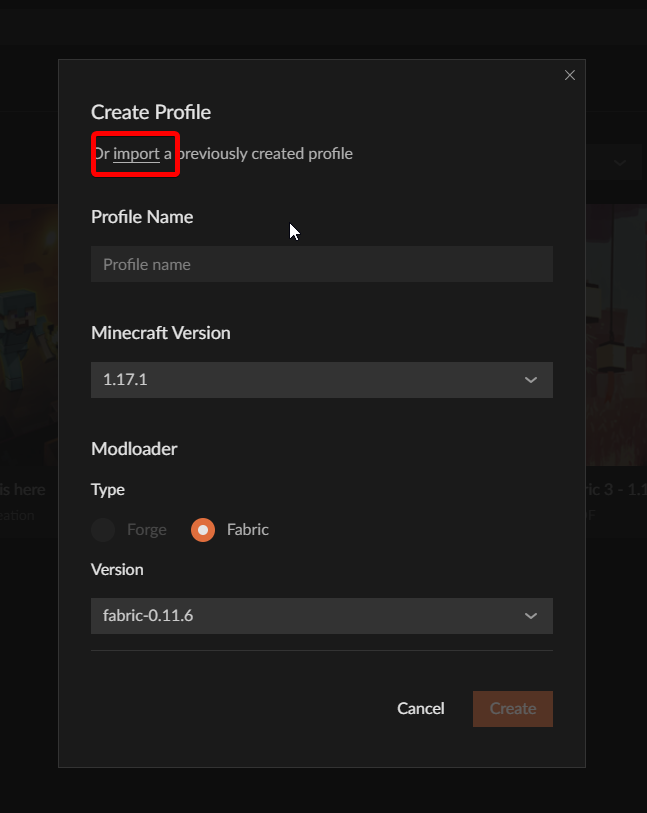
 opal cipher
Then you need to exit all minecraft instances running.
 opal cipher
!mc-logs
red patioBOT
Where to find the log on the CurseForge Client.
Right-click the modpack profile icon OR click the button in the modpack profile.
Click Open Folder.
Open the logs folder.
Find the file called latest.log and drag it into discord.
opal cipher
Sounds like something broke then, let's move over to #👽︱game-support
 plush timber
I don't know how to fix this it keeps happening every time I try to import a profile and I've relaunched the app multiple times.

 mossy current
Hey, just wanted to ask a quick question. What timezone, and time, roughly, do you start reviewing new files?
opal cipher
!status
red patioBOT
It is 11:01AM on Sunday for CurseForge my dudes.
Project Moderation Time
Project/File moderation is done on;
Sunday, Monday, Tuesday, Wednesday, Thursday: 10AM - 6PM GMT+2
Friday, Saturday: No Moderation!
This process is First in, First out. Thus files submitted late in the work day may not be checked until the next work day.
New Projects or uploads requiring manual approval: 1-3 Working Days
Updates to approved projects not needing manual approval: 1 Hour
File sync to the Curseforge app may take up to 24 hours after approval.
mossy current
Thanks!
opal cipher
So file/project review/moderation started about an hour ago. ^^ And since it's FIFO (First In, First Out), there might be a queue in front of your project. :)
opal cipher
Nah, might be some projects in front of it from closing time on thursday. But shouldn't be that bad, no. :)
fleet bear
they changed months ago after overwolf took over
mossy current
Ah, probably then
fleet bear
we did a whole discord revamp see #786424115535544350
mossy current
I probably got it just before the changes then
 prisma forge
Hey! Im new to curseforge and I downloaded a few modpacks.But when i wanted to start any of them, Minecraft threw out a login error. Any idea if this is an Internet, Curse or Minecraft issue?

Interestingly the game without curseforge lets me log out and log in without an issue
mossy current
Hmm, looks like Minecraft issue to me, maybe due to them starting to move to Microsoft accounts? Though, don't quote me on that
prisma forge
mossy current
Hmm, looks like Minecraft issue to me, maybe due to them starting to move to Mic...
Interesting.. Strange fact that this account was registered after Dec, so its a microsoft only account
mossy current
Could be that? I honestly haven't looked into it a lot. Mostly been polishing my new mod, and having the members on my server waiting on it. Haven't actually tried a regular login the past week
prisma forge
mossy current
Could be that? I honestly haven't looked into it a lot. Mostly been polishing my...
I don't know, I guess i'll wait for a bit, but still, thanks for your help
mossy current
Np
 mighty scroll
Hi I'm having some issues from my home hosted forge server.
Whenever my friend tries joining (we're on same network) it comes up with an iO.netty errror
viral briar
!notcf
red patioBOT
The question you are asking about isn't related to CurseForge. Please use the appropriate game rooms by getting the role from #786424115535544350 or use #👽︱game-support for help.
This room is only for CurseForge Owned & Maintained features/services.
 whole folio
my digital miner bugt can anyone help me
mossy current
!status
red patioBOT
It is 12:50PM on Sunday for CurseForge my dudes.
Project Moderation Time
Project/File moderation is done on;
Sunday, Monday, Tuesday, Wednesday, Thursday: 10AM - 6PM GMT+2
Friday, Saturday: No Moderation!
This process is First in, First out. Thus files submitted late in the work day may not be checked until the next work day.
New Projects or uploads requiring manual approval: 1-3 Working Days
Updates to approved projects not needing manual approval: 1 Hour
File sync to the Curseforge app may take up to 24 hours after approval.
 quasi haven
i keep getting this error whenever i try to use java to open the forge installer, any help?

 magic sky
Can you use games downloaded from Steam (i.e stardew valley) on curseforge and if so, how?
viral briar
!stardew
red patioBOT
Overwolf maintains a known list of issues here, some with solutions, others without.
https://support.curseforge.com/en/support/solutions/articles/9000196615-curseforge-known-issues
Scroll down, look at "Other games"
viral wolf
viral wolf
how do i add mods to mc if i download them from google
Help
 native anchor
I have that question too
lyric crescent
?mc-installmods (also in the pinned messages 😉 )
red patioBOT
How to install mods in CurseForge App.
- Click
+ Create Custom Profile - Name it, select the required Minecraft version, select the Forge version (usually the highest number), click
Create. - Click the profile icon.
- Click
Add New Content - Search and install the desired mods.
- Start the game!
How to install mods not on CurseForge.
- Right click the profile picture or Open the profile and click the Icon next to the play button.
- Click
Open Folder. - Drag the mod(s) into the
modsfolder. (Note: Some mods will require others, to run. Make sure to read the instructions for the mod!) - Start the game!
native anchor
But the problem is i couldn´t find it on the app and so i downloaded it from google. How can i activate it and where do the mods have to go?
lyric crescent
read the instrcustions i just sent..?
quasi haven
Oh another thing, how do i use a mod for forge when it needs other mods for it to work
like dbc with its jin core and client
lyric crescent
you install those mods
 low dagger
what mean Failed to get mod loader from manifest ??
quasi haven
lyric crescent
you install those mods
k....
lyric crescent
low dagger
what mean Failed to get mod loader from manifest ??
what were you trying to do
low dagger
I am trying to install modpack from CursForge
lyric crescent
Piracy is not allowed here and you will not recieve support for it. @quartz seal
 quartz seal
quasi haven
quartz seal
quasi haven
lmaoo caught
lyric crescent
low dagger
I am trying to install modpack from CursForge
Can you explain what exactly you are doing.
low dagger
I just Downloaded CurseForge and try to download All of Fabric 4 - 1.17 modpack
lyric crescent
try restarting the app
low dagger
Ty for help
digital roost
when will forge be updated
lyric crescent
!notcf
red patioBOT
The question you are asking about isn't related to CurseForge. Please use the appropriate game rooms by getting the role from #786424115535544350 or use #👽︱game-support for help.
This room is only for CurseForge Owned & Maintained features/services.
viral wolf
red patio
i already downloaded the mods
how do i add
frm desktop
and how do i change the version of forge
like its 1.16.5
and i am using 1.12.2
mods
scarlet wing
what does it mean when I get this error other than the fact I can't play?

am playing froggy pack on 1.12.2
lyric crescent
!notcf
red patioBOT
The question you are asking about isn't related to CurseForge. Please use the appropriate game rooms by getting the role from #786424115535544350 or use #👽︱game-support for help.
This room is only for CurseForge Owned & Maintained features/services.
lyric crescent
viral wolf
how do i add
You make a new profile with the required forge version
 solid tusk
It maybe requires a dependant
Try looking into the mod and pressing "relations" then you will see what api or whatever it requires
 velvet cedar
since a few days my son can't start any mods in curseforge for minecraft. There is already a ticket open in support, but it's not getting very fast and all the things they ask I'm already done. But still my son can't start minecraft.
When we try to open minecraft through curseforge we need to log in. But i can't login in this launcher with my microfsoft account. So I can't start Minecraft java edition

in the ticket the person says we having an old launcher
but I alreadyt installed everything again, and it's stil starting this launcher
If I start minecraft launcher outside curseforge it's working fine
anyone some tips?
velvet cedar
can I do anything to fix this error?
solid tusk
93 is a version for launcher released on September 12, 2019. This version fixed a bug where newer versions of Minecraft could not be launched. This is the last update to the Legacy Launcher.
So I'm guessing this version is old-
Are you on mac or pc
*or windows
velvet cedar
windows
solid tusk
ok
first try to Press Windows Key + R to open Run
then Type control and click OK
In Control Panel, go to Programs > Programs and Features.
also Minecraft comes with a built-in repair tool
so
velvet cedar
when i start outside curseforge it's starting this launcher
 solid tusk
Also the bin folder can get messed up
have you tried reporting a launcher bug-
The latest version of Minecraft is 1.17.1
velvet cedar
their is a ticket open
solid tusk
k
Make sure that if you use mods, you use clean ones that run CLEAN, if your minecraft crashes, the only fix is removing some or ALL mods and putting new ones
rich flint
velvet cedar
their is a ticket open
?mc-installfix
red patioBOT
- Click on the Minecraft Tab on the Left side of the CurseForge App.
- Click button next to the
Create Custom Profileoption. - Click
Repair Installationoption. - Play game.
NOTE: You will not lose any modpacks or worlds, These are saved in the Instances folder. DO NOT TOUCH THIS FOLDER OR YOU WILL LOSE EVERYTHING
rich flint
probably could not hurt
velvet cedar
allready tried to install new ones. but still unable to login with my windows account. If I put my son his old majong account (allrady migrate to microsoft account) I'm only able to play in demo mode
rich flint
as doing thaat will purge the core MC files that Curseforge has downloaded and uses
solid tusk
Oh-
rich flint
(not related to any other minecraft installation on your computer)
rich flint
velvet cedar
allready tried to install new ones. but still unable to login with my windows ac...
unclear what you mean 'tried to install new ones'? did you do the installfix?
velvet cedar
multiple times already
if i start any mod or vanilla minecraft -> I get launcher 1.6.93 here i can't login with my microsoft account
rich flint
so purging the MC files CF app uses doesnt work? it downloads a version with old MC launcher?
CF has no relation to your existing MC installs
it gets it's own things behind the scenes
digital roost
If i download cf for desktop, can i download mods from there to a custom folder for another place i have minecraft installed, if that makes sense?
rich flint
if you want to yes
well not directly
you'd need to install the mods to a customm profile and then do some copy/pasting
velvet cedar
rich flint
so purging the MC files CF app uses doesnt work? it downloads a version with old...
what do you mean with 'purging the MC files?'
rich flint
velvet cedar
what do you mean with 'purging the MC files?'
?mc-installfix
red patioBOT
- Click on the Minecraft Tab on the Left side of the CurseForge App.
- Click button next to the
Create Custom Profileoption. - Click
Repair Installationoption. - Play game.
NOTE: You will not lose any modpacks or worlds, These are saved in the Instances folder. DO NOT TOUCH THIS FOLDER OR YOU WILL LOSE EVERYTHING
rich flint
exactly that
velvet cedar
done that already 5 times i think
rich flint
ok
digital roost
can i download individual mods from cf?
rich flint
digital roost
can i download individual mods from cf?
browse curseforge.com ...
digital roost
D:
fallen loom
digital roost
can i download individual mods from cf?
?mc-installmods
red patioBOT
How to install mods in CurseForge App.
- Click
+ Create Custom Profile - Name it, select the required Minecraft version, select the Forge version (usually the highest number), click
Create. - Click the profile icon.
- Click
Add New Content - Search and install the desired mods.
- Start the game!
How to install mods not on CurseForge.
- Right click the profile picture or Open the profile and click the Icon next to the play button.
- Click
Open Folder. - Drag the mod(s) into the
modsfolder. (Note: Some mods will require others, to run. Make sure to read the instructions for the mod!) - Start the game!
slender crag
Could someone help me to check if my modpack is not being published due to the files naming? Or anything else at all, it's been four days
https://www.curseforge.com/minecraft/modpacks/fotoncraft/files
red patioBOT
It is 08:51PM on Sunday for CurseForge my dudes.
Project Moderation Time
Project/File moderation is done on;
Sunday, Monday, Tuesday, Wednesday, Thursday: 10AM - 6PM GMT+2
Friday, Saturday: No Moderation!
This process is First in, First out. Thus files submitted late in the work day may not be checked until the next work day.
New Projects or uploads requiring manual approval: 1-3 Working Days
Updates to approved projects not needing manual approval: 1 Hour
File sync to the Curseforge app may take up to 24 hours after approval.
queen storm
slender crag
Could someone help me to check if my modpack is not being published due to the f...
!status
slender crag
It's been 3 working days anyways, so that answer means that everything is fine with the modpack?
red patioBOT
Sync and your Project.
CurseForge App and site do not share the same requirements! You can find things on the site but this does not mean it will be in the app!
For a mod to show up in the app:
- Projects MUST have a file marked as RELEASE or BETA
- Projects MUST be APPROVED
- Projects MUST have a file marked for the GAME VERSION SELECTED/LOADED
- Projects CAN'T be EXPERIMENTAL
- Projects CAN'T be ABANDON
Files can take a while to show up in the app. If your files still have not shown up either your project is new and you have yet to mark a file as Release/Beta or there is issues with the sync system making it slow.
Vote this issue up if you would like to know when the last sync was! https://curseforge-ideas.overwolf.com/ideas/CF-I-1617
slender crag
Yes, but that sync you sent said about release or beta, but its for mods, does that apply also for modpacks?
queen storm
Applies for everything
 glass marsh
anyone here know how tf datapacks work?
made one to configure a mod (because mod configs are too much work to make I guess ;-;) but idk how to actually make it a datapack
 cursive ermine
but i have the game on steam
 glass marsh
do i just zip the .json with the .mcmeta? Or is there some special black magic ritual?
cursive ermine
 glass marsh
cursive ermine
but i have the game on steam
glass marsh
cursive ermine
but i have the game on steam
it detects it for me (though I use Vortex). Maybe specify the install location?
or just use vortex, way easier
signal ridge
cursive ermine
!stardew